Online Distance Education and Communities of Learners
Online Resources, Education Sites and Portal
ENVIRONMEN
T
FLEXIBLE
LEARNING
Describe a flexible learning environment and the
different platforms used for flexible learning;
Recognize how innovative teachers use online
resources and educational sites and portals for
online distance learning; and
DESIRED LEARNING
OUTCOMES
1
2
3 Reflect on the use of technology on its relevance and
appropriateness.
WHAT IS
DISTANCE
LEARNING?
• Distance learning is a form of learning without face-to-
face contact with the teacher and delivered via
telecommunications.
• With the advent of newer technologies, distance learning
is delivered via computer-based media thus called online
learning or e-learning.
• The present generation of learners has access to
information at their fingertips.
DISTANCE LEARNING
• The teacher is no longer seen as the dispenser of knowledge
but rather as one who expertly directs learners to take their
track in searching for answers to questions raised inside the
classroom.
• Learning takes place anywhere, adding to the concept of
flexibility in the learning environment. With technology,
students can continue to join class sessions even if they are
not physically around.
DISTANCE LEARNING
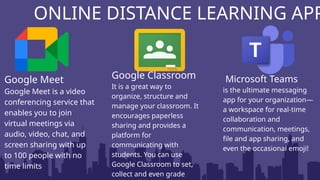
ONLINE DISTANCE LEARNING APP
Google Meet
Google Meet is a video
conferencing service that
enables you to join
virtual meetings via
audio, video, chat, and
screen sharing with up
to 100 people with no
time limits
ONLINE DISTANCE LEARNING APP
Google Meet
Google Meet is a video
conferencing service that
enables you to join
virtual meetings via
audio, video, chat, and
screen sharing with up
to 100 people with no
time limits
Google Classroom
It is a great way to
organize, structure and
manage your classroom. It
encourages paperless
sharing and provides a
platform for
communicating with
students. You can use
Google Classroom to set,
collect and even grade
ONLINE DISTANCE LEARNING APP
Google Meet
Google Meet is a video
conferencing service that
enables you to join
virtual meetings via
audio, video, chat, and
screen sharing with up
to 100 people with no
time limits
Google Classroom
It is a great way to
organize, structure and
manage your classroom. It
encourages paperless
sharing and provides a
platform for
communicating with
students. You can use
Google Classroom to set,
collect and even grade
Microsoft Teams
is the ultimate messaging
app for your organization—
a workspace for real-time
collaboration and
communication, meetings,
file and app sharing, and
even the occasional emoji!
• The flexible mode of learning used a platform such
as Moodle, Google classroom, Edmodo, Schoology,
etc. These are free programs designed for
educational purposes, it has features that are
patterned after the instructional activities of a
teacher in a physical classroom. When you use
this, you can actuallyhold a lesson, post
questionsfor discussion. Hold an online chat
discussion, give assessment activities and provide
DIFFERENT PLATFORMS
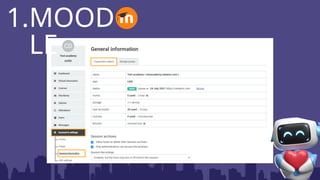
• Moodle was created by
Martin Dougiamas, founder
and CEO of Moodle, stands
for Modular Oriented
Dynamic Learning
Environment which is an
open source software. It is a
Learning Management
System (LMS) that supports
1.MOODLE
1.MOOD
LE
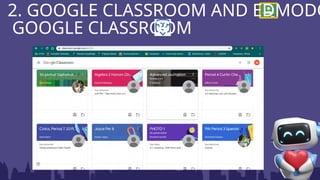
• Edmodo is a social learning tool that
allows teachers to create courses,
assign tasks, and track student
performance. It also has features such
as chat rooms, polls, quizzes, and
discussion boards. On the other hand,
Google Classroom is a cloud-based
service that lets students collaborate on
assignments and projects.
2. GOOGLE CLASSROOM AND EDMODO
GOOGLE CLASSROOM
2. GOOGLE CLASSROOM AND EDMODO
GOOGLE CLASSROOM
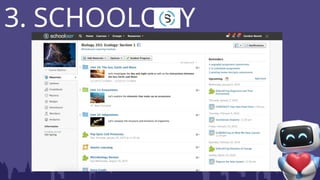
• Schoology will support educational
activities in both the classroom and
remote learning situations. It expands
student learning opportunities and
gives students greater control over
when and how they learn.
• to enhance the learning experience
and streamline communication.
Teachers rely on Schoology to create
and share resources, post
assignments, and assess student
3. SCHOOLOGY
3. SCHOOLOGY
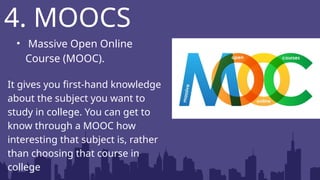
• Massive Open Online
Course (MOOC).
It gives you first-hand knowledge
about the subject you want to
study in college. You can get to
know through a MOOC how
interesting that subject is, rather
than choosing that course in
college
4. MOOCS
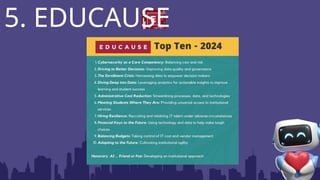
• MEDUCAUSE is a non-profit
association with the mission is to
advance higher education through
the use of information technology
• It's a community of IT leaders and
professionals working together to
tackle challenges and leverage
opportunities that are constantly
evolving within higher education.
5. EDUCAUSE
5. EDUCAUSE
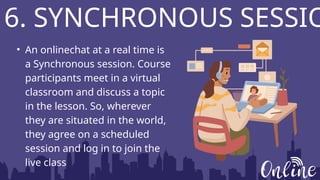
• An onlinechat at a real time is
a Synchronous session. Course
participants meet in a virtual
classroom and discuss a topic
in the lesson. So, wherever
they are situated in the world,
they agree on a scheduled
session and log in to join the
live class
6. SYNCHRONOUS SESSIO
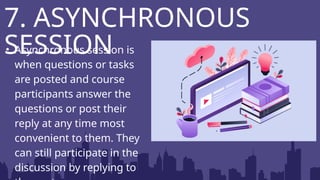
• Asynchronous session is
when questions or tasks
are posted and course
participants answer the
questions or post their
reply at any time most
convenient to them. They
can still participate in the
discussion by replying to
7. ASYNCHRONOUS
SESSION
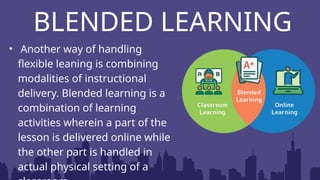
BLENDED LEARNING
• Another way of handling
flexible leaning is combining
modalities of instructional
delivery. Blended learning is a
combination of learning
activities wherein a part of the
lesson is delivered online while
the other part is handled in
actual physical setting of a
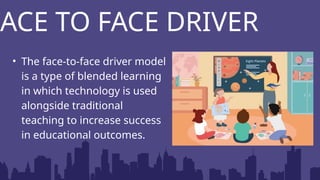
FACE TO FACE DRIVER
• The face-to-face driver model
is a type of blended learning
in which technology is used
alongside traditional
teaching to increase success
in educational outcomes.
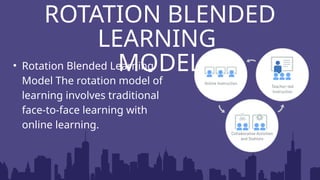
ROTATION BLENDED
LEARNING
MODEL
• Rotation Blended Learning
Model The rotation model of
learning involves traditional
face-to-face learning with
online learning.
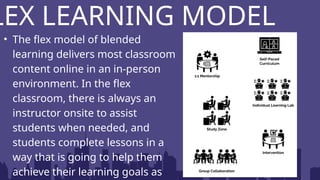
LEX LEARNING MODEL
• The flex model of blended
learning delivers most classroom
content online in an in-person
environment. In the flex
classroom, there is always an
instructor onsite to assist
students when needed, and
students complete lessons in a
way that is going to help them
achieve their learning goals as
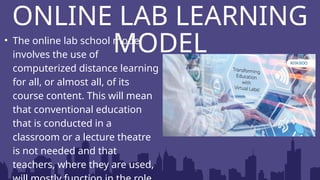
ONLINE LAB LEARNING
MODEL
• The online lab school model
involves the use of
computerized distance learning
for all, or almost all, of its
course content. This will mean
that conventional education
that is conducted in a
classroom or a lecture theatre
is not needed and that
teachers, where they are used,
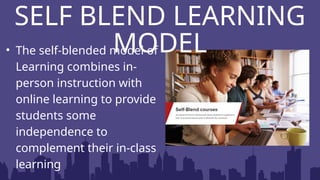
SELF BLEND LEARNING
MODEL
• The self-blended model of
Learning combines in-
person instruction with
online learning to provide
students some
independence to
complement their in-class
learning
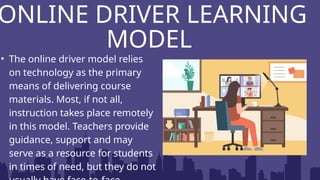
ONLINE DRIVER LEARNING
MODEL
• The online driver model relies
on technology as the primary
means of delivering course
materials. Most, if not all,
instruction takes place remotely
in this model. Teachers provide
guidance, support and may
serve as a resource for students
in times of need, but they do not
ONLINE COMMUNITIES
OF LEARNING/ SOCIAL
NETWORKING
WHAT IS
NETWORKING?
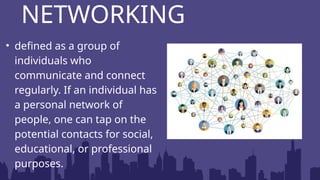
• defined as a group of
individuals who
communicate and connect
regularly. If an individual has
a personal network of
people, one can tap on the
potential contacts for social,
educational, or professional
purposes.
NETWORKING
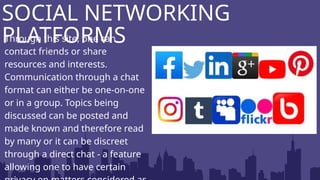
Through this site, one can
contact friends or share
resources and interests.
Communication through a chat
format can either be one-on-one
or in a group. Topics being
discussed can be posted and
made known and therefore read
by many or it can be discreet
through a direct chat - a feature
allowing one to have certain
SOCIAL NETWORKING
PLATFORMS
WHAT ARE
EDUCATIONAL
SITES AND
PORTALS ?
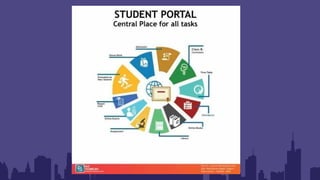
• They are websites that support different educational sectors
by providing access to relevant information and tools to each
group served.
• An educational portal is a specially designed website that
provides a host of educational services. The term portal was
historically used to describe a port or location of multiple
loading and off loading activities.
EDUCATIONAL; SITES AND
PORTALS
• Educational websites can include websites that have games, videos
or topic related resources that act as tool to enchance learning and
supplement classroom teaching. These websites help make the
process of learning entertaining and attractive to the student,
especially in today’s age.
EDUCATIONAL; SITES AND
PORTALS
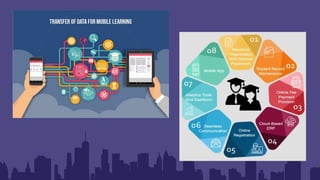
• The subject of Educational Technology, or
EdTech is expanding quickly and is
transforming how we teach and learn. The
emergence of mobile learning, which enables
students to access educational resources and
content on their smartphones and tablets, is
one of the most important breakthrougs in
EDUCATIONAL TECHNOLOGY
AND MOBILE LEARNING
• Mobile Learning, or m-learning, is a form of remote
learning that takes place on portable electronic devices. As
more and more people have access to smartphones and
tablets, and as these gadgets progress and become capable
of running educational apps and software, it is growing in
popularity.
EDUCATIONAL TECHNOLOGY
AND MOBILE LEARNING
• Positive attitude and openness to learn
• Nurture the curiosity and sustain the passion to
improve practice
• Persevere
WHAT IS THE RIGHT MINDSET OF
A TEACHER IN USING DIGITAL
TOOLS?
LISTENING
THANKYOU FOR

Lesson: Flexible-Learning-Environment.pptx

  • 1.
    Online Distance Educationand Communities of Learners Online Resources, Education Sites and Portal ENVIRONMEN T FLEXIBLE LEARNING
  • 2.
    Describe a flexiblelearning environment and the different platforms used for flexible learning; Recognize how innovative teachers use online resources and educational sites and portals for online distance learning; and DESIRED LEARNING OUTCOMES 1 2 3 Reflect on the use of technology on its relevance and appropriateness.
  • 3.
  • 4.
    • Distance learningis a form of learning without face-to- face contact with the teacher and delivered via telecommunications. • With the advent of newer technologies, distance learning is delivered via computer-based media thus called online learning or e-learning. • The present generation of learners has access to information at their fingertips. DISTANCE LEARNING
  • 5.
    • The teacheris no longer seen as the dispenser of knowledge but rather as one who expertly directs learners to take their track in searching for answers to questions raised inside the classroom. • Learning takes place anywhere, adding to the concept of flexibility in the learning environment. With technology, students can continue to join class sessions even if they are not physically around. DISTANCE LEARNING
  • 6.
  • 7.
    ONLINE DISTANCE LEARNINGAPP Google Meet Google Meet is a video conferencing service that enables you to join virtual meetings via audio, video, chat, and screen sharing with up to 100 people with no time limits
  • 8.
    ONLINE DISTANCE LEARNINGAPP Google Meet Google Meet is a video conferencing service that enables you to join virtual meetings via audio, video, chat, and screen sharing with up to 100 people with no time limits Google Classroom It is a great way to organize, structure and manage your classroom. It encourages paperless sharing and provides a platform for communicating with students. You can use Google Classroom to set, collect and even grade
  • 9.
    ONLINE DISTANCE LEARNINGAPP Google Meet Google Meet is a video conferencing service that enables you to join virtual meetings via audio, video, chat, and screen sharing with up to 100 people with no time limits Google Classroom It is a great way to organize, structure and manage your classroom. It encourages paperless sharing and provides a platform for communicating with students. You can use Google Classroom to set, collect and even grade Microsoft Teams is the ultimate messaging app for your organization— a workspace for real-time collaboration and communication, meetings, file and app sharing, and even the occasional emoji!
  • 10.
    • The flexiblemode of learning used a platform such as Moodle, Google classroom, Edmodo, Schoology, etc. These are free programs designed for educational purposes, it has features that are patterned after the instructional activities of a teacher in a physical classroom. When you use this, you can actuallyhold a lesson, post questionsfor discussion. Hold an online chat discussion, give assessment activities and provide DIFFERENT PLATFORMS
  • 11.
    • Moodle wascreated by Martin Dougiamas, founder and CEO of Moodle, stands for Modular Oriented Dynamic Learning Environment which is an open source software. It is a Learning Management System (LMS) that supports 1.MOODLE
  • 12.
  • 13.
    • Edmodo isa social learning tool that allows teachers to create courses, assign tasks, and track student performance. It also has features such as chat rooms, polls, quizzes, and discussion boards. On the other hand, Google Classroom is a cloud-based service that lets students collaborate on assignments and projects. 2. GOOGLE CLASSROOM AND EDMODO GOOGLE CLASSROOM
  • 14.
    2. GOOGLE CLASSROOMAND EDMODO GOOGLE CLASSROOM
  • 15.
    • Schoology willsupport educational activities in both the classroom and remote learning situations. It expands student learning opportunities and gives students greater control over when and how they learn. • to enhance the learning experience and streamline communication. Teachers rely on Schoology to create and share resources, post assignments, and assess student 3. SCHOOLOGY
  • 16.
  • 17.
    • Massive OpenOnline Course (MOOC). It gives you first-hand knowledge about the subject you want to study in college. You can get to know through a MOOC how interesting that subject is, rather than choosing that course in college 4. MOOCS
  • 18.
    • MEDUCAUSE isa non-profit association with the mission is to advance higher education through the use of information technology • It's a community of IT leaders and professionals working together to tackle challenges and leverage opportunities that are constantly evolving within higher education. 5. EDUCAUSE
  • 19.
  • 20.
    • An onlinechatat a real time is a Synchronous session. Course participants meet in a virtual classroom and discuss a topic in the lesson. So, wherever they are situated in the world, they agree on a scheduled session and log in to join the live class 6. SYNCHRONOUS SESSIO
  • 21.
    • Asynchronous sessionis when questions or tasks are posted and course participants answer the questions or post their reply at any time most convenient to them. They can still participate in the discussion by replying to 7. ASYNCHRONOUS SESSION
  • 22.
    BLENDED LEARNING • Anotherway of handling flexible leaning is combining modalities of instructional delivery. Blended learning is a combination of learning activities wherein a part of the lesson is delivered online while the other part is handled in actual physical setting of a
  • 23.
    FACE TO FACEDRIVER • The face-to-face driver model is a type of blended learning in which technology is used alongside traditional teaching to increase success in educational outcomes.
  • 24.
    ROTATION BLENDED LEARNING MODEL • RotationBlended Learning Model The rotation model of learning involves traditional face-to-face learning with online learning.
  • 25.
    LEX LEARNING MODEL •The flex model of blended learning delivers most classroom content online in an in-person environment. In the flex classroom, there is always an instructor onsite to assist students when needed, and students complete lessons in a way that is going to help them achieve their learning goals as
  • 26.
    ONLINE LAB LEARNING MODEL •The online lab school model involves the use of computerized distance learning for all, or almost all, of its course content. This will mean that conventional education that is conducted in a classroom or a lecture theatre is not needed and that teachers, where they are used,
  • 27.
    SELF BLEND LEARNING MODEL •The self-blended model of Learning combines in- person instruction with online learning to provide students some independence to complement their in-class learning
  • 28.
    ONLINE DRIVER LEARNING MODEL •The online driver model relies on technology as the primary means of delivering course materials. Most, if not all, instruction takes place remotely in this model. Teachers provide guidance, support and may serve as a resource for students in times of need, but they do not
  • 29.
  • 30.
  • 31.
    • defined asa group of individuals who communicate and connect regularly. If an individual has a personal network of people, one can tap on the potential contacts for social, educational, or professional purposes. NETWORKING
  • 32.
    Through this site,one can contact friends or share resources and interests. Communication through a chat format can either be one-on-one or in a group. Topics being discussed can be posted and made known and therefore read by many or it can be discreet through a direct chat - a feature allowing one to have certain SOCIAL NETWORKING PLATFORMS
  • 33.
  • 34.
    • They arewebsites that support different educational sectors by providing access to relevant information and tools to each group served. • An educational portal is a specially designed website that provides a host of educational services. The term portal was historically used to describe a port or location of multiple loading and off loading activities. EDUCATIONAL; SITES AND PORTALS
  • 36.
    • Educational websitescan include websites that have games, videos or topic related resources that act as tool to enchance learning and supplement classroom teaching. These websites help make the process of learning entertaining and attractive to the student, especially in today’s age. EDUCATIONAL; SITES AND PORTALS
  • 37.
    • The subjectof Educational Technology, or EdTech is expanding quickly and is transforming how we teach and learn. The emergence of mobile learning, which enables students to access educational resources and content on their smartphones and tablets, is one of the most important breakthrougs in EDUCATIONAL TECHNOLOGY AND MOBILE LEARNING
  • 38.
    • Mobile Learning,or m-learning, is a form of remote learning that takes place on portable electronic devices. As more and more people have access to smartphones and tablets, and as these gadgets progress and become capable of running educational apps and software, it is growing in popularity. EDUCATIONAL TECHNOLOGY AND MOBILE LEARNING
  • 40.
    • Positive attitudeand openness to learn • Nurture the curiosity and sustain the passion to improve practice • Persevere WHAT IS THE RIGHT MINDSET OF A TEACHER IN USING DIGITAL TOOLS?
  • 41.