1
SHADAN COLLEGE of ENGINEERING & TECHNOLOGY I/I M. Tech (VLSI), II-SEM: D.S.D. with FPGA Lab
M. TECH. - I YEAR- II SEMESTER
(VLSI SYSTEM DESIGN/EMBEDDED SYSTEM-
R22)
Digital System Design with FPGAs Lab (Lab – I)
Prepared By,
Dr. Amairullah Khan Lodhi,
Director R & D, Professor
Department of Electronics & Communication Engineering
SHADAN COLLEGE OF ENGINEERING & TECHNOLOGY
Peerancheru, Hyderabad-500091
2
SHADAN COLLEGE of ENGINEERING & TECHNOLOGY I/I M. Tech (VLSI), II-SEM: D.S.D. with FPGA Lab
VISION OF THE INSTITUTION
● Striving continuously for global recognition through academic excellence in higher education for
the betterment of society.
MISSION OF THE INSTITUTION
● To produce technically competent and socially responsible engineers with ethical values through
innovative teaching learning process.
● To promote research and entrepreneurship culture among faculty and students.
ELECTRONICS AND COMMUNICATION ENGINEERING
VISION
 Towards a global knowledge hub, striving continuously in pursuit of excellence in education,
research, entrepreneurship and providing technological services to the society.
MISSION
 To turn out full-fledged Engineers in the field of Electronics & Communication Engineering with an
overall back-ground suitable for making a successful career either in industry/research or higher
education in India and abroad.
 Imparting total quality education to develop innovative, entrepreneurial and professional fit for a
globally competitive environment, fostering product-oriented research for establishing self-
sustaining creative centers to serve the societal needs.
Programme Educational Objectives (PEOs)
 PEO 1: To produce graduates who can demonstrate technical competence in the field of Electronics
and Communication Engineering and develop solutions to the complex problems.
 PEO 2: To produce graduates who can demonstrate professional competence through life-long
learning, professional skills and professional activities related globally to engineering and society.
 PEO 3: To produce graduates who function effectively in a multi-disciplinary environment within a
societal and environmental context, both individually and as a team.
 PEO 4: To produce graduates who engage in research and entrepreneurship with eco-friendly
attitude.
Programme Specific Outcomes (PSOs)
 PSO 1: The student should be able to understand the concepts of Electronics & Communication
Engineering and their applications in the field of semiconductor technology, Consumer Electronics,
embedded systems, communication/networking and other relevant areas.
 PSO 2: The student should have an ability to apply technical knowledge and usage of modern
hardware & software tools related to Electronics & Communication Engineering for solving real
world problems
 PSO 3: The student should have the capability to analyze, comprehend, design & develop electronic
subsystems/ systems for a variety of engineering applications and thus demonstrating professional
ethics & concern for societal well-being and higher studies.
3
SHADAN COLLEGE of ENGINEERING & TECHNOLOGY I/I M. Tech (VLSI), II-SEM: D.S.D. with FPGA Lab
PROGRAMME OUTCOMES (PO)
Engineering Graduates will be able to:
1. Engineering knowledge: Apply the knowledge of mathematics, science, engineering fundamentals,
and an engineering specialization to the solution of complex engineering problems.
2. Problem analysis: Identify, formulate, review research literature, and analyze complex engineering
problems reaching substantiated conclusions using first principles of mathematics, natural sciences, and
engineering sciences.
3. Design/development of solutions: Design solutions for complex engineering problems and design
system components or processes that meet the specified needs with appropriate consideration for the
public health and safety, and the cultural, societal, and environmental considerations.
4. Conduct investigations of complex problems: Use research-based knowledge and research methods
including design of experiments, analysis and interpretation of data, and synthesis of the information to
provide valid conclusions.
5. Modern tool usage: Create, select, and apply appropriate techniques, resources, and modern
engineering and IT tools including prediction and modeling to complex engineering activities with an
understanding of the limitations.
6. The engineer and society: Apply reasoning informed by the contextual knowledge to assess societal,
health, safety, legal and cultural issues and the consequent responsibilities relevant to the professional
engineering practice.
7. Environment and sustainability: Understand the impact of the professional engineering solutions in
societal and environmental contexts, and demonstrate the knowledge of, and need for sustainable
development.
8. Ethics: Apply ethical principles and commit to professional ethics and responsibilities and norms of the
engineering practice.
9. Individual and team work: Function effectively as an individual, and as a member or leader in diverse
teams, and in multidisciplinary settings.
10. Communication: Communicate effectively on complex engineering activities with the engineering
community and with society at large, such as, being able to comprehend and write effective reports and
design documentation, make effective presentations, and give and receive clear instructions.
11. Project management and finance: Demonstrate knowledge and understanding of the engineering and
management principles and apply these to one’s own work, as a member and leader in a team, to
manage projects and in multidisciplinary environments.
12. Life-long learning: Recognize the need for, and have the preparation and ability to engage in
independent and life-long learning in the broadest context of technological change.
4
SHADAN COLLEGE of ENGINEERING & TECHNOLOGY I/I M. Tech (VLSI), II-SEM: D.S.D. with FPGA Lab
Course Overview:
This course gives knowledge about the design, analysis, simulation of circuits used as
building blocks in Very Large Scale Integration (VLSI) devices. Students can apply the concepts
learnt in the lectures towards design of actual VLSI subsystem all the way from specification,
modeling, synthesis and physical design. This lab provides hands-on experience on
implementation of digital circuit designs using HDL language, which are required for
development of various projects and research work.
Objectives:
The course should enable the students to:
1. The ability to code and simulate any digital function in Verilog HDL.
2. Know the difference between synthesizable and non-synthesizable code.
3. Understand library modeling, behavioral code and the differences between them.
4. Understand the differences between simulator algorithms.
5. Learn good coding techniques per current industrial practices.
6. Understand logic verification using Verilog simulation.
Course Outcomes:
After completion of the course, the student will be able to:
1. Describe Verilog hardware description languages (HDL).
2. Design Digital Circuits in Verilog HDL.
3. Write behavioral models of digital circuits.
4. Write Register Transfer Level (RTL) models of digital circuits.
5. Verify behavioral and RTL models.
6. Describe standard cell libraries and FPGAs.
7. Synthesize RTL models to standard cell libraries and FPGAs.
8. Implement RTL models on FPGAs and Testing & Verification.
INSTRUCTIONS TO THE STUDENTS
1. Students should come with thorough preparation for the experiment to be conducted.
2. Students should take prior permission from the concerned faculty before availing the leave.
3. Students should come with formals and to be present on time in the laboratory.
4. Students will not be permitted to attend the laboratory unless they bring the practical
record fully completed in all respects pertaining to the experiment conducted in the previous
class.
5. Students will be permitted to attend laboratory unless they bring the observation book
fully completed in all respects pertaining to the experiment conducted in the present class.
6. They should obtain the signature of the staff-in-charge in the observation book after
completing each experiment.
7. Practical record and observation book should be maintained neatly.
5
SHADAN COLLEGE of ENGINEERING & TECHNOLOGY I/I M. Tech (VLSI), II-SEM: D.S.D. with FPGA Lab
DIGITAL SYSTEM DESIGN WITH FPGAs LAB (Lab – I)
Part - I:
Programming can be done using any complier. Down load the programs on FPGA/CPLD boards and
Performance testing may be done using pattern generator (32 channels) and logic analyzer apart from
Verification by simulation with any of the front end tools.
1. HDL code to realize all the logic gates
2. Design and Simulation of Full Adder, Serial Binary Adder, Multi Precession Adder, Carry Look Ahead
Adder.
3. Design of Combinational circuit using Decoders.
4. Design of Combinational circuit using encoder (without and with parity).
5. Design of Combinational circuit using multiplexer.
6. Design of 4 bit binary to gray converter using MUX or Decoders.
7. Design of Multiplexer/ Demultiplexer, comparator in all 3 styles.
8. Modeling of an Edge triggered and Level triggered FFs: D, SR, and JK
9. Design of 4-bit binary, BCD counters (synchronous/ asynchronous reset) or any sequence counter
10. Design of a N- bit Register of Serial- in Serial –out, Serial in parallel out, Parallel in Serial out and
Parallel in Parallel Out using different FFs.
11. Design of Sequence Detector (Finite State Machine- Mealy and Moore Machines).
12. Design of 4- Bit Multiplier, Divider.
13. Design of ALU to Perform – ADD, SUB, AND-OR, 1’s and 2’s Compliment,
14. Implementing the above designs on FPGA kits
6
SHADAN COLLEGE of ENGINEERING & TECHNOLOGY I/I M. Tech (VLSI), II-SEM: D.S.D. with FPGA Lab
ELECTRONICS AND COMMUNICATION ENGINEERING
Electronic design automation (EDA) or electronic computer-aided design software (ECAD) designs
and develops electronic systems such as printed circuit boards (PCBs) and integrated circuits
(ICs). It allows designers to build out different alternatives and options and compare them to each
other. It also generates manufacturing documentation as part of the specification used to source,
fabricate, and produce PCBs.
The rapidly growing EDA industry is best understood by looking at the definition of EDA.
Electronics includes anything electronic, from computer chips and cell phones to controls for
automobiles, etc. Everything made by the electronics industry results from designers using EDA
tools and services.
Design is the part of the production cycle where creativity, ingenuity, and new ideas are most
valued. Designers build models to understand the behavior and complex interactions of millions of
constituent parts in their designs to ensure completeness, correctness, and manufacturability of the
final product. Many of the designers in this field include electrical and software engineers.
Automation demonstrates the increasing complexity in the electronics industry today. This
complexity is enabled by Moore's Law (which states that the number of transistors in integrated
circuits doubles every 18 months), which drives the need for automation. Engineers need to
validate their concepts, model and analyze their designs, and identify and eliminate problems
before making production commitments. EDA helps ensure correct designs.
Very Large Scale Integration (VLSI)
VLSI is the process of creating an integrated circuit (IC) by combining thousands of transistors into
a single chip. VLSI began in the 1970s when complex semiconductor and communication
technologies were being developed. Before the introduction of VLSI technology most ICs had a
limited set of functions they could perform.
The functionality of electronics equipment’s and gadgets has achieved a phenomenal while their
physical sizes and weights have come down drastically. The major reason is due to the rapid
advances in integration technologies, which enables fabrication of millions of transistors in a single
Integrated Circuit (IC) or chip. IC is a device having multiple transistors with interconnects
manufactured on a single silicon substrate. Integration with a complexity of 10’s of transistors is
called Small Scale Integration, with 100’s is Medium Scale Integration (MSI), with 1000’s is Large
Scale Integration (LSI), with 10,000 it is Very Large Scale Integration (VLSI) Systems of systems
can be implemented in a VLSI IC. However, with this rise in functionality of VLSI ICs, design
problem has become huge and complex.
To address this complexly issue, after the design specifications are complete almost all the other
steps are automated using CAD tools. However, even designs automated using CAD tools may
have bugs. Also, due to extremely large size of the design space it is not possible to verify
correctness of the design under all possible situations. So technique are required that can verify,
without exercising exhaustive input-output combinations, that the design meets all the input
specifications; this technique is called formal verification. In VLSI designs millions of transistors
are packed into a single chip. This leads to manufacturing defects and all the chips need to be
physically tested by giving input signals from a pattern generator and comparing responses using a
logic analyzer; this process is called Testing. So, in the process of manufacturing a VLSI IC there
are three broad steps: Design-Verification-Test.
7
SHADAN COLLEGE of ENGINEERING & TECHNOLOGY I/I M. Tech (VLSI), II-SEM: D.S.D. with FPGA Lab
VLSI ICs can be divided into analog, digital or mixed-signal (both analog and digitalon the same
chip) based on their functionality.
 Digital ICs can contain logic gates, flip-flops, multiplexers. Work using binary
mathematics to process "one" and "zero" signals.
 Analog ICs, such as current mirrors, voltage followers, filters, OPAMPs etc.
work by processing continuous signals.
 When single IC has both analog and digital components it is called mixed
signal IC e.g, Analog to Digital Converter (ADC).
The automation algorithms and CAD tools are mainly available for digital ICs because
transformation of design specifications to silicon implementation can be accomplished using
logical procedures (which can be converted to algorithms and tools). However, most of the analog
circuits design is like an “art” which is best performed by designers with “aid” of some CAD tools
(which provides feedback to designer if the manual design is progressing fine etc.)
VLSI Design flow
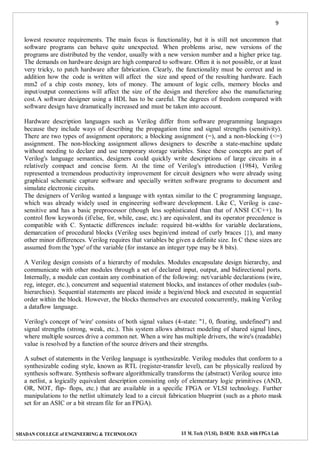
The VLSI IC circuits design flow is shown in the figure below.
 Specifications comes first, they describe abstractly the functionality, interface, and the
architecture of the digital IC circuit to be designed.
 Architectural design is then created to analyze the design in terms of functionality,
performance, compliance to given standards, and other specifications.
 RTL Description is done using HDLs. This RTL Description is simulated to test
functionality. From here onwards we need the help of EDA tools.
 RTL Description is then converted to a gate-level netlist using logic synthesis tools. A gate-
level net list is a Description of the circuit in terms of gates and connections between them,
which are made in such a way that they meet the timing, power and area specifications.
 Finally a physical layout is made, which will be verified and then sent to fabrication.
The Figure provides a more simplified view of the VLSI design flow, taking into account the various
representations, or abstractions of design - behavioral logic, circuit and mask layout. Note that the
verification of design plays a very important role in every step during this process. The failure to properly
verify a design in its early phases typically causes significant and expensive re-design at a later stage,
which ultimately increases the time-to-market.
Figure 1 VLSI Design Flow
8
SHADAN COLLEGE of ENGINEERING & TECHNOLOGY I/I M. Tech (VLSI), II-SEM: D.S.D. with FPGA Lab
In the following, we will examine design methodologies and structured approaches which have
been developed over the years to deal with both complex hardware and software projects.
Regardless of the actual size of the project, the basic principles of structured design will improve
the prospects of success. Some of the classical techniques for reducing the complexity of IC design
are: Hierarchy, regularity, modularity and locality.
DESIGN STYLES
In 1980s when industry observed the possibility of automating the VLSI physical design using
CAD tools, a new design methodology has been introduced. This new design methodology was
called semi-custom VLSI design, where the design on silicon is customized as per the required
application, reducing the design time and cost involved.
In comparison with full custom VLSI where the complete layout will be hand drawn and every cell
is designed as per the requirements the semi-custom has the following advantages.
 Separated design approach, front end and back end
 Reduced cost as the basic cells are reused
 Less design turnaround time.
In today ASIC industry the design is portioned into front end and back end as explained below.
1. Front end
a. Enter the design in one standard format (which EDA tools can understand)
b. Analyzing the requirements and high level design (identifying various blocks
in design)
c. RTL design evolving the necessary micro architecture for the each block
d. VHDL, Verilog, other HDLs, Netlist etc.
e. Developing necessary test benches for functional verification.
f. Simulation and model verification using standard simulators
g. Integration of all the blocks and top level simulation.
2. Back end
a. Synthesizing the design, fixing any bugs (if any part of code is not
synthesizable)
b. Floor planning as the targeted silicon area
c. Invoking the ASIC back end tools (Mapping extracted Netlist cells to
technology specific cells)
d. Place and root as per the required timing and clock constraints
e. Extraction of models from synthesis outputs
f. Timing simulation and functional verification
g. Sending the design to the FAB and getting the chip manufactured
Introduction to HDL
This section is a brief introduction to hardware design using a Hardware Description Language
(HDL). A language describing hardware is quite different from C, Pascal, or other software
languages. A computer program is dynamic, i.e., sharing the same resources, allocating resources
when needed and not always optimized for maximum speed, optimal memory management, or
9
SHADAN COLLEGE of ENGINEERING & TECHNOLOGY I/I M. Tech (VLSI), II-SEM: D.S.D. with FPGA Lab
lowest resource requirements. The main focus is functionality, but it is still not uncommon that
software programs can behave quite unexpected. When problems arise, new versions of the
programs are distributed by the vendor, usually with a new version number and a higher price tag.
The demands on hardware design are high compared to software. Often it is not possible, or at least
very tricky, to patch hardware after fabrication. Clearly, the functionality must be correct and in
addition how the code is written will affect the size and speed of the resulting hardware. Each
mm2 of a chip costs money, lots of money. The amount of logic cells, memory blocks and
input/output connections will affect the size of the design and therefore also the manufacturing
cost.A software designer using a HDL has to be careful. The degrees of freedom compared with
software design have dramatically increased and must be taken into account.
Hardware description languages such as Verilog differ from software programming languages
because they include ways of describing the propagation time and signal strengths (sensitivity).
There are two types of assignment operators; a blocking assignment (=), and a non-blocking (<=)
assignment. The non-blocking assignment allows designers to describe a state-machine update
without needing to declare and use temporary storage variables. Since these concepts are part of
Verilog's language semantics, designers could quickly write descriptions of large circuits in a
relatively compact and concise form. At the time of Verilog's introduction (1984), Verilog
represented a tremendous productivity improvement for circuit designers who were already using
graphical schematic capture software and specially written software programs to document and
simulate electronic circuits.
The designers of Verilog wanted a language with syntax similar to the C programming language,
which was already widely used in engineering software development. Like C, Verilog is case-
sensitive and has a basic preprocessor (though less sophisticated than that of ANSI C/C++). Its
control flow keywords (if/else, for, while, case, etc.) are equivalent, and its operator precedence is
compatible with C. Syntactic differences include: required bit-widths for variable declarations,
demarcation of procedural blocks (Verilog uses begin/end instead of curly braces {}), and many
other minor differences. Verilog requires that variables be given a definite size. In C these sizes are
assumed from the 'type' of the variable (for instance an integer type may be 8 bits).
A Verilog design consists of a hierarchy of modules. Modules encapsulate design hierarchy, and
communicate with other modules through a set of declared input, output, and bidirectional ports.
Internally, a module can contain any combination of the following: net/variable declarations (wire,
reg, integer, etc.), concurrent and sequential statement blocks, and instances of other modules (sub-
hierarchies). Sequential statements are placed inside a begin/end block and executed in sequential
order within the block. However, the blocks themselves are executed concurrently, making Verilog
a dataflow language.
Verilog's concept of 'wire' consists of both signal values (4-state: "1, 0, floating, undefined") and
signal strengths (strong, weak, etc.). This system allows abstract modeling of shared signal lines,
where multiple sources drive a common net. When a wire has multiple drivers, the wire's (readable)
value is resolved by a function of the source drivers and their strengths.
A subset of statements in the Verilog language is synthesizable. Verilog modules that conform to a
synthesizable coding style, known as RTL (register-transfer level), can be physically realized by
synthesis software. Synthesis software algorithmically transforms the (abstract) Verilog source into
a netlist, a logically equivalent description consisting only of elementary logic primitives (AND,
OR, NOT, flip- flops, etc.) that are available in a specific FPGA or VLSI technology. Further
manipulations to the netlist ultimately lead to a circuit fabrication blueprint (such as a photo mask
set for an ASIC or a bit stream file for an FPGA).
10
SHADAN COLLEGE of ENGINEERING & TECHNOLOGY I/I M. Tech (VLSI), II-SEM: D.S.D. with FPGA Lab
HDL simulators are better than gate level simulators for 2 reasons: portable model
development,and the ability to design complicated test benches that react to outputs from the model
under test. Finding a model for a unique component for your particular gate level simulator can be
a frustrating task; with an HDL language you can always write your own model. Also most gate
level simulators are limited to simple waveform based test benches which complicate the testing of
bus and microprocessor interface circuits.
 Verilog is a great low level language. Structural models are easy to design and
Behavioral RTL code is pretty good. The syntax is regular and easy to remember.
It is the fastest HDL language to learn and use. However Verilog lacks user
defined data types and lacks the interface-object separation of the VHDL's entity-
architecture model.
 VHDL is good for designing behavioral models and incorporates some of the
modern object oriented techniques. It's syntax is strange and irregular, and the
language is difficult to use. Structural models require a lot of code that interferes
with the readability of the model.
Xilinx Manual:
1. Introduction
Xilinx Tools is a suite of software tools used for the design of digital circuits implemented using
Xilinx Field Programmable Gate Array (FPGA) or Complex Programmable Logic Device
(CPLD). The design procedure consists of (a) design entry, (b) synthesis and implementation of
the design, (c) functional simulation and (d) testing and verification. Digital designs can be
entered in various ways using the above CAD tools: using a schematic entry tool, using a
hardware description language (HDL) – Verilog or VHDL or a combination of both. In this lab we
will only use the design flow that involves the use of Verilog HDL.
The CAD tools enable you to design combinational and sequential circuits starting with Verilog
HDL design specifications. The steps of this design procedure are listed below:
1. Create Verilog design input file(s) using template driven editor.
2. Compile and implement the Verilog design file(s).
3. Create the test-vectors and simulate the design (functional simulation) without
using a PLD (FPGA or CPLD).
4. Assign input/output pins to implement the design on a target device.
5. Download bit stream to an FPGA or CPLD device.
6. Test design on FPGA/CPLD device
A Verilog input file in the Xilinx software environment consists of the following segments:
1. Header: module name, list of input and output ports.
2. Declarations: input and output ports, registers and wires.
3. Logic Descriptions: equations, state machines and logic functions.
4. End: end module
All your designs for this lab must be specified in the above Verilog input format. Note that the
statediagram segment does not exist for combinational logic designs.
2. Creating a New Project
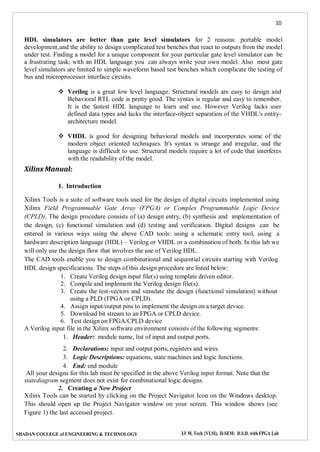
Xilinx Tools can be started by clicking on the Project Navigator Icon on the Windows desktop.
This should open up the Project Navigator window on your screen. This window shows (see
Figure 1) the last accessed project.
11
SHADAN COLLEGE of ENGINEERING & TECHNOLOGY I/I M. Tech (VLSI), II-SEM: D.S.D. with FPGA Lab
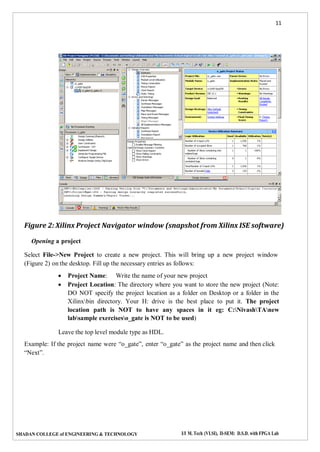
Figure 2: Xilinx Project Navigator window (snapshot from Xilinx ISE software)
Opening a project
Select File->New Project to create a new project. This will bring up a new project window
(Figure 2) on the desktop. Fill up the necessary entries as follows:
 Project Name: Write the name of your new project
 Project Location: The directory where you want to store the new project (Note:
DO NOT specify the project location as a folder on Desktop or a folder in the
Xilinxbin directory. Your H: drive is the best place to put it. The project
location path is NOT to have any spaces in it eg: C:NivashTAnew
labsample exerciseso_gate is NOT to be used)
Leave the top level module type as HDL.
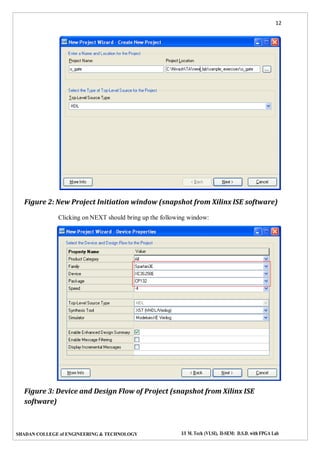
Example: If the project name were “o_gate”, enter “o_gate” as the project name and then click
“Next”.
12
SHADAN COLLEGE of ENGINEERING & TECHNOLOGY I/I M. Tech (VLSI), II-SEM: D.S.D. with FPGA Lab
Figure 2: New Project Initiation window (snapshot from Xilinx ISE software)
Clicking on NEXT should bring up the following window:
Figure 3: Device and Design Flow of Project (snapshot from Xilinx ISE
software)
13
SHADAN COLLEGE of ENGINEERING & TECHNOLOGY I/I M. Tech (VLSI), II-SEM: D.S.D. with FPGA Lab
For each of the properties given below, click on the ‘value’ area and select from thelist of values
that appear.
 Device Family: Family of the FPGA/CPLD used. In this laboratory we will be
using the Spartan3EFPGA’s.
 Device: The number of the actual device. For this lab you may enter XC3S250E
 (this can be found on the attached prototyping board)
 Package: The type of package with the number of pins. The Spartan FPGA used in
this lab is packaged in CP132package.
 Speed Grade: The Speed grade is“-4”.
 Synthesis Tool: XST[VHDL/Verilog]
 Simulator: The tool used to simulate and verify the functionality of the design.
Modelsim simulator is integrated in the Xilinx ISE. Hence choose “Modelsim-XE
Verilog” as the simulator or even Xilinx ISE Simulator can be used.
 Then click on NEXT to save the entries.
All project files such as schematics, netlists, Verilog files, VHDL files, etc., will be stored in a
subdirectory with the project name. A project can only have one top level HDL source file (or
schematic). Modules can be added to the project to create a modular, hierarchical design.
In order to open an existing project in Xilinx Tools, select File->Open Project to show the list
of projects on the machine. Choose the project you want and click OK.
Clicking on NEXT on the above window brings up the following window:
Figure 4: Create new source window (snapshot from Xilinx ISE software)
If creating a new source file, click on the NEW SOURCE.
14
SHADAN COLLEGE of ENGINEERING & TECHNOLOGY I/I M. Tech (VLSI), II-SEM: D.S.D. with FPGA Lab
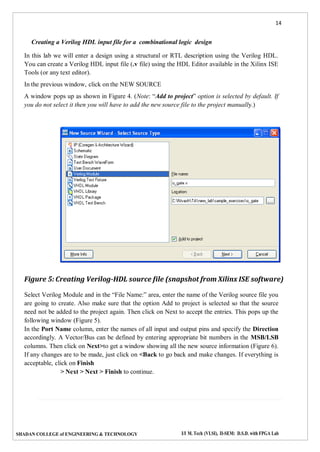
Creating a Verilog HDL input file for a combinational logic design
In this lab we will enter a design using a structural or RTL description using the Verilog HDL.
You can create a Verilog HDL input file (.v file) using the HDL Editor available in the Xilinx ISE
Tools (or any text editor).
In the previous window, click on the NEW SOURCE
A window pops up as shown in Figure 4. (Note: “Add to project” option is selected by default. If
you do not select it then you will have to add the new source file to the project manually.)
Figure 5: Creating Verilog-HDL source file (snapshot from Xilinx ISE software)
Select Verilog Module and in the “File Name:” area, enter the name of the Verilog source file you
are going to create. Also make sure that the option Add to project is selected so that the source
need not be added to the project again. Then click on Next to accept the entries. This pops up the
following window (Figure 5).
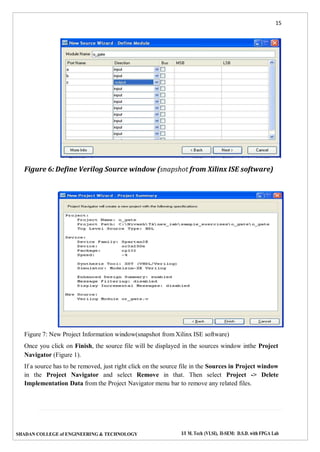
In the Port Name column, enter the names of all input and output pins and specify the Direction
accordingly. A Vector/Bus can be defined by entering appropriate bit numbers in the MSB/LSB
columns. Then click on Next>to get a window showing all the new source information (Figure 6).
If any changes are to be made, just click on <Back to go back and make changes. If everything is
acceptable, click on Finish
> Next > Next > Finish to continue.
15
SHADAN COLLEGE of ENGINEERING & TECHNOLOGY I/I M. Tech (VLSI), II-SEM: D.S.D. with FPGA Lab
Figure 6: Define Verilog Source window (snapshot from Xilinx ISE software)
Figure 7: New Project Information window(snapshot from Xilinx ISE software)
Once you click on Finish, the source file will be displayed in the sources window inthe Project
Navigator (Figure 1).
If a source has to be removed, just right click on the source file in the Sources in Project window
in the Project Navigator and select Remove in that. Then select Project -> Delete
Implementation Data from the Project Navigator menu bar to remove any related files.
16
SHADAN COLLEGE of ENGINEERING & TECHNOLOGY I/I M. Tech (VLSI), II-SEM: D.S.D. with FPGA Lab
Editing the Verilog source file
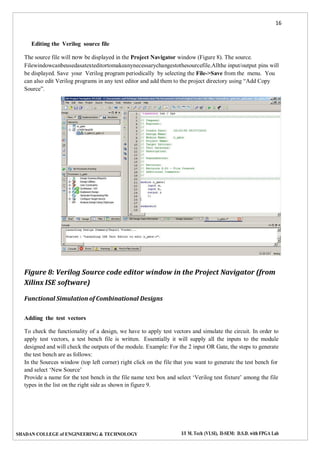
The source file will now be displayed in the Project Navigator window (Figure 8). The source.
Filewindowcanbeusedasatexteditortomakeanynecessarychangestothesourcefile.Allthe input/output pins will
be displayed. Save your Verilog program periodically by selecting the File->Save from the menu. You
can also edit Verilog programs in any text editor and add them to the project directory using “Add Copy
Source”.
Figure 8: Verilog Source code editor window in the Project Navigator (from
Xilinx ISE software)
Functional Simulation of Combinational Designs
Adding the test vectors
To check the functionality of a design, we have to apply test vectors and simulate the circuit. In order to
apply test vectors, a test bench file is written. Essentially it will supply all the inputs to the module
designed and will check the outputs of the module. Example: For the 2 input OR Gate, the steps to generate
the test bench are as follows:
In the Sources window (top left corner) right click on the file that you want to generate the test bench for
and select ‘New Source’
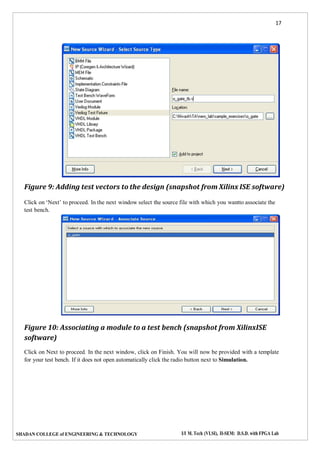
Provide a name for the test bench in the file name text box and select ‘Verilog test fixture’ among the file
types in the list on the right side as shown in figure 9.
17
SHADAN COLLEGE of ENGINEERING & TECHNOLOGY I/I M. Tech (VLSI), II-SEM: D.S.D. with FPGA Lab
Figure 9: Adding test vectors to the design (snapshot from Xilinx ISE software)
Click on ‘Next’ to proceed. In the next window select the source file with which you wantto associate the
test bench.
Figure 10: Associating a module to a test bench (snapshot from XilinxISE
software)
Click on Next to proceed. In the next window, click on Finish. You will now be provided with a template
for your test bench. If it does not open automatically click the radio button next to Simulation.
18
SHADAN COLLEGE of ENGINEERING & TECHNOLOGY I/I M. Tech (VLSI), II-SEM: D.S.D. with FPGA Lab
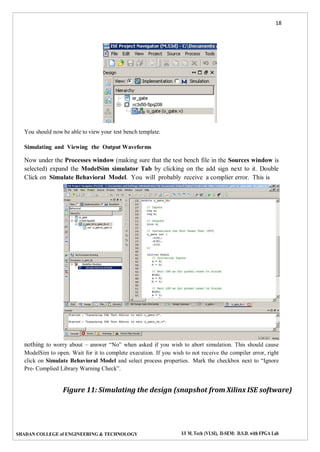
You should now be able to view your test bench template.
Simulating and Viewing the Output Waveforms
Now under the Processes window (making sure that the test bench file in the Sources window is
selected) expand the ModelSim simulator Tab by clicking on the add sign next to it. Double
Click on Simulate Behavioral Model. You will probably receive a complier error. This is
nothing to worry about – answer “No” when asked if you wish to abort simulation. This should cause
ModelSim to open. Wait for it to complete execution. If you wish to not receive the compiler error, right
click on Simulate Behavioral Model and select process properties. Mark the checkbox next to “Ignore
Pre- Complied Library Warning Check”.
Figure 11: Simulating the design (snapshot from Xilinx ISE software)
19
SHADAN COLLEGE of ENGINEERING & TECHNOLOGY I/I M. Tech (VLSI), II-SEM: D.S.D. with FPGA Lab
Saving the simulation results
To save the simulation results, Go to the waveform window of the Modelsim simulator, Click on File ->
Print to Postscript -> give desired filename and location.
Note that by default, the waveform is “zoomed in” to the nano second level. Use the zoom
controlsto display the entire waveform.
Else a normal print screen option can be used on the waveform window and subsequently stored in Paint.
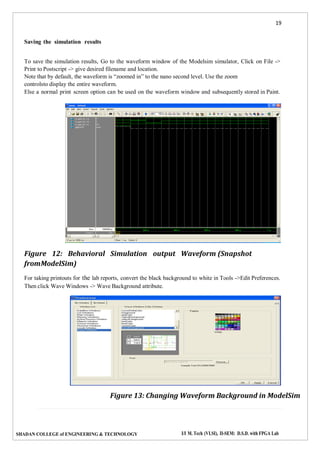
Figure 12: Behavioral Simulation output Waveform (Snapshot
fromModelSim)
For taking printouts for the lab reports, convert the black background to white in Tools ->Edit Preferences.
Then click Wave Windows -> Wave Background attribute.
Figure 13: Changing Waveform Background in ModelSim
20
SHADAN COLLEGE of ENGINEERING & TECHNOLOGY I/I M. Tech (VLSI), II-SEM: D.S.D. with FPGA Lab
3. Synthesis and Implementation of the Design
The design has to be synthesized and implemented before it can be checked for correctness, by running
functional simulation or downloaded onto the prototyping board. With the top- level Verilog file opened (can
be done by double-clicking that file) in the HDL editor window in the right half of the Project Navigator, and
the view of the project being in the Module view , the implement design option can be seen in the process
view. Design entry utilities and Generate Programming File options can also be seen in the process view.
The former can be used to include user constraints, if any and the latter will be discussed later.
To synthesize the design, double click on the Synthesize Design option in the Processes window.
To implement the design, double click the Implement design option in the Processes window. It will go
through steps like Translate, Map and Place & Route. If any of these steps could not be done or done with
errors, it will place a X mark in front of that, otherwise a tick mark will be placed after each of them to indicate
the successful completion. If everything is done successfully, a tick mark will be placed before the
Implement Design option. If there are warnings, one can see mark in front of the option
Indicating that there are some warnings. One can look at the warnings or errors in the Console
windowpresent at the bottom of the Navigator window. Every time the design file is saved; all these
marks disappear asking for a fresh compilation.
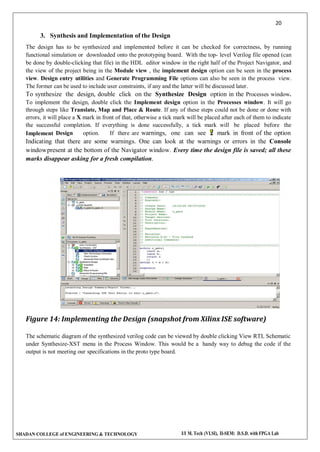
Figure 14: Implementing the Design (snapshot from Xilinx ISE software)
The schematic diagram of the synthesized verilog code can be viewed by double clicking View RTL Schematic
under Synthesize-XST menu in the Process Window. This would be a handy way to debug the code if the
output is not meeting our specifications in the proto type board.
21
SHADAN COLLEGE of ENGINEERING & TECHNOLOGY I/I M. Tech (VLSI), II-SEM: D.S.D. with FPGA Lab
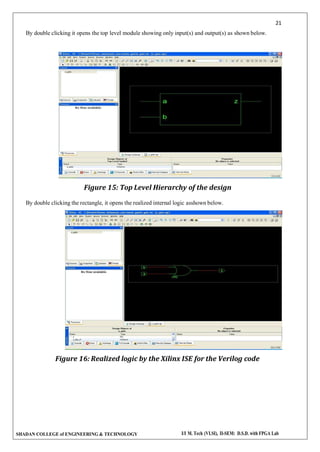
By double clicking it opens the top level module showing only input(s) and output(s) as shown below.
Figure 15: Top Level Hierarchy of the design
By double clicking the rectangle, it opens the realized internal logic asshown below.
Figure 16: Realized logic by the Xilinx ISE for the Verilog code
22
SHADAN COLLEGE of ENGINEERING & TECHNOLOGY I/I M. Tech (VLSI), II-SEM: D.S.D. with FPGA Lab
EXP: 1-HDLCODE TOREALIZEALLLOGIC GATES
AIM:
TodevelopthesourcecodeforlogicgatesbyusingVERILOGandobtainthesimulation,
Synthesis, place and route and implement into FPGA.
SOFTWARE&HARDWARE:
1. XILINX 9.2 i
2. FPGA-SPARTAN-3
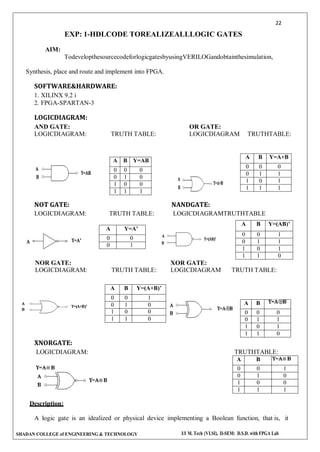
LOGICDIAGRAM:
AND GATE: OR GATE:
LOGICDIAGRAM: TRUTH TABLE: LOGICDIAGRAM TRUTHTABLE:
NOT GATE: NANDGATE:
LOGICDIAGRAM: TRUTH TABLE: LOGICDIAGRAMTRUTHTABLE
NOR GATE: XOR GATE:
LOGICDIAGRAM: TRUTH TABLE: LOGICDIAGRAM TRUTH TABLE:
XNORGATE:
LOGICDIAGRAM: TRUTHTABLE:
A B
0 0 1
0 1 0
1 0 0
1 1 1
Description:
A logic gate is an idealized or physical device implementing a Boolean function, that is, it
A B Y=AB
0 0 0
0 1 0
1 0 0
1 1 1
A B Y=A+B
0 0 0
0 1 1
1 0 1
1 1 1
A Y=A’
0 0
0 1
A B Y=(AB)’
0 0 1
0 1 1
1 0 1
1 1 0
A B Y=(A+B)’
0 0 1
0 1 0
1 0 0
1 1 0
A B
0 0 0
0 1 1
1 0 1
1 1 0
23
SHADAN COLLEGE of ENGINEERING & TECHNOLOGY I/I M. Tech (VLSI), II-SEM: D.S.D. with FPGA Lab
performs a logical operation on one or more logical inputs, and produces a single logical output.
Depending on the context, the term may refer to an ideal logic gate, one that has for instance zero
rise time and unlimited fan-out, or it may refer to a non-ideal physical device.
VERILOGSOURCE CODE:
DATA FLOW MODEL:
modulelogicgates1(a,b,c);
input a;
input b;
output
[6:0]c;
assignc[0]=a&b;
assignc[1]=a|b;
assignc[2]=
~(a&b);assign c[3]=
~(a|b);
assignc[4]=a^ b;
assignc[5]= ~(a ^
b);assign c[6]=~ a;
endmodule
(OR)
module all(a,b,an,o,na,no,nt,xo,xn);
input a,b;
output (an,na,no,nt,xo,xn);
assign#5 an=a&b;
assign#5 na=~(a&b);
assign#5 o=a|b;
assign#5 no=~(a|b);
assign#5 nt=~a;
assign#5 xo=a^b;
assign#5 xn=~(a^b);
endmodule
BEHAVIOURAL MODELLING OF AND GATE:
module andg(a,b,an);
input a,b;
output an;
reg an;
always @(a or b)
begin
if(a==1`b0 && b==1`b0)
an=1`b0;
else if(a==1`b0 && b==1`b1)
an=1`b0;
else if(a==1`b1 && b=1`b0)
an=1`b0;
else if(a==1`b1 && b==1`b1)
an=1`b1;
end
endmodule
24
SHADAN COLLEGE of ENGINEERING & TECHNOLOGY I/I M. Tech (VLSI), II-SEM: D.S.D. with FPGA Lab
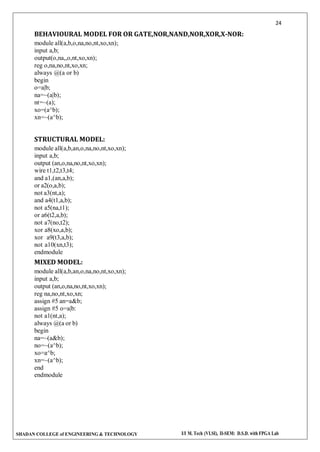
BEHAVIOURAL MODEL FOR OR GATE,NOR,NAND,NOR,XOR,X-NOR:
module all(a,b,o,na,no,nt,xo,xn);
input a,b;
output(o,na,,o,nt,xo,xn);
reg o,na,no,nt,xo,xn;
always @(a or b)
begin
o=a|b;
na=~(a|b);
nt=~(a);
xo=(a^b);
xn=~(a^b);
STRUCTURAL MODEL:
module all(a,b,an,o,na,no,nt,xo,xn);
input a,b;
output (an,o,na,no,nt,xo,xn);
wire t1,t2,t3,t4;
and a1,(an,a,b);
or a2(o,a,b);
not a3(nt,a);
and a4(t1,a,b);
not a5(na,t1);
or a6(t2,a,b);
not a7(no,t2);
xor a8(xo,a,b);
xor a9(t3,a,b);
not a10(xn,t3);
endmodule
MIXED MODEL:
module all(a,b,an,o,na,no,nt,xo,xn);
input a,b;
output (an,o,na,no,nt,xo,xn);
reg na,no,nt,xo,xn;
assign #5 an=a&b;
assign #5 o=a|b:
not a1(nt,a);
always @(a or b)
begin
na=~(a&b);
no=~(a^b);
xo=a^b;
xn=~(a^b);
end
endmodule
25
SHADAN COLLEGE of ENGINEERING & TECHNOLOGY I/I M. Tech (VLSI), II-SEM: D.S.D. with FPGA Lab
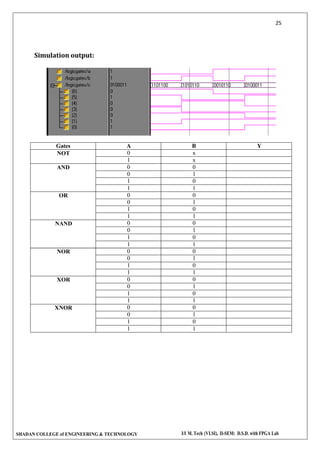
Simulation output:
Gates A B Y
NOT 0 x
1 x
AND 0 0
0 1
1 0
1 1
OR 0 0
0 1
1 0
1 1
NAND 0 0
0 1
1 0
1 1
NOR 0 0
0 1
1 0
1 1
XOR 0 0
0 1
1 0
1 1
XNOR 0 0
0 1
1 0
1 1
26
SHADAN COLLEGE of ENGINEERING & TECHNOLOGY I/I M. Tech (VLSI), II-SEM: D.S.D. with FPGA Lab
EXPERIMENT 2
DESIGN OF DECODER AND ENCODER
OBJECTIVE
To design and simulate the HDL code for the following combinational circuits
a. 3 to 8 Decoder
b. 8 to 3 Encoder (With priority and without priority)
RESOURCES
PC installed with Xilinx tool
PROGRAM LOGIC
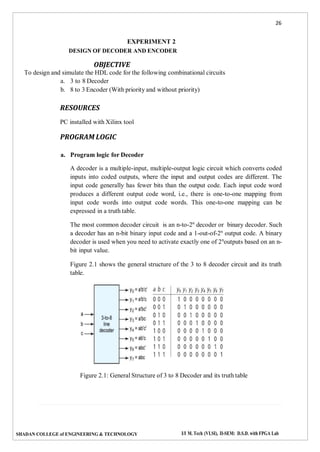
a. Program logic for Decoder
A decoder is a multiple-input, multiple-output logic circuit which converts coded
inputs into coded outputs, where the input and output codes are different. The
input code generally has fewer bits than the output code. Each input code word
produces a different output code word, i.e., there is one-to-one mapping from
input code words into output code words. This one-to-one mapping can be
expressed in a truth table.
The most common decoder circuit is an n-to-2n
decoder or binary decoder. Such
a decoder has an n-bit binary input code and a 1-out-of-2n
output code. A binary
decoder is used when you need to activate exactly one of 2n
outputs based on an n-
bit input value.
Figure 2.1 shows the general structure of the 3 to 8 decoder circuit and its truth
table.
Figure 2.1: General Structure of 3 to 8 Decoder and its truth table
27
SHADAN COLLEGE of ENGINEERING & TECHNOLOGY I/I M. Tech (VLSI), II-SEM: D.S.D. with FPGA Lab
b. Program logic for Encoder
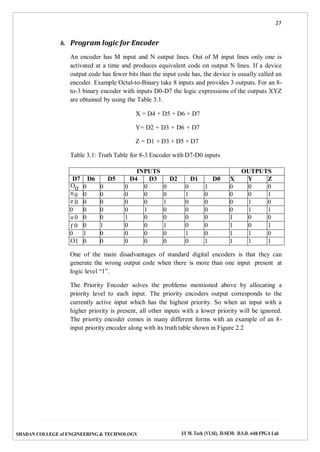
An encoder has M input and N output lines. Out of M input lines only one is
activated at a time and produces equivalent code on output N lines. If a device
output code has fewer bits than the input code has, the device is usually called an
encoder. Example Octal-to-Binary take 8 inputs and provides 3 outputs. For an 8-
to-3 binary encoder with inputs D0-D7 the logic expressions of the outputs XYZ
are obtained by using the Table 3.1.
X = D4 + D5 + D6 + D7
Y= D2 + D3 + D6 + D7
Z = D1 + D3 + D5 + D7
Table 3.1: Truth Table for 8-3 Encoder with D7-D0 inputs
INPUTS OUTPUTS
D7 D6 D5 D4 D3 D2 D1 D0 X Y Z
O0 0 0 0 0 0 0 1 0 0 0
n 0 0 0 0 0 0 1 0 0 0 1
e 0 0 0 0 0 1 0 0 0 1 0
0 0 0 0 1 0 0 0 0 1 1
o 0 0 0 1 0 0 0 0 1 0 0
f 0 0 1 0 0 1 0 0 1 0 1
0 1 0 0 0 0 1 0 1 1 0
O1 0 0 0 0 0 0 1 1 1 1
One of the main disadvantages of standard digital encoders is that they can
generate the wrong output code when there is more than one input present at
logic level “1”.
The Priority Encoder solves the problems mentioned above by allocating a
priority level to each input. The priority encoders output corresponds to the
currently active input which has the highest priority. So when an input with a
higher priority is present, all other inputs with a lower priority will be ignored.
The priority encoder comes in many different forms with an example of an 8-
input priority encoder along with its truth table shown in Figure 2.2
28
SHADAN COLLEGE of ENGINEERING & TECHNOLOGY I/I M. Tech (VLSI), II-SEM: D.S.D. with FPGA Lab
Figure 2.2: General Structure of 3 to 8 Decoder and its truth table
Decoder or encoder can be designed using HDL through its truth table in two ways: one is
using gate level modeling and another is by behavioral model.
PROCEDURE
1. Create a module with required number of variables and mention it’s input/output.
2. Implement the logic for decoder or encoder using behavioral or gate level model.
3. Create another module referred as test bench to verify the functionality.
4. Follow the steps required to simulate the design and compare the obtained output
with the corresponding truth table.
CODE
// 8 to 3 Encoder without priority
module p2(d,e);
input [7:0] d;
output [2:0]e;
assign e[2]= d[4] | d[5] | d[6] | d[7];
assign e[1]= d[2] | d[3] | d[6] | d[7];
assign e[0]= d[1] | d[3] | d[5] | d[7];
endmodule
// 8 to 3 Encoder with priority
module p4(din, dout);
input [7:0] din;
output [2:0] dout;
reg [2:0] dout;
always @(din)
begin
if (din[7]==1'b1) dout=3'b111;
29
SHADAN COLLEGE of ENGINEERING & TECHNOLOGY I/I M. Tech (VLSI), II-SEM: D.S.D. with FPGA Lab
else if (din[6]==1'b1) dout=3'b110;
else if (din[5]==1'b1) dout=3'b101;
else if (din[4]==1'b1) dout=3'b100;
else if (din[3]==1'b1) dout=3'b011;
else if (din[2]==1'b1) dout=3'b010;
else if (din[1]==1'b1) dout=3'b001;
else if (din[0]==1'b1) dout=3'b000;
else dout=3'bXXX;
end
endmodule
// 3 to 8 decoder
module p3(i,d);
input [2:0]i;
output [7:0]d;
assign d[0]=(~i[2])&(~i[1])&(~i[0]);
assign d[1]=(~i[2])&(~i[1])&(i[0]);
assign d[2]=(~i[2])&(i[1])&(~i[0]);
assign d[3]=(~i[2])&(i[1])&(i[0]);
assign d[4]=(i[2])&(~i[1])&(~i[0]);
assign d[5]=(i[2])&(~i[1])&(i[0]);
assign d[6]=(i[2])&(i[1])&(~i[0]);
assign d[7]=(i[2])&(i[1])&(i[0]);
endmodule
PRE LAB QUESTIONS
1. What is a decoder?
2. What for enable inputs are used in decoder?
3. What are the applications of decoder?
4. What is an encoder?
5. What is a priority encoder?
6. How many input and output lines are there for a 128x7 encoder.
LAB ASSIGNMENT
1. Implement full adder circuit using decoder and two OR gates.
2. Implement 3x8 decoder using 2x4 decoder and additional logic.
3. Construct a 4x16 decoder using two 3x8 decoder and additional logic. Show the
schematic diagram neatly?
4. Design 2-to-4 decoder using only NOR gates.
5. Construct a 5 x 32 decoder with four 3x 8 decoders with enable and one 2 x 4
decoder.
6. Write a Verilog code to implement Octal-to-Binary Encoder?
30
SHADAN COLLEGE of ENGINEERING & TECHNOLOGY I/I M. Tech (VLSI), II-SEM: D.S.D. with FPGA Lab
7. Write a Verilog code to implement a 8x3 Priority Encoder?
8. Write a Verilog code to implement Decimal-to-BCD Encoder?
POST LAB QUESTIONS
1. What is the key difference between an initial statement and an always statement?
2. Name two kinds of assignments that you can have in a Verilog HDL model.
3. Create a Verilog module named h6to64 that represents a 6-to-64 binary decoder. Use
the treelike structure in which the 6-to-64 decoder is built using nine
instances of the 3to8 decoder.
4. Write code for a parallel encoder and a priority encoder.
5. What is the difference between wire and reg data type ?
6. What is the difference between the following two lines of Verilog code?
#5 a = b;
a = #5 b;
7. What is the use of Priority Encoder?
31
SHADAN COLLEGE of ENGINEERING & TECHNOLOGY I/I M. Tech (VLSI), II-SEM: D.S.D. with FPGA Lab
EXPERIMENT 3
DESIGN OF MULTIPLEXER AND DEMULTIPLEXER
OBJECTIVE
To write HDL codes for an 8X1 multiplexer and 1X8 demultiplexer and verify its
functionality.
RESOURCES
PC installed with Xilinx tool
PROGRAM LOGIC
In the large-scale-digital systems, a single line is required to carry on two or more
digital signals – and, of course! At a time, one signal can be placed on the one line.
But, what is required is a device that will allow us to select; and, the signal we wish
to place on a common line, such a circuit is referred to as multiplexer.
The function of a multiplexer is to select the input of any ‘n’ input lines and feed that
to one output line. The function of a de-multiplexer is to inverse the function of the
multiplexer and the shortcut forms of the multiplexer. The de-multiplexers are mux
and demux. Some multiplexers perform both multiplexing and de-multiplexing
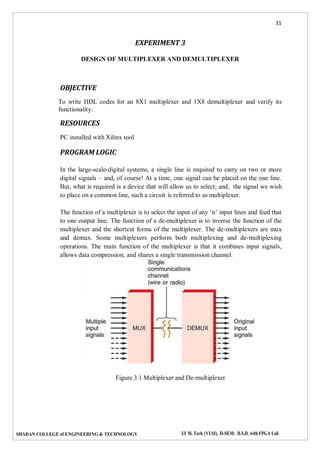
operations. The main function of the multiplexer is that it combines input signals,
allows data compression, and shares a single transmission channel.
Figure 3.1 Multiplexer and De-multiplexer
32
SHADAN COLLEGE of ENGINEERING & TECHNOLOGY I/I M. Tech (VLSI), II-SEM: D.S.D. with FPGA Lab
The output value of a 8x1 multiplexer can be represented using the equation (3.1)
Y  S2 S1 S0 Io  S2 S1S0 I1  S2S1 S0 I2  S2S1S0 I3  S2 S1 S0I4  S2 S1S0 I5  S2S1 S0I6  S2S1S0 I7
… (3.1)
For the combination of selection input, the data line is connected to the output line.
The 8x1 multiplexer requires 8 AND gates, one OR gate and 3 selection lines. As an
input, the combination of selection inputs are giving to the AND gate with the
corresponding input data lines.
In a similar fashion, all the AND gates are given connection. In this 8x1 multiplexer,
for any selection line input, one AND gate gives a value of 1 and the remaining all
AND gates give 0. And, finally, by using OR gate, all the AND gates are added; and,
this will be equal to the selected value.
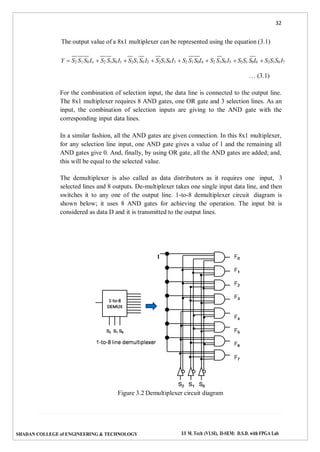
The demultiplexer is also called as data distributors as it requires one input, 3
selected lines and 8 outputs. De-multiplexer takes one single input data line, and then
switches it to any one of the output line. 1-to-8 demultiplexer circuit diagram is
shown below; it uses 8 AND gates for achieving the operation. The input bit is
considered as data D and it is transmitted to the output lines.
Figure 3.2 Demultiplexer circuit diagram
33
SHADAN COLLEGE of ENGINEERING & TECHNOLOGY I/I M. Tech (VLSI), II-SEM: D.S.D. with FPGA Lab
PROCEDURE
1. Create a module with required number of variables and mention it’s input/output.
2. Write the description of the multiplexer or demultiplexer using data flow model
or gate level model
3. Create another module referred as test bench to verify the functionality.
4. Follow the steps required to simulate the design and compare the obtained output
with the corresponding truth table.
CODE
// 8:1 multiplexer
module p5(s,i,y);
input [7:0]i;
input [2:0]s;
output y;
wire [2:0]sb;
not(sb[0],s[0]);
not(sb[1],s[1]);
not(sb[2],s[2]);
assign y = (sb[2]&sb[1]&sb[0]&i[0]) | (sb[2]&sb[1]&s[0]&i[1]) |
(sb[2]&s[1]&sb[0]&i[2]) | (sb[2]&s[1]&s[0]&i[3]) | (s[2]&sb[1]&sb[0]&i[4]) |
(s[2]&sb[1]&s[0]&i[5]) | (s[2]&s[1]&sb[0]&i[6]) | (s[2]&s[1]&s[0]&i[7]);
endmodule
//1:8 Demultiplexer
module p6(din,s,dout);
output [7:0]dout ;
input din ;
input [2:0]s ;
assign dout[7] = din & (s[2]) & (s[1]) & (s[0]);
assign dout[6] = din & (s[2]) & (s[1]) & (~s[0]);
assign dout[5] = din & (s[2]) & (~s[1]) & (s[0]);
assign dout[4] = din & (s[2]) & (~s[1]) & (~s[0]);
assign dout[3] = din & (~s[2]) & (s[1]) & (s[0]);
assign dout[2] = din & (~s[2]) & (s[1]) & (~s[0]);
assign dout[1] = din & (~s[2]) & (~s[1]) & (s[0]);
assign dout[0] = din & (~s[2]) & (~s[1]) & (~s[0]);
endmodule
PRE LAB QUESTIONS
1. What is a multiplexer?
2. What is the relationship between input lines and select lines?
34
SHADAN COLLEGE of ENGINEERING & TECHNOLOGY I/I M. Tech (VLSI), II-SEM: D.S.D. with FPGA Lab
3. Why a multiplexer is called a data selector?
4. Mention the applications of multiplexer and demultiplexer.
LAB ASSIGNMENT
1. Implement a full adder with two 4x1 multiplexers.
2. Implement 2 to 4 decoder using 1x4 demultiplexer.
3. Implement a full subtractor with two 4x1 multiplexers.
4. Realize 8x1 mux using 4x1 multiplexer.
5. Implement half adder using 2x1 multiplexer.
6. F(W, X,Y, Z)  m(0,1,3,5,7)using 8x1 multiplexer.
7. Write code for 1x4 Multiplexer using different coding methods.
POST LAB QUESTIONS
1. Can a multiplexer be used to realize a logic function?
2. Differentiate between decoder and demultiplexer.
3. What are the applications of multiplexers?
4. Design an OR gate from 2:1 MUX.
5. Design a D and T flip flop using 2:1 multiplexer
6. Implement the function f(A,B,C)= Σm (0,1,3,5,7) by using multiplexer
35
SHADAN COLLEGE of ENGINEERING & TECHNOLOGY I/I M. Tech (VLSI), II-SEM: D.S.D. with FPGA Lab
EXPERIMENT 4
DESIGN OF CODE CONVERTERS
OBJECTIVE
To Design and simulate the HDL code for the following combinational circuits
a. 4 - Bit binary to gray code converter
b. 4 - Bit gray to binary code converter
c. Comparator
RESOURCES
PC installed with Xilinx tool
PROGRAM LOGIC
Binary to gray code converter logic
This conversion method strongly follows the EX-OR gate operation between binary
bits. The steps to perform binary to grey code conversion are given bellow.
a. To convert binary to grey code, bring down the most significant digit of the given
binary number, because, the first digit or most significant digit of the grey code
number is same as the binary number.
b. To obtain the successive grey coded bits to produce the equivalent grey coded
number for the given binary, add the first bit or the most significant digit of
binary to the second one and write down the result next to the first bit of grey
code, add the second binary bit to third one and write down the result next to the
second bit of grey code, follow this operation until the last binary bit and write
down the results based on EX-OR logic to produce the equivalent grey coded
binary.
Gray to binary code converter logic
This conversion method also follows the EX-OR gate operation between grey &
binary bits. The steps to perform grey code to binary conversion are given below.
a. To convert grey code to binary, bring down the most significant digit of the given
grey code number, because, the first digit or the most significant digit of the grey
code number is same as the binary number.
36
SHADAN COLLEGE of ENGINEERING & TECHNOLOGY I/I M. Tech (VLSI), II-SEM: D.S.D. with FPGA Lab
b. To obtain the successive second binary bit, perform the EX-OR operation
between the first bit or most significant digit of binary to the second bit of the
given grey code.
c. To obtain the successive third binary bit, perform the EX-OR operation between
the second bit or most significant digit of binary to the third MSD (most
significant digit) of grey code and so on for the next successive binary bits
conversion to find the equivalent.
PROCEDURE
1. Create a module with required number of variables and mention it’s input/output.
2. Write the description of the code converter using data flow model or gate level
model.
3. Create another module referred as test bench to verify the functionality.
4. Follow the steps required to simulate the design and compare the obtained output
with the required one.
CODE
// binary to gray code converter
module p7(b,g);
input [3:0] b;
output [3:0] g;
reg [3:0] g;
always@(b)
begin
g[3]=b[3];
g[2]=b[3]^b[2];
g[1]=b[2]^b[1];
g[0]=b[1]^b[0];
end
endmodule
//gray to binary converter
module p8(g,b);
input [3:0] g;
output [3:0] b;
reg [3:0] b;
always@(g)
begin
b[3]=g[3];
37
SHADAN COLLEGE of ENGINEERING & TECHNOLOGY I/I M. Tech (VLSI), II-SEM: D.S.D. with FPGA Lab
b[2]=b[3]^g[2];
b[1]=b[2]^g[1];
b[0]=b[1]^g[0];
end
endmodule
// 4 bit comparator
module p9(a,b,g,l,e);
input [3:0]a;
input [3:0]b;
output g,l,e;
reg g,l,e;
always@(a,b)
begin
if (a<b)
begin
e = 0; l = 1; g = 0;
end
else if (a==b)
begin
e = 1; l = 0; g = 0;
end
else
begin
e = 0; l = 0; g = 1;
end
end
endmodule
PRE LAB QUESTIONS
1. What is a code converter? List some of the code converters.
2. What are the typical applications of gray code?
3. Distinguish between the weighted and non-weighted codes. Give examples.
4. Realize the Boolean expressions for binary to gray code conversion
5. Realize the Boolean expressions for gray to binary code conversion
38
SHADAN COLLEGE of ENGINEERING & TECHNOLOGY I/I M. Tech (VLSI), II-SEM: D.S.D. with FPGA Lab
LAB ASSIGNMENT
1. Design BCD to Excess-3 code converter.
2. Design a BCD to seven segment code converter.
3. Design octal to binary code converter.
POST LAB QUESTIONS
1. What is the difference between blocking and non-blocking assignments?
2. What is the difference between case x and case statements?
3. What is this `timescale compiler directive?
4. What is sensitivity list?
39
SHADAN COLLEGE of ENGINEERING & TECHNOLOGY I/I M. Tech (VLSI), II-SEM: D.S.D. with FPGA Lab
EXPERIMENT 5
FULL ADDER AND FULL SUBTRACTOR DESIGN MODELING
OBJECTIVE
To write a HDL code to describe the functions of a full Adder and subtractor.
RESOURCES
PC installed with Xilinx tool
PROGRAM LOGIC
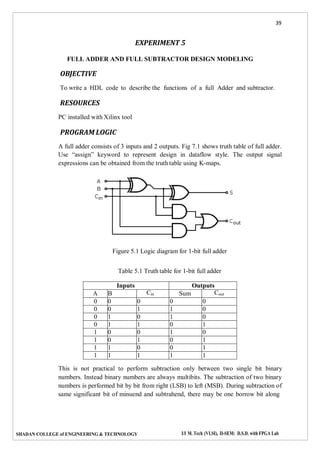
A full adder consists of 3 inputs and 2 outputs. Fig 7.1 shows truth table of full adder.
Use “assign” keyword to represent design in dataflow style. The output signal
expressions can be obtained from the truth table using K-maps.
Figure 5.1 Logic diagram for 1-bit full adder
Table 5.1 Truth table for 1-bit full adder
Inputs Outputs
A B Cin Sum Cout
0 0 0 0 0
0 0 1 1 0
0 1 0 1 0
0 1 1 0 1
1 0 0 1 0
1 0 1 0 1
1 1 0 0 1
1 1 1 1 1
This is not practical to perform subtraction only between two single bit binary
numbers. Instead binary numbers are always multibits. The subtraction of two binary
numbers is performed bit by bit from right (LSB) to left (MSB). During subtraction of
same significant bit of minuend and subtrahend, there may be one borrow bit along
40
SHADAN COLLEGE of ENGINEERING & TECHNOLOGY I/I M. Tech (VLSI), II-SEM: D.S.D. with FPGA Lab
with difference bit. This borrow bit (either 0 or 1) is to be added to the next higher
significant bit of minuend and then next corresponding bit of subtrahend to be
subtracted from this. It will continue up to MSB. The combinational logic circuit
performs this operation is called full subtractor. Hence, full subs tractor is similar to
half subs tractor but inputs in full subs tractor are three instead of two.
Two inputs are for the minuend and subtrahend bits and third input is for borrowed
which comes from previous bits subtraction. The outputs of full adder are similar to
that of half adder, these are difference (D) and borrow (b).
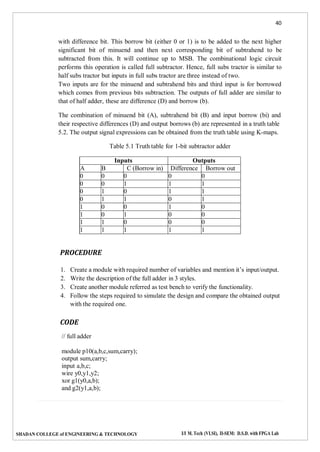
The combination of minuend bit (A), subtrahend bit (B) and input borrow (bi) and
their respective differences (D) and output borrows (b) are represented in a truth table
5.2. The output signal expressions can be obtained from the truth table using K-maps.
Table 5.1 Truth table for 1-bit subtractor adder
Inputs Outputs
A B C (Borrow in) Difference Borrow out
0 0 0 0 0
0 0 1 1 1
0 1 0 1 1
0 1 1 0 1
1 0 0 1 0
1 0 1 0 0
1 1 0 0 0
1 1 1 1 1
PROCEDURE
1. Create a module with required number of variables and mention it’s input/output.
2. Write the description of the full adder in 3 styles.
3. Create another module referred as test bench to verify the functionality.
4. Follow the steps required to simulate the design and compare the obtained output
with the required one.
CODE
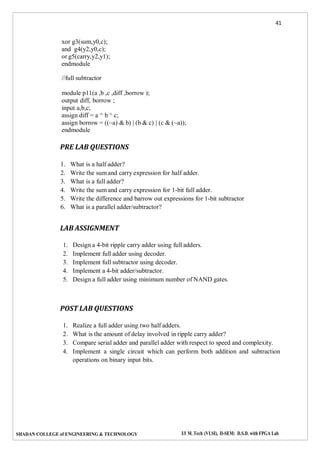
// full adder
module p10(a,b,c,sum,carry);
output sum,carry;
input a,b,c;
wire y0,y1,y2;
xor g1(y0,a,b);
and g2(y1,a,b);
41
SHADAN COLLEGE of ENGINEERING & TECHNOLOGY I/I M. Tech (VLSI), II-SEM: D.S.D. with FPGA Lab
xor g3(sum,y0,c);
and g4(y2,y0,c);
or g5(carry,y2,y1);
endmodule
//full subtractor
module p11(a ,b ,c ,diff ,borrow );
output diff, borrow ;
input a,b,c;
assign diff = a ^ b ^ c;
assign borrow = ((~a) & b) | (b & c) | (c & (~a));
endmodule
PRE LAB QUESTIONS
1. What is a half adder?
2. Write the sum and carry expression for half adder.
3. What is a full adder?
4. Write the sum and carry expression for 1-bit full adder.
5. Write the difference and barrow out expressions for 1-bit subtractor
6. What is a parallel adder/subtractor?
LAB ASSIGNMENT
1. Design a 4-bit ripple carry adder using full adders.
2. Implement full adder using decoder.
3. Implement full subtractor using decoder.
4. Implement a 4-bit adder/subtractor.
5. Design a full adder using minimum number of NAND gates.
POST LAB QUESTIONS
1. Realize a full adder using two half adders.
2. What is the amount of delay involved in ripple carry adder?
3. Compare serial adder and parallel adder with respect to speed and complexity.
4. Implement a single circuit which can perform both addition and subtraction
operations on binary input bits.
42
SHADAN COLLEGE of ENGINEERING & TECHNOLOGY I/I M. Tech (VLSI), II-SEM: D.S.D. with FPGA Lab
EXPERIMENT 6
DESIGN OF 8-BIT ARITHMETIC LOGIC UNIT
OBJECTIVE
To design a model to implement 8-bit ALU functionality
RESOURCES
PC installed with Xilinx tool
PROGRAM LOGIC
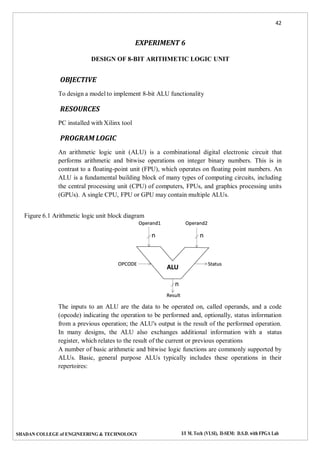
An arithmetic logic unit (ALU) is a combinational digital electronic circuit that
performs arithmetic and bitwise operations on integer binary numbers. This is in
contrast to a floating-point unit (FPU), which operates on floating point numbers. An
ALU is a fundamental building block of many types of computing circuits, including
the central processing unit (CPU) of computers, FPUs, and graphics processing units
(GPUs). A single CPU, FPU or GPU may contain multiple ALUs.
Figure 6.1 Arithmetic logic unit block diagram
The inputs to an ALU are the data to be operated on, called operands, and a code
(opcode) indicating the operation to be performed and, optionally, status information
from a previous operation; the ALU's output is the result of the performed operation.
In many designs, the ALU also exchanges additional information with a status
register, which relates to the result of the current or previous operations
A number of basic arithmetic and bitwise logic functions are commonly supported by
ALUs. Basic, general purpose ALUs typically includes these operations in their
repertoires:
43
SHADAN COLLEGE of ENGINEERING & TECHNOLOGY I/I M. Tech (VLSI), II-SEM: D.S.D. with FPGA Lab
 Arithmetic operations
 Bitwise logical operations
 Bit shift operations
In this lab, students have to design an 8-bit ALU to implement the following
operations:
Table 1: ALU Instructions
Control Instruction Operation
000 Add Ouput<= A+B+Cin (Cout is carry)
001 Sub Output <= A-B-C (Cou is barrow)
010 Or Output <= A or B
011 And Output <= A and B
100 Shl Output <= A[7:0] & ‘0’
101 Shr Output <= ‘0’ & A[7:1]
110 Rol Output <= A[2:0] & A[7]
111 Ror Output <= A[0] & A[7:1]
Table 1 also illustrates the encoding of the control input
The 4 - bit ALU has the following inputs:
 A: 8-bit input
 B: 8-bit input
 Cin: 1-bit input
 Output: 8-bit output
 Cout: 1-bit output
 Control: 3-bit control input
The following points should be taken care of:
 Use a case statement (or a similar ‘combinational’ statement) that checks the
input combination of “Code” and acts on A, B, and Cin as described in
Table1.
 The above circuit is completely combinational. The output should change as
soon as the code combination or any of the input changes.
 You can use arithmetic and logical operators to realize your design.
PROCEDURE
1. Create a module with required number of variables and mention it’s input/output.
2. Write the description of the ALU by using case statements.
3. Create another module referred as test bench to verify the functionality.
4. Follow the steps required to simulate the design and compare the obtained output
with the required one.
44
SHADAN COLLEGE of ENGINEERING & TECHNOLOGY I/I M. Tech (VLSI), II-SEM: D.S.D. with FPGA Lab
CODE
//8 bit ALU
module p13(z,a,b,sel);
input [7:0]a,b;
input [3:0]sel;
output [7:0]z;
reg [7:0]z;
always@(sel,a,b)
begin
case(sel)
4'b0000: z=a+b;
4'b0001: z=a-b;
4'b0010: z=b-1;
4'b0011: z=a*b;
4'b0100: z=a&&b;
4'b0101: z=a||b;
4'b0110: z=!a;
4'b0111: z=~a;
4'b1000: z=a&b;
4'b1001: z=a|b;
4'b1010: z=a^b;
4'b1011: z=a<<1;
4'b1100: z=a>>1;
4'b1101: z=a+1;
4'b1110: z=a-1;
endcase
end
endmodule
PRE LAB QUESTIONS
1. State the basic units of the computer. Name the subunits that make up the CPU,
and give the function of each of the units.
2. Give the description of computer architecture.
3. What are arithmetic operations
4. What are bitwise logical operations
5. What are bit shift operations
LAB ASSIGNMENT
1. Design the 4-bit ALU
2. Write a HDL code to implement basic arithmetic operations using ALU.
POST LAB QUESTIONS
1. Write a HDL code to implement bitwise logical operations using ALU.
2. Write a HDL code to implement bit shift operations using ALU.
45
SHADAN COLLEGE of ENGINEERING & TECHNOLOGY I/I M. Tech (VLSI), II-SEM: D.S.D. with FPGA Lab
EXPERIMENT 7
HDL MODEL FOR FLIP FLOPS
OBJECTIVE
To write HDL codes for SR, JK, D, T flip flops and verify its functionality.
RESOURCES
PC installed with Xilinx tool
PROGRAM LOGIC
Each flip-flop stores a single bit of data, which is emitted through the Q output on the
output section side. Normally, the value can be controlled via the inputs to the input
side. In particular, the value changes when the clock input, marked by a triangle on
each flip-flop, rises from 0 to 1 (or otherwise as configured); on this rising edge, the
value changes according to the tables below.
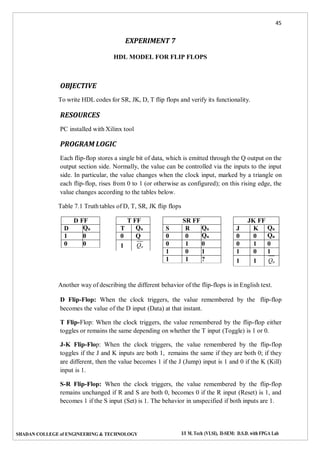
Table 7.1 Truth tables of D, T, SR, JK flip flops
Another way of describing the different behavior of the flip-flops is in English text.
D Flip-Flop: When the clock triggers, the value remembered by the flip-flop
becomes the value of the D input (Data) at that instant.
T Flip-Flop: When the clock triggers, the value remembered by the flip-flop either
toggles or remains the same depending on whether the T input (Toggle) is 1 or 0.
J-K Flip-Flop: When the clock triggers, the value remembered by the flip-flop
toggles if the J and K inputs are both 1, remains the same if they are both 0; if they
are different, then the value becomes 1 if the J (Jump) input is 1 and 0 if the K (Kill)
input is 1.
S-R Flip-Flop: When the clock triggers, the value remembered by the flip-flop
remains unchanged if R and S are both 0, becomes 0 if the R input (Reset) is 1, and
becomes 1 if the S input (Set) is 1. The behavior in unspecified if both inputs are 1.
D FF
D Qn
1 0
0 0
T FF
T Qn
0 Q
1 Qn
SR FF
S R Qn
0 0 Qn
0 1 0
1 0 1
1 1 ?
JK FF
J K Qn
0 0 Qn
0 1 0
1 0 1
1 1 Qn
46
SHADAN COLLEGE of ENGINEERING & TECHNOLOGY I/I M. Tech (VLSI), II-SEM: D.S.D. with FPGA Lab
PROCEDURE
1. Create a module with required number of variables and mention it’s input/output.
2. Write the description of the flip flops using behavioral model
3. Create another module referred as test bench to verify the functionality.
4. Follow the steps required to simulate the design and compare the obtained output
with the required one.
CODE
//SR flipflop
module p14(s,r,clk,q,qb);
input s,r,clk;
output q,qb;
reg q,qb;
reg [1:0]sr;
wire qp=1'b0;
always@(posedge clk)
begin sr={s,r};
begin
case (sr)
2'd0:q=qp;
2'd1:q=1'b0;
2'd2:q=1'b1;
2'd3:q=1'bX;
endcase
end
qb=~q;
end
endmodule
//JK flipflop
module p15(j,k,clk,q,qb);
input j,k,clk;
output q,qb;
reg q,qb;
reg [1:0]jk;
wire qp=1'b0;
always@(posedge clk)
begin jk={j,k};
begin
case (jk)
2'd0:q=qp;
2'd1:q=1'b0;
2'd2:q=1'b1;
2'd3:q=~q;
endcase
47
SHADAN COLLEGE of ENGINEERING & TECHNOLOGY I/I M. Tech (VLSI), II-SEM: D.S.D. with FPGA Lab
end
qb=~q;
end
endmodule
//D flipflop
module p16(q,din,clk);
output q;
reg q;
input din ;
wire din ;
input clk ;
always @ (posedge (clk))
begin q = din ;
end
endmodule
//T flipflop
module p17(q,t,clk);
output q;
reg q;
input t ;
input clk ;
always @ (posedge (clk))
begin
q = ~t;
end
endmodule
PRE LAB QUESTIONS
1. Distinguish between latch and edge triggered flip-flop?
2. What is the cause for the race around phenomenon in a J - K flip-flop?
3. What is meant by triggering of a flip-flop?
4. What do you mean by clock skew?
5. What is master-slave flip-flop?
LAB ASSIGNMENT
1. Convert a given J-K flip-flop in to a D flip-flop using additional logic if
necessary?
2. Convert a given J-K flip-flop in to a T flip-flop using additional logic if
necessary?
48
SHADAN COLLEGE of ENGINEERING & TECHNOLOGY I/I M. Tech (VLSI), II-SEM: D.S.D. with FPGA Lab
3. Convert a given D flip-flop in to a T flip-flop using additional logic if necessary?
4. Implement an asynchronous reset JK FF.
POST LAB QUESTIONS
1. What is use of characteristic and excitation table?
2. How is a JK flip flop made to toggle?
3. Differentiate between combinational and sequential circuits.
49
SHADAN COLLEGE of ENGINEERING & TECHNOLOGY I/I M. Tech (VLSI), II-SEM: D.S.D. with FPGA Lab
EXPERIMENT 8
DESIGN OF COUNTERS
OBJECTIVE
To write HDL codes for the following counters.
a. Binary counter
b. BCD counter (Synchronous reset and asynchronous reset)
RESOURCES
PC installed with Xilinx tool
PROGRAM LOGIC
Counter is a sequential circuit. A digital circuit which is used for counting pulses is
known as counter. Counter is the widest application of flip-flops. It is a group of flip-
flops with a clock signal applied. Counters are of two types.
 Asynchronous or ripple counters.
 Synchronous counters.
Asynchronous counters are called as ripple counters, the first flip-flop is clocked
by the external clock pulse and then each successive flip-flop is clocked by the
output of the preceding flip-flop. The term asynchronous refers to events that do not
have a fixed time relationship with each other. An asynchronous counter is one in
which the flip-flops within the counter do not change states at exactly the same time
because they do not have a common clock pulse
In synchronous counters, the clock inputs of all the flip-flops are connected together
and are triggered by the input pulses. Thus, all the flip-flops change state
simultaneously (in parallel).
A counter is a register capable of counting the number of clock pulses arriving at its
clock input. Count represents the number clock pulses arrived. A specified sequence
of states appears as the counter output. The name counter is generally used for
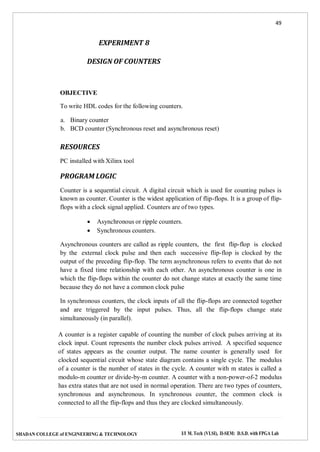
clocked sequential circuit whose state diagram contains a single cycle. The modulus
of a counter is the number of states in the cycle. A counter with m states is called a
modulo-m counter or divide-by-m counter. A counter with a non-power-of-2 modulus
has extra states that are not used in normal operation. There are two types of counters,
synchronous and asynchronous. In synchronous counter, the common clock is
connected to all the flip-flops and thus they are clocked simultaneously.
50
SHADAN COLLEGE of ENGINEERING & TECHNOLOGY I/I M. Tech (VLSI), II-SEM: D.S.D. with FPGA Lab
Fig. 8.1 General structure of a counter’s state diagram – a single
cycle
Asynchronous Decade Counters
The modulus is the number of unique states through which the counter will
sequence. The maximum possible number of states of a counter is 2n
where n
is the number of flip-flops. Counters can be designed to have a number of
states in their sequence that is less than the maximum of 2n
. This type of
sequence is called a truncated sequence. One common modulus for counters with
truncated sequences is 10 (Modules10). A decade counter with a count sequence
of zero (0000) through 9 (1001) is a BCD decade counter because its 10-state
sequence produces the BCD code. To obtain a truncated sequence, it is necessary to
force the counter to recycle before going through all of its possible states. A decade
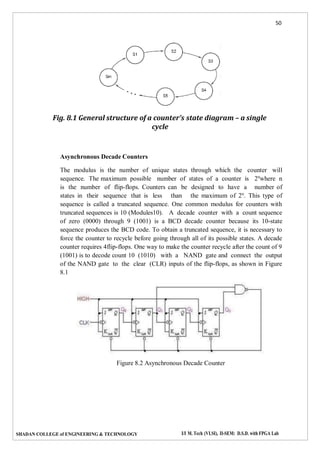
counter requires 4flip-flops. One way to make the counter recycle after the count of 9
(1001) is to decode count 10 (1010) with a NAND gate and connect the output
of the NAND gate to the clear (CLR) inputs of the flip-flops, as shown in Figure
8.1
Figure 8.2 Asynchronous Decade Counter
51
SHADAN COLLEGE of ENGINEERING & TECHNOLOGY I/I M. Tech (VLSI), II-SEM: D.S.D. with FPGA Lab
Synchronous Decade Counters
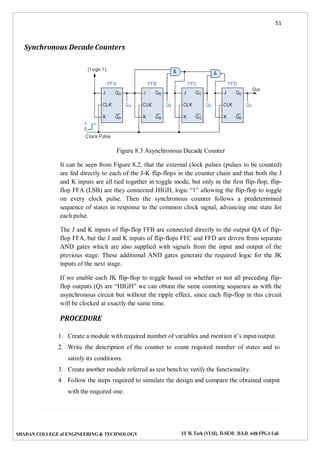
Figure 8.3 Asynchronous Decade Counter
It can be seen from Figure 8.2, that the external clock pulses (pulses to be counted)
are fed directly to each of the J-K flip-flops in the counter chain and that both the J
and K inputs are all tied together in toggle mode, but only in the first flip-flop, flip-
flop FFA (LSB) are they connected HIGH, logic “1” allowing the flip-flop to toggle
on every clock pulse. Then the synchronous counter follows a predetermined
sequence of states in response to the common clock signal, advancing one state for
each pulse.
The J and K inputs of flip-flop FFB are connected directly to the output QA of flip-
flop FFA, but the J and K inputs of flip-flops FFC and FFD are driven from separate
AND gates which are also supplied with signals from the input and output of the
previous stage. These additional AND gates generate the required logic for the JK
inputs of the next stage.
If we enable each JK flip-flop to toggle based on whether or not all preceding flip-
flop outputs (Q) are “HIGH” we can obtain the same counting sequence as with the
asynchronous circuit but without the ripple effect, since each flip-flop in this circuit
will be clocked at exactly the same time.
PROCEDURE
1. Create a module with required number of variables and mention it’s input/output.
2. Write the description of the counter to count required number of states and to
satisfy its conditions.
3. Create another module referred as test bench to verify the functionality.
4. Follow the steps required to simulate the design and compare the obtained output
with the required one.
52
SHADAN COLLEGE of ENGINEERING & TECHNOLOGY I/I M. Tech (VLSI), II-SEM: D.S.D. with FPGA Lab
CODE
// binary counter
module p18(clk,count );
output [3:0] count ;
reg [3:0] count ;
input clk ;
wire clk ;
initial count = 0;
always @ (posedge (clk))
begin
count <= count + 1;
end
endmodule
//BCD counter
module p19(clk ,reset ,dout );
output [3:0] dout ;
reg [3:0] dout ;
input clk ;
wire clk ;
input reset ;
wire reset ;
initial dout = 0 ;
always @ (posedge (clk))
begin
if (reset) dout <= 0;
else if (dout<=9)
begin
dout <= dout + 1;
end
else if (dout==9)
begin
dout <= 0;
end
end
endmodule
PRE LAB QUESTIONS
1. How many number of flip-flops required in a decade counter?
2. How many number of flip-flops required in a Mod – N Counter?
3. What is the difference between synchronous and asynchronous counters?
4. An n stage ripple counter can count up to .
53
SHADAN COLLEGE of ENGINEERING & TECHNOLOGY I/I M. Tech (VLSI), II-SEM: D.S.D. with FPGA Lab
LAB ASSIGNMENT
1. Design and implement a synchronous 3 – bit up/down counter using J-K flip-
flops.
2. Implement a ring counter.
3. Implement a Johnson counter.
4. Design a 4-bit ripple counter and verify its functionality.
POST LAB QUESTIONS
1. What is an asynchronous counter?
2. How is it different from a synchronous counter?
3. What are the advantages of synchronous counters?
4. Design mod-5 synchronous counter using T FF.
5. What is a decade counter?
6. For how many clock pulses the final output of a modulus 8 counter occur?
7. How the up counter can be made to work as down counter?
54
SHADAN COLLEGE of ENGINEERING & TECHNOLOGY I/I M. Tech (VLSI), II-SEM: D.S.D. with FPGA Lab
EXPERIMENT 9
HDL CODE FOR UNIVERSAL SHIFT REGISTER
OBJECTIVE
Ro design and simulate the HDL code for universal shift register.
RESOURCES
PC installed with Xilinx tool
PROGRAM LOGIC
Universal Shift Register is a register which can be configured to load and/or retrieve
the data in any mode (either serial or parallel) by shifting it either towards right or
towards left. In other words, a combined design of unidirectional (either right- or left-
shift of data bits as in case of SISO, SIPO, PISO, PIPO) and bidirectional shift
register along with parallel load provision is referred to as universal shift register.
Figure 9.1 N-Bit Universal Shift register
The working of this shift register is explained by the Table 9.1. The corresponding
truth table and the wave forms are given by Table 9.2.
55
SHADAN COLLEGE of ENGINEERING & TECHNOLOGY I/I M. Tech (VLSI), II-SEM: D.S.D. with FPGA Lab
Table 9.1 Functional table for n-bit universal shift register
Select lines
Functionality
S0 S1
0 0
No change for any number of clock cycles as the outputs of the flip-
flops are back-fed to themselves
0 1
Data bits within the register shift right for each clock tick with the
serial input bits being provided at D1 via MUX1
1 0
Data bits within the register shift left for each clock tick with the serial
input bits being provided at Dn via MUXn
1 1
Bits of the data word to be stored are fed in parallel format through pin
number 3 of each MUX at the rising edge of the clock
Table 9.2 Truth table for n-bit universal shift register
PROCEDURE
1. Create a module with required number of variables and mention it’s input/output.
2. Write the description of the universal shift register.
3. Create another module referred as test bench to verify the functionality.
4. Follow the steps required to simulate the design and compare the obtained output
with the required one.
56
SHADAN COLLEGE of ENGINEERING & TECHNOLOGY I/I M. Tech (VLSI), II-SEM: D.S.D. with FPGA Lab
CODE
//universal shift register
module p20(op,in,s,MSB_in,LSB_in,clk);
input [3:0]in;
input [1:0]s;
input MSB_in, LSB_in,clk;
output [3:0]op;
reg [3:0]op;
always @( posedge clk)
case (s)
2'b00: op <= op;
2'b01: op <= {MSB_in, op[3:1]};
2'b10: op <= {op[2:0], LSB_in};
2'b11: op <= in;
endcase
endmodule
PRE LAB QUESTIONS
1. What is a register
2. What is a shift register?
3. Mention the various shift operations.
4. What is the difference between logical shift and arithmetic shift?
LAB ASSIGNMENT
1. Design a shift right register.
2. Design a shift left register.
3. Design a circular shift right register using JK flip flop.
4. Design a circular left right register using JK flip flop.
POST LAB QUESTIONS
1. Write a HDL code to load the data parallel in universal shift register.
2. Write a HDL code to load the data serial in universal shift register.
3. Write a HDL code to perform serial in parallel out (SIPO) operation in universal
shift register.
4. Write a HDL code to perform serial in serial out (SISO) operation in universal
shift register.
5. Write a HDL code to perform parallel in serial out (PISO) operation in universal
shift register.
6. Write a HDL code to perform parallel in parallel out (SISO) operation in
universal shift register.
57
SHADAN COLLEGE of ENGINEERING & TECHNOLOGY I/I M. Tech (VLSI), II-SEM: D.S.D. with FPGA Lab
i i
i1
EXPERIMENT 10
HDL CODE FOR CARRY LOOK AHEAD ADDER
OBJECTIVE
To design and simulate the HDL code for carry look ahead adder
RESOURCES
PC installed with Xilinx tool
PROGRAM LOGIC
Ripple-carry addition suffers from an impractical propagation delay cause by the
sequential generation of arithmetic carries. In other words, ci1 is dependent on
ci , which is further dependent on ci1 , etc. The effect of this carry chain is a
propagation delay that has a linear dependency on n, the bit width of the adder.
Therefore, methods that compute the arithmetic carries in parallel have potential
performance benefits over ripple-carry addition.
As the name implies, carry-look ahead is one such technique for high-speed
addition that computes arithmetic carries in a parallel fashion. To understand how
exactly a carry-look ahead adder works, consider the addition of two numbers, X
and Y, such that x is the ith
ith binary digit of X, and y is the ith
binary digit
of Y. The (i 1)th
arithmetic carry is c and is computed as follows:
ci1  xi yi  xici  yici
 xi yi  (xi  yi )ci (2)
(1)
The effect of simply factoring out ci from the last two terms in expression (1) is
shown in expression (2). Now observe that
conditions exists:
1. xi yi is logic ‘1’
ci1 is logic ‘1’ if either of the two
2. xi  yi is logic ‘1’1 and there is a previous carry (i.e. ci =1)
Therefore,
xi yi
is referred to as generate function because when ‘1’, a carry is
generated, while
xi  yi is referred to as the propagate function because when ‘1’,
it will propagate a carry. In mathematical terms, we see that
gi  xi yi
(3)
58
SHADAN COLLEGE of ENGINEERING & TECHNOLOGY I/I M. Tech (VLSI), II-SEM: D.S.D. with FPGA Lab
pi  xi  yi
ci1  gi  pici
(5)
(4)
Clearly, expressions (3) and (4) do not depend on the carry in the previous bit
position and thus, can be generated in parallel. It turns out, we can write
expression (5) for the first four carries in such a way that they, too, do not
depend on one another, but rather only depend on the input carry, c0, and the
gi
and
pi . Examine the expressions below to convince yourself of this.
c1  g0  p0c0
c2  g1  p1c1  g1  p1g0  p1p0c0
c3  g2  p2c2  g2  p2g1  p2 p1g0  p2 p1p0c0
c4  g3  p3c3  g3  p3g2  p3 p2g1  p3 p2 p1g0  p3 p2 p1p0c0
(7)
(8)
(9)
(6)
Although the expression for
ci becomes increasingly complex, the theoretical gate-
delay for each of the above expressions, given the
gi ’s,
pi ’s, and
c0 , is ∆g =
2. However, the increased complexity is reflected in the number of inputs to each
gate (i.e. the gate fan-in) and the number of gates required. Figure 1 illustrates this
point with the gate-level schematic for each of the sub-modules within a 4-bit
carry-lookahead adder. One thing to note is that:
pi  xi  yi
si  pi ci
(8)
(9)
In other words, expression (10) is being used in lieu expression (4). It turns out
that expression (5) works correctly in either case, and the former allows the Sum
to be computed with expression (11). Before moving on, let us try to understand
how data flows through the 4-bit carry-lookahead adder. To do so, we enumerate
through the steps below:
Data arrives at the Generate/Propagate Unit, and the
gi ’s and
pi ’s, are computed in
one gate-delay (i.e.∆g= 1).
The
gi ’s and
pi ’s are forwarded to the Carry-Lookahead Unit, which generates
all of the carries in two gate-delays, ∆g = 2.
59
SHADAN COLLEGE of ENGINEERING & TECHNOLOGY I/I M. Tech (VLSI), II-SEM: D.S.D. with FPGA Lab
The carries are then fed into the Summation Unit, which computes the sum bits,
the
si ’s, in one gate-delay ∆g = 1.
60
SHADAN COLLEGE of ENGINEERING & TECHNOLOGY I/I M. Tech (VLSI), II-SEM: D.S.D. with FPGA Lab
Figure 10.1 Carry-lookahead Adder
For simplicity, we are assuming that all gates have the same delay time. This
assumption may or may not be true depending on the target technology that is
being used to implement your logic. However, for the sake of comparison with
other addition techniques, this model works well. Summarizing the above steps,
we can see that the propagation delay for a 4-bit adder is no longer determined by
a carry chain and is only four gate-delays, (∆g= 4). The pre-lab assignment will
include an exercise which asks you to look at the gate count of a 4-bit Carry-
Lookahead Adder.
PROCEDURE
1. Create a module with required number of variables and mention it’s
input/output.
2. Write the description of the carry look ahead adder using data flow model or
gate level model.
3. Create another module referred as test bench to verify the functionality.
4. Follow the steps required to simulate the design and compare the obtained
output with the required one.
CODE
module p21(a,b,cin,sum,cout);
input[3:0] a,b;
input cin;
61
SHADAN COLLEGE of ENGINEERING & TECHNOLOGY I/I M. Tech (VLSI), II-SEM: D.S.D. with FPGA Lab
output [3:0] sum;
output cout;
wire p0,p1,p2,p3,g0,g1,g2,g3,c1,c2,c3,c4;
assign p0=(a[0]^b[0]),
p1=(a[1]^b[1]),
p2=(a[2]^b[2]),
p3=(a[3]^b[3]);
assign g0=(a[0]&b[0]),
g1=(a[1]&b[1]),
g2=(a[2]&b[2]),
g3=(a[3]&b[3]);
assign c0=cin,
c1=g0|(p0&cin),
c2=g1|(p1&g0)|(p1&p0&cin),
c3=g2|(p2&g1)|(p2&p1&g0)|(p1&p1&p0&cin),
c4=g3|(p3&g2)|(p3&p2&g1)|(p3&p2&p1&g0)|(p3&p2&p1&p0&cin);
assign sum[0]=p0^c0,
sum[1]=p1^c1,
sum[2]=p2^c2,
sum[3]=p3^c3;
assign cout=c4;
endmodule
PRE LAB QUESTIONS
1. What is the functionality of the adder?
2. Design a ripple carry adder and mention its disadvantage.
3. List the various adders and its pros and cons.
LAB ASSIGNMENT
1. Design 4-bit ripple carry adder using HDL.
2. Design 4-bit carry look ahead adder using HDL.
3. Observe the RTL schematic of the designed 4-bit look ahead adder.
POST LAB QUESTIONS
1. How many gates are required to design 4-bit look ahead adder.
2. How many lookup tables are required to implement the 4-bit look ahead
adder?
3. What is synthesis process?
4. Design 32-bit carry look ahead adder using HDL.
62
SHADAN COLLEGE of ENGINEERING & TECHNOLOGY I/I M. Tech (VLSI), II-SEM: D.S.D. with FPGA Lab
EXPERIMENT 11
HDL CODE TO DETECT A SEQUENCE
OBJECTIVE
To perform the design flow to generate state machines in Verilog code to detect
the given sequence of bits.
RESOURCES
PC installed with Xilinx tool
PROGRAM LOGIC
As an illustrative example a sequence detector for bit sequence ‘1011’ is
described. Every clock-cycle a value will be sampled, if the sequence ‘1011’ is
detected a ‘1’ will be produced at the output for 1 clock-cycle. There are two
methods to design state machines, first is Mealy and second is Moore style. We
will give you an example for both styles.
Following is the behavior description of the sequencer for a Mealy style
implementation and the state diagram is shown in figure 1:
Figure 11.1: Mealy State Machine for Detecting a Sequence of ‘1011’
 When in initial state (S0) the machine gets the input of ‘1’ it jumps to the next
state with the output equal to ’0’. If the input is ‘0’ it stays in the same state.
 When in 2nd
state (S1) the machine gets an input of ‘0’ it jumps to the 3rd state
with the output equal to ‘0’. If it gets an input of ‘1’ it stays in the same state.
 When in the 3rd
state (S2) the machine gets an input of ‘1’ it jumps to the 4th
state with the output equal to ‘0’. If the input received is ‘0’ it goes back to the
initial state.
63
SHADAN COLLEGE of ENGINEERING & TECHNOLOGY I/I M. Tech (VLSI), II-SEM: D.S.D. with FPGA Lab
When in the 4th
state (S3) the machine gets an input of ‘1’ it jumps back to the 2nd
state, with the output
equal to ‘1’. If the input received is ‘0’ it goes back to the 3rd state.
Following is the behavior description of the sequencer for a Moore style
implementation and the state diagram is shown in figure 11.2:
Figure 11.2: Moore State Machine for Detecting a Sequence of ‘1011’
 In initial state (S0) the output of the detector is ‘0’. When machine gets the
input of‘1’ it jumps to the next state. If the input is ‘0’ it stays in the same
state.
 In 2nd state (S1) the output of the detector is ‘0’. When machine gets an input
of ‘0’it jumps to the 3rd state. If it gets an input of ‘1’ it stays in the same state.
 In the 3rd state (S2) the output of the detector is ‘0’. When machine gets an
input of‘1’ it jumps to the 4th state. If the input received is ‘0’ it goes back to
the initial state.
 In the 4th state (S3) the output of the detector is ‘0’. When machine gets an
input of‘1’ it jumps to the 5th state. If the input received is ‘0’ it goes back to
the 3rd state.
 In the 5th
state the output of the detector is ‘1’. When machine gets an input of
‘0’it jumps to the 3rd state, otherwise it jumps to the 2nd state.
After designing the state machines the models have to be transformed into
Verilog code describing the architecture. Therefore, it is helpful to get an
understanding about the building blocks. Figure 11.3 shows the entity for the
sequence detector to be developed. The two blocks inside, i.e., the
64
SHADAN COLLEGE of ENGINEERING & TECHNOLOGY I/I M. Tech (VLSI), II-SEM: D.S.D. with FPGA Lab
Combinational and the register block is building out of the two processes used
within the architecture in Verilog. The combinational block decides the next
state of the FSM according to the current state and the input as well as drives
the output according to the state (and input for Mealy implementation). The
register block saves the current state of the FSM. This structure can be used to
write the Verilog code.
Figure 11.3: Block diagram clarifying the basic building blocks of an FSM
PROCEDURE
1. Create a module with required number of variables and mention it’s
input/output.
2. Write the description of the sequence detector FSM in behavioral model.
3. Create another module referred as test bench to verify the functionality.
4. Follow the steps required to simulate the design and compare the obtained
output with the required one.
65
SHADAN COLLEGE of ENGINEERING & TECHNOLOGY I/I M. Tech (VLSI), II-SEM: D.S.D. with FPGA Lab
CODE
// sequence detector
module p22(clk, rst, inp, outp);
input clk, rst, inp;
output outp;
reg [1:0] state;reg outp;
always @( posedge clk, rst )
begin
if( rst )
state <= 2'b00;
else
begin
case( {state,inp} )
3'b000: begin
state <= 2'b00;
end
3'b001: begin
state <= 2'b01;
end
3'b010: begin
state <= 2'b10;
end
3'b011: begin
state <= 2'b01;
end
3'b100: begin
state <= 2'b10;
end
3'b101: begin
state <= 2'b11;
end
3'b110: begin
state <= 2'b10;
end
3'b111: begin
state <= 2'b01;
end
endcase
end
assign outp = (({state,inp})==3'b111)? 1'b1 : 1'b0;
end
endmodule
PRE LAB QUESTIONS
1. Design a FSM to detect the sequence ‘1010’.
2. Design a state flow diagram for the sequence detector FSM ‘10010’.
3. Design the state table for the sequence detector FSM ‘10010’.
66
SHADAN COLLEGE of ENGINEERING & TECHNOLOGY I/I M. Tech (VLSI), II-SEM: D.S.D. with FPGA Lab
4. What is a sequential circuit?
LAB ASSIGNMENT
1. Design a FSM to detect the sequence ‘1011’.
2. Design a state flow diagram for the sequence detector FSM ‘1011.
3. Design the state table for the sequence detector FSM ‘1011’.
4. Obtain the Boolean logic expressions for the next states from the obtained
state table.
5. Observe the RTL schematic of the designed FSM.
POST LAB QUESTIONS
1. Design a state flow diagram for the sequence detector FSM ‘1010101.
2. Design a ‘1010101’ sequence detector using Verilog HDL coding.
67
SHADAN COLLEGE of ENGINEERING & TECHNOLOGY I/I M. Tech (VLSI), II-SEM: D.S.D. with FPGA Lab
EXPERIMENT 12
CHESS CLOCK CONTROLLER FSM USING HDL
OBJECTIVE
To design a chess clock controller FSM using HDL
RESOURCES
PC installed with Xilinx tool
PROGRAM LOGIC
Figure 12.1 shows the block diagram of a system used by two chess players to
record the amount of time taken to make their respective moves. The players,
referred to as Player-A and Player-B, each have their own timer (TIMER-A and
TIMER-B), the purpose of which is to record the total amount of time taken in
hours, minutes and seconds for their moves since the commencement of the game.
Figure 12.1 Block diagram of chess clock system.
The exact details of the timer internal operation are beyond the scope of this
discussion, since we are primarily concerned with the description of the FSM that
68
SHADAN COLLEGE of ENGINEERING & TECHNOLOGY I/I M. Tech (VLSI), II-SEM: D.S.D. with FPGA Lab
controls them. The timer control inputs, en and rst, shown in Figure 12.1, operate
as follows:
 rst – when logic 1, resets the time to zero hours, zero minutes and zero
seconds.
 en – when logic 1, enables the time to increment from the current time
value. When en is logic 0, the current elapsed time is held constant.
At the start of a new game, the Reset input is asserted to initialize the system and
clear both timers to zero time. This is achieved by means of the Clr output of the
Chess Clock FSM being driven high, thereby asserting the reset (rst) input of both
timers. Each chess player has a push button, which when pressed applies logic 1
to their respective inputs, Pa and Pb, of the ChessClock FSM. After resetting the
timers, the player who is not making the first move presses their push-button in
order to enable the other player’s timer to commence timing. For example, if
Player-A is to make the first move, then Player-B starts the game by pressing their
push-button. This has the effect of activating the Ta output of the Chess Clock
FSM block shown in Figure 12.1, in order to enable TIMER-A to record the time
taken by Player-A to make the first move. Once Player-A completes the first
move, Player-A’s button is pressed in order to stop their own timer and start
Player-B’s timer (Ta is negated and Tb is asserted).
For the purposes of this simulation, it is assumed that the Pa and Pb inputs are
asserted momentarily for at least one clock cycle, and the potential problems
resulting from switch bounce and met stability may be neglected.
In the unlikely event that both players press their buttons simultaneously, the
Chess ClockFSM is designed to disable both timers by negating Ta and Tb.
This will hold each player’s elapsed time until play recommences in the manner
described above, i.e. Player-A (Player-B) presses their push-button to re-enable
TIMER-B (TIMER-A).
The state diagram for the Chess Clock FSM is shown in Figure 8.32. As shown,
the FSM makes use of four states having the names shown in the upper half of the
state circles. The states of the FSM outputs Ta, Tb and Clr are listed in the lower
half of every state circle; those outputs preceded by ‘/’ are forced to logic 0,
whereas those without ‘/’ are forced to logic 1. The presence of the output states
within eachof the state circles indicates that the Chess ClockFSM is of the Moore
variety.
69
SHADAN COLLEGE of ENGINEERING & TECHNOLOGY I/I M. Tech (VLSI), II-SEM: D.S.D. with FPGA Lab
Figure 12.2 State diagram for chess clock controller FSM.
The values of the inputs, Pa and Pb, are shown alongside each corresponding state
transition path (arrow) using a format similar to that used to show the state of the
outputs. The movement from one state to another occurs on the rising edge of the
Clock input. Where the number of transitions shown originating from a given state
is less than the total number possible, the remaining input conditions result in a so-
called sling, i.e. the next state is the same as the current state.
For example, the state named Run A in Figure 12.2 has two transitions shown on
the diagram corresponding to the input conditions (Pa, Pb) = (1, 0) and (1, 1). The
remaining input conditions, (Pa, Pb) = (0, 0) and (0, 1),cause the state machine to
remain in the current state; hence, there exists a sling in state Run A corresponding
to the condition that the Pa input is at logic 0 and the Pb input can be either logic 0
or logic 1, the latter indicating the presence of a don’t care condition for input Pb.
The asynchronous, active-high Reset input forces the FSM directly into the state
named Stop, irrespective of any other condition.
PROCEDURE
1. Create a module with required number of variables and mention it’s
input/output.
70
SHADAN COLLEGE of ENGINEERING & TECHNOLOGY I/I M. Tech (VLSI), II-SEM: D.S.D. with FPGA Lab
2. Write the description of the chess clock controller FSM using behavioral
model.
3. Create another module referred as test bench to verify the functionality.
4. Follow the steps required to simulate the design and compare the obtained
output with the required one.
CODE
// chess clock timer
module p23(input reset,Pa,Pb,clock,output Ta,Tb,Clr);
localparam RunA = 0,RunB = 1,Stop = 2,Wait = 3;
reg[1:0]state;
always@(posedge clock or posedge reset)
begin
if(reset)
state<= Stop;
else
case(state)
RunA:
casex({Pa,Pb})
2'b0x:state<= RunA;
2'b10:state<= RunB;
endcase 2'b11:state<= Wait;
RunB:
casex({Pa,Pb})
2'bx0:state<= RunB;
2'b01:state<= RunA;
2'b11:state<= Wait;
endcase
Stop:
case({Pa,Pb})
2'b00:state<= Stop;
2'b01:state<= RunA;
2'b10:state<= RunB;
endcase
2'b11:state<= Wait;
Wait:if(Pa == Pb)
state<= Wait;
else if(Pa == 1'b1)
state<= RunB;
else
state<= RunA;
endcase
end
assign Ta = state == RunA;
71
SHADAN COLLEGE of ENGINEERING & TECHNOLOGY I/I M. Tech (VLSI), II-SEM: D.S.D. with FPGA Lab
assign Tb = state == RunB;
assign Clr = state == Stop;
endmodule
PRE LAB QUESTIONS
1. What is finite state machine?
2. What is mealy machine?
3. What is Moore machine?
4. Mention the difference between case, casex, and casez.
5. Design a simple finite state machine using HDL.
LAB ASSIGNMENT
1. Design a digital circuit with case statements in Verilog.
2. What is state assignment?
POST LAB QUESTIONS
1. What is reset signal?
2. What is set signal?
3. Design a chess clock controller FSM with alternative state assignment to
match outputs.
72
SHADAN COLLEGE of ENGINEERING & TECHNOLOGY I/I M. Tech (VLSI), II-SEM: D.S.D. with FPGA Lab
EXPERIMENT 13
TRAFFIC LIGHT CONTROLLER USING HDL
OBJECTIVE
Design a traffic light controller using HDL
RESOURCES
PC installed with Xilinx tool
PROGRAM LOGIC
Specification
Consider a controller for traffic at the intersection of a main highway and a
country road.
The following specifications must be considered.
 The traffic signal for the main highway gets highest priority because cars are
continuously present on the main highway. Thus, the main highway signal
remains green by default.
 Occasionally, cars from the country road arrive at the traffic signal. The traffic
signal for the country road must turn green only long enough to let the cars on
the country road go.
 As soon as there are no cars on the country road, the country road traffic signal
turns yellow and then red and the traffic signal on the main highway turn green
again.
 There is a sensor to detect cars waiting on the country road. The sensor sends a
signal X as input to the controller. X = 1 if there are cars on the country road;
otherwise, X= 0.
73
SHADAN COLLEGE of ENGINEERING & TECHNOLOGY I/I M. Tech (VLSI), II-SEM: D.S.D. with FPGA Lab
 There are delays on transitions from S1 to 52, from S2 to S3, and from S4 to
SO. The delays must be controllable.
The state machine diagram and the state definitions for the traffic signal
controller are shown in Figure 13.1.
Figure 13.1 State machine diagram
Table 13.1 FSM for Traffic Signal Controller
State Signals
S0 Hwy = G Cntry = R
S1 Hwy = Y Cntry = R
S2 Hwy = R Cntry = R
S3 Hwy = R Cntry = G
S4 Hwy = R Cntry = Y
PROCEDURE
1. Create a module with required number of variables and mention it’s
input/output.
2. Write the description of the traffic light controller using behavioral model
3. Create another module referred as test bench to verify the functionality.
4. Follow the steps required to simulate the design and compare the obtained
output with the required one.
CODE
module p24(clk ,sensor ,r ,y ,g );
output r ;
reg r ;
output y ;
reg y ;
output g ;
74
SHADAN COLLEGE of ENGINEERING & TECHNOLOGY I/I M. Tech (VLSI), II-SEM: D.S.D. with FPGA Lab
reg g ;
input clk ;
wire clk ;
input sensor ;
wire sensor ;
parameter red = 0;
parameter yellow = 1;
parameter green = 2;
reg [1:0] p_state;
reg [1:0] n_state;
initial p_state = red;
always @ (posedge (clk)) begin
p_state <= n_state;
end
always @ (p_state or sensor) begin
case (p_state)
red : n_state = green ;
green : begin
if (sensor)
n_state = green;
else
n_state = yellow;
end
yellow : n_state = red ;
endcase
end
always @ (p_state) begin
case (p_state)
red : begin
r = 1;
y = 0;
g = 0;
end
yellow : begin
r = 0;
y = 1;
g = 0;
end
green : begin
if (sensor)
n_state = green;
else
n_state = yellow;
r = 0;
y = 0;
g = 1;
end
75
SHADAN COLLEGE of ENGINEERING & TECHNOLOGY I/I M. Tech (VLSI), II-SEM: D.S.D. with FPGA Lab
endcase
end
endmodule
PRE LAB QUESTIONS
1. What is finite state machine?
2. What is mealy machine?
3. What is moore machine?
4. Design a simple finite state machine using HDL.
LAB ASSIGNMENT
1. Represent the state flow diagram (Figure 13.1) as a table of present state and
next state along with input signal.
2. Describe case statement in Verilog.
3. Describe always block in Verilog.
4. Describe initial block in Verilog.
POST LAB QUESTIONS
1. Assume the alternative specifications and design a new traffic light controller.
2. Describe the concurrent statements in Verilog.
3. Design the same traffic light controller using Moore machine.
76
SHADAN COLLEGE of ENGINEERING & TECHNOLOGY I/I M. Tech (VLSI), II-SEM: D.S.D. with FPGA Lab
EXPERIMENT 14
ELEVATOR DESIGN USING HDL CODE
OBJECTIVE
To write HDL code to simulate Elevator operations
RESOURCES
PC installed with Xilinx tool
PROGRAM LOGIC
An elevator is a device designed as a convenience appliance that has evolved to
become an unavoidable feature of modern day urban life. An elevator is defined
as, “A machine that carries people or goods up and down to different levels in a
building or mine”. While a standalone elevator is a simple electro-mechanical
device, an elevator system may consist of multiple standalone elevator units
whose operations are controlled and coordinated by a master controller. Such
controllers are designed to operate with maximum efficiency in terms of service
as well as resource utilization. This experiment details the design of an elevator
controller using VERILOG. The Elevators/Lifts are used in multi store buildings
as a means of transport between various floors.
The elevator decides moving direction by comparing request floor with current
floor. In a condition that the weight has to be less than 4500lb and door has to be
closed in three minute. If the weight is larger than it, the elevator will alert
automatically. The Door Alert signal is normally low but goes high whenever the
door has been open for more than three minute. There is a sensor at each floor to
sense whether the elevator has passed the current floor. This sensor provides the
signal that encodes the floor that has been passed.
The core parts of the design are shift register, three cases of elevator and the while
loop when receive Request Floor.
Design Strategy
In the coding part, we used several strategies to make the program works.
First, we defined the input and output current floor as In_Current_Floor and
Our_Current_Floor to avoid same variable name as output and input.
Second, we add two more input pins - Over_time and Over_Weight in the code.
These signals will be output from the mechanical machine to the controller. When
the controller receives signal from weight alert or door alert, the complete will
become one so that the elevator will stay unmoved at the Out_Current_Floor.
77
SHADAN COLLEGE of ENGINEERING & TECHNOLOGY I/I M. Tech (VLSI), II-SEM: D.S.D. with FPGA Lab
Third, define the Out_Current_Floor, Direction, Complete, Door_Alert and
Weight_Alert as reg then assign them equal to the output. Therefore, those
variables will run as a register and output.
Next, when the Reset is off the variable Complete, Door Alert and Weight Alert
will be initialized to be zero. Similarly, when the Request_Floor is on, the variable
In_Current_Floor is set to be equal to Out_Current_Floor only once.
Then, In_Current_Floor stay the same, Out_Current_Floor keep changing
(updating) and compare with request floor, until Out_Current_Floor is at the same
level as Request_Floor.
Lastly, define three cases of if statement for the elevator. There are cases for
normal running cases – (comparing between Request_Floor and
Out_Current_Floor to decide the moving direction), door open for more than three
minutes - (turn on the Door_Alert) and overweight cases for elevator - (turn on the
Weight_Alert).
While designing a lift controller number of states depends on number of
levels/floors. If you want to design a three floor lift then three states are required.
And one need design the finite state machine using those three states and have to
mention the function of the each state.
PROCEDURE
1. Create a module with required number of variables and mention it’s
input/output.
2. Write the description of the finite state machine using behavioral model.
3. Create another module referred as test bench to verify the functionality.
4. Follow the steps required to simulate the design and compare the obtained
output with the required one.
CODE
// Elevator
module p25(request_floor, in_current_floor, clk, reset, complete, direction,
out_current_floor);
input [2:0] request_floor;
input [2:0] in_current_floor;
input clk;
input reset; //1 bit input reset
output [2:0] out_current_floor;
output direction;
output complete;
78
SHADAN COLLEGE of ENGINEERING & TECHNOLOGY I/I M. Tech (VLSI), II-SEM: D.S.D. with FPGA Lab
reg r_direction;
reg r_complete;
reg [2:0] r_out_current_floor;
reg [6:0] clk_count;
reg clk_100;
reg clk_trigger;
assign direction = r_direction;
assign complete = r_complete;
assign out_current_floor = r_out_current_floor;
always @ (negedge reset)
begin
clk_100 = 1'b0;
clk_count = 0;
clk_trigger = 1'b0;
r_complete= 1'b0;
end
always @ (posedge clk)
begin
if (clk_trigger)
begin
clk_count = clk_count +1;
end
if (clk_count == 5000)
begin
clk_100 =~ clk_100;
clk_count = 0;
end
end
always @ (request_floor)
begin
clk_trigger =1 ;
clk_100 =~ clk_100;
r_out_current_floor <= in_current_floor;
end
always @ (posedge clk) begin
if (!reset)
begin
if (request_floor > r_out_current_floor)
begin
r_direction = 1'b1;
r_out_current_floor <= r_out_current_floor << 1;
end
79
SHADAN COLLEGE of ENGINEERING & TECHNOLOGY I/I M. Tech (VLSI), II-SEM: D.S.D. with FPGA Lab
else if (request_floor < r_out_current_floor)
begin
r_direction = 1'b0;
r_out_current_floor = r_out_current_floor >> 1;
end
else if (request_floor == r_out_current_floor)
begin
r_complete = 1;
r_direction = 0;
end
end
end
endmodule
PRE LAB QUESTIONS
1. Define a finite state machine.
2. Design a simple two state finite state machine.
3. Design a finite state machine using Moore model.
4. Design a finite state machine using mealy model.
LAB ASSIGNMENT
1. Design a three floor lift/elevator controller.
2. Design state flow diagram for three floor lift controller.
3. Design state table for three floor lift controller.
4. Design a three floor lift/elevator controller using Verilog coding.
POST LAB QUESTIONS
1. Design a eight floor lift/elevator controller using Verilog HDL.
2. Design a 4 floor lift controller using different design strategies or specifications.

Digital System Design with FPGAs Lab Manual.pdf

  • 1.
    1 SHADAN COLLEGE ofENGINEERING & TECHNOLOGY I/I M. Tech (VLSI), II-SEM: D.S.D. with FPGA Lab M. TECH. - I YEAR- II SEMESTER (VLSI SYSTEM DESIGN/EMBEDDED SYSTEM- R22) Digital System Design with FPGAs Lab (Lab – I) Prepared By, Dr. Amairullah Khan Lodhi, Director R & D, Professor Department of Electronics & Communication Engineering SHADAN COLLEGE OF ENGINEERING & TECHNOLOGY Peerancheru, Hyderabad-500091
  • 2.
    2 SHADAN COLLEGE ofENGINEERING & TECHNOLOGY I/I M. Tech (VLSI), II-SEM: D.S.D. with FPGA Lab VISION OF THE INSTITUTION ● Striving continuously for global recognition through academic excellence in higher education for the betterment of society. MISSION OF THE INSTITUTION ● To produce technically competent and socially responsible engineers with ethical values through innovative teaching learning process. ● To promote research and entrepreneurship culture among faculty and students. ELECTRONICS AND COMMUNICATION ENGINEERING VISION  Towards a global knowledge hub, striving continuously in pursuit of excellence in education, research, entrepreneurship and providing technological services to the society. MISSION  To turn out full-fledged Engineers in the field of Electronics & Communication Engineering with an overall back-ground suitable for making a successful career either in industry/research or higher education in India and abroad.  Imparting total quality education to develop innovative, entrepreneurial and professional fit for a globally competitive environment, fostering product-oriented research for establishing self- sustaining creative centers to serve the societal needs. Programme Educational Objectives (PEOs)  PEO 1: To produce graduates who can demonstrate technical competence in the field of Electronics and Communication Engineering and develop solutions to the complex problems.  PEO 2: To produce graduates who can demonstrate professional competence through life-long learning, professional skills and professional activities related globally to engineering and society.  PEO 3: To produce graduates who function effectively in a multi-disciplinary environment within a societal and environmental context, both individually and as a team.  PEO 4: To produce graduates who engage in research and entrepreneurship with eco-friendly attitude. Programme Specific Outcomes (PSOs)  PSO 1: The student should be able to understand the concepts of Electronics & Communication Engineering and their applications in the field of semiconductor technology, Consumer Electronics, embedded systems, communication/networking and other relevant areas.  PSO 2: The student should have an ability to apply technical knowledge and usage of modern hardware & software tools related to Electronics & Communication Engineering for solving real world problems  PSO 3: The student should have the capability to analyze, comprehend, design & develop electronic subsystems/ systems for a variety of engineering applications and thus demonstrating professional ethics & concern for societal well-being and higher studies.
  • 3.
    3 SHADAN COLLEGE ofENGINEERING & TECHNOLOGY I/I M. Tech (VLSI), II-SEM: D.S.D. with FPGA Lab PROGRAMME OUTCOMES (PO) Engineering Graduates will be able to: 1. Engineering knowledge: Apply the knowledge of mathematics, science, engineering fundamentals, and an engineering specialization to the solution of complex engineering problems. 2. Problem analysis: Identify, formulate, review research literature, and analyze complex engineering problems reaching substantiated conclusions using first principles of mathematics, natural sciences, and engineering sciences. 3. Design/development of solutions: Design solutions for complex engineering problems and design system components or processes that meet the specified needs with appropriate consideration for the public health and safety, and the cultural, societal, and environmental considerations. 4. Conduct investigations of complex problems: Use research-based knowledge and research methods including design of experiments, analysis and interpretation of data, and synthesis of the information to provide valid conclusions. 5. Modern tool usage: Create, select, and apply appropriate techniques, resources, and modern engineering and IT tools including prediction and modeling to complex engineering activities with an understanding of the limitations. 6. The engineer and society: Apply reasoning informed by the contextual knowledge to assess societal, health, safety, legal and cultural issues and the consequent responsibilities relevant to the professional engineering practice. 7. Environment and sustainability: Understand the impact of the professional engineering solutions in societal and environmental contexts, and demonstrate the knowledge of, and need for sustainable development. 8. Ethics: Apply ethical principles and commit to professional ethics and responsibilities and norms of the engineering practice. 9. Individual and team work: Function effectively as an individual, and as a member or leader in diverse teams, and in multidisciplinary settings. 10. Communication: Communicate effectively on complex engineering activities with the engineering community and with society at large, such as, being able to comprehend and write effective reports and design documentation, make effective presentations, and give and receive clear instructions. 11. Project management and finance: Demonstrate knowledge and understanding of the engineering and management principles and apply these to one’s own work, as a member and leader in a team, to manage projects and in multidisciplinary environments. 12. Life-long learning: Recognize the need for, and have the preparation and ability to engage in independent and life-long learning in the broadest context of technological change.
  • 4.
    4 SHADAN COLLEGE ofENGINEERING & TECHNOLOGY I/I M. Tech (VLSI), II-SEM: D.S.D. with FPGA Lab Course Overview: This course gives knowledge about the design, analysis, simulation of circuits used as building blocks in Very Large Scale Integration (VLSI) devices. Students can apply the concepts learnt in the lectures towards design of actual VLSI subsystem all the way from specification, modeling, synthesis and physical design. This lab provides hands-on experience on implementation of digital circuit designs using HDL language, which are required for development of various projects and research work. Objectives: The course should enable the students to: 1. The ability to code and simulate any digital function in Verilog HDL. 2. Know the difference between synthesizable and non-synthesizable code. 3. Understand library modeling, behavioral code and the differences between them. 4. Understand the differences between simulator algorithms. 5. Learn good coding techniques per current industrial practices. 6. Understand logic verification using Verilog simulation. Course Outcomes: After completion of the course, the student will be able to: 1. Describe Verilog hardware description languages (HDL). 2. Design Digital Circuits in Verilog HDL. 3. Write behavioral models of digital circuits. 4. Write Register Transfer Level (RTL) models of digital circuits. 5. Verify behavioral and RTL models. 6. Describe standard cell libraries and FPGAs. 7. Synthesize RTL models to standard cell libraries and FPGAs. 8. Implement RTL models on FPGAs and Testing & Verification. INSTRUCTIONS TO THE STUDENTS 1. Students should come with thorough preparation for the experiment to be conducted. 2. Students should take prior permission from the concerned faculty before availing the leave. 3. Students should come with formals and to be present on time in the laboratory. 4. Students will not be permitted to attend the laboratory unless they bring the practical record fully completed in all respects pertaining to the experiment conducted in the previous class. 5. Students will be permitted to attend laboratory unless they bring the observation book fully completed in all respects pertaining to the experiment conducted in the present class. 6. They should obtain the signature of the staff-in-charge in the observation book after completing each experiment. 7. Practical record and observation book should be maintained neatly.
  • 5.
    5 SHADAN COLLEGE ofENGINEERING & TECHNOLOGY I/I M. Tech (VLSI), II-SEM: D.S.D. with FPGA Lab DIGITAL SYSTEM DESIGN WITH FPGAs LAB (Lab – I) Part - I: Programming can be done using any complier. Down load the programs on FPGA/CPLD boards and Performance testing may be done using pattern generator (32 channels) and logic analyzer apart from Verification by simulation with any of the front end tools. 1. HDL code to realize all the logic gates 2. Design and Simulation of Full Adder, Serial Binary Adder, Multi Precession Adder, Carry Look Ahead Adder. 3. Design of Combinational circuit using Decoders. 4. Design of Combinational circuit using encoder (without and with parity). 5. Design of Combinational circuit using multiplexer. 6. Design of 4 bit binary to gray converter using MUX or Decoders. 7. Design of Multiplexer/ Demultiplexer, comparator in all 3 styles. 8. Modeling of an Edge triggered and Level triggered FFs: D, SR, and JK 9. Design of 4-bit binary, BCD counters (synchronous/ asynchronous reset) or any sequence counter 10. Design of a N- bit Register of Serial- in Serial –out, Serial in parallel out, Parallel in Serial out and Parallel in Parallel Out using different FFs. 11. Design of Sequence Detector (Finite State Machine- Mealy and Moore Machines). 12. Design of 4- Bit Multiplier, Divider. 13. Design of ALU to Perform – ADD, SUB, AND-OR, 1’s and 2’s Compliment, 14. Implementing the above designs on FPGA kits
  • 6.
    6 SHADAN COLLEGE ofENGINEERING & TECHNOLOGY I/I M. Tech (VLSI), II-SEM: D.S.D. with FPGA Lab ELECTRONICS AND COMMUNICATION ENGINEERING Electronic design automation (EDA) or electronic computer-aided design software (ECAD) designs and develops electronic systems such as printed circuit boards (PCBs) and integrated circuits (ICs). It allows designers to build out different alternatives and options and compare them to each other. It also generates manufacturing documentation as part of the specification used to source, fabricate, and produce PCBs. The rapidly growing EDA industry is best understood by looking at the definition of EDA. Electronics includes anything electronic, from computer chips and cell phones to controls for automobiles, etc. Everything made by the electronics industry results from designers using EDA tools and services. Design is the part of the production cycle where creativity, ingenuity, and new ideas are most valued. Designers build models to understand the behavior and complex interactions of millions of constituent parts in their designs to ensure completeness, correctness, and manufacturability of the final product. Many of the designers in this field include electrical and software engineers. Automation demonstrates the increasing complexity in the electronics industry today. This complexity is enabled by Moore's Law (which states that the number of transistors in integrated circuits doubles every 18 months), which drives the need for automation. Engineers need to validate their concepts, model and analyze their designs, and identify and eliminate problems before making production commitments. EDA helps ensure correct designs. Very Large Scale Integration (VLSI) VLSI is the process of creating an integrated circuit (IC) by combining thousands of transistors into a single chip. VLSI began in the 1970s when complex semiconductor and communication technologies were being developed. Before the introduction of VLSI technology most ICs had a limited set of functions they could perform. The functionality of electronics equipment’s and gadgets has achieved a phenomenal while their physical sizes and weights have come down drastically. The major reason is due to the rapid advances in integration technologies, which enables fabrication of millions of transistors in a single Integrated Circuit (IC) or chip. IC is a device having multiple transistors with interconnects manufactured on a single silicon substrate. Integration with a complexity of 10’s of transistors is called Small Scale Integration, with 100’s is Medium Scale Integration (MSI), with 1000’s is Large Scale Integration (LSI), with 10,000 it is Very Large Scale Integration (VLSI) Systems of systems can be implemented in a VLSI IC. However, with this rise in functionality of VLSI ICs, design problem has become huge and complex. To address this complexly issue, after the design specifications are complete almost all the other steps are automated using CAD tools. However, even designs automated using CAD tools may have bugs. Also, due to extremely large size of the design space it is not possible to verify correctness of the design under all possible situations. So technique are required that can verify, without exercising exhaustive input-output combinations, that the design meets all the input specifications; this technique is called formal verification. In VLSI designs millions of transistors are packed into a single chip. This leads to manufacturing defects and all the chips need to be physically tested by giving input signals from a pattern generator and comparing responses using a logic analyzer; this process is called Testing. So, in the process of manufacturing a VLSI IC there are three broad steps: Design-Verification-Test.
  • 7.
    7 SHADAN COLLEGE ofENGINEERING & TECHNOLOGY I/I M. Tech (VLSI), II-SEM: D.S.D. with FPGA Lab VLSI ICs can be divided into analog, digital or mixed-signal (both analog and digitalon the same chip) based on their functionality.  Digital ICs can contain logic gates, flip-flops, multiplexers. Work using binary mathematics to process "one" and "zero" signals.  Analog ICs, such as current mirrors, voltage followers, filters, OPAMPs etc. work by processing continuous signals.  When single IC has both analog and digital components it is called mixed signal IC e.g, Analog to Digital Converter (ADC). The automation algorithms and CAD tools are mainly available for digital ICs because transformation of design specifications to silicon implementation can be accomplished using logical procedures (which can be converted to algorithms and tools). However, most of the analog circuits design is like an “art” which is best performed by designers with “aid” of some CAD tools (which provides feedback to designer if the manual design is progressing fine etc.) VLSI Design flow The VLSI IC circuits design flow is shown in the figure below.  Specifications comes first, they describe abstractly the functionality, interface, and the architecture of the digital IC circuit to be designed.  Architectural design is then created to analyze the design in terms of functionality, performance, compliance to given standards, and other specifications.  RTL Description is done using HDLs. This RTL Description is simulated to test functionality. From here onwards we need the help of EDA tools.  RTL Description is then converted to a gate-level netlist using logic synthesis tools. A gate- level net list is a Description of the circuit in terms of gates and connections between them, which are made in such a way that they meet the timing, power and area specifications.  Finally a physical layout is made, which will be verified and then sent to fabrication. The Figure provides a more simplified view of the VLSI design flow, taking into account the various representations, or abstractions of design - behavioral logic, circuit and mask layout. Note that the verification of design plays a very important role in every step during this process. The failure to properly verify a design in its early phases typically causes significant and expensive re-design at a later stage, which ultimately increases the time-to-market. Figure 1 VLSI Design Flow
  • 8.
    8 SHADAN COLLEGE ofENGINEERING & TECHNOLOGY I/I M. Tech (VLSI), II-SEM: D.S.D. with FPGA Lab In the following, we will examine design methodologies and structured approaches which have been developed over the years to deal with both complex hardware and software projects. Regardless of the actual size of the project, the basic principles of structured design will improve the prospects of success. Some of the classical techniques for reducing the complexity of IC design are: Hierarchy, regularity, modularity and locality. DESIGN STYLES In 1980s when industry observed the possibility of automating the VLSI physical design using CAD tools, a new design methodology has been introduced. This new design methodology was called semi-custom VLSI design, where the design on silicon is customized as per the required application, reducing the design time and cost involved. In comparison with full custom VLSI where the complete layout will be hand drawn and every cell is designed as per the requirements the semi-custom has the following advantages.  Separated design approach, front end and back end  Reduced cost as the basic cells are reused  Less design turnaround time. In today ASIC industry the design is portioned into front end and back end as explained below. 1. Front end a. Enter the design in one standard format (which EDA tools can understand) b. Analyzing the requirements and high level design (identifying various blocks in design) c. RTL design evolving the necessary micro architecture for the each block d. VHDL, Verilog, other HDLs, Netlist etc. e. Developing necessary test benches for functional verification. f. Simulation and model verification using standard simulators g. Integration of all the blocks and top level simulation. 2. Back end a. Synthesizing the design, fixing any bugs (if any part of code is not synthesizable) b. Floor planning as the targeted silicon area c. Invoking the ASIC back end tools (Mapping extracted Netlist cells to technology specific cells) d. Place and root as per the required timing and clock constraints e. Extraction of models from synthesis outputs f. Timing simulation and functional verification g. Sending the design to the FAB and getting the chip manufactured Introduction to HDL This section is a brief introduction to hardware design using a Hardware Description Language (HDL). A language describing hardware is quite different from C, Pascal, or other software languages. A computer program is dynamic, i.e., sharing the same resources, allocating resources when needed and not always optimized for maximum speed, optimal memory management, or
  • 9.
    9 SHADAN COLLEGE ofENGINEERING & TECHNOLOGY I/I M. Tech (VLSI), II-SEM: D.S.D. with FPGA Lab lowest resource requirements. The main focus is functionality, but it is still not uncommon that software programs can behave quite unexpected. When problems arise, new versions of the programs are distributed by the vendor, usually with a new version number and a higher price tag. The demands on hardware design are high compared to software. Often it is not possible, or at least very tricky, to patch hardware after fabrication. Clearly, the functionality must be correct and in addition how the code is written will affect the size and speed of the resulting hardware. Each mm2 of a chip costs money, lots of money. The amount of logic cells, memory blocks and input/output connections will affect the size of the design and therefore also the manufacturing cost.A software designer using a HDL has to be careful. The degrees of freedom compared with software design have dramatically increased and must be taken into account. Hardware description languages such as Verilog differ from software programming languages because they include ways of describing the propagation time and signal strengths (sensitivity). There are two types of assignment operators; a blocking assignment (=), and a non-blocking (<=) assignment. The non-blocking assignment allows designers to describe a state-machine update without needing to declare and use temporary storage variables. Since these concepts are part of Verilog's language semantics, designers could quickly write descriptions of large circuits in a relatively compact and concise form. At the time of Verilog's introduction (1984), Verilog represented a tremendous productivity improvement for circuit designers who were already using graphical schematic capture software and specially written software programs to document and simulate electronic circuits. The designers of Verilog wanted a language with syntax similar to the C programming language, which was already widely used in engineering software development. Like C, Verilog is case- sensitive and has a basic preprocessor (though less sophisticated than that of ANSI C/C++). Its control flow keywords (if/else, for, while, case, etc.) are equivalent, and its operator precedence is compatible with C. Syntactic differences include: required bit-widths for variable declarations, demarcation of procedural blocks (Verilog uses begin/end instead of curly braces {}), and many other minor differences. Verilog requires that variables be given a definite size. In C these sizes are assumed from the 'type' of the variable (for instance an integer type may be 8 bits). A Verilog design consists of a hierarchy of modules. Modules encapsulate design hierarchy, and communicate with other modules through a set of declared input, output, and bidirectional ports. Internally, a module can contain any combination of the following: net/variable declarations (wire, reg, integer, etc.), concurrent and sequential statement blocks, and instances of other modules (sub- hierarchies). Sequential statements are placed inside a begin/end block and executed in sequential order within the block. However, the blocks themselves are executed concurrently, making Verilog a dataflow language. Verilog's concept of 'wire' consists of both signal values (4-state: "1, 0, floating, undefined") and signal strengths (strong, weak, etc.). This system allows abstract modeling of shared signal lines, where multiple sources drive a common net. When a wire has multiple drivers, the wire's (readable) value is resolved by a function of the source drivers and their strengths. A subset of statements in the Verilog language is synthesizable. Verilog modules that conform to a synthesizable coding style, known as RTL (register-transfer level), can be physically realized by synthesis software. Synthesis software algorithmically transforms the (abstract) Verilog source into a netlist, a logically equivalent description consisting only of elementary logic primitives (AND, OR, NOT, flip- flops, etc.) that are available in a specific FPGA or VLSI technology. Further manipulations to the netlist ultimately lead to a circuit fabrication blueprint (such as a photo mask set for an ASIC or a bit stream file for an FPGA).
  • 10.
    10 SHADAN COLLEGE ofENGINEERING & TECHNOLOGY I/I M. Tech (VLSI), II-SEM: D.S.D. with FPGA Lab HDL simulators are better than gate level simulators for 2 reasons: portable model development,and the ability to design complicated test benches that react to outputs from the model under test. Finding a model for a unique component for your particular gate level simulator can be a frustrating task; with an HDL language you can always write your own model. Also most gate level simulators are limited to simple waveform based test benches which complicate the testing of bus and microprocessor interface circuits.  Verilog is a great low level language. Structural models are easy to design and Behavioral RTL code is pretty good. The syntax is regular and easy to remember. It is the fastest HDL language to learn and use. However Verilog lacks user defined data types and lacks the interface-object separation of the VHDL's entity- architecture model.  VHDL is good for designing behavioral models and incorporates some of the modern object oriented techniques. It's syntax is strange and irregular, and the language is difficult to use. Structural models require a lot of code that interferes with the readability of the model. Xilinx Manual: 1. Introduction Xilinx Tools is a suite of software tools used for the design of digital circuits implemented using Xilinx Field Programmable Gate Array (FPGA) or Complex Programmable Logic Device (CPLD). The design procedure consists of (a) design entry, (b) synthesis and implementation of the design, (c) functional simulation and (d) testing and verification. Digital designs can be entered in various ways using the above CAD tools: using a schematic entry tool, using a hardware description language (HDL) – Verilog or VHDL or a combination of both. In this lab we will only use the design flow that involves the use of Verilog HDL. The CAD tools enable you to design combinational and sequential circuits starting with Verilog HDL design specifications. The steps of this design procedure are listed below: 1. Create Verilog design input file(s) using template driven editor. 2. Compile and implement the Verilog design file(s). 3. Create the test-vectors and simulate the design (functional simulation) without using a PLD (FPGA or CPLD). 4. Assign input/output pins to implement the design on a target device. 5. Download bit stream to an FPGA or CPLD device. 6. Test design on FPGA/CPLD device A Verilog input file in the Xilinx software environment consists of the following segments: 1. Header: module name, list of input and output ports. 2. Declarations: input and output ports, registers and wires. 3. Logic Descriptions: equations, state machines and logic functions. 4. End: end module All your designs for this lab must be specified in the above Verilog input format. Note that the statediagram segment does not exist for combinational logic designs. 2. Creating a New Project Xilinx Tools can be started by clicking on the Project Navigator Icon on the Windows desktop. This should open up the Project Navigator window on your screen. This window shows (see Figure 1) the last accessed project.
  • 11.
    11 SHADAN COLLEGE ofENGINEERING & TECHNOLOGY I/I M. Tech (VLSI), II-SEM: D.S.D. with FPGA Lab Figure 2: Xilinx Project Navigator window (snapshot from Xilinx ISE software) Opening a project Select File->New Project to create a new project. This will bring up a new project window (Figure 2) on the desktop. Fill up the necessary entries as follows:  Project Name: Write the name of your new project  Project Location: The directory where you want to store the new project (Note: DO NOT specify the project location as a folder on Desktop or a folder in the Xilinxbin directory. Your H: drive is the best place to put it. The project location path is NOT to have any spaces in it eg: C:NivashTAnew labsample exerciseso_gate is NOT to be used) Leave the top level module type as HDL. Example: If the project name were “o_gate”, enter “o_gate” as the project name and then click “Next”.
  • 12.
    12 SHADAN COLLEGE ofENGINEERING & TECHNOLOGY I/I M. Tech (VLSI), II-SEM: D.S.D. with FPGA Lab Figure 2: New Project Initiation window (snapshot from Xilinx ISE software) Clicking on NEXT should bring up the following window: Figure 3: Device and Design Flow of Project (snapshot from Xilinx ISE software)
  • 13.
    13 SHADAN COLLEGE ofENGINEERING & TECHNOLOGY I/I M. Tech (VLSI), II-SEM: D.S.D. with FPGA Lab For each of the properties given below, click on the ‘value’ area and select from thelist of values that appear.  Device Family: Family of the FPGA/CPLD used. In this laboratory we will be using the Spartan3EFPGA’s.  Device: The number of the actual device. For this lab you may enter XC3S250E  (this can be found on the attached prototyping board)  Package: The type of package with the number of pins. The Spartan FPGA used in this lab is packaged in CP132package.  Speed Grade: The Speed grade is“-4”.  Synthesis Tool: XST[VHDL/Verilog]  Simulator: The tool used to simulate and verify the functionality of the design. Modelsim simulator is integrated in the Xilinx ISE. Hence choose “Modelsim-XE Verilog” as the simulator or even Xilinx ISE Simulator can be used.  Then click on NEXT to save the entries. All project files such as schematics, netlists, Verilog files, VHDL files, etc., will be stored in a subdirectory with the project name. A project can only have one top level HDL source file (or schematic). Modules can be added to the project to create a modular, hierarchical design. In order to open an existing project in Xilinx Tools, select File->Open Project to show the list of projects on the machine. Choose the project you want and click OK. Clicking on NEXT on the above window brings up the following window: Figure 4: Create new source window (snapshot from Xilinx ISE software) If creating a new source file, click on the NEW SOURCE.
  • 14.
    14 SHADAN COLLEGE ofENGINEERING & TECHNOLOGY I/I M. Tech (VLSI), II-SEM: D.S.D. with FPGA Lab Creating a Verilog HDL input file for a combinational logic design In this lab we will enter a design using a structural or RTL description using the Verilog HDL. You can create a Verilog HDL input file (.v file) using the HDL Editor available in the Xilinx ISE Tools (or any text editor). In the previous window, click on the NEW SOURCE A window pops up as shown in Figure 4. (Note: “Add to project” option is selected by default. If you do not select it then you will have to add the new source file to the project manually.) Figure 5: Creating Verilog-HDL source file (snapshot from Xilinx ISE software) Select Verilog Module and in the “File Name:” area, enter the name of the Verilog source file you are going to create. Also make sure that the option Add to project is selected so that the source need not be added to the project again. Then click on Next to accept the entries. This pops up the following window (Figure 5). In the Port Name column, enter the names of all input and output pins and specify the Direction accordingly. A Vector/Bus can be defined by entering appropriate bit numbers in the MSB/LSB columns. Then click on Next>to get a window showing all the new source information (Figure 6). If any changes are to be made, just click on <Back to go back and make changes. If everything is acceptable, click on Finish > Next > Next > Finish to continue.
  • 15.
    15 SHADAN COLLEGE ofENGINEERING & TECHNOLOGY I/I M. Tech (VLSI), II-SEM: D.S.D. with FPGA Lab Figure 6: Define Verilog Source window (snapshot from Xilinx ISE software) Figure 7: New Project Information window(snapshot from Xilinx ISE software) Once you click on Finish, the source file will be displayed in the sources window inthe Project Navigator (Figure 1). If a source has to be removed, just right click on the source file in the Sources in Project window in the Project Navigator and select Remove in that. Then select Project -> Delete Implementation Data from the Project Navigator menu bar to remove any related files.
  • 16.
    16 SHADAN COLLEGE ofENGINEERING & TECHNOLOGY I/I M. Tech (VLSI), II-SEM: D.S.D. with FPGA Lab Editing the Verilog source file The source file will now be displayed in the Project Navigator window (Figure 8). The source. Filewindowcanbeusedasatexteditortomakeanynecessarychangestothesourcefile.Allthe input/output pins will be displayed. Save your Verilog program periodically by selecting the File->Save from the menu. You can also edit Verilog programs in any text editor and add them to the project directory using “Add Copy Source”. Figure 8: Verilog Source code editor window in the Project Navigator (from Xilinx ISE software) Functional Simulation of Combinational Designs Adding the test vectors To check the functionality of a design, we have to apply test vectors and simulate the circuit. In order to apply test vectors, a test bench file is written. Essentially it will supply all the inputs to the module designed and will check the outputs of the module. Example: For the 2 input OR Gate, the steps to generate the test bench are as follows: In the Sources window (top left corner) right click on the file that you want to generate the test bench for and select ‘New Source’ Provide a name for the test bench in the file name text box and select ‘Verilog test fixture’ among the file types in the list on the right side as shown in figure 9.
  • 17.
    17 SHADAN COLLEGE ofENGINEERING & TECHNOLOGY I/I M. Tech (VLSI), II-SEM: D.S.D. with FPGA Lab Figure 9: Adding test vectors to the design (snapshot from Xilinx ISE software) Click on ‘Next’ to proceed. In the next window select the source file with which you wantto associate the test bench. Figure 10: Associating a module to a test bench (snapshot from XilinxISE software) Click on Next to proceed. In the next window, click on Finish. You will now be provided with a template for your test bench. If it does not open automatically click the radio button next to Simulation.
  • 18.
    18 SHADAN COLLEGE ofENGINEERING & TECHNOLOGY I/I M. Tech (VLSI), II-SEM: D.S.D. with FPGA Lab You should now be able to view your test bench template. Simulating and Viewing the Output Waveforms Now under the Processes window (making sure that the test bench file in the Sources window is selected) expand the ModelSim simulator Tab by clicking on the add sign next to it. Double Click on Simulate Behavioral Model. You will probably receive a complier error. This is nothing to worry about – answer “No” when asked if you wish to abort simulation. This should cause ModelSim to open. Wait for it to complete execution. If you wish to not receive the compiler error, right click on Simulate Behavioral Model and select process properties. Mark the checkbox next to “Ignore Pre- Complied Library Warning Check”. Figure 11: Simulating the design (snapshot from Xilinx ISE software)
  • 19.
    19 SHADAN COLLEGE ofENGINEERING & TECHNOLOGY I/I M. Tech (VLSI), II-SEM: D.S.D. with FPGA Lab Saving the simulation results To save the simulation results, Go to the waveform window of the Modelsim simulator, Click on File -> Print to Postscript -> give desired filename and location. Note that by default, the waveform is “zoomed in” to the nano second level. Use the zoom controlsto display the entire waveform. Else a normal print screen option can be used on the waveform window and subsequently stored in Paint. Figure 12: Behavioral Simulation output Waveform (Snapshot fromModelSim) For taking printouts for the lab reports, convert the black background to white in Tools ->Edit Preferences. Then click Wave Windows -> Wave Background attribute. Figure 13: Changing Waveform Background in ModelSim
  • 20.
    20 SHADAN COLLEGE ofENGINEERING & TECHNOLOGY I/I M. Tech (VLSI), II-SEM: D.S.D. with FPGA Lab 3. Synthesis and Implementation of the Design The design has to be synthesized and implemented before it can be checked for correctness, by running functional simulation or downloaded onto the prototyping board. With the top- level Verilog file opened (can be done by double-clicking that file) in the HDL editor window in the right half of the Project Navigator, and the view of the project being in the Module view , the implement design option can be seen in the process view. Design entry utilities and Generate Programming File options can also be seen in the process view. The former can be used to include user constraints, if any and the latter will be discussed later. To synthesize the design, double click on the Synthesize Design option in the Processes window. To implement the design, double click the Implement design option in the Processes window. It will go through steps like Translate, Map and Place & Route. If any of these steps could not be done or done with errors, it will place a X mark in front of that, otherwise a tick mark will be placed after each of them to indicate the successful completion. If everything is done successfully, a tick mark will be placed before the Implement Design option. If there are warnings, one can see mark in front of the option Indicating that there are some warnings. One can look at the warnings or errors in the Console windowpresent at the bottom of the Navigator window. Every time the design file is saved; all these marks disappear asking for a fresh compilation. Figure 14: Implementing the Design (snapshot from Xilinx ISE software) The schematic diagram of the synthesized verilog code can be viewed by double clicking View RTL Schematic under Synthesize-XST menu in the Process Window. This would be a handy way to debug the code if the output is not meeting our specifications in the proto type board.
  • 21.
    21 SHADAN COLLEGE ofENGINEERING & TECHNOLOGY I/I M. Tech (VLSI), II-SEM: D.S.D. with FPGA Lab By double clicking it opens the top level module showing only input(s) and output(s) as shown below. Figure 15: Top Level Hierarchy of the design By double clicking the rectangle, it opens the realized internal logic asshown below. Figure 16: Realized logic by the Xilinx ISE for the Verilog code
  • 22.
    22 SHADAN COLLEGE ofENGINEERING & TECHNOLOGY I/I M. Tech (VLSI), II-SEM: D.S.D. with FPGA Lab EXP: 1-HDLCODE TOREALIZEALLLOGIC GATES AIM: TodevelopthesourcecodeforlogicgatesbyusingVERILOGandobtainthesimulation, Synthesis, place and route and implement into FPGA. SOFTWARE&HARDWARE: 1. XILINX 9.2 i 2. FPGA-SPARTAN-3 LOGICDIAGRAM: AND GATE: OR GATE: LOGICDIAGRAM: TRUTH TABLE: LOGICDIAGRAM TRUTHTABLE: NOT GATE: NANDGATE: LOGICDIAGRAM: TRUTH TABLE: LOGICDIAGRAMTRUTHTABLE NOR GATE: XOR GATE: LOGICDIAGRAM: TRUTH TABLE: LOGICDIAGRAM TRUTH TABLE: XNORGATE: LOGICDIAGRAM: TRUTHTABLE: A B 0 0 1 0 1 0 1 0 0 1 1 1 Description: A logic gate is an idealized or physical device implementing a Boolean function, that is, it A B Y=AB 0 0 0 0 1 0 1 0 0 1 1 1 A B Y=A+B 0 0 0 0 1 1 1 0 1 1 1 1 A Y=A’ 0 0 0 1 A B Y=(AB)’ 0 0 1 0 1 1 1 0 1 1 1 0 A B Y=(A+B)’ 0 0 1 0 1 0 1 0 0 1 1 0 A B 0 0 0 0 1 1 1 0 1 1 1 0
  • 23.
    23 SHADAN COLLEGE ofENGINEERING & TECHNOLOGY I/I M. Tech (VLSI), II-SEM: D.S.D. with FPGA Lab performs a logical operation on one or more logical inputs, and produces a single logical output. Depending on the context, the term may refer to an ideal logic gate, one that has for instance zero rise time and unlimited fan-out, or it may refer to a non-ideal physical device. VERILOGSOURCE CODE: DATA FLOW MODEL: modulelogicgates1(a,b,c); input a; input b; output [6:0]c; assignc[0]=a&b; assignc[1]=a|b; assignc[2]= ~(a&b);assign c[3]= ~(a|b); assignc[4]=a^ b; assignc[5]= ~(a ^ b);assign c[6]=~ a; endmodule (OR) module all(a,b,an,o,na,no,nt,xo,xn); input a,b; output (an,na,no,nt,xo,xn); assign#5 an=a&b; assign#5 na=~(a&b); assign#5 o=a|b; assign#5 no=~(a|b); assign#5 nt=~a; assign#5 xo=a^b; assign#5 xn=~(a^b); endmodule BEHAVIOURAL MODELLING OF AND GATE: module andg(a,b,an); input a,b; output an; reg an; always @(a or b) begin if(a==1`b0 && b==1`b0) an=1`b0; else if(a==1`b0 && b==1`b1) an=1`b0; else if(a==1`b1 && b=1`b0) an=1`b0; else if(a==1`b1 && b==1`b1) an=1`b1; end endmodule
  • 24.
    24 SHADAN COLLEGE ofENGINEERING & TECHNOLOGY I/I M. Tech (VLSI), II-SEM: D.S.D. with FPGA Lab BEHAVIOURAL MODEL FOR OR GATE,NOR,NAND,NOR,XOR,X-NOR: module all(a,b,o,na,no,nt,xo,xn); input a,b; output(o,na,,o,nt,xo,xn); reg o,na,no,nt,xo,xn; always @(a or b) begin o=a|b; na=~(a|b); nt=~(a); xo=(a^b); xn=~(a^b); STRUCTURAL MODEL: module all(a,b,an,o,na,no,nt,xo,xn); input a,b; output (an,o,na,no,nt,xo,xn); wire t1,t2,t3,t4; and a1,(an,a,b); or a2(o,a,b); not a3(nt,a); and a4(t1,a,b); not a5(na,t1); or a6(t2,a,b); not a7(no,t2); xor a8(xo,a,b); xor a9(t3,a,b); not a10(xn,t3); endmodule MIXED MODEL: module all(a,b,an,o,na,no,nt,xo,xn); input a,b; output (an,o,na,no,nt,xo,xn); reg na,no,nt,xo,xn; assign #5 an=a&b; assign #5 o=a|b: not a1(nt,a); always @(a or b) begin na=~(a&b); no=~(a^b); xo=a^b; xn=~(a^b); end endmodule
  • 25.
    25 SHADAN COLLEGE ofENGINEERING & TECHNOLOGY I/I M. Tech (VLSI), II-SEM: D.S.D. with FPGA Lab Simulation output: Gates A B Y NOT 0 x 1 x AND 0 0 0 1 1 0 1 1 OR 0 0 0 1 1 0 1 1 NAND 0 0 0 1 1 0 1 1 NOR 0 0 0 1 1 0 1 1 XOR 0 0 0 1 1 0 1 1 XNOR 0 0 0 1 1 0 1 1
  • 26.
    26 SHADAN COLLEGE ofENGINEERING & TECHNOLOGY I/I M. Tech (VLSI), II-SEM: D.S.D. with FPGA Lab EXPERIMENT 2 DESIGN OF DECODER AND ENCODER OBJECTIVE To design and simulate the HDL code for the following combinational circuits a. 3 to 8 Decoder b. 8 to 3 Encoder (With priority and without priority) RESOURCES PC installed with Xilinx tool PROGRAM LOGIC a. Program logic for Decoder A decoder is a multiple-input, multiple-output logic circuit which converts coded inputs into coded outputs, where the input and output codes are different. The input code generally has fewer bits than the output code. Each input code word produces a different output code word, i.e., there is one-to-one mapping from input code words into output code words. This one-to-one mapping can be expressed in a truth table. The most common decoder circuit is an n-to-2n decoder or binary decoder. Such a decoder has an n-bit binary input code and a 1-out-of-2n output code. A binary decoder is used when you need to activate exactly one of 2n outputs based on an n- bit input value. Figure 2.1 shows the general structure of the 3 to 8 decoder circuit and its truth table. Figure 2.1: General Structure of 3 to 8 Decoder and its truth table
  • 27.
    27 SHADAN COLLEGE ofENGINEERING & TECHNOLOGY I/I M. Tech (VLSI), II-SEM: D.S.D. with FPGA Lab b. Program logic for Encoder An encoder has M input and N output lines. Out of M input lines only one is activated at a time and produces equivalent code on output N lines. If a device output code has fewer bits than the input code has, the device is usually called an encoder. Example Octal-to-Binary take 8 inputs and provides 3 outputs. For an 8- to-3 binary encoder with inputs D0-D7 the logic expressions of the outputs XYZ are obtained by using the Table 3.1. X = D4 + D5 + D6 + D7 Y= D2 + D3 + D6 + D7 Z = D1 + D3 + D5 + D7 Table 3.1: Truth Table for 8-3 Encoder with D7-D0 inputs INPUTS OUTPUTS D7 D6 D5 D4 D3 D2 D1 D0 X Y Z O0 0 0 0 0 0 0 1 0 0 0 n 0 0 0 0 0 0 1 0 0 0 1 e 0 0 0 0 0 1 0 0 0 1 0 0 0 0 0 1 0 0 0 0 1 1 o 0 0 0 1 0 0 0 0 1 0 0 f 0 0 1 0 0 1 0 0 1 0 1 0 1 0 0 0 0 1 0 1 1 0 O1 0 0 0 0 0 0 1 1 1 1 One of the main disadvantages of standard digital encoders is that they can generate the wrong output code when there is more than one input present at logic level “1”. The Priority Encoder solves the problems mentioned above by allocating a priority level to each input. The priority encoders output corresponds to the currently active input which has the highest priority. So when an input with a higher priority is present, all other inputs with a lower priority will be ignored. The priority encoder comes in many different forms with an example of an 8- input priority encoder along with its truth table shown in Figure 2.2
  • 28.
    28 SHADAN COLLEGE ofENGINEERING & TECHNOLOGY I/I M. Tech (VLSI), II-SEM: D.S.D. with FPGA Lab Figure 2.2: General Structure of 3 to 8 Decoder and its truth table Decoder or encoder can be designed using HDL through its truth table in two ways: one is using gate level modeling and another is by behavioral model. PROCEDURE 1. Create a module with required number of variables and mention it’s input/output. 2. Implement the logic for decoder or encoder using behavioral or gate level model. 3. Create another module referred as test bench to verify the functionality. 4. Follow the steps required to simulate the design and compare the obtained output with the corresponding truth table. CODE // 8 to 3 Encoder without priority module p2(d,e); input [7:0] d; output [2:0]e; assign e[2]= d[4] | d[5] | d[6] | d[7]; assign e[1]= d[2] | d[3] | d[6] | d[7]; assign e[0]= d[1] | d[3] | d[5] | d[7]; endmodule // 8 to 3 Encoder with priority module p4(din, dout); input [7:0] din; output [2:0] dout; reg [2:0] dout; always @(din) begin if (din[7]==1'b1) dout=3'b111;
  • 29.
    29 SHADAN COLLEGE ofENGINEERING & TECHNOLOGY I/I M. Tech (VLSI), II-SEM: D.S.D. with FPGA Lab else if (din[6]==1'b1) dout=3'b110; else if (din[5]==1'b1) dout=3'b101; else if (din[4]==1'b1) dout=3'b100; else if (din[3]==1'b1) dout=3'b011; else if (din[2]==1'b1) dout=3'b010; else if (din[1]==1'b1) dout=3'b001; else if (din[0]==1'b1) dout=3'b000; else dout=3'bXXX; end endmodule // 3 to 8 decoder module p3(i,d); input [2:0]i; output [7:0]d; assign d[0]=(~i[2])&(~i[1])&(~i[0]); assign d[1]=(~i[2])&(~i[1])&(i[0]); assign d[2]=(~i[2])&(i[1])&(~i[0]); assign d[3]=(~i[2])&(i[1])&(i[0]); assign d[4]=(i[2])&(~i[1])&(~i[0]); assign d[5]=(i[2])&(~i[1])&(i[0]); assign d[6]=(i[2])&(i[1])&(~i[0]); assign d[7]=(i[2])&(i[1])&(i[0]); endmodule PRE LAB QUESTIONS 1. What is a decoder? 2. What for enable inputs are used in decoder? 3. What are the applications of decoder? 4. What is an encoder? 5. What is a priority encoder? 6. How many input and output lines are there for a 128x7 encoder. LAB ASSIGNMENT 1. Implement full adder circuit using decoder and two OR gates. 2. Implement 3x8 decoder using 2x4 decoder and additional logic. 3. Construct a 4x16 decoder using two 3x8 decoder and additional logic. Show the schematic diagram neatly? 4. Design 2-to-4 decoder using only NOR gates. 5. Construct a 5 x 32 decoder with four 3x 8 decoders with enable and one 2 x 4 decoder. 6. Write a Verilog code to implement Octal-to-Binary Encoder?
  • 30.
    30 SHADAN COLLEGE ofENGINEERING & TECHNOLOGY I/I M. Tech (VLSI), II-SEM: D.S.D. with FPGA Lab 7. Write a Verilog code to implement a 8x3 Priority Encoder? 8. Write a Verilog code to implement Decimal-to-BCD Encoder? POST LAB QUESTIONS 1. What is the key difference between an initial statement and an always statement? 2. Name two kinds of assignments that you can have in a Verilog HDL model. 3. Create a Verilog module named h6to64 that represents a 6-to-64 binary decoder. Use the treelike structure in which the 6-to-64 decoder is built using nine instances of the 3to8 decoder. 4. Write code for a parallel encoder and a priority encoder. 5. What is the difference between wire and reg data type ? 6. What is the difference between the following two lines of Verilog code? #5 a = b; a = #5 b; 7. What is the use of Priority Encoder?
  • 31.
    31 SHADAN COLLEGE ofENGINEERING & TECHNOLOGY I/I M. Tech (VLSI), II-SEM: D.S.D. with FPGA Lab EXPERIMENT 3 DESIGN OF MULTIPLEXER AND DEMULTIPLEXER OBJECTIVE To write HDL codes for an 8X1 multiplexer and 1X8 demultiplexer and verify its functionality. RESOURCES PC installed with Xilinx tool PROGRAM LOGIC In the large-scale-digital systems, a single line is required to carry on two or more digital signals – and, of course! At a time, one signal can be placed on the one line. But, what is required is a device that will allow us to select; and, the signal we wish to place on a common line, such a circuit is referred to as multiplexer. The function of a multiplexer is to select the input of any ‘n’ input lines and feed that to one output line. The function of a de-multiplexer is to inverse the function of the multiplexer and the shortcut forms of the multiplexer. The de-multiplexers are mux and demux. Some multiplexers perform both multiplexing and de-multiplexing operations. The main function of the multiplexer is that it combines input signals, allows data compression, and shares a single transmission channel. Figure 3.1 Multiplexer and De-multiplexer
  • 32.
    32 SHADAN COLLEGE ofENGINEERING & TECHNOLOGY I/I M. Tech (VLSI), II-SEM: D.S.D. with FPGA Lab The output value of a 8x1 multiplexer can be represented using the equation (3.1) Y  S2 S1 S0 Io  S2 S1S0 I1  S2S1 S0 I2  S2S1S0 I3  S2 S1 S0I4  S2 S1S0 I5  S2S1 S0I6  S2S1S0 I7 … (3.1) For the combination of selection input, the data line is connected to the output line. The 8x1 multiplexer requires 8 AND gates, one OR gate and 3 selection lines. As an input, the combination of selection inputs are giving to the AND gate with the corresponding input data lines. In a similar fashion, all the AND gates are given connection. In this 8x1 multiplexer, for any selection line input, one AND gate gives a value of 1 and the remaining all AND gates give 0. And, finally, by using OR gate, all the AND gates are added; and, this will be equal to the selected value. The demultiplexer is also called as data distributors as it requires one input, 3 selected lines and 8 outputs. De-multiplexer takes one single input data line, and then switches it to any one of the output line. 1-to-8 demultiplexer circuit diagram is shown below; it uses 8 AND gates for achieving the operation. The input bit is considered as data D and it is transmitted to the output lines. Figure 3.2 Demultiplexer circuit diagram
  • 33.
    33 SHADAN COLLEGE ofENGINEERING & TECHNOLOGY I/I M. Tech (VLSI), II-SEM: D.S.D. with FPGA Lab PROCEDURE 1. Create a module with required number of variables and mention it’s input/output. 2. Write the description of the multiplexer or demultiplexer using data flow model or gate level model 3. Create another module referred as test bench to verify the functionality. 4. Follow the steps required to simulate the design and compare the obtained output with the corresponding truth table. CODE // 8:1 multiplexer module p5(s,i,y); input [7:0]i; input [2:0]s; output y; wire [2:0]sb; not(sb[0],s[0]); not(sb[1],s[1]); not(sb[2],s[2]); assign y = (sb[2]&sb[1]&sb[0]&i[0]) | (sb[2]&sb[1]&s[0]&i[1]) | (sb[2]&s[1]&sb[0]&i[2]) | (sb[2]&s[1]&s[0]&i[3]) | (s[2]&sb[1]&sb[0]&i[4]) | (s[2]&sb[1]&s[0]&i[5]) | (s[2]&s[1]&sb[0]&i[6]) | (s[2]&s[1]&s[0]&i[7]); endmodule //1:8 Demultiplexer module p6(din,s,dout); output [7:0]dout ; input din ; input [2:0]s ; assign dout[7] = din & (s[2]) & (s[1]) & (s[0]); assign dout[6] = din & (s[2]) & (s[1]) & (~s[0]); assign dout[5] = din & (s[2]) & (~s[1]) & (s[0]); assign dout[4] = din & (s[2]) & (~s[1]) & (~s[0]); assign dout[3] = din & (~s[2]) & (s[1]) & (s[0]); assign dout[2] = din & (~s[2]) & (s[1]) & (~s[0]); assign dout[1] = din & (~s[2]) & (~s[1]) & (s[0]); assign dout[0] = din & (~s[2]) & (~s[1]) & (~s[0]); endmodule PRE LAB QUESTIONS 1. What is a multiplexer? 2. What is the relationship between input lines and select lines?
  • 34.
    34 SHADAN COLLEGE ofENGINEERING & TECHNOLOGY I/I M. Tech (VLSI), II-SEM: D.S.D. with FPGA Lab 3. Why a multiplexer is called a data selector? 4. Mention the applications of multiplexer and demultiplexer. LAB ASSIGNMENT 1. Implement a full adder with two 4x1 multiplexers. 2. Implement 2 to 4 decoder using 1x4 demultiplexer. 3. Implement a full subtractor with two 4x1 multiplexers. 4. Realize 8x1 mux using 4x1 multiplexer. 5. Implement half adder using 2x1 multiplexer. 6. F(W, X,Y, Z)  m(0,1,3,5,7)using 8x1 multiplexer. 7. Write code for 1x4 Multiplexer using different coding methods. POST LAB QUESTIONS 1. Can a multiplexer be used to realize a logic function? 2. Differentiate between decoder and demultiplexer. 3. What are the applications of multiplexers? 4. Design an OR gate from 2:1 MUX. 5. Design a D and T flip flop using 2:1 multiplexer 6. Implement the function f(A,B,C)= Σm (0,1,3,5,7) by using multiplexer
  • 35.
    35 SHADAN COLLEGE ofENGINEERING & TECHNOLOGY I/I M. Tech (VLSI), II-SEM: D.S.D. with FPGA Lab EXPERIMENT 4 DESIGN OF CODE CONVERTERS OBJECTIVE To Design and simulate the HDL code for the following combinational circuits a. 4 - Bit binary to gray code converter b. 4 - Bit gray to binary code converter c. Comparator RESOURCES PC installed with Xilinx tool PROGRAM LOGIC Binary to gray code converter logic This conversion method strongly follows the EX-OR gate operation between binary bits. The steps to perform binary to grey code conversion are given bellow. a. To convert binary to grey code, bring down the most significant digit of the given binary number, because, the first digit or most significant digit of the grey code number is same as the binary number. b. To obtain the successive grey coded bits to produce the equivalent grey coded number for the given binary, add the first bit or the most significant digit of binary to the second one and write down the result next to the first bit of grey code, add the second binary bit to third one and write down the result next to the second bit of grey code, follow this operation until the last binary bit and write down the results based on EX-OR logic to produce the equivalent grey coded binary. Gray to binary code converter logic This conversion method also follows the EX-OR gate operation between grey & binary bits. The steps to perform grey code to binary conversion are given below. a. To convert grey code to binary, bring down the most significant digit of the given grey code number, because, the first digit or the most significant digit of the grey code number is same as the binary number.
  • 36.
    36 SHADAN COLLEGE ofENGINEERING & TECHNOLOGY I/I M. Tech (VLSI), II-SEM: D.S.D. with FPGA Lab b. To obtain the successive second binary bit, perform the EX-OR operation between the first bit or most significant digit of binary to the second bit of the given grey code. c. To obtain the successive third binary bit, perform the EX-OR operation between the second bit or most significant digit of binary to the third MSD (most significant digit) of grey code and so on for the next successive binary bits conversion to find the equivalent. PROCEDURE 1. Create a module with required number of variables and mention it’s input/output. 2. Write the description of the code converter using data flow model or gate level model. 3. Create another module referred as test bench to verify the functionality. 4. Follow the steps required to simulate the design and compare the obtained output with the required one. CODE // binary to gray code converter module p7(b,g); input [3:0] b; output [3:0] g; reg [3:0] g; always@(b) begin g[3]=b[3]; g[2]=b[3]^b[2]; g[1]=b[2]^b[1]; g[0]=b[1]^b[0]; end endmodule //gray to binary converter module p8(g,b); input [3:0] g; output [3:0] b; reg [3:0] b; always@(g) begin b[3]=g[3];
  • 37.
    37 SHADAN COLLEGE ofENGINEERING & TECHNOLOGY I/I M. Tech (VLSI), II-SEM: D.S.D. with FPGA Lab b[2]=b[3]^g[2]; b[1]=b[2]^g[1]; b[0]=b[1]^g[0]; end endmodule // 4 bit comparator module p9(a,b,g,l,e); input [3:0]a; input [3:0]b; output g,l,e; reg g,l,e; always@(a,b) begin if (a<b) begin e = 0; l = 1; g = 0; end else if (a==b) begin e = 1; l = 0; g = 0; end else begin e = 0; l = 0; g = 1; end end endmodule PRE LAB QUESTIONS 1. What is a code converter? List some of the code converters. 2. What are the typical applications of gray code? 3. Distinguish between the weighted and non-weighted codes. Give examples. 4. Realize the Boolean expressions for binary to gray code conversion 5. Realize the Boolean expressions for gray to binary code conversion
  • 38.
    38 SHADAN COLLEGE ofENGINEERING & TECHNOLOGY I/I M. Tech (VLSI), II-SEM: D.S.D. with FPGA Lab LAB ASSIGNMENT 1. Design BCD to Excess-3 code converter. 2. Design a BCD to seven segment code converter. 3. Design octal to binary code converter. POST LAB QUESTIONS 1. What is the difference between blocking and non-blocking assignments? 2. What is the difference between case x and case statements? 3. What is this `timescale compiler directive? 4. What is sensitivity list?
  • 39.
    39 SHADAN COLLEGE ofENGINEERING & TECHNOLOGY I/I M. Tech (VLSI), II-SEM: D.S.D. with FPGA Lab EXPERIMENT 5 FULL ADDER AND FULL SUBTRACTOR DESIGN MODELING OBJECTIVE To write a HDL code to describe the functions of a full Adder and subtractor. RESOURCES PC installed with Xilinx tool PROGRAM LOGIC A full adder consists of 3 inputs and 2 outputs. Fig 7.1 shows truth table of full adder. Use “assign” keyword to represent design in dataflow style. The output signal expressions can be obtained from the truth table using K-maps. Figure 5.1 Logic diagram for 1-bit full adder Table 5.1 Truth table for 1-bit full adder Inputs Outputs A B Cin Sum Cout 0 0 0 0 0 0 0 1 1 0 0 1 0 1 0 0 1 1 0 1 1 0 0 1 0 1 0 1 0 1 1 1 0 0 1 1 1 1 1 1 This is not practical to perform subtraction only between two single bit binary numbers. Instead binary numbers are always multibits. The subtraction of two binary numbers is performed bit by bit from right (LSB) to left (MSB). During subtraction of same significant bit of minuend and subtrahend, there may be one borrow bit along
  • 40.
    40 SHADAN COLLEGE ofENGINEERING & TECHNOLOGY I/I M. Tech (VLSI), II-SEM: D.S.D. with FPGA Lab with difference bit. This borrow bit (either 0 or 1) is to be added to the next higher significant bit of minuend and then next corresponding bit of subtrahend to be subtracted from this. It will continue up to MSB. The combinational logic circuit performs this operation is called full subtractor. Hence, full subs tractor is similar to half subs tractor but inputs in full subs tractor are three instead of two. Two inputs are for the minuend and subtrahend bits and third input is for borrowed which comes from previous bits subtraction. The outputs of full adder are similar to that of half adder, these are difference (D) and borrow (b). The combination of minuend bit (A), subtrahend bit (B) and input borrow (bi) and their respective differences (D) and output borrows (b) are represented in a truth table 5.2. The output signal expressions can be obtained from the truth table using K-maps. Table 5.1 Truth table for 1-bit subtractor adder Inputs Outputs A B C (Borrow in) Difference Borrow out 0 0 0 0 0 0 0 1 1 1 0 1 0 1 1 0 1 1 0 1 1 0 0 1 0 1 0 1 0 0 1 1 0 0 0 1 1 1 1 1 PROCEDURE 1. Create a module with required number of variables and mention it’s input/output. 2. Write the description of the full adder in 3 styles. 3. Create another module referred as test bench to verify the functionality. 4. Follow the steps required to simulate the design and compare the obtained output with the required one. CODE // full adder module p10(a,b,c,sum,carry); output sum,carry; input a,b,c; wire y0,y1,y2; xor g1(y0,a,b); and g2(y1,a,b);
  • 41.
    41 SHADAN COLLEGE ofENGINEERING & TECHNOLOGY I/I M. Tech (VLSI), II-SEM: D.S.D. with FPGA Lab xor g3(sum,y0,c); and g4(y2,y0,c); or g5(carry,y2,y1); endmodule //full subtractor module p11(a ,b ,c ,diff ,borrow ); output diff, borrow ; input a,b,c; assign diff = a ^ b ^ c; assign borrow = ((~a) & b) | (b & c) | (c & (~a)); endmodule PRE LAB QUESTIONS 1. What is a half adder? 2. Write the sum and carry expression for half adder. 3. What is a full adder? 4. Write the sum and carry expression for 1-bit full adder. 5. Write the difference and barrow out expressions for 1-bit subtractor 6. What is a parallel adder/subtractor? LAB ASSIGNMENT 1. Design a 4-bit ripple carry adder using full adders. 2. Implement full adder using decoder. 3. Implement full subtractor using decoder. 4. Implement a 4-bit adder/subtractor. 5. Design a full adder using minimum number of NAND gates. POST LAB QUESTIONS 1. Realize a full adder using two half adders. 2. What is the amount of delay involved in ripple carry adder? 3. Compare serial adder and parallel adder with respect to speed and complexity. 4. Implement a single circuit which can perform both addition and subtraction operations on binary input bits.
  • 42.
    42 SHADAN COLLEGE ofENGINEERING & TECHNOLOGY I/I M. Tech (VLSI), II-SEM: D.S.D. with FPGA Lab EXPERIMENT 6 DESIGN OF 8-BIT ARITHMETIC LOGIC UNIT OBJECTIVE To design a model to implement 8-bit ALU functionality RESOURCES PC installed with Xilinx tool PROGRAM LOGIC An arithmetic logic unit (ALU) is a combinational digital electronic circuit that performs arithmetic and bitwise operations on integer binary numbers. This is in contrast to a floating-point unit (FPU), which operates on floating point numbers. An ALU is a fundamental building block of many types of computing circuits, including the central processing unit (CPU) of computers, FPUs, and graphics processing units (GPUs). A single CPU, FPU or GPU may contain multiple ALUs. Figure 6.1 Arithmetic logic unit block diagram The inputs to an ALU are the data to be operated on, called operands, and a code (opcode) indicating the operation to be performed and, optionally, status information from a previous operation; the ALU's output is the result of the performed operation. In many designs, the ALU also exchanges additional information with a status register, which relates to the result of the current or previous operations A number of basic arithmetic and bitwise logic functions are commonly supported by ALUs. Basic, general purpose ALUs typically includes these operations in their repertoires:
  • 43.
    43 SHADAN COLLEGE ofENGINEERING & TECHNOLOGY I/I M. Tech (VLSI), II-SEM: D.S.D. with FPGA Lab  Arithmetic operations  Bitwise logical operations  Bit shift operations In this lab, students have to design an 8-bit ALU to implement the following operations: Table 1: ALU Instructions Control Instruction Operation 000 Add Ouput<= A+B+Cin (Cout is carry) 001 Sub Output <= A-B-C (Cou is barrow) 010 Or Output <= A or B 011 And Output <= A and B 100 Shl Output <= A[7:0] & ‘0’ 101 Shr Output <= ‘0’ & A[7:1] 110 Rol Output <= A[2:0] & A[7] 111 Ror Output <= A[0] & A[7:1] Table 1 also illustrates the encoding of the control input The 4 - bit ALU has the following inputs:  A: 8-bit input  B: 8-bit input  Cin: 1-bit input  Output: 8-bit output  Cout: 1-bit output  Control: 3-bit control input The following points should be taken care of:  Use a case statement (or a similar ‘combinational’ statement) that checks the input combination of “Code” and acts on A, B, and Cin as described in Table1.  The above circuit is completely combinational. The output should change as soon as the code combination or any of the input changes.  You can use arithmetic and logical operators to realize your design. PROCEDURE 1. Create a module with required number of variables and mention it’s input/output. 2. Write the description of the ALU by using case statements. 3. Create another module referred as test bench to verify the functionality. 4. Follow the steps required to simulate the design and compare the obtained output with the required one.
  • 44.
    44 SHADAN COLLEGE ofENGINEERING & TECHNOLOGY I/I M. Tech (VLSI), II-SEM: D.S.D. with FPGA Lab CODE //8 bit ALU module p13(z,a,b,sel); input [7:0]a,b; input [3:0]sel; output [7:0]z; reg [7:0]z; always@(sel,a,b) begin case(sel) 4'b0000: z=a+b; 4'b0001: z=a-b; 4'b0010: z=b-1; 4'b0011: z=a*b; 4'b0100: z=a&&b; 4'b0101: z=a||b; 4'b0110: z=!a; 4'b0111: z=~a; 4'b1000: z=a&b; 4'b1001: z=a|b; 4'b1010: z=a^b; 4'b1011: z=a<<1; 4'b1100: z=a>>1; 4'b1101: z=a+1; 4'b1110: z=a-1; endcase end endmodule PRE LAB QUESTIONS 1. State the basic units of the computer. Name the subunits that make up the CPU, and give the function of each of the units. 2. Give the description of computer architecture. 3. What are arithmetic operations 4. What are bitwise logical operations 5. What are bit shift operations LAB ASSIGNMENT 1. Design the 4-bit ALU 2. Write a HDL code to implement basic arithmetic operations using ALU. POST LAB QUESTIONS 1. Write a HDL code to implement bitwise logical operations using ALU. 2. Write a HDL code to implement bit shift operations using ALU.
  • 45.
    45 SHADAN COLLEGE ofENGINEERING & TECHNOLOGY I/I M. Tech (VLSI), II-SEM: D.S.D. with FPGA Lab EXPERIMENT 7 HDL MODEL FOR FLIP FLOPS OBJECTIVE To write HDL codes for SR, JK, D, T flip flops and verify its functionality. RESOURCES PC installed with Xilinx tool PROGRAM LOGIC Each flip-flop stores a single bit of data, which is emitted through the Q output on the output section side. Normally, the value can be controlled via the inputs to the input side. In particular, the value changes when the clock input, marked by a triangle on each flip-flop, rises from 0 to 1 (or otherwise as configured); on this rising edge, the value changes according to the tables below. Table 7.1 Truth tables of D, T, SR, JK flip flops Another way of describing the different behavior of the flip-flops is in English text. D Flip-Flop: When the clock triggers, the value remembered by the flip-flop becomes the value of the D input (Data) at that instant. T Flip-Flop: When the clock triggers, the value remembered by the flip-flop either toggles or remains the same depending on whether the T input (Toggle) is 1 or 0. J-K Flip-Flop: When the clock triggers, the value remembered by the flip-flop toggles if the J and K inputs are both 1, remains the same if they are both 0; if they are different, then the value becomes 1 if the J (Jump) input is 1 and 0 if the K (Kill) input is 1. S-R Flip-Flop: When the clock triggers, the value remembered by the flip-flop remains unchanged if R and S are both 0, becomes 0 if the R input (Reset) is 1, and becomes 1 if the S input (Set) is 1. The behavior in unspecified if both inputs are 1. D FF D Qn 1 0 0 0 T FF T Qn 0 Q 1 Qn SR FF S R Qn 0 0 Qn 0 1 0 1 0 1 1 1 ? JK FF J K Qn 0 0 Qn 0 1 0 1 0 1 1 1 Qn
  • 46.
    46 SHADAN COLLEGE ofENGINEERING & TECHNOLOGY I/I M. Tech (VLSI), II-SEM: D.S.D. with FPGA Lab PROCEDURE 1. Create a module with required number of variables and mention it’s input/output. 2. Write the description of the flip flops using behavioral model 3. Create another module referred as test bench to verify the functionality. 4. Follow the steps required to simulate the design and compare the obtained output with the required one. CODE //SR flipflop module p14(s,r,clk,q,qb); input s,r,clk; output q,qb; reg q,qb; reg [1:0]sr; wire qp=1'b0; always@(posedge clk) begin sr={s,r}; begin case (sr) 2'd0:q=qp; 2'd1:q=1'b0; 2'd2:q=1'b1; 2'd3:q=1'bX; endcase end qb=~q; end endmodule //JK flipflop module p15(j,k,clk,q,qb); input j,k,clk; output q,qb; reg q,qb; reg [1:0]jk; wire qp=1'b0; always@(posedge clk) begin jk={j,k}; begin case (jk) 2'd0:q=qp; 2'd1:q=1'b0; 2'd2:q=1'b1; 2'd3:q=~q; endcase
  • 47.
    47 SHADAN COLLEGE ofENGINEERING & TECHNOLOGY I/I M. Tech (VLSI), II-SEM: D.S.D. with FPGA Lab end qb=~q; end endmodule //D flipflop module p16(q,din,clk); output q; reg q; input din ; wire din ; input clk ; always @ (posedge (clk)) begin q = din ; end endmodule //T flipflop module p17(q,t,clk); output q; reg q; input t ; input clk ; always @ (posedge (clk)) begin q = ~t; end endmodule PRE LAB QUESTIONS 1. Distinguish between latch and edge triggered flip-flop? 2. What is the cause for the race around phenomenon in a J - K flip-flop? 3. What is meant by triggering of a flip-flop? 4. What do you mean by clock skew? 5. What is master-slave flip-flop? LAB ASSIGNMENT 1. Convert a given J-K flip-flop in to a D flip-flop using additional logic if necessary? 2. Convert a given J-K flip-flop in to a T flip-flop using additional logic if necessary?
  • 48.
    48 SHADAN COLLEGE ofENGINEERING & TECHNOLOGY I/I M. Tech (VLSI), II-SEM: D.S.D. with FPGA Lab 3. Convert a given D flip-flop in to a T flip-flop using additional logic if necessary? 4. Implement an asynchronous reset JK FF. POST LAB QUESTIONS 1. What is use of characteristic and excitation table? 2. How is a JK flip flop made to toggle? 3. Differentiate between combinational and sequential circuits.
  • 49.
    49 SHADAN COLLEGE ofENGINEERING & TECHNOLOGY I/I M. Tech (VLSI), II-SEM: D.S.D. with FPGA Lab EXPERIMENT 8 DESIGN OF COUNTERS OBJECTIVE To write HDL codes for the following counters. a. Binary counter b. BCD counter (Synchronous reset and asynchronous reset) RESOURCES PC installed with Xilinx tool PROGRAM LOGIC Counter is a sequential circuit. A digital circuit which is used for counting pulses is known as counter. Counter is the widest application of flip-flops. It is a group of flip- flops with a clock signal applied. Counters are of two types.  Asynchronous or ripple counters.  Synchronous counters. Asynchronous counters are called as ripple counters, the first flip-flop is clocked by the external clock pulse and then each successive flip-flop is clocked by the output of the preceding flip-flop. The term asynchronous refers to events that do not have a fixed time relationship with each other. An asynchronous counter is one in which the flip-flops within the counter do not change states at exactly the same time because they do not have a common clock pulse In synchronous counters, the clock inputs of all the flip-flops are connected together and are triggered by the input pulses. Thus, all the flip-flops change state simultaneously (in parallel). A counter is a register capable of counting the number of clock pulses arriving at its clock input. Count represents the number clock pulses arrived. A specified sequence of states appears as the counter output. The name counter is generally used for clocked sequential circuit whose state diagram contains a single cycle. The modulus of a counter is the number of states in the cycle. A counter with m states is called a modulo-m counter or divide-by-m counter. A counter with a non-power-of-2 modulus has extra states that are not used in normal operation. There are two types of counters, synchronous and asynchronous. In synchronous counter, the common clock is connected to all the flip-flops and thus they are clocked simultaneously.
  • 50.
    50 SHADAN COLLEGE ofENGINEERING & TECHNOLOGY I/I M. Tech (VLSI), II-SEM: D.S.D. with FPGA Lab Fig. 8.1 General structure of a counter’s state diagram – a single cycle Asynchronous Decade Counters The modulus is the number of unique states through which the counter will sequence. The maximum possible number of states of a counter is 2n where n is the number of flip-flops. Counters can be designed to have a number of states in their sequence that is less than the maximum of 2n . This type of sequence is called a truncated sequence. One common modulus for counters with truncated sequences is 10 (Modules10). A decade counter with a count sequence of zero (0000) through 9 (1001) is a BCD decade counter because its 10-state sequence produces the BCD code. To obtain a truncated sequence, it is necessary to force the counter to recycle before going through all of its possible states. A decade counter requires 4flip-flops. One way to make the counter recycle after the count of 9 (1001) is to decode count 10 (1010) with a NAND gate and connect the output of the NAND gate to the clear (CLR) inputs of the flip-flops, as shown in Figure 8.1 Figure 8.2 Asynchronous Decade Counter
  • 51.
    51 SHADAN COLLEGE ofENGINEERING & TECHNOLOGY I/I M. Tech (VLSI), II-SEM: D.S.D. with FPGA Lab Synchronous Decade Counters Figure 8.3 Asynchronous Decade Counter It can be seen from Figure 8.2, that the external clock pulses (pulses to be counted) are fed directly to each of the J-K flip-flops in the counter chain and that both the J and K inputs are all tied together in toggle mode, but only in the first flip-flop, flip- flop FFA (LSB) are they connected HIGH, logic “1” allowing the flip-flop to toggle on every clock pulse. Then the synchronous counter follows a predetermined sequence of states in response to the common clock signal, advancing one state for each pulse. The J and K inputs of flip-flop FFB are connected directly to the output QA of flip- flop FFA, but the J and K inputs of flip-flops FFC and FFD are driven from separate AND gates which are also supplied with signals from the input and output of the previous stage. These additional AND gates generate the required logic for the JK inputs of the next stage. If we enable each JK flip-flop to toggle based on whether or not all preceding flip- flop outputs (Q) are “HIGH” we can obtain the same counting sequence as with the asynchronous circuit but without the ripple effect, since each flip-flop in this circuit will be clocked at exactly the same time. PROCEDURE 1. Create a module with required number of variables and mention it’s input/output. 2. Write the description of the counter to count required number of states and to satisfy its conditions. 3. Create another module referred as test bench to verify the functionality. 4. Follow the steps required to simulate the design and compare the obtained output with the required one.
  • 52.
    52 SHADAN COLLEGE ofENGINEERING & TECHNOLOGY I/I M. Tech (VLSI), II-SEM: D.S.D. with FPGA Lab CODE // binary counter module p18(clk,count ); output [3:0] count ; reg [3:0] count ; input clk ; wire clk ; initial count = 0; always @ (posedge (clk)) begin count <= count + 1; end endmodule //BCD counter module p19(clk ,reset ,dout ); output [3:0] dout ; reg [3:0] dout ; input clk ; wire clk ; input reset ; wire reset ; initial dout = 0 ; always @ (posedge (clk)) begin if (reset) dout <= 0; else if (dout<=9) begin dout <= dout + 1; end else if (dout==9) begin dout <= 0; end end endmodule PRE LAB QUESTIONS 1. How many number of flip-flops required in a decade counter? 2. How many number of flip-flops required in a Mod – N Counter? 3. What is the difference between synchronous and asynchronous counters? 4. An n stage ripple counter can count up to .
  • 53.
    53 SHADAN COLLEGE ofENGINEERING & TECHNOLOGY I/I M. Tech (VLSI), II-SEM: D.S.D. with FPGA Lab LAB ASSIGNMENT 1. Design and implement a synchronous 3 – bit up/down counter using J-K flip- flops. 2. Implement a ring counter. 3. Implement a Johnson counter. 4. Design a 4-bit ripple counter and verify its functionality. POST LAB QUESTIONS 1. What is an asynchronous counter? 2. How is it different from a synchronous counter? 3. What are the advantages of synchronous counters? 4. Design mod-5 synchronous counter using T FF. 5. What is a decade counter? 6. For how many clock pulses the final output of a modulus 8 counter occur? 7. How the up counter can be made to work as down counter?
  • 54.
    54 SHADAN COLLEGE ofENGINEERING & TECHNOLOGY I/I M. Tech (VLSI), II-SEM: D.S.D. with FPGA Lab EXPERIMENT 9 HDL CODE FOR UNIVERSAL SHIFT REGISTER OBJECTIVE Ro design and simulate the HDL code for universal shift register. RESOURCES PC installed with Xilinx tool PROGRAM LOGIC Universal Shift Register is a register which can be configured to load and/or retrieve the data in any mode (either serial or parallel) by shifting it either towards right or towards left. In other words, a combined design of unidirectional (either right- or left- shift of data bits as in case of SISO, SIPO, PISO, PIPO) and bidirectional shift register along with parallel load provision is referred to as universal shift register. Figure 9.1 N-Bit Universal Shift register The working of this shift register is explained by the Table 9.1. The corresponding truth table and the wave forms are given by Table 9.2.
  • 55.
    55 SHADAN COLLEGE ofENGINEERING & TECHNOLOGY I/I M. Tech (VLSI), II-SEM: D.S.D. with FPGA Lab Table 9.1 Functional table for n-bit universal shift register Select lines Functionality S0 S1 0 0 No change for any number of clock cycles as the outputs of the flip- flops are back-fed to themselves 0 1 Data bits within the register shift right for each clock tick with the serial input bits being provided at D1 via MUX1 1 0 Data bits within the register shift left for each clock tick with the serial input bits being provided at Dn via MUXn 1 1 Bits of the data word to be stored are fed in parallel format through pin number 3 of each MUX at the rising edge of the clock Table 9.2 Truth table for n-bit universal shift register PROCEDURE 1. Create a module with required number of variables and mention it’s input/output. 2. Write the description of the universal shift register. 3. Create another module referred as test bench to verify the functionality. 4. Follow the steps required to simulate the design and compare the obtained output with the required one.
  • 56.
    56 SHADAN COLLEGE ofENGINEERING & TECHNOLOGY I/I M. Tech (VLSI), II-SEM: D.S.D. with FPGA Lab CODE //universal shift register module p20(op,in,s,MSB_in,LSB_in,clk); input [3:0]in; input [1:0]s; input MSB_in, LSB_in,clk; output [3:0]op; reg [3:0]op; always @( posedge clk) case (s) 2'b00: op <= op; 2'b01: op <= {MSB_in, op[3:1]}; 2'b10: op <= {op[2:0], LSB_in}; 2'b11: op <= in; endcase endmodule PRE LAB QUESTIONS 1. What is a register 2. What is a shift register? 3. Mention the various shift operations. 4. What is the difference between logical shift and arithmetic shift? LAB ASSIGNMENT 1. Design a shift right register. 2. Design a shift left register. 3. Design a circular shift right register using JK flip flop. 4. Design a circular left right register using JK flip flop. POST LAB QUESTIONS 1. Write a HDL code to load the data parallel in universal shift register. 2. Write a HDL code to load the data serial in universal shift register. 3. Write a HDL code to perform serial in parallel out (SIPO) operation in universal shift register. 4. Write a HDL code to perform serial in serial out (SISO) operation in universal shift register. 5. Write a HDL code to perform parallel in serial out (PISO) operation in universal shift register. 6. Write a HDL code to perform parallel in parallel out (SISO) operation in universal shift register.
  • 57.
    57 SHADAN COLLEGE ofENGINEERING & TECHNOLOGY I/I M. Tech (VLSI), II-SEM: D.S.D. with FPGA Lab i i i1 EXPERIMENT 10 HDL CODE FOR CARRY LOOK AHEAD ADDER OBJECTIVE To design and simulate the HDL code for carry look ahead adder RESOURCES PC installed with Xilinx tool PROGRAM LOGIC Ripple-carry addition suffers from an impractical propagation delay cause by the sequential generation of arithmetic carries. In other words, ci1 is dependent on ci , which is further dependent on ci1 , etc. The effect of this carry chain is a propagation delay that has a linear dependency on n, the bit width of the adder. Therefore, methods that compute the arithmetic carries in parallel have potential performance benefits over ripple-carry addition. As the name implies, carry-look ahead is one such technique for high-speed addition that computes arithmetic carries in a parallel fashion. To understand how exactly a carry-look ahead adder works, consider the addition of two numbers, X and Y, such that x is the ith ith binary digit of X, and y is the ith binary digit of Y. The (i 1)th arithmetic carry is c and is computed as follows: ci1  xi yi  xici  yici  xi yi  (xi  yi )ci (2) (1) The effect of simply factoring out ci from the last two terms in expression (1) is shown in expression (2). Now observe that conditions exists: 1. xi yi is logic ‘1’ ci1 is logic ‘1’ if either of the two 2. xi  yi is logic ‘1’1 and there is a previous carry (i.e. ci =1) Therefore, xi yi is referred to as generate function because when ‘1’, a carry is generated, while xi  yi is referred to as the propagate function because when ‘1’, it will propagate a carry. In mathematical terms, we see that gi  xi yi (3)
  • 58.
    58 SHADAN COLLEGE ofENGINEERING & TECHNOLOGY I/I M. Tech (VLSI), II-SEM: D.S.D. with FPGA Lab pi  xi  yi ci1  gi  pici (5) (4) Clearly, expressions (3) and (4) do not depend on the carry in the previous bit position and thus, can be generated in parallel. It turns out, we can write expression (5) for the first four carries in such a way that they, too, do not depend on one another, but rather only depend on the input carry, c0, and the gi and pi . Examine the expressions below to convince yourself of this. c1  g0  p0c0 c2  g1  p1c1  g1  p1g0  p1p0c0 c3  g2  p2c2  g2  p2g1  p2 p1g0  p2 p1p0c0 c4  g3  p3c3  g3  p3g2  p3 p2g1  p3 p2 p1g0  p3 p2 p1p0c0 (7) (8) (9) (6) Although the expression for ci becomes increasingly complex, the theoretical gate- delay for each of the above expressions, given the gi ’s, pi ’s, and c0 , is ∆g = 2. However, the increased complexity is reflected in the number of inputs to each gate (i.e. the gate fan-in) and the number of gates required. Figure 1 illustrates this point with the gate-level schematic for each of the sub-modules within a 4-bit carry-lookahead adder. One thing to note is that: pi  xi  yi si  pi ci (8) (9) In other words, expression (10) is being used in lieu expression (4). It turns out that expression (5) works correctly in either case, and the former allows the Sum to be computed with expression (11). Before moving on, let us try to understand how data flows through the 4-bit carry-lookahead adder. To do so, we enumerate through the steps below: Data arrives at the Generate/Propagate Unit, and the gi ’s and pi ’s, are computed in one gate-delay (i.e.∆g= 1). The gi ’s and pi ’s are forwarded to the Carry-Lookahead Unit, which generates all of the carries in two gate-delays, ∆g = 2.
  • 59.
    59 SHADAN COLLEGE ofENGINEERING & TECHNOLOGY I/I M. Tech (VLSI), II-SEM: D.S.D. with FPGA Lab The carries are then fed into the Summation Unit, which computes the sum bits, the si ’s, in one gate-delay ∆g = 1.
  • 60.
    60 SHADAN COLLEGE ofENGINEERING & TECHNOLOGY I/I M. Tech (VLSI), II-SEM: D.S.D. with FPGA Lab Figure 10.1 Carry-lookahead Adder For simplicity, we are assuming that all gates have the same delay time. This assumption may or may not be true depending on the target technology that is being used to implement your logic. However, for the sake of comparison with other addition techniques, this model works well. Summarizing the above steps, we can see that the propagation delay for a 4-bit adder is no longer determined by a carry chain and is only four gate-delays, (∆g= 4). The pre-lab assignment will include an exercise which asks you to look at the gate count of a 4-bit Carry- Lookahead Adder. PROCEDURE 1. Create a module with required number of variables and mention it’s input/output. 2. Write the description of the carry look ahead adder using data flow model or gate level model. 3. Create another module referred as test bench to verify the functionality. 4. Follow the steps required to simulate the design and compare the obtained output with the required one. CODE module p21(a,b,cin,sum,cout); input[3:0] a,b; input cin;
  • 61.
    61 SHADAN COLLEGE ofENGINEERING & TECHNOLOGY I/I M. Tech (VLSI), II-SEM: D.S.D. with FPGA Lab output [3:0] sum; output cout; wire p0,p1,p2,p3,g0,g1,g2,g3,c1,c2,c3,c4; assign p0=(a[0]^b[0]), p1=(a[1]^b[1]), p2=(a[2]^b[2]), p3=(a[3]^b[3]); assign g0=(a[0]&b[0]), g1=(a[1]&b[1]), g2=(a[2]&b[2]), g3=(a[3]&b[3]); assign c0=cin, c1=g0|(p0&cin), c2=g1|(p1&g0)|(p1&p0&cin), c3=g2|(p2&g1)|(p2&p1&g0)|(p1&p1&p0&cin), c4=g3|(p3&g2)|(p3&p2&g1)|(p3&p2&p1&g0)|(p3&p2&p1&p0&cin); assign sum[0]=p0^c0, sum[1]=p1^c1, sum[2]=p2^c2, sum[3]=p3^c3; assign cout=c4; endmodule PRE LAB QUESTIONS 1. What is the functionality of the adder? 2. Design a ripple carry adder and mention its disadvantage. 3. List the various adders and its pros and cons. LAB ASSIGNMENT 1. Design 4-bit ripple carry adder using HDL. 2. Design 4-bit carry look ahead adder using HDL. 3. Observe the RTL schematic of the designed 4-bit look ahead adder. POST LAB QUESTIONS 1. How many gates are required to design 4-bit look ahead adder. 2. How many lookup tables are required to implement the 4-bit look ahead adder? 3. What is synthesis process? 4. Design 32-bit carry look ahead adder using HDL.
  • 62.
    62 SHADAN COLLEGE ofENGINEERING & TECHNOLOGY I/I M. Tech (VLSI), II-SEM: D.S.D. with FPGA Lab EXPERIMENT 11 HDL CODE TO DETECT A SEQUENCE OBJECTIVE To perform the design flow to generate state machines in Verilog code to detect the given sequence of bits. RESOURCES PC installed with Xilinx tool PROGRAM LOGIC As an illustrative example a sequence detector for bit sequence ‘1011’ is described. Every clock-cycle a value will be sampled, if the sequence ‘1011’ is detected a ‘1’ will be produced at the output for 1 clock-cycle. There are two methods to design state machines, first is Mealy and second is Moore style. We will give you an example for both styles. Following is the behavior description of the sequencer for a Mealy style implementation and the state diagram is shown in figure 1: Figure 11.1: Mealy State Machine for Detecting a Sequence of ‘1011’  When in initial state (S0) the machine gets the input of ‘1’ it jumps to the next state with the output equal to ’0’. If the input is ‘0’ it stays in the same state.  When in 2nd state (S1) the machine gets an input of ‘0’ it jumps to the 3rd state with the output equal to ‘0’. If it gets an input of ‘1’ it stays in the same state.  When in the 3rd state (S2) the machine gets an input of ‘1’ it jumps to the 4th state with the output equal to ‘0’. If the input received is ‘0’ it goes back to the initial state.
  • 63.
    63 SHADAN COLLEGE ofENGINEERING & TECHNOLOGY I/I M. Tech (VLSI), II-SEM: D.S.D. with FPGA Lab When in the 4th state (S3) the machine gets an input of ‘1’ it jumps back to the 2nd state, with the output equal to ‘1’. If the input received is ‘0’ it goes back to the 3rd state. Following is the behavior description of the sequencer for a Moore style implementation and the state diagram is shown in figure 11.2: Figure 11.2: Moore State Machine for Detecting a Sequence of ‘1011’  In initial state (S0) the output of the detector is ‘0’. When machine gets the input of‘1’ it jumps to the next state. If the input is ‘0’ it stays in the same state.  In 2nd state (S1) the output of the detector is ‘0’. When machine gets an input of ‘0’it jumps to the 3rd state. If it gets an input of ‘1’ it stays in the same state.  In the 3rd state (S2) the output of the detector is ‘0’. When machine gets an input of‘1’ it jumps to the 4th state. If the input received is ‘0’ it goes back to the initial state.  In the 4th state (S3) the output of the detector is ‘0’. When machine gets an input of‘1’ it jumps to the 5th state. If the input received is ‘0’ it goes back to the 3rd state.  In the 5th state the output of the detector is ‘1’. When machine gets an input of ‘0’it jumps to the 3rd state, otherwise it jumps to the 2nd state. After designing the state machines the models have to be transformed into Verilog code describing the architecture. Therefore, it is helpful to get an understanding about the building blocks. Figure 11.3 shows the entity for the sequence detector to be developed. The two blocks inside, i.e., the
  • 64.
    64 SHADAN COLLEGE ofENGINEERING & TECHNOLOGY I/I M. Tech (VLSI), II-SEM: D.S.D. with FPGA Lab Combinational and the register block is building out of the two processes used within the architecture in Verilog. The combinational block decides the next state of the FSM according to the current state and the input as well as drives the output according to the state (and input for Mealy implementation). The register block saves the current state of the FSM. This structure can be used to write the Verilog code. Figure 11.3: Block diagram clarifying the basic building blocks of an FSM PROCEDURE 1. Create a module with required number of variables and mention it’s input/output. 2. Write the description of the sequence detector FSM in behavioral model. 3. Create another module referred as test bench to verify the functionality. 4. Follow the steps required to simulate the design and compare the obtained output with the required one.
  • 65.
    65 SHADAN COLLEGE ofENGINEERING & TECHNOLOGY I/I M. Tech (VLSI), II-SEM: D.S.D. with FPGA Lab CODE // sequence detector module p22(clk, rst, inp, outp); input clk, rst, inp; output outp; reg [1:0] state;reg outp; always @( posedge clk, rst ) begin if( rst ) state <= 2'b00; else begin case( {state,inp} ) 3'b000: begin state <= 2'b00; end 3'b001: begin state <= 2'b01; end 3'b010: begin state <= 2'b10; end 3'b011: begin state <= 2'b01; end 3'b100: begin state <= 2'b10; end 3'b101: begin state <= 2'b11; end 3'b110: begin state <= 2'b10; end 3'b111: begin state <= 2'b01; end endcase end assign outp = (({state,inp})==3'b111)? 1'b1 : 1'b0; end endmodule PRE LAB QUESTIONS 1. Design a FSM to detect the sequence ‘1010’. 2. Design a state flow diagram for the sequence detector FSM ‘10010’. 3. Design the state table for the sequence detector FSM ‘10010’.
  • 66.
    66 SHADAN COLLEGE ofENGINEERING & TECHNOLOGY I/I M. Tech (VLSI), II-SEM: D.S.D. with FPGA Lab 4. What is a sequential circuit? LAB ASSIGNMENT 1. Design a FSM to detect the sequence ‘1011’. 2. Design a state flow diagram for the sequence detector FSM ‘1011. 3. Design the state table for the sequence detector FSM ‘1011’. 4. Obtain the Boolean logic expressions for the next states from the obtained state table. 5. Observe the RTL schematic of the designed FSM. POST LAB QUESTIONS 1. Design a state flow diagram for the sequence detector FSM ‘1010101. 2. Design a ‘1010101’ sequence detector using Verilog HDL coding.
  • 67.
    67 SHADAN COLLEGE ofENGINEERING & TECHNOLOGY I/I M. Tech (VLSI), II-SEM: D.S.D. with FPGA Lab EXPERIMENT 12 CHESS CLOCK CONTROLLER FSM USING HDL OBJECTIVE To design a chess clock controller FSM using HDL RESOURCES PC installed with Xilinx tool PROGRAM LOGIC Figure 12.1 shows the block diagram of a system used by two chess players to record the amount of time taken to make their respective moves. The players, referred to as Player-A and Player-B, each have their own timer (TIMER-A and TIMER-B), the purpose of which is to record the total amount of time taken in hours, minutes and seconds for their moves since the commencement of the game. Figure 12.1 Block diagram of chess clock system. The exact details of the timer internal operation are beyond the scope of this discussion, since we are primarily concerned with the description of the FSM that
  • 68.
    68 SHADAN COLLEGE ofENGINEERING & TECHNOLOGY I/I M. Tech (VLSI), II-SEM: D.S.D. with FPGA Lab controls them. The timer control inputs, en and rst, shown in Figure 12.1, operate as follows:  rst – when logic 1, resets the time to zero hours, zero minutes and zero seconds.  en – when logic 1, enables the time to increment from the current time value. When en is logic 0, the current elapsed time is held constant. At the start of a new game, the Reset input is asserted to initialize the system and clear both timers to zero time. This is achieved by means of the Clr output of the Chess Clock FSM being driven high, thereby asserting the reset (rst) input of both timers. Each chess player has a push button, which when pressed applies logic 1 to their respective inputs, Pa and Pb, of the ChessClock FSM. After resetting the timers, the player who is not making the first move presses their push-button in order to enable the other player’s timer to commence timing. For example, if Player-A is to make the first move, then Player-B starts the game by pressing their push-button. This has the effect of activating the Ta output of the Chess Clock FSM block shown in Figure 12.1, in order to enable TIMER-A to record the time taken by Player-A to make the first move. Once Player-A completes the first move, Player-A’s button is pressed in order to stop their own timer and start Player-B’s timer (Ta is negated and Tb is asserted). For the purposes of this simulation, it is assumed that the Pa and Pb inputs are asserted momentarily for at least one clock cycle, and the potential problems resulting from switch bounce and met stability may be neglected. In the unlikely event that both players press their buttons simultaneously, the Chess ClockFSM is designed to disable both timers by negating Ta and Tb. This will hold each player’s elapsed time until play recommences in the manner described above, i.e. Player-A (Player-B) presses their push-button to re-enable TIMER-B (TIMER-A). The state diagram for the Chess Clock FSM is shown in Figure 8.32. As shown, the FSM makes use of four states having the names shown in the upper half of the state circles. The states of the FSM outputs Ta, Tb and Clr are listed in the lower half of every state circle; those outputs preceded by ‘/’ are forced to logic 0, whereas those without ‘/’ are forced to logic 1. The presence of the output states within eachof the state circles indicates that the Chess ClockFSM is of the Moore variety.
  • 69.
    69 SHADAN COLLEGE ofENGINEERING & TECHNOLOGY I/I M. Tech (VLSI), II-SEM: D.S.D. with FPGA Lab Figure 12.2 State diagram for chess clock controller FSM. The values of the inputs, Pa and Pb, are shown alongside each corresponding state transition path (arrow) using a format similar to that used to show the state of the outputs. The movement from one state to another occurs on the rising edge of the Clock input. Where the number of transitions shown originating from a given state is less than the total number possible, the remaining input conditions result in a so- called sling, i.e. the next state is the same as the current state. For example, the state named Run A in Figure 12.2 has two transitions shown on the diagram corresponding to the input conditions (Pa, Pb) = (1, 0) and (1, 1). The remaining input conditions, (Pa, Pb) = (0, 0) and (0, 1),cause the state machine to remain in the current state; hence, there exists a sling in state Run A corresponding to the condition that the Pa input is at logic 0 and the Pb input can be either logic 0 or logic 1, the latter indicating the presence of a don’t care condition for input Pb. The asynchronous, active-high Reset input forces the FSM directly into the state named Stop, irrespective of any other condition. PROCEDURE 1. Create a module with required number of variables and mention it’s input/output.
  • 70.
    70 SHADAN COLLEGE ofENGINEERING & TECHNOLOGY I/I M. Tech (VLSI), II-SEM: D.S.D. with FPGA Lab 2. Write the description of the chess clock controller FSM using behavioral model. 3. Create another module referred as test bench to verify the functionality. 4. Follow the steps required to simulate the design and compare the obtained output with the required one. CODE // chess clock timer module p23(input reset,Pa,Pb,clock,output Ta,Tb,Clr); localparam RunA = 0,RunB = 1,Stop = 2,Wait = 3; reg[1:0]state; always@(posedge clock or posedge reset) begin if(reset) state<= Stop; else case(state) RunA: casex({Pa,Pb}) 2'b0x:state<= RunA; 2'b10:state<= RunB; endcase 2'b11:state<= Wait; RunB: casex({Pa,Pb}) 2'bx0:state<= RunB; 2'b01:state<= RunA; 2'b11:state<= Wait; endcase Stop: case({Pa,Pb}) 2'b00:state<= Stop; 2'b01:state<= RunA; 2'b10:state<= RunB; endcase 2'b11:state<= Wait; Wait:if(Pa == Pb) state<= Wait; else if(Pa == 1'b1) state<= RunB; else state<= RunA; endcase end assign Ta = state == RunA;
  • 71.
    71 SHADAN COLLEGE ofENGINEERING & TECHNOLOGY I/I M. Tech (VLSI), II-SEM: D.S.D. with FPGA Lab assign Tb = state == RunB; assign Clr = state == Stop; endmodule PRE LAB QUESTIONS 1. What is finite state machine? 2. What is mealy machine? 3. What is Moore machine? 4. Mention the difference between case, casex, and casez. 5. Design a simple finite state machine using HDL. LAB ASSIGNMENT 1. Design a digital circuit with case statements in Verilog. 2. What is state assignment? POST LAB QUESTIONS 1. What is reset signal? 2. What is set signal? 3. Design a chess clock controller FSM with alternative state assignment to match outputs.
  • 72.
    72 SHADAN COLLEGE ofENGINEERING & TECHNOLOGY I/I M. Tech (VLSI), II-SEM: D.S.D. with FPGA Lab EXPERIMENT 13 TRAFFIC LIGHT CONTROLLER USING HDL OBJECTIVE Design a traffic light controller using HDL RESOURCES PC installed with Xilinx tool PROGRAM LOGIC Specification Consider a controller for traffic at the intersection of a main highway and a country road. The following specifications must be considered.  The traffic signal for the main highway gets highest priority because cars are continuously present on the main highway. Thus, the main highway signal remains green by default.  Occasionally, cars from the country road arrive at the traffic signal. The traffic signal for the country road must turn green only long enough to let the cars on the country road go.  As soon as there are no cars on the country road, the country road traffic signal turns yellow and then red and the traffic signal on the main highway turn green again.  There is a sensor to detect cars waiting on the country road. The sensor sends a signal X as input to the controller. X = 1 if there are cars on the country road; otherwise, X= 0.
  • 73.
    73 SHADAN COLLEGE ofENGINEERING & TECHNOLOGY I/I M. Tech (VLSI), II-SEM: D.S.D. with FPGA Lab  There are delays on transitions from S1 to 52, from S2 to S3, and from S4 to SO. The delays must be controllable. The state machine diagram and the state definitions for the traffic signal controller are shown in Figure 13.1. Figure 13.1 State machine diagram Table 13.1 FSM for Traffic Signal Controller State Signals S0 Hwy = G Cntry = R S1 Hwy = Y Cntry = R S2 Hwy = R Cntry = R S3 Hwy = R Cntry = G S4 Hwy = R Cntry = Y PROCEDURE 1. Create a module with required number of variables and mention it’s input/output. 2. Write the description of the traffic light controller using behavioral model 3. Create another module referred as test bench to verify the functionality. 4. Follow the steps required to simulate the design and compare the obtained output with the required one. CODE module p24(clk ,sensor ,r ,y ,g ); output r ; reg r ; output y ; reg y ; output g ;
  • 74.
    74 SHADAN COLLEGE ofENGINEERING & TECHNOLOGY I/I M. Tech (VLSI), II-SEM: D.S.D. with FPGA Lab reg g ; input clk ; wire clk ; input sensor ; wire sensor ; parameter red = 0; parameter yellow = 1; parameter green = 2; reg [1:0] p_state; reg [1:0] n_state; initial p_state = red; always @ (posedge (clk)) begin p_state <= n_state; end always @ (p_state or sensor) begin case (p_state) red : n_state = green ; green : begin if (sensor) n_state = green; else n_state = yellow; end yellow : n_state = red ; endcase end always @ (p_state) begin case (p_state) red : begin r = 1; y = 0; g = 0; end yellow : begin r = 0; y = 1; g = 0; end green : begin if (sensor) n_state = green; else n_state = yellow; r = 0; y = 0; g = 1; end
  • 75.
    75 SHADAN COLLEGE ofENGINEERING & TECHNOLOGY I/I M. Tech (VLSI), II-SEM: D.S.D. with FPGA Lab endcase end endmodule PRE LAB QUESTIONS 1. What is finite state machine? 2. What is mealy machine? 3. What is moore machine? 4. Design a simple finite state machine using HDL. LAB ASSIGNMENT 1. Represent the state flow diagram (Figure 13.1) as a table of present state and next state along with input signal. 2. Describe case statement in Verilog. 3. Describe always block in Verilog. 4. Describe initial block in Verilog. POST LAB QUESTIONS 1. Assume the alternative specifications and design a new traffic light controller. 2. Describe the concurrent statements in Verilog. 3. Design the same traffic light controller using Moore machine.
  • 76.
    76 SHADAN COLLEGE ofENGINEERING & TECHNOLOGY I/I M. Tech (VLSI), II-SEM: D.S.D. with FPGA Lab EXPERIMENT 14 ELEVATOR DESIGN USING HDL CODE OBJECTIVE To write HDL code to simulate Elevator operations RESOURCES PC installed with Xilinx tool PROGRAM LOGIC An elevator is a device designed as a convenience appliance that has evolved to become an unavoidable feature of modern day urban life. An elevator is defined as, “A machine that carries people or goods up and down to different levels in a building or mine”. While a standalone elevator is a simple electro-mechanical device, an elevator system may consist of multiple standalone elevator units whose operations are controlled and coordinated by a master controller. Such controllers are designed to operate with maximum efficiency in terms of service as well as resource utilization. This experiment details the design of an elevator controller using VERILOG. The Elevators/Lifts are used in multi store buildings as a means of transport between various floors. The elevator decides moving direction by comparing request floor with current floor. In a condition that the weight has to be less than 4500lb and door has to be closed in three minute. If the weight is larger than it, the elevator will alert automatically. The Door Alert signal is normally low but goes high whenever the door has been open for more than three minute. There is a sensor at each floor to sense whether the elevator has passed the current floor. This sensor provides the signal that encodes the floor that has been passed. The core parts of the design are shift register, three cases of elevator and the while loop when receive Request Floor. Design Strategy In the coding part, we used several strategies to make the program works. First, we defined the input and output current floor as In_Current_Floor and Our_Current_Floor to avoid same variable name as output and input. Second, we add two more input pins - Over_time and Over_Weight in the code. These signals will be output from the mechanical machine to the controller. When the controller receives signal from weight alert or door alert, the complete will become one so that the elevator will stay unmoved at the Out_Current_Floor.
  • 77.
    77 SHADAN COLLEGE ofENGINEERING & TECHNOLOGY I/I M. Tech (VLSI), II-SEM: D.S.D. with FPGA Lab Third, define the Out_Current_Floor, Direction, Complete, Door_Alert and Weight_Alert as reg then assign them equal to the output. Therefore, those variables will run as a register and output. Next, when the Reset is off the variable Complete, Door Alert and Weight Alert will be initialized to be zero. Similarly, when the Request_Floor is on, the variable In_Current_Floor is set to be equal to Out_Current_Floor only once. Then, In_Current_Floor stay the same, Out_Current_Floor keep changing (updating) and compare with request floor, until Out_Current_Floor is at the same level as Request_Floor. Lastly, define three cases of if statement for the elevator. There are cases for normal running cases – (comparing between Request_Floor and Out_Current_Floor to decide the moving direction), door open for more than three minutes - (turn on the Door_Alert) and overweight cases for elevator - (turn on the Weight_Alert). While designing a lift controller number of states depends on number of levels/floors. If you want to design a three floor lift then three states are required. And one need design the finite state machine using those three states and have to mention the function of the each state. PROCEDURE 1. Create a module with required number of variables and mention it’s input/output. 2. Write the description of the finite state machine using behavioral model. 3. Create another module referred as test bench to verify the functionality. 4. Follow the steps required to simulate the design and compare the obtained output with the required one. CODE // Elevator module p25(request_floor, in_current_floor, clk, reset, complete, direction, out_current_floor); input [2:0] request_floor; input [2:0] in_current_floor; input clk; input reset; //1 bit input reset output [2:0] out_current_floor; output direction; output complete;
  • 78.
    78 SHADAN COLLEGE ofENGINEERING & TECHNOLOGY I/I M. Tech (VLSI), II-SEM: D.S.D. with FPGA Lab reg r_direction; reg r_complete; reg [2:0] r_out_current_floor; reg [6:0] clk_count; reg clk_100; reg clk_trigger; assign direction = r_direction; assign complete = r_complete; assign out_current_floor = r_out_current_floor; always @ (negedge reset) begin clk_100 = 1'b0; clk_count = 0; clk_trigger = 1'b0; r_complete= 1'b0; end always @ (posedge clk) begin if (clk_trigger) begin clk_count = clk_count +1; end if (clk_count == 5000) begin clk_100 =~ clk_100; clk_count = 0; end end always @ (request_floor) begin clk_trigger =1 ; clk_100 =~ clk_100; r_out_current_floor <= in_current_floor; end always @ (posedge clk) begin if (!reset) begin if (request_floor > r_out_current_floor) begin r_direction = 1'b1; r_out_current_floor <= r_out_current_floor << 1; end
  • 79.
    79 SHADAN COLLEGE ofENGINEERING & TECHNOLOGY I/I M. Tech (VLSI), II-SEM: D.S.D. with FPGA Lab else if (request_floor < r_out_current_floor) begin r_direction = 1'b0; r_out_current_floor = r_out_current_floor >> 1; end else if (request_floor == r_out_current_floor) begin r_complete = 1; r_direction = 0; end end end endmodule PRE LAB QUESTIONS 1. Define a finite state machine. 2. Design a simple two state finite state machine. 3. Design a finite state machine using Moore model. 4. Design a finite state machine using mealy model. LAB ASSIGNMENT 1. Design a three floor lift/elevator controller. 2. Design state flow diagram for three floor lift controller. 3. Design state table for three floor lift controller. 4. Design a three floor lift/elevator controller using Verilog coding. POST LAB QUESTIONS 1. Design a eight floor lift/elevator controller using Verilog HDL. 2. Design a 4 floor lift controller using different design strategies or specifications.