Google Web Toolkit: A technical overview
Chris Schalk

Con: Gabriel Praino


DevFest 2009
November 17th, 2009
Agenda

    •  AJAX: what it is and why it's important
    •  Introducing GWT
    •  GWT advantages
    •  GWT 2.0 features
    •  Who’s using GWT
    •  Q&A


3
AJAX... uh... what?
    •  Also known as Asynchronous JavaScript And XML
    •  JavaScript can issue asynchronous server requests
    •  JavaScript can manipulate the user interface


4
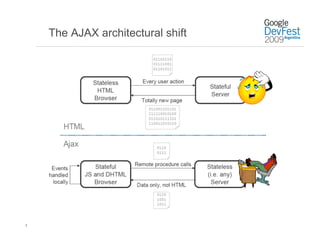
The AJAX architectural shift


5
The AJAX slippery slope

    •  Experiment with “a bit of script”
    •  Everybody loves it! More!
    •  When did we became an AJAX shop?
    •  Attempt to port to something other than Internet Explorer
    •  Wait... this is hard!
    •  Result: “A tangled mess!”


6
GWT’s Mission


     "GWT's mission is to radically improve
        the web experience for users by
      enabling developers to use existing
       Java tools to build no-compromise
        AJAX for any modern browser."


7
Google Web Toolkit at a glance
    •  Write code in the JavaTM language using your favorite Java
       IDE
    •  Debug as bytecode against a special browser (hosted mode)
    •  Cross-compile into standalone optimized JavaScript (web
       mode)
    •  No browser plugins / no obligatory server-side machinery
    •  Includes extensive cross-browser libraries
         •  User interface (DOM, widgets, ...)
         •  Client/server communication (XHR, RPC, JSON, ...)
         •  App infrastructure (history, timers, unit testing, i18n, a11y, ...)
         •  External services (Gadgets, Gears, Google Maps, ...)
    •  JavaScript integration
         •  JavaScript Native Interface (JSNI)
    •     Fully open source under Apache 2.0
8
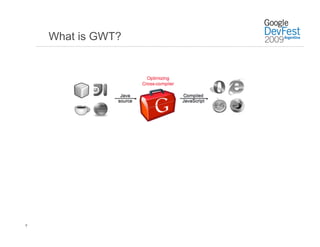
What is GWT?


9
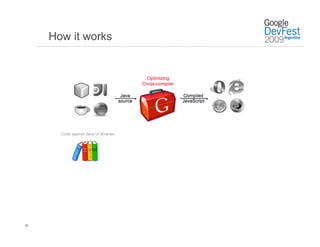
How it works


     Google Web Toolkit Weekly Report 09/01/2008 - 09/08/200
           Code against Java UI libraries


10
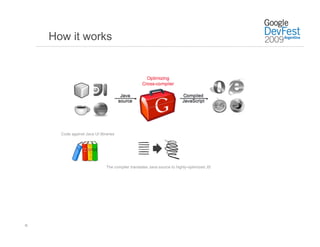
How it works


       Code against Java UI libraries


                                The compiler translates Java source to highly-optimized JS


11
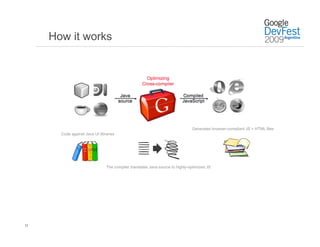
How it works


                                                                               Generates browser-compliant JS + HTML files
       Code against Java UI libraries


                                The compiler translates Java source to highly-optimized JS


12
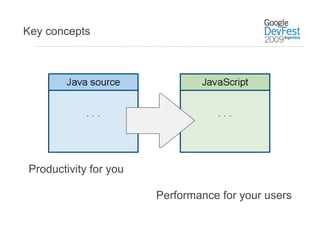
Key concepts


Productivity for you

                       Performance for your users
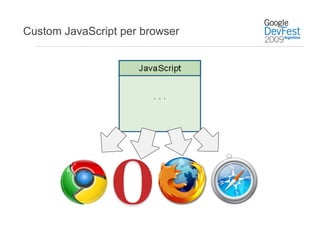
Custom JavaScript per browser
Demo: Getting started building
GWT apps
GWT Advantages
GWT Advantages – Faster Ajax applications
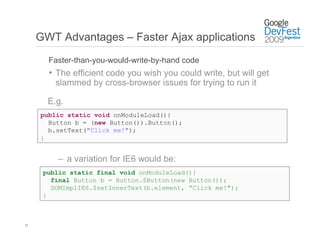
       Faster-than-you-would-write-by-hand code
       •  The efficient code you wish you could write, but will get
         slammed by cross-browser issues for trying to run it

       E.g.
     public static void onModuleLoad(){
       Button b = (new Button()).Button();
       b.setText("Click me!");
     }


         –  a variation for IE6 would be:
      public static final void onModuleLoad(){
        final Button b = Button.$Button(new Button());
        DOMImplIE6.$setInnerText(b.element, ”Click me!");
      }


17
GWT Advantages – Faster Ajax applications

       Faster-than-you-would-write-by-hand code
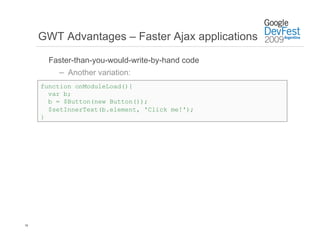
         –  Another variation:
     function onModuleLoad(){
       var b;
       b = $Button(new Button());
       $setInnerText(b.element, 'Click me!');
     }


18
GWT Advantages – Faster Ajax applications

        Faster-than-you-would-write-by-hand code
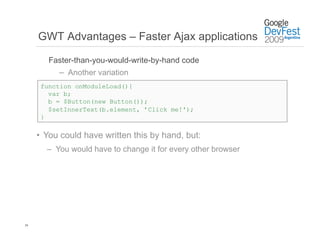
           –  Another variation
      function onModuleLoad(){
        var b;
        b = $Button(new Button());
        $setInnerText(b.element, ’Click me!');
      }

     •  You could have written this by hand, but:
       –  You would have to change it for every other browser


19
GWT Advantages – Faster Ajax applications

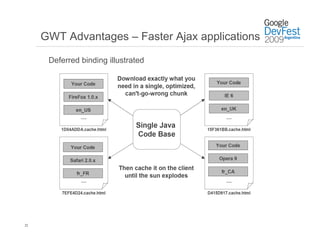
      Deferred binding
       •  Why give the user more than they asked for?
       •  Users only download what they need to run your
        application
       •  Made possible through the technique of deferred
        binding


20
GWT Advantages – Faster Ajax applications

      Deferred binding


      •  A technique that lets the compiler make different
       bindings for your application at compile-time and choose
       the right one later
      •  The application bootstrap process selects the correct
       binding when loading your application


21
GWT Advantages – Faster Ajax applications

      Deferred binding illustrated


22
GWT Advantages – No more memory leaks

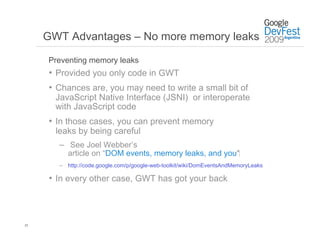
     Preventing memory leaks
     •  Provided you only code in GWT
     •  Chances are, you may need to write a small bit of
       JavaScript Native Interface (JSNI) or interoperate
       with JavaScript code
     •  In those cases, you can prevent memory
       leaks by being careful
       –  See Joel Webber’s
          article on “DOM events, memory leaks, and you”‫‏‬
       –  http://code.google.com/p/google-web-toolkit/wiki/DomEventsAndMemoryLeaks

     •  In every other case, GWT has got your back


23
GWT Advantages – History support

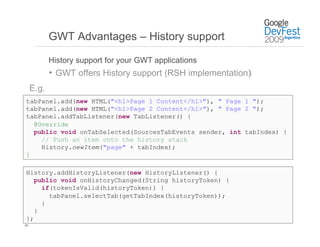
            History support for your GWT applications
            •  GWT offers History support (RSH implementation)‫‏‬
     E.g.
tabPanel.add(new HTML("<h1>Page 1 Content</h1>"), " Page 1 ");
tabPanel.add(new HTML("<h1>Page 2 Content</h1>"), " Page 2 ");
tabPanel.addTabListener(new TabListener() {
  @Override
  public void onTabSelected(SourcesTabEvents sender, int tabIndex) {
    // Push an item onto the history stack
    History.newItem("page" + tabIndex);
}

History.addHistoryListener(new HistoryListener() {
   public void onHistoryChanged(String historyToken) {
     if(tokenIsValid(historyToken)) {
       tabPanel.selectTab(getTabIndex(historyToken));
     }
   }
};
24
GWT Advantages – Faster development

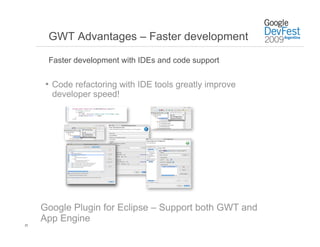
      Faster development with IDEs and code support


      •  Code refactoring with IDE tools greatly improve
       developer speed!


     Google Plugin for Eclipse – Support both GWT and
     App Engine
25
GWT Advantages – Faster development

     Faster development with IDEs and code support


     •  You can also thoroughly test your Ajax application using
      a combination of:
       –  Standard JUnit TestCase
       –  GWTTestCase
       –  HTMLUnit tests
       –  Selenium tests


26
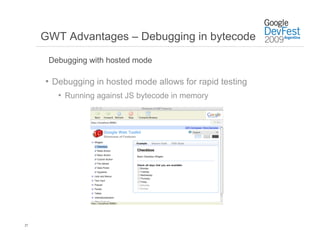
GWT Advantages – Debugging in bytecode

      Debugging with hosted mode

     •  Debugging in hosted mode allows for rapid testing
        •  Running against JS bytecode in memory


27
Summary of development advantages

     •  Optimized, high performance Ajax applications
     •  As a developer, you don’t have to worry about:
       –  Browser quirk headaches
       –  Memory leaks
       –  History support
     •  Code reuse through design patterns
     •  Faster development using IDEs and other Java tools
     •  Debugging in bytecode


28
GWT Tools and Widgets
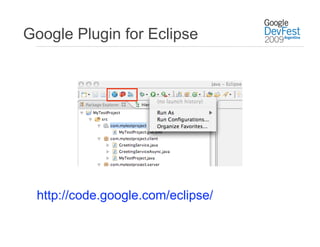
Google Plugin for Eclipse


 http://code.google.com/eclipse/
Widget libraries


•  GWT (http://code.google.com/webtoolkit/)
•  Incubator (http://code.google.com/p/google-web-toolkit-incubator/)

•    Smart GWT (http://code.google.com/p/smartgwt/)
•    GWT-Ext (http://code.google.com/p/gwt-ext/)
•    IT Mill Toolkit (http://www.itmill.com/)
•    GWT mosaic (http://code.google.com/p/gwt-mosaic/)
•    Ext GWT (http://extjs.com/products/gxt/)
•    Advanced GWT Components
     (http://advanced-gwt.sourceforge.net/)
New features coming in GWT 2.0
GWT 2.0: More advantages

     •  Hosted mode becomes “development mode”
     •  Code splitting
     •  Client bundle
     •  Declarative UI in XML (UiBinder)
     •  … and much more


33
Code Splitting: Big scripts, big problems

     •  Problem: Initial download can be slooooow
        –  Some apps becomes bigger over time
        –  Parsing through initial script can cause UI to hang
        –  Current day browsers have a two connection limit
     •  Solution: Split up the script!


34
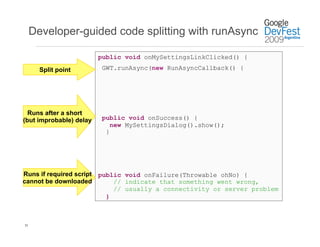
Developer-guided code splitting with runAsync

                         public void onMySettingsLinkClicked() {

       Split point        GWT.runAsync(new RunAsyncCallback() {


  Runs after a short
(but improbable) delay    public void onSuccess() {
                             new MySettingsDialog().show();
                           }


Runs if required script public void onFailure(Throwable ohNo) {
cannot be downloaded        // indicate that something went wrong,
                            // usually a connectivity or server problem
                          }


35
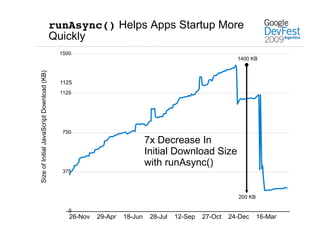
runAsync() Helps Apps Startup More
                                           Quickly
                                            1500
                                                                                                        1400 KB
Size of Initial JavaScript Download (KB)


                                            1125
                                            1125


                                             750
                                                                          7x Decrease In
                                                                          Initial Download Size
                                                                          with runAsync()
                                             375


                                                                                                        200 KB

                                               0
                                               26-Nov   29-Apr   18-Jun    28-Jul   12-Sep   27-Oct   24-Dec     16-Mar
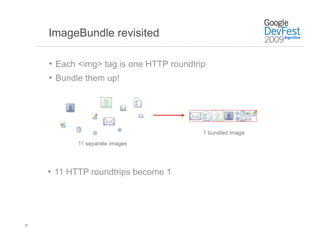
ImageBundle revisited

     •  Each <img> tag is one HTTP roundtrip
     •  Bundle them up!


     •  11 HTTP roundtrips become 1


37
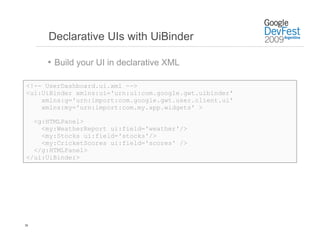
Declarative UIs with UiBinder

     •  Build your UI in declarative XML

<!-- UserDashboard.ui.xml -->
<ui:UiBinder xmlns:ui='urn:ui:com.google.gwt.uibinder'
    xmlns:g='urn:import:com.google.gwt.user.client.ui'
    xmlns:my='urn:import:com.my.app.widgets' >

  <g:HTMLPanel>
    <my:WeatherReport ui:field='weather'/>
    <my:Stocks ui:field='stocks'/>
    <my:CricketScores ui:field='scores' />
  </g:HTMLPanel>
</ui:UiBinder>


38
Who's using GWT?
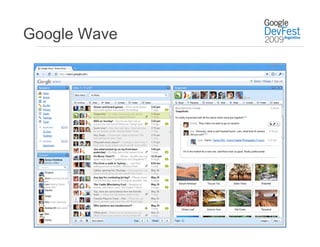
Google Wave
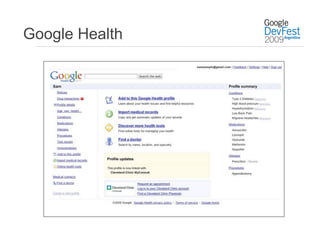
Google Health
Mobile
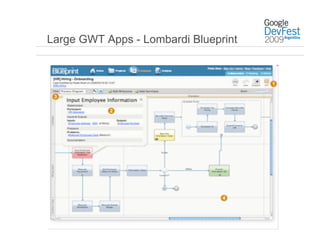
Large GWT Apps - Lombardi Blueprint


                  Google Web Toolkit
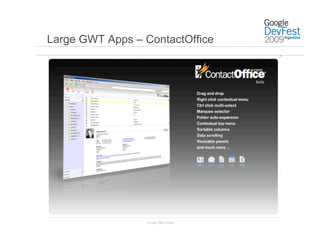
Large GWT Apps – ContactOffice


                 Google Web Toolkit
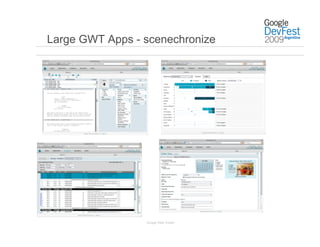
Large GWT Apps - scenechronize


                 Google Web Toolkit
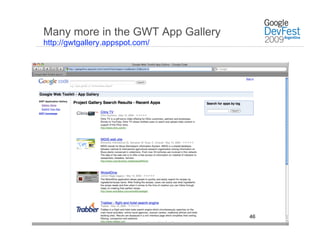
Many more in the GWT App Gallery
http://gwtgallery.appspot.com/


                                                  46
                             Google Web Toolkit
Learn more
code.google.com/webtoolkit
Muchas Gracias!


      Q&A

Devfest09 Cschalk Gwt

  • 2.
    Google Web Toolkit:A technical overview Chris Schalk Con: Gabriel Praino DevFest 2009 November 17th, 2009
  • 3.
    Agenda •  AJAX: what it is and why it's important •  Introducing GWT •  GWT advantages •  GWT 2.0 features •  Who’s using GWT •  Q&A 3
  • 4.
    AJAX... uh... what? •  Also known as Asynchronous JavaScript And XML •  JavaScript can issue asynchronous server requests •  JavaScript can manipulate the user interface 4
  • 5.
  • 6.
    The AJAX slipperyslope •  Experiment with “a bit of script” •  Everybody loves it! More! •  When did we became an AJAX shop? •  Attempt to port to something other than Internet Explorer •  Wait... this is hard! •  Result: “A tangled mess!” 6
  • 7.
    GWT’s Mission "GWT's mission is to radically improve the web experience for users by enabling developers to use existing Java tools to build no-compromise AJAX for any modern browser." 7
  • 8.
    Google Web Toolkitat a glance •  Write code in the JavaTM language using your favorite Java IDE •  Debug as bytecode against a special browser (hosted mode) •  Cross-compile into standalone optimized JavaScript (web mode) •  No browser plugins / no obligatory server-side machinery •  Includes extensive cross-browser libraries •  User interface (DOM, widgets, ...) •  Client/server communication (XHR, RPC, JSON, ...) •  App infrastructure (history, timers, unit testing, i18n, a11y, ...) •  External services (Gadgets, Gears, Google Maps, ...) •  JavaScript integration •  JavaScript Native Interface (JSNI) •  Fully open source under Apache 2.0 8
  • 9.
  • 10.
    How it works Google Web Toolkit Weekly Report 09/01/2008 - 09/08/200 Code against Java UI libraries 10
  • 11.
    How it works Code against Java UI libraries The compiler translates Java source to highly-optimized JS 11
  • 12.
    How it works Generates browser-compliant JS + HTML files Code against Java UI libraries The compiler translates Java source to highly-optimized JS 12
  • 13.
    Key concepts Productivity foryou Performance for your users
  • 14.
  • 15.
    Demo: Getting startedbuilding GWT apps
  • 16.
  • 17.
    GWT Advantages –Faster Ajax applications Faster-than-you-would-write-by-hand code •  The efficient code you wish you could write, but will get slammed by cross-browser issues for trying to run it E.g. public static void onModuleLoad(){ Button b = (new Button()).Button(); b.setText("Click me!"); } –  a variation for IE6 would be: public static final void onModuleLoad(){ final Button b = Button.$Button(new Button()); DOMImplIE6.$setInnerText(b.element, ”Click me!"); } 17
  • 18.
    GWT Advantages –Faster Ajax applications Faster-than-you-would-write-by-hand code –  Another variation: function onModuleLoad(){ var b; b = $Button(new Button()); $setInnerText(b.element, 'Click me!'); } 18
  • 19.
    GWT Advantages –Faster Ajax applications Faster-than-you-would-write-by-hand code –  Another variation function onModuleLoad(){ var b; b = $Button(new Button()); $setInnerText(b.element, ’Click me!'); } •  You could have written this by hand, but: –  You would have to change it for every other browser 19
  • 20.
    GWT Advantages –Faster Ajax applications Deferred binding •  Why give the user more than they asked for? •  Users only download what they need to run your application •  Made possible through the technique of deferred binding 20
  • 21.
    GWT Advantages –Faster Ajax applications Deferred binding •  A technique that lets the compiler make different bindings for your application at compile-time and choose the right one later •  The application bootstrap process selects the correct binding when loading your application 21
  • 22.
    GWT Advantages –Faster Ajax applications Deferred binding illustrated 22
  • 23.
    GWT Advantages –No more memory leaks Preventing memory leaks •  Provided you only code in GWT •  Chances are, you may need to write a small bit of JavaScript Native Interface (JSNI) or interoperate with JavaScript code •  In those cases, you can prevent memory leaks by being careful –  See Joel Webber’s article on “DOM events, memory leaks, and you”‫‏‬ –  http://code.google.com/p/google-web-toolkit/wiki/DomEventsAndMemoryLeaks •  In every other case, GWT has got your back 23
  • 24.
    GWT Advantages –History support History support for your GWT applications •  GWT offers History support (RSH implementation)‫‏‬ E.g. tabPanel.add(new HTML("<h1>Page 1 Content</h1>"), " Page 1 "); tabPanel.add(new HTML("<h1>Page 2 Content</h1>"), " Page 2 "); tabPanel.addTabListener(new TabListener() { @Override public void onTabSelected(SourcesTabEvents sender, int tabIndex) { // Push an item onto the history stack History.newItem("page" + tabIndex); } History.addHistoryListener(new HistoryListener() { public void onHistoryChanged(String historyToken) { if(tokenIsValid(historyToken)) { tabPanel.selectTab(getTabIndex(historyToken)); } } }; 24
  • 25.
    GWT Advantages –Faster development Faster development with IDEs and code support •  Code refactoring with IDE tools greatly improve developer speed! Google Plugin for Eclipse – Support both GWT and App Engine 25
  • 26.
    GWT Advantages –Faster development Faster development with IDEs and code support •  You can also thoroughly test your Ajax application using a combination of: –  Standard JUnit TestCase –  GWTTestCase –  HTMLUnit tests –  Selenium tests 26
  • 27.
    GWT Advantages –Debugging in bytecode Debugging with hosted mode •  Debugging in hosted mode allows for rapid testing •  Running against JS bytecode in memory 27
  • 28.
    Summary of developmentadvantages •  Optimized, high performance Ajax applications •  As a developer, you don’t have to worry about: –  Browser quirk headaches –  Memory leaks –  History support •  Code reuse through design patterns •  Faster development using IDEs and other Java tools •  Debugging in bytecode 28
  • 29.
  • 30.
    Google Plugin forEclipse http://code.google.com/eclipse/
  • 31.
    Widget libraries •  GWT(http://code.google.com/webtoolkit/) •  Incubator (http://code.google.com/p/google-web-toolkit-incubator/) •  Smart GWT (http://code.google.com/p/smartgwt/) •  GWT-Ext (http://code.google.com/p/gwt-ext/) •  IT Mill Toolkit (http://www.itmill.com/) •  GWT mosaic (http://code.google.com/p/gwt-mosaic/) •  Ext GWT (http://extjs.com/products/gxt/) •  Advanced GWT Components (http://advanced-gwt.sourceforge.net/)
  • 32.
  • 33.
    GWT 2.0: Moreadvantages •  Hosted mode becomes “development mode” •  Code splitting •  Client bundle •  Declarative UI in XML (UiBinder) •  … and much more 33
  • 34.
    Code Splitting: Bigscripts, big problems •  Problem: Initial download can be slooooow –  Some apps becomes bigger over time –  Parsing through initial script can cause UI to hang –  Current day browsers have a two connection limit •  Solution: Split up the script! 34
  • 35.
    Developer-guided code splittingwith runAsync public void onMySettingsLinkClicked() { Split point GWT.runAsync(new RunAsyncCallback() { Runs after a short (but improbable) delay public void onSuccess() { new MySettingsDialog().show(); } Runs if required script public void onFailure(Throwable ohNo) { cannot be downloaded // indicate that something went wrong, // usually a connectivity or server problem } 35
  • 36.
    runAsync() Helps AppsStartup More Quickly 1500 1400 KB Size of Initial JavaScript Download (KB) 1125 1125 750 7x Decrease In Initial Download Size with runAsync() 375 200 KB 0 26-Nov 29-Apr 18-Jun 28-Jul 12-Sep 27-Oct 24-Dec 16-Mar
  • 37.
    ImageBundle revisited •  Each <img> tag is one HTTP roundtrip •  Bundle them up! •  11 HTTP roundtrips become 1 37
  • 38.
    Declarative UIs withUiBinder •  Build your UI in declarative XML <!-- UserDashboard.ui.xml --> <ui:UiBinder xmlns:ui='urn:ui:com.google.gwt.uibinder' xmlns:g='urn:import:com.google.gwt.user.client.ui' xmlns:my='urn:import:com.my.app.widgets' > <g:HTMLPanel> <my:WeatherReport ui:field='weather'/> <my:Stocks ui:field='stocks'/> <my:CricketScores ui:field='scores' /> </g:HTMLPanel> </ui:UiBinder> 38
  • 39.
  • 40.
  • 41.
  • 42.
  • 43.
    Large GWT Apps- Lombardi Blueprint Google Web Toolkit
  • 44.
    Large GWT Apps– ContactOffice Google Web Toolkit
  • 45.
    Large GWT Apps- scenechronize Google Web Toolkit
  • 46.
    Many more inthe GWT App Gallery http://gwtgallery.appspot.com/ 46 Google Web Toolkit
  • 47.
  • 48.