


Modern web applications with Dojo:
        the cutting edge
      Eugene Lazutkin, DojoToolkit.org
Disclaimer
●   I am a Staff Engineer of Sun Microsystems, but
    this presentation doesn't necessarily reflect any
    official stance of said company
●   Today I speak with you as a Dojo committer and
    a fellow software developer


                                                    2
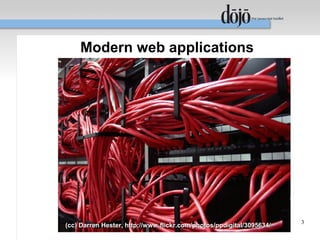
Modern web applications


                                                                      3
(cc) Darren Hester, http://www.flickr.com/photos/ppdigital/3095634/
Drivers of modern web apps (client)
●   JavaScript
    –   More-or-less uniform support of the standard across
        browsers
●   DOM (Document Object Model)
    –   Better access to layout engine
    –   Better support for CSS standards


                                                          4
Drivers of modern web apps (client)
●   Events
    –   Consistent support of interactive features
●   XHR (XMLHTTPRequest)
    –   Interaction with the server:
         ● Ajax
         ● Comet


                                                     5
Drivers of modern web apps (client)
●   Performance improvements
    –   Faster hardware, software, networks
●   Human factor
    –   Listen what your users tell you
    –   We do, and the most common request is...


                                                   6
“We want better user experience!”


(cc) Jacob Appelbaum, http://www.flickr.com/photos/ioerror/407491823/   7
Zombie Mob (San Francisco, CA, USA)
Ajax web applications: “The enhancer”
●   Add a helper to enhance the existing non-Ajax
    functionality
●   The application provides a natural fallback, if
    the client doesn't support Ajax
●   Majority of UI generation/processing is on the
    server.


                                                      8
Ajax web applications: “The enhancer”
●   Example: an auto-suggest input box
    –   If the client doesn't support JavaScript, we expect
        our user to enter complete input strings.
    –   We can “complete” user's input on the server, and
        present choices back.


                                                              9
Ajax web applications: “The enhancer”
●   Pros:
    –   Scales down naturally for “dumb” clients
    –   Minimizes the development costs, if majority of
        clients do not support Ajax
●   Cons:
    –   Scaling up for “smart” clients is limited
    –   Some UI techniques are impossible


                                                          10
Ajax web applications: “The enhancer”
●   When to use:
    –   A “cosmetic surgery” of an existing “Web 1.0”
        application
    –   Majority of targeted users use “dumb” clients:
         ●   Mobile users
         ●   Legacy browsers
         ●   Accessibility concerns
         ●   Legal concerns


                                                         11
Ajax web applications: “Web 2.0”
●   Some essential parts of UI are on the client.
●   The application has a non-Ajax path.
●   Server generates the UI and provides a low-
    level data access API.


                                                    12
Ajax web applications: “Web 2.0”
●   Example: drag-and-drop (DnD)
    –   Doesn't lend itself for a non-Ajax fallback
    –   Can be replaced with a set of buttons (hard to use)
    –   In some cases we need to redesign the non-Ajax UI
        replacement
    –   We will review DnD later (time permitting)


                                                         13
Ajax web applications: “Web 2.0”
●   Pros:
    –   We can build attractive user interfaces for capable
        browsers
    –   Reduces the server load
●   Cons:
    –   Hard to scale down
    –   May need a separate path for “dumb” clients


                                                          14
Ajax web applications: “Web 2.0”
●   When to use:
    –   Majority of targeted users use “smart” clients
    –   We try to balance our development efforts:
         ●   Is it easier to do on the server?
         ●   Is it easier to do on the client?
    –   We redesign an existing “Web 1.0” application by
        modules


                                                           15
Ajax web applications: “One-page app”
●   All UI functionality is on the client
●   “Legacy” clients are supported separately, if
    they supported at all.
●   The application runs locally (literally) and may
    have completely “local” look and feel replacing
    “connected applications”


                                                    16
Ajax web applications: “One-page app”
●   Example: the dialog box based CRUD
    application
    –   All functionality falls neatly into list/viewer/editor
        pattern conforming to Create/Update/Delete
    –   The server provides REST/SOAP API to data
    –   All files (HTML, CSS, JS) are static
         ●   The server doesn't spend time on unnecessary tasks
         ●   We can cache aggressively


                                                                  17
Ajax web applications: “One-page app”
●   Pros:
    –   Gives users the experience of local applications +
        the universal access of web applications
    –   Minimizes the server load
●   Cons:
    –   Requires a completely different path for “dumb”
        clients or we should have a complete control over
        our client base
    –   It is hard to implement
                                                             18
Ajax web applications: “One-page app”
●   When to use:
    –   We control what users use, so we can reject “dumb”
        clients:
         ●   IT
         ●   A subscription service
         ●   Specially targeted users
    –   We can afford providing a reduced functionality for
        “dumb” clients simplifying the non-Ajax path
    –   We want to unload servers to the max

                                                          19
The way of Dojo: helping hands


                                 20
The Dojo way: JavaScript
●   Dojo provides numerous enhancements and
    common algorithms including:
    –   OOP helpers – simple way to setup single and
        multiple inheritance (dojo.declare)
    –   JS object creators – mixins, delegation
        (dojo.lang.common)
    –   Python-like repr facility with support for custom
        formatters (dojo.lang.repr)
    –   FP helpers – currying, map/reduce, and so on.
                                                            21
The Dojo way: DOM
●   Dojo normalizes differences in DOM
    implementation, and implements common
    algorithms
    –   Node, parent/child, ancestor/descendant
        manipulations
    –   Class manipulations
    –   Opacity, and color functions
    –   Layout calculations
    –   Metrics, and much much more
                                                  22
The Dojo way: Events
●   Dojo implements a subset of AOP (Aspect-
    Oriented programming)
●   It allows to chain event handlers using following
    advices:
    –   After – the handler is attached to the end of the
        queue
    –   Before – the handler is attached to the front of the
        queue
    –   Around – the handler replaces the queue
                                                            23
The Dojo way: Events
●   Handlers can be dynamically connected and
    disconnected
●   Disconnecting handlers reverts the queue to the
    previous state
●   Browser events are normalized
●   Uniform support for canceling bubbling events,
    and return values


                                                 24
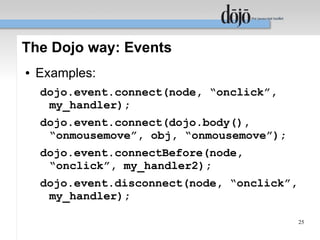
The Dojo way: Events
●   Examples:
    dojo.event.connect(node, “onclick”,
     my_handler);
    dojo.event.connect(dojo.body(),
     “onmousemove”, obj, “onmousemove”);
    dojo.event.connectBefore(node,
     “onclick”, my_handler2);
    dojo.event.disconnect(node, “onclick”,
     my_handler);

                                             25
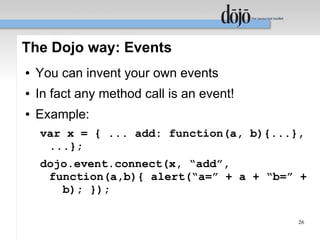
The Dojo way: Events
●   You can invent your own events
●   In fact any method call is an event!
●   Example:
    var x = { ... add: function(a, b){...},
     ...};
    dojo.event.connect(x, “add”,
     function(a,b){ alert(“a=” + a + “b=” +
       b); });

                                           26
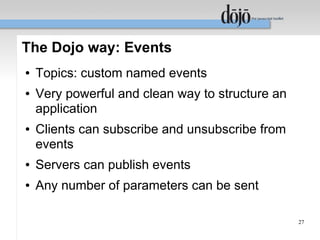
The Dojo way: Events
●   Topics: custom named events
●   Very powerful and clean way to structure an
    application
●   Clients can subscribe and unsubscribe from
    events
●   Servers can publish events
●   Any number of parameters can be sent

                                                  27
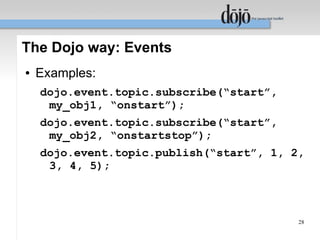
The Dojo way: Events
●   Examples:
    dojo.event.topic.subscribe(“start”,
     my_obj1, “onstart”);
    dojo.event.topic.subscribe(“start”,
     my_obj2, “onstartstop”);
    dojo.event.topic.publish(“start”, 1, 2,
     3, 4, 5);


                                          28
The Dojo way: XHR
●   Dojo exposes XHR through dojo.io.bind():
    –   Supports different I/O methods
         ●   GET, POST, multipart POST...
    –   Supports data conversion for XML and JSON
        returned data
    –   Pluggable transports
         ●   XmlHTTPRequest object, IFRAME, <SCRIPT>...


                                                          29
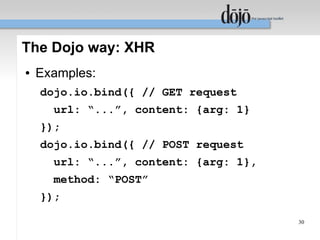
The Dojo way: XHR
●   Examples:
    dojo.io.bind({ // GET request
      url: “...”, content: {arg: 1}
    });
    dojo.io.bind({ // POST request
      url: “...”, content: {arg: 1},
      method: “POST”
    });

                                       30
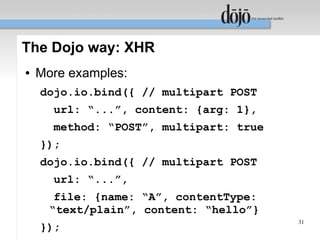
The Dojo way: XHR
●   More examples:
    dojo.io.bind({ // multipart POST
      url: “...”, content: {arg: 1},
      method: “POST”, multipart: true
    });
    dojo.io.bind({ // multipart POST
      url: “...”,
       file: {name: “A”, contentType:
      “text/plain”, content: “hello”}
                                        31
    });
That was easy!


                 32
Dojo packages
●   All Dojo functionality organized in packages or
    widgets
●   How to request a package?
    dojo.require(“dojo.dom”);
●   Dojo Loader translates package names to file
    names, and loads packages on demand
●   The loader makes sure that all packages loaded
    only once
                                                   33
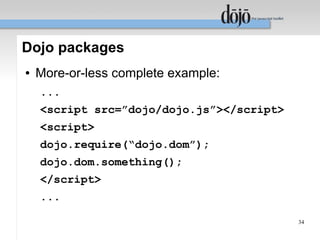
Dojo packages
●   More-or-less complete example:
    ...
    <script src=”dojo/dojo.js”></script>
    <script>
    dojo.require(“dojo.dom”);
    dojo.dom.something();
    </script>
    ...

                                           34
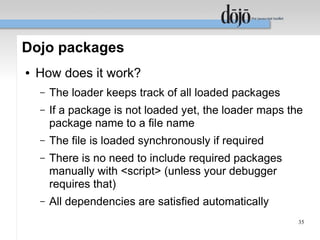
Dojo packages
●   How does it work?
    –   The loader keeps track of all loaded packages
    –   If a package is not loaded yet, the loader maps the
        package name to a file name
    –   The file is loaded synchronously if required
    –   There is no need to include required packages
        manually with <script> (unless your debugger
        requires that)
    –   All dependencies are satisfied automatically
                                                          35
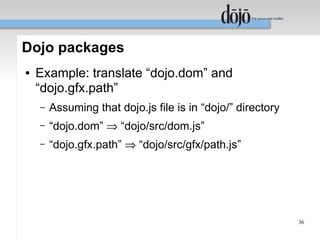
Dojo packages
●   Example: translate “dojo.dom” and
    “dojo.gfx.path”
    –   Assuming that dojo.js file is in “dojo/” directory
    –   “dojo.dom” ⇒ “dojo/src/dom.js”
    –   “dojo.gfx.path” ⇒ “dojo/src/gfx/path.js”


                                                             36
Dojo packages
●   Special value * is treated as “__package__.js”
    file
●   Example:
    –   “dojo.event.*” ⇒ “dojo/src/event/__package__.js”
●   Usually it loads the default configuration


                                                           37
Dojo packages
●   You can create your own packages with your
    own root
●   Example:
    dojo.require(“dojo.dom”);
    dojo.require(“custom.dom.extra”);
●   The Dojo loader can be hinted how to treat your
    custom namespace, but defaults are quite
    sensible
                                                 38
Dojo packages
●   Default translation of a custom package name
    –   Example: translate “custom.dom.extras”:
         ●   Assuming that dojo.js is in “dojo/” directory
         ●
             “custom.dom.extras” ⇒ “dojo/../custom/dom/extras.js”
         ●   ...or simply “custom/dom/extras.js”
●   If your custom directory next to dojo, you don't
    need to do anything
●   Otherwise you should tell the loader how to map
    your namespace
                                                                    39
Dojo packages
●   Loading a small number of packages is fast, but
    loading a lot of small packages takes time
●   Before going to production you should prep
    packages:
    –   Combine frequently used packages together
    –   Compress resulting files using some syntax-aware
        algorithms (eliminate unnecessary whitespaces,
        reduces local names, and so on)
    –   Compress the result with gzip
                                                       40
Dojo packages
●   Dojo Build system does it for you
    –   It takes a list your “seed” packages and builds a
        custom dojo.js file
    –   The custom dojo.js will include all packages and
        their dependencies already processed
●   Can I include my custom packages in the build?
    –   Yes!!!


                                                            41
Dojo packages
●   We provide Dojo in several pre-built flavors
●   Example (the Ajax Dojo profile):
    var dependencies = ["dojo.io.*",
     "dojo.io.BrowserIO", "dojo.event.*",
     "dojo.lfx.*"];
    load("getDependencyList.js");
●   You can build your very own custom-tailored
    Dojo profile with your custom packages

                                                   42
Dojo widgets (a very quick overview)
●   Widget encapsulates a functionality of a visual
    entity (example: a drop-down data picker)
●   It is specified by an HTML snippet (template), a
    CSS snippet, and a JavaSript code
●   It can be instantiated directly from HTML using
    special attributes, or programmatically on the fly
●   Widgets provide convenient building blocks for
    your application
                                                    43
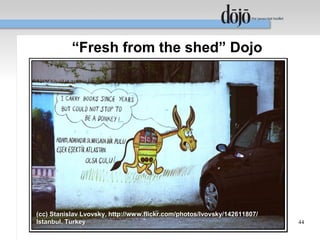
“Fresh from the shed” Dojo


(cc) Stanislav Lvovsky, http://www.flickr.com/photos/lvovsky/142611807/
Istanbul, Turkey                                                          44
Dojo Graphics (dojo.gfx)
●   “A picture is worth a thousand words”
●   Because we are visual-oriented beings
●   Because picture can convey more information
    than text on the same piece of screen


                                                  45
Dojo Graphics (dojo.gfx)
●   Implements DOM-based vector graphics
●   Supported shapes:
    –   Path, polyline/polygon, rectangle, ellipse, circle, line,
        image, text, textpath
●   Supported fills:
    –   Solid color fill (with opacity), linear gradient, radial
        gradient
●   Supports different strokes, fonts
                                                                   46
Dojo Graphics (dojo.gfx)
●   Arbitrary 2D transformations:
    –   Shifts, scaling, rotation, skewing, and so on...
●   Groups
    –   Shapes can be transformed together
●   All attributes can be changed dynamically, the
    picture will be regenerated automatically
●   Event handlers can be attached to shapes

                                                           47
Dojo Graphics (dojo.gfx)
●   Why DOM-based vector graphics?
    –   Simpler to use (HTML is DOM too) – easy to modify
        a picture
    –   Shapes can be used for catching events without
        additional coding
    –   Automatic regeneration when objects are modified
●   While procedural graphics is easier
    conceptually, it can be difficult to scale for
    complex cases (e.g., grouping,
    transformations...)                                  48
Dojo Graphics (dojo.gfx)
●   Right now 2 back-ends are supported
    automatically:
    –   SVG – Mozilla Firefox, Opera, Webkit
    –   VML – Microsoft Internet Explorer
●   In the future we may add more back-ends
●   In the future we may add a Canvas-like API


                                                 49
Everybody loves charts...


(cc) Brendan Dolan-Gavitt,
http://www.flickr.com/photos/moyix/174053226/
                                                50
New Hampshire, USA
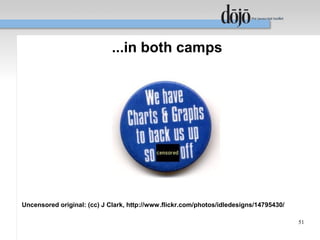
...in both camps


Uncensored original: (cc) J Clark, http://www.flickr.com/photos/idledesigns/14795430/

                                                                                        51
Dojo Charting (dojo.charting)
●   Based on SVG or VML
●   At present time doesn't use dojo.gfx
●   We will transition it to dojo.gfx in the near future
    adding more chart types
●   Yes, we will add pseudo-3D charts including a
    pie chart


                                                      52
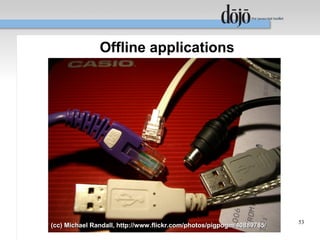
Offline applications


                                                                       53
(cc) Michael Randall, http://www.flickr.com/photos/pigpogm/40889785/
Dojo Offline
●   Ongoing project
●   Supports the offline mode
●   Can detect if it is offline or online
●   Synchronizes data when online, caches when
    offline
●   Relies on a persistent storage supported by
    browsers
●   Natively supports Firefox 3
                                                  54
The way ahead


                55
Dojo contributors/sponsors
●   Corporate contributors/sponsors
    –   AOL, LLC; BEA Systems; Curam Software, Ltd.; Defence
        Science & Technology Organisation; Elastic Path; Emerald
        Hand, Inc.; EuroClick, LLC; GCGF; Global Media Systems;
        GreenPlum; IBM; Indico Group; Laszlo Systems, Inc.; Media
        Hive; Meebo; Nexaweb Technologies, Inc.; OneTrackMind;
        OpenBravo; RedHat; Renkoo; SitePen, Inc.; Spider
        Strategies; Sun Microsystems, Inc.; Suretec Systems, Ltd.;
        Weswit S.R.L.; Wotan, LLC; Yuma Union High School
        District #70


                                                               56
Dojo contributors/sponsors
●   ~200 individual contributors
●   ~25 committers


                                   57
In case you didn't see warnings...


                                     58
Dojo 0.9
●   Why 0.9?
    –   Because we want to have a milestone release
        before 1.0
●   Refactoring Dojo
    –   Code duplication removal
    –   More consistent idioms
    –   Task-oriented fast paths
    –   Reducing inter-dependencies

                                                      59
Dojo 0.9
●   Restructuring Dojo
    –   Dojo Base – packaging all frequently used
        functionality in one small file
    –   Dojo Core – a superset of Dojo Base with strict
        control of new additions
    –   DojoX – Dojo eXtented – a place for less common
        packages
    –   Dijit – Dojo Widgets


                                                          60
Dojo 0.9
●   Don't worry – 0.4.x line will be supported too!
●   We will provide a detailed guide for 0.9
    migration (if you want to migrate)
●   Tentative 0.9 timeline – “the end of 2007”, but it
    can be changed
●   We already started working on it


                                                      61
The end


                                                               62
(cc) Su Neko, http://www.flickr.com/photos/suneko/373310729/
Backup slides


                63
Revisiting drag-and-drop (DnD)
●   DnD is an extremely valuable but under-
    appreciated UI device
●   It is absolutely indispensable when:
    –   Reordering containers (e.g., lists, or trees)
    –   Building a list (or any container) from several
        sources
●   The alternatives are usually messy
●   It helps us to reduce the UI complexity
                                                          64
Revisiting drag-and-drop (DnD)
●   How familiar is it for users?
    –   The File Manager of any modern OS uses DnD to
        copy/move files, and restructure directories
●   Why is it underused in modern web apps?
    –   Inadequate support of DnD in many JS toolkits
    –   Web developers should think more like local app
        developers, and they don't
    –   Conceptual gaps

                                                          65
Revisiting drag-and-drop (DnD)
●   Main DnD players (the user point of view)
    –   Data sources
    –   Data targets
    –   Data we want to move/copy from sources to targets
    –   The application itself


                                                       66
Revisiting drag-and-drop (DnD)
●   Huh? Data?
    –   Some implementations of DnD “forget” that
        frequently user doesn't want to move DOM nodes,
        but wants to exchange the underlying data
●   The application???
    –   The page should cooperate with DnD providing a
        visual feedback to the user
    –   At the very least it should “show” available targets

                                                               67

Dojo (QCon 2007 Slides)

  • 1.
    Modern web applicationswith Dojo: the cutting edge Eugene Lazutkin, DojoToolkit.org
  • 2.
    Disclaimer ● I am a Staff Engineer of Sun Microsystems, but this presentation doesn't necessarily reflect any official stance of said company ● Today I speak with you as a Dojo committer and a fellow software developer 2
  • 3.
    Modern web applications 3 (cc) Darren Hester, http://www.flickr.com/photos/ppdigital/3095634/
  • 4.
    Drivers of modernweb apps (client) ● JavaScript – More-or-less uniform support of the standard across browsers ● DOM (Document Object Model) – Better access to layout engine – Better support for CSS standards 4
  • 5.
    Drivers of modernweb apps (client) ● Events – Consistent support of interactive features ● XHR (XMLHTTPRequest) – Interaction with the server: ● Ajax ● Comet 5
  • 6.
    Drivers of modernweb apps (client) ● Performance improvements – Faster hardware, software, networks ● Human factor – Listen what your users tell you – We do, and the most common request is... 6
  • 7.
    “We want betteruser experience!” (cc) Jacob Appelbaum, http://www.flickr.com/photos/ioerror/407491823/ 7 Zombie Mob (San Francisco, CA, USA)
  • 8.
    Ajax web applications:“The enhancer” ● Add a helper to enhance the existing non-Ajax functionality ● The application provides a natural fallback, if the client doesn't support Ajax ● Majority of UI generation/processing is on the server. 8
  • 9.
    Ajax web applications:“The enhancer” ● Example: an auto-suggest input box – If the client doesn't support JavaScript, we expect our user to enter complete input strings. – We can “complete” user's input on the server, and present choices back. 9
  • 10.
    Ajax web applications:“The enhancer” ● Pros: – Scales down naturally for “dumb” clients – Minimizes the development costs, if majority of clients do not support Ajax ● Cons: – Scaling up for “smart” clients is limited – Some UI techniques are impossible 10
  • 11.
    Ajax web applications:“The enhancer” ● When to use: – A “cosmetic surgery” of an existing “Web 1.0” application – Majority of targeted users use “dumb” clients: ● Mobile users ● Legacy browsers ● Accessibility concerns ● Legal concerns 11
  • 12.
    Ajax web applications:“Web 2.0” ● Some essential parts of UI are on the client. ● The application has a non-Ajax path. ● Server generates the UI and provides a low- level data access API. 12
  • 13.
    Ajax web applications:“Web 2.0” ● Example: drag-and-drop (DnD) – Doesn't lend itself for a non-Ajax fallback – Can be replaced with a set of buttons (hard to use) – In some cases we need to redesign the non-Ajax UI replacement – We will review DnD later (time permitting) 13
  • 14.
    Ajax web applications:“Web 2.0” ● Pros: – We can build attractive user interfaces for capable browsers – Reduces the server load ● Cons: – Hard to scale down – May need a separate path for “dumb” clients 14
  • 15.
    Ajax web applications:“Web 2.0” ● When to use: – Majority of targeted users use “smart” clients – We try to balance our development efforts: ● Is it easier to do on the server? ● Is it easier to do on the client? – We redesign an existing “Web 1.0” application by modules 15
  • 16.
    Ajax web applications:“One-page app” ● All UI functionality is on the client ● “Legacy” clients are supported separately, if they supported at all. ● The application runs locally (literally) and may have completely “local” look and feel replacing “connected applications” 16
  • 17.
    Ajax web applications:“One-page app” ● Example: the dialog box based CRUD application – All functionality falls neatly into list/viewer/editor pattern conforming to Create/Update/Delete – The server provides REST/SOAP API to data – All files (HTML, CSS, JS) are static ● The server doesn't spend time on unnecessary tasks ● We can cache aggressively 17
  • 18.
    Ajax web applications:“One-page app” ● Pros: – Gives users the experience of local applications + the universal access of web applications – Minimizes the server load ● Cons: – Requires a completely different path for “dumb” clients or we should have a complete control over our client base – It is hard to implement 18
  • 19.
    Ajax web applications:“One-page app” ● When to use: – We control what users use, so we can reject “dumb” clients: ● IT ● A subscription service ● Specially targeted users – We can afford providing a reduced functionality for “dumb” clients simplifying the non-Ajax path – We want to unload servers to the max 19
  • 20.
    The way ofDojo: helping hands 20
  • 21.
    The Dojo way:JavaScript ● Dojo provides numerous enhancements and common algorithms including: – OOP helpers – simple way to setup single and multiple inheritance (dojo.declare) – JS object creators – mixins, delegation (dojo.lang.common) – Python-like repr facility with support for custom formatters (dojo.lang.repr) – FP helpers – currying, map/reduce, and so on. 21
  • 22.
    The Dojo way:DOM ● Dojo normalizes differences in DOM implementation, and implements common algorithms – Node, parent/child, ancestor/descendant manipulations – Class manipulations – Opacity, and color functions – Layout calculations – Metrics, and much much more 22
  • 23.
    The Dojo way:Events ● Dojo implements a subset of AOP (Aspect- Oriented programming) ● It allows to chain event handlers using following advices: – After – the handler is attached to the end of the queue – Before – the handler is attached to the front of the queue – Around – the handler replaces the queue 23
  • 24.
    The Dojo way:Events ● Handlers can be dynamically connected and disconnected ● Disconnecting handlers reverts the queue to the previous state ● Browser events are normalized ● Uniform support for canceling bubbling events, and return values 24
  • 25.
    The Dojo way:Events ● Examples: dojo.event.connect(node, “onclick”, my_handler); dojo.event.connect(dojo.body(), “onmousemove”, obj, “onmousemove”); dojo.event.connectBefore(node, “onclick”, my_handler2); dojo.event.disconnect(node, “onclick”, my_handler); 25
  • 26.
    The Dojo way:Events ● You can invent your own events ● In fact any method call is an event! ● Example: var x = { ... add: function(a, b){...}, ...}; dojo.event.connect(x, “add”, function(a,b){ alert(“a=” + a + “b=” + b); }); 26
  • 27.
    The Dojo way:Events ● Topics: custom named events ● Very powerful and clean way to structure an application ● Clients can subscribe and unsubscribe from events ● Servers can publish events ● Any number of parameters can be sent 27
  • 28.
    The Dojo way:Events ● Examples: dojo.event.topic.subscribe(“start”, my_obj1, “onstart”); dojo.event.topic.subscribe(“start”, my_obj2, “onstartstop”); dojo.event.topic.publish(“start”, 1, 2, 3, 4, 5); 28
  • 29.
    The Dojo way:XHR ● Dojo exposes XHR through dojo.io.bind(): – Supports different I/O methods ● GET, POST, multipart POST... – Supports data conversion for XML and JSON returned data – Pluggable transports ● XmlHTTPRequest object, IFRAME, <SCRIPT>... 29
  • 30.
    The Dojo way:XHR ● Examples: dojo.io.bind({ // GET request url: “...”, content: {arg: 1} }); dojo.io.bind({ // POST request url: “...”, content: {arg: 1}, method: “POST” }); 30
  • 31.
    The Dojo way:XHR ● More examples: dojo.io.bind({ // multipart POST url: “...”, content: {arg: 1}, method: “POST”, multipart: true }); dojo.io.bind({ // multipart POST url: “...”, file: {name: “A”, contentType: “text/plain”, content: “hello”} 31 });
  • 32.
  • 33.
    Dojo packages ● All Dojo functionality organized in packages or widgets ● How to request a package? dojo.require(“dojo.dom”); ● Dojo Loader translates package names to file names, and loads packages on demand ● The loader makes sure that all packages loaded only once 33
  • 34.
    Dojo packages ● More-or-less complete example: ... <script src=”dojo/dojo.js”></script> <script> dojo.require(“dojo.dom”); dojo.dom.something(); </script> ... 34
  • 35.
    Dojo packages ● How does it work? – The loader keeps track of all loaded packages – If a package is not loaded yet, the loader maps the package name to a file name – The file is loaded synchronously if required – There is no need to include required packages manually with <script> (unless your debugger requires that) – All dependencies are satisfied automatically 35
  • 36.
    Dojo packages ● Example: translate “dojo.dom” and “dojo.gfx.path” – Assuming that dojo.js file is in “dojo/” directory – “dojo.dom” ⇒ “dojo/src/dom.js” – “dojo.gfx.path” ⇒ “dojo/src/gfx/path.js” 36
  • 37.
    Dojo packages ● Special value * is treated as “__package__.js” file ● Example: – “dojo.event.*” ⇒ “dojo/src/event/__package__.js” ● Usually it loads the default configuration 37
  • 38.
    Dojo packages ● You can create your own packages with your own root ● Example: dojo.require(“dojo.dom”); dojo.require(“custom.dom.extra”); ● The Dojo loader can be hinted how to treat your custom namespace, but defaults are quite sensible 38
  • 39.
    Dojo packages ● Default translation of a custom package name – Example: translate “custom.dom.extras”: ● Assuming that dojo.js is in “dojo/” directory ● “custom.dom.extras” ⇒ “dojo/../custom/dom/extras.js” ● ...or simply “custom/dom/extras.js” ● If your custom directory next to dojo, you don't need to do anything ● Otherwise you should tell the loader how to map your namespace 39
  • 40.
    Dojo packages ● Loading a small number of packages is fast, but loading a lot of small packages takes time ● Before going to production you should prep packages: – Combine frequently used packages together – Compress resulting files using some syntax-aware algorithms (eliminate unnecessary whitespaces, reduces local names, and so on) – Compress the result with gzip 40
  • 41.
    Dojo packages ● Dojo Build system does it for you – It takes a list your “seed” packages and builds a custom dojo.js file – The custom dojo.js will include all packages and their dependencies already processed ● Can I include my custom packages in the build? – Yes!!! 41
  • 42.
    Dojo packages ● We provide Dojo in several pre-built flavors ● Example (the Ajax Dojo profile): var dependencies = ["dojo.io.*", "dojo.io.BrowserIO", "dojo.event.*", "dojo.lfx.*"]; load("getDependencyList.js"); ● You can build your very own custom-tailored Dojo profile with your custom packages 42
  • 43.
    Dojo widgets (avery quick overview) ● Widget encapsulates a functionality of a visual entity (example: a drop-down data picker) ● It is specified by an HTML snippet (template), a CSS snippet, and a JavaSript code ● It can be instantiated directly from HTML using special attributes, or programmatically on the fly ● Widgets provide convenient building blocks for your application 43
  • 44.
    “Fresh from theshed” Dojo (cc) Stanislav Lvovsky, http://www.flickr.com/photos/lvovsky/142611807/ Istanbul, Turkey 44
  • 45.
    Dojo Graphics (dojo.gfx) ● “A picture is worth a thousand words” ● Because we are visual-oriented beings ● Because picture can convey more information than text on the same piece of screen 45
  • 46.
    Dojo Graphics (dojo.gfx) ● Implements DOM-based vector graphics ● Supported shapes: – Path, polyline/polygon, rectangle, ellipse, circle, line, image, text, textpath ● Supported fills: – Solid color fill (with opacity), linear gradient, radial gradient ● Supports different strokes, fonts 46
  • 47.
    Dojo Graphics (dojo.gfx) ● Arbitrary 2D transformations: – Shifts, scaling, rotation, skewing, and so on... ● Groups – Shapes can be transformed together ● All attributes can be changed dynamically, the picture will be regenerated automatically ● Event handlers can be attached to shapes 47
  • 48.
    Dojo Graphics (dojo.gfx) ● Why DOM-based vector graphics? – Simpler to use (HTML is DOM too) – easy to modify a picture – Shapes can be used for catching events without additional coding – Automatic regeneration when objects are modified ● While procedural graphics is easier conceptually, it can be difficult to scale for complex cases (e.g., grouping, transformations...) 48
  • 49.
    Dojo Graphics (dojo.gfx) ● Right now 2 back-ends are supported automatically: – SVG – Mozilla Firefox, Opera, Webkit – VML – Microsoft Internet Explorer ● In the future we may add more back-ends ● In the future we may add a Canvas-like API 49
  • 50.
    Everybody loves charts... (cc)Brendan Dolan-Gavitt, http://www.flickr.com/photos/moyix/174053226/ 50 New Hampshire, USA
  • 51.
    ...in both camps Uncensoredoriginal: (cc) J Clark, http://www.flickr.com/photos/idledesigns/14795430/ 51
  • 52.
    Dojo Charting (dojo.charting) ● Based on SVG or VML ● At present time doesn't use dojo.gfx ● We will transition it to dojo.gfx in the near future adding more chart types ● Yes, we will add pseudo-3D charts including a pie chart 52
  • 53.
    Offline applications 53 (cc) Michael Randall, http://www.flickr.com/photos/pigpogm/40889785/
  • 54.
    Dojo Offline ● Ongoing project ● Supports the offline mode ● Can detect if it is offline or online ● Synchronizes data when online, caches when offline ● Relies on a persistent storage supported by browsers ● Natively supports Firefox 3 54
  • 55.
  • 56.
    Dojo contributors/sponsors ● Corporate contributors/sponsors – AOL, LLC; BEA Systems; Curam Software, Ltd.; Defence Science & Technology Organisation; Elastic Path; Emerald Hand, Inc.; EuroClick, LLC; GCGF; Global Media Systems; GreenPlum; IBM; Indico Group; Laszlo Systems, Inc.; Media Hive; Meebo; Nexaweb Technologies, Inc.; OneTrackMind; OpenBravo; RedHat; Renkoo; SitePen, Inc.; Spider Strategies; Sun Microsystems, Inc.; Suretec Systems, Ltd.; Weswit S.R.L.; Wotan, LLC; Yuma Union High School District #70 56
  • 57.
    Dojo contributors/sponsors ● ~200 individual contributors ● ~25 committers 57
  • 58.
    In case youdidn't see warnings... 58
  • 59.
    Dojo 0.9 ● Why 0.9? – Because we want to have a milestone release before 1.0 ● Refactoring Dojo – Code duplication removal – More consistent idioms – Task-oriented fast paths – Reducing inter-dependencies 59
  • 60.
    Dojo 0.9 ● Restructuring Dojo – Dojo Base – packaging all frequently used functionality in one small file – Dojo Core – a superset of Dojo Base with strict control of new additions – DojoX – Dojo eXtented – a place for less common packages – Dijit – Dojo Widgets 60
  • 61.
    Dojo 0.9 ● Don't worry – 0.4.x line will be supported too! ● We will provide a detailed guide for 0.9 migration (if you want to migrate) ● Tentative 0.9 timeline – “the end of 2007”, but it can be changed ● We already started working on it 61
  • 62.
    The end 62 (cc) Su Neko, http://www.flickr.com/photos/suneko/373310729/
  • 63.
  • 64.
    Revisiting drag-and-drop (DnD) ● DnD is an extremely valuable but under- appreciated UI device ● It is absolutely indispensable when: – Reordering containers (e.g., lists, or trees) – Building a list (or any container) from several sources ● The alternatives are usually messy ● It helps us to reduce the UI complexity 64
  • 65.
    Revisiting drag-and-drop (DnD) ● How familiar is it for users? – The File Manager of any modern OS uses DnD to copy/move files, and restructure directories ● Why is it underused in modern web apps? – Inadequate support of DnD in many JS toolkits – Web developers should think more like local app developers, and they don't – Conceptual gaps 65
  • 66.
    Revisiting drag-and-drop (DnD) ● Main DnD players (the user point of view) – Data sources – Data targets – Data we want to move/copy from sources to targets – The application itself 66
  • 67.
    Revisiting drag-and-drop (DnD) ● Huh? Data? – Some implementations of DnD “forget” that frequently user doesn't want to move DOM nodes, but wants to exchange the underlying data ● The application??? – The page should cooperate with DnD providing a visual feedback to the user – At the very least it should “show” available targets 67