Introduction to Google’s Cloud Platform
              Technologies


Chris Schalk                 Cloudstock 
Google Developer Advocate    Monday Dec 6th, 2010 
What is 
cloud 
compu/ng? 


             2
Just Kidding ;‐) 


                    3
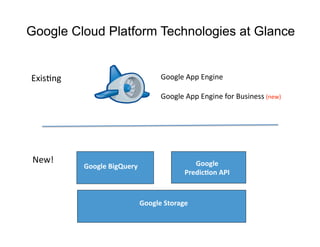
Google Cloud Platform Technologies at Glance


ExisFng                             Google App Engine 

                                    Google App Engine for Business (new) 


 New!                                         Google  
           Google BigQuery 
                                           Predic/on API 


                              Google Storage 
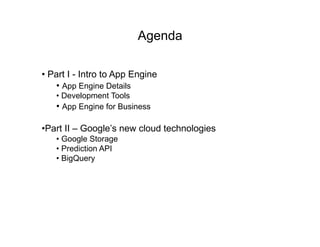
Agenda

•  Part I - Intro to App Engine
    •  App Engine Details
   •  Development Tools
   •  App Engine for Business

• Part II – Google’s new cloud technologies
   •  Google Storage
   •  Prediction API
   •  BigQuery
Part I – Intro to App Engine

Topics covered

•  App Engine a PaaS
•  App Engine usage/customers
•  App Engine Technical Details
Google App Engine
Build your own applications in Google's cloud
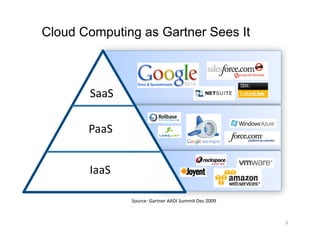
Cloud Computing as Gartner Sees It


       SaaS 

       PaaS 


       IaaS 

               Source: Gartner AADI Summit Dec 2009 


                                                       8 
Why Google App Engine?


  • Easy to build

  • Easy to maintain

  • Easy to scale


                         9
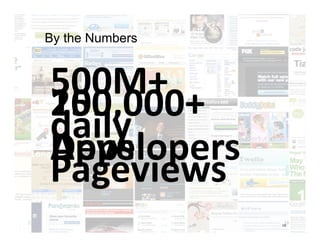
By the Numbers


500M+ 
100,000+ 
250,000+ 
daily 
Apps 
Developers 
Pageviews 
                  10
                 10
Some App Engine Partners


                           11 
App Engine Details


                     12
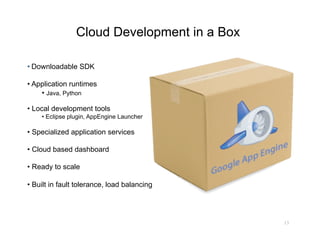
Cloud Development in a Box

•  Downloadable SDK

•  Application runtimes
     •  Java, Python

•  Local development tools
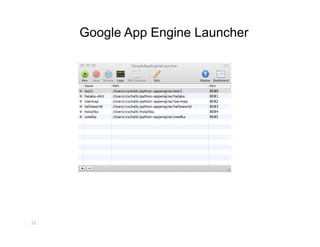
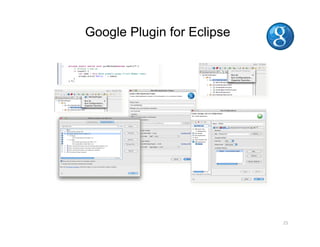
     •  Eclipse plugin, AppEngine Launcher

•  Specialized application services

•  Cloud based dashboard

•  Ready to scale

•  Built in fault tolerance, load balancing


                                              13
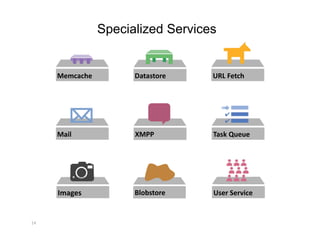
Specialized Services


      Memcache          Datastore    URL Fetch 


      Mail              XMPP         Task Queue 


      Images            Blobstore    User Service 


14 
Language Runtimes


                 Duke, the Java mascot 
                 Copyright © Sun Microsystems Inc., all rights reserved. 
15 
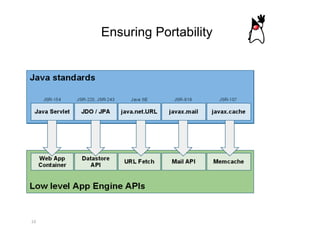
Ensuring Portability


16 
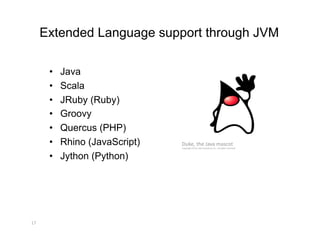
Extended Language support through JVM

       •    Java
       •    Scala
       •    JRuby (Ruby)
       •    Groovy
       •    Quercus (PHP)
       •    Rhino (JavaScript)   Duke, the Java mascot 
                                 Copyright © Sun Microsystems Inc., all rights reserved. 


       •    Jython (Python)


17 
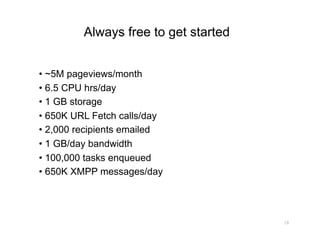
Always free to get started


•  ~5M pageviews/month
•  6.5 CPU hrs/day
•  1 GB storage
•  650K URL Fetch calls/day
•  2,000 recipients emailed
•  1 GB/day bandwidth
•  100,000 tasks enqueued
•  650K XMPP messages/day


                                      18
Application Platform Management


19 
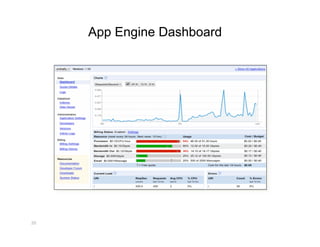
App Engine Dashboard


20 
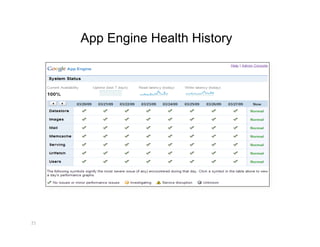
App Engine Health History


21 
Development Tools for App Engine


22 
Google App Engine Launcher


23 
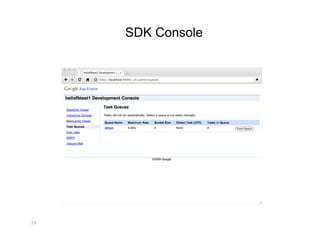
SDK Console


24 
Google Plugin for Eclipse


                            25 
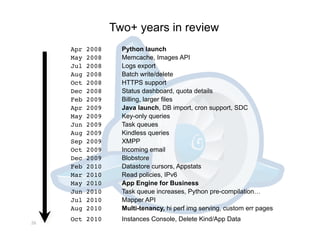
Two+ years in review
      Apr   2008
     Python launch
      May   2008
     Memcache, Images API
      Jul   2008
     Logs export
      Aug   2008
     Batch write/delete
      Oct   2008
     HTTPS support
      Dec   2008
     Status dashboard, quota details
      Feb   2009
     Billing, larger files
      Apr   2009
     Java launch, DB import, cron support, SDC
      May   2009
     Key-only queries
      Jun   2009
     Task queues
      Aug   2009
     Kindless queries
      Sep   2009
     XMPP
      Oct   2009
     Incoming email
      Dec   2009
     Blobstore
      Feb   2010
     Datastore cursors, Appstats
      Mar   2010
     Read policies, IPv6
      May   2010
     App Engine for Business
      Jun   2010
     Task queue increases, Python pre-compilation…
      Jul   2010
     Mapper API
      Aug   2010
     Multi-tenancy, hi perf img serving, custom err pages
      Oct 2010
       Instances Console, Delete Kind/App Data
26 
Introducing App Engine for Business


                 App Engine for Business

Same scalable cloud platform, but designed for the Enterprise


                                                                27
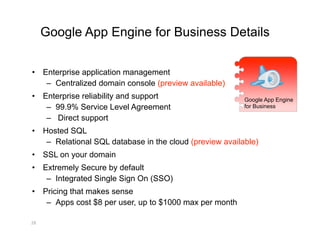
Google App Engine for Business Details

•  Enterprise application management
    –  Centralized domain console (preview available)
•  Enterprise reliability and support                      Google App Engine
    –  99.9% Service Level Agreement                       for Business

    –  Direct support
•  Hosted SQL
    –  Relational SQL database in the cloud (preview available)
•  SSL on your domain
•  Extremely Secure by default
    –  Integrated Single Sign On (SSO)
•  Pricing that makes sense
    –  Apps cost $8 per user, up to $1000 max per month

28 
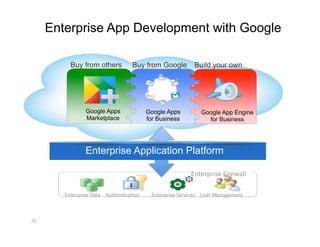
Enterprise App Development with Google

           Buy from others         Buy from Google          Build your own


                 Google Apps              Google Apps         Google App Engine
                 Marketplace              for Business          for Business


                 Enterprise Application Platform

                                                          Enterprise Firewall 

         Enterprise Data  AuthenFcaFon     Enterprise Services  User Management 


29 
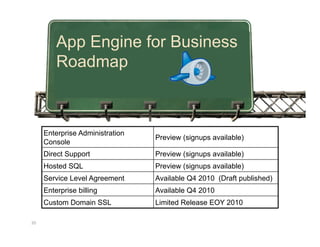
App Engine for Business
          Roadmap


      Enterprise Administration
                                  Preview (signups available)
      Console
      Direct Support              Preview (signups available)
      Hosted SQL                  Preview (signups available)
      Service Level Agreement     Available Q4 2010 (Draft published)
      Enterprise billing          Available Q4 2010
      Custom Domain SSL           Limited Release EOY 2010

30 
App Engine Resources


Get started with App Engine
•  http://code.google.com/appengine

Read up on App Engine for Business and become a trusted tester
•  http://code.google.com/appengine/business

•  bit.ly/gae4btt <- sign up!
Part II - Google’s new Cloud Technologies

Topics covered
•  Google Storage for Developers
•  Prediction API (machine learning)
•  BigQuery
Google Storage for Developers
        Store your data in Google's cloud
What Is Google Storage?


•  Store your data in Google's cloud 
   o  any format, any amount, any Fme 

•  You control access to your data 
   o  private, shared, or public 

•   Access via Google APIs or 3rd party tools/libraries 
Sample Use Cases

Static content hosting
e.g. static html, images, music, video

Backup and recovery
e.g. personal data, business records

Sharing
e.g. share data with your customers

Data storage for applications
e.g. used as storage backend for Android, AppEngine, Cloud based apps

Storage for Computation
e.g. BigQuery, Prediction API
Google Storage Benefits

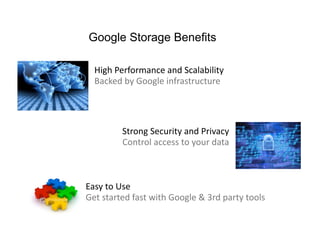
  High Performance and Scalability        
  Backed by Google infrastructure  


            Strong Security and Privacy 
            Control access to your data 


Easy to Use 
Get started fast with Google & 3rd party tools 
Google Storage Technical Details
•  RESTful API  
   o  Verbs: GET, PUT, POST, HEAD, DELETE  
   o  Resources: identified by URI 
   o  Compatible with S3  

•  Buckets  
   o  Flat containers  

•  Objects  
   o  Any type 
   o  Size: 100 GB / object 

•  Access Control for Google Accounts  
   o  For individuals and groups  

•  Two Ways to Authenticate Requests  
   o  Sign request using access keys  
   o  Web browser login
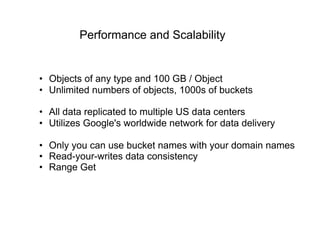
Performance and Scalability


•  Objects of any type and 100 GB / Object
•  Unlimited numbers of objects, 1000s of buckets

•  All data replicated to multiple US data centers
•  Utilizes Google's worldwide network for data delivery

•  Only you can use bucket names with your domain names
•  Read-your-writes data consistency
•  Range Get
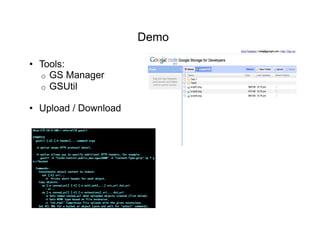
Demo

•  Tools:
   o  GS Manager
   o  GSUtil

•  Upload / Download
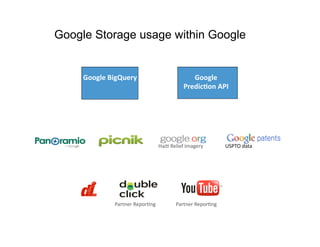
Google Storage usage within Google


     Google BigQuery                           Google  
                                            Predic/on API 


                                  HaiF Relief Imagery        USPTO data 


              Partner ReporFng           Partner ReporFng 
Some Early Google Storage Adopters 
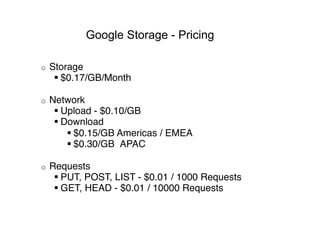
Google Storage - Pricing

o    Storage 
       $0.17/GB/Month 

o    Network 
       Upload - $0.10/GB 
       Download 
          $0.15/GB Americas / EMEA 
          $0.30/GB  APAC 

o    Requests 
       PUT, POST, LIST - $0.01 / 1000 Requests 
       GET, HEAD - $0.01 / 10000 Requests
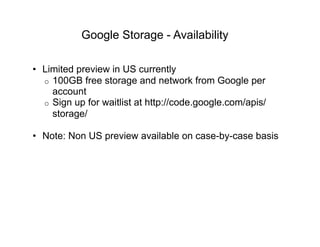
Google Storage - Availability

•  Limited preview in US currently
   o  100GB free storage and network from Google per
      account
   o  Sign up for waitlist at http://code.google.com/apis/
      storage/

•  Note: Non US preview available on case-by-case basis
Google Prediction API
Google's prediction engine in the cloud
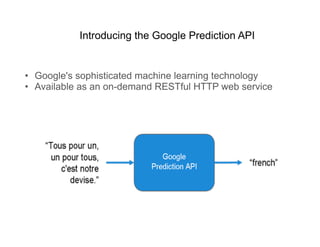
Introducing the Google Prediction API


•  Google's sophisticated machine learning technology
•  Available as an on-demand RESTful HTTP web service
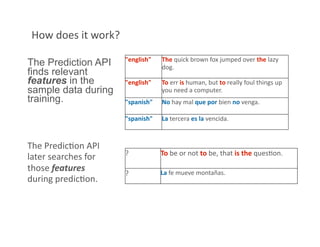
How does it work? 
                      "english"    The quick brown fox jumped over the lazy 
The Prediction API                 dog. 
finds relevant
features in the       "english"    To err is human, but to really foul things up 
sample data during                 you need a computer. 
training.             "spanish"    No hay mal que por bien no venga. 

                      "spanish"    La tercera es la vencida. 


The PredicFon API 
                      ?            To be or not to be, that is the quesFon. 
later searches for 
those features        ?            La fe mueve montañas. 
during predicFon. 
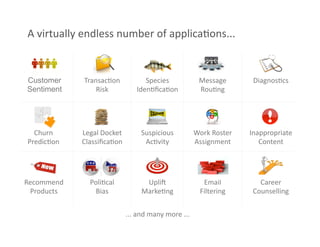
A virtually endless number of applicaFons... 


Customer     TransacFon            Species             Message        DiagnosFcs 
Sentiment        Risk           IdenFficaFon            RouFng 


  Churn      Legal Docket         Suspicious          Work Roster    Inappropriate 
PredicFon    ClassificaFon          AcFvity            Assignment        Content 


Recommend      PoliFcal            Uplij                Email           Career 
 Products       Bias              MarkeFng             Filtering      Counselling 


                             ... and many more ... 
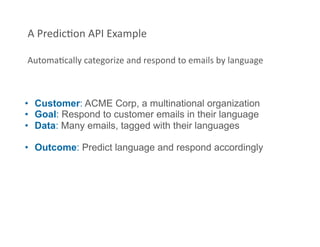
A PredicFon API Example 

AutomaFcally categorize and respond to emails by language 


•  Customer: ACME Corp, a multinational organization
•  Goal: Respond to customer emails in their language
•  Data: Many emails, tagged with their languages

•  Outcome: Predict language and respond accordingly
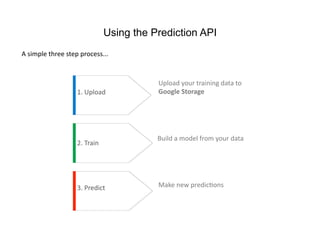
Using the Prediction API
A simple three step process... 


                                          Upload your training data to 
                   1. Upload              Google Storage  


                                          Build a model from your data 
                   2. Train 


                   3. Predict             Make new predicFons 
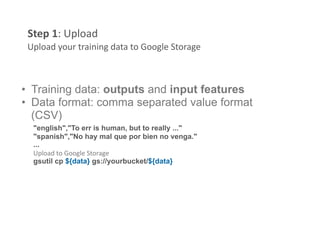
Step 1: Upload 
 Upload your training data to Google Storage 


•  Training data: outputs and input features
•  Data format: comma separated value format
   (CSV)
  "english","To err is human, but to really ..." 
  "spanish","No hay mal que por bien no venga." 
  ...
  Upload to Google Storage 
  gsutil cp ${data} gs://yourbucket/${data}
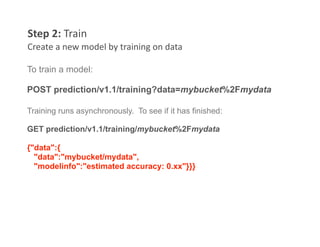
Step 2: Train 
Create a new model by training on data 

To train a model:

POST prediction/v1.1/training?data=mybucket%2Fmydata

Training runs asynchronously. To see if it has finished:

GET prediction/v1.1/training/mybucket%2Fmydata

{"data":{
  "data":"mybucket/mydata",
  "modelinfo":"estimated accuracy: 0.xx"}}}
Step 3: Predict 
 Apply the trained model to make predicFons on new data 


POST prediction/v1.1/query/mybucket%2Fmydata/predict
{ "data":{
   "input": { "text" : [
    "J'aime X! C'est le meilleur" ]}}}
Step 3: Predict 
Apply the trained model to make predicFons on new data 

POST prediction/v1.1/query/mybucket%2Fmydata/predict

{ "data":{
   "input": { "text" : [
    "J'aime X! C'est le meilleur" ]}}}

{ data : {
  "kind" : "prediction#output",
  "outputLabel":"French",
  "outputMulti" :[
    {"label":"French", "score": x.xx}
    {"label":"English", "score": x.xx}
    {"label":"Spanish", "score": x.xx}]}}
Step 3: Predict 
Apply the trained model to make predicFons on new data 
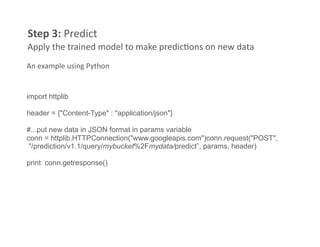
An example using Python 


import httplib

header = {"Content-Type" : "application/json"}

#...put new data in JSON format in params variable
conn = httplib.HTTPConnection("www.googleapis.com")conn.request("POST",
 "/prediction/v1.1/query/mybucket%2Fmydata/predict”, params, header)

print conn.getresponse()
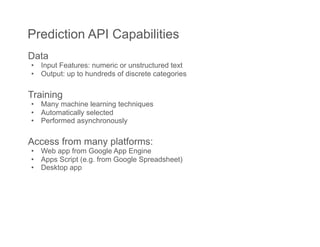
Prediction API Capabilities
Data
•  Input Features: numeric or unstructured text
•  Output: up to hundreds of discrete categories

Training
•  Many machine learning techniques
•  Automatically selected
•  Performed asynchronously

Access from many platforms:
•  Web app from Google App Engine
•  Apps Script (e.g. from Google Spreadsheet)
•  Desktop app
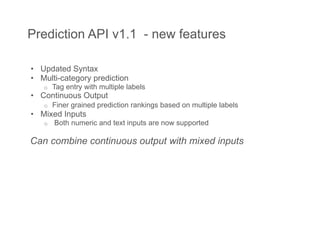
Prediction API v1.1 - new features

•  Updated Syntax
•  Multi-category prediction
   o    Tag entry with multiple labels
•  Continuous Output
   o    Finer grained prediction rankings based on multiple labels
•  Mixed Inputs
   o    Both numeric and text inputs are now supported

Can combine continuous output with mixed inputs
Google BigQuery
Interactive analysis of large datasets in Google's cloud
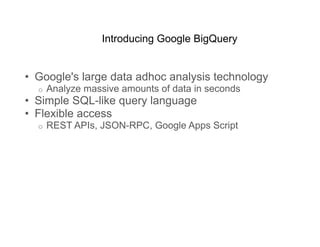
Introducing Google BigQuery


•  Google's large data adhoc analysis technology
  o    Analyze massive amounts of data in seconds
•  Simple SQL-like query language
•  Flexible access
  o    REST APIs, JSON-RPC, Google Apps Script
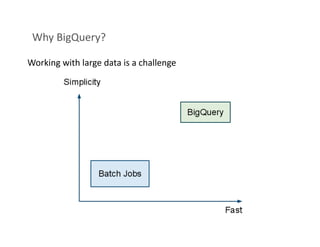
Why BigQuery?  

Working with large data is a challenge 
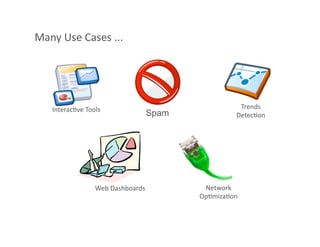
Many Use Cases ... 


   InteracFve Tools                              Trends 
                               Spam             DetecFon 


                 Web Dashboards        Network 
                                      OpFmizaFon 
Key CapabiliFes of BigQuery 


 •  Scalable: Billions of rows
 •  Fast: Response in seconds

 •  Simple: Queries in SQL

 •  Web Service
    o  REST
    o  JSON-RPC
    o  Google App Scripts
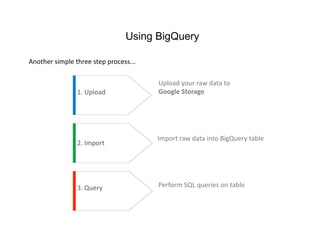
Using BigQuery

Another simple three step process... 

                                        Upload your raw data to 
                1. Upload               Google Storage  


                                        Import raw data into BigQuery table 
                2. Import 


                3. Query                Perform SQL queries on table 
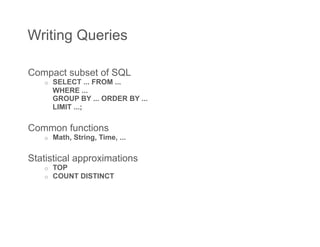
Writing Queries

Compact subset of SQL
   o    SELECT ... FROM ...
        WHERE ...
        GROUP BY ... ORDER BY ...
        LIMIT ...;

Common functions
   o    Math, String, Time, ...

Statistical approximations
   o    TOP
   o    COUNT DISTINCT
BigQuery via REST
GET /bigquery/v1/tables/{table name}

GET /bigquery/v1/query?q={query}

Sample JSON Reply:
{
    "results": {
      "fields": { [
        {"id":"COUNT(*)","type":"uint64"}, ... ]
      },
      "rows": [
        {"f":[{"v":"2949"}, ...]},
        {"f":[{"v":"5387"}, ...]}, ... ]
    }
}

Also supports JSON-RPC
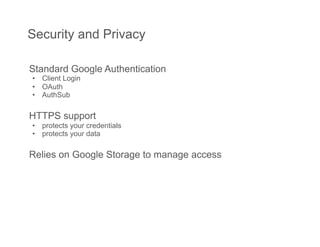
Security and Privacy

Standard Google Authentication
•  Client Login
•  OAuth
•  AuthSub

HTTPS support
•  protects your credentials
•  protects your data

Relies on Google Storage to manage access
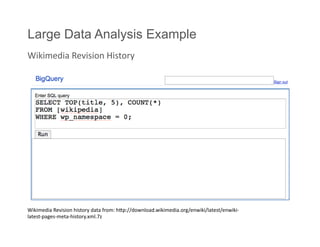
Large Data Analysis Example
Wikimedia Revision History 


Wikimedia Revision history data from: hmp://download.wikimedia.org/enwiki/latest/enwiki‐
latest‐pages‐meta‐history.xml.7z 
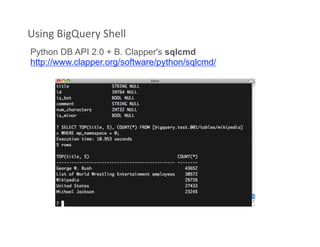
Using BigQuery Shell 
Python DB API 2.0 + B. Clapper's sqlcmd
http://www.clapper.org/software/python/sqlcmd/
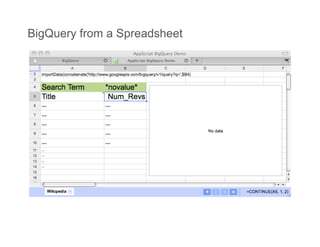
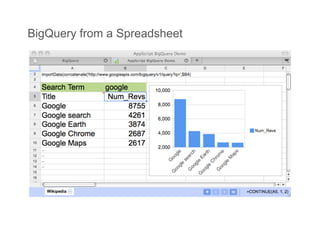
BigQuery from a Spreadsheet
Further info available at: 


•  Google Storage for Developers
   o  http://code.google.com/apis/storage

•  Prediction API
    o  http://code.google.com/apis/predict

•  BigQuery
    o  http://code.google.com/apis/bigquery
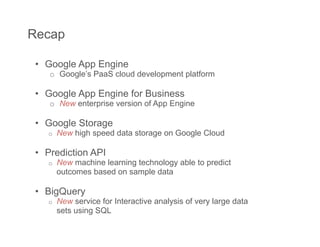
Recap

 •  Google App Engine
    o  Google’s PaaS cloud development platform

 •  Google App Engine for Business
    o  New enterprise version of App Engine

 •  Google Storage
    o    New high speed data storage on Google Cloud

 •  Prediction API
    o    New machine learning technology able to predict
         outcomes based on sample data

 •  BigQuery
    o    New service for Interactive analysis of very large data
         sets using SQL
Q&A
Thank You!

Chris Schalk
Google Developer
Advocate

http://twitter.com/cschalk

Introduction to Google Cloud Platform Technologies

  • 1.
    Introduction to Google’sCloud Platform Technologies Chris Schalk  Cloudstock  Google Developer Advocate  Monday Dec 6th, 2010 
  • 2.
  • 3.
  • 4.
    Google Cloud PlatformTechnologies at Glance ExisFng  Google App Engine  Google App Engine for Business (new)  New!  Google   Google BigQuery  Predic/on API  Google Storage 
  • 5.
    Agenda •  Part I- Intro to App Engine •  App Engine Details •  Development Tools •  App Engine for Business • Part II – Google’s new cloud technologies •  Google Storage •  Prediction API •  BigQuery
  • 6.
    Part I –Intro to App Engine Topics covered •  App Engine a PaaS •  App Engine usage/customers •  App Engine Technical Details
  • 7.
    Google App Engine Buildyour own applications in Google's cloud
  • 8.
    Cloud Computing asGartner Sees It SaaS  PaaS  IaaS  Source: Gartner AADI Summit Dec 2009  8 
  • 9.
    Why Google AppEngine? • Easy to build • Easy to maintain • Easy to scale 9
  • 10.
  • 11.
    Some App EnginePartners 11 
  • 12.
  • 13.
    Cloud Development ina Box •  Downloadable SDK •  Application runtimes •  Java, Python •  Local development tools •  Eclipse plugin, AppEngine Launcher •  Specialized application services •  Cloud based dashboard •  Ready to scale •  Built in fault tolerance, load balancing 13
  • 14.
    Specialized Services Memcache  Datastore  URL Fetch  Mail  XMPP  Task Queue  Images  Blobstore  User Service  14 
  • 15.
    Language Runtimes Duke, the Java mascot  Copyright © Sun Microsystems Inc., all rights reserved.  15 
  • 16.
  • 17.
    Extended Language supportthrough JVM •  Java •  Scala •  JRuby (Ruby) •  Groovy •  Quercus (PHP) •  Rhino (JavaScript) Duke, the Java mascot  Copyright © Sun Microsystems Inc., all rights reserved.  •  Jython (Python) 17 
  • 18.
    Always free toget started •  ~5M pageviews/month •  6.5 CPU hrs/day •  1 GB storage •  650K URL Fetch calls/day •  2,000 recipients emailed •  1 GB/day bandwidth •  100,000 tasks enqueued •  650K XMPP messages/day 18
  • 19.
  • 20.
  • 21.
    App Engine HealthHistory 21 
  • 22.
    Development Tools forApp Engine 22 
  • 23.
    Google App EngineLauncher 23 
  • 24.
  • 25.
    Google Plugin forEclipse 25 
  • 26.
    Two+ years inreview Apr 2008 Python launch May 2008 Memcache, Images API Jul 2008 Logs export Aug 2008 Batch write/delete Oct 2008 HTTPS support Dec 2008 Status dashboard, quota details Feb 2009 Billing, larger files Apr 2009 Java launch, DB import, cron support, SDC May 2009 Key-only queries Jun 2009 Task queues Aug 2009 Kindless queries Sep 2009 XMPP Oct 2009 Incoming email Dec 2009 Blobstore Feb 2010 Datastore cursors, Appstats Mar 2010 Read policies, IPv6 May 2010 App Engine for Business Jun 2010 Task queue increases, Python pre-compilation… Jul 2010 Mapper API Aug 2010 Multi-tenancy, hi perf img serving, custom err pages Oct 2010 Instances Console, Delete Kind/App Data 26 
  • 27.
    Introducing App Enginefor Business App Engine for Business Same scalable cloud platform, but designed for the Enterprise 27
  • 28.
    Google App Enginefor Business Details •  Enterprise application management –  Centralized domain console (preview available) •  Enterprise reliability and support Google App Engine –  99.9% Service Level Agreement for Business –  Direct support •  Hosted SQL –  Relational SQL database in the cloud (preview available) •  SSL on your domain •  Extremely Secure by default –  Integrated Single Sign On (SSO) •  Pricing that makes sense –  Apps cost $8 per user, up to $1000 max per month 28 
  • 29.
    Enterprise App Developmentwith Google Buy from others Buy from Google Build your own Google Apps Google Apps Google App Engine Marketplace for Business for Business Enterprise Application Platform Enterprise Firewall  Enterprise Data  AuthenFcaFon  Enterprise Services  User Management  29 
  • 30.
    App Engine forBusiness Roadmap Enterprise Administration Preview (signups available) Console Direct Support Preview (signups available) Hosted SQL Preview (signups available) Service Level Agreement Available Q4 2010 (Draft published) Enterprise billing Available Q4 2010 Custom Domain SSL Limited Release EOY 2010 30 
  • 31.
    App Engine Resources Getstarted with App Engine •  http://code.google.com/appengine Read up on App Engine for Business and become a trusted tester •  http://code.google.com/appengine/business •  bit.ly/gae4btt <- sign up!
  • 32.
    Part II -Google’s new Cloud Technologies Topics covered •  Google Storage for Developers •  Prediction API (machine learning) •  BigQuery
  • 33.
    Google Storage forDevelopers Store your data in Google's cloud
  • 34.
    What Is GoogleStorage? •  Store your data in Google's cloud  o  any format, any amount, any Fme  •  You control access to your data  o  private, shared, or public  •   Access via Google APIs or 3rd party tools/libraries 
  • 35.
    Sample Use Cases Staticcontent hosting e.g. static html, images, music, video Backup and recovery e.g. personal data, business records Sharing e.g. share data with your customers Data storage for applications e.g. used as storage backend for Android, AppEngine, Cloud based apps Storage for Computation e.g. BigQuery, Prediction API
  • 36.
    Google Storage Benefits High Performance and Scalability         Backed by Google infrastructure   Strong Security and Privacy          Control access to your data  Easy to Use  Get started fast with Google & 3rd party tools 
  • 37.
    Google Storage TechnicalDetails •  RESTful API   o  Verbs: GET, PUT, POST, HEAD, DELETE   o  Resources: identified by URI  o  Compatible with S3   •  Buckets   o  Flat containers   •  Objects   o  Any type  o  Size: 100 GB / object  •  Access Control for Google Accounts   o  For individuals and groups   •  Two Ways to Authenticate Requests   o  Sign request using access keys   o  Web browser login
  • 38.
    Performance and Scalability • Objects of any type and 100 GB / Object •  Unlimited numbers of objects, 1000s of buckets •  All data replicated to multiple US data centers •  Utilizes Google's worldwide network for data delivery •  Only you can use bucket names with your domain names •  Read-your-writes data consistency •  Range Get
  • 39.
    Demo •  Tools: o  GS Manager o  GSUtil •  Upload / Download
  • 40.
    Google Storage usagewithin Google Google BigQuery  Google   Predic/on API  HaiF Relief Imagery  USPTO data  Partner ReporFng  Partner ReporFng 
  • 41.
  • 42.
    Google Storage -Pricing o  Storage   $0.17/GB/Month  o  Network   Upload - $0.10/GB   Download   $0.15/GB Americas / EMEA   $0.30/GB  APAC  o  Requests   PUT, POST, LIST - $0.01 / 1000 Requests   GET, HEAD - $0.01 / 10000 Requests
  • 43.
    Google Storage -Availability •  Limited preview in US currently o  100GB free storage and network from Google per account o  Sign up for waitlist at http://code.google.com/apis/ storage/ •  Note: Non US preview available on case-by-case basis
  • 44.
    Google Prediction API Google'sprediction engine in the cloud
  • 45.
    Introducing the GooglePrediction API •  Google's sophisticated machine learning technology •  Available as an on-demand RESTful HTTP web service
  • 46.
    How does it work?  "english"  The quick brown fox jumped over the lazy  The Prediction API dog.  finds relevant features in the "english"  To err is human, but to really foul things up  sample data during you need a computer.  training. "spanish"  No hay mal que por bien no venga.  "spanish"  La tercera es la vencida.  The PredicFon API  ?  To be or not to be, that is the quesFon.  later searches for  those features  ?  La fe mueve montañas.  during predicFon. 
  • 47.
    A virtually endless number of applicaFons...  Customer TransacFon  Species  Message  DiagnosFcs  Sentiment Risk  IdenFficaFon  RouFng  Churn  Legal Docket  Suspicious  Work Roster  Inappropriate  PredicFon  ClassificaFon  AcFvity  Assignment  Content  Recommend  PoliFcal  Uplij  Email  Career  Products  Bias  MarkeFng  Filtering  Counselling  ... and many more ... 
  • 48.
    A PredicFon API Example  AutomaFcally categorize and respond to emails by language  •  Customer: ACMECorp, a multinational organization •  Goal: Respond to customer emails in their language •  Data: Many emails, tagged with their languages •  Outcome: Predict language and respond accordingly
  • 49.
    Using the PredictionAPI A simple three step process...  Upload your training data to  1. Upload  Google Storage   Build a model from your data  2. Train  3. Predict  Make new predicFons 
  • 50.
    Step 1: Upload  Upload your training data to Google Storage  •  Trainingdata: outputs and input features •  Data format: comma separated value format (CSV) "english","To err is human, but to really ..."  "spanish","No hay mal que por bien no venga."  ... Upload to Google Storage  gsutil cp ${data} gs://yourbucket/${data}
  • 51.
    Step 2: Train  Create a new model by training on data  To train amodel: POST prediction/v1.1/training?data=mybucket%2Fmydata Training runs asynchronously. To see if it has finished: GET prediction/v1.1/training/mybucket%2Fmydata {"data":{ "data":"mybucket/mydata", "modelinfo":"estimated accuracy: 0.xx"}}}
  • 52.
  • 53.
    Step 3: Predict  Apply the trained model to make predicFons on new data  POST prediction/v1.1/query/mybucket%2Fmydata/predict { "data":{ "input": { "text" : [ "J'aime X! C'est le meilleur" ]}}} { data : { "kind" : "prediction#output", "outputLabel":"French", "outputMulti" :[ {"label":"French", "score": x.xx} {"label":"English", "score": x.xx} {"label":"Spanish", "score": x.xx}]}}
  • 54.
    Step 3: Predict  Apply the trained model to make predicFons on new data  An example using Python  import httplib header ={"Content-Type" : "application/json"} #...put new data in JSON format in params variable conn = httplib.HTTPConnection("www.googleapis.com")conn.request("POST", "/prediction/v1.1/query/mybucket%2Fmydata/predict”, params, header) print conn.getresponse()
  • 55.
    Prediction API Capabilities Data • Input Features: numeric or unstructured text •  Output: up to hundreds of discrete categories Training •  Many machine learning techniques •  Automatically selected •  Performed asynchronously Access from many platforms: •  Web app from Google App Engine •  Apps Script (e.g. from Google Spreadsheet) •  Desktop app
  • 56.
    Prediction API v1.1- new features •  Updated Syntax •  Multi-category prediction o  Tag entry with multiple labels •  Continuous Output o  Finer grained prediction rankings based on multiple labels •  Mixed Inputs o  Both numeric and text inputs are now supported Can combine continuous output with mixed inputs
  • 57.
    Google BigQuery Interactive analysisof large datasets in Google's cloud
  • 58.
    Introducing Google BigQuery • Google's large data adhoc analysis technology o  Analyze massive amounts of data in seconds •  Simple SQL-like query language •  Flexible access o  REST APIs, JSON-RPC, Google Apps Script
  • 59.
  • 60.
    Many Use Cases ...  InteracFve Tools  Trends  Spam DetecFon  Web Dashboards  Network  OpFmizaFon 
  • 61.
    Key CapabiliFes of BigQuery  •  Scalable:Billions of rows •  Fast: Response in seconds •  Simple: Queries in SQL •  Web Service o  REST o  JSON-RPC o  Google App Scripts
  • 62.
    Using BigQuery Another simple three step process...  Upload your raw data to  1. Upload  Google Storage   Import raw data into BigQuery table  2. Import  3. Query  Perform SQL queries on table 
  • 63.
    Writing Queries Compact subsetof SQL o  SELECT ... FROM ... WHERE ... GROUP BY ... ORDER BY ... LIMIT ...; Common functions o  Math, String, Time, ... Statistical approximations o  TOP o  COUNT DISTINCT
  • 64.
    BigQuery via REST GET/bigquery/v1/tables/{table name} GET /bigquery/v1/query?q={query} Sample JSON Reply: { "results": { "fields": { [ {"id":"COUNT(*)","type":"uint64"}, ... ] }, "rows": [ {"f":[{"v":"2949"}, ...]}, {"f":[{"v":"5387"}, ...]}, ... ] } } Also supports JSON-RPC
  • 65.
    Security and Privacy StandardGoogle Authentication •  Client Login •  OAuth •  AuthSub HTTPS support •  protects your credentials •  protects your data Relies on Google Storage to manage access
  • 66.
    Large Data AnalysisExample Wikimedia Revision History  Wikimedia Revision history data from: hmp://download.wikimedia.org/enwiki/latest/enwiki‐ latest‐pages‐meta‐history.xml.7z 
  • 67.
    Using BigQuery Shell  Python DB API2.0 + B. Clapper's sqlcmd http://www.clapper.org/software/python/sqlcmd/
  • 68.
    BigQuery from aSpreadsheet
  • 69.
    BigQuery from aSpreadsheet
  • 70.
    Further info available at:  •  Google Storagefor Developers o  http://code.google.com/apis/storage •  Prediction API o  http://code.google.com/apis/predict •  BigQuery o  http://code.google.com/apis/bigquery
  • 71.
    Recap •  GoogleApp Engine o  Google’s PaaS cloud development platform •  Google App Engine for Business o  New enterprise version of App Engine •  Google Storage o  New high speed data storage on Google Cloud •  Prediction API o  New machine learning technology able to predict outcomes based on sample data •  BigQuery o  New service for Interactive analysis of very large data sets using SQL
  • 72.
  • 73.
    Thank You! Chris Schalk GoogleDeveloper Advocate http://twitter.com/cschalk