VDI-in-One-Server

Deskpool

VDI solution for SMB

Simple:Very easy deployment and management
Professional:Open architecture for various hypervisors
Cost Efficient:Really cheaper than PC solution

www.jieyung.com
Content

1

Why VDI

2

Deskpool VDI Solution

3

Why Deskpool VDI

4

Deskpool VDI for SMB
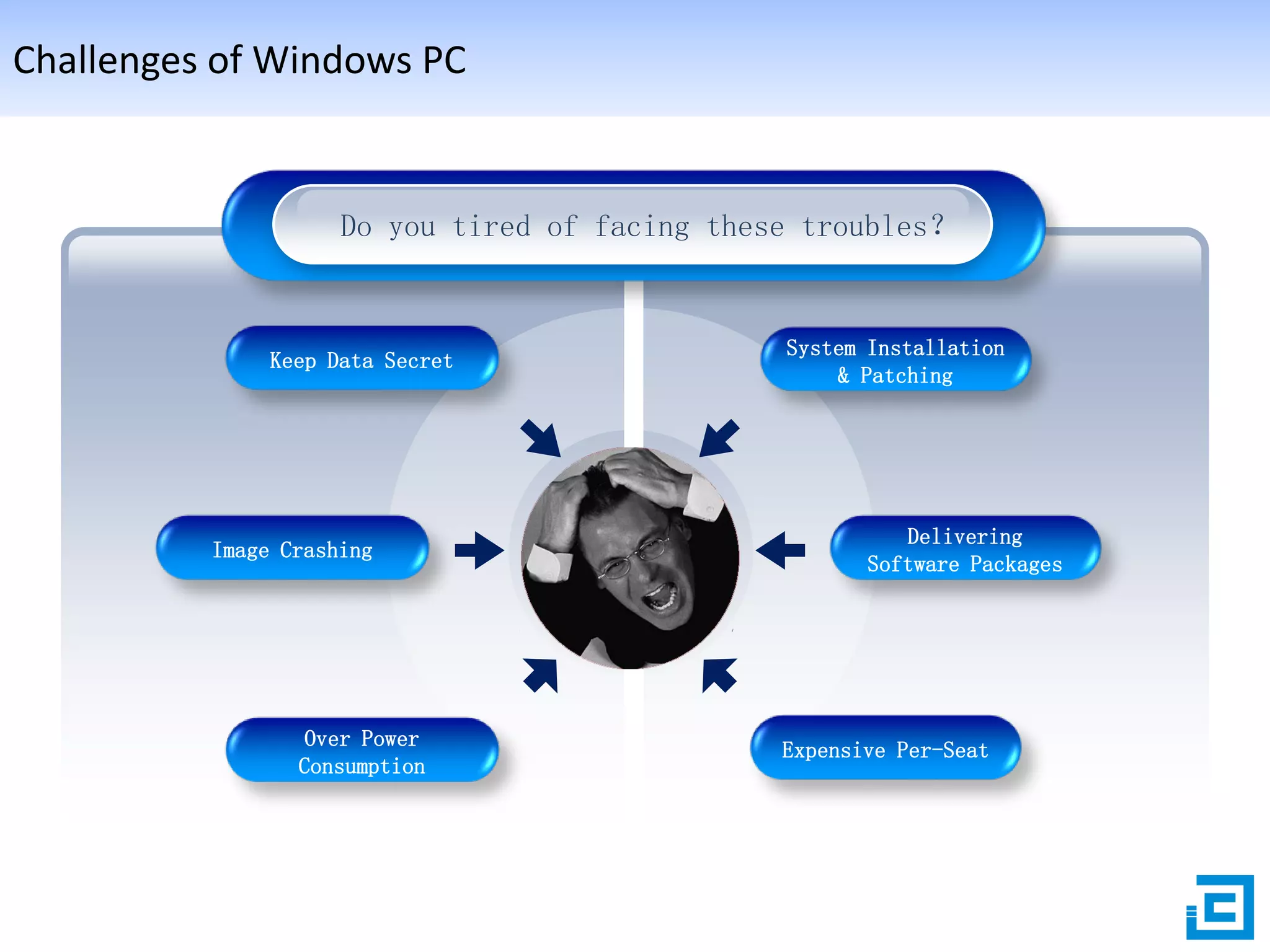
Challenges of Windows PC

Do you tired of facing these troubles?

Keep Data Secret

Image Crashing

Over Power
Consumption

System Installation
& Patching

Delivering
Software Packages

Expensive Per-Seat
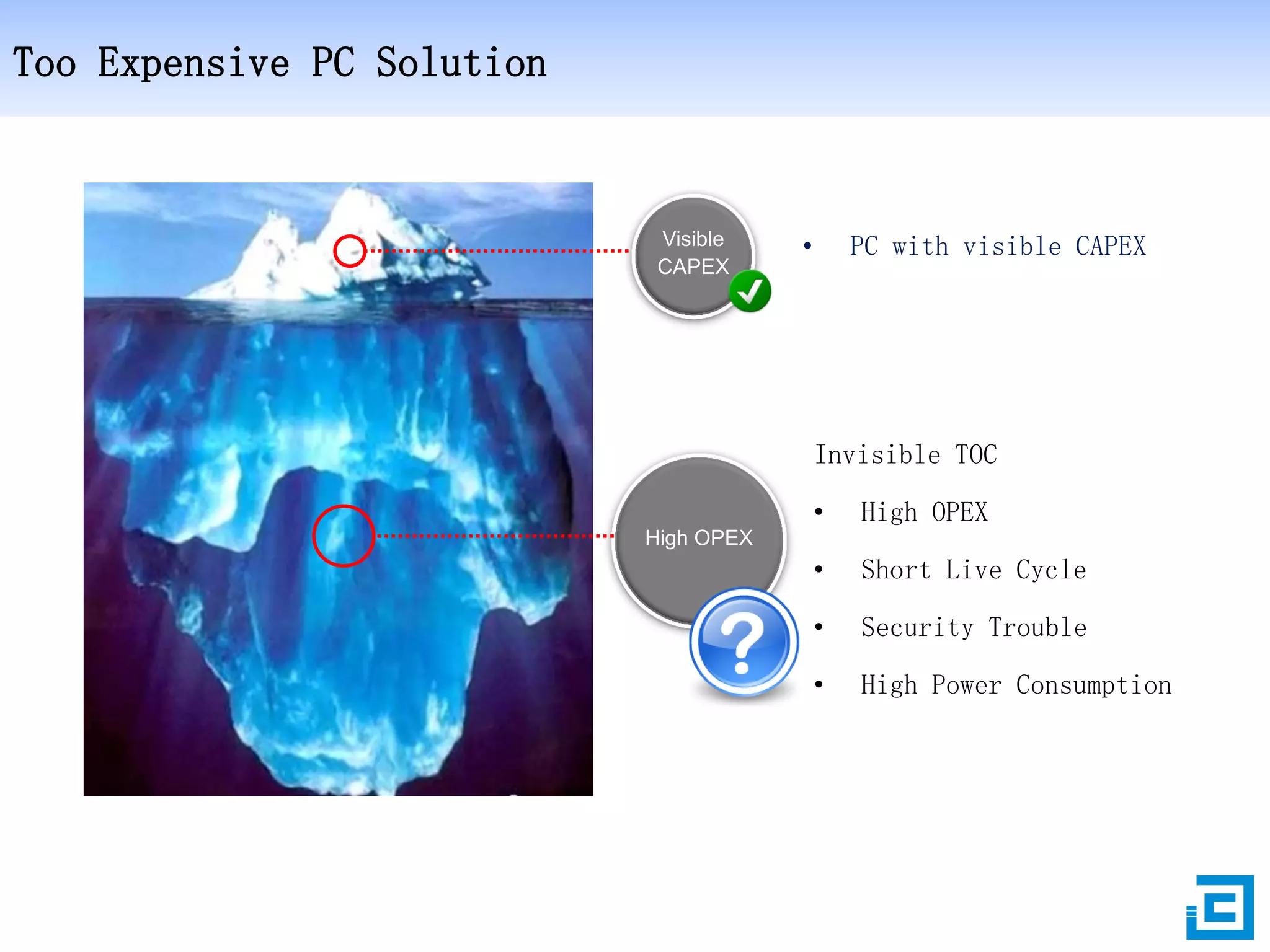
Too Expensive PC Solution

Visible
CAPEX

•

PC with visible CAPEX

Invisible TOC
•

High OPEX

•

Short Live Cycle

•

Security Trouble

•

High Power Consumption

High OPEX
Benefits from hosted VDI
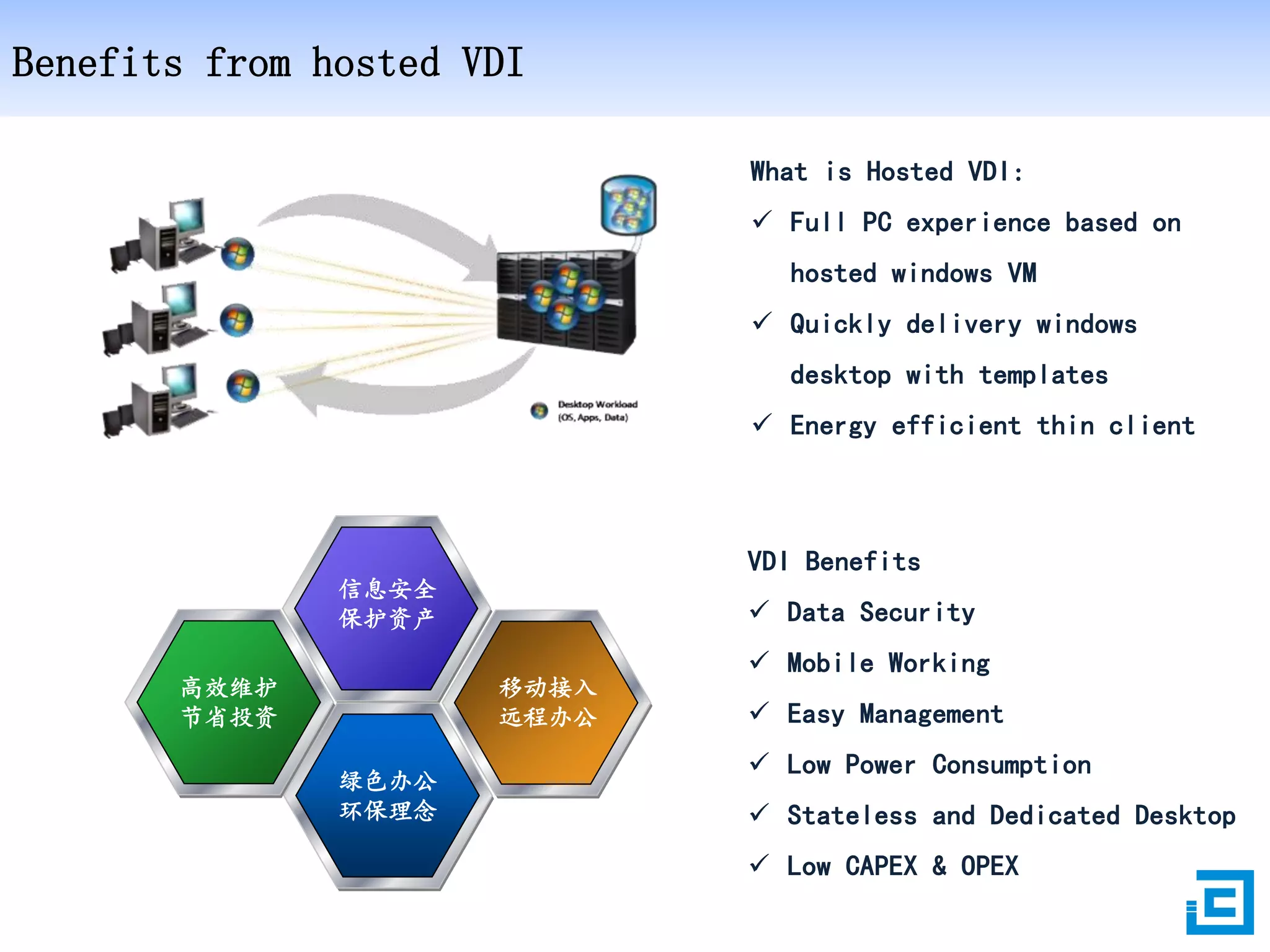
What is Hosted VDI:
 Full PC experience based on
hosted windows VM
 Quickly delivery windows
desktop with templates
 Energy efficient thin client

VDI Benefits
信息安全
保护资产

高效维护
节省投资

 Data Security
移动接入
远程办公

绿色办公
环保理念

 Mobile Working
 Easy Management
 Low Power Consumption
 Stateless and Dedicated Desktop
 Low CAPEX & OPEX
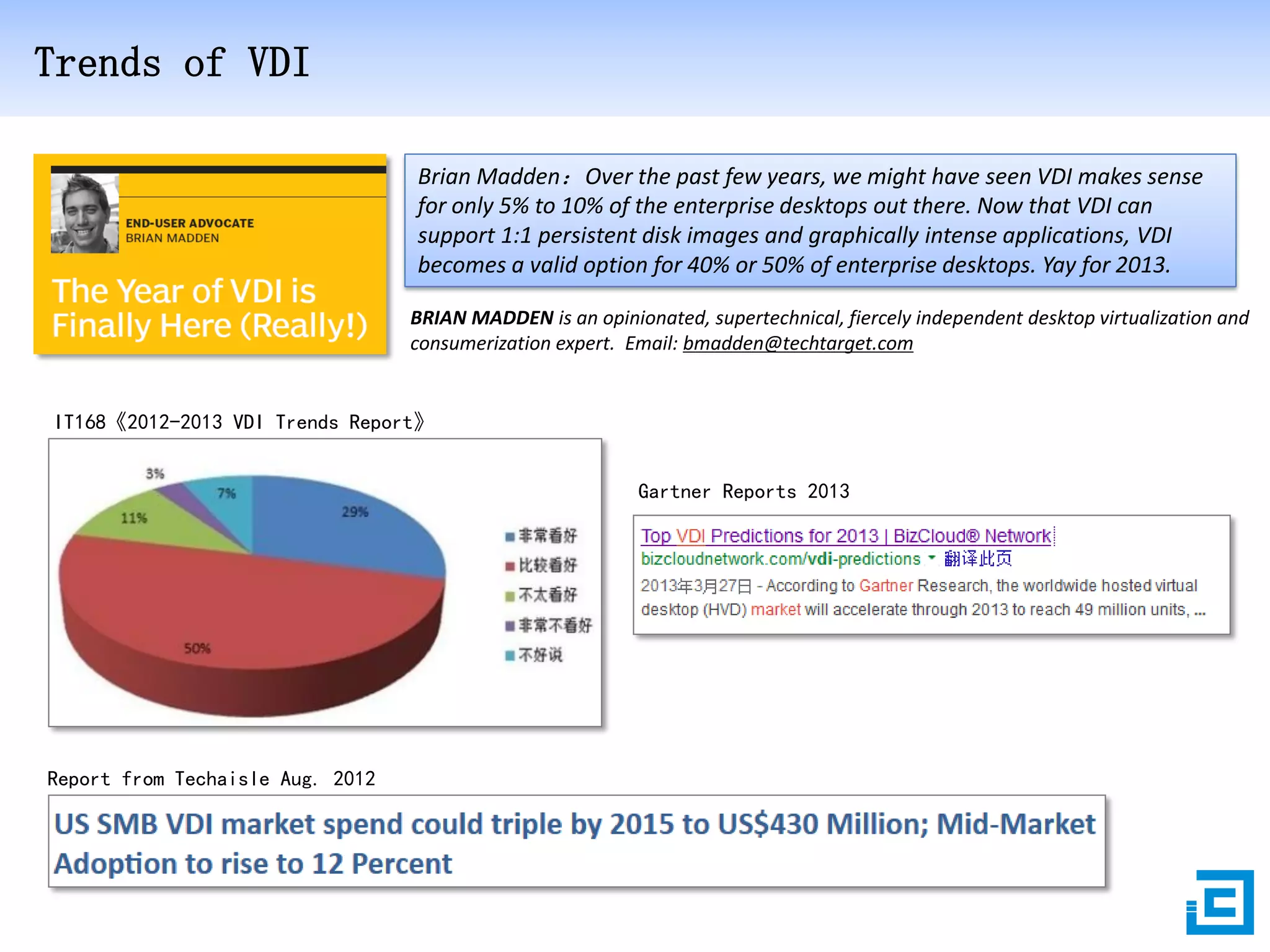
Trends of VDI
Brian Madden:Over the past few years, we might have seen VDI makes sense
for only 5% to 10% of the enterprise desktops out there. Now that VDI can
support 1:1 persistent disk images and graphically intense applications, VDI
becomes a valid option for 40% or 50% of enterprise desktops. Yay for 2013.
BRIAN MADDEN is an opinionated, supertechnical, fiercely independent desktop virtualization and
consumerization expert. Email: bmadden@techtarget.com

IT168《2012-2013 VDI Trends Report》
Gartner Reports 2013

Report from Techaisle Aug. 2012
Content

1

Why VDI

2

Deskpool VDI Solution

3

Why Deskpool VDI

4

Deskpool VDI for SMB
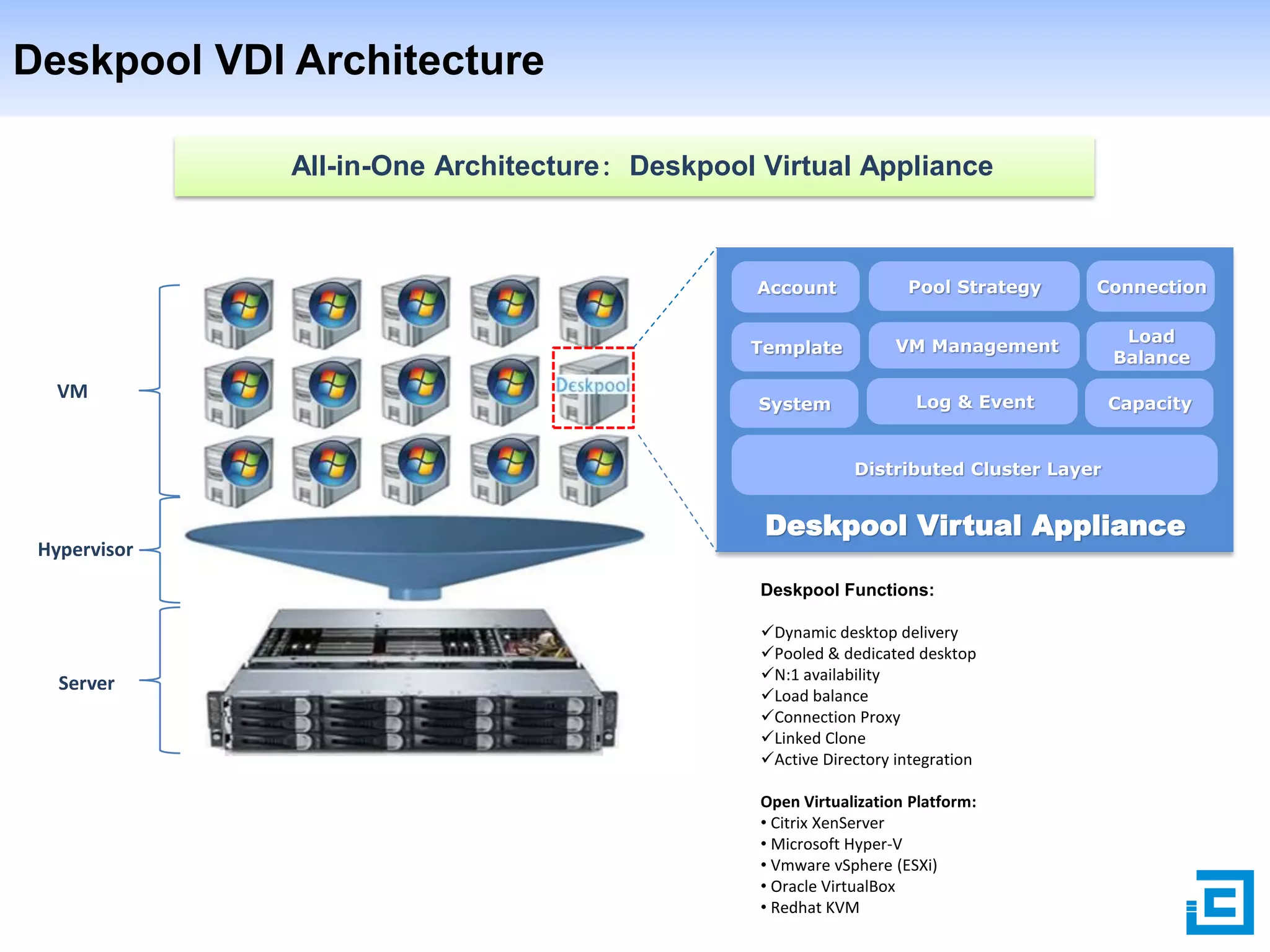
Deskpool VDI Architecture
All-in-One Architecture: Deskpool Virtual Appliance

Account

Connection

Template

VM

Pool Strategy
VM Management

Load
Balance

System

Log & Event

Capacity

Distributed Cluster Layer

Hypervisor

Deskpool Virtual Appliance
Deskpool Functions:

Server

Dynamic desktop delivery
Pooled & dedicated desktop
N:1 availability
Load balance
Connection Proxy
Linked Clone
Active Directory integration
Open Virtualization Platform:
• Citrix XenServer
• Microsoft Hyper-V
• Vmware vSphere (ESXi)
• Oracle VirtualBox
• Redhat KVM
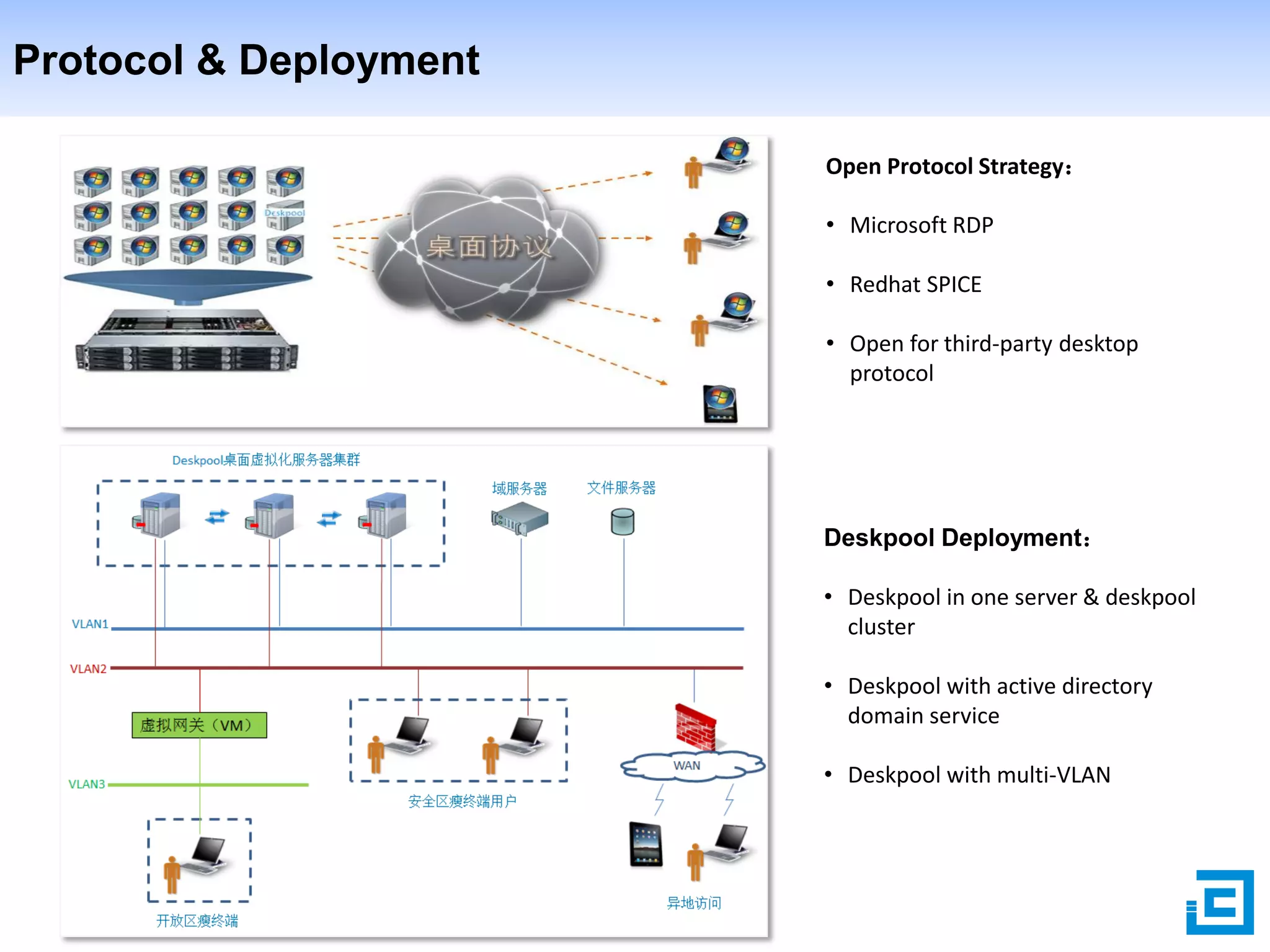
Protocol & Deployment
Open Protocol Strategy:

• Microsoft RDP
• Redhat SPICE
• Open for third-party desktop
protocol

Deskpool Deployment:
• Deskpool in one server & deskpool
cluster
• Deskpool with active directory
domain service
• Deskpool with multi-VLAN
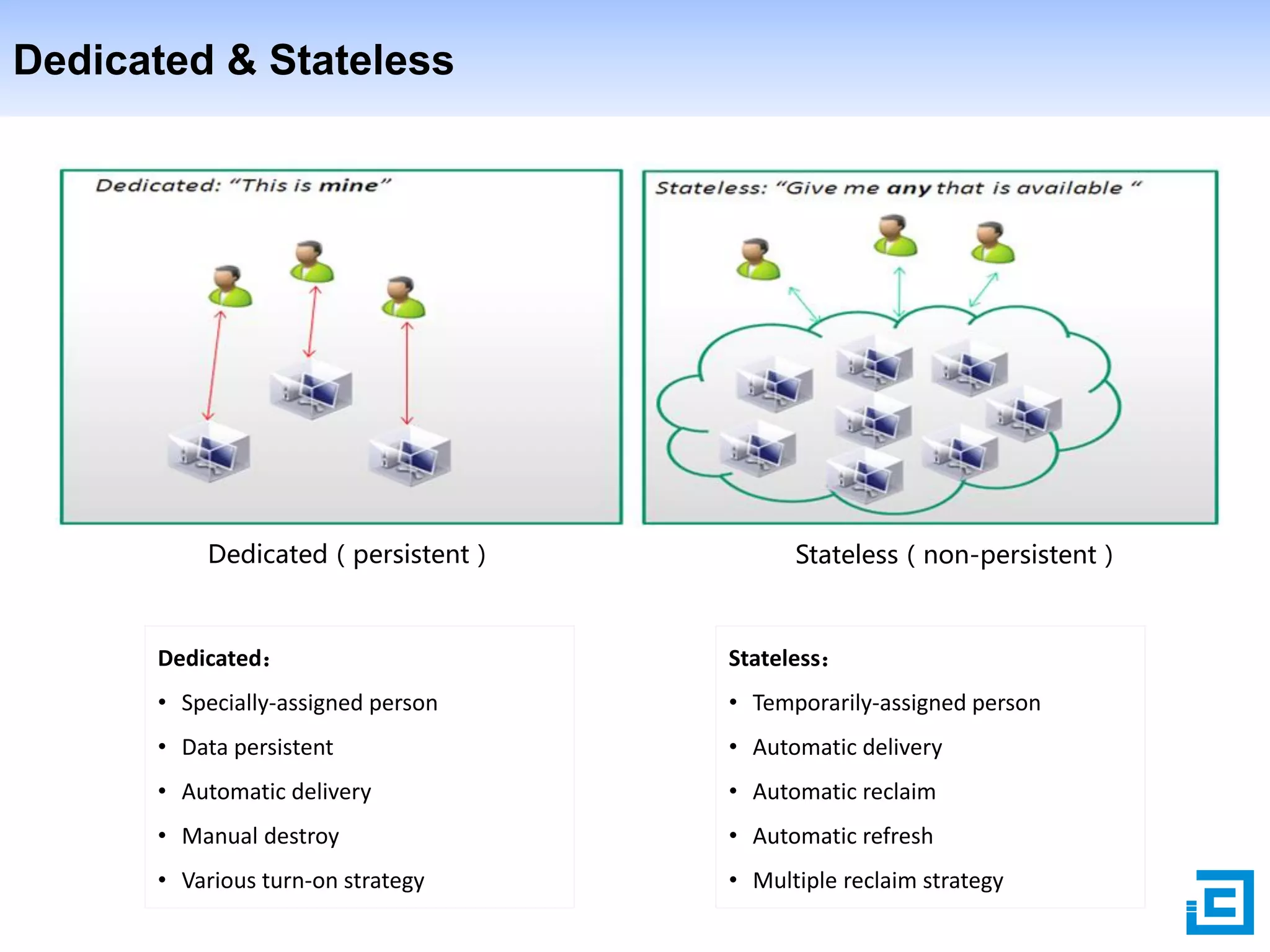
Dedicated & Stateless

Dedicated(persistent)

Stateless(non-persistent)

Dedicated:

Stateless:

• Specially-assigned person

• Temporarily-assigned person

• Data persistent

• Automatic delivery

• Automatic delivery

• Automatic reclaim

• Manual destroy

• Automatic refresh

• Various turn-on strategy

• Multiple reclaim strategy
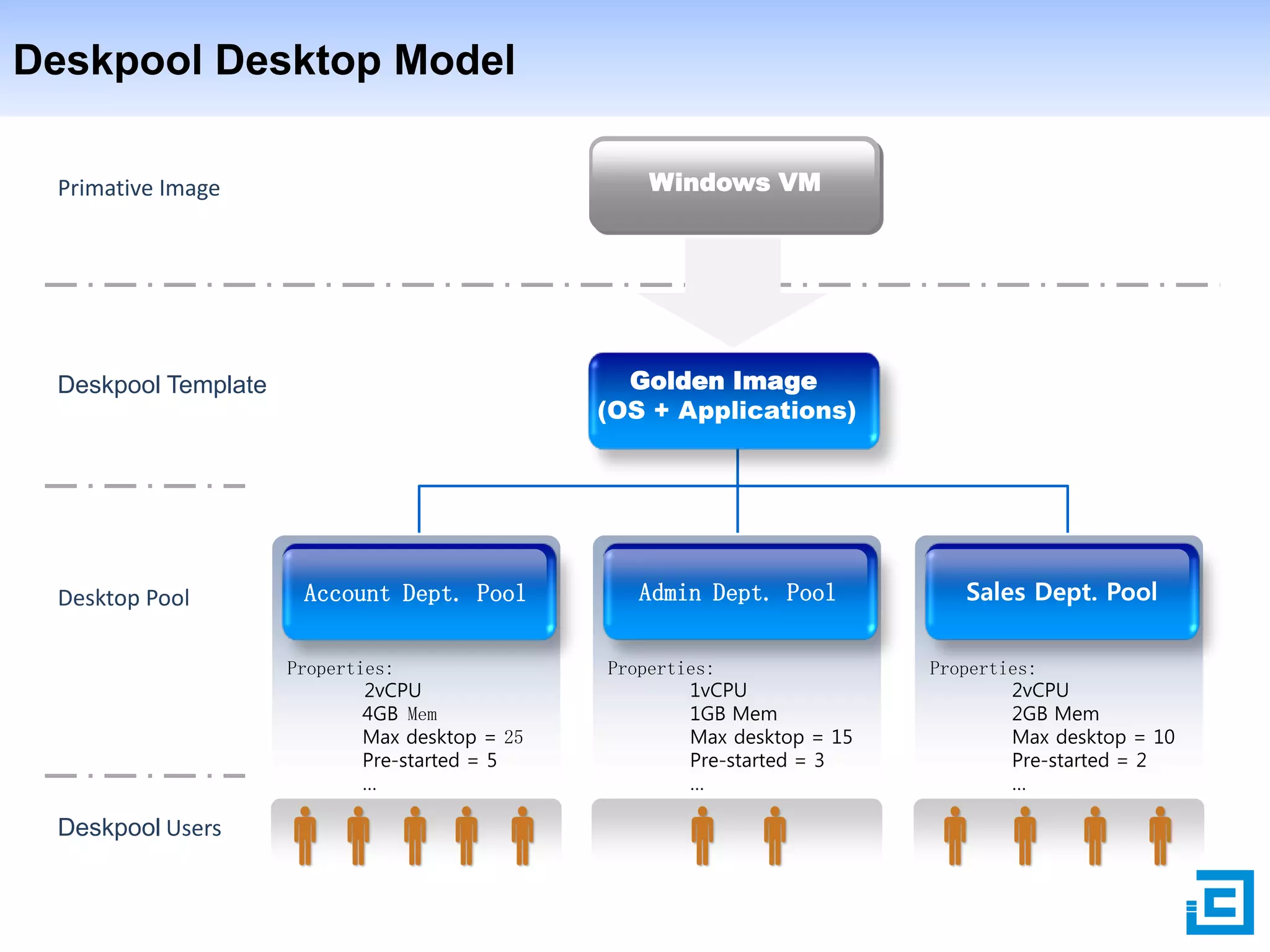
Deskpool Desktop Model
Windows VM

Primative Image

Golden Image
(OS + Applications)

Deskpool Template

Desktop Pool

Account Dept. Pool
Properties:
2vCPU
4GB Mem
Max desktop = 25
Pre-started = 5
…

Deskpool Users

Admin Dept. Pool
Properties:
1vCPU
1GB Mem
Max desktop = 15
Pre-started = 3
…

Sales Dept. Pool
Properties:
2vCPU
2GB Mem
Max desktop = 10
Pre-started = 2
…
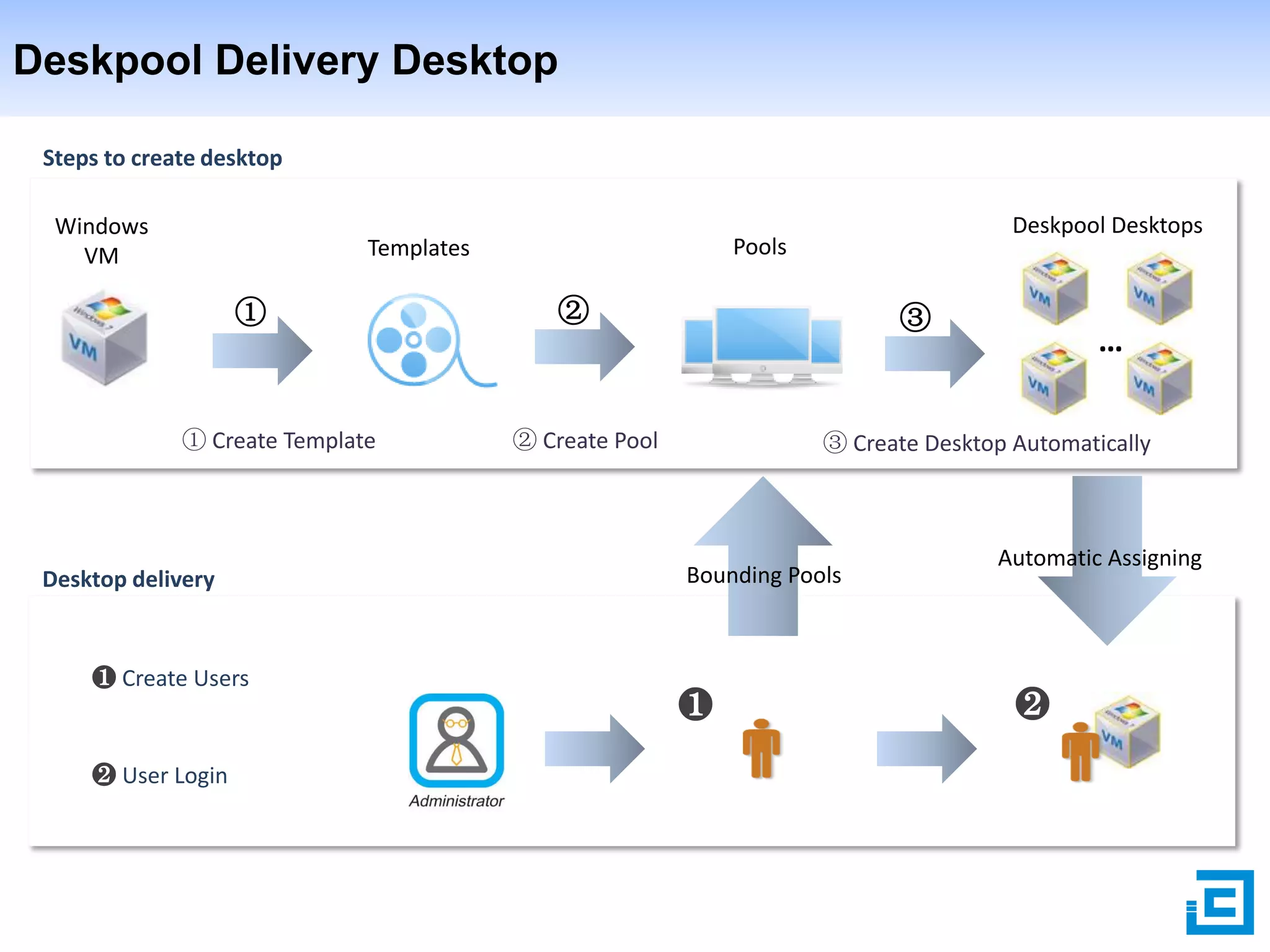
Deskpool Delivery Desktop
Steps to create desktop
Windows
VM

①

① Create Template

Desktop delivery

❶ Create Users

❷ User Login

Deskpool Desktops

Pools

Templates

②

③

② Create Pool

…

③ Create Desktop Automatically

Bounding Pools

❶

Automatic Assigning

❷
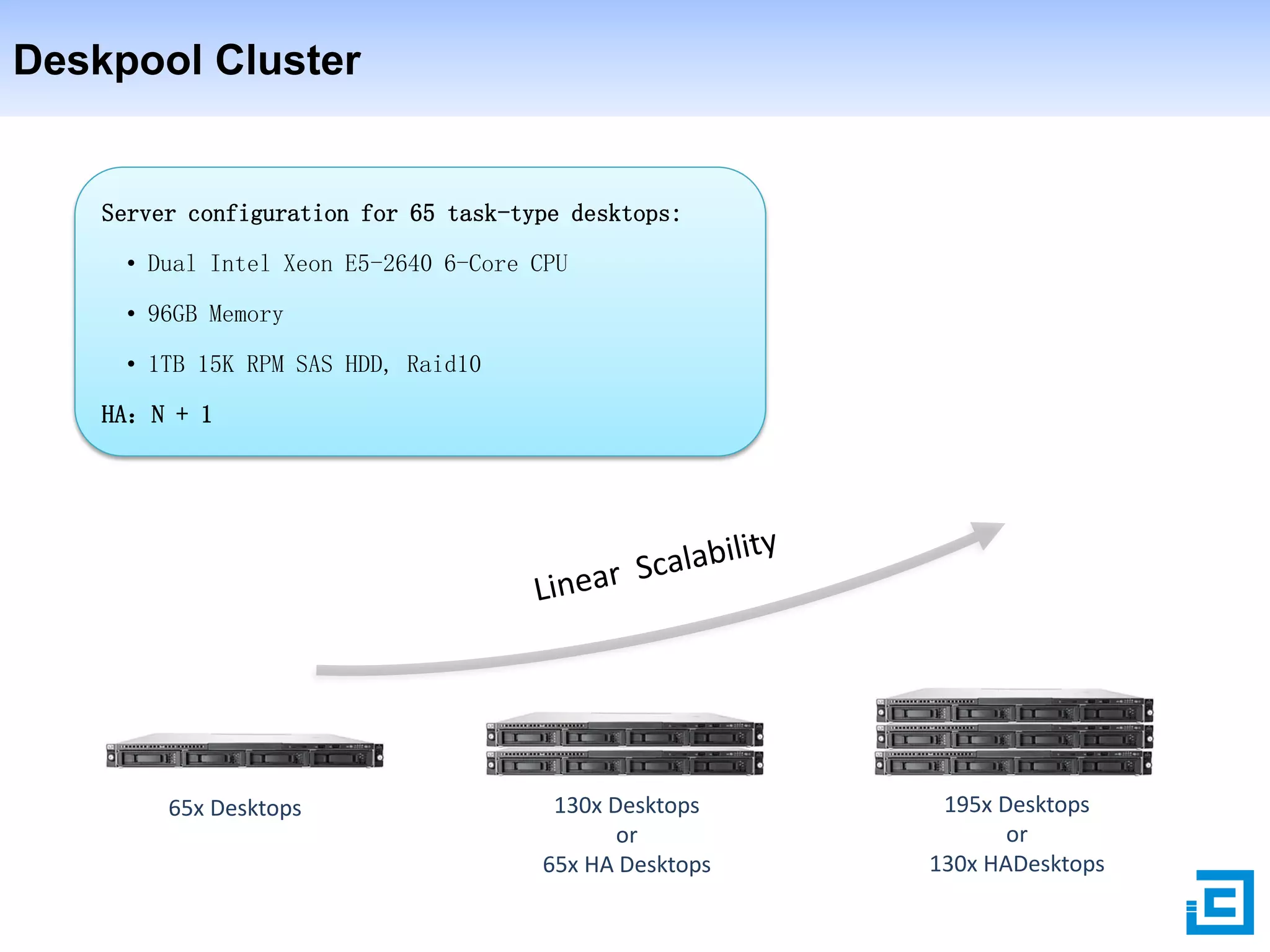
Deskpool Cluster

Server configuration for 65 task-type desktops:
• Dual Intel Xeon E5-2640 6-Core CPU
• 96GB Memory
• 1TB 15K RPM SAS HDD, Raid10
HA:N + 1

65x Desktops

130x Desktops
or
65x HA Desktops

195x Desktops
or
130x HADesktops
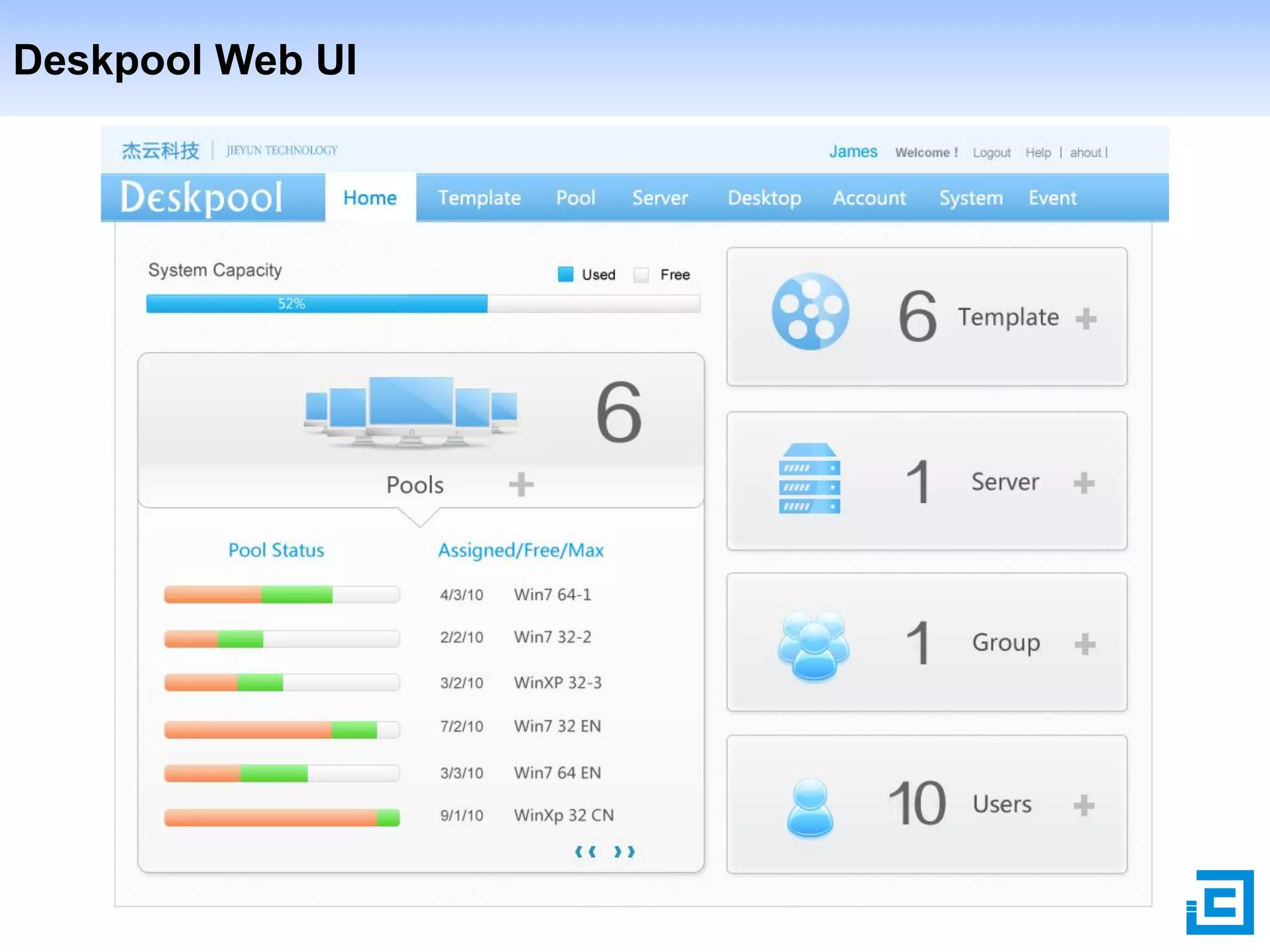
Deskpool Web UI
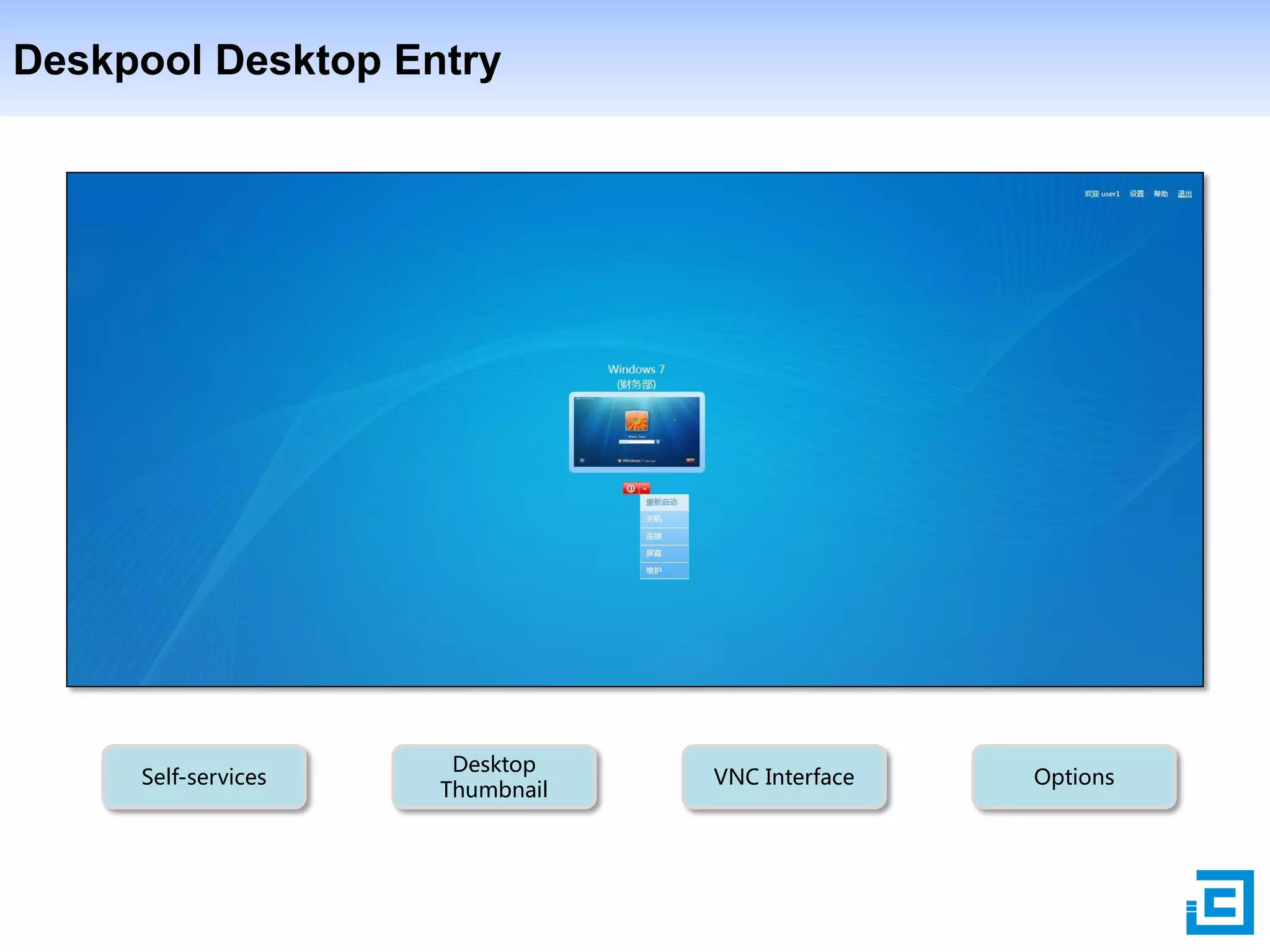
Deskpool Desktop Entry

Self-services

Desktop
Thumbnail

VNC Interface

Options
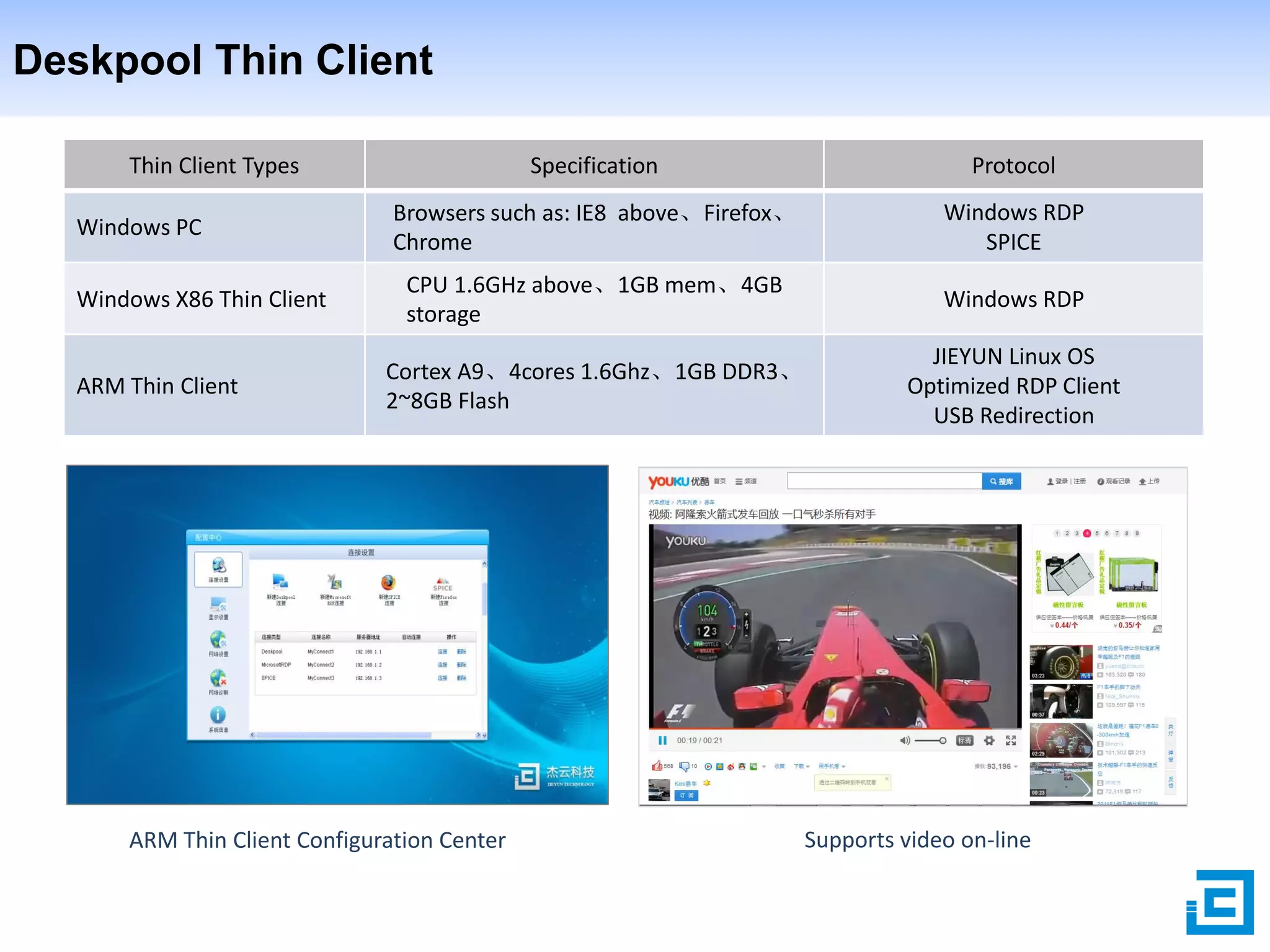
Deskpool Thin Client
Thin Client Types
Windows PC
Windows X86 Thin Client

ARM Thin Client

Specification

Protocol

Browsers such as: IE8 above、Firefox、
Chrome

Windows RDP
SPICE

CPU 1.6GHz above、1GB mem、4GB
storage

Windows RDP

Cortex A9、4cores 1.6Ghz、1GB DDR3、
2~8GB Flash

JIEYUN Linux OS
Optimized RDP Client
USB Redirection

ARM Thin Client Configuration Center

Supports video on-line
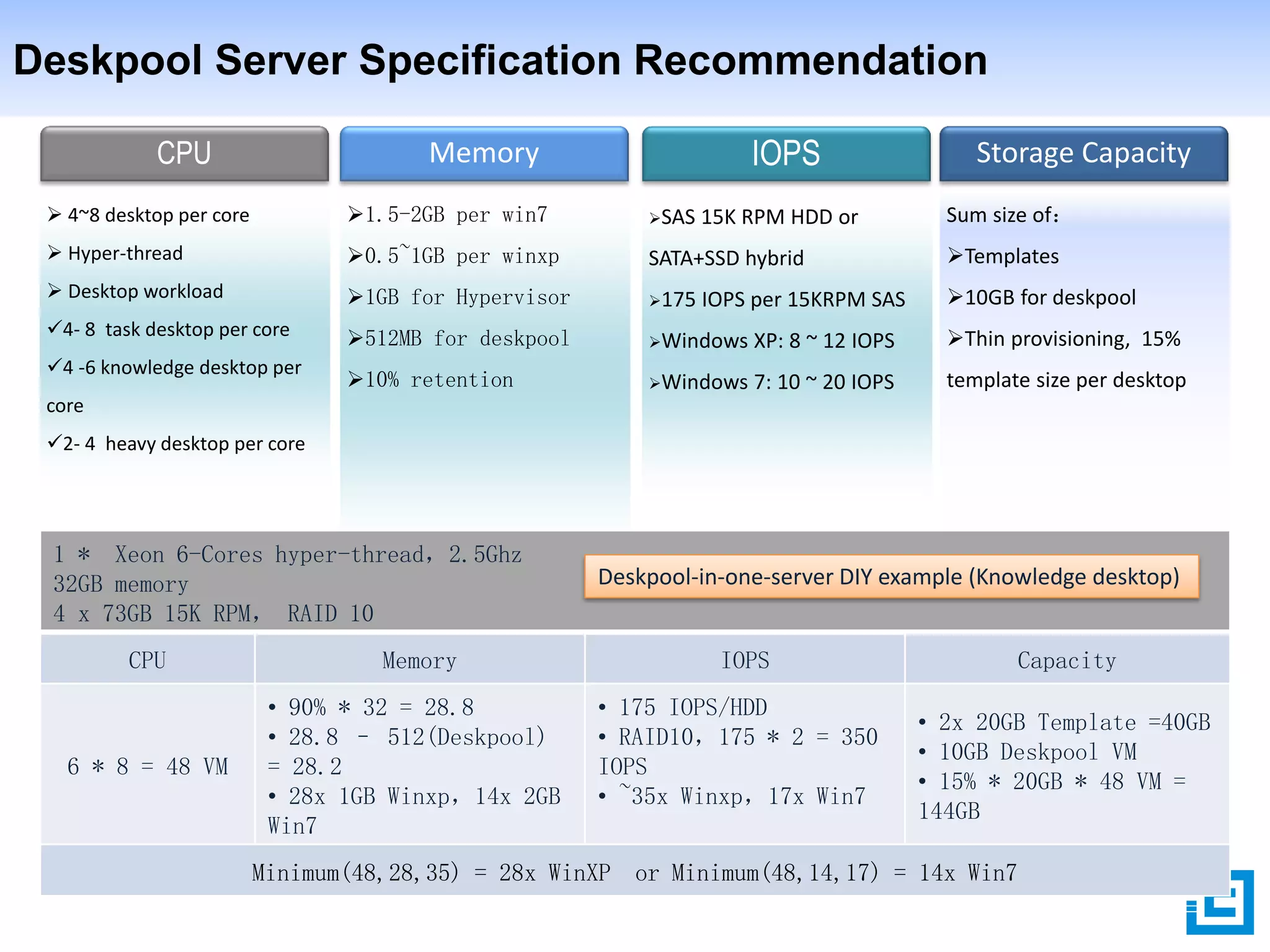
Deskpool Server Specification Recommendation
CPU

IOPS

Memory

Storage Capacity

 4~8 desktop per core

1.5-2GB per win7

SAS

 Hyper-thread

0.5~1GB per winxp

SATA+SSD hybrid

Templates

 Desktop workload

1GB for Hypervisor

175

10GB for deskpool

4- 8 task desktop per core

512MB for deskpool

Windows

XP: 8 ~ 12 IOPS

Thin provisioning, 15%

10% retention

Windows

7: 10 ~ 20 IOPS

template size per desktop

4 -6 knowledge desktop per

15K RPM HDD or

IOPS per 15KRPM SAS

Sum size of:

core
2- 4 heavy desktop per core

1 * Xeon 6-Cores hyper-thread,2.5Ghz
32GB memory
4 x 73GB 15K RPM, RAID 10

Deskpool-in-one-server DIY example (Knowledge desktop)

CPU

Memory

IOPS

6 * 8 = 48 VM

• 90% * 32 = 28.8
• 28.8 – 512(Deskpool)
= 28.2
• 28x 1GB Winxp,14x 2GB
Win7

• 175 IOPS/HDD
• RAID10,175 * 2 = 350
IOPS
• ~35x Winxp,17x Win7

Capacity
• 2x 20GB Template =40GB
• 10GB Deskpool VM
• 15% * 20GB * 48 VM =
144GB

Minimum(48,28,35) = 28x WinXP or Minimum(48,14,17) = 14x Win7
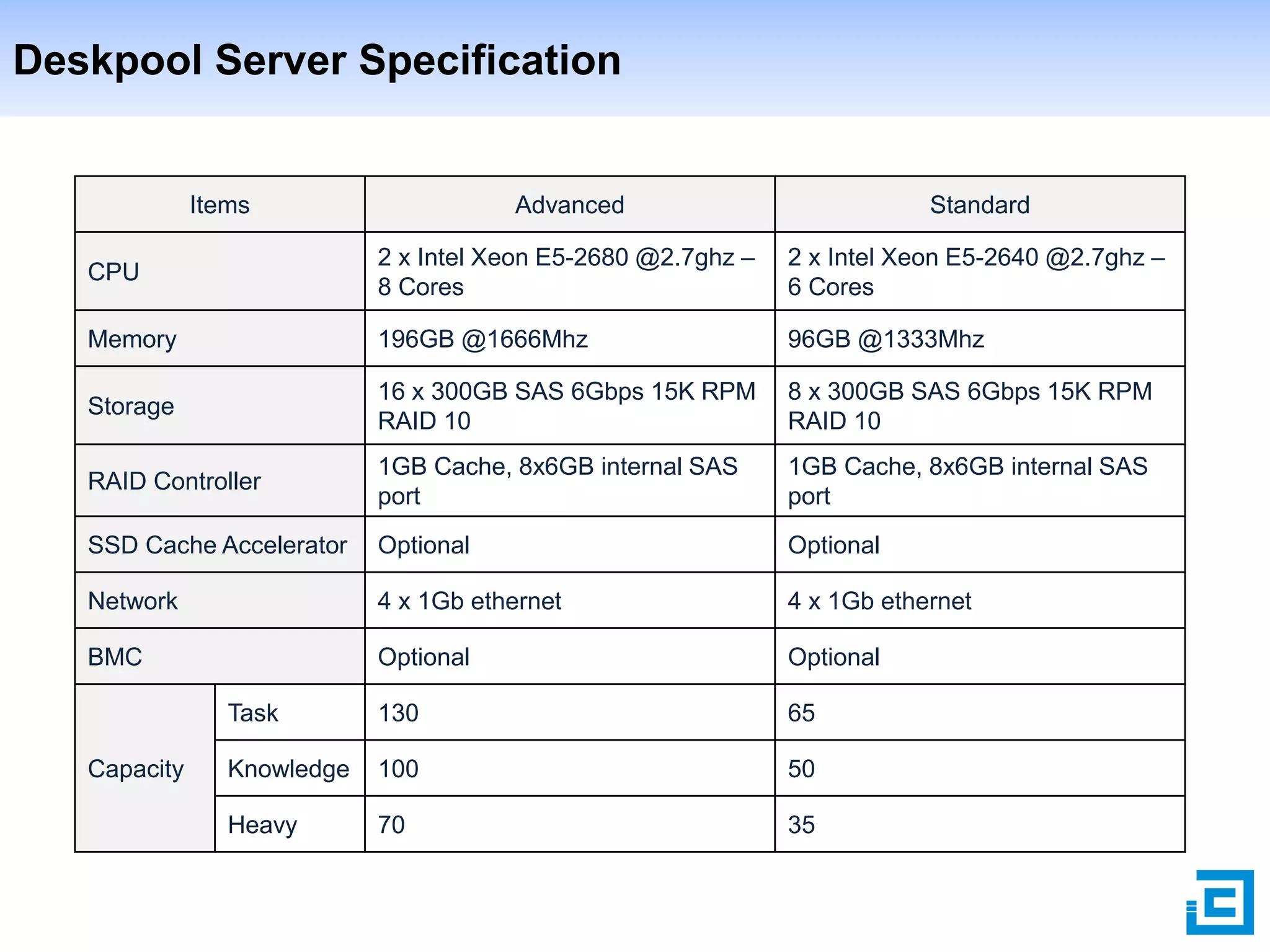
Deskpool Server Specification

Items

Advanced

Standard

CPU

2 x Intel Xeon E5-2680 @2.7ghz –
8 Cores

2 x Intel Xeon E5-2640 @2.7ghz –
6 Cores

Memory

196GB @1666Mhz

96GB @1333Mhz

Storage

16 x 300GB SAS 6Gbps 15K RPM
RAID 10

8 x 300GB SAS 6Gbps 15K RPM
RAID 10

RAID Controller

1GB Cache, 8x6GB internal SAS
port

1GB Cache, 8x6GB internal SAS
port

SSD Cache Accelerator

Optional

Optional

Network

4 x 1Gb ethernet

4 x 1Gb ethernet

BMC

Optional

Optional

Task

130

65

Knowledge

100

50

Heavy

70

35

Capacity
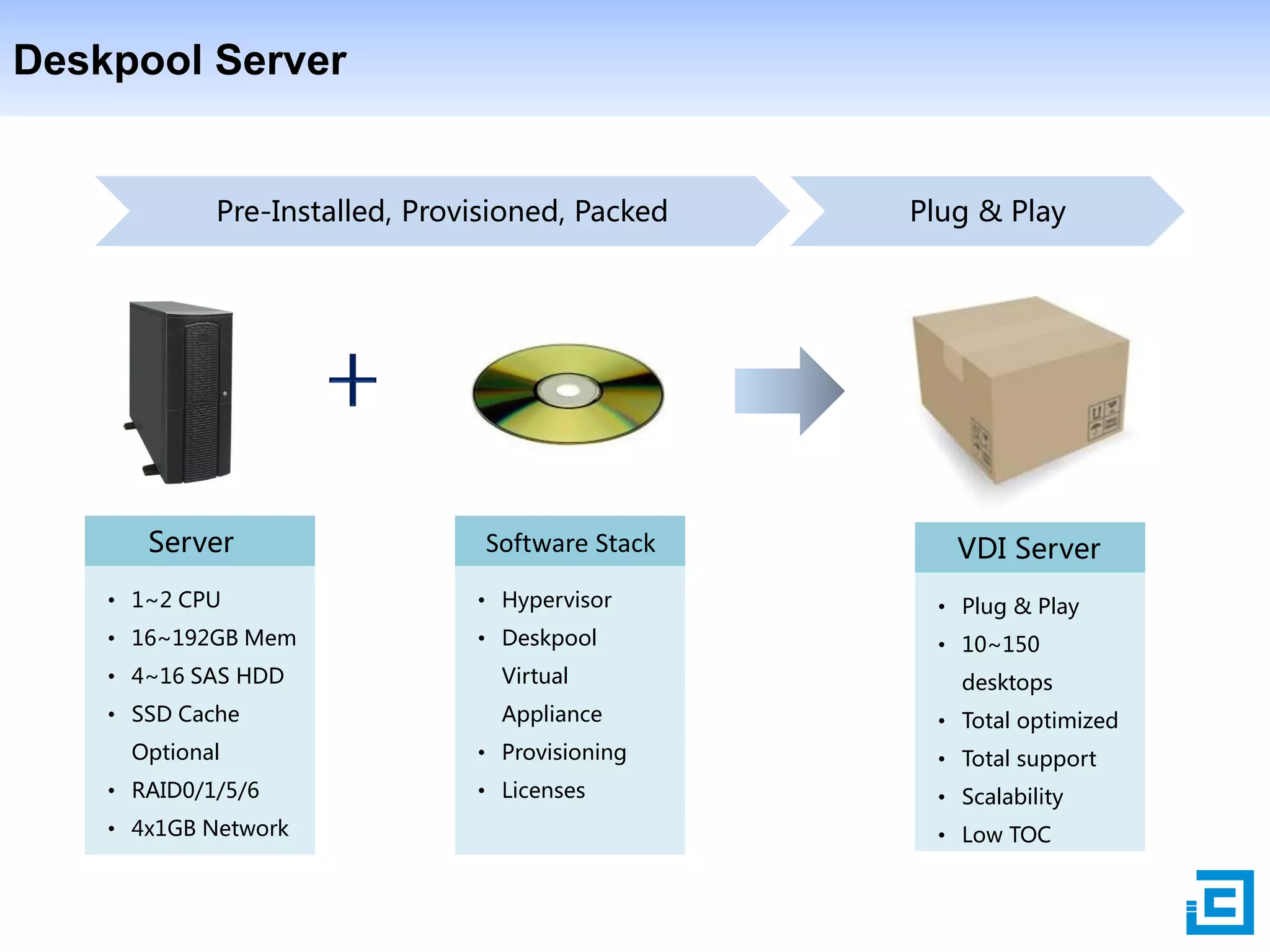
Deskpool Server

Pre-Installed, Provisioned, Packed

Server

Software Stack

Plug & Play

VDI Server

• 1~2 CPU

• Hypervisor

• Plug & Play

• 16~192GB Mem

• Deskpool

• 10~150

• 4~16 SAS HDD

Virtual

• SSD Cache

Appliance

Optional

• Provisioning

• Total support

• Licenses

• Scalability

• RAID0/1/5/6
• 4x1GB Network

desktops

• Total optimized

• Low TOC
Content

1

Why VDI

2

Deskpool VDI Solution

3

Why Deskpool VDI

4

Deskpool VDI for SMB
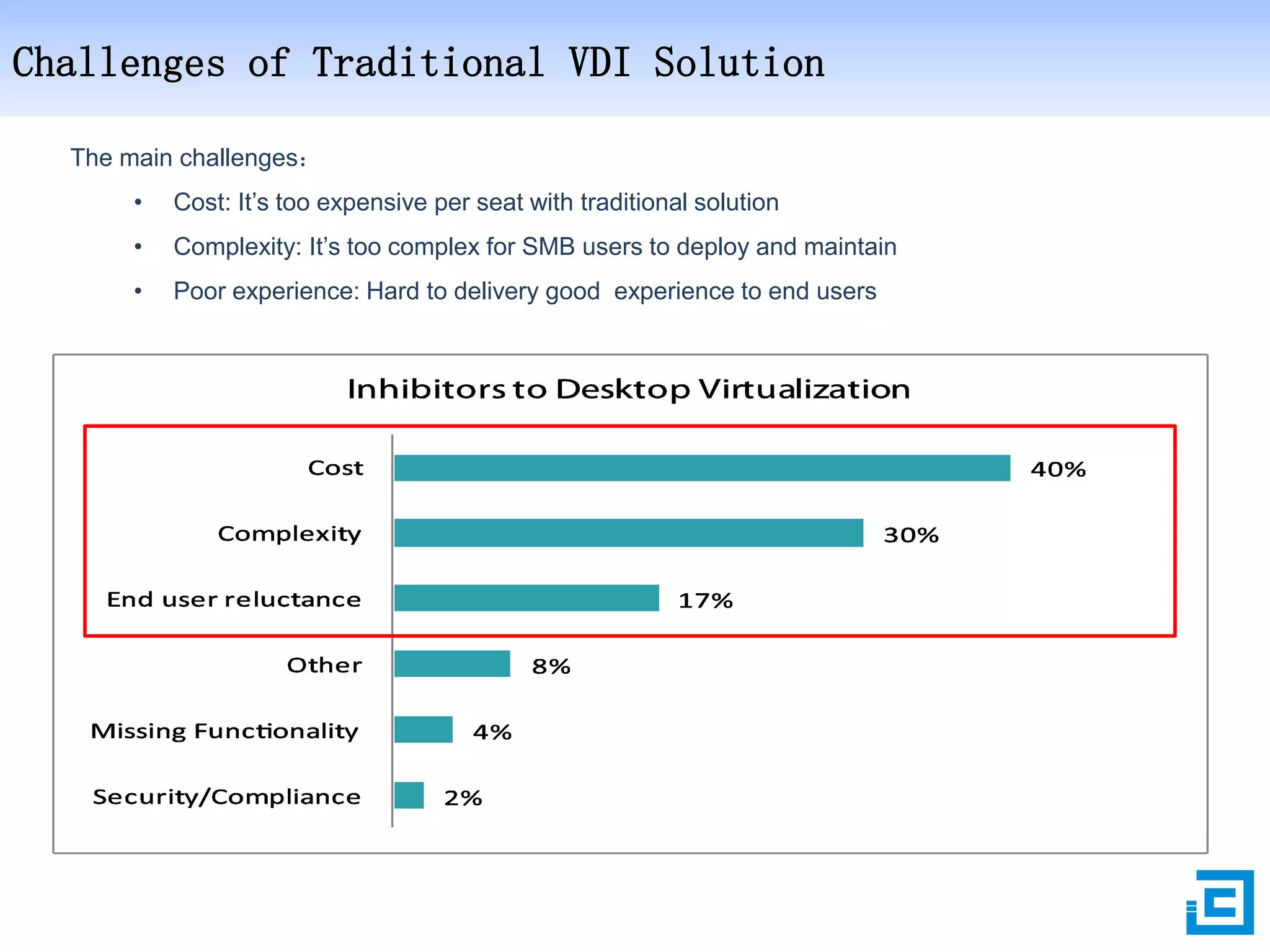
Challenges of Traditional VDI Solution
The main challenges:
•

Cost: It’s too expensive per seat with traditional solution

•

Complexity: It’s too complex for SMB users to deploy and maintain

•

Poor experience: Hard to delivery good experience to end users
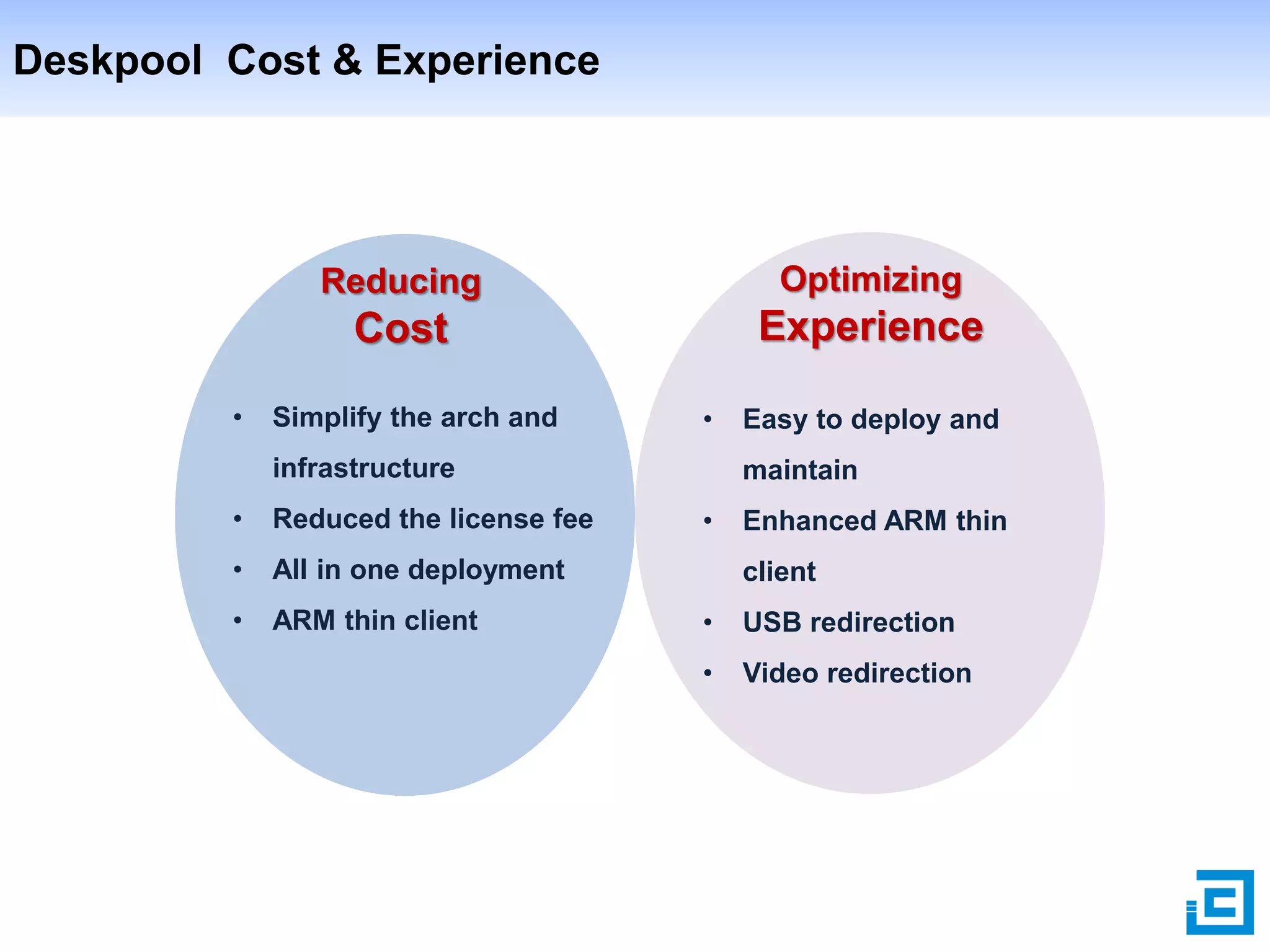
Deskpool Cost & Experience

Reducing

Cost
•

Optimizing

Experience

Simplify the arch and

•

infrastructure
•

Reduced the license fee

•

ARM thin client

maintain

All in one deployment

•

Easy to deploy and

•

Enhanced ARM thin
client

•

USB redirection

•

Video redirection
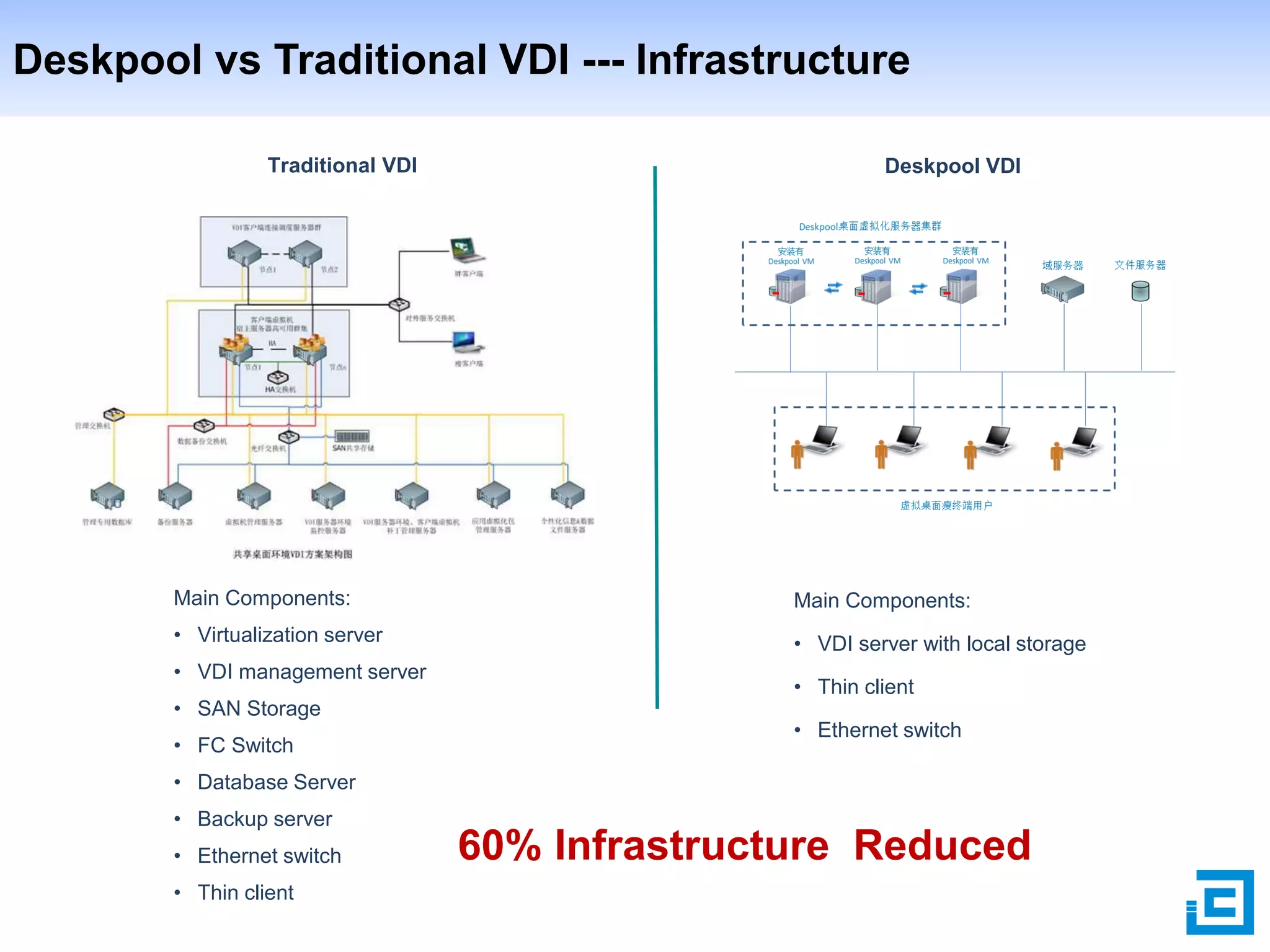
Deskpool vs Traditional VDI --- Infrastructure
Traditional VDI

Deskpool VDI

Main Components:

Main Components:

• Virtualization server

• VDI server with local storage

• VDI management server
• SAN Storage
• FC Switch

• Thin client
• Ethernet switch

• Database Server
• Backup server
• Ethernet switch
• Thin client

60% Infrastructure Reduced
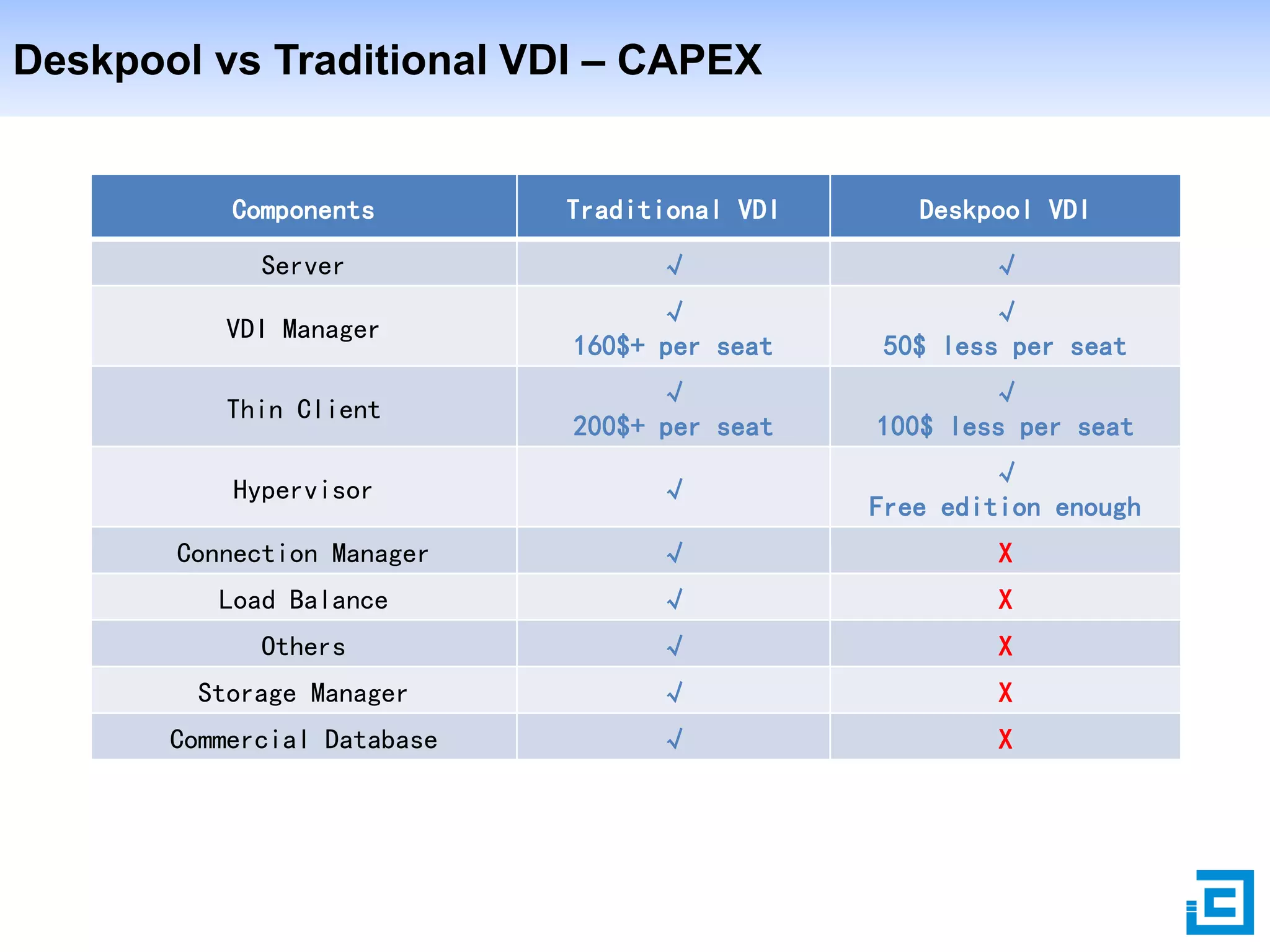
Deskpool vs Traditional VDI – CAPEX

Components

Traditional VDI

Deskpool VDI

Server

√

√

VDI Manager

√
160$+ per seat

√
50$ less per seat

Thin Client

√
200$+ per seat

√
100$ less per seat

Hypervisor

√

√
Free edition enough

Connection Manager

√

X

Load Balance

√

X

Others

√

X

Storage Manager

√

X

Commercial Database

√

X
Deskpool Simple Deployment & Maintainence
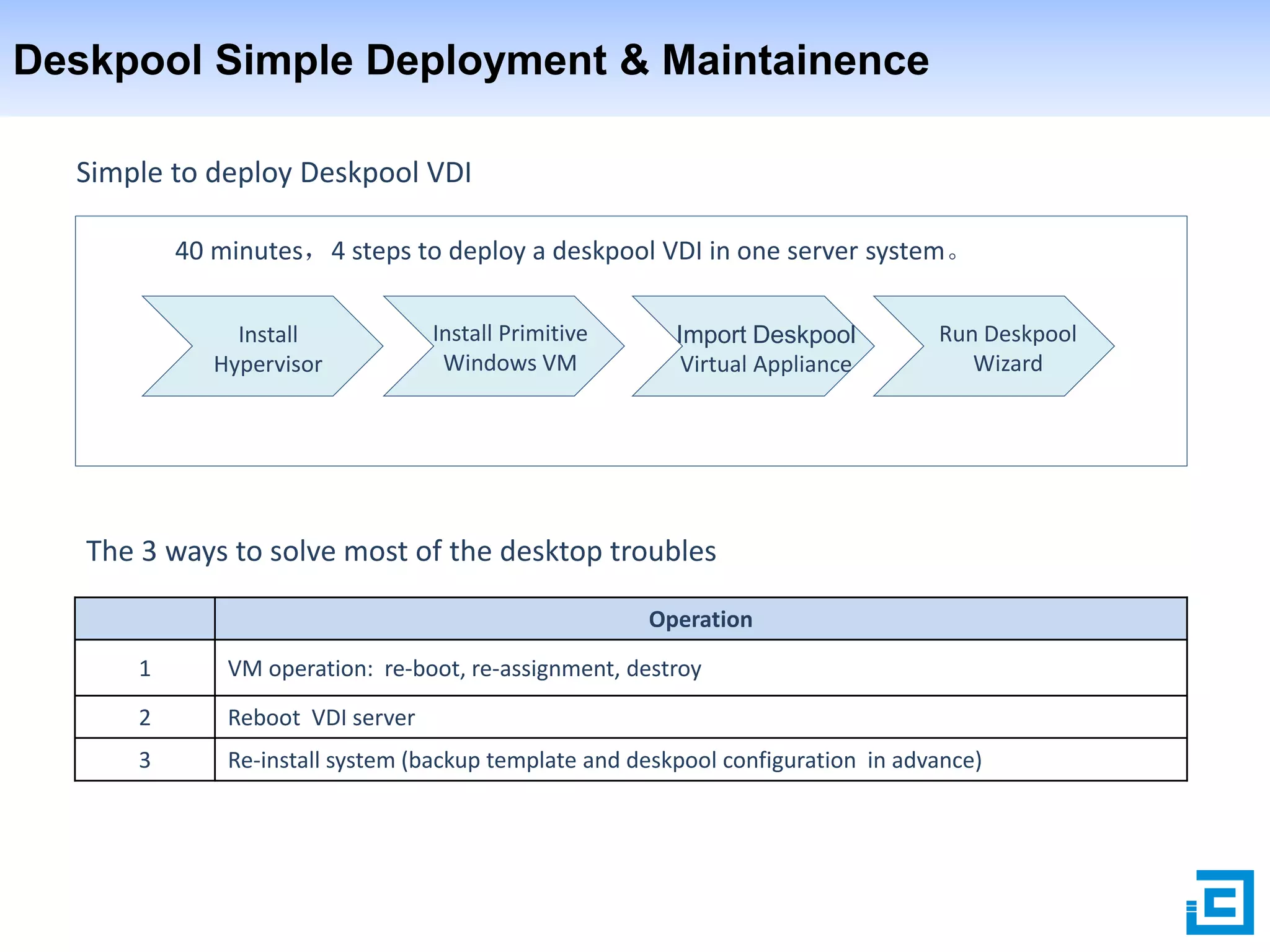
Simple to deploy Deskpool VDI
40 minutes,4 steps to deploy a deskpool VDI in one server system。
Install
Hypervisor

Install Primitive
Windows VM

Import Deskpool
Virtual Appliance

Run Deskpool
Wizard

The 3 ways to solve most of the desktop troubles
Operation

1

VM operation: re-boot, re-assignment, destroy

2

Reboot VDI server

3

Re-install system (backup template and deskpool configuration in advance)
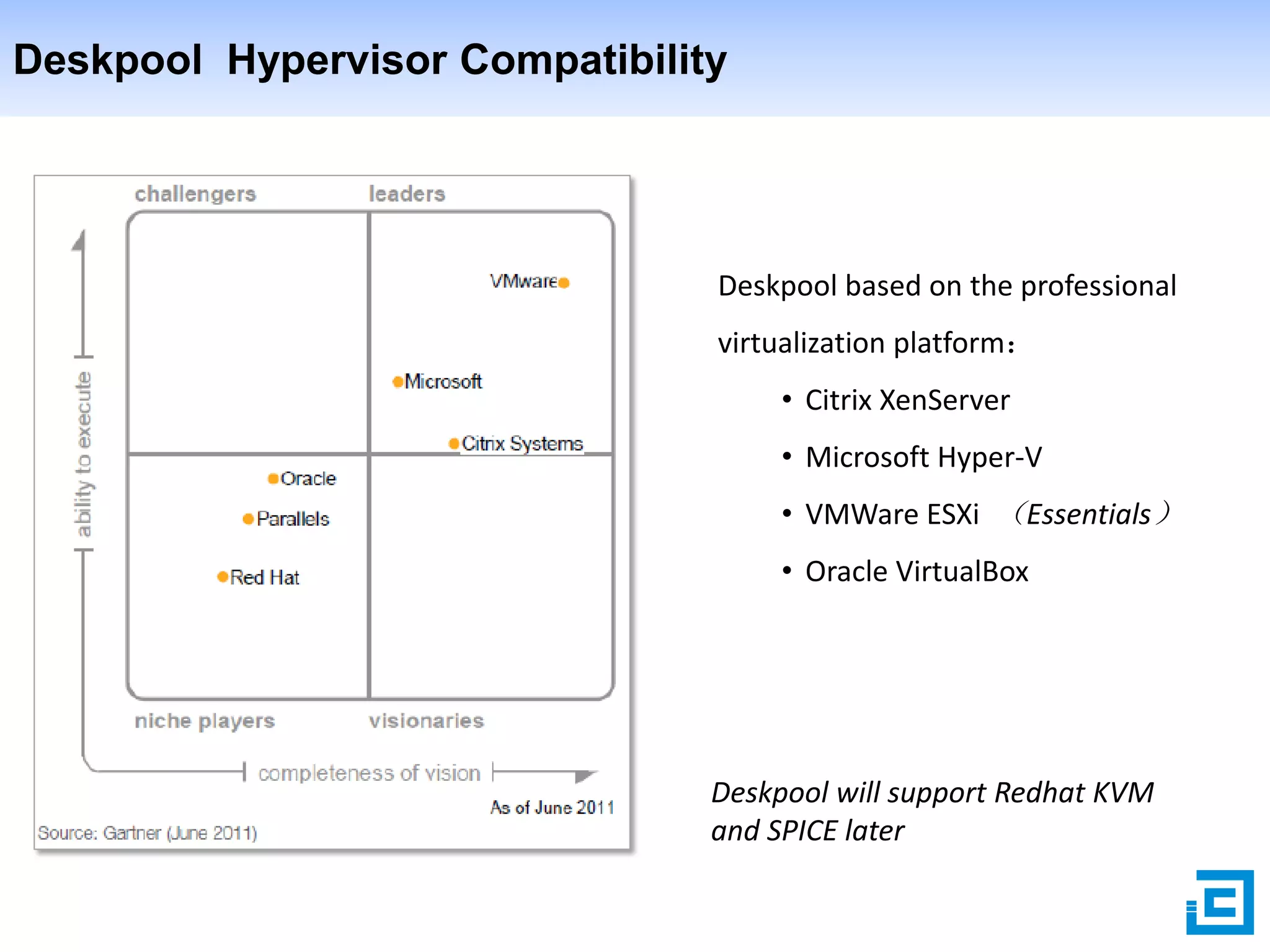
Deskpool Hypervisor Compatibility

Deskpool based on the professional
virtualization platform:
• Citrix XenServer
• Microsoft Hyper-V
• VMWare ESXi (Essentials)
• Oracle VirtualBox

Deskpool will support Redhat KVM
and SPICE later
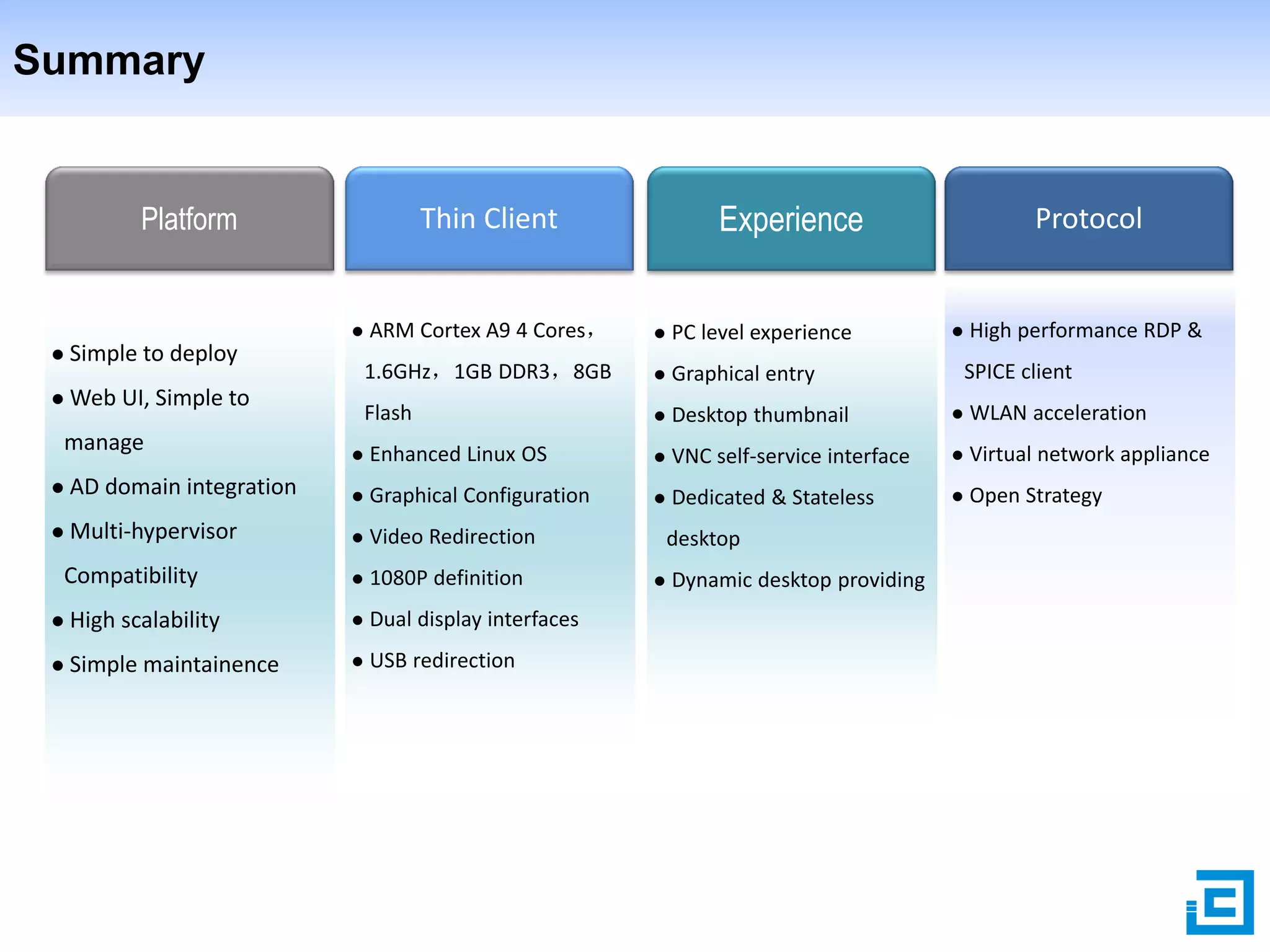
Summary

Platform



Web UI, Simple to

ARM Cortex A9 4 Cores,



PC level experience



Graphical entry

Flash

Simple to deploy

manage



Desktop thumbnail



WLAN acceleration



High performance RDP &
SPICE client



Enhanced Linux OS



VNC self-service interface



Virtual network appliance



Dedicated & Stateless



Open Strategy



AD domain integration



Graphical Configuration



Multi-hypervisor



Video Redirection



1080P definition

Compatibility

Protocol

1.6GHz,1GB DDR3,8GB





Experience

Thin Client



High scalability



Dual display interfaces



Simple maintainence



USB redirection

desktop


Dynamic desktop providing
Content

1

Why VDI

2

Deskpool VDI Solution

3

Why Deskpool VDI

4

Deskpool VDI for SMB
Deskpool, the best choice for SMB

Deskpool making VDI cost-effective for SMB:
 Self-service deployment:Deskpool enables the users to deploy VDI system by themselves,
especially , users could setup the POC system without any commercial support.
 Simple to Management:Deskpool provides web based management UI and system
initialization wizard, deskpool could automatically delivery dedicated and stateless desktop.
 End to end cost effective : Deskpool is very suitable for small companies looking to control
IT costs , which not only provides low cost VDI software solution, but also delivery low-cost,
high performance thin client products, such as J30 and J60 box from JIEYUN technology.
 Seamless compatible with existing IT environment:Deskpool could be deployed into an
existing active directory domain environment and provides VLAN provisioning for each pool.
谢谢

Please send email to sales@jieyung.com for more information

Deskpool making vdi cost effective for smb

  • 1.
    VDI-in-One-Server Deskpool VDI solution forSMB Simple:Very easy deployment and management Professional:Open architecture for various hypervisors Cost Efficient:Really cheaper than PC solution www.jieyung.com
  • 2.
    Content 1 Why VDI 2 Deskpool VDISolution 3 Why Deskpool VDI 4 Deskpool VDI for SMB
  • 3.
    Challenges of WindowsPC Do you tired of facing these troubles? Keep Data Secret Image Crashing Over Power Consumption System Installation & Patching Delivering Software Packages Expensive Per-Seat
  • 4.
    Too Expensive PCSolution Visible CAPEX • PC with visible CAPEX Invisible TOC • High OPEX • Short Live Cycle • Security Trouble • High Power Consumption High OPEX
  • 5.
    Benefits from hostedVDI What is Hosted VDI:  Full PC experience based on hosted windows VM  Quickly delivery windows desktop with templates  Energy efficient thin client VDI Benefits 信息安全 保护资产 高效维护 节省投资  Data Security 移动接入 远程办公 绿色办公 环保理念  Mobile Working  Easy Management  Low Power Consumption  Stateless and Dedicated Desktop  Low CAPEX & OPEX
  • 6.
    Trends of VDI BrianMadden:Over the past few years, we might have seen VDI makes sense for only 5% to 10% of the enterprise desktops out there. Now that VDI can support 1:1 persistent disk images and graphically intense applications, VDI becomes a valid option for 40% or 50% of enterprise desktops. Yay for 2013. BRIAN MADDEN is an opinionated, supertechnical, fiercely independent desktop virtualization and consumerization expert. Email: bmadden@techtarget.com IT168《2012-2013 VDI Trends Report》 Gartner Reports 2013 Report from Techaisle Aug. 2012
  • 7.
    Content 1 Why VDI 2 Deskpool VDISolution 3 Why Deskpool VDI 4 Deskpool VDI for SMB
  • 8.
    Deskpool VDI Architecture All-in-OneArchitecture: Deskpool Virtual Appliance Account Connection Template VM Pool Strategy VM Management Load Balance System Log & Event Capacity Distributed Cluster Layer Hypervisor Deskpool Virtual Appliance Deskpool Functions: Server Dynamic desktop delivery Pooled & dedicated desktop N:1 availability Load balance Connection Proxy Linked Clone Active Directory integration Open Virtualization Platform: • Citrix XenServer • Microsoft Hyper-V • Vmware vSphere (ESXi) • Oracle VirtualBox • Redhat KVM
  • 9.
    Protocol & Deployment OpenProtocol Strategy: • Microsoft RDP • Redhat SPICE • Open for third-party desktop protocol Deskpool Deployment: • Deskpool in one server & deskpool cluster • Deskpool with active directory domain service • Deskpool with multi-VLAN
  • 10.
    Dedicated & Stateless Dedicated(persistent) Stateless(non-persistent) Dedicated: Stateless: •Specially-assigned person • Temporarily-assigned person • Data persistent • Automatic delivery • Automatic delivery • Automatic reclaim • Manual destroy • Automatic refresh • Various turn-on strategy • Multiple reclaim strategy
  • 11.
    Deskpool Desktop Model WindowsVM Primative Image Golden Image (OS + Applications) Deskpool Template Desktop Pool Account Dept. Pool Properties: 2vCPU 4GB Mem Max desktop = 25 Pre-started = 5 … Deskpool Users Admin Dept. Pool Properties: 1vCPU 1GB Mem Max desktop = 15 Pre-started = 3 … Sales Dept. Pool Properties: 2vCPU 2GB Mem Max desktop = 10 Pre-started = 2 …
  • 12.
    Deskpool Delivery Desktop Stepsto create desktop Windows VM ① ① Create Template Desktop delivery ❶ Create Users ❷ User Login Deskpool Desktops Pools Templates ② ③ ② Create Pool … ③ Create Desktop Automatically Bounding Pools ❶ Automatic Assigning ❷
  • 13.
    Deskpool Cluster Server configurationfor 65 task-type desktops: • Dual Intel Xeon E5-2640 6-Core CPU • 96GB Memory • 1TB 15K RPM SAS HDD, Raid10 HA:N + 1 65x Desktops 130x Desktops or 65x HA Desktops 195x Desktops or 130x HADesktops
  • 14.
  • 15.
  • 16.
    Deskpool Thin Client ThinClient Types Windows PC Windows X86 Thin Client ARM Thin Client Specification Protocol Browsers such as: IE8 above、Firefox、 Chrome Windows RDP SPICE CPU 1.6GHz above、1GB mem、4GB storage Windows RDP Cortex A9、4cores 1.6Ghz、1GB DDR3、 2~8GB Flash JIEYUN Linux OS Optimized RDP Client USB Redirection ARM Thin Client Configuration Center Supports video on-line
  • 17.
    Deskpool Server SpecificationRecommendation CPU IOPS Memory Storage Capacity  4~8 desktop per core 1.5-2GB per win7 SAS  Hyper-thread 0.5~1GB per winxp SATA+SSD hybrid Templates  Desktop workload 1GB for Hypervisor 175 10GB for deskpool 4- 8 task desktop per core 512MB for deskpool Windows XP: 8 ~ 12 IOPS Thin provisioning, 15% 10% retention Windows 7: 10 ~ 20 IOPS template size per desktop 4 -6 knowledge desktop per 15K RPM HDD or IOPS per 15KRPM SAS Sum size of: core 2- 4 heavy desktop per core 1 * Xeon 6-Cores hyper-thread,2.5Ghz 32GB memory 4 x 73GB 15K RPM, RAID 10 Deskpool-in-one-server DIY example (Knowledge desktop) CPU Memory IOPS 6 * 8 = 48 VM • 90% * 32 = 28.8 • 28.8 – 512(Deskpool) = 28.2 • 28x 1GB Winxp,14x 2GB Win7 • 175 IOPS/HDD • RAID10,175 * 2 = 350 IOPS • ~35x Winxp,17x Win7 Capacity • 2x 20GB Template =40GB • 10GB Deskpool VM • 15% * 20GB * 48 VM = 144GB Minimum(48,28,35) = 28x WinXP or Minimum(48,14,17) = 14x Win7
  • 18.
    Deskpool Server Specification Items Advanced Standard CPU 2x Intel Xeon E5-2680 @2.7ghz – 8 Cores 2 x Intel Xeon E5-2640 @2.7ghz – 6 Cores Memory 196GB @1666Mhz 96GB @1333Mhz Storage 16 x 300GB SAS 6Gbps 15K RPM RAID 10 8 x 300GB SAS 6Gbps 15K RPM RAID 10 RAID Controller 1GB Cache, 8x6GB internal SAS port 1GB Cache, 8x6GB internal SAS port SSD Cache Accelerator Optional Optional Network 4 x 1Gb ethernet 4 x 1Gb ethernet BMC Optional Optional Task 130 65 Knowledge 100 50 Heavy 70 35 Capacity
  • 19.
    Deskpool Server Pre-Installed, Provisioned,Packed Server Software Stack Plug & Play VDI Server • 1~2 CPU • Hypervisor • Plug & Play • 16~192GB Mem • Deskpool • 10~150 • 4~16 SAS HDD Virtual • SSD Cache Appliance Optional • Provisioning • Total support • Licenses • Scalability • RAID0/1/5/6 • 4x1GB Network desktops • Total optimized • Low TOC
  • 20.
    Content 1 Why VDI 2 Deskpool VDISolution 3 Why Deskpool VDI 4 Deskpool VDI for SMB
  • 21.
    Challenges of TraditionalVDI Solution The main challenges: • Cost: It’s too expensive per seat with traditional solution • Complexity: It’s too complex for SMB users to deploy and maintain • Poor experience: Hard to delivery good experience to end users
  • 22.
    Deskpool Cost &Experience Reducing Cost • Optimizing Experience Simplify the arch and • infrastructure • Reduced the license fee • ARM thin client maintain All in one deployment • Easy to deploy and • Enhanced ARM thin client • USB redirection • Video redirection
  • 23.
    Deskpool vs TraditionalVDI --- Infrastructure Traditional VDI Deskpool VDI Main Components: Main Components: • Virtualization server • VDI server with local storage • VDI management server • SAN Storage • FC Switch • Thin client • Ethernet switch • Database Server • Backup server • Ethernet switch • Thin client 60% Infrastructure Reduced
  • 24.
    Deskpool vs TraditionalVDI – CAPEX Components Traditional VDI Deskpool VDI Server √ √ VDI Manager √ 160$+ per seat √ 50$ less per seat Thin Client √ 200$+ per seat √ 100$ less per seat Hypervisor √ √ Free edition enough Connection Manager √ X Load Balance √ X Others √ X Storage Manager √ X Commercial Database √ X
  • 25.
    Deskpool Simple Deployment& Maintainence Simple to deploy Deskpool VDI 40 minutes,4 steps to deploy a deskpool VDI in one server system。 Install Hypervisor Install Primitive Windows VM Import Deskpool Virtual Appliance Run Deskpool Wizard The 3 ways to solve most of the desktop troubles Operation 1 VM operation: re-boot, re-assignment, destroy 2 Reboot VDI server 3 Re-install system (backup template and deskpool configuration in advance)
  • 26.
    Deskpool Hypervisor Compatibility Deskpoolbased on the professional virtualization platform: • Citrix XenServer • Microsoft Hyper-V • VMWare ESXi (Essentials) • Oracle VirtualBox Deskpool will support Redhat KVM and SPICE later
  • 27.
    Summary Platform  Web UI, Simpleto ARM Cortex A9 4 Cores,  PC level experience  Graphical entry Flash Simple to deploy manage  Desktop thumbnail  WLAN acceleration  High performance RDP & SPICE client  Enhanced Linux OS  VNC self-service interface  Virtual network appliance  Dedicated & Stateless  Open Strategy  AD domain integration  Graphical Configuration  Multi-hypervisor  Video Redirection  1080P definition Compatibility Protocol 1.6GHz,1GB DDR3,8GB   Experience Thin Client  High scalability  Dual display interfaces  Simple maintainence  USB redirection desktop  Dynamic desktop providing
  • 28.
    Content 1 Why VDI 2 Deskpool VDISolution 3 Why Deskpool VDI 4 Deskpool VDI for SMB
  • 29.
    Deskpool, the bestchoice for SMB Deskpool making VDI cost-effective for SMB:  Self-service deployment:Deskpool enables the users to deploy VDI system by themselves, especially , users could setup the POC system without any commercial support.  Simple to Management:Deskpool provides web based management UI and system initialization wizard, deskpool could automatically delivery dedicated and stateless desktop.  End to end cost effective : Deskpool is very suitable for small companies looking to control IT costs , which not only provides low cost VDI software solution, but also delivery low-cost, high performance thin client products, such as J30 and J60 box from JIEYUN technology.  Seamless compatible with existing IT environment:Deskpool could be deployed into an existing active directory domain environment and provides VLAN provisioning for each pool.
  • 30.
    谢谢 Please send emailto sales@jieyung.com for more information