Parallels Solutions for Business
Taking Windows Applications Beyond Hardware Limits
2
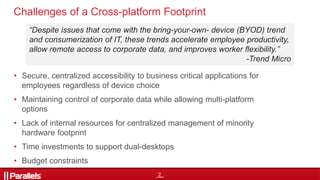
Challenges of a Cross-platform Footprint
• Secure, centralized accessibility to business critical applications for
employees regardless of device choice
• Maintaining control of corporate data while allowing multi-platform
options
• Lack of internal resources for centralized management of minority
hardware footprint
• Time investments to support dual-desktops
• Budget constraints
“Despite issues that come with the bring-your-own- device (BYOD) trend
and consumerization of IT, these trends accelerate employee productivity,
allow remote access to corporate data, and improves worker flexibility.”
-Trend Micro
5
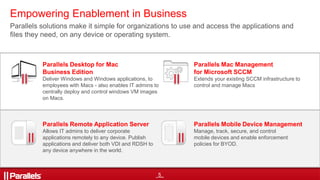
Empowering Enablement in Business
Parallels solutions make it simple for organizations to use and access the applications and
files they need, on any device or operating system.
Parallels Remote Application Server
Allows IT admins to deliver corporate
applications remotely to any device. Publish
applications and deliver both VDI and RDSH to
any device anywhere in the world.
Parallels Desktop for Mac
Business Edition
Deliver Windows and Windows applications, to
employees with Macs - also enables IT admins to
centrally deploy and control windows VM images
on Macs.
Parallels Mac Management
for Microsoft SCCM
Extends your existing SCCM infrastructure to
control and manage Macs
Parallels Mobile Device Management
Manage, track, secure, and control
mobile devices and enable enforcement
policies for BYOD.
7
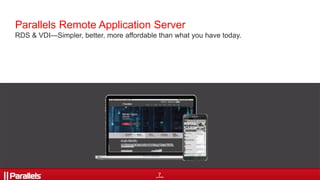
Parallels Remote Application Server
RDS & VDI—Simpler, better, more affordable than what you have today.
8
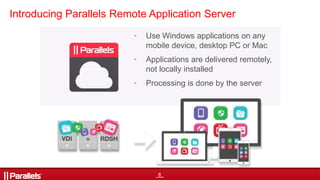
Introducing Parallels Remote Application Server
• Use Windows applications on any
mobile device, desktop PC or Mac
• Applications are delivered remotely,
not locally installed
• Processing is done by the server
9
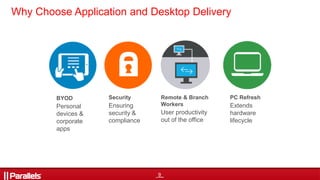
Why Choose Application and Desktop Delivery
BYOD
Personal
devices &
corporate
apps
Security
Ensuring
security &
compliance
Remote & Branch
Workers
User productivity
out of the office
PC Refresh
Extends
hardware
lifecycle
10
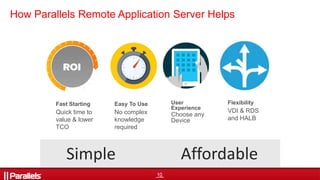
How Parallels Remote Application Server Helps
Fast Starting
Quick time to
value & lower
TCO
Simple Affordable
Easy To Use
No complex
knowledge
required
User
Experience
Choose any
Device
Flexibility
VDI & RDS
and HALB
11
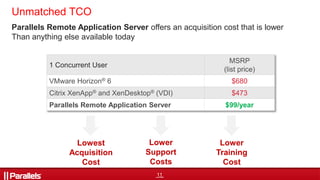
1 Concurrent User
MSRP
(list price)
VMware Horizon® 6 $680
Citrix XenApp® and XenDesktop® (VDI) $473
Parallels Remote Application Server $99/year
Lowest
Acquisition
Cost
Lower
Support
Costs
Lower
Training
Cost
Unmatched TCO
Parallels Remote Application Server offers an acquisition cost that is lower
Than anything else available today
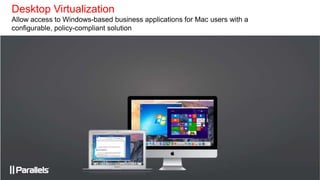
Desktop Virtualization
Allow access to Windows-based business applications for Mac users with a
configurable, policy-compliant solution
13
Allows IT pros to support Windows®-based business applications for
Mac users with a configurable, policy-compliant solution
 Single license key and License Management Portal
 Policy-compliant
 Mass deployment tools
 Encrypted virtual machines
 24/7 priority phone and email support
14
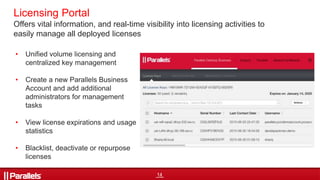
Licensing Portal
• Unified volume licensing and
centralized key management
• Create a new Parallels Business
Account and add additional
administrators for management
tasks
• View license expirations and usage
statistics
• Blacklist, deactivate or repurpose
licenses
Offers vital information, and real-time visibility into licensing activities to
easily manage all deployed licenses
15
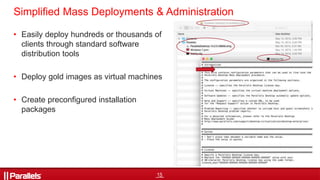
• Easily deploy hundreds or thousands of
clients through standard software
distribution tools
• Deploy gold images as virtual machines
• Create preconfigured installation
packages
Simplified Mass Deployments & Administration
17
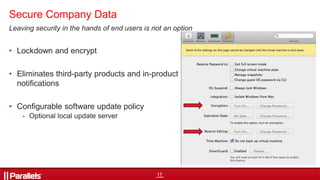
Leaving security in the hands of end users is not an option
• Lockdown and encrypt
• Eliminates third-party products and in-product
notifications
• Configurable software update policy
• Optional local update server
Secure Company Data
Manage Apple Hardware via Microsoft SCCM
Control and manage Macs the same way you do PCs
21
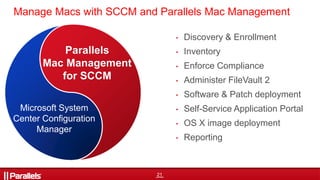
• Discovery & Enrollment
• Inventory
• Enforce Compliance
• Administer FileVault 2
• Software & Patch deployment
• Self-Service Application Portal
• OS X image deployment
• Reporting
Manage Macs with SCCM and Parallels Mac Management
Microsoft System
Center Configuration
Manager
Parallels
Mac Management
for SCCM
22
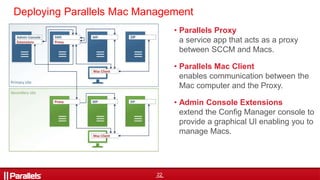
• Parallels Proxy
a service app that acts as a proxy
between SCCM and Macs.
• Parallels Mac Client
enables communication between the
Mac computer and the Proxy.
• Admin Console Extensions
extend the Config Manager console to
provide a graphical UI enabling you to
manage Macs.
Deploying Parallels Mac Management
25
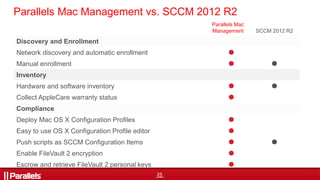
Parallels Mac Management vs. SCCM 2012 R2
Parallels Mac
Management SCCM 2012 R2
Discovery and Enrollment
Network discovery and automatic enrollment 
Manual enrollment  
Inventory
Hardware and software inventory  
Collect AppleCare warranty status 
Compliance
Deploy Mac OS X Configuration Profiles 
Easy to use OS X Configuration Profile editor 
Push scripts as SCCM Configuration Items  
Enable FileVault 2 encryption 
Escrow and retrieve FileVault 2 personal keys 
26
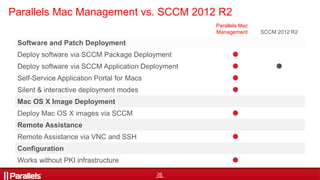
Parallels Mac Management vs. SCCM 2012 R2
Parallels Mac
Management SCCM 2012 R2
Software and Patch Deployment
Deploy software via SCCM Package Deployment 
Deploy software via SCCM Application Deployment  
Self-Service Application Portal for Macs 
Silent & interactive deployment modes 
Mac OS X Image Deployment
Deploy Mac OS X images via SCCM 
Remote Assistance
Remote Assistance via VNC and SSH 
Configuration
Works without PKI infrastructure 
28
Contact us with questions!
(425) 282-6400
usentsales@parallels.com
Visit us online:
parallels.com/business
Parallels Blog
http://blog.parallels.com
@ParallelsBiz
Parallels Corporate and Academic Licensing Team

IT Trends 2016: Taking Windows Applications Beyond Hardware Limits

  • 1.
    Parallels Solutions forBusiness Taking Windows Applications Beyond Hardware Limits
  • 2.
    2 Challenges of aCross-platform Footprint • Secure, centralized accessibility to business critical applications for employees regardless of device choice • Maintaining control of corporate data while allowing multi-platform options • Lack of internal resources for centralized management of minority hardware footprint • Time investments to support dual-desktops • Budget constraints “Despite issues that come with the bring-your-own- device (BYOD) trend and consumerization of IT, these trends accelerate employee productivity, allow remote access to corporate data, and improves worker flexibility.” -Trend Micro
  • 3.
    5 Empowering Enablement inBusiness Parallels solutions make it simple for organizations to use and access the applications and files they need, on any device or operating system. Parallels Remote Application Server Allows IT admins to deliver corporate applications remotely to any device. Publish applications and deliver both VDI and RDSH to any device anywhere in the world. Parallels Desktop for Mac Business Edition Deliver Windows and Windows applications, to employees with Macs - also enables IT admins to centrally deploy and control windows VM images on Macs. Parallels Mac Management for Microsoft SCCM Extends your existing SCCM infrastructure to control and manage Macs Parallels Mobile Device Management Manage, track, secure, and control mobile devices and enable enforcement policies for BYOD.
  • 4.
    7 Parallels Remote ApplicationServer RDS & VDI—Simpler, better, more affordable than what you have today.
  • 5.
    8 Introducing Parallels RemoteApplication Server • Use Windows applications on any mobile device, desktop PC or Mac • Applications are delivered remotely, not locally installed • Processing is done by the server
  • 6.
    9 Why Choose Applicationand Desktop Delivery BYOD Personal devices & corporate apps Security Ensuring security & compliance Remote & Branch Workers User productivity out of the office PC Refresh Extends hardware lifecycle
  • 7.
    10 How Parallels RemoteApplication Server Helps Fast Starting Quick time to value & lower TCO Simple Affordable Easy To Use No complex knowledge required User Experience Choose any Device Flexibility VDI & RDS and HALB
  • 8.
    11 1 Concurrent User MSRP (listprice) VMware Horizon® 6 $680 Citrix XenApp® and XenDesktop® (VDI) $473 Parallels Remote Application Server $99/year Lowest Acquisition Cost Lower Support Costs Lower Training Cost Unmatched TCO Parallels Remote Application Server offers an acquisition cost that is lower Than anything else available today
  • 9.
    Desktop Virtualization Allow accessto Windows-based business applications for Mac users with a configurable, policy-compliant solution
  • 10.
    13 Allows IT prosto support Windows®-based business applications for Mac users with a configurable, policy-compliant solution  Single license key and License Management Portal  Policy-compliant  Mass deployment tools  Encrypted virtual machines  24/7 priority phone and email support
  • 11.
    14 Licensing Portal • Unifiedvolume licensing and centralized key management • Create a new Parallels Business Account and add additional administrators for management tasks • View license expirations and usage statistics • Blacklist, deactivate or repurpose licenses Offers vital information, and real-time visibility into licensing activities to easily manage all deployed licenses
  • 12.
    15 • Easily deployhundreds or thousands of clients through standard software distribution tools • Deploy gold images as virtual machines • Create preconfigured installation packages Simplified Mass Deployments & Administration
  • 13.
    17 Leaving security inthe hands of end users is not an option • Lockdown and encrypt • Eliminates third-party products and in-product notifications • Configurable software update policy • Optional local update server Secure Company Data
  • 14.
    Manage Apple Hardwarevia Microsoft SCCM Control and manage Macs the same way you do PCs
  • 15.
    21 • Discovery &Enrollment • Inventory • Enforce Compliance • Administer FileVault 2 • Software & Patch deployment • Self-Service Application Portal • OS X image deployment • Reporting Manage Macs with SCCM and Parallels Mac Management Microsoft System Center Configuration Manager Parallels Mac Management for SCCM
  • 16.
    22 • Parallels Proxy aservice app that acts as a proxy between SCCM and Macs. • Parallels Mac Client enables communication between the Mac computer and the Proxy. • Admin Console Extensions extend the Config Manager console to provide a graphical UI enabling you to manage Macs. Deploying Parallels Mac Management
  • 17.
    25 Parallels Mac Managementvs. SCCM 2012 R2 Parallels Mac Management SCCM 2012 R2 Discovery and Enrollment Network discovery and automatic enrollment  Manual enrollment   Inventory Hardware and software inventory   Collect AppleCare warranty status  Compliance Deploy Mac OS X Configuration Profiles  Easy to use OS X Configuration Profile editor  Push scripts as SCCM Configuration Items   Enable FileVault 2 encryption  Escrow and retrieve FileVault 2 personal keys 
  • 18.
    26 Parallels Mac Managementvs. SCCM 2012 R2 Parallels Mac Management SCCM 2012 R2 Software and Patch Deployment Deploy software via SCCM Package Deployment  Deploy software via SCCM Application Deployment   Self-Service Application Portal for Macs  Silent & interactive deployment modes  Mac OS X Image Deployment Deploy Mac OS X images via SCCM  Remote Assistance Remote Assistance via VNC and SSH  Configuration Works without PKI infrastructure 
  • 19.
    28 Contact us withquestions! (425) 282-6400 usentsales@parallels.com Visit us online: parallels.com/business Parallels Blog http://blog.parallels.com @ParallelsBiz Parallels Corporate and Academic Licensing Team