

Designer / Developer Workflow CS4 & Flex Bess Ho Silicon Valley Web Builder (SVWB) Flex User Group Adobe Headquarter May 12th at SF & May 14th 2009 at SJ
Bess Ho iPhone SDK / Web Developer UI Developer / Designer Blog: webbuilders.wordpress.com Founder of   Silicon Valley Web Builder (SVWB) Website: svwebbuilder.com Coming Soon Releasing iTune App Store
Design & Development Workflow Checklist Create & modify Flex Skin Wire frame Prototype Layout in MXML Styling in CSS Backgrounds Images
Options: Adobe CS4 For Flex Builder Support Photoshop CS4 Illustrator CS4 Flash CS4 Firework CS4 What product gives you the most support for Flex Builder in building RIA?
CS4 Photoshop No results on Flex or Skin Save image as PNG Import single PNG file one at a time
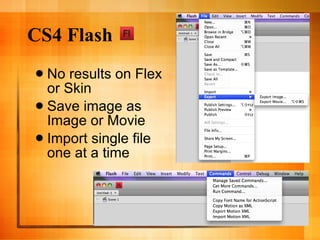
CS4 Flash No results on Flex or Skin Save image as Image or Movie Import single file one at a time
Most Common Request Flex Skinning Flex Builder Design Library Includes buttons, tabs, bars, form elements Includes states
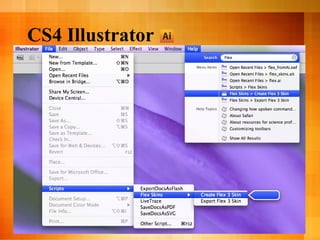
CS4 Illustrator
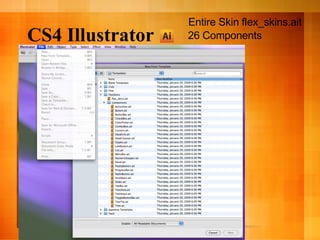
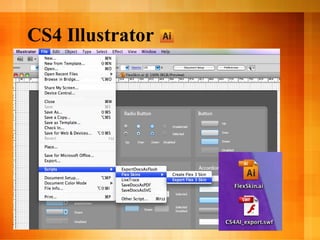
CS4 Illustrator 26 Components Entire Skin flex_skins.ait
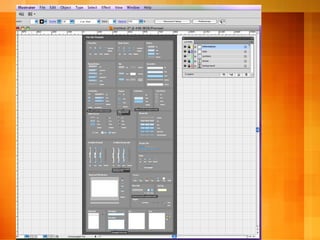
CS4 Illustrator
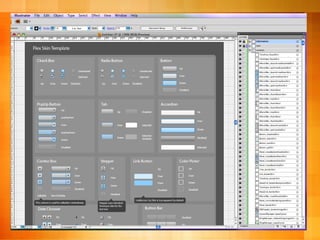
CS4 Illustrator
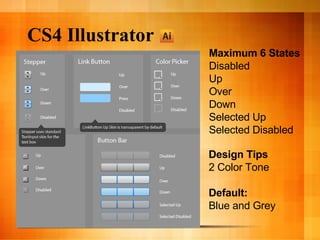
CS4 Illustrator Maximum 6 States Disabled Up Over Down Selected Up Selected Disabled Design Tips 2 Color Tone Default: Blue and Grey
CS4 Illustrator
CS4 FireWorks
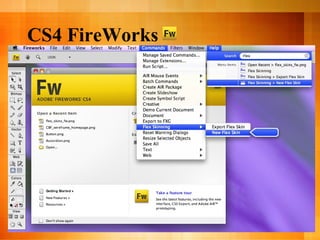
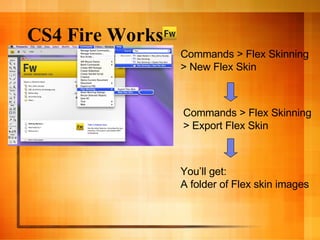
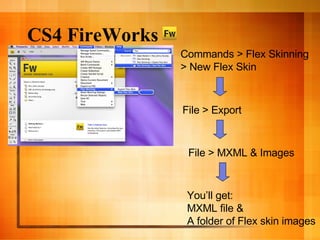
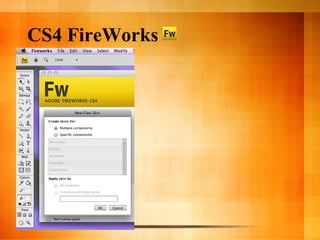
CS4 Fire Works Commands > Flex Skinning > New Flex Skin Commands > Flex Skinning > Export Flex Skin You’ll get: A folder of Flex skin images
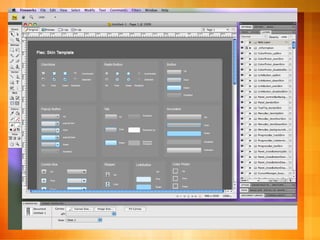
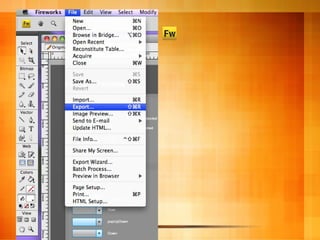
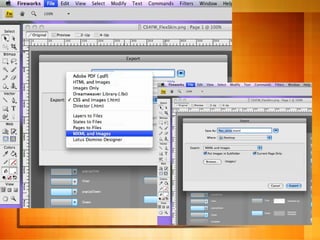
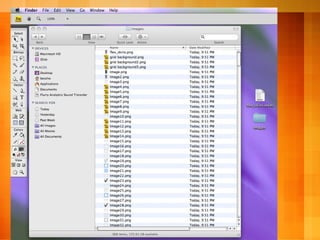
CS4 FireWorks Commands > Flex Skinning > New Flex Skin File > Export You’ll get: MXML file & A folder of Flex skin images File > MXML & Images
CS4 FireWorks
CS4 FireWorks
CS4 FireWorks
CS4 FireWorks
CS4 FireWorks
CS4 FireWorks
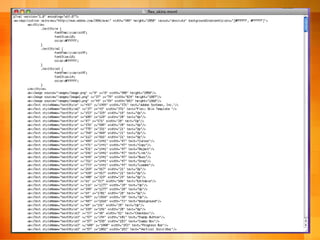
CS4 FireWorks <?xml version=&quot;1.0&quot; encoding=&quot;utf-8&quot;?> <mx:Application xmlns:mx=&quot;http://www.adobe.com/2006/mxml&quot; width=&quot;900&quot; height=&quot;2050&quot; layout=&quot;absolute&quot; backgroundGradientColors=&quot;[#FFFFFF, #FFFFFF]&quot;> <mx:Style> .textStyle { fontFamily:ArialMT; fontSize:10; color:#FFFFFF; } .textStyle2 { fontFamily:ArialMT; fontSize:18; color:#FFFFFF; } .textStyle3 { fontFamily:ArialMT; fontSize:14; color:#FFFFFF; } </mx:Style>
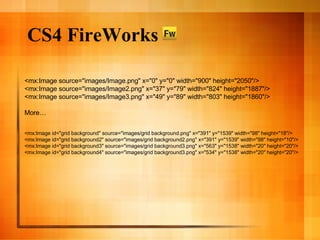
CS4 FireWorks <mx:Image source=&quot;images/Image.png&quot; x=&quot;0&quot; y=&quot;0&quot; width=&quot;900&quot; height=&quot;2050&quot;/> <mx:Image source=&quot;images/Image2.png&quot; x=&quot;37&quot; y=&quot;79&quot; width=&quot;824&quot; height=&quot;1887&quot;/> <mx:Image source=&quot;images/Image3.png&quot; x=&quot;49&quot; y=&quot;89&quot; width=&quot;803&quot; height=&quot;1860&quot;/> More… <mx:Image id=&quot;grid background&quot; source=&quot;images/grid background.png&quot; x=&quot;391&quot; y=&quot;1539&quot; width=&quot;98&quot; height=&quot;18&quot;/> <mx:Image id=&quot;grid background2&quot; source=&quot;images/grid background2.png&quot; x=&quot;391&quot; y=&quot;1539&quot; width=&quot;98&quot; height=&quot;10&quot;/> <mx:Image id=&quot;grid background3&quot; source=&quot;images/grid background3.png&quot; x=&quot;563&quot; y=&quot;1538&quot; width=&quot;20&quot; height=&quot;20&quot;/> <mx:Image id=&quot;grid background4&quot; source=&quot;images/grid background3.png&quot; x=&quot;534&quot; y=&quot;1538&quot; width=&quot;20&quot; height=&quot;20&quot;/>
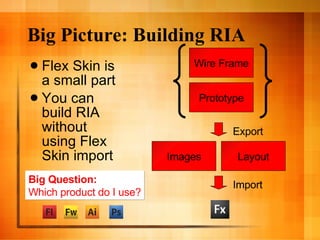
Big Picture: Building RIA Flex Skin is a small part You can build RIA without using Flex Skin import Wire Frame Prototype Images Layout Export Import Big Question: Which product do I use?
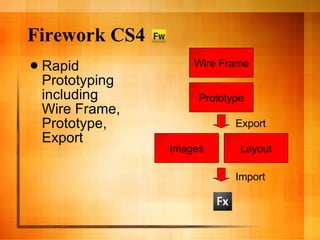
Firework CS4 Rapid Prototyping including Wire Frame, Prototype, Export Wire Frame Prototype Images Layout Export Import
New Flex Project CookingFor Food Recipe Finder Where you can find and track recipes quickly
Work Flow Define Product Definition Define Product Deliverables Create User Cases & Stories Define Technical Specifications Define Visual Specifications A new Flex project Communications Documentations Teamwork Signoff & Approval Effectiveness Collaborations
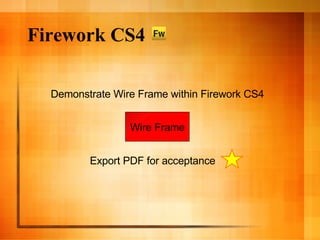
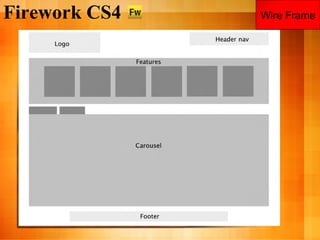
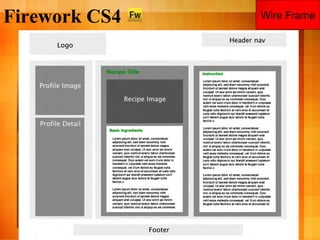
Firework CS4 Wire Frame Demonstrate Wire Frame within Firework CS4 Export PDF for acceptance
Firework CS4 Wire Frame
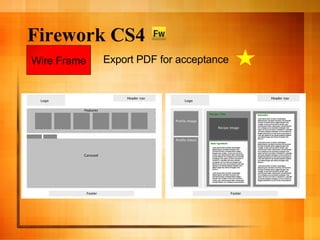
Firework CS4 Wire Frame Export PDF for acceptance
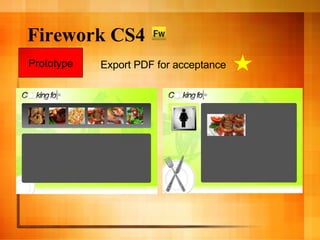
Firework CS4 Demonstrate Prototype within Firework CS4 Prototype Export PDF for acceptance
Firework CS4 Prototype Export PDF for acceptance
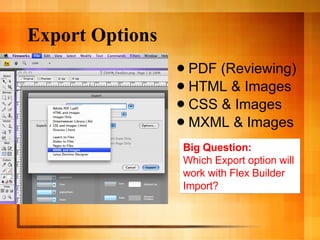
Export Options PDF (Reviewing) HTML & Images CSS & Images MXML & Images Big Question: Which Export option will  work with Flex Builder  Import?
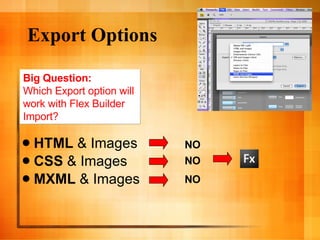
Export Options HTML  & Images CSS  & Images MXML  & Images Big Question: Which Export option will  work with Flex Builder  Import? NO NO NO
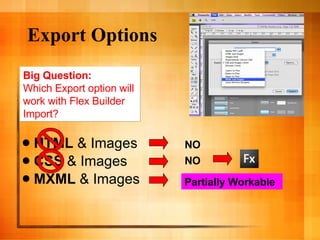
Export Options HTML  & Images CSS  & Images MXML  & Images Big Question: Which Export option will  work with Flex Builder  Import? NO NO Partially Workable
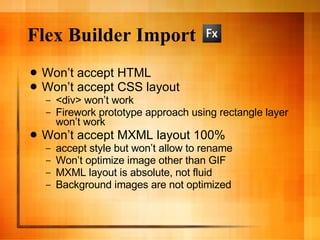
Flex Builder Import Won’t accept HTML Won’t accept CSS layout <div> won’t work Firework prototype approach using rectangle layer won’t work Won’t accept MXML layout 100% accept style but won’t allow to rename Won’t optimize image other than GIF MXML layout is absolute, not fluid Background images are not optimized
Flex Builder Import What’s NEXT?
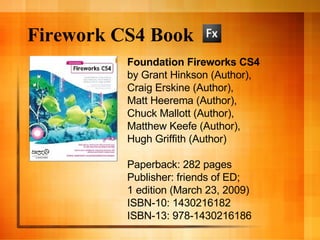
Firework CS4 Book Foundation Fireworks CS4 by Grant Hinkson (Author),  Craig Erskine (Author),  Matt Heerema (Author),  Chuck Mallott (Author),  Matthew Keefe (Author),  Hugh Griffith (Author)  Paperback: 282 pages Publisher: friends of ED;  1 edition (March 23, 2009) ISBN-10: 1430216182 ISBN-13: 978-1430216186
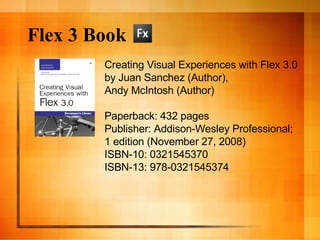
Flex 3 Book Creating Visual Experiences with Flex 3.0 by Juan Sanchez (Author),  Andy McIntosh (Author)  Paperback: 432 pages Publisher: Addison-Wesley Professional;  1 edition (November 27, 2008) ISBN-10: 0321545370 ISBN-13: 978-0321545374
Questions & Answers
Bess Ho iTune App Store Help!

Designer & Developer Work Flow for Flex Builder

  • 1.
    Designer / DeveloperWorkflow CS4 & Flex Bess Ho Silicon Valley Web Builder (SVWB) Flex User Group Adobe Headquarter May 12th at SF & May 14th 2009 at SJ
  • 2.
    Bess Ho iPhoneSDK / Web Developer UI Developer / Designer Blog: webbuilders.wordpress.com Founder of Silicon Valley Web Builder (SVWB) Website: svwebbuilder.com Coming Soon Releasing iTune App Store
  • 3.
    Design & DevelopmentWorkflow Checklist Create & modify Flex Skin Wire frame Prototype Layout in MXML Styling in CSS Backgrounds Images
  • 4.
    Options: Adobe CS4For Flex Builder Support Photoshop CS4 Illustrator CS4 Flash CS4 Firework CS4 What product gives you the most support for Flex Builder in building RIA?
  • 5.
    CS4 Photoshop Noresults on Flex or Skin Save image as PNG Import single PNG file one at a time
  • 6.
    CS4 Flash Noresults on Flex or Skin Save image as Image or Movie Import single file one at a time
  • 7.
    Most Common RequestFlex Skinning Flex Builder Design Library Includes buttons, tabs, bars, form elements Includes states
  • 8.
  • 9.
    CS4 Illustrator 26Components Entire Skin flex_skins.ait
  • 10.
  • 11.
  • 12.
    CS4 Illustrator Maximum6 States Disabled Up Over Down Selected Up Selected Disabled Design Tips 2 Color Tone Default: Blue and Grey
  • 13.
  • 14.
  • 15.
    CS4 Fire WorksCommands > Flex Skinning > New Flex Skin Commands > Flex Skinning > Export Flex Skin You’ll get: A folder of Flex skin images
  • 16.
    CS4 FireWorks Commands> Flex Skinning > New Flex Skin File > Export You’ll get: MXML file & A folder of Flex skin images File > MXML & Images
  • 17.
  • 18.
  • 19.
  • 20.
  • 21.
  • 22.
  • 23.
    CS4 FireWorks <?xmlversion=&quot;1.0&quot; encoding=&quot;utf-8&quot;?> <mx:Application xmlns:mx=&quot;http://www.adobe.com/2006/mxml&quot; width=&quot;900&quot; height=&quot;2050&quot; layout=&quot;absolute&quot; backgroundGradientColors=&quot;[#FFFFFF, #FFFFFF]&quot;> <mx:Style> .textStyle { fontFamily:ArialMT; fontSize:10; color:#FFFFFF; } .textStyle2 { fontFamily:ArialMT; fontSize:18; color:#FFFFFF; } .textStyle3 { fontFamily:ArialMT; fontSize:14; color:#FFFFFF; } </mx:Style>
  • 24.
    CS4 FireWorks <mx:Imagesource=&quot;images/Image.png&quot; x=&quot;0&quot; y=&quot;0&quot; width=&quot;900&quot; height=&quot;2050&quot;/> <mx:Image source=&quot;images/Image2.png&quot; x=&quot;37&quot; y=&quot;79&quot; width=&quot;824&quot; height=&quot;1887&quot;/> <mx:Image source=&quot;images/Image3.png&quot; x=&quot;49&quot; y=&quot;89&quot; width=&quot;803&quot; height=&quot;1860&quot;/> More… <mx:Image id=&quot;grid background&quot; source=&quot;images/grid background.png&quot; x=&quot;391&quot; y=&quot;1539&quot; width=&quot;98&quot; height=&quot;18&quot;/> <mx:Image id=&quot;grid background2&quot; source=&quot;images/grid background2.png&quot; x=&quot;391&quot; y=&quot;1539&quot; width=&quot;98&quot; height=&quot;10&quot;/> <mx:Image id=&quot;grid background3&quot; source=&quot;images/grid background3.png&quot; x=&quot;563&quot; y=&quot;1538&quot; width=&quot;20&quot; height=&quot;20&quot;/> <mx:Image id=&quot;grid background4&quot; source=&quot;images/grid background3.png&quot; x=&quot;534&quot; y=&quot;1538&quot; width=&quot;20&quot; height=&quot;20&quot;/>
  • 25.
    Big Picture: BuildingRIA Flex Skin is a small part You can build RIA without using Flex Skin import Wire Frame Prototype Images Layout Export Import Big Question: Which product do I use?
  • 26.
    Firework CS4 RapidPrototyping including Wire Frame, Prototype, Export Wire Frame Prototype Images Layout Export Import
  • 27.
    New Flex ProjectCookingFor Food Recipe Finder Where you can find and track recipes quickly
  • 28.
    Work Flow DefineProduct Definition Define Product Deliverables Create User Cases & Stories Define Technical Specifications Define Visual Specifications A new Flex project Communications Documentations Teamwork Signoff & Approval Effectiveness Collaborations
  • 29.
    Firework CS4 WireFrame Demonstrate Wire Frame within Firework CS4 Export PDF for acceptance
  • 30.
  • 31.
  • 32.
    Firework CS4 WireFrame Export PDF for acceptance
  • 33.
    Firework CS4 DemonstratePrototype within Firework CS4 Prototype Export PDF for acceptance
  • 34.
    Firework CS4 PrototypeExport PDF for acceptance
  • 35.
    Export Options PDF(Reviewing) HTML & Images CSS & Images MXML & Images Big Question: Which Export option will work with Flex Builder Import?
  • 36.
    Export Options HTML & Images CSS & Images MXML & Images Big Question: Which Export option will work with Flex Builder Import? NO NO NO
  • 37.
    Export Options HTML & Images CSS & Images MXML & Images Big Question: Which Export option will work with Flex Builder Import? NO NO Partially Workable
  • 38.
    Flex Builder ImportWon’t accept HTML Won’t accept CSS layout <div> won’t work Firework prototype approach using rectangle layer won’t work Won’t accept MXML layout 100% accept style but won’t allow to rename Won’t optimize image other than GIF MXML layout is absolute, not fluid Background images are not optimized
  • 39.
    Flex Builder ImportWhat’s NEXT?
  • 40.
    Firework CS4 BookFoundation Fireworks CS4 by Grant Hinkson (Author), Craig Erskine (Author), Matt Heerema (Author), Chuck Mallott (Author), Matthew Keefe (Author), Hugh Griffith (Author) Paperback: 282 pages Publisher: friends of ED; 1 edition (March 23, 2009) ISBN-10: 1430216182 ISBN-13: 978-1430216186
  • 41.
    Flex 3 BookCreating Visual Experiences with Flex 3.0 by Juan Sanchez (Author), Andy McIntosh (Author) Paperback: 432 pages Publisher: Addison-Wesley Professional; 1 edition (November 27, 2008) ISBN-10: 0321545370 ISBN-13: 978-0321545374
  • 42.
  • 43.
    Bess Ho iTuneApp Store Help!