DESIGN, CONTROL, AND IMPLEMENTATION OF A THREE LINK
ARTICULATED ROBOT ARM
A Thesis
Presented to
The Graduate Faculty of The University of Akron
In Partial Fulfillment
of the Requirements for the Degree
Master of Science
Donald R. Dentler II
August, 2008
ii
DESIGN, CONTROL, AND IMPLEMENTATION OF A THREE LINK
ARTICULATED ROBOT ARM
Donald R. Dentler II
Thesis
Approved: Accepted:
_______________________________ _______________________________
Advisor Dean of the College
Dr. Yueh-Jaw Lin Dr. George K. Haritos
_______________________________ _______________________________
Committee Member Dean of the Graduate School
Dr. John S. Gerhardt Dr. George R. Newkome
_______________________________ _______________________________
Committee Member Date
Dr. Zhenhai Xia
_______________________________
Department Chair
Dr. Celal Batur
iii
ABSTRACT
Robots have become commonplace in the manufacturing environment, allowing
tasks ranging from the most repetitive to the most complex to be automated. As
technology advances, robotics evolves to be both more precise and practical.
The purpose of this research is to study the behavior of a robotic system through
the use of a three link articulated robotic arm. An in depth description of the various
actuators, controllers, and drivers is included. The arm will be designed following the
physical principals governing static and dynamic requirements of motion. The design
process includes both examining structural requirements and control implementation.
Component selection must be optimized for the design in terms of performance and
physical properties. Using the robot arm and simulated motion programs, both forward
and inverse coordinate transformation solutions are presented.
iv
TABLE OF CONTENTS
Page
LIST OF TABLES.............................................................................................................. v
LIST OF FIGURES ........................................................................................................... vi
CHAPTER
I. INTRODUCTION .................................................................................................. 1
II. REVIEW OF ROBOTIC SYSTEMS ..................................................................... 3
III. ROBOT DYNAMICS........................................................................................... 42
IV. DESIGN OF ROBOT ARM................................................................................. 61
V. SUMMARY.......................................................................................................... 99
BIBLIOGRAPHY........................................................................................................... 101
APPENDICES ................................................................................................................ 103
APPENDIX A. DETAILED ROBOT DRAWING PACKAGE ........................ 104
APPENDIX B. STEPPER MOTOR TORQUE CURVES................................. 116
APPENDIX C. MAXIMUM DYNAMIC TORQUE FOR LINK 2................... 119
APPENDIX D. MAXIMUM DYNAMIC TORQUE FOR LINK 1................... 121
APPENDIX E. MAXIMUM DYNAMIC TORQUE FOR LINK 0................... 124
APPENDIX F. PLOT OF INVERSE SOLUTION............................................. 127
v
LIST OF TABLES
Table Page
1: Actuator Comparison.................................................................................................... 10
2: Binary to Hexadecimal Conversion.............................................................................. 41
3: Material Properties........................................................................................................ 62
4: Assembly Parts List ...................................................................................................... 65
5: Stepper Mechanical Properties ..................................................................................... 79
6: Link Parameters............................................................................................................ 85
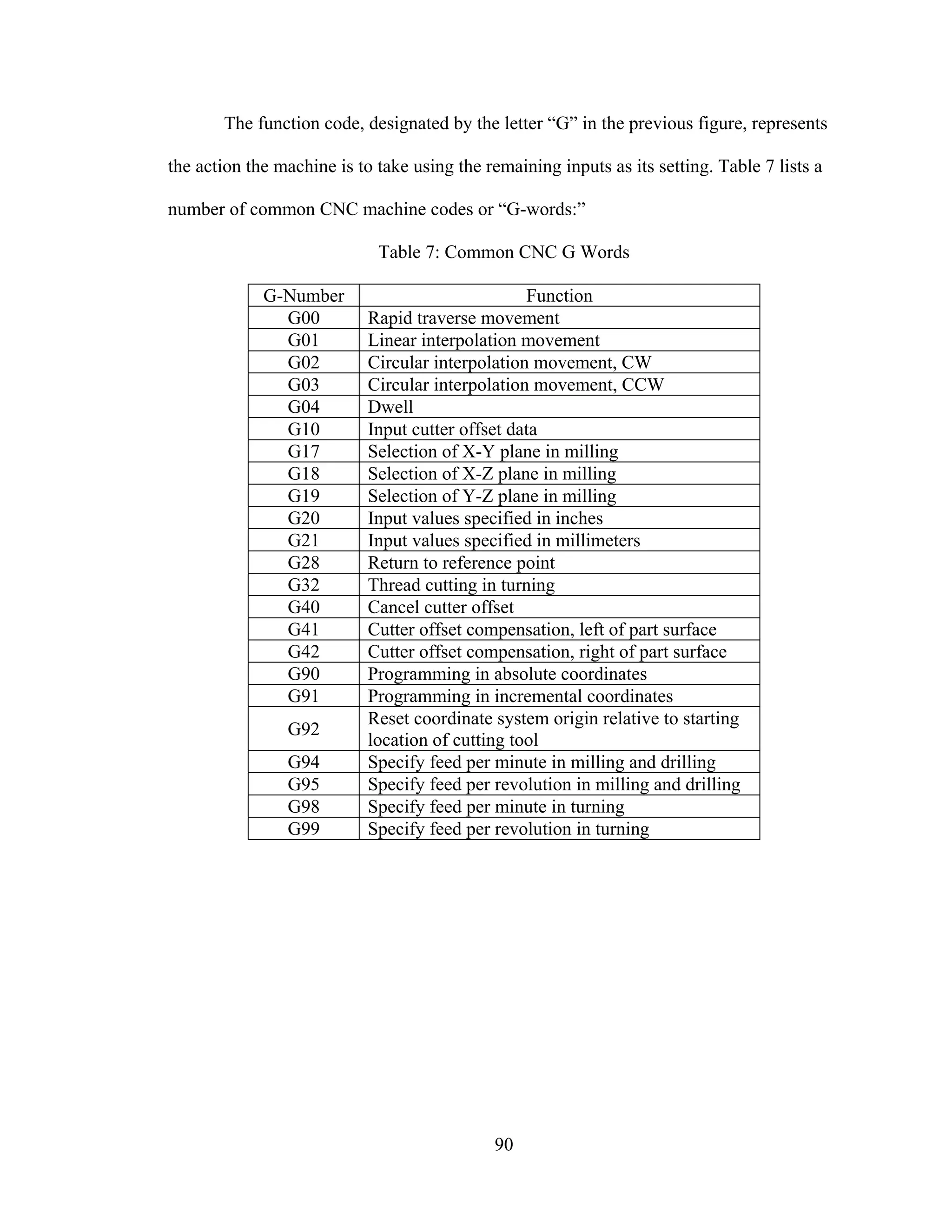
7: Common CNC G Words............................................................................................... 90
8: SP-3/FET-3 Stepper Parallel Port Pin Assignments (DB25 Connector)...................... 92
9: 6 Lead Wire Motor Wiring........................................................................................... 96
vi
LIST OF FIGURES
Figure Page
1: Cartesian Robot Movement ............................................................................................ 4
2: Cylindrical Robot Movement ......................................................................................... 4
3: Spherical Robot Movement ............................................................................................ 5
4: Articulated Robot Motion [2] ......................................................................................... 6
5: Robot Comparison Chart [4]........................................................................................... 7
6: SCARA Robot Motion.................................................................................................... 8
7: Permanent Magnet Motor[1] ........................................................................................ 12
8: Variable Reluctance Motor[1] ...................................................................................... 13
9: Hybrid Stepper Motor[1] .............................................................................................. 14
10: Unifilar Motor Winding [1]........................................................................................ 15
11: Bifilar Motor Windings. Left: 6 Lead Motor. Right: 8 Lead Motor [1]..................... 16
12: Torque Degradation with Step Division [2] ............................................................... 19
13: Example of a Servo System........................................................................................ 20
14: Permanent Magnet DC Motor..................................................................................... 22
15: Brushless DC Motor ................................................................................................... 23
16: Magnet Follows Rotating Field .................................................................................. 24
17: Applying the Current out of Phase ............................................................................. 25
18: Open Loop vs. Closed Loop System Comparison...................................................... 27
vii
19: Open Loop System Diagram....................................................................................... 28
20: Closed Loop System................................................................................................... 29
21: Information Flow Between Driver and Motor[1] ....................................................... 30
22: Current Flow Through Unipolar Drive[5] .................................................................. 31
23: R/L Driver Circuit [5]................................................................................................. 32
24: H-bridge [5] ................................................................................................................ 33
25: Chopper Pulse Chart [5] ............................................................................................. 35
26: Bipolar Chopper Schematic [5] .................................................................................. 36
27: Average Voltage Produced by Pulse Width ............................................................... 37
28: Average Voltage Produced by Pulse Frequency......................................................... 38
29: Layout of DB25 Parallel Port[1]................................................................................. 39
30: Establishing links........................................................................................................ 43
31: Example of link coordinate frames............................................................................. 46
32: Relating link velocity to the base frame ..................................................................... 49
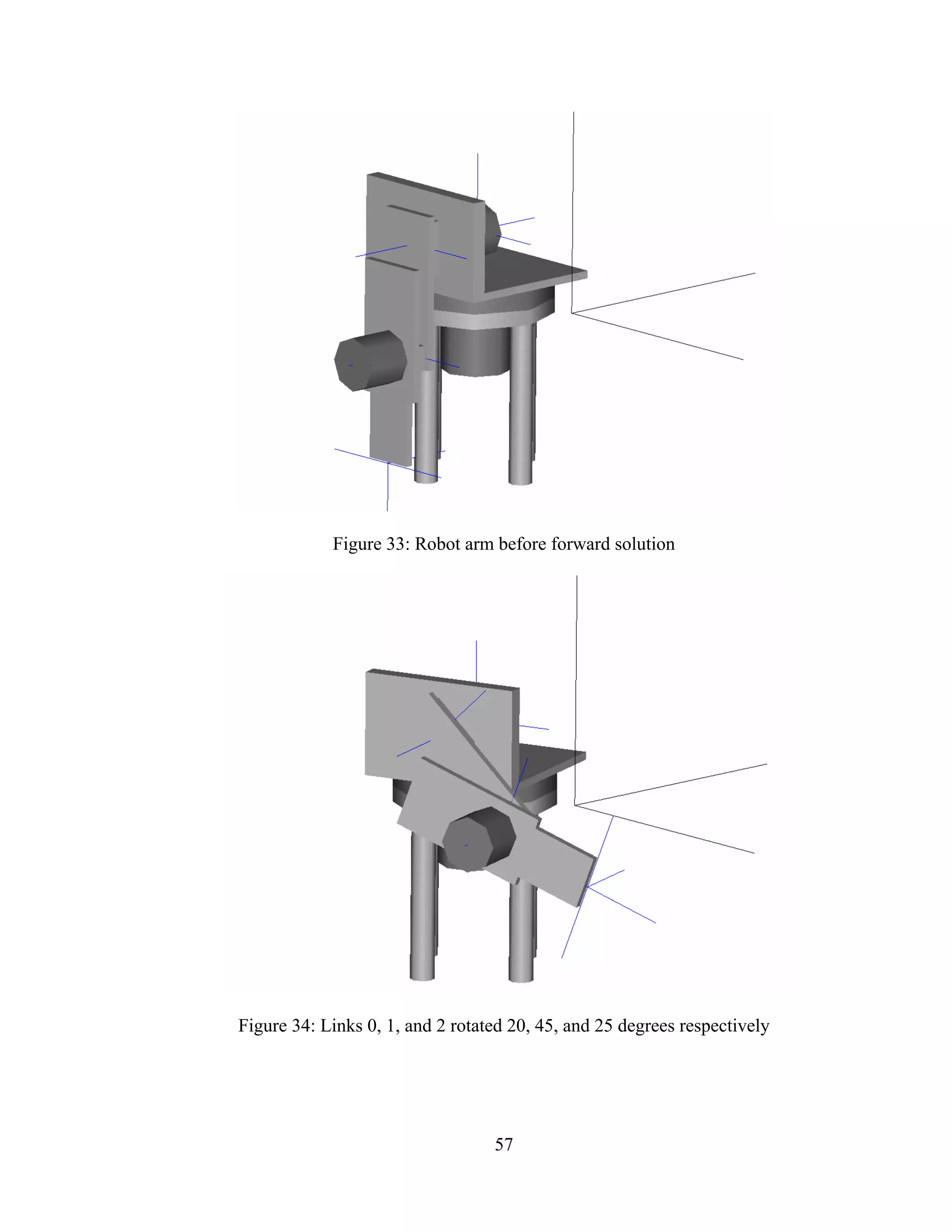
33: Robot arm before forward solution............................................................................. 57
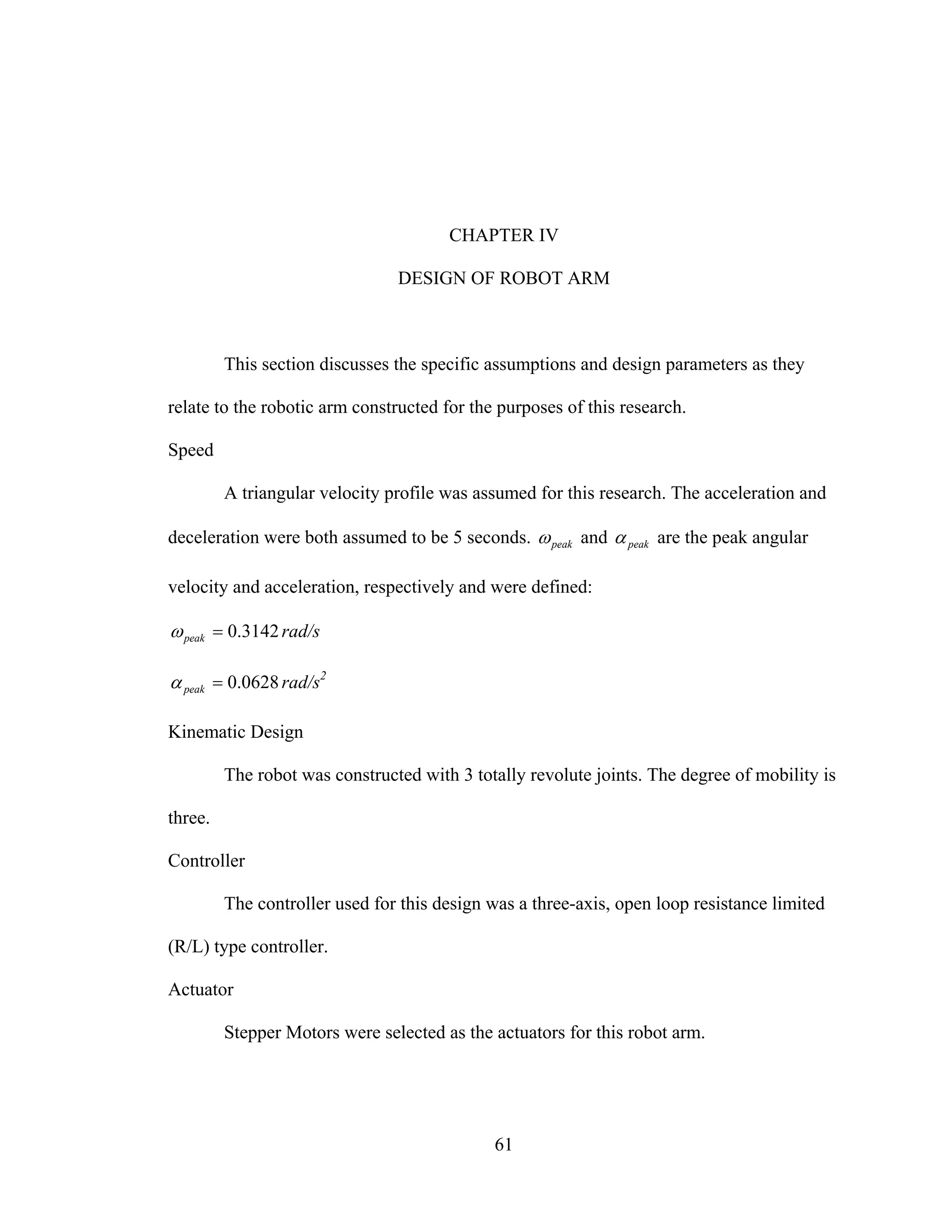
34: Links 0, 1, and 2 rotated 20, 45, and 25 degrees respectively.................................... 57
35: Robot arm before inverse solution.............................................................................. 58
36: Robot arm translated to end point............................................................................... 59
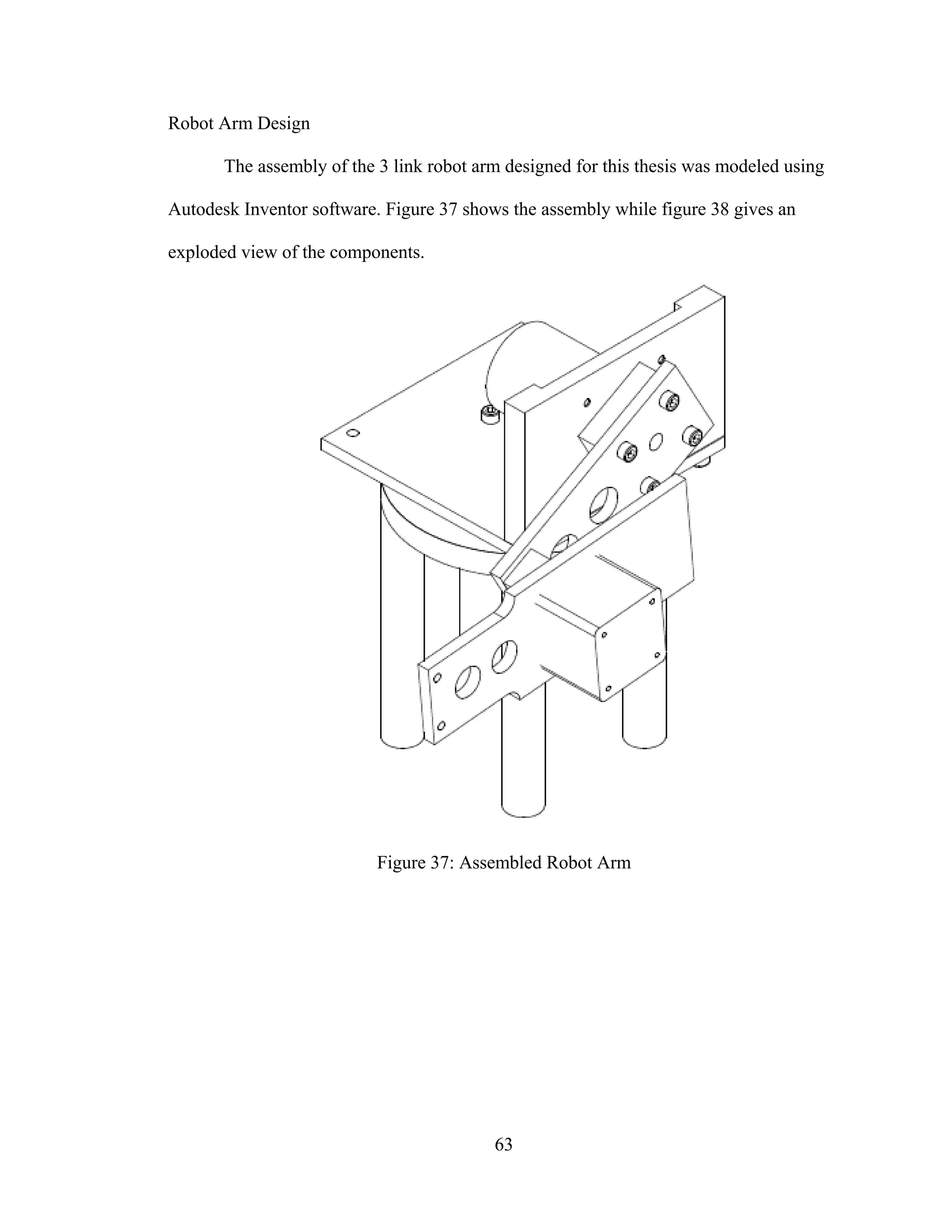
37: Assembled Robot Arm ............................................................................................... 63
38: Exploded Assembly View .......................................................................................... 64
39: Robot Arm Reach Dimensions ................................................................................... 66
40: Link 0 Rotation........................................................................................................... 67
41: Rotation Range for Link 1 (a) and Link 2 (b)............................................................. 67
viii
42: Jointed Manipulator Structure .................................................................................... 68
43: Forces and Moments Imposed on Manipulator Structure........................................... 69
44: Torques on the Robot Arm Assembly ........................................................................ 71
45: Design Variables Link 2 ............................................................................................. 80
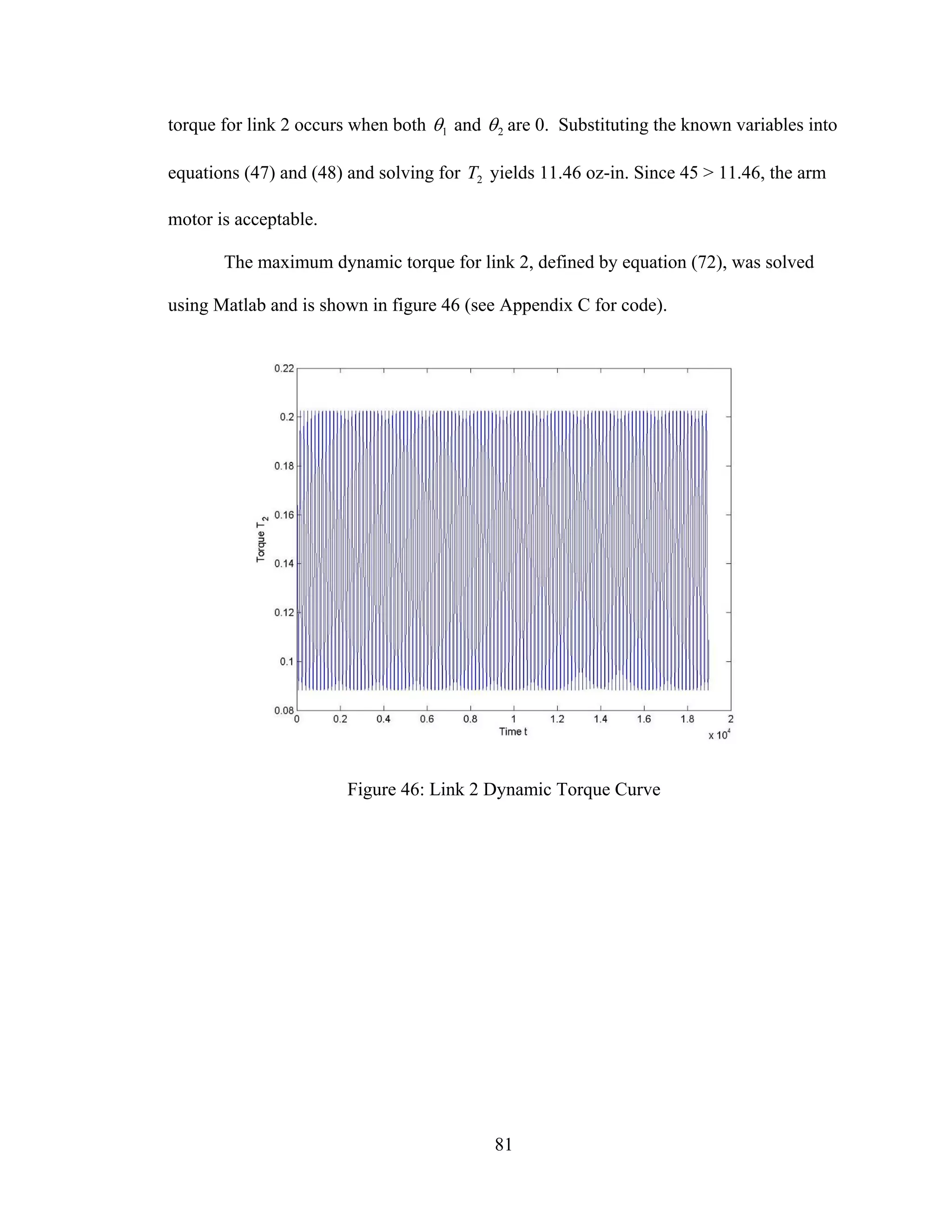
46: Link 2 Dynamic Torque Curve................................................................................... 81
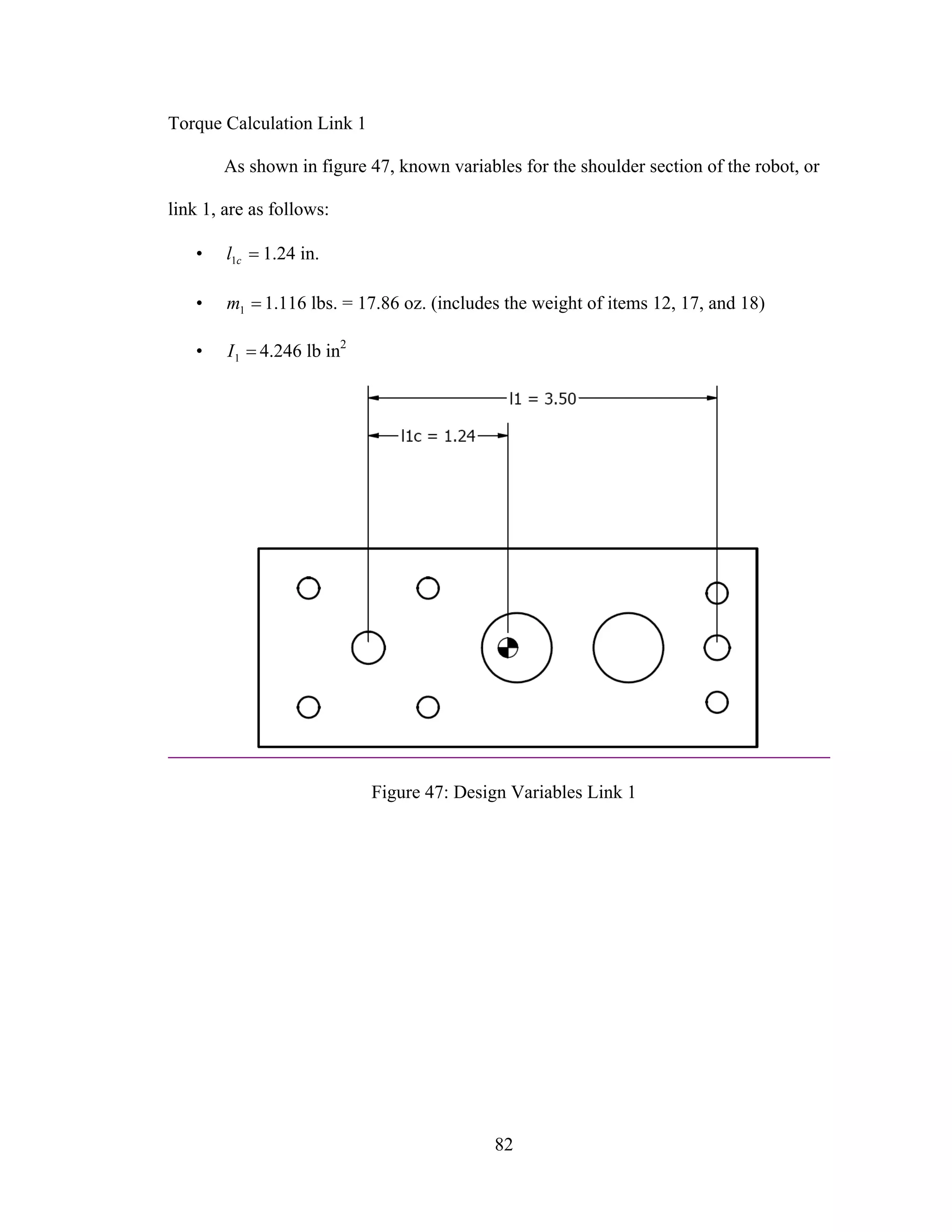
47: Design Variables Link 1 ............................................................................................. 82
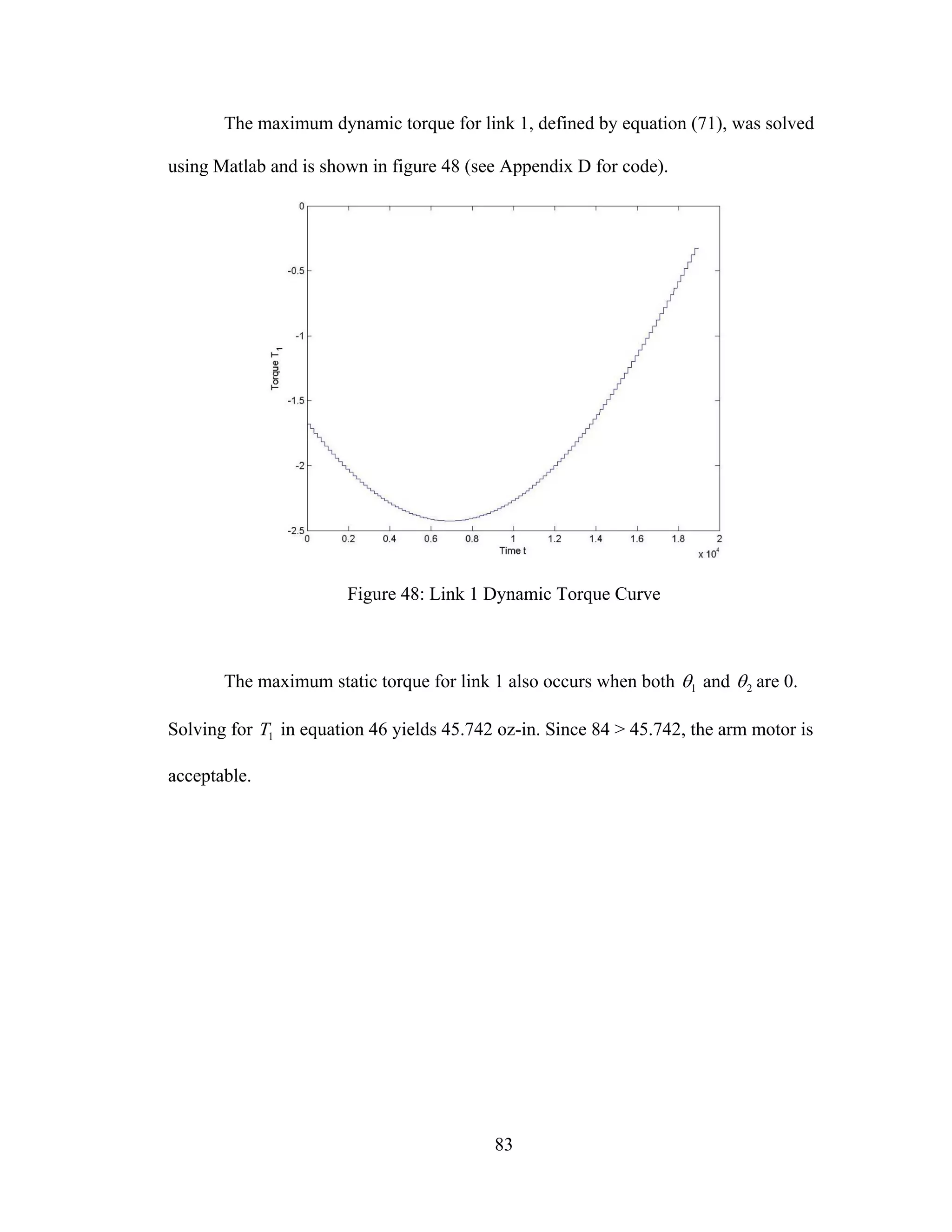
48: Link 1 Dynamic Torque Curve................................................................................... 83
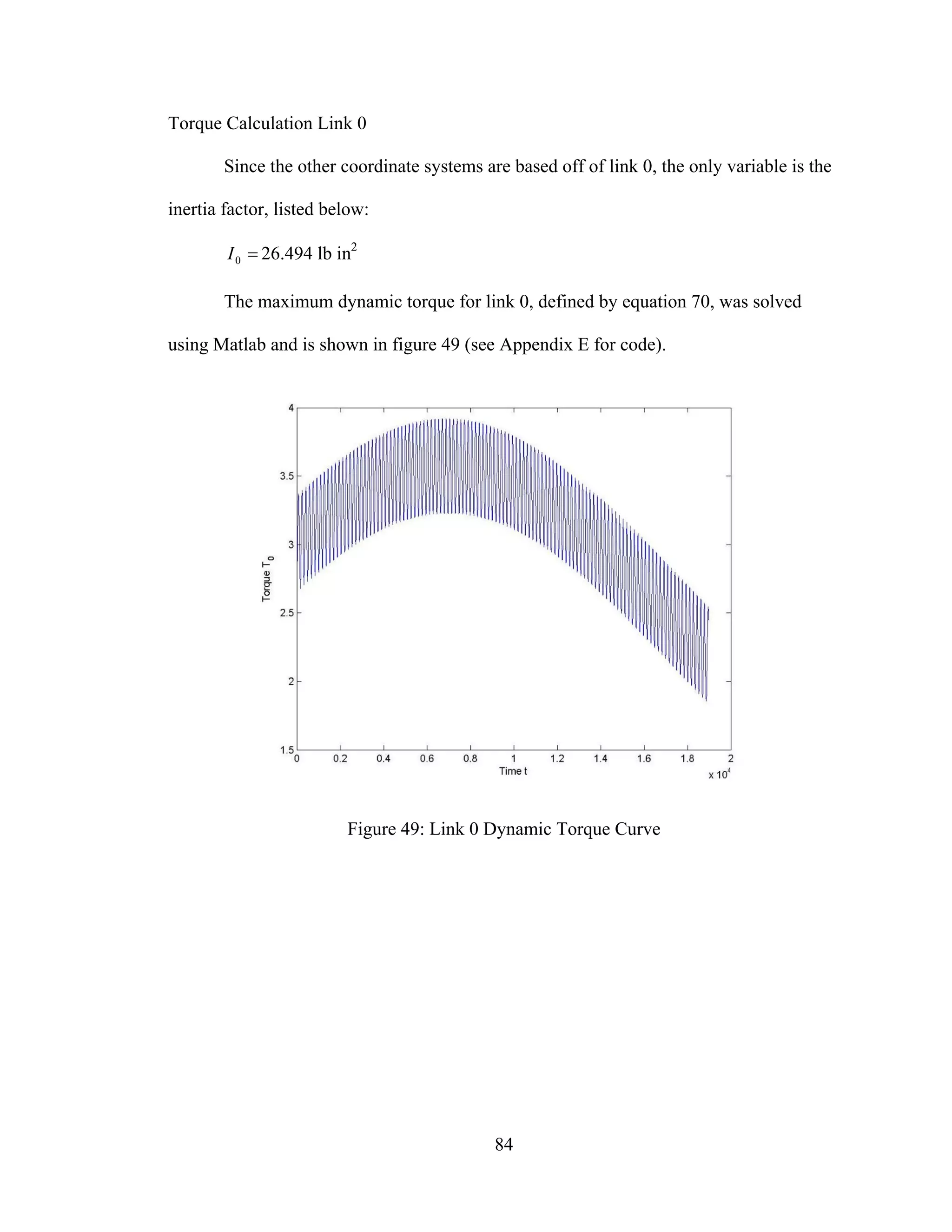
49: Link 0 Dynamic Torque Curve................................................................................... 84
50: FET-3 Controller Board Diagram............................................................................... 87
51: Parallel Port Setup for FET-3 Controller Interface..................................................... 88
52: CNC Command Line Format...................................................................................... 89
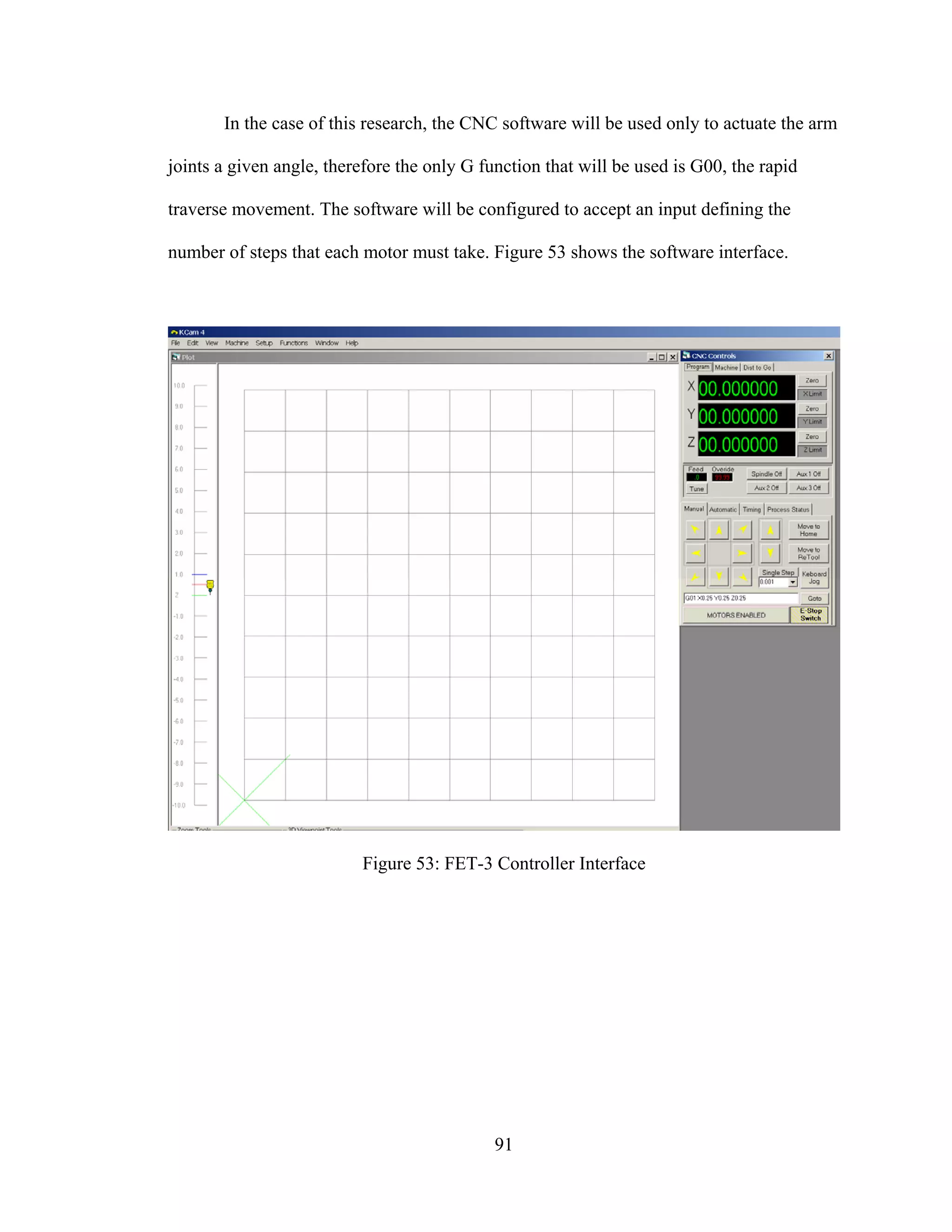
53: FET-3 Controller Interface ......................................................................................... 91
54: Standard Parallel Port Pinout [2] ................................................................................ 92
55: Connecting Wire Harness to Board ............................................................................ 95
56: Motor Junction Terminals........................................................................................... 97
1
CHAPTER I
INTRODUCTION
Robots have become commonplace in the manufacturing environment, allowing
tasks ranging from the most repetitive to the most complex to be automated. As
technology advances, robotics evolves to be both more precise and practical.
The purpose of this research is twofold. First, this text should serve as an
overview of robotics and the mechanics that govern a robotic system. Second this paper
presents the application of robotics principles and general engineering knowledge
involved in the design and operation of a robot arm.
Chapter II outlines the elements of a robotic system. Actuators, controller and
driver circuits, and computer interfaces are covered in detail. Also detailed are the
physical principles that govern these components.
Chapter III describes the engineering principles involved in the structural design
of a robotic system. Coordinate transformations, dynamic behavior, and curve tracking
conditions are derived and modeled mathematically.
The detailed design of the robot constructed for this research is included in
Chapter IV. Motor selection, static and dynamic analysis are covered, as well as
calculations justifying these component selections. An assembly procedure is also
included.
2
Chapter V summarizes the works of this thesis with observations and
recommendations for extended study on this topic.
3
CHAPTER II
REVIEW OF ROBOTIC SYSTEMS
Typically, robots are used to perform jobs that are difficult, hazardous or
monotonous for humans. They lift heavy objects, paint, weld, handle chemicals, and
perform assembly work for days at a time without suffering from fatigue. Robots are
defined by the nature of their movement. This section describes the following
classifications of robots [1,4]:
• Cartesian
• Cylindrical
• Polar
• Articulated
• SCARA
Cartesian Robot [6,1,4]
Cartesian, or gantry, robots are defined by movement limited by three prismatic
joints (figure 1). The workspace is defined by a rectangle resulting from the coincident
axes.
4
Figure 1: Cartesian Robot Movement
Cylindrical Robot
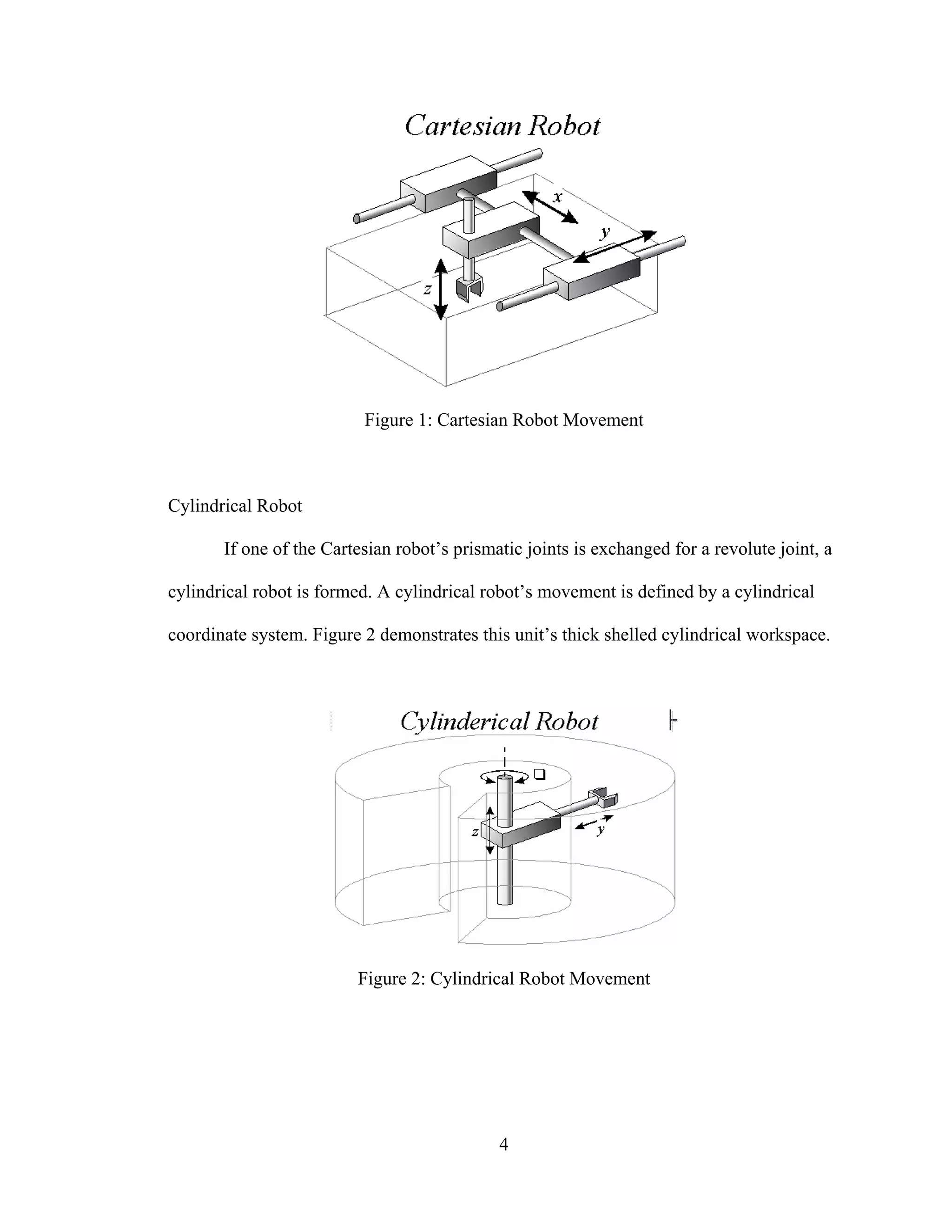
If one of the Cartesian robot’s prismatic joints is exchanged for a revolute joint, a
cylindrical robot is formed. A cylindrical robot’s movement is defined by a cylindrical
coordinate system. Figure 2 demonstrates this unit’s thick shelled cylindrical workspace.
Figure 2: Cylindrical Robot Movement
5
Spherical Robot
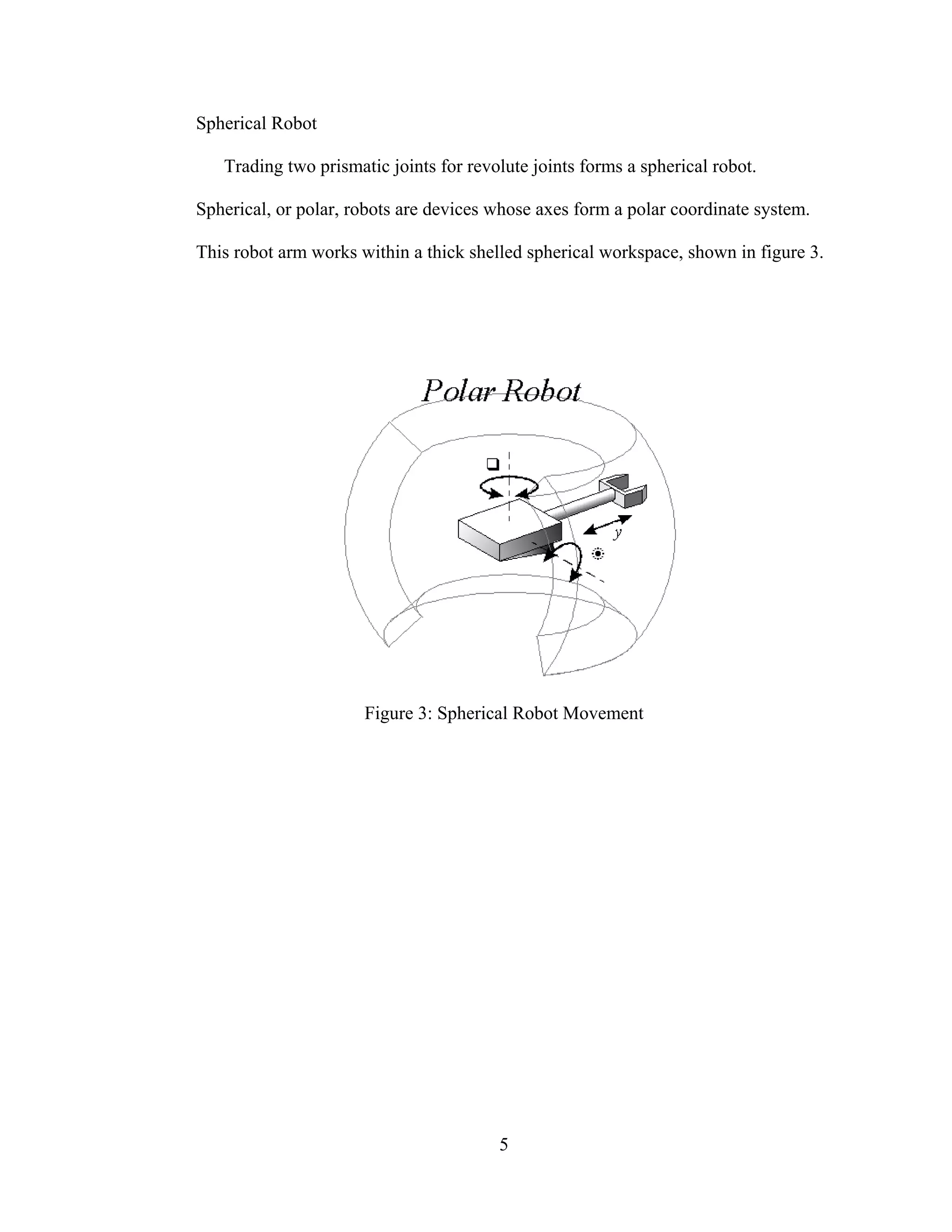
Trading two prismatic joints for revolute joints forms a spherical robot.
Spherical, or polar, robots are devices whose axes form a polar coordinate system.
This robot arm works within a thick shelled spherical workspace, shown in figure 3.
Figure 3: Spherical Robot Movement
6
Articulated Robot
Substituting a revolute joint for the final prismatic joint turns the arm into an
articulated arm. Any robot whose arm has at least three rotary joints is considered to
be an articulated robot (figure 4). The workspace is a complex set of intersecting
spheres.
Figure 4: Articulated Robot Motion [2]
It can be seen that the required workspace weighs heavily in the selection of a robotic
system. Figure 5 makes a comparison of the previously described robotic systems.
7
Figure 5: Robot Comparison Chart [4]
8
SCARA Robot
SCARA (which stands for Selectively Compliant Articulated Robot Arm) is a
specialty robot which has two parallel rotary joints to provide compliance in a plane.
A third prismatic joint allows the arm to translate vertically. SCARA robots differ
from articulated robots in that its workspace consists of two concentric cylinders,
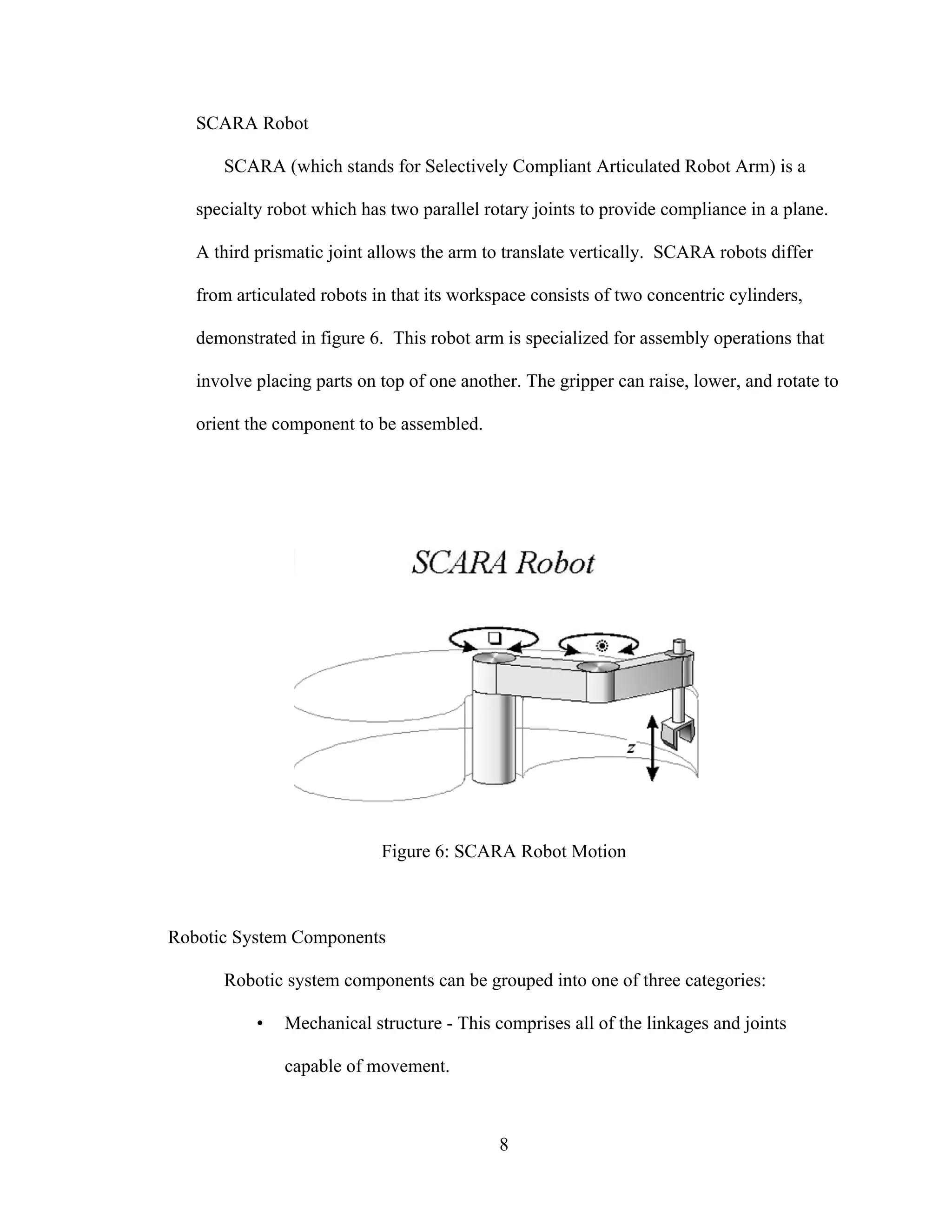
demonstrated in figure 6. This robot arm is specialized for assembly operations that
involve placing parts on top of one another. The gripper can raise, lower, and rotate to
orient the component to be assembled.
Figure 6: SCARA Robot Motion
Robotic System Components
Robotic system components can be grouped into one of three categories:
• Mechanical structure - This comprises all of the linkages and joints
capable of movement.
9
• Actuator - The mechanism that provides the necessary forces to move the
mechanical structure.
• Controller circuit - Supplies the actuators with the input required to
achieve the desired position, force, speed, etc.
The design of the mechanical structure will be discussed in Chapter III. Actuators
and controller circuits will be reviewed here.
10
Actuator types
The proper selection of actuator will dictate how effective a robot is in performing
a specific task. Actuators can be either mechanical or electrical and have varying
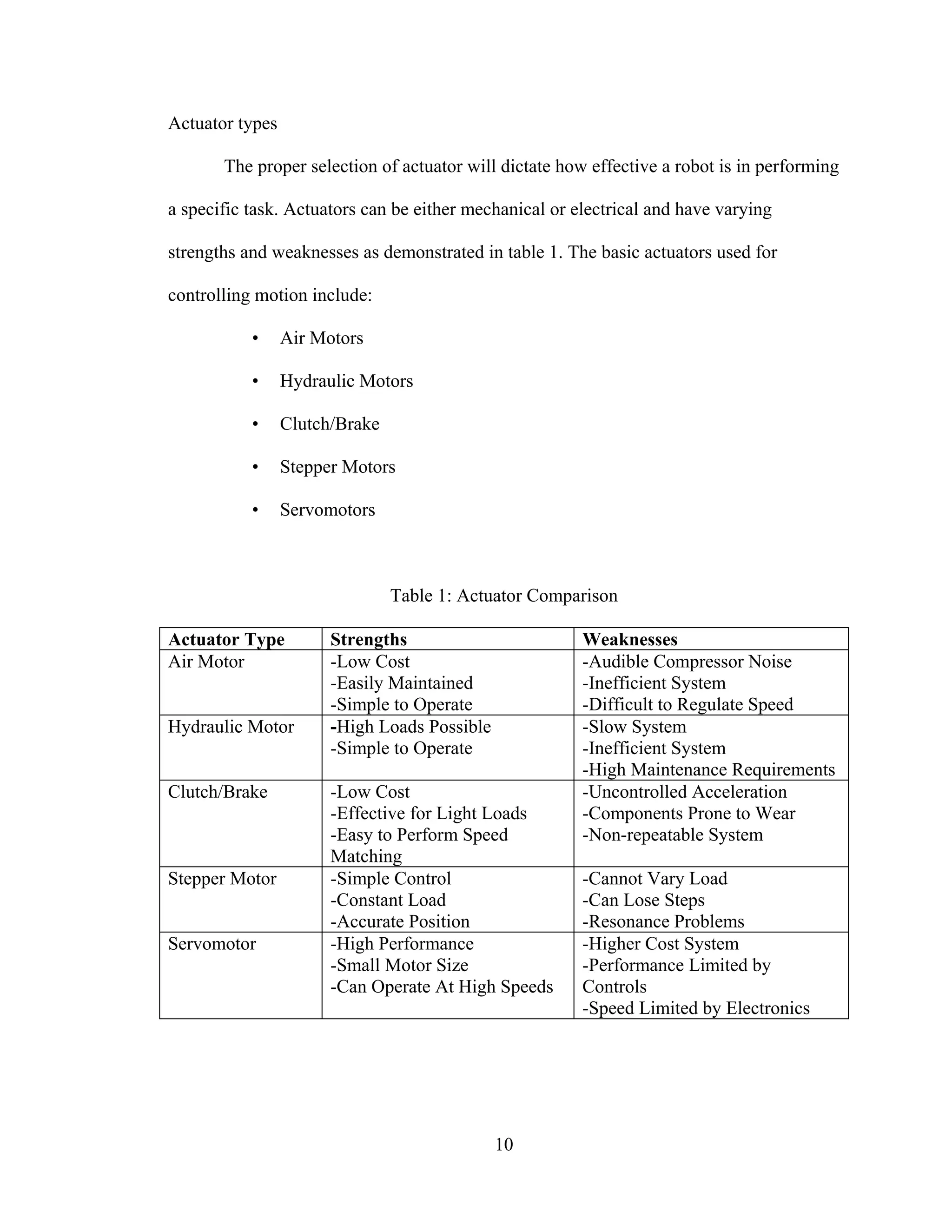
strengths and weaknesses as demonstrated in table 1. The basic actuators used for
controlling motion include:
• Air Motors
• Hydraulic Motors
• Clutch/Brake
• Stepper Motors
• Servomotors
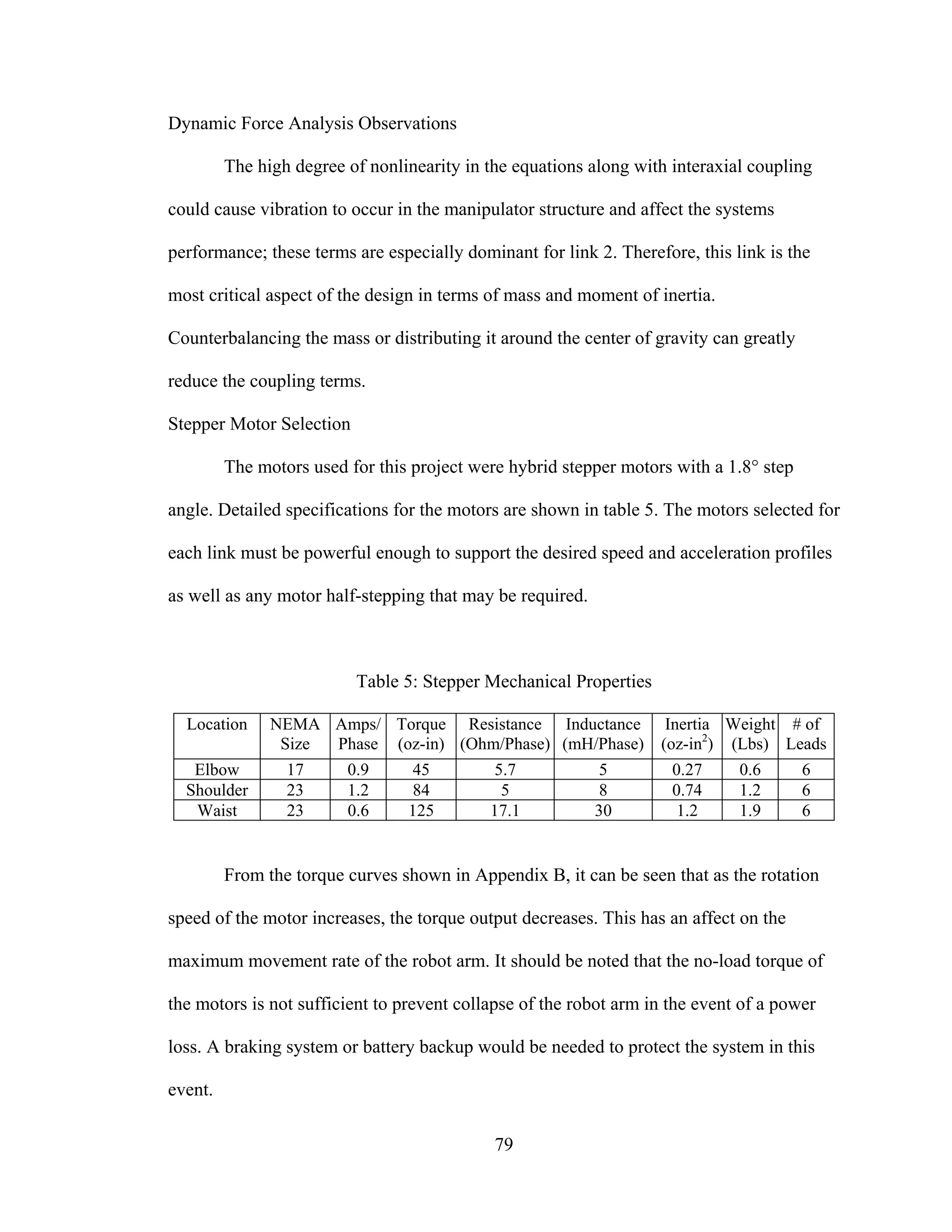
Table 1: Actuator Comparison
Actuator Type Strengths Weaknesses
Air Motor -Low Cost
-Easily Maintained
-Simple to Operate
-Audible Compressor Noise
-Inefficient System
-Difficult to Regulate Speed
Hydraulic Motor -High Loads Possible
-Simple to Operate
-Slow System
-Inefficient System
-High Maintenance Requirements
Clutch/Brake -Low Cost
-Effective for Light Loads
-Easy to Perform Speed
Matching
-Uncontrolled Acceleration
-Components Prone to Wear
-Non-repeatable System
Stepper Motor -Simple Control
-Constant Load
-Accurate Position
-Cannot Vary Load
-Can Lose Steps
-Resonance Problems
Servomotor -High Performance
-Small Motor Size
-Can Operate At High Speeds
-Higher Cost System
-Performance Limited by
Controls
-Speed Limited by Electronics
11
The most commonly used actuators in robotics are electric motors, be it either a
stepper or servo type. Stepper motors perform best in open loop systems and servomotors
are best suited for closed loop applications. These two specific actuators will be discussed
in some detail along with open and closed loop systems.
Stepper Motors
Stepper motors, or steppers, are mechanically simple when compared to other
motors in that there are no internal brushes or contacts. Armature rotation is achieved by
switching the magnetic field sequentially.
Types of Steppers
Steppers can be grouped into three categories that differ in terms of internal
construction based on the use of permanent magnets and/or iron rotors with laminated
steel stators:
• Permanent magnet
• Variable reluctance
• Hybrid.
12
Permanent Magnet Steppers
The permanent magnet (PM) motor (shown in figure 7) has a permanent magnet
attached to the rotor. It is a relatively low speed, low torque device with large step angles
of either 45° or 90°. Its simple construction and low cost make it an ideal choice for non-
industrial applications, such as a line printer wheel positioner.
Figure 7: Permanent Magnet Motor[1]
Unlike the other stepper motors, the PM motor rotor has no teeth and is designed
to be magnetized at a right angle to its axis. The above illustration shows a simple, 90°
PM motor with four phases (A-D). Applying current to each phase in sequence will cause
the rotor to rotate by adjusting to the changing magnetic fields. A 45° angle can be
obtained by energizing two adjacent poles simultaneously.
Variable Reluctance Steppers
The variable reluctance motor does not use a permanent magnet. As a result, the
motor rotor can move without constraint or detent torque. This type of construction is
good in non-industrial applications that do not require a high degree of motor torque,
such as the positioning of a micro slide.
13
The variable reluctance motor shown in figure 8 has four stator pole pairs set 15°
apart. Current applied to pole A through the motor winding causes a magnetic attraction
that aligns the rotor to pole A. Energizing stator pole B causes a 15° rotation to align with
pole B. This process will continue with pole C and back to A in a clockwise direction.
Reversing this procedure (C to A) would result in a counterclockwise rotation.
Figure 8: Variable Reluctance Motor[1]
14
Hybrid Steppers
Hybrid motors combine the best characteristics of the variable reluctance and
permanent magnet motors. They are constructed with multi-toothed stator poles and a
permanent magnet rotor. Standard hybrid motors have 200 rotor teeth and rotate at 1.8º
step angles. Other hybrid motors are available in 0.9º and 3.6º step angle configurations.
Because they exhibit high static and dynamic torque and run at very high step rates,
hybrid motors are used in a wide variety of industrial applications. Figure 9 shows the
configuration of a hybrid stepper motor.
Figure 9: Hybrid Stepper Motor[1]
Motor Windings
Hybrid stepper motor stators can be wound in two ways, unifilar and bifilar. The
windings affect how the current flows through the motor and, in turn how the motor
performs.
15
Unifilar Windings
Unifilar has only one winding per stator pole. Stepper motors with a unifilar
winding will have 4 lead wires. Figure 10 is a wiring diagram that illustrates a typical
unifilar motor:
Figure 10: Unifilar Motor Winding [1]
16
Bifilar Windings
Bifilar wound motors means that there are two identical sets of windings on each
stator pole. This type of winding configuration simplifies operation in that transferring
current from one coil to another wound in the opposite direction, will reverse the rotation
of the motor shaft. To accomplish this feat in a unifilar application would require the
current to physically reverse its direction along the same winding. The most common
wiring configuration for bifilar wound stepper motors is 8 leads because it offers the
flexibility of either a series or parallel connection. There are, however, many 6-lead
stepping motors available for series connection applications. Figure 11 demonstrates both
the 6 and 8 lead wiring diagrams.
Figure 11: Bifilar Motor Windings. Left: 6 Lead Motor. Right: 8 Lead Motor [1]
Step Modes
Steppers may be stepped one of three ways depending on how and when the
stators are energized. The step modes are:
• Full step mode
• Half step mode
17
• Microstep mode
The capabilities of the driver determine what step modes are available to the user.
Full Stepping
Standard hybrid stepper motors have 200 rotor teeth, or 200 full steps per
revolution of the motor shaft. Dividing the 200 steps into the 360º rotation equals a 1.8º
full step angle. Normally, full step mode is achieved by energizing both windings while
reversing the current alternately. Essentially, one digital input from the driver is
equivalent to one step.
Half Stepping
Half step simply means that a motor with 200 teeth is rotating at 400 steps per
revolution. In this mode, one winding is energized and then two windings are energized
alternately, causing the rotor to rotate at half the distance, or 0.9º. Half stepping is a more
practical solution however, in industrial applications. Although it provides slightly less
torque (about 70% of the motor’s rated holding torque), half step mode increases the
amount of resolution over a full step mode and increases positional accuracy. The torque
reduction can be countered by over sizing the motor accordingly for the application.
Microstepping
Microstepping is a relatively new stepper motor technology that controls the
current in the motor winding to a degree that further subdivides the number of positions
between poles. Currently, microstep drivers are capable of rotating at 1/256 of a step (per
step), or over 50,000 steps per revolution. This provides for a very smooth motor
operation, with reduced mechanical noise and system resonance. The tradeoff with this
enhanced performance is decreased motor torque. Figure 12 charts the torque decrease as
18
a single step is divided. At 256 steps per step the motor is only producing 0.61% of the
full holding torque. In some cases, this may not even be enough torque to rotate the shaft,
which affects the motor’s accuracy.
19
Figure12:TorqueDegradationwithStepDivision[2]
20
Servomotors
The term “servomotor” does not refer to one single kind of motor. Instead it refers
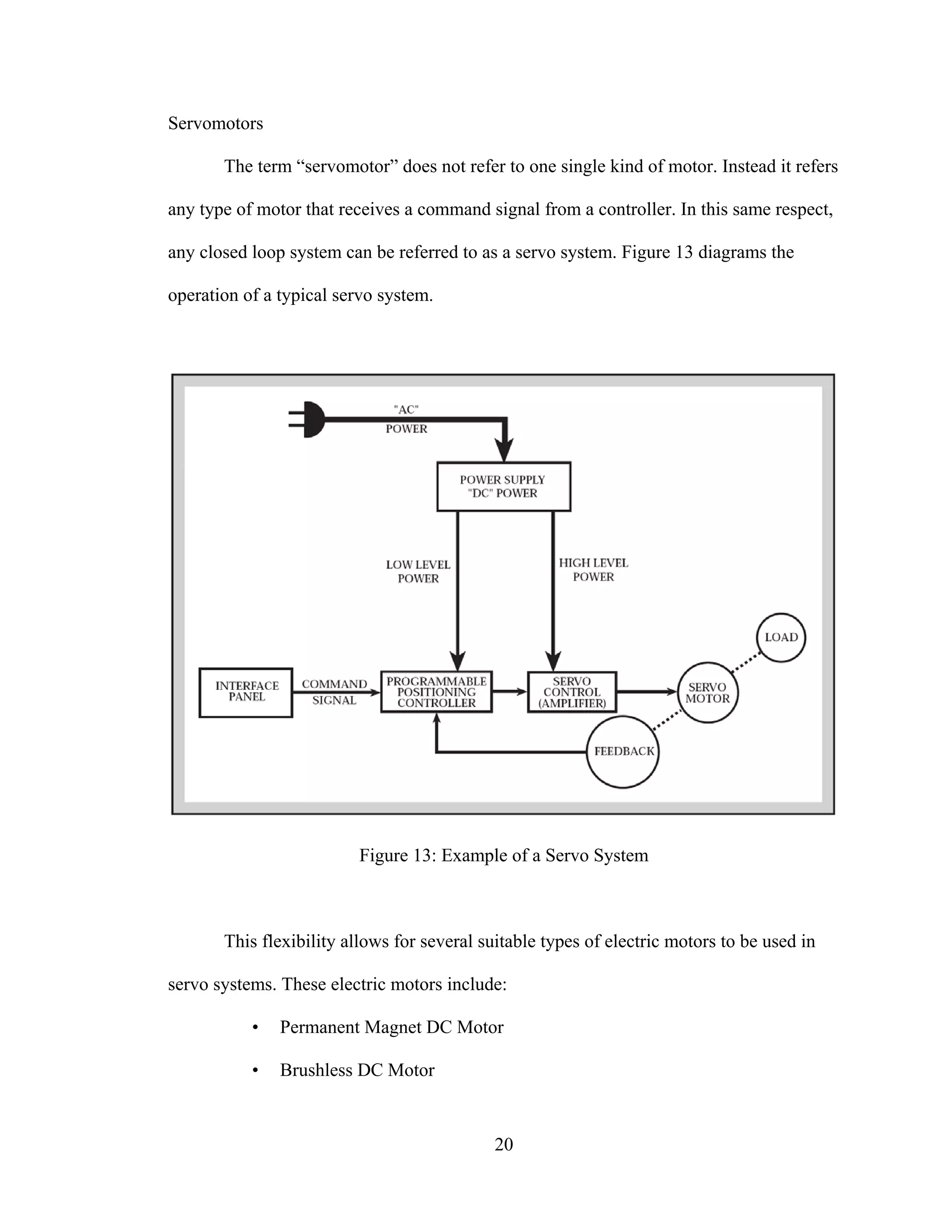
any type of motor that receives a command signal from a controller. In this same respect,
any closed loop system can be referred to as a servo system. Figure 13 diagrams the
operation of a typical servo system.
Figure 13: Example of a Servo System
This flexibility allows for several suitable types of electric motors to be used in
servo systems. These electric motors include:
• Permanent Magnet DC Motor
• Brushless DC Motor
21
• Induction AC Motor
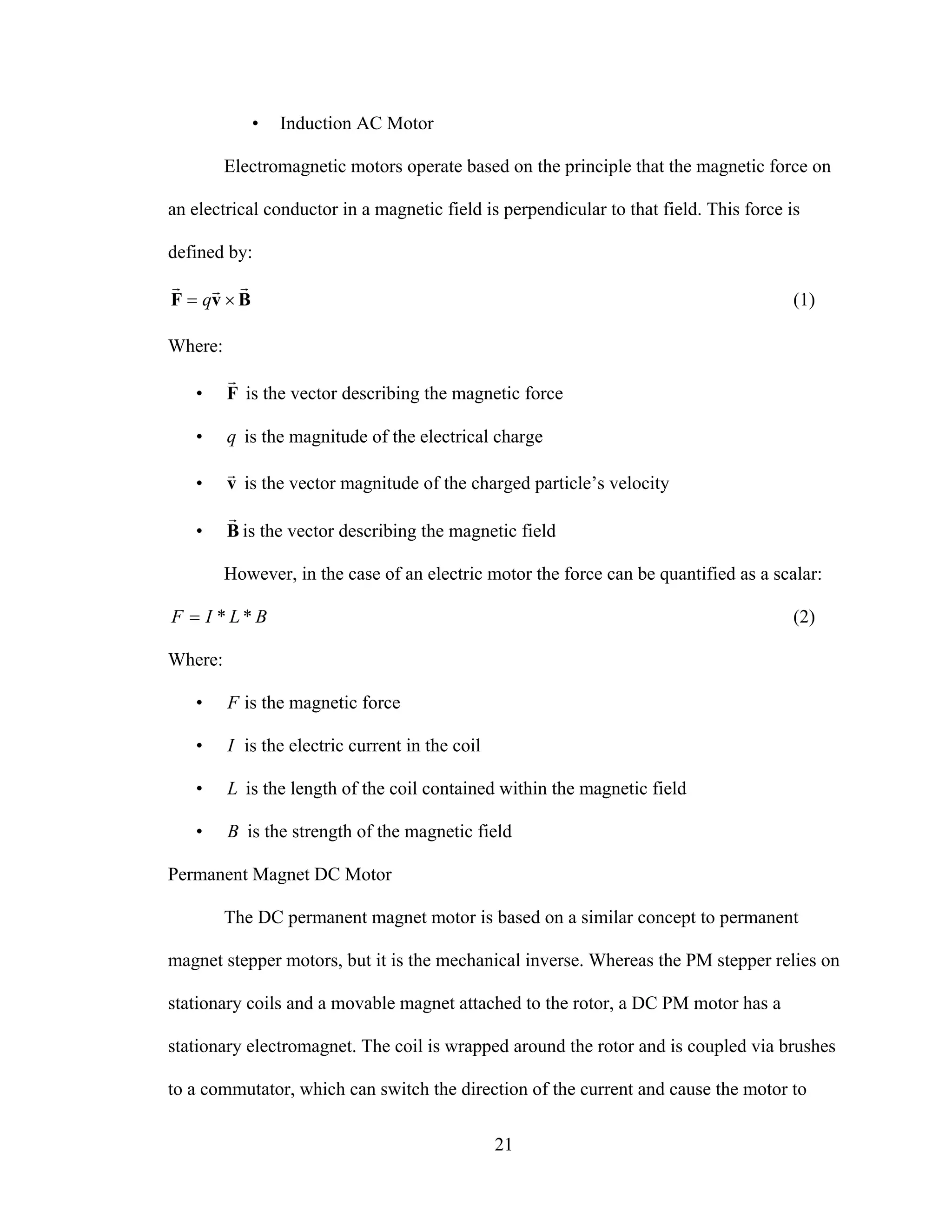
Electromagnetic motors operate based on the principle that the magnetic force on
an electrical conductor in a magnetic field is perpendicular to that field. This force is
defined by:
BvF
rrr
×= q (1)
Where:
• F
r
is the vector describing the magnetic force
• q is the magnitude of the electrical charge
• v
r
is the vector magnitude of the charged particle’s velocity
• B
r
is the vector describing the magnetic field
However, in the case of an electric motor the force can be quantified as a scalar:
BLIF **= (2)
Where:
• F is the magnetic force
• I is the electric current in the coil
• L is the length of the coil contained within the magnetic field
• B is the strength of the magnetic field
Permanent Magnet DC Motor
The DC permanent magnet motor is based on a similar concept to permanent
magnet stepper motors, but it is the mechanical inverse. Whereas the PM stepper relies on
stationary coils and a movable magnet attached to the rotor, a DC PM motor has a
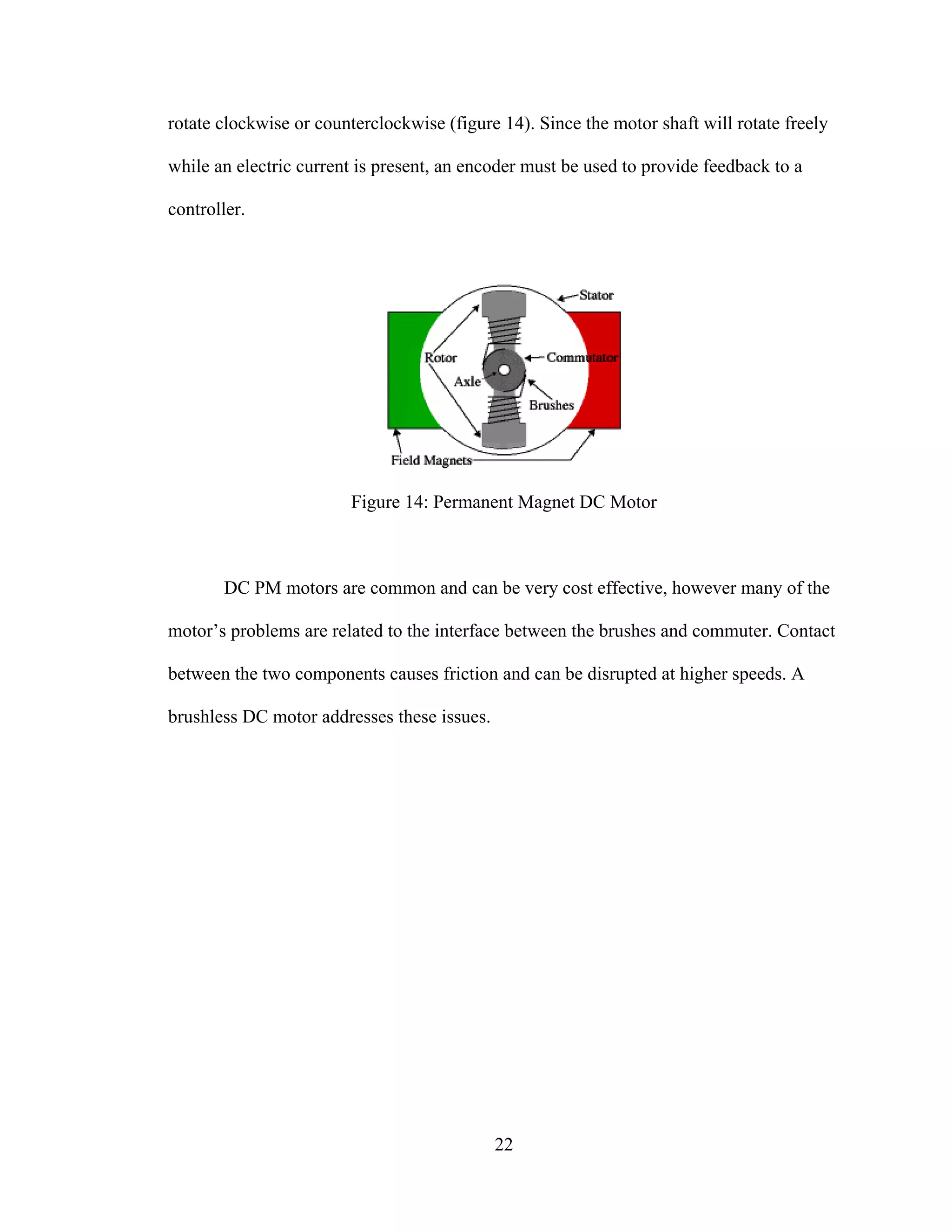
stationary electromagnet. The coil is wrapped around the rotor and is coupled via brushes
to a commutator, which can switch the direction of the current and cause the motor to
22
rotate clockwise or counterclockwise (figure 14). Since the motor shaft will rotate freely
while an electric current is present, an encoder must be used to provide feedback to a
controller.
Figure 14: Permanent Magnet DC Motor
DC PM motors are common and can be very cost effective, however many of the
motor’s problems are related to the interface between the brushes and commuter. Contact
between the two components causes friction and can be disrupted at higher speeds. A
brushless DC motor addresses these issues.
23
Brushless DC Motor [17]
A brushless DC motor replaces the commutator and brushes with an electronic
controller. This controller maintains the proper current in the stationary coils. Figure 15
shows a basic diagram of a brushless DC motor.
Figure 15: Brushless DC Motor
It should be noted that the internal layout of a brushless DC motor looks very
similar to a permanent magnet stepper, yet a brushless motor relies on a feedback device
such as a Hall Effect sensor to keep track of the position of the rotor. This provides for
precise speed control. The brushless DC motor has a much higher initial cost than a
conventional DC motor, but these costs can usually be justified by the increased
performance and elimination of the maintenance needed to replace the brush contacts.
Induction AC Motor
24
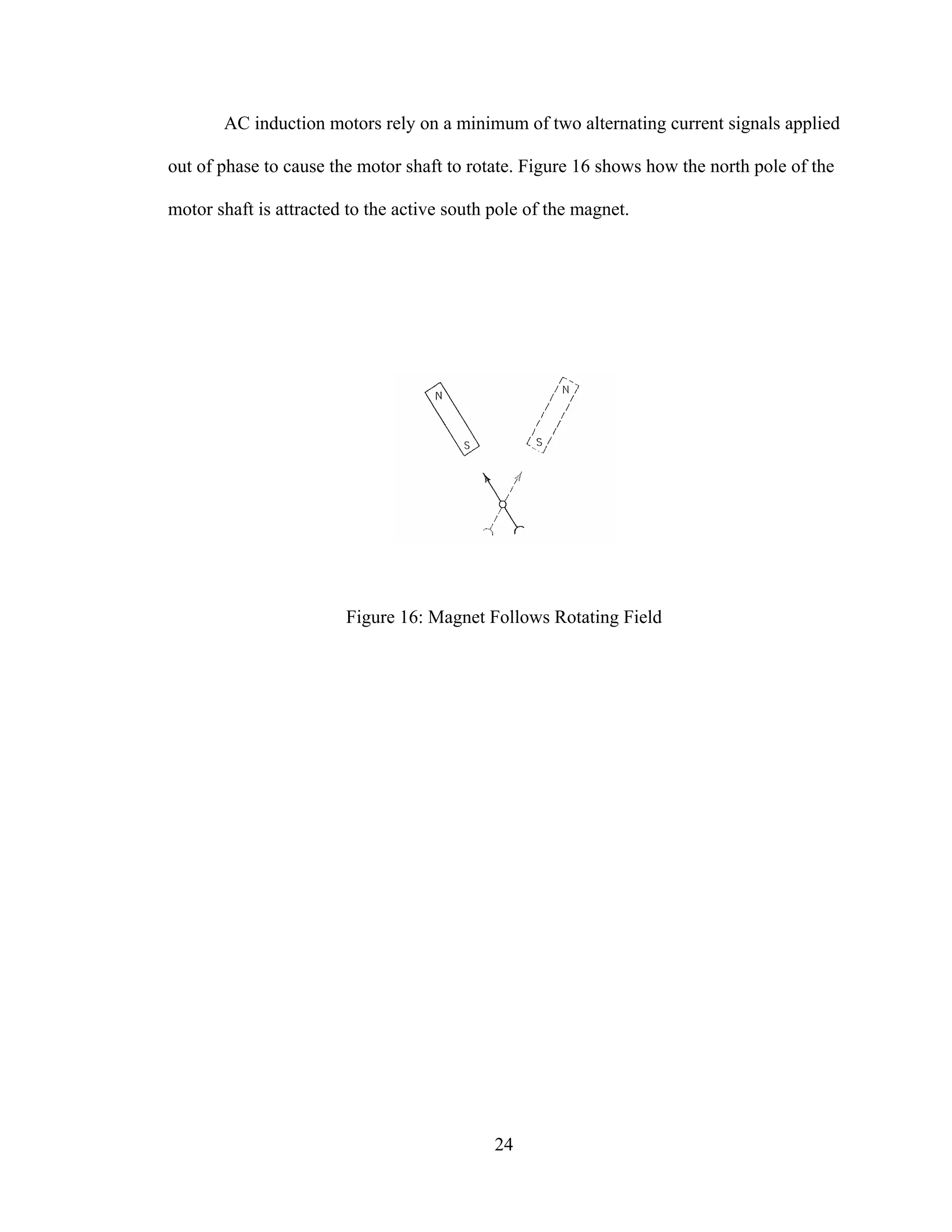
AC induction motors rely on a minimum of two alternating current signals applied
out of phase to cause the motor shaft to rotate. Figure 16 shows how the north pole of the
motor shaft is attracted to the active south pole of the magnet.
Figure 16: Magnet Follows Rotating Field
25
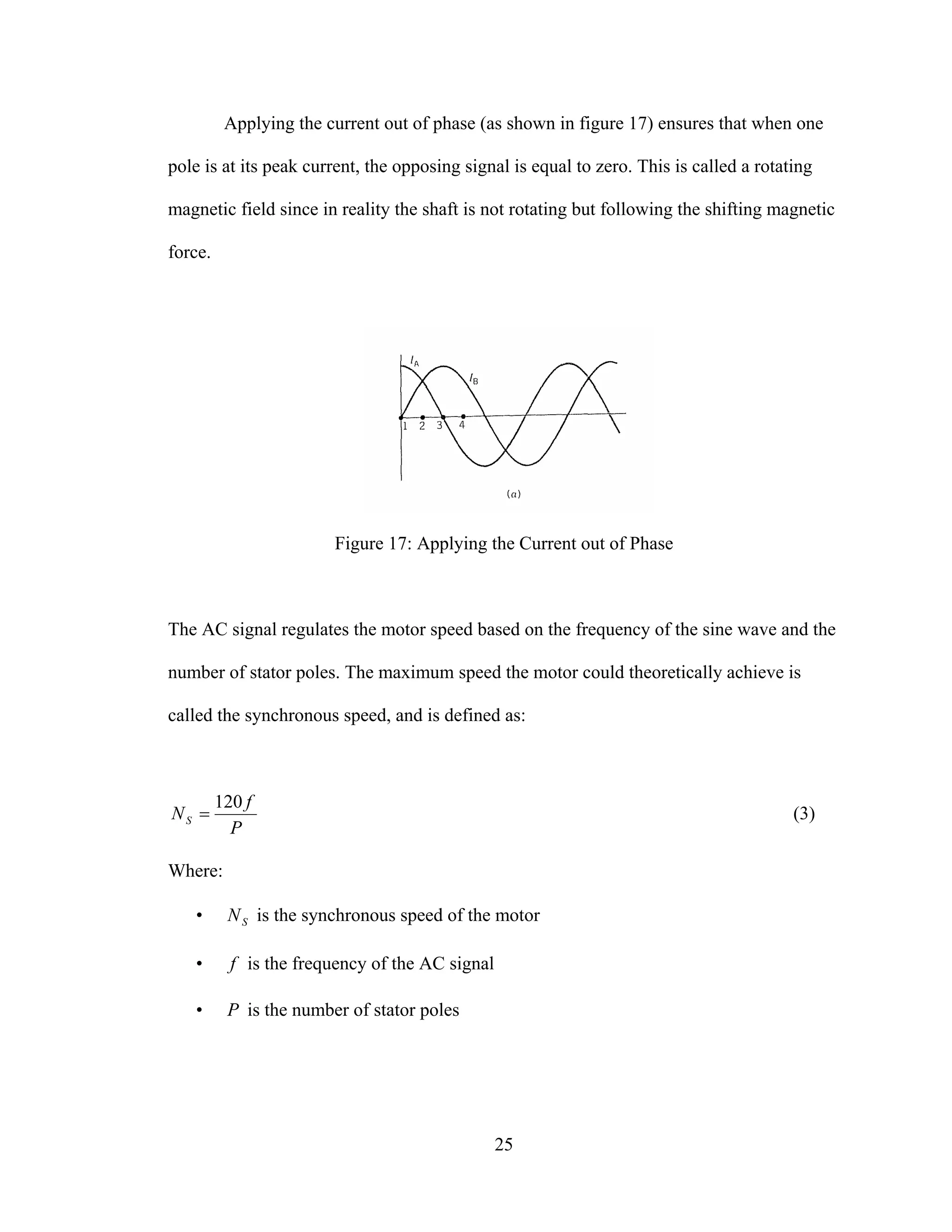
Applying the current out of phase (as shown in figure 17) ensures that when one
pole is at its peak current, the opposing signal is equal to zero. This is called a rotating
magnetic field since in reality the shaft is not rotating but following the shifting magnetic
force.
Figure 17: Applying the Current out of Phase
The AC signal regulates the motor speed based on the frequency of the sine wave and the
number of stator poles. The maximum speed the motor could theoretically achieve is
called the synchronous speed, and is defined as:
P
f
NS
120
= (3)
Where:
• SN is the synchronous speed of the motor
• f is the frequency of the AC signal
• P is the number of stator poles
26
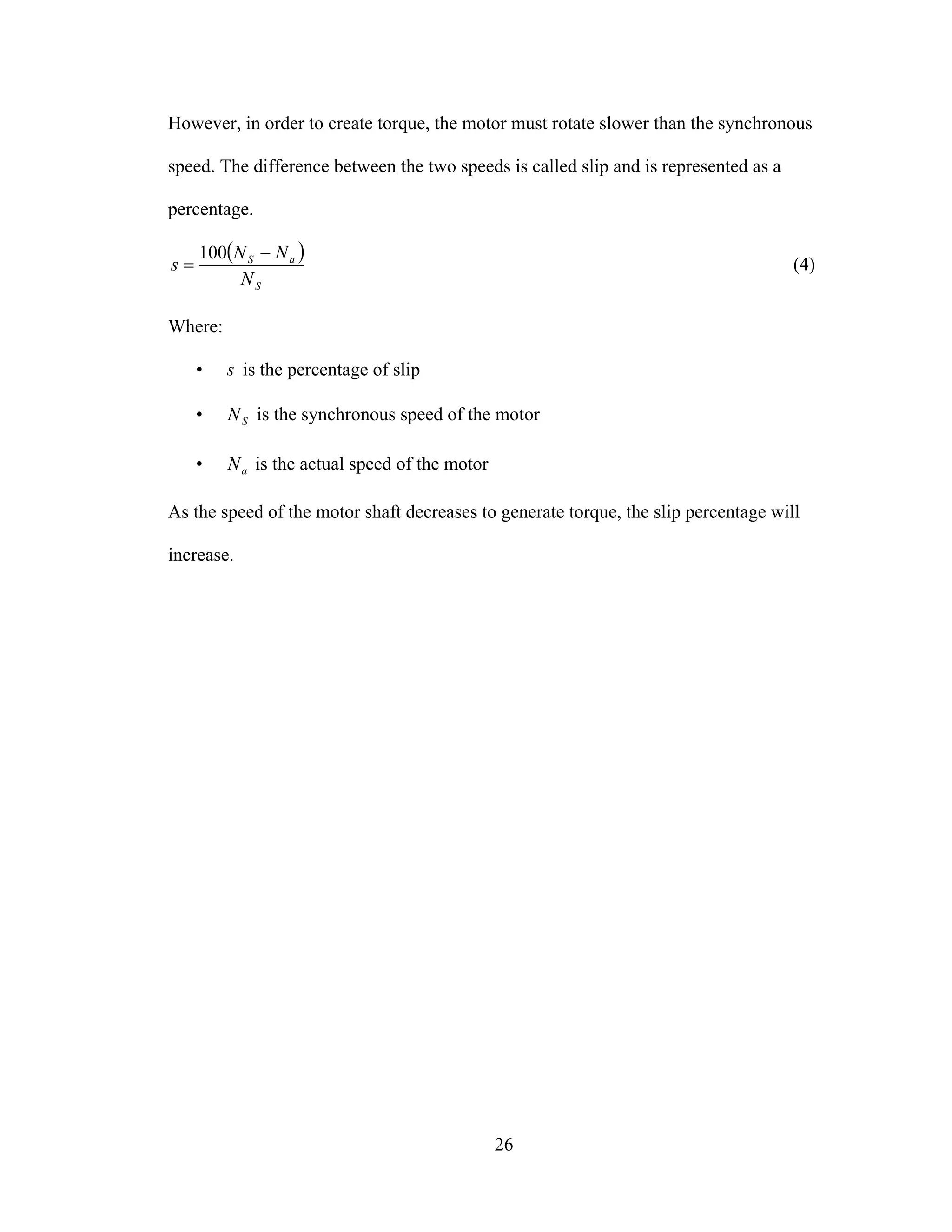
However, in order to create torque, the motor must rotate slower than the synchronous
speed. The difference between the two speeds is called slip and is represented as a
percentage.
( )
S
aS
N
NN
s
−
=
100
(4)
Where:
• s is the percentage of slip
• SN is the synchronous speed of the motor
• aN is the actual speed of the motor
As the speed of the motor shaft decreases to generate torque, the slip percentage will
increase.
27
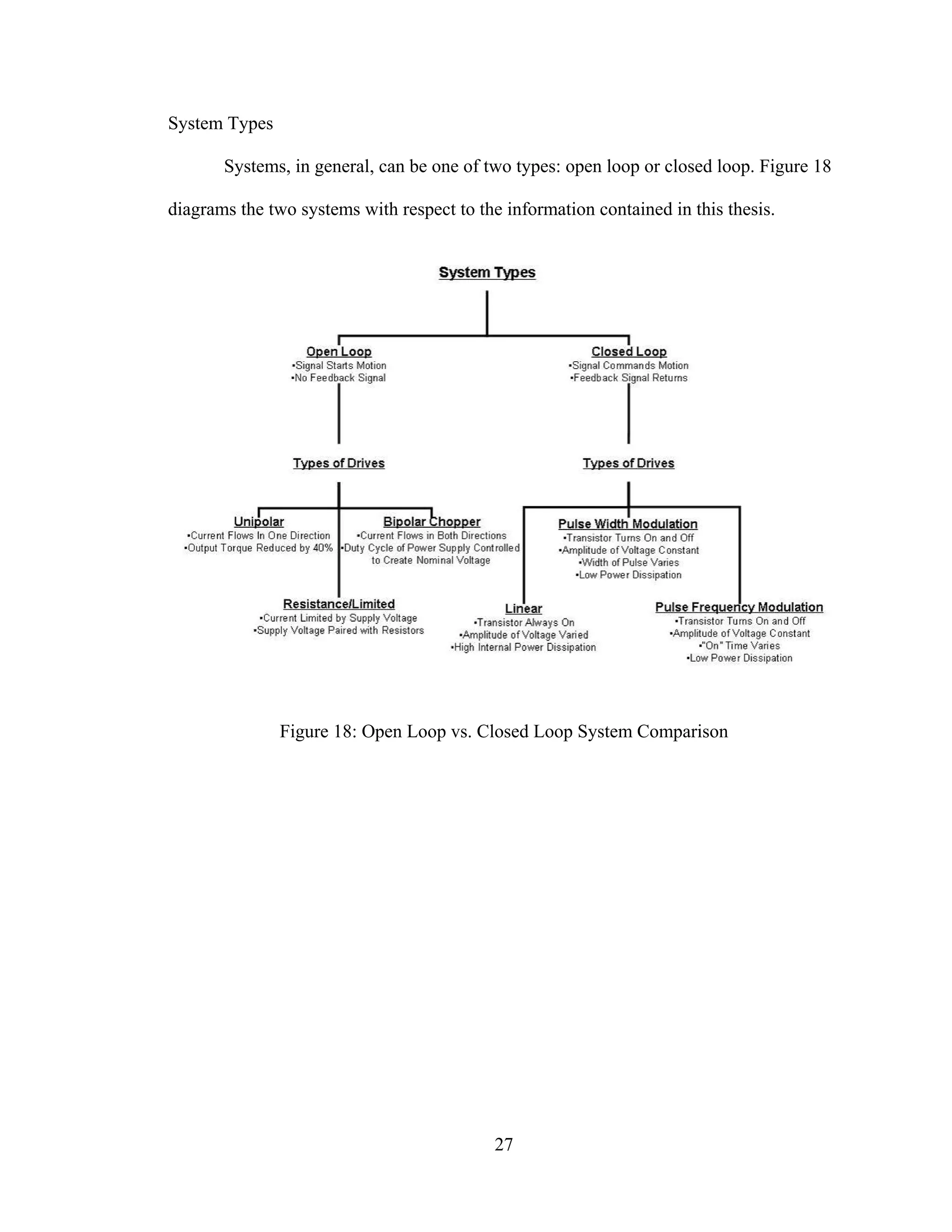
System Types
Systems, in general, can be one of two types: open loop or closed loop. Figure 18
diagrams the two systems with respect to the information contained in this thesis.
Figure 18: Open Loop vs. Closed Loop System Comparison
28
Open Loop
The premise of an open loop system is that the controller sends a signal to the
driver based on the set point. The driver in turn will move the actuator the appropriate
amount. No further action is taken unless the set point changes. Figure 19 diagrams this
system.
Figure 19: Open Loop System Diagram
Open loop systems are most effective when it is desirable for an actuator to move
constantly until commanded to stop or when the actuation is extremely accurate. The
latter case is true of stepper motors, since the steps are a constant increment.
TO ACTUATORINPUT
CONTROLLER DRIVE
29
Closed Loop [3]
A closed loop system operates as shown in figure 20. A command signal is sent to
the motor and a feedback signal is returned to the controller indicating the motor’s
current state. The controller compares the command and feedback signals and adjusts its
output accordingly.
Figure 20: Closed Loop System
Closed loop systems are effective when the process demands control over a
variety of complex motion profiles. Closed loop allows for precise control over speed and
position through the use of feedback devices such as tachometers, encoders, or resolvers.
Because of additional components required, a closed loop system is more complex and
can cost more initially; but these issues are offset by the added degrees of control.
The low power command signal is amplified by the servo controller to produce
movement of the motor and load. As the motor moves the load, an appropriate feedback
signal is generated and returned to the positioning controller. The controller in turn
evaluates this signal and determines whether or not the motor is operating properly. If the
command signal and feedback signal are not equal, the controller will correct the position
signal until the difference between the two is zero.
FEEDBACK
INPUT CONTROL DRIVER MOTOR SENSOR
OUTPUT
30
Motor Driver Circuits
The electric current produced by the control circuit is normally not high enough to
induce the necessary torque for motor rotation. For this reason, driver circuits are
employed. They manage the higher currents required by the motor and convert a digital
control signal from the controller into a movement by the motor. Drivers also manage the
direction that the current is flowing to produce clockwise or counterclockwise motion.
Types of Stepper Motor Drivers
Generally, there are three basic types of stepper driver technologies, they are:
• Unipolar
• Resistance/limited
• Bipolar chopper.
All drivers utilize a "translator" to convert the step and direction signals from the
indexer into electrical pulses to the motor. The essential difference between driver
options is the “switch set,” or the circuit that energizes the motor windings. Figure 21
shows the flow of information from controller to stepper motor.
Figure 21: Information Flow Between Driver and Motor[1]
31
Unipolar Drive
A unipolar drive consists of a winding with a center-tap, or two separate windings
per phase, which limits the current flow to one direction. The direction is reversed by
moving the current from one half of the winding to the other half using two switches per
phase, as shown in figure 22. Therefore, the switch set of a unipolar drive is simple and
inexpensive. However, the unipolar drive utilizes only half the available conducting wire
volume on the winding. As a result, the torque output of a unipolar driver is reduced by
nearly 40% when compared to other technologies. Unipolar drivers are useful in
applications that operate at relatively low step rates.
Figure 22: Current Flow Through Unipolar Drive[5]
32
Resistance/Limited Drive
Resistance/Limited (R/L) drivers are simple and inexpensive. The driver limits
the current by supply voltage and the resistance of the winding. High speed performance
is improved by increasing the supply voltage. This increased supply voltage in the R/L
drive must be accompanied by an additional resistor in series with the winding to limit
the current to the previous level (figure 23). This resistor, called a dropping resistor, is
added to maintain a useful increase in speed. The drawback of this method is the power
loss in the dropping resistors. This process also produces an excessive amount of heat and
must rely on a DC power supply for its current source.
Figure 23: R/L Driver Circuit [5]
33
Bipolar Chopper Drive
Bipolar chopper drivers are by far the most widely used drivers for industrial
applications. Although they are typically more expensive to design, they offer high
performance and high efficiency. This driver employs two different principles to control
the current flow to the motor windings: a bipolar switch set and current chopping. Both
are explained in this section.
A Bipolar drive, as the name implies, switches the current direction on a single
winding by shifting the voltage polarity across the terminals. The polarity switch is
accomplished using four switches configured as shown in figure 24. This configuration is
called an H-bridge.
Figure 24: H-bridge [5]
34
The method behind a chopper driver is to use a supply voltage which is several
times higher than the nominal voltage of the motor causing a significant increase in the
current. By controlling the duty cycle of the chopper, an average voltage and an average
current equal to the nominal motor voltage and current are created. The advantage of this
constant current control is management of the developed torque, regardless of power
supply voltage variations. It also provides the shortest possible current build-up and
reversal time.
35
Additionally, these drivers use a four transistor H-bridge with recirculating diodes
and a sense resistor that maintains a feedback voltage proportional to the motor current.
Motor windings, using a bipolar chopper driver, are energized to the full supply level by
turning on one set of the switching transistors. The sensing resistor develops a voltage
with the linear rise in current, which is monitored by a comparator, until the required
level is reached. At this point the top switch opens and the current in the motor coil is
maintained via the bottom switch and the diode. Current decay occurs until a preset
position is reached and the process starts over. This "chopping" effect of the supply is
what maintains the correct current voltage to the motor at all times (figure 25).
Figure 25: Chopper Pulse Chart [5]
36
Figure 26 illustrates an H-bridge configured as a constant current chopper.
Depending on how the H-bridge is switched during the turn-off period, the current will
either recirculate through one transistor and one diode (path 2), giving the slow current
decay, or recirculate back through the power supply (path 3).
Figure 26: Bipolar Chopper Schematic [5]
Servo Drivers [6]
Servo motors are controlled using electronic pulses. Normally, transistors are
employed to regulate the pulses. There are three basic transistor circuits used for
servomotor control; linear, pulse width modulated and pulse frequency modulated.
Linear Driver
37
Linear drivers operate using transistors that are always active, but regulate the
amount of power supplied. Transistors act as a valve which, based on the input voltage,
controls the current it draws from a connected voltage source. In this way the controller
functions as a faucet. For example, if a transistor receives half of the full range input
voltage, then the motor runs at half power. Linear drive provides for a stable motor speed
and control.
Pulse Width Modulation Driver
Pulse width modulation, or PWM, drivers regulate power by varying the time it is
applied to the motor. This way, the average power is controlled through the duty cycle of
the pulse. If the pulse is wide (i.e., the power is applied longer) the average power sent to
motor is high causing it to turn faster, and so on. Figure 27 illustrates how the pulse width
determines the average voltage. The advantage of this approach is that the amount power
dissipated by the transistor is low because it is always fully on or off. Requiring less
power means the transistors can be smaller, which leads to smaller packaging for the
driver.
Figure 27: Average Voltage Produced by Pulse Width
38
Pulse Frequency Modulation Driver
Instead of varying the duty cycle of a pulse, the width of the pulse itself could be
controlled. This technique is called pulse frequency modulation, or PFM. A PFM driver
operates by applying few pulses to in a given time period to generate a high average
voltage and many pulses to generate a low average voltage. Figure 28 demonstrates the
concept of PFM. As with PWM, the transistors are either fully on or off. Due to the
complicated system required to modulate the pulse frequency, PFM drivers are not
commonly used.
Figure 28: Average Voltage Produced by Pulse Frequency
Computer Interface
Normally, a robots controller is housed with a computer. The computer can
translate motion commands into data pulses that are processed by the motor driver. This
section outlines one of the most common interfaces, the parallel port, and details how the
data is transferred across it.
39
Parallel Port [7] [8]
When a PC sends data to a printer or other device using a parallel port, it can send
8 bits of data (1 byte) simultaneously. These 8 bits are being transmitted in parallel to
each other, as opposed to the same eight bits being transmitted serially, 1 bit at a time,
through a serial port. The standard parallel port is capable of sending 50 to 100 kilobytes
of data per second. Figure 29 shows the layout of a common configuration of parallel
port, DB25, which has 25 pins.
Figure 29: Layout of DB25 Parallel Port[1]
Following is a description of the pins:
• Pin 1 – maintains a voltage between 2.8 and 5 volts, called the strobe
signal. When data is sent to the printer the voltage drops below 0.5 volts as
the computer sends a byte of data.
• Pins 2 through 9 – used to exchange data between the PC and receiving
entity. A simple method is used to indicate whether a bit has a value of 1
or 0. A charge of 5 volts is sent through means a particular pin has a bit
value of 1. No charge indicates a value of 0.
• Pin 10 – operates in a similar fashion to Pin 1. A voltage drop indicates to
the computer to confirm that the data has been received. This is called the
acknowledge signal.
40
• Pin 11 – normally used as the printer busy signal when charged. The
voltage drops below 0.5 volts when the printer is ready to receive more
data.
• Pin 12 – a 5 volt signal that is charged when the printer is out of paper.
• Pin 13 – the printer online signal. It is constantly charged to indicate that
the printer is active and ready to receive information.
• Pin 14 – an auto feed signal to the printer to move paper through the
system.
• Pin 15 – error signal to let the computer know if there are any problems. It
uses a voltage drop below 0.5 volts, similar to the other pins, to indicate an
error.
• Pin 16 – A voltage drop below 0.5 volts initializes the printer.
• Pin 17 – Charging will take the printer offline. This charge is maintained
until it is desirable to bring the printer online.
• Pins 18-25 – these are the ground pins to be used as a reference signal for
the low (below 0.5 volts) charges.
41
Hexadecimal Conversion
When writing to or reading from a port, the status of an entire byte (8 bits) is
defined at once. When the state is updated, a binary number is written to (or read from)
the port, with either a 1 or a 0 for each bit. For example, if pins 2 and 7 are to be moved
to logic state 1 the binary input should be 0,0,1,0,0,0,0,1. To expedite programming, this
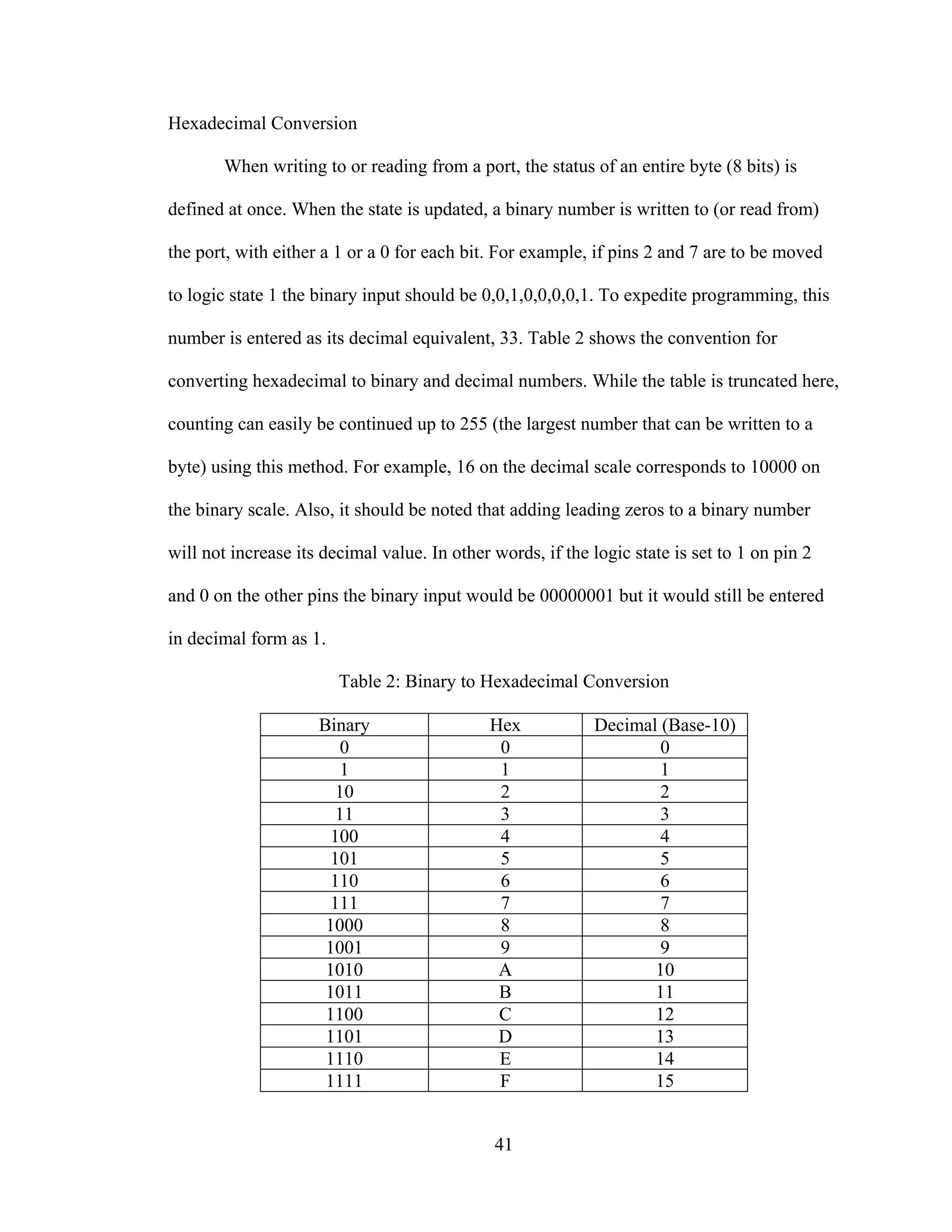
number is entered as its decimal equivalent, 33. Table 2 shows the convention for
converting hexadecimal to binary and decimal numbers. While the table is truncated here,
counting can easily be continued up to 255 (the largest number that can be written to a
byte) using this method. For example, 16 on the decimal scale corresponds to 10000 on
the binary scale. Also, it should be noted that adding leading zeros to a binary number
will not increase its decimal value. In other words, if the logic state is set to 1 on pin 2
and 0 on the other pins the binary input would be 00000001 but it would still be entered
in decimal form as 1.
Table 2: Binary to Hexadecimal Conversion
Binary Hex Decimal (Base-10)
0 0 0
1 1 1
10 2 2
11 3 3
100 4 4
101 5 5
110 6 6
111 7 7
1000 8 8
1001 9 9
1010 A 10
1011 B 11
1100 C 12
1101 D 13
1110 E 14
1111 F 15
42
CHAPTER III
ROBOT DYNAMICS
The challenge of designing a robot stems from anticipating and controlling the
system dynamics. This chapter outlines the dynamic behavior of robotic arms and spatial
transformations used to determine position. Path planning, curve tracking, and inverse
transformation solution methods are also discussed.
Definition of Link Coordinate Frames
Each point of actuation between two sections of a robot arm is called a link. These
links are numbered starting from the base (link 0) and move outward toward the tool (link
n). Each link is assigned its own local coordinate system, or frame. In order to remain
consistent between problems, the following conventions are used to establish frame
coordinates.
Rules for assigning frame coordinates:
The coordinate system is defined for each link following the convention as
follows:
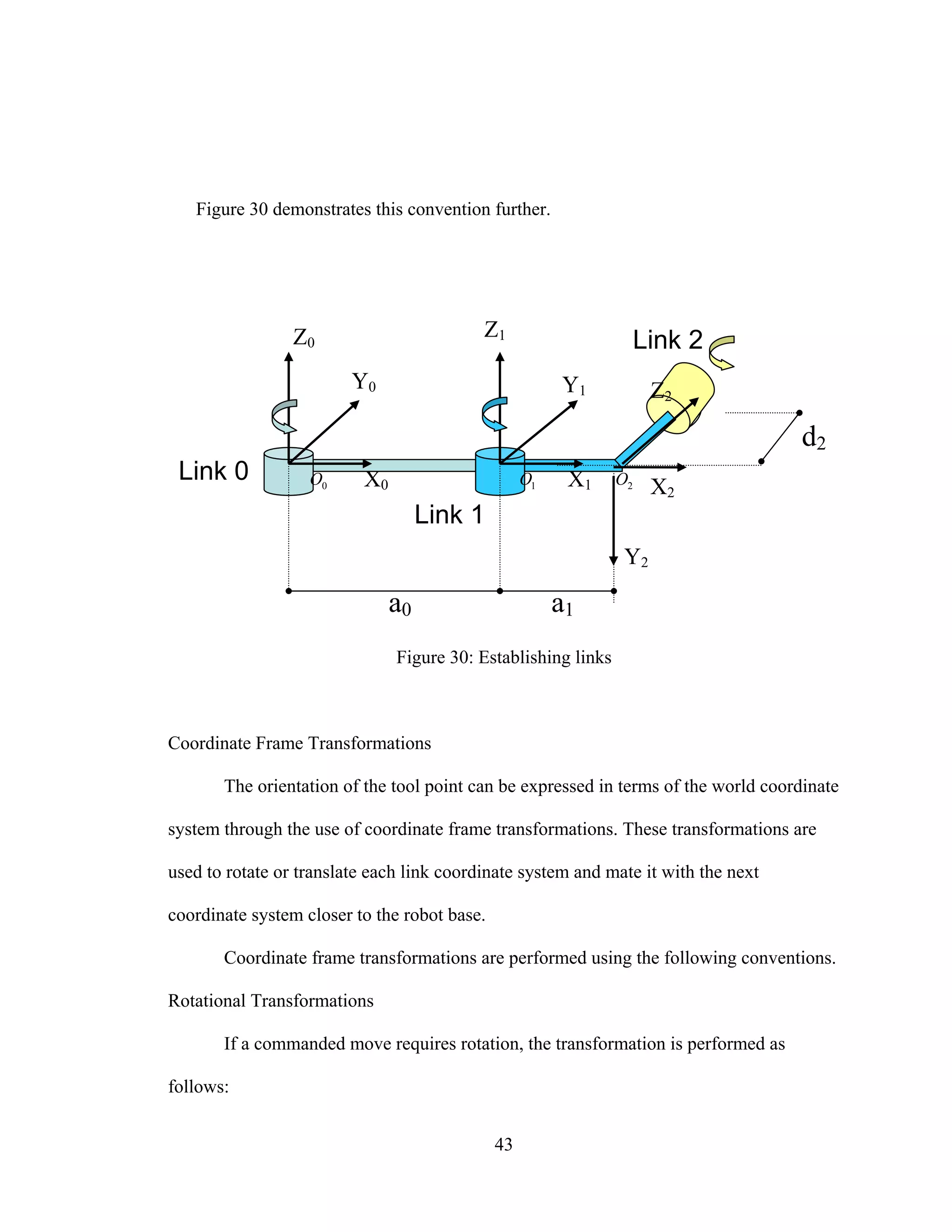
• Zn is directed along the axis of rotation of the link n+1
• Xn is directed along the common normal an
• Yn assigned by right hand rule
43
Figure 30 demonstrates this convention further.
Figure 30: Establishing links
Coordinate Frame Transformations
The orientation of the tool point can be expressed in terms of the world coordinate
system through the use of coordinate frame transformations. These transformations are
used to rotate or translate each link coordinate system and mate it with the next
coordinate system closer to the robot base.
Coordinate frame transformations are performed using the following conventions.
Rotational Transformations
If a commanded move requires rotation, the transformation is performed as
follows:
a0 a1
Z0
X0
Y0
X2
Y1
X1
Y2
d2
Z1
2O1O0O
Z2
Link 0
Link 1
Link 2
44
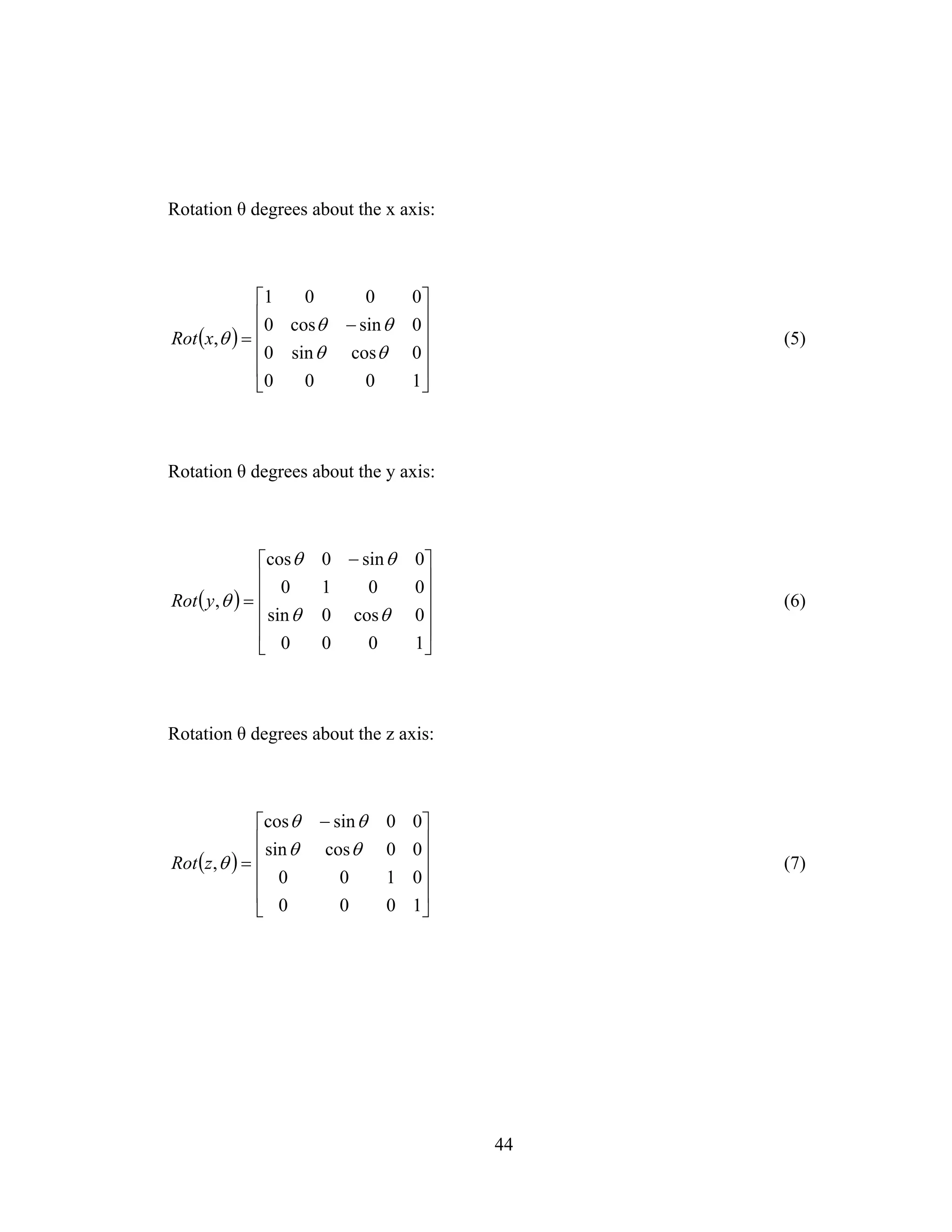
Rotation θ degrees about the x axis:
( )
⎥
⎥
⎥
⎥
⎦
⎤
⎢
⎢
⎢
⎢
⎣
⎡
−
=
1000
0cossin0
0sincos0
0001
,
θθ
θθ
θxRot (5)
Rotation θ degrees about the y axis:
( )
⎥
⎥
⎥
⎥
⎦
⎤
⎢
⎢
⎢
⎢
⎣
⎡ −
=
1000
0cos0sin
0010
0sin0cos
,
θθ
θθ
θyRot (6)
Rotation θ degrees about the z axis:
( )
⎥
⎥
⎥
⎥
⎦
⎤
⎢
⎢
⎢
⎢
⎣
⎡ −
=
1000
0100
00cossin
00sincos
,
θθ
θθ
θzRot (7)
45
Translational Transformations
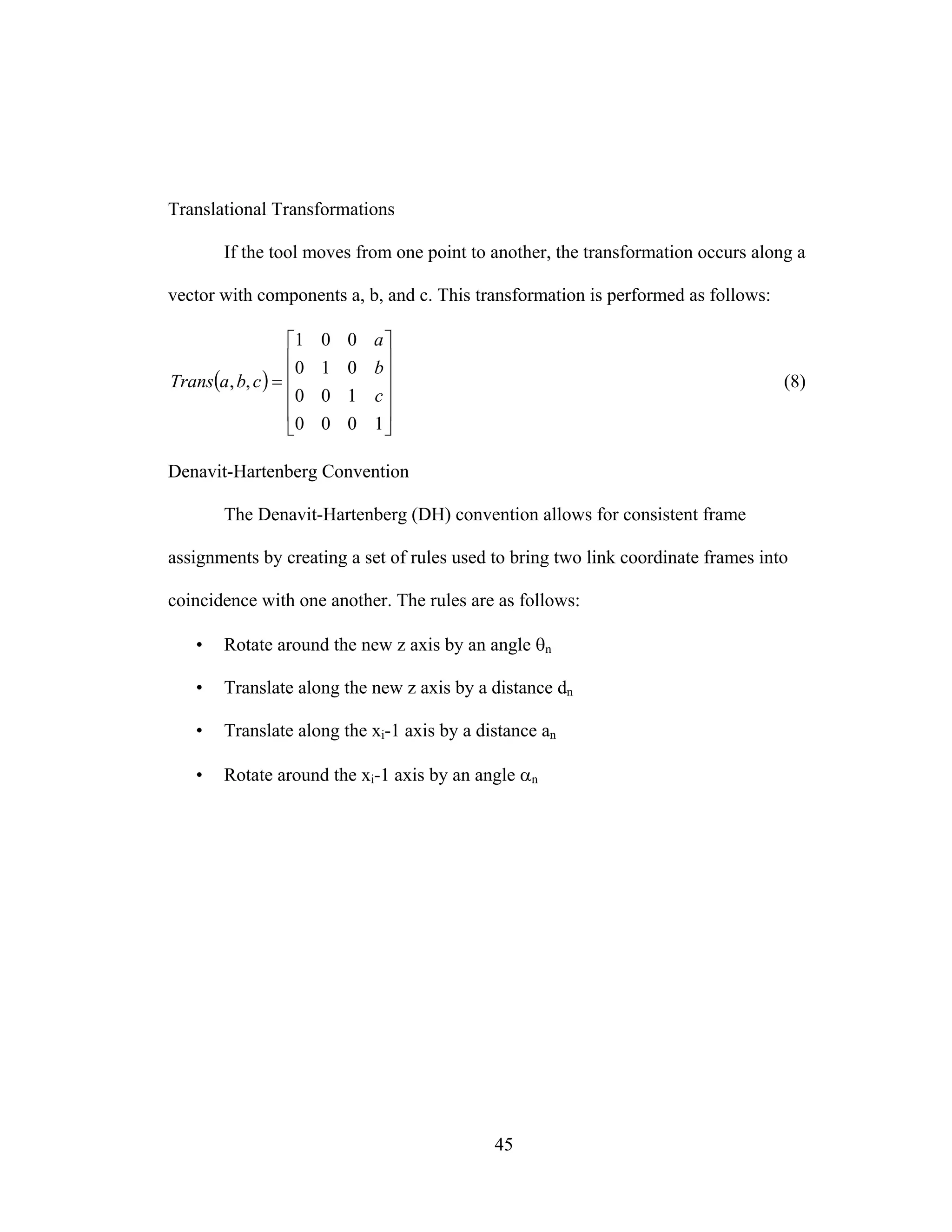
If the tool moves from one point to another, the transformation occurs along a
vector with components a, b, and c. This transformation is performed as follows:
( )
⎥
⎥
⎥
⎥
⎦
⎤
⎢
⎢
⎢
⎢
⎣
⎡
=
1000
100
010
001
,,
c
b
a
cbaTrans (8)
Denavit-Hartenberg Convention
The Denavit-Hartenberg (DH) convention allows for consistent frame
assignments by creating a set of rules used to bring two link coordinate frames into
coincidence with one another. The rules are as follows:
• Rotate around the new z axis by an angle θn
• Translate along the new z axis by a distance dn
• Translate along the xi-1 axis by a distance an
• Rotate around the xi-1 axis by an angle αn
46
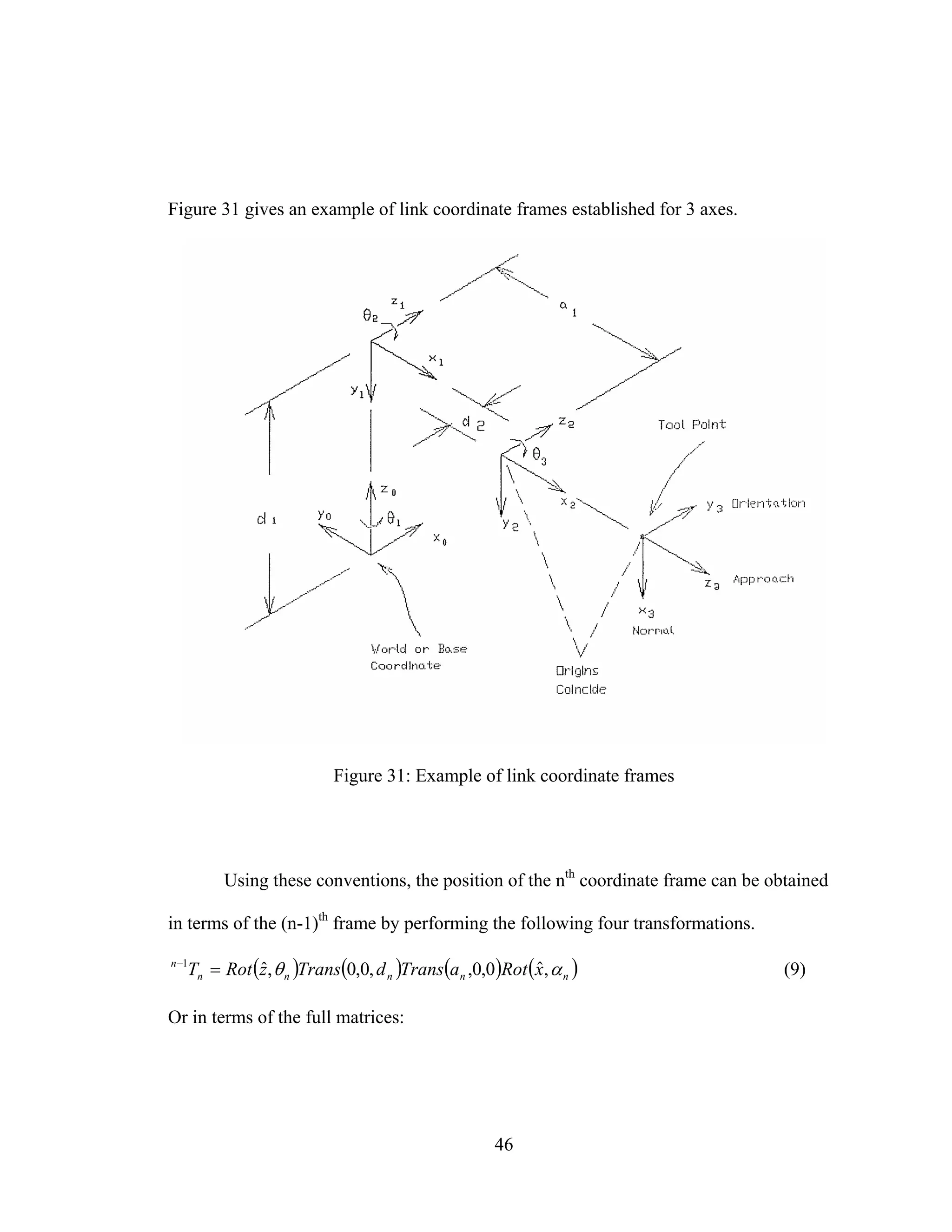
Figure 31 gives an example of link coordinate frames established for 3 axes.
Figure 31: Example of link coordinate frames
Using these conventions, the position of the nth
coordinate frame can be obtained
in terms of the (n-1)th
frame by performing the following four transformations.
( ) ( ) ( ) ( )nnnnn
n
xRotaTransdTranszRotT αθ ,ˆ0,0,,0,0,ˆ1
=−
(9)
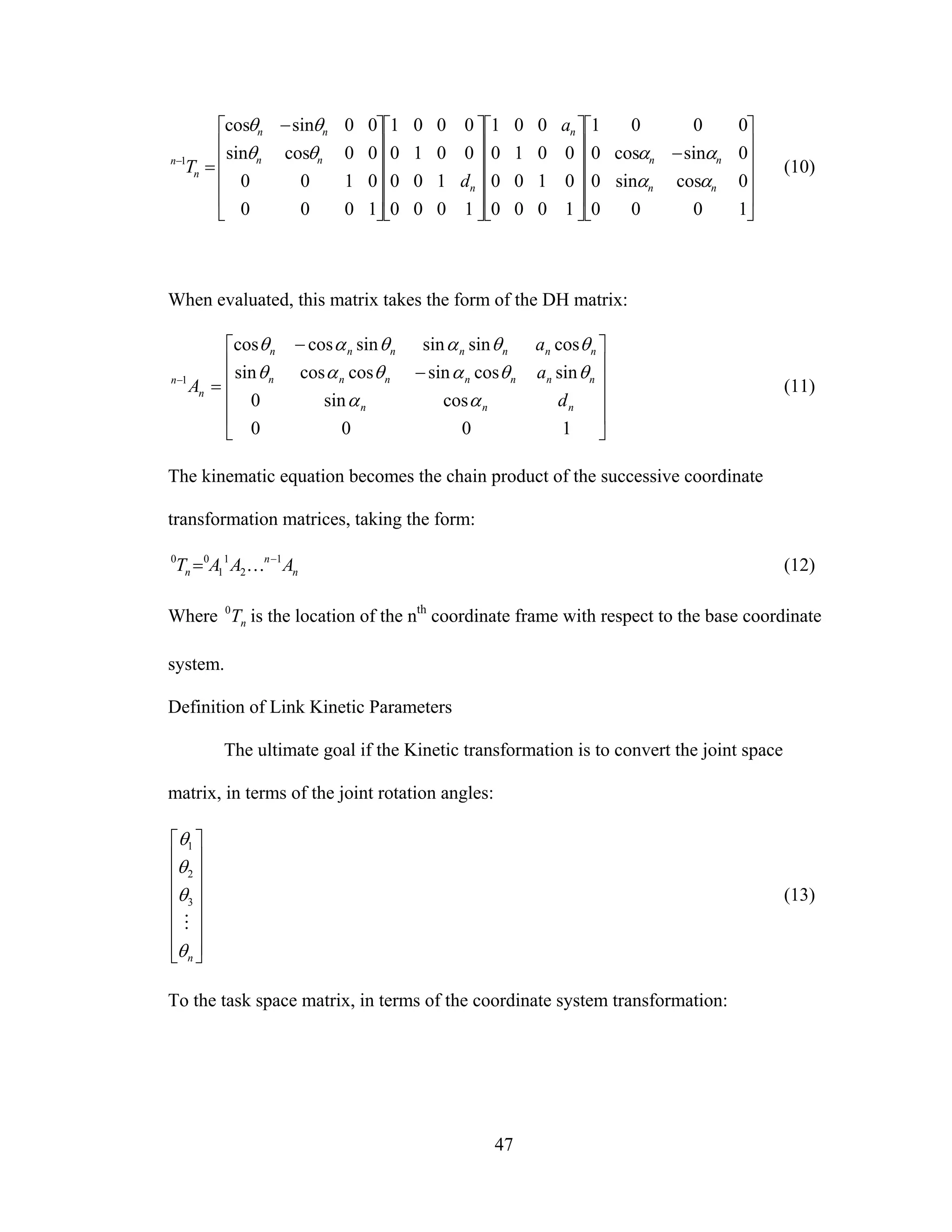
Or in terms of the full matrices:
47
⎥
⎥
⎥
⎥
⎦
⎤
⎢
⎢
⎢
⎢
⎣
⎡
−
⎥
⎥
⎥
⎥
⎦
⎤
⎢
⎢
⎢
⎢
⎣
⎡
⎥
⎥
⎥
⎥
⎦
⎤
⎢
⎢
⎢
⎢
⎣
⎡
⎥
⎥
⎥
⎥
⎦
⎤
⎢
⎢
⎢
⎢
⎣
⎡ −
=−
1000
0cossin0
0sincos0
0001
1000
0100
0010
001
1000
100
0010
0001
1000
0100
00cossin
00sincos
1
nn
nn
n
n
nn
nn
n
n
a
d
T
αα
ααθθ
θθ
(10)
When evaluated, this matrix takes the form of the DH matrix:
⎥
⎥
⎥
⎥
⎦
⎤
⎢
⎢
⎢
⎢
⎣
⎡
−
−
=−
1000
cossin0
sincossincoscossin
cossinsinsincoscos
1
nnn
nnnnnnn
nnnnnnn
n
n
d
a
a
A
αα
θθαθαθ
θθαθαθ
(11)
The kinematic equation becomes the chain product of the successive coordinate
transformation matrices, taking the form:
n
n
n AAAT 1
2
1
1
00 −
= K (12)
Where nT0
is the location of the nth
coordinate frame with respect to the base coordinate
system.
Definition of Link Kinetic Parameters
The ultimate goal if the Kinetic transformation is to convert the joint space
matrix, in terms of the joint rotation angles:
⎥
⎥
⎥
⎥
⎥
⎥
⎦
⎤
⎢
⎢
⎢
⎢
⎢
⎢
⎣
⎡
nθ
θ
θ
θ
M
3
2
1
(13)
To the task space matrix, in terms of the coordinate system transformation:
48
⎥
⎥
⎥
⎥
⎥
⎥
⎥
⎥
⎦
⎤
⎢
⎢
⎢
⎢
⎢
⎢
⎢
⎢
⎣
⎡
ϕ
θ
φ
z
y
x
(14)
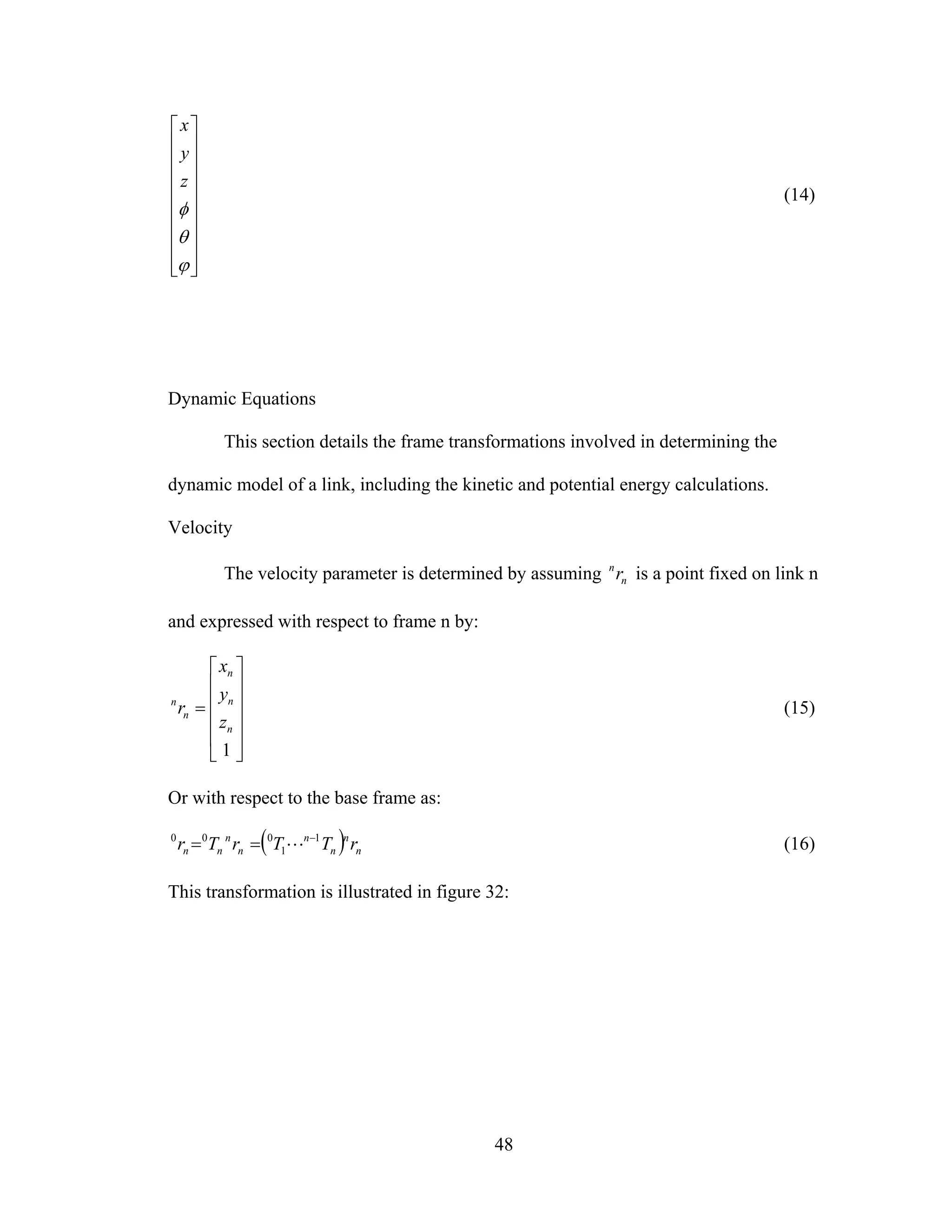
Dynamic Equations
This section details the frame transformations involved in determining the
dynamic model of a link, including the kinetic and potential energy calculations.
Velocity
The velocity parameter is determined by assuming n
n
r is a point fixed on link n
and expressed with respect to frame n by:
⎥
⎥
⎥
⎥
⎦
⎤
⎢
⎢
⎢
⎢
⎣
⎡
=
1
n
n
n
n
n
z
y
x
r (15)
Or with respect to the base frame as:
( ) n
n
n
n
n
n
nn rTTrTr 1
1
000 −
== L (16)
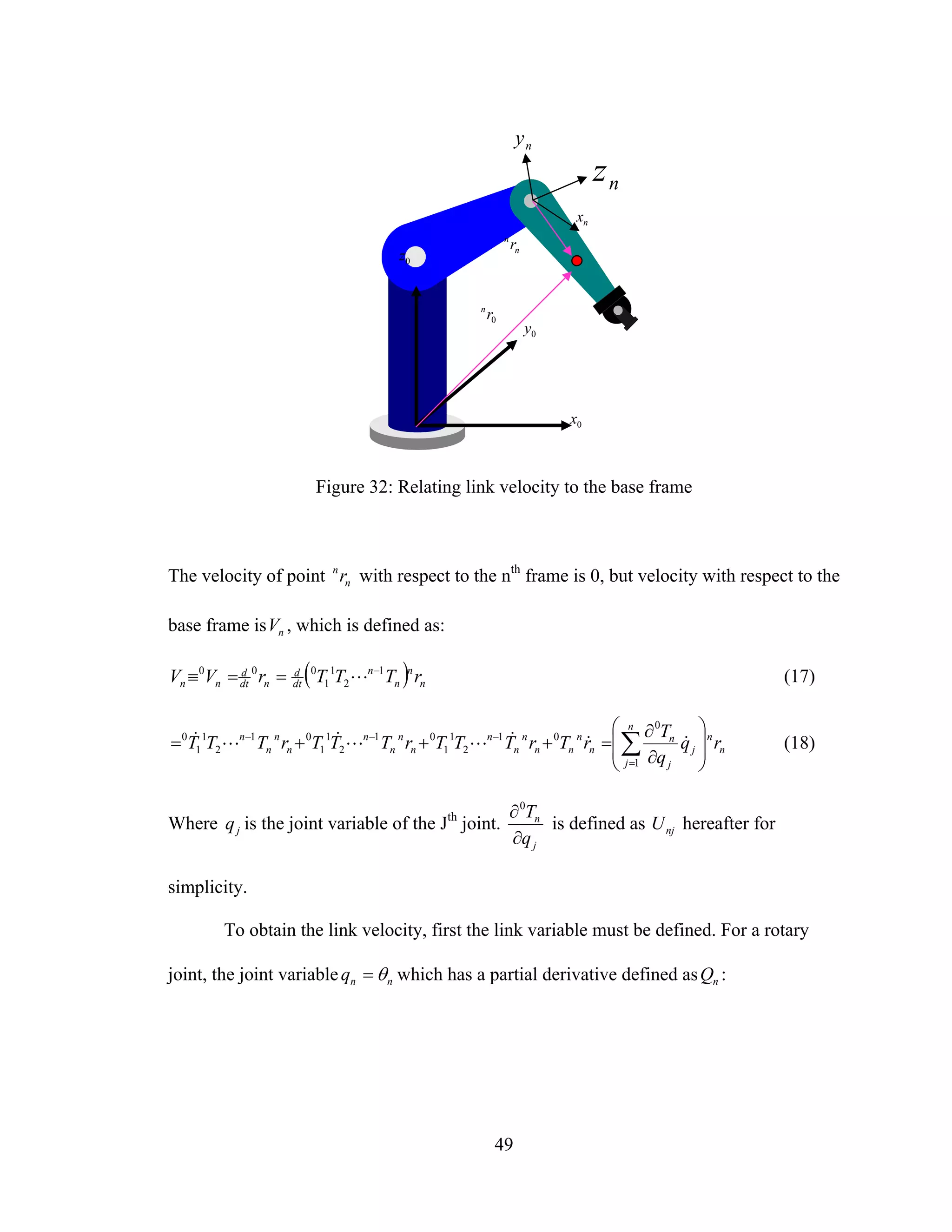
This transformation is illustrated in figure 32:
49
Figure 32: Relating link velocity to the base frame
The velocity of point n
n
r with respect to the nth
frame is 0, but velocity with respect to the
base frame is nV , which is defined as:
( ) n
n
n
n
dt
d
ndt
d
nn rTTTrVV 1
2
1
1
000 −
==≡ L (17)
n
n
n
j
j
j
n
n
n
nn
n
n
n
n
n
n
n
n
n
n
n
rq
q
T
rTrTTTrTTTrTTT
⎟
⎟
⎠
⎞
⎜
⎜
⎝
⎛
∂
∂
=+++= ∑=
−−−
1
0
01
2
1
1
01
2
1
1
01
2
1
1
0
&&&LL&L& (18)
Where jq is the joint variable of the Jth
joint.
j
n
q
T
∂
∂0
is defined as njU hereafter for
simplicity.
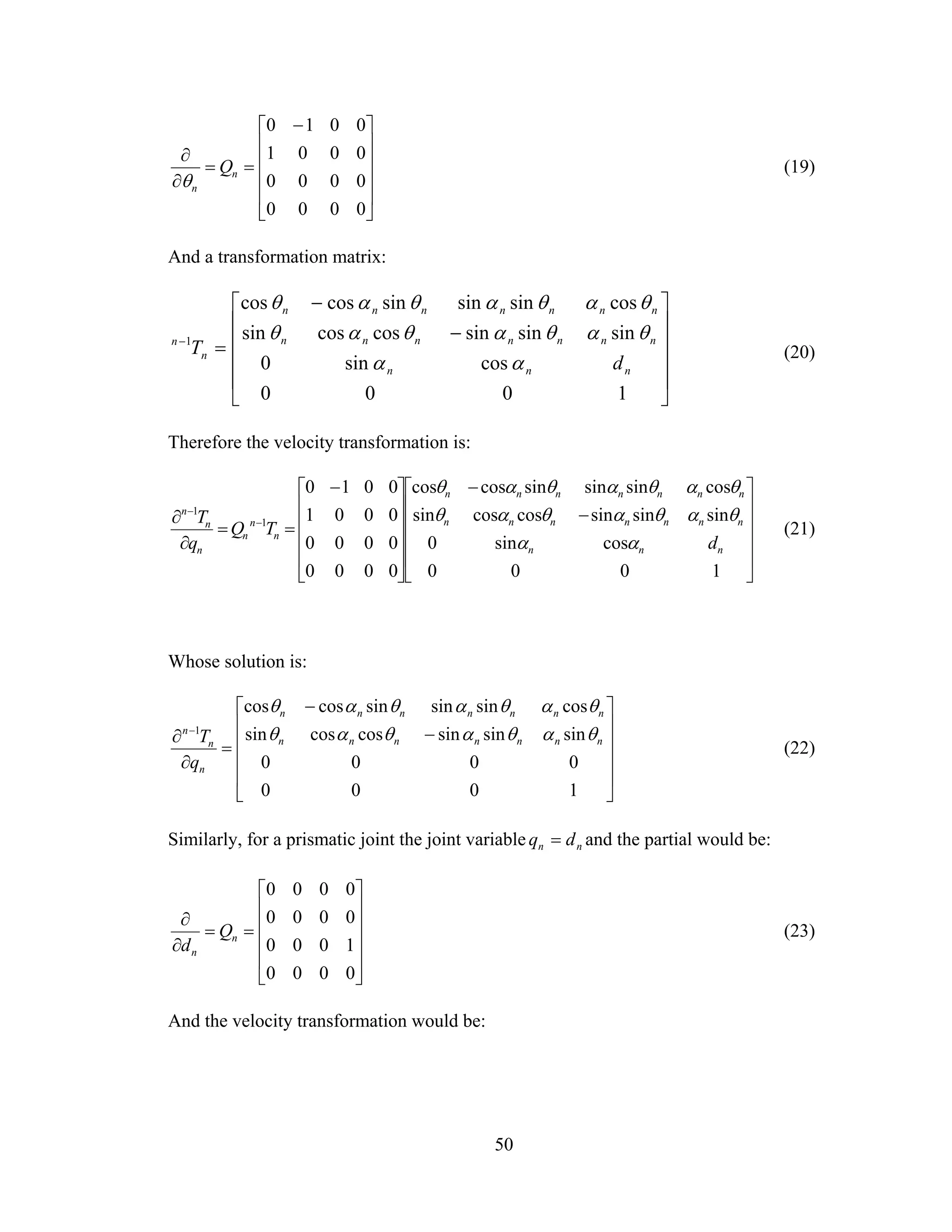
To obtain the link velocity, first the link variable must be defined. For a rotary
joint, the joint variable nnq θ= which has a partial derivative defined as nQ :
n
n
r
nx
nz
0x
0z
0y
0rn
ny
50
⎥
⎥
⎥
⎥
⎦
⎤
⎢
⎢
⎢
⎢
⎣
⎡ −
==
∂
∂
0000
0000
0001
0010
n
n
Q
θ
(19)
And a transformation matrix:
⎥
⎥
⎥
⎥
⎦
⎤
⎢
⎢
⎢
⎢
⎣
⎡
−
−
=−
1000
cossin0
sinsinsincoscossin
cossinsinsincoscos
1
nnn
nnnnnnn
nnnnnnn
n
n
d
T
αα
θαθαθαθ
θαθαθαθ
(20)
Therefore the velocity transformation is:
⎥
⎥
⎥
⎥
⎦
⎤
⎢
⎢
⎢
⎢
⎣
⎡
−
−
⎥
⎥
⎥
⎥
⎦
⎤
⎢
⎢
⎢
⎢
⎣
⎡ −
==
∂
∂ −
−
1000
cossin0
sinsinsincoscossin
cossinsinsincoscos
0000
0000
0001
0010
1
1
nnn
nnnnnnn
nnnnnnn
n
n
n
n
n
n
d
TQ
q
T
αα
θαθαθαθ
θαθαθαθ
(21)
Whose solution is:
⎥
⎥
⎥
⎥
⎦
⎤
⎢
⎢
⎢
⎢
⎣
⎡
−
−
=
∂
∂ −
1000
0000
sinsinsincoscossin
cossinsinsincoscos
1
nnnnnnn
nnnnnnn
n
n
n
q
T θαθαθαθ
θαθαθαθ
(22)
Similarly, for a prismatic joint the joint variable nn dq = and the partial would be:
⎥
⎥
⎥
⎥
⎦
⎤
⎢
⎢
⎢
⎢
⎣
⎡
==
∂
∂
0000
1000
0000
0000
n
n
Q
d
(23)
And the velocity transformation would be:
51
⎥
⎥
⎥
⎥
⎦
⎤
⎢
⎢
⎢
⎢
⎣
⎡
−
−
⎥
⎥
⎥
⎥
⎦
⎤
⎢
⎢
⎢
⎢
⎣
⎡
==
∂
∂ −
−
1000
cossin0
sinsinsincoscossin
cossinsinsincoscos
0000
1000
0000
0000
1
1
nnn
nnnnnnn
nnnnnnn
n
n
n
n
n
n
d
TQ
q
T
αα
θαθαθαθ
θαθαθαθ
(24)
Whose solution is:
⎥
⎥
⎥
⎥
⎦
⎤
⎢
⎢
⎢
⎢
⎣
⎡
=
∂
∂ −
0000
1000
0000
0000
1
n
n
n
q
T
(25)
The effect of the motion of joint j for all points on link n is as follows:
⎩
⎨
⎧
>
≤
=≡
∂
∂
−
−
njfor
njforTQT
U
q
T n
j
jj
nj
j
n
0
1
1
00
(26)
The velocity of the link would then be defined as
∑∑ ==
−
=
∂
∂
===≡
n
j
n
n
jnjn
n
n
j
j
j
n
n
n
n
n
inn rqUrq
q
T
rTTT
dt
d
r
dt
d
VV
11
0
1
2
1
1
000
)()()( &&L (27)
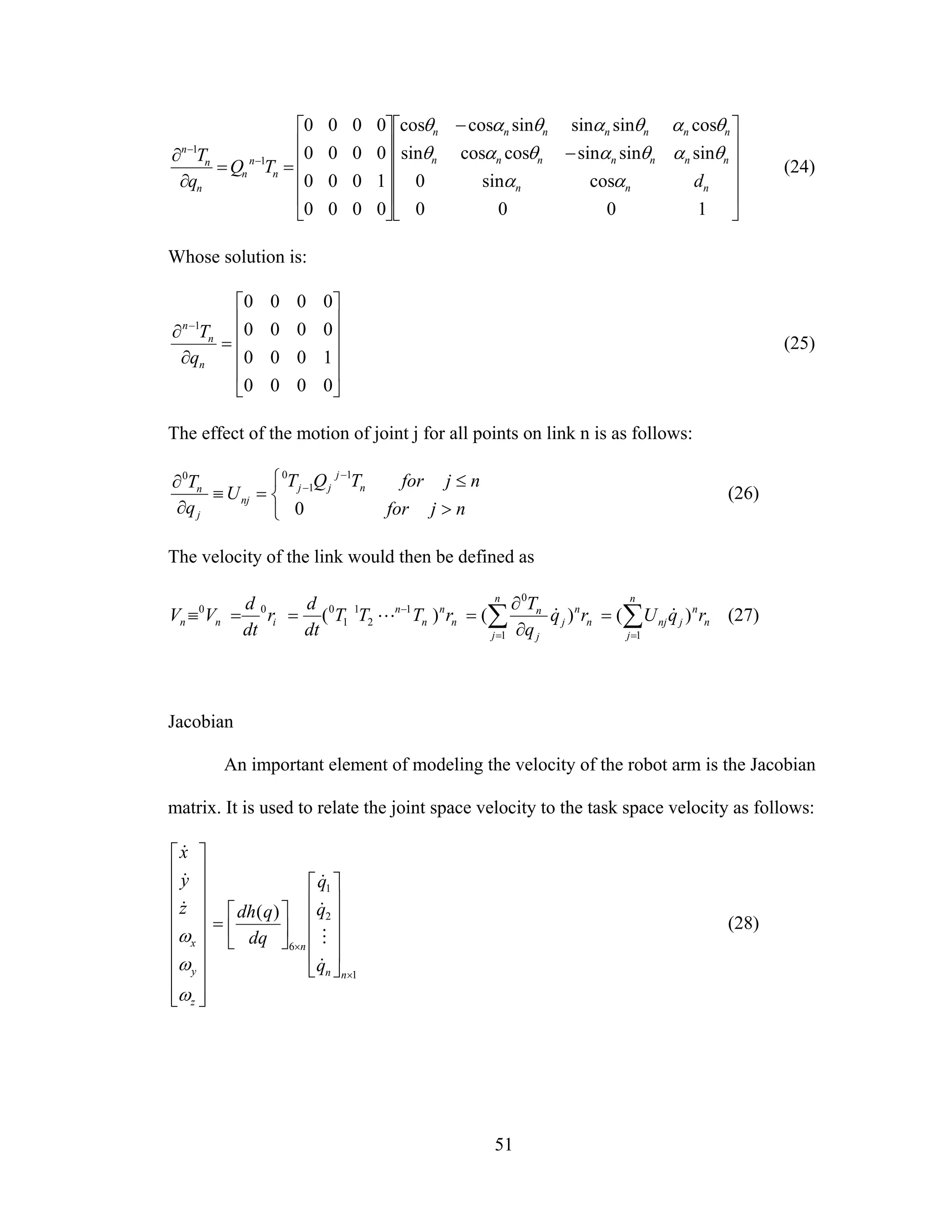
Jacobian
An important element of modeling the velocity of the robot arm is the Jacobian
matrix. It is used to relate the joint space velocity to the task space velocity as follows:
⎥
⎥
⎥
⎥
⎥
⎥
⎥
⎥
⎦
⎤
⎢
⎢
⎢
⎢
⎢
⎢
⎢
⎢
⎣
⎡
z
y
x
z
y
x
ω
ω
ω
&
&
&
1
2
1
6
)(
×
×
⎥
⎥
⎥
⎥
⎦
⎤
⎢
⎢
⎢
⎢
⎣
⎡
⎥
⎦
⎤
⎢
⎣
⎡
=
nn
n
q
q
q
dq
qdh
&
M
&
&
(28)
52
nn
n
n
n
q
h
q
h
q
h
q
h
q
h
q
h
q
h
q
h
q
h
dq
qdh
J
×
×
⎥
⎥
⎥
⎥
⎥
⎥
⎥
⎦
⎤
⎢
⎢
⎢
⎢
⎢
⎢
⎢
⎣
⎡
∂
∂
∂
∂
∂
∂
∂
∂
∂
∂
∂
∂
∂
∂
∂
∂
∂
∂
=⎟⎟
⎠
⎞
⎜⎜
⎝
⎛
=
6
6
2
6
1
6
2
2
2
1
2
1
2
1
1
1
6
)(
L
MMMM
L
L
(29)
Kinetic Energy
Once the link velocity has been determined, the kinetic energy can be calculated.
For a rigid body in 3-D space with a linear velocity (V) and angular velocity (ω) about
the center of mass, the kinetic energy is:
22
2
1
2
1
ωImvK += or ωωTT
IVmVK
2
1
2
1
+= (30)
Where I is the inertia tensor:
( )
( )
( ) ⎥
⎥
⎥
⎥
⎦
⎤
⎢
⎢
⎢
⎢
⎣
⎡
+−−
−+−
−−+
≡
∫∫∫
∫∫∫
∫∫∫
dmyxyzdmxzdm
yzdmdmzxxydm
xzdmxydmdmzy
I
22
22
22
(31)
It should be noted that the diagonal terms represent the moments of inertia and the
off diagonal terms represent the products of inertia. The kinetic energy of a particle with
differential mass dm in link n is:
( )dmVVtracedmzyxdK T
nnnnnn
2
1
2
1 222
=⎟⎟
⎠
⎞
⎜⎜
⎝
⎛
++=
•••
(32)
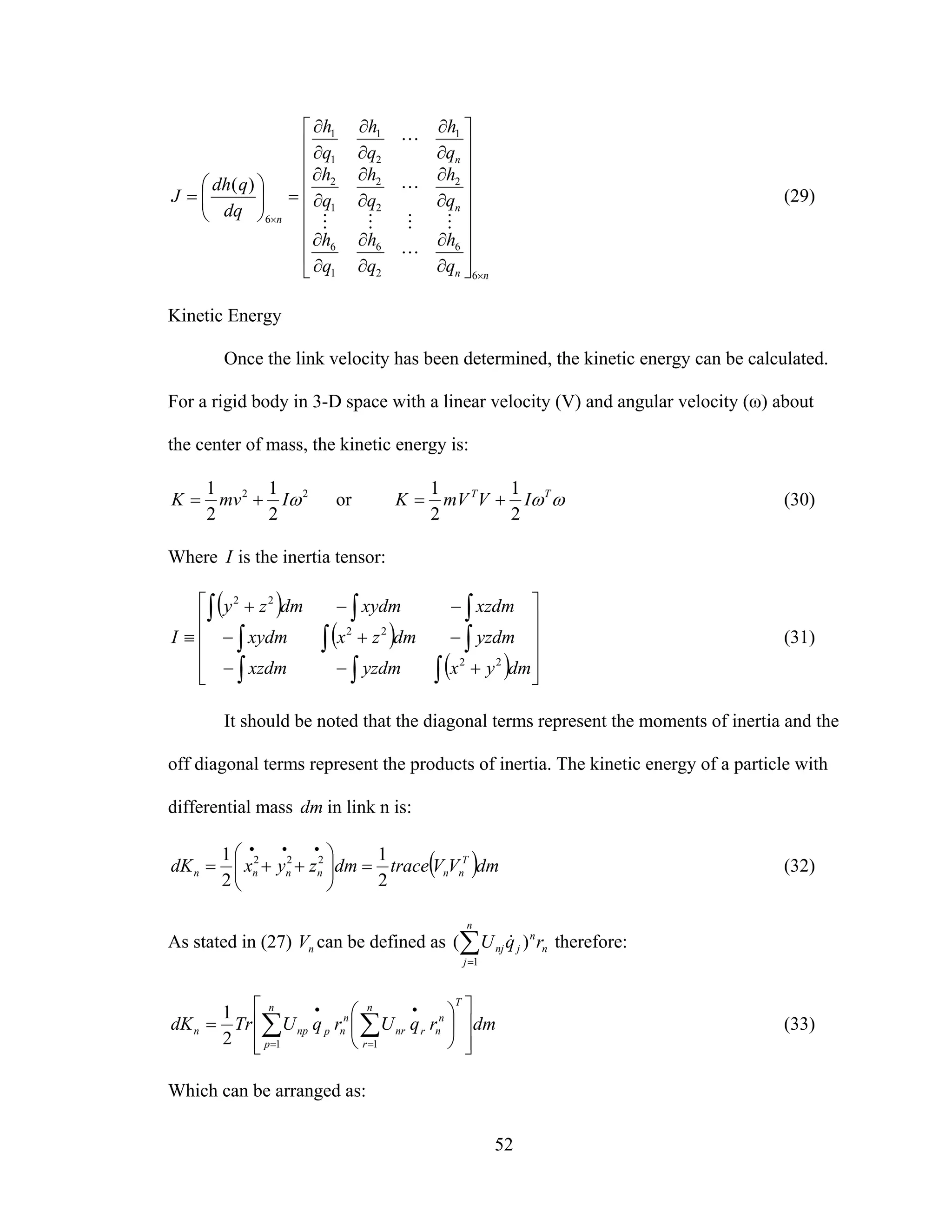
As stated in (27) nV can be defined as ∑=
n
j
n
n
jnj rqU
1
)( & therefore:
dmrqUrqUTrdK
Tn
r
n
nrnr
n
p
n
npnpn
⎥
⎥
⎦
⎤
⎢
⎢
⎣
⎡
⎟
⎠
⎞
⎜
⎝
⎛
= ∑∑ =
•
=
•
112
1
(33)
Which can be arranged as:
53
⎥
⎦
⎤
⎢
⎣
⎡
= ∑∑=
••
=
n
p
rp
T
nr
Tn
n
n
n
n
r
npn qqUdmrrUTrdK
1 1
)(
2
1
(34)
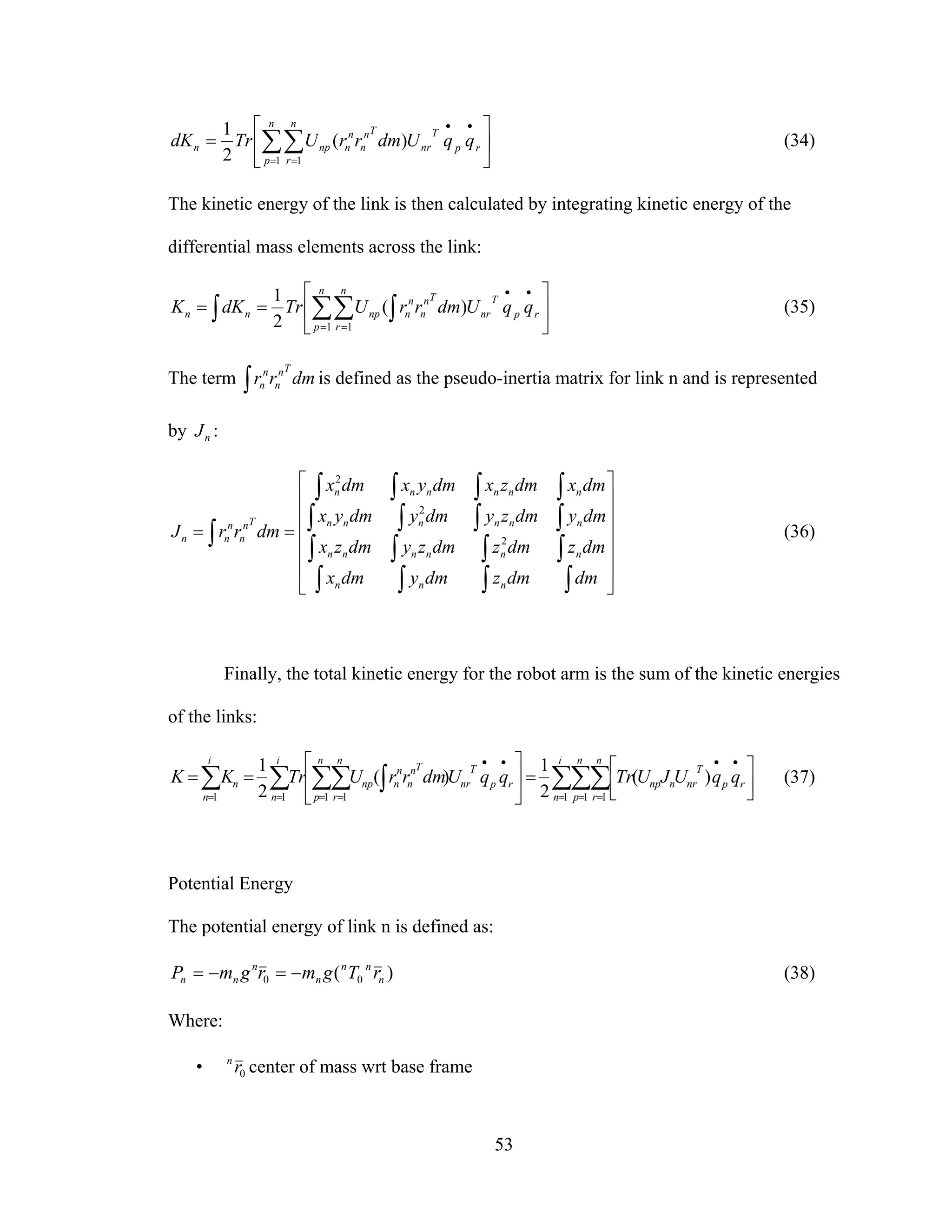
The kinetic energy of the link is then calculated by integrating kinetic energy of the
differential mass elements across the link:
⎥
⎦
⎤
⎢
⎣
⎡
== ∑ ∫∑∫ =
••
=
n
p
rp
T
nr
Tn
n
n
n
n
r
npnn qqUdmrrUTrdKK
1 1
)(
2
1
(35)
The term ∫ dmrr
Tn
n
n
n is defined as the pseudo-inertia matrix for link n and is represented
by nJ :
⎥
⎥
⎥
⎥
⎥
⎦
⎤
⎢
⎢
⎢
⎢
⎢
⎣
⎡
==
∫∫∫∫
∫∫∫∫
∫∫∫∫
∫∫∫∫
∫
dmdmzdmydmx
dmzdmzdmzydmzx
dmydmzydmydmyx
dmxdmzxdmyxdmx
dmrrJ
nnn
nnnnnn
nnnnnn
nnnnnn
Tn
n
n
nn 2
2
2
(36)
Finally, the total kinetic energy for the robot arm is the sum of the kinetic energies
of the links:
∑∑∑∑ ∫∑∑∑ = = =
••
=
••
===
⎥⎦
⎤
⎢⎣
⎡
=⎥
⎦
⎤
⎢
⎣
⎡
==
i
n
n
p
n
r
rp
T
nrnnp
n
p
rp
T
nr
Tn
n
n
n
n
r
np
i
n
i
n
n qqUJUTrqqUdmrrUTrKK
1 1 11 111
)(
2
1
)(
2
1
(37)
Potential Energy
The potential energy of link n is defined as:
)( 00 n
nn
n
n
nn rTgmrgmP −=−= (38)
Where:
• 0rn
center of mass wrt base frame
54
• n
n
r center of mass wrt to nth
frame
• )0,,,( zyx gggg = is the gravity row vector expressed in base frame
The potential energy of the robot arm is then:
∑ ∑= =
−==
n
n
n
n
n
nn
nn rTgmPP
0 0
0 ])([ (39)
Which is a function of nq .
Lagrange Function
In order to simplify the solution, the dynamic equations can be determined using
Lagrangian mechanics. The Lagrange function allows the forces to be determined using
the system’s energy. This eliminates the need to solve for acceleration components. Since
energy is a scalar quantity, it also makes the equations easier to manage. The Lagrangian
function takes the form of:
[ ]∑∑∑ ∑= = = =
+=−=
i
n
n
j
n
k
i
n
n
n
nnkj
T
nknnj rTgmqqUJUTrPKL
1 1 1 1
0
)()(
2
1
&& (40)
Where L is the Lagrange – Euler equation:
n
nn q
L
q
L
dt
d
τ=
∂
∂
−
∂
∂
)(
&
(41)
j
j
jn
i
nj
j
i
nj
j
k
j
m
mk
T
jnj
m
jk
i
nj
j
k
k
T
jnjjk rUgmqqUJ
q
U
TrqUJUTr ∑∑∑∑∑∑ == = == =
−
∂
∂
+=
1 11
)()( &&&& (42)
And:
• K: Total kinetic energy of robot
• P: Total potential energy of robot
• nq : Joint variable of nth
joint
• nq& : First time derivative of nq
55
• nτ : Summation of torques about link n
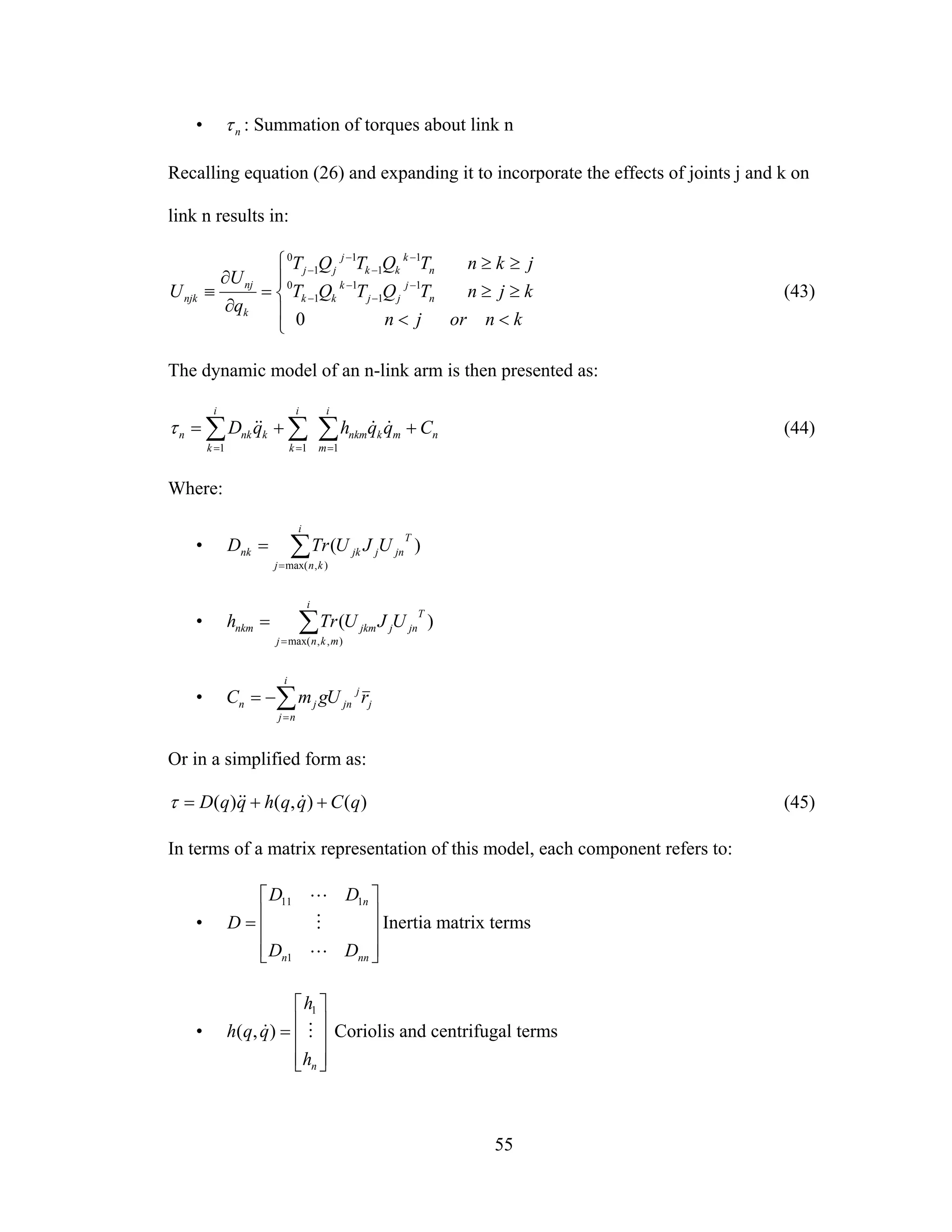
Recalling equation (26) and expanding it to incorporate the effects of joints j and k on
link n results in:
⎪
⎩
⎪
⎨
⎧
<<
≥≥
≥≥
=
∂
∂
≡ −
−
−
−
−
−
−
−
knorjn
kjnTQTQT
jknTQTQT
q
U
U n
j
jj
k
kk
n
k
kk
j
jj
k
nj
njk
0
1
1
1
1
0
1
1
1
1
0
(43)
The dynamic model of an n-link arm is then presented as:
n
i
m
mknkm
i
k
i
k
knkn CqqhqD ++= ∑∑∑ === 111
&&&&τ (44)
Where:
• ∑=
=
i
knj
T
jnjjknk UJUTrD
),max(
)(
• ∑=
=
i
mknj
T
jnjjkmnkm UJUTrh
),,max(
)(
• j
j
jn
i
nj
jn rUgmC ∑=
−=
Or in a simplified form as:
)(),()( qCqqhqqD ++= &&&τ (45)
In terms of a matrix representation of this model, each component refers to:
•
⎥
⎥
⎥
⎦
⎤
⎢
⎢
⎢
⎣
⎡
=
nnn
n
DD
DD
D
L
M
L
1
111
Inertia matrix terms
•
⎥
⎥
⎥
⎦
⎤
⎢
⎢
⎢
⎣
⎡
=
nh
h
qqh M&
1
),( Coriolis and centrifugal terms
56
•
⎥
⎥
⎥
⎦
⎤
⎢
⎢
⎢
⎣
⎡
=
nC
C
qC M
1
)( Gravity terms
•
⎥
⎥
⎥
⎦
⎤
⎢
⎢
⎢
⎣
⎡
=
nτ
τ
τ M
1
Driving torques for each link
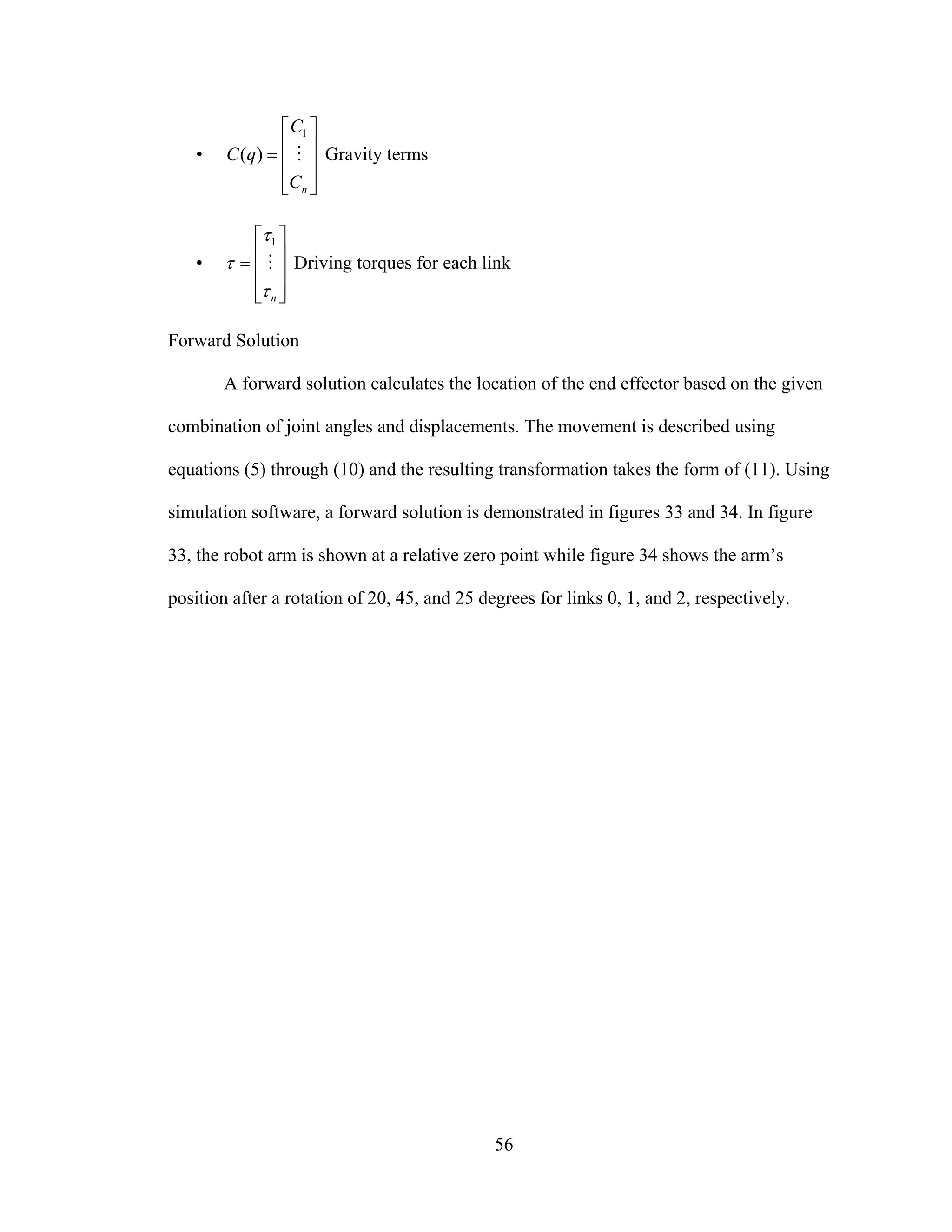
Forward Solution
A forward solution calculates the location of the end effector based on the given
combination of joint angles and displacements. The movement is described using
equations (5) through (10) and the resulting transformation takes the form of (11). Using
simulation software, a forward solution is demonstrated in figures 33 and 34. In figure
33, the robot arm is shown at a relative zero point while figure 34 shows the arm’s
position after a rotation of 20, 45, and 25 degrees for links 0, 1, and 2, respectively.
57
Figure 33: Robot arm before forward solution
Figure 34: Links 0, 1, and 2 rotated 20, 45, and 25 degrees respectively
58
Inverse Solution
The inverse solution requires determining the necessary link rotations and
transformations needed to achieve the desired location and orientation of the end effector.
In some cases this can lead to multiple solutions for a movement. There have been
numerous studies performed on determining the most efficient orientation of the joints,
some of which will be referenced in this section. An example of an inverse solution is
shown below, using a proprietary algorithm from New River Kinematics. Figure 35
shows the robot arm at [0,0,0] and the desired end point in space at [7, -1, 3]. Figure 36
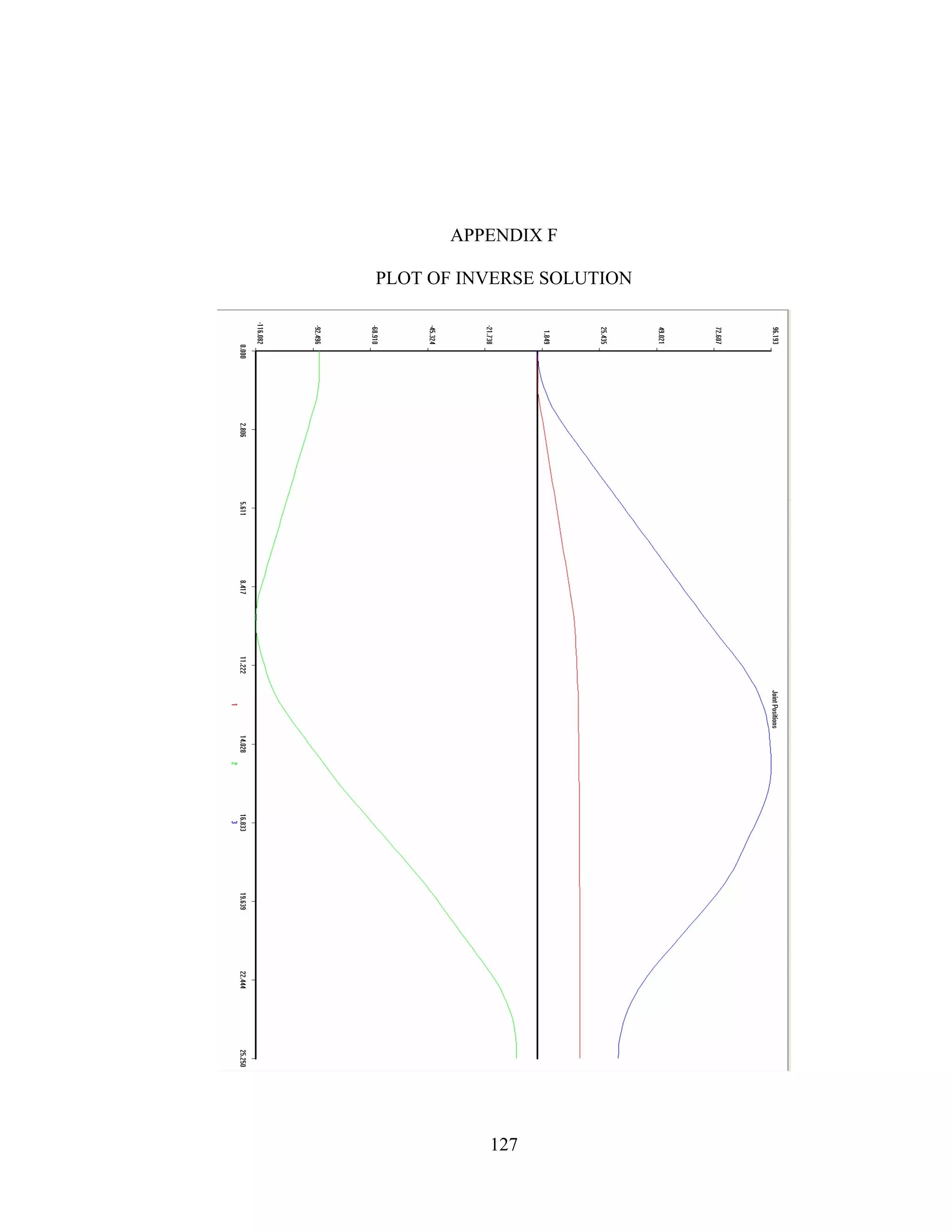
shows the robot arm translated to the point. A plot of the joint motions during the inverse
solution is included in Appendix F.
Figure 35: Robot arm before inverse solution
59
Figure 36: Robot arm translated to end point
Elements of the inverse solution include path planning, curve tracking and the
configuration space. A brief commentary on these concepts follows.
Path Planning
The goal of path planning algorithms is to generate the most efficient arrangement
of the link frames, taking into account any physical obstacles and system limitations.
Configuration Space
Problems that arise in the motion planning process can be related to the physical
design of the robot of the restrictions of the workspace [11]. For example, as the number
of available degrees of freedom increase, so do the possible solutions to the inverse
transformation. Also, obstacles in the workspace, which includes links of the robot arm,
can add difficulty to the solution.
60
Curve Tracking
When a robot has to follow a complicated path or if the reference point is moving
with time, an open-loop controller is sometimes not sufficient. Curve tracking and path
planning methods are a vast area of study. This section describes some closed-loop
control methods for tracking a robots movement.
Potential Energy Method
[12] outlines using a potential energy field approach to guiding the robot.
Sometimes it is desirable for the robot to stay on a certain curve instead of following a
reference point. The exact position at a given time is not important, as long as it is
somewhere on this desired curve. To solve this problem, a virtual potential field is
constructed around the desired curve, such that the potential energy is minimal
everywhere on the desired curve, and increases with the deviation from the desired curve.
The system can then follow the path of steepest descent to find its commanded position.
[13] extends the use of this method to add control terms that are power-
continuous but change the distribution of kinetic energy over the various directions to
obtain asymptotic convergence.
Orthogonal Decomposition Control
[14] describes using a vision system to guide the robot. The automatic input is
accomplished using a method called Orthogonal Decomposition Control. The center of
the camera is defined by the vector r. At each sample point, the ji
rr
− vector coordinate
frame is established, where i
r
is a unit vector tangent to the curve and j
r
is the normal unit
vector. The objective is to control the velocity error signal based on the vector tangent to
the curve and the position error signal based on the normal vector.
61
CHAPTER IV
DESIGN OF ROBOT ARM
This section discusses the specific assumptions and design parameters as they
relate to the robotic arm constructed for the purposes of this research.
Speed
A triangular velocity profile was assumed for this research. The acceleration and
deceleration were both assumed to be 5 seconds. peakω and peakα are the peak angular
velocity and acceleration, respectively and were defined:
3142.0=peakω rad/s
0628.0=peakα rad/s2
Kinematic Design
The robot was constructed with 3 totally revolute joints. The degree of mobility is
three.
Controller
The controller used for this design was a three-axis, open loop resistance limited
(R/L) type controller.
Actuator
Stepper Motors were selected as the actuators for this robot arm.
62
Material
6061-T6 aluminum was used for the majority of the components for this robot
arm for its cost, corrosion resistance, and workability. Only the legs were constructed
from 321 stainless steel to add weight to the base and increase stability. Table 3 lists the
mechanical properties for both materials.
Table 3: Material Properties
Material Alloy
Tensile
Strength (ksi)
Modulus of
Elasticity (ksi)
Density
(lbs/in3
)
Aluminum 6061-T6
36 Yield
42 Ultimate
9.9 x 10³
0.098
Stainless Steel 321
26 Yield
73 Ultimate
29.0 x 10³
0.286
63
Robot Arm Design
The assembly of the 3 link robot arm designed for this thesis was modeled using
Autodesk Inventor software. Figure 37 shows the assembly while figure 38 gives an
exploded view of the components.
Figure 37: Assembled Robot Arm
64
Figure 38: Exploded Assembly View
65
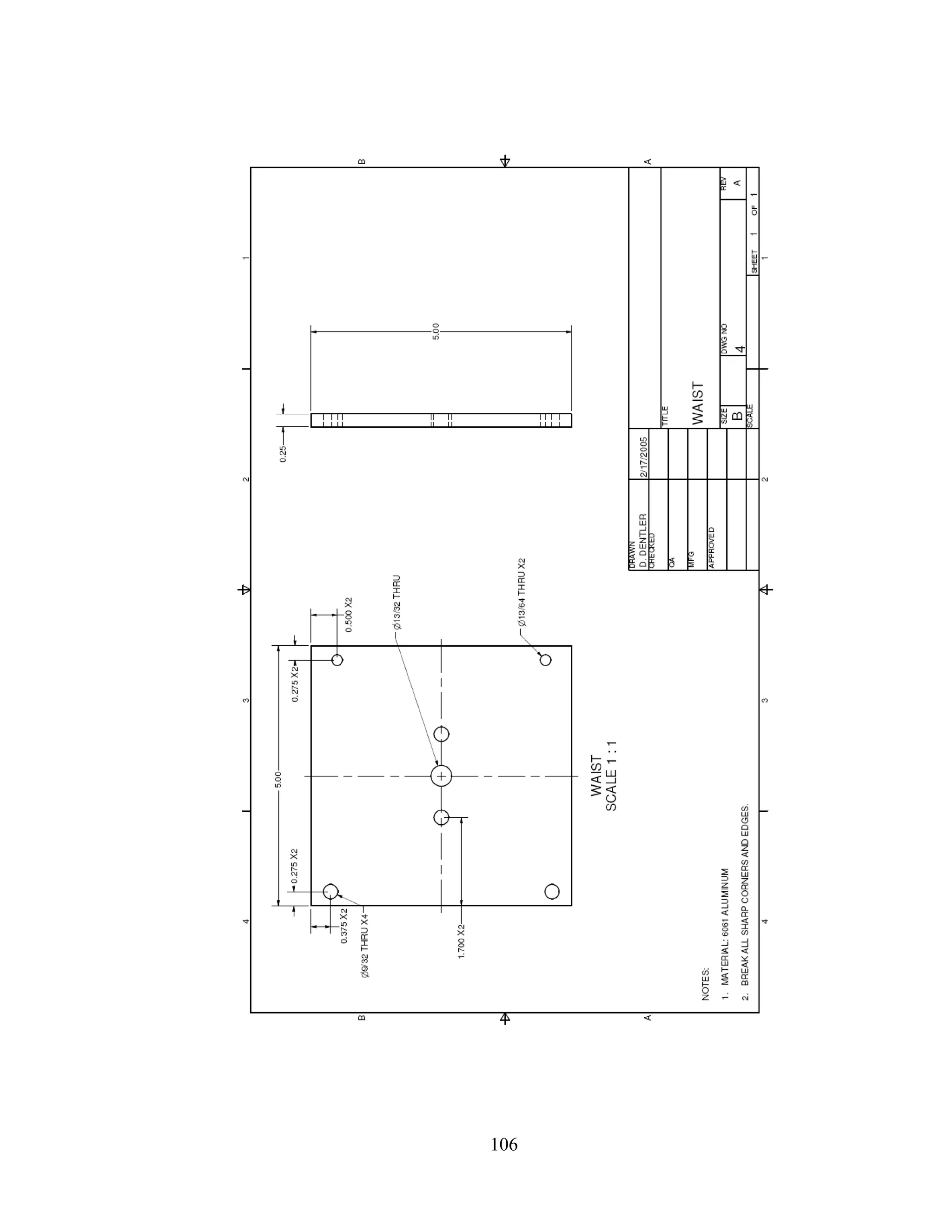
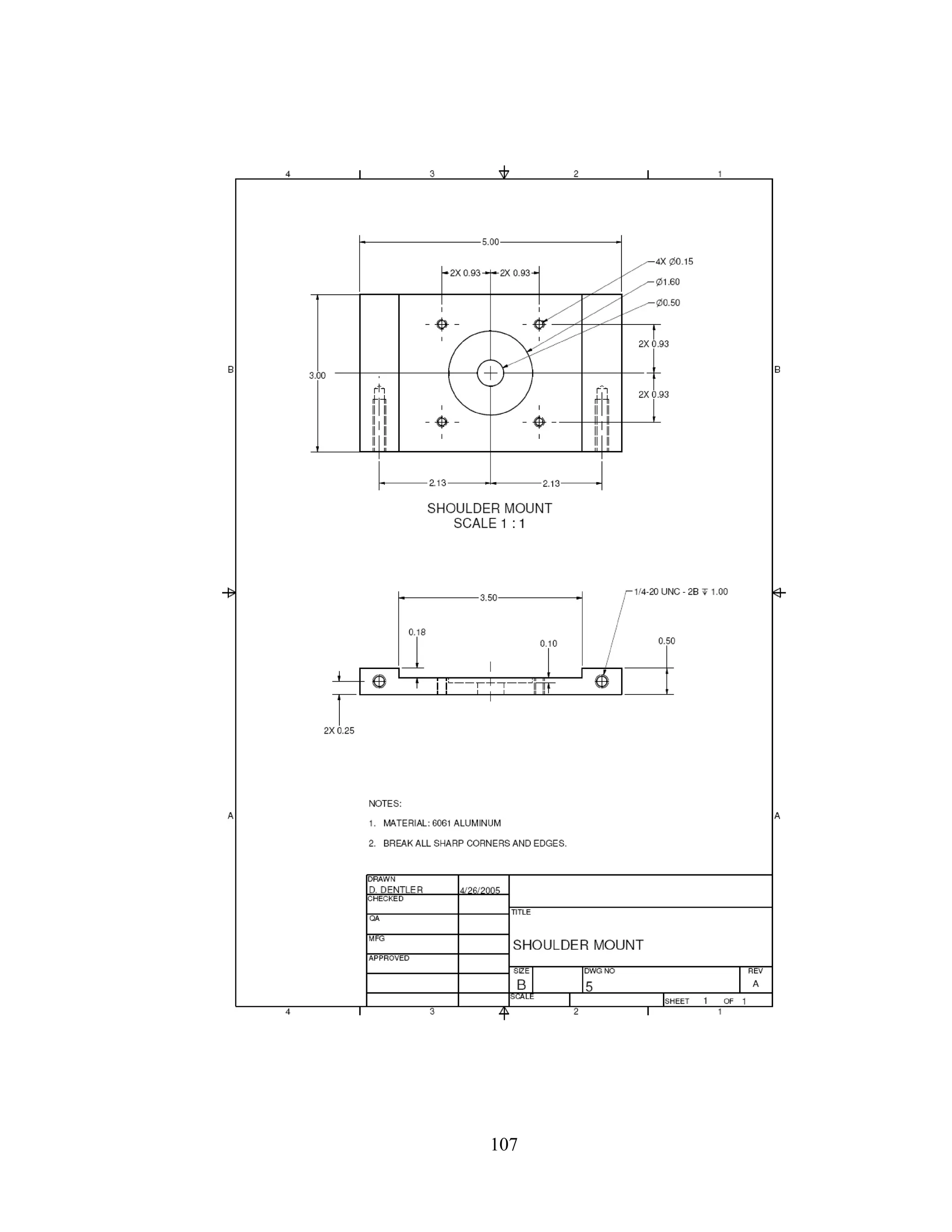
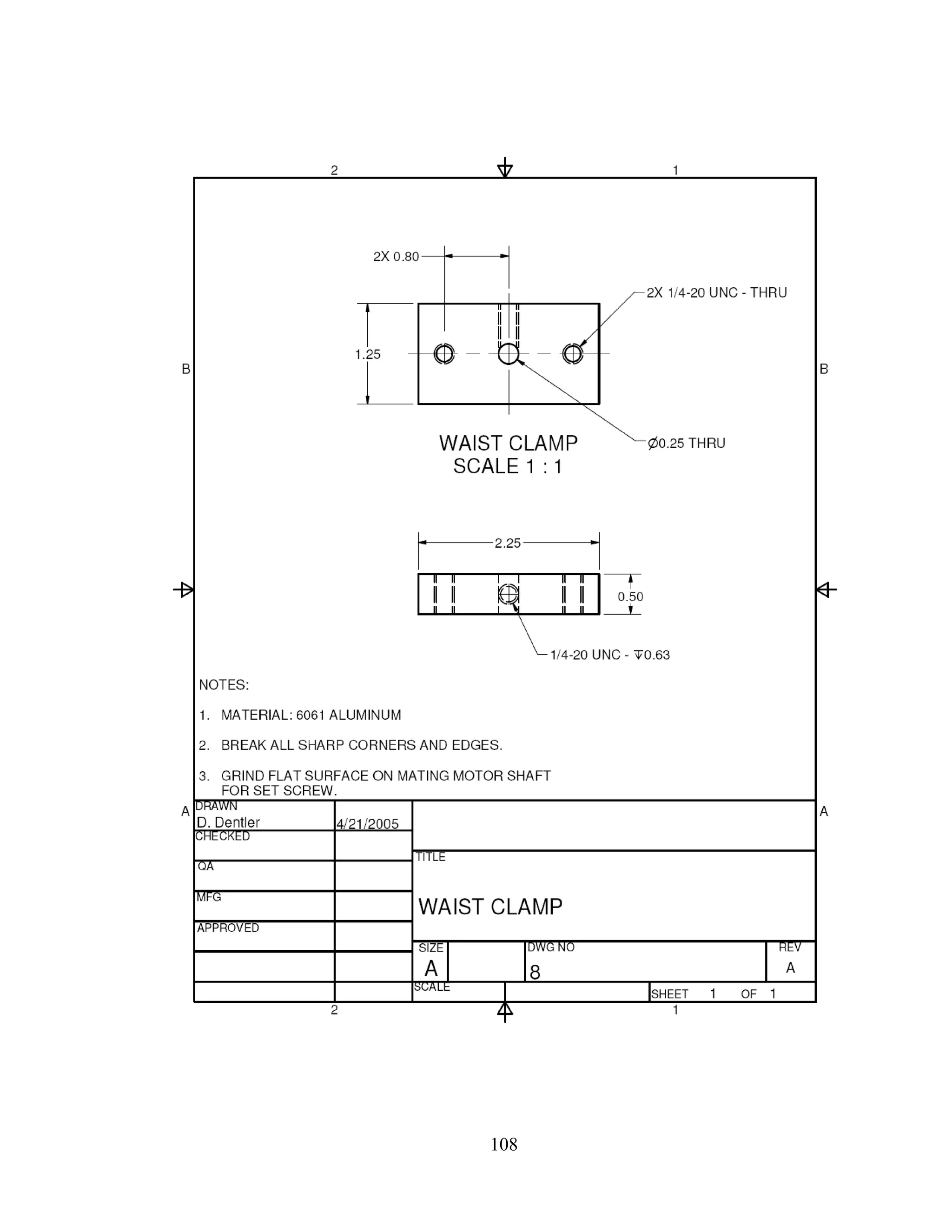
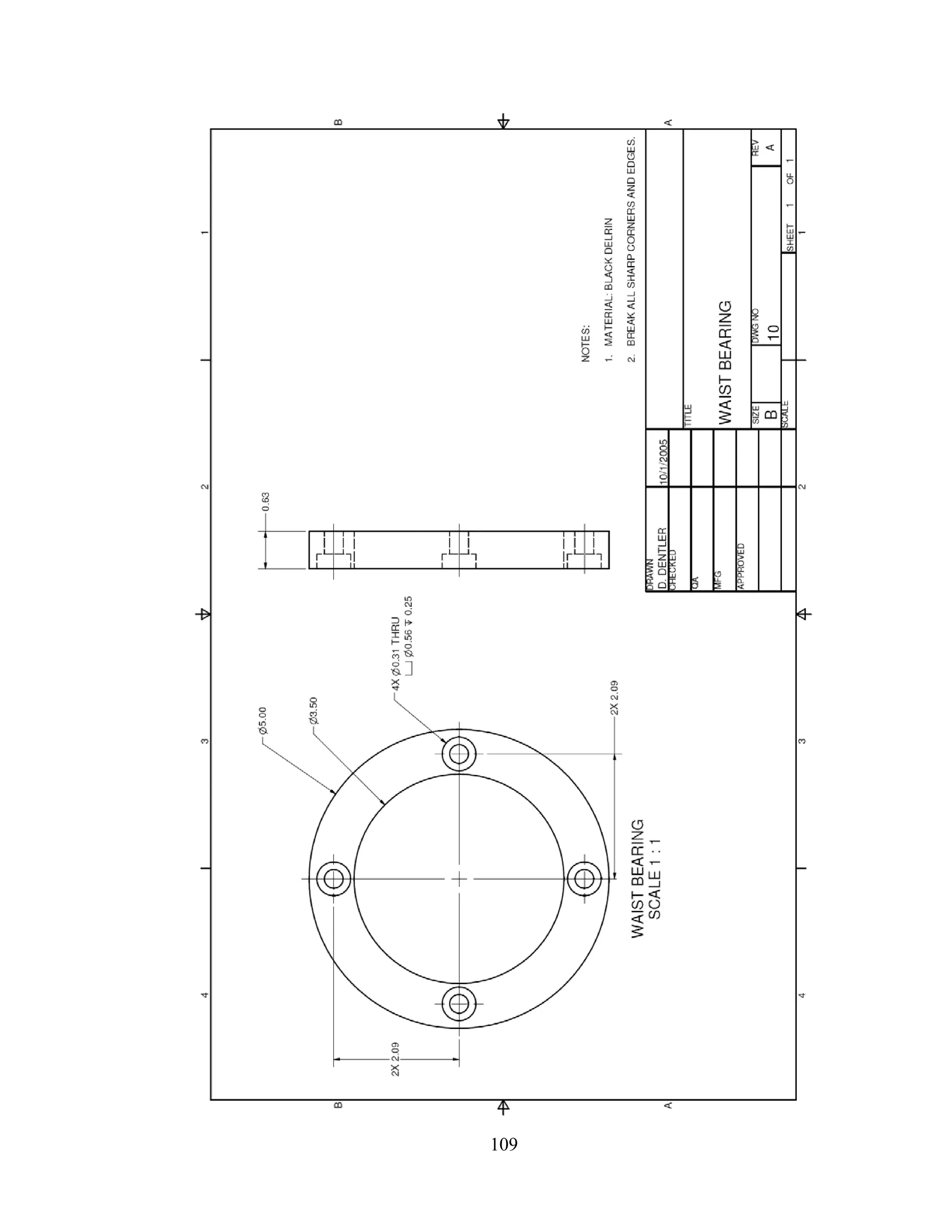
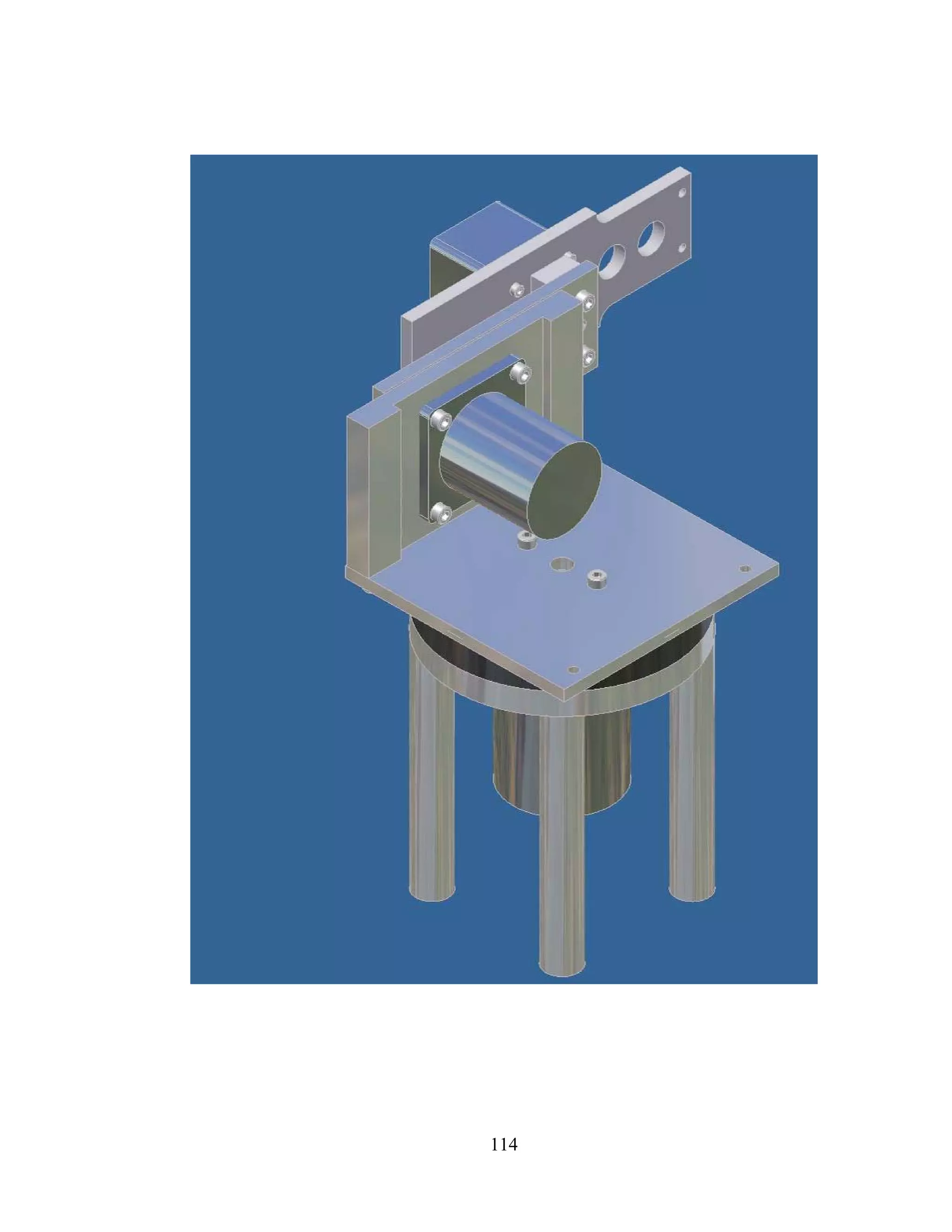
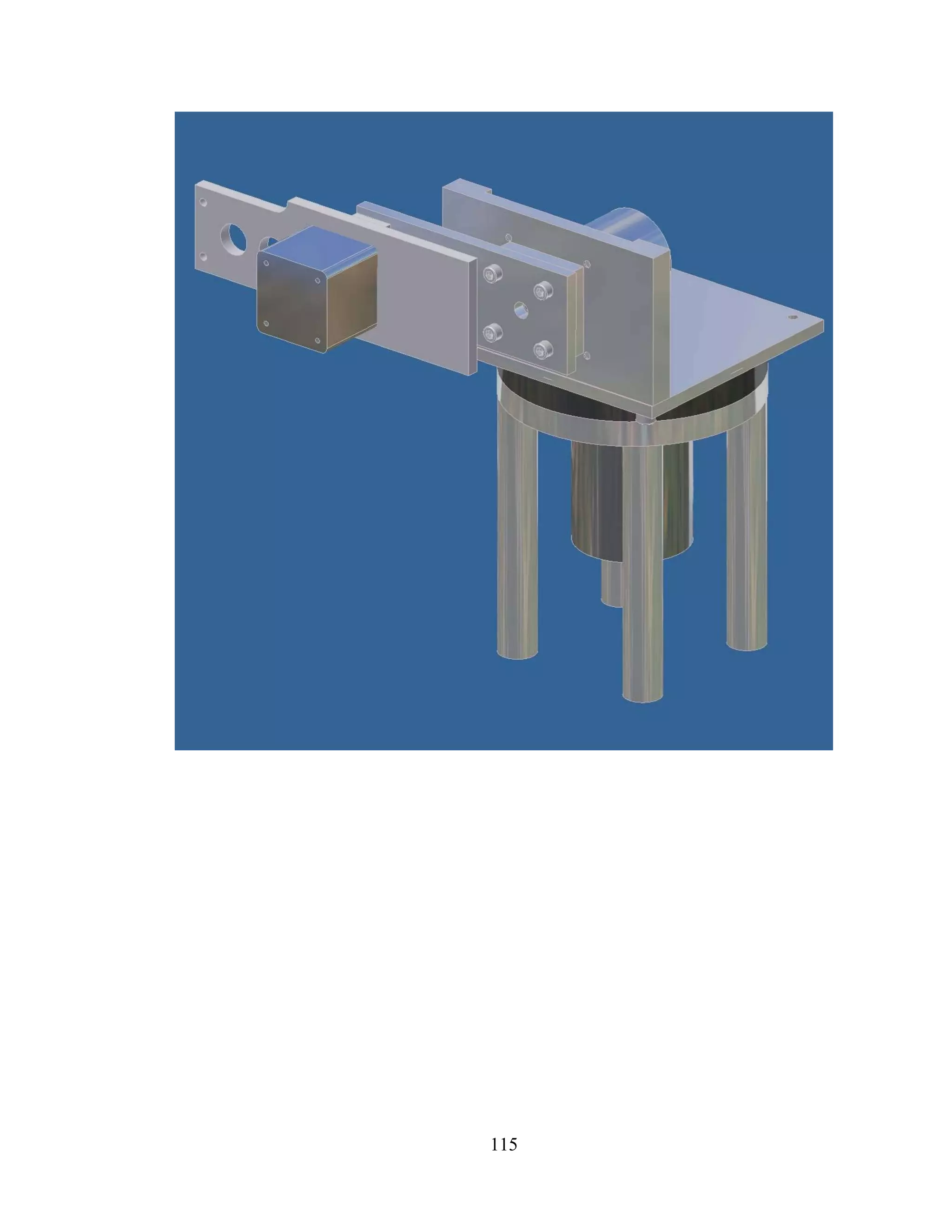
Including the stepper motors, there are 16 major components to the assembly
(table 4). Link 0 is made from parts 4 through 9, parts 11 through 17 make link 1, and
link 2 is made up of parts 18 through 21. A detailed drawing package is in included in
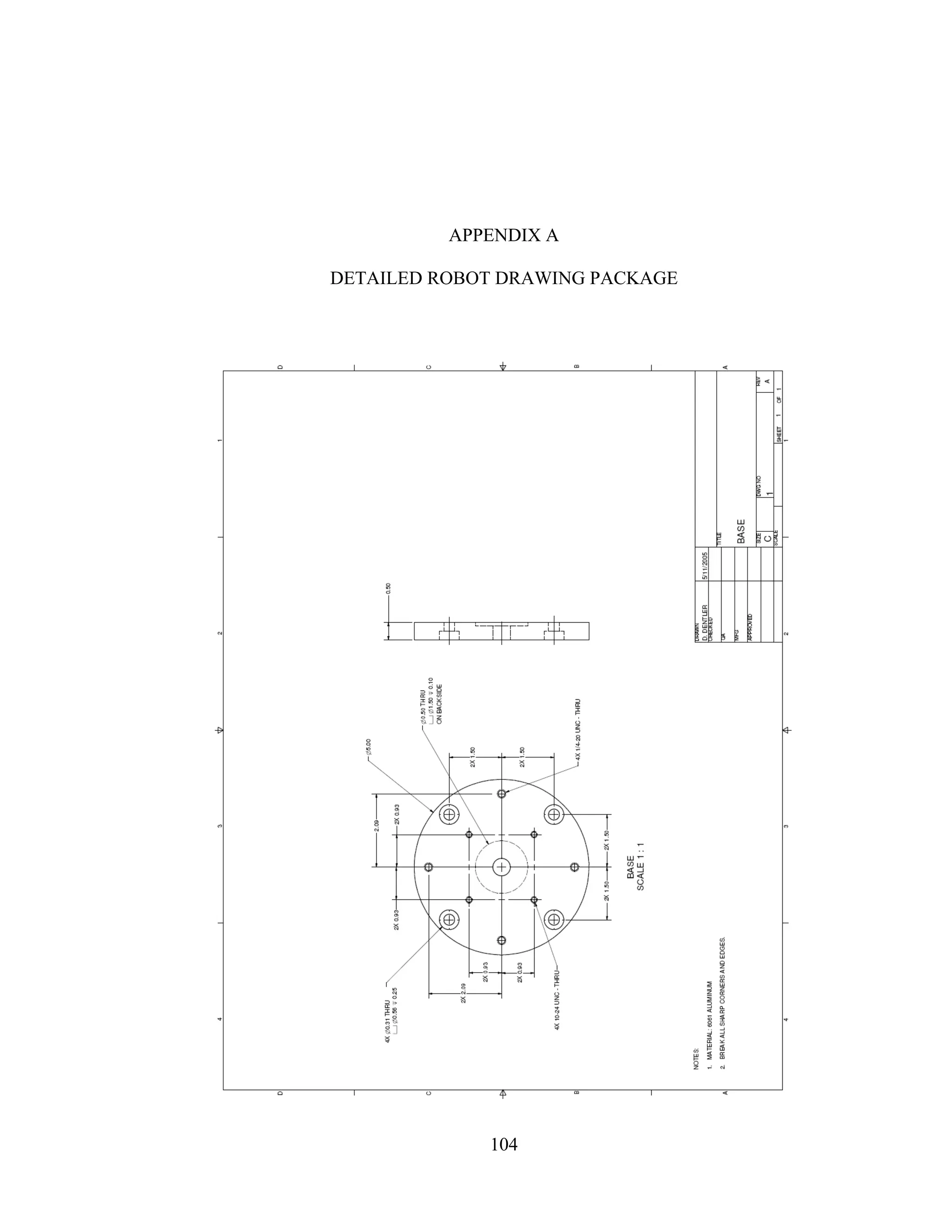
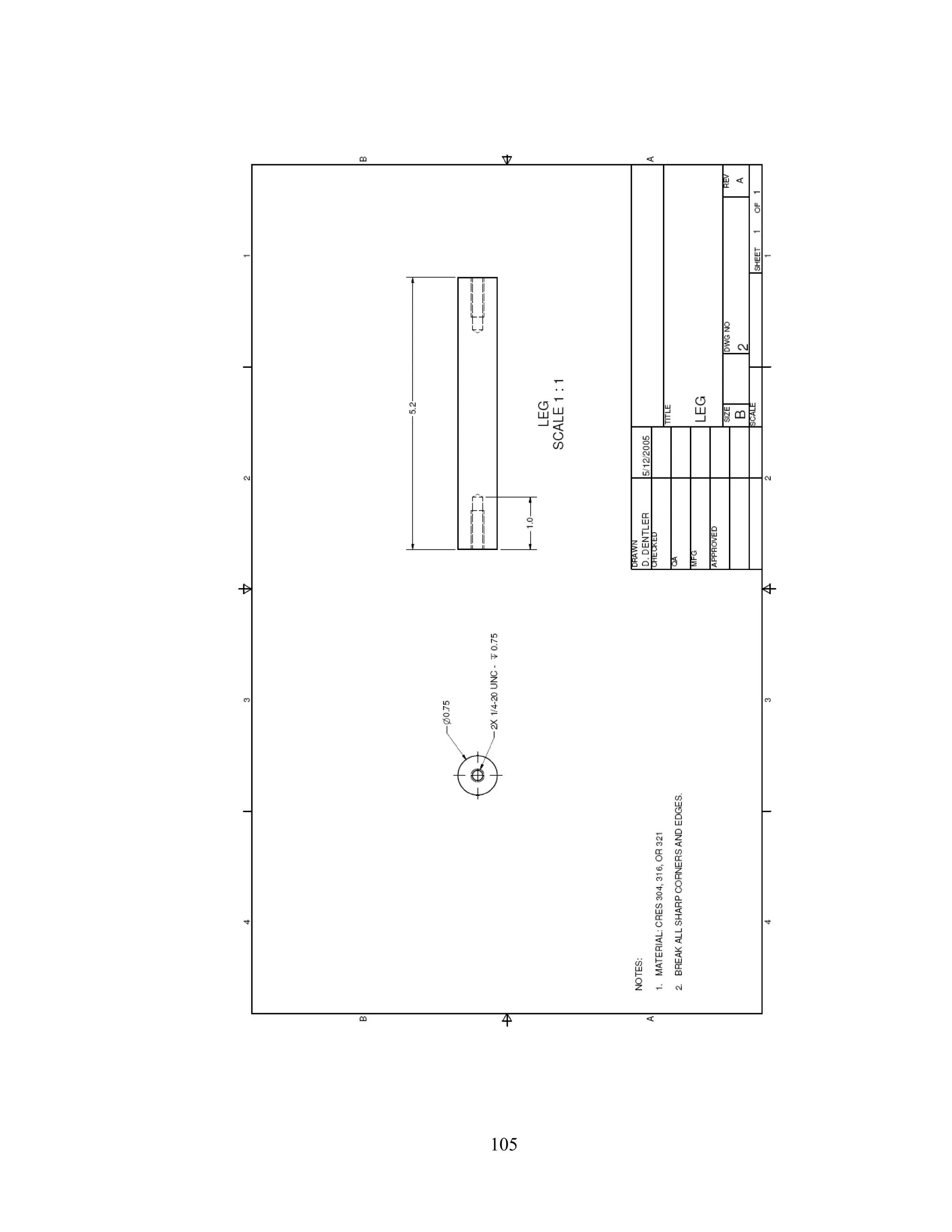
Appendix A.
Table 4: Assembly Parts List
Item # Quantity Description
1 1 Base
2 4 Leg
3 10 1/4-20 x 3/4” Screws
4 1 Waist
5 1 Shoulder Mount
6 1 Waist Motor (5618L-23)
7 4 #10-24 x 5/8” Screws
8 1 Waist Clamp
9 1 1/4-20 x 5/8” Screw
10 1 Waist Bearing
11 1 Shoulder Motor (5618M-06)
12 1 Shoulder Clamp
13 1 Upper Arm
14 10 #10-24 x 1/2” Screws
15 1 1/4-20 x 7/8” Screw
16 2 #10-24 x 3/4” Screws
17 1 Elbow Clamp
18 1 Elbow Motor (4218M-06)
19 1 Lower Arm
20 1 #8-32 x 1/2” Screw
21 4 M3 x 10 Screws
66
Robot Workspace
The workspace is defined in figures 39 through 41. The reaching length is 4.5
inches, the height is 15.0 inches and the total rotation at the waist (link 0) is 90°, defined
by a range of [0,90] (Figure 40). Link 1 is permitted to have a range of [-40,70] (Figure
41 (a)), for a total rotation of 110° and link 2 is allowed a range of [-80,90] (Figure 41
(b)), for a total rotation of 170°.
Figure 39: Robot Arm Reach Dimensions
67
Figure 40: Link 0 Rotation
(a) (b)
Figure 41: Rotation Range for Link 1 (a) and Link 2 (b)
68
Static Link Analysis
Figure 42 shows a jointed manipulator structure in two dimensional space. The tip
of link 2 is positioned by means of revolute joints 1 and 2.
Y
X
θ
1
Joint 1
Link 1
Link 2
m1
,I1
m2
,I2
l1c
l2c
l1
l2
θ
2
T1
T2
Joint 2
Figure 42: Jointed Manipulator Structure
1m , 2m , 1I , and 2I define the mass and moment of inertia about the centers of
gravity of links 1 and 2, respectively. The location of the gravity centers is denoted by cl1
and cl2 , taken from the axes of the respective joints. Angles 1θ and 2θ are the rotations of
links 1 and 2.
For the purpose of this research, it is assumed that the robot arm is not subjected
to any forces relating to tasks or payloads at the tip of link 2. Therefore the only forces
exerted are those needed to overcome gravity. Equilibrium with reaction forces and joint
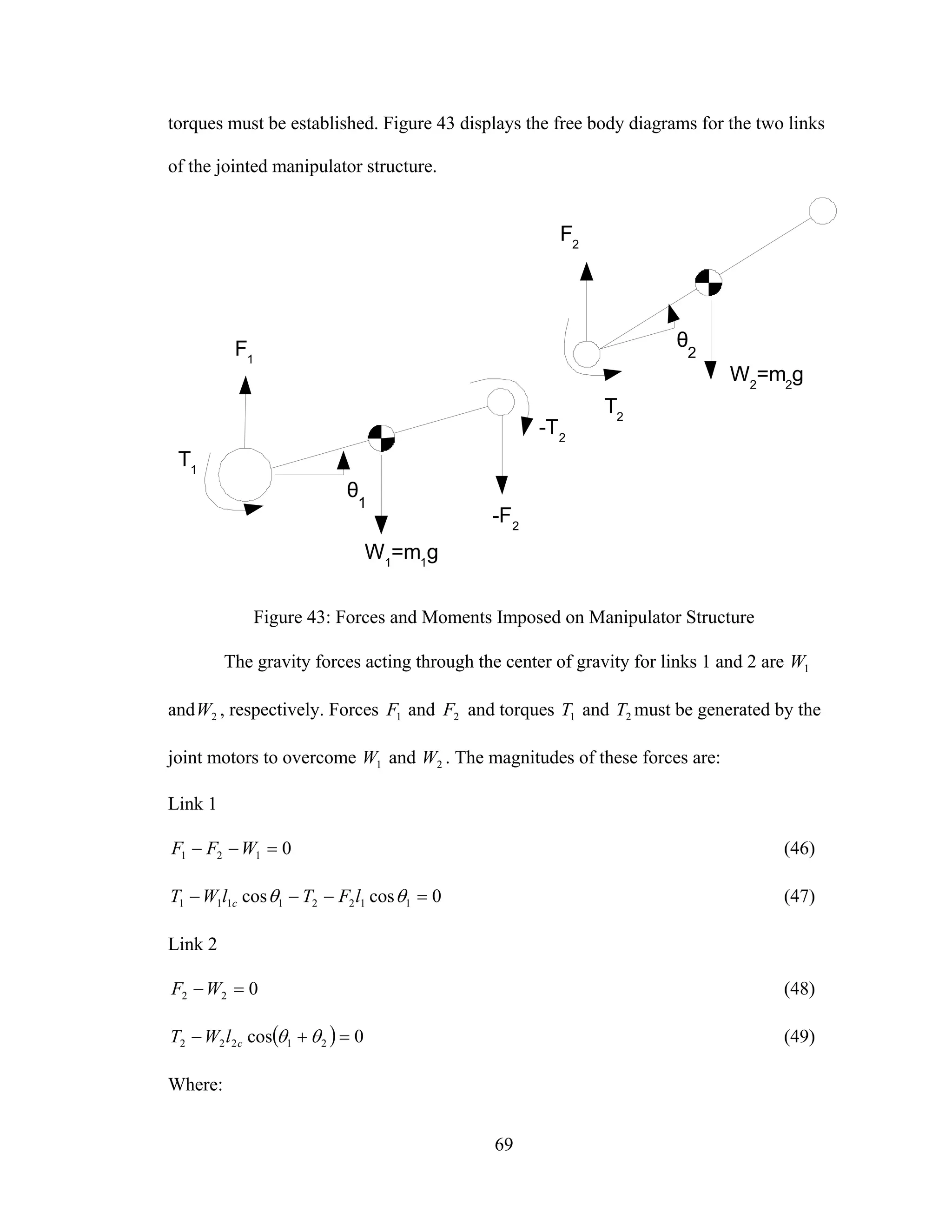
69
torques must be established. Figure 43 displays the free body diagrams for the two links
of the jointed manipulator structure.
θ
1
θ
2
T1
-T2
W1
=m1
g
W2
=m2
g
T2
F2
-F2
F1
Figure 43: Forces and Moments Imposed on Manipulator Structure
The gravity forces acting through the center of gravity for links 1 and 2 are 1W
and 2W , respectively. Forces 1F and 2F and torques 1T and 2T must be generated by the
joint motors to overcome 1W and 2W . The magnitudes of these forces are:
Link 1
0121 =−− WFF (46)
0coscos 11221111 =−−− θθ lFTlWT c (47)
Link 2
022 =−WF (48)
( ) 0cos 21222 =+− θθclWT (49)
Where:
70
• ( )gmmF 211 +=
• gmF 22 =
• ( )[ ]1121221111 coscoscos θθθθ llgmglmT cc +++=
• ( )21222 cos θθ += cglmT
• =1m 1.116 lbs. = 17.86 oz.
• =2m 0.217 lbs. = 3.470 oz
Mass 1m includes the weight of the shoulder clamp (item 12), the elbow clamp
(item 17), and the elbow motor (item 18). The torques, 1T and 2T , required to overcome
gravity forces, can become very large in magnitude. However, these magnitudes can be
controlled during the design phase by performing actions such as choosing low mass
materials, shaping the link to move the center of gravity closer to the joint axis of
rotation, or adding a counterbalance to the link.
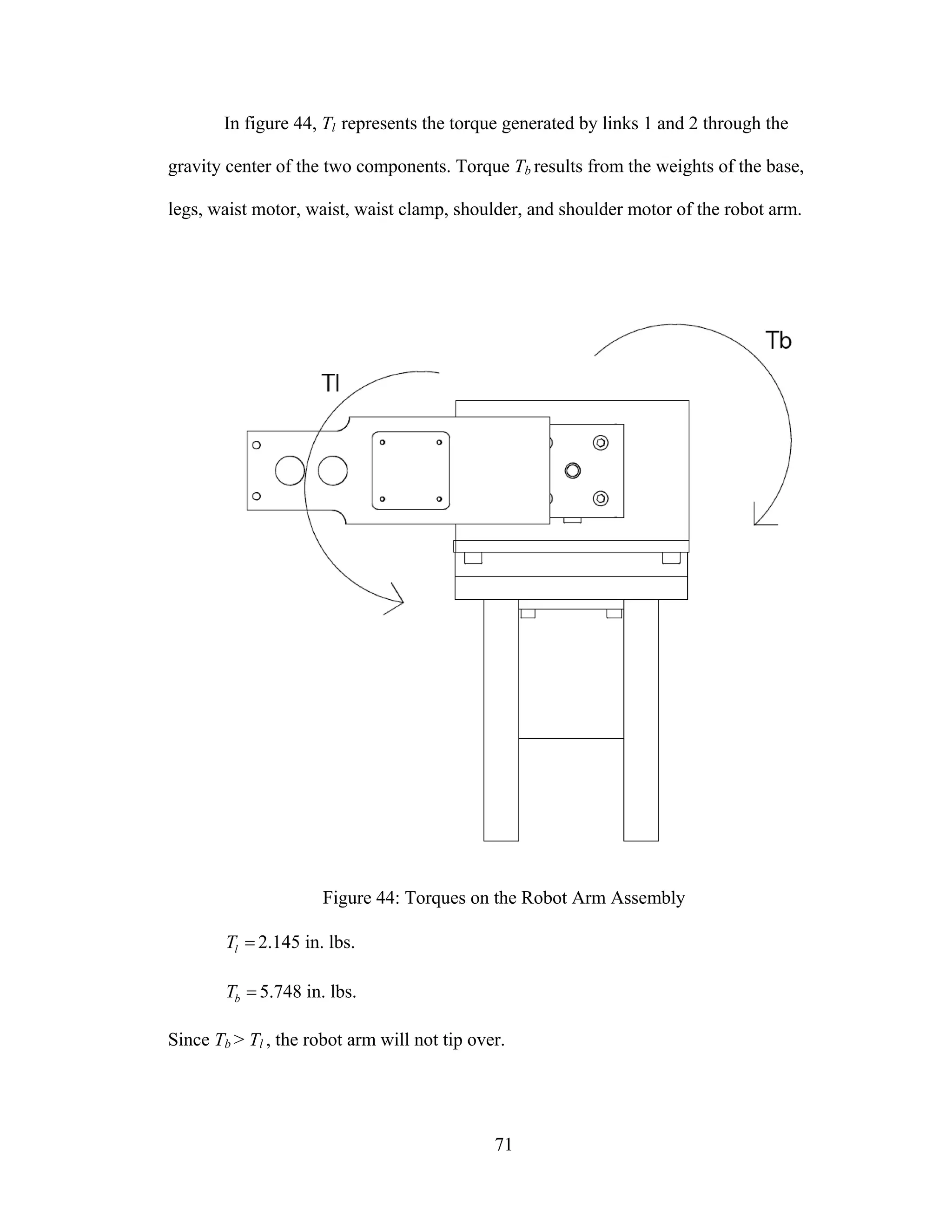
System Stability
In order to prevent the robot from tipping over when the arms are outstretched,
the torque generated by links 1 and 2 at the maximum reaching distance must be less than
the counterbalance torque from the robots base.
71
In figure 44, Tl represents the torque generated by links 1 and 2 through the
gravity center of the two components. Torque Tb results from the weights of the base,
legs, waist motor, waist, waist clamp, shoulder, and shoulder motor of the robot arm.
Figure 44: Torques on the Robot Arm Assembly
=lT 2.145 in. lbs.
=bT 5.748 in. lbs.
Since Tb > Tl , the robot arm will not tip over.
72
Dynamic Torque Analysis
In order to calculate the forces required to drive the links at the desired velocity
and acceleration profiles, dynamic equations must be used. These equations are related to
the Lagrange equations previously described.
Dynamic Torque Link 0
For link 0 the kinetic and potential energy are expressed as
2
2
0
00
•
=
θ
IK 00 =V (50)
The torque 00T , which has to be developed by the waist joint motor to support the link 0
motion, is determined by the Lagrange equation
0
0
0
0
00
θθ ∂
∂
−
⎟⎟
⎟
⎠
⎞
⎜⎜
⎜
⎝
⎛
∂
∂
= •
KK
dt
d
T or 0000
••
= θIT (51)
Dynamic Torque Link 1
For link 1, the position vector gr1 , the origin of which is at the center 1O , and the
velocity gv1 of the center of gravity of link 1 are
( ) ( ) ( )[ ]kjilr cg 1101011 sinsinsincoscos θθθθθ ++= (52)
( ) ( )
( ) ( )
( ) }]cos[
]sinsincoscos[
]sincoscossin[{
01
110010
110010111
k
j
ilrv cgg
•
••
•••
+
++
+−==
θθ
θθθθθθ
θθθθθθ
(53)
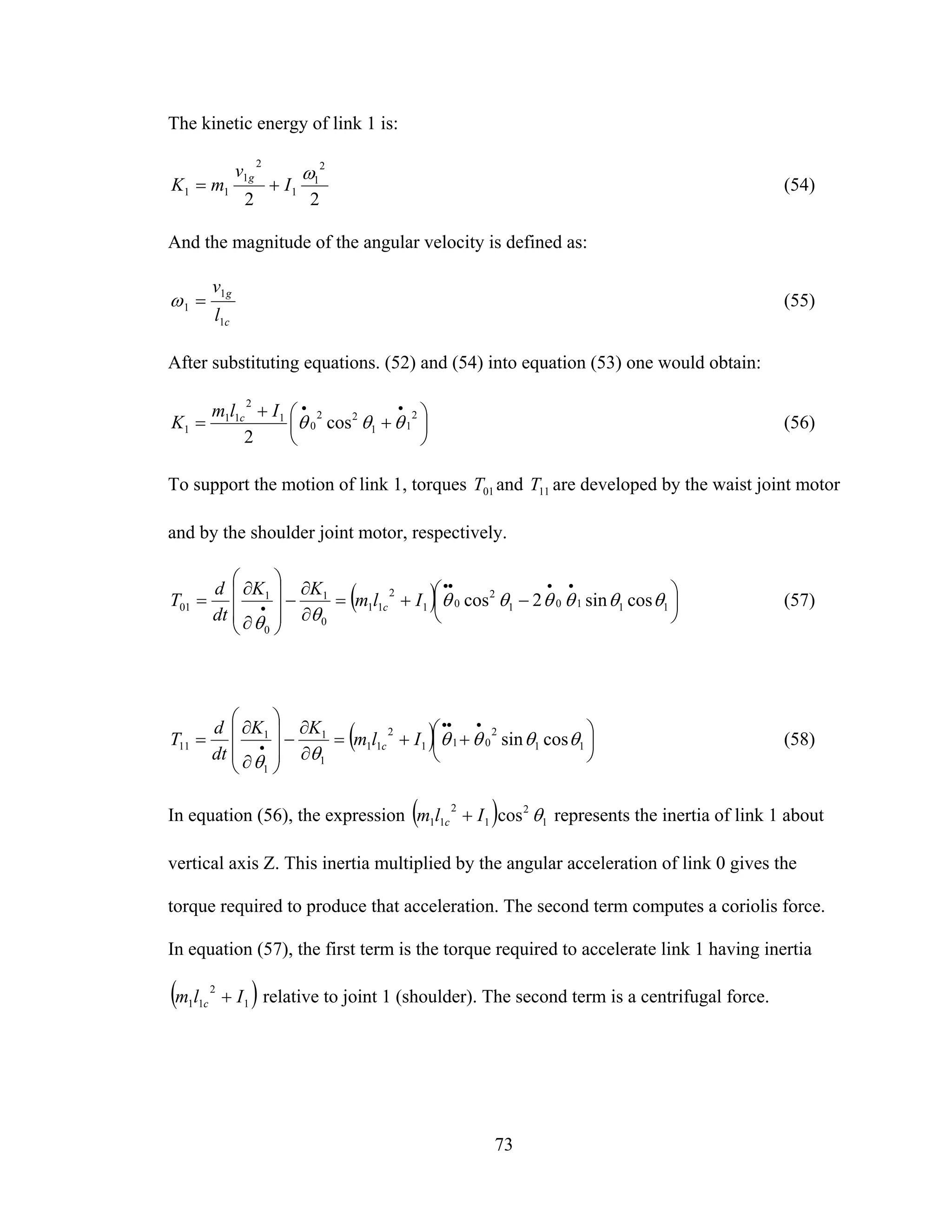
73
The kinetic energy of link 1 is:
22
2
1
1
2
1
11
ω
I
v
mK
g
+= (54)
And the magnitude of the angular velocity is defined as:
c
g
l
v
1
1
1 =ω (55)
After substituting equations. (52) and (54) into equation (53) one would obtain:
⎟
⎠
⎞
⎜
⎝
⎛ +
+
=
••
2
11
22
0
1
2
11
1 cos
2
θθθ
Ilm
K c
(56)
To support the motion of link 1, torques 01T and 11T are developed by the waist joint motor
and by the shoulder joint motor, respectively.
( ) ⎟
⎠
⎞
⎜
⎝
⎛ −+=
∂
∂
−
⎟⎟
⎟
⎠
⎞
⎜⎜
⎜
⎝
⎛
∂
∂
=
••••
• 11101
2
01
2
11
0
1
0
1
01 cossin2cos θθθθθθ
θθ
Ilm
KK
dt
d
T c (57)
( ) ⎟
⎠
⎞
⎜
⎝
⎛ ++=
∂
∂
−
⎟⎟
⎟
⎠
⎞
⎜⎜
⎜
⎝
⎛
∂
∂
=
•••
• 11
2
011
2
11
1
1
1
1
11 cossin θθθθ
θθ
Ilm
KK
dt
d
T c (58)
In equation (56), the expression ( ) 1
2
1
2
11 cos θIlm c + represents the inertia of link 1 about
vertical axis Z. This inertia multiplied by the angular acceleration of link 0 gives the
torque required to produce that acceleration. The second term computes a coriolis force.
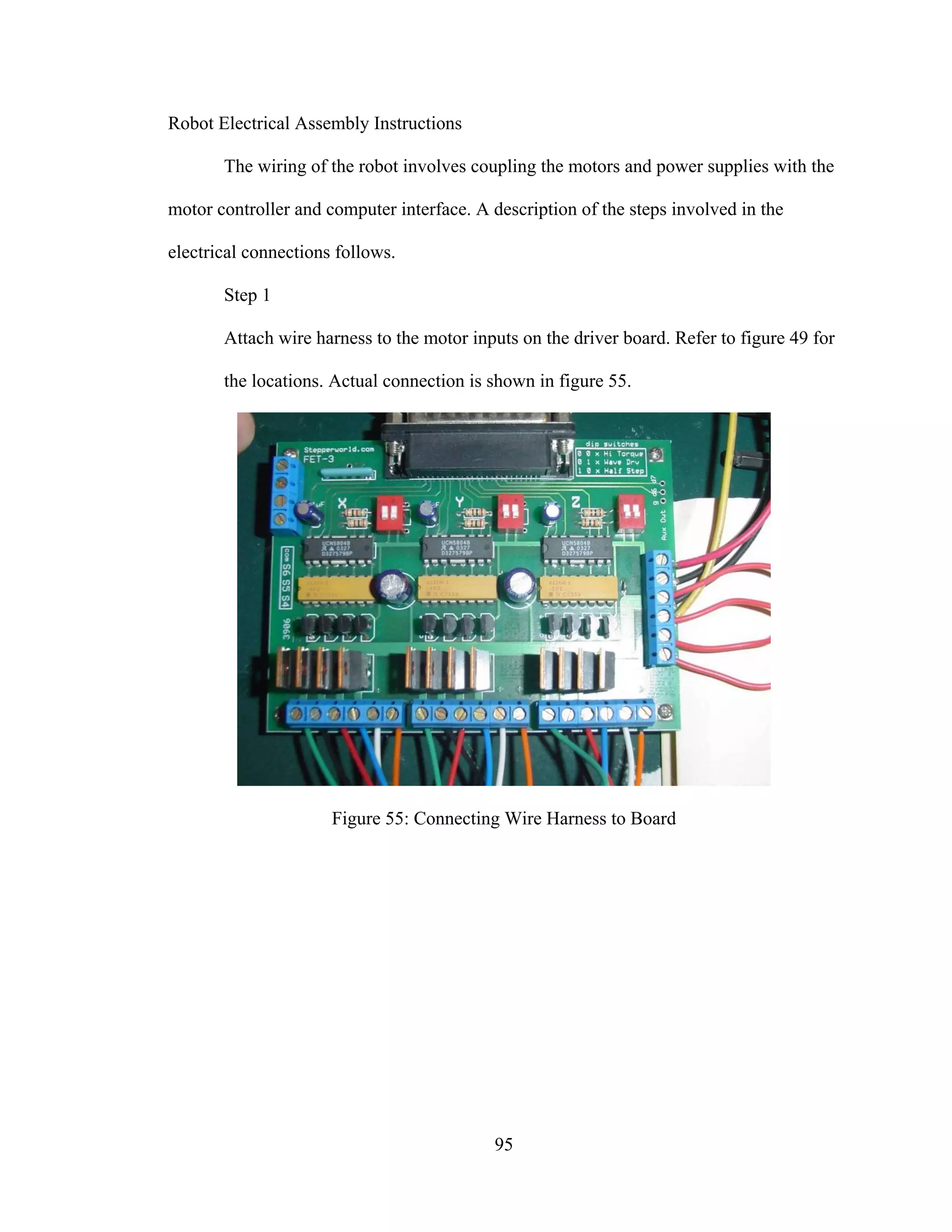
In equation (57), the first term is the torque required to accelerate link 1 having inertia
( )1
2
11 Ilm c + relative to joint 1 (shoulder). The second term is a centrifugal force.
74
Dynamic Torque Link 2
For link 2, the position vector of center of gravity of link 2 relative to 1O is
( )[ ]
( )[ ]
( )[ ]kll
jll
illr
c
c
cg
21211
212110
2121102
cossin
coscossin
coscoscos
θθθ
θθθθ
θθθθ
+++
+++
++=
(59)
The velocity center of gravity of link 2 is
( )
( )
( )
( )
( ) kll
jll
ll
ill
llrv
c
c
c
c
cgg
]coscos[
}sin]sinsin[
cos]coscos{[
}cos]sinsin[
sin]coscos[{
21212111
021212111
0021211
021212111
002121122
θθθθθθ
θθθθθθθ
θθθθθ
θθθθθθθ
θθθθθ
+⎟
⎠
⎞
⎜
⎝
⎛ +++
+⎟
⎠
⎞
⎜
⎝
⎛ ++−
+++
+⎟
⎠
⎞
⎜
⎝
⎛ ++−
++−==
•••
•••
•
•••
••
(60)
( )
( )
2
21
2
2221121
2
1
2
1
2
021
22
2
211211
22
122
2
2
cos2
]cos
coscos2cos[
⎟
⎠
⎞
⎜
⎝
⎛ ++⎟
⎠
⎞
⎜
⎝
⎛ ++
+++
++=⋅=
•••••
••
θθθθθθ
θθθθ
θθθθ
cc
c
cggg
lll
ll
lllvvv
(61)
75
The magnitude of angular velocity 2ω of link 2 is
cg
c
g lv
l
l
v 21
1
1
22 −=ω (62)
Where ( ) gc vll 111 is the velocity of the joint between links 1 and 2. Inserting equations
(52) and (59) produces
( ) 2
2121
2
0
2
21
1
1
21
1
1
2
2
2
)(cos
•••
+++=
⎟⎟
⎠
⎞
⎜⎜
⎝
⎛
−⎟⎟
⎠
⎞
⎜⎜
⎝
⎛
−=
θθθθθ
ω cg
c
gg
c
g lv
l
l
vv
l
l
v
(63)
Thus the kinetic energy of link 2 is
( )
( )
( )
( )}cos
)(cos)(2
]cos
coscos2cos[{
2
1
21
2
2
02
2
212
2
222211212
2
1
2
12
2
021
22
2
211211
22
122
θθθ
θθθθθθ
θθθθ
θθθθ
++
+++++
+++
++=
•
•••••
••
I
Ilmllm
lml
lllmK
cc
c
c
(64)
76
And the torques in the motors of joints 0, 1, and 2, respectively, required to support
motion of link 2 are
( )
( ) ( )
( ) ( )
( ) ( ) ( )
( )
( ) ( ) ( ) 2021212
2
22
211212
1021212
2
22
21121121
11
2
12021
2
2
2
22
211211
22
12
0
2
0
2
02
]cossin
sincos[2
}cossin
]sincoscos[sin
cossin[{2}cos
]coscos2cos[{
••
••
••
•
++++
+−
++++
++++
−+++
++=
∂
∂
−
⎟⎟
⎟
⎠
⎞
⎜⎜
⎜
⎝
⎛
∂
∂
=
θθθθθθ
θθθ
θθθθθθ
θθθθθθ
θθθθθ
θθθθ
θθ
Ilm
llm
Ilm
ll
lmIlm
lllm
KK
dt
d
T
c
c
c
c
c
c
(65)
( )
( ) ( )
( ) ( ) ( ) ( )
( ) 212212
2
22212
2
0212122121
2
2
2112121121
11
2
1222
2
222212
12
2
222212
2
12
1
2
1
2
12
sin2)sin(
}cossin]cossin
sincoscossin
cossin[{cos
)cos2(
•••
•
••
••
•
−−
++++++
++++
++++
+++=
∂
∂
−
⎟⎟
⎟
⎠
⎞
⎜⎜
⎜
⎝
⎛
∂
∂
=
θθθθθ
θθθθθθθθθ
θθθθθθ
θθθθ
θθ
θθ
cc
c
cc
cc
cc
llmllm
Il
llll
lmIlmllm
Ilmllmlm
KK
dt
d
T
(66)
77
( )
( ) ( ) ( )
( ) ( ) 2
12212
2
021212
2121
2
2211212
22
2
2212
2
222212
2
2
2
2
22
)sin(}cossin
]cossinsincos[{
)(cos
••
••••
•
++++
+++++
++++=
∂
∂
−
⎟⎟
⎟
⎠
⎞
⎜⎜
⎜
⎝
⎛
∂
∂
=
θθθθθθθ
θθθθθθθ
θθθ
θθ
c
cc
ccc
llmI
lllm
IlmIlmllm
KK
dt
d
T
(67)
Assuming link 0 is vertical, the potential energy is
( )[ ]{ }212112111 sinsinsin θθθθ +++= cc llmlmgV (68)
Accordingly, the gravity-related components of the torque in the actuators of joints 1 and
2 are as follows
( )[ ]{ }212112111
1
1 coscoscos θθθθ
θ
+++−=
∂
∂
−= ccg llmlmg
V
T (69)
( )[ ]2122
2
2 cos θθ
θ
+−=
∂
∂
−= cg lmg
V
T (70)
These torque components are added to the motion-related components from equations
(57), (65), and (66). The overall torques to be developed by actuators in joints 0, 1, and 2
( 0T , 1T , and 2T ) are calculated as follows
78
( )
( ) ( ) ( )
( ) ( )
( ) ( ) ( ) ( )
( ) ( ) ( ) ( ) 2021212
2
22211212
1021212
2
222112
211211112111
2
11
021
2
2
2
222112
1
2
1121
2
1
2
1100201000
]cossinsincos[2
]}cossinsincos
cossincossin[cossin{2
}cos]coscos2
cos[cos{
••
••
••
+++++−
++++++
++++−
+++++
+++=++=
θθθθθθθθθ
θθθθθθθθθ
θθθθθθθ
θθθθθθ
θθ
Ilmllm
Ilml
lllmIlm
Ilml
llmIlmITTTT
cc
cc
cc
cc
c
(71)
( )
( ) ( ) ( ) ( )
( ) ( )
( )]}coscos[cos{
)sin2()sin(]}cossin
cossinsincoscossin
cossin[cossin{)cos(
)cos2(
212112111
212212
2
22212
2
021212
2121
2
22112121121
11
2
12111
2
1122
2
222212
12
2
222212
2
121
2
11112111
θθθθ
θθθθθθθθθθ
θθθθθθθθθθ
θθθθθθ
θθ
++++
−−+++
+++++++
++++++
+++++=++=
••••
••
••
cc
cc
ccc
ccc
cccg
llmlmg
llmllmI
lllll
lmIlmIlmllm
IlmllmlmIlmTTTT
(72)
( ) ( ) ( )
( ) ( )
( )]cos{
)sin(}cossin
]cossinsincos[{
)()cos(
2122
2
12212
2
021212
2121
2
2211212
22
2
2212
2
2222122222
θθ
θθθθθθθ
θθθθθθθ
θθθ
++
++++
+++++
++++=+=
••
••••
c
c
cc
cccg
lmg
llmI
lllm
IlmIlmllmTTT
(73)
79
Dynamic Force Analysis Observations
The high degree of nonlinearity in the equations along with interaxial coupling
could cause vibration to occur in the manipulator structure and affect the systems
performance; these terms are especially dominant for link 2. Therefore, this link is the
most critical aspect of the design in terms of mass and moment of inertia.
Counterbalancing the mass or distributing it around the center of gravity can greatly
reduce the coupling terms.
Stepper Motor Selection
The motors used for this project were hybrid stepper motors with a 1.8° step
angle. Detailed specifications for the motors are shown in table 5. The motors selected for
each link must be powerful enough to support the desired speed and acceleration profiles
as well as any motor half-stepping that may be required.
Table 5: Stepper Mechanical Properties
Location NEMA
Size
Amps/
Phase
Torque
(oz-in)
Resistance
(Ohm/Phase)
Inductance
(mH/Phase)
Inertia
(oz-in2
)
Weight
(Lbs)
# of
Leads
Elbow 17 0.9 45 5.7 5 0.27 0.6 6
Shoulder 23 1.2 84 5 8 0.74 1.2 6
Waist 23 0.6 125 17.1 30 1.2 1.9 6
From the torque curves shown in Appendix B, it can be seen that as the rotation
speed of the motor increases, the torque output decreases. This has an affect on the
maximum movement rate of the robot arm. It should be noted that the no-load torque of
the motors is not sufficient to prevent collapse of the robot arm in the event of a power
loss. A braking system or battery backup would be needed to protect the system in this
event.
80
Dynamic Torque Calculation
Using equations developed in equations (49) through (72), it is possible to
calculate the dynamic torque requirements of the robot arm.
Torque Calculation Link 2
As shown in figure 45, known variables in equation (48) for the arm section of the
robot, or link 2, are as follows:
• =cl2 0 in.
• =2m 0.217 lbs. = 3.47 oz.
• =2I 1.158 lb in2
• =1l 3.50 in.
Figure 45: Design Variables Link 2
Figure 41 previously defined the range of rotation angles for link 1 and 2 ( 1θ and
2θ , respectively) as [-40, 70] for link 1 and [-80, 90] for link 2. The maximum static
81
torque for link 2 occurs when both 1θ and 2θ are 0. Substituting the known variables into
equations (47) and (48) and solving for 2T yields 11.46 oz-in. Since 45 > 11.46, the arm
motor is acceptable.
The maximum dynamic torque for link 2, defined by equation (72), was solved
using Matlab and is shown in figure 46 (see Appendix C for code).
Figure 46: Link 2 Dynamic Torque Curve
82
Torque Calculation Link 1
As shown in figure 47, known variables for the shoulder section of the robot, or
link 1, are as follows:
• =cl1 1.24 in.
• =1m 1.116 lbs. = 17.86 oz. (includes the weight of items 12, 17, and 18)
• =1I 4.246 lb in2
Figure 47: Design Variables Link 1
83
The maximum dynamic torque for link 1, defined by equation (71), was solved
using Matlab and is shown in figure 48 (see Appendix D for code).
Figure 48: Link 1 Dynamic Torque Curve
The maximum static torque for link 1 also occurs when both 1θ and 2θ are 0.
Solving for 1T in equation 46 yields 45.742 oz-in. Since 84 > 45.742, the arm motor is
acceptable.
84
Torque Calculation Link 0
Since the other coordinate systems are based off of link 0, the only variable is the
inertia factor, listed below:
=0I 26.494 lb in2
The maximum dynamic torque for link 0, defined by equation 70, was solved
using Matlab and is shown in figure 49 (see Appendix E for code).
Figure 49: Link 0 Dynamic Torque Curve
85
Kinetic Link Parameters
The kinetic link parameters for the robot arm are listed in table 6.
Table 6: Link Parameters
Link αi ai di θi
1 0 0 1.5 θ1
2 90 0 2.8 θ2
3 0 3.5 .25 θ3
The coordinate transformation matrices for the individual links are as follows:
⎥
⎥
⎥
⎥
⎦
⎤
⎢
⎢
⎢
⎢
⎣
⎡ −
=
1000
5.1100
00cossin
00sincos
11
11
1
0 θθ
θθ
A (74)
⎥
⎥
⎥
⎥
⎦
⎤
⎢
⎢
⎢
⎢
⎣
⎡
−
=
1000
8.2010
0cos0sin
0sin0cos
22
22
2
1 θθ
θθ
A (75)
⎥
⎥
⎥
⎥
⎦
⎤
⎢
⎢
⎢
⎢
⎣
⎡ −
=
1000
25.0100
sin5.30cossin
cos5.30sincos
333
333
3
2 θθθ
θθθ
A (76)
Multiplying the matrices produces the kinematic equation T:
( ) ( ) ( ) ( ) ( )
( ) ( ) ( ) ( ) ( )
⎥
⎥
⎥
⎥
⎦
⎤
⎢
⎢
⎢
⎢
⎣
⎡
+
+−+++−+
+++++−+
=
1000
3.4sin5.30cossin
cos25.0sincos5.3cossinsinsincos
sin25.0coscos5.3sincossincoscos
333
2121321213213
2121321213213
3
0
θθθ
θθθθθθθθθθθθθ
θθθθθθθθθθθθθ
T (77)
86
Open Loop Control
Based on the transformation matrix derived in (77), a database can be constructed
which contains all of the possible end effector locations in the task space. These locations
can then be translated into a number of steps that the motors need to take in order to
rotate each joint into position.
Selection of Driver
The purpose of a stepper motor driver is to supply the current to the motor
windings through a separate power source since the required current is too high to be
supplied by a PC.
Stepper Motor Drivers
A stepper motor driver is selected according to the type of stepper motor (ie.,
unipolar or bipolar) and current/voltage requirements (refer back to table 5 for motor
info). For this application, the FET3 system, supplied by StepperWorld, was chosen. The
FET3 is a low cost driver for hobby use that proved to be very versatile to the needs of
this research. The features of the FET3 board are as follows [15]:
• 3 Axis Unipolar (L/R Type Driver)
• High Current Capability
• Step and Direction Interface (compatible with 3rd party software)
• Dip Switch Mode Selection for each axis - Wave drive, Hi-Torque, Half Step
• 3 Switch Inputs for Limit Detection
• Connects to Parallel Port with Standard DB-25 Cable
• Optional Separate Power Supply Input for Z axis
• 50 VDC Maximum Motor Supply Voltage
87
• 36 Amp Per Phase Max
• 140 Watts Per Phase Max
A diagram of the control board is shown in figure 50.
Figure 50: FET-3 Controller Board Diagram
88
The FET-3 board operates with a step/direction interface, which makes it
compatible with most 3rd
party CNC software systems. Figure 51 shows the proper
configuration of the LPT port for CNC software operation.
Figure 51: Parallel Port Setup for FET-3 Controller Interface
89
The purpose of CNC code is to position the machine bed or tool in a
manufacturing environment accurately and repeatedly. The code provides speeds and
coordinates to actuators that then move load accordingly. This existing technology
provides an easy control interface for the arm used in this research. Once the final
position of each joint is determined, the command can be entered as a single line of code
in the CNC software and the move will be carried out. The command line takes the
format shown in figure 52.
Figure 52: CNC Command Line Format
90
The function code, designated by the letter “G” in the previous figure, represents
the action the machine is to take using the remaining inputs as its setting. Table 7 lists a
number of common CNC machine codes or “G-words:”
Table 7: Common CNC G Words
G-Number Function
G00 Rapid traverse movement
G01 Linear interpolation movement
G02 Circular interpolation movement, CW
G03 Circular interpolation movement, CCW
G04 Dwell
G10 Input cutter offset data
G17 Selection of X-Y plane in milling
G18 Selection of X-Z plane in milling
G19 Selection of Y-Z plane in milling
G20 Input values specified in inches
G21 Input values specified in millimeters
G28 Return to reference point
G32 Thread cutting in turning
G40 Cancel cutter offset
G41 Cutter offset compensation, left of part surface
G42 Cutter offset compensation, right of part surface
G90 Programming in absolute coordinates
G91 Programming in incremental coordinates
G92
Reset coordinate system origin relative to starting
location of cutting tool
G94 Specify feed per minute in milling and drilling
G95 Specify feed per revolution in milling and drilling
G98 Specify feed per minute in turning
G99 Specify feed per revolution in turning
91
In the case of this research, the CNC software will be used only to actuate the arm
joints a given angle, therefore the only G function that will be used is G00, the rapid
traverse movement. The software will be configured to accept an input defining the
number of steps that each motor must take. Figure 53 shows the software interface.
Figure 53: FET-3 Controller Interface
92
The control board uses the parallel port logic described above to power the
stepper motors. Figure 54 shows the pin out of the connector and table 8 describes the
function of the pins.
Figure 54: Standard Parallel Port Pinout [2]
Table 8: SP-3/FET-3 Stepper Parallel Port Pin Assignments (DB25 Connector)
Pin [Bit] Address I/O Function
2- [D0] bs OUTPUT X axis direction
3- [D1] bs OUTPUT X axis step
4- [D2] bs OUTPUT Y axis direction
5- [D3] bs OUTPUT Y axis step
6- [D4] bs OUTPUT Z axis direction
7- [D5] bs OUTPUT Z axis step
8- [D6] bs OUTPUT Aux Out (d6)
9- [D7] bs OUTPUT Aux Out (d7)
10- [S6] bs+1 OUTPUT Z switch detect
12- [S5] bs+1 OUTPUT Y switch detect
13- [S4] bs+1 OUTPUT X switch detect
14- [C1] bs+2 OUTPUT X axis *Enable (active LO)
16- [C2] bs+2 OUTPUT Y axis *Enable (active LO)
17- [C3] bs+2 OUTPUT Z axis *Enable (active LO)
18- Ground
25- Ground
93
Note that since pins 14 and 17 (data bits C1 and C3) are recognized as outputs
from the computer, the signal must be inverted to become an output from the control
board. The bit descriptions D, S, and C describe the function assigned to a particular pin.
“D” designates a pin as a data output operating on the port base address, or data port. The
base address of a parallel port is normally Hex 378, 278, or 3BC. Normally, the data port
is a “write only” port (the exception is the case of a bi-directional ports, which are not
discussed in this paper). “S” corresponds to a switch input operating on the status port or
base address +1, which would be Hex 379, 279, or 3BD respectively. The status port is a
“read only” port, meaning any data written to this port is ignored. Finally, “C” coincides
with a control output from the PC. In the example of the robot arm, this control output
enables the motor on a particular axis. A “C” signal operates on the control port defined
as the base address +2, or Hex 37A, 27A, or 3BE. The control port is a “write only” port.
Robot Mechanical Assembly Instructions
Following is a detailed description of how the robot arm used in this research was
constructed.
Step 1
Secure Elbow Motor (#18) to Lower Arm (#19) using four M3 x 10 screws.
Step 2
Attach Waist Motor (#6) to Base (#1) using four #10-24 x 5/8” screws.
Step 3
Attach Legs (#2) to Base using four 1/4-20 x 3/4” screws.
Step 4
94
Secure Waist Clamp (#8) to Waist Motor using one 1/4-20 x 5/8” screw. Ensure
the set screw is tight against the flat on the motor shaft.
Step 5
Attach Waist Bearing (#10) to Base using four 1/4-20 x 3/4” screws.
Step 6
Line up through holes on Waist (#4) with Waist Clamp. Attach using two #10-24
x 3/4” Screws.
Step 7
Insert Shoulder Motor (#11) into Shoulder Mount (#5). Fasten in place with four
#10-24 x 1/2” Screws.
Step 8
Affix Shoulder Mount to Waist using two 1/4-20 x 3/4” screws.
Step 9
Using four #10-24 x 1/2” screws, attach Shoulder Clamp (#12) to Upper Arm
(#13).
Step 10
Assemble Elbow Clamp (#17) to Upper Arm with two #10-24 x 1/2” screws.
Step 11
Insert Shoulder Motor shaft into Shoulder Clamp and secure with 1/4-20 x 7/8”
screw. Ensure the set screw is tight against the flat on the motor shaft.
Step 12
Insert Elbow Motor shaft into Elbow Clamp and secure with #8-32 x 1/2” screw.
Ensure the set screw is tight against the flat on the motor shaft.
95
Robot Electrical Assembly Instructions
The wiring of the robot involves coupling the motors and power supplies with the
motor controller and computer interface. A description of the steps involved in the
electrical connections follows.
Step 1
Attach wire harness to the motor inputs on the driver board. Refer to figure 49 for
the locations. Actual connection is shown in figure 55.
Figure 55: Connecting Wire Harness to Board
96
Step 2
The motors are 6 lead unipolar motors. They are attached to the driver as
previously shown in figure 55, with A and C referring to coil A and B and D
referring to coil B. Table 9 lists the wiring requirements for the different motor
configurations.
Table 9: 6 Lead Wire Motor Wiring
Color Code 1 Red White Blue Green Yellow Black
Color Code 2 Brown Black Orange Red White Yellow
Color Code 3 Red Black Red/
White
Green White Green/
White
Wire A A/C
Common
C B B/D
Common
D
97
The robot has a terminal built onto the waist to allow for a wire harness
extension. This allows the robot to be far away from the control board. The
junction terminals are in groups of six for each motor, as shown in figure 56.
Using the corresponding color code in table 9, attach the motors to the junction
block as required. The motors for links 1 and 2 are wired per color code 1 while
link 0 follows color code 3.
Figure 56: Motor Junction Terminals
98
Step 3
The driver board allows for the use of two separate power supplies, one
for the X and Y axes and a separate supply for the Z axis. This research only used
a single, high current power supply so the XY+ terminal was connected to the Z+
terminal as shown in figure 50. The XY- is similarly connected to the Z- terminal
to complete the wiring.
99
CHAPTER V
SUMMARY
Robotic arm systems were covered in detail in this research. The actuators,
controllers, and driver hardware systems were introduced. Mathematical properties such
as system statics and dynamics, path planning, and coordinate transformations were also
covered in detail.
A three link revolute jointed robot arm was developed to demonstrate some of the
principles discussed in this research. It was able to actuate to any point in its workspace
through the use of a CNC driver board and software. It’s simple construction and basic
open loop control system made it ideal to demonstrate the concepts brought up during
this research.
Further research could be performed on this subject using the robot arm. Some
possible improvements on the system could be as follows:
1) Replace stepper motors with servo motors. This would give a greater degree of
precision and accuracy to the system. However, servos are more difficult to
implement and would require closed loop control.
2) Switch to a closed loop controller. A controller that employs sensors would lead
to move accurate movements.
3) Build a dedicated controller. A stand alone controller instead of a PC would allow
the controls to be customized for the application.
100
4) Add a gripper function to the end effector. This could take the form of a simple
open/closed gripper or utilize an additional joint to allow for rotation of the
object.
101
BIBLIOGRAPHY
References:
[4] McKerrow, Phillip John: Introduction to Robotics, Addison-Wesley Publishing,
1991
[1] Shelton, Bob: “Types of Robots. NASA ROVer Ranch Website.” 2003.
<http://prime.jsc.nasa.gov/ROV/types.html>
[2] Beauchemin, George A.: “Stepper Motor Technical Note: Microstepping Myths
and Realities.” 2003, MicroMo Electronics, Inc. <http://www.micro-drives.com>
[3] Baldor Electric Company: “Servo Control Facts: A Handbook Explaining the
Basics of Motion” 1994, Baldor Electric Company.
<http://www.baldor.com/pdf/manuals/1205-394.pdf>
[5] New Japan Radio Company: “Drive Circuit Basics.” New Japan Radio Company
Ltd. <www.njr.co.jp/pdf/ee/ee05002.pdf>
[6] Chernousko, Falex L.: Manipulation Robots, CRC Press, 1993
[7] Peacock, Craig: “Interfacing the Standard Parallel Port.” 2005 Beyond Logic.
<http://www.beyondlogic.org/spp/parallel.htm>
[8] Tyson, Jeff: “How Parallel Ports Work.” 2005 How Stuff Works.
<http://computer.howstuffworks.com/parallel-port1.htm>
[9] Kelly, Alonzo: “Introduction to Mobile Robots.” 1996, Carnegie Mellon
University <https://www.andrew.cmu.edu/course/16-761/Documentation/>
[10] Schwartz, Jacob T, Sharir, Micha: “On the Piano Movers’ Problem.” 1981, New
York University, Dept. of Computer Science.
[11] Amato, Nancy: “A Brief Introduction: The Motion Planning Problem,
Configuration Space, Basic Path Planning Methods.” 2004, University of Padova.
<http://parasol.tamu.edu/~amato/Courses/padova04/lectures/L1.intro.pdf>
102
[12] Duindam, Vincent, Stramigioli, Stefano: “Passive Asymptotic Curve Tracking.”
IFAC Workshop on Lagr. and Hamilt. Methods for Nonlinear Control, pages 229
– 234 April 2003
[13] Vincent Duindam, Stefano Stramigioli: “Port-Based Asymptotic Curve Tracking
for Mechanical Systems.” European Journal of Control, Volume 10(5), pages 411
– 420 December 2004
[14] Jing Lin, Hui-Tang Chen, Ping Jiang, Yue-Juan Wang, Peng-Yung Woo. Curve
Tracking and Reproduction by a Robot with a Vision System
[15] Laidman Russell. “Interfacing the FET-3 Stepper Controller”. 2000,StepperWorld
<http://www.stepperworld.com>
[16] Benson, Harris. University Physics. 1996 Rand McNally NewYork ISBN 0-471-
00689-0
[17] Brown, Ward. Brushless DC Motor Control Made Easy. 2002, Microchip
Technology Inc.
[18] Laidman Russell. “Unipolar Stepper Motors and Control”. 1999 StepperWorld
<http://www.stepperworld.com>
[19] Malcom, Douglas R. Robotics, an Introduction. 1988. Delmar Publishers. Albany,
New York
[20] Advanced Micro Systems: “Stepper Motor System Basics.” 2008, Advanced
Micro Systems. <http://www.ams2000.com/stepping101.html>
[21] Jones, Douglas W. “Control of stepping motors,” 1998, University of Iowa.
<http://www.cs.uiowa.edu/~jones/step/>
[22] Liu, Yuhang. Design and Control Simulation of a Robot Arm. Master’s Thesis
2004, University of Akron.
[23] Lin Engineering. Data sheets 1.8° NEMA size 17 standard step motor.
[24] Lin Engineering. Data sheets 1.8° NEMA size 23 standard step motor.
[25] Lin Engineering. Data sheets Wiring diagram 6 lead standard step motor.
[26] Laidman, Russell. Data sheet FET-3 stepper motor controller. 2000,
StepperWorld <http://www.stepperworld.com>
103
APPENDICES
104
APPENDIX A
DETAILED ROBOT DRAWING PACKAGE
105
106
107
108
109
110
111
112
113
114
115
116
APPENDIX B
STEPPER MOTOR TORQUE CURVES
117
118
119
APPENDIX C
MAXIMUM DYNAMIC TORQUE FOR LINK 2
%PROGRAM CALCULATES THE MAXIMUM DYNAMIC TORQUE REQUIRED
TO ACTUATE LINK 2
clear;
%Initial Conditions
%Mass of link 2
m2 =0.217;
%Length of link 1
l1=3.5;
%Inertia of link 2
I2=1.158;
%Length between CG of link 2 and elbow joint
lc2=0;
%Velocity and acceleration
v=0.3142;
a=0.0628;
%Max Torque Calculation
%Theta 1 and 2 describe the angle of link 1 and 2, respectively
theta1=(-40:70)*pi/180;
theta2=(-80:90)*pi/180;
cosine1=cos(theta1(1));
cosine2=cos(theta2(1));
sine2=sin(theta2(1));
sine12=sin(theta1(1)+theta2(1));
cosine12=cos(theta1(1)+theta2(1));
sinecosine12=sine12*cosine12;
%Torque?
torque=(m2*l1*lc2*cosine2+2*(m2*lc2^2+I2))*a+...
(m2*(l1*lc2*cosine1*sine12+lc2^2*sinecosine12)+...
120
I2*sinecosine12+m2*l1*lc2*sine2)*(v^2)+m2*lc2*cosine12;
angle1=theta1(1);
angle2=theta2(1);
tt2=[];
%Find solution
for i=1:length(theta1)
for j=1:length(theta2)
sine12=sin(theta1(i)+theta2(j));
cosine12=cos(theta1(i)+theta2(j));
sinecosine12=sine12*cosine12;
cosine1=cos(theta1(i));
cosine2=cos(theta2(j));
sine2=sin(theta2(j));
torque2=(m2*l1*lc2*cosine2+2*(m2*lc2^2+I2))*a+...
(m2*(l1*lc2*cosine1*sine12+lc2^2*sinecosine12)+...
I2*sinecosine12+m2*l1*lc2*sine2)*(v^2)+m2*lc2*cosine12;
tt2=[tt2 torque2];
if abs(torque2)>abs(torque);
torque=torque2;
angle1=theta1(i);
angle2=theta2(j);
end
end
end
%Display max torque in lbs. and oz.
torque
torque*16
%Display and of link 1 and link 2 where the maximum torque occurs
angle1*180/pi
angle2*180/pi
%Plot the torque curve
k=1:(70+41)*(90+81);
plot(k,tt2)
xlabel('Time t')
ylabel('Torque T_2')
121
APPENDIX D
MAXIMUM DYNAMIC TORQUE FOR LINK 1
%PROGRAM CALCULATES THE MAXIMUM DYNAMIC TORQUE REQUIRED
TO ACTUATE LINK 1
clear;
%Initial Conditions
%Mass of link 1 and link 2
m1= 1.933;
m2= .217;
%Length of link 1
l1= 3.5;
%Inertia of link 1 and link 2
I1= 4.246;
I2= 1.158;
%Length between CG of link1 and shoulder joint
lc1= 1.24;
%Length between CG of link 2 and elbow joint
lc2= 0;
%Velocity and acceleration
v= .3142;
a= .0628;
%Max Torque Calculation
%Theta 1 and 2 describe the angle of link 1 and 2, respectively
theta1= (-40:70)*pi/180;
theta2= (-80:90)*pi/180;
cosine1=cos(theta1(1));
cosine2=cos(theta2(1));
sine1=sin(theta1(1));
sine2=sin(theta2(1));
sine12=sin(theta1(1)+theta2(1));
cosine12=cos(theta1(1)+theta2(1));
122
sinecosine12=sine12*cosine12;
sine1cosine1=sine1*cosine1;
sine1cosine12=sine1*cosine12;
cosine1sine12=cosine1*sine12;
%Torque?
torque=(m1*lc1^2+I1+m2*l1^2+2*m2*l1*lc2*cosine2+m2*lc2^2+I2)*a+...
(m2*l1*lc2*cosine2+m2*lc2^2+I2)*a+...
((m1*lc1^2+I1)*sine1cosine1+m2*(l1^2*sine1cosine1+l1*lc2*(sine1cosine12+cosine1si
ne12)+lc2^2*sinecosine12)+...
m1*lc1*cosine1+m2*(l1*cosine1+lc2*cosine12));
angle1=theta1(1);
angle2=theta2(1);
tt1=[];
%Find solution
for i=1:length(theta1)
for j=1:length(theta2)
sine12=sin(theta1(i)+theta2(j));
cosine12=cos(theta1(i)+theta2(j));
sinecosine12=sine12*cosine12;
cosine1=cos(theta1(i));
cosine2=cos(theta2(j));
sine1=sin(theta1(1));
sine2=sin(theta2(j));
sine1cosine1=sine1*cosine1;
sine1cosine12=sine1*cosine12;
cosine1sine12=cosine1*sine12;
torque1=(m1*lc1^2+I1+m2*l1^2+2*m2*l1*lc2*cosine2+m2*lc2^2+I2)*a+...
(m2*l1*lc2*cosine2+m2*lc2^2+I2)*a+...
((m1*lc1^2+I1)*sine1cosine1+m2*(l1^2*sine1cosine1+l1*lc2*(sine1cosine12+c
osine1sine12)+lc2^2*sinecosine12)+...
m1*lc1*cosine1+m2*(l1*cosine1+lc2*cosine12));
tt1=[tt1 torque1];
if abs(torque1)>abs(torque);
torque=torque1;
angle1=theta1(i);
angle2=theta2(j);
end
end
end
123
%Display max torque in lbs. and oz.
torque
torque*16
%Display and of link 1 and link 2 where the maximum torque occurs
angle1*180/pi
angle2*180/pi
%Plot the torque curve
k=1:(70+41)*(90+81);
plot(k,tt1)
xlabel('Time t')
ylabel('Torque T_1')
124
APPENDIX E
MAXIMUM DYNAMIC TORQUE FOR LINK 0
%PROGRAM CALCULATES THE MAXIMUM DYNAMIC TORQUE REQUIRED
TO ACTUATE LINK 0
clear;
%Initial Conditions
%Mass of link 1 and link 2
m1= 1.933;
m2= .217;
%Length of link 1
l1= 3.5;
%Inertia of link 0, link 1, and link 2
I0= 26.494;
I1= 4.246;
I2= 1.158;
%Length between CG of link1 and shoulder joint
lc1= 1.24;
%Length between CG of link 2 and elbow joint
lc2= 0;
%Velocity and acceleration
v= .3142;
a= .0628;
%Max Torque Calculation
%Theta 1 and 2 describe the angle of link 1 and 2, respectively
theta1= (-40:70)*pi/180;
theta2= (-80:90)*pi/180;
cosine1=cos(theta1(1));
%cosine2=cos(theta2(1));
sine1=sin(theta1(1));
%sine2=sin(theta2(1));
sine12=sin(theta1(1)+theta2(1));
125
cosine12=cos(theta1(1)+theta2(1));
sinecosine12=sine12*cosine12;
sine1cosine1=sine1*cosine1;
sine1cosine12=sine1*cosine12;
cosine1cosine12=cosine1*cosine12;
cosine1sine12=cosine1*sine12;
%Torque?
torque=(I0+(m1*lc1^2+I1)*cosine1^2+m2*l1*(l1*cosine1^2+2*lc2*cosine1cosine12)+(
m2*lc2^2+I2)*cosine12^2)...
*a-
2*((m1*lc1^2+I1)*sine1cosine1+m2*l1*(l1*sine1cosine1+lc2*sine1cosine12+lc2*cosin
e1sine12)+(m2*lc2^2+I2)*sinecosine12)...
*v^2-2*(m2*l1*lc2*cosine1sine12+(m2*lc2^2+I2)*sinecosine12)*v^2-
2*(m2*l1*lc2*cosine1sine12+(m2*lc2^2+I2)*sinecosine12)*v^2;
angle1=theta1(1);
angle2=theta2(1);
tt0=[];
%Find solution
for i=1:length(theta1)
for j=1:length(theta2)
sine12=sin(theta1(i)+theta2(j));
cosine12=cos(theta1(i)+theta2(j));
sinecosine12=sine12*cosine12;
cosine1=cos(theta1(i));
%cosine2=cos(theta2(j));
sine1=sin(theta1(1));
%sine2=sin(theta2(j));
sine1cosine1=sine1*cosine1;
sine1cosine12=sine1*cosine12;
cosine1sine12=cosine1*sine12;
torque0=(I0+(m1*lc1^2+I1)*cosine1^2+m2*l1*(l1*cosine1^2+2*lc2*cosine1cos
ine12)+(m2*lc2^2+I2)*cosine12^2)...
*a-
2*((m1*lc1^2+I1)*sine1cosine1+m2*l1*(l1*sine1cosine1+lc2*sine1cosine12+lc2*cosin
e1sine12)+(m2*lc2^2+I2)*sinecosine12)...
*v^2-2*(m2*l1*lc2*cosine1sine12+(m2*lc2^2+I2)*sinecosine12)*v^2-
2*(m2*l1*lc2*cosine1sine12+(m2*lc2^2+I2)*sinecosine12)*v^2;
tt0=[tt0 torque0];
if abs(torque0)>abs(torque);
torque=torque0;
angle1=theta1(i);
126
angle2=theta2(j);
end
end
end
%Display max torque in lbs. and oz.
torque
torque*16
%Display and of link 1 and link 2 where the maximum torque occurs
angle1*180/pi
angle2*180/pi
%Plot the torque curve
k=1:(70+41)*(90+81);
plot(k,tt0)
xlabel('Time t')
ylabel('Torque T_0')
127
APPENDIX F
PLOT OF INVERSE SOLUTION

Design, control, and implementation of a three link

  • 1.
    DESIGN, CONTROL, ANDIMPLEMENTATION OF A THREE LINK ARTICULATED ROBOT ARM A Thesis Presented to The Graduate Faculty of The University of Akron In Partial Fulfillment of the Requirements for the Degree Master of Science Donald R. Dentler II August, 2008
  • 2.
    ii DESIGN, CONTROL, ANDIMPLEMENTATION OF A THREE LINK ARTICULATED ROBOT ARM Donald R. Dentler II Thesis Approved: Accepted: _______________________________ _______________________________ Advisor Dean of the College Dr. Yueh-Jaw Lin Dr. George K. Haritos _______________________________ _______________________________ Committee Member Dean of the Graduate School Dr. John S. Gerhardt Dr. George R. Newkome _______________________________ _______________________________ Committee Member Date Dr. Zhenhai Xia _______________________________ Department Chair Dr. Celal Batur
  • 3.
    iii ABSTRACT Robots have becomecommonplace in the manufacturing environment, allowing tasks ranging from the most repetitive to the most complex to be automated. As technology advances, robotics evolves to be both more precise and practical. The purpose of this research is to study the behavior of a robotic system through the use of a three link articulated robotic arm. An in depth description of the various actuators, controllers, and drivers is included. The arm will be designed following the physical principals governing static and dynamic requirements of motion. The design process includes both examining structural requirements and control implementation. Component selection must be optimized for the design in terms of performance and physical properties. Using the robot arm and simulated motion programs, both forward and inverse coordinate transformation solutions are presented.
  • 4.
    iv TABLE OF CONTENTS Page LISTOF TABLES.............................................................................................................. v LIST OF FIGURES ........................................................................................................... vi CHAPTER I. INTRODUCTION .................................................................................................. 1 II. REVIEW OF ROBOTIC SYSTEMS ..................................................................... 3 III. ROBOT DYNAMICS........................................................................................... 42 IV. DESIGN OF ROBOT ARM................................................................................. 61 V. SUMMARY.......................................................................................................... 99 BIBLIOGRAPHY........................................................................................................... 101 APPENDICES ................................................................................................................ 103 APPENDIX A. DETAILED ROBOT DRAWING PACKAGE ........................ 104 APPENDIX B. STEPPER MOTOR TORQUE CURVES................................. 116 APPENDIX C. MAXIMUM DYNAMIC TORQUE FOR LINK 2................... 119 APPENDIX D. MAXIMUM DYNAMIC TORQUE FOR LINK 1................... 121 APPENDIX E. MAXIMUM DYNAMIC TORQUE FOR LINK 0................... 124 APPENDIX F. PLOT OF INVERSE SOLUTION............................................. 127
  • 5.
    v LIST OF TABLES TablePage 1: Actuator Comparison.................................................................................................... 10 2: Binary to Hexadecimal Conversion.............................................................................. 41 3: Material Properties........................................................................................................ 62 4: Assembly Parts List ...................................................................................................... 65 5: Stepper Mechanical Properties ..................................................................................... 79 6: Link Parameters............................................................................................................ 85 7: Common CNC G Words............................................................................................... 90 8: SP-3/FET-3 Stepper Parallel Port Pin Assignments (DB25 Connector)...................... 92 9: 6 Lead Wire Motor Wiring........................................................................................... 96
  • 6.
    vi LIST OF FIGURES FigurePage 1: Cartesian Robot Movement ............................................................................................ 4 2: Cylindrical Robot Movement ......................................................................................... 4 3: Spherical Robot Movement ............................................................................................ 5 4: Articulated Robot Motion [2] ......................................................................................... 6 5: Robot Comparison Chart [4]........................................................................................... 7 6: SCARA Robot Motion.................................................................................................... 8 7: Permanent Magnet Motor[1] ........................................................................................ 12 8: Variable Reluctance Motor[1] ...................................................................................... 13 9: Hybrid Stepper Motor[1] .............................................................................................. 14 10: Unifilar Motor Winding [1]........................................................................................ 15 11: Bifilar Motor Windings. Left: 6 Lead Motor. Right: 8 Lead Motor [1]..................... 16 12: Torque Degradation with Step Division [2] ............................................................... 19 13: Example of a Servo System........................................................................................ 20 14: Permanent Magnet DC Motor..................................................................................... 22 15: Brushless DC Motor ................................................................................................... 23 16: Magnet Follows Rotating Field .................................................................................. 24 17: Applying the Current out of Phase ............................................................................. 25 18: Open Loop vs. Closed Loop System Comparison...................................................... 27
  • 7.
    vii 19: Open LoopSystem Diagram....................................................................................... 28 20: Closed Loop System................................................................................................... 29 21: Information Flow Between Driver and Motor[1] ....................................................... 30 22: Current Flow Through Unipolar Drive[5] .................................................................. 31 23: R/L Driver Circuit [5]................................................................................................. 32 24: H-bridge [5] ................................................................................................................ 33 25: Chopper Pulse Chart [5] ............................................................................................. 35 26: Bipolar Chopper Schematic [5] .................................................................................. 36 27: Average Voltage Produced by Pulse Width ............................................................... 37 28: Average Voltage Produced by Pulse Frequency......................................................... 38 29: Layout of DB25 Parallel Port[1]................................................................................. 39 30: Establishing links........................................................................................................ 43 31: Example of link coordinate frames............................................................................. 46 32: Relating link velocity to the base frame ..................................................................... 49 33: Robot arm before forward solution............................................................................. 57 34: Links 0, 1, and 2 rotated 20, 45, and 25 degrees respectively.................................... 57 35: Robot arm before inverse solution.............................................................................. 58 36: Robot arm translated to end point............................................................................... 59 37: Assembled Robot Arm ............................................................................................... 63 38: Exploded Assembly View .......................................................................................... 64 39: Robot Arm Reach Dimensions ................................................................................... 66 40: Link 0 Rotation........................................................................................................... 67 41: Rotation Range for Link 1 (a) and Link 2 (b)............................................................. 67
  • 8.
    viii 42: Jointed ManipulatorStructure .................................................................................... 68 43: Forces and Moments Imposed on Manipulator Structure........................................... 69 44: Torques on the Robot Arm Assembly ........................................................................ 71 45: Design Variables Link 2 ............................................................................................. 80 46: Link 2 Dynamic Torque Curve................................................................................... 81 47: Design Variables Link 1 ............................................................................................. 82 48: Link 1 Dynamic Torque Curve................................................................................... 83 49: Link 0 Dynamic Torque Curve................................................................................... 84 50: FET-3 Controller Board Diagram............................................................................... 87 51: Parallel Port Setup for FET-3 Controller Interface..................................................... 88 52: CNC Command Line Format...................................................................................... 89 53: FET-3 Controller Interface ......................................................................................... 91 54: Standard Parallel Port Pinout [2] ................................................................................ 92 55: Connecting Wire Harness to Board ............................................................................ 95 56: Motor Junction Terminals........................................................................................... 97
  • 9.
    1 CHAPTER I INTRODUCTION Robots havebecome commonplace in the manufacturing environment, allowing tasks ranging from the most repetitive to the most complex to be automated. As technology advances, robotics evolves to be both more precise and practical. The purpose of this research is twofold. First, this text should serve as an overview of robotics and the mechanics that govern a robotic system. Second this paper presents the application of robotics principles and general engineering knowledge involved in the design and operation of a robot arm. Chapter II outlines the elements of a robotic system. Actuators, controller and driver circuits, and computer interfaces are covered in detail. Also detailed are the physical principles that govern these components. Chapter III describes the engineering principles involved in the structural design of a robotic system. Coordinate transformations, dynamic behavior, and curve tracking conditions are derived and modeled mathematically. The detailed design of the robot constructed for this research is included in Chapter IV. Motor selection, static and dynamic analysis are covered, as well as calculations justifying these component selections. An assembly procedure is also included.
  • 10.
    2 Chapter V summarizesthe works of this thesis with observations and recommendations for extended study on this topic.
  • 11.
    3 CHAPTER II REVIEW OFROBOTIC SYSTEMS Typically, robots are used to perform jobs that are difficult, hazardous or monotonous for humans. They lift heavy objects, paint, weld, handle chemicals, and perform assembly work for days at a time without suffering from fatigue. Robots are defined by the nature of their movement. This section describes the following classifications of robots [1,4]: • Cartesian • Cylindrical • Polar • Articulated • SCARA Cartesian Robot [6,1,4] Cartesian, or gantry, robots are defined by movement limited by three prismatic joints (figure 1). The workspace is defined by a rectangle resulting from the coincident axes.
  • 12.
    4 Figure 1: CartesianRobot Movement Cylindrical Robot If one of the Cartesian robot’s prismatic joints is exchanged for a revolute joint, a cylindrical robot is formed. A cylindrical robot’s movement is defined by a cylindrical coordinate system. Figure 2 demonstrates this unit’s thick shelled cylindrical workspace. Figure 2: Cylindrical Robot Movement
  • 13.
    5 Spherical Robot Trading twoprismatic joints for revolute joints forms a spherical robot. Spherical, or polar, robots are devices whose axes form a polar coordinate system. This robot arm works within a thick shelled spherical workspace, shown in figure 3. Figure 3: Spherical Robot Movement
  • 14.
    6 Articulated Robot Substituting arevolute joint for the final prismatic joint turns the arm into an articulated arm. Any robot whose arm has at least three rotary joints is considered to be an articulated robot (figure 4). The workspace is a complex set of intersecting spheres. Figure 4: Articulated Robot Motion [2] It can be seen that the required workspace weighs heavily in the selection of a robotic system. Figure 5 makes a comparison of the previously described robotic systems.
  • 15.
    7 Figure 5: RobotComparison Chart [4]
  • 16.
    8 SCARA Robot SCARA (whichstands for Selectively Compliant Articulated Robot Arm) is a specialty robot which has two parallel rotary joints to provide compliance in a plane. A third prismatic joint allows the arm to translate vertically. SCARA robots differ from articulated robots in that its workspace consists of two concentric cylinders, demonstrated in figure 6. This robot arm is specialized for assembly operations that involve placing parts on top of one another. The gripper can raise, lower, and rotate to orient the component to be assembled. Figure 6: SCARA Robot Motion Robotic System Components Robotic system components can be grouped into one of three categories: • Mechanical structure - This comprises all of the linkages and joints capable of movement.
  • 17.
    9 • Actuator -The mechanism that provides the necessary forces to move the mechanical structure. • Controller circuit - Supplies the actuators with the input required to achieve the desired position, force, speed, etc. The design of the mechanical structure will be discussed in Chapter III. Actuators and controller circuits will be reviewed here.
  • 18.
    10 Actuator types The properselection of actuator will dictate how effective a robot is in performing a specific task. Actuators can be either mechanical or electrical and have varying strengths and weaknesses as demonstrated in table 1. The basic actuators used for controlling motion include: • Air Motors • Hydraulic Motors • Clutch/Brake • Stepper Motors • Servomotors Table 1: Actuator Comparison Actuator Type Strengths Weaknesses Air Motor -Low Cost -Easily Maintained -Simple to Operate -Audible Compressor Noise -Inefficient System -Difficult to Regulate Speed Hydraulic Motor -High Loads Possible -Simple to Operate -Slow System -Inefficient System -High Maintenance Requirements Clutch/Brake -Low Cost -Effective for Light Loads -Easy to Perform Speed Matching -Uncontrolled Acceleration -Components Prone to Wear -Non-repeatable System Stepper Motor -Simple Control -Constant Load -Accurate Position -Cannot Vary Load -Can Lose Steps -Resonance Problems Servomotor -High Performance -Small Motor Size -Can Operate At High Speeds -Higher Cost System -Performance Limited by Controls -Speed Limited by Electronics
  • 19.
    11 The most commonlyused actuators in robotics are electric motors, be it either a stepper or servo type. Stepper motors perform best in open loop systems and servomotors are best suited for closed loop applications. These two specific actuators will be discussed in some detail along with open and closed loop systems. Stepper Motors Stepper motors, or steppers, are mechanically simple when compared to other motors in that there are no internal brushes or contacts. Armature rotation is achieved by switching the magnetic field sequentially. Types of Steppers Steppers can be grouped into three categories that differ in terms of internal construction based on the use of permanent magnets and/or iron rotors with laminated steel stators: • Permanent magnet • Variable reluctance • Hybrid.
  • 20.
    12 Permanent Magnet Steppers Thepermanent magnet (PM) motor (shown in figure 7) has a permanent magnet attached to the rotor. It is a relatively low speed, low torque device with large step angles of either 45° or 90°. Its simple construction and low cost make it an ideal choice for non- industrial applications, such as a line printer wheel positioner. Figure 7: Permanent Magnet Motor[1] Unlike the other stepper motors, the PM motor rotor has no teeth and is designed to be magnetized at a right angle to its axis. The above illustration shows a simple, 90° PM motor with four phases (A-D). Applying current to each phase in sequence will cause the rotor to rotate by adjusting to the changing magnetic fields. A 45° angle can be obtained by energizing two adjacent poles simultaneously. Variable Reluctance Steppers The variable reluctance motor does not use a permanent magnet. As a result, the motor rotor can move without constraint or detent torque. This type of construction is good in non-industrial applications that do not require a high degree of motor torque, such as the positioning of a micro slide.
  • 21.
    13 The variable reluctancemotor shown in figure 8 has four stator pole pairs set 15° apart. Current applied to pole A through the motor winding causes a magnetic attraction that aligns the rotor to pole A. Energizing stator pole B causes a 15° rotation to align with pole B. This process will continue with pole C and back to A in a clockwise direction. Reversing this procedure (C to A) would result in a counterclockwise rotation. Figure 8: Variable Reluctance Motor[1]
  • 22.
    14 Hybrid Steppers Hybrid motorscombine the best characteristics of the variable reluctance and permanent magnet motors. They are constructed with multi-toothed stator poles and a permanent magnet rotor. Standard hybrid motors have 200 rotor teeth and rotate at 1.8º step angles. Other hybrid motors are available in 0.9º and 3.6º step angle configurations. Because they exhibit high static and dynamic torque and run at very high step rates, hybrid motors are used in a wide variety of industrial applications. Figure 9 shows the configuration of a hybrid stepper motor. Figure 9: Hybrid Stepper Motor[1] Motor Windings Hybrid stepper motor stators can be wound in two ways, unifilar and bifilar. The windings affect how the current flows through the motor and, in turn how the motor performs.
  • 23.
    15 Unifilar Windings Unifilar hasonly one winding per stator pole. Stepper motors with a unifilar winding will have 4 lead wires. Figure 10 is a wiring diagram that illustrates a typical unifilar motor: Figure 10: Unifilar Motor Winding [1]
  • 24.
    16 Bifilar Windings Bifilar woundmotors means that there are two identical sets of windings on each stator pole. This type of winding configuration simplifies operation in that transferring current from one coil to another wound in the opposite direction, will reverse the rotation of the motor shaft. To accomplish this feat in a unifilar application would require the current to physically reverse its direction along the same winding. The most common wiring configuration for bifilar wound stepper motors is 8 leads because it offers the flexibility of either a series or parallel connection. There are, however, many 6-lead stepping motors available for series connection applications. Figure 11 demonstrates both the 6 and 8 lead wiring diagrams. Figure 11: Bifilar Motor Windings. Left: 6 Lead Motor. Right: 8 Lead Motor [1] Step Modes Steppers may be stepped one of three ways depending on how and when the stators are energized. The step modes are: • Full step mode • Half step mode
  • 25.
    17 • Microstep mode Thecapabilities of the driver determine what step modes are available to the user. Full Stepping Standard hybrid stepper motors have 200 rotor teeth, or 200 full steps per revolution of the motor shaft. Dividing the 200 steps into the 360º rotation equals a 1.8º full step angle. Normally, full step mode is achieved by energizing both windings while reversing the current alternately. Essentially, one digital input from the driver is equivalent to one step. Half Stepping Half step simply means that a motor with 200 teeth is rotating at 400 steps per revolution. In this mode, one winding is energized and then two windings are energized alternately, causing the rotor to rotate at half the distance, or 0.9º. Half stepping is a more practical solution however, in industrial applications. Although it provides slightly less torque (about 70% of the motor’s rated holding torque), half step mode increases the amount of resolution over a full step mode and increases positional accuracy. The torque reduction can be countered by over sizing the motor accordingly for the application. Microstepping Microstepping is a relatively new stepper motor technology that controls the current in the motor winding to a degree that further subdivides the number of positions between poles. Currently, microstep drivers are capable of rotating at 1/256 of a step (per step), or over 50,000 steps per revolution. This provides for a very smooth motor operation, with reduced mechanical noise and system resonance. The tradeoff with this enhanced performance is decreased motor torque. Figure 12 charts the torque decrease as
  • 26.
    18 a single stepis divided. At 256 steps per step the motor is only producing 0.61% of the full holding torque. In some cases, this may not even be enough torque to rotate the shaft, which affects the motor’s accuracy.
  • 27.
  • 28.
    20 Servomotors The term “servomotor”does not refer to one single kind of motor. Instead it refers any type of motor that receives a command signal from a controller. In this same respect, any closed loop system can be referred to as a servo system. Figure 13 diagrams the operation of a typical servo system. Figure 13: Example of a Servo System This flexibility allows for several suitable types of electric motors to be used in servo systems. These electric motors include: • Permanent Magnet DC Motor • Brushless DC Motor
  • 29.
    21 • Induction ACMotor Electromagnetic motors operate based on the principle that the magnetic force on an electrical conductor in a magnetic field is perpendicular to that field. This force is defined by: BvF rrr ×= q (1) Where: • F r is the vector describing the magnetic force • q is the magnitude of the electrical charge • v r is the vector magnitude of the charged particle’s velocity • B r is the vector describing the magnetic field However, in the case of an electric motor the force can be quantified as a scalar: BLIF **= (2) Where: • F is the magnetic force • I is the electric current in the coil • L is the length of the coil contained within the magnetic field • B is the strength of the magnetic field Permanent Magnet DC Motor The DC permanent magnet motor is based on a similar concept to permanent magnet stepper motors, but it is the mechanical inverse. Whereas the PM stepper relies on stationary coils and a movable magnet attached to the rotor, a DC PM motor has a stationary electromagnet. The coil is wrapped around the rotor and is coupled via brushes to a commutator, which can switch the direction of the current and cause the motor to
  • 30.
    22 rotate clockwise orcounterclockwise (figure 14). Since the motor shaft will rotate freely while an electric current is present, an encoder must be used to provide feedback to a controller. Figure 14: Permanent Magnet DC Motor DC PM motors are common and can be very cost effective, however many of the motor’s problems are related to the interface between the brushes and commuter. Contact between the two components causes friction and can be disrupted at higher speeds. A brushless DC motor addresses these issues.
  • 31.
    23 Brushless DC Motor[17] A brushless DC motor replaces the commutator and brushes with an electronic controller. This controller maintains the proper current in the stationary coils. Figure 15 shows a basic diagram of a brushless DC motor. Figure 15: Brushless DC Motor It should be noted that the internal layout of a brushless DC motor looks very similar to a permanent magnet stepper, yet a brushless motor relies on a feedback device such as a Hall Effect sensor to keep track of the position of the rotor. This provides for precise speed control. The brushless DC motor has a much higher initial cost than a conventional DC motor, but these costs can usually be justified by the increased performance and elimination of the maintenance needed to replace the brush contacts. Induction AC Motor
  • 32.
    24 AC induction motorsrely on a minimum of two alternating current signals applied out of phase to cause the motor shaft to rotate. Figure 16 shows how the north pole of the motor shaft is attracted to the active south pole of the magnet. Figure 16: Magnet Follows Rotating Field
  • 33.
    25 Applying the currentout of phase (as shown in figure 17) ensures that when one pole is at its peak current, the opposing signal is equal to zero. This is called a rotating magnetic field since in reality the shaft is not rotating but following the shifting magnetic force. Figure 17: Applying the Current out of Phase The AC signal regulates the motor speed based on the frequency of the sine wave and the number of stator poles. The maximum speed the motor could theoretically achieve is called the synchronous speed, and is defined as: P f NS 120 = (3) Where: • SN is the synchronous speed of the motor • f is the frequency of the AC signal • P is the number of stator poles
  • 34.
    26 However, in orderto create torque, the motor must rotate slower than the synchronous speed. The difference between the two speeds is called slip and is represented as a percentage. ( ) S aS N NN s − = 100 (4) Where: • s is the percentage of slip • SN is the synchronous speed of the motor • aN is the actual speed of the motor As the speed of the motor shaft decreases to generate torque, the slip percentage will increase.
  • 35.
    27 System Types Systems, ingeneral, can be one of two types: open loop or closed loop. Figure 18 diagrams the two systems with respect to the information contained in this thesis. Figure 18: Open Loop vs. Closed Loop System Comparison
  • 36.
    28 Open Loop The premiseof an open loop system is that the controller sends a signal to the driver based on the set point. The driver in turn will move the actuator the appropriate amount. No further action is taken unless the set point changes. Figure 19 diagrams this system. Figure 19: Open Loop System Diagram Open loop systems are most effective when it is desirable for an actuator to move constantly until commanded to stop or when the actuation is extremely accurate. The latter case is true of stepper motors, since the steps are a constant increment. TO ACTUATORINPUT CONTROLLER DRIVE
  • 37.
    29 Closed Loop [3] Aclosed loop system operates as shown in figure 20. A command signal is sent to the motor and a feedback signal is returned to the controller indicating the motor’s current state. The controller compares the command and feedback signals and adjusts its output accordingly. Figure 20: Closed Loop System Closed loop systems are effective when the process demands control over a variety of complex motion profiles. Closed loop allows for precise control over speed and position through the use of feedback devices such as tachometers, encoders, or resolvers. Because of additional components required, a closed loop system is more complex and can cost more initially; but these issues are offset by the added degrees of control. The low power command signal is amplified by the servo controller to produce movement of the motor and load. As the motor moves the load, an appropriate feedback signal is generated and returned to the positioning controller. The controller in turn evaluates this signal and determines whether or not the motor is operating properly. If the command signal and feedback signal are not equal, the controller will correct the position signal until the difference between the two is zero. FEEDBACK INPUT CONTROL DRIVER MOTOR SENSOR OUTPUT
  • 38.
    30 Motor Driver Circuits Theelectric current produced by the control circuit is normally not high enough to induce the necessary torque for motor rotation. For this reason, driver circuits are employed. They manage the higher currents required by the motor and convert a digital control signal from the controller into a movement by the motor. Drivers also manage the direction that the current is flowing to produce clockwise or counterclockwise motion. Types of Stepper Motor Drivers Generally, there are three basic types of stepper driver technologies, they are: • Unipolar • Resistance/limited • Bipolar chopper. All drivers utilize a "translator" to convert the step and direction signals from the indexer into electrical pulses to the motor. The essential difference between driver options is the “switch set,” or the circuit that energizes the motor windings. Figure 21 shows the flow of information from controller to stepper motor. Figure 21: Information Flow Between Driver and Motor[1]
  • 39.
    31 Unipolar Drive A unipolardrive consists of a winding with a center-tap, or two separate windings per phase, which limits the current flow to one direction. The direction is reversed by moving the current from one half of the winding to the other half using two switches per phase, as shown in figure 22. Therefore, the switch set of a unipolar drive is simple and inexpensive. However, the unipolar drive utilizes only half the available conducting wire volume on the winding. As a result, the torque output of a unipolar driver is reduced by nearly 40% when compared to other technologies. Unipolar drivers are useful in applications that operate at relatively low step rates. Figure 22: Current Flow Through Unipolar Drive[5]
  • 40.
    32 Resistance/Limited Drive Resistance/Limited (R/L)drivers are simple and inexpensive. The driver limits the current by supply voltage and the resistance of the winding. High speed performance is improved by increasing the supply voltage. This increased supply voltage in the R/L drive must be accompanied by an additional resistor in series with the winding to limit the current to the previous level (figure 23). This resistor, called a dropping resistor, is added to maintain a useful increase in speed. The drawback of this method is the power loss in the dropping resistors. This process also produces an excessive amount of heat and must rely on a DC power supply for its current source. Figure 23: R/L Driver Circuit [5]
  • 41.
    33 Bipolar Chopper Drive Bipolarchopper drivers are by far the most widely used drivers for industrial applications. Although they are typically more expensive to design, they offer high performance and high efficiency. This driver employs two different principles to control the current flow to the motor windings: a bipolar switch set and current chopping. Both are explained in this section. A Bipolar drive, as the name implies, switches the current direction on a single winding by shifting the voltage polarity across the terminals. The polarity switch is accomplished using four switches configured as shown in figure 24. This configuration is called an H-bridge. Figure 24: H-bridge [5]
  • 42.
    34 The method behinda chopper driver is to use a supply voltage which is several times higher than the nominal voltage of the motor causing a significant increase in the current. By controlling the duty cycle of the chopper, an average voltage and an average current equal to the nominal motor voltage and current are created. The advantage of this constant current control is management of the developed torque, regardless of power supply voltage variations. It also provides the shortest possible current build-up and reversal time.
  • 43.
    35 Additionally, these driversuse a four transistor H-bridge with recirculating diodes and a sense resistor that maintains a feedback voltage proportional to the motor current. Motor windings, using a bipolar chopper driver, are energized to the full supply level by turning on one set of the switching transistors. The sensing resistor develops a voltage with the linear rise in current, which is monitored by a comparator, until the required level is reached. At this point the top switch opens and the current in the motor coil is maintained via the bottom switch and the diode. Current decay occurs until a preset position is reached and the process starts over. This "chopping" effect of the supply is what maintains the correct current voltage to the motor at all times (figure 25). Figure 25: Chopper Pulse Chart [5]
  • 44.
    36 Figure 26 illustratesan H-bridge configured as a constant current chopper. Depending on how the H-bridge is switched during the turn-off period, the current will either recirculate through one transistor and one diode (path 2), giving the slow current decay, or recirculate back through the power supply (path 3). Figure 26: Bipolar Chopper Schematic [5] Servo Drivers [6] Servo motors are controlled using electronic pulses. Normally, transistors are employed to regulate the pulses. There are three basic transistor circuits used for servomotor control; linear, pulse width modulated and pulse frequency modulated. Linear Driver
  • 45.
    37 Linear drivers operateusing transistors that are always active, but regulate the amount of power supplied. Transistors act as a valve which, based on the input voltage, controls the current it draws from a connected voltage source. In this way the controller functions as a faucet. For example, if a transistor receives half of the full range input voltage, then the motor runs at half power. Linear drive provides for a stable motor speed and control. Pulse Width Modulation Driver Pulse width modulation, or PWM, drivers regulate power by varying the time it is applied to the motor. This way, the average power is controlled through the duty cycle of the pulse. If the pulse is wide (i.e., the power is applied longer) the average power sent to motor is high causing it to turn faster, and so on. Figure 27 illustrates how the pulse width determines the average voltage. The advantage of this approach is that the amount power dissipated by the transistor is low because it is always fully on or off. Requiring less power means the transistors can be smaller, which leads to smaller packaging for the driver. Figure 27: Average Voltage Produced by Pulse Width
  • 46.
    38 Pulse Frequency ModulationDriver Instead of varying the duty cycle of a pulse, the width of the pulse itself could be controlled. This technique is called pulse frequency modulation, or PFM. A PFM driver operates by applying few pulses to in a given time period to generate a high average voltage and many pulses to generate a low average voltage. Figure 28 demonstrates the concept of PFM. As with PWM, the transistors are either fully on or off. Due to the complicated system required to modulate the pulse frequency, PFM drivers are not commonly used. Figure 28: Average Voltage Produced by Pulse Frequency Computer Interface Normally, a robots controller is housed with a computer. The computer can translate motion commands into data pulses that are processed by the motor driver. This section outlines one of the most common interfaces, the parallel port, and details how the data is transferred across it.
  • 47.
    39 Parallel Port [7][8] When a PC sends data to a printer or other device using a parallel port, it can send 8 bits of data (1 byte) simultaneously. These 8 bits are being transmitted in parallel to each other, as opposed to the same eight bits being transmitted serially, 1 bit at a time, through a serial port. The standard parallel port is capable of sending 50 to 100 kilobytes of data per second. Figure 29 shows the layout of a common configuration of parallel port, DB25, which has 25 pins. Figure 29: Layout of DB25 Parallel Port[1] Following is a description of the pins: • Pin 1 – maintains a voltage between 2.8 and 5 volts, called the strobe signal. When data is sent to the printer the voltage drops below 0.5 volts as the computer sends a byte of data. • Pins 2 through 9 – used to exchange data between the PC and receiving entity. A simple method is used to indicate whether a bit has a value of 1 or 0. A charge of 5 volts is sent through means a particular pin has a bit value of 1. No charge indicates a value of 0. • Pin 10 – operates in a similar fashion to Pin 1. A voltage drop indicates to the computer to confirm that the data has been received. This is called the acknowledge signal.
  • 48.
    40 • Pin 11– normally used as the printer busy signal when charged. The voltage drops below 0.5 volts when the printer is ready to receive more data. • Pin 12 – a 5 volt signal that is charged when the printer is out of paper. • Pin 13 – the printer online signal. It is constantly charged to indicate that the printer is active and ready to receive information. • Pin 14 – an auto feed signal to the printer to move paper through the system. • Pin 15 – error signal to let the computer know if there are any problems. It uses a voltage drop below 0.5 volts, similar to the other pins, to indicate an error. • Pin 16 – A voltage drop below 0.5 volts initializes the printer. • Pin 17 – Charging will take the printer offline. This charge is maintained until it is desirable to bring the printer online. • Pins 18-25 – these are the ground pins to be used as a reference signal for the low (below 0.5 volts) charges.
  • 49.
    41 Hexadecimal Conversion When writingto or reading from a port, the status of an entire byte (8 bits) is defined at once. When the state is updated, a binary number is written to (or read from) the port, with either a 1 or a 0 for each bit. For example, if pins 2 and 7 are to be moved to logic state 1 the binary input should be 0,0,1,0,0,0,0,1. To expedite programming, this number is entered as its decimal equivalent, 33. Table 2 shows the convention for converting hexadecimal to binary and decimal numbers. While the table is truncated here, counting can easily be continued up to 255 (the largest number that can be written to a byte) using this method. For example, 16 on the decimal scale corresponds to 10000 on the binary scale. Also, it should be noted that adding leading zeros to a binary number will not increase its decimal value. In other words, if the logic state is set to 1 on pin 2 and 0 on the other pins the binary input would be 00000001 but it would still be entered in decimal form as 1. Table 2: Binary to Hexadecimal Conversion Binary Hex Decimal (Base-10) 0 0 0 1 1 1 10 2 2 11 3 3 100 4 4 101 5 5 110 6 6 111 7 7 1000 8 8 1001 9 9 1010 A 10 1011 B 11 1100 C 12 1101 D 13 1110 E 14 1111 F 15
  • 50.
    42 CHAPTER III ROBOT DYNAMICS Thechallenge of designing a robot stems from anticipating and controlling the system dynamics. This chapter outlines the dynamic behavior of robotic arms and spatial transformations used to determine position. Path planning, curve tracking, and inverse transformation solution methods are also discussed. Definition of Link Coordinate Frames Each point of actuation between two sections of a robot arm is called a link. These links are numbered starting from the base (link 0) and move outward toward the tool (link n). Each link is assigned its own local coordinate system, or frame. In order to remain consistent between problems, the following conventions are used to establish frame coordinates. Rules for assigning frame coordinates: The coordinate system is defined for each link following the convention as follows: • Zn is directed along the axis of rotation of the link n+1 • Xn is directed along the common normal an • Yn assigned by right hand rule
  • 51.
    43 Figure 30 demonstratesthis convention further. Figure 30: Establishing links Coordinate Frame Transformations The orientation of the tool point can be expressed in terms of the world coordinate system through the use of coordinate frame transformations. These transformations are used to rotate or translate each link coordinate system and mate it with the next coordinate system closer to the robot base. Coordinate frame transformations are performed using the following conventions. Rotational Transformations If a commanded move requires rotation, the transformation is performed as follows: a0 a1 Z0 X0 Y0 X2 Y1 X1 Y2 d2 Z1 2O1O0O Z2 Link 0 Link 1 Link 2
  • 52.
    44 Rotation θ degreesabout the x axis: ( ) ⎥ ⎥ ⎥ ⎥ ⎦ ⎤ ⎢ ⎢ ⎢ ⎢ ⎣ ⎡ − = 1000 0cossin0 0sincos0 0001 , θθ θθ θxRot (5) Rotation θ degrees about the y axis: ( ) ⎥ ⎥ ⎥ ⎥ ⎦ ⎤ ⎢ ⎢ ⎢ ⎢ ⎣ ⎡ − = 1000 0cos0sin 0010 0sin0cos , θθ θθ θyRot (6) Rotation θ degrees about the z axis: ( ) ⎥ ⎥ ⎥ ⎥ ⎦ ⎤ ⎢ ⎢ ⎢ ⎢ ⎣ ⎡ − = 1000 0100 00cossin 00sincos , θθ θθ θzRot (7)
  • 53.
    45 Translational Transformations If thetool moves from one point to another, the transformation occurs along a vector with components a, b, and c. This transformation is performed as follows: ( ) ⎥ ⎥ ⎥ ⎥ ⎦ ⎤ ⎢ ⎢ ⎢ ⎢ ⎣ ⎡ = 1000 100 010 001 ,, c b a cbaTrans (8) Denavit-Hartenberg Convention The Denavit-Hartenberg (DH) convention allows for consistent frame assignments by creating a set of rules used to bring two link coordinate frames into coincidence with one another. The rules are as follows: • Rotate around the new z axis by an angle θn • Translate along the new z axis by a distance dn • Translate along the xi-1 axis by a distance an • Rotate around the xi-1 axis by an angle αn
  • 54.
    46 Figure 31 givesan example of link coordinate frames established for 3 axes. Figure 31: Example of link coordinate frames Using these conventions, the position of the nth coordinate frame can be obtained in terms of the (n-1)th frame by performing the following four transformations. ( ) ( ) ( ) ( )nnnnn n xRotaTransdTranszRotT αθ ,ˆ0,0,,0,0,ˆ1 =− (9) Or in terms of the full matrices:
  • 55.
    47 ⎥ ⎥ ⎥ ⎥ ⎦ ⎤ ⎢ ⎢ ⎢ ⎢ ⎣ ⎡ − ⎥ ⎥ ⎥ ⎥ ⎦ ⎤ ⎢ ⎢ ⎢ ⎢ ⎣ ⎡ ⎥ ⎥ ⎥ ⎥ ⎦ ⎤ ⎢ ⎢ ⎢ ⎢ ⎣ ⎡ ⎥ ⎥ ⎥ ⎥ ⎦ ⎤ ⎢ ⎢ ⎢ ⎢ ⎣ ⎡ − =− 1000 0cossin0 0sincos0 0001 1000 0100 0010 001 1000 100 0010 0001 1000 0100 00cossin 00sincos 1 nn nn n n nn nn n n a d T αα ααθθ θθ (10) When evaluated,this matrix takes the form of the DH matrix: ⎥ ⎥ ⎥ ⎥ ⎦ ⎤ ⎢ ⎢ ⎢ ⎢ ⎣ ⎡ − − =− 1000 cossin0 sincossincoscossin cossinsinsincoscos 1 nnn nnnnnnn nnnnnnn n n d a a A αα θθαθαθ θθαθαθ (11) The kinematic equation becomes the chain product of the successive coordinate transformation matrices, taking the form: n n n AAAT 1 2 1 1 00 − = K (12) Where nT0 is the location of the nth coordinate frame with respect to the base coordinate system. Definition of Link Kinetic Parameters The ultimate goal if the Kinetic transformation is to convert the joint space matrix, in terms of the joint rotation angles: ⎥ ⎥ ⎥ ⎥ ⎥ ⎥ ⎦ ⎤ ⎢ ⎢ ⎢ ⎢ ⎢ ⎢ ⎣ ⎡ nθ θ θ θ M 3 2 1 (13) To the task space matrix, in terms of the coordinate system transformation:
  • 56.
    48 ⎥ ⎥ ⎥ ⎥ ⎥ ⎥ ⎥ ⎥ ⎦ ⎤ ⎢ ⎢ ⎢ ⎢ ⎢ ⎢ ⎢ ⎢ ⎣ ⎡ ϕ θ φ z y x (14) Dynamic Equations This sectiondetails the frame transformations involved in determining the dynamic model of a link, including the kinetic and potential energy calculations. Velocity The velocity parameter is determined by assuming n n r is a point fixed on link n and expressed with respect to frame n by: ⎥ ⎥ ⎥ ⎥ ⎦ ⎤ ⎢ ⎢ ⎢ ⎢ ⎣ ⎡ = 1 n n n n n z y x r (15) Or with respect to the base frame as: ( ) n n n n n n nn rTTrTr 1 1 000 − == L (16) This transformation is illustrated in figure 32:
  • 57.
    49 Figure 32: Relatinglink velocity to the base frame The velocity of point n n r with respect to the nth frame is 0, but velocity with respect to the base frame is nV , which is defined as: ( ) n n n n dt d ndt d nn rTTTrVV 1 2 1 1 000 − ==≡ L (17) n n n j j j n n n nn n n n n n n n n n n n rq q T rTrTTTrTTTrTTT ⎟ ⎟ ⎠ ⎞ ⎜ ⎜ ⎝ ⎛ ∂ ∂ =+++= ∑= −−− 1 0 01 2 1 1 01 2 1 1 01 2 1 1 0 &&&LL&L& (18) Where jq is the joint variable of the Jth joint. j n q T ∂ ∂0 is defined as njU hereafter for simplicity. To obtain the link velocity, first the link variable must be defined. For a rotary joint, the joint variable nnq θ= which has a partial derivative defined as nQ : n n r nx nz 0x 0z 0y 0rn ny
  • 58.
    50 ⎥ ⎥ ⎥ ⎥ ⎦ ⎤ ⎢ ⎢ ⎢ ⎢ ⎣ ⎡ − == ∂ ∂ 0000 0000 0001 0010 n n Q θ (19) And atransformation matrix: ⎥ ⎥ ⎥ ⎥ ⎦ ⎤ ⎢ ⎢ ⎢ ⎢ ⎣ ⎡ − − =− 1000 cossin0 sinsinsincoscossin cossinsinsincoscos 1 nnn nnnnnnn nnnnnnn n n d T αα θαθαθαθ θαθαθαθ (20) Therefore the velocity transformation is: ⎥ ⎥ ⎥ ⎥ ⎦ ⎤ ⎢ ⎢ ⎢ ⎢ ⎣ ⎡ − − ⎥ ⎥ ⎥ ⎥ ⎦ ⎤ ⎢ ⎢ ⎢ ⎢ ⎣ ⎡ − == ∂ ∂ − − 1000 cossin0 sinsinsincoscossin cossinsinsincoscos 0000 0000 0001 0010 1 1 nnn nnnnnnn nnnnnnn n n n n n n d TQ q T αα θαθαθαθ θαθαθαθ (21) Whose solution is: ⎥ ⎥ ⎥ ⎥ ⎦ ⎤ ⎢ ⎢ ⎢ ⎢ ⎣ ⎡ − − = ∂ ∂ − 1000 0000 sinsinsincoscossin cossinsinsincoscos 1 nnnnnnn nnnnnnn n n n q T θαθαθαθ θαθαθαθ (22) Similarly, for a prismatic joint the joint variable nn dq = and the partial would be: ⎥ ⎥ ⎥ ⎥ ⎦ ⎤ ⎢ ⎢ ⎢ ⎢ ⎣ ⎡ == ∂ ∂ 0000 1000 0000 0000 n n Q d (23) And the velocity transformation would be:
  • 59.
    51 ⎥ ⎥ ⎥ ⎥ ⎦ ⎤ ⎢ ⎢ ⎢ ⎢ ⎣ ⎡ − − ⎥ ⎥ ⎥ ⎥ ⎦ ⎤ ⎢ ⎢ ⎢ ⎢ ⎣ ⎡ == ∂ ∂ − − 1000 cossin0 sinsinsincoscossin cossinsinsincoscos 0000 1000 0000 0000 1 1 nnn nnnnnnn nnnnnnn n n n n n n d TQ q T αα θαθαθαθ θαθαθαθ (24) Whose solutionis: ⎥ ⎥ ⎥ ⎥ ⎦ ⎤ ⎢ ⎢ ⎢ ⎢ ⎣ ⎡ = ∂ ∂ − 0000 1000 0000 0000 1 n n n q T (25) The effect of the motion of joint j for all points on link n is as follows: ⎩ ⎨ ⎧ > ≤ =≡ ∂ ∂ − − njfor njforTQT U q T n j jj nj j n 0 1 1 00 (26) The velocity of the link would then be defined as ∑∑ == − = ∂ ∂ ===≡ n j n n jnjn n n j j j n n n n n inn rqUrq q T rTTT dt d r dt d VV 11 0 1 2 1 1 000 )()()( &&L (27) Jacobian An important element of modeling the velocity of the robot arm is the Jacobian matrix. It is used to relate the joint space velocity to the task space velocity as follows: ⎥ ⎥ ⎥ ⎥ ⎥ ⎥ ⎥ ⎥ ⎦ ⎤ ⎢ ⎢ ⎢ ⎢ ⎢ ⎢ ⎢ ⎢ ⎣ ⎡ z y x z y x ω ω ω & & & 1 2 1 6 )( × × ⎥ ⎥ ⎥ ⎥ ⎦ ⎤ ⎢ ⎢ ⎢ ⎢ ⎣ ⎡ ⎥ ⎦ ⎤ ⎢ ⎣ ⎡ = nn n q q q dq qdh & M & & (28)
  • 60.
    52 nn n n n q h q h q h q h q h q h q h q h q h dq qdh J × × ⎥ ⎥ ⎥ ⎥ ⎥ ⎥ ⎥ ⎦ ⎤ ⎢ ⎢ ⎢ ⎢ ⎢ ⎢ ⎢ ⎣ ⎡ ∂ ∂ ∂ ∂ ∂ ∂ ∂ ∂ ∂ ∂ ∂ ∂ ∂ ∂ ∂ ∂ ∂ ∂ =⎟⎟ ⎠ ⎞ ⎜⎜ ⎝ ⎛ = 6 6 2 6 1 6 2 2 2 1 2 1 2 1 1 1 6 )( L MMMM L L (29) Kinetic Energy Once thelink velocity has been determined, the kinetic energy can be calculated. For a rigid body in 3-D space with a linear velocity (V) and angular velocity (ω) about the center of mass, the kinetic energy is: 22 2 1 2 1 ωImvK += or ωωTT IVmVK 2 1 2 1 += (30) Where I is the inertia tensor: ( ) ( ) ( ) ⎥ ⎥ ⎥ ⎥ ⎦ ⎤ ⎢ ⎢ ⎢ ⎢ ⎣ ⎡ +−− −+− −−+ ≡ ∫∫∫ ∫∫∫ ∫∫∫ dmyxyzdmxzdm yzdmdmzxxydm xzdmxydmdmzy I 22 22 22 (31) It should be noted that the diagonal terms represent the moments of inertia and the off diagonal terms represent the products of inertia. The kinetic energy of a particle with differential mass dm in link n is: ( )dmVVtracedmzyxdK T nnnnnn 2 1 2 1 222 =⎟⎟ ⎠ ⎞ ⎜⎜ ⎝ ⎛ ++= ••• (32) As stated in (27) nV can be defined as ∑= n j n n jnj rqU 1 )( & therefore: dmrqUrqUTrdK Tn r n nrnr n p n npnpn ⎥ ⎥ ⎦ ⎤ ⎢ ⎢ ⎣ ⎡ ⎟ ⎠ ⎞ ⎜ ⎝ ⎛ = ∑∑ = • = • 112 1 (33) Which can be arranged as:
  • 61.
    53 ⎥ ⎦ ⎤ ⎢ ⎣ ⎡ = ∑∑= •• = n p rp T nr Tn n n n n r npn qqUdmrrUTrdK 11 )( 2 1 (34) The kinetic energy of the link is then calculated by integrating kinetic energy of the differential mass elements across the link: ⎥ ⎦ ⎤ ⎢ ⎣ ⎡ == ∑ ∫∑∫ = •• = n p rp T nr Tn n n n n r npnn qqUdmrrUTrdKK 1 1 )( 2 1 (35) The term ∫ dmrr Tn n n n is defined as the pseudo-inertia matrix for link n and is represented by nJ : ⎥ ⎥ ⎥ ⎥ ⎥ ⎦ ⎤ ⎢ ⎢ ⎢ ⎢ ⎢ ⎣ ⎡ == ∫∫∫∫ ∫∫∫∫ ∫∫∫∫ ∫∫∫∫ ∫ dmdmzdmydmx dmzdmzdmzydmzx dmydmzydmydmyx dmxdmzxdmyxdmx dmrrJ nnn nnnnnn nnnnnn nnnnnn Tn n n nn 2 2 2 (36) Finally, the total kinetic energy for the robot arm is the sum of the kinetic energies of the links: ∑∑∑∑ ∫∑∑∑ = = = •• = •• === ⎥⎦ ⎤ ⎢⎣ ⎡ =⎥ ⎦ ⎤ ⎢ ⎣ ⎡ == i n n p n r rp T nrnnp n p rp T nr Tn n n n n r np i n i n n qqUJUTrqqUdmrrUTrKK 1 1 11 111 )( 2 1 )( 2 1 (37) Potential Energy The potential energy of link n is defined as: )( 00 n nn n n nn rTgmrgmP −=−= (38) Where: • 0rn center of mass wrt base frame
  • 62.
    54 • n n r centerof mass wrt to nth frame • )0,,,( zyx gggg = is the gravity row vector expressed in base frame The potential energy of the robot arm is then: ∑ ∑= = −== n n n n n nn nn rTgmPP 0 0 0 ])([ (39) Which is a function of nq . Lagrange Function In order to simplify the solution, the dynamic equations can be determined using Lagrangian mechanics. The Lagrange function allows the forces to be determined using the system’s energy. This eliminates the need to solve for acceleration components. Since energy is a scalar quantity, it also makes the equations easier to manage. The Lagrangian function takes the form of: [ ]∑∑∑ ∑= = = = +=−= i n n j n k i n n n nnkj T nknnj rTgmqqUJUTrPKL 1 1 1 1 0 )()( 2 1 && (40) Where L is the Lagrange – Euler equation: n nn q L q L dt d τ= ∂ ∂ − ∂ ∂ )( & (41) j j jn i nj j i nj j k j m mk T jnj m jk i nj j k k T jnjjk rUgmqqUJ q U TrqUJUTr ∑∑∑∑∑∑ == = == = − ∂ ∂ += 1 11 )()( &&&& (42) And: • K: Total kinetic energy of robot • P: Total potential energy of robot • nq : Joint variable of nth joint • nq& : First time derivative of nq
  • 63.
    55 • nτ :Summation of torques about link n Recalling equation (26) and expanding it to incorporate the effects of joints j and k on link n results in: ⎪ ⎩ ⎪ ⎨ ⎧ << ≥≥ ≥≥ = ∂ ∂ ≡ − − − − − − − − knorjn kjnTQTQT jknTQTQT q U U n j jj k kk n k kk j jj k nj njk 0 1 1 1 1 0 1 1 1 1 0 (43) The dynamic model of an n-link arm is then presented as: n i m mknkm i k i k knkn CqqhqD ++= ∑∑∑ === 111 &&&&τ (44) Where: • ∑= = i knj T jnjjknk UJUTrD ),max( )( • ∑= = i mknj T jnjjkmnkm UJUTrh ),,max( )( • j j jn i nj jn rUgmC ∑= −= Or in a simplified form as: )(),()( qCqqhqqD ++= &&&τ (45) In terms of a matrix representation of this model, each component refers to: • ⎥ ⎥ ⎥ ⎦ ⎤ ⎢ ⎢ ⎢ ⎣ ⎡ = nnn n DD DD D L M L 1 111 Inertia matrix terms • ⎥ ⎥ ⎥ ⎦ ⎤ ⎢ ⎢ ⎢ ⎣ ⎡ = nh h qqh M& 1 ),( Coriolis and centrifugal terms
  • 64.
    56 • ⎥ ⎥ ⎥ ⎦ ⎤ ⎢ ⎢ ⎢ ⎣ ⎡ = nC C qC M 1 )( Gravityterms • ⎥ ⎥ ⎥ ⎦ ⎤ ⎢ ⎢ ⎢ ⎣ ⎡ = nτ τ τ M 1 Driving torques for each link Forward Solution A forward solution calculates the location of the end effector based on the given combination of joint angles and displacements. The movement is described using equations (5) through (10) and the resulting transformation takes the form of (11). Using simulation software, a forward solution is demonstrated in figures 33 and 34. In figure 33, the robot arm is shown at a relative zero point while figure 34 shows the arm’s position after a rotation of 20, 45, and 25 degrees for links 0, 1, and 2, respectively.
  • 65.
    57 Figure 33: Robotarm before forward solution Figure 34: Links 0, 1, and 2 rotated 20, 45, and 25 degrees respectively
  • 66.
    58 Inverse Solution The inversesolution requires determining the necessary link rotations and transformations needed to achieve the desired location and orientation of the end effector. In some cases this can lead to multiple solutions for a movement. There have been numerous studies performed on determining the most efficient orientation of the joints, some of which will be referenced in this section. An example of an inverse solution is shown below, using a proprietary algorithm from New River Kinematics. Figure 35 shows the robot arm at [0,0,0] and the desired end point in space at [7, -1, 3]. Figure 36 shows the robot arm translated to the point. A plot of the joint motions during the inverse solution is included in Appendix F. Figure 35: Robot arm before inverse solution
  • 67.
    59 Figure 36: Robotarm translated to end point Elements of the inverse solution include path planning, curve tracking and the configuration space. A brief commentary on these concepts follows. Path Planning The goal of path planning algorithms is to generate the most efficient arrangement of the link frames, taking into account any physical obstacles and system limitations. Configuration Space Problems that arise in the motion planning process can be related to the physical design of the robot of the restrictions of the workspace [11]. For example, as the number of available degrees of freedom increase, so do the possible solutions to the inverse transformation. Also, obstacles in the workspace, which includes links of the robot arm, can add difficulty to the solution.
  • 68.
    60 Curve Tracking When arobot has to follow a complicated path or if the reference point is moving with time, an open-loop controller is sometimes not sufficient. Curve tracking and path planning methods are a vast area of study. This section describes some closed-loop control methods for tracking a robots movement. Potential Energy Method [12] outlines using a potential energy field approach to guiding the robot. Sometimes it is desirable for the robot to stay on a certain curve instead of following a reference point. The exact position at a given time is not important, as long as it is somewhere on this desired curve. To solve this problem, a virtual potential field is constructed around the desired curve, such that the potential energy is minimal everywhere on the desired curve, and increases with the deviation from the desired curve. The system can then follow the path of steepest descent to find its commanded position. [13] extends the use of this method to add control terms that are power- continuous but change the distribution of kinetic energy over the various directions to obtain asymptotic convergence. Orthogonal Decomposition Control [14] describes using a vision system to guide the robot. The automatic input is accomplished using a method called Orthogonal Decomposition Control. The center of the camera is defined by the vector r. At each sample point, the ji rr − vector coordinate frame is established, where i r is a unit vector tangent to the curve and j r is the normal unit vector. The objective is to control the velocity error signal based on the vector tangent to the curve and the position error signal based on the normal vector.
  • 69.
    61 CHAPTER IV DESIGN OFROBOT ARM This section discusses the specific assumptions and design parameters as they relate to the robotic arm constructed for the purposes of this research. Speed A triangular velocity profile was assumed for this research. The acceleration and deceleration were both assumed to be 5 seconds. peakω and peakα are the peak angular velocity and acceleration, respectively and were defined: 3142.0=peakω rad/s 0628.0=peakα rad/s2 Kinematic Design The robot was constructed with 3 totally revolute joints. The degree of mobility is three. Controller The controller used for this design was a three-axis, open loop resistance limited (R/L) type controller. Actuator Stepper Motors were selected as the actuators for this robot arm.
  • 70.
    62 Material 6061-T6 aluminum wasused for the majority of the components for this robot arm for its cost, corrosion resistance, and workability. Only the legs were constructed from 321 stainless steel to add weight to the base and increase stability. Table 3 lists the mechanical properties for both materials. Table 3: Material Properties Material Alloy Tensile Strength (ksi) Modulus of Elasticity (ksi) Density (lbs/in3 ) Aluminum 6061-T6 36 Yield 42 Ultimate 9.9 x 10³ 0.098 Stainless Steel 321 26 Yield 73 Ultimate 29.0 x 10³ 0.286
  • 71.
    63 Robot Arm Design Theassembly of the 3 link robot arm designed for this thesis was modeled using Autodesk Inventor software. Figure 37 shows the assembly while figure 38 gives an exploded view of the components. Figure 37: Assembled Robot Arm
  • 72.
  • 73.
    65 Including the steppermotors, there are 16 major components to the assembly (table 4). Link 0 is made from parts 4 through 9, parts 11 through 17 make link 1, and link 2 is made up of parts 18 through 21. A detailed drawing package is in included in Appendix A. Table 4: Assembly Parts List Item # Quantity Description 1 1 Base 2 4 Leg 3 10 1/4-20 x 3/4” Screws 4 1 Waist 5 1 Shoulder Mount 6 1 Waist Motor (5618L-23) 7 4 #10-24 x 5/8” Screws 8 1 Waist Clamp 9 1 1/4-20 x 5/8” Screw 10 1 Waist Bearing 11 1 Shoulder Motor (5618M-06) 12 1 Shoulder Clamp 13 1 Upper Arm 14 10 #10-24 x 1/2” Screws 15 1 1/4-20 x 7/8” Screw 16 2 #10-24 x 3/4” Screws 17 1 Elbow Clamp 18 1 Elbow Motor (4218M-06) 19 1 Lower Arm 20 1 #8-32 x 1/2” Screw 21 4 M3 x 10 Screws
  • 74.
    66 Robot Workspace The workspaceis defined in figures 39 through 41. The reaching length is 4.5 inches, the height is 15.0 inches and the total rotation at the waist (link 0) is 90°, defined by a range of [0,90] (Figure 40). Link 1 is permitted to have a range of [-40,70] (Figure 41 (a)), for a total rotation of 110° and link 2 is allowed a range of [-80,90] (Figure 41 (b)), for a total rotation of 170°. Figure 39: Robot Arm Reach Dimensions
  • 75.
    67 Figure 40: Link0 Rotation (a) (b) Figure 41: Rotation Range for Link 1 (a) and Link 2 (b)
  • 76.
    68 Static Link Analysis Figure42 shows a jointed manipulator structure in two dimensional space. The tip of link 2 is positioned by means of revolute joints 1 and 2. Y X θ 1 Joint 1 Link 1 Link 2 m1 ,I1 m2 ,I2 l1c l2c l1 l2 θ 2 T1 T2 Joint 2 Figure 42: Jointed Manipulator Structure 1m , 2m , 1I , and 2I define the mass and moment of inertia about the centers of gravity of links 1 and 2, respectively. The location of the gravity centers is denoted by cl1 and cl2 , taken from the axes of the respective joints. Angles 1θ and 2θ are the rotations of links 1 and 2. For the purpose of this research, it is assumed that the robot arm is not subjected to any forces relating to tasks or payloads at the tip of link 2. Therefore the only forces exerted are those needed to overcome gravity. Equilibrium with reaction forces and joint
  • 77.
    69 torques must beestablished. Figure 43 displays the free body diagrams for the two links of the jointed manipulator structure. θ 1 θ 2 T1 -T2 W1 =m1 g W2 =m2 g T2 F2 -F2 F1 Figure 43: Forces and Moments Imposed on Manipulator Structure The gravity forces acting through the center of gravity for links 1 and 2 are 1W and 2W , respectively. Forces 1F and 2F and torques 1T and 2T must be generated by the joint motors to overcome 1W and 2W . The magnitudes of these forces are: Link 1 0121 =−− WFF (46) 0coscos 11221111 =−−− θθ lFTlWT c (47) Link 2 022 =−WF (48) ( ) 0cos 21222 =+− θθclWT (49) Where:
  • 78.
    70 • ( )gmmF211 += • gmF 22 = • ( )[ ]1121221111 coscoscos θθθθ llgmglmT cc +++= • ( )21222 cos θθ += cglmT • =1m 1.116 lbs. = 17.86 oz. • =2m 0.217 lbs. = 3.470 oz Mass 1m includes the weight of the shoulder clamp (item 12), the elbow clamp (item 17), and the elbow motor (item 18). The torques, 1T and 2T , required to overcome gravity forces, can become very large in magnitude. However, these magnitudes can be controlled during the design phase by performing actions such as choosing low mass materials, shaping the link to move the center of gravity closer to the joint axis of rotation, or adding a counterbalance to the link. System Stability In order to prevent the robot from tipping over when the arms are outstretched, the torque generated by links 1 and 2 at the maximum reaching distance must be less than the counterbalance torque from the robots base.
  • 79.
    71 In figure 44,Tl represents the torque generated by links 1 and 2 through the gravity center of the two components. Torque Tb results from the weights of the base, legs, waist motor, waist, waist clamp, shoulder, and shoulder motor of the robot arm. Figure 44: Torques on the Robot Arm Assembly =lT 2.145 in. lbs. =bT 5.748 in. lbs. Since Tb > Tl , the robot arm will not tip over.
  • 80.
    72 Dynamic Torque Analysis Inorder to calculate the forces required to drive the links at the desired velocity and acceleration profiles, dynamic equations must be used. These equations are related to the Lagrange equations previously described. Dynamic Torque Link 0 For link 0 the kinetic and potential energy are expressed as 2 2 0 00 • = θ IK 00 =V (50) The torque 00T , which has to be developed by the waist joint motor to support the link 0 motion, is determined by the Lagrange equation 0 0 0 0 00 θθ ∂ ∂ − ⎟⎟ ⎟ ⎠ ⎞ ⎜⎜ ⎜ ⎝ ⎛ ∂ ∂ = • KK dt d T or 0000 •• = θIT (51) Dynamic Torque Link 1 For link 1, the position vector gr1 , the origin of which is at the center 1O , and the velocity gv1 of the center of gravity of link 1 are ( ) ( ) ( )[ ]kjilr cg 1101011 sinsinsincoscos θθθθθ ++= (52) ( ) ( ) ( ) ( ) ( ) }]cos[ ]sinsincoscos[ ]sincoscossin[{ 01 110010 110010111 k j ilrv cgg • •• ••• + ++ +−== θθ θθθθθθ θθθθθθ (53)
  • 81.
    73 The kinetic energyof link 1 is: 22 2 1 1 2 1 11 ω I v mK g += (54) And the magnitude of the angular velocity is defined as: c g l v 1 1 1 =ω (55) After substituting equations. (52) and (54) into equation (53) one would obtain: ⎟ ⎠ ⎞ ⎜ ⎝ ⎛ + + = •• 2 11 22 0 1 2 11 1 cos 2 θθθ Ilm K c (56) To support the motion of link 1, torques 01T and 11T are developed by the waist joint motor and by the shoulder joint motor, respectively. ( ) ⎟ ⎠ ⎞ ⎜ ⎝ ⎛ −+= ∂ ∂ − ⎟⎟ ⎟ ⎠ ⎞ ⎜⎜ ⎜ ⎝ ⎛ ∂ ∂ = •••• • 11101 2 01 2 11 0 1 0 1 01 cossin2cos θθθθθθ θθ Ilm KK dt d T c (57) ( ) ⎟ ⎠ ⎞ ⎜ ⎝ ⎛ ++= ∂ ∂ − ⎟⎟ ⎟ ⎠ ⎞ ⎜⎜ ⎜ ⎝ ⎛ ∂ ∂ = ••• • 11 2 011 2 11 1 1 1 1 11 cossin θθθθ θθ Ilm KK dt d T c (58) In equation (56), the expression ( ) 1 2 1 2 11 cos θIlm c + represents the inertia of link 1 about vertical axis Z. This inertia multiplied by the angular acceleration of link 0 gives the torque required to produce that acceleration. The second term computes a coriolis force. In equation (57), the first term is the torque required to accelerate link 1 having inertia ( )1 2 11 Ilm c + relative to joint 1 (shoulder). The second term is a centrifugal force.
  • 82.
    74 Dynamic Torque Link2 For link 2, the position vector of center of gravity of link 2 relative to 1O is ( )[ ] ( )[ ] ( )[ ]kll jll illr c c cg 21211 212110 2121102 cossin coscossin coscoscos θθθ θθθθ θθθθ +++ +++ ++= (59) The velocity center of gravity of link 2 is ( ) ( ) ( ) ( ) ( ) kll jll ll ill llrv c c c c cgg ]coscos[ }sin]sinsin[ cos]coscos{[ }cos]sinsin[ sin]coscos[{ 21212111 021212111 0021211 021212111 002121122 θθθθθθ θθθθθθθ θθθθθ θθθθθθθ θθθθθ +⎟ ⎠ ⎞ ⎜ ⎝ ⎛ +++ +⎟ ⎠ ⎞ ⎜ ⎝ ⎛ ++− +++ +⎟ ⎠ ⎞ ⎜ ⎝ ⎛ ++− ++−== ••• ••• • ••• •• (60) ( ) ( ) 2 21 2 2221121 2 1 2 1 2 021 22 2 211211 22 122 2 2 cos2 ]cos coscos2cos[ ⎟ ⎠ ⎞ ⎜ ⎝ ⎛ ++⎟ ⎠ ⎞ ⎜ ⎝ ⎛ ++ +++ ++=⋅= ••••• •• θθθθθθ θθθθ θθθθ cc c cggg lll ll lllvvv (61)
  • 83.
    75 The magnitude ofangular velocity 2ω of link 2 is cg c g lv l l v 21 1 1 22 −=ω (62) Where ( ) gc vll 111 is the velocity of the joint between links 1 and 2. Inserting equations (52) and (59) produces ( ) 2 2121 2 0 2 21 1 1 21 1 1 2 2 2 )(cos ••• +++= ⎟⎟ ⎠ ⎞ ⎜⎜ ⎝ ⎛ −⎟⎟ ⎠ ⎞ ⎜⎜ ⎝ ⎛ −= θθθθθ ω cg c gg c g lv l l vv l l v (63) Thus the kinetic energy of link 2 is ( ) ( ) ( ) ( )}cos )(cos)(2 ]cos coscos2cos[{ 2 1 21 2 2 02 2 212 2 222211212 2 1 2 12 2 021 22 2 211211 22 122 θθθ θθθθθθ θθθθ θθθθ ++ +++++ +++ ++= • ••••• •• I Ilmllm lml lllmK cc c c (64)
  • 84.
    76 And the torquesin the motors of joints 0, 1, and 2, respectively, required to support motion of link 2 are ( ) ( ) ( ) ( ) ( ) ( ) ( ) ( ) ( ) ( ) ( ) ( ) 2021212 2 22 211212 1021212 2 22 21121121 11 2 12021 2 2 2 22 211211 22 12 0 2 0 2 02 ]cossin sincos[2 }cossin ]sincoscos[sin cossin[{2}cos ]coscos2cos[{ •• •• •• • ++++ +− ++++ ++++ −+++ ++= ∂ ∂ − ⎟⎟ ⎟ ⎠ ⎞ ⎜⎜ ⎜ ⎝ ⎛ ∂ ∂ = θθθθθθ θθθ θθθθθθ θθθθθθ θθθθθ θθθθ θθ Ilm llm Ilm ll lmIlm lllm KK dt d T c c c c c c (65) ( ) ( ) ( ) ( ) ( ) ( ) ( ) ( ) 212212 2 22212 2 0212122121 2 2 2112121121 11 2 1222 2 222212 12 2 222212 2 12 1 2 1 2 12 sin2)sin( }cossin]cossin sincoscossin cossin[{cos )cos2( ••• • •• •• • −− ++++++ ++++ ++++ +++= ∂ ∂ − ⎟⎟ ⎟ ⎠ ⎞ ⎜⎜ ⎜ ⎝ ⎛ ∂ ∂ = θθθθθ θθθθθθθθθ θθθθθθ θθθθ θθ θθ cc c cc cc cc llmllm Il llll lmIlmllm Ilmllmlm KK dt d T (66)
  • 85.
    77 ( ) ( )( ) ( ) ( ) ( ) 2 12212 2 021212 2121 2 2211212 22 2 2212 2 222212 2 2 2 2 22 )sin(}cossin ]cossinsincos[{ )(cos •• •••• • ++++ +++++ ++++= ∂ ∂ − ⎟⎟ ⎟ ⎠ ⎞ ⎜⎜ ⎜ ⎝ ⎛ ∂ ∂ = θθθθθθθ θθθθθθθ θθθ θθ c cc ccc llmI lllm IlmIlmllm KK dt d T (67) Assuming link 0 is vertical, the potential energy is ( )[ ]{ }212112111 sinsinsin θθθθ +++= cc llmlmgV (68) Accordingly, the gravity-related components of the torque in the actuators of joints 1 and 2 are as follows ( )[ ]{ }212112111 1 1 coscoscos θθθθ θ +++−= ∂ ∂ −= ccg llmlmg V T (69) ( )[ ]2122 2 2 cos θθ θ +−= ∂ ∂ −= cg lmg V T (70) These torque components are added to the motion-related components from equations (57), (65), and (66). The overall torques to be developed by actuators in joints 0, 1, and 2 ( 0T , 1T , and 2T ) are calculated as follows
  • 86.
    78 ( ) ( )( ) ( ) ( ) ( ) ( ) ( ) ( ) ( ) ( ) ( ) ( ) ( ) 2021212 2 22211212 1021212 2 222112 211211112111 2 11 021 2 2 2 222112 1 2 1121 2 1 2 1100201000 ]cossinsincos[2 ]}cossinsincos cossincossin[cossin{2 }cos]coscos2 cos[cos{ •• •• •• +++++− ++++++ ++++− +++++ +++=++= θθθθθθθθθ θθθθθθθθθ θθθθθθθ θθθθθθ θθ Ilmllm Ilml lllmIlm Ilml llmIlmITTTT cc cc cc cc c (71) ( ) ( ) ( ) ( ) ( ) ( ) ( ) ( )]}coscos[cos{ )sin2()sin(]}cossin cossinsincoscossin cossin[cossin{)cos( )cos2( 212112111 212212 2 22212 2 021212 2121 2 22112121121 11 2 12111 2 1122 2 222212 12 2 222212 2 121 2 11112111 θθθθ θθθθθθθθθθ θθθθθθθθθθ θθθθθθ θθ ++++ −−+++ +++++++ ++++++ +++++=++= •••• •• •• cc cc ccc ccc cccg llmlmg llmllmI lllll lmIlmIlmllm IlmllmlmIlmTTTT (72) ( ) ( ) ( ) ( ) ( ) ( )]cos{ )sin(}cossin ]cossinsincos[{ )()cos( 2122 2 12212 2 021212 2121 2 2211212 22 2 2212 2 2222122222 θθ θθθθθθθ θθθθθθθ θθθ ++ ++++ +++++ ++++=+= •• •••• c c cc cccg lmg llmI lllm IlmIlmllmTTT (73)
  • 87.
    79 Dynamic Force AnalysisObservations The high degree of nonlinearity in the equations along with interaxial coupling could cause vibration to occur in the manipulator structure and affect the systems performance; these terms are especially dominant for link 2. Therefore, this link is the most critical aspect of the design in terms of mass and moment of inertia. Counterbalancing the mass or distributing it around the center of gravity can greatly reduce the coupling terms. Stepper Motor Selection The motors used for this project were hybrid stepper motors with a 1.8° step angle. Detailed specifications for the motors are shown in table 5. The motors selected for each link must be powerful enough to support the desired speed and acceleration profiles as well as any motor half-stepping that may be required. Table 5: Stepper Mechanical Properties Location NEMA Size Amps/ Phase Torque (oz-in) Resistance (Ohm/Phase) Inductance (mH/Phase) Inertia (oz-in2 ) Weight (Lbs) # of Leads Elbow 17 0.9 45 5.7 5 0.27 0.6 6 Shoulder 23 1.2 84 5 8 0.74 1.2 6 Waist 23 0.6 125 17.1 30 1.2 1.9 6 From the torque curves shown in Appendix B, it can be seen that as the rotation speed of the motor increases, the torque output decreases. This has an affect on the maximum movement rate of the robot arm. It should be noted that the no-load torque of the motors is not sufficient to prevent collapse of the robot arm in the event of a power loss. A braking system or battery backup would be needed to protect the system in this event.
  • 88.
    80 Dynamic Torque Calculation Usingequations developed in equations (49) through (72), it is possible to calculate the dynamic torque requirements of the robot arm. Torque Calculation Link 2 As shown in figure 45, known variables in equation (48) for the arm section of the robot, or link 2, are as follows: • =cl2 0 in. • =2m 0.217 lbs. = 3.47 oz. • =2I 1.158 lb in2 • =1l 3.50 in. Figure 45: Design Variables Link 2 Figure 41 previously defined the range of rotation angles for link 1 and 2 ( 1θ and 2θ , respectively) as [-40, 70] for link 1 and [-80, 90] for link 2. The maximum static
  • 89.
    81 torque for link2 occurs when both 1θ and 2θ are 0. Substituting the known variables into equations (47) and (48) and solving for 2T yields 11.46 oz-in. Since 45 > 11.46, the arm motor is acceptable. The maximum dynamic torque for link 2, defined by equation (72), was solved using Matlab and is shown in figure 46 (see Appendix C for code). Figure 46: Link 2 Dynamic Torque Curve
  • 90.
    82 Torque Calculation Link1 As shown in figure 47, known variables for the shoulder section of the robot, or link 1, are as follows: • =cl1 1.24 in. • =1m 1.116 lbs. = 17.86 oz. (includes the weight of items 12, 17, and 18) • =1I 4.246 lb in2 Figure 47: Design Variables Link 1
  • 91.
    83 The maximum dynamictorque for link 1, defined by equation (71), was solved using Matlab and is shown in figure 48 (see Appendix D for code). Figure 48: Link 1 Dynamic Torque Curve The maximum static torque for link 1 also occurs when both 1θ and 2θ are 0. Solving for 1T in equation 46 yields 45.742 oz-in. Since 84 > 45.742, the arm motor is acceptable.
  • 92.
    84 Torque Calculation Link0 Since the other coordinate systems are based off of link 0, the only variable is the inertia factor, listed below: =0I 26.494 lb in2 The maximum dynamic torque for link 0, defined by equation 70, was solved using Matlab and is shown in figure 49 (see Appendix E for code). Figure 49: Link 0 Dynamic Torque Curve
  • 93.
    85 Kinetic Link Parameters Thekinetic link parameters for the robot arm are listed in table 6. Table 6: Link Parameters Link αi ai di θi 1 0 0 1.5 θ1 2 90 0 2.8 θ2 3 0 3.5 .25 θ3 The coordinate transformation matrices for the individual links are as follows: ⎥ ⎥ ⎥ ⎥ ⎦ ⎤ ⎢ ⎢ ⎢ ⎢ ⎣ ⎡ − = 1000 5.1100 00cossin 00sincos 11 11 1 0 θθ θθ A (74) ⎥ ⎥ ⎥ ⎥ ⎦ ⎤ ⎢ ⎢ ⎢ ⎢ ⎣ ⎡ − = 1000 8.2010 0cos0sin 0sin0cos 22 22 2 1 θθ θθ A (75) ⎥ ⎥ ⎥ ⎥ ⎦ ⎤ ⎢ ⎢ ⎢ ⎢ ⎣ ⎡ − = 1000 25.0100 sin5.30cossin cos5.30sincos 333 333 3 2 θθθ θθθ A (76) Multiplying the matrices produces the kinematic equation T: ( ) ( ) ( ) ( ) ( ) ( ) ( ) ( ) ( ) ( ) ⎥ ⎥ ⎥ ⎥ ⎦ ⎤ ⎢ ⎢ ⎢ ⎢ ⎣ ⎡ + +−+++−+ +++++−+ = 1000 3.4sin5.30cossin cos25.0sincos5.3cossinsinsincos sin25.0coscos5.3sincossincoscos 333 2121321213213 2121321213213 3 0 θθθ θθθθθθθθθθθθθ θθθθθθθθθθθθθ T (77)
  • 94.
    86 Open Loop Control Basedon the transformation matrix derived in (77), a database can be constructed which contains all of the possible end effector locations in the task space. These locations can then be translated into a number of steps that the motors need to take in order to rotate each joint into position. Selection of Driver The purpose of a stepper motor driver is to supply the current to the motor windings through a separate power source since the required current is too high to be supplied by a PC. Stepper Motor Drivers A stepper motor driver is selected according to the type of stepper motor (ie., unipolar or bipolar) and current/voltage requirements (refer back to table 5 for motor info). For this application, the FET3 system, supplied by StepperWorld, was chosen. The FET3 is a low cost driver for hobby use that proved to be very versatile to the needs of this research. The features of the FET3 board are as follows [15]: • 3 Axis Unipolar (L/R Type Driver) • High Current Capability • Step and Direction Interface (compatible with 3rd party software) • Dip Switch Mode Selection for each axis - Wave drive, Hi-Torque, Half Step • 3 Switch Inputs for Limit Detection • Connects to Parallel Port with Standard DB-25 Cable • Optional Separate Power Supply Input for Z axis • 50 VDC Maximum Motor Supply Voltage
  • 95.
    87 • 36 AmpPer Phase Max • 140 Watts Per Phase Max A diagram of the control board is shown in figure 50. Figure 50: FET-3 Controller Board Diagram
  • 96.
    88 The FET-3 boardoperates with a step/direction interface, which makes it compatible with most 3rd party CNC software systems. Figure 51 shows the proper configuration of the LPT port for CNC software operation. Figure 51: Parallel Port Setup for FET-3 Controller Interface
  • 97.
    89 The purpose ofCNC code is to position the machine bed or tool in a manufacturing environment accurately and repeatedly. The code provides speeds and coordinates to actuators that then move load accordingly. This existing technology provides an easy control interface for the arm used in this research. Once the final position of each joint is determined, the command can be entered as a single line of code in the CNC software and the move will be carried out. The command line takes the format shown in figure 52. Figure 52: CNC Command Line Format
  • 98.
    90 The function code,designated by the letter “G” in the previous figure, represents the action the machine is to take using the remaining inputs as its setting. Table 7 lists a number of common CNC machine codes or “G-words:” Table 7: Common CNC G Words G-Number Function G00 Rapid traverse movement G01 Linear interpolation movement G02 Circular interpolation movement, CW G03 Circular interpolation movement, CCW G04 Dwell G10 Input cutter offset data G17 Selection of X-Y plane in milling G18 Selection of X-Z plane in milling G19 Selection of Y-Z plane in milling G20 Input values specified in inches G21 Input values specified in millimeters G28 Return to reference point G32 Thread cutting in turning G40 Cancel cutter offset G41 Cutter offset compensation, left of part surface G42 Cutter offset compensation, right of part surface G90 Programming in absolute coordinates G91 Programming in incremental coordinates G92 Reset coordinate system origin relative to starting location of cutting tool G94 Specify feed per minute in milling and drilling G95 Specify feed per revolution in milling and drilling G98 Specify feed per minute in turning G99 Specify feed per revolution in turning
  • 99.
    91 In the caseof this research, the CNC software will be used only to actuate the arm joints a given angle, therefore the only G function that will be used is G00, the rapid traverse movement. The software will be configured to accept an input defining the number of steps that each motor must take. Figure 53 shows the software interface. Figure 53: FET-3 Controller Interface
  • 100.
    92 The control boarduses the parallel port logic described above to power the stepper motors. Figure 54 shows the pin out of the connector and table 8 describes the function of the pins. Figure 54: Standard Parallel Port Pinout [2] Table 8: SP-3/FET-3 Stepper Parallel Port Pin Assignments (DB25 Connector) Pin [Bit] Address I/O Function 2- [D0] bs OUTPUT X axis direction 3- [D1] bs OUTPUT X axis step 4- [D2] bs OUTPUT Y axis direction 5- [D3] bs OUTPUT Y axis step 6- [D4] bs OUTPUT Z axis direction 7- [D5] bs OUTPUT Z axis step 8- [D6] bs OUTPUT Aux Out (d6) 9- [D7] bs OUTPUT Aux Out (d7) 10- [S6] bs+1 OUTPUT Z switch detect 12- [S5] bs+1 OUTPUT Y switch detect 13- [S4] bs+1 OUTPUT X switch detect 14- [C1] bs+2 OUTPUT X axis *Enable (active LO) 16- [C2] bs+2 OUTPUT Y axis *Enable (active LO) 17- [C3] bs+2 OUTPUT Z axis *Enable (active LO) 18- Ground 25- Ground
  • 101.
    93 Note that sincepins 14 and 17 (data bits C1 and C3) are recognized as outputs from the computer, the signal must be inverted to become an output from the control board. The bit descriptions D, S, and C describe the function assigned to a particular pin. “D” designates a pin as a data output operating on the port base address, or data port. The base address of a parallel port is normally Hex 378, 278, or 3BC. Normally, the data port is a “write only” port (the exception is the case of a bi-directional ports, which are not discussed in this paper). “S” corresponds to a switch input operating on the status port or base address +1, which would be Hex 379, 279, or 3BD respectively. The status port is a “read only” port, meaning any data written to this port is ignored. Finally, “C” coincides with a control output from the PC. In the example of the robot arm, this control output enables the motor on a particular axis. A “C” signal operates on the control port defined as the base address +2, or Hex 37A, 27A, or 3BE. The control port is a “write only” port. Robot Mechanical Assembly Instructions Following is a detailed description of how the robot arm used in this research was constructed. Step 1 Secure Elbow Motor (#18) to Lower Arm (#19) using four M3 x 10 screws. Step 2 Attach Waist Motor (#6) to Base (#1) using four #10-24 x 5/8” screws. Step 3 Attach Legs (#2) to Base using four 1/4-20 x 3/4” screws. Step 4
  • 102.
    94 Secure Waist Clamp(#8) to Waist Motor using one 1/4-20 x 5/8” screw. Ensure the set screw is tight against the flat on the motor shaft. Step 5 Attach Waist Bearing (#10) to Base using four 1/4-20 x 3/4” screws. Step 6 Line up through holes on Waist (#4) with Waist Clamp. Attach using two #10-24 x 3/4” Screws. Step 7 Insert Shoulder Motor (#11) into Shoulder Mount (#5). Fasten in place with four #10-24 x 1/2” Screws. Step 8 Affix Shoulder Mount to Waist using two 1/4-20 x 3/4” screws. Step 9 Using four #10-24 x 1/2” screws, attach Shoulder Clamp (#12) to Upper Arm (#13). Step 10 Assemble Elbow Clamp (#17) to Upper Arm with two #10-24 x 1/2” screws. Step 11 Insert Shoulder Motor shaft into Shoulder Clamp and secure with 1/4-20 x 7/8” screw. Ensure the set screw is tight against the flat on the motor shaft. Step 12 Insert Elbow Motor shaft into Elbow Clamp and secure with #8-32 x 1/2” screw. Ensure the set screw is tight against the flat on the motor shaft.
  • 103.
    95 Robot Electrical AssemblyInstructions The wiring of the robot involves coupling the motors and power supplies with the motor controller and computer interface. A description of the steps involved in the electrical connections follows. Step 1 Attach wire harness to the motor inputs on the driver board. Refer to figure 49 for the locations. Actual connection is shown in figure 55. Figure 55: Connecting Wire Harness to Board
  • 104.
    96 Step 2 The motorsare 6 lead unipolar motors. They are attached to the driver as previously shown in figure 55, with A and C referring to coil A and B and D referring to coil B. Table 9 lists the wiring requirements for the different motor configurations. Table 9: 6 Lead Wire Motor Wiring Color Code 1 Red White Blue Green Yellow Black Color Code 2 Brown Black Orange Red White Yellow Color Code 3 Red Black Red/ White Green White Green/ White Wire A A/C Common C B B/D Common D
  • 105.
    97 The robot hasa terminal built onto the waist to allow for a wire harness extension. This allows the robot to be far away from the control board. The junction terminals are in groups of six for each motor, as shown in figure 56. Using the corresponding color code in table 9, attach the motors to the junction block as required. The motors for links 1 and 2 are wired per color code 1 while link 0 follows color code 3. Figure 56: Motor Junction Terminals
  • 106.
    98 Step 3 The driverboard allows for the use of two separate power supplies, one for the X and Y axes and a separate supply for the Z axis. This research only used a single, high current power supply so the XY+ terminal was connected to the Z+ terminal as shown in figure 50. The XY- is similarly connected to the Z- terminal to complete the wiring.
  • 107.
    99 CHAPTER V SUMMARY Robotic armsystems were covered in detail in this research. The actuators, controllers, and driver hardware systems were introduced. Mathematical properties such as system statics and dynamics, path planning, and coordinate transformations were also covered in detail. A three link revolute jointed robot arm was developed to demonstrate some of the principles discussed in this research. It was able to actuate to any point in its workspace through the use of a CNC driver board and software. It’s simple construction and basic open loop control system made it ideal to demonstrate the concepts brought up during this research. Further research could be performed on this subject using the robot arm. Some possible improvements on the system could be as follows: 1) Replace stepper motors with servo motors. This would give a greater degree of precision and accuracy to the system. However, servos are more difficult to implement and would require closed loop control. 2) Switch to a closed loop controller. A controller that employs sensors would lead to move accurate movements. 3) Build a dedicated controller. A stand alone controller instead of a PC would allow the controls to be customized for the application.
  • 108.
    100 4) Add agripper function to the end effector. This could take the form of a simple open/closed gripper or utilize an additional joint to allow for rotation of the object.
  • 109.
    101 BIBLIOGRAPHY References: [4] McKerrow, PhillipJohn: Introduction to Robotics, Addison-Wesley Publishing, 1991 [1] Shelton, Bob: “Types of Robots. NASA ROVer Ranch Website.” 2003. <http://prime.jsc.nasa.gov/ROV/types.html> [2] Beauchemin, George A.: “Stepper Motor Technical Note: Microstepping Myths and Realities.” 2003, MicroMo Electronics, Inc. <http://www.micro-drives.com> [3] Baldor Electric Company: “Servo Control Facts: A Handbook Explaining the Basics of Motion” 1994, Baldor Electric Company. <http://www.baldor.com/pdf/manuals/1205-394.pdf> [5] New Japan Radio Company: “Drive Circuit Basics.” New Japan Radio Company Ltd. <www.njr.co.jp/pdf/ee/ee05002.pdf> [6] Chernousko, Falex L.: Manipulation Robots, CRC Press, 1993 [7] Peacock, Craig: “Interfacing the Standard Parallel Port.” 2005 Beyond Logic. <http://www.beyondlogic.org/spp/parallel.htm> [8] Tyson, Jeff: “How Parallel Ports Work.” 2005 How Stuff Works. <http://computer.howstuffworks.com/parallel-port1.htm> [9] Kelly, Alonzo: “Introduction to Mobile Robots.” 1996, Carnegie Mellon University <https://www.andrew.cmu.edu/course/16-761/Documentation/> [10] Schwartz, Jacob T, Sharir, Micha: “On the Piano Movers’ Problem.” 1981, New York University, Dept. of Computer Science. [11] Amato, Nancy: “A Brief Introduction: The Motion Planning Problem, Configuration Space, Basic Path Planning Methods.” 2004, University of Padova. <http://parasol.tamu.edu/~amato/Courses/padova04/lectures/L1.intro.pdf>
  • 110.
    102 [12] Duindam, Vincent,Stramigioli, Stefano: “Passive Asymptotic Curve Tracking.” IFAC Workshop on Lagr. and Hamilt. Methods for Nonlinear Control, pages 229 – 234 April 2003 [13] Vincent Duindam, Stefano Stramigioli: “Port-Based Asymptotic Curve Tracking for Mechanical Systems.” European Journal of Control, Volume 10(5), pages 411 – 420 December 2004 [14] Jing Lin, Hui-Tang Chen, Ping Jiang, Yue-Juan Wang, Peng-Yung Woo. Curve Tracking and Reproduction by a Robot with a Vision System [15] Laidman Russell. “Interfacing the FET-3 Stepper Controller”. 2000,StepperWorld <http://www.stepperworld.com> [16] Benson, Harris. University Physics. 1996 Rand McNally NewYork ISBN 0-471- 00689-0 [17] Brown, Ward. Brushless DC Motor Control Made Easy. 2002, Microchip Technology Inc. [18] Laidman Russell. “Unipolar Stepper Motors and Control”. 1999 StepperWorld <http://www.stepperworld.com> [19] Malcom, Douglas R. Robotics, an Introduction. 1988. Delmar Publishers. Albany, New York [20] Advanced Micro Systems: “Stepper Motor System Basics.” 2008, Advanced Micro Systems. <http://www.ams2000.com/stepping101.html> [21] Jones, Douglas W. “Control of stepping motors,” 1998, University of Iowa. <http://www.cs.uiowa.edu/~jones/step/> [22] Liu, Yuhang. Design and Control Simulation of a Robot Arm. Master’s Thesis 2004, University of Akron. [23] Lin Engineering. Data sheets 1.8° NEMA size 17 standard step motor. [24] Lin Engineering. Data sheets 1.8° NEMA size 23 standard step motor. [25] Lin Engineering. Data sheets Wiring diagram 6 lead standard step motor. [26] Laidman, Russell. Data sheet FET-3 stepper motor controller. 2000, StepperWorld <http://www.stepperworld.com>
  • 111.
  • 112.
  • 113.
  • 114.
  • 115.
  • 116.
  • 117.
  • 118.
  • 119.
  • 120.
  • 121.
  • 122.
  • 123.
  • 124.
  • 125.
  • 126.
  • 127.
    119 APPENDIX C MAXIMUM DYNAMICTORQUE FOR LINK 2 %PROGRAM CALCULATES THE MAXIMUM DYNAMIC TORQUE REQUIRED TO ACTUATE LINK 2 clear; %Initial Conditions %Mass of link 2 m2 =0.217; %Length of link 1 l1=3.5; %Inertia of link 2 I2=1.158; %Length between CG of link 2 and elbow joint lc2=0; %Velocity and acceleration v=0.3142; a=0.0628; %Max Torque Calculation %Theta 1 and 2 describe the angle of link 1 and 2, respectively theta1=(-40:70)*pi/180; theta2=(-80:90)*pi/180; cosine1=cos(theta1(1)); cosine2=cos(theta2(1)); sine2=sin(theta2(1)); sine12=sin(theta1(1)+theta2(1)); cosine12=cos(theta1(1)+theta2(1)); sinecosine12=sine12*cosine12; %Torque? torque=(m2*l1*lc2*cosine2+2*(m2*lc2^2+I2))*a+... (m2*(l1*lc2*cosine1*sine12+lc2^2*sinecosine12)+...
  • 128.
    120 I2*sinecosine12+m2*l1*lc2*sine2)*(v^2)+m2*lc2*cosine12; angle1=theta1(1); angle2=theta2(1); tt2=[]; %Find solution for i=1:length(theta1) forj=1:length(theta2) sine12=sin(theta1(i)+theta2(j)); cosine12=cos(theta1(i)+theta2(j)); sinecosine12=sine12*cosine12; cosine1=cos(theta1(i)); cosine2=cos(theta2(j)); sine2=sin(theta2(j)); torque2=(m2*l1*lc2*cosine2+2*(m2*lc2^2+I2))*a+... (m2*(l1*lc2*cosine1*sine12+lc2^2*sinecosine12)+... I2*sinecosine12+m2*l1*lc2*sine2)*(v^2)+m2*lc2*cosine12; tt2=[tt2 torque2]; if abs(torque2)>abs(torque); torque=torque2; angle1=theta1(i); angle2=theta2(j); end end end %Display max torque in lbs. and oz. torque torque*16 %Display and of link 1 and link 2 where the maximum torque occurs angle1*180/pi angle2*180/pi %Plot the torque curve k=1:(70+41)*(90+81); plot(k,tt2) xlabel('Time t') ylabel('Torque T_2')
  • 129.
    121 APPENDIX D MAXIMUM DYNAMICTORQUE FOR LINK 1 %PROGRAM CALCULATES THE MAXIMUM DYNAMIC TORQUE REQUIRED TO ACTUATE LINK 1 clear; %Initial Conditions %Mass of link 1 and link 2 m1= 1.933; m2= .217; %Length of link 1 l1= 3.5; %Inertia of link 1 and link 2 I1= 4.246; I2= 1.158; %Length between CG of link1 and shoulder joint lc1= 1.24; %Length between CG of link 2 and elbow joint lc2= 0; %Velocity and acceleration v= .3142; a= .0628; %Max Torque Calculation %Theta 1 and 2 describe the angle of link 1 and 2, respectively theta1= (-40:70)*pi/180; theta2= (-80:90)*pi/180; cosine1=cos(theta1(1)); cosine2=cos(theta2(1)); sine1=sin(theta1(1)); sine2=sin(theta2(1)); sine12=sin(theta1(1)+theta2(1)); cosine12=cos(theta1(1)+theta2(1));
  • 130.
    122 sinecosine12=sine12*cosine12; sine1cosine1=sine1*cosine1; sine1cosine12=sine1*cosine12; cosine1sine12=cosine1*sine12; %Torque? torque=(m1*lc1^2+I1+m2*l1^2+2*m2*l1*lc2*cosine2+m2*lc2^2+I2)*a+... (m2*l1*lc2*cosine2+m2*lc2^2+I2)*a+... ((m1*lc1^2+I1)*sine1cosine1+m2*(l1^2*sine1cosine1+l1*lc2*(sine1cosine12+cosine1si ne12)+lc2^2*sinecosine12)+... m1*lc1*cosine1+m2*(l1*cosine1+lc2*cosine12)); angle1=theta1(1); angle2=theta2(1); tt1=[]; %Find solution for i=1:length(theta1) forj=1:length(theta2) sine12=sin(theta1(i)+theta2(j)); cosine12=cos(theta1(i)+theta2(j)); sinecosine12=sine12*cosine12; cosine1=cos(theta1(i)); cosine2=cos(theta2(j)); sine1=sin(theta1(1)); sine2=sin(theta2(j)); sine1cosine1=sine1*cosine1; sine1cosine12=sine1*cosine12; cosine1sine12=cosine1*sine12; torque1=(m1*lc1^2+I1+m2*l1^2+2*m2*l1*lc2*cosine2+m2*lc2^2+I2)*a+... (m2*l1*lc2*cosine2+m2*lc2^2+I2)*a+... ((m1*lc1^2+I1)*sine1cosine1+m2*(l1^2*sine1cosine1+l1*lc2*(sine1cosine12+c osine1sine12)+lc2^2*sinecosine12)+... m1*lc1*cosine1+m2*(l1*cosine1+lc2*cosine12)); tt1=[tt1 torque1]; if abs(torque1)>abs(torque); torque=torque1; angle1=theta1(i); angle2=theta2(j); end end end
  • 131.
    123 %Display max torquein lbs. and oz. torque torque*16 %Display and of link 1 and link 2 where the maximum torque occurs angle1*180/pi angle2*180/pi %Plot the torque curve k=1:(70+41)*(90+81); plot(k,tt1) xlabel('Time t') ylabel('Torque T_1')
  • 132.
    124 APPENDIX E MAXIMUM DYNAMICTORQUE FOR LINK 0 %PROGRAM CALCULATES THE MAXIMUM DYNAMIC TORQUE REQUIRED TO ACTUATE LINK 0 clear; %Initial Conditions %Mass of link 1 and link 2 m1= 1.933; m2= .217; %Length of link 1 l1= 3.5; %Inertia of link 0, link 1, and link 2 I0= 26.494; I1= 4.246; I2= 1.158; %Length between CG of link1 and shoulder joint lc1= 1.24; %Length between CG of link 2 and elbow joint lc2= 0; %Velocity and acceleration v= .3142; a= .0628; %Max Torque Calculation %Theta 1 and 2 describe the angle of link 1 and 2, respectively theta1= (-40:70)*pi/180; theta2= (-80:90)*pi/180; cosine1=cos(theta1(1)); %cosine2=cos(theta2(1)); sine1=sin(theta1(1)); %sine2=sin(theta2(1)); sine12=sin(theta1(1)+theta2(1));
  • 133.
    125 cosine12=cos(theta1(1)+theta2(1)); sinecosine12=sine12*cosine12; sine1cosine1=sine1*cosine1; sine1cosine12=sine1*cosine12; cosine1cosine12=cosine1*cosine12; cosine1sine12=cosine1*sine12; %Torque? torque=(I0+(m1*lc1^2+I1)*cosine1^2+m2*l1*(l1*cosine1^2+2*lc2*cosine1cosine12)+( m2*lc2^2+I2)*cosine12^2)... *a- 2*((m1*lc1^2+I1)*sine1cosine1+m2*l1*(l1*sine1cosine1+lc2*sine1cosine12+lc2*cosin e1sine12)+(m2*lc2^2+I2)*sinecosine12)... *v^2-2*(m2*l1*lc2*cosine1sine12+(m2*lc2^2+I2)*sinecosine12)*v^2- 2*(m2*l1*lc2*cosine1sine12+(m2*lc2^2+I2)*sinecosine12)*v^2; angle1=theta1(1); angle2=theta2(1); tt0=[]; %Find solution for i=1:length(theta1) forj=1:length(theta2) sine12=sin(theta1(i)+theta2(j)); cosine12=cos(theta1(i)+theta2(j)); sinecosine12=sine12*cosine12; cosine1=cos(theta1(i)); %cosine2=cos(theta2(j)); sine1=sin(theta1(1)); %sine2=sin(theta2(j)); sine1cosine1=sine1*cosine1; sine1cosine12=sine1*cosine12; cosine1sine12=cosine1*sine12; torque0=(I0+(m1*lc1^2+I1)*cosine1^2+m2*l1*(l1*cosine1^2+2*lc2*cosine1cos ine12)+(m2*lc2^2+I2)*cosine12^2)... *a- 2*((m1*lc1^2+I1)*sine1cosine1+m2*l1*(l1*sine1cosine1+lc2*sine1cosine12+lc2*cosin e1sine12)+(m2*lc2^2+I2)*sinecosine12)... *v^2-2*(m2*l1*lc2*cosine1sine12+(m2*lc2^2+I2)*sinecosine12)*v^2- 2*(m2*l1*lc2*cosine1sine12+(m2*lc2^2+I2)*sinecosine12)*v^2; tt0=[tt0 torque0]; if abs(torque0)>abs(torque); torque=torque0; angle1=theta1(i);
  • 134.
    126 angle2=theta2(j); end end end %Display max torquein lbs. and oz. torque torque*16 %Display and of link 1 and link 2 where the maximum torque occurs angle1*180/pi angle2*180/pi %Plot the torque curve k=1:(70+41)*(90+81); plot(k,tt0) xlabel('Time t') ylabel('Torque T_0')
  • 135.
    127 APPENDIX F PLOT OFINVERSE SOLUTION