Ceph Deployment at Target:
Customer Spotlight
Agenda
2
Welcome to Surly!
• Introduction
• Ceph @ Target
• Initial FAIL
• Problems Faced
• Solutions
• Current Implementation
• Future Direction
• Questions
Agenda
3
Introduction
Will Boege
Lead Technical Architect
Enterprise Private Cloud Engineering
Agenda
4
@
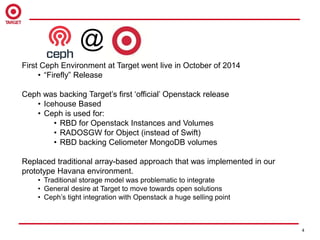
First Ceph Environment at Target went live in October of 2014
• “Firefly” Release
Ceph was backing Target’s first ‘official’ Openstack release
• Icehouse Based
• Ceph is used for:
• RBD for Openstack Instances and Volumes
• RADOSGW for Object (instead of Swift)
• RBD backing Celiometer MongoDB volumes
Replaced traditional array-based approach that was implemented in our
prototype Havana environment.
• Traditional storage model was problematic to integrate
• General desire at Target to move towards open solutions
• Ceph’s tight integration with Openstack a huge selling point
Agenda
5
@
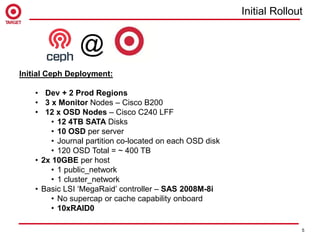
Initial Ceph Deployment:
• Dev + 2 Prod Regions
• 3 x Monitor Nodes – Cisco B200
• 12 x OSD Nodes – Cisco C240 LFF
• 12 4TB SATA Disks
• 10 OSD per server
• Journal partition co-located on each OSD disk
• 120 OSD Total = ~ 400 TB
• 2x 10GBE per host
• 1 public_network
• 1 cluster_network
• Basic LSI ‘MegaRaid’ controller – SAS 2008M-8i
• No supercap or cache capability onboard
• 10xRAID0
Initial Rollout
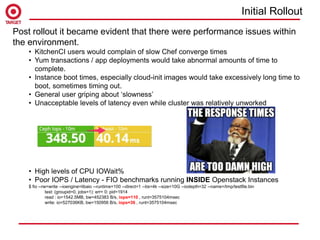
Post rollout it became evident that there were performance issues within
the environment.
• KitchenCI users would complain of slow Chef converge times
• Yum transactions / app deployments would take abnormal amounts of time to
complete.
• Instance boot times, especially cloud-init images would take excessively long time to
boot, sometimes timing out.
• General user griping about ‘slowness’
• Unacceptable levels of latency even while cluster was relatively unworked
• High levels of CPU IOWait%
• Poor IOPS / Latency - FIO benchmarks running INSIDE Openstack Instances
$ fio --rw=write --ioengine=libaio --runtime=100 --direct=1 --bs=4k --size=10G --iodepth=32 --name=/tmp/testfile.bin
test: (groupid=0, jobs=1): err= 0: pid=1914
read : io=1542.5MB, bw=452383 B/s, iops=110 , runt=3575104msec
write: io=527036KB, bw=150956 B/s, iops=36 , runt=3575104msec
Initial Rollout
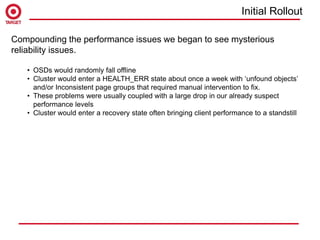
Compounding the performance issues we began to see mysterious
reliability issues.
• OSDs would randomly fall offline
• Cluster would enter a HEALTH_ERR state about once a week with ‘unfound objects’
and/or Inconsistent page groups that required manual intervention to fix.
• These problems were usually coupled with a large drop in our already suspect
performance levels
• Cluster would enter a recovery state often bringing client performance to a standstill
Initial Rollout
Customer opinion of our Openstack deployment due to
Ceph…..
…which leads to perception of the team....
Maybe Ceph isn’t the right solution?
What could we have done differently??
• Hardware
• Monitoring
• Tuning
• User Feedback
Ceph is not magic. It does the best
with the hardware you give it!
Much ill-advised advice floating around that if you just throw enough crappy disks at Ceph
you will achieve enterprise grade performance. Garbage in – Garbage out. Don’t be greedy
and build for capacity, if your objective is to create more a performant block storage
solution.
Fewer Better Disks > More ‘cheap’ Disks
….depending on your use case.
Hardware
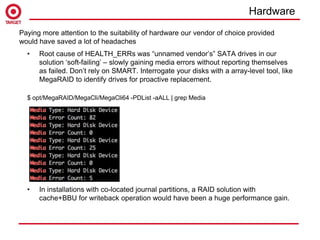
• Root cause of HEALTH_ERRs was “unnamed vendor’s” SATA drives in our
solution ‘soft-failing’ – slowly gaining media errors without reporting themselves
as failed. Don’t rely on SMART. Interrogate your disks with a array-level tool, like
MegaRAID to identify drives for proactive replacement.
$ opt/MegaRAID/MegaCli/MegaCli64 -PDList -aALL | grep Media
• In installations with co-located journal partitions, a RAID solution with
cache+BBU for writeback operation would have been a huge performance gain.
Paying more attention to the suitability of hardware our vendor of choice provided
would have saved a lot of headaches
Hardware
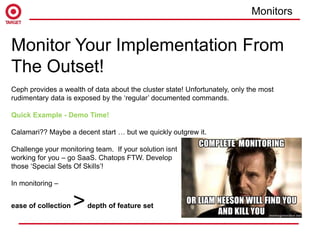
Monitor Your Implementation From
The Outset!
Ceph provides a wealth of data about the cluster state! Unfortunately, only the most
rudimentary data is exposed by the ‘regular’ documented commands.
Quick Example - Demo Time!
Calamari?? Maybe a decent start … but we quickly outgrew it.
Challenge your monitoring team. If your solution isnt
working for you – go SaaS. Chatops FTW. Develop
those ‘Special Sets Of Skills’!
In monitoring –
ease of collection >depth of feature set
Monitors
require 'rubygems'
require 'dogapi'
api_key = “XXXXXXXXXXXXXXXXXXXXXXXX"
dosd = `ceph osd tree | grep down | wc -l`
host = `hostname`
if host.include?("ttb")
envname = "dev"
elsif host.include?("ttc")
envname = "prod-ttc"
else
envname = "prod-tte”
end
dog = Dogapi::Client.new(api_key)
dog.emit_point("ceph.osd_down", dosd, :tags => ["env:#{envname}","app:ceph"])
Monitors
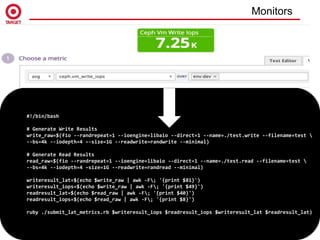
#!/bin/bash
# Generate Write Results
write_raw=$(fio --randrepeat=1 --ioengine=libaio --direct=1 --name=./test.write --filename=test 
--bs=4k --iodepth=4 –-size=1G --readwrite=randwrite --minimal)
# Generate Read Results
read_raw=$(fio --randrepeat=1 --ioengine=libaio --direct=1 --name=./test.read --filename=test 
--bs=4k --iodepth=4 –size=1G --readwrite=randread --minimal)
writeresult_lat=$(echo $write_raw | awk -F; '{print $81}')
writeresult_iops=$(echo $write_raw | awk -F; '{print $49}')
readresult_lat=$(echo $read_raw | awk -F; '{print $40}')
readresult_iops=$(echo $read_raw | awk -F; '{print $8}')
ruby ./submit_lat_metrics.rb $writeresult_iops $readresult_iops $writeresult_lat $readresult_lat)
Monitors
Tune to your workload!
• This is unique to your specific workloads
But… in general.....
Neuter the default recovery priority
[osd]
osd_max_backfills = 1
osd_recovery_priority = 1
osd_client_op_priority = 63
osd_recovery_max_active = 1
osd_recovery_max_single_start = 1
Limit the impact of deep scrubing
osd_scrub_max_interval = 1209600
osd_scrub_min_interval = 604800
osd_scrub_sleep = .05
osd_snap_trim_sleep = .05
osd_scrub_chunk_max = 5
osd_scrub_chunk_min = 1
osd_deep_scrub_stride = 1048576
osd_deep_scrub_interval = 2592000
Tuning
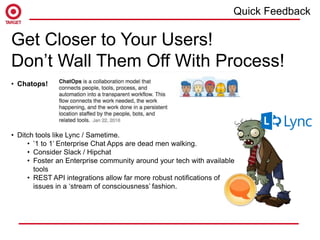
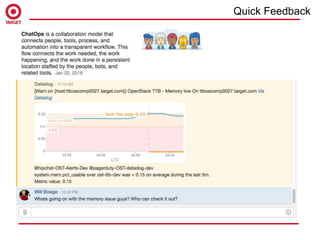
Get Closer to Your Users!
Don’t Wall Them Off With Process!
• Chatops!
• Ditch tools like Lync / Sametime.
• ’1 to 1’ Enterprise Chat Apps are dead men walking.
• Consider Slack / Hipchat
• Foster an Enterprise community around your tech with available
tools
• REST API integrations allow far more robust notifications of
issues in a ‘stream of consciousness’ fashion.
Quick Feedback
Quick Feedback
Agenda
1
9
Improved Hardware
• OSD Nodes – Cisco C240M4 SFF
• 20 10k Seagate SAS 1.1TB
• 6 480g Intel S3500 SSD
• We have tried the ’high-durability’ Toshiba SSD
they seem to work pretty well.
• Journal partition on SSD with 5:1 OSD/Journal ratio
• 90 OSD Total = ~ 100 TB
• Improved LSI ‘MegaRaid’ controller – SAS-9271-8i
• Supercap
• Writeback capability
• 18xRAID0
• Writethru on journals, writeback on spinning OSDs.
• Based on “Hammer” Ceph Release
After understanding that slower, high capacity disk wouldn't meet our
needs for an Openstack general purpose block storage solution – we
rebuilt.
Current State
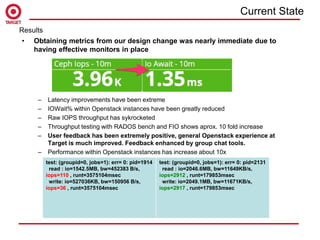
• Obtaining metrics from our design change was nearly immediate due to
having effective monitors in place
– Latency improvements have been extreme
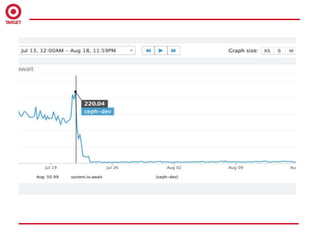
– IOWait% within Openstack instances have been greatly reduced
– Raw IOPS throughput has sykrocketed
– Throughput testing with RADOS bench and FIO shows aprox. 10 fold increase
– User feedback has been extremely positive, general Openstack experience at
Target is much improved. Feedback enhanced by group chat tools.
– Performance within Openstack instances has increase about 10x
Results
test: (groupid=0, jobs=1): err= 0: pid=1914
read : io=1542.5MB, bw=452383 B/s,
iops=110 , runt=3575104msec
write: io=527036KB, bw=150956 B/s,
iops=36 , runt=3575104msec
test: (groupid=0, jobs=1): err= 0: pid=2131
read : io=2046.6MB, bw=11649KB/s,
iops=2912 , runt=179853msec
write: io=2049.1MB, bw=11671KB/s,
iops=2917 , runt=179853msec
Current State
• Forcing the physical world to bend to our will. Getting datacenter techs to understand the
importance of rack placements in modern ‘scale-out’ IT
– To date our server placement is ‘what's the next open slot?’
– Create a ‘rack’ unit of cloud expansion
– More effectively utilize CRUSH for data placement and
availability
• Normalizing our Private Cloud storage performance offerings
– ENABLE IOPS LIMITS IN NOVA! QEMU supports this natively. Avoid the all you can
eat IO buffet.
nova-manage flavor set_key --name m1.small --key quota:disk_read_iops_sec --value 300
nova-manage flavor set_key --name m1.small --key quota:disk_write_iops_sec --value 300
– Leverage Cinder as the storage ‘menu’ beyond the default offering.
• Experiment with NVME for journal disks – greater journal density.
• Currently testing all SSD pool performance
– All SSD in Ceph has been maturing rapidly – Jewel sounds very promising.
– We have needs for a ‘ultra’ Cinder tier for workloads that require high IOPS / low
latency for use cases such as Apache Cassandra
– Considering Solidfire for this use case
Next Steps
Next Steps
• Repurposing legacy SATA hardware into a dedicated object pool
– High capacity, low performance drives should work well in an object use case
– Jewel has per-tenant namespaces for RADOSGW (!)
• Automate deployment with Chef to bring parity with our Openstack automation. ceph-deploy
still seems to be working for us.
– Use TDD to enforce base server configurations
• Broadening Ceph beyond cloud niche use case. Especially with improved object offering.
Next Steps
Next Steps
• Before embarking on creating a Ceph environment, have a good idea of what
your objectives are for the environment.
– Capacity?
– Performance?
• If you make wrong decisions it can lead to a negative user perception of Ceph,
and the technologies that depend on it, like Openstack
• Once you understand your objective, understand that your hardware selection is
crucial to your success
• Unless you are architecting for raw capacity, use SSDs for your journal volumes
without exception
– If you must co-locate journals, use a RAID adapter with BBU+Writeback cache
• A hybrid approach may be feasible with SATA ‘capacity’ disks with SSD or
NVME journals. I’ve yet to try this, I’d be interested in seeing some benchmark
data on a setup like this
• Research, experiment, break stuff, consult with Red Hat / Inktank
• Monitor, monitor, monitor and provide a very short feedback loop for your users
to engage you with their concerns
Conclusion
Conclusion
Thanks For Your Time!
Questions?
&

Ceph Deployment at Target: Customer Spotlight

  • 1.
    Ceph Deployment atTarget: Customer Spotlight
  • 2.
    Agenda 2 Welcome to Surly! •Introduction • Ceph @ Target • Initial FAIL • Problems Faced • Solutions • Current Implementation • Future Direction • Questions
  • 3.
    Agenda 3 Introduction Will Boege Lead TechnicalArchitect Enterprise Private Cloud Engineering
  • 4.
    Agenda 4 @ First Ceph Environmentat Target went live in October of 2014 • “Firefly” Release Ceph was backing Target’s first ‘official’ Openstack release • Icehouse Based • Ceph is used for: • RBD for Openstack Instances and Volumes • RADOSGW for Object (instead of Swift) • RBD backing Celiometer MongoDB volumes Replaced traditional array-based approach that was implemented in our prototype Havana environment. • Traditional storage model was problematic to integrate • General desire at Target to move towards open solutions • Ceph’s tight integration with Openstack a huge selling point
  • 5.
    Agenda 5 @ Initial Ceph Deployment: •Dev + 2 Prod Regions • 3 x Monitor Nodes – Cisco B200 • 12 x OSD Nodes – Cisco C240 LFF • 12 4TB SATA Disks • 10 OSD per server • Journal partition co-located on each OSD disk • 120 OSD Total = ~ 400 TB • 2x 10GBE per host • 1 public_network • 1 cluster_network • Basic LSI ‘MegaRaid’ controller – SAS 2008M-8i • No supercap or cache capability onboard • 10xRAID0 Initial Rollout
  • 6.
    Post rollout itbecame evident that there were performance issues within the environment. • KitchenCI users would complain of slow Chef converge times • Yum transactions / app deployments would take abnormal amounts of time to complete. • Instance boot times, especially cloud-init images would take excessively long time to boot, sometimes timing out. • General user griping about ‘slowness’ • Unacceptable levels of latency even while cluster was relatively unworked • High levels of CPU IOWait% • Poor IOPS / Latency - FIO benchmarks running INSIDE Openstack Instances $ fio --rw=write --ioengine=libaio --runtime=100 --direct=1 --bs=4k --size=10G --iodepth=32 --name=/tmp/testfile.bin test: (groupid=0, jobs=1): err= 0: pid=1914 read : io=1542.5MB, bw=452383 B/s, iops=110 , runt=3575104msec write: io=527036KB, bw=150956 B/s, iops=36 , runt=3575104msec Initial Rollout
  • 7.
    Compounding the performanceissues we began to see mysterious reliability issues. • OSDs would randomly fall offline • Cluster would enter a HEALTH_ERR state about once a week with ‘unfound objects’ and/or Inconsistent page groups that required manual intervention to fix. • These problems were usually coupled with a large drop in our already suspect performance levels • Cluster would enter a recovery state often bringing client performance to a standstill Initial Rollout
  • 8.
    Customer opinion ofour Openstack deployment due to Ceph….. …which leads to perception of the team....
  • 9.
    Maybe Ceph isn’tthe right solution?
  • 10.
    What could wehave done differently?? • Hardware • Monitoring • Tuning • User Feedback
  • 11.
    Ceph is notmagic. It does the best with the hardware you give it! Much ill-advised advice floating around that if you just throw enough crappy disks at Ceph you will achieve enterprise grade performance. Garbage in – Garbage out. Don’t be greedy and build for capacity, if your objective is to create more a performant block storage solution. Fewer Better Disks > More ‘cheap’ Disks ….depending on your use case. Hardware
  • 12.
    • Root causeof HEALTH_ERRs was “unnamed vendor’s” SATA drives in our solution ‘soft-failing’ – slowly gaining media errors without reporting themselves as failed. Don’t rely on SMART. Interrogate your disks with a array-level tool, like MegaRAID to identify drives for proactive replacement. $ opt/MegaRAID/MegaCli/MegaCli64 -PDList -aALL | grep Media • In installations with co-located journal partitions, a RAID solution with cache+BBU for writeback operation would have been a huge performance gain. Paying more attention to the suitability of hardware our vendor of choice provided would have saved a lot of headaches Hardware
  • 13.
    Monitor Your ImplementationFrom The Outset! Ceph provides a wealth of data about the cluster state! Unfortunately, only the most rudimentary data is exposed by the ‘regular’ documented commands. Quick Example - Demo Time! Calamari?? Maybe a decent start … but we quickly outgrew it. Challenge your monitoring team. If your solution isnt working for you – go SaaS. Chatops FTW. Develop those ‘Special Sets Of Skills’! In monitoring – ease of collection >depth of feature set Monitors
  • 14.
    require 'rubygems' require 'dogapi' api_key= “XXXXXXXXXXXXXXXXXXXXXXXX" dosd = `ceph osd tree | grep down | wc -l` host = `hostname` if host.include?("ttb") envname = "dev" elsif host.include?("ttc") envname = "prod-ttc" else envname = "prod-tte” end dog = Dogapi::Client.new(api_key) dog.emit_point("ceph.osd_down", dosd, :tags => ["env:#{envname}","app:ceph"]) Monitors
  • 15.
    #!/bin/bash # Generate WriteResults write_raw=$(fio --randrepeat=1 --ioengine=libaio --direct=1 --name=./test.write --filename=test --bs=4k --iodepth=4 –-size=1G --readwrite=randwrite --minimal) # Generate Read Results read_raw=$(fio --randrepeat=1 --ioengine=libaio --direct=1 --name=./test.read --filename=test --bs=4k --iodepth=4 –size=1G --readwrite=randread --minimal) writeresult_lat=$(echo $write_raw | awk -F; '{print $81}') writeresult_iops=$(echo $write_raw | awk -F; '{print $49}') readresult_lat=$(echo $read_raw | awk -F; '{print $40}') readresult_iops=$(echo $read_raw | awk -F; '{print $8}') ruby ./submit_lat_metrics.rb $writeresult_iops $readresult_iops $writeresult_lat $readresult_lat) Monitors
  • 16.
    Tune to yourworkload! • This is unique to your specific workloads But… in general..... Neuter the default recovery priority [osd] osd_max_backfills = 1 osd_recovery_priority = 1 osd_client_op_priority = 63 osd_recovery_max_active = 1 osd_recovery_max_single_start = 1 Limit the impact of deep scrubing osd_scrub_max_interval = 1209600 osd_scrub_min_interval = 604800 osd_scrub_sleep = .05 osd_snap_trim_sleep = .05 osd_scrub_chunk_max = 5 osd_scrub_chunk_min = 1 osd_deep_scrub_stride = 1048576 osd_deep_scrub_interval = 2592000 Tuning
  • 17.
    Get Closer toYour Users! Don’t Wall Them Off With Process! • Chatops! • Ditch tools like Lync / Sametime. • ’1 to 1’ Enterprise Chat Apps are dead men walking. • Consider Slack / Hipchat • Foster an Enterprise community around your tech with available tools • REST API integrations allow far more robust notifications of issues in a ‘stream of consciousness’ fashion. Quick Feedback
  • 18.
  • 19.
    Agenda 1 9 Improved Hardware • OSDNodes – Cisco C240M4 SFF • 20 10k Seagate SAS 1.1TB • 6 480g Intel S3500 SSD • We have tried the ’high-durability’ Toshiba SSD they seem to work pretty well. • Journal partition on SSD with 5:1 OSD/Journal ratio • 90 OSD Total = ~ 100 TB • Improved LSI ‘MegaRaid’ controller – SAS-9271-8i • Supercap • Writeback capability • 18xRAID0 • Writethru on journals, writeback on spinning OSDs. • Based on “Hammer” Ceph Release After understanding that slower, high capacity disk wouldn't meet our needs for an Openstack general purpose block storage solution – we rebuilt. Current State
  • 20.
    • Obtaining metricsfrom our design change was nearly immediate due to having effective monitors in place – Latency improvements have been extreme – IOWait% within Openstack instances have been greatly reduced – Raw IOPS throughput has sykrocketed – Throughput testing with RADOS bench and FIO shows aprox. 10 fold increase – User feedback has been extremely positive, general Openstack experience at Target is much improved. Feedback enhanced by group chat tools. – Performance within Openstack instances has increase about 10x Results test: (groupid=0, jobs=1): err= 0: pid=1914 read : io=1542.5MB, bw=452383 B/s, iops=110 , runt=3575104msec write: io=527036KB, bw=150956 B/s, iops=36 , runt=3575104msec test: (groupid=0, jobs=1): err= 0: pid=2131 read : io=2046.6MB, bw=11649KB/s, iops=2912 , runt=179853msec write: io=2049.1MB, bw=11671KB/s, iops=2917 , runt=179853msec Current State
  • 22.
    • Forcing thephysical world to bend to our will. Getting datacenter techs to understand the importance of rack placements in modern ‘scale-out’ IT – To date our server placement is ‘what's the next open slot?’ – Create a ‘rack’ unit of cloud expansion – More effectively utilize CRUSH for data placement and availability • Normalizing our Private Cloud storage performance offerings – ENABLE IOPS LIMITS IN NOVA! QEMU supports this natively. Avoid the all you can eat IO buffet. nova-manage flavor set_key --name m1.small --key quota:disk_read_iops_sec --value 300 nova-manage flavor set_key --name m1.small --key quota:disk_write_iops_sec --value 300 – Leverage Cinder as the storage ‘menu’ beyond the default offering. • Experiment with NVME for journal disks – greater journal density. • Currently testing all SSD pool performance – All SSD in Ceph has been maturing rapidly – Jewel sounds very promising. – We have needs for a ‘ultra’ Cinder tier for workloads that require high IOPS / low latency for use cases such as Apache Cassandra – Considering Solidfire for this use case Next Steps Next Steps
  • 23.
    • Repurposing legacySATA hardware into a dedicated object pool – High capacity, low performance drives should work well in an object use case – Jewel has per-tenant namespaces for RADOSGW (!) • Automate deployment with Chef to bring parity with our Openstack automation. ceph-deploy still seems to be working for us. – Use TDD to enforce base server configurations • Broadening Ceph beyond cloud niche use case. Especially with improved object offering. Next Steps Next Steps
  • 24.
    • Before embarkingon creating a Ceph environment, have a good idea of what your objectives are for the environment. – Capacity? – Performance? • If you make wrong decisions it can lead to a negative user perception of Ceph, and the technologies that depend on it, like Openstack • Once you understand your objective, understand that your hardware selection is crucial to your success • Unless you are architecting for raw capacity, use SSDs for your journal volumes without exception – If you must co-locate journals, use a RAID adapter with BBU+Writeback cache • A hybrid approach may be feasible with SATA ‘capacity’ disks with SSD or NVME journals. I’ve yet to try this, I’d be interested in seeing some benchmark data on a setup like this • Research, experiment, break stuff, consult with Red Hat / Inktank • Monitor, monitor, monitor and provide a very short feedback loop for your users to engage you with their concerns Conclusion Conclusion
  • 25.
    Thanks For YourTime! Questions? &