Deploy Rails Applications How to Deploy Rails Application by Capistrano By Shishir Kumar Saha tekSymmetry, LLC
Introduction  Configure Rails Environment  Setup Capistrano Apache virtual host configuration Configure mongrel cluster  Configure multiple virtual hosts
Configure Rails Environment Ruby RubyGems  -  RubyGems is a package manager for the Ruby programming language that provides a standard format for distributing Ruby programs and libraries Ruby on Rails Mongrel  -  Mongrel is a fast, stand-alone HTTP library and server for Ruby. It is also a Gem. Subversion -  Subversion is an open-source version control system   Capistrano -  Capistrano is a utility which is used to automate the deployment of Rails applications Mysql
Setup Capistrano Installation command –  sudo gem install capistrano --include-dependencies Deploy command –  Go to your local rails application directory and just write cap deploy cap deploy:migrations That’s all ……… your deploy process is already finished !!!
How to configure? Create a user –  useradd username passwd username  Create a deploy directory –  cd /var/www/rails  mkdir new_rails_application Change ownership of deploy directory –  chown –R /var/www/rails/new_rails_application Go to Sites-enabled direcctory and create individual virtual host files as below–  cd /etc/apache2/sites-enabled/ 001-test_saudi_fantasy_football 002-test_gulf_hotelz These individual file will cover virtual host, mongrel cluster and reverse proxy configuration Apache configuration
About sites-enabled directory What is "sites-enabled" directory in apache configuration path Why it needs? Some Apache installations (such as the default installs on Debian and Ubuntu) by default define a global virtual host that shares /var/www as the document root. This may lead to problems with your install. If you access your site and see nothing but a directory listing, then you’re affected by this problem. The solution is to remove the “default” site from your /etc/apache2/sites-enabled directory. This is called something like default or 000-default .
Configuration details – <VirtualHost *:80> ServerName sfftest.mooo.com ServerAlias sfftest.codesymmetry.com # Presuming your rails app is at /var/www/test DocumentRoot /var/www/rails/saudi_fantasy_football/current/public <Directory &quot;/var/www/rails/saudi_fantasy_football/current/public&quot;> Options FollowSymLinks AllowOverride None Order allow,deny  Allow from all </Directory>  # Configure mongrel_cluster <Proxy balancer://sff_mongrel_cluster> BalancerMember http://127.0.0.1:8000 BalancerMember http://127.0.0.1:8001 BalancerMember http://127.0.0.1:8002 </Proxy> ProxyPass / balancer://sff_mongrel_cluster/ ProxyPassReverse / balancer://sff_mongrel_cluster/ # These directories should always be served up by Apache, since they contain static content.  Or just let rails do it. ProxyPass /images ! ProxyPass /stylesheets ! ProxyPass /javascripts ! ProxyPass /favicon.ico ! RewriteEngine On # Check for maintenance file and redirect all requests #  ( this is for use with Capistrano's disable_web task ) RewriteCond %{DOCUMENT_ROOT}/system/maintenance.html -f RewriteCond %{SCRIPT_FILENAME} !maintenance.html RewriteRule ^.*$ %{DOCUMENT_ROOT}/system/maintenance.html [L] # Important rule to prevent exposure of subversion files if you are deploying with Capistrano ! RewriteRule ^(.*/)?\.svn/ - [F,L] # Rewrite index to check for static RewriteRule ^/$ /index.html [QSA] # Rewrite to check for Rails cached page RewriteRule ^([^.]+)$ $1.html [QSA] # Redirect all non-static requests to cluster RewriteCond %{DOCUMENT_ROOT}/%{REQUEST_FILENAME} !-f RewriteRule ^/(.*)$ balancer://sff_mongrel_cluster%{REQUEST_URI} [P,QSA,L] </VirtualHost>
Virtual Host refers to the practice of maintaining more than one server on one machine, as differentiated by their apparent hostname.  For example, it is often desirable for companies sharing a web server to have their own domains, with web servers accessible as  www.company1.com  www.company2.com,  Virtual host
Virtual host configuration <VirtualHost *:80> ServerName sfftest.mooo.com ServerAlias sfftest.codesymmetry.com # Presuming your rails app is at /var/www/test DocumentRoot /var/www/rails/saudi_fantasy_football/current/public
Apache reverse proxy Forward Proxies and Reverse Proxies Forward proxy  provide Internet access to internal clients that are restricted by a firewall. The forward proxy can also use caching (as provided by mod_cache) to reduce network usage. ProxyRequests On ProxyVia On <Proxy *> Order deny,allow Deny from all Allow from internal.example.com </Proxy> Reverse proxy  provide Internet users access to a server that is behind a firewall. Reverse proxies can also be used to balance load among several back-end servers, or to provide caching for a slower back-end server ProxyRequests Off <Proxy *> Order deny,allow Allow from all </Proxy>
Mongrel cluster Mongrel_cluster is a plugin that wrappers the mongrel HTTP server and simplifies the deployment of webapps using a cluster of mongrel servers
Apache reverse proxy and Mongrel cluster <Directory &quot;/var/www/rails/saudi_fantasy_football/current/public&quot;>   Options FollowSymLinks   AllowOverride None   Order allow,deny    Allow from all   </Directory> # Configure mongrel_cluster   <Proxy balancer://sff_mongrel_cluster>   BalancerMember http://127.0.0.1:8000   BalancerMember http://127.0.0.1:8001   BalancerMember http://127.0.0.1:8002   </Proxy> ProxyPass / balancer://sff_mongrel_cluster/   ProxyPassReverse / balancer://sff_mongrel_cluster/
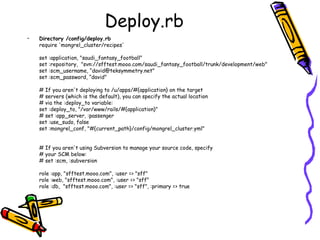
Deploy.rb Directory /config/deploy.rb require 'mongrel_cluster/recipes' set :application, &quot;saudi_fantasy_football&quot; set :repository,  &quot;svn://sfftest.mooo.com/saudi_fantasy_football/trunk/development/web&quot; set :scm_username, “david@teksymmetry.net&quot; set :scm_password, “david&quot; # If you aren't deploying to /u/apps/#{application} on the target # servers (which is the default), you can specify the actual location # via the :deploy_to variable: set :deploy_to, &quot;/var/www/rails/#{application}&quot; # set :app_server, :passenger set :use_sudo, false set :mongrel_conf, &quot;#{current_path}/config/mongrel_cluster.yml&quot; # If you aren't using Subversion to manage your source code, specify # your SCM below: # set :scm, :subversion role :app, &quot;sfftest.mooo.com&quot;, :user => &quot;sff&quot; role :web, &quot;sfftest.mooo.com&quot;, :user => &quot;sff&quot; role :db,  &quot;sfftest.mooo.com&quot;, :user => &quot;sff&quot;, :primary => true
Deploy.rb # Configure production database namespace :database do   desc &quot;Create database configuration file&quot;   task :production do   run &quot;rm #{current_path}/config/database.yml&quot;   configuration = {   &quot;production&quot; => {   &quot;adapter&quot; => &quot;mysql&quot;,   &quot;database&quot; => &quot;saudi_fantasy_football_production&quot;,   &quot;encoding&quot; => &quot;utf8&quot;,   &quot;pool&quot; => 5,   &quot;timeout&quot; => 5000,   &quot;username&quot; => &quot;sfftest&quot;,   &quot;password&quot; => “sfftest&quot;   }   }   put configuration.to_yaml, &quot;#{current_path}/config/database.yml&quot;   end end after &quot;deploy:update&quot;, &quot;database:production&quot;
Deploy.rb # Configure mongrel cluster configuration namespace :mongrel do   desc &quot;Configure mongrel cluster&quot;   task :configure do   configuration = {   &quot;log_file&quot; => &quot;log/mongrel.log&quot;,   &quot;port&quot; => &quot;8000&quot;,   &quot;pid_file&quot; => &quot;tmp/pids/mongrel.pid&quot;,   &quot;environment&quot; => &quot;production&quot;,   &quot;servers&quot; => 3   }   put configuration.to_yaml, &quot;#{current_path}/config/mongrel_cluster.yml&quot;   end desc &quot;Restart mongrel&quot;   task :restart do   sudo &quot;mongrel_cluster_ctl restart -c #{current_path}/config/mongrel_cluster.yml -v&quot;   end end after &quot;deploy:update&quot;, &quot;mongrel:configure&quot;
Multiple virtual hosting Just create a new configuration file in /etc/apache2/sites-enabled/ directory maintaining the naming order ie., 003-test_gulf_auto
Reference http://www.capify.org/getting-started/from-the-beginning/
Question?

Deploy Rails Application by Capistrano

  • 1.
    Deploy Rails ApplicationsHow to Deploy Rails Application by Capistrano By Shishir Kumar Saha tekSymmetry, LLC
  • 2.
    Introduction ConfigureRails Environment Setup Capistrano Apache virtual host configuration Configure mongrel cluster Configure multiple virtual hosts
  • 3.
    Configure Rails EnvironmentRuby RubyGems - RubyGems is a package manager for the Ruby programming language that provides a standard format for distributing Ruby programs and libraries Ruby on Rails Mongrel - Mongrel is a fast, stand-alone HTTP library and server for Ruby. It is also a Gem. Subversion - Subversion is an open-source version control system Capistrano - Capistrano is a utility which is used to automate the deployment of Rails applications Mysql
  • 4.
    Setup Capistrano Installationcommand – sudo gem install capistrano --include-dependencies Deploy command – Go to your local rails application directory and just write cap deploy cap deploy:migrations That’s all ……… your deploy process is already finished !!!
  • 5.
    How to configure?Create a user – useradd username passwd username Create a deploy directory – cd /var/www/rails mkdir new_rails_application Change ownership of deploy directory – chown –R /var/www/rails/new_rails_application Go to Sites-enabled direcctory and create individual virtual host files as below– cd /etc/apache2/sites-enabled/ 001-test_saudi_fantasy_football 002-test_gulf_hotelz These individual file will cover virtual host, mongrel cluster and reverse proxy configuration Apache configuration
  • 6.
    About sites-enabled directoryWhat is &quot;sites-enabled&quot; directory in apache configuration path Why it needs? Some Apache installations (such as the default installs on Debian and Ubuntu) by default define a global virtual host that shares /var/www as the document root. This may lead to problems with your install. If you access your site and see nothing but a directory listing, then you’re affected by this problem. The solution is to remove the “default” site from your /etc/apache2/sites-enabled directory. This is called something like default or 000-default .
  • 7.
    Configuration details –<VirtualHost *:80> ServerName sfftest.mooo.com ServerAlias sfftest.codesymmetry.com # Presuming your rails app is at /var/www/test DocumentRoot /var/www/rails/saudi_fantasy_football/current/public <Directory &quot;/var/www/rails/saudi_fantasy_football/current/public&quot;> Options FollowSymLinks AllowOverride None Order allow,deny Allow from all </Directory> # Configure mongrel_cluster <Proxy balancer://sff_mongrel_cluster> BalancerMember http://127.0.0.1:8000 BalancerMember http://127.0.0.1:8001 BalancerMember http://127.0.0.1:8002 </Proxy> ProxyPass / balancer://sff_mongrel_cluster/ ProxyPassReverse / balancer://sff_mongrel_cluster/ # These directories should always be served up by Apache, since they contain static content. Or just let rails do it. ProxyPass /images ! ProxyPass /stylesheets ! ProxyPass /javascripts ! ProxyPass /favicon.ico ! RewriteEngine On # Check for maintenance file and redirect all requests # ( this is for use with Capistrano's disable_web task ) RewriteCond %{DOCUMENT_ROOT}/system/maintenance.html -f RewriteCond %{SCRIPT_FILENAME} !maintenance.html RewriteRule ^.*$ %{DOCUMENT_ROOT}/system/maintenance.html [L] # Important rule to prevent exposure of subversion files if you are deploying with Capistrano ! RewriteRule ^(.*/)?\.svn/ - [F,L] # Rewrite index to check for static RewriteRule ^/$ /index.html [QSA] # Rewrite to check for Rails cached page RewriteRule ^([^.]+)$ $1.html [QSA] # Redirect all non-static requests to cluster RewriteCond %{DOCUMENT_ROOT}/%{REQUEST_FILENAME} !-f RewriteRule ^/(.*)$ balancer://sff_mongrel_cluster%{REQUEST_URI} [P,QSA,L] </VirtualHost>
  • 8.
    Virtual Host refersto the practice of maintaining more than one server on one machine, as differentiated by their apparent hostname. For example, it is often desirable for companies sharing a web server to have their own domains, with web servers accessible as www.company1.com www.company2.com, Virtual host
  • 9.
    Virtual host configuration<VirtualHost *:80> ServerName sfftest.mooo.com ServerAlias sfftest.codesymmetry.com # Presuming your rails app is at /var/www/test DocumentRoot /var/www/rails/saudi_fantasy_football/current/public
  • 10.
    Apache reverse proxyForward Proxies and Reverse Proxies Forward proxy provide Internet access to internal clients that are restricted by a firewall. The forward proxy can also use caching (as provided by mod_cache) to reduce network usage. ProxyRequests On ProxyVia On <Proxy *> Order deny,allow Deny from all Allow from internal.example.com </Proxy> Reverse proxy provide Internet users access to a server that is behind a firewall. Reverse proxies can also be used to balance load among several back-end servers, or to provide caching for a slower back-end server ProxyRequests Off <Proxy *> Order deny,allow Allow from all </Proxy>
  • 11.
    Mongrel cluster Mongrel_clusteris a plugin that wrappers the mongrel HTTP server and simplifies the deployment of webapps using a cluster of mongrel servers
  • 12.
    Apache reverse proxyand Mongrel cluster <Directory &quot;/var/www/rails/saudi_fantasy_football/current/public&quot;> Options FollowSymLinks AllowOverride None Order allow,deny Allow from all </Directory> # Configure mongrel_cluster <Proxy balancer://sff_mongrel_cluster> BalancerMember http://127.0.0.1:8000 BalancerMember http://127.0.0.1:8001 BalancerMember http://127.0.0.1:8002 </Proxy> ProxyPass / balancer://sff_mongrel_cluster/ ProxyPassReverse / balancer://sff_mongrel_cluster/
  • 13.
    Deploy.rb Directory /config/deploy.rbrequire 'mongrel_cluster/recipes' set :application, &quot;saudi_fantasy_football&quot; set :repository, &quot;svn://sfftest.mooo.com/saudi_fantasy_football/trunk/development/web&quot; set :scm_username, “david@teksymmetry.net&quot; set :scm_password, “david&quot; # If you aren't deploying to /u/apps/#{application} on the target # servers (which is the default), you can specify the actual location # via the :deploy_to variable: set :deploy_to, &quot;/var/www/rails/#{application}&quot; # set :app_server, :passenger set :use_sudo, false set :mongrel_conf, &quot;#{current_path}/config/mongrel_cluster.yml&quot; # If you aren't using Subversion to manage your source code, specify # your SCM below: # set :scm, :subversion role :app, &quot;sfftest.mooo.com&quot;, :user => &quot;sff&quot; role :web, &quot;sfftest.mooo.com&quot;, :user => &quot;sff&quot; role :db, &quot;sfftest.mooo.com&quot;, :user => &quot;sff&quot;, :primary => true
  • 14.
    Deploy.rb # Configureproduction database namespace :database do desc &quot;Create database configuration file&quot; task :production do run &quot;rm #{current_path}/config/database.yml&quot; configuration = { &quot;production&quot; => { &quot;adapter&quot; => &quot;mysql&quot;, &quot;database&quot; => &quot;saudi_fantasy_football_production&quot;, &quot;encoding&quot; => &quot;utf8&quot;, &quot;pool&quot; => 5, &quot;timeout&quot; => 5000, &quot;username&quot; => &quot;sfftest&quot;, &quot;password&quot; => “sfftest&quot; } } put configuration.to_yaml, &quot;#{current_path}/config/database.yml&quot; end end after &quot;deploy:update&quot;, &quot;database:production&quot;
  • 15.
    Deploy.rb # Configuremongrel cluster configuration namespace :mongrel do desc &quot;Configure mongrel cluster&quot; task :configure do configuration = { &quot;log_file&quot; => &quot;log/mongrel.log&quot;, &quot;port&quot; => &quot;8000&quot;, &quot;pid_file&quot; => &quot;tmp/pids/mongrel.pid&quot;, &quot;environment&quot; => &quot;production&quot;, &quot;servers&quot; => 3 } put configuration.to_yaml, &quot;#{current_path}/config/mongrel_cluster.yml&quot; end desc &quot;Restart mongrel&quot; task :restart do sudo &quot;mongrel_cluster_ctl restart -c #{current_path}/config/mongrel_cluster.yml -v&quot; end end after &quot;deploy:update&quot;, &quot;mongrel:configure&quot;
  • 16.
    Multiple virtual hostingJust create a new configuration file in /etc/apache2/sites-enabled/ directory maintaining the naming order ie., 003-test_gulf_auto
  • 17.
  • 18.