Stackato Overview
Martin Kenneth Michalsky
Senior QE
© 2013 TechZone. All rights reserved.
Introduction
2
© 2013 TechZone. All rights reserved.
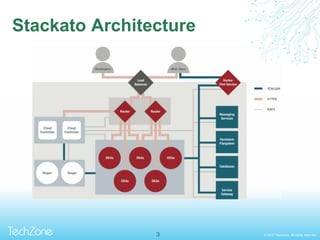
Stackato Architecture
3
© 2013 TechZone. All rights reserved.
General Configuration
4
© 2013 TechZone. All rights reserved.
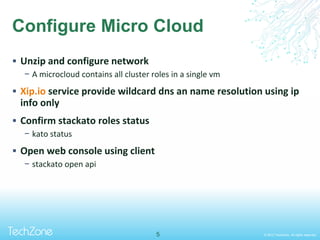
Configure Micro Cloud
 Unzip and configure network
− A microcloud contains all cluster roles in a single vm
 Xip.io service provide wildcard dns an name resolution using ip
info only
 Confirm stackato roles status
− kato status
 Open web console using client
− stackato open api
5
© 2013 TechZone. All rights reserved.
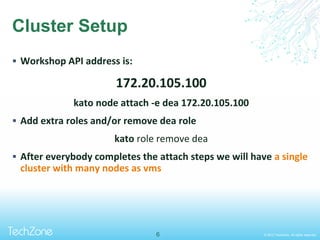
Cluster Setup
 Workshop API address is:
172.20.105.100
kato node attach -e dea 172.20.105.100
 Add extra roles and/or remove dea role
kato role remove dea
 After everybody completes the attach steps we will have a single
cluster with many nodes as vms
6
© 2013 TechZone. All rights reserved.
Deploying Apps
7
© 2013 TechZone. All rights reserved.
Deploying apps using Stackato client
 Download stackato client and add it to your path
 Download and unzip a sample app from
https://github.com/kassanmoor/testlink
− This app is already modified, ready to run in stackato after push it.
8
© 2013 TechZone. All rights reserved.
Adapting apps to run in stackato
 Apps languages are detected automatically most of times
− On java apps Maven or ant are needed
 Provisioned service info is set put on a environment
variable inside the container
− The name of the variable is: $DATABASE_URL
− Returns the database data in the following format:
− protocol://username:password@host:port/database_nam
9
© 2013 TechZone. All rights reserved.
Adapting apps to run in stackato
 On php you can parse the database url using:
<?php
$url_parts = parse_url($_SERVER['DATABASE_URL']);
$db_name = substr( $url_parts['path'], 1 );
$db_connection_string = $url_parts['host'] . ':' . $url_parts['port'];
// ** MySQL settings from resource descriptor ** //
echo $db_name;
echo $url_parts['user'];
echo $url_parts['pass'];
echo $url_parts['host'];
echo $url_parts['port'];
?>
10
© 2013 TechZone. All rights reserved.
Deploying apps from Appstore
 Several open source apps included in the default store
− Ready to use and you can check the source code modifications
needed to run it at:
https://github.com/Stackato-Apps/
 You can add your own apps using a reachable git repository
and yml file
− Naming logic is already built in on store and each parameter of
app/store are fully customizable
11
© 2013 TechZone. All rights reserved.12
Q&A
© 2013 TechZone. All rights reserved.13

Stackato Presentation Techzone 2013

  • 1.
  • 2.
    © 2013 TechZone.All rights reserved. Introduction 2
  • 3.
    © 2013 TechZone.All rights reserved. Stackato Architecture 3
  • 4.
    © 2013 TechZone.All rights reserved. General Configuration 4
  • 5.
    © 2013 TechZone.All rights reserved. Configure Micro Cloud  Unzip and configure network − A microcloud contains all cluster roles in a single vm  Xip.io service provide wildcard dns an name resolution using ip info only  Confirm stackato roles status − kato status  Open web console using client − stackato open api 5
  • 6.
    © 2013 TechZone.All rights reserved. Cluster Setup  Workshop API address is: 172.20.105.100 kato node attach -e dea 172.20.105.100  Add extra roles and/or remove dea role kato role remove dea  After everybody completes the attach steps we will have a single cluster with many nodes as vms 6
  • 7.
    © 2013 TechZone.All rights reserved. Deploying Apps 7
  • 8.
    © 2013 TechZone.All rights reserved. Deploying apps using Stackato client  Download stackato client and add it to your path  Download and unzip a sample app from https://github.com/kassanmoor/testlink − This app is already modified, ready to run in stackato after push it. 8
  • 9.
    © 2013 TechZone.All rights reserved. Adapting apps to run in stackato  Apps languages are detected automatically most of times − On java apps Maven or ant are needed  Provisioned service info is set put on a environment variable inside the container − The name of the variable is: $DATABASE_URL − Returns the database data in the following format: − protocol://username:password@host:port/database_nam 9
  • 10.
    © 2013 TechZone.All rights reserved. Adapting apps to run in stackato  On php you can parse the database url using: <?php $url_parts = parse_url($_SERVER['DATABASE_URL']); $db_name = substr( $url_parts['path'], 1 ); $db_connection_string = $url_parts['host'] . ':' . $url_parts['port']; // ** MySQL settings from resource descriptor ** // echo $db_name; echo $url_parts['user']; echo $url_parts['pass']; echo $url_parts['host']; echo $url_parts['port']; ?> 10
  • 11.
    © 2013 TechZone.All rights reserved. Deploying apps from Appstore  Several open source apps included in the default store − Ready to use and you can check the source code modifications needed to run it at: https://github.com/Stackato-Apps/  You can add your own apps using a reachable git repository and yml file − Naming logic is already built in on store and each parameter of app/store are fully customizable 11
  • 12.
    © 2013 TechZone.All rights reserved.12 Q&A
  • 13.
    © 2013 TechZone.All rights reserved.13