Comprehensive document
management in Atlassian Jira
& Confluence
Quick
Introduction
Company
About StiltSoft
 Platinum Top Vendor on the Atlassian
Marketplace
 Silver Atlassian Solution Partner
 Atlassian Verified Vendor
 Data Center approved apps
 4,000+ customers in 80+ countries
 15+ apps on the Atlassian Marketplace
 Apps for Confluence, Jira, and Bitbucket
Quick
Introduction
Table Filter and
Charts for
Confluence
Our Featured Apps
Smart
Attachments for
Jira
Awesome
Graphs for
Bitbucket
Customer Case
for Jira Cloud
Talk – Inline
Comments for
Confluence
Handy Macros
for Confluence
Our apps
Quick
Introduction
About Presenter
Vadim
Rutkevich
 Business analyst at StiltSoft
 Product owner of Smart Attachments for Jira
and Confluence, InPlace Editor, Evernote
Integration, and Favorite Pages
Your presenter
Quick
Introduction Smart Attachments for
Jira
 Categories for attachment distribution
 Document version hierarchy
 Bulk operations on attachments
 Automatic file distribution based on the
naming pattern or regular expression
 Access restrictions and issue-type
dependent category visibility
 Workflow automations (post-functions,
conditions, validators)
Smart
Attachments for
Jira
Quick
Introduction
Smart Attachments for
Confluence
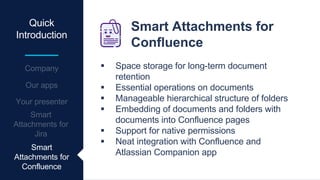
 Space storage for long-term document
retention
 Essential operations on documents
 Manageable hierarchical structure of folders
 Embedding of documents and folders with
documents into Confluence pages
 Support for native permissions
 Neat integration with Confluence and
Atlassian Companion app
Smart
Attachments for
Confluence
Let’s see how to
manage
documents in
Confluence
INTRODUCTION
Agenda
Documentation flow issues
CONFLUENCE FOR TEAM COLLABORATION
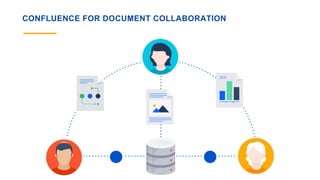
CONFLUENCE FOR DOCUMENT COLLABORATION
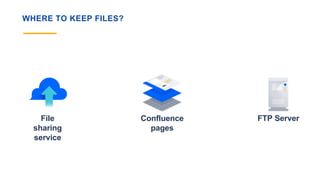
WHERE TO KEEP FILES?
File
sharing
service
Confluence
pages
FTP Server
ISSUES WITH FILE SHARING SERVICES
Secureness
of corporate
documents
Allocation of
permissions to
teammates
Fragmentation
of documents
across
accounts
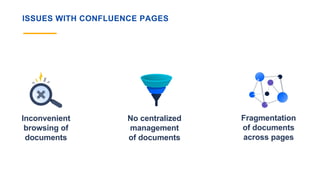
ISSUES WITH CONFLUENCE PAGES
Inconvenient
browsing of
documents
No centralized
management
of documents
Fragmentation
of documents
across pages
ISSUES WITH FTP SERVER
INCONVENIENT
:)
Agenda
Document retention in Confluence
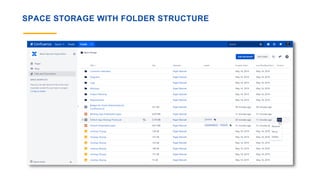
SPACE STORAGE WITH FOLDER STRUCTURE
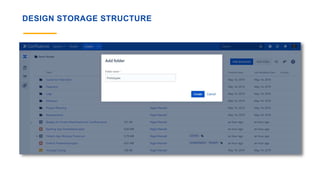
DESIGN STORAGE STRUCTURE
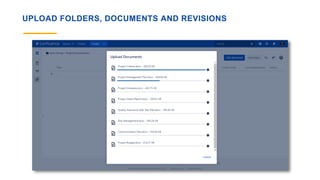
UPLOAD FOLDERS, DOCUMENTS AND REVISIONS
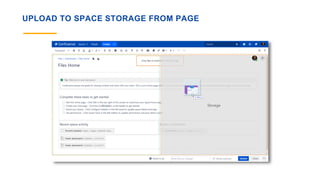
UPLOAD TO SPACE STORAGE FROM PAGE
MOVE DOCUMENTS WITH REVISIONS
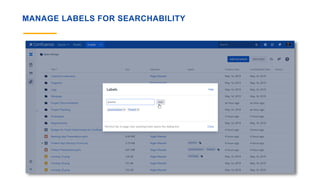
MANAGE LABELS FOR SEARCHABILITY
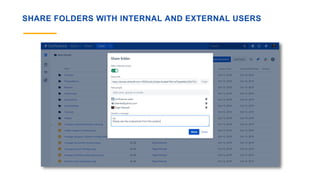
SHARE FOLDERS WITH INTERNAL AND EXTERNAL USERS
Agenda Collaboration on files
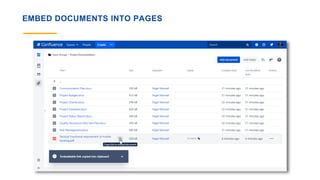
EMBED DOCUMENTS INTO PAGES
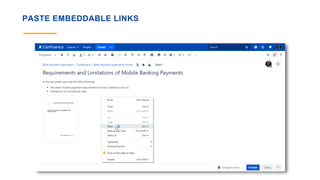
PASTE EMBEDDABLE LINKS
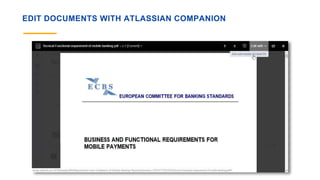
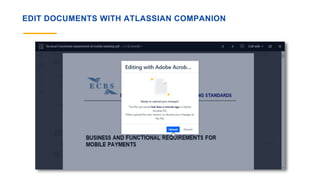
EDIT DOCUMENTS WITH ATLASSIAN COMPANION
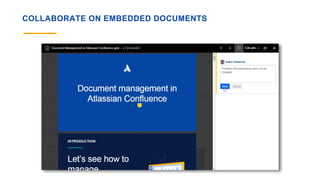
COLLABORATE ON EMBEDDED DOCUMENTS
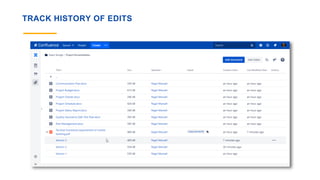
TRACK HISTORY OF EDITS
Agenda
Embedding of folders
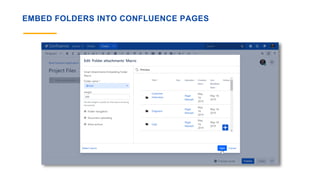
EMBED FOLDERS INTO CONFLUENCE PAGES
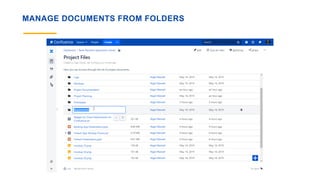
MANAGE DOCUMENTS FROM FOLDERS
Let’s see how to
manage
documents in Jira
INTRODUCTION
Agenda
Documentation issues in Jira
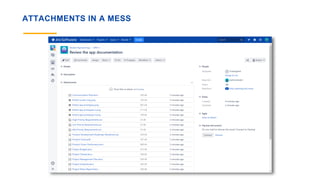
ATTACHMENTS IN A MESS
ISSUES WITH ATTACHMENTS IN JIRA
No categorization
of attachments
Essential
features missing
No document
versioning
Agenda
Category schemes
CATEGORY SCHEMES
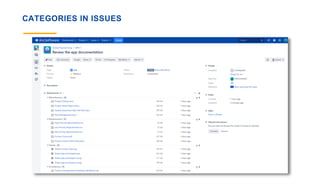
CATEGORIES IN ISSUES
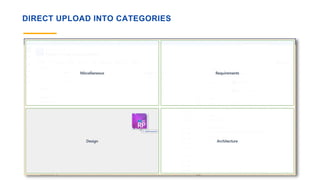
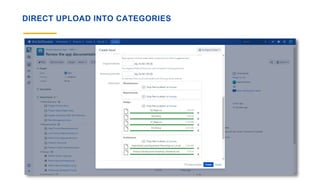
DIRECT UPLOAD INTO CATEGORIES
Agenda Operations on attachments
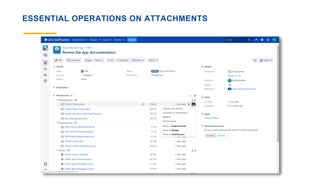
ESSENTIAL OPERATIONS ON ATTACHMENTS
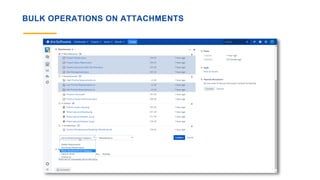
BULK OPERATIONS ON ATTACHMENTS
KEEP DOCUMENT REVISIONS IN ONE PLACE
TRACK DOCUMENT EDITS
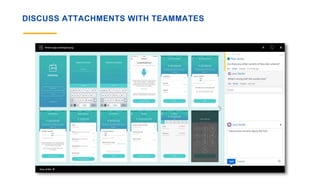
DISCUSS ATTACHMENTS WITH TEAMMATES
Agenda
Workflow automations
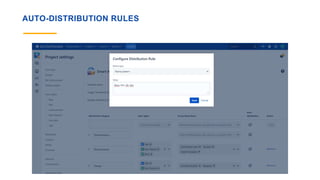
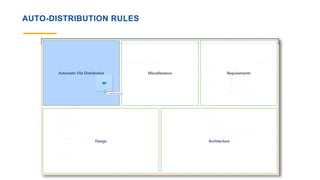
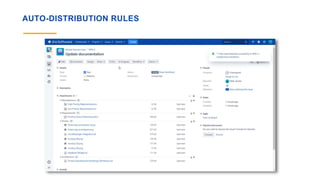
AUTO-DISTRIBUTION RULES
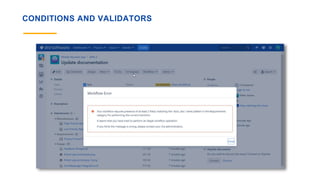
CONDITIONS AND VALIDATORS
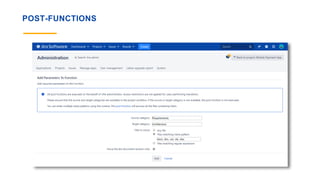
POST-FUNCTIONS
Agenda
Project storage
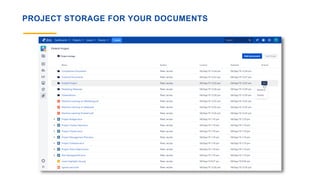
PROJECT STORAGE FOR YOUR DOCUMENTS
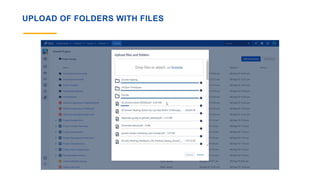
UPLOAD OF FOLDERS WITH FILES
VADIM RUTKEVICH | PRODUCT OWNER | @STILTSOFT
VRUTKEVICH@STILTSOFT.COM
Thank you!

Document management in Atlassian Confluence and Jira

Editor's Notes

  • #3 StiltSoft is a Platinum Top Vendor and Atlassian Soltution Partner located in Gomel, Belarus. It develops handy and efficient solutions for Jira, Confluence and Bitbucket. https://marketplace.atlassian.com/vendors/27437/stiltsoft?from=slideshare&utm_campaign=slideshare-traffic&utm_medium=slideshare-presentation&utm_source=slideshare&utm_content=document-management-jira-confluence-presentation
  • #4 See all StiltSoft apps at https://marketplace.atlassian.com/vendors/27437/stiltsoft?from=slideshare&utm_campaign=slideshare-traffic&utm_medium=slideshare-presentation&utm_source=slideshare&utm_content=document-management-jira-confluence-presentation
  • #5 View profile at https://www.linkedin.com/in/vadim-rutkevich-60015070/
  • #6 View the app at https://marketplace.atlassian.com/apps/1212507/smart-attachments?hosting=server&tab=overview&from=slideshare&utm_campaign=slideshare-traffic&utm_medium=slideshare-presentation&utm_source=slideshare&utm_content=document-management-jira-confluence-presentation
  • #7 View the app at https://marketplace.atlassian.com/apps/1219123/smart-attachments-for-confluence?hosting=server&tab=overview&from=slideshare&utm_campaign=slideshare-traffic&utm_medium=slideshare-presentation&utm_source=slideshare&utm_content=document-management-jira-confluence-presentation
  • #10 Confluence was designed as a team collaboration platform for teams of all sizes and all specializations.
  • #11 Most Confluence users use it for getting the latest information about the company. A lot od users use it to create content, manage documents, prepare visually-appealing and easy-to-read pages.
  • #12 The only question which users have is where to keep files that are attached to Confluence pages on a regular basis. Alternatively, you can use file sharing services that can be integrated with Confluence or keep files on the FTP server.
  • #13 Issues that exist with file sharing servers: You upload your private files to some service that can be compromised. Allocation of granular permissions to files for your teammates. Fragmentation of documents and files across multiple accounts.
  • #14 Issues that exist with file sharing servers: Inconvenient browsing through attachments kept on different pages. Unavailability of the centralized management of documents. You need to perform operations per page. Fragmentation of documents across pages.
  • #15 It is impossible to integrate with Confluence functionality which makes such solution quite poor for use.
  • #17 Within each project you can create a project storage with Smart Attachments for Confluence. It allows you to keep documents in a centralized place which your teammates can open to view some files. https://marketplace.atlassian.com/apps/1219123/smart-attachments-for-confluence?hosting=server&tab=overview&from=slideshare&utm_campaign=slideshare-traffic&utm_medium=slideshare-presentation&utm_source=slideshare&utm_content=document-management-jira-confluence-presentation
  • #18 You can design the structure of the space storage according to your needs and requirements of your team. Add new folders and build multi-level structures of documents. https://marketplace.atlassian.com/apps/1219123/smart-attachments-for-confluence?hosting=server&tab=overview&from=slideshare&utm_campaign=slideshare-traffic&utm_medium=slideshare-presentation&utm_source=slideshare&utm_content=document-management-jira-confluence-presentation
  • #19 Upload documents and folders, the Smart Attachments app will recreate the folder structure from scratch, so you needn’t manually to do anything about this. https://marketplace.atlassian.com/apps/1219123/smart-attachments-for-confluence?hosting=server&tab=overview&from=slideshare&utm_campaign=slideshare-traffic&utm_medium=slideshare-presentation&utm_source=slideshare&utm_content=document-management-jira-confluence-presentation
  • #20 Upload files to the space storage while editing the page and embed the uploaded files automatically into the page. https://marketplace.atlassian.com/apps/1219123/smart-attachments-for-confluence?hosting=server&tab=overview&from=slideshare&utm_campaign=slideshare-traffic&utm_medium=slideshare-presentation&utm_source=slideshare&utm_content=document-management-jira-confluence-presentation
  • #21 Move documents to the appropriate folder in the space storage. https://marketplace.atlassian.com/apps/1219123/smart-attachments-for-confluence?hosting=server&tab=overview&from=slideshare&utm_campaign=slideshare-traffic&utm_medium=slideshare-presentation&utm_source=slideshare&utm_content=document-management-jira-confluence-presentation
  • #22 You can manage labels of document for better document searchability in Confluence. https://marketplace.atlassian.com/apps/1219123/smart-attachments-for-confluence?hosting=server&tab=overview&from=slideshare&utm_campaign=slideshare-traffic&utm_medium=slideshare-presentation&utm_source=slideshare&utm_content=document-management-jira-confluence-presentation
  • #23 You can share folders with files with internal Confluence users and with external people having no access to your Confluence through public sharing links. https://marketplace.atlassian.com/apps/1219123/smart-attachments-for-confluence?hosting=server&tab=overview&from=slideshare&utm_campaign=slideshare-traffic&utm_medium=slideshare-presentation&utm_source=slideshare&utm_content=document-management-jira-confluence-presentation
  • #25 You can quickly embed documents into Confluence pages for collaboration with your teammates. https://marketplace.atlassian.com/apps/1219123/smart-attachments-for-confluence?hosting=server&tab=overview&from=slideshare&utm_campaign=slideshare-traffic&utm_medium=slideshare-presentation&utm_source=slideshare&utm_content=document-management-jira-confluence-presentation
  • #26 Paste the embeddable code into Confluence page and the app will automatically convert it into the document. https://marketplace.atlassian.com/apps/1219123/smart-attachments-for-confluence?hosting=server&tab=overview&from=slideshare&utm_campaign=slideshare-traffic&utm_medium=slideshare-presentation&utm_source=slideshare&utm_content=document-management-jira-confluence-presentation
  • #27 Preview files from the space storage and edit them through the Atlassian Companion app. https://marketplace.atlassian.com/apps/1219123/smart-attachments-for-confluence?hosting=server&tab=overview&from=slideshare&utm_campaign=slideshare-traffic&utm_medium=slideshare-presentation&utm_source=slideshare&utm_content=document-management-jira-confluence-presentation
  • #28 Save new document revisions edited in the Atlassian Companion app under the parent document in the space storage. https://marketplace.atlassian.com/apps/1219123/smart-attachments-for-confluence?hosting=server&tab=overview&from=slideshare&utm_campaign=slideshare-traffic&utm_medium=slideshare-presentation&utm_source=slideshare&utm_content=document-management-jira-confluence-presentation
  • #29 Comment on documents and discuss their contents with your teammates. https://marketplace.atlassian.com/apps/1219123/smart-attachments-for-confluence?hosting=server&tab=overview&from=slideshare&utm_campaign=slideshare-traffic&utm_medium=slideshare-presentation&utm_source=slideshare&utm_content=document-management-jira-confluence-presentation

  • #30 View and manage document revisions in the space storage. https://marketplace.atlassian.com/apps/1219123/smart-attachments-for-confluence?hosting=server&tab=overview&from=slideshare&utm_campaign=slideshare-traffic&utm_medium=slideshare-presentation&utm_source=slideshare&utm_content=document-management-jira-confluence-presentation
  • #32 Embed folders with documents into Confluence pages, navigate through them, perform operations on documents and files, upload new files. https://marketplace.atlassian.com/apps/1219123/smart-attachments-for-confluence?hosting=server&tab=overview&from=slideshare&utm_campaign=slideshare-traffic&utm_medium=slideshare-presentation&utm_source=slideshare&utm_content=document-management-jira-confluence-presentation
  • #33 Embed folders with documents into Confluence pages, navigate through them, perform operations on documents and files, upload new files. https://marketplace.atlassian.com/apps/1219123/smart-attachments-for-confluence?hosting=server&tab=overview&from=slideshare&utm_campaign=slideshare-traffic&utm_medium=slideshare-presentation&utm_source=slideshare&utm_content=document-management-jira-confluence-presentation
  • #36 By default, attachments in Jira issues are stored as a mess of files that are difficult to locate the appropriate file. https://marketplace.atlassian.com/apps/1212507/smart-attachments?hosting=server&tab=overview&from=slideshare&utm_campaign=slideshare-traffic&utm_medium=slideshare-presentation&utm_source=slideshare&utm_content=document-management-jira-confluence-presentation
  • #37 The main problems that users encounter with document management in Jira include the following: No categorization of attachments in Jira issues, that’s why it becomes quite difficult to locate the appropriate file at once. Some essential features (like document revisions, bulk operations) are not available in Jira. https://marketplace.atlassian.com/apps/1212507/smart-attachments?hosting=server&tab=overview&from=slideshare&utm_campaign=slideshare-traffic&utm_medium=slideshare-presentation&utm_source=slideshare&utm_content=document-management-jira-confluence-presentation https://marketplace.atlassian.com/apps/1212507/smart-attachments?hosting=server&tab=overview&from=slideshare&utm_campaign=slideshare-traffic&utm_medium=slideshare-presentation&utm_source=slideshare&utm_content=document-management-jira-confluence-presentation
  • #39 The Smart Attachments app uses the configurable category schemes. For each category you can adjust its visibility depending on the issue type, additionally you can set access restrictions for each category. Optionally, you can configure automatic distribution rules for uploaded files, so the app will place them into the necessary category depending on the naming or regular expression. https://marketplace.atlassian.com/apps/1212507/smart-attachments?hosting=server&tab=overview&from=slideshare&utm_campaign=slideshare-traffic&utm_medium=slideshare-presentation&utm_source=slideshare&utm_content=document-management-jira-confluence-presentation
  • #40 In the issue the Attachments section is divided into categories. You can quickly locate the necessary file in the specific category. https://marketplace.atlassian.com/apps/1212507/smart-attachments?hosting=server&tab=overview&from=slideshare&utm_campaign=slideshare-traffic&utm_medium=slideshare-presentation&utm_source=slideshare&utm_content=document-management-jira-confluence-presentation
  • #41 You can upload files into the necessary category by drag-n-drop. https://marketplace.atlassian.com/apps/1212507/smart-attachments?hosting=server&tab=overview&from=slideshare&utm_campaign=slideshare-traffic&utm_medium=slideshare-presentation&utm_source=slideshare&utm_content=document-management-jira-confluence-presentation
  • #42 Categories are available on all forms, so you can upload files to the necessary category at once. https://marketplace.atlassian.com/apps/1212507/smart-attachments?hosting=server&tab=overview&from=slideshare&utm_campaign=slideshare-traffic&utm_medium=slideshare-presentation&utm_source=slideshare&utm_content=document-management-jira-confluence-presentation
  • #44 You can perform all the basic operations on attachments in Jira issues and some additional operations. https://marketplace.atlassian.com/apps/1212507/smart-attachments?hosting=server&tab=overview&from=slideshare&utm_campaign=slideshare-traffic&utm_medium=slideshare-presentation&utm_source=slideshare&utm_content=document-management-jira-confluence-presentation
  • #45 You can perform bulk operations on attachments (removal, moving, download, archiving or sending to email). https://marketplace.atlassian.com/apps/1212507/smart-attachments?hosting=server&tab=overview&from=slideshare&utm_campaign=slideshare-traffic&utm_medium=slideshare-presentation&utm_source=slideshare&utm_content=document-management-jira-confluence-presentation
  • #46 Manage document revisions and store them as an expandable tree with revisions. https://marketplace.atlassian.com/apps/1212507/smart-attachments?hosting=server&tab=overview&from=slideshare&utm_campaign=slideshare-traffic&utm_medium=slideshare-presentation&utm_source=slideshare&utm_content=document-management-jira-confluence-presentation
  • #47 Track what was changed in each document revision, so your teammates can track these changes if needed. https://marketplace.atlassian.com/apps/1212507/smart-attachments?hosting=server&tab=overview&from=slideshare&utm_campaign=slideshare-traffic&utm_medium=slideshare-presentation&utm_source=slideshare&utm_content=document-management-jira-confluence-presentation
  • #48 Discuss attachments with your teammates and add updated when needed. https://marketplace.atlassian.com/apps/1212507/smart-attachments?hosting=server&tab=overview&from=slideshare&utm_campaign=slideshare-traffic&utm_medium=slideshare-presentation&utm_source=slideshare&utm_content=document-management-jira-confluence-presentation
  • #50 You can configure automatic file distribution rules that base on the naming pattern or regular expression. https://marketplace.atlassian.com/apps/1212507/smart-attachments?hosting=server&tab=overview&from=slideshare&utm_campaign=slideshare-traffic&utm_medium=slideshare-presentation&utm_source=slideshare&utm_content=document-management-jira-confluence-presentation
  • #51 When uploading files to the Jira issue, you can drop them into the special area. The Smart Attachments app will automatically place them into the corresponding category. https://marketplace.atlassian.com/apps/1212507/smart-attachments?hosting=server&tab=overview&from=slideshare&utm_campaign=slideshare-traffic&utm_medium=slideshare-presentation&utm_source=slideshare&utm_content=document-management-jira-confluence-presentation
  • #52 Your files will appear in the corresponding categories depending on the automatic file distribution rules that you configured. https://marketplace.atlassian.com/apps/1212507/smart-attachments?hosting=server&tab=overview&from=slideshare&utm_campaign=slideshare-traffic&utm_medium=slideshare-presentation&utm_source=slideshare&utm_content=document-management-jira-confluence-presentation
  • #53 You can configure conditions and validators that can check availability of specific attachments in categories, or validate that there are files uploaded by a specific user, user group or project role. https://marketplace.atlassian.com/apps/1212507/smart-attachments?hosting=server&tab=overview&from=slideshare&utm_campaign=slideshare-traffic&utm_medium=slideshare-presentation&utm_source=slideshare&utm_content=document-management-jira-confluence-presentation
  • #54 During the issue transition, the app validates attachments according to the specified criteria and either allows or disallows the further transition upon invalidation. https://marketplace.atlassian.com/apps/1212507/smart-attachments?hosting=server&tab=overview&from=slideshare&utm_campaign=slideshare-traffic&utm_medium=slideshare-presentation&utm_source=slideshare&utm_content=document-management-jira-confluence-presentation
  • #55 You can configure the post-functions for automatic execution of routine operations on attachments in Jira issues. You can delete files from categories, send them to external stakeholders for review, or moving draft files to the category with approved files. https://marketplace.atlassian.com/apps/1212507/smart-attachments?hosting=server&tab=overview&from=slideshare&utm_campaign=slideshare-traffic&utm_medium=slideshare-presentation&utm_source=slideshare&utm_content=document-management-jira-confluence-presentation
  • #57 You can activate the project storage for keeping important project documents in the centralized place where your teammates can quickly access them. https://marketplace.atlassian.com/apps/1212507/smart-attachments?hosting=server&tab=overview&from=slideshare&utm_campaign=slideshare-traffic&utm_medium=slideshare-presentation&utm_source=slideshare&utm_content=document-management-jira-confluence-presentation
  • #58 When moving from Sharepoint, Dropbox, OneDriver, or anything else, you can drop folders with attachments and the Smart Attachments will re-create the entire structure from scratch in Jira. https://marketplace.atlassian.com/apps/1212507/smart-attachments?hosting=server&tab=overview&from=slideshare&utm_campaign=slideshare-traffic&utm_medium=slideshare-presentation&utm_source=slideshare&utm_content=document-management-jira-confluence-presentation