







Debugging rendering
problems at scale
Giacomo Zecchini | Verve Search
SLIDESHARE.NET/GIACOMOZECCHINI
@GIACOMOZECCHINI
Hi, I’m Giacomo. Technical
Director at Verve Search.
Technical background and
previous experiences in
development.
@giacomozecchini
#brightonSEO
Today we are going to talk about
rendering errors, the challenges
of debugging at scale and a new
approach to solve these issues.
@giacomozecchini
#brightonSEO
The search engine's rendering
process is very similar to
Schrödinger's cat paradox.
https://en.wikipedia.org/wiki/Schrödinger's_cat
@giacomozecchini
#brightonSEO
A hypothetical cat page may be
considered simultaneously both
alive correctly rendered and
dead not correctly rendered.
@giacomozecchini
#brightonSEO
Let me explain..
@giacomozecchini
#brightonSEO
Search engines get web pages
and put them in web rendering
services.
https://developers.google.com/search/docs/guides/javascript-seo-basics
@giacomozecchini
#brightonSEO
Inside the web rendering
services, the pages are rendered
similarly to a browser.
https://developers.google.com/search/docs/guides/javascript-seo-basics
@giacomozecchini
#brightonSEO
Then, the search engines can
extract all information they
need from those rendered
pages.
https://developers.google.com/search/docs/guides/javascript-seo-basics
@giacomozecchini
#brightonSEO
This is an oversimplification of a
complex process.
https://www.youtube.com/watch?v=Qxd_d9m9vzo
@giacomozecchini
#brightonSEO
If you want to know more about
this I’d suggest to watch Martin
Splitt’s TechSEO Boost 2019
talk.
https://www.youtube.com/watch?v=Qxd_d9m9vzo
@giacomozecchini
#brightonSEO
What’s the problem
with Web Rendering
Services?
@giacomozecchini
#brightonSEO
What happens inside the web
rendering services is something
hidden from our eyes, like in a
closed box.
@giacomozecchini
#brightonSEO
You don’t know if a page has
been correctly rendered until you
check it manually.
@giacomozecchini
#brightonSEO
Search engines are capable of
rendering your pages and most
of the time the process will be
fine.
@giacomozecchini
#brightonSEO
Nonetheless, some pages have
rendering problems.
@giacomozecchini
#brightonSEO
When is a page not
correctly rendered?
@giacomozecchini
#brightonSEO
A page is “not correctly
rendered” when is not possible
for the WRS to get an asset or
when an error blocks the
process.
@giacomozecchini
#brightonSEO
Not only pages with Javascript
have problems!
@giacomozecchini
#brightonSEO
Let's have a look at a few
examples...
@giacomozecchini
#brightonSEO
HTTP / DNS / Network errors
@giacomozecchini
#brightonSEO
https://developers.google.com/search/docs/advanced/crawling/http-network-errors
Crawler
WRS
Cache
SEARCH ENGINE
* Icons made by Freepik from www.flaticon.com
Robots.txt blocks a resources
@giacomozecchini
#brightonSEO
https://developers.google.com/search/docs/advanced/robots/intro
Crawler
WRS
Cache
SEARCH ENGINE
* Icons made by Freepik from www.flaticon.com
Fetch timeout
@giacomozecchini
#brightonSEO
Crawler
WRS
Cache
SEARCH ENGINE
* this doesn’t seem very common,
but it can happen
* Icons made by Freepik from www.flaticon.com
https/http mixed content
@giacomozecchini
#brightonSEO
If your website has an HTTPS
URL but one of the Javascript
files has an HTTP URL and the
HTTPS version is not available,
the script won't be used!
Cache mismatch, user
permission for specific
features (e.g. geolocation),
service worker registration,
Javascript syntax errors, etc.
@giacomozecchini
#brightonSEO
What if a page is not
correctly rendered?
@giacomozecchini
#brightonSEO
If WRS can’t get your CSS the
page layout won’t be correct and
you may also have Mobile
Usability issues.
@giacomozecchini
#brightonSEO
If WRS can’t get or execute your
JS files correctly, your page may
be blank or broken.
@giacomozecchini
#brightonSEO
Eventually, WRS may need to
render again your page, which
means slower indexing.
@giacomozecchini
#brightonSEO
Debugging at scale
@giacomozecchini
#brightonSEO
Manually checking page per
page might work on very small
websites.
@giacomozecchini
#brightonSEO
When you start having a lot of
pages.. That’s a problem!
@giacomozecchini
#brightonSEO
You can prioritise and group
pages with similar HTML and
resources together, but..
@giacomozecchini
#brightonSEO
..the rendering of a page can fail
regardless of what happens to
other similar pages.
@giacomozecchini
#brightonSEO
You still have to manually check
pages to be 100% sure those are
correctly rendered.
@giacomozecchini
#brightonSEO
WRS capabilities
vs Debugging
@giacomozecchini
#brightonSEO
Understanding what a Web
Rendering Service can or can’t
do is a one time task.
@giacomozecchini
#brightonSEO
You can build a page with a
specific feature and test it. If it
works once it will work again on
other pages.
@giacomozecchini
#brightonSEO
When debugging issues you are
not focusing on a single feature
but on having an overall correct
rendering.
@giacomozecchini
#brightonSEO
View crawled page is the way.
@giacomozecchini
#brightonSEO
A lot of information.
@giacomozecchini
#brightonSEO
But that’s not enough, you want
more. For instance, Javascript
console messages are
coalesced and not shown.
@giacomozecchini
#brightonSEO
Yes, you can get JavaScript
console errors from the Mobile
Friendly test or other live tests
but it’s not the same!
@giacomozecchini
#brightonSEO
Mobile-Friendly Test and the
other live tests bypass the
cache, have shorter timeouts,
and few other differences.
@giacomozecchini
#brightonSEO
A new hope
approach
@giacomozecchini
#brightonSEO
I started my research by getting
and printing the information I
needed on the page with some
Javascript, in a hidden <DIV>.
@giacomozecchini
#brightonSEO
<html>
…
<div id="info" style="display:none"></div>
…
<script>
…
function getInformation(){
// do stuff!
}
…
var div = document.getElementById("info");
var p = document.createElement("p");
p.innerText = getInformation();
div.appendChild(p);
…
</script>
…
</html>
@giacomozecchini
#brightonSEO
This prints the
information you need
in the DIV at
rendering time and
then you can get
them in Search
Console view crawled
page HTML.
But waiting for a page to be
crawled, rendered and indexed
again is time consuming and not
scalable.
@giacomozecchini
#brightonSEO
It’s a nice way of discovering
new things but you still have to
manually check all pages.
@giacomozecchini
#brightonSEO
Then, I thought of using 1x1 px
images, appending errors or
information in the URL:
https://www.example.com/image.jpg
?u=page_url&e=error
@giacomozecchini
#brightonSEO
The idea was to look in the
server access log and find all
errors that occurred during the
rendering.
@giacomozecchini
#brightonSEO
But Google’s WRS doesn’t
download images during the
rendering of a page.
@giacomozecchini
#brightonSEO
But then..
@giacomozecchini
#brightonSEO
The answer was always in
front of my eyes:
Javascript + POST requests!
@giacomozecchini
#brightonSEO
Google’s WRS cache GET
requests.
@giacomozecchini
#brightonSEO
https://developer.mozilla.org/en-US/docs/Web/HTTP/Methods/GET
But doesn’t cache POST
requests.
@giacomozecchini
#brightonSEO
https://developer.mozilla.org/en-US/docs/Web/HTTP/Methods/POST
Say welcome to the shiny new
Search Engine Rendering
Errors Logging framework!
@giacomozecchini
#brightonSEO
@giacomozecchini
#brightonSEO
Crawler
WRS
Cache
SEARCH ENGINE YOUR WEBSITE
Search Engines download or use the cache of
the resources they need to render your pages.
* Icons made by Freepik from www.flaticon.com
@giacomozecchini
#brightonSEO
CHROMIUM INSTANCE
SEARCH ENGINE
Crawler
INTERNET
During the rendering the website, WRS executes
Javascript and downloads additional resources
a website might need or request.
* Icons made by Freepik from www.flaticon.com
@giacomozecchini
#brightonSEO
CHROMIUM INSTANCE
* Icons made by Freepik from www.flaticon.com
SEARCH ENGINE
Crawler
SERVER
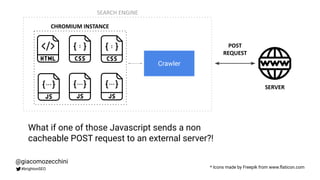
What if one of those Javascript sends a non
cacheable POST request to an external server?!
POST
REQUEST
@giacomozecchini
#brightonSEO
There are multiple ways of
sending POST requests in JS:
Fetch API
https://developer.mozilla.org/en-US/docs/Web/API/Fetch_API/Using_Fetch
Navigator.sendBeacon()
https://developer.mozilla.org/en-US/docs/Web/API/Navigator/sendBeacon
XMLHttpRequest.send()
https://developer.mozilla.org/en-US/docs/Web/API/XMLHttpRequest/send
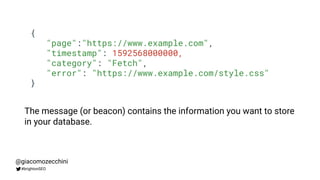
{
"page":"https://www.example.com",
"timestamp": 1592568000000,
"category": "Fetch",
"error": "https://www.example.com/style.css"
}
@giacomozecchini
#brightonSEO
The message (or beacon) contains the information you want to store
in your database.
@giacomozecchini
#brightonSEO
TIME URL CATEGORY ERROR
25/10/1985 09:00:00 https://www.example.com Fetch https://www.example.com/style.css
21/10/2015 07:28:00 https://www.example.com/about.html Fetch https://www.example.com/app.js
12/11/1955 06:38:00 https://www.example.com Javascript File: https://www.example.com/app.js Line: 3 Col: 2
Error: Uncaught ReferenceError: APP is not defined
When you have everything in a database you can query the tables
and do all your analysis. You can also have automatic alerts, etc.
Debugging in
practice
@giacomozecchini
#brightonSEO
!! Warning !!
Don’t use this code on your
website, these are just (bad)
examples.
@giacomozecchini
#brightonSEO
Debugging example #1
Check if a page has been
rendered
@giacomozecchini
#brightonSEO
<html>
…
<script>
sendMessageToServer();
</script>
…
</html>
@giacomozecchini
#brightonSEO
When the WRS executes the script, the
function sends a message back to the
server.
Debugging example #2
Know if there is a problem
downloading CSS or JS files
@giacomozecchini
#brightonSEO
<html>
<head>
<meta charset="utf-8">
<meta http-equiv="X-UA-Compatible" content="IE=edge">
<meta name="viewport" content="width=device-width, initial-scale=1">
<script>
…
window.addEventListener('error', function(err) {
if (isDownloadError(err)){
sendMessageToServer(err);
}
}, true);
…
</script>
…
</head>
…
</html>
@giacomozecchini
#brightonSEO
If there is an error and it's a CSS or
JS load error you can send a
message back to the server. This
works for HTTP/DNS/Network errors,
Robots.txt, fetch timeouts, etc.
Caveats
@giacomozecchini
#brightonSEO
There are some products out
there but all of them focus on
users and not on search
engines.
@giacomozecchini
#brightonSEO
Search engines are different
and you need to solve
different problems.
@giacomozecchini
#brightonSEO
You should be careful adding
new code to your website!
@giacomozecchini
#brightonSEO
Web Performance issues
You don’t want to slow down
the user experience with
something you need only for
search engines.
@giacomozecchini
#brightonSEO
Web Performance issues
Check for the User-Agent and
run the script only for search
engines.
@giacomozecchini
#brightonSEO
Crawl budget
You don’t want to consume
your crawl budget on these
requests.
@giacomozecchini
#brightonSEO
Crawl budget
Host your debugging server on
a different domain or
subdomain.
@giacomozecchini
#brightonSEO
There are many other possible
problems, you just need to find
a solution for them.
@giacomozecchini
#brightonSEO
Conclusions
@giacomozecchini
#brightonSEO
The simpler a page is, the
more chances it will render
correctly. The majority of
pages are just fine.
@giacomozecchini
#brightonSEO
If you work on big or complex
websites you may encounter
rendering problems.
@giacomozecchini
#brightonSEO
Debugging rendering
problems is a very time
consuming task..
@giacomozecchini
#brightonSEO
..but, if you use the right
approach you can cut down
the time it takes.
@giacomozecchini
#brightonSEO
You can use this approach as
a one time debugging script to
get more information or as a
monitoring system.
@giacomozecchini
#brightonSEO
Thank You!
Got questions? DM me on Twitter.
@giacomozecchini

Debugging rendering problems at scale

  • 1.
    Debugging rendering problems atscale Giacomo Zecchini | Verve Search SLIDESHARE.NET/GIACOMOZECCHINI @GIACOMOZECCHINI
  • 2.
    Hi, I’m Giacomo.Technical Director at Verve Search. Technical background and previous experiences in development. @giacomozecchini #brightonSEO
  • 3.
    Today we aregoing to talk about rendering errors, the challenges of debugging at scale and a new approach to solve these issues. @giacomozecchini #brightonSEO
  • 4.
    The search engine'srendering process is very similar to Schrödinger's cat paradox. https://en.wikipedia.org/wiki/Schrödinger's_cat @giacomozecchini #brightonSEO
  • 5.
    A hypothetical catpage may be considered simultaneously both alive correctly rendered and dead not correctly rendered. @giacomozecchini #brightonSEO
  • 6.
  • 7.
    Search engines getweb pages and put them in web rendering services. https://developers.google.com/search/docs/guides/javascript-seo-basics @giacomozecchini #brightonSEO
  • 8.
    Inside the webrendering services, the pages are rendered similarly to a browser. https://developers.google.com/search/docs/guides/javascript-seo-basics @giacomozecchini #brightonSEO
  • 9.
    Then, the searchengines can extract all information they need from those rendered pages. https://developers.google.com/search/docs/guides/javascript-seo-basics @giacomozecchini #brightonSEO
  • 10.
    This is anoversimplification of a complex process. https://www.youtube.com/watch?v=Qxd_d9m9vzo @giacomozecchini #brightonSEO
  • 11.
    If you wantto know more about this I’d suggest to watch Martin Splitt’s TechSEO Boost 2019 talk. https://www.youtube.com/watch?v=Qxd_d9m9vzo @giacomozecchini #brightonSEO
  • 12.
    What’s the problem withWeb Rendering Services? @giacomozecchini #brightonSEO
  • 13.
    What happens insidethe web rendering services is something hidden from our eyes, like in a closed box. @giacomozecchini #brightonSEO
  • 14.
    You don’t knowif a page has been correctly rendered until you check it manually. @giacomozecchini #brightonSEO
  • 15.
    Search engines arecapable of rendering your pages and most of the time the process will be fine. @giacomozecchini #brightonSEO
  • 16.
    Nonetheless, some pageshave rendering problems. @giacomozecchini #brightonSEO
  • 17.
    When is apage not correctly rendered? @giacomozecchini #brightonSEO
  • 18.
    A page is“not correctly rendered” when is not possible for the WRS to get an asset or when an error blocks the process. @giacomozecchini #brightonSEO
  • 19.
    Not only pageswith Javascript have problems! @giacomozecchini #brightonSEO
  • 20.
    Let's have alook at a few examples... @giacomozecchini #brightonSEO
  • 21.
    HTTP / DNS/ Network errors @giacomozecchini #brightonSEO https://developers.google.com/search/docs/advanced/crawling/http-network-errors Crawler WRS Cache SEARCH ENGINE * Icons made by Freepik from www.flaticon.com
  • 22.
    Robots.txt blocks aresources @giacomozecchini #brightonSEO https://developers.google.com/search/docs/advanced/robots/intro Crawler WRS Cache SEARCH ENGINE * Icons made by Freepik from www.flaticon.com
  • 23.
    Fetch timeout @giacomozecchini #brightonSEO Crawler WRS Cache SEARCH ENGINE *this doesn’t seem very common, but it can happen * Icons made by Freepik from www.flaticon.com
  • 24.
    https/http mixed content @giacomozecchini #brightonSEO Ifyour website has an HTTPS URL but one of the Javascript files has an HTTP URL and the HTTPS version is not available, the script won't be used!
  • 25.
    Cache mismatch, user permissionfor specific features (e.g. geolocation), service worker registration, Javascript syntax errors, etc. @giacomozecchini #brightonSEO
  • 26.
    What if apage is not correctly rendered? @giacomozecchini #brightonSEO
  • 27.
    If WRS can’tget your CSS the page layout won’t be correct and you may also have Mobile Usability issues. @giacomozecchini #brightonSEO
  • 28.
    If WRS can’tget or execute your JS files correctly, your page may be blank or broken. @giacomozecchini #brightonSEO
  • 29.
    Eventually, WRS mayneed to render again your page, which means slower indexing. @giacomozecchini #brightonSEO
  • 30.
  • 31.
    Manually checking pageper page might work on very small websites. @giacomozecchini #brightonSEO
  • 32.
    When you starthaving a lot of pages.. That’s a problem! @giacomozecchini #brightonSEO
  • 33.
    You can prioritiseand group pages with similar HTML and resources together, but.. @giacomozecchini #brightonSEO
  • 34.
    ..the rendering ofa page can fail regardless of what happens to other similar pages. @giacomozecchini #brightonSEO
  • 35.
    You still haveto manually check pages to be 100% sure those are correctly rendered. @giacomozecchini #brightonSEO
  • 36.
  • 37.
    Understanding what aWeb Rendering Service can or can’t do is a one time task. @giacomozecchini #brightonSEO
  • 38.
    You can builda page with a specific feature and test it. If it works once it will work again on other pages. @giacomozecchini #brightonSEO
  • 39.
    When debugging issuesyou are not focusing on a single feature but on having an overall correct rendering. @giacomozecchini #brightonSEO
  • 40.
    View crawled pageis the way. @giacomozecchini #brightonSEO
  • 41.
    A lot ofinformation. @giacomozecchini #brightonSEO
  • 42.
    But that’s notenough, you want more. For instance, Javascript console messages are coalesced and not shown. @giacomozecchini #brightonSEO
  • 43.
    Yes, you canget JavaScript console errors from the Mobile Friendly test or other live tests but it’s not the same! @giacomozecchini #brightonSEO
  • 44.
    Mobile-Friendly Test andthe other live tests bypass the cache, have shorter timeouts, and few other differences. @giacomozecchini #brightonSEO
  • 45.
  • 46.
    I started myresearch by getting and printing the information I needed on the page with some Javascript, in a hidden <DIV>. @giacomozecchini #brightonSEO
  • 47.
    <html> … <div id="info" style="display:none"></div> … <script> … functiongetInformation(){ // do stuff! } … var div = document.getElementById("info"); var p = document.createElement("p"); p.innerText = getInformation(); div.appendChild(p); … </script> … </html> @giacomozecchini #brightonSEO This prints the information you need in the DIV at rendering time and then you can get them in Search Console view crawled page HTML.
  • 48.
    But waiting fora page to be crawled, rendered and indexed again is time consuming and not scalable. @giacomozecchini #brightonSEO
  • 49.
    It’s a niceway of discovering new things but you still have to manually check all pages. @giacomozecchini #brightonSEO
  • 50.
    Then, I thoughtof using 1x1 px images, appending errors or information in the URL: https://www.example.com/image.jpg ?u=page_url&e=error @giacomozecchini #brightonSEO
  • 51.
    The idea wasto look in the server access log and find all errors that occurred during the rendering. @giacomozecchini #brightonSEO
  • 52.
    But Google’s WRSdoesn’t download images during the rendering of a page. @giacomozecchini #brightonSEO
  • 53.
  • 54.
    The answer wasalways in front of my eyes: Javascript + POST requests! @giacomozecchini #brightonSEO
  • 55.
    Google’s WRS cacheGET requests. @giacomozecchini #brightonSEO https://developer.mozilla.org/en-US/docs/Web/HTTP/Methods/GET
  • 56.
    But doesn’t cachePOST requests. @giacomozecchini #brightonSEO https://developer.mozilla.org/en-US/docs/Web/HTTP/Methods/POST
  • 57.
    Say welcome tothe shiny new Search Engine Rendering Errors Logging framework! @giacomozecchini #brightonSEO
  • 58.
    @giacomozecchini #brightonSEO Crawler WRS Cache SEARCH ENGINE YOURWEBSITE Search Engines download or use the cache of the resources they need to render your pages. * Icons made by Freepik from www.flaticon.com
  • 59.
    @giacomozecchini #brightonSEO CHROMIUM INSTANCE SEARCH ENGINE Crawler INTERNET Duringthe rendering the website, WRS executes Javascript and downloads additional resources a website might need or request. * Icons made by Freepik from www.flaticon.com
  • 60.
    @giacomozecchini #brightonSEO CHROMIUM INSTANCE * Iconsmade by Freepik from www.flaticon.com SEARCH ENGINE Crawler SERVER What if one of those Javascript sends a non cacheable POST request to an external server?! POST REQUEST
  • 61.
    @giacomozecchini #brightonSEO There are multipleways of sending POST requests in JS: Fetch API https://developer.mozilla.org/en-US/docs/Web/API/Fetch_API/Using_Fetch Navigator.sendBeacon() https://developer.mozilla.org/en-US/docs/Web/API/Navigator/sendBeacon XMLHttpRequest.send() https://developer.mozilla.org/en-US/docs/Web/API/XMLHttpRequest/send
  • 62.
    { "page":"https://www.example.com", "timestamp": 1592568000000, "category": "Fetch", "error":"https://www.example.com/style.css" } @giacomozecchini #brightonSEO The message (or beacon) contains the information you want to store in your database.
  • 63.
    @giacomozecchini #brightonSEO TIME URL CATEGORYERROR 25/10/1985 09:00:00 https://www.example.com Fetch https://www.example.com/style.css 21/10/2015 07:28:00 https://www.example.com/about.html Fetch https://www.example.com/app.js 12/11/1955 06:38:00 https://www.example.com Javascript File: https://www.example.com/app.js Line: 3 Col: 2 Error: Uncaught ReferenceError: APP is not defined When you have everything in a database you can query the tables and do all your analysis. You can also have automatic alerts, etc.
  • 64.
  • 65.
    !! Warning !! Don’tuse this code on your website, these are just (bad) examples. @giacomozecchini #brightonSEO
  • 66.
    Debugging example #1 Checkif a page has been rendered @giacomozecchini #brightonSEO
  • 67.
  • 68.
    Debugging example #2 Knowif there is a problem downloading CSS or JS files @giacomozecchini #brightonSEO
  • 69.
    <html> <head> <meta charset="utf-8"> <meta http-equiv="X-UA-Compatible"content="IE=edge"> <meta name="viewport" content="width=device-width, initial-scale=1"> <script> … window.addEventListener('error', function(err) { if (isDownloadError(err)){ sendMessageToServer(err); } }, true); … </script> … </head> … </html> @giacomozecchini #brightonSEO If there is an error and it's a CSS or JS load error you can send a message back to the server. This works for HTTP/DNS/Network errors, Robots.txt, fetch timeouts, etc.
  • 70.
  • 71.
    There are someproducts out there but all of them focus on users and not on search engines. @giacomozecchini #brightonSEO
  • 72.
    Search engines aredifferent and you need to solve different problems. @giacomozecchini #brightonSEO
  • 73.
    You should becareful adding new code to your website! @giacomozecchini #brightonSEO
  • 74.
    Web Performance issues Youdon’t want to slow down the user experience with something you need only for search engines. @giacomozecchini #brightonSEO
  • 75.
    Web Performance issues Checkfor the User-Agent and run the script only for search engines. @giacomozecchini #brightonSEO
  • 76.
    Crawl budget You don’twant to consume your crawl budget on these requests. @giacomozecchini #brightonSEO
  • 77.
    Crawl budget Host yourdebugging server on a different domain or subdomain. @giacomozecchini #brightonSEO
  • 78.
    There are manyother possible problems, you just need to find a solution for them. @giacomozecchini #brightonSEO
  • 79.
  • 80.
    The simpler apage is, the more chances it will render correctly. The majority of pages are just fine. @giacomozecchini #brightonSEO
  • 81.
    If you workon big or complex websites you may encounter rendering problems. @giacomozecchini #brightonSEO
  • 82.
    Debugging rendering problems isa very time consuming task.. @giacomozecchini #brightonSEO
  • 83.
    ..but, if youuse the right approach you can cut down the time it takes. @giacomozecchini #brightonSEO
  • 84.
    You can usethis approach as a one time debugging script to get more information or as a monitoring system. @giacomozecchini #brightonSEO
  • 85.
    Thank You! Got questions?DM me on Twitter. @giacomozecchini