Atle Skjekkeland Vice President, AIIM What is Enterprise  Content Management?
AIIM Training Programs
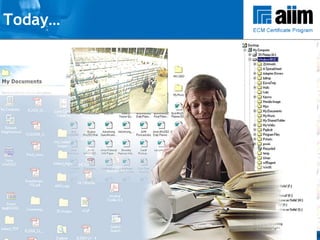
Today…
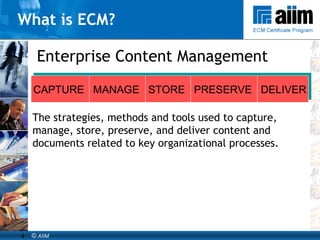
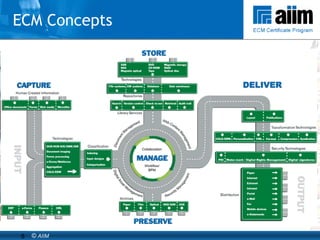
What is ECM? Enterprise Content Management The strategies, methods and tools used to capture, manage, store, preserve, and deliver content and documents related to key organizational processes. CAPTURE  MANAGE  STORE  PRESERVE  DELIVER
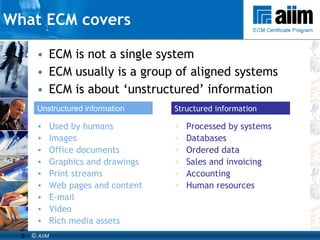
ECM is not a single system ECM usually is a group of aligned systems ECM is about ‘unstructured’ information  What ECM covers Used by humans Images Office documents Graphics and drawings Print streams Web pages and content E-mail Video Rich media assets Unstructured information Processed by systems Databases Ordered data Sales and invoicing Accounting Human resources Structured information
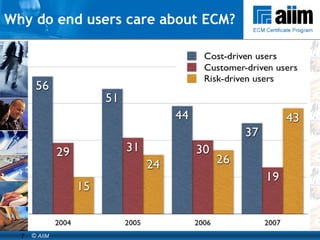
Why ECM? Why do end users care about ECM? COST-DRIVEN USERS -  Improve efficiency - Reduce costs - Increased profits/Better performance CUSTOMER-DRIVEN USERS -  Better customer service - Leadership/Competitive advantage - Faster turnaround/Improved response RISK-DRIVEN USERS - Compliance - Risk management/Business continuity
Why do end users care about ECM?
ECM Concepts
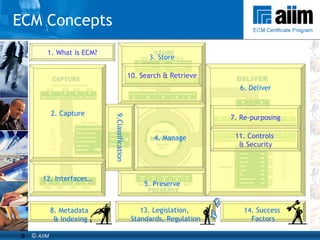
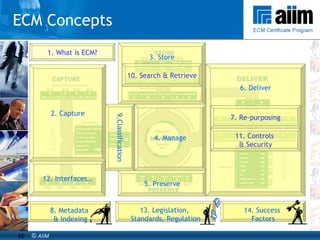
1. What is ECM? 14. Success  Factors 8. Metadata & Indexing 13. Legislation,  Standards, Regulation 3. Store 4. Manage 5. Preserve 6. Deliver 7. Re-purposing 10. Search & Retrieve 11. Controls  & Security 12. Interfaces… 2. Capture 9.Classification ECM Concepts
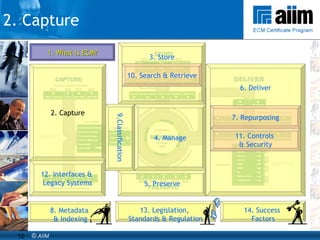
2. Capture 1. What is ECM? 14. Success  Factors 8. Metadata & Indexing 13. Legislation,  Standards & Regulation 3. Store 4. Manage 5. Preserve 6. Deliver 7. Repurposing 10. Search & Retrieve 11. Controls  & Security 12. Interfaces &  Legacy Systems 2. Capture 9.Classification
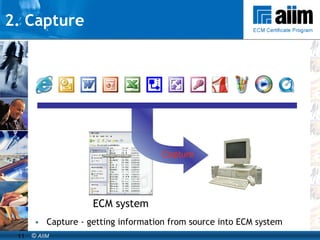
2. Capture Capture - getting information from source into ECM system ECM system Capture
3. Storage Information Lifecycle Management “ A new set of management practices based on aligning the business value of information to the most appropriate and cost effective infrastructure” ILM is a new approach to operating the datacenter  Designed to address the top problem in the datacenter : complexity It is a business-driven management practice  ILM is the framework through which we organize, instrument,  automate, and operate information and data services ILM is a process not a product Must account for regulatory compliance Source: SNIA
3. Manage - Key ECM technologies Imaging Document Centric Collaboration Electronic Document Management Electronic Records Management Email Management Workflow & Business Process Management Web Content Management & Portals Digital Asset Management Information Organization & Access
3. Manage –  Document Centric Collaboration Collaboration is a working practice whereby individuals work together to a common purpose to achieve business benefit.  Key features of collaboration tools are:  Synchronous collaboration: online meetings and instant messaging Asynchronous collaboration: shared workspaces and annotations Many organizations are also looking at Free-form Collaboration tools to improve collaboration and reduce number of emails Social Networking tools, blogs, and wikis
3. Manage -  Document Management DM is an electronic capability that manages documents. Document can be defined as “recorded information or object which can be treated as a unit”. Key DM features are:  Check In / Check Out and Locking; Version Control; Roll back; Audit Trail; Workflow
3. Manage  -  Electronic Records Management An ERMS is an electronic capability that helps in the management of records – both electronic records and physical records.  Key ERMS features are:  Declaration; Classification; Access Control; Disposition; Long-term preservation  A Record is a Document that is… Required as proof of business decision Required for business continuity Required for legal or compliance reasons If in doubt – make it a record
3. Manage  -  Web Content Management Web Content Management provides a set of procedures for managing content – from its creation or import to its archive and eventual destruction - that is destined for publication on the Web.  The key features of web content management are: Design and organise websites in order to provide users with efficient and effective access to relevant and up-to-date content; Control and prepare the content ready for publication; Control the content evaluation and approval process prior to publication on the web site; Automate key parts of the publishing process. When web pages are being built dynamically by a content management system, manual testing may need to be undertaken to ensure that all components fit together properly prior to publishing.
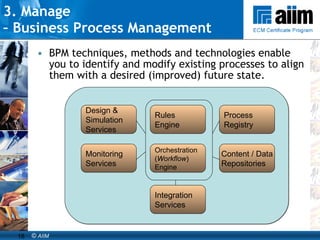
BPM techniques, methods and technologies enable you to identify and modify existing processes to align them with a desired (improved) future state. 3. Manage  –  Business Process Management Design & Simulation Services Monitoring  Services Process Registry Orchestration ( Workflow ) Engine Rules Engine Integration Services Content / Data Repositories
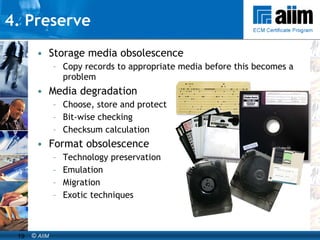
4. Preserve Storage media obsolescence Copy records to appropriate media before this becomes a problem Media degradation Choose, store and protect Bit-wise checking Checksum calculation Format obsolescence Technology preservation  Emulation Migration Exotic techniques
6-7. Deliver & Repurposing Distribution channels – you can deliver content via: Paper Internet / Intranet / Extranet(s) Portals E-Mail (perhaps with attachments) Fax (automatically) Mobile phone (web enabled, or by SMS ‘texting’) Personal Digital Assistants (PDA) XML – for display and/or data transfers Instant messaging Web-casting and content streaming RSS
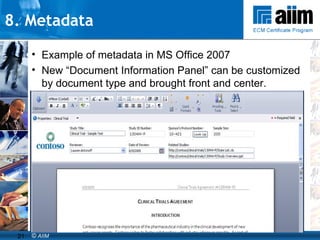
8. Metadata  Example of metadata in MS Office 2007 New “Document Information Panel” can be customized by document type and brought front and center.
8. Metadata - types One way to categorize metadata; Descriptive : Information describing the content used for search and retrieval.  Structural : Information that ties this item with others, such as pages in a book, or the documents in a case folder.  Administrative : Information used to manage and control access to the item.  Source: IMERGE Consulting
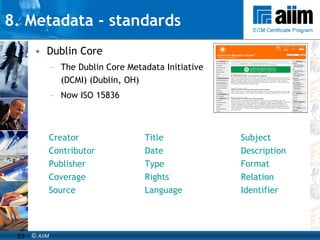
8. Metadata - standards Dublin Core The Dublin Core Metadata Initiative (DCMI) (Dublin, OH) Now ISO 15836 Creator Title Subject Contributor Date Description Publisher Type Format Coverage Rights Relation Source Language Identifier
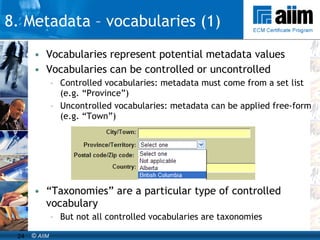
Vocabularies represent potential metadata values Vocabularies can be controlled or uncontrolled Controlled vocabularies: metadata must come from a set list (e.g. “Province”) Uncontrolled vocabularies: metadata can be applied free-form (e.g. “Town”) “ Taxonomies” are a particular type of controlled vocabulary But not all controlled vocabularies are taxonomies 8. Metadata – vocabularies (1)
It’s important to control vocabulary  so your searchers don’t have to  Standards need to be set to minimize confusion among taggers/indexers Enforces terminological consistency Reduces spelling mistakes Enables interoperability Technology can manage thesaurus (“like”) terms 8. Metadata – vocabularies (2)
For humans, adding metadata means work Indexers may not see the ultimate benefit of metadata themselves Benefits tend to accrue to the enterprise and content consumers To be sure, clerical staff can be forced to index In some imaging systems, it is a specialized skill In other cases: “Not my job” Sometimes humans provide incomplete or inaccurate metadata So a question arises: Is there a way to get machines to add metadata for us? Source: Taxonomy Strategies 8. Metadata – manual process
Need to consider: Automatic classification tools exist, and have potential Auto-categorization software as well as some search engines can attempt to classify content They still rely on an authoritative taxonomy or controlled vocabulary Typically need “training” to achieve minimally acceptable results But results are typically not as good as humans’ Degree of human involvement becomes a cost/benefit tradeoff Source: Taxonomy Strategies 8. Metadata – automated
9. Classification Classification: “ the systematic identification and arrangement of business activities and/or records into categories according to logically structured conventions, methods and procedural rules represented in a classification system” Source: MoReq
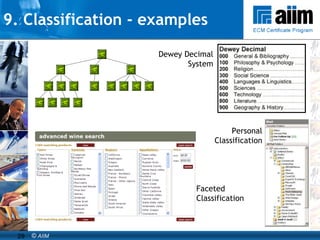
9. Classification - examples Dewey Decimal System Personal Classification Faceted Classification
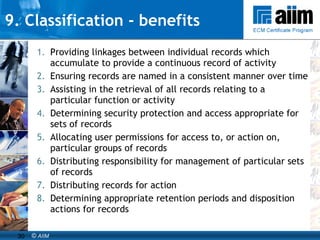
9. Classification - benefits Providing linkages between individual records which accumulate to provide a continuous record of activity Ensuring records are named in a consistent manner over time Assisting in the retrieval of all records relating to a particular function or activity Determining security protection and access appropriate for sets of records Allocating user permissions for access to, or action on, particular groups of records Distributing responsibility for management of particular sets of records Distributing records for action Determining appropriate retention periods and disposition actions for records
9. Classification - issues Key issue in a new ECM environment is ease-of-use and performance for users If users aren’t happy, environment won’t work  Business Classification Scheme (BCS) design and deployment will have major impact on usability BCS design and deployment must maximize ease-of-use and performance for users Note - usability will also be affected by Number of levels User interface Using ‘shortcuts’ or ‘favourites’ Availability & quality of other retrieval tools   e.g. a search engine
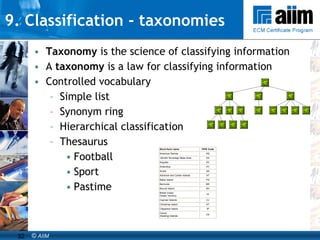
9. Classification - taxonomies Taxonomy  is the science of classifying information A  taxonomy  is a law for classifying information   Controlled vocabulary Simple list Synonym ring Hierarchical classification Thesaurus Football Sport Pastime
9. Classification - taxonomies
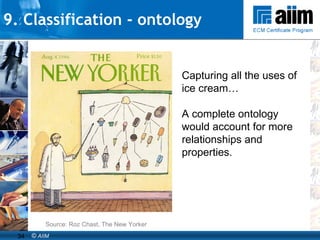
9. Classification - ontology Capturing all the uses of ice cream… A complete ontology would account for more relationships and properties. Source: Roz Chast, The New Yorker
9. Classification - folksonomy Folksonomy : the anti-controlled vocabulary.  Collaborative vocabularies for tagging content, rarely with any sort of control Relevance between metadata and content may be determined by users in a democratic fashion four users define an object as being “green”  one user defines an object as being “aqua”  relevance can be defined as " more green than aqua ” Over time, clusters emerge and communities typically self-organize around them Typically arise in Web-based communities where individuals to share content, then create and use tags (e.g., blogs) Applied to enterprise use cases when there is a critical mass of taggers to make it worthwhile Can be a useful “bottom-up” approach to developing taxonomies
10. Search & Retrieval Three main ways people look for information Pattern Matching (a.k.a., search)  some particular  attributes in the sought after information E.g.,  words or phrases, proximity, etc. Navigation, or traversal – Finding a relevant asset that is linked to other assets Traversing links looking at related information Classified or Categorized, organized by topic browsing Using classification taxonomies and related structured organizations of information
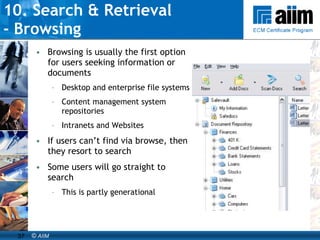
10. Search & Retrieval  - Browsing Browsing is usually the first option for users seeking information or documents Desktop and enterprise file systems Content management system repositories Intranets and Websites If users can’t find via browse, then they resort to search Some users will go straight to search This is partly generational
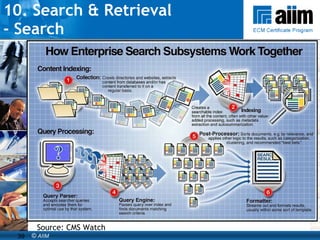
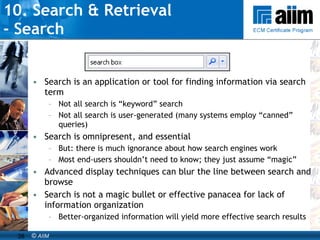
10. Search & Retrieval  - Search Search is an application or tool for finding information via search term Not all search is “keyword” search Not all search is user-generated (many systems employ “canned” queries) Search is omnipresent, and essential But: there is much ignorance about how search engines work Most end-users shouldn’t need to know; they just assume “magic” Advanced display techniques can blur the line between search and browse Search is not a magic bullet or effective panacea for lack of information organization Better-organized information will yield more effective search results
10. Search & Retrieval  - Search Source: CMS Watch
10. Search & Retrieval  - Findability Findability  is  the quality of being locatable or navigable Information should be easy to discover or locate Information access is about helping users find documents that satisfy their information needs Remember, someone may be looking for something they’ve never seen or touched before Advanced information organization techniques can support findability Thesauri, Ontologies, Topic Maps and Semantic Networks Faceted search and navigation
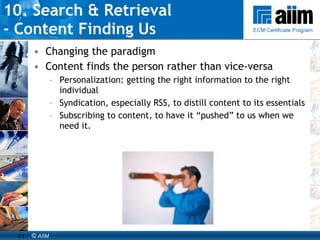
10. Search & Retrieval  - Content Finding Us Changing the paradigm Content finds the person rather than vice-versa Personalization: getting the right information to the right individual Syndication, especially RSS, to distill content to its essentials Subscribing to content, to have it “pushed” to us when we need it.
11. Security & Access Control Identification Authentication Authorization Encryption Digital signatures Audit trail Key components of access control: Mechanisms that help implement access control:
11. Security & Access Control  - Authoritative content Authenticity  –  proof that the content is what we say it is Integrity  –  proof that the content is complete and unaltered Reliability  –  proof that the content belongs in the system Usability  –  we can find it and understand it The characteristics of an authoritative content:
11. Security & Access Control  - Digital Rights Management Digital Rights Management Encryption Copy management Digital signatures and public key infrastructure (PKI) Electronic Watermarks
12. Integration - goals End-to-end information management Information  flow  across system boundaries Information may be  locked  in legacy systems Improving information flows and  unlocking  information leads to (among others): Improved efficiency Reduced cost Competitive advantage
SOA offers Flexibility Standard messaging formats Greater asset re-use potential Reduced integration costs Standards, such as Simple object access protocol (SOAP) XML (discussed earlier) No pain, no gain! Retrofit existing applications New management practices New security defences … Incremental approach is possible 12. Integration - SOA
12. Integration - SOA Intranet Extranet B2B  PDA Office software Internet 3g phone Service  delivery  channels Web application XML Rendition  Encapsulation XML XML Cross-system business logic XML XML XML XML Accounting system Business application Business intelligence system E-mail system Back office  IT services Contact  mgmt EDMS, ERMS Workflow mgmt
1. What is ECM? 14. Success  Factors 8. Metadata & Indexing 13. Legislation,  Standards, Regulation 3. Store 4. Manage 5. Preserve 6. Deliver 7. Re-purposing 10. Search & Retrieve 11. Controls  & Security 12. Interfaces… 2. Capture 9.Classification ECM Concepts
AIIM Certificate Program The AIIM Certificate Program is designed from global best practices among our 60,000 members for Enterprise Content Management (ECM) and Electronic Records Management (ERM)  Skill sets and best practices were identified by Education Advisory Groups in NA and Europe  More than 9,000 course attendees in 2,5 years Each new training program leads to an designation (not Strategy workshops) Next Step?
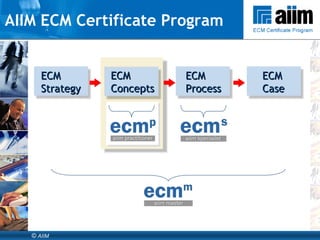
AIIM ECM Certificate Program ECM Strategy ECM Concepts ECM Process ECM Case
Questions? Atle Skjekkeland, Vice President AIIM Email:  [email_address] Web:  www.aiim.org/training

What is-ecm-1227461596391360-9

  • 1.
    Atle Skjekkeland VicePresident, AIIM What is Enterprise Content Management?
  • 2.
  • 3.
  • 4.
    What is ECM?Enterprise Content Management The strategies, methods and tools used to capture, manage, store, preserve, and deliver content and documents related to key organizational processes. CAPTURE MANAGE STORE PRESERVE DELIVER
  • 5.
    ECM is nota single system ECM usually is a group of aligned systems ECM is about ‘unstructured’ information What ECM covers Used by humans Images Office documents Graphics and drawings Print streams Web pages and content E-mail Video Rich media assets Unstructured information Processed by systems Databases Ordered data Sales and invoicing Accounting Human resources Structured information
  • 6.
    Why ECM? Whydo end users care about ECM? COST-DRIVEN USERS - Improve efficiency - Reduce costs - Increased profits/Better performance CUSTOMER-DRIVEN USERS - Better customer service - Leadership/Competitive advantage - Faster turnaround/Improved response RISK-DRIVEN USERS - Compliance - Risk management/Business continuity
  • 7.
    Why do endusers care about ECM?
  • 8.
  • 9.
    1. What isECM? 14. Success Factors 8. Metadata & Indexing 13. Legislation, Standards, Regulation 3. Store 4. Manage 5. Preserve 6. Deliver 7. Re-purposing 10. Search & Retrieve 11. Controls & Security 12. Interfaces… 2. Capture 9.Classification ECM Concepts
  • 10.
    2. Capture 1.What is ECM? 14. Success Factors 8. Metadata & Indexing 13. Legislation, Standards & Regulation 3. Store 4. Manage 5. Preserve 6. Deliver 7. Repurposing 10. Search & Retrieve 11. Controls & Security 12. Interfaces & Legacy Systems 2. Capture 9.Classification
  • 11.
    2. Capture Capture- getting information from source into ECM system ECM system Capture
  • 12.
    3. Storage InformationLifecycle Management “ A new set of management practices based on aligning the business value of information to the most appropriate and cost effective infrastructure” ILM is a new approach to operating the datacenter Designed to address the top problem in the datacenter : complexity It is a business-driven management practice ILM is the framework through which we organize, instrument, automate, and operate information and data services ILM is a process not a product Must account for regulatory compliance Source: SNIA
  • 13.
    3. Manage -Key ECM technologies Imaging Document Centric Collaboration Electronic Document Management Electronic Records Management Email Management Workflow & Business Process Management Web Content Management & Portals Digital Asset Management Information Organization & Access
  • 14.
    3. Manage – Document Centric Collaboration Collaboration is a working practice whereby individuals work together to a common purpose to achieve business benefit. Key features of collaboration tools are: Synchronous collaboration: online meetings and instant messaging Asynchronous collaboration: shared workspaces and annotations Many organizations are also looking at Free-form Collaboration tools to improve collaboration and reduce number of emails Social Networking tools, blogs, and wikis
  • 15.
    3. Manage - Document Management DM is an electronic capability that manages documents. Document can be defined as “recorded information or object which can be treated as a unit”. Key DM features are: Check In / Check Out and Locking; Version Control; Roll back; Audit Trail; Workflow
  • 16.
    3. Manage - Electronic Records Management An ERMS is an electronic capability that helps in the management of records – both electronic records and physical records. Key ERMS features are: Declaration; Classification; Access Control; Disposition; Long-term preservation A Record is a Document that is… Required as proof of business decision Required for business continuity Required for legal or compliance reasons If in doubt – make it a record
  • 17.
    3. Manage - Web Content Management Web Content Management provides a set of procedures for managing content – from its creation or import to its archive and eventual destruction - that is destined for publication on the Web. The key features of web content management are: Design and organise websites in order to provide users with efficient and effective access to relevant and up-to-date content; Control and prepare the content ready for publication; Control the content evaluation and approval process prior to publication on the web site; Automate key parts of the publishing process. When web pages are being built dynamically by a content management system, manual testing may need to be undertaken to ensure that all components fit together properly prior to publishing.
  • 18.
    BPM techniques, methodsand technologies enable you to identify and modify existing processes to align them with a desired (improved) future state. 3. Manage – Business Process Management Design & Simulation Services Monitoring Services Process Registry Orchestration ( Workflow ) Engine Rules Engine Integration Services Content / Data Repositories
  • 19.
    4. Preserve Storagemedia obsolescence Copy records to appropriate media before this becomes a problem Media degradation Choose, store and protect Bit-wise checking Checksum calculation Format obsolescence Technology preservation Emulation Migration Exotic techniques
  • 20.
    6-7. Deliver &Repurposing Distribution channels – you can deliver content via: Paper Internet / Intranet / Extranet(s) Portals E-Mail (perhaps with attachments) Fax (automatically) Mobile phone (web enabled, or by SMS ‘texting’) Personal Digital Assistants (PDA) XML – for display and/or data transfers Instant messaging Web-casting and content streaming RSS
  • 21.
    8. Metadata Example of metadata in MS Office 2007 New “Document Information Panel” can be customized by document type and brought front and center.
  • 22.
    8. Metadata -types One way to categorize metadata; Descriptive : Information describing the content used for search and retrieval. Structural : Information that ties this item with others, such as pages in a book, or the documents in a case folder. Administrative : Information used to manage and control access to the item. Source: IMERGE Consulting
  • 23.
    8. Metadata -standards Dublin Core The Dublin Core Metadata Initiative (DCMI) (Dublin, OH) Now ISO 15836 Creator Title Subject Contributor Date Description Publisher Type Format Coverage Rights Relation Source Language Identifier
  • 24.
    Vocabularies represent potentialmetadata values Vocabularies can be controlled or uncontrolled Controlled vocabularies: metadata must come from a set list (e.g. “Province”) Uncontrolled vocabularies: metadata can be applied free-form (e.g. “Town”) “ Taxonomies” are a particular type of controlled vocabulary But not all controlled vocabularies are taxonomies 8. Metadata – vocabularies (1)
  • 25.
    It’s important tocontrol vocabulary so your searchers don’t have to Standards need to be set to minimize confusion among taggers/indexers Enforces terminological consistency Reduces spelling mistakes Enables interoperability Technology can manage thesaurus (“like”) terms 8. Metadata – vocabularies (2)
  • 26.
    For humans, addingmetadata means work Indexers may not see the ultimate benefit of metadata themselves Benefits tend to accrue to the enterprise and content consumers To be sure, clerical staff can be forced to index In some imaging systems, it is a specialized skill In other cases: “Not my job” Sometimes humans provide incomplete or inaccurate metadata So a question arises: Is there a way to get machines to add metadata for us? Source: Taxonomy Strategies 8. Metadata – manual process
  • 27.
    Need to consider:Automatic classification tools exist, and have potential Auto-categorization software as well as some search engines can attempt to classify content They still rely on an authoritative taxonomy or controlled vocabulary Typically need “training” to achieve minimally acceptable results But results are typically not as good as humans’ Degree of human involvement becomes a cost/benefit tradeoff Source: Taxonomy Strategies 8. Metadata – automated
  • 28.
    9. Classification Classification:“ the systematic identification and arrangement of business activities and/or records into categories according to logically structured conventions, methods and procedural rules represented in a classification system” Source: MoReq
  • 29.
    9. Classification -examples Dewey Decimal System Personal Classification Faceted Classification
  • 30.
    9. Classification -benefits Providing linkages between individual records which accumulate to provide a continuous record of activity Ensuring records are named in a consistent manner over time Assisting in the retrieval of all records relating to a particular function or activity Determining security protection and access appropriate for sets of records Allocating user permissions for access to, or action on, particular groups of records Distributing responsibility for management of particular sets of records Distributing records for action Determining appropriate retention periods and disposition actions for records
  • 31.
    9. Classification -issues Key issue in a new ECM environment is ease-of-use and performance for users If users aren’t happy, environment won’t work Business Classification Scheme (BCS) design and deployment will have major impact on usability BCS design and deployment must maximize ease-of-use and performance for users Note - usability will also be affected by Number of levels User interface Using ‘shortcuts’ or ‘favourites’ Availability & quality of other retrieval tools e.g. a search engine
  • 32.
    9. Classification -taxonomies Taxonomy is the science of classifying information A taxonomy is a law for classifying information Controlled vocabulary Simple list Synonym ring Hierarchical classification Thesaurus Football Sport Pastime
  • 33.
  • 34.
    9. Classification -ontology Capturing all the uses of ice cream… A complete ontology would account for more relationships and properties. Source: Roz Chast, The New Yorker
  • 35.
    9. Classification -folksonomy Folksonomy : the anti-controlled vocabulary. Collaborative vocabularies for tagging content, rarely with any sort of control Relevance between metadata and content may be determined by users in a democratic fashion four users define an object as being “green” one user defines an object as being “aqua” relevance can be defined as " more green than aqua ” Over time, clusters emerge and communities typically self-organize around them Typically arise in Web-based communities where individuals to share content, then create and use tags (e.g., blogs) Applied to enterprise use cases when there is a critical mass of taggers to make it worthwhile Can be a useful “bottom-up” approach to developing taxonomies
  • 36.
    10. Search &Retrieval Three main ways people look for information Pattern Matching (a.k.a., search) some particular attributes in the sought after information E.g., words or phrases, proximity, etc. Navigation, or traversal – Finding a relevant asset that is linked to other assets Traversing links looking at related information Classified or Categorized, organized by topic browsing Using classification taxonomies and related structured organizations of information
  • 37.
    10. Search &Retrieval - Browsing Browsing is usually the first option for users seeking information or documents Desktop and enterprise file systems Content management system repositories Intranets and Websites If users can’t find via browse, then they resort to search Some users will go straight to search This is partly generational
  • 38.
    10. Search &Retrieval - Search Search is an application or tool for finding information via search term Not all search is “keyword” search Not all search is user-generated (many systems employ “canned” queries) Search is omnipresent, and essential But: there is much ignorance about how search engines work Most end-users shouldn’t need to know; they just assume “magic” Advanced display techniques can blur the line between search and browse Search is not a magic bullet or effective panacea for lack of information organization Better-organized information will yield more effective search results
  • 39.
    10. Search &Retrieval - Search Source: CMS Watch
  • 40.
    10. Search &Retrieval - Findability Findability is the quality of being locatable or navigable Information should be easy to discover or locate Information access is about helping users find documents that satisfy their information needs Remember, someone may be looking for something they’ve never seen or touched before Advanced information organization techniques can support findability Thesauri, Ontologies, Topic Maps and Semantic Networks Faceted search and navigation
  • 41.
    10. Search &Retrieval - Content Finding Us Changing the paradigm Content finds the person rather than vice-versa Personalization: getting the right information to the right individual Syndication, especially RSS, to distill content to its essentials Subscribing to content, to have it “pushed” to us when we need it.
  • 42.
    11. Security &Access Control Identification Authentication Authorization Encryption Digital signatures Audit trail Key components of access control: Mechanisms that help implement access control:
  • 43.
    11. Security &Access Control - Authoritative content Authenticity – proof that the content is what we say it is Integrity – proof that the content is complete and unaltered Reliability – proof that the content belongs in the system Usability – we can find it and understand it The characteristics of an authoritative content:
  • 44.
    11. Security &Access Control - Digital Rights Management Digital Rights Management Encryption Copy management Digital signatures and public key infrastructure (PKI) Electronic Watermarks
  • 45.
    12. Integration -goals End-to-end information management Information flow across system boundaries Information may be locked in legacy systems Improving information flows and unlocking information leads to (among others): Improved efficiency Reduced cost Competitive advantage
  • 46.
    SOA offers FlexibilityStandard messaging formats Greater asset re-use potential Reduced integration costs Standards, such as Simple object access protocol (SOAP) XML (discussed earlier) No pain, no gain! Retrofit existing applications New management practices New security defences … Incremental approach is possible 12. Integration - SOA
  • 47.
    12. Integration -SOA Intranet Extranet B2B PDA Office software Internet 3g phone Service delivery channels Web application XML Rendition Encapsulation XML XML Cross-system business logic XML XML XML XML Accounting system Business application Business intelligence system E-mail system Back office IT services Contact mgmt EDMS, ERMS Workflow mgmt
  • 48.
    1. What isECM? 14. Success Factors 8. Metadata & Indexing 13. Legislation, Standards, Regulation 3. Store 4. Manage 5. Preserve 6. Deliver 7. Re-purposing 10. Search & Retrieve 11. Controls & Security 12. Interfaces… 2. Capture 9.Classification ECM Concepts
  • 49.
    AIIM Certificate ProgramThe AIIM Certificate Program is designed from global best practices among our 60,000 members for Enterprise Content Management (ECM) and Electronic Records Management (ERM) Skill sets and best practices were identified by Education Advisory Groups in NA and Europe More than 9,000 course attendees in 2,5 years Each new training program leads to an designation (not Strategy workshops) Next Step?
  • 50.
    AIIM ECM CertificateProgram ECM Strategy ECM Concepts ECM Process ECM Case
  • 51.
    Questions? Atle Skjekkeland,Vice President AIIM Email: [email_address] Web: www.aiim.org/training

Editor's Notes

  • #50 AUDIENCE: The ERM and ECM programmes will be designed for Business Managers, IT Managers, Compliance Officers, Archivists, Librarians, Risk Managers, Records Managers etc, as well as for solution providers, sales consultants, project managers, and technical staff. AIIM will also license the training material to internal training departments and commercial training companies. The training modules will be available as online training modules, but also as onsite public and private training classes with AIIM trainers or AIIM certified training providers
  • #51 Let’s start by looking at where this Onsite Presentation Workshop in ECM Concepts fits in the AIIM ECM Certificate Program. This is the second component of the AIIM ECM certificate program. ~ The first is the ‘ECM Strategy’ component, which introduces the arguments around ECM and your organisation’s strategy. It provides enough information for you to understand, and make the case for, ECM. ~ This ‘ECM Concepts’ component introduces the basic ideas you need to understand, to specify, and talk about ECM in more detail. This leads to the designation AIIM ‘ECM Practitioner’. ~ The next component is ‘ECM Process’ which shows you how to manage the processes required to implement ECM systems and initiatives. It leads to the AIIM ‘ECM Specialist’ designation. ~ The fourth and final component is ‘ECM Case’ – it is a workshop that gives you opportunities to consolidate what you have learned in the earlier components, using case studies. ~ After completing the entire program, the designation ‘AIIM ECM Master’ can be used. However, please note that this AIIM ECM Certificate Program is designed to give all participants an appreciation of all aspects of ECM.  No participant should expect to gain in-depth expertise in any aspect of ECM from this Program.  If such in-depth expertise in an aspect of ECM is desired, specialist courses, references or assistance should be sought.