AWR DB performance
Data Mining
Yury Velikanov Oracle DBA
Mission
Let you remember/consider AWR
next time you troubleshoot
Performance issue!
AWR Agenda
• Introduction & Background
• Examples, Examples, Examples
• Concept & Approach
• More examples
• Q & A
[LinkedIn, twitter, slideshare, blog, email, mobile, …]
Few words about Yury
Yury Oracle
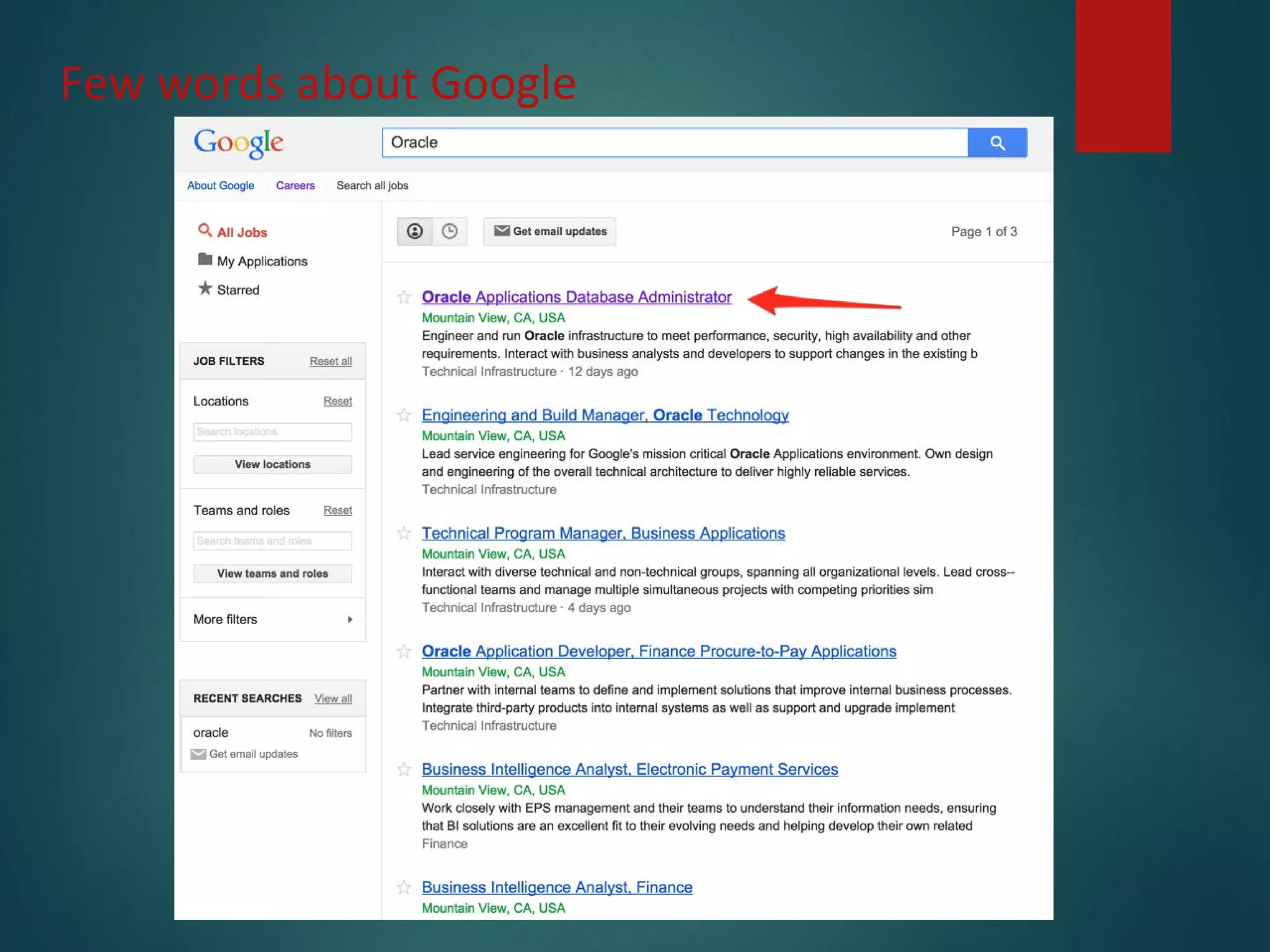
Few words about Google
Google careers
Few words about Google
Background
• AWR is one of many RDBMS performance data sources
• Sometimes it isn’t the best source (aggregation)
• SQL Extended trace (event 10046)
• RAW trace
• tkprof
• TRCAnlzr [ID 224270.1]
• Method-R state of art tools
• PL/SQL Profiler
• LTOM (Session Trace Collector)
• others
• Sometimes it is the best/efficient source!
• Sometimes it is the only one available!
Background
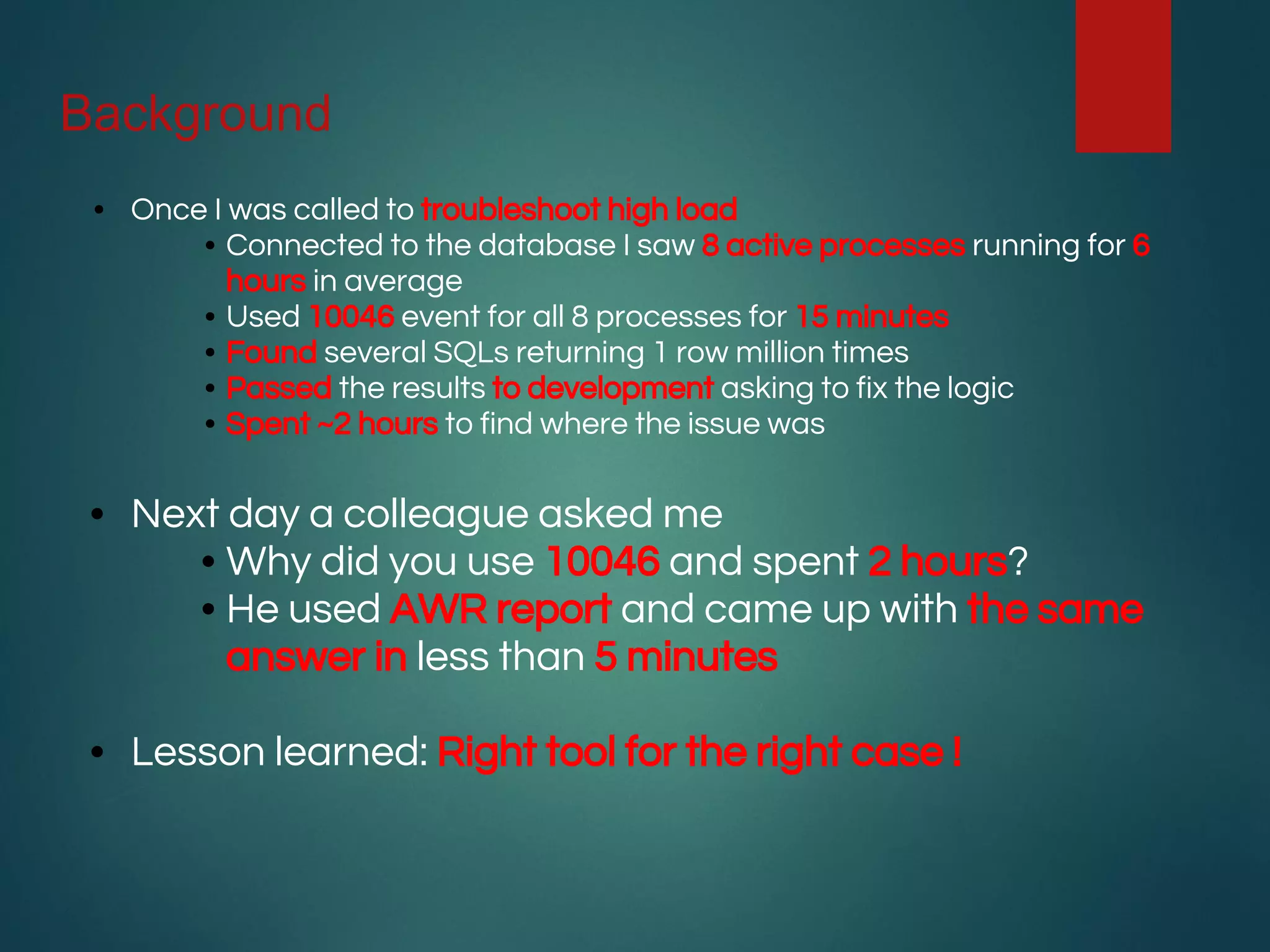
• Once I was called to troubleshoot high load
• Connected to the database I saw 8 active processes running for 6
hours in average
• Used 10046 event for all 8 processes for 15 minutes
• Found several SQLs returning 1 row million times
• Passed the results to development asking to fix the logic
• Spent ~2 hours to find where the issue was
• Next day a colleague asked me
• Why did you use 10046 and spent 2 hours?
• He used AWR report and came up with the same
answer in less than 5 minutes
• Lesson learned: Right tool for the right case !
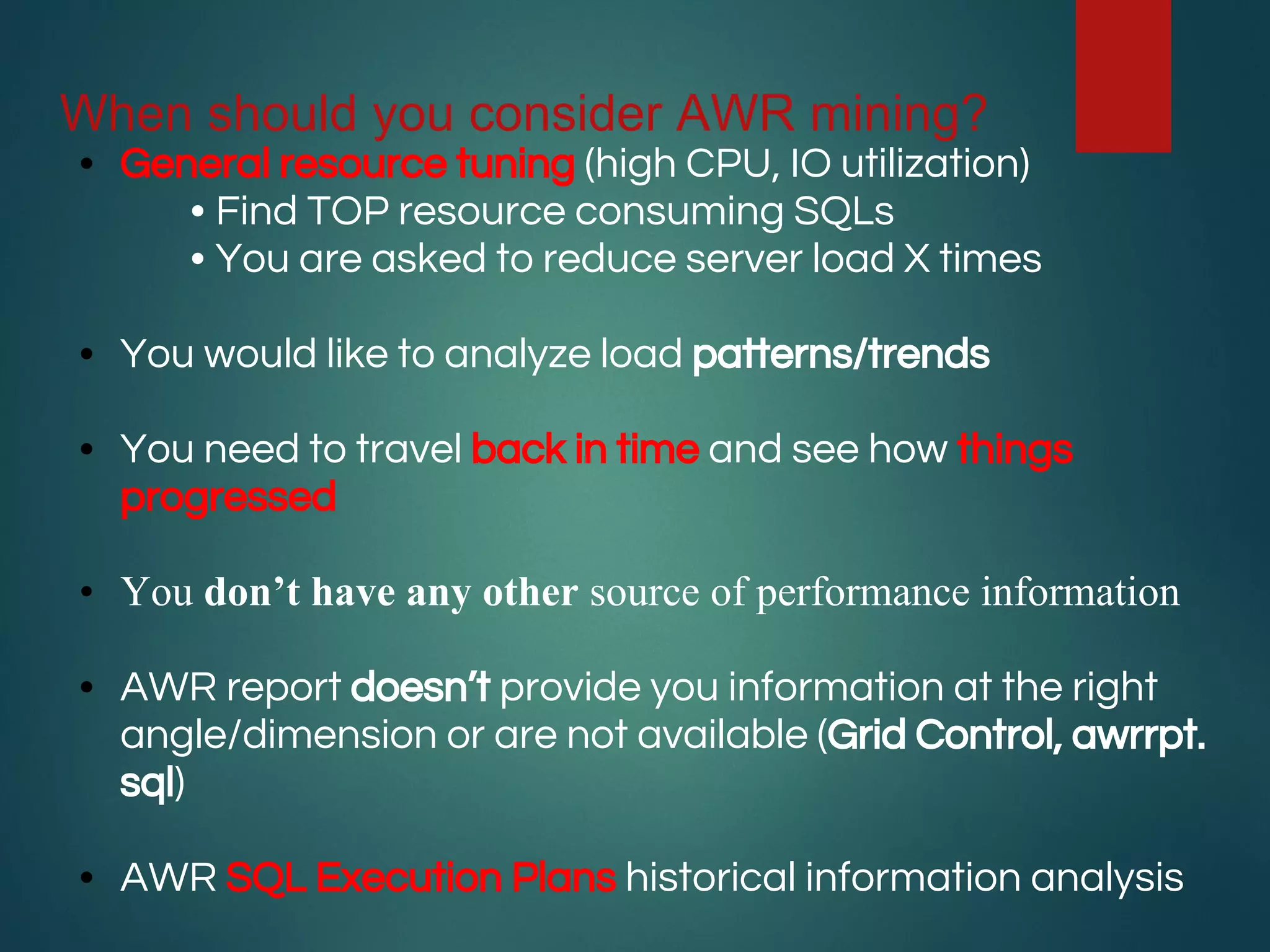
When should you consider AWR mining?
• General resource tuning (high CPU, IO utilization)
• Find TOP resource consuming SQLs
• You are asked to reduce server load X times
• You would like to analyze load patterns/trends
• You need to travel back in time and see how things
progressed
• You don’t have any other source of performance information
• AWR report doesn’t provide you information at the right
angle/dimension or are not available (Grid Control, awrrpt.
sql)
• AWR SQL Execution Plans historical information analysis
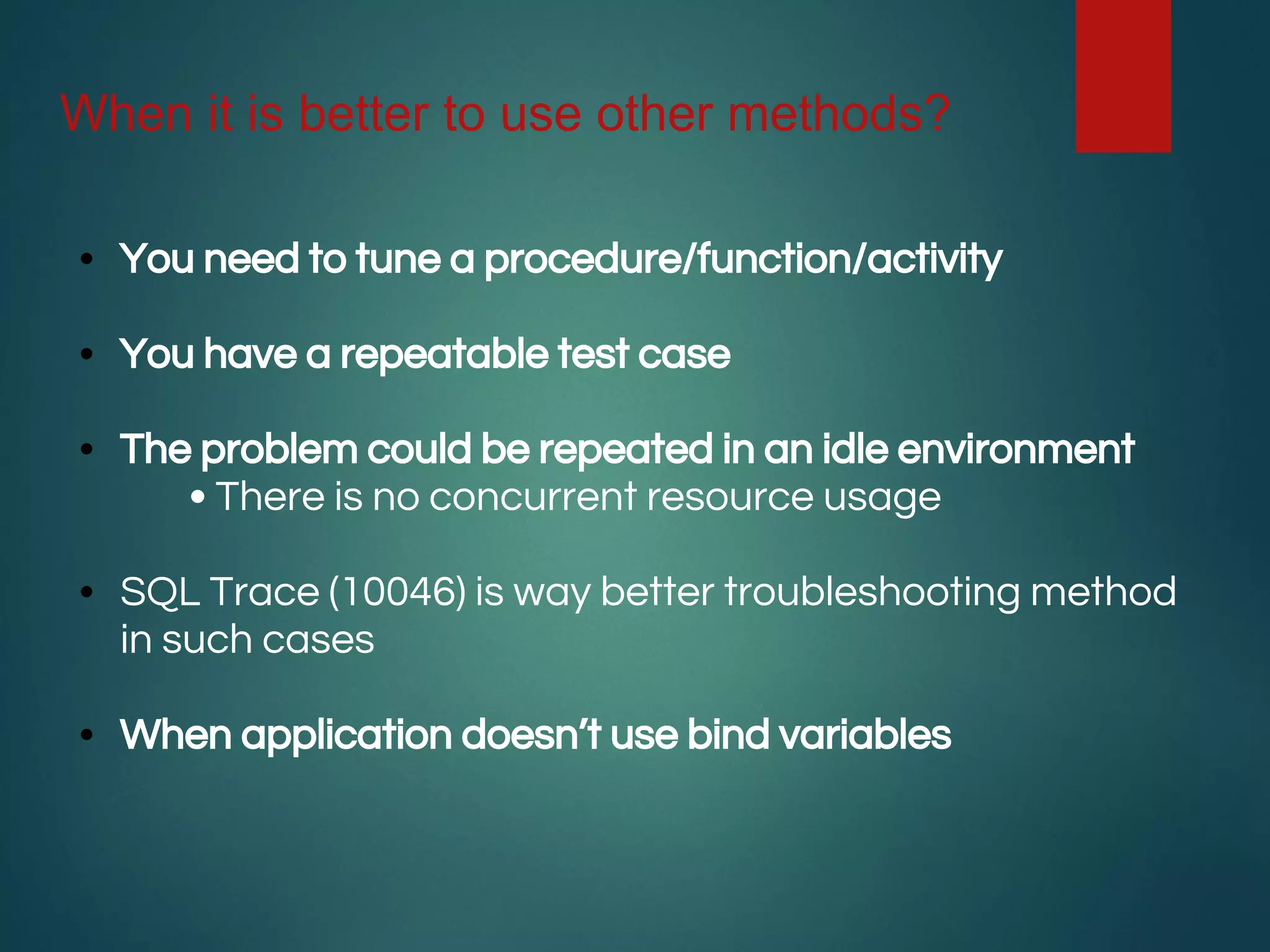
When it is better to use other methods?
• You need to tune a procedure/function/activity
• You have a repeatable test case
• The problem could be repeated in an idle environment
• There is no concurrent resource usage
• SQL Trace (10046) is way better troubleshooting method
in such cases
• When application doesn’t use bind variables
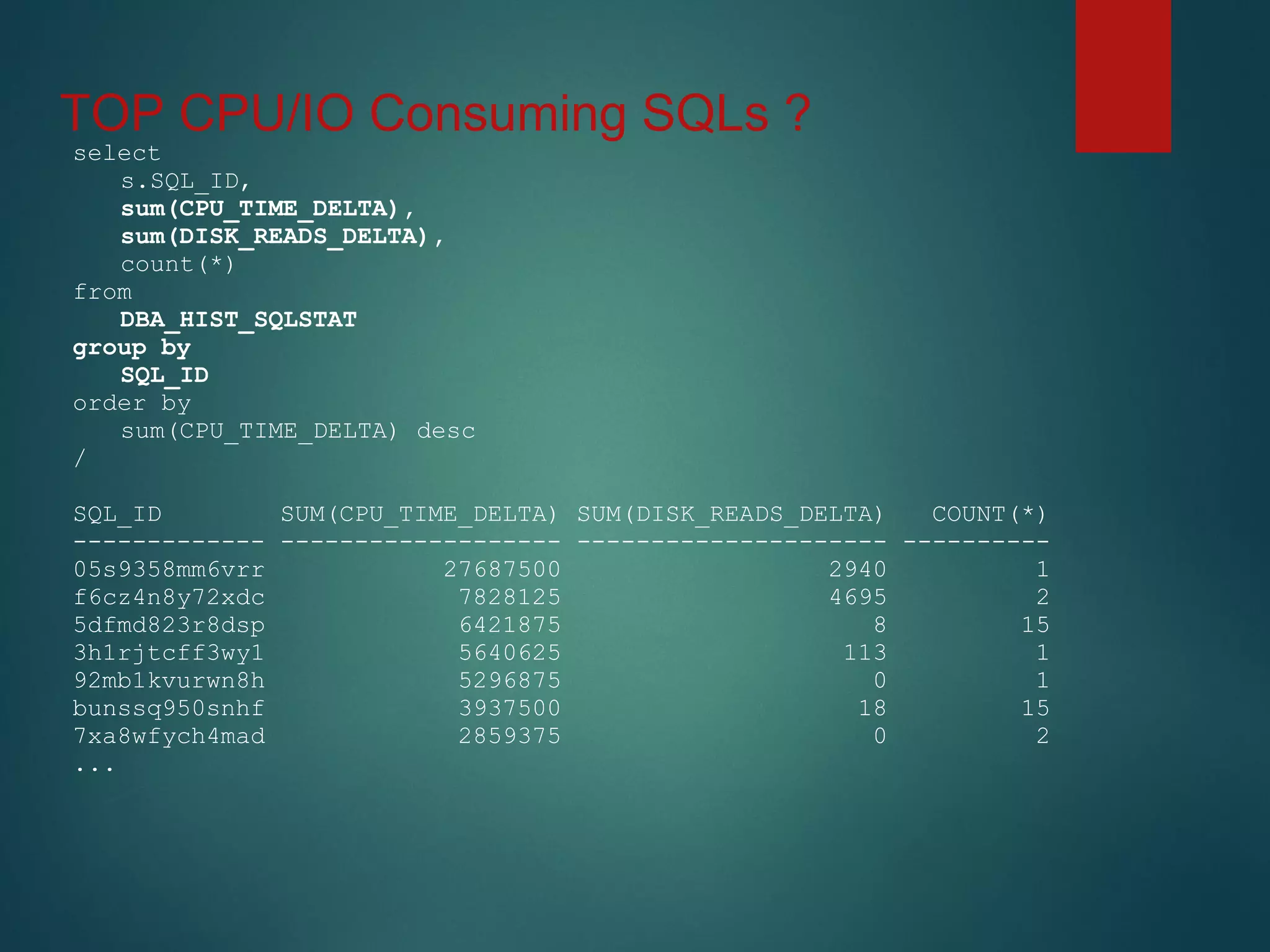
TOP CPU/IO Consuming SQLs ?
select
s.SQL_ID,
sum(CPU_TIME_DELTA),
sum(DISK_READS_DELTA),
count(*)
from
DBA_HIST_SQLSTAT
group by
SQL_ID
order by
sum(CPU_TIME_DELTA) desc
/
SQL_ID SUM(CPU_TIME_DELTA) SUM(DISK_READS_DELTA) COUNT(*)
------------- ------------------- --------------------- ----------
05s9358mm6vrr 27687500 2940 1
f6cz4n8y72xdc 7828125 4695 2
5dfmd823r8dsp 6421875 8 15
3h1rjtcff3wy1 5640625 113 1
92mb1kvurwn8h 5296875 0 1
bunssq950snhf 3937500 18 15
7xa8wfych4mad 2859375 0 2
...
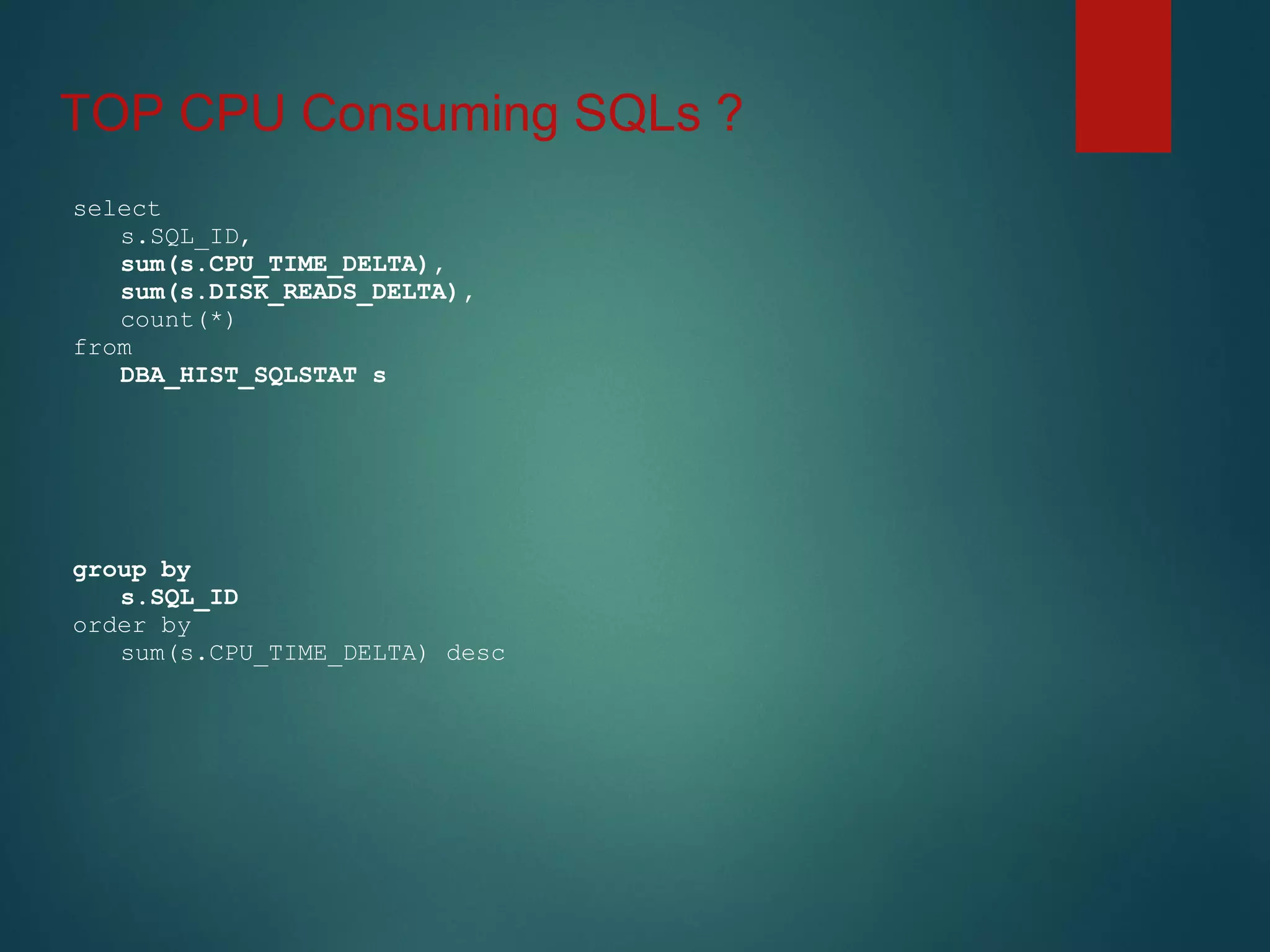
TOP CPU Consuming SQLs ?
select
s.SQL_ID,
sum(s.CPU_TIME_DELTA),
sum(s.DISK_READS_DELTA),
count(*)
from
DBA_HIST_SQLSTAT s
group by
s.SQL_ID
order by
sum(s.CPU_TIME_DELTA) desc
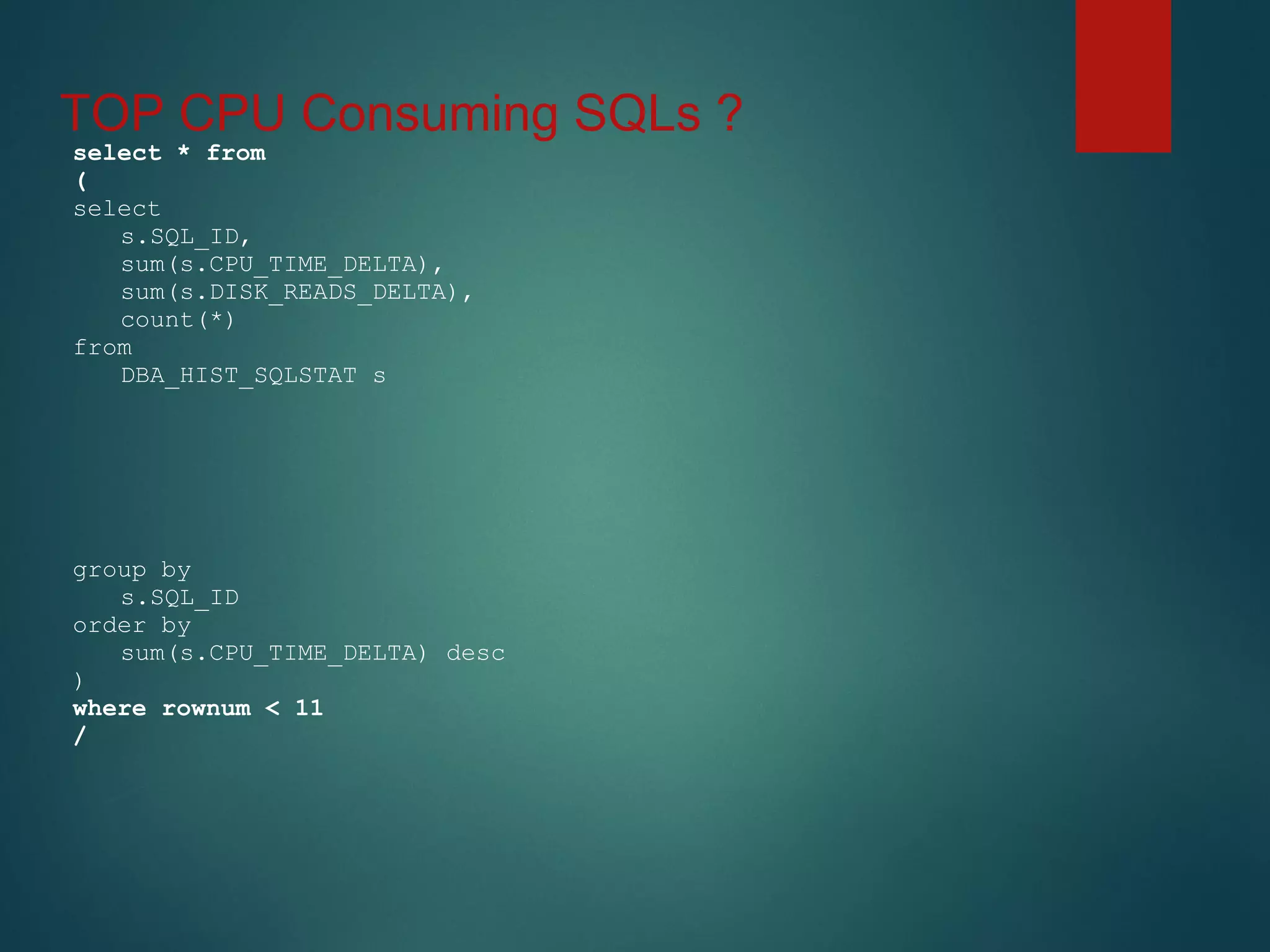
TOP CPU Consuming SQLs ?
select * from
(
select
s.SQL_ID,
sum(s.CPU_TIME_DELTA),
sum(s.DISK_READS_DELTA),
count(*)
from
DBA_HIST_SQLSTAT s
group by
s.SQL_ID
order by
sum(s.CPU_TIME_DELTA) desc
)
where rownum < 11
/
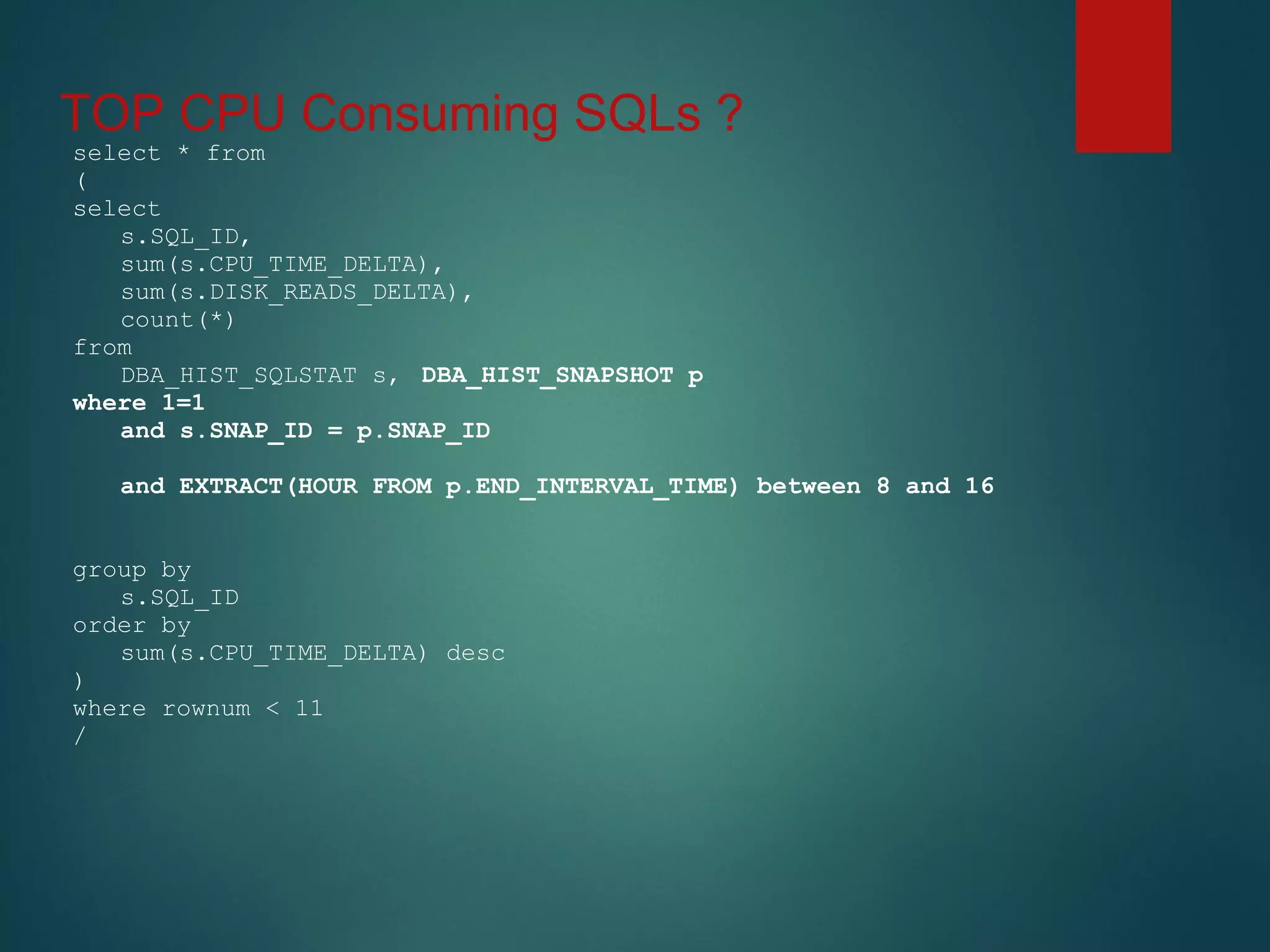
TOP CPU Consuming SQLs ?
select * from
(
select
s.SQL_ID,
sum(s.CPU_TIME_DELTA),
sum(s.DISK_READS_DELTA),
count(*)
from
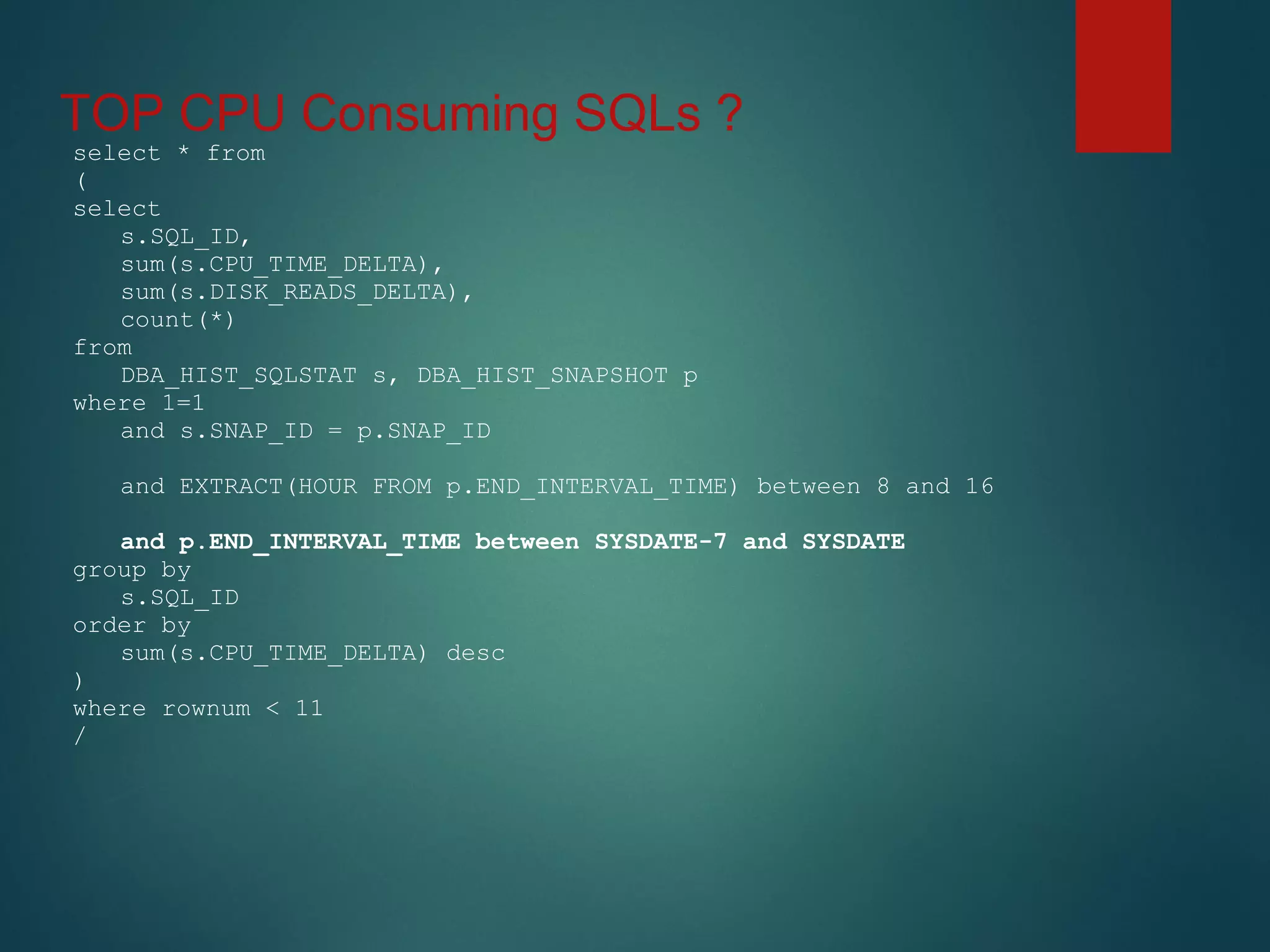
DBA_HIST_SQLSTAT s, DBA_HIST_SNAPSHOT p
where 1=1
and s.SNAP_ID = p.SNAP_ID
and EXTRACT(HOUR FROM p.END_INTERVAL_TIME) between 8 and 16
group by
s.SQL_ID
order by
sum(s.CPU_TIME_DELTA) desc
)
where rownum < 11
/
TOP CPU Consuming SQLs ?
select * from
(
select
s.SQL_ID,
sum(s.CPU_TIME_DELTA),
sum(s.DISK_READS_DELTA),
count(*)
from
DBA_HIST_SQLSTAT s, DBA_HIST_SNAPSHOT p
where 1=1
and s.SNAP_ID = p.SNAP_ID
and EXTRACT(HOUR FROM p.END_INTERVAL_TIME) between 8 and 16
and p.END_INTERVAL_TIME between SYSDATE-7 and SYSDATE
group by
s.SQL_ID
order by
sum(s.CPU_TIME_DELTA) desc
)
where rownum < 11
/
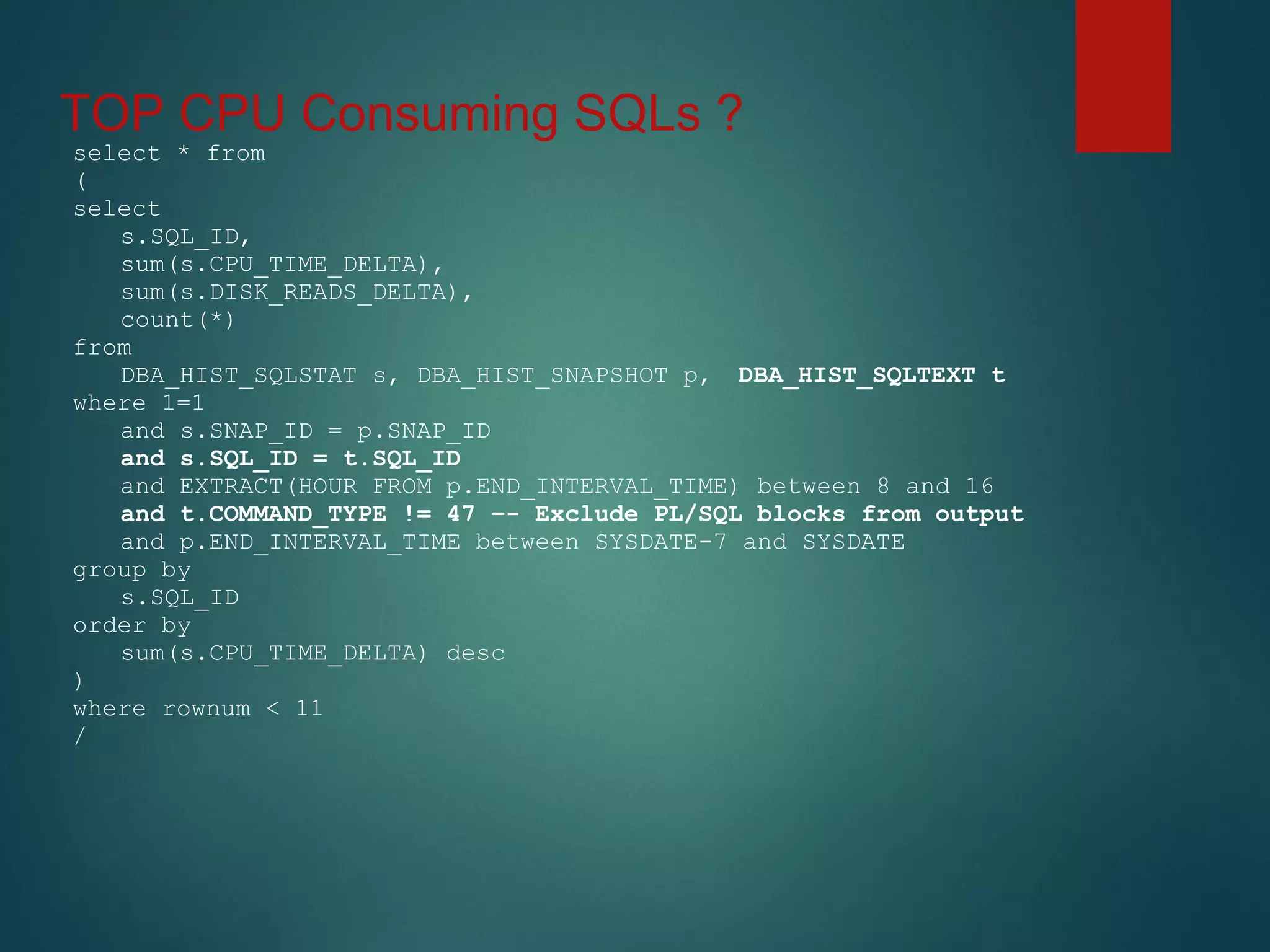
TOP CPU Consuming SQLs ?
select * from
(
select
s.SQL_ID,
sum(s.CPU_TIME_DELTA),
sum(s.DISK_READS_DELTA),
count(*)
from
DBA_HIST_SQLSTAT s, DBA_HIST_SNAPSHOT p, DBA_HIST_SQLTEXT t
where 1=1
and s.SNAP_ID = p.SNAP_ID
and s.SQL_ID = t.SQL_ID
and EXTRACT(HOUR FROM p.END_INTERVAL_TIME) between 8 and 16
and t.COMMAND_TYPE != 47 –- Exclude PL/SQL blocks from output
and p.END_INTERVAL_TIME between SYSDATE-7 and SYSDATE
group by
s.SQL_ID
order by
sum(s.CPU_TIME_DELTA) desc
)
where rownum < 11
/
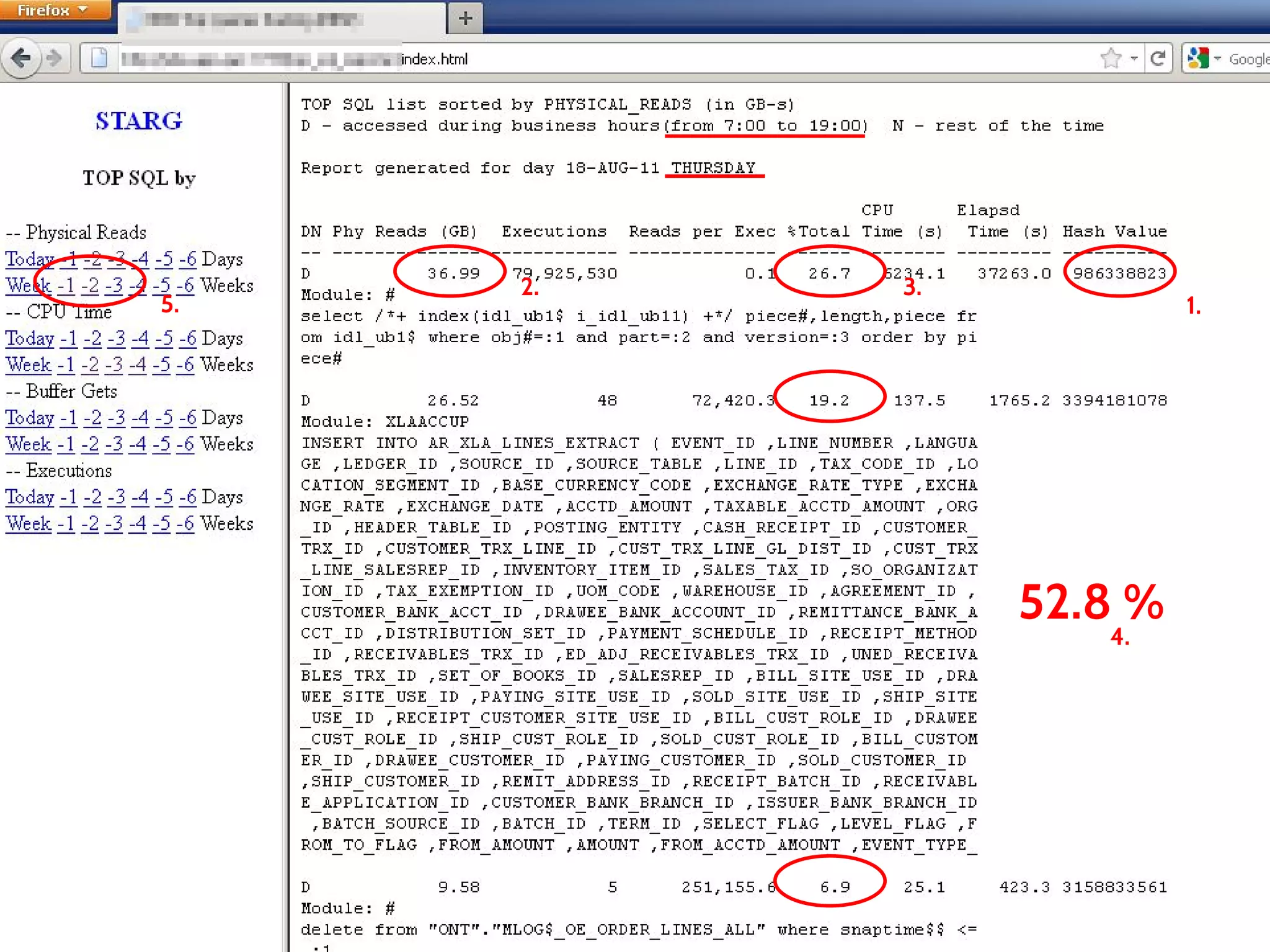
52.8 %
1.
2. 3.
4.
5.
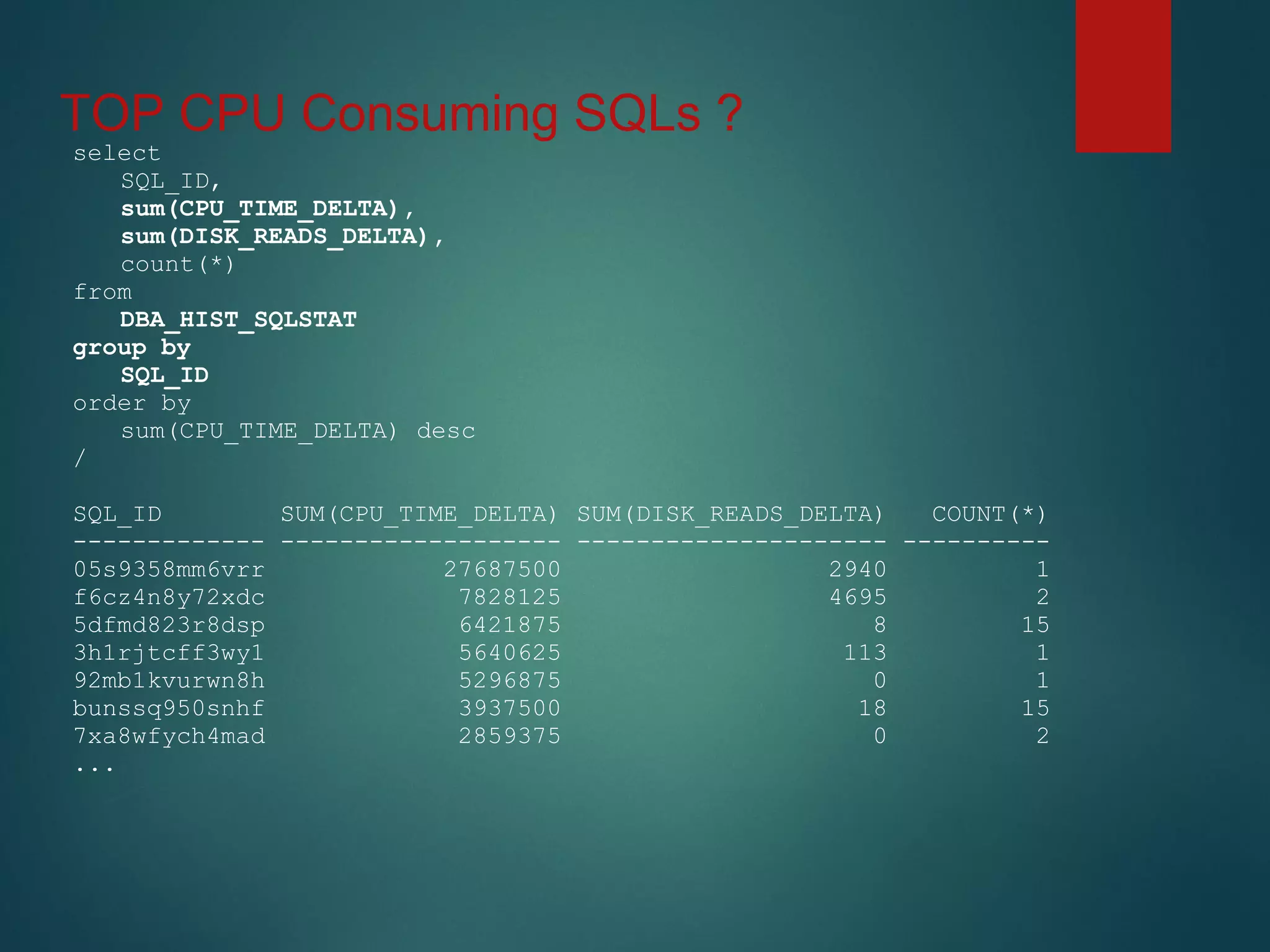
TOP CPU Consuming SQLs ?
select
SQL_ID,
sum(CPU_TIME_DELTA),
sum(DISK_READS_DELTA),
count(*)
from
DBA_HIST_SQLSTAT
group by
SQL_ID
order by
sum(CPU_TIME_DELTA) desc
/
SQL_ID SUM(CPU_TIME_DELTA) SUM(DISK_READS_DELTA) COUNT(*)
------------- ------------------- --------------------- ----------
05s9358mm6vrr 27687500 2940 1
f6cz4n8y72xdc 7828125 4695 2
5dfmd823r8dsp 6421875 8 15
3h1rjtcff3wy1 5640625 113 1
92mb1kvurwn8h 5296875 0 1
bunssq950snhf 3937500 18 15
7xa8wfych4mad 2859375 0 2
...
5 Slides
Concept & Approach
AWR = DBA_HIST_% objects
• 223 => 11.2.0.4.0
• 243 => 12.1.0.1.0
• I use just few on a regular basis
• DBA_HIST_ACTIVE_SESS_HISTORY
• DBA_HIST_SEG_STAT
• DBA_HIST_SQLSTAT
• DBA_HIST_SQL_PLAN
• DBA_HIST_SYSSTAT
• DBA_HIST_SYSTEM_EVENT
• Most of the views contain data snapshots from V$___
views
• DELTA columns (e.g. DISK_READS_DELTA)
• DBA_HIST_SEG_STAT
• DBA_HIST_SQLSTAT
- V$ACTIVE_SESSION_HISTORY
- V$SEGMENT_STATISTICS
- V$SQL
- V$SQL_PLAN
- V$SYSSTAT ( ~SES~ )
- V$SYSTEM_EVENT ( ~SESSION~ )
AWR Things to keep in mind …
• The data are just snapshots of V$ views
• Data collected based on thresholds(default top 30)
• Some data is excluded based on thresholds
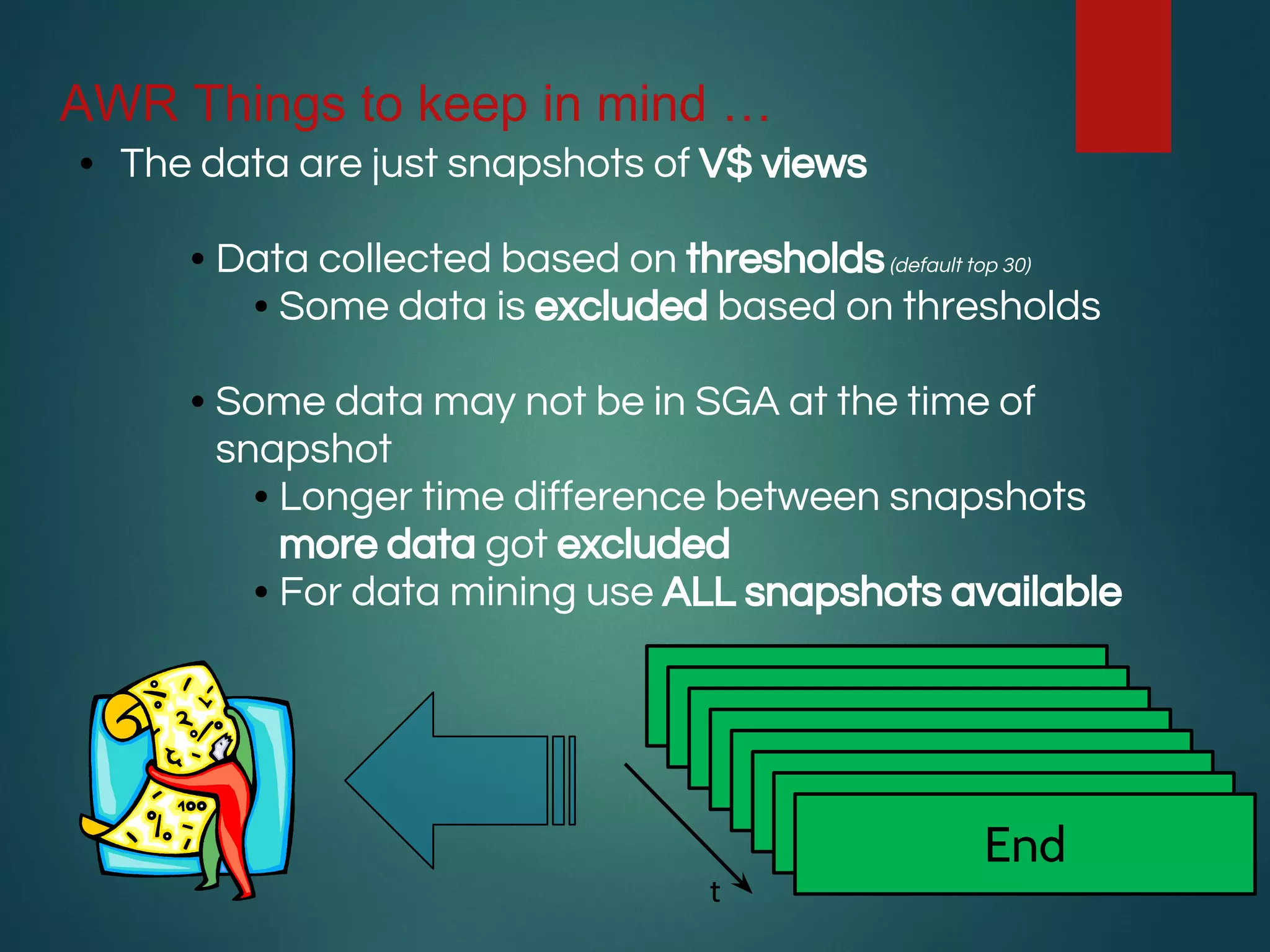
• Some data may not be in SGA at the time of
snapshot
• Longer time difference between snapshots
more data got excluded
• For data mining use ALL snapshots available
Begin
End
t
AWR Things to keep in mind …
• Forget about AWR if there are literals in the code
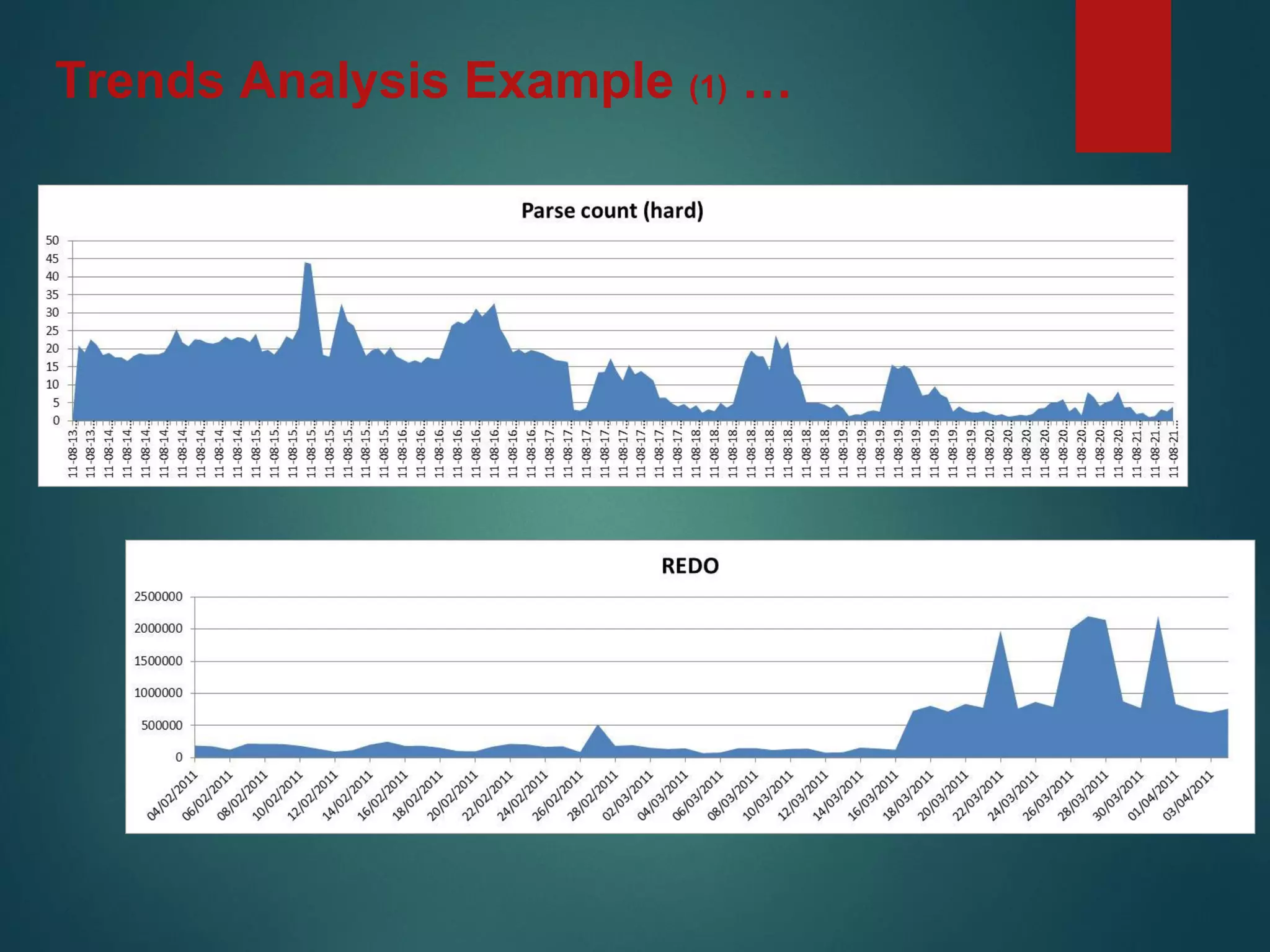
• Indicator is high parse count (hard)(10-50 per/sec)
• cursor_sharing = FORCE (use very carefully)
• In RAC configuration do not forget INST_ID column in joins
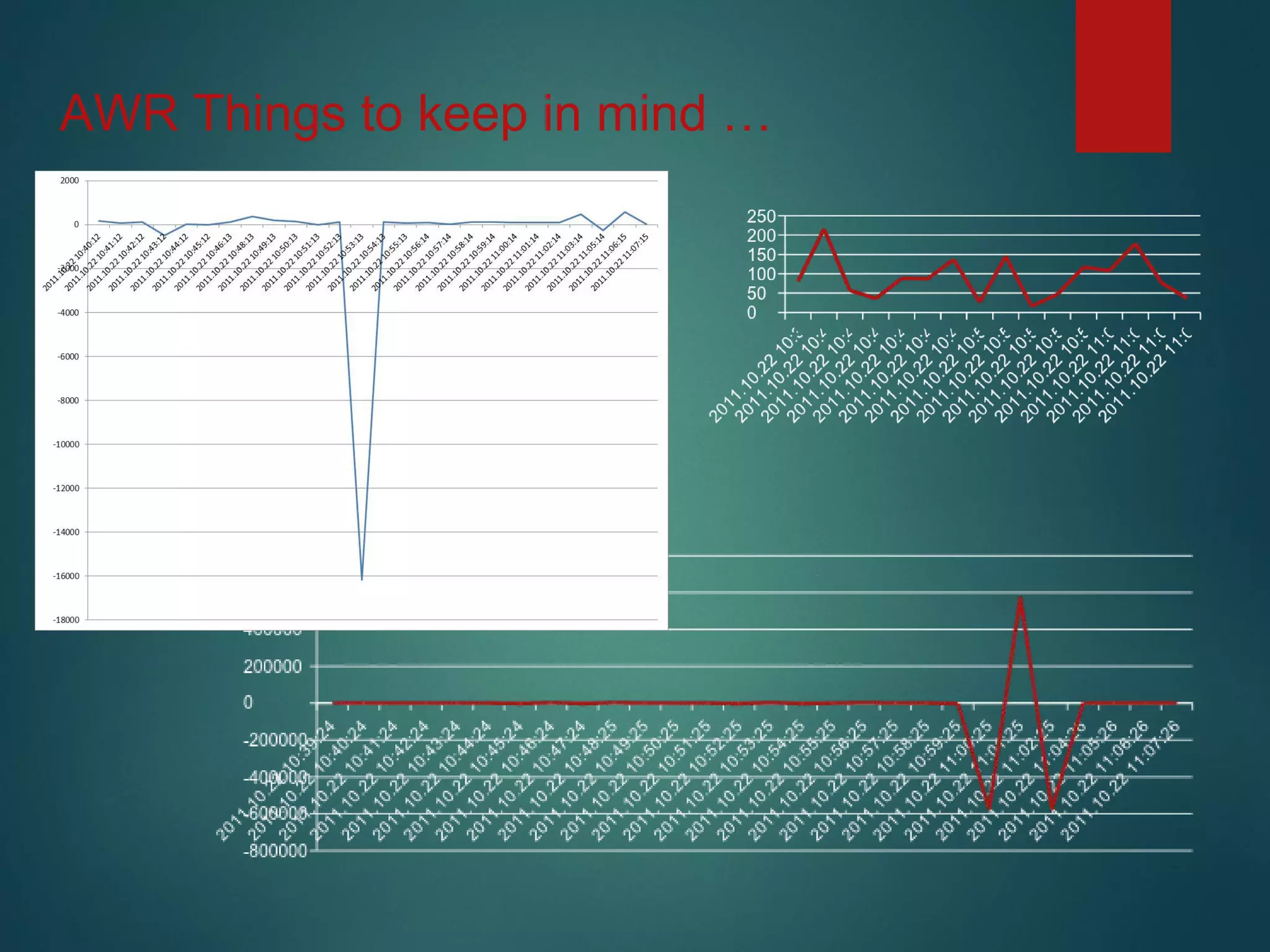
• Most of the V$ (DBA_HIST) performance views have incremental
counters. END - BEGIN values
• You may get wrong results (sometimes negative)
• Sometimes counters reach max value and get reset
• Counters got reset at instance restart time
• Time between snapshots may be different
• Suggestion (ENDv - BEGINv)/(ENDs - BEGINs)=value/sec
AWR Things to keep in mind …
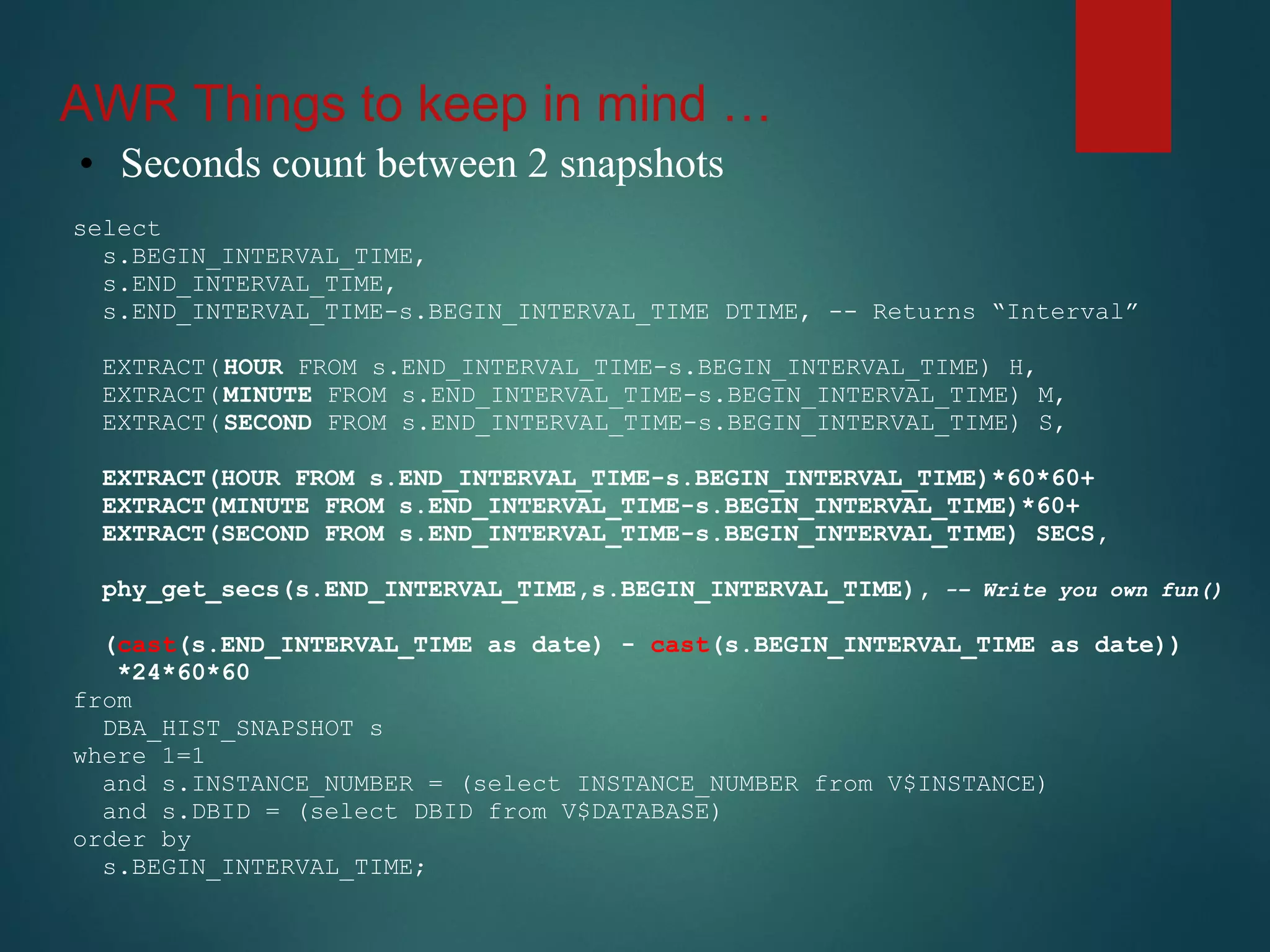
• Seconds count between 2 snapshots
select
s.BEGIN_INTERVAL_TIME,
s.END_INTERVAL_TIME,
s.END_INTERVAL_TIME-s.BEGIN_INTERVAL_TIME DTIME, -- Returns “Interval”
EXTRACT(HOUR FROM s.END_INTERVAL_TIME-s.BEGIN_INTERVAL_TIME) H,
EXTRACT(MINUTE FROM s.END_INTERVAL_TIME-s.BEGIN_INTERVAL_TIME) M,
EXTRACT(SECOND FROM s.END_INTERVAL_TIME-s.BEGIN_INTERVAL_TIME) S,
EXTRACT(HOUR FROM s.END_INTERVAL_TIME-s.BEGIN_INTERVAL_TIME)*60*60+
EXTRACT(MINUTE FROM s.END_INTERVAL_TIME-s.BEGIN_INTERVAL_TIME)*60+
EXTRACT(SECOND FROM s.END_INTERVAL_TIME-s.BEGIN_INTERVAL_TIME) SECS,
phy_get_secs(s.END_INTERVAL_TIME,s.BEGIN_INTERVAL_TIME), -– Write you own fun()
(cast(s.END_INTERVAL_TIME as date) - cast(s.BEGIN_INTERVAL_TIME as date))
*24*60*60
from
DBA_HIST_SNAPSHOT s
where 1=1
and s.INSTANCE_NUMBER = (select INSTANCE_NUMBER from V$INSTANCE)
and s.DBID = (select DBID from V$DATABASE)
order by
s.BEGIN_INTERVAL_TIME;
AWR Things to keep in mind …
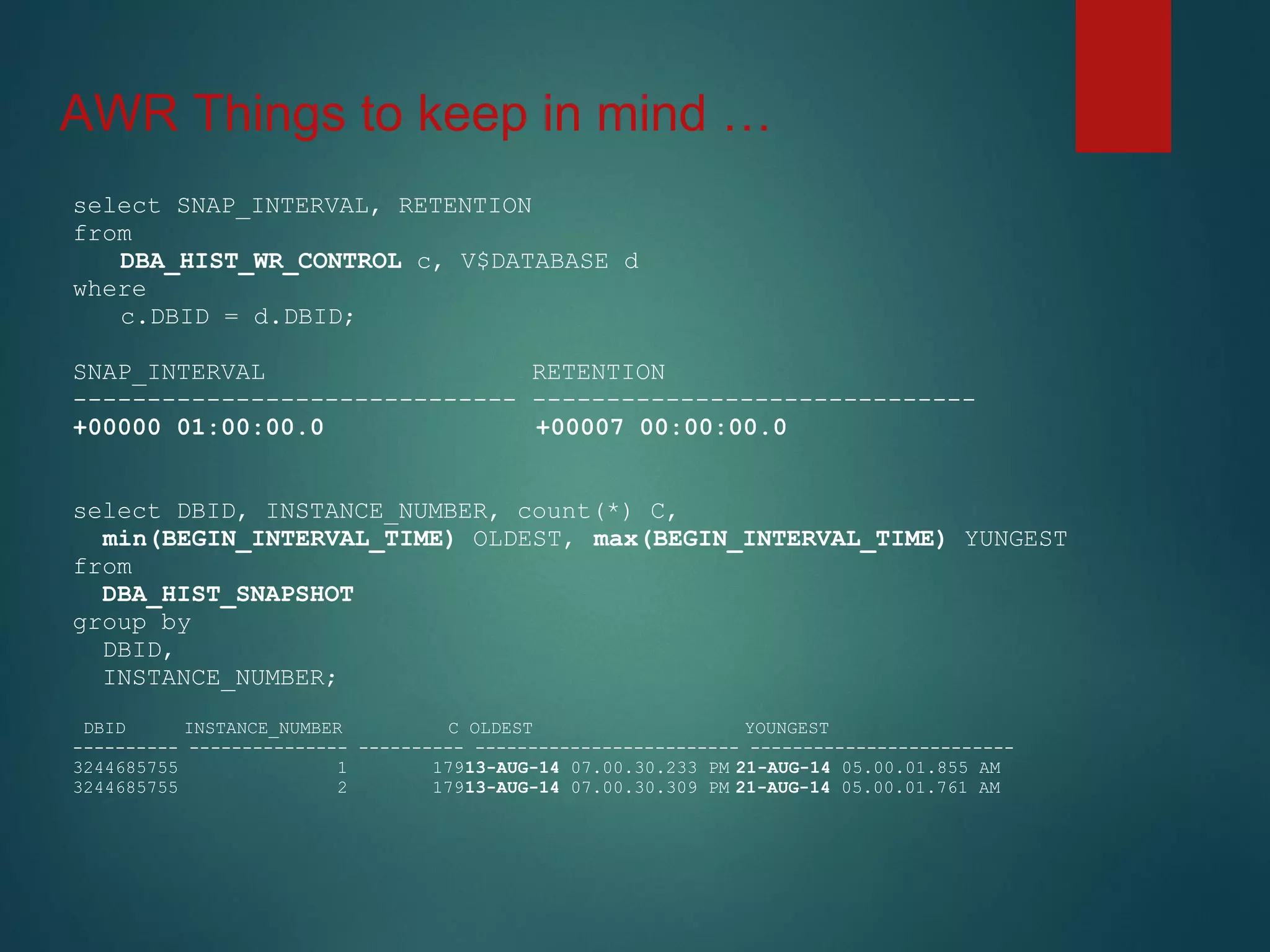
select SNAP_INTERVAL, RETENTION
from
DBA_HIST_WR_CONTROL c, V$DATABASE d
where
c.DBID = d.DBID;
SNAP_INTERVAL RETENTION
------------------------------ ------------------------------
+00000 01:00:00.0 +00007 00:00:00.0
select DBID, INSTANCE_NUMBER, count(*) C,
min(BEGIN_INTERVAL_TIME) OLDEST, max(BEGIN_INTERVAL_TIME) YUNGEST
from
DBA_HIST_SNAPSHOT
group by
DBID,
INSTANCE_NUMBER;
DBID INSTANCE_NUMBER C OLDEST YOUNGEST
---------- --------------- ---------- ------------------------- -------------------------
3244685755 1 17913-AUG-14 07.00.30.233 PM 21-AUG-14 05.00.01.855 AM
3244685755 2 17913-AUG-14 07.00.30.309 PM 21-AUG-14 05.00.01.761 AM
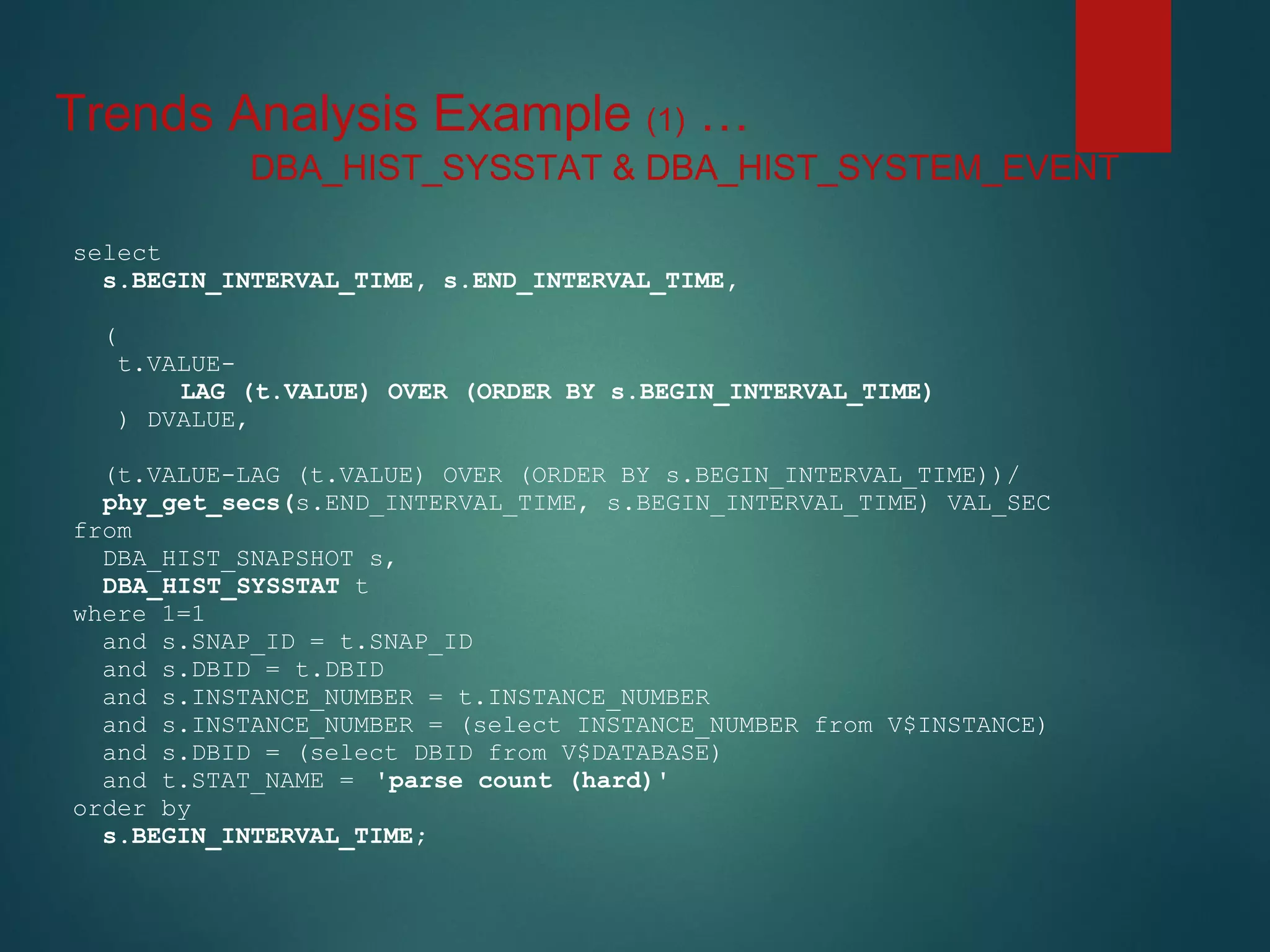
Trends Analysis Example (1) …
select
s.BEGIN_INTERVAL_TIME, s.END_INTERVAL_TIME,
(
t.VALUE-
LAG (t.VALUE) OVER (ORDER BY s.BEGIN_INTERVAL_TIME)
) DVALUE,
(t.VALUE-LAG (t.VALUE) OVER (ORDER BY s.BEGIN_INTERVAL_TIME))/
phy_get_secs(s.END_INTERVAL_TIME, s.BEGIN_INTERVAL_TIME) VAL_SEC
from
DBA_HIST_SNAPSHOT s,
DBA_HIST_SYSSTAT t
where 1=1
and s.SNAP_ID = t.SNAP_ID
and s.DBID = t.DBID
and s.INSTANCE_NUMBER = t.INSTANCE_NUMBER
and s.INSTANCE_NUMBER = (select INSTANCE_NUMBER from V$INSTANCE)
and s.DBID = (select DBID from V$DATABASE)
and t.STAT_NAME = 'parse count (hard)'
order by
s.BEGIN_INTERVAL_TIME;
DBA_HIST_SYSSTAT & DBA_HIST_SYSTEM_EVENT
Trends Analysis Example (1) …
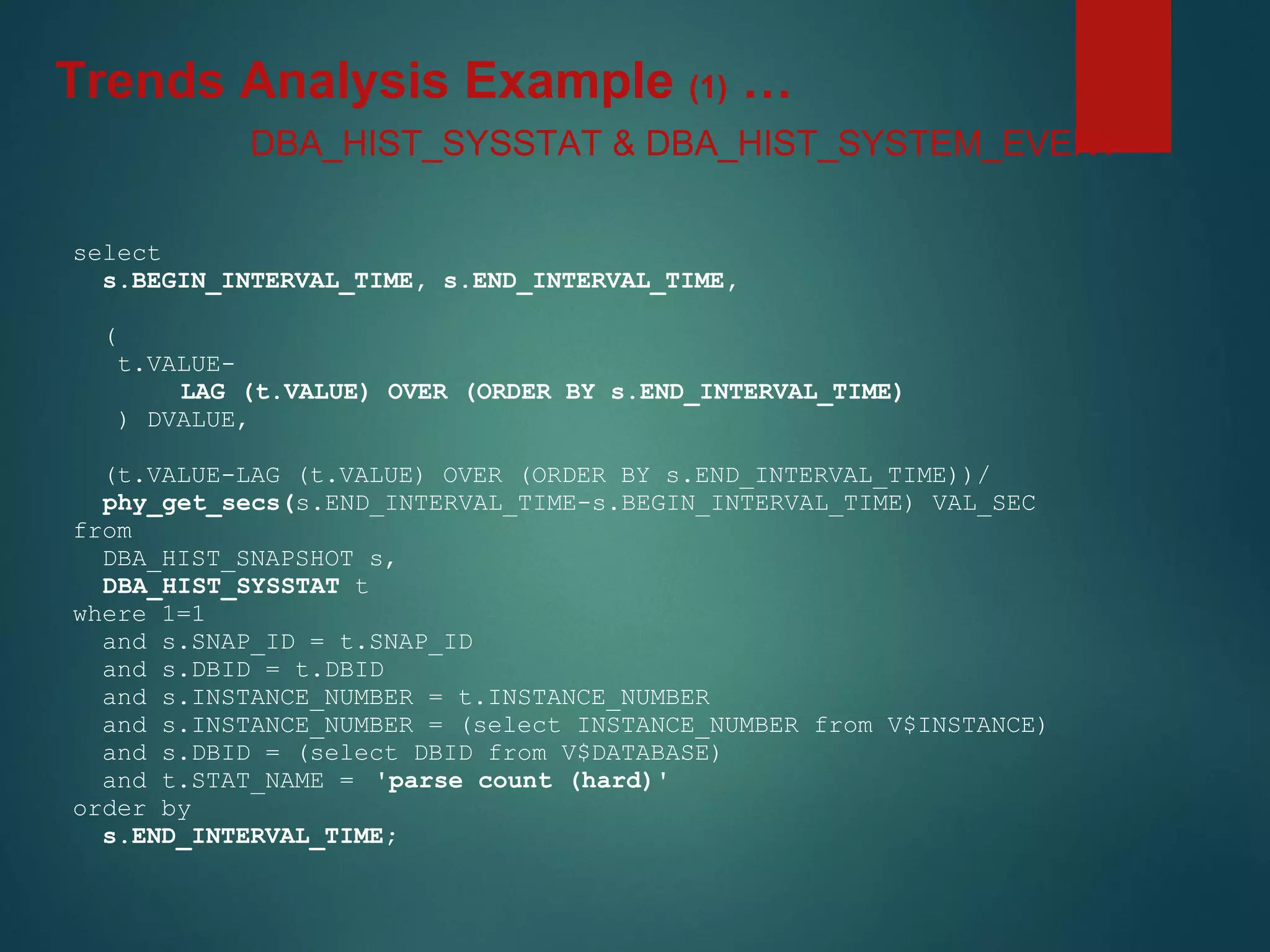
select
s.BEGIN_INTERVAL_TIME, s.END_INTERVAL_TIME,
(
t.VALUE-
LAG (t.VALUE) OVER (ORDER BY s.END_INTERVAL_TIME)
) DVALUE,
(t.VALUE-LAG (t.VALUE) OVER (ORDER BY s.END_INTERVAL_TIME))/
phy_get_secs(s.END_INTERVAL_TIME-s.BEGIN_INTERVAL_TIME) VAL_SEC
from
DBA_HIST_SNAPSHOT s,
DBA_HIST_SYSSTAT t
where 1=1
and s.SNAP_ID = t.SNAP_ID
and s.DBID = t.DBID
and s.INSTANCE_NUMBER = t.INSTANCE_NUMBER
and s.INSTANCE_NUMBER = (select INSTANCE_NUMBER from V$INSTANCE)
and s.DBID = (select DBID from V$DATABASE)
and t.STAT_NAME = 'parse count (hard)'
order by
s.END_INTERVAL_TIME;
DBA_HIST_SYSSTAT & DBA_HIST_SYSTEM_EVENT
Trends Analysis Example (1) …
SQL Bad performance Example (2) …
• Called by a user to troubleshoot a badly performing SQL
• Sometimes the SQL hangs (never finishes) and needs to be killed
and re-executed
• Upon re-execution, it always finishes successfully in a few
minutes
• The client demanded a resolution ASAP …
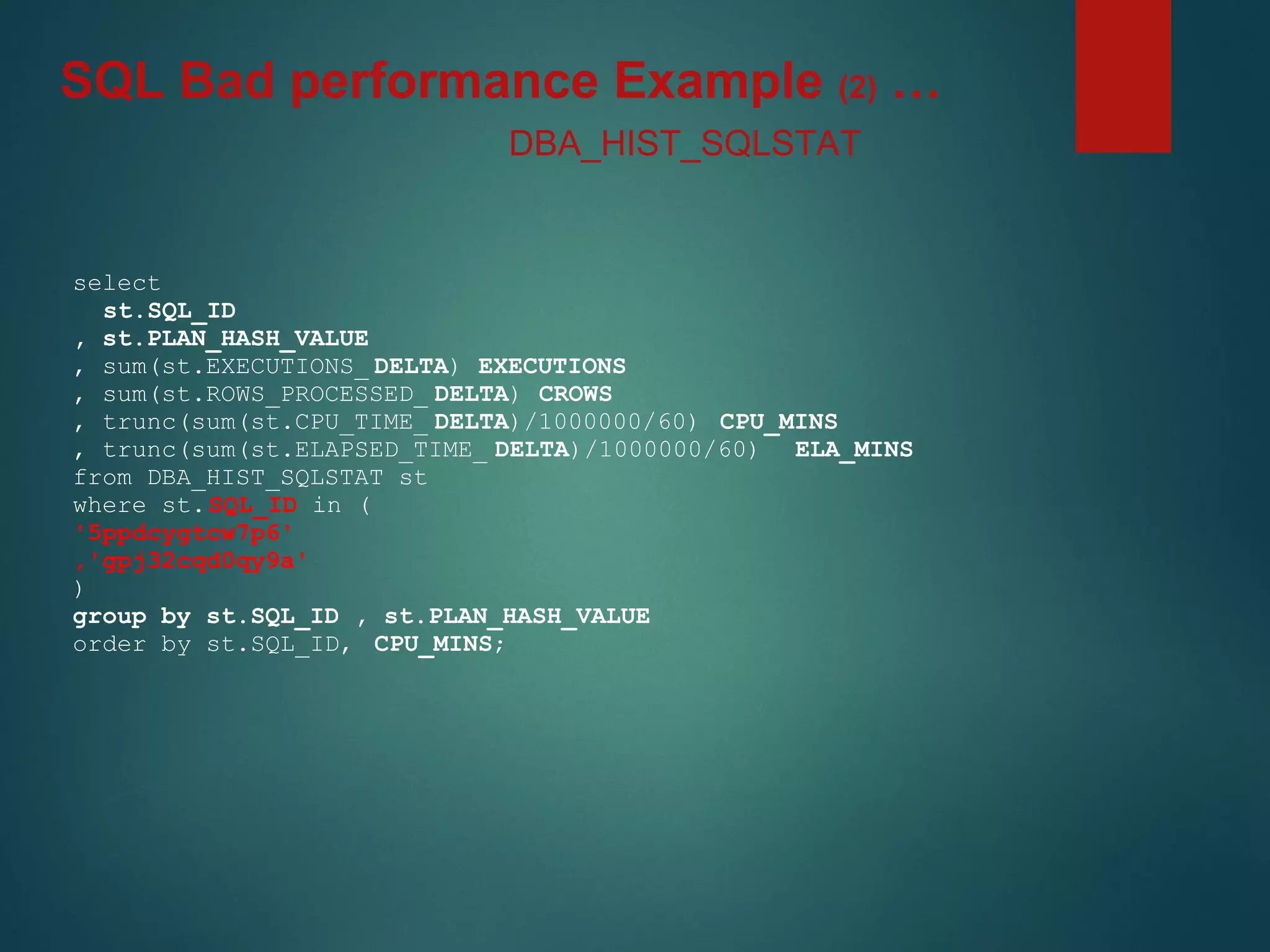
select
st.SQL_ID
, st.PLAN_HASH_VALUE
, sum(st.EXECUTIONS_ DELTA) EXECUTIONS
, sum(st.ROWS_PROCESSED_ DELTA) CROWS
, trunc(sum(st.CPU_TIME_ DELTA)/1000000/60) CPU_MINS
, trunc(sum(st.ELAPSED_TIME_ DELTA)/1000000/60) ELA_MINS
from DBA_HIST_SQLSTAT st
where st.SQL_ID in (
'5ppdcygtcw7p6'
,'gpj32cqd0qy9a'
)
group by st.SQL_ID , st.PLAN_HASH_VALUE
order by st.SQL_ID, CPU_MINS;
DBA_HIST_SQLSTAT
SQL Bad performance Example (2) …
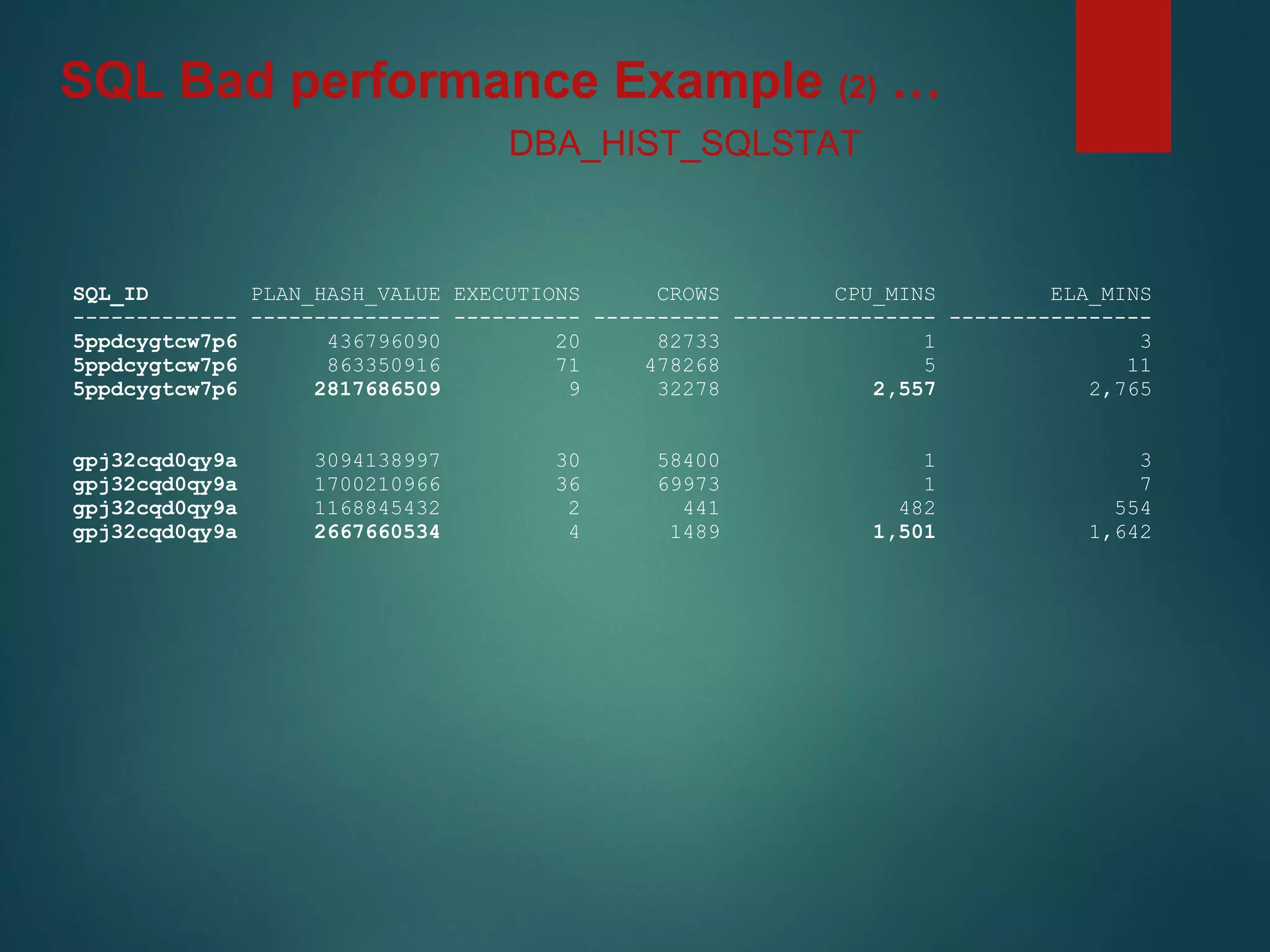
SQL_ID PLAN_HASH_VALUE EXECUTIONS CROWS CPU_MINS ELA_MINS
------------- --------------- ---------- ---------- ---------------- ----------------
5ppdcygtcw7p6 436796090 20 82733 1 3
5ppdcygtcw7p6 863350916 71 478268 5 11
5ppdcygtcw7p6 2817686509 9 32278 2,557 2,765
gpj32cqd0qy9a 3094138997 30 58400 1 3
gpj32cqd0qy9a 1700210966 36 69973 1 7
gpj32cqd0qy9a 1168845432 2 441 482 554
gpj32cqd0qy9a 2667660534 4 1489 1,501 1,642
DBA_HIST_SQLSTAT
SQL Bad performance Example (2) …
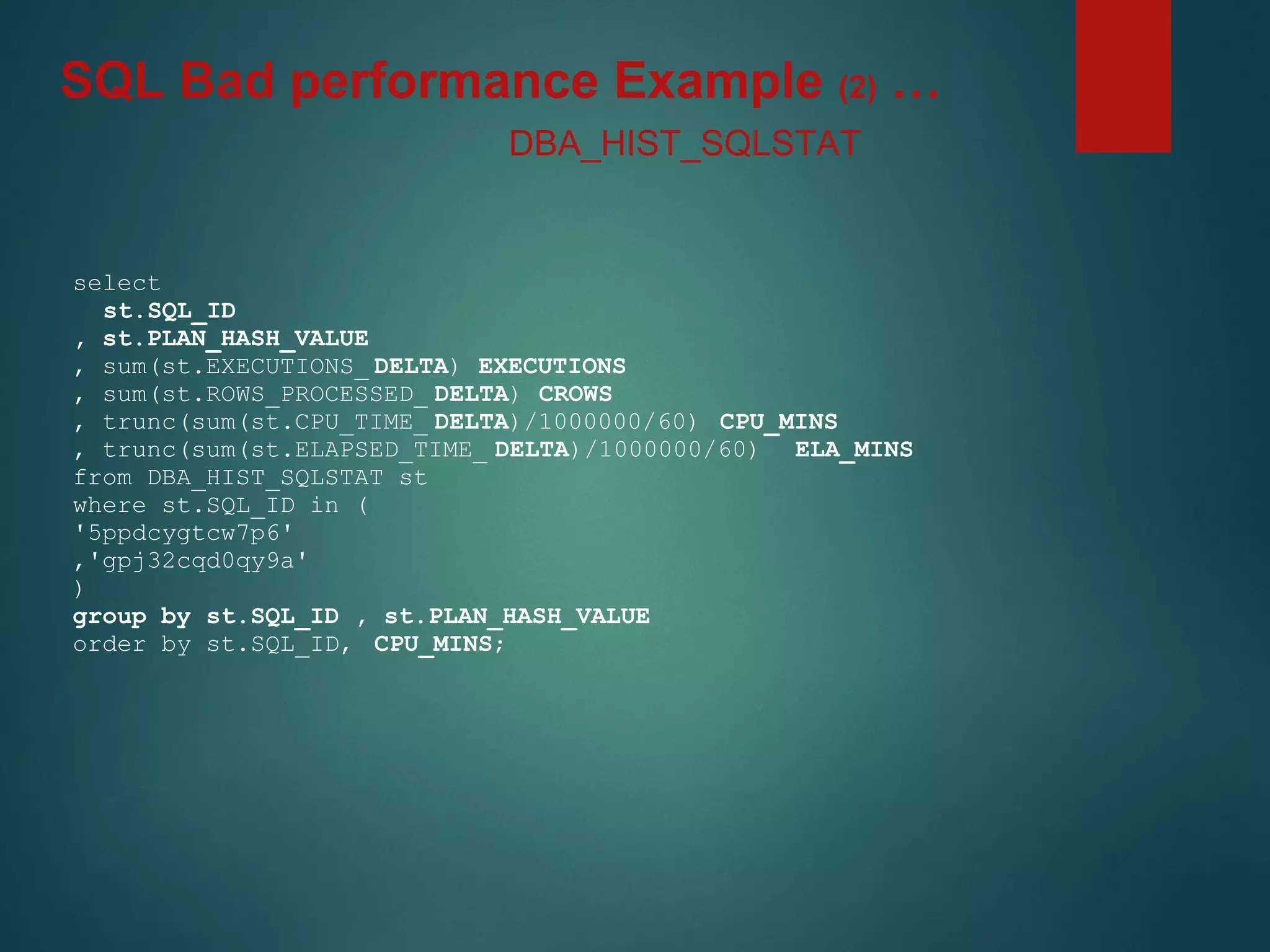
select
st.SQL_ID
, st.PLAN_HASH_VALUE
, sum(st.EXECUTIONS_ DELTA) EXECUTIONS
, sum(st.ROWS_PROCESSED_ DELTA) CROWS
, trunc(sum(st.CPU_TIME_ DELTA)/1000000/60) CPU_MINS
, trunc(sum(st.ELAPSED_TIME_ DELTA)/1000000/60) ELA_MINS
from DBA_HIST_SQLSTAT st
where st.SQL_ID in (
'5ppdcygtcw7p6'
,'gpj32cqd0qy9a'
)
group by st.SQL_ID , st.PLAN_HASH_VALUE
order by st.SQL_ID, CPU_MINS;
DBA_HIST_SQLSTAT
SQL Bad performance Example (2) …
• In the result …
• Two different jobs were gathering statistics on a daily basis
1. “ANALYZE …” part of other batch job (developer)
2. “DBMS_STATS…” traditional (DBA)
• Sometimes “DBMS_STATS…“ did not complete before the
batch job starts (+/- 10 minutes).
• After the job got killed (typically after 10 min since it started) the
new “correct” statistics were in place.
• Takeaways …
A. Don’t change your statistics that frequently (should be consistent)
B. AWR data helps to spot such issues easily
SQL Bad performance Example (2) …
SQL Plan flipping Example (3) …
• I asked myself: Well !
• If we find that the execution plan for one SQL has changed
from a good (fast) to a bad one (slow), are there other SQLs
affected by an issue alike?
• And if there are, how many are there?
• Would SQL Profiles (baselines, outlines) help address
those?
SELECT st2.SQL_ID ,
st2.PLAN_HASH_VALUE ,
st_long.PLAN_HASH_VALUE l_PLAN_HASH_VALUE ,
st2.CPU_MINS ,
st_long.CPU_MINS l_CPU_MINS ,
st2.ELA_MINS ,
st_long.ELA_MINS l_ELA_MINS ,
st2.EXECUTIONS ,
st_long.EXECUTIONS l_EXECUTIONS ,
st2.CROWS ,
st_long.CROWS l_CROWS ,
st2.CPU_MINS_PER_ROW ,
st_long.CPU_MINS_PER_ROW l_CPU_MINS_PER_ROW
FROM
(SELECT st.SQL_ID ,
st.PLAN_HASH_VALUE ,
SUM(st.EXECUTIONS_DELTA) EXECUTIONS ,
SUM(st.ROWS_PROCESSED_DELTA) CROWS ,
TRUNC(SUM(st.CPU_TIME_DELTA) /1000000/60) CPU_MINS ,
DECODE( SUM(st.ROWS_PROCESSED_DELTA), 0 , 0 , (SUM(st.CPU_TIME_DELTA)/1000000/60)/SUM(st.ROWS_PROCESSED_DELTA) ) CPU_MINS_PER_ROW ,
TRUNC(SUM(st.ELAPSED_TIME_DELTA) /1000000/60) ELA_MINS
FROM DBA_HIST_SQLSTAT st
WHERE 1 =1
AND ( st.CPU_TIME_DELTA !=0
OR st.ROWS_PROCESSED_DELTA !=0)
GROUP BY st.SQL_ID,
st.PLAN_HASH_VALUE
) st2,
(SELECT st.SQL_ID ,
st.PLAN_HASH_VALUE ,
SUM(st.EXECUTIONS_DELTA) EXECUTIONS ,
SUM(st.ROWS_PROCESSED_DELTA) CROWS ,
TRUNC(SUM(st.CPU_TIME_DELTA) /1000000/60) CPU_MINS ,
DECODE( SUM(st.ROWS_PROCESSED_DELTA), 0 , 0 , (SUM(st.CPU_TIME_DELTA)/1000000/60)/SUM(st.ROWS_PROCESSED_DELTA) ) CPU_MINS_PER_ROW ,
TRUNC(SUM(st.ELAPSED_TIME_DELTA) /1000000/60) ELA_MINS
FROM DBA_HIST_SQLSTAT st
WHERE 1 =1
AND ( st.CPU_TIME_DELTA !=0
OR st.ROWS_PROCESSED_DELTA !=0)
HAVING TRUNC(SUM(st.CPU_TIME_DELTA)/1000000/60) > 10
GROUP BY st.SQL_ID,
st.PLAN_HASH_VALUE
) st_long
WHERE 1 =1
AND st2.SQL_ID = st_long.SQL_ID
AND st_long.CPU_MINS_PER_ROW/DECODE(st2.CPU_MINS_PER_ROW,0,1,st2.CPU_MINS_PER_ROW) > 2
ORDER BY l_CPU_MINS DESC,
st2.SQL_ID,
st_long.CPU_MINS DESC,
st2.PLAN_HASH_VALUE;
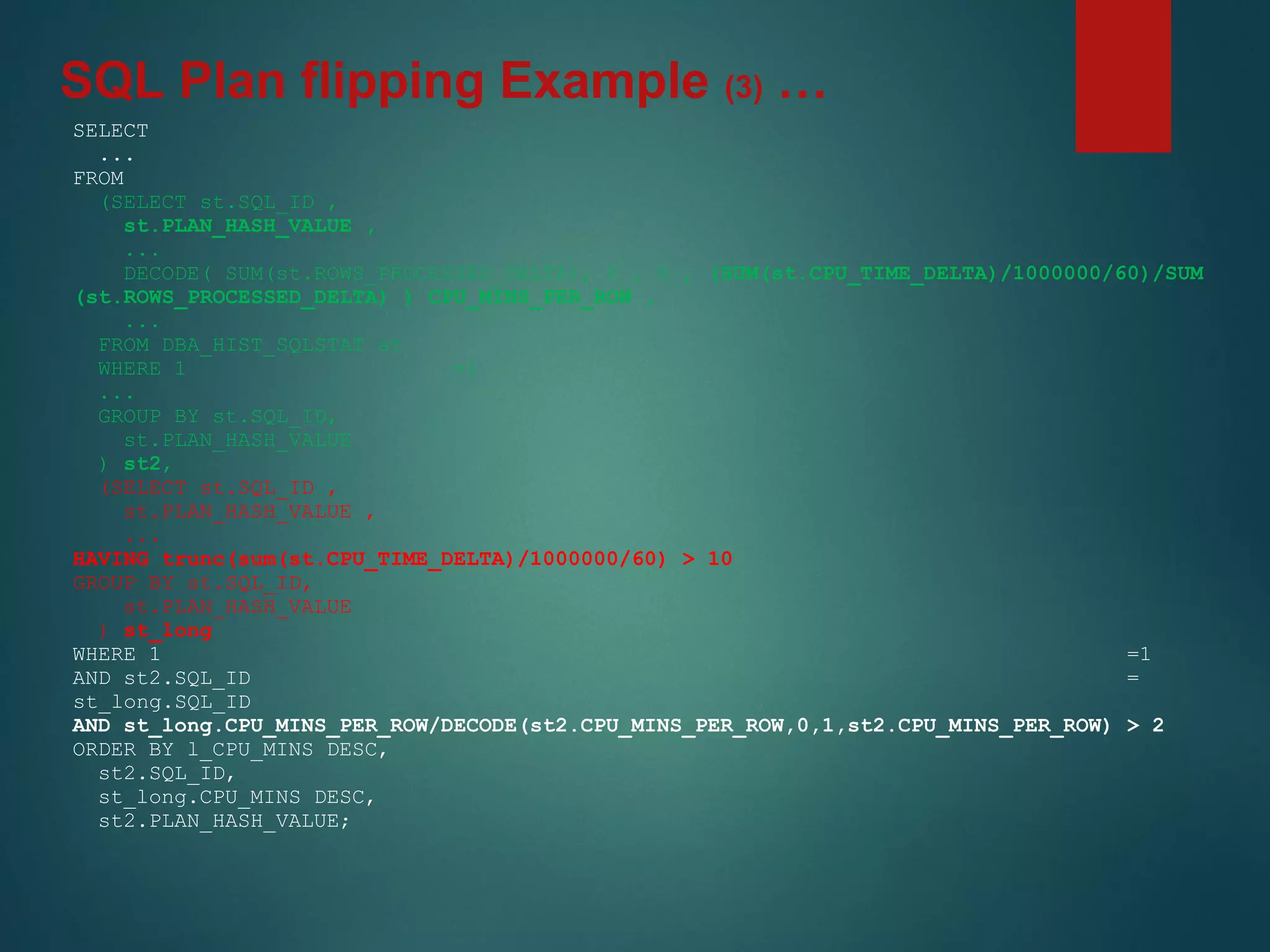
SQL Plan flipping Example (3) …
SELECT
...
FROM
(SELECT st.SQL_ID ,
st.PLAN_HASH_VALUE ,
...
DECODE( SUM(st.ROWS_PROCESSED_DELTA), 0 , 0 , (SUM(st.CPU_TIME_DELTA)/1000000/60)/SUM
(st.ROWS_PROCESSED_DELTA) ) CPU_MINS_PER_ROW ,
...
FROM DBA_HIST_SQLSTAT st
WHERE 1 =1
...
GROUP BY st.SQL_ID,
st.PLAN_HASH_VALUE
) st2,
(SELECT st.SQL_ID ,
st.PLAN_HASH_VALUE ,
...
HAVING trunc(sum(st.CPU_TIME_DELTA)/1000000/60) > 10
GROUP BY st.SQL_ID,
st.PLAN_HASH_VALUE
) st_long
WHERE 1 =1
AND st2.SQL_ID =
st_long.SQL_ID
AND st_long.CPU_MINS_PER_ROW/DECODE(st2.CPU_MINS_PER_ROW,0,1,st2.CPU_MINS_PER_ROW) > 2
ORDER BY l_CPU_MINS DESC,
st2.SQL_ID,
st_long.CPU_MINS DESC,
st2.PLAN_HASH_VALUE;
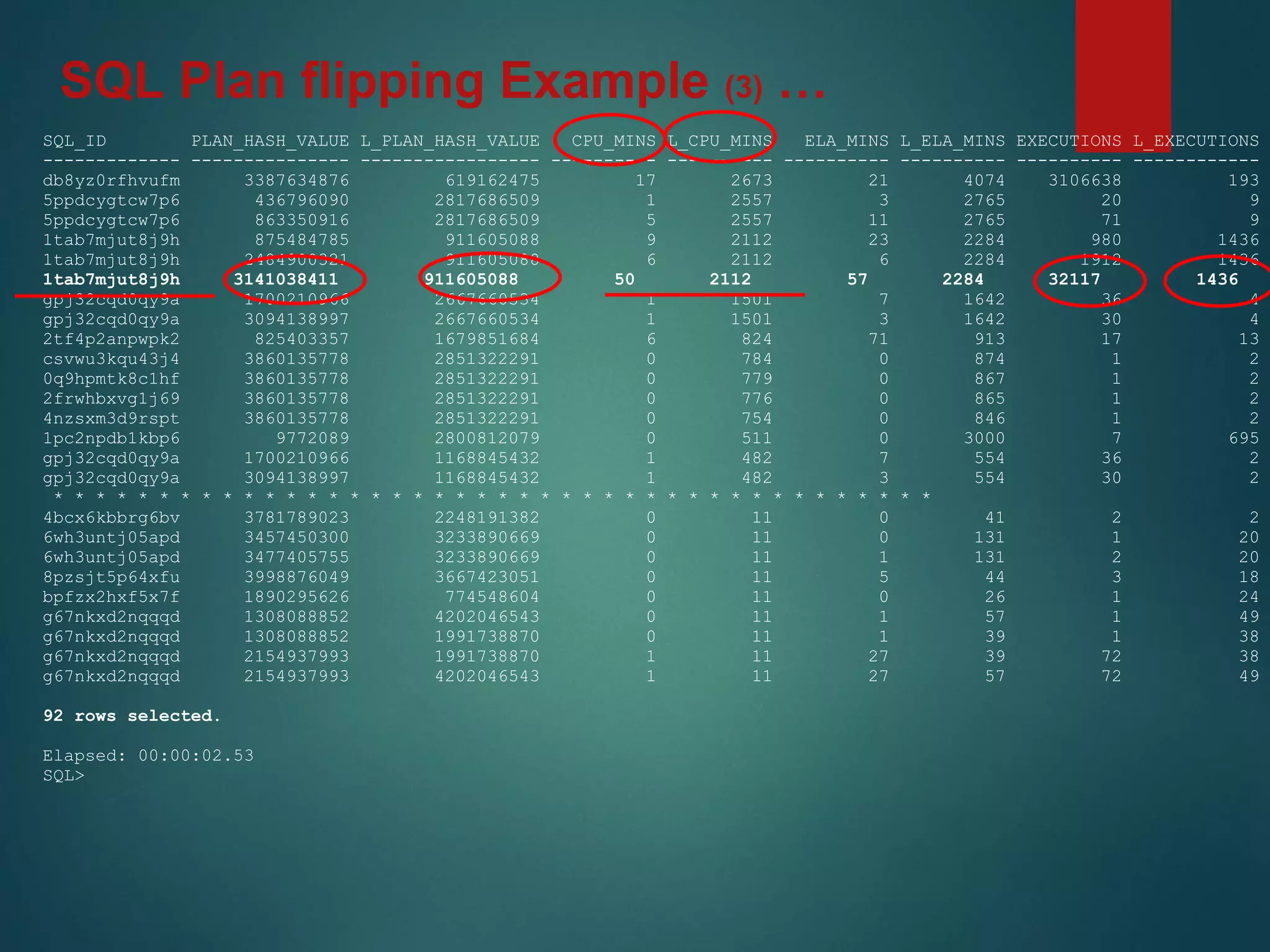
SQL Plan flipping Example (3) …
SQL_ID PLAN_HASH_VALUE L_PLAN_HASH_VALUE CPU_MINS L_CPU_MINS ELA_MINS L_ELA_MINS EXECUTIONS L_EXECUTIONS
------------- --------------- ----------------- ---------- ---------- ---------- ---------- ---------- ------------
db8yz0rfhvufm 3387634876 619162475 17 2673 21 4074 3106638 193
5ppdcygtcw7p6 436796090 2817686509 1 2557 3 2765 20 9
5ppdcygtcw7p6 863350916 2817686509 5 2557 11 2765 71 9
1tab7mjut8j9h 875484785 911605088 9 2112 23 2284 980 1436
1tab7mjut8j9h 2484900321 911605088 6 2112 6 2284 1912 1436
1tab7mjut8j9h 3141038411 911605088 50 2112 57 2284 32117 1436
gpj32cqd0qy9a 1700210966 2667660534 1 1501 7 1642 36 4
gpj32cqd0qy9a 3094138997 2667660534 1 1501 3 1642 30 4
2tf4p2anpwpk2 825403357 1679851684 6 824 71 913 17 13
csvwu3kqu43j4 3860135778 2851322291 0 784 0 874 1 2
0q9hpmtk8c1hf 3860135778 2851322291 0 779 0 867 1 2
2frwhbxvg1j69 3860135778 2851322291 0 776 0 865 1 2
4nzsxm3d9rspt 3860135778 2851322291 0 754 0 846 1 2
1pc2npdb1kbp6 9772089 2800812079 0 511 0 3000 7 695
gpj32cqd0qy9a 1700210966 1168845432 1 482 7 554 36 2
gpj32cqd0qy9a 3094138997 1168845432 1 482 3 554 30 2
* * * * * * * * * * * * * * * * * * * * * * * * * * * * * * * * * * * * * * * * * *
4bcx6kbbrg6bv 3781789023 2248191382 0 11 0 41 2 2
6wh3untj05apd 3457450300 3233890669 0 11 0 131 1 20
6wh3untj05apd 3477405755 3233890669 0 11 1 131 2 20
8pzsjt5p64xfu 3998876049 3667423051 0 11 5 44 3 18
bpfzx2hxf5x7f 1890295626 774548604 0 11 0 26 1 24
g67nkxd2nqqqd 1308088852 4202046543 0 11 1 57 1 49
g67nkxd2nqqqd 1308088852 1991738870 0 11 1 39 1 38
g67nkxd2nqqqd 2154937993 1991738870 1 11 27 39 72 38
g67nkxd2nqqqd 2154937993 4202046543 1 11 27 57 72 49
92 rows selected.
Elapsed: 00:00:02.53
SQL>
SQL Plan flipping Example (3) …
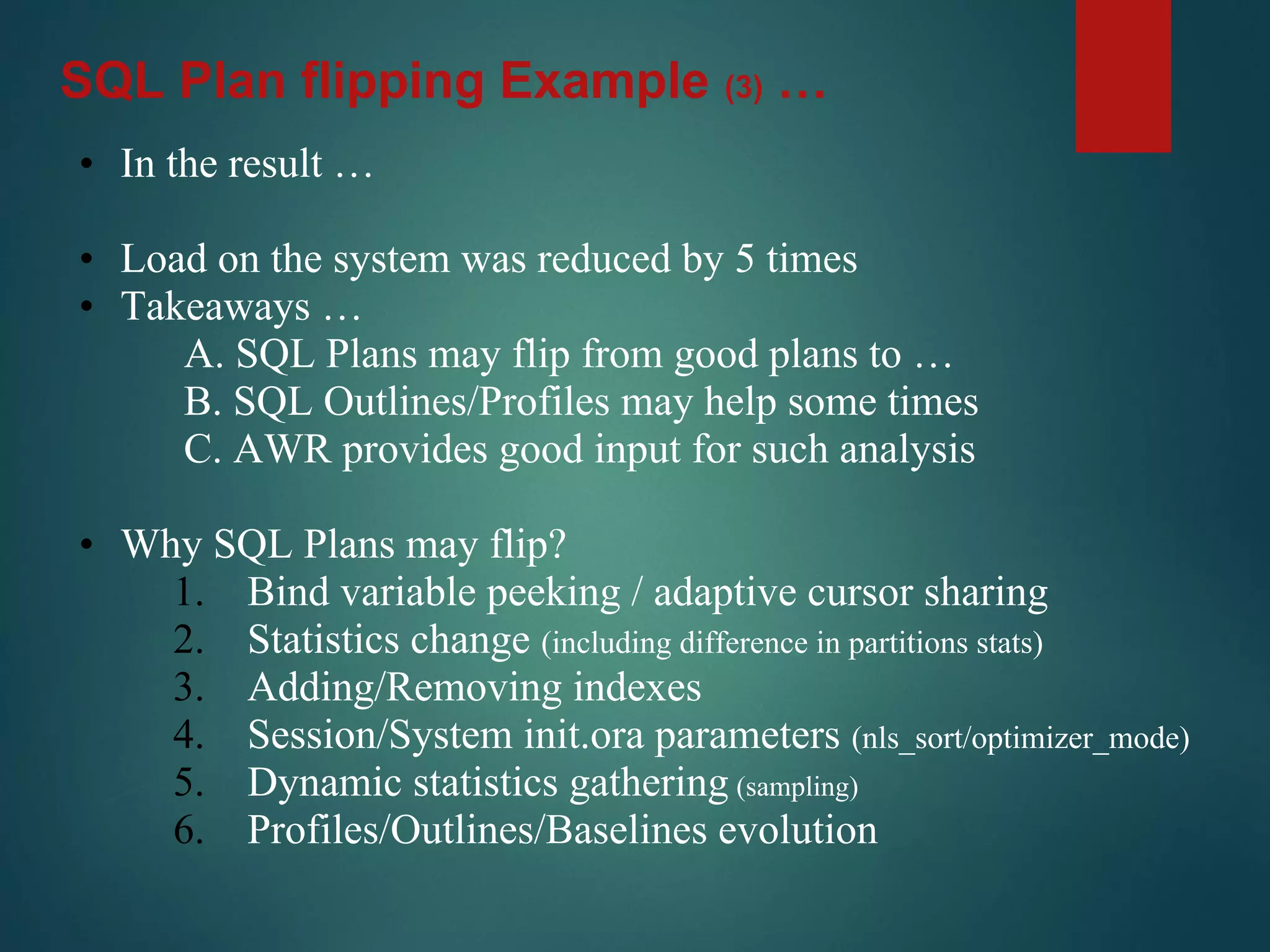
• In the result …
• Load on the system was reduced by 5 times
• Takeaways …
A. SQL Plans may flip from good plans to …
B. SQL Outlines/Profiles may help some times
C. AWR provides good input for such analysis
• Why SQL Plans may flip?
1. Bind variable peeking / adaptive cursor sharing
2. Statistics change (including difference in partitions stats)
3. Adding/Removing indexes
4. Session/System init.ora parameters (nls_sort/optimizer_mode)
5. Dynamic statistics gathering (sampling)
6. Profiles/Outlines/Baselines evolution
SQL Plan flipping Example (3) …
• AWR = DBA_HIST% views ( snapshots from V$% views )
• Sometimes it is the only source of information
• AWR contains much more information that default AWR reports
and Grid Control could provide you
• Be careful mining data (there are some gotchas)
• Don’t be afraid to discover/mine the AWR data
I can show you the door …
… but it is you who should walk through it
Conclusions …
Additional Resources
• www.oracle.com/scan
• www.pythian.com/exadata
• www.pythian.com/news/tag/exadata - Exadata
Blog
• www.pythian.com/news_and_events/in_the_news
Article: “Making the Most of Oracle Exadata”
My Oracle Support notes 888828.1 and 757552.1
Thank you!
Mission
Let you remember/consider AWR
next time you troubleshoot
Performance issue!
Google careers

OTN tour 2015 AWR data mining

  • 1.
    AWR DB performance DataMining Yury Velikanov Oracle DBA
  • 2.
    Mission Let you remember/considerAWR next time you troubleshoot Performance issue!
  • 3.
    AWR Agenda • Introduction& Background • Examples, Examples, Examples • Concept & Approach • More examples • Q & A
  • 4.
    [LinkedIn, twitter, slideshare,blog, email, mobile, …] Few words about Yury Yury Oracle
  • 5.
    Few words aboutGoogle Google careers
  • 6.
  • 7.
    Background • AWR isone of many RDBMS performance data sources • Sometimes it isn’t the best source (aggregation) • SQL Extended trace (event 10046) • RAW trace • tkprof • TRCAnlzr [ID 224270.1] • Method-R state of art tools • PL/SQL Profiler • LTOM (Session Trace Collector) • others • Sometimes it is the best/efficient source! • Sometimes it is the only one available!
  • 8.
    Background • Once Iwas called to troubleshoot high load • Connected to the database I saw 8 active processes running for 6 hours in average • Used 10046 event for all 8 processes for 15 minutes • Found several SQLs returning 1 row million times • Passed the results to development asking to fix the logic • Spent ~2 hours to find where the issue was • Next day a colleague asked me • Why did you use 10046 and spent 2 hours? • He used AWR report and came up with the same answer in less than 5 minutes • Lesson learned: Right tool for the right case !
  • 9.
    When should youconsider AWR mining? • General resource tuning (high CPU, IO utilization) • Find TOP resource consuming SQLs • You are asked to reduce server load X times • You would like to analyze load patterns/trends • You need to travel back in time and see how things progressed • You don’t have any other source of performance information • AWR report doesn’t provide you information at the right angle/dimension or are not available (Grid Control, awrrpt. sql) • AWR SQL Execution Plans historical information analysis
  • 10.
    When it isbetter to use other methods? • You need to tune a procedure/function/activity • You have a repeatable test case • The problem could be repeated in an idle environment • There is no concurrent resource usage • SQL Trace (10046) is way better troubleshooting method in such cases • When application doesn’t use bind variables
  • 11.
    TOP CPU/IO ConsumingSQLs ? select s.SQL_ID, sum(CPU_TIME_DELTA), sum(DISK_READS_DELTA), count(*) from DBA_HIST_SQLSTAT group by SQL_ID order by sum(CPU_TIME_DELTA) desc / SQL_ID SUM(CPU_TIME_DELTA) SUM(DISK_READS_DELTA) COUNT(*) ------------- ------------------- --------------------- ---------- 05s9358mm6vrr 27687500 2940 1 f6cz4n8y72xdc 7828125 4695 2 5dfmd823r8dsp 6421875 8 15 3h1rjtcff3wy1 5640625 113 1 92mb1kvurwn8h 5296875 0 1 bunssq950snhf 3937500 18 15 7xa8wfych4mad 2859375 0 2 ...
  • 12.
    TOP CPU ConsumingSQLs ? select s.SQL_ID, sum(s.CPU_TIME_DELTA), sum(s.DISK_READS_DELTA), count(*) from DBA_HIST_SQLSTAT s group by s.SQL_ID order by sum(s.CPU_TIME_DELTA) desc
  • 13.
    TOP CPU ConsumingSQLs ? select * from ( select s.SQL_ID, sum(s.CPU_TIME_DELTA), sum(s.DISK_READS_DELTA), count(*) from DBA_HIST_SQLSTAT s group by s.SQL_ID order by sum(s.CPU_TIME_DELTA) desc ) where rownum < 11 /
  • 14.
    TOP CPU ConsumingSQLs ? select * from ( select s.SQL_ID, sum(s.CPU_TIME_DELTA), sum(s.DISK_READS_DELTA), count(*) from DBA_HIST_SQLSTAT s, DBA_HIST_SNAPSHOT p where 1=1 and s.SNAP_ID = p.SNAP_ID and EXTRACT(HOUR FROM p.END_INTERVAL_TIME) between 8 and 16 group by s.SQL_ID order by sum(s.CPU_TIME_DELTA) desc ) where rownum < 11 /
  • 15.
    TOP CPU ConsumingSQLs ? select * from ( select s.SQL_ID, sum(s.CPU_TIME_DELTA), sum(s.DISK_READS_DELTA), count(*) from DBA_HIST_SQLSTAT s, DBA_HIST_SNAPSHOT p where 1=1 and s.SNAP_ID = p.SNAP_ID and EXTRACT(HOUR FROM p.END_INTERVAL_TIME) between 8 and 16 and p.END_INTERVAL_TIME between SYSDATE-7 and SYSDATE group by s.SQL_ID order by sum(s.CPU_TIME_DELTA) desc ) where rownum < 11 /
  • 16.
    TOP CPU ConsumingSQLs ? select * from ( select s.SQL_ID, sum(s.CPU_TIME_DELTA), sum(s.DISK_READS_DELTA), count(*) from DBA_HIST_SQLSTAT s, DBA_HIST_SNAPSHOT p, DBA_HIST_SQLTEXT t where 1=1 and s.SNAP_ID = p.SNAP_ID and s.SQL_ID = t.SQL_ID and EXTRACT(HOUR FROM p.END_INTERVAL_TIME) between 8 and 16 and t.COMMAND_TYPE != 47 –- Exclude PL/SQL blocks from output and p.END_INTERVAL_TIME between SYSDATE-7 and SYSDATE group by s.SQL_ID order by sum(s.CPU_TIME_DELTA) desc ) where rownum < 11 /
  • 17.
  • 18.
    TOP CPU ConsumingSQLs ? select SQL_ID, sum(CPU_TIME_DELTA), sum(DISK_READS_DELTA), count(*) from DBA_HIST_SQLSTAT group by SQL_ID order by sum(CPU_TIME_DELTA) desc / SQL_ID SUM(CPU_TIME_DELTA) SUM(DISK_READS_DELTA) COUNT(*) ------------- ------------------- --------------------- ---------- 05s9358mm6vrr 27687500 2940 1 f6cz4n8y72xdc 7828125 4695 2 5dfmd823r8dsp 6421875 8 15 3h1rjtcff3wy1 5640625 113 1 92mb1kvurwn8h 5296875 0 1 bunssq950snhf 3937500 18 15 7xa8wfych4mad 2859375 0 2 ...
  • 19.
  • 20.
    AWR = DBA_HIST_%objects • 223 => 11.2.0.4.0 • 243 => 12.1.0.1.0 • I use just few on a regular basis • DBA_HIST_ACTIVE_SESS_HISTORY • DBA_HIST_SEG_STAT • DBA_HIST_SQLSTAT • DBA_HIST_SQL_PLAN • DBA_HIST_SYSSTAT • DBA_HIST_SYSTEM_EVENT • Most of the views contain data snapshots from V$___ views • DELTA columns (e.g. DISK_READS_DELTA) • DBA_HIST_SEG_STAT • DBA_HIST_SQLSTAT - V$ACTIVE_SESSION_HISTORY - V$SEGMENT_STATISTICS - V$SQL - V$SQL_PLAN - V$SYSSTAT ( ~SES~ ) - V$SYSTEM_EVENT ( ~SESSION~ )
  • 21.
    AWR Things tokeep in mind … • The data are just snapshots of V$ views • Data collected based on thresholds(default top 30) • Some data is excluded based on thresholds • Some data may not be in SGA at the time of snapshot • Longer time difference between snapshots more data got excluded • For data mining use ALL snapshots available Begin End t
  • 22.
    AWR Things tokeep in mind … • Forget about AWR if there are literals in the code • Indicator is high parse count (hard)(10-50 per/sec) • cursor_sharing = FORCE (use very carefully) • In RAC configuration do not forget INST_ID column in joins • Most of the V$ (DBA_HIST) performance views have incremental counters. END - BEGIN values • You may get wrong results (sometimes negative) • Sometimes counters reach max value and get reset • Counters got reset at instance restart time • Time between snapshots may be different • Suggestion (ENDv - BEGINv)/(ENDs - BEGINs)=value/sec
  • 23.
    AWR Things tokeep in mind …
  • 24.
    AWR Things tokeep in mind … • Seconds count between 2 snapshots select s.BEGIN_INTERVAL_TIME, s.END_INTERVAL_TIME, s.END_INTERVAL_TIME-s.BEGIN_INTERVAL_TIME DTIME, -- Returns “Interval” EXTRACT(HOUR FROM s.END_INTERVAL_TIME-s.BEGIN_INTERVAL_TIME) H, EXTRACT(MINUTE FROM s.END_INTERVAL_TIME-s.BEGIN_INTERVAL_TIME) M, EXTRACT(SECOND FROM s.END_INTERVAL_TIME-s.BEGIN_INTERVAL_TIME) S, EXTRACT(HOUR FROM s.END_INTERVAL_TIME-s.BEGIN_INTERVAL_TIME)*60*60+ EXTRACT(MINUTE FROM s.END_INTERVAL_TIME-s.BEGIN_INTERVAL_TIME)*60+ EXTRACT(SECOND FROM s.END_INTERVAL_TIME-s.BEGIN_INTERVAL_TIME) SECS, phy_get_secs(s.END_INTERVAL_TIME,s.BEGIN_INTERVAL_TIME), -– Write you own fun() (cast(s.END_INTERVAL_TIME as date) - cast(s.BEGIN_INTERVAL_TIME as date)) *24*60*60 from DBA_HIST_SNAPSHOT s where 1=1 and s.INSTANCE_NUMBER = (select INSTANCE_NUMBER from V$INSTANCE) and s.DBID = (select DBID from V$DATABASE) order by s.BEGIN_INTERVAL_TIME;
  • 25.
    AWR Things tokeep in mind … select SNAP_INTERVAL, RETENTION from DBA_HIST_WR_CONTROL c, V$DATABASE d where c.DBID = d.DBID; SNAP_INTERVAL RETENTION ------------------------------ ------------------------------ +00000 01:00:00.0 +00007 00:00:00.0 select DBID, INSTANCE_NUMBER, count(*) C, min(BEGIN_INTERVAL_TIME) OLDEST, max(BEGIN_INTERVAL_TIME) YUNGEST from DBA_HIST_SNAPSHOT group by DBID, INSTANCE_NUMBER; DBID INSTANCE_NUMBER C OLDEST YOUNGEST ---------- --------------- ---------- ------------------------- ------------------------- 3244685755 1 17913-AUG-14 07.00.30.233 PM 21-AUG-14 05.00.01.855 AM 3244685755 2 17913-AUG-14 07.00.30.309 PM 21-AUG-14 05.00.01.761 AM
  • 26.
    Trends Analysis Example(1) … select s.BEGIN_INTERVAL_TIME, s.END_INTERVAL_TIME, ( t.VALUE- LAG (t.VALUE) OVER (ORDER BY s.BEGIN_INTERVAL_TIME) ) DVALUE, (t.VALUE-LAG (t.VALUE) OVER (ORDER BY s.BEGIN_INTERVAL_TIME))/ phy_get_secs(s.END_INTERVAL_TIME, s.BEGIN_INTERVAL_TIME) VAL_SEC from DBA_HIST_SNAPSHOT s, DBA_HIST_SYSSTAT t where 1=1 and s.SNAP_ID = t.SNAP_ID and s.DBID = t.DBID and s.INSTANCE_NUMBER = t.INSTANCE_NUMBER and s.INSTANCE_NUMBER = (select INSTANCE_NUMBER from V$INSTANCE) and s.DBID = (select DBID from V$DATABASE) and t.STAT_NAME = 'parse count (hard)' order by s.BEGIN_INTERVAL_TIME; DBA_HIST_SYSSTAT & DBA_HIST_SYSTEM_EVENT
  • 27.
  • 28.
    select s.BEGIN_INTERVAL_TIME, s.END_INTERVAL_TIME, ( t.VALUE- LAG (t.VALUE)OVER (ORDER BY s.END_INTERVAL_TIME) ) DVALUE, (t.VALUE-LAG (t.VALUE) OVER (ORDER BY s.END_INTERVAL_TIME))/ phy_get_secs(s.END_INTERVAL_TIME-s.BEGIN_INTERVAL_TIME) VAL_SEC from DBA_HIST_SNAPSHOT s, DBA_HIST_SYSSTAT t where 1=1 and s.SNAP_ID = t.SNAP_ID and s.DBID = t.DBID and s.INSTANCE_NUMBER = t.INSTANCE_NUMBER and s.INSTANCE_NUMBER = (select INSTANCE_NUMBER from V$INSTANCE) and s.DBID = (select DBID from V$DATABASE) and t.STAT_NAME = 'parse count (hard)' order by s.END_INTERVAL_TIME; DBA_HIST_SYSSTAT & DBA_HIST_SYSTEM_EVENT Trends Analysis Example (1) …
  • 29.
    SQL Bad performanceExample (2) … • Called by a user to troubleshoot a badly performing SQL • Sometimes the SQL hangs (never finishes) and needs to be killed and re-executed • Upon re-execution, it always finishes successfully in a few minutes • The client demanded a resolution ASAP …
  • 30.
    select st.SQL_ID , st.PLAN_HASH_VALUE , sum(st.EXECUTIONS_DELTA) EXECUTIONS , sum(st.ROWS_PROCESSED_ DELTA) CROWS , trunc(sum(st.CPU_TIME_ DELTA)/1000000/60) CPU_MINS , trunc(sum(st.ELAPSED_TIME_ DELTA)/1000000/60) ELA_MINS from DBA_HIST_SQLSTAT st where st.SQL_ID in ( '5ppdcygtcw7p6' ,'gpj32cqd0qy9a' ) group by st.SQL_ID , st.PLAN_HASH_VALUE order by st.SQL_ID, CPU_MINS; DBA_HIST_SQLSTAT SQL Bad performance Example (2) …
  • 31.
    SQL_ID PLAN_HASH_VALUE EXECUTIONSCROWS CPU_MINS ELA_MINS ------------- --------------- ---------- ---------- ---------------- ---------------- 5ppdcygtcw7p6 436796090 20 82733 1 3 5ppdcygtcw7p6 863350916 71 478268 5 11 5ppdcygtcw7p6 2817686509 9 32278 2,557 2,765 gpj32cqd0qy9a 3094138997 30 58400 1 3 gpj32cqd0qy9a 1700210966 36 69973 1 7 gpj32cqd0qy9a 1168845432 2 441 482 554 gpj32cqd0qy9a 2667660534 4 1489 1,501 1,642 DBA_HIST_SQLSTAT SQL Bad performance Example (2) …
  • 32.
    select st.SQL_ID , st.PLAN_HASH_VALUE , sum(st.EXECUTIONS_DELTA) EXECUTIONS , sum(st.ROWS_PROCESSED_ DELTA) CROWS , trunc(sum(st.CPU_TIME_ DELTA)/1000000/60) CPU_MINS , trunc(sum(st.ELAPSED_TIME_ DELTA)/1000000/60) ELA_MINS from DBA_HIST_SQLSTAT st where st.SQL_ID in ( '5ppdcygtcw7p6' ,'gpj32cqd0qy9a' ) group by st.SQL_ID , st.PLAN_HASH_VALUE order by st.SQL_ID, CPU_MINS; DBA_HIST_SQLSTAT SQL Bad performance Example (2) …
  • 33.
    • In theresult … • Two different jobs were gathering statistics on a daily basis 1. “ANALYZE …” part of other batch job (developer) 2. “DBMS_STATS…” traditional (DBA) • Sometimes “DBMS_STATS…“ did not complete before the batch job starts (+/- 10 minutes). • After the job got killed (typically after 10 min since it started) the new “correct” statistics were in place. • Takeaways … A. Don’t change your statistics that frequently (should be consistent) B. AWR data helps to spot such issues easily SQL Bad performance Example (2) …
  • 34.
    SQL Plan flippingExample (3) … • I asked myself: Well ! • If we find that the execution plan for one SQL has changed from a good (fast) to a bad one (slow), are there other SQLs affected by an issue alike? • And if there are, how many are there? • Would SQL Profiles (baselines, outlines) help address those?
  • 35.
    SELECT st2.SQL_ID , st2.PLAN_HASH_VALUE, st_long.PLAN_HASH_VALUE l_PLAN_HASH_VALUE , st2.CPU_MINS , st_long.CPU_MINS l_CPU_MINS , st2.ELA_MINS , st_long.ELA_MINS l_ELA_MINS , st2.EXECUTIONS , st_long.EXECUTIONS l_EXECUTIONS , st2.CROWS , st_long.CROWS l_CROWS , st2.CPU_MINS_PER_ROW , st_long.CPU_MINS_PER_ROW l_CPU_MINS_PER_ROW FROM (SELECT st.SQL_ID , st.PLAN_HASH_VALUE , SUM(st.EXECUTIONS_DELTA) EXECUTIONS , SUM(st.ROWS_PROCESSED_DELTA) CROWS , TRUNC(SUM(st.CPU_TIME_DELTA) /1000000/60) CPU_MINS , DECODE( SUM(st.ROWS_PROCESSED_DELTA), 0 , 0 , (SUM(st.CPU_TIME_DELTA)/1000000/60)/SUM(st.ROWS_PROCESSED_DELTA) ) CPU_MINS_PER_ROW , TRUNC(SUM(st.ELAPSED_TIME_DELTA) /1000000/60) ELA_MINS FROM DBA_HIST_SQLSTAT st WHERE 1 =1 AND ( st.CPU_TIME_DELTA !=0 OR st.ROWS_PROCESSED_DELTA !=0) GROUP BY st.SQL_ID, st.PLAN_HASH_VALUE ) st2, (SELECT st.SQL_ID , st.PLAN_HASH_VALUE , SUM(st.EXECUTIONS_DELTA) EXECUTIONS , SUM(st.ROWS_PROCESSED_DELTA) CROWS , TRUNC(SUM(st.CPU_TIME_DELTA) /1000000/60) CPU_MINS , DECODE( SUM(st.ROWS_PROCESSED_DELTA), 0 , 0 , (SUM(st.CPU_TIME_DELTA)/1000000/60)/SUM(st.ROWS_PROCESSED_DELTA) ) CPU_MINS_PER_ROW , TRUNC(SUM(st.ELAPSED_TIME_DELTA) /1000000/60) ELA_MINS FROM DBA_HIST_SQLSTAT st WHERE 1 =1 AND ( st.CPU_TIME_DELTA !=0 OR st.ROWS_PROCESSED_DELTA !=0) HAVING TRUNC(SUM(st.CPU_TIME_DELTA)/1000000/60) > 10 GROUP BY st.SQL_ID, st.PLAN_HASH_VALUE ) st_long WHERE 1 =1 AND st2.SQL_ID = st_long.SQL_ID AND st_long.CPU_MINS_PER_ROW/DECODE(st2.CPU_MINS_PER_ROW,0,1,st2.CPU_MINS_PER_ROW) > 2 ORDER BY l_CPU_MINS DESC, st2.SQL_ID, st_long.CPU_MINS DESC, st2.PLAN_HASH_VALUE; SQL Plan flipping Example (3) …
  • 36.
    SELECT ... FROM (SELECT st.SQL_ID , st.PLAN_HASH_VALUE, ... DECODE( SUM(st.ROWS_PROCESSED_DELTA), 0 , 0 , (SUM(st.CPU_TIME_DELTA)/1000000/60)/SUM (st.ROWS_PROCESSED_DELTA) ) CPU_MINS_PER_ROW , ... FROM DBA_HIST_SQLSTAT st WHERE 1 =1 ... GROUP BY st.SQL_ID, st.PLAN_HASH_VALUE ) st2, (SELECT st.SQL_ID , st.PLAN_HASH_VALUE , ... HAVING trunc(sum(st.CPU_TIME_DELTA)/1000000/60) > 10 GROUP BY st.SQL_ID, st.PLAN_HASH_VALUE ) st_long WHERE 1 =1 AND st2.SQL_ID = st_long.SQL_ID AND st_long.CPU_MINS_PER_ROW/DECODE(st2.CPU_MINS_PER_ROW,0,1,st2.CPU_MINS_PER_ROW) > 2 ORDER BY l_CPU_MINS DESC, st2.SQL_ID, st_long.CPU_MINS DESC, st2.PLAN_HASH_VALUE; SQL Plan flipping Example (3) …
  • 37.
    SQL_ID PLAN_HASH_VALUE L_PLAN_HASH_VALUECPU_MINS L_CPU_MINS ELA_MINS L_ELA_MINS EXECUTIONS L_EXECUTIONS ------------- --------------- ----------------- ---------- ---------- ---------- ---------- ---------- ------------ db8yz0rfhvufm 3387634876 619162475 17 2673 21 4074 3106638 193 5ppdcygtcw7p6 436796090 2817686509 1 2557 3 2765 20 9 5ppdcygtcw7p6 863350916 2817686509 5 2557 11 2765 71 9 1tab7mjut8j9h 875484785 911605088 9 2112 23 2284 980 1436 1tab7mjut8j9h 2484900321 911605088 6 2112 6 2284 1912 1436 1tab7mjut8j9h 3141038411 911605088 50 2112 57 2284 32117 1436 gpj32cqd0qy9a 1700210966 2667660534 1 1501 7 1642 36 4 gpj32cqd0qy9a 3094138997 2667660534 1 1501 3 1642 30 4 2tf4p2anpwpk2 825403357 1679851684 6 824 71 913 17 13 csvwu3kqu43j4 3860135778 2851322291 0 784 0 874 1 2 0q9hpmtk8c1hf 3860135778 2851322291 0 779 0 867 1 2 2frwhbxvg1j69 3860135778 2851322291 0 776 0 865 1 2 4nzsxm3d9rspt 3860135778 2851322291 0 754 0 846 1 2 1pc2npdb1kbp6 9772089 2800812079 0 511 0 3000 7 695 gpj32cqd0qy9a 1700210966 1168845432 1 482 7 554 36 2 gpj32cqd0qy9a 3094138997 1168845432 1 482 3 554 30 2 * * * * * * * * * * * * * * * * * * * * * * * * * * * * * * * * * * * * * * * * * * 4bcx6kbbrg6bv 3781789023 2248191382 0 11 0 41 2 2 6wh3untj05apd 3457450300 3233890669 0 11 0 131 1 20 6wh3untj05apd 3477405755 3233890669 0 11 1 131 2 20 8pzsjt5p64xfu 3998876049 3667423051 0 11 5 44 3 18 bpfzx2hxf5x7f 1890295626 774548604 0 11 0 26 1 24 g67nkxd2nqqqd 1308088852 4202046543 0 11 1 57 1 49 g67nkxd2nqqqd 1308088852 1991738870 0 11 1 39 1 38 g67nkxd2nqqqd 2154937993 1991738870 1 11 27 39 72 38 g67nkxd2nqqqd 2154937993 4202046543 1 11 27 57 72 49 92 rows selected. Elapsed: 00:00:02.53 SQL> SQL Plan flipping Example (3) …
  • 38.
    • In theresult … • Load on the system was reduced by 5 times • Takeaways … A. SQL Plans may flip from good plans to … B. SQL Outlines/Profiles may help some times C. AWR provides good input for such analysis • Why SQL Plans may flip? 1. Bind variable peeking / adaptive cursor sharing 2. Statistics change (including difference in partitions stats) 3. Adding/Removing indexes 4. Session/System init.ora parameters (nls_sort/optimizer_mode) 5. Dynamic statistics gathering (sampling) 6. Profiles/Outlines/Baselines evolution SQL Plan flipping Example (3) …
  • 39.
    • AWR =DBA_HIST% views ( snapshots from V$% views ) • Sometimes it is the only source of information • AWR contains much more information that default AWR reports and Grid Control could provide you • Be careful mining data (there are some gotchas) • Don’t be afraid to discover/mine the AWR data I can show you the door … … but it is you who should walk through it Conclusions …
  • 40.
    Additional Resources • www.oracle.com/scan •www.pythian.com/exadata • www.pythian.com/news/tag/exadata - Exadata Blog • www.pythian.com/news_and_events/in_the_news Article: “Making the Most of Oracle Exadata” My Oracle Support notes 888828.1 and 757552.1 Thank you! Mission Let you remember/consider AWR next time you troubleshoot Performance issue! Google careers