10 Ways to Improve your
RMAN Script
Author: Yury Velikanov
Co-author and presenter: Maris Elsins
Why Pythian
• Recognized Leader:
– Global industry-leader in remote database administration
services and consulting for Oracle, Oracle Applications, MySQL
and SQL Server
– Work with over 150 multinational companies such as
Forbes.com, Fox Sports, Nordion and Western Union to help
manage their complex IT deployments

• Expertise:
– One of the world’s largest concentrations of dedicated, full-time
DBA expertise. Employ 7 Oracle ACEs/ACE Directors
– Hold 7 Specializations under Oracle Platinum Partner program,
including Oracle Exadata, Oracle GoldenGate & Oracle RAC

• Global Reach & Scalability:
– 24/7/365 global remote support for DBA and consulting, systems
administration, special projects or emergency response

2

© 2013 Pythian
Maris Elsins
•
•
•
•
•
•
•
•

3

8y+ Oracle [Apps] DBA (+3y PL/SQL Developer)
3y at Pythian
Oracle Certified Professional (9i, 10g, 11g, 11i, R12)
Oracle Certified Master
Speaker (15) (UKOUG, OUGF, LVOUG, Collaborate)
Blogger http://www.pythian.com/blog/author/elsins
MarisElsins, Maris.Elsins, ,
FAN of #BAAG

© 2013 Pythian
Questions & Comments

#UKOUG_Tech13

4

© 2013 Pythian

@MarisElsins
5

© 2013 Pythian
The Mission
Give you 10 practical hints on
RMAN script improvements

Encourage you to think
on what can possibly go wrong
before it happens.

6

© 2013 Pythian
Right Approach ...

! be skeptical !

• If backups and trial recovery works it doesn’t mean
you don’t have issues
– must test / document / practice recovery

• Challenge your backup procedures!
– Think about what can possibly go wrong
– Think now as in the middle of an emergency recovery it
may be way too late or too challenging

• Prepare all you may need for smooth recovery while
working on backup procedures
7

© 2013 Pythian
Few general thoughts …
NEVER rely on backups stored on the same
physical media as the database!
Mark Brinsmead, Sr. Oracle DBA, Pythian
Even if your storage is the fanciest disk array (misnamed "SAN"
by many) in the world, there exist failure modes in which ALL
data in the disk array can be lost simultaneously. (Aside from fire
or other disaster, failed firmware upgrades are the most
common.) You don't really have a "backup" until the backup is
written to separate physical media!

8

© 2013 Pythian
Few general thoughts …
Avoid situations where the loss of a single piece of
physical media can destroy more than one backup.
When backing up to tape, for example, if the tape capacity is
much larger than your backups, consider alternating backups
between multiple tape pools. ("Self-redundant" backups are of
little value if you are able to lose several consecutive backups
simply by damaging one tape cartridge).

If your backup and recovery procedures violate
some of the base concepts - state risks clearly and
sign/discuss those with business on regular basis.
9

© 2013 Pythian
10 Improvements

10

© 2013 Pythian
10 Improvements
Give us the perfect RMAN backup script
and go away!

11

© 2013 Pythian
#1 RMAN Log files
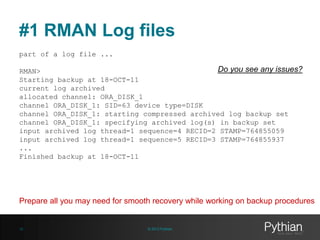
part of a log file ...

Do you see any issues?
RMAN>
Starting backup at 18-OCT-11
current log archived
allocated channel: ORA_DISK_1
channel ORA_DISK_1: SID=63 device type=DISK
channel ORA_DISK_1: starting compressed archived log backup set
channel ORA_DISK_1: specifying archived log(s) in backup set
input archived log thread=1 sequence=4 RECID=2 STAMP=764855059
input archived log thread=1 sequence=5 RECID=3 STAMP=764855937
...
Finished backup at 18-OCT-11

Prepare all you may need for smooth recovery while working on backup procedures

12

© 2013 Pythian
#1 RMAN Log files
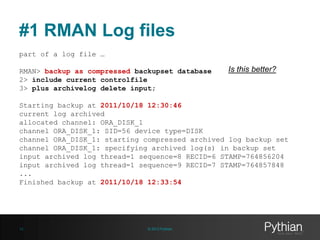
part of a log file …
RMAN> backup as compressed backupset database
2> include current controlfile
3> plus archivelog delete input;

Is this better?

Starting backup at 2011/10/18 12:30:46
current log archived
allocated channel: ORA_DISK_1
channel ORA_DISK_1: SID=56 device type=DISK
channel ORA_DISK_1: starting compressed archived log backup set
channel ORA_DISK_1: specifying archived log(s) in backup set
input archived log thread=1 sequence=8 RECID=6 STAMP=764856204
input archived log thread=1 sequence=9 RECID=7 STAMP=764857848
...
Finished backup at 2011/10/18 12:33:54

13

© 2013 Pythian
#1 RMAN Log files
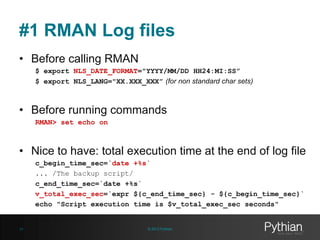
• Before calling RMAN
$ export NLS_DATE_FORMAT="YYYY/MM/DD HH24:MI:SS”
$ export NLS_LANG="XX.XXX_XXX” (for non standard char sets)

• Before running commands
RMAN> set echo on

• Nice to have: total execution time at the end of log file
c_begin_time_sec=`date +%s`
... /The backup script/
c_end_time_sec=`date +%s`
v_total_exec_sec=`expr ${c_end_time_sec} - ${c_begin_time_sec}`
echo "Script execution time is $v_total_exec_sec seconds"

14

© 2013 Pythian
#1 RMAN Log files
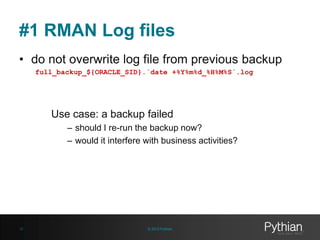
• do not overwrite log file from previous backup
full_backup_${ORACLE_SID}.`date +%Y%m%d_%H%M%S`.log

Use case: a backup failed
– should I re-run the backup now?
– would it interfere with business activities?

15

© 2013 Pythian
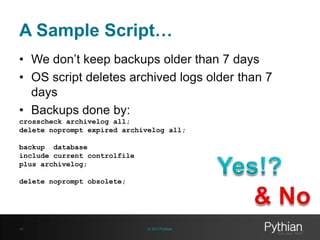
A Sample Script…
• We don’t keep backups older than 7 days
• OS script deletes archived logs older than 7
days
• Backups done by:
crosscheck archivelog all;
delete noprompt expired archivelog all;
backup database
include current controlfile
plus archivelog;
delete noprompt obsolete;

16

© 2013 Pythian
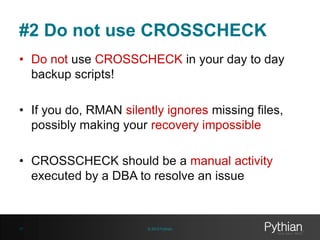
#2 Do not use CROSSCHECK
• Do not use CROSSCHECK in your day to day
backup scripts!
• If you do, RMAN silently ignores missing files,
possibly making your recovery impossible
• CROSSCHECK should be a manual activity
executed by a DBA to resolve an issue

17

© 2013 Pythian
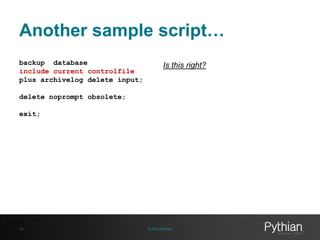
Another sample script…
backup database
include current controlfile
plus archivelog delete input;

Is this right?

delete noprompt obsolete;
exit;

18

© 2013 Pythian
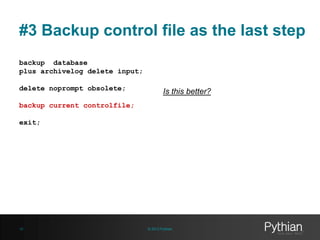
#3 Backup control file as the last step
backup database
plus archivelog delete input;
delete noprompt obsolete;

Is this better?

backup current controlfile;
exit;

19

© 2013 Pythian
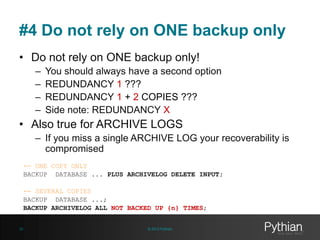
#4 Do not rely on ONE backup only
• Do not rely on ONE backup only!
–
–
–
–

You should always have a second option
REDUNDANCY 1 ???
REDUNDANCY 1 + 2 COPIES ???
Side note: REDUNDANCY X

• Also true for ARCHIVE LOGS
– If you miss a single ARCHIVE LOG your recoverability is
compromised
-- ONE COPY ONLY
BACKUP DATABASE ... PLUS ARCHIVELOG DELETE INPUT;
-- SEVERAL COPIES
BACKUP DATABASE ...;
BACKUP ARCHIVELOG ALL NOT BACKED UP {n} TIMES;
20

© 2013 Pythian
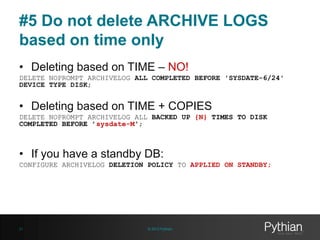
#5 Do not delete ARCHIVE LOGS
based on time only
• Deleting based on TIME – NO!
DELETE NOPROMPT ARCHIVELOG ALL COMPLETED BEFORE 'SYSDATE-6/24'
DEVICE TYPE DISK;

• Deleting based on TIME + COPIES
DELETE NOPROMPT ARCHIVELOG ALL BACKED UP {N} TIMES TO DISK
COMPLETED BEFORE ’sysdate-M';

• If you have a standby DB:
CONFIGURE ARCHIVELOG DELETION POLICY TO APPLIED ON STANDBY;

21

© 2013 Pythian
#6 Use control file if catalog DB isn't
available
[oracle@host01 ~]$ rman target / catalog rdata/xxx
Recovery Manager: Release 11.2.0.2.0 - Production on Tue Oct 18 15:15:25 2011
...
connected to target database: PROD1 (DBID=1973883562)
RMAN-00571: ===========================================================
RMAN-00569: =============== ERROR MESSAGE STACK FOLLOWS ===============
RMAN-00571: ===========================================================
RMAN-00554: initialization of internal recovery manager package failed
RMAN-04004: error from recovery catalog database: ORA-28000: the account is
locked
[oracle@host01 ~]$

22

© 2013 Pythian
#6 Use control file if catalog DB isn't
available
[oracle@host01 ~]$ rman
RMAN> echo set on
RMAN> connect target *
connected to target database: PROD1 (DBID=1973883562)
RMAN> connect catalog *
RMAN-00571: ===========================================================
RMAN-00569: =============== ERROR MESSAGE STACK FOLLOWS ===============
RMAN-00571: ===========================================================
RMAN-04004: error from recovery catalog database: ORA-28000: the account is
locked

RMAN> backup as compressed backupset database
2> include current controlfile
3> plus archivelog delete input;
Starting backup at 2011/10/18 15:22:30
current log archived
using target database control file instead of recovery catalog

special THX 2 @pfierens 4 discussion in tweeter

23

© 2013 Pythian
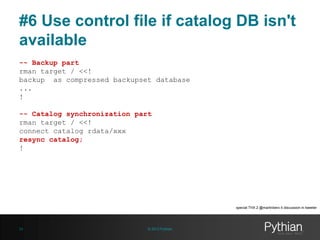
#6 Use control file if catalog DB isn't
available
-- Backup part
rman target / <<!
backup as compressed backupset database
...
!
-- Catalog synchronization part
rman target / <<!
connect catalog rdata/xxx
resync catalog;
!

special THX 2 @martinberx 4 discussion in tweeter

24

© 2013 Pythian
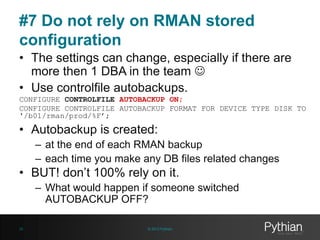
#7 Do not rely on RMAN stored
configuration
• The settings can change, especially if there are
more then 1 DBA in the team 
• Use controlfile autobackups.
CONFIGURE CONTROLFILE AUTOBACKUP ON;
CONFIGURE CONTROLFILE AUTOBACKUP FORMAT FOR DEVICE TYPE DISK TO
'/b01/rman/prod/%F’;

• Autobackup is created:
– at the end of each RMAN backup
– each time you make any DB files related changes

• BUT! don’t 100% rely on it.
– What would happen if someone switched
AUTOBACKUP OFF?
25

© 2013 Pythian
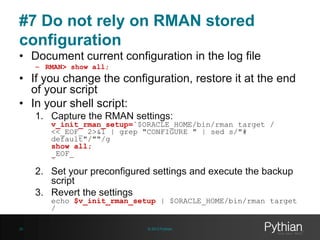
#7 Do not rely on RMAN stored
configuration
• Document current configuration in the log file
– RMAN> show all;

• If you change the configuration, restore it at the end
of your script
• In your shell script:
1. Capture the RMAN settings:

v_init_rman_setup=`$ORACLE_HOME/bin/rman target /
<<_EOF_ 2>&1 | grep "CONFIGURE " | sed s/"#
default"/""/g
show all;
_EOF_
`

2. Set your preconfigured settings and execute the backup
script
3. Revert the settings

echo $v_init_rman_setup | $ORACLE_HOME/bin/rman target
/

26

© 2013 Pythian
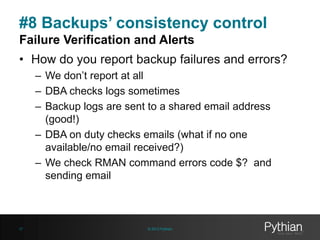
#8 Backups’ consistency control
Failure Verification and Alerts
• How do you report backup failures and errors?
– We don’t report at all
– DBA checks logs sometimes
– Backup logs are sent to a shared email address
(good!)
– DBA on duty checks emails (what if no one
available/no email received?)
– We check RMAN command errors code $? and
sending email

27

© 2013 Pythian
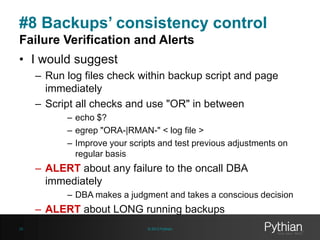
#8 Backups’ consistency control
Failure Verification and Alerts
• I would suggest
– Run log files check within backup script and page
immediately
– Script all checks and use "OR" in between
– echo $?
– egrep "ORA-|RMAN-" < log file >
– Improve your scripts and test previous adjustments on
regular basis

– ALERT about any failure to the oncall DBA
immediately
– DBA makes a judgment and takes a conscious decision

– ALERT about LONG running backups
28

© 2013 Pythian
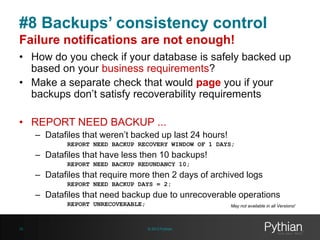
#8 Backups’ consistency control
Failure notifications are not enough!
• How do you check if your database is safely backed up
based on your business requirements?
• Make a separate check that would page you if your
backups don’t satisfy recoverability requirements
• REPORT NEED BACKUP ...
– Datafiles that weren’t backed up last 24 hours!
REPORT NEED BACKUP RECOVERY WINDOW OF 1 DAYS;

– Datafiles that have less then 10 backups!
REPORT NEED BACKUP REDUNDANCY 10;

– Datafiles that require more then 2 days of archived logs
REPORT NEED BACKUP DAYS = 2;

– Datafiles that need backup due to unrecoverable operations
REPORT UNRECOVERABLE;

29

May not available in all Versions!

© 2013 Pythian
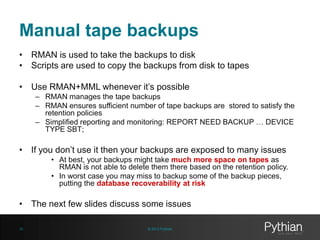
Manual tape backups
• RMAN is used to take the backups to disk
• Scripts are used to copy the backups from disk to tapes
• Use RMAN+MML whenever it’s possible
– RMAN manages the tape backups
– RMAN ensures sufficient number of tape backups are stored to satisfy the
retention policies
– Simplified reporting and monitoring: REPORT NEED BACKUP … DEVICE
TYPE SBT;

• If you don’t use it then your backups are exposed to many issues
• At best, your backups might take much more space on tapes as
RMAN is not able to delete them there based on the retention policy.
• In worst case you may miss to backup some of the backup pieces,
putting the database recoverability at risk

• The next few slides discuss some issues
30

© 2013 Pythian
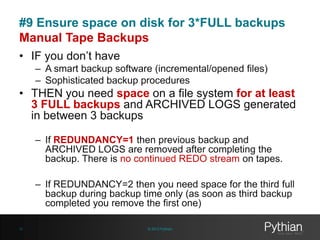
#9 Ensure space on disk for 3*FULL backups
Manual Tape Backups
• IF you don’t have
– A smart backup software (incremental/opened files)
– Sophisticated backup procedures

• THEN you need space on a file system for at least
3 FULL backups and ARCHIVED LOGS generated
in between 3 backups
– If REDUNDANCY=1 then previous backup and
ARCHIVED LOGS are removed after completing the
backup. There is no continued REDO stream on tapes.
– If REDUNDANCY=2 then you need space for the third full
backup during backup time only (as soon as third backup
completed you remove the first one)
31

© 2013 Pythian
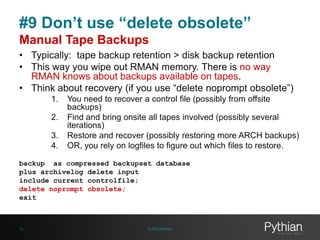
#9 Don’t use “delete obsolete”
Manual Tape Backups
• Typically: tape backup retention > disk backup retention
• This way you wipe out RMAN memory. There is no way
RMAN knows about backups available on tapes.
• Think about recovery (if you use “delete noprompt obsolete”)
1.
2.

3.
4.

You need to recover a control file (possibly from offsite
backups)
Find and bring onsite all tapes involved (possibly several
iterations)
Restore and recover (possibly restoring more ARCH backups)
OR, you rely on logfiles to figure out which files to restore.

backup as compressed backupset database
plus archivelog delete input
include current controlfile;
delete noprompt obsolete;
exit

32

© 2013 Pythian
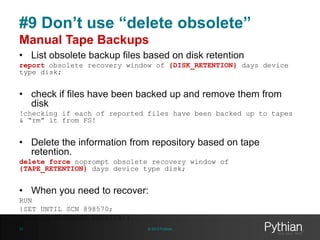
#9 Don’t use “delete obsolete”
Manual Tape Backups
• List obsolete backup files based on disk retention
report obsolete recovery window of {DISK_RETENTION} days device
type disk;

• check if files have been backed up and remove them from
disk
!checking if each of reported files have been backed up to tapes
& “rm” it from FS!

• Delete the information from repository based on tape
retention.
delete force noprompt obsolete recovery window of
{TAPE_RETENTION} days device type disk;

• When you need to recover:
RUN
{SET UNTIL SCN 898570;
RESTORE DATABASE PREVIEW;}
33

© 2013 Pythian
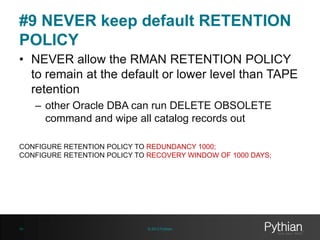
#9 NEVER keep default RETENTION
POLICY
• NEVER allow the RMAN RETENTION POLICY
to remain at the default or lower level than TAPE
retention
– other Oracle DBA can run DELETE OBSOLETE
command and wipe all catalog records out
CONFIGURE RETENTION POLICY TO REDUNDANCY 1000;
CONFIGURE RETENTION POLICY TO RECOVERY WINDOW OF 1000 DAYS;

34

© 2013 Pythian
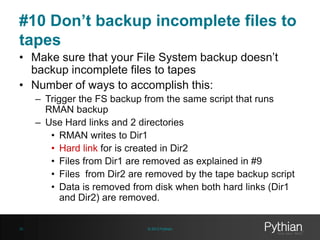
#10 Don’t backup incomplete files to
tapes
• Make sure that your File System backup doesn’t
backup incomplete files to tapes
• Number of ways to accomplish this:
– Trigger the FS backup from the same script that runs
RMAN backup
– Use Hard links and 2 directories
• RMAN writes to Dir1
• Hard link for is created in Dir2
• Files from Dir1 are removed as explained in #9
• Files from Dir2 are removed by the tape backup script
• Data is removed from disk when both hard links (Dir1
and Dir2) are removed.

35

© 2013 Pythian
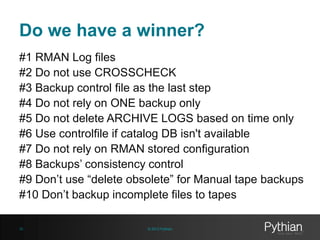
Do we have a winner?
#1 RMAN Log files
#2 Do not use CROSSCHECK
#3 Backup control file as the last step
#4 Do not rely on ONE backup only
#5 Do not delete ARCHIVE LOGS based on time only
#6 Use controlfile if catalog DB isn't available
#7 Do not rely on RMAN stored configuration
#8 Backups’ consistency control
#9 Don’t use “delete obsolete” for Manual tape backups
#10 Don’t backup incomplete files to tapes
36

© 2013 Pythian
Thank you and Q&A
elsins@pythian.com

@MarisElsins
www.pythian.com/blog/author/elsins

37

© 2013 Pythian

10 ways to improve your rman script

  • 1.
    10 Ways toImprove your RMAN Script Author: Yury Velikanov Co-author and presenter: Maris Elsins
  • 2.
    Why Pythian • RecognizedLeader: – Global industry-leader in remote database administration services and consulting for Oracle, Oracle Applications, MySQL and SQL Server – Work with over 150 multinational companies such as Forbes.com, Fox Sports, Nordion and Western Union to help manage their complex IT deployments • Expertise: – One of the world’s largest concentrations of dedicated, full-time DBA expertise. Employ 7 Oracle ACEs/ACE Directors – Hold 7 Specializations under Oracle Platinum Partner program, including Oracle Exadata, Oracle GoldenGate & Oracle RAC • Global Reach & Scalability: – 24/7/365 global remote support for DBA and consulting, systems administration, special projects or emergency response 2 © 2013 Pythian
  • 3.
    Maris Elsins • • • • • • • • 3 8y+ Oracle[Apps] DBA (+3y PL/SQL Developer) 3y at Pythian Oracle Certified Professional (9i, 10g, 11g, 11i, R12) Oracle Certified Master Speaker (15) (UKOUG, OUGF, LVOUG, Collaborate) Blogger http://www.pythian.com/blog/author/elsins MarisElsins, Maris.Elsins, , FAN of #BAAG © 2013 Pythian
  • 4.
    Questions & Comments #UKOUG_Tech13 4 ©2013 Pythian @MarisElsins
  • 5.
  • 6.
    The Mission Give you10 practical hints on RMAN script improvements Encourage you to think on what can possibly go wrong before it happens. 6 © 2013 Pythian
  • 7.
    Right Approach ... !be skeptical ! • If backups and trial recovery works it doesn’t mean you don’t have issues – must test / document / practice recovery • Challenge your backup procedures! – Think about what can possibly go wrong – Think now as in the middle of an emergency recovery it may be way too late or too challenging • Prepare all you may need for smooth recovery while working on backup procedures 7 © 2013 Pythian
  • 8.
    Few general thoughts… NEVER rely on backups stored on the same physical media as the database! Mark Brinsmead, Sr. Oracle DBA, Pythian Even if your storage is the fanciest disk array (misnamed "SAN" by many) in the world, there exist failure modes in which ALL data in the disk array can be lost simultaneously. (Aside from fire or other disaster, failed firmware upgrades are the most common.) You don't really have a "backup" until the backup is written to separate physical media! 8 © 2013 Pythian
  • 9.
    Few general thoughts… Avoid situations where the loss of a single piece of physical media can destroy more than one backup. When backing up to tape, for example, if the tape capacity is much larger than your backups, consider alternating backups between multiple tape pools. ("Self-redundant" backups are of little value if you are able to lose several consecutive backups simply by damaging one tape cartridge). If your backup and recovery procedures violate some of the base concepts - state risks clearly and sign/discuss those with business on regular basis. 9 © 2013 Pythian
  • 10.
  • 11.
    10 Improvements Give usthe perfect RMAN backup script and go away! 11 © 2013 Pythian
  • 12.
    #1 RMAN Logfiles part of a log file ... Do you see any issues? RMAN> Starting backup at 18-OCT-11 current log archived allocated channel: ORA_DISK_1 channel ORA_DISK_1: SID=63 device type=DISK channel ORA_DISK_1: starting compressed archived log backup set channel ORA_DISK_1: specifying archived log(s) in backup set input archived log thread=1 sequence=4 RECID=2 STAMP=764855059 input archived log thread=1 sequence=5 RECID=3 STAMP=764855937 ... Finished backup at 18-OCT-11 Prepare all you may need for smooth recovery while working on backup procedures 12 © 2013 Pythian
  • 13.
    #1 RMAN Logfiles part of a log file … RMAN> backup as compressed backupset database 2> include current controlfile 3> plus archivelog delete input; Is this better? Starting backup at 2011/10/18 12:30:46 current log archived allocated channel: ORA_DISK_1 channel ORA_DISK_1: SID=56 device type=DISK channel ORA_DISK_1: starting compressed archived log backup set channel ORA_DISK_1: specifying archived log(s) in backup set input archived log thread=1 sequence=8 RECID=6 STAMP=764856204 input archived log thread=1 sequence=9 RECID=7 STAMP=764857848 ... Finished backup at 2011/10/18 12:33:54 13 © 2013 Pythian
  • 14.
    #1 RMAN Logfiles • Before calling RMAN $ export NLS_DATE_FORMAT="YYYY/MM/DD HH24:MI:SS” $ export NLS_LANG="XX.XXX_XXX” (for non standard char sets) • Before running commands RMAN> set echo on • Nice to have: total execution time at the end of log file c_begin_time_sec=`date +%s` ... /The backup script/ c_end_time_sec=`date +%s` v_total_exec_sec=`expr ${c_end_time_sec} - ${c_begin_time_sec}` echo "Script execution time is $v_total_exec_sec seconds" 14 © 2013 Pythian
  • 15.
    #1 RMAN Logfiles • do not overwrite log file from previous backup full_backup_${ORACLE_SID}.`date +%Y%m%d_%H%M%S`.log Use case: a backup failed – should I re-run the backup now? – would it interfere with business activities? 15 © 2013 Pythian
  • 16.
    A Sample Script… •We don’t keep backups older than 7 days • OS script deletes archived logs older than 7 days • Backups done by: crosscheck archivelog all; delete noprompt expired archivelog all; backup database include current controlfile plus archivelog; delete noprompt obsolete; 16 © 2013 Pythian
  • 17.
    #2 Do notuse CROSSCHECK • Do not use CROSSCHECK in your day to day backup scripts! • If you do, RMAN silently ignores missing files, possibly making your recovery impossible • CROSSCHECK should be a manual activity executed by a DBA to resolve an issue 17 © 2013 Pythian
  • 18.
    Another sample script… backupdatabase include current controlfile plus archivelog delete input; Is this right? delete noprompt obsolete; exit; 18 © 2013 Pythian
  • 19.
    #3 Backup controlfile as the last step backup database plus archivelog delete input; delete noprompt obsolete; Is this better? backup current controlfile; exit; 19 © 2013 Pythian
  • 20.
    #4 Do notrely on ONE backup only • Do not rely on ONE backup only! – – – – You should always have a second option REDUNDANCY 1 ??? REDUNDANCY 1 + 2 COPIES ??? Side note: REDUNDANCY X • Also true for ARCHIVE LOGS – If you miss a single ARCHIVE LOG your recoverability is compromised -- ONE COPY ONLY BACKUP DATABASE ... PLUS ARCHIVELOG DELETE INPUT; -- SEVERAL COPIES BACKUP DATABASE ...; BACKUP ARCHIVELOG ALL NOT BACKED UP {n} TIMES; 20 © 2013 Pythian
  • 21.
    #5 Do notdelete ARCHIVE LOGS based on time only • Deleting based on TIME – NO! DELETE NOPROMPT ARCHIVELOG ALL COMPLETED BEFORE 'SYSDATE-6/24' DEVICE TYPE DISK; • Deleting based on TIME + COPIES DELETE NOPROMPT ARCHIVELOG ALL BACKED UP {N} TIMES TO DISK COMPLETED BEFORE ’sysdate-M'; • If you have a standby DB: CONFIGURE ARCHIVELOG DELETION POLICY TO APPLIED ON STANDBY; 21 © 2013 Pythian
  • 22.
    #6 Use controlfile if catalog DB isn't available [oracle@host01 ~]$ rman target / catalog rdata/xxx Recovery Manager: Release 11.2.0.2.0 - Production on Tue Oct 18 15:15:25 2011 ... connected to target database: PROD1 (DBID=1973883562) RMAN-00571: =========================================================== RMAN-00569: =============== ERROR MESSAGE STACK FOLLOWS =============== RMAN-00571: =========================================================== RMAN-00554: initialization of internal recovery manager package failed RMAN-04004: error from recovery catalog database: ORA-28000: the account is locked [oracle@host01 ~]$ 22 © 2013 Pythian
  • 23.
    #6 Use controlfile if catalog DB isn't available [oracle@host01 ~]$ rman RMAN> echo set on RMAN> connect target * connected to target database: PROD1 (DBID=1973883562) RMAN> connect catalog * RMAN-00571: =========================================================== RMAN-00569: =============== ERROR MESSAGE STACK FOLLOWS =============== RMAN-00571: =========================================================== RMAN-04004: error from recovery catalog database: ORA-28000: the account is locked RMAN> backup as compressed backupset database 2> include current controlfile 3> plus archivelog delete input; Starting backup at 2011/10/18 15:22:30 current log archived using target database control file instead of recovery catalog special THX 2 @pfierens 4 discussion in tweeter 23 © 2013 Pythian
  • 24.
    #6 Use controlfile if catalog DB isn't available -- Backup part rman target / <<! backup as compressed backupset database ... ! -- Catalog synchronization part rman target / <<! connect catalog rdata/xxx resync catalog; ! special THX 2 @martinberx 4 discussion in tweeter 24 © 2013 Pythian
  • 25.
    #7 Do notrely on RMAN stored configuration • The settings can change, especially if there are more then 1 DBA in the team  • Use controlfile autobackups. CONFIGURE CONTROLFILE AUTOBACKUP ON; CONFIGURE CONTROLFILE AUTOBACKUP FORMAT FOR DEVICE TYPE DISK TO '/b01/rman/prod/%F’; • Autobackup is created: – at the end of each RMAN backup – each time you make any DB files related changes • BUT! don’t 100% rely on it. – What would happen if someone switched AUTOBACKUP OFF? 25 © 2013 Pythian
  • 26.
    #7 Do notrely on RMAN stored configuration • Document current configuration in the log file – RMAN> show all; • If you change the configuration, restore it at the end of your script • In your shell script: 1. Capture the RMAN settings: v_init_rman_setup=`$ORACLE_HOME/bin/rman target / <<_EOF_ 2>&1 | grep "CONFIGURE " | sed s/"# default"/""/g show all; _EOF_ ` 2. Set your preconfigured settings and execute the backup script 3. Revert the settings echo $v_init_rman_setup | $ORACLE_HOME/bin/rman target / 26 © 2013 Pythian
  • 27.
    #8 Backups’ consistencycontrol Failure Verification and Alerts • How do you report backup failures and errors? – We don’t report at all – DBA checks logs sometimes – Backup logs are sent to a shared email address (good!) – DBA on duty checks emails (what if no one available/no email received?) – We check RMAN command errors code $? and sending email 27 © 2013 Pythian
  • 28.
    #8 Backups’ consistencycontrol Failure Verification and Alerts • I would suggest – Run log files check within backup script and page immediately – Script all checks and use "OR" in between – echo $? – egrep "ORA-|RMAN-" < log file > – Improve your scripts and test previous adjustments on regular basis – ALERT about any failure to the oncall DBA immediately – DBA makes a judgment and takes a conscious decision – ALERT about LONG running backups 28 © 2013 Pythian
  • 29.
    #8 Backups’ consistencycontrol Failure notifications are not enough! • How do you check if your database is safely backed up based on your business requirements? • Make a separate check that would page you if your backups don’t satisfy recoverability requirements • REPORT NEED BACKUP ... – Datafiles that weren’t backed up last 24 hours! REPORT NEED BACKUP RECOVERY WINDOW OF 1 DAYS; – Datafiles that have less then 10 backups! REPORT NEED BACKUP REDUNDANCY 10; – Datafiles that require more then 2 days of archived logs REPORT NEED BACKUP DAYS = 2; – Datafiles that need backup due to unrecoverable operations REPORT UNRECOVERABLE; 29 May not available in all Versions! © 2013 Pythian
  • 30.
    Manual tape backups •RMAN is used to take the backups to disk • Scripts are used to copy the backups from disk to tapes • Use RMAN+MML whenever it’s possible – RMAN manages the tape backups – RMAN ensures sufficient number of tape backups are stored to satisfy the retention policies – Simplified reporting and monitoring: REPORT NEED BACKUP … DEVICE TYPE SBT; • If you don’t use it then your backups are exposed to many issues • At best, your backups might take much more space on tapes as RMAN is not able to delete them there based on the retention policy. • In worst case you may miss to backup some of the backup pieces, putting the database recoverability at risk • The next few slides discuss some issues 30 © 2013 Pythian
  • 31.
    #9 Ensure spaceon disk for 3*FULL backups Manual Tape Backups • IF you don’t have – A smart backup software (incremental/opened files) – Sophisticated backup procedures • THEN you need space on a file system for at least 3 FULL backups and ARCHIVED LOGS generated in between 3 backups – If REDUNDANCY=1 then previous backup and ARCHIVED LOGS are removed after completing the backup. There is no continued REDO stream on tapes. – If REDUNDANCY=2 then you need space for the third full backup during backup time only (as soon as third backup completed you remove the first one) 31 © 2013 Pythian
  • 32.
    #9 Don’t use“delete obsolete” Manual Tape Backups • Typically: tape backup retention > disk backup retention • This way you wipe out RMAN memory. There is no way RMAN knows about backups available on tapes. • Think about recovery (if you use “delete noprompt obsolete”) 1. 2. 3. 4. You need to recover a control file (possibly from offsite backups) Find and bring onsite all tapes involved (possibly several iterations) Restore and recover (possibly restoring more ARCH backups) OR, you rely on logfiles to figure out which files to restore. backup as compressed backupset database plus archivelog delete input include current controlfile; delete noprompt obsolete; exit 32 © 2013 Pythian
  • 33.
    #9 Don’t use“delete obsolete” Manual Tape Backups • List obsolete backup files based on disk retention report obsolete recovery window of {DISK_RETENTION} days device type disk; • check if files have been backed up and remove them from disk !checking if each of reported files have been backed up to tapes & “rm” it from FS! • Delete the information from repository based on tape retention. delete force noprompt obsolete recovery window of {TAPE_RETENTION} days device type disk; • When you need to recover: RUN {SET UNTIL SCN 898570; RESTORE DATABASE PREVIEW;} 33 © 2013 Pythian
  • 34.
    #9 NEVER keepdefault RETENTION POLICY • NEVER allow the RMAN RETENTION POLICY to remain at the default or lower level than TAPE retention – other Oracle DBA can run DELETE OBSOLETE command and wipe all catalog records out CONFIGURE RETENTION POLICY TO REDUNDANCY 1000; CONFIGURE RETENTION POLICY TO RECOVERY WINDOW OF 1000 DAYS; 34 © 2013 Pythian
  • 35.
    #10 Don’t backupincomplete files to tapes • Make sure that your File System backup doesn’t backup incomplete files to tapes • Number of ways to accomplish this: – Trigger the FS backup from the same script that runs RMAN backup – Use Hard links and 2 directories • RMAN writes to Dir1 • Hard link for is created in Dir2 • Files from Dir1 are removed as explained in #9 • Files from Dir2 are removed by the tape backup script • Data is removed from disk when both hard links (Dir1 and Dir2) are removed. 35 © 2013 Pythian
  • 36.
    Do we havea winner? #1 RMAN Log files #2 Do not use CROSSCHECK #3 Backup control file as the last step #4 Do not rely on ONE backup only #5 Do not delete ARCHIVE LOGS based on time only #6 Use controlfile if catalog DB isn't available #7 Do not rely on RMAN stored configuration #8 Backups’ consistency control #9 Don’t use “delete obsolete” for Manual tape backups #10 Don’t backup incomplete files to tapes 36 © 2013 Pythian
  • 37.
    Thank you andQ&A elsins@pythian.com @MarisElsins www.pythian.com/blog/author/elsins 37 © 2013 Pythian

Editor's Notes

  • #3 Pyrhian is a global data and infrastructure management company. We employ more than 250 DBAs and we support more then 6000 databases.If you need help – Call us!
  • #4 BAAG’s main idea is to eliminate guesswork from the decision making process. This is especially important in my work. If I’m guessing – I might be wrongIf I base decisions on facts – the chances of being right are higher.And for the scope of this presentation, It’s also important to make sure your RMAN scripts are written so that they minimize the guesswork during the restore situations.
  • #8 If backups are successful and the test recovery succeeded = Does it mean everything is OK?NOTest oftenDocument important information (where are the backups stored?) – you say I have just few databases I know where they are, what if you have 10? What if you have 20?In best scenario you might loose time looking for backups and the information needed for recovery, And nothing can be worse than the CEO watching over your shoulder and seeing how you browse the filesystem looking for backups. Be sceptical.Prepare for the worsHope for the best.
  • #9 Let’s start with few general thought to prepare your brain for this discussion about backup scriptsA common misconception is that modern disk arrays are extremely reliable. It’s not true – there are still failure scenarios when all data on the array is lost simultaneously.The most typical example besides physical damage is a firmware update. So Even on the fanciest disk array you don’t really have backups unless you store a copy of backup elsewhere.
  • #10 This somewhat extends the previous thought…But imagine you have a database that you you take archived log backups every 4 hours.You backup each archived log twice, that is – you delete it only after it’s included in 2 archived log backups.What happens if the same tape cartridge is used for 2 consecutive backups and it’s damaged? You loose an archived log.state risks clearly Do it often.“I can’t recover this database if it breaks”
  • #13 This is a typical output log created by the “backup database” command. Do you see any issues?Shout if you know what’s wrong!Keep in mind the statement below: “Prepare all you may need for smooth recovery while working on backup procedures”. Does it provide enough information for most of the situations?
  • #14 Is this better?/// You see the exact command used to take the backup – this immediately gives you lot of information about the data included in this backups./// You see the exact timestamps and are able to understand the oldest point in time you can recovert to using this backup. It also gives you a hint on how much archived redo you have to apply on top of the backup.
  • #15 Date +%s – seconds since the 1st of January, 1970.Why do we need to know how long the backups take? Helps in planning the backup schedules. Look at the history, check the elapsed time trend.
  • #17 Another example of a script I’ve seen … /explain the script/Does anything think it’s a good script?
  • #18 Don’t use crosscheckWhat if an archived log “disappears” before it’s backed up?My colleague recently encountered a situation where an archived log “disappeared” when it was being archived during a FS resize operation.We didn’t crosscheck inside RMAN script and got alerted immediately after the backup failed. And solved the issue by running an incremental backup ASAP.CROSSCHECK has to be a manual activity executed by DBAs to resolve issues.If you run crosscheck and delete expired within the script you loose the archived logs and don’t even find out about it.
  • #19 / explain the script / Ok. .. You see the “include current controlfile” is red, must be something wrong with it.And it’s correct. We are making the controlfilebackup outdated immediately
  • #20 Now you must be thinking common – we all use controlfileautbackups and we should,
  • #21 Do not rely on a single backup.Always have a plan B.Talk about these options:REDUNDANCY 1 – REDUNDANCY 1 + 2 copies = data files, are read once even if there are 2 copies, so if a memory corruption occurs during the backup, you might take a corrupted backup.REDUNDANCY X – not good as you never know the recovery window (i.e. someone might take a one off backup before the maintenance )
  • #22 Deleting archived logs based on time only is dangerous.How do you make sure the archived logs have been backed up?As previously was explained – we should also heck the number of backups taken for each archived log before deleting it.And a deletion policy should be set if to applied on standby if standby database is used.
  • #23 It’s important how you start RMAN from your backup scripts –If the target database and catalog database connection information is passed as parameters upon initialization of RMAN – unavailability of RMAN prevents startup of rman and you will not take the backup
  • #24 Better approach….
  • #25 Another method to accomplish the same thing is to take backup without connecting to the RMAN catalog.Then after the backup completes, resync the catalog.
  • #26 There are number of reasons why rman stored settings might change - some of the reasons will be valid/planned changed to the backup policy - other changes might be temporary fixes or workarounds for a specific purpose – what happens while If all DBAs are not 100% sure of all specific configurations for the backups the situations when some stored settings are accidentally changed can happen.Here are few examples– 1. DBA temporarily reduces the retention settings to free additional room for archived log backups because of unusual peak activity in the database. 2.Parallelism settings might be temporarily changed to take one off backupIf you don’t have a catalog database, but use tapes for backups looking up controlfileautobackup can take long time.
  • #27 Document the settings before executing your scriptsI find it’s much better to ensure stability of backup scripts if the required settings are hardcoded in the backup script.But to do that, we probably need a solution to save and restore the settings that were present when the backup script started./ Explain the implementation /
  • #28 Backup validations and alerts - I’ve often see it being done wrong or being done incompletely.SO how do you monitor the backup jobs? Here are few examples I’ve seen that are not very thorough:We don’t report at allDBA logs on to the server and checks logs sometimesBackup logs are sent to a shared email address (good!)DBA on duty checks emails (what if no one available/no email received?)We check RMAN command errors code $? and sending emailThe email based approach when the DBA is supposed to check alerts in the morning is surprisingly popular, but this is definitely not good enough!
  • #29 I would suggest more thorough analysis…/walk though the slide /-- ALERT about any failure to the oncall DBA immediatelyFull backups are usually very resource consuming – do you want to re-run the full backups in the morning after you find out it failed?-- ALERT about LONG running backupsWhy? Because if the backup runs too long it threatens to impact the enduser experience.Unsderstand why backups take longer and take actions to avoid impacting users.Plan the thresholds so that you had enough time or action, i..e if the time is slowly increasing as the database grows give youtseklf enough time to be able to tune the backup
  • #30 Additionally, the notifications alone are not enough!You have to make sure you database is safely backed up based on the business requirements! Implement another check Probably even running on a different server (not on the same DB server) to check if:All datafiles have been backed up I last 24 hours?We have enough datafiles to satisfy the retention settingsDatafiles containing unrecoverable operrrations.This is extremely important, because these checks will let you know of it.i.e. on Security-Enhanced Linux cron stops working when the password for the OS user expires!
  • #32 What happens if you have redundancy=1 the previous backup and archived logs are removed immediately after completing the current backup.When the tape backup runs it backs up 1 full backup + half a day of archived logs, so in the end the backups on tapes will contain a full backup for each daysome archived logs after each full backupThen a gap before the next backup.Redundancy 2 resolved the problem and ensures the continuous redo stream on tape as it will always keep all redo logs between last two backups.Redundancy 2 required space for 3 backups.
  • #34 You should remove files from disk based on disk retentionYou should remove obsolete files’ information from the based on tape retention