Leveraging HPCC Systems with Virtual Computing Lab 
Vincent W. Freeh 
Department of Computer Science 
North Carolina State University
Projects 
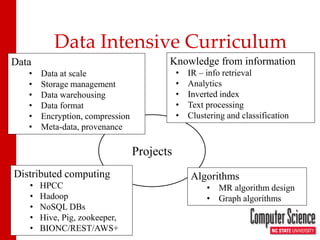
Data Intensive Curriculum 
Data 
• 
Data at scale 
• 
Storage management 
• 
Data warehousing 
• 
Data format 
• 
Encryption, compression 
• 
Meta-data, provenance 
Distributed computing 
• 
HPCC 
• 
Hadoop 
• 
NoSQL DBs 
• 
Hive, Pig, zookeeper, 
• 
BIONC/REST/AWS+ 
Algorithms 
• 
MR algorithm design 
• 
Graph algorithms 
Knowledge from information 
• 
IR – info retrieval 
• 
Analytics 
• 
Inverted index 
• 
Text processing 
• 
Clustering and classification
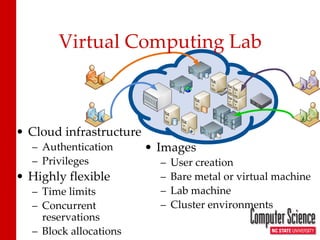
Virtual Computing Lab 
• 
Cloud infrastructure 
– 
Authentication 
– 
Privileges 
• 
Highly flexible 
– 
Time limits 
– 
Concurrent reservations 
– 
Block allocations 
• 
Images 
– 
User creation 
– 
Bare metal or virtual machine 
– 
Lab machine 
– 
Cluster environments
History of VCL 
• 
Begun 2004 at NCSU 
– 
College of Engineering 
– 
Office of Information Technology 
• 
Donated source to Apache Software Foundation 2008 
– 
Top-level Apache Project 
• 
World wide 
– 
More than 40 installations
NCSU VCL Statistics 
• 
Total reservations: > 1.4M 
• 
Total hours: > 10M 
• 
Unique images: > 3,000 
Max concurrent reservations/day
HPCC on VCL 
• 
Project: Create HPCC image on VCL 
• 
Why 
– 
No setup to use HPCC 
– 
Experience with HPCC cluster 
• 
Goals 
– 
Standalone HPCC image 
– 
HPCC cluster 
– 
Not for production (yet)
Standalone image 
• 
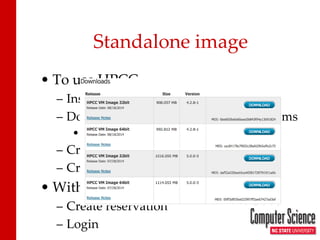
To use HPCC 
– 
Install VMware or equivalent 
– 
Download VM image from HPCCsystems 
• 
Which one? 
– 
Create VM instance 
– 
Cross fingers 
• 
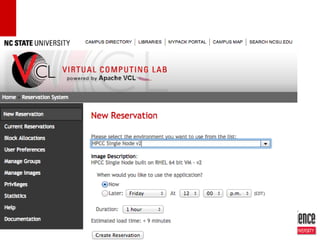
With VCL 
– 
Create reservation 
– 
Login
VCL Timeline 
new request 
allocate VM/node 
provision 
start 
initialize 
notify user
Issues 
• 
Authentication 
• 
Persistent storage
Authentication 
• 
SSH 
– 
Instance is “owned” by user who created reservation 
– 
Can ssh into image using campus ID and password 
• 
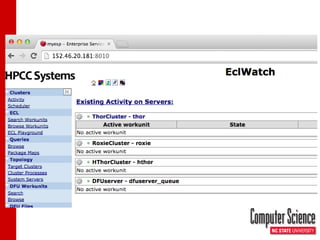
ECL Watch 
– 
Web page 
– 
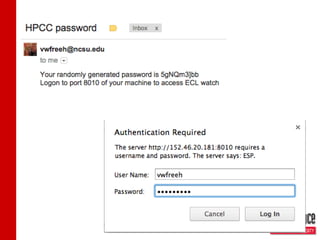
Needs to be password protected
Authentication 
• 
Two methods 
– 
LDAP 
• 
Not working (at this time) 
• 
Need to authenticate with campus LDAP server 
– 
.htaccess
.htaccess 
• 
Create random password 
• 
Create .htaccess file 
• 
(Re)start ECL watch 
• 
Email password to user
Persistent storage 
• 
NCSU 
– 
AFS storage 
– 
Limited 
• 
VCL image 
– 
Mounts AFS as remote disk 
– 
Spray and despray from/to AFS 
– 
Done manually
• 
AFS too small 
• 
Multiple datasets 
• 
Sharing 
• 
Specific to NCSU 
Persistent storage issues
HPCC Cluster Image 
• 
Use VCL cluster environment 
– 
Parent-child 
– 
Any number 
– 
/etc/cluster 
• 
HPCC cluster configuration 
– 
Cluster configurations vary 
– 
Many parameters and options 
– 
Complex
Configuration 
• 
Web page GUI 
• 
Good for novice 
• 
Good for persistent
Cluster configuration 
• 
environment.xml 
– 
Specifies configuration 
– 
Easy to get wrong 
– 
Command line tool 
• 
Idea 
– 
Create several cluster VCL images 
– 
Dynamically create environment.xml on each node in image 
– 
Start HPCC services
VCL Hooks 
• 
Hook 
– 
Routine invoked by instance of image 
– 
Provides for dynamic configuration 
– 
Many hooks – at various points in the boot timeline
Example: default user 
• 
Image is generic 
• 
Instance has specific user and access to user’s storage 
• 
Hooks 
– 
Create user 
– 
Mount remote filesystem
Cluster Configuration 
• 
Create environment.xml 
– 
Need node info for all nodes in cluster 
– 
Need cluster type (eg, thor-only, thor+roxie) 
– 
Execute command line tool 
• 
Set up ssh keys 
• 
Start HPCC services
Issues 
• 
Passwordless ssh 
– 
Share keys during load 
– 
VCLs blocks general ssh 
• 
Persistent storage 
– 
Even a bigger problem 
• 
Cluster configurations 
– 
Create a VCL image for each configuration 
– 
Essentially infinitely many possible configurations 
– 
What are the primary clusters?
Teaching 
• 
HPCC is a vehicle 
– 
Use HPCC to teach concepts 
• 
What can be taught? 
– 
Applications (use ECL) 
– 
Distributed systems (evaluation) 
– 
System design (configuration) 
– 
Performance (identify bottlenecks)
Summary 
• 
HPCC on VCL 
– 
Standalone prototype 
– 
Cluster prototype 
• 
Issues 
– 
LDAP 
– 
Persistent storage 
– 
SSH
RESEARCH
Extending ECL with Natural Language Processing (NLP) 
• 
GATE – open source NLP system 
• 
Java 
• 
Pipeline of processing resources 
• 
Add ECL routines to create and execute pipelines
Elastic HPCC 
• 
Elastic changes procurement (from capital to operating) 
• 
Must effectively add or remove nodes 
• 
Must efficiently access any data from any node

HPCC Systems Engineering Summit Presentation - Leveraging HPCC Systems with VCL (Virtual Computing Lab)

  • 1.
    Leveraging HPCC Systemswith Virtual Computing Lab Vincent W. Freeh Department of Computer Science North Carolina State University
  • 2.
    Projects Data IntensiveCurriculum Data • Data at scale • Storage management • Data warehousing • Data format • Encryption, compression • Meta-data, provenance Distributed computing • HPCC • Hadoop • NoSQL DBs • Hive, Pig, zookeeper, • BIONC/REST/AWS+ Algorithms • MR algorithm design • Graph algorithms Knowledge from information • IR – info retrieval • Analytics • Inverted index • Text processing • Clustering and classification
  • 3.
    Virtual Computing Lab • Cloud infrastructure – Authentication – Privileges • Highly flexible – Time limits – Concurrent reservations – Block allocations • Images – User creation – Bare metal or virtual machine – Lab machine – Cluster environments
  • 4.
    History of VCL • Begun 2004 at NCSU – College of Engineering – Office of Information Technology • Donated source to Apache Software Foundation 2008 – Top-level Apache Project • World wide – More than 40 installations
  • 5.
    NCSU VCL Statistics • Total reservations: > 1.4M • Total hours: > 10M • Unique images: > 3,000 Max concurrent reservations/day
  • 6.
    HPCC on VCL • Project: Create HPCC image on VCL • Why – No setup to use HPCC – Experience with HPCC cluster • Goals – Standalone HPCC image – HPCC cluster – Not for production (yet)
  • 7.
    Standalone image • To use HPCC – Install VMware or equivalent – Download VM image from HPCCsystems • Which one? – Create VM instance – Cross fingers • With VCL – Create reservation – Login
  • 8.
    VCL Timeline newrequest allocate VM/node provision start initialize notify user
  • 13.
    Issues • Authentication • Persistent storage
  • 14.
    Authentication • SSH – Instance is “owned” by user who created reservation – Can ssh into image using campus ID and password • ECL Watch – Web page – Needs to be password protected
  • 15.
    Authentication • Twomethods – LDAP • Not working (at this time) • Need to authenticate with campus LDAP server – .htaccess
  • 16.
    .htaccess • Createrandom password • Create .htaccess file • (Re)start ECL watch • Email password to user
  • 19.
    Persistent storage • NCSU – AFS storage – Limited • VCL image – Mounts AFS as remote disk – Spray and despray from/to AFS – Done manually
  • 20.
    • AFS toosmall • Multiple datasets • Sharing • Specific to NCSU Persistent storage issues
  • 21.
    HPCC Cluster Image • Use VCL cluster environment – Parent-child – Any number – /etc/cluster • HPCC cluster configuration – Cluster configurations vary – Many parameters and options – Complex
  • 22.
    Configuration • Webpage GUI • Good for novice • Good for persistent
  • 23.
    Cluster configuration • environment.xml – Specifies configuration – Easy to get wrong – Command line tool • Idea – Create several cluster VCL images – Dynamically create environment.xml on each node in image – Start HPCC services
  • 24.
    VCL Hooks • Hook – Routine invoked by instance of image – Provides for dynamic configuration – Many hooks – at various points in the boot timeline
  • 25.
    Example: default user • Image is generic • Instance has specific user and access to user’s storage • Hooks – Create user – Mount remote filesystem
  • 26.
    Cluster Configuration • Create environment.xml – Need node info for all nodes in cluster – Need cluster type (eg, thor-only, thor+roxie) – Execute command line tool • Set up ssh keys • Start HPCC services
  • 27.
    Issues • Passwordlessssh – Share keys during load – VCLs blocks general ssh • Persistent storage – Even a bigger problem • Cluster configurations – Create a VCL image for each configuration – Essentially infinitely many possible configurations – What are the primary clusters?
  • 28.
    Teaching • HPCCis a vehicle – Use HPCC to teach concepts • What can be taught? – Applications (use ECL) – Distributed systems (evaluation) – System design (configuration) – Performance (identify bottlenecks)
  • 29.
    Summary • HPCCon VCL – Standalone prototype – Cluster prototype • Issues – LDAP – Persistent storage – SSH
  • 30.
  • 31.
    Extending ECL withNatural Language Processing (NLP) • GATE – open source NLP system • Java • Pipeline of processing resources • Add ECL routines to create and execute pipelines
  • 32.
    Elastic HPCC • Elastic changes procurement (from capital to operating) • Must effectively add or remove nodes • Must efficiently access any data from any node