2019 HPCC
Systems®
Community Day
Challenge Yourself –
Challenge the Status Quo
Shamser Ahmed
shamser.ahmed@lexisnexisrisk.co
m
Workunit Analysis Tool
Tech Review
Overview
• Why analyze workunits?
• Analyzing workunits manually
• Introducing the Workunit Analysis Tool
• Demonstration
• Challenges
• Concluding remarks
• Questions & Suggestions
Workunit Analysis Tool 2
Why analyze
workunits?
Why analyze workunits?
Examine graph to
• Determine if the job is as efficient as possible
• Graph may not be optimal
• Issues: redundant/duplicate activities, inefficient sorting, inefficient joins,
too many sub-graphs, skew relating issues etc
• Human guidance may be necessary
• Reveal errors in ECL
• Is the platform doing what you expect?
• Platform related issues
• Why is my job running slower than before?
Workunit Analysis Tool 4
Why analyze workunits?
Examine graph metrics to identify issues with
• Skews
• Spills
• External services
• Less than optimal operation (join, sort, distribute, etc)
• Does actual time taken match expected time?
Workunit Analysis Tool 5
Why analyze workunits?
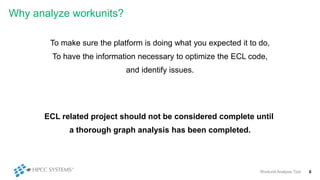
To make sure the platform is doing what you expected it to do,
To have the information necessary to optimize the ECL code,
and identify issues.
Workunit Analysis Tool 6
ECL related project should not be considered complete until
a thorough graph analysis has been completed.
Analyzing
workunits
manually
Analyzing workunit - a walk through
Workunit Analysis Tool 8
Analyzing workunit - a walk through
Workunit Analysis Tool 9
Analyzing workunit - a walk through
Workunit Analysis Tool 10
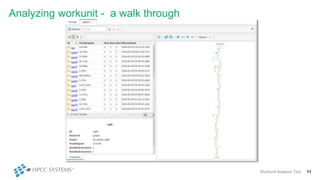
Analyzing workunit - a walk through
Workunit Analysis Tool 11
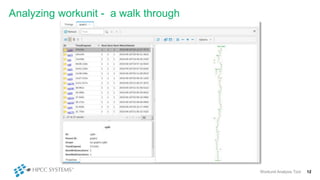
Analyzing workunit - a walk through
Workunit Analysis Tool 12
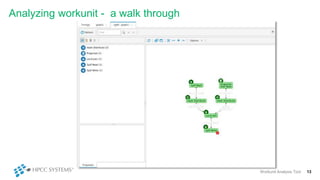
Analyzing workunit - a walk through
Workunit Analysis Tool 13
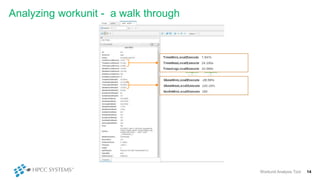
Analyzing workunit - a walk through
Workunit Analysis Tool 14
Analyzing workunit - a walk through
Workunit Analysis Tool 15
Analyzing workunit - a walk through
Workunit Analysis Tool 16
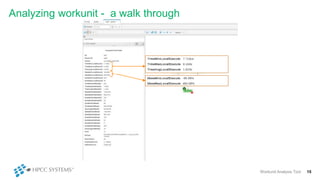
Analyzing workunit - a walk through
Workunit Analysis Tool 17
Analyzing workunit - a walk through
Workunit Analysis Tool 18
So, do we routinely analyze work units?
oAlways?
oSometimes?
oRarely?
Workunit Analysis Tool 19
So, do we routinely analyze work units?
• Probably not enough
• Probably not in sufficient depth
• Why?
• Difficult to fully understand large graphs
• Difficult to digest the large number of metrics
• Difficult to interpret the metrics
• Not having the time
Workunit Analysis Tool 20
Introducing the
Workunit Analysis
Tool
Introducing the Workunit Analysis Tool
• Analyzes the workunit to provide information useful for
• Improving performance
• Diagnosing issues
Workunit Analysis Tool 22
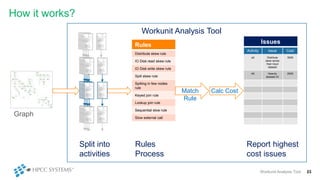
Rules
Distribute skew rule
IO Disk read skew rule
IO Disk write skew rule
Spill skew rule
Spilling in few nodes
rule
Keyed join rule
Lookup join rule
Sequential slow rule
Slow external call
How it works?
Workunit Analysis Tool 23
Graph
Split into
activities
Workunit Analysis Tool
Rules
Process
Match
Rule
Issues
Activity Issue Cost
a3 Distrbute
skew worse
than input
dataset
3000
A5 Heavily
skewed IO
2000
Calc Cost
Report highest
cost issues
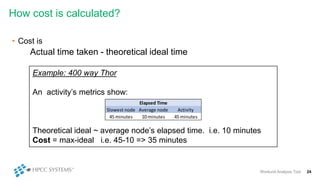
How cost is calculated?
• Cost is
Actual time taken - theoretical ideal time
Workunit Analysis Tool 24
Example: 400 way Thor
An activity’s metrics show:
Theoretical ideal ~ average node’s elapsed time. i.e. 10 minutes
Cost = max-ideal i.e. 45-10 => 35 minutes
Slowest node Average node Activity
45 minutes 10 minutes 45 minutes
Elapsed Time
Demonstration
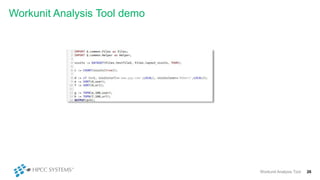
Workunit Analysis Tool demo
Workunit Analysis Tool 26
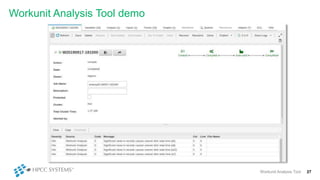
Workunit Analysis Tool demo
Workunit Analysis Tool 27
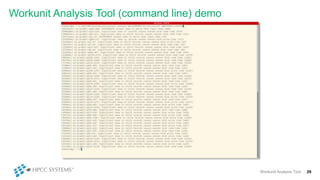
Workunit Analysis Tool (command line) demo
Workunit Analysis Tool 28
Workunit Analysis Tool (command line) demo
Workunit Analysis Tool 29
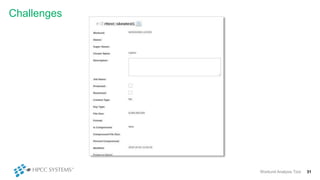
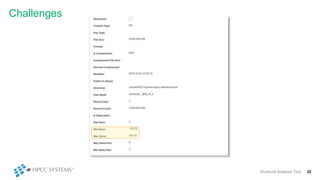
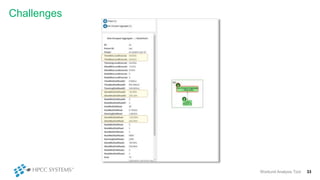
Challenges
Challenges
Workunit Analysis Tool 31
Challenges
Workunit Analysis Tool 32
Challenges
Workunit Analysis Tool 33
Concluding
remarks
How it should be used
Workunit Analysis Tool 35
It is a tool for the developer
It does not decide if something is wrong or
right:
Developers should interpret the information
and decide on what changes (if any) is
needed.
It will not catch every problem
There will always be cases that have not
been considered or implemented.
Workunits of concern should be
analyzed manually.
• Improve cost calculation
• More rules
• Skews: global sort, spilling skews (some nodes spilling others not), all on one node, unbalanced
join and other excessive skews
• Issues caused by sequential operation
• Slow joins
• Ratio of disk IO time to size read out of line
• Index read/keyed join & large number of reject rows
• Large amount of time in functions & soap calls
• Long time waiting for queues
• Proportion of time spent spilling to other work
• Live analysis: analyze workunit whilst it’s executing
• ROXIE Support
Features Planned
Workunit Analysis Tool 36
Concluding remarks
• Automatically analyzes workunit after a job completes
• Analyzes the entire work unit in seconds
• Thoroughly analyses workunit:
• Every graph & subgraph
• Every metric
• Every time
• Now, every workunit may be analyzed every time it executes
• Caveat:
• Work in progress
• Doesn’t eliminate manual analysis
Workunit Analysis Tool 37
Questions?
Shamser Ahmed
Senior Consulting SW Engineer
shamser.ahmed@lexisnexisrisk.com
Workunit Analysis Tool 38
View this presentation on YouTube:
https://www.youtube.com/watch?v=5F9WW89yDZw&list=PL-8MJMUpp8IKH5-
d56az56t52YccleX5h&index=3&t=0s
(5:33:00)
Workunit Analysis Tool 39

Work Unit Analysis Tool

  • 1.
    2019 HPCC Systems® Community Day ChallengeYourself – Challenge the Status Quo Shamser Ahmed shamser.ahmed@lexisnexisrisk.co m Workunit Analysis Tool Tech Review
  • 2.
    Overview • Why analyzeworkunits? • Analyzing workunits manually • Introducing the Workunit Analysis Tool • Demonstration • Challenges • Concluding remarks • Questions & Suggestions Workunit Analysis Tool 2
  • 3.
  • 4.
    Why analyze workunits? Examinegraph to • Determine if the job is as efficient as possible • Graph may not be optimal • Issues: redundant/duplicate activities, inefficient sorting, inefficient joins, too many sub-graphs, skew relating issues etc • Human guidance may be necessary • Reveal errors in ECL • Is the platform doing what you expect? • Platform related issues • Why is my job running slower than before? Workunit Analysis Tool 4
  • 5.
    Why analyze workunits? Examinegraph metrics to identify issues with • Skews • Spills • External services • Less than optimal operation (join, sort, distribute, etc) • Does actual time taken match expected time? Workunit Analysis Tool 5
  • 6.
    Why analyze workunits? Tomake sure the platform is doing what you expected it to do, To have the information necessary to optimize the ECL code, and identify issues. Workunit Analysis Tool 6 ECL related project should not be considered complete until a thorough graph analysis has been completed.
  • 7.
  • 8.
    Analyzing workunit -a walk through Workunit Analysis Tool 8
  • 9.
    Analyzing workunit -a walk through Workunit Analysis Tool 9
  • 10.
    Analyzing workunit -a walk through Workunit Analysis Tool 10
  • 11.
    Analyzing workunit -a walk through Workunit Analysis Tool 11
  • 12.
    Analyzing workunit -a walk through Workunit Analysis Tool 12
  • 13.
    Analyzing workunit -a walk through Workunit Analysis Tool 13
  • 14.
    Analyzing workunit -a walk through Workunit Analysis Tool 14
  • 15.
    Analyzing workunit -a walk through Workunit Analysis Tool 15
  • 16.
    Analyzing workunit -a walk through Workunit Analysis Tool 16
  • 17.
    Analyzing workunit -a walk through Workunit Analysis Tool 17
  • 18.
    Analyzing workunit -a walk through Workunit Analysis Tool 18
  • 19.
    So, do weroutinely analyze work units? oAlways? oSometimes? oRarely? Workunit Analysis Tool 19
  • 20.
    So, do weroutinely analyze work units? • Probably not enough • Probably not in sufficient depth • Why? • Difficult to fully understand large graphs • Difficult to digest the large number of metrics • Difficult to interpret the metrics • Not having the time Workunit Analysis Tool 20
  • 21.
  • 22.
    Introducing the WorkunitAnalysis Tool • Analyzes the workunit to provide information useful for • Improving performance • Diagnosing issues Workunit Analysis Tool 22
  • 23.
    Rules Distribute skew rule IODisk read skew rule IO Disk write skew rule Spill skew rule Spilling in few nodes rule Keyed join rule Lookup join rule Sequential slow rule Slow external call How it works? Workunit Analysis Tool 23 Graph Split into activities Workunit Analysis Tool Rules Process Match Rule Issues Activity Issue Cost a3 Distrbute skew worse than input dataset 3000 A5 Heavily skewed IO 2000 Calc Cost Report highest cost issues
  • 24.
    How cost iscalculated? • Cost is Actual time taken - theoretical ideal time Workunit Analysis Tool 24 Example: 400 way Thor An activity’s metrics show: Theoretical ideal ~ average node’s elapsed time. i.e. 10 minutes Cost = max-ideal i.e. 45-10 => 35 minutes Slowest node Average node Activity 45 minutes 10 minutes 45 minutes Elapsed Time
  • 25.
  • 26.
    Workunit Analysis Tooldemo Workunit Analysis Tool 26
  • 27.
    Workunit Analysis Tooldemo Workunit Analysis Tool 27
  • 28.
    Workunit Analysis Tool(command line) demo Workunit Analysis Tool 28
  • 29.
    Workunit Analysis Tool(command line) demo Workunit Analysis Tool 29
  • 30.
  • 31.
  • 32.
  • 33.
  • 34.
  • 35.
    How it shouldbe used Workunit Analysis Tool 35 It is a tool for the developer It does not decide if something is wrong or right: Developers should interpret the information and decide on what changes (if any) is needed. It will not catch every problem There will always be cases that have not been considered or implemented. Workunits of concern should be analyzed manually.
  • 36.
    • Improve costcalculation • More rules • Skews: global sort, spilling skews (some nodes spilling others not), all on one node, unbalanced join and other excessive skews • Issues caused by sequential operation • Slow joins • Ratio of disk IO time to size read out of line • Index read/keyed join & large number of reject rows • Large amount of time in functions & soap calls • Long time waiting for queues • Proportion of time spent spilling to other work • Live analysis: analyze workunit whilst it’s executing • ROXIE Support Features Planned Workunit Analysis Tool 36

  • 37.
    Concluding remarks • Automaticallyanalyzes workunit after a job completes • Analyzes the entire work unit in seconds • Thoroughly analyses workunit: • Every graph & subgraph • Every metric • Every time • Now, every workunit may be analyzed every time it executes • Caveat: • Work in progress • Doesn’t eliminate manual analysis Workunit Analysis Tool 37
  • 38.
    Questions? Shamser Ahmed Senior ConsultingSW Engineer shamser.ahmed@lexisnexisrisk.com Workunit Analysis Tool 38
  • 39.
    View this presentationon YouTube: https://www.youtube.com/watch?v=5F9WW89yDZw&list=PL-8MJMUpp8IKH5- d56az56t52YccleX5h&index=3&t=0s (5:33:00) Workunit Analysis Tool 39

Editor's Notes

  • #3  In the presentation, I will be covering the following areas:
  • #5 So, WHY WOULD YOU WANT TO ANALYZE WU? I'd suggest that you'd Examine graph to... Graph not optimal (compile time information) The code generator does not "know" about data until execution completes. Hints need to guide the code generator A different action may be better suited Highlight inefficiencies in ECL code Too many small sub-graphs with effecting performance  Inappropriate joins – is keyed join better, lookup join? Or spills at unexpected times Platform is not infallible Code generator could do a better job.  The engines can always be optimise further … Team constantly improving --------------------- Analyzing WU may highlight issues in the design, data or architecture Hey, my job is running slower? Regression in platform Or bug introduced in ECL Or has the data changed?
  • #6 In addition to examining the graph, the graph metrics should be examined The metrics will highlight Skews causing cluster to be used inefficiently..some nodes idle whilst others very busy Spills affect performance. Usually, necessary. But may be possible to eliminate External (soap calls) becoming a bottle neck Lookup join, keyed join better?  Assisting in achieving better distribution? How long do we expect that "work" to take? Does it match with the actual time taken?
  • #8 Important to understand: how now Appreciate what/how analysis tool works
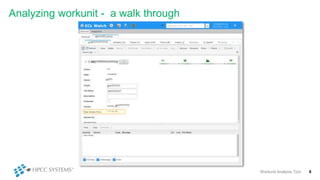
  • #9 START BY having a look at real world Workunit and conducting some analysis. This WU executed on a 400 way thor.  As you can see it took over 1 hour 17 minutes.  That is quite a significant amount of resources.  Definitely, worth seeing if it's possible to reduce the total cluster time.
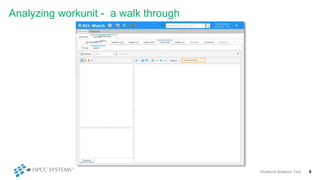
  • #10 With a large Workunit on a busy system, it takes some time to gather and display the graph.
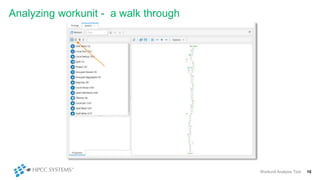
  • #11 Eventually, the entire graph is shown. Many graphs, subgraphs and activites here.  Too many to examine everyone, so we'll focus on the activies having the biggest impact
  • #12 Clicked sub-graphs icon to get the timings related to the subgraphs and then clicked "TimeElapsed" to sort by timings
  • #13 The list is sorted in reverse elapsed time order – subgraph with highest elapsed time shown first Clicking on that one to drill down
  • #14 So, here we have the subgraph with the slowest execution time.... We going to examine the activities to see where the time is going
  • #15 I've click spill read and see 1) the maximum execution time is around 24 seconds 2) other metrics not paricularly interesting
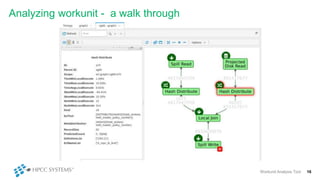
  • #16 Now examine, Project Disk Read..  max local execute 9 seconds But skew is 400%.. Would be significant but subsequently HASH DISTRIBUTE
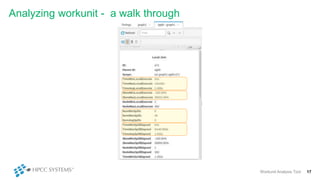
  • #17 Quick process again.. Reducing skew Finally, examining Local Join
  • #18 14 minutes... doesn't sound significant but 14minus X 400 way cluster... worth reducing if possible MASSIVE SKEW IN LOCAL EXECUTE TIME 3500%!!  SEEMS one has large number of spills... needs examining Consider the previous hash distributes to see if skew may be reduced... So, we can carry on looking at elapsed time in other parts of the activites... More to do.. examine a different metric
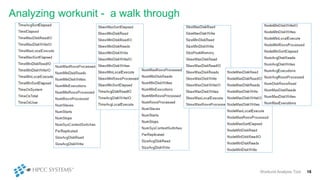
  • #19 It’s not over.. There are many more metrics to examine This is to give a taste of the analysing WU manually.  I'll end the demo but in the real work the analysis would continue for far more subgraphs and metrics
  • #20 So, that bring us to the question of "in the real world" do we ... I think the answer for most would be "less thank we'd like"
  • #21 large complex workunit that takes significant cluster time Some graphs are VERY LARGE and browsers struggle to render quickly enough forgiven for not fully understanding all the metrics Expected value Best case for hardware, network bandwidth Need: general feel for what the values should be Time consuming: Examine key metrics, for key graphs But small graph may be important.. So GREAT TO HAVE MORE ASSISTANT IN analyze WU, So that brings us to Work unit Analyzer tool...
  • #23 … The Workunit analysis tool is designed to assist the user in analysing work units  <read slide> Now: Automatic and routine More thorough
  • #25 Suppose, heavily skewed data means … So, cost in this case would be 2,100 seconds. Cost calculation not perfect: e.g. skews upstream activities/ complex relationship
  • #27  I would like to show demo of of it working on a small test ECL. Here's a short piece of ECL (that does nothing useful) designed to test the Analysis tool It outputs the first 100 users and first 100 urls – for not reason whatsoever.. Workunit Analysis Tool is built into the workflow...
  • #28   These are screen shots of job I executed earlier... Within a fraction of a second after the WU completes, the potential issues are shown in the messages section...
  • #29 WHEN YOU MAY USE COMAND LINE .are going to have a quick look at the command line verson of the Analysis tool  We'd not normally need to use the command line .. but I'm examining the real world workunit that we were looking at earlier. To see what issues it detects
  • #30 Bang A fraction of a second later The analysis is complete... You can see it has detected couple of dozen issues.  We found a couple of potential issues in our 5-10 minutes of manual analysis... 2 dozen issues detected in less than a second. The list is sorted in reverse cost order, with the highest cost shown first... In the real worl, I'd now examine the reported activities in more details and see if we can do something about the area of concern
  • #36 Is a developer tool.  It is a tool to assist the developers
  • #37  ...You feedback and suggestions is invaluable
  • #38  <read slide> Analysis stored with workunit analysis is routine rather than when a problem arises or when the developer has time (3rd point): Potential to for a more thorough analysis
  • #39 Thank-you for listening (and participation). We have time for any questions. Which work units do you analyze? Every work units? Only ones that take a long time? When jobs take longer than normal? How do you analyze workunits? Do you focus on particular parts of the graph? Particular metrics? Skews Elapsed time Data sizes That concludes the presentation.   Feel free to contact me with questions, feedback and suggestions. Thank-you very much for your attention.