2019 HPCC
Systems®
Community Day
Challenge Yourself –
Challenge the Status Quo
Xiaoming Wang
Senior Consulting SWE
HPCC Systems Platform
Godson Fortil
Software Engineer I
HPCC Systems Platform
Getting Started with HPCC Systems®
Platform Docker Container & Kubernetes
Getting Started with HPCC Systems® Platform Docker Container & Kubernetes 2
Introduction
Getting Started with HPCC Systems® Platform Docker Container & Kubernetes 3
• What is Docker?
• Docker provides a way to run applications securely isolated in a container, packaged with all its
dependencies and libraries
• What is Kubernetes?
• Kubernetes is an open-source container orchestration system for automating application deployment,
scaling, and management
• Main features include:
• Container grouping using pod
• Self-healing
• Auto-scalability
• DNS management
• Load balancing
• Rolling update or rollback
• Resource monitoring and logging
Introduction
Getting Started with HPCC Systems® Platform Docker Container & Kubernetes 4
• Why we want to talk about Docker/Kubernetes
• LexisNexis Risk Solutions strategy to move towards the cloud, such as AWS
• Docker/Kubernetes is a major method to deploy application in the cloud.
• After this presentation, you should be
• Familiar with current HPCC Systems Docker build and deployment on Kubernetes
workflow
• Able to use HPCC Systems Docker/Kubernetes in your development workflow
• Able to contribute to the integration of these two technologies with the HPCC Systems
Platform
HPCC-Docker
Getting Started with HPCC Systems® Platform Docker Container & Kubernetes 5
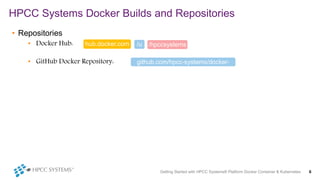
• Repositories
• Docker Hub:
• GitHub Docker Repository:
HPCC Systems Docker Builds and Repositories
Getting Started with HPCC Systems® Platform Docker Container & Kubernetes 6
hub.docker.com /hpccsystems/u
github.com/hpcc-systems/docker-
hpcc
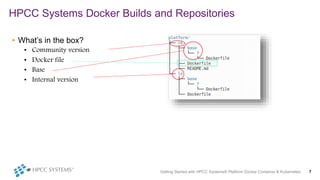
• What’s in the box?
• Community version
• Docker file
• Base
• Internal version
HPCC Systems Docker Builds and Repositories
Getting Started with HPCC Systems® Platform Docker Container & Kubernetes 7
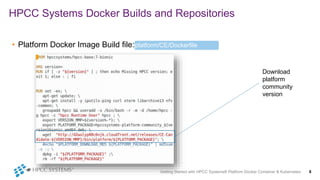
• Platform Docker Image Build file:
HPCC Systems Docker Builds and Repositories
Getting Started with HPCC Systems® Platform Docker Container & Kubernetes 8
platform/CE/Dockerfile
Download
platform
community
version
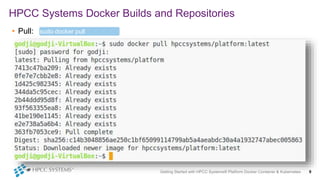
• Pull:
HPCC Systems Docker Builds and Repositories
Getting Started with HPCC Systems® Platform Docker Container & Kubernetes 9
sudo docker pull
<repo>:<tag>
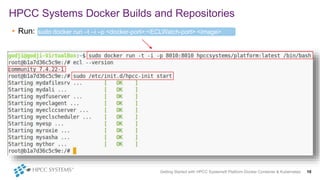
• Run:
HPCC Systems Docker Builds and Repositories
Getting Started with HPCC Systems® Platform Docker Container & Kubernetes 10
sudo docker run –t –i –p <docker-port>:<ECLWatch-port> <image>
/bin/bash
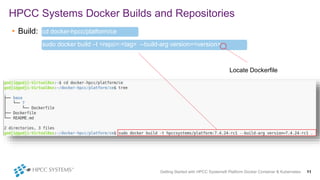
• Build:
HPCC Systems Docker Builds and Repositories
Getting Started with HPCC Systems® Platform Docker Container & Kubernetes 11
sudo docker build –t <repo>:<tag> --build-arg version=<version> .
cd docker-hpcc/platform/ce
Locate Dockerfile
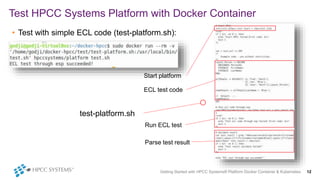
• Test with simple ECL code (test-platform.sh):
Test HPCC Systems Platform with Docker Container
Getting Started with HPCC Systems® Platform Docker Container & Kubernetes 12
test-platform.sh
Start platform
ECL test code
Run ECL test
Parse test result
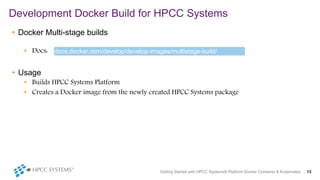
• Docker Multi-stage builds
• Docs:
• Usage
• Builds HPCC Systems Platform
• Creates a Docker image from the newly created HPCC Systems package
Development Docker Build for HPCC Systems
Getting Started with HPCC Systems® Platform Docker Container & Kubernetes 13
docs.docker.com/develop/develop-images/multistage-build/
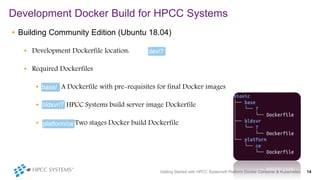
• Building Community Edition (Ubuntu 18.04)
• Development Dockerfile location:
• Required Dockerfiles
• A Dockerfile with pre-requisites for final Docker images
• HPCC Systems build server image Dockerfile
• Two stages Docker build Dockerfile
Development Docker Build for HPCC Systems
Getting Started with HPCC Systems® Platform Docker Container & Kubernetes 14
dev/7
base/
7
bldsvr/7
platform/ce
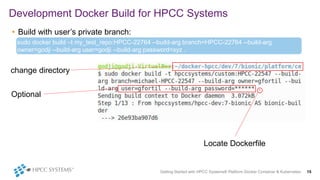
• Build with user’s private branch:
Development Docker Build for HPCC Systems
Getting Started with HPCC Systems® Platform Docker Container & Kubernetes 15
sudo docker build –t my_test_repo:HPCC-22764 --build-arg branch=HPCC-22764 --build-arg
owner=godji --build-arg user=godji --build-arg password=xyz .
change directory
Optional
Locate Dockerfile
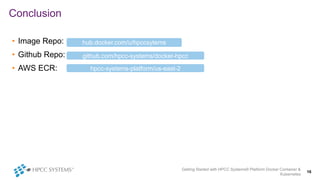
• Image Repo:
• Github Repo:
• AWS ECR:
Conclusion
Getting Started with HPCC Systems® Platform Docker Container &
Kubernetes
16
hub.docker.com/u/hpccsytems
github.com/hpcc-systems/docker-hpcc
hpcc-systems-platform/us-east-2
HPCC-Kube
Getting Started with HPCC Systems® Platform Docker Container & Kubernetes 17
Deploy HPCC Systems on AWS EKS
Getting Started with HPCC Systems® Platform Docker Container & Kubernetes 18
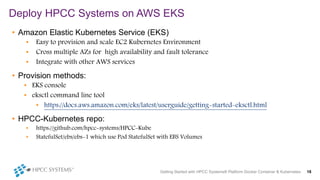
• Amazon Elastic Kubernetes Service (EKS)
• Easy to provision and scale EC2 Kubernetes Environment
• Cross multiple AZs for high availability and fault tolerance
• Integrate with other AWS services
• Provision methods:
• EKS console
• eksctl command line tool
• https://docs.aws.amazon.com/eks/latest/userguide/getting-started-eksctl.html
• HPCC-Kubernetes repo:
• https://github.com/hpcc-systems/HPCC-Kube
• StatefulSet/ebs/ebs-1 which use Pod StatefulSet with EBS Volumes
Getting Started with HPCC Systems® Platform Docker Container & Kubernetes 19
Deploy HPCC Systems on AWS EKS
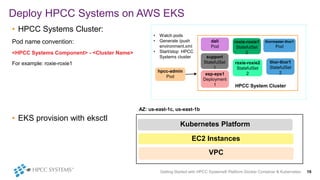
• HPCC Systems Cluster:
Pod name convention:
<HPCC Systems Component> - <Cluster Name>
For example: roxie-roxie1
• EKS provision with eksctl
• Watch pods
• Generate /push
environment.xml
• Start/stop HPCC
Systems cluster
HPCC System Cluster
dali
Pod
roxie-roxie1
StatefulSet
2
thormaster-thor1
Pod
support
StatefulSet
1
roxie-roxie2
StatefulSet
2
thor-thor1
StatefulSet
2esp-eps1
Deployment
1
hpcc-admin
Pod
AZ: us-east-1c, us-east-1b
Kubernetes Platform
EC2 Instances
VPC
Getting Started with HPCC Systems® Platform Docker Container & Kubernetes 20
Deploy HPCC Systems on AWS EKS
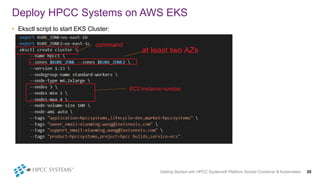
• Eksctl script to start EKS Cluster:
at least two AZs
EC2 Instance number
command
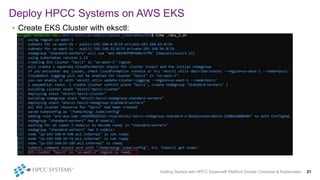
• Create EKS Cluster with eksctl:
Deploy HPCC Systems on AWS EKS
Getting Started with HPCC Systems® Platform Docker Container & Kubernetes 21
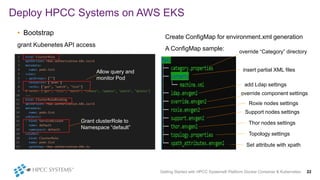
Create ConfigMap for environment.xml generation
A ConfigMap sample:
In
Deploy HPCC Systems on AWS EKS
Getting Started with HPCC Systems® Platform Docker Container & Kubernetes 22
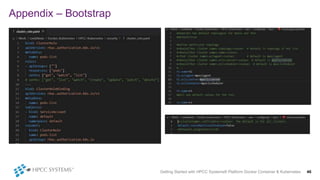
• Bootstrap
grant Kubenetes API access
Allow query and
monitor Pod
Grant clusterRole to
Namespace “default”
override “Category” directory
insert partial XML files
add Ldap settings
override component settings
Roxie nodes settings
Support nodes settings
Thor nodes settings
Topology settings
Set attribute with xpath
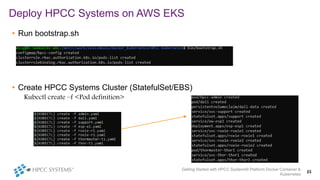
• Run bootstrap.sh
• Create HPCC Systems Cluster (StatefulSet/EBS)
Kubectl create –f <Pod definition>
Deploy HPCC Systems on AWS EKS
Getting Started with HPCC Systems® Platform Docker Container &
Kubernetes
23
Deploy HPCC Systems on AWS EKS
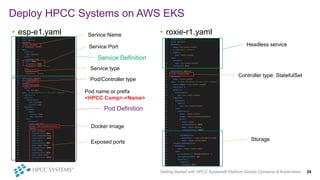
• esp-e1.yaml • roxie-r1.yaml
Getting Started with HPCC Systems® Platform Docker Container & Kubernetes 24
Service Name
Service Port
Pod name or prefix
<HPCC Comp>-<Name>
Docker Image
Exposed ports
Pod/Controller type
Service type
Headless service
Service Definition
Pod Definition
Storage
Controller type: StatefulSet
Deploy HPCC Systems on AWS EKS
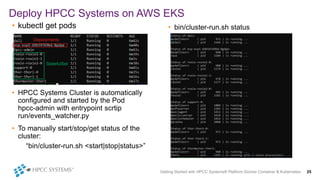
• kubectl get pods
• HPCC Systems Cluster is automatically
configured and started by the Pod
hpcc-admin with entrypoint scrtip
run/events_watcher.py
• To manually start/stop/get status of the
cluster:
“bin/cluster-run.sh <start|stop|status>”
• bin/cluster-run.sh status
Getting Started with HPCC Systems® Platform Docker Container & Kubernetes 25
Deployments
StatefulSet
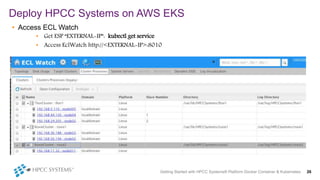
• Access ECL Watch
• Get ESP “EXTERNAL-IP”: kubectl get service
• Access EclWatch http://<EXTERNAL-IP>:8010
Deploy HPCC Systems on AWS EKS
Getting Started with HPCC Systems® Platform Docker Container & Kubernetes 26
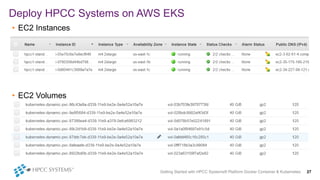
• EC2 Instances
• EC2 Volumes
Deploy HPCC Systems on AWS EKS
Getting Started with HPCC Systems® Platform Docker Container & Kubernetes 27
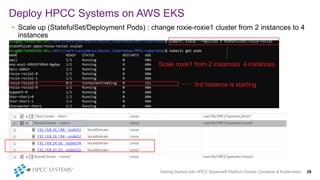
• Scale up (StatefulSet/Deployment Pods) : change roxie-roxie1 cluster from 2 instances to 4
instances
Deploy HPCC Systems on AWS EKS
Getting Started with HPCC Systems® Platform Docker Container & Kubernetes 28
Scale roxie1 from 2 instances 4 instances
3rd instance is starting
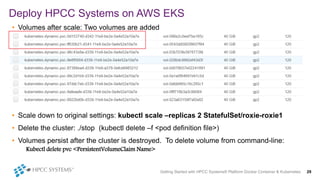
• Volumes after scale: Two volumes are added
• Scale down to original settings: kubectl scale –replicas 2 StatefulSet/roxie-roxie1
• Delete the cluster: ./stop (kubectl delete –f <pod definition file>)
• Volumes persist after the cluster is destroyed. To delete volume from command-line:
Kubectl delete pvc <PersistentVolumeClaim Name>
Deploy HPCC Systems on AWS EKS
Getting Started with HPCC Systems® Platform Docker Container & Kubernetes 29
Getting Started with HPCC Systems® Platform Docker Container & Kubernetes 30
• Deploy HPCC Systems cluster with Elastic File System (EFS)
Deployment/efs/ and StatefulSet/efs/.
• Helm Charts: charts/hpcc-ss (EBS), charts/hpcc-dp (EFS)
• Volume types comparison (EKS)
• EBS
• Performance better and cheaper
• Hard to re-use the volume in StatefulSet
• Not ideal when deployed across multiple Available Zones (data duplicated may not be equal in two AZs)
• EFS
• Easy to use. No need to use StatefulSet. If allowed a file can be written by all parties.
• Performance may not be as good as EBS. Costs more than EBS.
• EKS Cost:
• Mainly EC2 instances.
• To control the cost:
• Delete/Start the EKS Cluster. It takes about 15-30 min to create a cluster in our case.
• Use “eksctl scale nodegroup” to resize EKS cluster.
• Use spot instances which is cheaper
Deploy HPCC Systems on AWS EKS
Getting Started with HPCC Systems® Platform Docker Container & Kubernetes 31
Manage ECL Watch with ISTIO on Local Kubernetes
• Goal: show an example of using local Docker/Kubernetes to develop and test HPCC
Systems Platform
• Setup a local Kubernetes environment
• Minikube https://kubernetes.io/docs/tasks/tools/install-minikube/
• Windows
• Linux
• Mac
• Docker/Go/Kubernetes https://github.com/kubernetes/kubernetes
• Linux local/LINUX.md
• Mac local/APPLE.md
• Windows WSL2 (coming) local/WINDOWS.md
• https://github.com/hpcc-systems/HPCC-Kube/local
Getting Started with HPCC Systems® Platform Docker Container & Kubernetes 32
Manage ECL Watch with ISTIO on Local Kubernetes
• What is ISTIO (https://istio.io/docs/concepts)
ISTIO is an open source project which tries to resolve common problems when people migrate their
products to the cloud. These problems include network control, security, monitoring, logging, etc.
• Why use ISTIO
ISTIO makes it easy to create a network of deployed services with load balancing, service-to-service
authentication, monitoring, and more with few or no code changes in service code.
• ISTIO supports various Kubernetes Platforms
Getting Started with HPCC Systems® Platform Docker Container & Kubernetes 33
Manage ECL Watch with ISTIO on Local Kubernetes
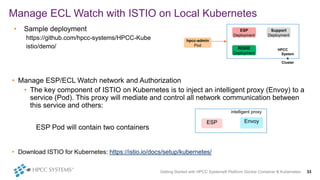
• Sample deployment
https://github.com/hpcc-systems/HPCC-Kube
istio/demo/
• Manage ESP/ECL Watch network and Authorization
• The key component of ISTIO on Kubernetes is to inject an intelligent proxy (Envoy) to a
service (Pod). This proxy will mediate and control all network communication between
this service and others:
ESP Pod will contain two containers
• Download ISTIO for Kubernetes: https://istio.io/docs/setup/kubernetes/
Support
Deployment
ESP
Deployment
hpcc-admin
Pod
ROXIE
Deployment
HPCC
System
s
Cluster
ESP Envoy
intelligent proxy
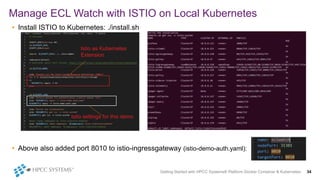
• Install ISTIO to Kubernetes: ./install.sh
• Above also added port 8010 to istio-ingressgateway (istio-demo-auth.yaml):
Manage ECL Watch with ISTIO on Local Kubernetes
Getting Started with HPCC Systems® Platform Docker Container & Kubernetes 34
Istio as Kubernetes
Extension
Istio settings for this demo
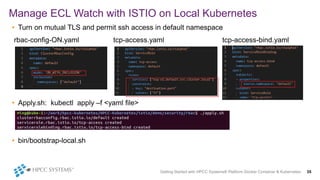
• Turn on mutual TLS and permit ssh access in default namespace
rbac-config-ON.yaml tcp-access.yaml tcp-access-bind.yaml
• Apply.sh: kubectl apply –f <yaml file>
• bin/bootstrap-local.sh
Manage ECL Watch with ISTIO on Local Kubernetes
Getting Started with HPCC Systems® Platform Docker Container & Kubernetes 35
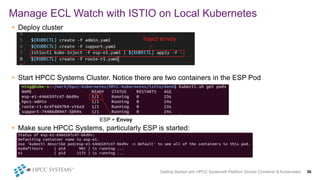
• Deploy cluster
• Start HPCC Systems Cluster. Notice there are two containers in the ESP Pod
• Make sure HPCC Systems, particularly ESP is started:
Manage ECL Watch with ISTIO on Local Kubernetes
Getting Started with HPCC Systems® Platform Docker Container & Kubernetes 36
ESP + Envoy
Inject envoy
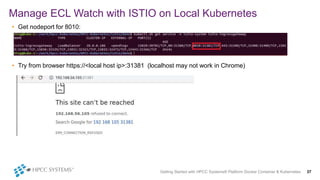
• Get nodeport for 8010:
• Try from browser https://<local host ip>:31381 (localhost may not work in Chrome)
Manage ECL Watch with ISTIO on Local Kubernetes
Getting Started with HPCC Systems® Platform Docker Container & Kubernetes 37
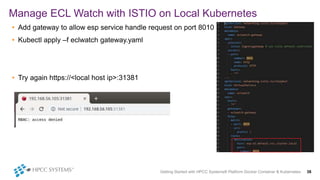
• Add gateway to allow esp service handle request on port 8010
• Kubectl apply –f eclwatch gateway.yaml
• Try again https://<local host ip>:31381
Manage ECL Watch with ISTIO on Local Kubernetes
Getting Started with HPCC Systems® Platform Docker Container & Kubernetes 38
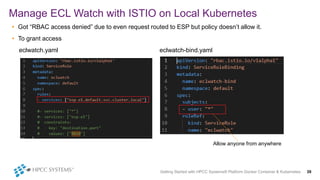
• Got “RBAC access denied” due to even request routed to ESP but policy doesn’t allow it.
• To grant access
eclwatch.yaml eclwatch-bind.yaml
Manage ECL Watch with ISTIO on Local Kubernetes
Getting Started with HPCC Systems® Platform Docker Container & Kubernetes 39
Allow anyone from anywhere
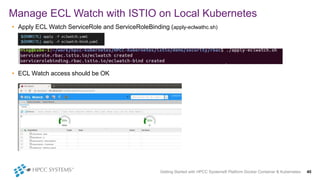
• Apply ECL Watch ServiceRole and ServiceRoleBinding (apply-eclwathc.sh)
• ECL Watch access should be OK
Manage ECL Watch with ISTIO on Local Kubernetes
Getting Started with HPCC Systems® Platform Docker Container & Kubernetes 40
Getting Started with HPCC Systems® Platform Docker Container & Kubernetes 41
Manage ECL Watch with ISTIO on Local Kubernetes
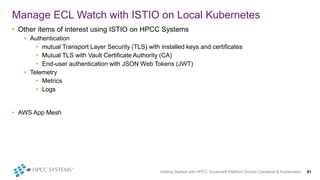
• Other items of interest using ISTIO on HPCC Systems
• Authentication
• mutual Transport Layer Security (TLS) with installed keys and certificates
• Mutual TLS with Vault Certificate Authority (CA)
• End-user authentication with JSON Web Tokens (JWT)
• Telemetry
• Metrics
• Logs
• AWS App Mesh
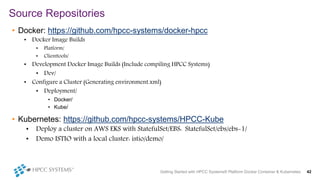
• Docker: https://github.com/hpcc-systems/docker-hpcc
• Docker Image Builds
• Platform/
• Clienttools/
• Development Docker Image Builds (Include compiling HPCC Systems)
• Dev/
• Configure a Cluster (Generating environment.xml)
• Deployment/
• Docker/
• Kube/
• Kubernetes: https://github.com/hpcc-systems/HPCC-Kube
• Deploy a cluster on AWS EKS with StatefulSet/EBS: StatefulSet/ebs/ebs-1/
• Demo ISTIO with a local cluster: istio/demo/
Source Repositories
Getting Started with HPCC Systems® Platform Docker Container & Kubernetes 42
Questions & Suggestions
HPCC Systems Docker Repository:
https://github.com/hpcc-systems/docker-hpcc
HPCC Systems Kubernetes Repository:
https://github.com/hpcc-systems/HPCC-Kube
Getting Started with HPCC Systems® Platform Docker Container &
Kubernetes
43
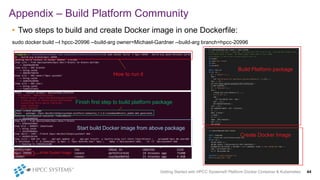
• Two steps to build and create Docker image in one Dockerfile:
sudo docker build --t hpcc-20996 --build-arg owner=Michael-Gardner --build-arg branch=hpcc-20996
Appendix – Build Platform Community
Getting Started with HPCC Systems® Platform Docker Container & Kubernetes 44
How to run it
Finish first step to build platform package
Start build Docker image from above package
Build Platform package
Create Docker Image
Final Docker Image
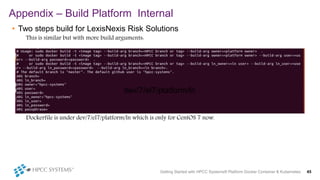
• Two steps build for LexisNexis Risk Solutions
This is similar but with more build arguments:
Dockerfile is under dev/7/el7/platform/ln which is only for CentOS 7 now.
Appendix – Build Platform Internal
Getting Started with HPCC Systems® Platform Docker Container & Kubernetes 45
dev/7/el7/platform/ln
Appendix – Bootstrap
Getting Started with HPCC Systems® Platform Docker Container & Kubernetes 46
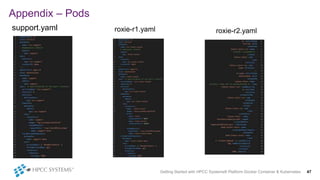
Appendix – Pods
support.yaml roxie-r2.yaml
Getting Started with HPCC Systems® Platform Docker Container & Kubernetes 47
roxie-r1.yaml
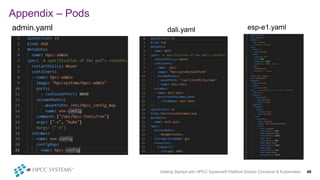
Appendix – Pods
admin.yaml esp-e1.yaml
Getting Started with HPCC Systems® Platform Docker Container & Kubernetes 48
dali.yaml
Appendix – Pods
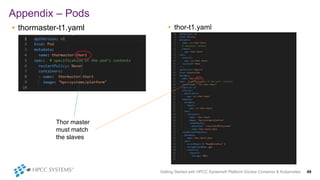
• thormaster-t1.yaml • thor-t1.yaml
Getting Started with HPCC Systems® Platform Docker Container & Kubernetes 49
Thor master
must match
the slaves
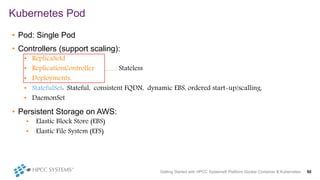
• Pod: Single Pod
• Controllers (support scaling):
• ReplicaSetd
• ReplicationController Stateless
• Deployments:
• StatefulSet: Stateful, consistent FQDN, dynamic EBS, ordered start-up/scalling,
• DaemonSet
• Persistent Storage on AWS:
• Elastic Block Store (EBS)
• Elastic File System (EFS)
Kubernetes Pod
Getting Started with HPCC Systems® Platform Docker Container & Kubernetes 50
Getting Started with HPCC Systems® Platform Docker Container & Kubernetes 51
Manage ECL Watch with ISTIO on Local Kubernetes
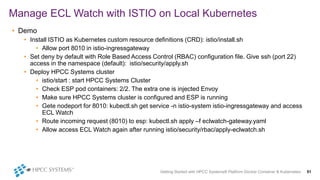
• Demo
• Install ISTIO as Kubernetes custom resource definitions (CRD): istio/install.sh
• Allow port 8010 in istio-ingressgateway
• Set deny by default with Role Based Access Control (RBAC) configuration file. Give ssh (port 22)
access in the namespace (default): istio/security/apply.sh
• Deploy HPCC Systems cluster
• istio/start : start HPCC Systems Cluster
• Check ESP pod containers: 2/2. The extra one is injected Envoy
• Make sure HPCC Systems cluster is configured and ESP is running
• Gete nodeport for 8010: kubectl.sh get service -n istio-system istio-ingressgateway and access
ECL Watch
• Route incoming request (8010) to esp: kubectl.sh apply –f eclwatch-gateway.yaml
• Allow access ECL Watch again after running istio/security/rbac/apply-eclwatch.sh
Getting Started with HPCC Systems® Platform Docker Container &
Kubernetes
52
View this presentation on YouTube:
https://www.youtube.com/watch?v=bp1fSv_KrPc&list=PL-
8MJMUpp8IKH5-d56az56t52YccleX5h&index=9&t=0s

Docker Support

  • 1.
    2019 HPCC Systems® Community Day ChallengeYourself – Challenge the Status Quo Xiaoming Wang Senior Consulting SWE HPCC Systems Platform Godson Fortil Software Engineer I HPCC Systems Platform
  • 2.
    Getting Started withHPCC Systems® Platform Docker Container & Kubernetes Getting Started with HPCC Systems® Platform Docker Container & Kubernetes 2
  • 3.
    Introduction Getting Started withHPCC Systems® Platform Docker Container & Kubernetes 3 • What is Docker? • Docker provides a way to run applications securely isolated in a container, packaged with all its dependencies and libraries • What is Kubernetes? • Kubernetes is an open-source container orchestration system for automating application deployment, scaling, and management • Main features include: • Container grouping using pod • Self-healing • Auto-scalability • DNS management • Load balancing • Rolling update or rollback • Resource monitoring and logging
  • 4.
    Introduction Getting Started withHPCC Systems® Platform Docker Container & Kubernetes 4 • Why we want to talk about Docker/Kubernetes • LexisNexis Risk Solutions strategy to move towards the cloud, such as AWS • Docker/Kubernetes is a major method to deploy application in the cloud. • After this presentation, you should be • Familiar with current HPCC Systems Docker build and deployment on Kubernetes workflow • Able to use HPCC Systems Docker/Kubernetes in your development workflow • Able to contribute to the integration of these two technologies with the HPCC Systems Platform
  • 5.
    HPCC-Docker Getting Started withHPCC Systems® Platform Docker Container & Kubernetes 5
  • 6.
    • Repositories • DockerHub: • GitHub Docker Repository: HPCC Systems Docker Builds and Repositories Getting Started with HPCC Systems® Platform Docker Container & Kubernetes 6 hub.docker.com /hpccsystems/u github.com/hpcc-systems/docker- hpcc
  • 7.
    • What’s inthe box? • Community version • Docker file • Base • Internal version HPCC Systems Docker Builds and Repositories Getting Started with HPCC Systems® Platform Docker Container & Kubernetes 7
  • 8.
    • Platform DockerImage Build file: HPCC Systems Docker Builds and Repositories Getting Started with HPCC Systems® Platform Docker Container & Kubernetes 8 platform/CE/Dockerfile Download platform community version
  • 9.
    • Pull: HPCC SystemsDocker Builds and Repositories Getting Started with HPCC Systems® Platform Docker Container & Kubernetes 9 sudo docker pull <repo>:<tag>
  • 10.
    • Run: HPCC SystemsDocker Builds and Repositories Getting Started with HPCC Systems® Platform Docker Container & Kubernetes 10 sudo docker run –t –i –p <docker-port>:<ECLWatch-port> <image> /bin/bash
  • 11.
    • Build: HPCC SystemsDocker Builds and Repositories Getting Started with HPCC Systems® Platform Docker Container & Kubernetes 11 sudo docker build –t <repo>:<tag> --build-arg version=<version> . cd docker-hpcc/platform/ce Locate Dockerfile
  • 12.
    • Test withsimple ECL code (test-platform.sh): Test HPCC Systems Platform with Docker Container Getting Started with HPCC Systems® Platform Docker Container & Kubernetes 12 test-platform.sh Start platform ECL test code Run ECL test Parse test result
  • 13.
    • Docker Multi-stagebuilds • Docs: • Usage • Builds HPCC Systems Platform • Creates a Docker image from the newly created HPCC Systems package Development Docker Build for HPCC Systems Getting Started with HPCC Systems® Platform Docker Container & Kubernetes 13 docs.docker.com/develop/develop-images/multistage-build/
  • 14.
    • Building CommunityEdition (Ubuntu 18.04) • Development Dockerfile location: • Required Dockerfiles • A Dockerfile with pre-requisites for final Docker images • HPCC Systems build server image Dockerfile • Two stages Docker build Dockerfile Development Docker Build for HPCC Systems Getting Started with HPCC Systems® Platform Docker Container & Kubernetes 14 dev/7 base/ 7 bldsvr/7 platform/ce
  • 15.
    • Build withuser’s private branch: Development Docker Build for HPCC Systems Getting Started with HPCC Systems® Platform Docker Container & Kubernetes 15 sudo docker build –t my_test_repo:HPCC-22764 --build-arg branch=HPCC-22764 --build-arg owner=godji --build-arg user=godji --build-arg password=xyz . change directory Optional Locate Dockerfile
  • 16.
    • Image Repo: •Github Repo: • AWS ECR: Conclusion Getting Started with HPCC Systems® Platform Docker Container & Kubernetes 16 hub.docker.com/u/hpccsytems github.com/hpcc-systems/docker-hpcc hpcc-systems-platform/us-east-2
  • 17.
    HPCC-Kube Getting Started withHPCC Systems® Platform Docker Container & Kubernetes 17
  • 18.
    Deploy HPCC Systemson AWS EKS Getting Started with HPCC Systems® Platform Docker Container & Kubernetes 18 • Amazon Elastic Kubernetes Service (EKS) • Easy to provision and scale EC2 Kubernetes Environment • Cross multiple AZs for high availability and fault tolerance • Integrate with other AWS services • Provision methods: • EKS console • eksctl command line tool • https://docs.aws.amazon.com/eks/latest/userguide/getting-started-eksctl.html • HPCC-Kubernetes repo: • https://github.com/hpcc-systems/HPCC-Kube • StatefulSet/ebs/ebs-1 which use Pod StatefulSet with EBS Volumes
  • 19.
    Getting Started withHPCC Systems® Platform Docker Container & Kubernetes 19 Deploy HPCC Systems on AWS EKS • HPCC Systems Cluster: Pod name convention: <HPCC Systems Component> - <Cluster Name> For example: roxie-roxie1 • EKS provision with eksctl • Watch pods • Generate /push environment.xml • Start/stop HPCC Systems cluster HPCC System Cluster dali Pod roxie-roxie1 StatefulSet 2 thormaster-thor1 Pod support StatefulSet 1 roxie-roxie2 StatefulSet 2 thor-thor1 StatefulSet 2esp-eps1 Deployment 1 hpcc-admin Pod AZ: us-east-1c, us-east-1b Kubernetes Platform EC2 Instances VPC
  • 20.
    Getting Started withHPCC Systems® Platform Docker Container & Kubernetes 20 Deploy HPCC Systems on AWS EKS • Eksctl script to start EKS Cluster: at least two AZs EC2 Instance number command
  • 21.
    • Create EKSCluster with eksctl: Deploy HPCC Systems on AWS EKS Getting Started with HPCC Systems® Platform Docker Container & Kubernetes 21
  • 22.
    Create ConfigMap forenvironment.xml generation A ConfigMap sample: In Deploy HPCC Systems on AWS EKS Getting Started with HPCC Systems® Platform Docker Container & Kubernetes 22 • Bootstrap grant Kubenetes API access Allow query and monitor Pod Grant clusterRole to Namespace “default” override “Category” directory insert partial XML files add Ldap settings override component settings Roxie nodes settings Support nodes settings Thor nodes settings Topology settings Set attribute with xpath
  • 23.
    • Run bootstrap.sh •Create HPCC Systems Cluster (StatefulSet/EBS) Kubectl create –f <Pod definition> Deploy HPCC Systems on AWS EKS Getting Started with HPCC Systems® Platform Docker Container & Kubernetes 23
  • 24.
    Deploy HPCC Systemson AWS EKS • esp-e1.yaml • roxie-r1.yaml Getting Started with HPCC Systems® Platform Docker Container & Kubernetes 24 Service Name Service Port Pod name or prefix <HPCC Comp>-<Name> Docker Image Exposed ports Pod/Controller type Service type Headless service Service Definition Pod Definition Storage Controller type: StatefulSet
  • 25.
    Deploy HPCC Systemson AWS EKS • kubectl get pods • HPCC Systems Cluster is automatically configured and started by the Pod hpcc-admin with entrypoint scrtip run/events_watcher.py • To manually start/stop/get status of the cluster: “bin/cluster-run.sh <start|stop|status>” • bin/cluster-run.sh status Getting Started with HPCC Systems® Platform Docker Container & Kubernetes 25 Deployments StatefulSet
  • 26.
    • Access ECLWatch • Get ESP “EXTERNAL-IP”: kubectl get service • Access EclWatch http://<EXTERNAL-IP>:8010 Deploy HPCC Systems on AWS EKS Getting Started with HPCC Systems® Platform Docker Container & Kubernetes 26
  • 27.
    • EC2 Instances •EC2 Volumes Deploy HPCC Systems on AWS EKS Getting Started with HPCC Systems® Platform Docker Container & Kubernetes 27
  • 28.
    • Scale up(StatefulSet/Deployment Pods) : change roxie-roxie1 cluster from 2 instances to 4 instances Deploy HPCC Systems on AWS EKS Getting Started with HPCC Systems® Platform Docker Container & Kubernetes 28 Scale roxie1 from 2 instances 4 instances 3rd instance is starting
  • 29.
    • Volumes afterscale: Two volumes are added • Scale down to original settings: kubectl scale –replicas 2 StatefulSet/roxie-roxie1 • Delete the cluster: ./stop (kubectl delete –f <pod definition file>) • Volumes persist after the cluster is destroyed. To delete volume from command-line: Kubectl delete pvc <PersistentVolumeClaim Name> Deploy HPCC Systems on AWS EKS Getting Started with HPCC Systems® Platform Docker Container & Kubernetes 29
  • 30.
    Getting Started withHPCC Systems® Platform Docker Container & Kubernetes 30 • Deploy HPCC Systems cluster with Elastic File System (EFS) Deployment/efs/ and StatefulSet/efs/. • Helm Charts: charts/hpcc-ss (EBS), charts/hpcc-dp (EFS) • Volume types comparison (EKS) • EBS • Performance better and cheaper • Hard to re-use the volume in StatefulSet • Not ideal when deployed across multiple Available Zones (data duplicated may not be equal in two AZs) • EFS • Easy to use. No need to use StatefulSet. If allowed a file can be written by all parties. • Performance may not be as good as EBS. Costs more than EBS. • EKS Cost: • Mainly EC2 instances. • To control the cost: • Delete/Start the EKS Cluster. It takes about 15-30 min to create a cluster in our case. • Use “eksctl scale nodegroup” to resize EKS cluster. • Use spot instances which is cheaper Deploy HPCC Systems on AWS EKS
  • 31.
    Getting Started withHPCC Systems® Platform Docker Container & Kubernetes 31 Manage ECL Watch with ISTIO on Local Kubernetes • Goal: show an example of using local Docker/Kubernetes to develop and test HPCC Systems Platform • Setup a local Kubernetes environment • Minikube https://kubernetes.io/docs/tasks/tools/install-minikube/ • Windows • Linux • Mac • Docker/Go/Kubernetes https://github.com/kubernetes/kubernetes • Linux local/LINUX.md • Mac local/APPLE.md • Windows WSL2 (coming) local/WINDOWS.md • https://github.com/hpcc-systems/HPCC-Kube/local
  • 32.
    Getting Started withHPCC Systems® Platform Docker Container & Kubernetes 32 Manage ECL Watch with ISTIO on Local Kubernetes • What is ISTIO (https://istio.io/docs/concepts) ISTIO is an open source project which tries to resolve common problems when people migrate their products to the cloud. These problems include network control, security, monitoring, logging, etc. • Why use ISTIO ISTIO makes it easy to create a network of deployed services with load balancing, service-to-service authentication, monitoring, and more with few or no code changes in service code. • ISTIO supports various Kubernetes Platforms
  • 33.
    Getting Started withHPCC Systems® Platform Docker Container & Kubernetes 33 Manage ECL Watch with ISTIO on Local Kubernetes • Sample deployment https://github.com/hpcc-systems/HPCC-Kube istio/demo/ • Manage ESP/ECL Watch network and Authorization • The key component of ISTIO on Kubernetes is to inject an intelligent proxy (Envoy) to a service (Pod). This proxy will mediate and control all network communication between this service and others: ESP Pod will contain two containers • Download ISTIO for Kubernetes: https://istio.io/docs/setup/kubernetes/ Support Deployment ESP Deployment hpcc-admin Pod ROXIE Deployment HPCC System s Cluster ESP Envoy intelligent proxy
  • 34.
    • Install ISTIOto Kubernetes: ./install.sh • Above also added port 8010 to istio-ingressgateway (istio-demo-auth.yaml): Manage ECL Watch with ISTIO on Local Kubernetes Getting Started with HPCC Systems® Platform Docker Container & Kubernetes 34 Istio as Kubernetes Extension Istio settings for this demo
  • 35.
    • Turn onmutual TLS and permit ssh access in default namespace rbac-config-ON.yaml tcp-access.yaml tcp-access-bind.yaml • Apply.sh: kubectl apply –f <yaml file> • bin/bootstrap-local.sh Manage ECL Watch with ISTIO on Local Kubernetes Getting Started with HPCC Systems® Platform Docker Container & Kubernetes 35
  • 36.
    • Deploy cluster •Start HPCC Systems Cluster. Notice there are two containers in the ESP Pod • Make sure HPCC Systems, particularly ESP is started: Manage ECL Watch with ISTIO on Local Kubernetes Getting Started with HPCC Systems® Platform Docker Container & Kubernetes 36 ESP + Envoy Inject envoy
  • 37.
    • Get nodeportfor 8010: • Try from browser https://<local host ip>:31381 (localhost may not work in Chrome) Manage ECL Watch with ISTIO on Local Kubernetes Getting Started with HPCC Systems® Platform Docker Container & Kubernetes 37
  • 38.
    • Add gatewayto allow esp service handle request on port 8010 • Kubectl apply –f eclwatch gateway.yaml • Try again https://<local host ip>:31381 Manage ECL Watch with ISTIO on Local Kubernetes Getting Started with HPCC Systems® Platform Docker Container & Kubernetes 38
  • 39.
    • Got “RBACaccess denied” due to even request routed to ESP but policy doesn’t allow it. • To grant access eclwatch.yaml eclwatch-bind.yaml Manage ECL Watch with ISTIO on Local Kubernetes Getting Started with HPCC Systems® Platform Docker Container & Kubernetes 39 Allow anyone from anywhere
  • 40.
    • Apply ECLWatch ServiceRole and ServiceRoleBinding (apply-eclwathc.sh) • ECL Watch access should be OK Manage ECL Watch with ISTIO on Local Kubernetes Getting Started with HPCC Systems® Platform Docker Container & Kubernetes 40
  • 41.
    Getting Started withHPCC Systems® Platform Docker Container & Kubernetes 41 Manage ECL Watch with ISTIO on Local Kubernetes • Other items of interest using ISTIO on HPCC Systems • Authentication • mutual Transport Layer Security (TLS) with installed keys and certificates • Mutual TLS with Vault Certificate Authority (CA) • End-user authentication with JSON Web Tokens (JWT) • Telemetry • Metrics • Logs • AWS App Mesh
  • 42.
    • Docker: https://github.com/hpcc-systems/docker-hpcc •Docker Image Builds • Platform/ • Clienttools/ • Development Docker Image Builds (Include compiling HPCC Systems) • Dev/ • Configure a Cluster (Generating environment.xml) • Deployment/ • Docker/ • Kube/ • Kubernetes: https://github.com/hpcc-systems/HPCC-Kube • Deploy a cluster on AWS EKS with StatefulSet/EBS: StatefulSet/ebs/ebs-1/ • Demo ISTIO with a local cluster: istio/demo/ Source Repositories Getting Started with HPCC Systems® Platform Docker Container & Kubernetes 42
  • 43.
    Questions & Suggestions HPCCSystems Docker Repository: https://github.com/hpcc-systems/docker-hpcc HPCC Systems Kubernetes Repository: https://github.com/hpcc-systems/HPCC-Kube Getting Started with HPCC Systems® Platform Docker Container & Kubernetes 43
  • 44.
    • Two stepsto build and create Docker image in one Dockerfile: sudo docker build --t hpcc-20996 --build-arg owner=Michael-Gardner --build-arg branch=hpcc-20996 Appendix – Build Platform Community Getting Started with HPCC Systems® Platform Docker Container & Kubernetes 44 How to run it Finish first step to build platform package Start build Docker image from above package Build Platform package Create Docker Image Final Docker Image
  • 45.
    • Two stepsbuild for LexisNexis Risk Solutions This is similar but with more build arguments: Dockerfile is under dev/7/el7/platform/ln which is only for CentOS 7 now. Appendix – Build Platform Internal Getting Started with HPCC Systems® Platform Docker Container & Kubernetes 45 dev/7/el7/platform/ln
  • 46.
    Appendix – Bootstrap GettingStarted with HPCC Systems® Platform Docker Container & Kubernetes 46
  • 47.
    Appendix – Pods support.yamlroxie-r2.yaml Getting Started with HPCC Systems® Platform Docker Container & Kubernetes 47 roxie-r1.yaml
  • 48.
    Appendix – Pods admin.yamlesp-e1.yaml Getting Started with HPCC Systems® Platform Docker Container & Kubernetes 48 dali.yaml
  • 49.
    Appendix – Pods •thormaster-t1.yaml • thor-t1.yaml Getting Started with HPCC Systems® Platform Docker Container & Kubernetes 49 Thor master must match the slaves
  • 50.
    • Pod: SinglePod • Controllers (support scaling): • ReplicaSetd • ReplicationController Stateless • Deployments: • StatefulSet: Stateful, consistent FQDN, dynamic EBS, ordered start-up/scalling, • DaemonSet • Persistent Storage on AWS: • Elastic Block Store (EBS) • Elastic File System (EFS) Kubernetes Pod Getting Started with HPCC Systems® Platform Docker Container & Kubernetes 50
  • 51.
    Getting Started withHPCC Systems® Platform Docker Container & Kubernetes 51 Manage ECL Watch with ISTIO on Local Kubernetes • Demo • Install ISTIO as Kubernetes custom resource definitions (CRD): istio/install.sh • Allow port 8010 in istio-ingressgateway • Set deny by default with Role Based Access Control (RBAC) configuration file. Give ssh (port 22) access in the namespace (default): istio/security/apply.sh • Deploy HPCC Systems cluster • istio/start : start HPCC Systems Cluster • Check ESP pod containers: 2/2. The extra one is injected Envoy • Make sure HPCC Systems cluster is configured and ESP is running • Gete nodeport for 8010: kubectl.sh get service -n istio-system istio-ingressgateway and access ECL Watch • Route incoming request (8010) to esp: kubectl.sh apply –f eclwatch-gateway.yaml • Allow access ECL Watch again after running istio/security/rbac/apply-eclwatch.sh
  • 52.
    Getting Started withHPCC Systems® Platform Docker Container & Kubernetes 52 View this presentation on YouTube: https://www.youtube.com/watch?v=bp1fSv_KrPc&list=PL- 8MJMUpp8IKH5-d56az56t52YccleX5h&index=9&t=0s

Editor's Notes

  • #3 Good that you included the ®!
  • #4 Add ISTIO here?
  • #5 With the HPCC-Docker and HPCC-Kube, you can deploy single or multiple node clusters of the HPCC Systems Platform on your local machine or in the cloud.
  • #6 As members of a Research and Development team, we live in the bleeding edge of things and have the opportunity to work on tools alike to continuously improve our development and deployment workflow with the idea of providing a better user experience and security. Following that same culture of making things easier, faster and more secure while providing you more functionalities, today, we would like to present to you HPCC-Docker and HPCC-Kube. Two new ways to run our platform.
  • #7 To save you time and make your life easier, we provide you ready-to-run Docker images of our latest gold builds. As for our old images, we keep them around as well. To access those images, please follow this link: To clone our source code, please follow this other link: AWS Elastic Container Registry (ECR) (Available soon)
  • #8  If you look into our HPCC-Docker project repo, you’ll notice this directory tree. As a member of the HPCC Community, you need to change directory to CE. In the CE directory, we have a Dockerfile that contains some configurations including the platform installation. In the base sub-directory, we have a Docker file that contains all the prerequisites including our Ubuntu 18.04 base image.
  • #9 Maybe recapture Dockerfile content with a white background to differentiate the Linux console execution
  • #10 Maybe recapture Dockerfile content with a white background to differentiate the Linux console execution
  • #11 Maybe recapture Dockerfile content with a white background to differentiate the Linux console execution
  • #12 Maybe recapture Dockerfile content with a white background to differentiate the Linux console execution
  • #13 Godji, don’t know if we can add a small regression test here. If not that is OK. We may want to display the ECL code in test-platform.sh
  • #16 Here is the place we may need little more testing. Particular for LN which is not show.
  • #18 As a member of a Research and Development team, I live in the bleeding edge of things and have the opportunity to work on tools alike to continuously improve our development and deployment workflow with the idea of providing a better user experience and security. Following that same culture of making things easier, faster and more secure while providing you more functionalities, today, we would like to present to you HPCC-Docker and HPCC-Kube. Two new ways to run our platform.
  • #25 TargetPort: Service selector should match Pod name or labels (app)?
  • #32 Minikube support KVM, QEMU, VirtualBox
  • #40 ???Should this be even request, or event request???
  • #52 Skip this slide when representing. Just keep it as reference if audience has questions