Data-intensive IceCube Cloud Burst
leveraging Internet2 Cloud Connect Service
By Igor Sfiligoi – UCSD
For the rest of the IceCube Cloud Burst team (UCSD+UW Madison)
NRP-Pilot Weekly Meeting, Nov 12th 2020
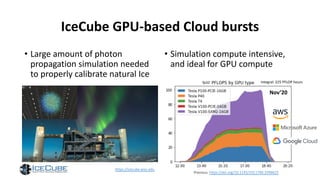
IceCube GPU-based Cloud bursts
• Large amount of photon
propagation simulation needed
to properly calibrate natural Ice
• Simulation compute intensive,
and ideal for GPU compute
Nov’20
https://icecube.wisc.edu
Previous: https://doi.org/10.1145/3311790.3396625
Integral: 225 PFLOP hoursfp32
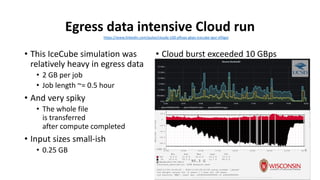
Egress data intensive Cloud run
• This IceCube simulation was
relatively heavy in egress data
• 2 GB per job
• Job length ~= 0.5 hour
• And very spiky
• The whole file
is transferred
after compute completed
• Input sizes small-ish
• 0.25 GB
• Cloud burst exceeded 10 GBps
• To make good use of a large fraction
of available Cloud GPUs
https://www.linkedin.com/pulse/cloudy-100-pflops-gbps-icecube-igor-sfiligoi
Storage backends
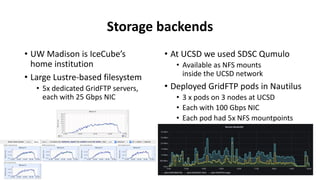
• UW Madison is IceCube’s
home institution
• Large Lustre-based filesystem
• 5x dedicated GridFTP servers,
each with 25 Gbps NIC
• At UCSD we used SDSC Qumulo
• Available as NFS mounts
inside the UCSD network
• Deployed GridFTP pods in Nautilus
• 3 x pods on 3 nodes at UCSD
• Each with 100 Gbps NIC
• Each pod had 5x NFS mountpoints
Using Internet2 Cloud Connect Service
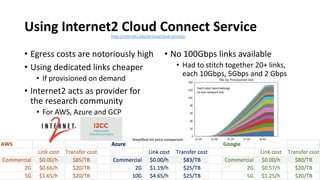
• Egress costs are notoriously high
• Using dedicated links cheaper
• If provisioned on demand
• Internet2 acts as provider for
the research community
• For AWS, Azure and GCP
• No 100Gbps links available
• Had to stitch together 20+ links,
each 10Gbps, 5Gbps and 2 Gbps
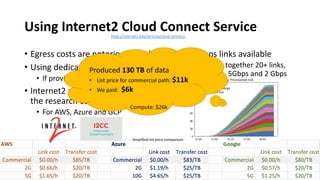
Each color band belongs
to one network link
https://internet2.edu/services/cloud-connect/
Simplified list price comparison
Using Internet2 Cloud Connect Service
• Egress costs are notoriously high
• Using dedicated links cheaper
• If provisioned on demand
• Internet2 acts as provider for
the research community
• For AWS, Azure and GCP
• No 100Gbps links available
• Had to stitch together 20+ links,
each 10Gbps, 5Gbps and 2 Gbps
Each color band belongs
to one network link
https://internet2.edu/services/cloud-connect/
Produced 130 TB of data
• List price for commercial path: $11k
• We paid: $6k
Compute: $26k
Simplified list price comparison
The need for many links
• Internet2 has mostly 2x 10 Gbps links with Cloud providers
• The only bright exception is the California link to Azure at 2x 100 Gbps
• The links are shared, so one can never get the whole link for itself
• 5 Gbps limit in AWS and GCP
• 10 Gbps limit in Azure
• The link speeds are rigidly defined
• 1, 2, 5, 10 Gbps
• To fill an (almost) empty 10 Gbps link,
one needs three links: 5 + 2 + 2
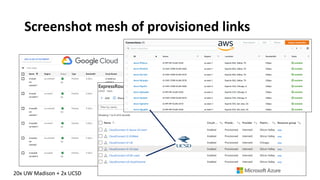
Screenshot mesh of provisioned links
20x UW Madison + 2x UCSD
Very different provisioning in the 3 Clouds
• AWS the most complex
• And requires initiation by
on-prem network engineer
• Many steps after initial request
• Create VPC and subnets
• Accept connection request
• Create VPG
• Associate VPG with VPC
• Create DCG
• Create VIF
• Relay back to on-prem the BGP key
• Establish VPC -> VPG routing
• Associate DCG -> VPG
• And don’t forget the Internet routers
• GCP the simplest
• Create VPC and subnets
• Create Cloud Router
• Create Interconnect
• Provide key to on-prem
• Azure not much harder
• Create VN and subnets
• Make sure the VN has Gateway subnet
• Create ExpressRoute (ER)
• Provide key to on-prem
• Create VNG
• Create connection between ER and VNG
• Note: Azure comes with many more options
to choose from
Additional on-prem networking setup needed
• Quote from Michael Hare, UW Madison Network engineer:
In addition to network configuration [at] UW Madison (AS59), we
provisioned BGP based Layer 3 MPLS VPNs (L3VPNs) towards Internet2
via our regional aggregator, BTAA OmniPop.
This work involved reaching out to the BTAA NOC to coordinate on VLAN
numbers and paths and to [the] Internet2 NOC to make sure the newly
provisioned VLANs were configurable inside OESS.
Due to limitations in programmability or knowledge at the time regarding
duplicate IP address towards the cloud (GCP, Azure, AWS) endpoints, we
built several discrete L3VPNs inside the Internet2 network to accomplish
the desired topology.
• Tom Hutton did the UCSD part
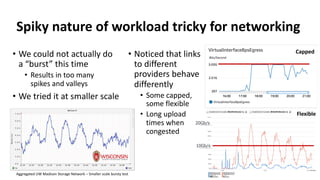
Spiky nature of workload tricky for networking
• We could not actually do
a “burst” this time
• Results in too many
spikes and valleys
• We tried it at smaller scale
• Noticed that links
to different
providers behave
differently
• Some capped,
some flexible
• Long upload
times when
congested
Capped
Flexible
Aggregated UW Madison Storage Network – Smaller scale bursty test
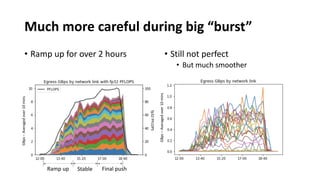
Much more careful during big “burst”
• Ramp up for over 2 hours • Still not perfect
• But much smoother
GBps–Averagedover10mins
fp32PFLOPS
Ramp up Stable Final push
Summary
•Using dedicated links made this Cloud run
a little more challenging
• But cost savings worth it
•Showed that data-intensive high-throughput
Cloud computing is doable
• With plenty of science data generated to show for it
Acknowledgments
• I would like to thank NSF for their support of this endeavor as part of
the OAC-1941481, MPS-1148698, OAC-1841530 , OAC-
1826967 and OPP-1600823.
• And all of this would of course not be possible without the hard work
of Michael Hare, David Schultz, Benedikt Riedel, Vladimir Brik,
Steve Barnet, Frank Wuerthwein, Tom Hutton, Matt Zekauskas and
John Hicks.
Backup slides
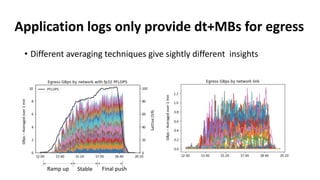
Application logs only provide dt+MBs for egress
• Different averaging techniques give sightly different insights
GBps–Averagedover1min
fp32PFLOPS
Ramp up Stable Final push GBps–Averagedover1min
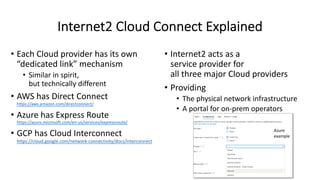
Internet2 Cloud Connect Explained
• Each Cloud provider has its own
“dedicated link” mechanism
• Similar in spirit,
but technically different
• AWS has Direct Connect
https://aws.amazon.com/directconnect/
• Azure has Express Route
https://azure.microsoft.com/en-us/services/expressroute/
• GCP has Cloud Interconnect
https://cloud.google.com/network-connectivity/docs/interconnect
• Internet2 acts as a
service provider for
all three major Cloud providers
• Providing
• The physical network infrastructure
• A portal for on-prem operators
Azure
example
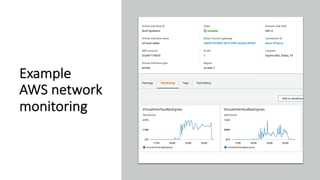
Example
AWS network
monitoring
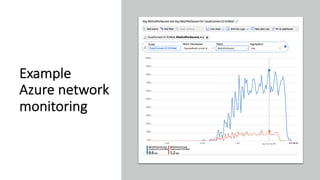
Example
Azure network
monitoring
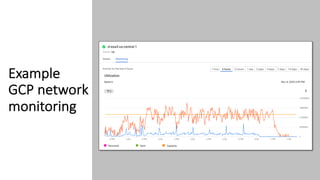
Example
GCP network
monitoring
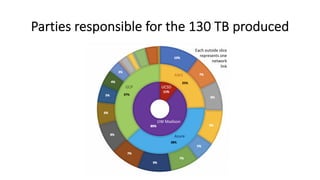
Parties responsible for the 130 TB produced
UW Madison
UCSDGCP
AWS
Azure
Each outside slice
represents one
network
link

Data-intensive IceCube Cloud Burst

  • 1.
    Data-intensive IceCube CloudBurst leveraging Internet2 Cloud Connect Service By Igor Sfiligoi – UCSD For the rest of the IceCube Cloud Burst team (UCSD+UW Madison) NRP-Pilot Weekly Meeting, Nov 12th 2020
  • 2.
    IceCube GPU-based Cloudbursts • Large amount of photon propagation simulation needed to properly calibrate natural Ice • Simulation compute intensive, and ideal for GPU compute Nov’20 https://icecube.wisc.edu Previous: https://doi.org/10.1145/3311790.3396625 Integral: 225 PFLOP hoursfp32
  • 3.
    Egress data intensiveCloud run • This IceCube simulation was relatively heavy in egress data • 2 GB per job • Job length ~= 0.5 hour • And very spiky • The whole file is transferred after compute completed • Input sizes small-ish • 0.25 GB • Cloud burst exceeded 10 GBps • To make good use of a large fraction of available Cloud GPUs https://www.linkedin.com/pulse/cloudy-100-pflops-gbps-icecube-igor-sfiligoi
  • 4.
    Storage backends • UWMadison is IceCube’s home institution • Large Lustre-based filesystem • 5x dedicated GridFTP servers, each with 25 Gbps NIC • At UCSD we used SDSC Qumulo • Available as NFS mounts inside the UCSD network • Deployed GridFTP pods in Nautilus • 3 x pods on 3 nodes at UCSD • Each with 100 Gbps NIC • Each pod had 5x NFS mountpoints
  • 5.
    Using Internet2 CloudConnect Service • Egress costs are notoriously high • Using dedicated links cheaper • If provisioned on demand • Internet2 acts as provider for the research community • For AWS, Azure and GCP • No 100Gbps links available • Had to stitch together 20+ links, each 10Gbps, 5Gbps and 2 Gbps Each color band belongs to one network link https://internet2.edu/services/cloud-connect/ Simplified list price comparison
  • 6.
    Using Internet2 CloudConnect Service • Egress costs are notoriously high • Using dedicated links cheaper • If provisioned on demand • Internet2 acts as provider for the research community • For AWS, Azure and GCP • No 100Gbps links available • Had to stitch together 20+ links, each 10Gbps, 5Gbps and 2 Gbps Each color band belongs to one network link https://internet2.edu/services/cloud-connect/ Produced 130 TB of data • List price for commercial path: $11k • We paid: $6k Compute: $26k Simplified list price comparison
  • 7.
    The need formany links • Internet2 has mostly 2x 10 Gbps links with Cloud providers • The only bright exception is the California link to Azure at 2x 100 Gbps • The links are shared, so one can never get the whole link for itself • 5 Gbps limit in AWS and GCP • 10 Gbps limit in Azure • The link speeds are rigidly defined • 1, 2, 5, 10 Gbps • To fill an (almost) empty 10 Gbps link, one needs three links: 5 + 2 + 2
  • 8.
    Screenshot mesh ofprovisioned links 20x UW Madison + 2x UCSD
  • 9.
    Very different provisioningin the 3 Clouds • AWS the most complex • And requires initiation by on-prem network engineer • Many steps after initial request • Create VPC and subnets • Accept connection request • Create VPG • Associate VPG with VPC • Create DCG • Create VIF • Relay back to on-prem the BGP key • Establish VPC -> VPG routing • Associate DCG -> VPG • And don’t forget the Internet routers • GCP the simplest • Create VPC and subnets • Create Cloud Router • Create Interconnect • Provide key to on-prem • Azure not much harder • Create VN and subnets • Make sure the VN has Gateway subnet • Create ExpressRoute (ER) • Provide key to on-prem • Create VNG • Create connection between ER and VNG • Note: Azure comes with many more options to choose from
  • 10.
    Additional on-prem networkingsetup needed • Quote from Michael Hare, UW Madison Network engineer: In addition to network configuration [at] UW Madison (AS59), we provisioned BGP based Layer 3 MPLS VPNs (L3VPNs) towards Internet2 via our regional aggregator, BTAA OmniPop. This work involved reaching out to the BTAA NOC to coordinate on VLAN numbers and paths and to [the] Internet2 NOC to make sure the newly provisioned VLANs were configurable inside OESS. Due to limitations in programmability or knowledge at the time regarding duplicate IP address towards the cloud (GCP, Azure, AWS) endpoints, we built several discrete L3VPNs inside the Internet2 network to accomplish the desired topology. • Tom Hutton did the UCSD part
  • 11.
    Spiky nature ofworkload tricky for networking • We could not actually do a “burst” this time • Results in too many spikes and valleys • We tried it at smaller scale • Noticed that links to different providers behave differently • Some capped, some flexible • Long upload times when congested Capped Flexible Aggregated UW Madison Storage Network – Smaller scale bursty test
  • 12.
    Much more carefulduring big “burst” • Ramp up for over 2 hours • Still not perfect • But much smoother GBps–Averagedover10mins GBps–Averagedover10mins fp32PFLOPS Ramp up Stable Final push
  • 13.
    Summary •Using dedicated linksmade this Cloud run a little more challenging • But cost savings worth it •Showed that data-intensive high-throughput Cloud computing is doable • With plenty of science data generated to show for it
  • 14.
    Acknowledgments • I wouldlike to thank NSF for their support of this endeavor as part of the OAC-1941481, MPS-1148698, OAC-1841530 , OAC- 1826967 and OPP-1600823. • And all of this would of course not be possible without the hard work of Michael Hare, David Schultz, Benedikt Riedel, Vladimir Brik, Steve Barnet, Frank Wuerthwein, Tom Hutton, Matt Zekauskas and John Hicks.
  • 15.
  • 16.
    Application logs onlyprovide dt+MBs for egress • Different averaging techniques give sightly different insights GBps–Averagedover1min fp32PFLOPS Ramp up Stable Final push GBps–Averagedover1min
  • 17.
    Internet2 Cloud ConnectExplained • Each Cloud provider has its own “dedicated link” mechanism • Similar in spirit, but technically different • AWS has Direct Connect https://aws.amazon.com/directconnect/ • Azure has Express Route https://azure.microsoft.com/en-us/services/expressroute/ • GCP has Cloud Interconnect https://cloud.google.com/network-connectivity/docs/interconnect • Internet2 acts as a service provider for all three major Cloud providers • Providing • The physical network infrastructure • A portal for on-prem operators Azure example
  • 18.
  • 19.
  • 20.
  • 21.
    Parties responsible forthe 130 TB produced UW Madison UCSDGCP AWS Azure Each outside slice represents one network link