Introduction Database System 1
Database System Concepts and
Architecture
• Introduction
• Characteristics of Databases
• File system v/s Database system
• Data abstraction and Data Independence
• DBMS system architecture
• Database Administrator (DBA)
• Role of DBA
By:- Manasi Deore
Introduction Database System 2
Database Management System (DMBS)
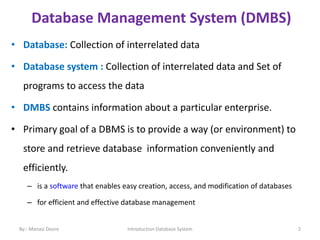
• Database: Collection of interrelated data
• Database system : Collection of interrelated data and Set of
programs to access the data
• DMBS contains information about a particular enterprise.
• Primary goal of a DBMS is to provide a way (or environment) to
store and retrieve database information conveniently and
efficiently.
– is a software that enables easy creation, access, and modification of databases
– for efficient and effective database management
By:- Manasi Deore
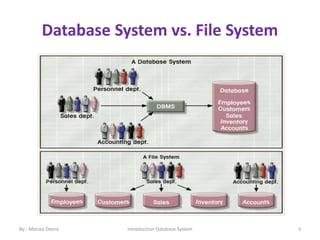
Database System vs. File System
Introduction Database System 3
By:- Manasi Deore
DBMS Application
Banking and Finance
Banking: For customer information, accounts, loans and
banking transaction.
Credit Card transaction: For purchases on credits cards and
generation of monthly statements.
Finance: for the information about holdings, sales and purchases of
financial instruments such as stocks and bonds; real time market
data to enable online trading by customers and automated trading
by firm.
Airline: For reservation and schedule information. Airlines were first
users in a geographical manner.
By:- Manasi Deore Introduction Database System 4
DBMS Application
Telecommunication : For keeping records of calls made, generating
monthly bills, maintaining balances on prepaid calling cards and
storing information about the communication networks.
Universities: For students information, course registration and
grades.
Document Databases: For maintaining collections of new articles,
patents, published research papers etc.
Navigation systems: For maintaining the location of varies places of
interest along with the exact route of roads, train systems, buses
etc
By:- Manasi Deore Introduction Database System 5
DBMS Application
Web-Based services
Social-media: For keeping records of users, connections between
users (friends/followers), posts made by users, rating/like information
about posts etc
Online retailers: For keeping records of sales data and orders as for any
retailer, but also for tracking a user’s product views, search terms etc.,
for the purpose of identifying the best items to recommend to that
user.
Online advertisement: for keeping records of click history to enable
targeted advertisements, product suggestions, news articles etc.
people access such databases every time they do a web search, make
an online purchase, or access a social-networking site.
By:- Manasi Deore Introduction Database System 6
By:- Manasi Deore Introduction Database System 7
By:- Manasi Deore Introduction Database System 8
DBMS Application
Enterprise or company information:
1. Sales: For customer, product, and purchase information
2. Accounting: For payments, receipts, account balance,
assets and other accounting information
3. Human resources: For information about employees,
salaries, payroll taxes, and benefits and for generation of
paychecks.
4. Manufacturing : For management of the supply chain and
for tracking production of items in factories, inventories of
items in warehouse and stores and others for items.
By:- Manasi Deore Introduction Database System 9
Introduction Database System 10
Purpose of Database Systems
• Data redundancy and inconsistency
• Difficulty in accessing data
• Data isolation (Location, format)
• Integrity problems
• Atomicity of updates
• Concurrent access anomalies
• Security problems
Database management systems were developed to handle the
following difficulties of typical file-processing systems supported by
conventional operating systems:
By:- Manasi Deore
Introduction Database System 11
• Data redundancy and inconsistency:-
Since different programmers create the files and application programs,
so various files with different structures , and may be written in several
programming languages : Inconsistency
The same information may be duplicated in several places(files):
Redundancy
Redundancy : Duplicated Values, there are no methods to validate the
insertion of duplicate data in file system.
Inconsistency: due to difference between information or data from
different resources for the same object.
DBMS- having centralized and normalized database that can be avoided.
By:- Manasi Deore
Introduction Database System 12
Difficulty in accessing data
• Information's are stored in different files or in different format.
The application programmer has to write particular program.
This is possible but very difficult and time consuming task.
The second point is, as data records are entered using different
tools or editors. So it is very difficult to write correct program.
• The point here is that conventional file-processing environment
do not allow needed data to be retrieved in a convenient and
efficient manner.
More responsive data-retrival systems are required for general use .
By:- Manasi Deore
Introduction Database System 13
Data isolation
Data are scattered in various files and in a different formats
Due to data in a multiple files and formats, writing new
application programs to retrieve the appropriate data is difficult
Integrity problems
Integrity means that the data in database is accurate.
The data values stored in the database must satisfy certain type
of consistency constraints.
ex. Saving account minimum amount.
By:- Manasi Deore
Introduction Database System 14
Atomicity of updates
A computer system, like any other device, is subject to failure.
In many applications, it is crucial that, if a failure occurs, the data
be restored to the consistent state that existed prior to failure.
If there is any failure to insert, update or delete in the file system,
there is no mechanism to switch back to the previous state.
It is difficult to ensure atomicity in a conventional file-processing
system.
By:- Manasi Deore
Introduction Database System 15
Concurrent access anomalies
For overall performance of the system and faster response, many systems allow
multiple users to update the data simultaneously.
the largest retailers may have millions of accesses per day to their data by
shoppers.
In a such a multiuser environment , interaction of concurrent updates is
possible and may result inconsistent data.
In file system ,in multiuser environment file opened by one user can’t use
simultaneously by other users.
To guard against this possibility, the system must maintain some form of
supervision.
But supervision is difficult to provide because data may be accessed by many
different application program that have not been coordinated previously.
By:- Manasi Deore
Introduction Database System 16
Security problems
Not every user of the database system should be able to access all the
data.
In file processing user can’t lock single query i.e. security restriction can
only be applied to whole file not to a single record field.
for example, In university, payroll personnel need to see only that part
of the database that has financial information.
They do not need access to information about academic records.
But since application program are added to file processing system in an
ad hoc manner, enforcing such security constraints is difficult.
By:- Manasi Deore
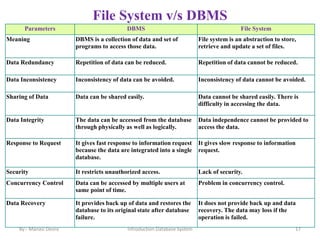
File System v/s DBMS
By:- Manasi Deore Introduction Database System 17
Parameters DBMS File System
Meaning DBMS is a collection of data and set of
programs to access those data.
File system is an abstraction to store,
retrieve and update a set of files.
Data Redundancy Repetition of data can be reduced. Repetition of data cannot be reduced.
Data Inconsistency Inconsistency of data can be avoided. Inconsistency of data cannot be avoided.
Sharing of Data Data can be shared easily. Data cannot be shared easily. There is
difficulty in accessing the data.
Data Integrity The data can be accessed from the database
through physically as well as logically.
Data independence cannot be provided to
access the data.
Response to Request It gives fast response to information request
because the data are integrated into a single
database.
It gives slow response to information
request.
Security It restricts unauthorized access. Lack of security.
Concurrency Control Data can be accessed by multiple users at
same point of time.
Problem in concurrency control.
Data Recovery It provides back up of data and restores the
database to its original state after database
failure.
It does not provide back up and data
recovery. The data may loss if the
operation is failed.
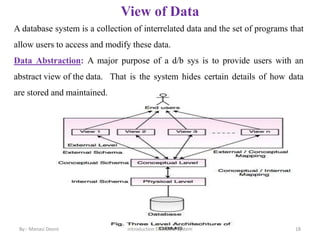
View of Data
By:- Manasi Deore 18
Introduction Database System
A database system is a collection of interrelated data and the set of programs that
allow users to access and modify these data.
Data Abstraction: A major purpose of a d/b sys is to provide users with an
abstract view of the data. That is the system hides certain details of how data
are stored and maintained.
Data Abstraction
By:- Manasi Deore 19
Introduction Database System
For the system to be usable, it must retrieve data efficiently.
The need for efficiency has led database system developers to use
complex data structures to represent data in the database.
Since many database users are not computer trained, developers hide the
complexity from users through several levels of Data abstraction, to
simplify users interactions with the system.
Data abstraction is a process of representing the essential features
without including implementation details.
Introduction Database System 20
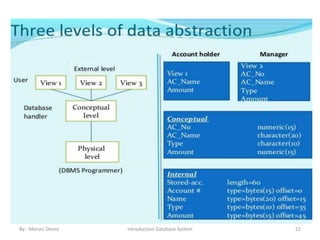
D/b sys have several schemas partitioned according to the levels of abstraction.
Physical schema:
Lowest level of abstraction describes how the data are actually stores. It
describes complex low-level data structures in detail which is hidden.
Logical schema:
The next level of abstraction describes what data are stored in the database, and
what relationships exists among them.
It is most important in terms of its effect on application programs, since
programmers construct application by using logical schema.
Although implementation of the simple structure at logical level may involve
complex physical level structure.
Database Administrator , who must decide what information to keep in the
database, and use the logical level of abstraction.
By:- Manasi Deore
Introduction Database System 21
View Level :
• The highest level of abstraction describes only part of entire d/b.
• A d/b may also have several schemas at the view level.
• Many users of the database system do not need all this information; instead, they
need to access only a part of the database.
• The view level of abstraction exists to simplify their interaction with the system.
• The system may provide many views for the same database.
By:- Manasi Deore
Introduction Database System 22
By:- Manasi Deore
By:- Manasi Deore Introduction Database System 23
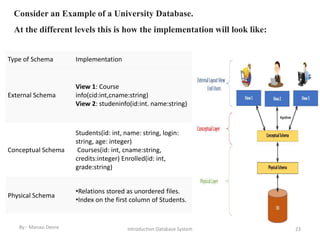
Type of Schema Implementation
External Schema
View 1: Course
info(cid:int,cname:string)
View 2: studeninfo(id:int. name:string)
Conceptual Schema
Students(id: int, name: string, login:
string, age: integer)
Courses(id: int, cname:string,
credits:integer) Enrolled(id: int,
grade:string)
Physical Schema
•Relations stored as unordered files.
•Index on the first column of Students.
Consider an Example of a University Database.
At the different levels this is how the implementation will look like:
Introduction Database System 24
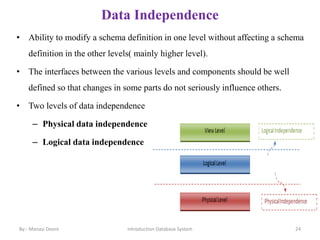
Data Independence
• Ability to modify a schema definition in one level without affecting a schema
definition in the other levels( mainly higher level).
• The interfaces between the various levels and components should be well
defined so that changes in some parts do not seriously influence others.
• Two levels of data independence
– Physical data independence
– Logical data independence
By:- Manasi Deore
Physical Data Independence
Physical data independence helps you to separate conceptual levels from the
internal/physical levels. It allows you to provide a logical description of the
database without the need to specify physical structures. Compared to Logical
Independence, it is easy to achieve physical data independence.
Examples of changes under Physical Data Independence
Due to Physical independence, any of the below change will not affect the
conceptual layer.
• Using a new storage device like Hard Drive or Magnetic Tapes
• Modifying the file organization technique in the Database
• Switching to different data structures.
• Changing the access method.
• Modifying indexes.
• Changes to compression techniques or hashing algorithms.
• Change of Location of Database from say C drive to D Drive
By:- Manasi Deore Introduction Database System 25
Logical Data Independence
Logical Data Independence is the ability to change the conceptual scheme
without changing: External views and External API or programs
Any change made will be absorbed by the mapping between external and
conceptual levels.
When compared to Physical Data independence, it is challenging to achieve
logical data independence.
Examples of changes under Logical Data Independence: Due to Logical
independence, any of the below change will not affect the external layer.
• Add/Modify/Delete a new attribute, entity or relationship is possible without a
rewrite of existing application programs
• Merging two records into one
• Breaking an existing record into two or more records
By:- Manasi Deore
Introduction Database System 26
Introduction Database System 27
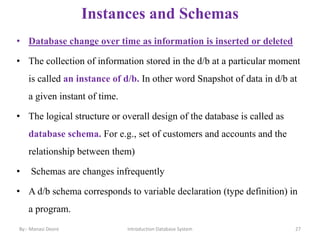
Instances and Schemas
• Database change over time as information is inserted or deleted
• The collection of information stored in the d/b at a particular moment
is called an instance of d/b. In other word Snapshot of data in d/b at
a given instant of time.
• The logical structure or overall design of the database is called as
database schema. For e.g., set of customers and accounts and the
relationship between them)
• Schemas are changes infrequently
• A d/b schema corresponds to variable declaration (type definition) in
a program.
By:- Manasi Deore
By:- Manasi Deore Introduction Database System 28
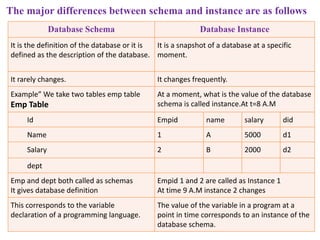
The major differences between schema and instance are as follows
Database Schema Database Instance
It is the definition of the database or it is
defined as the description of the database.
It is a snapshot of a database at a specific
moment.
It rarely changes. It changes frequently.
Example” We take two tables emp table
Emp Table
At a moment, what is the value of the database
schema is called instance.At t=8 A.M
Id Empid name salary did
Name 1 A 5000 d1
Salary 2 B 2000 d2
dept
Emp and dept both called as schemas
It gives database definition
Empid 1 and 2 are called as Instance 1
At time 9 A.M instance 2 changes
This corresponds to the variable
declaration of a programming language.
The value of the variable in a program at a
point in time corresponds to an instance of the
database schema.
Database Users and Administrators
A primary goal of a database system is to retrive information from and
store new information in the database
Users are differentiated by the way they expect to interact with the
system.
Database users are the one who really use and take the benefits of
database.
There will be different types of users depending on their need and way
of accessing the database. Database Users and
Administrators(people work with d/b)
29
Introduction Database System
By:- Manasi Deore
1. Native Users –
Are Unsophisticated users.
These are the users who use the existing application to interact with the d/b.
For example, online library system, ticket booking systems, ATMs etc
which has existing application and users use them to interact with the d/b
2. Application Programmers –
They are the computer professionals who write application programs like C,
C++, JAVA
For example, writing a C program to generate the report of employees who
are working in particular department.
30
Introduction Database System
By:- Manasi Deore
3. Sophisticated Users -
i. They are database developers, who write SQL queries to select/ insert/
delete/ update data.
ii. They do not use any application or programs to request the database.
iii. They directly interact with the database by means of query language like
SQL.
iv. These users will be scientists, engineers, analysts, In short, we can say this
category includes designers and developers of DBMS and SQL.
OLAP (online analytical processing)
Data Mining
4. Specialized Users –
i. These are also sophisticated users, but they write special database
application programs that don’t fit into traditional data processing frame work. .
ii. For example, Computer aided design ,
knowledge base and expert system
Systems that store data with complex data type (graphical data multimedia
data)
31
Introduction Database System
By:- Manasi Deore
Database Administrators(DBA)
Coordinates all the activities of the database system; the database administrator has a
good understanding of the enterprise’s information, resources and needs.
Has Both controls:- Data and Programs.
Database administrator’s duties include:
Schema definition:
DBA creates the original schema by executing a set of definition statements.
Storage structure and access method definition:
The DBA may specify some parameter related to the physical organization of
the data and the indices to be created.
32
Introduction Database System
By:- Manasi Deore
Schema and physical organization modification:
The DBA carries out changes to the schema and physical
organization to reflect the trends/needs of the organization or to alter
the physical organization to improve performance(efficiency) .
Granting user authority to access the database:
By granting different types of authorization, the DBA can regulate
the access( i.e. which part of the database various users can access).
The authorization information is kept in a special system structure
that the d/b system consult whenever some one attempts the data in
the system.
33
Introduction Database System
By:- Manasi Deore
Specifying integrity constraints:
To maintain the quality and consistency of data in the database.
Routine maintenance:
Periodically backing up the d/b, ensuring that enough free disk space
is available for normal operations .
Upgrading disk space as required.
Monitoring performance and responding to changes in requirements:
Monitoring jobs running on the d/b and ensuring that performance is
not degraded by very expensive tasks submitted by some users.
34
Introduction Database System
By:- Manasi Deore
By:- Manasi Deore Introduction Database System 35
By:- Manasi Deore Introduction Database System 36
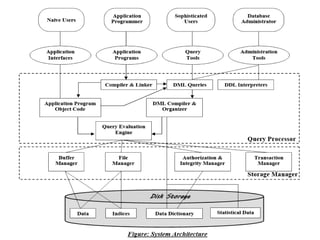
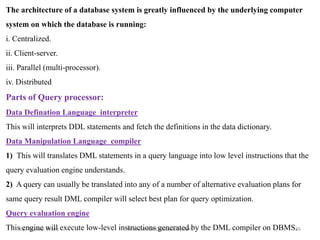
The architecture of a database system is greatly influenced by the underlying computer
system on which the database is running:
i. Centralized.
ii. Client-server.
iii. Parallel (multi-processor).
iv. Distributed
Parts of Query processor:
Data Defination Language interpreter
This will interprets DDL statements and fetch the definitions in the data dictionary.
Data Manipulation Language compiler
1) This will translates DML statements in a query language into low level instructions that the
query evaluation engine understands.
2) A query can usually be translated into any of a number of alternative evaluation plans for
same query result DML compiler will select best plan for query optimization.
Query evaluation engine
This engine will execute low-level instructions generated by the DML compiler on DBMS.
By:- Manasi Deore Introduction Database System 37
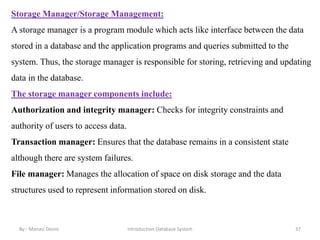
Storage Manager/Storage Management:
A storage manager is a program module which acts like interface between the data
stored in a database and the application programs and queries submitted to the
system. Thus, the storage manager is responsible for storing, retrieving and updating
data in the database.
The storage manager components include:
Authorization and integrity manager: Checks for integrity constraints and
authority of users to access data.
Transaction manager: Ensures that the database remains in a consistent state
although there are system failures.
File manager: Manages the allocation of space on disk storage and the data
structures used to represent information stored on disk.
By:- Manasi Deore Introduction Database System 38
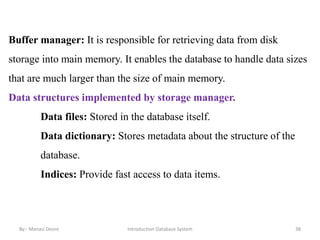
Buffer manager: It is responsible for retrieving data from disk
storage into main memory. It enables the database to handle data sizes
that are much larger than the size of main memory.
Data structures implemented by storage manager.
Data files: Stored in the database itself.
Data dictionary: Stores metadata about the structure of the
database.
Indices: Provide fast access to data items.
Database System Concepts and Architecture.ppt

  • 1.
    Introduction Database System1 Database System Concepts and Architecture • Introduction • Characteristics of Databases • File system v/s Database system • Data abstraction and Data Independence • DBMS system architecture • Database Administrator (DBA) • Role of DBA By:- Manasi Deore
  • 2.
    Introduction Database System2 Database Management System (DMBS) • Database: Collection of interrelated data • Database system : Collection of interrelated data and Set of programs to access the data • DMBS contains information about a particular enterprise. • Primary goal of a DBMS is to provide a way (or environment) to store and retrieve database information conveniently and efficiently. – is a software that enables easy creation, access, and modification of databases – for efficient and effective database management By:- Manasi Deore
  • 3.
    Database System vs.File System Introduction Database System 3 By:- Manasi Deore
  • 4.
    DBMS Application Banking andFinance Banking: For customer information, accounts, loans and banking transaction. Credit Card transaction: For purchases on credits cards and generation of monthly statements. Finance: for the information about holdings, sales and purchases of financial instruments such as stocks and bonds; real time market data to enable online trading by customers and automated trading by firm. Airline: For reservation and schedule information. Airlines were first users in a geographical manner. By:- Manasi Deore Introduction Database System 4
  • 5.
    DBMS Application Telecommunication :For keeping records of calls made, generating monthly bills, maintaining balances on prepaid calling cards and storing information about the communication networks. Universities: For students information, course registration and grades. Document Databases: For maintaining collections of new articles, patents, published research papers etc. Navigation systems: For maintaining the location of varies places of interest along with the exact route of roads, train systems, buses etc By:- Manasi Deore Introduction Database System 5
  • 6.
    DBMS Application Web-Based services Social-media:For keeping records of users, connections between users (friends/followers), posts made by users, rating/like information about posts etc Online retailers: For keeping records of sales data and orders as for any retailer, but also for tracking a user’s product views, search terms etc., for the purpose of identifying the best items to recommend to that user. Online advertisement: for keeping records of click history to enable targeted advertisements, product suggestions, news articles etc. people access such databases every time they do a web search, make an online purchase, or access a social-networking site. By:- Manasi Deore Introduction Database System 6
  • 7.
    By:- Manasi DeoreIntroduction Database System 7
  • 8.
    By:- Manasi DeoreIntroduction Database System 8
  • 9.
    DBMS Application Enterprise orcompany information: 1. Sales: For customer, product, and purchase information 2. Accounting: For payments, receipts, account balance, assets and other accounting information 3. Human resources: For information about employees, salaries, payroll taxes, and benefits and for generation of paychecks. 4. Manufacturing : For management of the supply chain and for tracking production of items in factories, inventories of items in warehouse and stores and others for items. By:- Manasi Deore Introduction Database System 9
  • 10.
    Introduction Database System10 Purpose of Database Systems • Data redundancy and inconsistency • Difficulty in accessing data • Data isolation (Location, format) • Integrity problems • Atomicity of updates • Concurrent access anomalies • Security problems Database management systems were developed to handle the following difficulties of typical file-processing systems supported by conventional operating systems: By:- Manasi Deore
  • 11.
    Introduction Database System11 • Data redundancy and inconsistency:- Since different programmers create the files and application programs, so various files with different structures , and may be written in several programming languages : Inconsistency The same information may be duplicated in several places(files): Redundancy Redundancy : Duplicated Values, there are no methods to validate the insertion of duplicate data in file system. Inconsistency: due to difference between information or data from different resources for the same object. DBMS- having centralized and normalized database that can be avoided. By:- Manasi Deore
  • 12.
    Introduction Database System12 Difficulty in accessing data • Information's are stored in different files or in different format. The application programmer has to write particular program. This is possible but very difficult and time consuming task. The second point is, as data records are entered using different tools or editors. So it is very difficult to write correct program. • The point here is that conventional file-processing environment do not allow needed data to be retrieved in a convenient and efficient manner. More responsive data-retrival systems are required for general use . By:- Manasi Deore
  • 13.
    Introduction Database System13 Data isolation Data are scattered in various files and in a different formats Due to data in a multiple files and formats, writing new application programs to retrieve the appropriate data is difficult Integrity problems Integrity means that the data in database is accurate. The data values stored in the database must satisfy certain type of consistency constraints. ex. Saving account minimum amount. By:- Manasi Deore
  • 14.
    Introduction Database System14 Atomicity of updates A computer system, like any other device, is subject to failure. In many applications, it is crucial that, if a failure occurs, the data be restored to the consistent state that existed prior to failure. If there is any failure to insert, update or delete in the file system, there is no mechanism to switch back to the previous state. It is difficult to ensure atomicity in a conventional file-processing system. By:- Manasi Deore
  • 15.
    Introduction Database System15 Concurrent access anomalies For overall performance of the system and faster response, many systems allow multiple users to update the data simultaneously. the largest retailers may have millions of accesses per day to their data by shoppers. In a such a multiuser environment , interaction of concurrent updates is possible and may result inconsistent data. In file system ,in multiuser environment file opened by one user can’t use simultaneously by other users. To guard against this possibility, the system must maintain some form of supervision. But supervision is difficult to provide because data may be accessed by many different application program that have not been coordinated previously. By:- Manasi Deore
  • 16.
    Introduction Database System16 Security problems Not every user of the database system should be able to access all the data. In file processing user can’t lock single query i.e. security restriction can only be applied to whole file not to a single record field. for example, In university, payroll personnel need to see only that part of the database that has financial information. They do not need access to information about academic records. But since application program are added to file processing system in an ad hoc manner, enforcing such security constraints is difficult. By:- Manasi Deore
  • 17.
    File System v/sDBMS By:- Manasi Deore Introduction Database System 17 Parameters DBMS File System Meaning DBMS is a collection of data and set of programs to access those data. File system is an abstraction to store, retrieve and update a set of files. Data Redundancy Repetition of data can be reduced. Repetition of data cannot be reduced. Data Inconsistency Inconsistency of data can be avoided. Inconsistency of data cannot be avoided. Sharing of Data Data can be shared easily. Data cannot be shared easily. There is difficulty in accessing the data. Data Integrity The data can be accessed from the database through physically as well as logically. Data independence cannot be provided to access the data. Response to Request It gives fast response to information request because the data are integrated into a single database. It gives slow response to information request. Security It restricts unauthorized access. Lack of security. Concurrency Control Data can be accessed by multiple users at same point of time. Problem in concurrency control. Data Recovery It provides back up of data and restores the database to its original state after database failure. It does not provide back up and data recovery. The data may loss if the operation is failed.
  • 18.
    View of Data By:-Manasi Deore 18 Introduction Database System A database system is a collection of interrelated data and the set of programs that allow users to access and modify these data. Data Abstraction: A major purpose of a d/b sys is to provide users with an abstract view of the data. That is the system hides certain details of how data are stored and maintained.
  • 19.
    Data Abstraction By:- ManasiDeore 19 Introduction Database System For the system to be usable, it must retrieve data efficiently. The need for efficiency has led database system developers to use complex data structures to represent data in the database. Since many database users are not computer trained, developers hide the complexity from users through several levels of Data abstraction, to simplify users interactions with the system. Data abstraction is a process of representing the essential features without including implementation details.
  • 20.
    Introduction Database System20 D/b sys have several schemas partitioned according to the levels of abstraction. Physical schema: Lowest level of abstraction describes how the data are actually stores. It describes complex low-level data structures in detail which is hidden. Logical schema: The next level of abstraction describes what data are stored in the database, and what relationships exists among them. It is most important in terms of its effect on application programs, since programmers construct application by using logical schema. Although implementation of the simple structure at logical level may involve complex physical level structure. Database Administrator , who must decide what information to keep in the database, and use the logical level of abstraction. By:- Manasi Deore
  • 21.
    Introduction Database System21 View Level : • The highest level of abstraction describes only part of entire d/b. • A d/b may also have several schemas at the view level. • Many users of the database system do not need all this information; instead, they need to access only a part of the database. • The view level of abstraction exists to simplify their interaction with the system. • The system may provide many views for the same database. By:- Manasi Deore
  • 22.
    Introduction Database System22 By:- Manasi Deore
  • 23.
    By:- Manasi DeoreIntroduction Database System 23 Type of Schema Implementation External Schema View 1: Course info(cid:int,cname:string) View 2: studeninfo(id:int. name:string) Conceptual Schema Students(id: int, name: string, login: string, age: integer) Courses(id: int, cname:string, credits:integer) Enrolled(id: int, grade:string) Physical Schema •Relations stored as unordered files. •Index on the first column of Students. Consider an Example of a University Database. At the different levels this is how the implementation will look like:
  • 24.
    Introduction Database System24 Data Independence • Ability to modify a schema definition in one level without affecting a schema definition in the other levels( mainly higher level). • The interfaces between the various levels and components should be well defined so that changes in some parts do not seriously influence others. • Two levels of data independence – Physical data independence – Logical data independence By:- Manasi Deore
  • 25.
    Physical Data Independence Physicaldata independence helps you to separate conceptual levels from the internal/physical levels. It allows you to provide a logical description of the database without the need to specify physical structures. Compared to Logical Independence, it is easy to achieve physical data independence. Examples of changes under Physical Data Independence Due to Physical independence, any of the below change will not affect the conceptual layer. • Using a new storage device like Hard Drive or Magnetic Tapes • Modifying the file organization technique in the Database • Switching to different data structures. • Changing the access method. • Modifying indexes. • Changes to compression techniques or hashing algorithms. • Change of Location of Database from say C drive to D Drive By:- Manasi Deore Introduction Database System 25
  • 26.
    Logical Data Independence LogicalData Independence is the ability to change the conceptual scheme without changing: External views and External API or programs Any change made will be absorbed by the mapping between external and conceptual levels. When compared to Physical Data independence, it is challenging to achieve logical data independence. Examples of changes under Logical Data Independence: Due to Logical independence, any of the below change will not affect the external layer. • Add/Modify/Delete a new attribute, entity or relationship is possible without a rewrite of existing application programs • Merging two records into one • Breaking an existing record into two or more records By:- Manasi Deore Introduction Database System 26
  • 27.
    Introduction Database System27 Instances and Schemas • Database change over time as information is inserted or deleted • The collection of information stored in the d/b at a particular moment is called an instance of d/b. In other word Snapshot of data in d/b at a given instant of time. • The logical structure or overall design of the database is called as database schema. For e.g., set of customers and accounts and the relationship between them) • Schemas are changes infrequently • A d/b schema corresponds to variable declaration (type definition) in a program. By:- Manasi Deore
  • 28.
    By:- Manasi DeoreIntroduction Database System 28 The major differences between schema and instance are as follows Database Schema Database Instance It is the definition of the database or it is defined as the description of the database. It is a snapshot of a database at a specific moment. It rarely changes. It changes frequently. Example” We take two tables emp table Emp Table At a moment, what is the value of the database schema is called instance.At t=8 A.M Id Empid name salary did Name 1 A 5000 d1 Salary 2 B 2000 d2 dept Emp and dept both called as schemas It gives database definition Empid 1 and 2 are called as Instance 1 At time 9 A.M instance 2 changes This corresponds to the variable declaration of a programming language. The value of the variable in a program at a point in time corresponds to an instance of the database schema.
  • 29.
    Database Users andAdministrators A primary goal of a database system is to retrive information from and store new information in the database Users are differentiated by the way they expect to interact with the system. Database users are the one who really use and take the benefits of database. There will be different types of users depending on their need and way of accessing the database. Database Users and Administrators(people work with d/b) 29 Introduction Database System By:- Manasi Deore
  • 30.
    1. Native Users– Are Unsophisticated users. These are the users who use the existing application to interact with the d/b. For example, online library system, ticket booking systems, ATMs etc which has existing application and users use them to interact with the d/b 2. Application Programmers – They are the computer professionals who write application programs like C, C++, JAVA For example, writing a C program to generate the report of employees who are working in particular department. 30 Introduction Database System By:- Manasi Deore
  • 31.
    3. Sophisticated Users- i. They are database developers, who write SQL queries to select/ insert/ delete/ update data. ii. They do not use any application or programs to request the database. iii. They directly interact with the database by means of query language like SQL. iv. These users will be scientists, engineers, analysts, In short, we can say this category includes designers and developers of DBMS and SQL. OLAP (online analytical processing) Data Mining 4. Specialized Users – i. These are also sophisticated users, but they write special database application programs that don’t fit into traditional data processing frame work. . ii. For example, Computer aided design , knowledge base and expert system Systems that store data with complex data type (graphical data multimedia data) 31 Introduction Database System By:- Manasi Deore
  • 32.
    Database Administrators(DBA) Coordinates allthe activities of the database system; the database administrator has a good understanding of the enterprise’s information, resources and needs. Has Both controls:- Data and Programs. Database administrator’s duties include: Schema definition: DBA creates the original schema by executing a set of definition statements. Storage structure and access method definition: The DBA may specify some parameter related to the physical organization of the data and the indices to be created. 32 Introduction Database System By:- Manasi Deore
  • 33.
    Schema and physicalorganization modification: The DBA carries out changes to the schema and physical organization to reflect the trends/needs of the organization or to alter the physical organization to improve performance(efficiency) . Granting user authority to access the database: By granting different types of authorization, the DBA can regulate the access( i.e. which part of the database various users can access). The authorization information is kept in a special system structure that the d/b system consult whenever some one attempts the data in the system. 33 Introduction Database System By:- Manasi Deore
  • 34.
    Specifying integrity constraints: Tomaintain the quality and consistency of data in the database. Routine maintenance: Periodically backing up the d/b, ensuring that enough free disk space is available for normal operations . Upgrading disk space as required. Monitoring performance and responding to changes in requirements: Monitoring jobs running on the d/b and ensuring that performance is not degraded by very expensive tasks submitted by some users. 34 Introduction Database System By:- Manasi Deore
  • 35.
    By:- Manasi DeoreIntroduction Database System 35
  • 36.
    By:- Manasi DeoreIntroduction Database System 36 The architecture of a database system is greatly influenced by the underlying computer system on which the database is running: i. Centralized. ii. Client-server. iii. Parallel (multi-processor). iv. Distributed Parts of Query processor: Data Defination Language interpreter This will interprets DDL statements and fetch the definitions in the data dictionary. Data Manipulation Language compiler 1) This will translates DML statements in a query language into low level instructions that the query evaluation engine understands. 2) A query can usually be translated into any of a number of alternative evaluation plans for same query result DML compiler will select best plan for query optimization. Query evaluation engine This engine will execute low-level instructions generated by the DML compiler on DBMS.
  • 37.
    By:- Manasi DeoreIntroduction Database System 37 Storage Manager/Storage Management: A storage manager is a program module which acts like interface between the data stored in a database and the application programs and queries submitted to the system. Thus, the storage manager is responsible for storing, retrieving and updating data in the database. The storage manager components include: Authorization and integrity manager: Checks for integrity constraints and authority of users to access data. Transaction manager: Ensures that the database remains in a consistent state although there are system failures. File manager: Manages the allocation of space on disk storage and the data structures used to represent information stored on disk.
  • 38.
    By:- Manasi DeoreIntroduction Database System 38 Buffer manager: It is responsible for retrieving data from disk storage into main memory. It enables the database to handle data sizes that are much larger than the size of main memory. Data structures implemented by storage manager. Data files: Stored in the database itself. Data dictionary: Stores metadata about the structure of the database. Indices: Provide fast access to data items.