
Database Relationships Objective 5.01 Understand database tables used in business
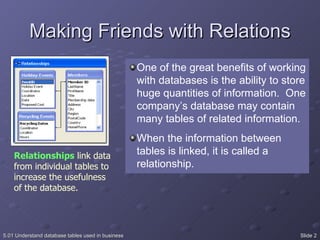
Making Friends with Relations Relationships  link data from individual tables to increase the usefulness of the database. One of the great benefits of working with databases is the ability to store huge quantities of information.  One company’s database may contain many tables of related information. When the information between tables is linked, it is called a relationship.
Relationships Table relationships increase the power of the database by allowing data to be stored separately, but managed and retrieved collectively.
Relationship Example A music store database contains three tables.  An Inventory table is linked by artist to a Royalty table which contains the artist’s contact information and royalty percentages The Inventory table is also linked to a Sales table by salesperson ID numbers, which contains employee information and commission rates Once a purchase is made, the inventory is adjusted in one table and the artist’s royalties and employee’s commissions are calculated from the information in the other tables What are the advantages of this system? Are there disadvantages?
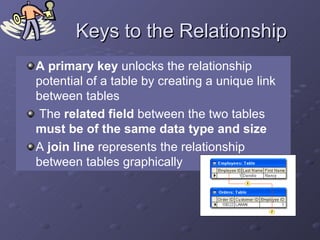
Keys to the Relationship A primary key  unlocks the relationship potential of a table by creating a unique link between tables The  related field  between the two tables  must be of the same data type and size A  join line  represents the relationship between tables graphically
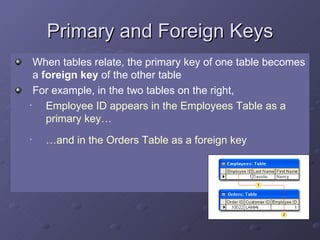
Primary and Foreign Keys When tables relate, the primary key of one table becomes a  foreign key  of the other table For example, in the two tables on the right,  Employee ID appears in the Employees Table as a primary key… … and in the Orders Table as a foreign key
Referential Integrity Referential integrity  protects related data that is stored in multiple tables.  It would prevent a customer in a customers table from being deleted if the customer’s ID also appears in the order table
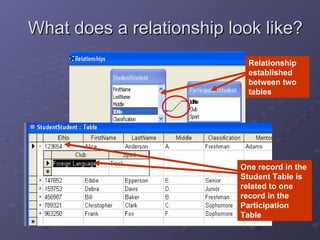
What does a relationship look like? One record in the Student Table is related to one record in the Participation Table Relationship established between two tables
Setting up a Relationship Add one table’s primary key to a like field with the same properties in another table In order to decide which table’s primary key to use you must first determine the nature (type) of the relationship  There are 3 types of relationships
One-to-One Only one matching record between two tables This relationship is the least common because it is not a very efficient use of tables
One-to-Many Most common type of relationship One record in Table A links to multiple records in Table B For example: A list of suppliers for the music store is contained in Table A. It is linked by the supplier ID field to Table B which contains all of the products used by the music store. When Table B is searched for a specific product (record), such as a CD carrying case, the manager can view the supplier’s contact information, which is stored in Table A.
Many-to-Many Multiple records in Table A are linked to multiple records in Table B For example: In the music store database, Table A contains customer information and Table B contains CD inventory.  A record for Bob from Table A may be linked to several records of CDs in Table B by linking the Customer ID fields.  If Table B contains the CD inventory, a record for a particular CD can be linked to several customers in Table A.
Function of the Junction Table A junction table is used with many to many relationships to join primary key fields of multiple tables For example, in a Music Store database, the primary key fields of the Orders, Musicians, Inventory, and Prices tables are all contained in a separate table, which acts like a hub for the tables of the database
 

Database Relationships

  • 1.
    Database Relationships Objective5.01 Understand database tables used in business
  • 2.
    Making Friends withRelations Relationships link data from individual tables to increase the usefulness of the database. One of the great benefits of working with databases is the ability to store huge quantities of information. One company’s database may contain many tables of related information. When the information between tables is linked, it is called a relationship.
  • 3.
    Relationships Table relationshipsincrease the power of the database by allowing data to be stored separately, but managed and retrieved collectively.
  • 4.
    Relationship Example Amusic store database contains three tables. An Inventory table is linked by artist to a Royalty table which contains the artist’s contact information and royalty percentages The Inventory table is also linked to a Sales table by salesperson ID numbers, which contains employee information and commission rates Once a purchase is made, the inventory is adjusted in one table and the artist’s royalties and employee’s commissions are calculated from the information in the other tables What are the advantages of this system? Are there disadvantages?
  • 5.
    Keys to theRelationship A primary key unlocks the relationship potential of a table by creating a unique link between tables The related field between the two tables must be of the same data type and size A join line represents the relationship between tables graphically
  • 6.
    Primary and ForeignKeys When tables relate, the primary key of one table becomes a foreign key of the other table For example, in the two tables on the right, Employee ID appears in the Employees Table as a primary key… … and in the Orders Table as a foreign key
  • 7.
    Referential Integrity Referentialintegrity protects related data that is stored in multiple tables. It would prevent a customer in a customers table from being deleted if the customer’s ID also appears in the order table
  • 8.
    What does arelationship look like? One record in the Student Table is related to one record in the Participation Table Relationship established between two tables
  • 9.
    Setting up aRelationship Add one table’s primary key to a like field with the same properties in another table In order to decide which table’s primary key to use you must first determine the nature (type) of the relationship There are 3 types of relationships
  • 10.
    One-to-One Only onematching record between two tables This relationship is the least common because it is not a very efficient use of tables
  • 11.
    One-to-Many Most commontype of relationship One record in Table A links to multiple records in Table B For example: A list of suppliers for the music store is contained in Table A. It is linked by the supplier ID field to Table B which contains all of the products used by the music store. When Table B is searched for a specific product (record), such as a CD carrying case, the manager can view the supplier’s contact information, which is stored in Table A.
  • 12.
    Many-to-Many Multiple recordsin Table A are linked to multiple records in Table B For example: In the music store database, Table A contains customer information and Table B contains CD inventory. A record for Bob from Table A may be linked to several records of CDs in Table B by linking the Customer ID fields. If Table B contains the CD inventory, a record for a particular CD can be linked to several customers in Table A.
  • 13.
    Function of theJunction Table A junction table is used with many to many relationships to join primary key fields of multiple tables For example, in a Music Store database, the primary key fields of the Orders, Musicians, Inventory, and Prices tables are all contained in a separate table, which acts like a hub for the tables of the database
  • 14.