Objective 5.01:  Understand database tables used in business Database Fundamentals
A database is a tool for organizing, storing, retrieving, and communicating groups of information that have similar characteristics  What is a database?
Examples of  Databases Telephone book Computerized Library card catalog Student data (NCWISE) iTunes Personal address book CD-Rom Encyclopedias Fingerprint database Encyclopedias  Dictionaries  Customer contact list Houses for sale MLS listings online Hospital/patient data Business stock inventory Barcode scanner keeps inventory in database. Internet search engines database
Why do businesses use databases? A database is a tool used by physical and online businesses to manage the huge amount of data required to run the business. For example, a business may use several databases to keep track of employee information, customers, products, and prices of products.  All of the information can be easily and efficiently managed and shared by database software.
What makes a database? Databases consist of four main objects: Tables  store data in rows and columns Queries  retrieve and process data Forms  control data entry and data views  Customized manner of inputting data into a database or presenting data on a screen Reports  summarize and print data *In this objective, our focus is on tables
Tables: the Building Blocks  of all Databases Tables organize data Each database consists of one or more tables Tables store data, so they’re essential building blocks of any database. All databases contain at least one  table A database should have a separate table for every major subject, such as employee records or customer orders. Data should not be duplicated in multiple tables.  Tables contain  R ows  called  R ecords  and  Columns  called  Fields .
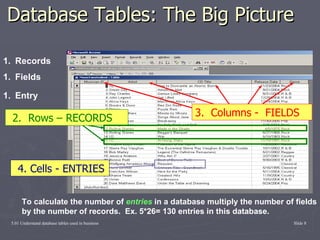
Components of a Database Table  Entry  – Data typed into a field.  Made up of characters.  Example: John Doe is an entry in the name field.  Also known as data. Field  – One item or bit of information in a record; represented by a  COLUMN . Comprised of entries   Record  – A group of related fields of information.  Everything on one row is a record
Database Tables: The Big Picture To calculate the number of  entries  in a database multiply the number of fields by the number of records.  Ex. 5*26= 130 entries in this database. 4. Cells - ENTRIES 2.  Rows – RECORDS 3.  Columns -  FIELDS Records Entry Fields
 

Database Fundamentals

  • 1.
    Objective 5.01: Understand database tables used in business Database Fundamentals
  • 2.
    A database isa tool for organizing, storing, retrieving, and communicating groups of information that have similar characteristics What is a database?
  • 3.
    Examples of Databases Telephone book Computerized Library card catalog Student data (NCWISE) iTunes Personal address book CD-Rom Encyclopedias Fingerprint database Encyclopedias Dictionaries Customer contact list Houses for sale MLS listings online Hospital/patient data Business stock inventory Barcode scanner keeps inventory in database. Internet search engines database
  • 4.
    Why do businessesuse databases? A database is a tool used by physical and online businesses to manage the huge amount of data required to run the business. For example, a business may use several databases to keep track of employee information, customers, products, and prices of products. All of the information can be easily and efficiently managed and shared by database software.
  • 5.
    What makes adatabase? Databases consist of four main objects: Tables store data in rows and columns Queries retrieve and process data Forms control data entry and data views Customized manner of inputting data into a database or presenting data on a screen Reports summarize and print data *In this objective, our focus is on tables
  • 6.
    Tables: the BuildingBlocks of all Databases Tables organize data Each database consists of one or more tables Tables store data, so they’re essential building blocks of any database. All databases contain at least one table A database should have a separate table for every major subject, such as employee records or customer orders. Data should not be duplicated in multiple tables. Tables contain R ows called R ecords and Columns called Fields .
  • 7.
    Components of aDatabase Table Entry – Data typed into a field. Made up of characters. Example: John Doe is an entry in the name field. Also known as data. Field – One item or bit of information in a record; represented by a COLUMN . Comprised of entries Record – A group of related fields of information. Everything on one row is a record
  • 8.
    Database Tables: TheBig Picture To calculate the number of entries in a database multiply the number of fields by the number of records. Ex. 5*26= 130 entries in this database. 4. Cells - ENTRIES 2. Rows – RECORDS 3. Columns - FIELDS Records Entry Fields
  • 9.