Create Table Relationships
Relationships
Why relationships?
They are critical part of your database, because
they link your tables back together after you
separate your data and also because they have a
big impact on how you design your queries and
get answers form your data.
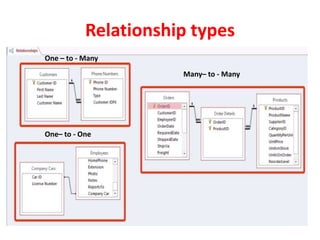
Relationship types
Any relational database uses three types of
relationships between its tables:
 One-to-many (Most common)
 Many-to-many (Part of most transaction and
student databases)
 One-to-one (Rare or not most common)
Relationship types
One – to - Many
Many– to - Many
One– to - One
Primary Key
• A primary key is a field (or combination of fields)
that uniquely identifies each record stored in a
table
• No two records in a table may be exact duplicates
– two records may, however, contain duplicate
data other than the primary key
• Primary key must be unique
• Primary key cannot contain a null value
• Will not change in value
© CCI Learning Solutions Inc. 5
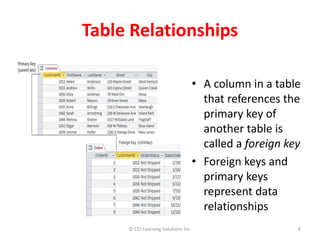
Table Relationships
• A column in a table
that references the
primary key of
another table is
called a foreign key
• Foreign keys and
primary keys
represent data
relationships
© CCI Learning Solutions Inc. 6
Table Relationships
• A relationship is made by matching data in key
fields between two tables
• When creating relationships, remember:
– Related fields may or may not have the same name
but must have the same data type
– When related fields are Number fields, they must
have the same Field Size property setting
– To define a relationship using an AutoNumber primary
key field, the foreign key must be a Number field with
a Field Size property setting of Long Integer
© CCI Learning Solutions Inc. 7
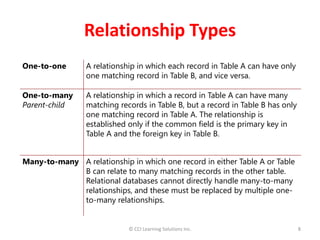
Relationship Types
One-to-one A relationship in which each record in Table A can have only
one matching record in Table B, and vice versa.
One-to-many
Parent-child
A relationship in which a record in Table A can have many
matching records in Table B, but a record in Table B has only
one matching record in Table A. The relationship is
established only if the common field is the primary key in
Table A and the foreign key in Table B.
Many-to-many A relationship in which one record in either Table A or Table
B can relate to many matching records in the other table.
Relational databases cannot directly handle many-to-many
relationships, and these must be replaced by multiple one-
to-many relationships.
© CCI Learning Solutions Inc. 8
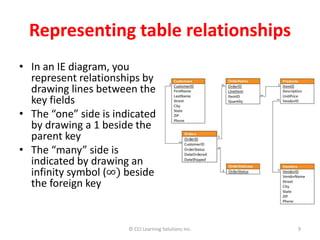
Representing table relationships
• In an IE diagram, you
represent relationships by
drawing lines between the
key fields
• The “one” side is indicated
by drawing a 1 beside the
parent key
• The “many” side is
indicated by drawing an
infinity symbol (∞) beside
the foreign key
© CCI Learning Solutions Inc. 9

Create table relationships

  • 1.
  • 2.
    Relationships Why relationships? They arecritical part of your database, because they link your tables back together after you separate your data and also because they have a big impact on how you design your queries and get answers form your data.
  • 3.
    Relationship types Any relationaldatabase uses three types of relationships between its tables:  One-to-many (Most common)  Many-to-many (Part of most transaction and student databases)  One-to-one (Rare or not most common)
  • 4.
    Relationship types One –to - Many Many– to - Many One– to - One
  • 5.
    Primary Key • Aprimary key is a field (or combination of fields) that uniquely identifies each record stored in a table • No two records in a table may be exact duplicates – two records may, however, contain duplicate data other than the primary key • Primary key must be unique • Primary key cannot contain a null value • Will not change in value © CCI Learning Solutions Inc. 5
  • 6.
    Table Relationships • Acolumn in a table that references the primary key of another table is called a foreign key • Foreign keys and primary keys represent data relationships © CCI Learning Solutions Inc. 6
  • 7.
    Table Relationships • Arelationship is made by matching data in key fields between two tables • When creating relationships, remember: – Related fields may or may not have the same name but must have the same data type – When related fields are Number fields, they must have the same Field Size property setting – To define a relationship using an AutoNumber primary key field, the foreign key must be a Number field with a Field Size property setting of Long Integer © CCI Learning Solutions Inc. 7
  • 8.
    Relationship Types One-to-one Arelationship in which each record in Table A can have only one matching record in Table B, and vice versa. One-to-many Parent-child A relationship in which a record in Table A can have many matching records in Table B, but a record in Table B has only one matching record in Table A. The relationship is established only if the common field is the primary key in Table A and the foreign key in Table B. Many-to-many A relationship in which one record in either Table A or Table B can relate to many matching records in the other table. Relational databases cannot directly handle many-to-many relationships, and these must be replaced by multiple one- to-many relationships. © CCI Learning Solutions Inc. 8
  • 9.
    Representing table relationships •In an IE diagram, you represent relationships by drawing lines between the key fields • The “one” side is indicated by drawing a 1 beside the parent key • The “many” side is indicated by drawing an infinity symbol (∞) beside the foreign key © CCI Learning Solutions Inc. 9

Editor's Notes