DATA
VISUALIZATION
Why Data Visualization?
 Data Visualization tools helps to make sense of data.
 Data Visualization helps companies increase confidence and avoid
making very risky” decisions.
 Data Visualization professionals are highly valued in the market place.
 Data visualization helps business take decisions based on the
understanding data from Data visualization tools.
 Business Intelligence is achieved by good data visualization
What is Data Visualization?
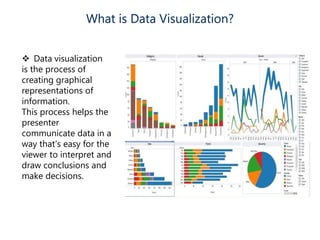
 Data visualization
is the process of
creating graphical
representations of
information.
This process helps the
presenter
communicate data in a
way that’s easy for the
viewer to interpret and
draw conclusions and
make decisions.
Data Visualization Techniques
Pie Chart
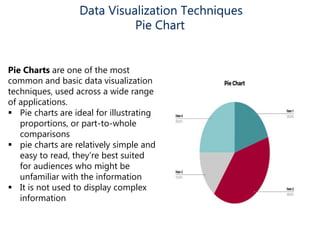
Pie Charts are one of the most
common and basic data visualization
techniques, used across a wide range
of applications.
 Pie charts are ideal for illustrating
proportions, or part-to-whole
comparisons
 pie charts are relatively simple and
easy to read, they’re best suited
for audiences who might be
unfamiliar with the information
 It is not used to display complex
information
Data Visualization Techniques
Bar Chart / Bar Graph
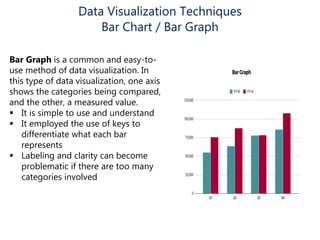
Bar Graph is a common and easy-to-
use method of data visualization. In
this type of data visualization, one axis
shows the categories being compared,
and the other, a measured value.
 It is simple to use and understand
 It employed the use of keys to
differentiate what each bar
represents
 Labeling and clarity can become
problematic if there are too many
categories involved
Data Visualization Techniques
Histogram
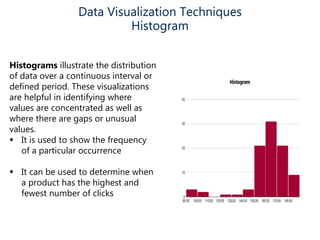
Histograms illustrate the distribution
of data over a continuous interval or
defined period. These visualizations
are helpful in identifying where
values are concentrated as well as
where there are gaps or unusual
values.
 It is used to show the frequency
of a particular occurrence
 It can be used to determine when
a product has the highest and
fewest number of clicks
Data Visualization Techniques
Gantt Chart
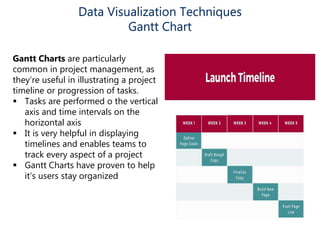
Gantt Charts are particularly
common in project management, as
they’re useful in illustrating a project
timeline or progression of tasks.
 Tasks are performed o the vertical
axis and time intervals on the
horizontal axis
 It is very helpful in displaying
timelines and enables teams to
track every aspect of a project
 Gantt Charts have proven to help
it’s users stay organized
Data Visualization Techniques
Heat Map
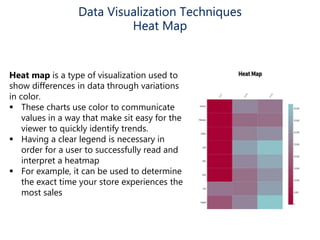
Heat map is a type of visualization used to
show differences in data through variations
in color.
 These charts use color to communicate
values in a way that make sit easy for the
viewer to quickly identify trends.
 Having a clear legend is necessary in
order for a user to successfully read and
interpret a heatmap
 For example, it can be used to determine
the exact time your store experiences the
most sales
Data Visualization Techniques
Box & Whisker Plot
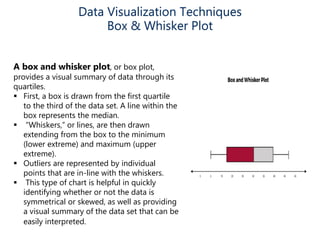
A box and whisker plot, or box plot,
provides a visual summary of data through its
quartiles.
 First, a box is drawn from the first quartile
to the third of the data set. A line within the
box represents the median.
 “Whiskers,” or lines, are then drawn
extending from the box to the minimum
(lower extreme) and maximum (upper
extreme).
 Outliers are represented by individual
points that are in-line with the whiskers.
 This type of chart is helpful in quickly
identifying whether or not the data is
symmetrical or skewed, as well as providing
a visual summary of the data set that can be
easily interpreted.
Data Visualization Techniques
Waterfall Chart
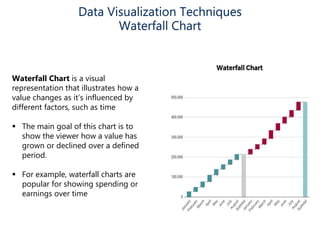
Waterfall Chart is a visual
representation that illustrates how a
value changes as it’s influenced by
different factors, such as time
 The main goal of this chart is to
show the viewer how a value has
grown or declined over a defined
period.
 For example, waterfall charts are
popular for showing spending or
earnings over time
Data Visualization Techniques
Area Chart
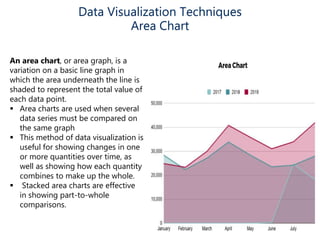
An area chart, or area graph, is a
variation on a basic line graph in
which the area underneath the line is
shaded to represent the total value of
each data point.
 Area charts are used when several
data series must be compared on
the same graph
 This method of data visualization is
useful for showing changes in one
or more quantities over time, as
well as showing how each quantity
combines to make up the whole.
 Stacked area charts are effective
in showing part-to-whole
comparisons.
Data Visualization Techniques
Area Chart
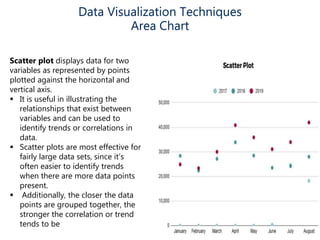
Scatter plot displays data for two
variables as represented by points
plotted against the horizontal and
vertical axis.
 It is useful in illustrating the
relationships that exist between
variables and can be used to
identify trends or correlations in
data.
 Scatter plots are most effective for
fairly large data sets, since it’s
often easier to identify trends
when there are more data points
present.
 Additionally, the closer the data
points are grouped together, the
stronger the correlation or trend
tends to be

Data Visualization

  • 1.
  • 2.
    Why Data Visualization? Data Visualization tools helps to make sense of data.  Data Visualization helps companies increase confidence and avoid making very risky” decisions.  Data Visualization professionals are highly valued in the market place.  Data visualization helps business take decisions based on the understanding data from Data visualization tools.  Business Intelligence is achieved by good data visualization
  • 3.
    What is DataVisualization?  Data visualization is the process of creating graphical representations of information. This process helps the presenter communicate data in a way that’s easy for the viewer to interpret and draw conclusions and make decisions.
  • 4.
    Data Visualization Techniques PieChart Pie Charts are one of the most common and basic data visualization techniques, used across a wide range of applications.  Pie charts are ideal for illustrating proportions, or part-to-whole comparisons  pie charts are relatively simple and easy to read, they’re best suited for audiences who might be unfamiliar with the information  It is not used to display complex information
  • 5.
    Data Visualization Techniques BarChart / Bar Graph Bar Graph is a common and easy-to- use method of data visualization. In this type of data visualization, one axis shows the categories being compared, and the other, a measured value.  It is simple to use and understand  It employed the use of keys to differentiate what each bar represents  Labeling and clarity can become problematic if there are too many categories involved
  • 6.
    Data Visualization Techniques Histogram Histogramsillustrate the distribution of data over a continuous interval or defined period. These visualizations are helpful in identifying where values are concentrated as well as where there are gaps or unusual values.  It is used to show the frequency of a particular occurrence  It can be used to determine when a product has the highest and fewest number of clicks
  • 7.
    Data Visualization Techniques GanttChart Gantt Charts are particularly common in project management, as they’re useful in illustrating a project timeline or progression of tasks.  Tasks are performed o the vertical axis and time intervals on the horizontal axis  It is very helpful in displaying timelines and enables teams to track every aspect of a project  Gantt Charts have proven to help it’s users stay organized
  • 8.
    Data Visualization Techniques HeatMap Heat map is a type of visualization used to show differences in data through variations in color.  These charts use color to communicate values in a way that make sit easy for the viewer to quickly identify trends.  Having a clear legend is necessary in order for a user to successfully read and interpret a heatmap  For example, it can be used to determine the exact time your store experiences the most sales
  • 9.
    Data Visualization Techniques Box& Whisker Plot A box and whisker plot, or box plot, provides a visual summary of data through its quartiles.  First, a box is drawn from the first quartile to the third of the data set. A line within the box represents the median.  “Whiskers,” or lines, are then drawn extending from the box to the minimum (lower extreme) and maximum (upper extreme).  Outliers are represented by individual points that are in-line with the whiskers.  This type of chart is helpful in quickly identifying whether or not the data is symmetrical or skewed, as well as providing a visual summary of the data set that can be easily interpreted.
  • 10.
    Data Visualization Techniques WaterfallChart Waterfall Chart is a visual representation that illustrates how a value changes as it’s influenced by different factors, such as time  The main goal of this chart is to show the viewer how a value has grown or declined over a defined period.  For example, waterfall charts are popular for showing spending or earnings over time
  • 11.
    Data Visualization Techniques AreaChart An area chart, or area graph, is a variation on a basic line graph in which the area underneath the line is shaded to represent the total value of each data point.  Area charts are used when several data series must be compared on the same graph  This method of data visualization is useful for showing changes in one or more quantities over time, as well as showing how each quantity combines to make up the whole.  Stacked area charts are effective in showing part-to-whole comparisons.
  • 12.
    Data Visualization Techniques AreaChart Scatter plot displays data for two variables as represented by points plotted against the horizontal and vertical axis.  It is useful in illustrating the relationships that exist between variables and can be used to identify trends or correlations in data.  Scatter plots are most effective for fairly large data sets, since it’s often easier to identify trends when there are more data points present.  Additionally, the closer the data points are grouped together, the stronger the correlation or trend tends to be