Introduction to Data Modeling
CS 146
What is a Data Model?
 Definition: precise description of the data content in a
system
 Types of data models:
1. Conceptual: describes WHAT the system contains
2. Logical: describes HOW the system will be implemented,
regardless of the DBMS
3. Physical: describes HOW the system will be implemented
using a specific DBMS
Why do we need to create data models?
 To aid in the development of a sound database design
that does not allow anomalies or inconsistencies
 Goal: to create database tables that do not contain
duplicate data values that can become inconsistent
Types of Data Models
 Entity-Relationship (E-R) Models
 Only addresses data and relationships
 Classic, simplest
 Best for deriving a sound table design
 Many extensions/variations exist
 Basis for most other modeling approaches
 UML (unified modeling language)
 Class models
 Goes beyond data, also models behaviors
Creating an Entity-Relationship Model
1. Identify entities
2. Identify entity attributes and primary keys
3. Specify relationships
Data Entities
 Entity
 A "thing" about which you want to store data in an
application
 Multiple examples (instances) of the entity must exist
 Goal:
 Store data about each entity in a separate table
 Do not store duplicate data in multiple tables or records
 Examples: CUSTOMER, PRODUCT
Data Model Naming Conventions
 Entity names are short, descriptive, compound word
singular nouns
 UWEC_STUDENT, CANDY_PRODUCT,
 Entity names will ultimately correspond to table names
 Why singular?
 Makes more sense when you start talking about relationships
Data Entity Instances
 Entity instance
 A specific occurrence (data value) of an entity
 An entity must have multiple entity instances or it is not
really an entity!
 Examples: Davey Jones, Celestial Cashew Crunch
ER Model Attributes
 Attribute
 A characteristic (data field) of an entity that you want to
store in the database
 Examples: CUST_ID, PROD_DESC
 Attribute value
 The value of a particular attribute for a particular entity
instance
 Examples: 42, "Nuts Not Nachos"
Data Model Naming Conventions
(continued)
 Attribute names are descriptive compound words
that correspond to the entity name
 Attribute names will ultimately correspond to field names
 Every attribute name within the database should be unique
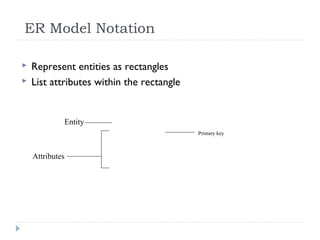
ER Model Notation
 Represent entities as rectangles
 List attributes within the rectangle
Entity
Attributes
Primary key
Attributes Selection Issues
 Primary key
 Atomic
 Composite
 Multi-valued
 Derived
Primary Key Attributes
 Attribute whose value is unique for every entity instance
 Every entity MUST have a PK
 Designate by:
 Placing as first attribute in the entity
 Underline
 Label using "PK"
Selecting Primary Keys
 Must be values that are:
 Unique for every possible record
 Do not change
 Best practice: numeric with no blank spaces or
formatting characters
 Often you need to create a surrogate key
 ID value that serves only to identify the object in
the database
 Exception: objects with "natural" primary keys
 SKU
 ISBN
 VIN
Atomic and Composite Attributes
 Atomic attribute: represents a single data value
 15, “Daniel", 12/25/2009
 Composite attribute: can be decomposed into atomic
attributes
 "James B. Brown"
 "5580 Pinewood Road, Eau Claire, WI 54701"
 Should you ever allow a composite attribute in a database?
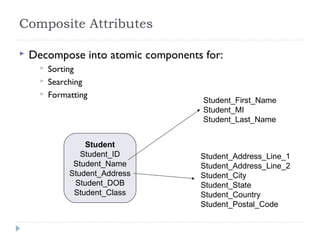
Composite Attributes
 Decompose into atomic components for:
 Sorting
 Searching
 Formatting
Student
Student_ID
Student_Name
Student_Address
Student_DOB
Student_Class
Student_First_Name
Student_MI
Student_Last_Name
Student_Address_Line_1
Student_Address_Line_2
Student_City
Student_State
Student_Country
Student_Postal_Code
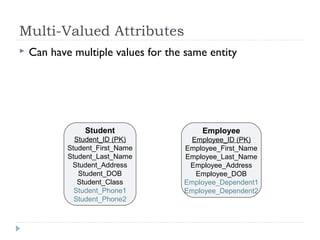
Multi-Valued Attributes
 Can have multiple values for the same entity
Student
Student_ID (PK)
Student_First_Name
Student_Last_Name
Student_Address
Student_DOB
Student_Class
Student_Phone1
Student_Phone2
Employee
Employee_ID (PK)
Employee_First_Name
Employee_Last_Name
Employee_Address
Employee_DOB
Employee_Dependent1
Employee_Dependent2
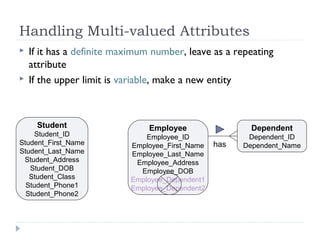
Handling Multi-valued Attributes
 If it has a definite maximum number, leave as a repeating
attribute
 If the upper limit is variable, make a new entity
Student
Student_ID
Student_First_Name
Student_Last_Name
Student_Address
Student_DOB
Student_Class
Student_Phone1
Student_Phone2
Employee
Employee_ID
Employee_First_Name
Employee_Last_Name
Employee_Address
Employee_DOB
Employee_Dependent1
Employee_Dependent2
Dependent
Dependent_ID
Dependent_Namehas
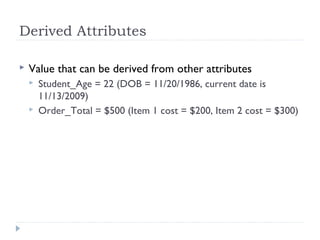
Derived Attributes
 Value that can be derived from other attributes
 Student_Age = 22 (DOB = 11/20/1986, current date is
11/13/2009)
 Order_Total = $500 (Item 1 cost = $200, Item 2 cost = $300)
Handling Derived Attributes
 Store the underlying data values from which you can
derive the attribute value …
 Examples:
 DOB => Age
 CurrentPrice and UnitsSold of an item (for a sales order)
 … unless the underlying values can change!
 PRODUCT_PRICE, COURSE_CREDITS
Creating an Entity-Relationship Model
1. Identify entities
2. Identify entity attributes and primary keys
3. Specify relationships
Data Model Relationships
 Specify the number of instances of one entity that can
be associated with instances of a related entity
 Types:
 1:M
 1:1
 M:M
 “M” denotes some value greater than 1 whose upper bound
is undetermined
 This is called relationship cardinality
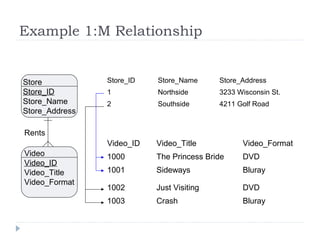
Example 1:M Relationship
Video_ID Video_Title Video_Format
1000 The Princess Bride DVD
1001 Sideways Bluray
1002 Just Visiting DVD
1003 Crash Bluray
Store_ID Store_Name Store_Address
1 Northside 3233 Wisconsin St.
2 Southside 4211 Golf Road
Store
Store_ID
Store_Name
Store_Address
Video
Video_ID
Video_Title
Video_Format
Rents
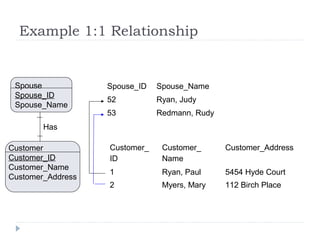
Example 1:1 Relationship
Spouse_ID Spouse_Name
52 Ryan, Judy
53 Redmann, Rudy
Customer_
ID
Customer_
Name
Customer_Address
1 Ryan, Paul 5454 Hyde Court
2 Myers, Mary 112 Birch Place
Customer
Customer_ID
Customer_Name
Customer_Address
Spouse
Spouse_ID
Spouse_Name
Has
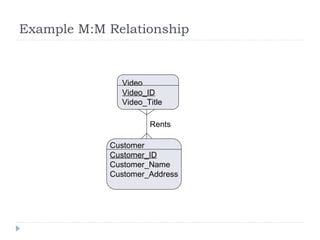
Example M:M Relationship
Customer
Customer_ID
Customer_Name
Customer_Address
Video
Video_ID
Video_Title
Rents
Example ER Model
Summary: The Data Modeling
Process
 Define entities
 Define attributes
 Define relationships
 Identify relationship cardinality (1:1, 1:M, M:M)

Data modelingpresentation

  • 1.
    Introduction to DataModeling CS 146
  • 2.
    What is aData Model?  Definition: precise description of the data content in a system  Types of data models: 1. Conceptual: describes WHAT the system contains 2. Logical: describes HOW the system will be implemented, regardless of the DBMS 3. Physical: describes HOW the system will be implemented using a specific DBMS
  • 3.
    Why do weneed to create data models?  To aid in the development of a sound database design that does not allow anomalies or inconsistencies  Goal: to create database tables that do not contain duplicate data values that can become inconsistent
  • 4.
    Types of DataModels  Entity-Relationship (E-R) Models  Only addresses data and relationships  Classic, simplest  Best for deriving a sound table design  Many extensions/variations exist  Basis for most other modeling approaches  UML (unified modeling language)  Class models  Goes beyond data, also models behaviors
  • 5.
    Creating an Entity-RelationshipModel 1. Identify entities 2. Identify entity attributes and primary keys 3. Specify relationships
  • 6.
    Data Entities  Entity A "thing" about which you want to store data in an application  Multiple examples (instances) of the entity must exist  Goal:  Store data about each entity in a separate table  Do not store duplicate data in multiple tables or records  Examples: CUSTOMER, PRODUCT
  • 7.
    Data Model NamingConventions  Entity names are short, descriptive, compound word singular nouns  UWEC_STUDENT, CANDY_PRODUCT,  Entity names will ultimately correspond to table names  Why singular?  Makes more sense when you start talking about relationships
  • 8.
    Data Entity Instances Entity instance  A specific occurrence (data value) of an entity  An entity must have multiple entity instances or it is not really an entity!  Examples: Davey Jones, Celestial Cashew Crunch
  • 9.
    ER Model Attributes Attribute  A characteristic (data field) of an entity that you want to store in the database  Examples: CUST_ID, PROD_DESC  Attribute value  The value of a particular attribute for a particular entity instance  Examples: 42, "Nuts Not Nachos"
  • 10.
    Data Model NamingConventions (continued)  Attribute names are descriptive compound words that correspond to the entity name  Attribute names will ultimately correspond to field names  Every attribute name within the database should be unique
  • 11.
    ER Model Notation Represent entities as rectangles  List attributes within the rectangle Entity Attributes Primary key
  • 12.
    Attributes Selection Issues Primary key  Atomic  Composite  Multi-valued  Derived
  • 13.
    Primary Key Attributes Attribute whose value is unique for every entity instance  Every entity MUST have a PK  Designate by:  Placing as first attribute in the entity  Underline  Label using "PK"
  • 14.
    Selecting Primary Keys Must be values that are:  Unique for every possible record  Do not change  Best practice: numeric with no blank spaces or formatting characters  Often you need to create a surrogate key  ID value that serves only to identify the object in the database  Exception: objects with "natural" primary keys  SKU  ISBN  VIN
  • 15.
    Atomic and CompositeAttributes  Atomic attribute: represents a single data value  15, “Daniel", 12/25/2009  Composite attribute: can be decomposed into atomic attributes  "James B. Brown"  "5580 Pinewood Road, Eau Claire, WI 54701"  Should you ever allow a composite attribute in a database?
  • 16.
    Composite Attributes  Decomposeinto atomic components for:  Sorting  Searching  Formatting Student Student_ID Student_Name Student_Address Student_DOB Student_Class Student_First_Name Student_MI Student_Last_Name Student_Address_Line_1 Student_Address_Line_2 Student_City Student_State Student_Country Student_Postal_Code
  • 17.
    Multi-Valued Attributes  Canhave multiple values for the same entity Student Student_ID (PK) Student_First_Name Student_Last_Name Student_Address Student_DOB Student_Class Student_Phone1 Student_Phone2 Employee Employee_ID (PK) Employee_First_Name Employee_Last_Name Employee_Address Employee_DOB Employee_Dependent1 Employee_Dependent2
  • 18.
    Handling Multi-valued Attributes If it has a definite maximum number, leave as a repeating attribute  If the upper limit is variable, make a new entity Student Student_ID Student_First_Name Student_Last_Name Student_Address Student_DOB Student_Class Student_Phone1 Student_Phone2 Employee Employee_ID Employee_First_Name Employee_Last_Name Employee_Address Employee_DOB Employee_Dependent1 Employee_Dependent2 Dependent Dependent_ID Dependent_Namehas
  • 19.
    Derived Attributes  Valuethat can be derived from other attributes  Student_Age = 22 (DOB = 11/20/1986, current date is 11/13/2009)  Order_Total = $500 (Item 1 cost = $200, Item 2 cost = $300)
  • 20.
    Handling Derived Attributes Store the underlying data values from which you can derive the attribute value …  Examples:  DOB => Age  CurrentPrice and UnitsSold of an item (for a sales order)  … unless the underlying values can change!  PRODUCT_PRICE, COURSE_CREDITS
  • 21.
    Creating an Entity-RelationshipModel 1. Identify entities 2. Identify entity attributes and primary keys 3. Specify relationships
  • 22.
    Data Model Relationships Specify the number of instances of one entity that can be associated with instances of a related entity  Types:  1:M  1:1  M:M  “M” denotes some value greater than 1 whose upper bound is undetermined  This is called relationship cardinality
  • 23.
    Example 1:M Relationship Video_IDVideo_Title Video_Format 1000 The Princess Bride DVD 1001 Sideways Bluray 1002 Just Visiting DVD 1003 Crash Bluray Store_ID Store_Name Store_Address 1 Northside 3233 Wisconsin St. 2 Southside 4211 Golf Road Store Store_ID Store_Name Store_Address Video Video_ID Video_Title Video_Format Rents
  • 24.
    Example 1:1 Relationship Spouse_IDSpouse_Name 52 Ryan, Judy 53 Redmann, Rudy Customer_ ID Customer_ Name Customer_Address 1 Ryan, Paul 5454 Hyde Court 2 Myers, Mary 112 Birch Place Customer Customer_ID Customer_Name Customer_Address Spouse Spouse_ID Spouse_Name Has
  • 25.
  • 26.
  • 27.
    Summary: The DataModeling Process  Define entities  Define attributes  Define relationships  Identify relationship cardinality (1:1, 1:M, M:M)