Data Driven Design Using Web Analytics to Improve Information Architectures Andrea Wiggins IA Summit 2007
Motivation: What Information Architects Want to Know Interviewees said: Context for making design decisions Validation of heuristic assumptions Understand why visitors come to the site & what they seek
Agenda Overview for Context Insert show of hands here! (topic, tools, data) What is web analytics (WA)?  How is it done? major WA concepts what the data look like IA questions to answer Rubinoff’s user experience audit Some WA measures for heuristic validation
What is web analytics? Data mining from web traffic logs Web server log files Page tag logs from client-side data collection (end up in server logs) Cookies to identify “unique visitors” What for? Proving web site value (ROI) Marketing campaign evaluation Executive decision making - markets & products Web site design parameters More…
How do you do it? Vendor analysis solutions Hosted ASP Currently most popular model Provides traffic stats “on-demand” Software Runs on dedicated servers Scalability: requires significant data storage space and data maintenance Costs Starts at FREE for Google Analytics and goes way, way up Large organizations spend $50K/yr and up Open source: not a robust option
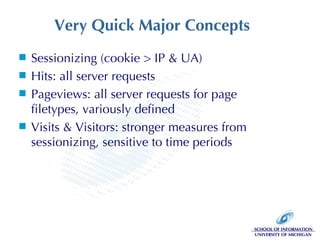
Very Quick Major Concepts Sessionizing (cookie > IP & UA) Hits: all server requests Pageviews: all server requests for page filetypes, variously defined Visits & Visitors: stronger measures from sessionizing, sensitive to time periods
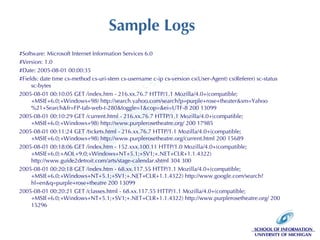
Sample Logs #Software: Microsoft Internet Information Services 6.0 #Version: 1.0 #Date: 2005-08-01 00:00:35 #Fields: date time cs-method cs-uri-stem cs-username c-ip cs-version cs(User-Agent) cs(Referer) sc-status sc-bytes  2005-08-01 00:10:05 GET /index.htm - 216.xx.76.7 HTTP/1.1 Mozilla/4.0+(compatible;+MSIE+6.0;+Windows+98) http://search.yahoo.com/search?p=purple+rose+theater&sm=Yahoo%21+Search&fr=FP-tab-web-t-280&toggle=1&cop=&ei=UTF-8 200 13099 2005-08-01 00:10:29 GET /current.html - 216.xx.76.7 HTTP/1.1 Mozilla/4.0+(compatible;+MSIE+6.0;+Windows+98) http://www.purplerosetheatre.org/ 200 17985 2005-08-01 00:11:24 GET /tickets.html - 216.xx.76.7 HTTP/1.1 Mozilla/4.0+(compatible;+MSIE+6.0;+Windows+98) http://www.purplerosetheatre.org/current.html 200 15689 2005-08-01 00:18:06 GET /index.htm - 152.xxx.100.11 HTTP/1.0 Mozilla/4.0+(compatible;+MSIE+6.0;+AOL+9.0;+Windows+NT+5.1;+SV1;+.NET+CLR+1.1.4322) http://www.guide2detroit.com/arts/stage-calendar.shtml 304 300 2005-08-01 00:20:18 GET /index.htm - 68.xx.117.55 HTTP/1.1 Mozilla/4.0+(compatible;+MSIE+6.0;+Windows+NT+5.1;+SV1;+.NET+CLR+1.1.4322) http://www.google.com/search?hl=en&q=purple+rose+theatre 200 13099 2005-08-01 00:20:21 GET /classes.html - 68.xx.117.55 HTTP/1.1 Mozilla/4.0+(compatible;+MSIE+6.0;+Windows+NT+5.1;+SV1;+.NET+CLR+1.1.4322) http://www.purplerosetheatre.org/ 200 15296
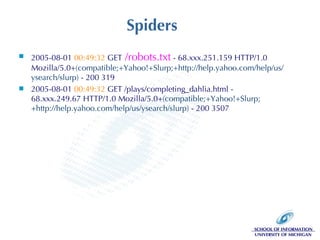
Spiders 2005-08-01  00:49:32  GET  /robots.txt  - 68.xxx.251.159 HTTP/1.0 Mozilla/5.0+ (compatible;+Yahoo!+Slurp;+http://help.yahoo.com/help/us/ysearch/slurp)  - 200 319 2005-08-01  00:49:32  GET /plays/completing_dahlia.html - 68.xxx.249.67 HTTP/1.0 Mozilla/5.0+ (compatible;+Yahoo!+Slurp;+http://help.yahoo.com/help/us/ysearch/slurp)  - 200 3507
A Few Good Metrics Information Architects want to know: Confirmation of heuristics Do users leave at first glance of this awful page? Where do they click? What position on the screen or layout produces the most clicks for the same content? Do the users “pogo-stick” back and forth between pages?  What are they comparing? Ambient findability measures At what hierarchy depth do visitors enter the site?  How do they get in on deep pages? Do they ever see the home page? Can they find their way to where we want them to go?
Searching for IA Answers On-site search behaviors How many searches do users make? Do users refine their search results? What type of queries do users make? How often are search results the last page? From what pages are searches initiated? Do the search terms have context in the page from which the search is initiated?  Why are users querying about chimpanzees?!?
What IAs Want Good navigation and content make the online world go ‘round Where in a process do users leave? Where do they go? Do they re-enter the process? How do users move through the site? Is there a better route? What pages don’t get visited?  What pages get unexpectedly high visits? What prompts conversion? Where do search engine spiders go in the site?  Is the best content being indexed?
Everybody Loves Rubinoff UX audit quantifies subjective measures Offers structure for comparing properties of the site Completely customizable, use strategically In a perfect world: Analyst & IA work together to set key performance indicators (KPI) and measurable heuristics Each independently evaluates the site on the same points and compare the IA’s heuristics to user data for validation They set before-and-after measures to prove value for the entire project
Rubinoff’s Four Categories Using a  sample  of statements from Rubinoff’s model: Branding Engaging, memorable brand experience Value of multimedia & graphics Functionality Server response time & technical errors Security & privacy practices Usability Error prevention & recovery Supporting user goals & tasks Content Navigation & site structure Search & referrals
1a: Branding Memorable & Engaging Experiences Ratio of new to returning visitors is key; set target KPI specific to site business goals Track trends over time and in relation to cross-channel marketing Median visit length in minutes  Average visit length in pages viewed Depth, breadth of visits Segment new and returning visitors to examine visit trends for different audiences
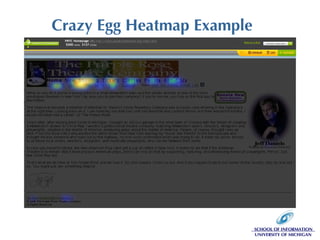
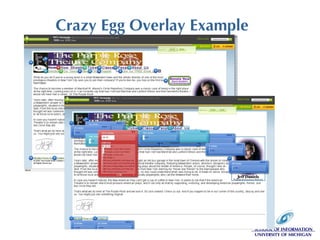
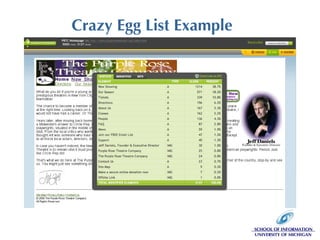
1b: Branding Value of Multimedia & Graphics Flash & AJAX require deciding upon what to measure, programming appropriate data collection, and configuring analysis tools Plan to include measures when designing multimedia applications to prove value Compare clickthrough rates for clickable graphics to rates for standard navigation links Great tools like Crazy Egg’s heatmap - easy! (also relevant to navigation, of course)
Crazy Egg Heatmap Example
Crazy Egg Overlay Example
Crazy Egg List Example
2a: Functionality Response Time & Technical Errors Response time is a default log field, easy to measure Check at peak load time to make sure site is responding quickly enough Monitor the rate of 500 (server) errors: this should be an extremely low number
2b: Functionality Security & Privacy Practices A matter of design for measurement, not measurement of design: considerations for designing a site that will be measured Privacy best practices:  Give a short, accurate, easy to understand privacy statement and stand by your word True first-party cookie Security best practices: (from an IA/analytic POV) SSL encryption on any transactional forms: lead generation, ecommerce, surveys Secure file transfer for & restricted access to raw web analytic data; password restrictions at minimum
3a: Usability Error Prevention & Recovery Percentage of visits experiencing 404 and 500 errors: errors should be < 0.5% of all hits Percentage of visits including an error, that end with an error - frustrated into leaving Where do 404 errors occur? Use to build a redirect page list to ensure (temporary) continuity of service to bookmarked URLs Path/navigation analysis: how did users arrive at 404? What did they do after? User errors: identify problems & re-enact or test
3b: Usability Supporting User Goals & Tasks Scenario/conversion analysis Define tasks and procedures supporting user goals Examine completion rates, step by step, intervals & overall A to B, B to C, C to D; A to C, B to D; A to D Look at leakage points Where did they go when they left the process? Did they come back later? Shopping cart analysis Keep in mind that users shop online for offline purchases Do behaviors suggest a need for a tool like a shipping calculator or product comparison? Online form completion
4a: Content Navigation & Site Structure Pogo-sticking: jumping back & forth between content or hierarchy levels (what about tabs?) Need a comparison tool, can’t identify product: not enough detail at the right level of site hierarchy or step of the purchase decision process Compare page-level traffic statistics for larger trends, broad navigation analysis: the usual #s Path analysis on navigation tools (by type) to pinpoint navigation and labeling problems Extensive use of supplemental navigation may indicate need for updates to global navigation
4b: Content Mining Search & Referrals Popularity = value? What about findability? If it’s not findable, it probably won’t be popular. Compare the content’s value (against similar content) with proportions of returning visitors, average page viewing length, external referrals - especially search referrals Search log analysis: what do your users value? Does user query language match site contents?  Are users searching for  panties  when you’re selling  pants ?
Validate the Match Between  the Site & the Real World More ways to use search log analysis: Does user vocabulary match site vocabulary? Do different audiences have different vocabularies, and does the site support them equally? Brand measurement returns product and industry terminology usage “ accuracy” of brand queries: spelling, inclusion of competitor’s brands, advertising slogans Did users find what they expected?  How many visits end on search results? Null results are revealing.
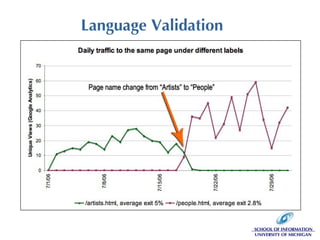
Language Validation
Conclusions Not much out there in the academic literature on using web analytics (hopefully to change!) WA data is flawed and tough to handle, but ultimately pays off in developing holistic understanding of user behavior Best-suited to case studies WA is ripe for adoption into formal usability frameworks, particularly for persona design and determining design parameters Best used iteratively: beginning, middle, end, annual follow-up…
Thanks!  Questions?

Data Driven Design: Using Web Analytics to Improve Information Architectures

  • 1.
    Data Driven DesignUsing Web Analytics to Improve Information Architectures Andrea Wiggins IA Summit 2007
  • 2.
    Motivation: What InformationArchitects Want to Know Interviewees said: Context for making design decisions Validation of heuristic assumptions Understand why visitors come to the site & what they seek
  • 3.
    Agenda Overview forContext Insert show of hands here! (topic, tools, data) What is web analytics (WA)? How is it done? major WA concepts what the data look like IA questions to answer Rubinoff’s user experience audit Some WA measures for heuristic validation
  • 4.
    What is webanalytics? Data mining from web traffic logs Web server log files Page tag logs from client-side data collection (end up in server logs) Cookies to identify “unique visitors” What for? Proving web site value (ROI) Marketing campaign evaluation Executive decision making - markets & products Web site design parameters More…
  • 5.
    How do youdo it? Vendor analysis solutions Hosted ASP Currently most popular model Provides traffic stats “on-demand” Software Runs on dedicated servers Scalability: requires significant data storage space and data maintenance Costs Starts at FREE for Google Analytics and goes way, way up Large organizations spend $50K/yr and up Open source: not a robust option
  • 6.
    Very Quick MajorConcepts Sessionizing (cookie > IP & UA) Hits: all server requests Pageviews: all server requests for page filetypes, variously defined Visits & Visitors: stronger measures from sessionizing, sensitive to time periods
  • 7.
    Sample Logs #Software:Microsoft Internet Information Services 6.0 #Version: 1.0 #Date: 2005-08-01 00:00:35 #Fields: date time cs-method cs-uri-stem cs-username c-ip cs-version cs(User-Agent) cs(Referer) sc-status sc-bytes 2005-08-01 00:10:05 GET /index.htm - 216.xx.76.7 HTTP/1.1 Mozilla/4.0+(compatible;+MSIE+6.0;+Windows+98) http://search.yahoo.com/search?p=purple+rose+theater&sm=Yahoo%21+Search&fr=FP-tab-web-t-280&toggle=1&cop=&ei=UTF-8 200 13099 2005-08-01 00:10:29 GET /current.html - 216.xx.76.7 HTTP/1.1 Mozilla/4.0+(compatible;+MSIE+6.0;+Windows+98) http://www.purplerosetheatre.org/ 200 17985 2005-08-01 00:11:24 GET /tickets.html - 216.xx.76.7 HTTP/1.1 Mozilla/4.0+(compatible;+MSIE+6.0;+Windows+98) http://www.purplerosetheatre.org/current.html 200 15689 2005-08-01 00:18:06 GET /index.htm - 152.xxx.100.11 HTTP/1.0 Mozilla/4.0+(compatible;+MSIE+6.0;+AOL+9.0;+Windows+NT+5.1;+SV1;+.NET+CLR+1.1.4322) http://www.guide2detroit.com/arts/stage-calendar.shtml 304 300 2005-08-01 00:20:18 GET /index.htm - 68.xx.117.55 HTTP/1.1 Mozilla/4.0+(compatible;+MSIE+6.0;+Windows+NT+5.1;+SV1;+.NET+CLR+1.1.4322) http://www.google.com/search?hl=en&q=purple+rose+theatre 200 13099 2005-08-01 00:20:21 GET /classes.html - 68.xx.117.55 HTTP/1.1 Mozilla/4.0+(compatible;+MSIE+6.0;+Windows+NT+5.1;+SV1;+.NET+CLR+1.1.4322) http://www.purplerosetheatre.org/ 200 15296
  • 8.
    Spiders 2005-08-01 00:49:32 GET /robots.txt - 68.xxx.251.159 HTTP/1.0 Mozilla/5.0+ (compatible;+Yahoo!+Slurp;+http://help.yahoo.com/help/us/ysearch/slurp) - 200 319 2005-08-01 00:49:32 GET /plays/completing_dahlia.html - 68.xxx.249.67 HTTP/1.0 Mozilla/5.0+ (compatible;+Yahoo!+Slurp;+http://help.yahoo.com/help/us/ysearch/slurp) - 200 3507
  • 9.
    A Few GoodMetrics Information Architects want to know: Confirmation of heuristics Do users leave at first glance of this awful page? Where do they click? What position on the screen or layout produces the most clicks for the same content? Do the users “pogo-stick” back and forth between pages? What are they comparing? Ambient findability measures At what hierarchy depth do visitors enter the site? How do they get in on deep pages? Do they ever see the home page? Can they find their way to where we want them to go?
  • 10.
    Searching for IAAnswers On-site search behaviors How many searches do users make? Do users refine their search results? What type of queries do users make? How often are search results the last page? From what pages are searches initiated? Do the search terms have context in the page from which the search is initiated? Why are users querying about chimpanzees?!?
  • 11.
    What IAs WantGood navigation and content make the online world go ‘round Where in a process do users leave? Where do they go? Do they re-enter the process? How do users move through the site? Is there a better route? What pages don’t get visited? What pages get unexpectedly high visits? What prompts conversion? Where do search engine spiders go in the site? Is the best content being indexed?
  • 12.
    Everybody Loves RubinoffUX audit quantifies subjective measures Offers structure for comparing properties of the site Completely customizable, use strategically In a perfect world: Analyst & IA work together to set key performance indicators (KPI) and measurable heuristics Each independently evaluates the site on the same points and compare the IA’s heuristics to user data for validation They set before-and-after measures to prove value for the entire project
  • 13.
    Rubinoff’s Four CategoriesUsing a sample of statements from Rubinoff’s model: Branding Engaging, memorable brand experience Value of multimedia & graphics Functionality Server response time & technical errors Security & privacy practices Usability Error prevention & recovery Supporting user goals & tasks Content Navigation & site structure Search & referrals
  • 14.
    1a: Branding Memorable& Engaging Experiences Ratio of new to returning visitors is key; set target KPI specific to site business goals Track trends over time and in relation to cross-channel marketing Median visit length in minutes Average visit length in pages viewed Depth, breadth of visits Segment new and returning visitors to examine visit trends for different audiences
  • 15.
    1b: Branding Valueof Multimedia & Graphics Flash & AJAX require deciding upon what to measure, programming appropriate data collection, and configuring analysis tools Plan to include measures when designing multimedia applications to prove value Compare clickthrough rates for clickable graphics to rates for standard navigation links Great tools like Crazy Egg’s heatmap - easy! (also relevant to navigation, of course)
  • 16.
  • 17.
  • 18.
  • 19.
    2a: Functionality ResponseTime & Technical Errors Response time is a default log field, easy to measure Check at peak load time to make sure site is responding quickly enough Monitor the rate of 500 (server) errors: this should be an extremely low number
  • 20.
    2b: Functionality Security& Privacy Practices A matter of design for measurement, not measurement of design: considerations for designing a site that will be measured Privacy best practices: Give a short, accurate, easy to understand privacy statement and stand by your word True first-party cookie Security best practices: (from an IA/analytic POV) SSL encryption on any transactional forms: lead generation, ecommerce, surveys Secure file transfer for & restricted access to raw web analytic data; password restrictions at minimum
  • 21.
    3a: Usability ErrorPrevention & Recovery Percentage of visits experiencing 404 and 500 errors: errors should be < 0.5% of all hits Percentage of visits including an error, that end with an error - frustrated into leaving Where do 404 errors occur? Use to build a redirect page list to ensure (temporary) continuity of service to bookmarked URLs Path/navigation analysis: how did users arrive at 404? What did they do after? User errors: identify problems & re-enact or test
  • 22.
    3b: Usability SupportingUser Goals & Tasks Scenario/conversion analysis Define tasks and procedures supporting user goals Examine completion rates, step by step, intervals & overall A to B, B to C, C to D; A to C, B to D; A to D Look at leakage points Where did they go when they left the process? Did they come back later? Shopping cart analysis Keep in mind that users shop online for offline purchases Do behaviors suggest a need for a tool like a shipping calculator or product comparison? Online form completion
  • 23.
    4a: Content Navigation& Site Structure Pogo-sticking: jumping back & forth between content or hierarchy levels (what about tabs?) Need a comparison tool, can’t identify product: not enough detail at the right level of site hierarchy or step of the purchase decision process Compare page-level traffic statistics for larger trends, broad navigation analysis: the usual #s Path analysis on navigation tools (by type) to pinpoint navigation and labeling problems Extensive use of supplemental navigation may indicate need for updates to global navigation
  • 24.
    4b: Content MiningSearch & Referrals Popularity = value? What about findability? If it’s not findable, it probably won’t be popular. Compare the content’s value (against similar content) with proportions of returning visitors, average page viewing length, external referrals - especially search referrals Search log analysis: what do your users value? Does user query language match site contents? Are users searching for panties when you’re selling pants ?
  • 25.
    Validate the MatchBetween the Site & the Real World More ways to use search log analysis: Does user vocabulary match site vocabulary? Do different audiences have different vocabularies, and does the site support them equally? Brand measurement returns product and industry terminology usage “ accuracy” of brand queries: spelling, inclusion of competitor’s brands, advertising slogans Did users find what they expected? How many visits end on search results? Null results are revealing.
  • 26.
  • 27.
    Conclusions Not muchout there in the academic literature on using web analytics (hopefully to change!) WA data is flawed and tough to handle, but ultimately pays off in developing holistic understanding of user behavior Best-suited to case studies WA is ripe for adoption into formal usability frameworks, particularly for persona design and determining design parameters Best used iteratively: beginning, middle, end, annual follow-up…
  • 28.

Editor's Notes

  • #2 MSI Student (32 days) -&gt; Phd Student Data analyst working w/ web analytic data Caveats: ortho, less academic than we might hope for a research track paper