D3.js: Data Visualization for the
web
Sizhe XI
University Of Liverpool & Redninja
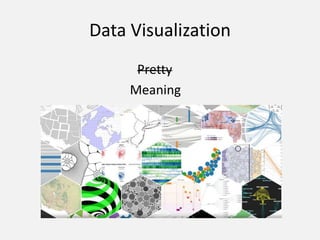
Data Visualization
Pretty
Meaning
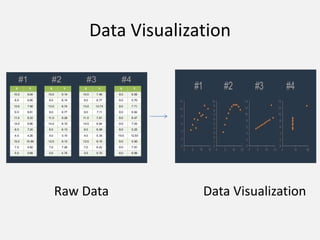
Data Visualization
Raw Data Data Visualization
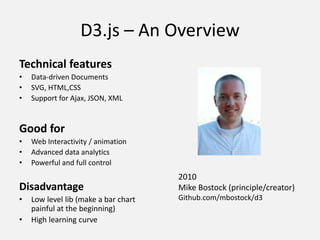
D3.js – An Overview
Technical features
• Data-driven Documents
• SVG, HTML,CSS
• Support for Ajax, JSON, XML
Good for
• Web Interactivity / animation
• Advanced data analytics
• Powerful and full control
Disadvantage
• Low level lib (make a bar chart
painful at the beginning)
• High learning curve
2010
Mike Bostock (principle/creator)
Github.com/mbostock/d3
What is it doing?
• Create and bind data to DOM elements
• Add, remove data, update DOM transition
• Map domain data to display data (scales)
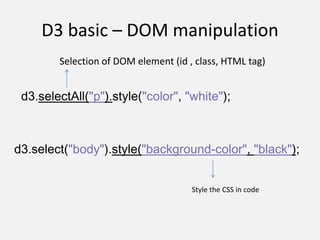
D3 basic – DOM manipulation
d3.selectAll("p").style("color", "white");
d3.select("body").style("background-color", "black");
Selection of DOM element (id , class, HTML tag)
Style the CSS in code
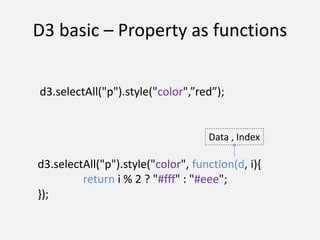
D3 basic – Property as functions
d3.selectAll("p").style("color", function(d, i){
return i % 2 ? "#fff" : "#eee";
});
Data , Index
d3.selectAll("p").style("color",”red”);
D3 basic – Property as functions
d3.selectAll("p")
.data([4, 8, 15, 16, 23, 42])
.style("font-size", function(d) {
return d + "px";
});
Plug in Data
D3 basic – Enter and Exit
var dataset = [5, 10, 20, 15, 18];
d3.select(“svg") .attr(‘id’,”abc”)
.selectAll(“circle”)
.data(dataset)
.enter()
.append(“circle”)
D3 basic – Enter and Exit
var dataset = [5, 10, 20, 15, 18];
d3.select(“svg") .attr(‘id’,”abc”)
. selectAll(“circle”)
.data(dataset)
.enter()
.append(“circle”)
Empty Selection
D3 basic – Enter and Exit
var dataset = [5, 10, 20, 15, 18];
d3.select(“svg") .attr(‘id’,”abc”)
. selectAll(“circle”)
.data(dataset)
.enter()
.append(“circle”)
D3 basic – Enter and Exit
var dataset = [5, 10, 20, 15, 18];
d3.select(“svg") .attr(‘id’,”abc”)
. selectAll(“circle”)
.data(dataset)
.enter()
.append(“circle”)
D3 basic – Enter and Exit
var dataset = [5, 10, 20, 15, 18];
d3.select(“svg") .attr(‘id’,”abc”)
. selectAll(“circle”)
.data(dataset)
.enter()
.append(“circle”)
D3 basic - Attributes
d3. selectAll(“circle”)
.attr(‘cy’, 60)
.attr(‘cx’, function(d, i){ return i * 100 + 30; })
.attr(‘r’, function(d){ return Math.sqrt(r); })
svg.selectAll("circle") .data([32, 57, 112, 293]);
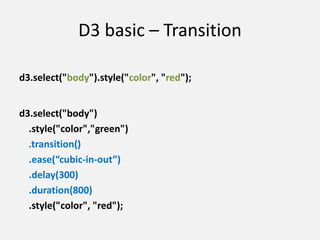
D3 basic – Transition
d3.select("body").style("color", "red");
d3.select("body")
.style("color","green")
.transition()
.ease(“cubic-in-out”)
.delay(300)
.duration(800)
.style("color", "red");
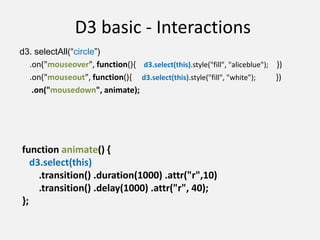
D3 basic - Interactions
d3. selectAll(“circle”)
.on("mouseover", function(){ d3.select(this).style("fill", "aliceblue"); })
.on("mouseout", function(){ d3.select(this).style("fill", "white"); })
.on("mousedown", animate);
function animate() {
d3.select(this)
.transition() .duration(1000) .attr("r",10)
.transition() .delay(1000) .attr("r", 40);
};
D3.js – scale (Domain and Range)
var data = [4, 8, 15, 16, 23, 42];
var x = d3.scale.linear()
.domain([0,d3.max(data)])
.range([0, 420]);
Value range of the dataset
Value range for the visualized graph
d3.select(".chart") .data(data)
.enter().append("div")
.style("width", function(d) { return x(d) + "px"; })
.text(function(d) { return d; });
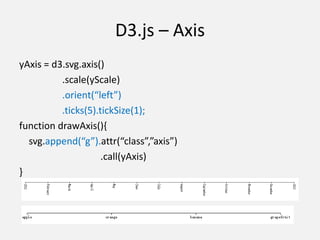
D3.js – Axis
yAxis = d3.svg.axis()
.scale(yScale)
.orient(“left”)
.ticks(5).tickSize(1);
function drawAxis(){
svg.append(“g”).attr(“class”,”axis”)
.call(yAxis)
}
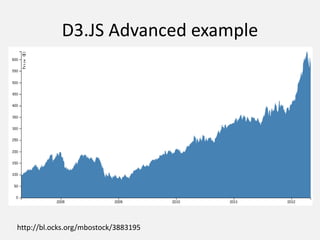
D3.JS Advanced example
http://bl.ocks.org/mbostock/3883195
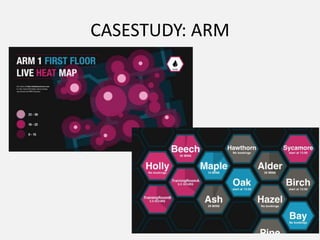
CASESTUDY: ARM
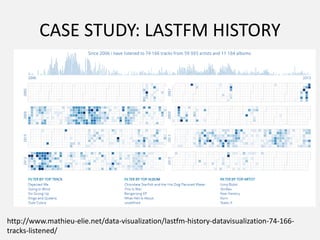
CASE STUDY: LASTFM HISTORY
http://www.mathieu-elie.net/data-visualization/lastfm-history-datavisualization-74-166-
tracks-listened/
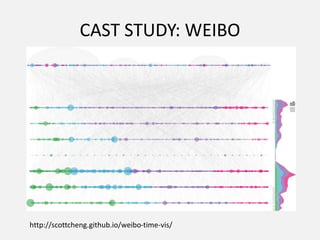
CAST STUDY: WEIBO
http://scottcheng.github.io/weibo-time-vis/
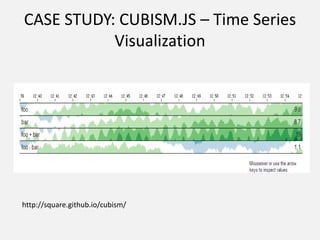
CASE STUDY: CUBISM.JS – Time Series
Visualization
http://square.github.io/cubism/
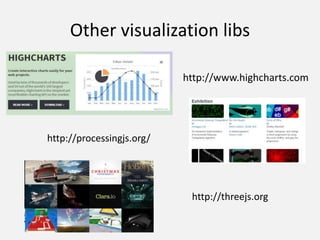
Other visualization libs
http://www.highcharts.com
http://processingjs.org/
http://threejs.org
D3 TUTORIAL RESOURCE
• https://www.dashingd3js.com
• http://alignedleft.com/tutorials/d3/
• http://www.jeromecukier.net/blog/2011/08/1
1/d3-scales-and-color/
• http://blog.visual.ly/creating-animations-and-
transitions-with-d3-js/
• http://bost.ocks.org/mike/bar/
• http://bost.ocks.org/mike/circles/
THANK YOU

D3

  • 1.
    D3.js: Data Visualizationfor the web Sizhe XI University Of Liverpool & Redninja
  • 2.
  • 3.
    Data Visualization Raw DataData Visualization
  • 4.
    D3.js – AnOverview Technical features • Data-driven Documents • SVG, HTML,CSS • Support for Ajax, JSON, XML Good for • Web Interactivity / animation • Advanced data analytics • Powerful and full control Disadvantage • Low level lib (make a bar chart painful at the beginning) • High learning curve 2010 Mike Bostock (principle/creator) Github.com/mbostock/d3
  • 5.
    What is itdoing? • Create and bind data to DOM elements • Add, remove data, update DOM transition • Map domain data to display data (scales)
  • 6.
    D3 basic –DOM manipulation d3.selectAll("p").style("color", "white"); d3.select("body").style("background-color", "black"); Selection of DOM element (id , class, HTML tag) Style the CSS in code
  • 7.
    D3 basic –Property as functions d3.selectAll("p").style("color", function(d, i){ return i % 2 ? "#fff" : "#eee"; }); Data , Index d3.selectAll("p").style("color",”red”);
  • 8.
    D3 basic –Property as functions d3.selectAll("p") .data([4, 8, 15, 16, 23, 42]) .style("font-size", function(d) { return d + "px"; }); Plug in Data
  • 9.
    D3 basic –Enter and Exit var dataset = [5, 10, 20, 15, 18]; d3.select(“svg") .attr(‘id’,”abc”) .selectAll(“circle”) .data(dataset) .enter() .append(“circle”)
  • 10.
    D3 basic –Enter and Exit var dataset = [5, 10, 20, 15, 18]; d3.select(“svg") .attr(‘id’,”abc”) . selectAll(“circle”) .data(dataset) .enter() .append(“circle”) Empty Selection
  • 11.
    D3 basic –Enter and Exit var dataset = [5, 10, 20, 15, 18]; d3.select(“svg") .attr(‘id’,”abc”) . selectAll(“circle”) .data(dataset) .enter() .append(“circle”)
  • 12.
    D3 basic –Enter and Exit var dataset = [5, 10, 20, 15, 18]; d3.select(“svg") .attr(‘id’,”abc”) . selectAll(“circle”) .data(dataset) .enter() .append(“circle”)
  • 13.
    D3 basic –Enter and Exit var dataset = [5, 10, 20, 15, 18]; d3.select(“svg") .attr(‘id’,”abc”) . selectAll(“circle”) .data(dataset) .enter() .append(“circle”)
  • 14.
    D3 basic -Attributes d3. selectAll(“circle”) .attr(‘cy’, 60) .attr(‘cx’, function(d, i){ return i * 100 + 30; }) .attr(‘r’, function(d){ return Math.sqrt(r); }) svg.selectAll("circle") .data([32, 57, 112, 293]);
  • 15.
    D3 basic –Transition d3.select("body").style("color", "red"); d3.select("body") .style("color","green") .transition() .ease(“cubic-in-out”) .delay(300) .duration(800) .style("color", "red");
  • 16.
    D3 basic -Interactions d3. selectAll(“circle”) .on("mouseover", function(){ d3.select(this).style("fill", "aliceblue"); }) .on("mouseout", function(){ d3.select(this).style("fill", "white"); }) .on("mousedown", animate); function animate() { d3.select(this) .transition() .duration(1000) .attr("r",10) .transition() .delay(1000) .attr("r", 40); };
  • 17.
    D3.js – scale(Domain and Range) var data = [4, 8, 15, 16, 23, 42]; var x = d3.scale.linear() .domain([0,d3.max(data)]) .range([0, 420]); Value range of the dataset Value range for the visualized graph d3.select(".chart") .data(data) .enter().append("div") .style("width", function(d) { return x(d) + "px"; }) .text(function(d) { return d; });
  • 18.
    D3.js – Axis yAxis= d3.svg.axis() .scale(yScale) .orient(“left”) .ticks(5).tickSize(1); function drawAxis(){ svg.append(“g”).attr(“class”,”axis”) .call(yAxis) }
  • 19.
  • 20.
  • 21.
    CASE STUDY: LASTFMHISTORY http://www.mathieu-elie.net/data-visualization/lastfm-history-datavisualization-74-166- tracks-listened/
  • 22.
  • 23.
    CASE STUDY: CUBISM.JS– Time Series Visualization http://square.github.io/cubism/
  • 24.
  • 25.
    D3 TUTORIAL RESOURCE •https://www.dashingd3js.com • http://alignedleft.com/tutorials/d3/ • http://www.jeromecukier.net/blog/2011/08/1 1/d3-scales-and-color/ • http://blog.visual.ly/creating-animations-and- transitions-with-d3-js/ • http://bost.ocks.org/mike/bar/ • http://bost.ocks.org/mike/circles/
  • 26.

Editor's Notes

  • #2 http://bl.ocks.org/mbostock/3883195 http://christopheviau.com/d3_tutorial/ http://blog.visual.ly/creating-animations-and-transitions-with-d3-js/ http://bost.ocks.org/mike/bar/