Data
Visualizations
with D3.js
Charlotte Front-End
Developers 

Thursday, July 27, 2017

6:30 PM to 8:30 PM

Brian Greig
Who am I
• Brian Greig

• Third Party Software Engineer
at BoA

• 13 years of web development
and data analysis

• Recent Charlotte transpant

• Requisite Social Media

@IgnoreIntuition

github.com/ignoreintuition/

linkedin.com/in/bgreig/
Data Visualization with D3.js
• Data Visualization concepts

• Accessing data via API

• Basic components

• Binding data

• Building visualizations

• Making your visuals interactive
Data Visualization
• What is Data Visualization?

• What makes a Data Visualization good or bad?
Subjective? Objective?

• Does your chart tell a story? Does it give insight into the
underlying data?

• Why D3?
Data Visualization
http://graphics.wsj.com/elections/2016/field-guide-red-blue-america/
https://tctechcrunch2011.files.wordpress.com/2014/02/power-map.png?w=738
Data Visualization
Dimension Determine how the data in your visualization is grouped
Measure Calculations used in visuzalitions.  Composed of aggregations.
Hierarchy
Data fields expanding into larger data sets and groups of data
sets, with each subsequently larger data set of a higher rank
than the set that came before it.
Detail Dimension Provides descriptive data about a dimension object 
Schema Organization of data (blueprint)
Subset Set of which all the elements are contained in another set.
Key Terms
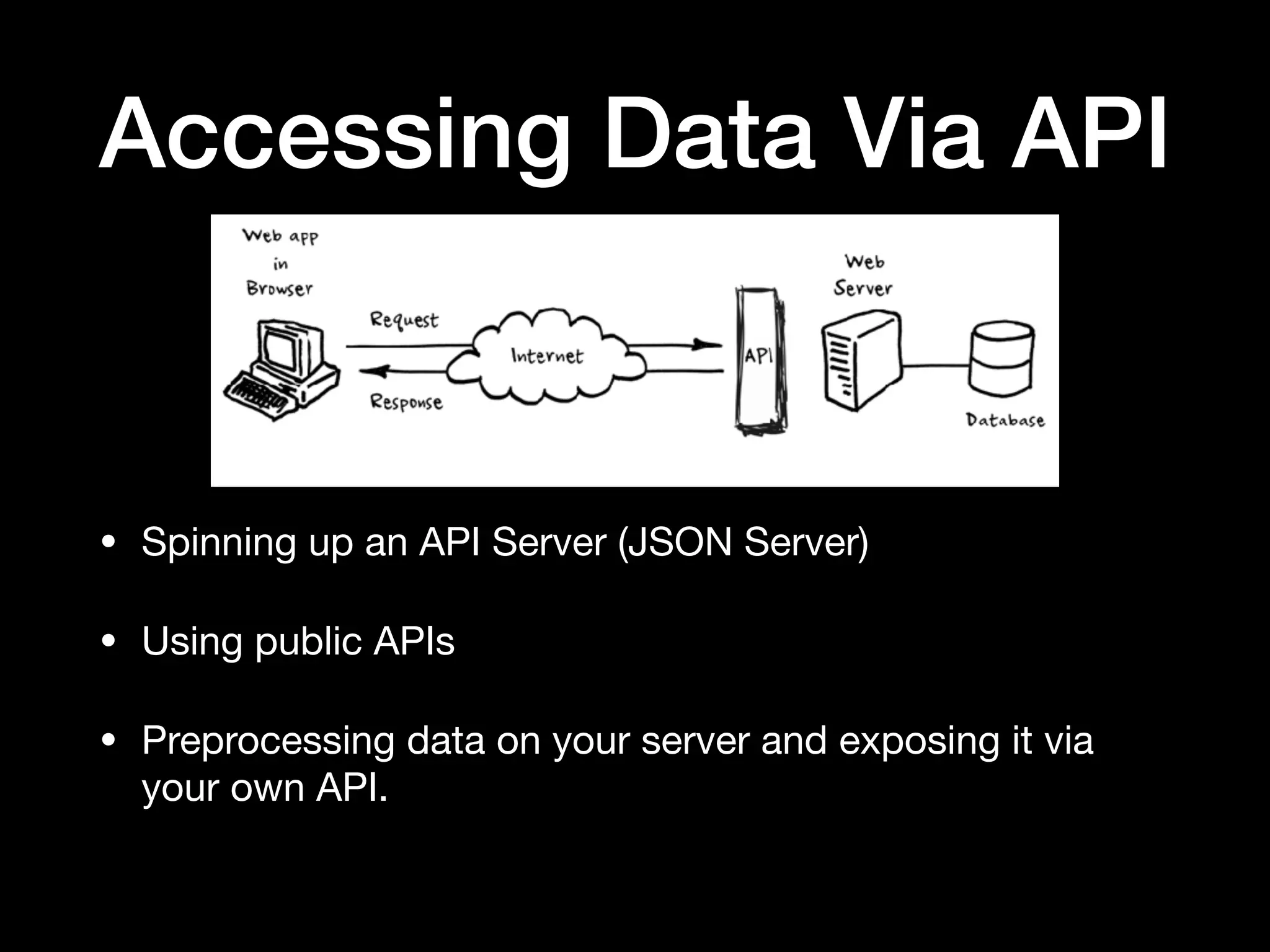
Accessing Data Via API
• Spinning up an API Server (JSON Server)

• Using public APIs

• Preprocessing data on your server and exposing it via
your own API.
Accessing Data Via API
• XMLHttpRequest

• jQuery

• d3.request - make an asynchronous request. 

• d3.queue - manage the concurrent evaluation of
asynchronous tasks.
Basic Components
Preparing your data for reporting

• Server-side vs client-side

• Pre-aggregation / real-time aggregation

• Obtaining your data

• Aggregating your data (d3.nest)

• Filtering your data (array.prototype.filter)

• Sorting your data (array.prototype.sort)
Basic Components
Structuring your application

• init: This is where you create your scales, ranges, domains, as well
as binding your data to the DOM element that is going to use it. 

• enter: This is the initial, static visualization.  here you will assign
attributes and values to the different components of your element. 

• update: Here you will update any of the dynamic attributes of your
graph if the user changes the context or scope of your data. 

• exit: Any cleanup.
Basic Components
Your basic D3 Starter Kit

• Define the dataset [1]

• Create a container [3-5]

• Bind your data [8]

• Append visual
components & set
attributes [11-18]

• Clean up [24]
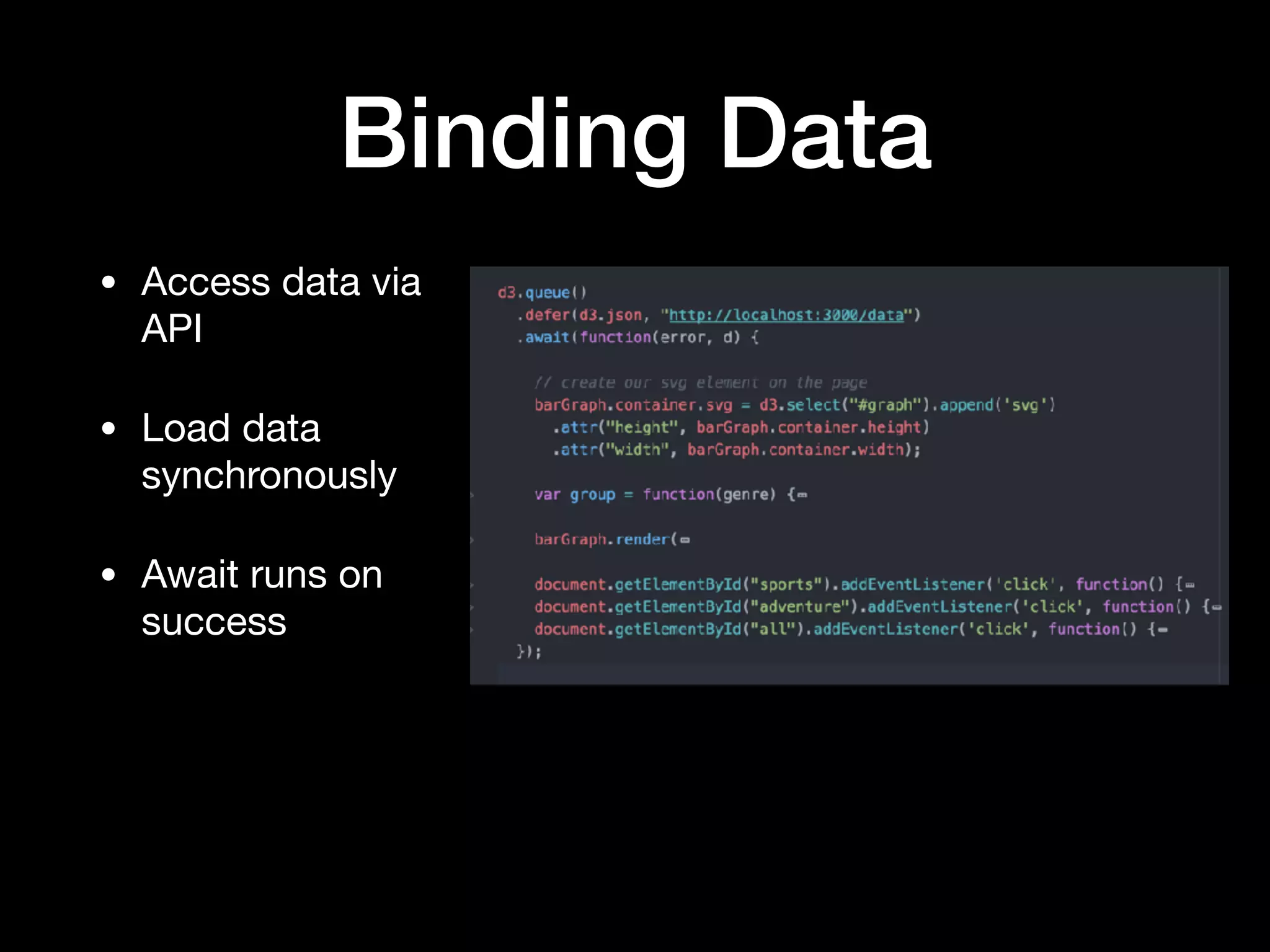
Binding Data
• Access data via
API

• Load data
synchronously

• Await runs on
success
Binding Data
• Aggregate as much
as possible on the
server

• Use rollup to further
aggregate data on
the front-end

• Use array functions
(filter, sort) to create
subsets
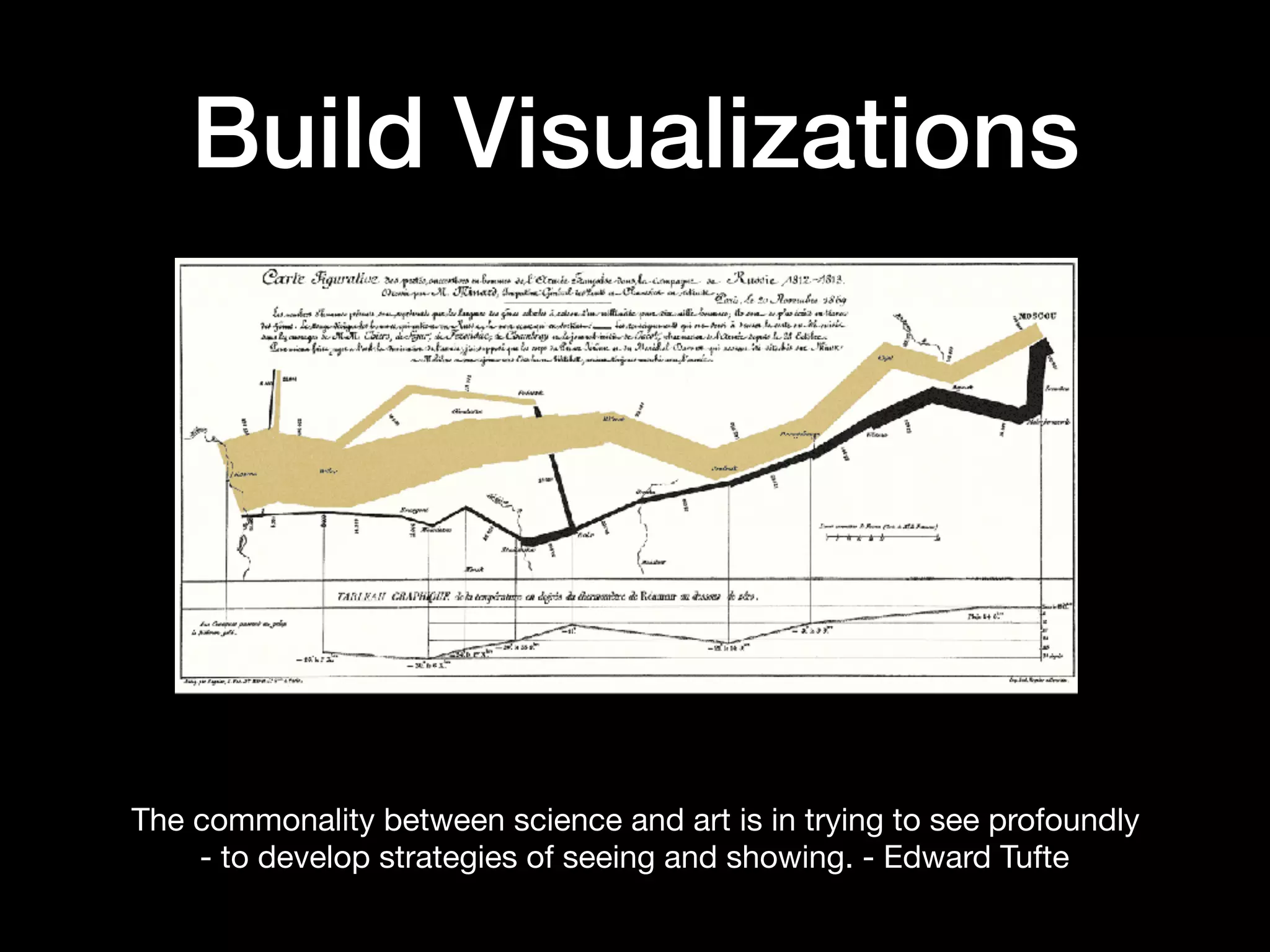
The commonality between science and art is in trying to see profoundly
- to develop strategies of seeing and showing. - Edward Tufte
Build Visualizations
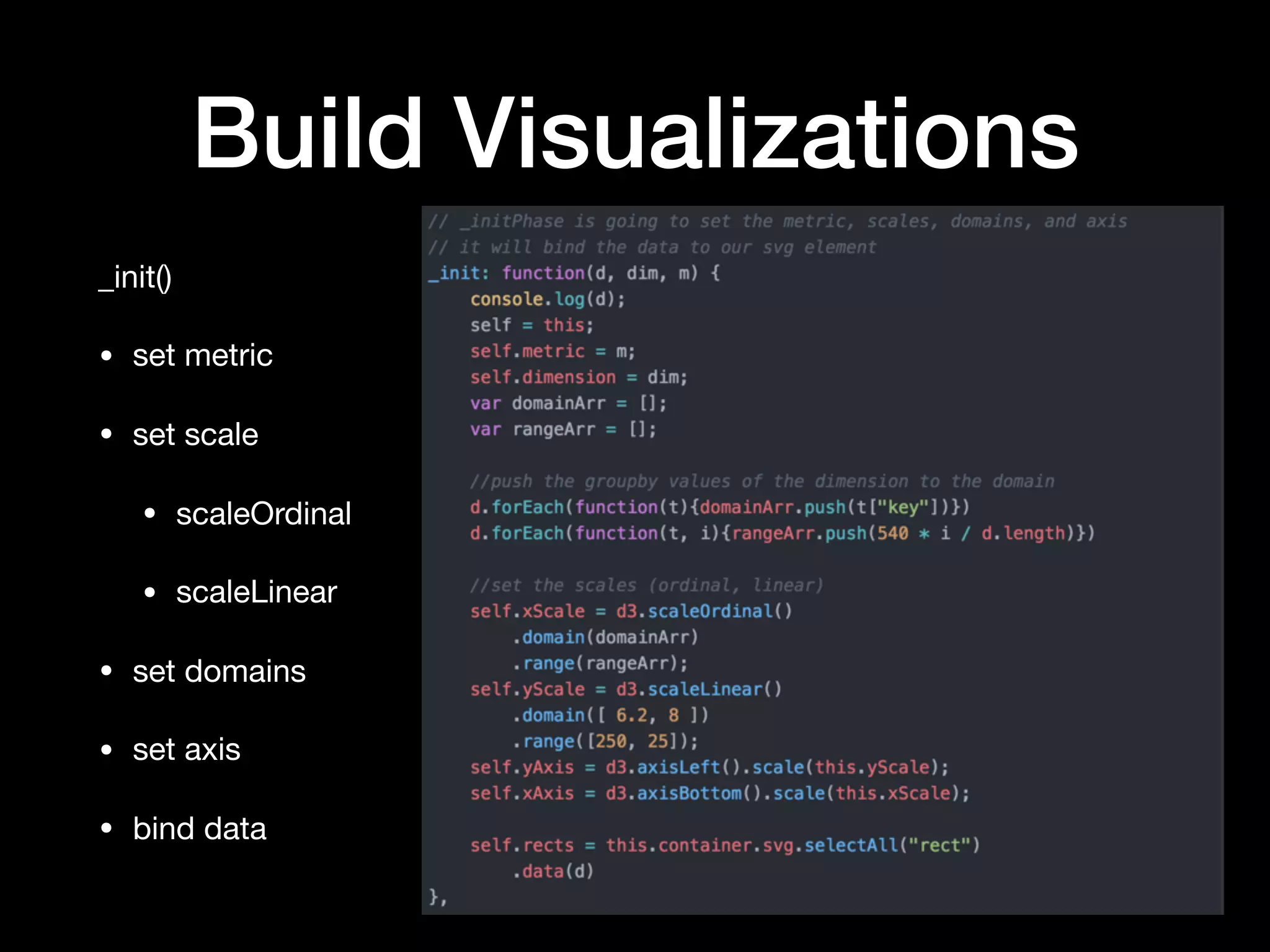
_init()

• set metric

• set scale

• scaleOrdinal

• scaleLinear

• set domains

• set axis

• bind data
Build Visualizations
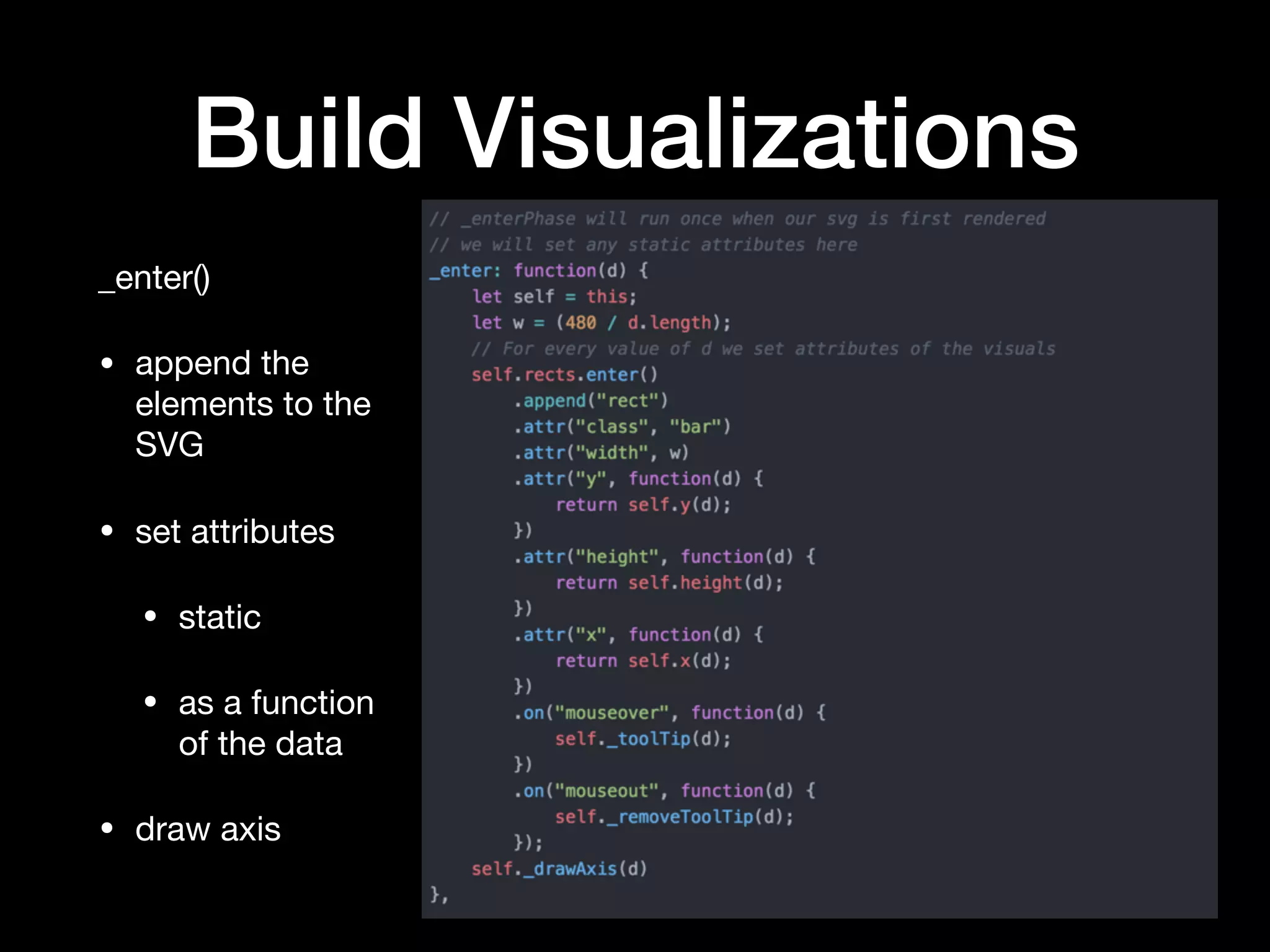
_enter()

• append the
elements to the
SVG

• set attributes

• static 

• as a function
of the data

• draw axis
Build Visualizations
Giving your data context

• Titles: Always, ALWAYS, include titles. Just enough to give
proper context

• Tooltips. Allowing your users to highlight the components of
your graph reduces clutter

• Axis. Terse and explanatory

• Colors. Varied and considerate of ADA

• Legends. Only if they provide value
Making it Interactive
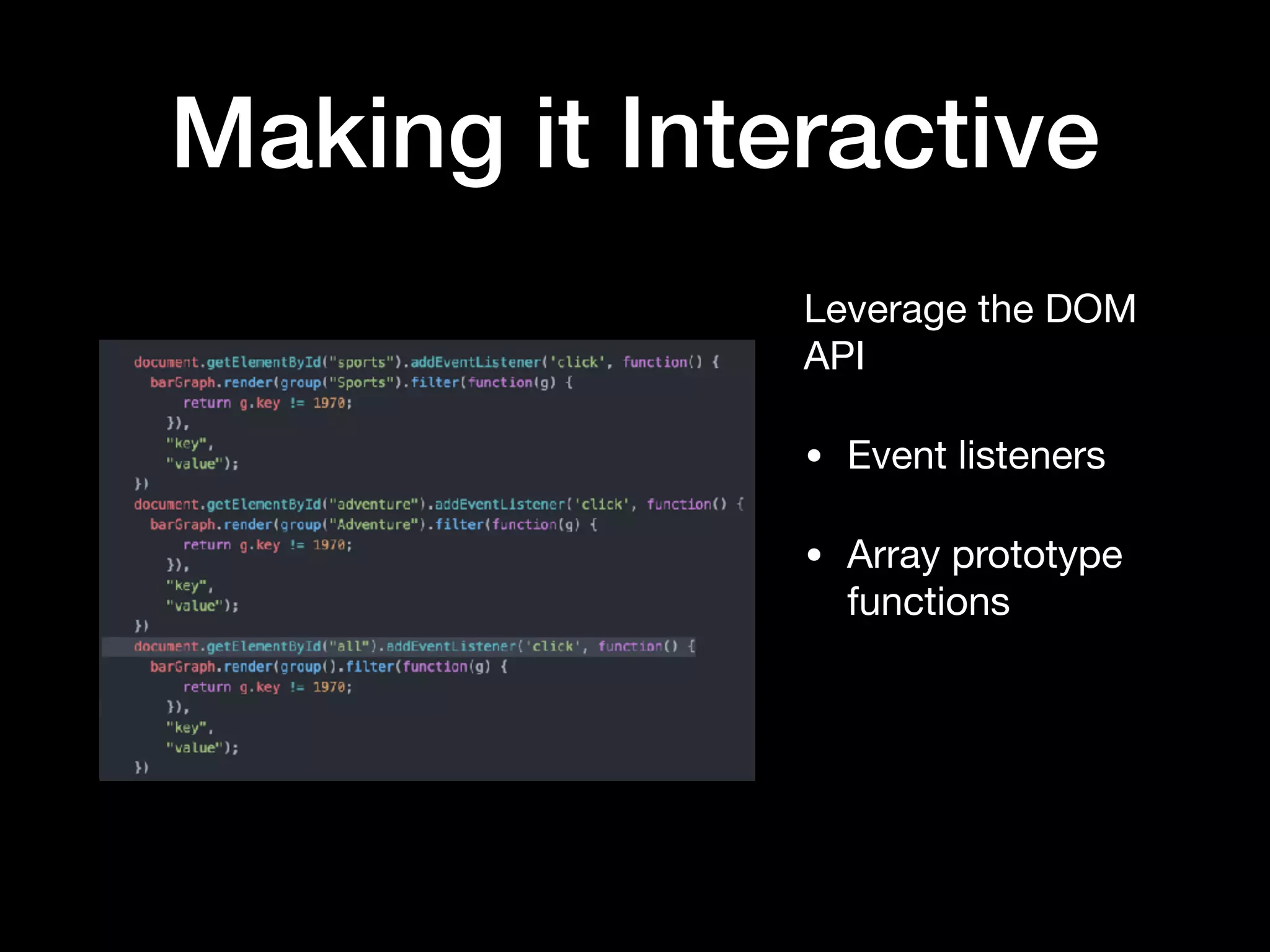
Leverage the DOM
API

• Event listeners

• Array prototype
functions
Making it Interactive
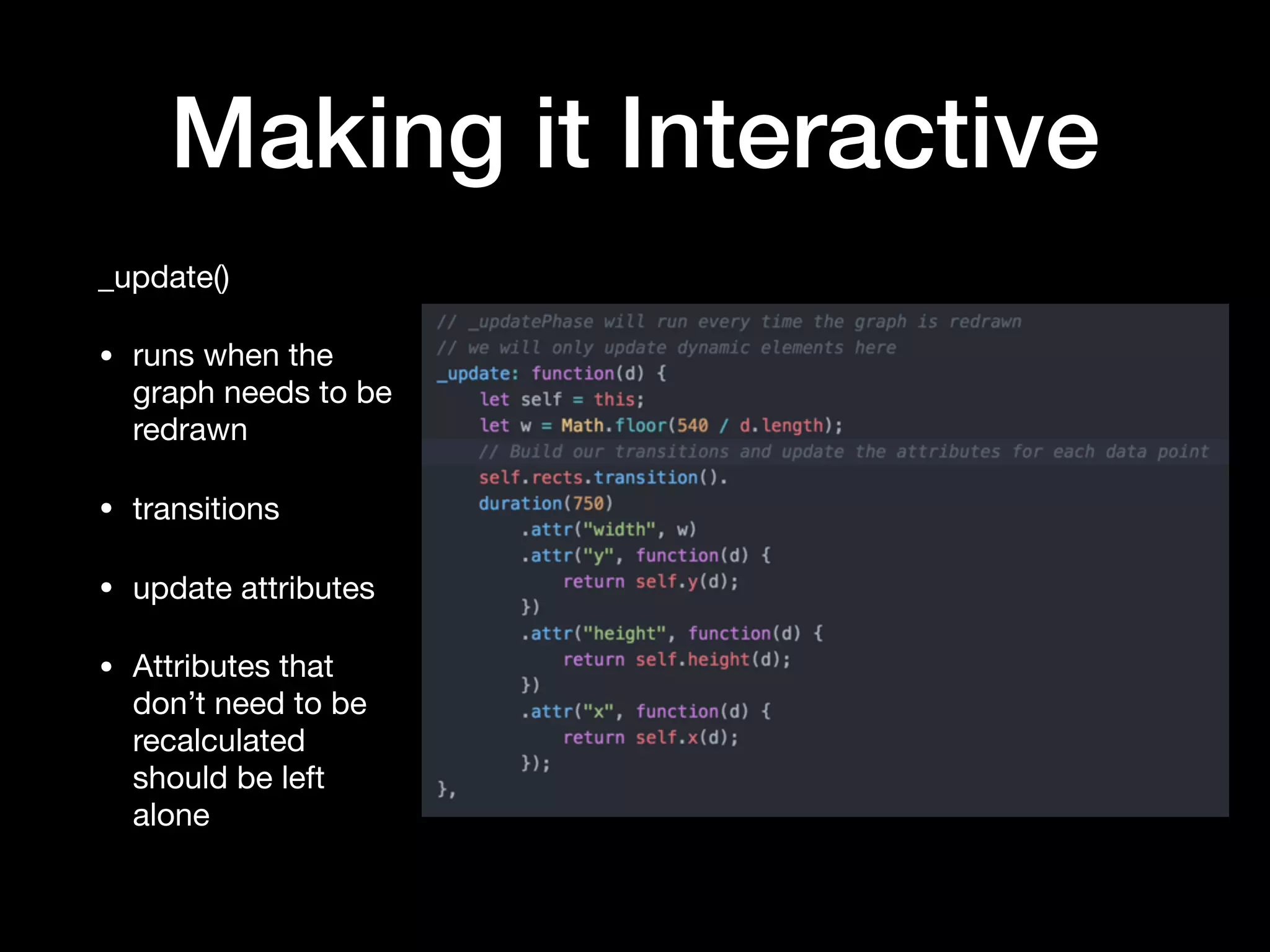
_update()

• runs when the
graph needs to be
redrawn

• transitions

• update attributes

• Attributes that
don’t need to be
recalculated
should be left
alone
Questions
Appendix
• D3 API Reference: https://d3js.org/

• JSON Server: https://github.com/typicode/json-server 

• Github Repo: https://github.com/ignoreintuition/
dataviz_boilerplate 

• 20 Years of Games: https://www.kaggle.com/egrinstein/
20-years-of-games

Charlotte Front End - D3

  • 1.
    Data Visualizations with D3.js Charlotte Front-End Developers Thursday, July 27, 2017 6:30 PM to 8:30 PM Brian Greig
  • 2.
    Who am I •Brian Greig • Third Party Software Engineer at BoA • 13 years of web development and data analysis • Recent Charlotte transpant • Requisite Social Media
 @IgnoreIntuition
 github.com/ignoreintuition/
 linkedin.com/in/bgreig/
  • 3.
    Data Visualization withD3.js • Data Visualization concepts • Accessing data via API • Basic components • Binding data • Building visualizations • Making your visuals interactive
  • 4.
    Data Visualization • Whatis Data Visualization? • What makes a Data Visualization good or bad? Subjective? Objective? • Does your chart tell a story? Does it give insight into the underlying data? • Why D3?
  • 5.
  • 6.
    Data Visualization Dimension Determinehow the data in your visualization is grouped Measure Calculations used in visuzalitions.  Composed of aggregations. Hierarchy Data fields expanding into larger data sets and groups of data sets, with each subsequently larger data set of a higher rank than the set that came before it. Detail Dimension Provides descriptive data about a dimension object  Schema Organization of data (blueprint) Subset Set of which all the elements are contained in another set. Key Terms
  • 7.
    Accessing Data ViaAPI • Spinning up an API Server (JSON Server) • Using public APIs • Preprocessing data on your server and exposing it via your own API.
  • 8.
    Accessing Data ViaAPI • XMLHttpRequest • jQuery • d3.request - make an asynchronous request. • d3.queue - manage the concurrent evaluation of asynchronous tasks.
  • 9.
    Basic Components Preparing yourdata for reporting • Server-side vs client-side • Pre-aggregation / real-time aggregation • Obtaining your data • Aggregating your data (d3.nest) • Filtering your data (array.prototype.filter) • Sorting your data (array.prototype.sort)
  • 10.
    Basic Components Structuring yourapplication • init: This is where you create your scales, ranges, domains, as well as binding your data to the DOM element that is going to use it. • enter: This is the initial, static visualization.  here you will assign attributes and values to the different components of your element. • update: Here you will update any of the dynamic attributes of your graph if the user changes the context or scope of your data. • exit: Any cleanup.
  • 11.
    Basic Components Your basicD3 Starter Kit • Define the dataset [1] • Create a container [3-5] • Bind your data [8] • Append visual components & set attributes [11-18] • Clean up [24]
  • 12.
    Binding Data • Accessdata via API • Load data synchronously • Await runs on success
  • 13.
    Binding Data • Aggregateas much as possible on the server • Use rollup to further aggregate data on the front-end • Use array functions (filter, sort) to create subsets
  • 14.
    The commonality betweenscience and art is in trying to see profoundly - to develop strategies of seeing and showing. - Edward Tufte Build Visualizations
  • 15.
    Build Visualizations _init() • setmetric • set scale • scaleOrdinal • scaleLinear • set domains • set axis • bind data
  • 16.
    Build Visualizations _enter() • appendthe elements to the SVG • set attributes • static • as a function of the data • draw axis
  • 17.
    Build Visualizations Giving yourdata context • Titles: Always, ALWAYS, include titles. Just enough to give proper context • Tooltips. Allowing your users to highlight the components of your graph reduces clutter • Axis. Terse and explanatory • Colors. Varied and considerate of ADA • Legends. Only if they provide value
  • 18.
    Making it Interactive Leveragethe DOM API • Event listeners • Array prototype functions
  • 19.
    Making it Interactive _update() •runs when the graph needs to be redrawn • transitions • update attributes • Attributes that don’t need to be recalculated should be left alone
  • 20.
  • 21.
    Appendix • D3 APIReference: https://d3js.org/ • JSON Server: https://github.com/typicode/json-server • Github Repo: https://github.com/ignoreintuition/ dataviz_boilerplate • 20 Years of Games: https://www.kaggle.com/egrinstein/ 20-years-of-games