Data Cleaning and Preparation - Text Functions.docx
1.
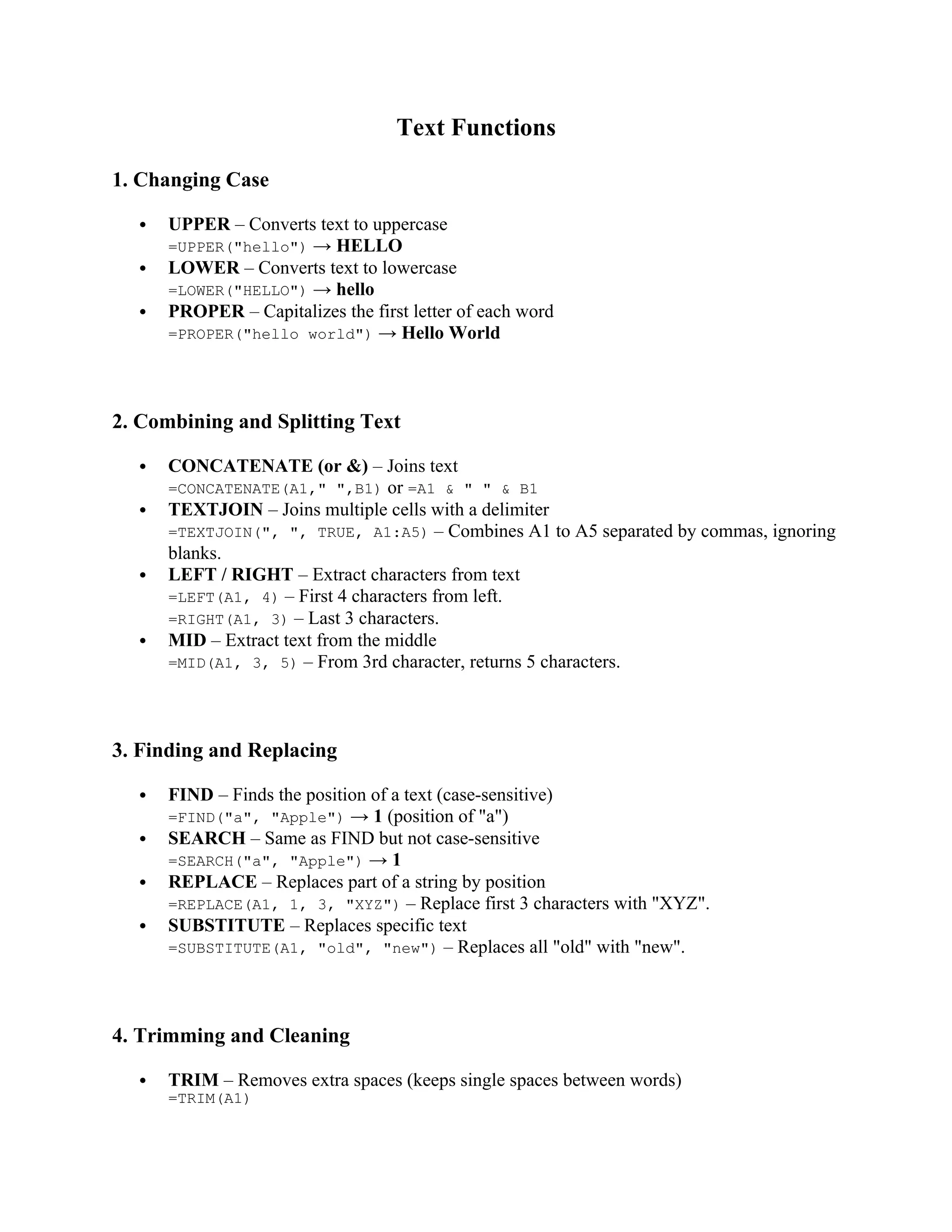
Text Functions
1. ChangingCase
UPPER – Converts text to uppercase
=UPPER("hello") → HELLO
LOWER – Converts text to lowercase
=LOWER("HELLO") → hello
PROPER – Capitalizes the first letter of each word
=PROPER("hello world") → Hello World
2. Combining and Splitting Text
CONCATENATE (or &) – Joins text
=CONCATENATE(A1," ",B1) or =A1 & " " & B1
TEXTJOIN – Joins multiple cells with a delimiter
=TEXTJOIN(", ", TRUE, A1:A5) – Combines A1 to A5 separated by commas, ignoring
blanks.
LEFT / RIGHT – Extract characters from text
=LEFT(A1, 4) – First 4 characters from left.
=RIGHT(A1, 3) – Last 3 characters.
MID – Extract text from the middle
=MID(A1, 3, 5) – From 3rd character, returns 5 characters.
3. Finding and Replacing
FIND – Finds the position of a text (case-sensitive)
=FIND("a", "Apple") → 1 (position of "a")
SEARCH – Same as FIND but not case-sensitive
=SEARCH("a", "Apple") → 1
REPLACE – Replaces part of a string by position
=REPLACE(A1, 1, 3, "XYZ") – Replace first 3 characters with "XYZ".
SUBSTITUTE – Replaces specific text
=SUBSTITUTE(A1, "old", "new") – Replaces all "old" with "new".
4. Trimming and Cleaning
TRIM – Removes extra spaces (keeps single spaces between words)
=TRIM(A1)
2.
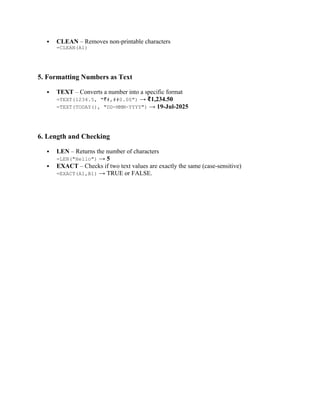
CLEAN –Removes non-printable characters
=CLEAN(A1)
5. Formatting Numbers as Text
TEXT – Converts a number into a specific format
=TEXT(1234.5, " #,##0.00")
₹ → 1,234.50
₹
=TEXT(TODAY(), "DD-MMM-YYYY") → 19-Jul-2025
6. Length and Checking
LEN – Returns the number of characters
=LEN("Hello") → 5
EXACT – Checks if two text values are exactly the same (case-sensitive)
=EXACT(A1,B1) → TRUE or FALSE.