DATA ANALYSIS WITH
POSTGRES AND POWER BI
BY SANGEETHA SUBRAMANI
SENIOR SOFTWARE
ENGINEER
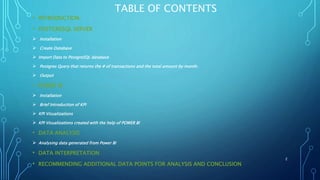
TABLE OF CONTENTS
• INTRODUCTION
• POSTGRESQL SERVER
 Installation
 Create Database
 Import Data to PostgreSQL database
 Postgres Query that returns the # of transactions and the total amount by month.
 Output
• POWER BI
 Installation
 Brief Introduction of KPI
 KPI Visualizations
 KPI Visualizations created with the help of POWER BI
• DATA ANALYSIS
 Analysing data generated from Power BI
• DATA INTERPRETATION
• RECOMMENDING ADDITIONAL DATA POINTS FOR ANALYSIS AND CONCLUSION
2
INTRODUCTION
In this presentation, I will explain below mentioned items for a dataset(create
excel data or use your personal excel data).
 Write a PostgreSQL query that returns the # of transactions and the total
amount by month
 Analysing the data provided in dataset(EXCEL) and defining 3 KPIs.
 Interpret your results and draw conclusions for the business.
3
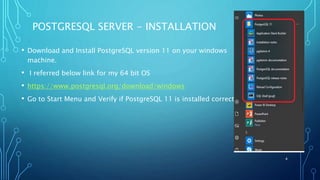
POSTGRESQL SERVER - INSTALLATION
• Download and Install PostgreSQL version 11 on your windows
machine.
• I referred below link for my 64 bit OS
• https://www.postgresql.org/download/windows
• Go to Start Menu and Verify if PostgreSQL 11 is installed correctly.
4
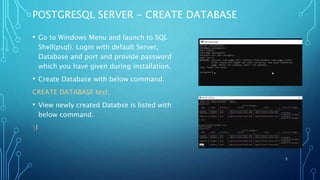
POSTGRESQL SERVER - CREATE DATABASE
• Go to Windows Menu and launch to SQL
Shell(psql). Login with default Server,
Database and port and provide password
which you have given during installation.
• Create Database with below command.
CREATE DATABASE test;
• View newly created Databse is listed with
below command.
l
5
POSTGRESQL SERVER - IMPORT DATA TO POSTGRESQL
DATABASE
• Convert XLSX file to CSV file(Open XLSX file and save
as CSV file) and save in your system.
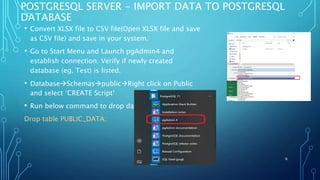
• Go to Start Menu and Launch pgAdmin4 and
establish connection. Verify if newly created
database (eg. Test) is listed.
• DatabaseSchemaspublicRight click on Public
and select ‘CREATE Script’
• Run below command to drop data
Drop table PUBLIC_DATA;
6
CONTINUED….
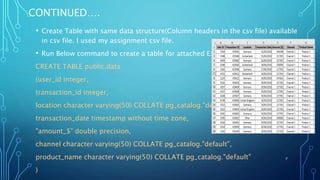
• Create Table with same data structure(Column headers in the csv file) available
in csv file. I used my assignment csv file.
• Run Below command to create a table for attached Excel.
CREATE TABLE public.data
(user_id integer,
transaction_id integer,
location character varying(50) COLLATE pg_catalog."default",
transaction_date timestamp without time zone,
"amount_$" double precision,
channel character varying(50) COLLATE pg_catalog."default",
product_name character varying(50) COLLATE pg_catalog."default"
)
7
CONTINUED…
• Run below command to Cross check the data by using select
command
select * from PUBLIC_DATA;
• Copy file by using below command
COPY PUBLIC.DATA FROM
‘C:UsersPRADEEPDownloadsTestBI_Test_Assignment.csv’
WITH CSV HEADER;
I have to write a Postgresql query that returns the # of
transactions and the total amount by month.
8
POSTGRES QUERY THAT RETURNS THE # OF
TRANSACTIONS AND THE TOTAL AMOUNT BY
MONTH
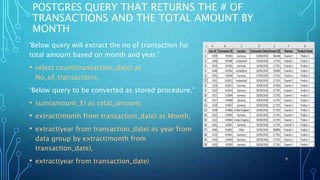
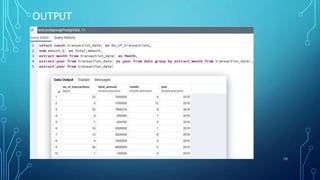
'Below query will extract the no of transaction for
total amount based on month and year.'
• select count(transaction_date) as
No_of_transactions,
‘Below query to be converted as stored procedure.'
• sum(amount_$) as total_amount,
• extract(month from transaction_date) as Month,
• extract(year from transaction_date) as year from
data group by extract(month from
transaction_date),
• extract(year from transaction_date) 9
OUTPUT
10
POWER BI - INSTALLATION
• There are two ways to install Power BI in windows OS.
• Type 1:Download the package from Microsoft power BI website and install.
• Type 2: Installation the App from Microsoft Store.
• I prefer installing App method as Power BI gets automatically updated if
there is any updated version available.
11
POWER BI - BRIEF INTRODUCTION OF KPI
• A Key Performance Indicator (KPI) is a visual cue that communicates the
amount of progress made toward a target.
• When to use KPI ?
When user think,
What am I ahead or behind on, this specifically refers to a TARGET number
How far ahead or behind am I, this represents a TREND which is related to
the target
Since KPI is based on specific measure, it is designed to help you evaluate a
current value and status of the metric.
• KPI requires Base Measure that evaluates the value and Target Measure .
12
KPI VISUALIZATIONS
• Open Power BI Desktop.
• Lets create few KPIs that measures the progress that made toward a certain
goal
• Step 1: Import Excel data and check preview of imported data.
• Step 2: Select column graph with values which we want to measure.
• Step 3: Select table for same values which we selected in step 1
• Step 4: Select one more table with same values and then change it to a KPI
NOTE: I feel comfortable having table, column graph along with KPI. So
created dashboard with these visualizations to compare data and measure
value
13
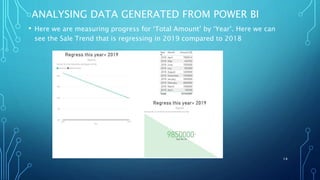
ANALYSING DATA GENERATED FROM POWER BI
• Here we are measuring progress for ‘Total Amount’ by ‘Year’. Here we can
see the Sale Trend that is regressing in 2019 compared to 2018
14
CONTINUED…
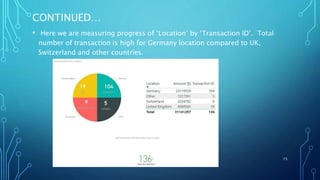
• Here we are measuring progress of ‘Location’ by ‘Transaction ID’. Total
number of transaction is high for Germany location compared to UK,
Switzerland and other countries.
15
CONTINUED…
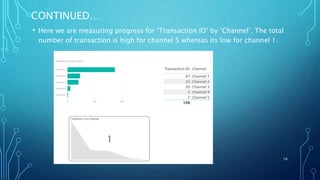
• Here we are measuring progress for ‘Transaction ID’ by ‘Channel’. The total
number of transaction is high for channel 5 whereas its low for channel 1.
16
DATA ANALYSIS – DATA INTERPRETATION
• Total Amount($) in the year 2019 is less compared to Total Amount($) in
the year 2018. Company has to bring some new ideas where it can
encourage customer to deposit more Amount.
• The Total Number of transaction is good in few locations such as Germany.
One has find out the reason why transactions are not good in other
countries. There is a huge difference in total number of transactions.
Methodologies followed in Germany can be applied to other countries so as
to improve transactions in other countries.
• Channels 5 is helping a lot for Sales. Thich can be encouraged and
advertised more in other sectors or locations where sales are less.
17
THANK YOU
• For any queries please contact:
sangeethas1989@gmail.com
• My Linkedin id is:
www.linkedin.com/in/sangeetha.subramani05029833
• Date of the slide created:
02/09/2019
18

Data analysis with Postgres and Power BI

  • 1.
    DATA ANALYSIS WITH POSTGRESAND POWER BI BY SANGEETHA SUBRAMANI SENIOR SOFTWARE ENGINEER
  • 2.
    TABLE OF CONTENTS •INTRODUCTION • POSTGRESQL SERVER  Installation  Create Database  Import Data to PostgreSQL database  Postgres Query that returns the # of transactions and the total amount by month.  Output • POWER BI  Installation  Brief Introduction of KPI  KPI Visualizations  KPI Visualizations created with the help of POWER BI • DATA ANALYSIS  Analysing data generated from Power BI • DATA INTERPRETATION • RECOMMENDING ADDITIONAL DATA POINTS FOR ANALYSIS AND CONCLUSION 2
  • 3.
    INTRODUCTION In this presentation,I will explain below mentioned items for a dataset(create excel data or use your personal excel data).  Write a PostgreSQL query that returns the # of transactions and the total amount by month  Analysing the data provided in dataset(EXCEL) and defining 3 KPIs.  Interpret your results and draw conclusions for the business. 3
  • 4.
    POSTGRESQL SERVER -INSTALLATION • Download and Install PostgreSQL version 11 on your windows machine. • I referred below link for my 64 bit OS • https://www.postgresql.org/download/windows • Go to Start Menu and Verify if PostgreSQL 11 is installed correctly. 4
  • 5.
    POSTGRESQL SERVER -CREATE DATABASE • Go to Windows Menu and launch to SQL Shell(psql). Login with default Server, Database and port and provide password which you have given during installation. • Create Database with below command. CREATE DATABASE test; • View newly created Databse is listed with below command. l 5
  • 6.
    POSTGRESQL SERVER -IMPORT DATA TO POSTGRESQL DATABASE • Convert XLSX file to CSV file(Open XLSX file and save as CSV file) and save in your system. • Go to Start Menu and Launch pgAdmin4 and establish connection. Verify if newly created database (eg. Test) is listed. • DatabaseSchemaspublicRight click on Public and select ‘CREATE Script’ • Run below command to drop data Drop table PUBLIC_DATA; 6
  • 7.
    CONTINUED…. • Create Tablewith same data structure(Column headers in the csv file) available in csv file. I used my assignment csv file. • Run Below command to create a table for attached Excel. CREATE TABLE public.data (user_id integer, transaction_id integer, location character varying(50) COLLATE pg_catalog."default", transaction_date timestamp without time zone, "amount_$" double precision, channel character varying(50) COLLATE pg_catalog."default", product_name character varying(50) COLLATE pg_catalog."default" ) 7
  • 8.
    CONTINUED… • Run belowcommand to Cross check the data by using select command select * from PUBLIC_DATA; • Copy file by using below command COPY PUBLIC.DATA FROM ‘C:UsersPRADEEPDownloadsTestBI_Test_Assignment.csv’ WITH CSV HEADER; I have to write a Postgresql query that returns the # of transactions and the total amount by month. 8
  • 9.
    POSTGRES QUERY THATRETURNS THE # OF TRANSACTIONS AND THE TOTAL AMOUNT BY MONTH 'Below query will extract the no of transaction for total amount based on month and year.' • select count(transaction_date) as No_of_transactions, ‘Below query to be converted as stored procedure.' • sum(amount_$) as total_amount, • extract(month from transaction_date) as Month, • extract(year from transaction_date) as year from data group by extract(month from transaction_date), • extract(year from transaction_date) 9
  • 10.
  • 11.
    POWER BI -INSTALLATION • There are two ways to install Power BI in windows OS. • Type 1:Download the package from Microsoft power BI website and install. • Type 2: Installation the App from Microsoft Store. • I prefer installing App method as Power BI gets automatically updated if there is any updated version available. 11
  • 12.
    POWER BI -BRIEF INTRODUCTION OF KPI • A Key Performance Indicator (KPI) is a visual cue that communicates the amount of progress made toward a target. • When to use KPI ? When user think, What am I ahead or behind on, this specifically refers to a TARGET number How far ahead or behind am I, this represents a TREND which is related to the target Since KPI is based on specific measure, it is designed to help you evaluate a current value and status of the metric. • KPI requires Base Measure that evaluates the value and Target Measure . 12
  • 13.
    KPI VISUALIZATIONS • OpenPower BI Desktop. • Lets create few KPIs that measures the progress that made toward a certain goal • Step 1: Import Excel data and check preview of imported data. • Step 2: Select column graph with values which we want to measure. • Step 3: Select table for same values which we selected in step 1 • Step 4: Select one more table with same values and then change it to a KPI NOTE: I feel comfortable having table, column graph along with KPI. So created dashboard with these visualizations to compare data and measure value 13
  • 14.
    ANALYSING DATA GENERATEDFROM POWER BI • Here we are measuring progress for ‘Total Amount’ by ‘Year’. Here we can see the Sale Trend that is regressing in 2019 compared to 2018 14
  • 15.
    CONTINUED… • Here weare measuring progress of ‘Location’ by ‘Transaction ID’. Total number of transaction is high for Germany location compared to UK, Switzerland and other countries. 15
  • 16.
    CONTINUED… • Here weare measuring progress for ‘Transaction ID’ by ‘Channel’. The total number of transaction is high for channel 5 whereas its low for channel 1. 16
  • 17.
    DATA ANALYSIS –DATA INTERPRETATION • Total Amount($) in the year 2019 is less compared to Total Amount($) in the year 2018. Company has to bring some new ideas where it can encourage customer to deposit more Amount. • The Total Number of transaction is good in few locations such as Germany. One has find out the reason why transactions are not good in other countries. There is a huge difference in total number of transactions. Methodologies followed in Germany can be applied to other countries so as to improve transactions in other countries. • Channels 5 is helping a lot for Sales. Thich can be encouraged and advertised more in other sectors or locations where sales are less. 17
  • 18.
    THANK YOU • Forany queries please contact: sangeethas1989@gmail.com • My Linkedin id is: www.linkedin.com/in/sangeetha.subramani05029833 • Date of the slide created: 02/09/2019 18