Dodge Data Integration for Salesforce.com
Improve Your Sales Performance
by Integrating Dodge data into Saleforce.com
• Charge up your sales pipeline with efficient integration of Dodge data
• Tie Dodge data directly into Account, Opportunity and Reporting workflows
• Improve usage and track ROI on Dodge data
Improve Your Sales Performance
by Integrating Dodge data into Saleforce.com
About ConstructionPoints
• Provides automated, daily integration of Dodge data
• Keeps data synchronized with Dodge’s editorial process
• Filtering & Scoring enables customers to pre-qualify Dodge records for integration
• Salesforce.com AppExchange Approved Click here to view listing
• Native Force.com/Apex Developed App
• Connects Dodge info to SF1
• Salesforce.com Enterprise, Unlimited or Developer edition required
Improve Your Sales Performance
by Integrating Dodge data into Saleforce.com
About ConstructionPoints con’t
• Fast Deployment - takes 4-5 hours to complete - install, configuration, data load
• 0 to very minimal IT resources needed to deploy
• Installation, configuration, user training and unlimited customer support are provided
• Ongoing App updates provided free
• Over 2,300 building product manufacturers, distributors and construction service
businesses have deployed Dodge ConstructionPoints management apps
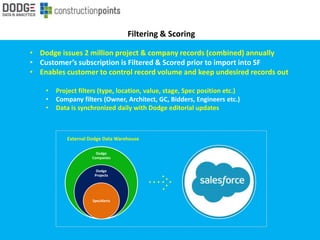
Filtering & Scoring
• Dodge issues 2 million project & company records (combined) annually
• Customer’s subscription is Filtered & Scored prior to import into SF
• Enables customer to control record volume and keep undesired records out
• Project filters (type, location, value, stage, Spec position etc.)
• Company filters (Owner, Architect, GC, Bidders, Engineers etc.)
• Data is synchronized daily with Dodge editorial updates
Dodge
Companies
Dodge
Projects
SpecAlerts
External Dodge Data Warehouse
• Dodge issues 500,000 project leads annually
• Customers will process/import a subset of these
• Basic ROI established by tying the value of Opportunities Won that are
related to Dodge projects
Track sales derived from Dodge data
1. Total # of Dodge projects imported into Salesforce
2. Total # of Opportunity records related to Dodge projects
3. Total # of WON Opportunity records related to Dodge projects
4. Total $ of WON Opportunities related to Dodge projects
Basic ROI Model
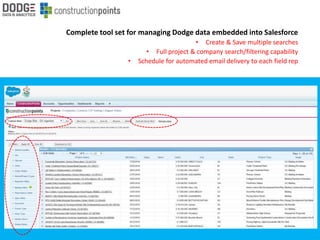
Complete tool set for managing Dodge data embedded into Salesforce
• Create & Save multiple searches
• Full project & company search/filtering capability
• Schedule for automated email delivery to each field rep
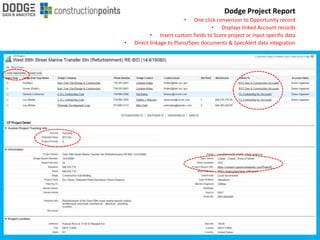
Dodge Project Report
• One click conversion to Opportunity record
• Displays linked Account records
• Insert custom fields to Score project or input specific data
• Direct linkage to Plans/Spec documents & SpecAlert data integration
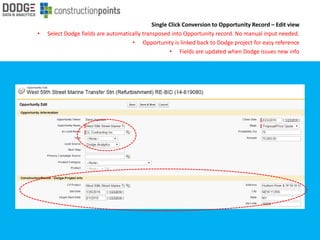
Single Click Conversion to Opportunity Record – Edit view
• Select Dodge fields are automatically transposed into Opportunity record. No manual input needed.
• Opportunity is linked back to Dodge project for easy reference
• Fields are updated when Dodge issues new info
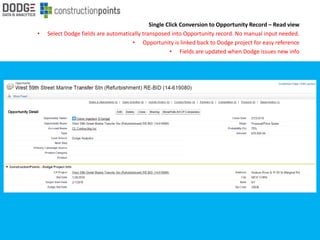
Single Click Conversion to Opportunity Record – Read view
• Select Dodge fields are automatically transposed into Opportunity record. No manual input needed.
• Opportunity is linked back to Dodge project for easy reference
• Fields are updated when Dodge issues new info
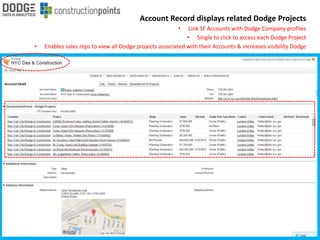
Account Record displays related Dodge Projects
• Link SF Accounts with Dodge Company profiles
• Single to click to access each Dodge Project
• Enables sales reps to view all Dodge projects associated with their Accounts & increases visibility Dodge

CP Salesforce Overview-2016

  • 1.
    Dodge Data Integrationfor Salesforce.com
  • 2.
    Improve Your SalesPerformance by Integrating Dodge data into Saleforce.com • Charge up your sales pipeline with efficient integration of Dodge data • Tie Dodge data directly into Account, Opportunity and Reporting workflows • Improve usage and track ROI on Dodge data
  • 3.
    Improve Your SalesPerformance by Integrating Dodge data into Saleforce.com About ConstructionPoints • Provides automated, daily integration of Dodge data • Keeps data synchronized with Dodge’s editorial process • Filtering & Scoring enables customers to pre-qualify Dodge records for integration • Salesforce.com AppExchange Approved Click here to view listing • Native Force.com/Apex Developed App • Connects Dodge info to SF1 • Salesforce.com Enterprise, Unlimited or Developer edition required
  • 4.
    Improve Your SalesPerformance by Integrating Dodge data into Saleforce.com About ConstructionPoints con’t • Fast Deployment - takes 4-5 hours to complete - install, configuration, data load • 0 to very minimal IT resources needed to deploy • Installation, configuration, user training and unlimited customer support are provided • Ongoing App updates provided free • Over 2,300 building product manufacturers, distributors and construction service businesses have deployed Dodge ConstructionPoints management apps
  • 5.
    Filtering & Scoring •Dodge issues 2 million project & company records (combined) annually • Customer’s subscription is Filtered & Scored prior to import into SF • Enables customer to control record volume and keep undesired records out • Project filters (type, location, value, stage, Spec position etc.) • Company filters (Owner, Architect, GC, Bidders, Engineers etc.) • Data is synchronized daily with Dodge editorial updates Dodge Companies Dodge Projects SpecAlerts External Dodge Data Warehouse
  • 6.
    • Dodge issues500,000 project leads annually • Customers will process/import a subset of these • Basic ROI established by tying the value of Opportunities Won that are related to Dodge projects Track sales derived from Dodge data 1. Total # of Dodge projects imported into Salesforce 2. Total # of Opportunity records related to Dodge projects 3. Total # of WON Opportunity records related to Dodge projects 4. Total $ of WON Opportunities related to Dodge projects Basic ROI Model
  • 7.
    Complete tool setfor managing Dodge data embedded into Salesforce • Create & Save multiple searches • Full project & company search/filtering capability • Schedule for automated email delivery to each field rep
  • 8.
    Dodge Project Report •One click conversion to Opportunity record • Displays linked Account records • Insert custom fields to Score project or input specific data • Direct linkage to Plans/Spec documents & SpecAlert data integration
  • 9.
    Single Click Conversionto Opportunity Record – Edit view • Select Dodge fields are automatically transposed into Opportunity record. No manual input needed. • Opportunity is linked back to Dodge project for easy reference • Fields are updated when Dodge issues new info
  • 10.
    Single Click Conversionto Opportunity Record – Read view • Select Dodge fields are automatically transposed into Opportunity record. No manual input needed. • Opportunity is linked back to Dodge project for easy reference • Fields are updated when Dodge issues new info
  • 11.
    Account Record displaysrelated Dodge Projects • Link SF Accounts with Dodge Company profiles • Single to click to access each Dodge Project • Enables sales reps to view all Dodge projects associated with their Accounts & increases visibility Dodge