BUILDING A SUCCESSFUL BYOD
PROGRAM:
A NEW PARADIGM FOR THE
EDUCATION COMMUNITY

http://bit.ly/fallcuebyod
*
Panel Introductions
•Linnette Attai
–Compliance Advisor, iKeepSafe
–President and Founder, PlayWell, LLC

•Kyle Brumbaugh
–Educational Technology Coordinator
–Member, CUE Board of Directors

•Elizabeth Calhoon
–Project Coordinator, Manager of Instructional
Technology & Online Learning
–Google Certified Teacher
*
About iKeepSafe
•Dedicated to promoting health and safety of
youth online
–Curriculum materials to teach Internet safety,
ethics and healthy use of technology
–Generation Safe suite of professional
development, self assessment and incident
response tools for school staffs
•http://www.ikeepsafe.org/educators/

–BEaPRO series to help parents teach their
children to become safe, ethical, responsible digital
citizens
*
Developing the BYOD
Materials

•Growing awareness of challenges facing
schools around implementation of BYOD
programs

–Privacy, safety, security, access, device management,
professional development, infrastructure, learning
content, policies, funding, technical support

•iKeepSafe invited a variety of stakeholders
and thought leaders to gather for a roundtable
discussion to outline concerns

*
BYOD Roundtable
•Linnette Attai, President and Founder, PlayWell, LLC
• Julie Baker, Marketing Content Manager, Kaspersky Lab
• Kyle Brumbaugh, Member of the Board of Directors, Computer Using Educators (CUE)
• Elizabeth Calhoon, Academic Technology Specialist

• Jeff Gaffney, Director of Sales-SLED, Kaspersky Lab
• Camilla Gagliolo, Program Director, ISTE
• Frank Gallagher, Executive Director, Cable in the Classroom
• Nancy Gifford, Counsel, Wiggen & Dana LLP
• Marsali Hancock, President and CEO, iKeepSafe

• Mary Heston, Social Media Director, Wired Mom
• Charles Leitch, Founding Principal, Patterson Buchanan Fobes & Leitch LLP
• Amber Lindsay, Director of Program Development and Outreach, iKeepSafe
• Sally Linford, Director of Communications, iKeepSafe
• Ethan Parry, Director of Public Relations, iKeepSafe
• Tim Sullivan, Publisher, Parent Teacher Organization
• Glen Warren, VP of Government Relations, California School Library Association (CSLA)
*
BYOD Roundtable Goals
•Explore building a successful BYOD program
– Consider all stakeholder challenges
•Examine benefits and complexities of
implementing a BYOD culture in schools
•Special attention paid to issues around
civil liberties, access, FERPA, CIPA and
updated COPPA amendments

*
BYOD Roundtable Goals
•Intended outcomes:
–Develop a launch pad for administrators,
policy makers, and educators to prepare
students, faculty, staff and parents to
thrive in this new educational environment
–Assist schools with integrating a wide
range of devices while minimizing risk

*
BUILDING A SUCCESSFUL BYOD PROGRAM:
A NEW PARADIGM FOR THE EDUCATION
COMMUNITY

•Multi-faceted, matrix approach to BYOD
program development
•Partnership and reliability between all levels
•Laying the groundwork prior to identifying
platforms and devices

*
BUILDING A SUCCESSFUL BYOD PROGRAM:
A NEW PARADIGM FOR THE EDUCATION
COMMUNITY

•Stakeholders:
–Superintendents:
•Articulate the vision
•Transition plan
•Partner with administrators and
credentialed staff
•Consider COPPA, FERPA and CIPA
requirements, as well as liability and civil
liberties issues
*
BUILDING A SUCCESSFUL BYOD PROGRAM:
A NEW PARADIGM FOR THE EDUCATION
COMMUNITY

•Stakeholders:
–Administrators:
•Develop policies and practices
•Partner with credentialed staff
•Set the standards
•Consider social media strategy, issues
of access and crisis communications
plan
*
BUILDING A SUCCESSFUL BYOD PROGRAM:
A NEW PARADIGM FOR THE EDUCATION
COMMUNITY

•Stakeholders:
–IT Department:
•Advise on existing network capabilities
•Ensure cyber security protocols and
practices are in place and adequate to
meet the needs
•Identify requirements for expansion
•Train on data security protocols
*
BUILDING A SUCCESSFUL BYOD PROGRAM:
A NEW PARADIGM FOR THE EDUCATION
COMMUNITY

•Stakeholders:
–Teachers:
•Full visibility on administrator policies and
expectations
•Training on devices and new classroom
management techniques
•Support students who don’t own devices
•Review requirements around regulations

*
BUILDING A SUCCESSFUL BYOD PROGRAM:
A NEW PARADIGM FOR THE EDUCATION
COMMUNITY

•Stakeholders:
–Parents:
•Communication around program
development
•Explain device privacy and security
expectations
•Provide policies on digital offenses
•Consider providing digital literacy training

*
BUILDING A SUCCESSFUL BYOD PROGRAM:
A NEW PARADIGM FOR THE EDUCATION
COMMUNITY

•Stakeholders:
–Students:
•Develop teachings around digital
citizenship
•Define expectations around privacy and
behavior:
•Screen-time management, ethics,
privacy, reputation, relationships,
security
•Build in accountability
*
BUILDING A SUCCESSFUL BYOD PROGRAM:
A NEW PARADIGM FOR THE EDUCATION
COMMUNITY

•Stakeholders:
–Law Enforcement:
•Communicate school media usage
and policies
•Provide updates with changes on
practices
•Consult on local issues or trends
related to cyber incidents
*
BYOD: Models and
Implementation
Strategies
How teaching and learning changes
when everyone is connected
Kyle Brumbaugh
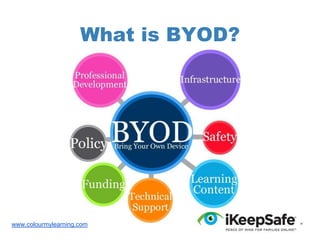
What is BYOD?

www.colourmylearning.com
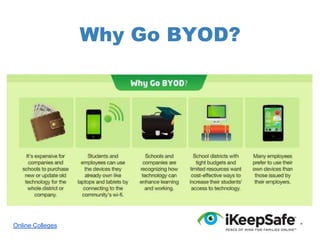
Why Go BYOD?

Online Colleges
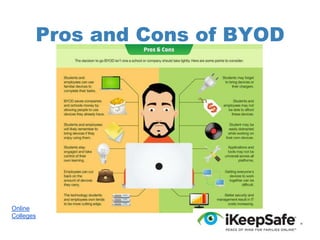
Pros and Cons of BYOD

Online
Colleges
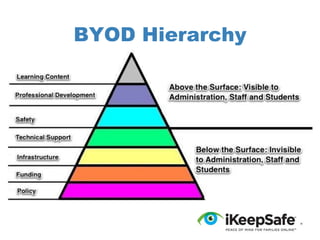
BYOD Hierarchy
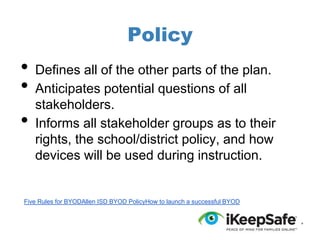
Policy

•
•
•

Defines all of the other parts of the plan.
Anticipates potential questions of all
stakeholders.
Informs all stakeholder groups as to their
rights, the school/district policy, and how
devices will be used during instruction.

Five Rules for BYODAllen ISD BYOD PolicyHow to launch a successful BYOD
•
•

•

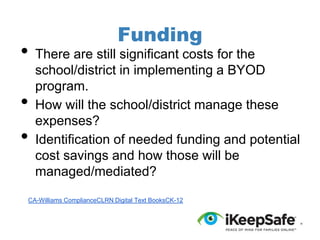
Funding
There are still significant costs for the
school/district in implementing a BYOD
program.
How will the school/district manage these
expenses?
Identification of needed funding and potential
cost savings and how those will be
managed/mediated?

CA-Williams ComplianceCLRN Digital Text BooksCK-12
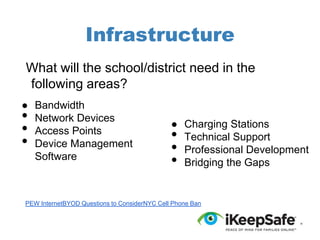
Infrastructure
What will the school/district need in the
following areas?
● Bandwidth
Network Devices
Access Points
Device Management
Software

•
•
•

● Charging Stations
Technical Support
Professional Development
Bridging the Gaps

•
•
•

PEW InternetBYOD Questions to ConsiderNYC Cell Phone Ban
Technical Support

•
•

•
•

What is the current state of tech support at
your school/district?
What support will the school/district provide
for personal devices?
Will you require all devices to have AntiVirus applications on them?
Who will handle connection issues on
school/district network?
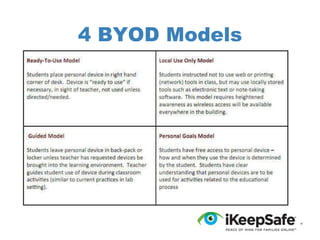
4 BYOD Models
Safety

•
•
•
•

CIPA, COPPA, FERPA Compliance
School / District Acceptable Use Policy
School / District Behavior Policy
On[the]Line - 21st Century Schools Initiative

On[the]Line Web PageCOPPA FAQ's - FTC
Professional Development

•
•

•
•

What is the current state of Professional
Development in your school/district?
Which norms can your school/district
support?
How will Professional Development be
delivered to staff?
What is the role of Administration in BYOD?
Learning Content

•
•
•

•
•

How will you deliver content?
How will teaching and learning change?
Which tools will you use to have students
create and deliver learning projects to you?
Will my choices "disenfranchise" any
students in my class?
How will you support "deviceless" students?
Pedagogical Models
Blended Learning:
Teachers can modify current course
materials.
Students have access to learning materials
in a variety of different settings.
Can tend to slip into "drill and kill" approach
of digital education.

•
•
•

Knewton - Blended Learning
Pedagogical Models

•
•
•

Flipped Learning:
Greater access to learning materials and to
teacher during the instructional day.
Provides access to learning materials at
home and accessible to others.
(Parents/Tutors)
Allows for a variety of assessment activities.
Labs, video, projects, etc.

Cycles of LearningAaron Sams VideoFlipped Teaching 1Knewton
Pedagogical Models
Project Based Learning:
Allows students to demonstrate mastery of
the content standards other than a test.
Learning is self-directed
Requires teachers to devise
monitoring, assessment and feedback
guidelines.
Edutopia PBL PagePBL ChecklistBuck Institute for Education
Allows students to produce for an audience.

•
•
•

•
Pedagogical Models
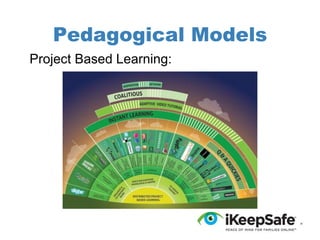
Project Based Learning:
What If You Did This...
After discussing the variety of communication
tools that you can use with your class or staff,
select one from the group and develop a
strategy of how you could implement it with
and list the process you would use to
implement this strategy.
Think About...
Take a look at the four pedagogical models
we discussed with BYOD. Which one would
you use with your classes?
Take into account the following:
School / District Policy
School / District Infrastructure
Student devices
Your personal level of expertise / support for
student learning.

•
•
•
•
For More Information
Please visit iKeepSafe at:
www.iKeepSafe.org
For the full white paper:
www.iKeepSafe.org/BYOD
BEaPro:
http://www.ikeepsafe.org/be-a-pro/info/
Generation Safe:
http://generationsafe.ikeepsafe.org/

*

Fall CUE Presentation: Building a Successful BYOD Program

  • 1.
    BUILDING A SUCCESSFULBYOD PROGRAM: A NEW PARADIGM FOR THE EDUCATION COMMUNITY http://bit.ly/fallcuebyod *
  • 2.
    Panel Introductions •Linnette Attai –ComplianceAdvisor, iKeepSafe –President and Founder, PlayWell, LLC •Kyle Brumbaugh –Educational Technology Coordinator –Member, CUE Board of Directors •Elizabeth Calhoon –Project Coordinator, Manager of Instructional Technology & Online Learning –Google Certified Teacher *
  • 3.
    About iKeepSafe •Dedicated topromoting health and safety of youth online –Curriculum materials to teach Internet safety, ethics and healthy use of technology –Generation Safe suite of professional development, self assessment and incident response tools for school staffs •http://www.ikeepsafe.org/educators/ –BEaPRO series to help parents teach their children to become safe, ethical, responsible digital citizens *
  • 4.
    Developing the BYOD Materials •Growingawareness of challenges facing schools around implementation of BYOD programs –Privacy, safety, security, access, device management, professional development, infrastructure, learning content, policies, funding, technical support •iKeepSafe invited a variety of stakeholders and thought leaders to gather for a roundtable discussion to outline concerns *
  • 5.
    BYOD Roundtable •Linnette Attai,President and Founder, PlayWell, LLC • Julie Baker, Marketing Content Manager, Kaspersky Lab • Kyle Brumbaugh, Member of the Board of Directors, Computer Using Educators (CUE) • Elizabeth Calhoon, Academic Technology Specialist • Jeff Gaffney, Director of Sales-SLED, Kaspersky Lab • Camilla Gagliolo, Program Director, ISTE • Frank Gallagher, Executive Director, Cable in the Classroom • Nancy Gifford, Counsel, Wiggen & Dana LLP • Marsali Hancock, President and CEO, iKeepSafe • Mary Heston, Social Media Director, Wired Mom • Charles Leitch, Founding Principal, Patterson Buchanan Fobes & Leitch LLP • Amber Lindsay, Director of Program Development and Outreach, iKeepSafe • Sally Linford, Director of Communications, iKeepSafe • Ethan Parry, Director of Public Relations, iKeepSafe • Tim Sullivan, Publisher, Parent Teacher Organization • Glen Warren, VP of Government Relations, California School Library Association (CSLA) *
  • 6.
    BYOD Roundtable Goals •Explorebuilding a successful BYOD program – Consider all stakeholder challenges •Examine benefits and complexities of implementing a BYOD culture in schools •Special attention paid to issues around civil liberties, access, FERPA, CIPA and updated COPPA amendments *
  • 7.
    BYOD Roundtable Goals •Intendedoutcomes: –Develop a launch pad for administrators, policy makers, and educators to prepare students, faculty, staff and parents to thrive in this new educational environment –Assist schools with integrating a wide range of devices while minimizing risk *
  • 8.
    BUILDING A SUCCESSFULBYOD PROGRAM: A NEW PARADIGM FOR THE EDUCATION COMMUNITY •Multi-faceted, matrix approach to BYOD program development •Partnership and reliability between all levels •Laying the groundwork prior to identifying platforms and devices *
  • 9.
    BUILDING A SUCCESSFULBYOD PROGRAM: A NEW PARADIGM FOR THE EDUCATION COMMUNITY •Stakeholders: –Superintendents: •Articulate the vision •Transition plan •Partner with administrators and credentialed staff •Consider COPPA, FERPA and CIPA requirements, as well as liability and civil liberties issues *
  • 10.
    BUILDING A SUCCESSFULBYOD PROGRAM: A NEW PARADIGM FOR THE EDUCATION COMMUNITY •Stakeholders: –Administrators: •Develop policies and practices •Partner with credentialed staff •Set the standards •Consider social media strategy, issues of access and crisis communications plan *
  • 11.
    BUILDING A SUCCESSFULBYOD PROGRAM: A NEW PARADIGM FOR THE EDUCATION COMMUNITY •Stakeholders: –IT Department: •Advise on existing network capabilities •Ensure cyber security protocols and practices are in place and adequate to meet the needs •Identify requirements for expansion •Train on data security protocols *
  • 12.
    BUILDING A SUCCESSFULBYOD PROGRAM: A NEW PARADIGM FOR THE EDUCATION COMMUNITY •Stakeholders: –Teachers: •Full visibility on administrator policies and expectations •Training on devices and new classroom management techniques •Support students who don’t own devices •Review requirements around regulations *
  • 13.
    BUILDING A SUCCESSFULBYOD PROGRAM: A NEW PARADIGM FOR THE EDUCATION COMMUNITY •Stakeholders: –Parents: •Communication around program development •Explain device privacy and security expectations •Provide policies on digital offenses •Consider providing digital literacy training *
  • 14.
    BUILDING A SUCCESSFULBYOD PROGRAM: A NEW PARADIGM FOR THE EDUCATION COMMUNITY •Stakeholders: –Students: •Develop teachings around digital citizenship •Define expectations around privacy and behavior: •Screen-time management, ethics, privacy, reputation, relationships, security •Build in accountability *
  • 15.
    BUILDING A SUCCESSFULBYOD PROGRAM: A NEW PARADIGM FOR THE EDUCATION COMMUNITY •Stakeholders: –Law Enforcement: •Communicate school media usage and policies •Provide updates with changes on practices •Consult on local issues or trends related to cyber incidents *
  • 16.
    BYOD: Models and Implementation Strategies Howteaching and learning changes when everyone is connected Kyle Brumbaugh
  • 17.
  • 18.
  • 19.
    Pros and Consof BYOD Online Colleges
  • 20.
  • 21.
    Policy • • • Defines all ofthe other parts of the plan. Anticipates potential questions of all stakeholders. Informs all stakeholder groups as to their rights, the school/district policy, and how devices will be used during instruction. Five Rules for BYODAllen ISD BYOD PolicyHow to launch a successful BYOD
  • 22.
    • • • Funding There are stillsignificant costs for the school/district in implementing a BYOD program. How will the school/district manage these expenses? Identification of needed funding and potential cost savings and how those will be managed/mediated? CA-Williams ComplianceCLRN Digital Text BooksCK-12
  • 23.
    Infrastructure What will theschool/district need in the following areas? ● Bandwidth Network Devices Access Points Device Management Software • • • ● Charging Stations Technical Support Professional Development Bridging the Gaps • • • PEW InternetBYOD Questions to ConsiderNYC Cell Phone Ban
  • 24.
    Technical Support • • • • What isthe current state of tech support at your school/district? What support will the school/district provide for personal devices? Will you require all devices to have AntiVirus applications on them? Who will handle connection issues on school/district network?
  • 25.
  • 26.
    Safety • • • • CIPA, COPPA, FERPACompliance School / District Acceptable Use Policy School / District Behavior Policy On[the]Line - 21st Century Schools Initiative On[the]Line Web PageCOPPA FAQ's - FTC
  • 27.
    Professional Development • • • • What isthe current state of Professional Development in your school/district? Which norms can your school/district support? How will Professional Development be delivered to staff? What is the role of Administration in BYOD?
  • 28.
    Learning Content • • • • • How willyou deliver content? How will teaching and learning change? Which tools will you use to have students create and deliver learning projects to you? Will my choices "disenfranchise" any students in my class? How will you support "deviceless" students?
  • 29.
    Pedagogical Models Blended Learning: Teacherscan modify current course materials. Students have access to learning materials in a variety of different settings. Can tend to slip into "drill and kill" approach of digital education. • • • Knewton - Blended Learning
  • 30.
    Pedagogical Models • • • Flipped Learning: Greateraccess to learning materials and to teacher during the instructional day. Provides access to learning materials at home and accessible to others. (Parents/Tutors) Allows for a variety of assessment activities. Labs, video, projects, etc. Cycles of LearningAaron Sams VideoFlipped Teaching 1Knewton
  • 31.
    Pedagogical Models Project BasedLearning: Allows students to demonstrate mastery of the content standards other than a test. Learning is self-directed Requires teachers to devise monitoring, assessment and feedback guidelines. Edutopia PBL PagePBL ChecklistBuck Institute for Education Allows students to produce for an audience. • • • •
  • 32.
  • 33.
    What If YouDid This... After discussing the variety of communication tools that you can use with your class or staff, select one from the group and develop a strategy of how you could implement it with and list the process you would use to implement this strategy.
  • 34.
    Think About... Take alook at the four pedagogical models we discussed with BYOD. Which one would you use with your classes? Take into account the following: School / District Policy School / District Infrastructure Student devices Your personal level of expertise / support for student learning. • • • •
  • 35.
    For More Information Pleasevisit iKeepSafe at: www.iKeepSafe.org For the full white paper: www.iKeepSafe.org/BYOD BEaPro: http://www.ikeepsafe.org/be-a-pro/info/ Generation Safe: http://generationsafe.ikeepsafe.org/ *