











CUBRIDDeveloper's CourseAuthor: Bomyung OhTeam / Department: DBMS Development LabAuthor(2): Kyungsik SeoTeam / Department: DBMS Development Lab
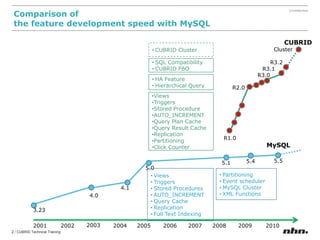
Comparison of the featuredevelopment speed with MySQLCUBRIDCUBRID ClusterClusterR3.2SQL Compatibility
CUBRID FBOR3.1R3.0HA Feature
Hierarchical QueryR2.0Views
Triggers
Stored Procedure
AUTO_INCREMENT
Query Plan Cache
Query Result Cache
Replication
Partitioning
Click CounterR1.0MySQL5.55.45.15.0Views
Triggers
Stored Procedures
AUTO_INCREMENT
Query Cache
Replication
Full Text Indexing
Partitioning
Event scheduler
MySQL Cluster
XML Functions4.14.03.232003200120022004200520062007200820092010
Who are using CUBRID Over 100,000 Downloads
Introduction to CUBRIDOverview and Architecture of CUBRIDUsing CUBRIDIntroduction to CUBRID HA
1.1 Overview and Architecture of CUBRID
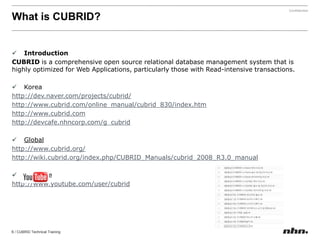
What is CUBRID?IntroductionCUBRIDis a comprehensive open source relational database management system that is highly optimized for Web Applications, particularly those with Read-intensive transactions. Koreahttp://dev.naver.com/projects/cubrid/http://www.cubrid.com/online_manual/cubrid_830/index.htmhttp://www.cubrid.comhttp://devcafe.nhncorp.com/g_cubridGlobalhttp://www.cubrid.org/http://wiki.cubrid.org/index.php/CUBRID_Manuals/cubrid_2008_R3.0_manualYou Tubehttp://www.youtube.com/user/cubrid
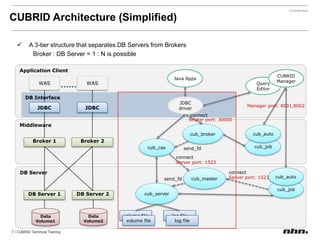
CUBRIDArchitecture (Simplified)A 3-tier structure that separates DB Servers from BrokersBroker : DB Server = 1 : N is possibleApplication ClientJava AppsCUBRID ManagerWASWASQuery EditorDB InterfaceJDBC driverManager port: 8001,8002JDBCJDBCconnectBroker port: 30000Middlewarecub_brokercub_autoBroker1Broker2cub_jobcub_cassend_fdconnectServer port: 1523DBServercub_mastercub_autoconnectServer port: 1523send_fdcub_jobcub_serverDB Server2DB Server1DataVolume2DataVolume1volume filelog filevolume filelog file
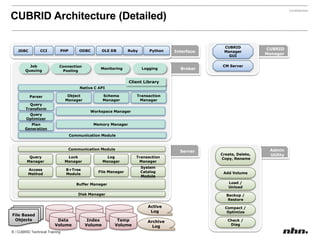
CUBRIDArchitecture (Detailed)CUBRIDManagerGUICUBRIDManagerInterfaceODBCCCIPHPOLE DBPythonRubyJDBCCM ServerBrokerJobQueuingMonitoringConnectionPoolingLoggingClient LibraryNative C APIParserObjectManagerSchemaManagerTransactionManagerQueryTransformWorkspace ManagerQueryOptimizerMemory ManagerPlanGenerationCommunication ModuleServerAdminUtilityCommunication ModuleCreate, Delete, Copy, RenameTransactionManagerLogManagerLockManagerQueryManagerAccessMethodB+TreeModuleFile ManagerSystemCatalog ModuleAdd VolumeBuffer ManagerLoad /UnloadDisk ManagerBackup /RestoreActiveLogCompact /OptimizeFile BasedObjectsDataVolumeIndexVolumeTempVolumeCheck /DiagArchiveLog
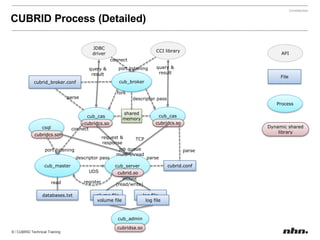
CUBRIDProcess (Detailed)JDBC driverCCI libraryAPIconnectquery &resultport listeningquery &resultFilecub_brokercubrid_broker.confforkparsedescriptor passProcesscub_cascub_casshared memorycsqlcubridcs.socubridcs.soDynamic shared libraryconnectcubridcs.sorequest &responseTCPjob queuemulti-threadport listeningparsedescriptor passparsecub_mastercub_servercubrid.confUDScubrid.somount(read/write)registerreadvolume filelog filedatabases.txtvolume filelog filecub_admincubridsa.so
1.2 Using CUBRID
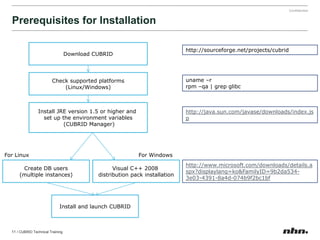
Prerequisites for InstallationDownload CUBRIDhttp://sourceforge.net/projects/cubridCheck supported platforms(Linux/Windows)uname –r rpm –qa | grepglibcInstall JRE version 1.5 or higher and set up the environment variables(CUBRID Manager)http://java.sun.com/javase/downloads/index.jspFor LinuxFor WindowsVisual C++ 2008 distribution pack installationCreate DB users(multiple instances)http://www.microsoft.com/downloads/details.aspx?displaylang=ko&FamilyID=9b2da534-3e03-4391-8a4d-074b9f2bc1bfInstall and launch CUBRID
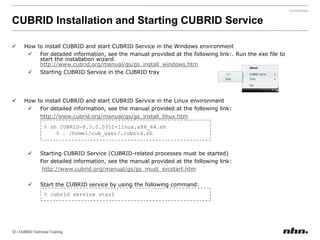
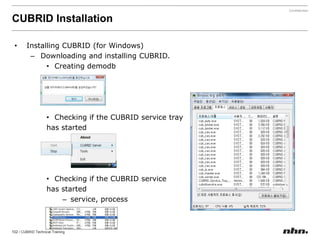
CUBRIDInstallation and Starting CUBRID ServiceHow to install CUBRID and start CUBRID Service in the Windows environment
For detailed information, see the manual provided at the following link:. Run the exe file to start the installation wizard.http://www.cubrid.org/manual/gs/gs_install_windows.htm
Starting CUBRID Service in the CUBRIDtray
How to install CUBRID and start CUBRID Service in the Linux environment
For detailed information, see the manual provided at the following link: http://www.cubrid.org/manual/gs/gs_install_linux.htmStarting CUBRID Service (CUBRID-related processes must be started)For detailed information, see the manual provided at the following link:http://www.cubrid.org/manual/gs/gs_must_svcstart.htmStart the CUBRID service by using the following command:% sh CUBRID-8.3.0.0312-linux.x86_64.sh% . /home1/cub_user/.cubrid.sh% cubrid service start
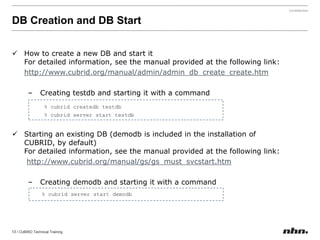
DB Creation and DB StartHow to create a new DB and start itFor detailed information, see the manual provided at the following link:http://www.cubrid.org/manual/admin/admin_db_create_create.htmCreating testdb and starting it with a command
Starting an existing DB(demodb is included in the installation of CUBRID, by default)For detailed information, see the manual provided at the following link:http://www.cubrid.org/manual/gs/gs_must_svcstart.htmCreating demodb and starting it with a command% cubridcreatedbtestdb	% cubrid server start testdb   % cubrid server start demodb
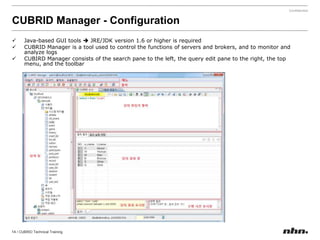
CUBRID Manager - ConfigurationJava-based GUI tools JRE/JDKversion 1.6 or higher is required
CUBRID Manager is a tool used to control the functions of servers and brokers, andto monitor and analyze logs
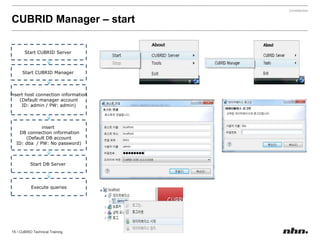
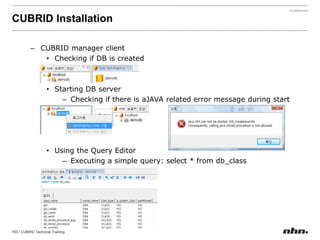
CUBIRD Manager consists of the search pane to the left, the query edit pane to the right, the top menu, and the toolbarCUBRID Manager – startStart CUBRID Server Start CUBRID Manager inserthost connection information(Default manager accountID: admin / PW: admin)insert DB connection information(Default DB accountID: dba  / PW: No password)Start DB ServerExecute queries
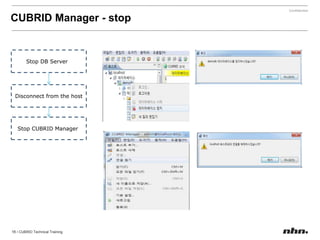
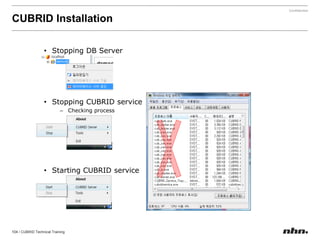
CUBRID Manager - stopStop DB ServerDisconnect from the hostStop CUBRID Manager
1.3 Introduction to CUBRID HA
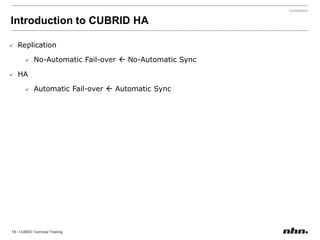
Introduction to CUBRID HA Replication
No-Automatic Fail-over  No-Automatic Sync
HA
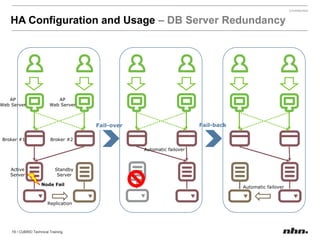
Automatic Fail-over  Automatic SyncHA Configuration and Usage– DB Server RedundancyAPWeb ServerAPWeb ServerFail-backFail-overBroker #2Broker #1Automatic failoverActiveServerStandbyServerNode FailAutomatic failoverReplication
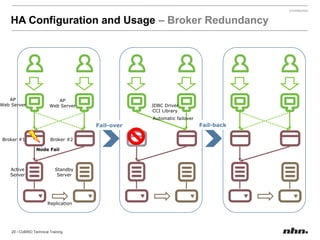
HA Configuration and Usage– Broker RedundancyAPWeb ServerAPWeb ServerJDBC DriverCCI LibraryAutomatic failoverFail-backFail-overBroker #2Broker #1Node FailActiveServerStandbyServerReplication
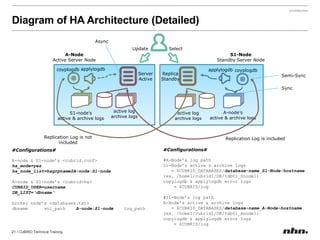
Diagram of HA Architecture (Detailed)AsyncUpdateSelectA-NodeActive Server NodeS1-NodeStandby Server NodeapplylogdbcoyplogdbapplylogdbcoyplogdbServerActiveReplicaStandbySemi-SyncSyncactive logarchive logsA-node’sactive & archive logsS1-node’sactive & archive logsactive logarchive logsReplication Log is not includedReplication Log is included#Configurations##A-Node’s log pathS1-Node’s active & archive logs    = $CUBRID_DATABASES/database-name_S1-Node-hostname(ex. /home1/cubrid1/DB/tdb01_Snode1)copylogdb & applylogdberror logs     = $CUBRID/log#S1-Node’s log pathA-Node’s active & archive logs    = $CUBRID_DATABASES/database-name_A-Node-hostname(ex. /home1/cubrid1/DB/tdb01_Anode1)copylogdb & applylogdberror logs     = $CUBRID/log#Configurations#A-node & S1-node’s <cubrid.conf>ha_mode=yesha_node_list=hagrpname@A-node:S1-nodeA-node & S1-node’s <cubrid-ha>CUBRID_USER=usernameDB_LIST=‘dbname‘broker node’s <databases.txt>dbnamevol_pathA-node:S1-nodelog_path
2. CUBRIDArchitectureCUBRIDVolume StructureCUBRIDParametersBroker ParametersError Log FileSystem Catalog
2.1 CUBRIDVolume Structure
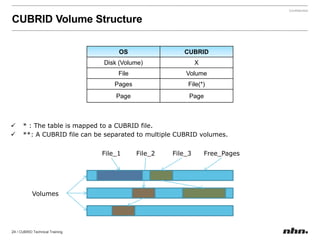
CUBRIDVolume Structure* : The table is mapped to aCUBRID file.
**: A CUBRID file can be separated to multiple CUBRID volumes.File_1File_2File_3Free_PagesVolumes
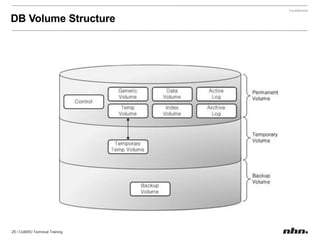
DB Volume Structure
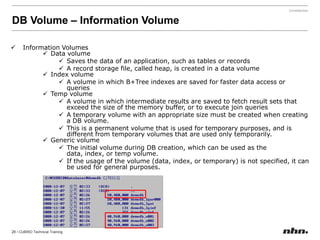
DBVolume – InformationVolumeInformation Volumes
Data volume
Saves the data of an application, such as tables or records
A record storage file, called heap, is created in a data volume
Index volume
A volume in which B+Tree indexes are saved for faster data access or queries
Temp volume
A volume in which intermediate results are saved to fetch result sets that exceed the size of the memory buffer, or to execute join queries
A temporary volume with an appropriate size must be created when creating a DB volume.
This is a permanent volume that is used for temporary purposes, and is different from temporary volumes that are used only temporarily.
Generic volume
The initial volume during DB creation, which can be used as the data, index, or temp volume.
If the usage of the volume (data, index, or temporary) is not specified, it can be used for general purposes.DB Volume – Log VolumeLog Volumes
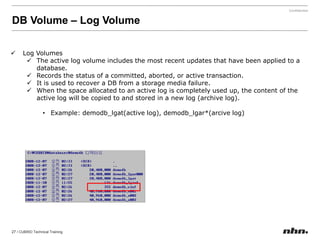
The active log volume includes the most recent updates that have been applied to a database.
Records the status of a committed, aborted, or active transaction.
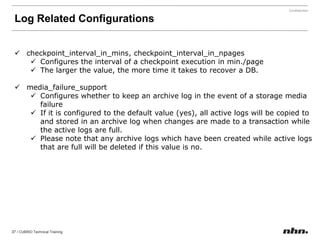
It is used to recover a DB from a storage media failure.
When the space allocated to an active log is completely used up, the content of the active log will be copied to and stored in a new log (archive log).
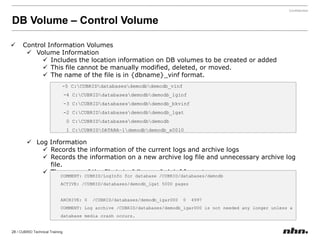
Example: demodb_lgat(active log), demodb_lgar*(arcive log)DB Volume – Control VolumeControl Information Volumes
Volume Information
Includes the location information on DB volumes to be created or added
This file cannot be manually modified, deleted, or moved.
The name of the file is in {dbname}_vinf format.
Log Information
Records the information of the current logs and archive logs
Records the information on a new archive log file and unnecessary archive log file.
The name of the file is in {dbname}_lginf format-5 C:\CUBRID\databases\demodb\demodb_vinf-4 C:\CUBRID\databases\demodb\demodb_lginf-3 C:\CUBRID\databases\demodb\demodb_bkvinf-2 C:\CUBRID\databases\demodb\demodb_lgat0 C:\CUBRID\databases\demodb\demodb1 C:\CUBRID\DATABA~1\demodb\demodb_x0010COMMENT: CUBRID/LogInfo for database /CUBRID/databases/demodbACTIVE: /CUBRID/databases/demodb_lgat 5000 pagesARCHIVE: 0  /CUBRID/databases/demodb_lgar000  0  4997COMMENT: Log archive /CUBRID/databases/demodb_lgar000 is not needed any longer unless a database media crash occurs.
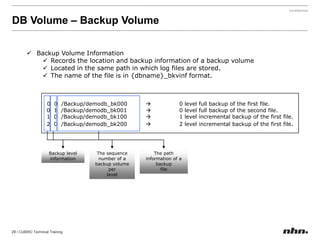
DB Volume – Backup VolumeBackup Volume Information
Records the location and backup information of a backup volume
Located in the same path in which log files are stored.
The name of the file is in {dbname}_bkvinf format.0  0  /Backup/demodb_bk000 	0 level full backup of the first file. 0  1  /Backup/demodb_bk001 	0 level full backup of the second file. 1  0  /Backup/demodb_bk100 	1 level incremental backup of the first file. 2  0  /Backup/demodb_bk200 	2 level incremental backup of the first file.The path information of a backupfileBackup levelinformationThe sequence number of a backup volume per level
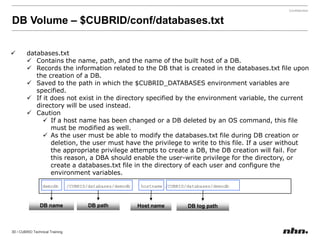
DB Volume – $CUBRID/conf/databases.txtdatabases.txt
Contains the name, path, and the name of the built host of a DB.
Records the information related to the DB that is created in the databases.txt file upon the creation of a DB.
Saved to the path in which the $CUBRID_DATABASES environment variables are specified.
If it does not exist in the directory specified by the environment variable, the current directory will be used instead.
Caution
If a host name has been changed or a DB deleted by an OS command, this file must be modified as well.
As the user must be able to modify the databases.txt file during DB creation or deletion, the user must have the privilege to write to this file. If a user without the appropriate privilege attempts to create a DB, the DB creation will fail. For this reason, a DBA should enable the user-write privilege for the directory, or create a databases.txt file in the directory of each user and configure the environment variables.demodb   /CUBRID/databases/demodb  hostname /CUBRID/databases/demodbDB nameDB pathHost nameDB log path
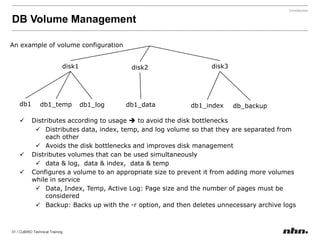
DB Volume ManagementAn example of volume configurationdisk1disk3disk2db1db1_tempdb1_logdb1_datadb1_indexdb_backupDistributes according to usage to avoid the disk bottlenecks
Distributes data, index, temp, and log volume so that they are separated from each other
Avoids the disk bottlenecks and improves disk management
Distributes volumes that can be used simultaneously
data & log,  data & index,  data & temp
Configures a volume to an appropriate size to prevent it from adding more volumes while in service
Data, Index, Temp, Active Log: Page size and the number of pages must be considered
Backup: Backs up with the -r option, and then deletes unnecessary archive logs2.2 CUBRID Parameters$CUBRID/conf/cubrid.conf
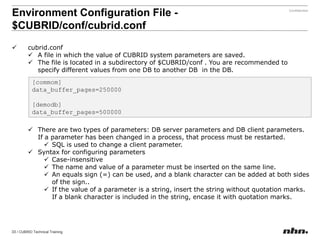
Environment Configuration File - $CUBRID/conf/cubrid.confcubrid.conf
A file in which the value of CUBRIDsystem parameters are saved.
The file is located in a subdirectory of $CUBRID/conf . You are recommended to specify different values from one DB to another DB  in the DB.
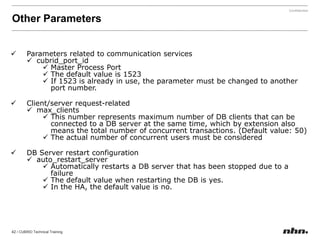
There are two types of parameters: DB server parameters and DB client parameters. If a parameter has been changed in a process, that process must be restarted.
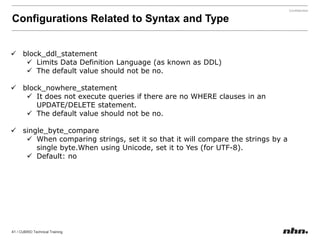
SQL is used to change a client parameter.
Syntax for configuring parameters
Case-insensitive
The name and value of a parameter must be inserted on the same line.
An equals sign (=) can be used, and a blank character can be added at both sides of the sign..
If the value of a parameter is a string, insertthe string without quotation marks. If a blank character is included in the string, encase it with quotation marks. [commom]data_buffer_pages=250000[demodb]data_buffer_pages=500000
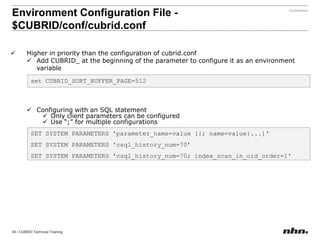
Higher in priority than the configuration of cubrid.conf
Add CUBRID_ at the beginning of the parameter to configure it as an environment variable
Configuring with an SQL statement
Only client parameters can be configured
Use “;” for multiple configurationsEnvironment Configuration File- $CUBRID/conf/cubrid.confset CUBRID_SORT_BUFFER_PAGE=512SET SYSTEM PARAMETERS 'parameter_name=value [{; name=value}...]‘SET SYSTEM PARAMETERS 'csql_history_num=70’SET SYSTEM PARAMETERS 'csql_history_num=70; index_scan_in_oid_order=1'
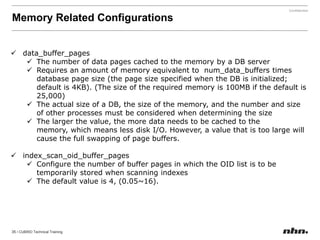
Memory Related Configurationsdata_buffer_pages
The number of data pages cached to the memory by a DB server
Requires an amount of memory equivalent to  num_data_buffers times database page size (the page size specified when the DB is initialized; default is 4KB). (The size of the required memory is 100MB if the default is 25,000)
The actual size of a DB, the size of the memory, and the number and size of other processes must be considered when determining the size
The larger the value, the more data needs to be cached to the memory, which means less disk I/O. However, a value that is too large will cause the full swapping of page buffers.

CUBRID Developer's Course

  • 1.
    CUBRIDDeveloper's CourseAuthor: BomyungOhTeam / Department: DBMS Development LabAuthor(2): Kyungsik SeoTeam / Department: DBMS Development Lab
  • 2.
    Comparison of thefeaturedevelopment speed with MySQLCUBRIDCUBRID ClusterClusterR3.2SQL Compatibility
  • 3.
  • 4.
  • 5.
  • 6.
  • 7.
  • 8.
  • 9.
  • 10.
  • 11.
  • 12.
  • 13.
  • 14.
  • 15.
  • 16.
  • 17.
  • 18.
  • 19.
  • 20.
  • 21.
  • 22.
  • 23.
    Who are usingCUBRID Over 100,000 Downloads
  • 24.
    Introduction to CUBRIDOverviewand Architecture of CUBRIDUsing CUBRIDIntroduction to CUBRID HA
  • 25.
    1.1 Overview andArchitecture of CUBRID
  • 26.
    What is CUBRID?IntroductionCUBRIDisa comprehensive open source relational database management system that is highly optimized for Web Applications, particularly those with Read-intensive transactions. Koreahttp://dev.naver.com/projects/cubrid/http://www.cubrid.com/online_manual/cubrid_830/index.htmhttp://www.cubrid.comhttp://devcafe.nhncorp.com/g_cubridGlobalhttp://www.cubrid.org/http://wiki.cubrid.org/index.php/CUBRID_Manuals/cubrid_2008_R3.0_manualYou Tubehttp://www.youtube.com/user/cubrid
  • 27.
    CUBRIDArchitecture (Simplified)A 3-tierstructure that separates DB Servers from BrokersBroker : DB Server = 1 : N is possibleApplication ClientJava AppsCUBRID ManagerWASWASQuery EditorDB InterfaceJDBC driverManager port: 8001,8002JDBCJDBCconnectBroker port: 30000Middlewarecub_brokercub_autoBroker1Broker2cub_jobcub_cassend_fdconnectServer port: 1523DBServercub_mastercub_autoconnectServer port: 1523send_fdcub_jobcub_serverDB Server2DB Server1DataVolume2DataVolume1volume filelog filevolume filelog file
  • 28.
    CUBRIDArchitecture (Detailed)CUBRIDManagerGUICUBRIDManagerInterfaceODBCCCIPHPOLE DBPythonRubyJDBCCMServerBrokerJobQueuingMonitoringConnectionPoolingLoggingClient LibraryNative C APIParserObjectManagerSchemaManagerTransactionManagerQueryTransformWorkspace ManagerQueryOptimizerMemory ManagerPlanGenerationCommunication ModuleServerAdminUtilityCommunication ModuleCreate, Delete, Copy, RenameTransactionManagerLogManagerLockManagerQueryManagerAccessMethodB+TreeModuleFile ManagerSystemCatalog ModuleAdd VolumeBuffer ManagerLoad /UnloadDisk ManagerBackup /RestoreActiveLogCompact /OptimizeFile BasedObjectsDataVolumeIndexVolumeTempVolumeCheck /DiagArchiveLog
  • 29.
    CUBRIDProcess (Detailed)JDBC driverCCIlibraryAPIconnectquery &resultport listeningquery &resultFilecub_brokercubrid_broker.confforkparsedescriptor passProcesscub_cascub_casshared memorycsqlcubridcs.socubridcs.soDynamic shared libraryconnectcubridcs.sorequest &responseTCPjob queuemulti-threadport listeningparsedescriptor passparsecub_mastercub_servercubrid.confUDScubrid.somount(read/write)registerreadvolume filelog filedatabases.txtvolume filelog filecub_admincubridsa.so
  • 30.
  • 31.
    Prerequisites for InstallationDownloadCUBRIDhttp://sourceforge.net/projects/cubridCheck supported platforms(Linux/Windows)uname –r rpm –qa | grepglibcInstall JRE version 1.5 or higher and set up the environment variables(CUBRID Manager)http://java.sun.com/javase/downloads/index.jspFor LinuxFor WindowsVisual C++ 2008 distribution pack installationCreate DB users(multiple instances)http://www.microsoft.com/downloads/details.aspx?displaylang=ko&FamilyID=9b2da534-3e03-4391-8a4d-074b9f2bc1bfInstall and launch CUBRID
  • 32.
    CUBRIDInstallation and StartingCUBRID ServiceHow to install CUBRID and start CUBRID Service in the Windows environment
  • 33.
    For detailed information,see the manual provided at the following link:. Run the exe file to start the installation wizard.http://www.cubrid.org/manual/gs/gs_install_windows.htm
  • 34.
    Starting CUBRID Servicein the CUBRIDtray
  • 35.
    How to installCUBRID and start CUBRID Service in the Linux environment
  • 36.
    For detailed information,see the manual provided at the following link: http://www.cubrid.org/manual/gs/gs_install_linux.htmStarting CUBRID Service (CUBRID-related processes must be started)For detailed information, see the manual provided at the following link:http://www.cubrid.org/manual/gs/gs_must_svcstart.htmStart the CUBRID service by using the following command:% sh CUBRID-8.3.0.0312-linux.x86_64.sh% . /home1/cub_user/.cubrid.sh% cubrid service start
  • 37.
    DB Creation andDB StartHow to create a new DB and start itFor detailed information, see the manual provided at the following link:http://www.cubrid.org/manual/admin/admin_db_create_create.htmCreating testdb and starting it with a command
  • 38.
    Starting an existingDB(demodb is included in the installation of CUBRID, by default)For detailed information, see the manual provided at the following link:http://www.cubrid.org/manual/gs/gs_must_svcstart.htmCreating demodb and starting it with a command% cubridcreatedbtestdb % cubrid server start testdb % cubrid server start demodb
  • 39.
    CUBRID Manager -ConfigurationJava-based GUI tools JRE/JDKversion 1.6 or higher is required
  • 40.
    CUBRID Manager isa tool used to control the functions of servers and brokers, andto monitor and analyze logs
  • 41.
    CUBIRD Manager consistsof the search pane to the left, the query edit pane to the right, the top menu, and the toolbarCUBRID Manager – startStart CUBRID Server Start CUBRID Manager inserthost connection information(Default manager accountID: admin / PW: admin)insert DB connection information(Default DB accountID: dba / PW: No password)Start DB ServerExecute queries
  • 42.
    CUBRID Manager -stopStop DB ServerDisconnect from the hostStop CUBRID Manager
  • 43.
  • 44.
  • 45.
  • 46.
  • 47.
    Automatic Fail-over Automatic SyncHA Configuration and Usage– DB Server RedundancyAPWeb ServerAPWeb ServerFail-backFail-overBroker #2Broker #1Automatic failoverActiveServerStandbyServerNode FailAutomatic failoverReplication
  • 48.
    HA Configuration andUsage– Broker RedundancyAPWeb ServerAPWeb ServerJDBC DriverCCI LibraryAutomatic failoverFail-backFail-overBroker #2Broker #1Node FailActiveServerStandbyServerReplication
  • 49.
    Diagram of HAArchitecture (Detailed)AsyncUpdateSelectA-NodeActive Server NodeS1-NodeStandby Server NodeapplylogdbcoyplogdbapplylogdbcoyplogdbServerActiveReplicaStandbySemi-SyncSyncactive logarchive logsA-node’sactive & archive logsS1-node’sactive & archive logsactive logarchive logsReplication Log is not includedReplication Log is included#Configurations##A-Node’s log pathS1-Node’s active & archive logs = $CUBRID_DATABASES/database-name_S1-Node-hostname(ex. /home1/cubrid1/DB/tdb01_Snode1)copylogdb & applylogdberror logs = $CUBRID/log#S1-Node’s log pathA-Node’s active & archive logs = $CUBRID_DATABASES/database-name_A-Node-hostname(ex. /home1/cubrid1/DB/tdb01_Anode1)copylogdb & applylogdberror logs = $CUBRID/log#Configurations#A-node & S1-node’s <cubrid.conf>ha_mode=yesha_node_list=hagrpname@A-node:S1-nodeA-node & S1-node’s <cubrid-ha>CUBRID_USER=usernameDB_LIST=‘dbname‘broker node’s <databases.txt>dbnamevol_pathA-node:S1-nodelog_path
  • 50.
  • 51.
  • 52.
    CUBRIDVolume Structure* :The table is mapped to aCUBRID file.
  • 53.
    **: A CUBRIDfile can be separated to multiple CUBRID volumes.File_1File_2File_3Free_PagesVolumes
  • 54.
  • 55.
  • 56.
  • 57.
    Saves the dataof an application, such as tables or records
  • 58.
    A record storagefile, called heap, is created in a data volume
  • 59.
  • 60.
    A volume inwhich B+Tree indexes are saved for faster data access or queries
  • 61.
  • 62.
    A volume inwhich intermediate results are saved to fetch result sets that exceed the size of the memory buffer, or to execute join queries
  • 63.
    A temporary volumewith an appropriate size must be created when creating a DB volume.
  • 64.
    This is apermanent volume that is used for temporary purposes, and is different from temporary volumes that are used only temporarily.
  • 65.
  • 66.
    The initial volumeduring DB creation, which can be used as the data, index, or temp volume.
  • 67.
    If the usageof the volume (data, index, or temporary) is not specified, it can be used for general purposes.DB Volume – Log VolumeLog Volumes
  • 68.
    The active logvolume includes the most recent updates that have been applied to a database.
  • 69.
    Records the statusof a committed, aborted, or active transaction.
  • 70.
    It is usedto recover a DB from a storage media failure.
  • 71.
    When the spaceallocated to an active log is completely used up, the content of the active log will be copied to and stored in a new log (archive log).
  • 72.
    Example: demodb_lgat(active log),demodb_lgar*(arcive log)DB Volume – Control VolumeControl Information Volumes
  • 73.
  • 74.
    Includes the locationinformation on DB volumes to be created or added
  • 75.
    This file cannotbe manually modified, deleted, or moved.
  • 76.
    The name ofthe file is in {dbname}_vinf format.
  • 77.
  • 78.
    Records the informationof the current logs and archive logs
  • 79.
    Records the informationon a new archive log file and unnecessary archive log file.
  • 80.
    The name ofthe file is in {dbname}_lginf format-5 C:\CUBRID\databases\demodb\demodb_vinf-4 C:\CUBRID\databases\demodb\demodb_lginf-3 C:\CUBRID\databases\demodb\demodb_bkvinf-2 C:\CUBRID\databases\demodb\demodb_lgat0 C:\CUBRID\databases\demodb\demodb1 C:\CUBRID\DATABA~1\demodb\demodb_x0010COMMENT: CUBRID/LogInfo for database /CUBRID/databases/demodbACTIVE: /CUBRID/databases/demodb_lgat 5000 pagesARCHIVE: 0 /CUBRID/databases/demodb_lgar000 0 4997COMMENT: Log archive /CUBRID/databases/demodb_lgar000 is not needed any longer unless a database media crash occurs.
  • 81.
    DB Volume –Backup VolumeBackup Volume Information
  • 82.
    Records the locationand backup information of a backup volume
  • 83.
    Located in thesame path in which log files are stored.
  • 84.
    The name ofthe file is in {dbname}_bkvinf format.0 0 /Backup/demodb_bk000 0 level full backup of the first file. 0 1 /Backup/demodb_bk001 0 level full backup of the second file. 1 0 /Backup/demodb_bk100 1 level incremental backup of the first file. 2 0 /Backup/demodb_bk200 2 level incremental backup of the first file.The path information of a backupfileBackup levelinformationThe sequence number of a backup volume per level
  • 85.
    DB Volume –$CUBRID/conf/databases.txtdatabases.txt
  • 86.
    Contains the name,path, and the name of the built host of a DB.
  • 87.
    Records the informationrelated to the DB that is created in the databases.txt file upon the creation of a DB.
  • 88.
    Saved to thepath in which the $CUBRID_DATABASES environment variables are specified.
  • 89.
    If it doesnot exist in the directory specified by the environment variable, the current directory will be used instead.
  • 90.
  • 91.
    If a hostname has been changed or a DB deleted by an OS command, this file must be modified as well.
  • 92.
    As the usermust be able to modify the databases.txt file during DB creation or deletion, the user must have the privilege to write to this file. If a user without the appropriate privilege attempts to create a DB, the DB creation will fail. For this reason, a DBA should enable the user-write privilege for the directory, or create a databases.txt file in the directory of each user and configure the environment variables.demodb /CUBRID/databases/demodb hostname /CUBRID/databases/demodbDB nameDB pathHost nameDB log path
  • 93.
    DB Volume ManagementAnexample of volume configurationdisk1disk3disk2db1db1_tempdb1_logdb1_datadb1_indexdb_backupDistributes according to usage to avoid the disk bottlenecks
  • 94.
    Distributes data, index,temp, and log volume so that they are separated from each other
  • 95.
    Avoids the diskbottlenecks and improves disk management
  • 96.
    Distributes volumes thatcan be used simultaneously
  • 97.
    data & log, data & index, data & temp
  • 98.
    Configures a volumeto an appropriate size to prevent it from adding more volumes while in service
  • 99.
    Data, Index, Temp,Active Log: Page size and the number of pages must be considered
  • 100.
    Backup: Backs upwith the -r option, and then deletes unnecessary archive logs2.2 CUBRID Parameters$CUBRID/conf/cubrid.conf
  • 101.
    Environment Configuration File- $CUBRID/conf/cubrid.confcubrid.conf
  • 102.
    A file inwhich the value of CUBRIDsystem parameters are saved.
  • 103.
    The file islocated in a subdirectory of $CUBRID/conf . You are recommended to specify different values from one DB to another DB in the DB.
  • 104.
    There are twotypes of parameters: DB server parameters and DB client parameters. If a parameter has been changed in a process, that process must be restarted.
  • 105.
    SQL is usedto change a client parameter.
  • 106.
  • 107.
  • 108.
    The name andvalue of a parameter must be inserted on the same line.
  • 109.
    An equals sign(=) can be used, and a blank character can be added at both sides of the sign..
  • 110.
    If the valueof a parameter is a string, insertthe string without quotation marks. If a blank character is included in the string, encase it with quotation marks. [commom]data_buffer_pages=250000[demodb]data_buffer_pages=500000
  • 111.
    Higher in prioritythan the configuration of cubrid.conf
  • 112.
    Add CUBRID_ atthe beginning of the parameter to configure it as an environment variable
  • 113.
    Configuring with anSQL statement
  • 114.
    Only client parameterscan be configured
  • 115.
    Use “;” formultiple configurationsEnvironment Configuration File- $CUBRID/conf/cubrid.confset CUBRID_SORT_BUFFER_PAGE=512SET SYSTEM PARAMETERS 'parameter_name=value [{; name=value}...]‘SET SYSTEM PARAMETERS 'csql_history_num=70’SET SYSTEM PARAMETERS 'csql_history_num=70; index_scan_in_oid_order=1'
  • 116.
  • 117.
    The number ofdata pages cached to the memory by a DB server
  • 118.
    Requires an amountof memory equivalent to num_data_buffers times database page size (the page size specified when the DB is initialized; default is 4KB). (The size of the required memory is 100MB if the default is 25,000)
  • 119.
    The actual sizeof a DB, the size of the memory, and the number and size of other processes must be considered when determining the size
  • 120.
    The larger thevalue, the more data needs to be cached to the memory, which means less disk I/O. However, a value that is too large will cause the full swapping of page buffers.