Microsoft Visual C# 2010
       Fourth Edition


        Chapter 7
      Using Methods
Objectives
• Learn about methods and implementation hiding
• Write methods with no parameters and no return
  value
• Write methods that require a single argument
• Write methods that require multiple arguments
• Write a method that returns a value


Microsoft Visual C# 2010, Fourth Edition           2
Objectives (cont'd.)
• Pass an array to a method
• Learn some alternate ways to write a Main()
  method header
• Learn about issues using methods in GUI programs


Microsoft Visual C# 2010, Fourth Edition         3
Understanding Methods and
               Implementation Hiding
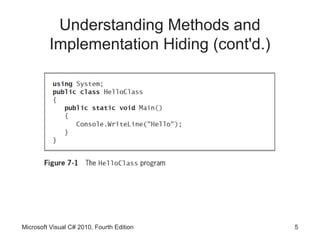
• Method
    – Encapsulated series of statements that perform a task
    – Using a method is called invoking or calling


Microsoft Visual C# 2010, Fourth Edition                 4
Understanding Methods and
         Implementation Hiding (cont'd.)


Microsoft Visual C# 2010, Fourth Edition   5
Understanding Implementation Hiding

• Implementation hiding
    – An important principle of object-oriented programming
    – Keeps the details of a method’s operations hidden
• Only concern is the way you interface or interact
  with the method
    – Program does not need to know how method works
• Multifile assembly
    – Program that uses methods and classes stored in
      other files


Microsoft Visual C# 2010, Fourth Edition                 6
Writing Methods with No Parameters
          and No Return Value
• Major reasons to create a method
    – Code will remain short and easy to follow
    – A method is easily reusable
• Code bloat
    – Unnecessarily long or repetitive statements
• A method must include:
    – Method declaration
          • Also called a method header or method definition
    – Opening curly brace
    – Method body
    – Closing curly brace
Microsoft Visual C# 2010, Fourth Edition                       7
Writing Methods with No Parameters
     and No Return Value (cont'd.)
• Method declaration
    – Defines the rules for using the method and contains:
          •   Optional declared accessibility
          •   Optional static modifier
          •   Return type for the method
          •   Method name, or identifier
          •   Opening parenthesis
          •   Optional list of method parameters
          •   Closing parenthesis


Microsoft Visual C# 2010, Fourth Edition                     8
Writing Methods with No Parameters
     and No Return Value (cont'd.)
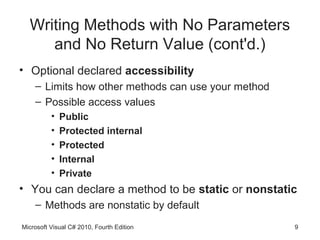
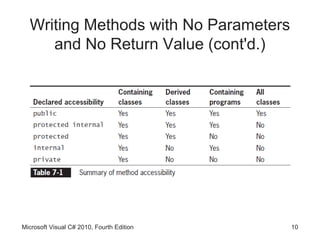
• Optional declared accessibility
    – Limits how other methods can use your method
    – Possible access values
          •   Public
          •   Protected internal
          •   Protected
          •   Internal
          •   Private
• You can declare a method to be static or nonstatic
    – Methods are nonstatic by default
Microsoft Visual C# 2010, Fourth Edition             9
Writing Methods with No Parameters
     and No Return Value (cont'd.)


Microsoft Visual C# 2010, Fourth Edition   10
Writing Methods with No Parameters
     and No Return Value (cont'd.)
• You can declare a method to be static or nonstatic
    – Methods are nonstatic by default
• static method
    – Can be called without referring to an object
          • Instead, you refer to the class
    – Cannot call nonstatic methods
          • Nonstatic methods can call static ones


Microsoft Visual C# 2010, Fourth Edition             11
Writing Methods with No Parameters
     and No Return Value (cont'd.)
• Every method has a return type
    – Indicates what kind of value the method will return to
      any other method that calls it
    – If a method does not return a value, its return type is
      void
• Method name must be a legal C# identifier
• Scope
    – Area in which a variable is known
• Parameter to a method
    – Variable that holds data passed to a method when it is
      called
Microsoft Visual C# 2010, Fourth Edition                    12
Writing Methods with No Parameters
     and No Return Value (cont'd.)


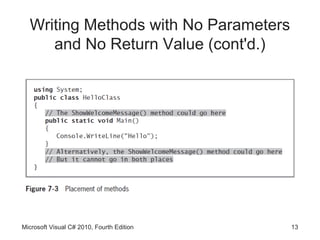
Microsoft Visual C# 2010, Fourth Edition   13
Writing Methods with No Parameters
     and No Return Value (cont'd.)


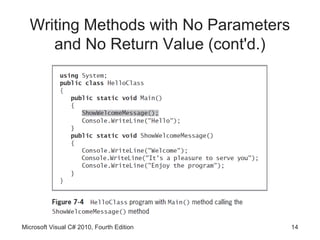
Microsoft Visual C# 2010, Fourth Edition   14
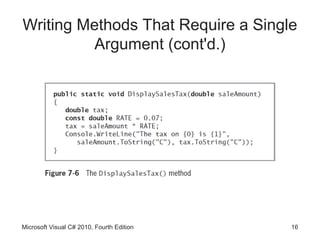
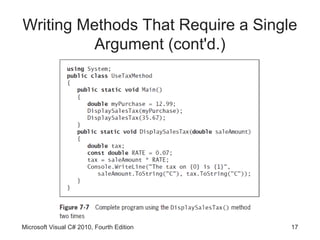
Writing Methods That Require a Single
             Argument
• You need:
    – Type of the parameter
    – A local identifier (name) for the parameter
• Local variable
    – Declared within a method
• Formal parameter
    – Parameter in a method header that accepts a value
• Actual parameters
    – Arguments within a method call


Microsoft Visual C# 2010, Fourth Edition                  15
Writing Methods That Require a Single
          Argument (cont'd.)


Microsoft Visual C# 2010, Fourth Edition   16
Writing Methods That Require a Single
          Argument (cont'd.)


Microsoft Visual C# 2010, Fourth Edition   17
Writing Methods That Require Multiple
             Arguments
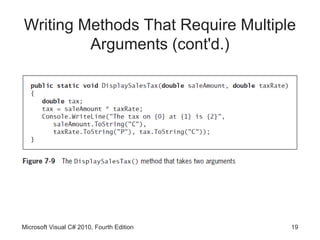
• Methods can take any number of parameters
• When you call the method, arguments must match
     – In both number and type


Microsoft Visual C# 2010, Fourth Edition       18
Writing Methods That Require Multiple
         Arguments (cont'd.)


Microsoft Visual C# 2010, Fourth Edition   19
Writing a Method That Returns a
                     Value
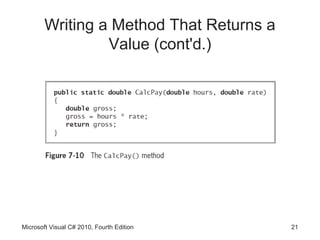
• A method can return, at most, one value to a method
  that calls it
• Method’s type
    – Method’s return type
• return statement
    – Causes a value to be sent back to the calling method
• You are not required to use a returned value


Microsoft Visual C# 2010, Fourth Edition                 20
Writing a Method That Returns a
                 Value (cont'd.)


Microsoft Visual C# 2010, Fourth Edition   21
Writing a Method That Returns a
                 Value (cont'd.)
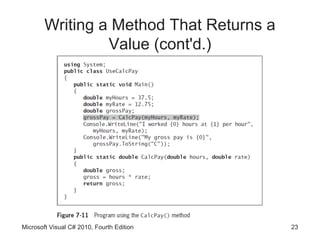
• A returned value can be:
     – Stored in a variable
     – Used directly
• Nested method calls
     – Method calls placed inside other method calls
• Writing a method that returns a Boolean value
     – When a method returns a value that is type bool
           • Method call can be used anywhere you can use a
             Boolean expression


Microsoft Visual C# 2010, Fourth Edition                      22
Writing a Method That Returns a
                 Value (cont'd.)


Microsoft Visual C# 2010, Fourth Edition   23
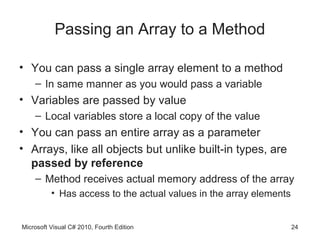
Passing an Array to a Method

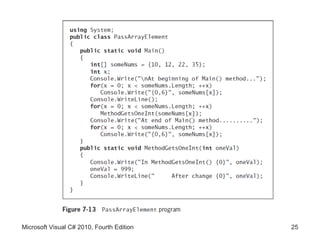
• You can pass a single array element to a method
    – In same manner as you would pass a variable
• Variables are passed by value
    – Local variables store a local copy of the value
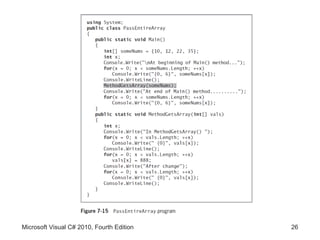
• You can pass an entire array as a parameter
• Arrays, like all objects but unlike built-in types, are
  passed by reference
    – Method receives actual memory address of the array
          • Has access to the actual values in the array elements


Microsoft Visual C# 2010, Fourth Edition                            24
Microsoft Visual C# 2010, Fourth Edition   25
Microsoft Visual C# 2010, Fourth Edition   26
Passing an Array to a Method (cont'd.)

• You can pass a multidimensional array to a method
    – By indicating the appropriate number of dimensions
      after the data type in the method header
    – Example
           public static void
        displayScores(int[,]scoresArray)
• Jagged arrays
    – Insert the appropriate number of square brackets after
      the data type in the method header
    – Example
             public static void displayIDs(int[][] idArray)

Microsoft Visual C# 2010, Fourth Edition                      27
Alternate Ways to Write a Main()
               Method Header
• Conventional way
        public static void Main()
• Passing command-line arguments
        public static void Main(string[] args)
• Some programmers prefer to write Main() method
  headers with a return type of int instead of void
    – Last statement in the Main() method must be a
      return statement


Microsoft Visual C# 2010, Fourth Edition              28
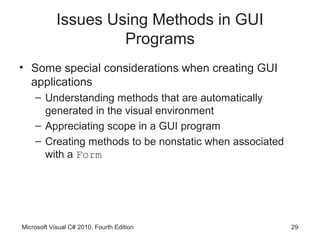
Issues Using Methods in GUI
                     Programs
• Some special considerations when creating GUI
  applications
    – Understanding methods that are automatically
      generated in the visual environment
    – Appreciating scope in a GUI program
    – Creating methods to be nonstatic when associated
      with a Form


Microsoft Visual C# 2010, Fourth Edition                 29
Understanding Methods that are
 Automatically Generated in the Visual
             Environment
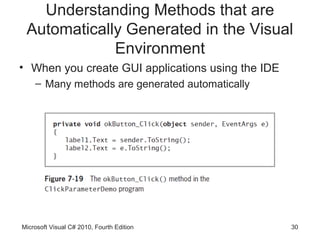
• When you create GUI applications using the IDE
    – Many methods are generated automatically


Microsoft Visual C# 2010, Fourth Edition           30
Appreciating Scope in a GUI Program
• When you declare a variable or constant within a
  method, it is local to that method
• If a variable or constant is needed by multiple
  event-handling methods
    – Variables or constants in question must be defined
      outside the methods (but within the Form class)
• Automatically generated event-handling methods
  have predefined sets of parameters


Microsoft Visual C# 2010, Fourth Edition                   31
Creating Methods to be Nonstatic
       when Associated with a Form
• When you create a GUI application and generate a
  method, the keyword static does not appear in the
  method header
    – Because the method is associated with an object from
      which the method-invoking events are sent


Microsoft Visual C# 2010, Fourth Edition                32
You Do It
• Activities to explore
    – Calling a Method
    – Writing a Method that Receives Parameters and
      Returns a Value


Microsoft Visual C# 2010, Fourth Edition              33
Summary
• Method is a series of statements that perform a
  task
• Some methods require passed-in information
  called arguments or parameters
• You write methods to make programs easier to
  understand and so that you can easily reuse them
• Object-oriented programs hide their methods’
  implementation
• You can pass multiple arguments to a method


Microsoft Visual C# 2010, Fourth Edition             34
Summary (cont'd.)
• The return type for a method can be any type used
  in the C# programming language
• You can pass an array as a parameter to a method
• You might see different Main() method headers in
  other books or in programs written by others
• Special considerations exist for methods when you
  create GUI applications


Microsoft Visual C# 2010, Fourth Edition          35

Csc153 chapter 07

  • 1.
    Microsoft Visual C#2010 Fourth Edition Chapter 7 Using Methods
  • 2.
    Objectives • Learn aboutmethods and implementation hiding • Write methods with no parameters and no return value • Write methods that require a single argument • Write methods that require multiple arguments • Write a method that returns a value Microsoft Visual C# 2010, Fourth Edition 2
  • 3.
    Objectives (cont'd.) • Passan array to a method • Learn some alternate ways to write a Main() method header • Learn about issues using methods in GUI programs Microsoft Visual C# 2010, Fourth Edition 3
  • 4.
    Understanding Methods and Implementation Hiding • Method – Encapsulated series of statements that perform a task – Using a method is called invoking or calling Microsoft Visual C# 2010, Fourth Edition 4
  • 5.
    Understanding Methods and Implementation Hiding (cont'd.) Microsoft Visual C# 2010, Fourth Edition 5
  • 6.
    Understanding Implementation Hiding •Implementation hiding – An important principle of object-oriented programming – Keeps the details of a method’s operations hidden • Only concern is the way you interface or interact with the method – Program does not need to know how method works • Multifile assembly – Program that uses methods and classes stored in other files Microsoft Visual C# 2010, Fourth Edition 6
  • 7.
    Writing Methods withNo Parameters and No Return Value • Major reasons to create a method – Code will remain short and easy to follow – A method is easily reusable • Code bloat – Unnecessarily long or repetitive statements • A method must include: – Method declaration • Also called a method header or method definition – Opening curly brace – Method body – Closing curly brace Microsoft Visual C# 2010, Fourth Edition 7
  • 8.
    Writing Methods withNo Parameters and No Return Value (cont'd.) • Method declaration – Defines the rules for using the method and contains: • Optional declared accessibility • Optional static modifier • Return type for the method • Method name, or identifier • Opening parenthesis • Optional list of method parameters • Closing parenthesis Microsoft Visual C# 2010, Fourth Edition 8
  • 9.
    Writing Methods withNo Parameters and No Return Value (cont'd.) • Optional declared accessibility – Limits how other methods can use your method – Possible access values • Public • Protected internal • Protected • Internal • Private • You can declare a method to be static or nonstatic – Methods are nonstatic by default Microsoft Visual C# 2010, Fourth Edition 9
  • 10.
    Writing Methods withNo Parameters and No Return Value (cont'd.) Microsoft Visual C# 2010, Fourth Edition 10
  • 11.
    Writing Methods withNo Parameters and No Return Value (cont'd.) • You can declare a method to be static or nonstatic – Methods are nonstatic by default • static method – Can be called without referring to an object • Instead, you refer to the class – Cannot call nonstatic methods • Nonstatic methods can call static ones Microsoft Visual C# 2010, Fourth Edition 11
  • 12.
    Writing Methods withNo Parameters and No Return Value (cont'd.) • Every method has a return type – Indicates what kind of value the method will return to any other method that calls it – If a method does not return a value, its return type is void • Method name must be a legal C# identifier • Scope – Area in which a variable is known • Parameter to a method – Variable that holds data passed to a method when it is called Microsoft Visual C# 2010, Fourth Edition 12
  • 13.
    Writing Methods withNo Parameters and No Return Value (cont'd.) Microsoft Visual C# 2010, Fourth Edition 13
  • 14.
    Writing Methods withNo Parameters and No Return Value (cont'd.) Microsoft Visual C# 2010, Fourth Edition 14
  • 15.
    Writing Methods ThatRequire a Single Argument • You need: – Type of the parameter – A local identifier (name) for the parameter • Local variable – Declared within a method • Formal parameter – Parameter in a method header that accepts a value • Actual parameters – Arguments within a method call Microsoft Visual C# 2010, Fourth Edition 15
  • 16.
    Writing Methods ThatRequire a Single Argument (cont'd.) Microsoft Visual C# 2010, Fourth Edition 16
  • 17.
    Writing Methods ThatRequire a Single Argument (cont'd.) Microsoft Visual C# 2010, Fourth Edition 17
  • 18.
    Writing Methods ThatRequire Multiple Arguments • Methods can take any number of parameters • When you call the method, arguments must match – In both number and type Microsoft Visual C# 2010, Fourth Edition 18
  • 19.
    Writing Methods ThatRequire Multiple Arguments (cont'd.) Microsoft Visual C# 2010, Fourth Edition 19
  • 20.
    Writing a MethodThat Returns a Value • A method can return, at most, one value to a method that calls it • Method’s type – Method’s return type • return statement – Causes a value to be sent back to the calling method • You are not required to use a returned value Microsoft Visual C# 2010, Fourth Edition 20
  • 21.
    Writing a MethodThat Returns a Value (cont'd.) Microsoft Visual C# 2010, Fourth Edition 21
  • 22.
    Writing a MethodThat Returns a Value (cont'd.) • A returned value can be: – Stored in a variable – Used directly • Nested method calls – Method calls placed inside other method calls • Writing a method that returns a Boolean value – When a method returns a value that is type bool • Method call can be used anywhere you can use a Boolean expression Microsoft Visual C# 2010, Fourth Edition 22
  • 23.
    Writing a MethodThat Returns a Value (cont'd.) Microsoft Visual C# 2010, Fourth Edition 23
  • 24.
    Passing an Arrayto a Method • You can pass a single array element to a method – In same manner as you would pass a variable • Variables are passed by value – Local variables store a local copy of the value • You can pass an entire array as a parameter • Arrays, like all objects but unlike built-in types, are passed by reference – Method receives actual memory address of the array • Has access to the actual values in the array elements Microsoft Visual C# 2010, Fourth Edition 24
  • 25.
    Microsoft Visual C#2010, Fourth Edition 25
  • 26.
    Microsoft Visual C#2010, Fourth Edition 26
  • 27.
    Passing an Arrayto a Method (cont'd.) • You can pass a multidimensional array to a method – By indicating the appropriate number of dimensions after the data type in the method header – Example public static void displayScores(int[,]scoresArray) • Jagged arrays – Insert the appropriate number of square brackets after the data type in the method header – Example public static void displayIDs(int[][] idArray) Microsoft Visual C# 2010, Fourth Edition 27
  • 28.
    Alternate Ways toWrite a Main() Method Header • Conventional way public static void Main() • Passing command-line arguments public static void Main(string[] args) • Some programmers prefer to write Main() method headers with a return type of int instead of void – Last statement in the Main() method must be a return statement Microsoft Visual C# 2010, Fourth Edition 28
  • 29.
    Issues Using Methodsin GUI Programs • Some special considerations when creating GUI applications – Understanding methods that are automatically generated in the visual environment – Appreciating scope in a GUI program – Creating methods to be nonstatic when associated with a Form Microsoft Visual C# 2010, Fourth Edition 29
  • 30.
    Understanding Methods thatare Automatically Generated in the Visual Environment • When you create GUI applications using the IDE – Many methods are generated automatically Microsoft Visual C# 2010, Fourth Edition 30
  • 31.
    Appreciating Scope ina GUI Program • When you declare a variable or constant within a method, it is local to that method • If a variable or constant is needed by multiple event-handling methods – Variables or constants in question must be defined outside the methods (but within the Form class) • Automatically generated event-handling methods have predefined sets of parameters Microsoft Visual C# 2010, Fourth Edition 31
  • 32.
    Creating Methods tobe Nonstatic when Associated with a Form • When you create a GUI application and generate a method, the keyword static does not appear in the method header – Because the method is associated with an object from which the method-invoking events are sent Microsoft Visual C# 2010, Fourth Edition 32
  • 33.
    You Do It •Activities to explore – Calling a Method – Writing a Method that Receives Parameters and Returns a Value Microsoft Visual C# 2010, Fourth Edition 33
  • 34.
    Summary • Method isa series of statements that perform a task • Some methods require passed-in information called arguments or parameters • You write methods to make programs easier to understand and so that you can easily reuse them • Object-oriented programs hide their methods’ implementation • You can pass multiple arguments to a method Microsoft Visual C# 2010, Fourth Edition 34
  • 35.
    Summary (cont'd.) • Thereturn type for a method can be any type used in the C# programming language • You can pass an array as a parameter to a method • You might see different Main() method headers in other books or in programs written by others • Special considerations exist for methods when you create GUI applications Microsoft Visual C# 2010, Fourth Edition 35