Microsoft Visual C# 2010
       Fourth Edition


        Chapter 4
     Making Decisions
Objectives
• Understand logic-planning tools and decision making
• Learn how to make decisions using the if statement
• Learn how to make decisions using the if-else
  statement
• Use compound expressions in if statements


Microsoft Visual C# 2010: Fourth Edition           2
Objectives (cont'd.)
• Make decisions using the switch statement
• Use the conditional operator
• Use the NOT operator
• Learn to avoid common errors when making
  decisions
• Learn about decision-making issues in GUI
  programs


Microsoft Visual C# 2010: Fourth Edition        3
Understanding Logic-Planning Tools
          and Decision Making
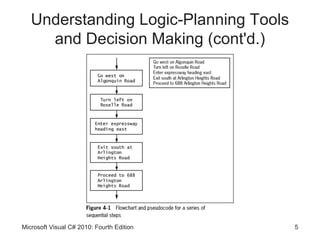
• Pseudocode
    – Tool that helps programmers plan a program’s logic by
      writing plain English statements
• Flowchart
    – You write the steps in diagram form as a series of
      shapes connected by arrows
• Sequence structure
    – One step follows another unconditionally
    – Sometimes, logical steps do not follow in an
      unconditional sequence

Microsoft Visual C# 2010: Fourth Edition                   4
Understanding Logic-Planning Tools
     and Decision Making (cont'd.)


Microsoft Visual C# 2010: Fourth Edition   5
Understanding Logic-Planning Tools
     and Decision Making (cont'd.)
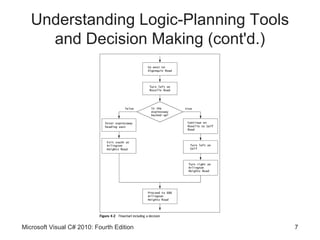
• Decision structure
    – Involves choosing between alternative courses of
      action based on some value within a program
    – All computer decisions are yes-or-no decisions
          • When reduced to their most basic form


Microsoft Visual C# 2010: Fourth Edition                 6
Understanding Logic-Planning Tools
     and Decision Making (cont'd.)


Microsoft Visual C# 2010: Fourth Edition   7
Making Decisions Using the if
                  Statement
• if statement
    – Used to make a single-alternative decision
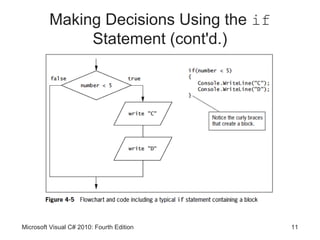
• Block
    – One or more statements contained within a pair of
      curly braces


Microsoft Visual C# 2010: Fourth Edition                  8
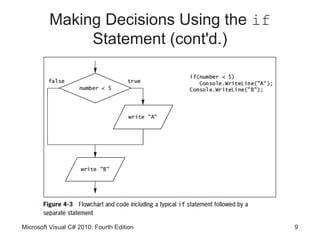
Making Decisions Using the if
              Statement (cont'd.)


Microsoft Visual C# 2010: Fourth Edition   9
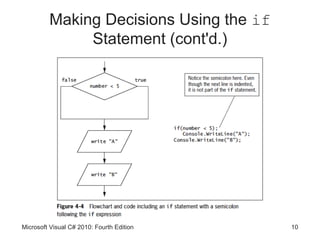
Making Decisions Using the if
              Statement (cont'd.)


Microsoft Visual C# 2010: Fourth Edition   10
Making Decisions Using the if
              Statement (cont'd.)


Microsoft Visual C# 2010: Fourth Edition   11
Making Decisions Using the if
              Statement (cont'd.)


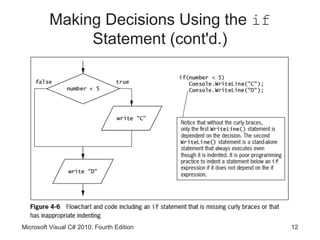
Microsoft Visual C# 2010: Fourth Edition   12
Making Decisions Using the if
              Statement (cont'd.)
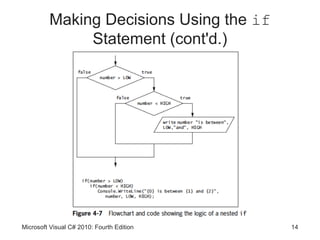
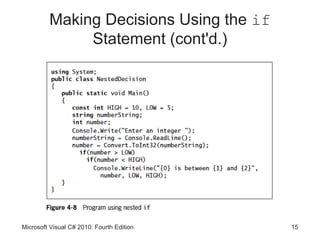
• Nested if
    – One decision structure is contained within another


Microsoft Visual C# 2010: Fourth Edition                   13
Making Decisions Using the if
              Statement (cont'd.)


Microsoft Visual C# 2010: Fourth Edition   14
Making Decisions Using the if
              Statement (cont'd.)


Microsoft Visual C# 2010: Fourth Edition   15
Making Decisions Using the if-else
              Statement
• Dual-alternative decisions
    – Have two possible outcomes
• if-else statement
    – Used to perform one action when a Boolean
      expression evaluates as true
          • And an alternate action when it evaluates as false


Microsoft Visual C# 2010: Fourth Edition                         16
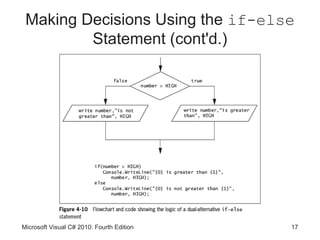
Making Decisions Using the if-else
         Statement (cont'd.)


Microsoft Visual C# 2010: Fourth Edition   17
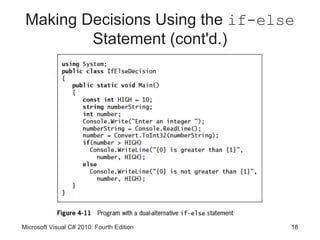
Making Decisions Using the if-else
         Statement (cont'd.)


Microsoft Visual C# 2010: Fourth Edition   18
Using Compound Expressions in if
             Statements
• You can combine multiple decisions into a single if
  statement
    – Using a combination of AND and OR operators


Microsoft Visual C# 2010: Fourth Edition            19
Using the Conditional AND Operator

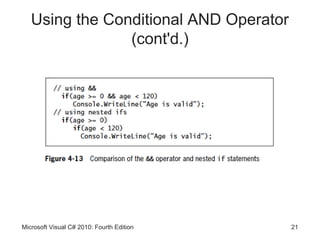
• Conditional AND operator
    – Determines whether two expressions are both true
    – Written as two ampersands (&&)
    – You must include a complete Boolean expression on
      each side of the operator
• Short-circuit evaluation
    – Expressions in each part of an AND expression are
      evaluated only as much as necessary
          • To determine whether the entire expression is true or
            false

Microsoft Visual C# 2010: Fourth Edition                        20
Using the Conditional AND Operator
                (cont'd.)


Microsoft Visual C# 2010: Fourth Edition   21
Using the Conditional OR Operator

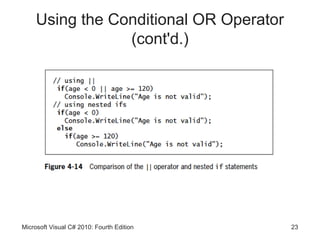
• Conditional OR operator
    – Used when you want some action to occur even if only
      one of two conditions is true
    – Written as ||


Microsoft Visual C# 2010: Fourth Edition               22
Using the Conditional OR Operator
                 (cont'd.)


Microsoft Visual C# 2010: Fourth Edition   23
Using the Logical AND and OR
                   Operators
• Boolean logical AND (&) and Boolean logical
  inclusive OR (|) operators
    – Work just like their && and || (conditional AND and
      OR) counterparts
    – They do not support short-circuit evaluation
    – Can lead to a side effect (unintended consequence)
• Avoid writing expressions that contain side effects


Microsoft Visual C# 2010: Fourth Edition                24
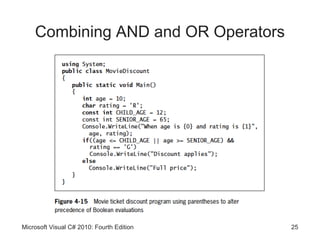
Combining AND and OR Operators


Microsoft Visual C# 2010: Fourth Edition   25
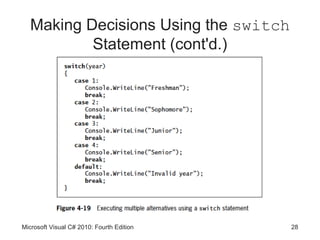
Making Decisions Using the switch
               Statement
• switch structure
    – Tests a single variable against a series of exact
      matches
• Keywords
    – switch, case, break, and default
• “No fall through rule”
    – Not allowing code to reach the end of a case
    – Not allowed in C#
    – Use a break statement at the end of each case

Microsoft Visual C# 2010: Fourth Edition                  26
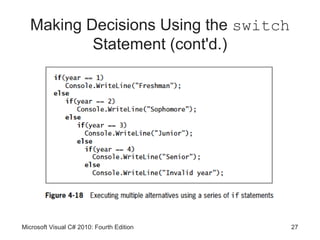
Making Decisions Using the switch
           Statement (cont'd.)


Microsoft Visual C# 2010: Fourth Edition   27
Making Decisions Using the switch
           Statement (cont'd.)


Microsoft Visual C# 2010: Fourth Edition   28
Making Decisions Using the switch
           Statement (cont'd.)
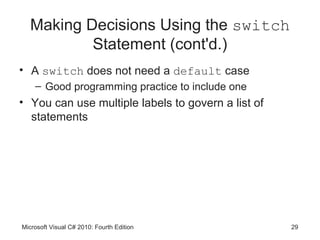
• A switch does not need a default case
    – Good programming practice to include one
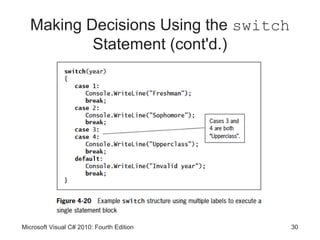
• You can use multiple labels to govern a list of
  statements


Microsoft Visual C# 2010: Fourth Edition            29
Making Decisions Using the switch
           Statement (cont'd.)


Microsoft Visual C# 2010: Fourth Edition   30
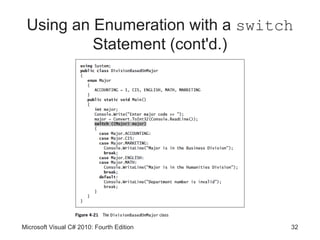
Using an Enumeration with a switch
             Statement
• Using an enumeration with a switch structure can
  often be convenient


Microsoft Visual C# 2010: Fourth Edition             31
Using an Enumeration with a switch
          Statement (cont'd.)


Microsoft Visual C# 2010: Fourth Edition   32
Using the Conditional Operator

• Conditional operator
    – Used as an abbreviated version of the if-else
      statement
    – A ternary operator
• Syntax
          testExpression ? trueResult : falseResult;


Microsoft Visual C# 2010: Fourth Edition               33
Using the NOT Operator

• NOT operator
    – Written as an exclamation point (!)
    – Negates the result of any Boolean expression


Microsoft Visual C# 2010: Fourth Edition             34
Avoiding Common Errors When
                Making Decisions
• Most frequent errors include:
    – Using the assignment operator instead of the
      comparison operator
    – Inserting a semicolon after the Boolean expression in
      an if statement
    – Failing to block a set of statements with curly braces
    – Failing to include a complete Boolean expression on
      each side of an && or || operator


Microsoft Visual C# 2010: Fourth Edition                   35
Performing Accurate and Efficient
               Range Checks
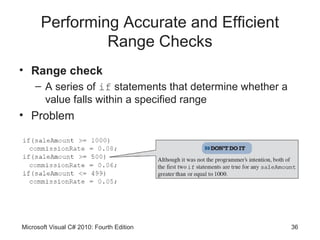
• Range check
    – A series of if statements that determine whether a
      value falls within a specified range
• Problem


Microsoft Visual C# 2010: Fourth Edition                   36
Performing Accurate and Efficient
           Range Checks (cont'd.)
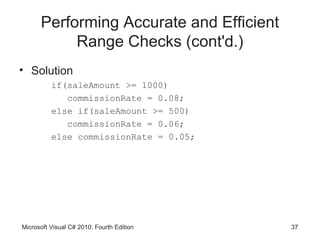
• Solution
          if(saleAmount >= 1000)
             commissionRate = 0.08;
          else if(saleAmount >= 500)
             commissionRate = 0.06;
          else commissionRate = 0.05;


Microsoft Visual C# 2010: Fourth Edition   37
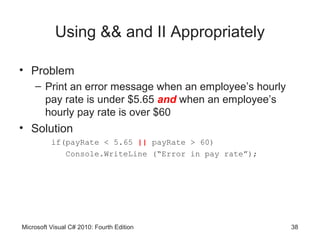
Using && and II Appropriately

• Problem
    – Print an error message when an employee’s hourly
      pay rate is under $5.65 and when an employee’s
      hourly pay rate is over $60
• Solution
          if(payRate < 5.65 || payRate > 60)
             Console.WriteLine (“Error in pay rate”);


Microsoft Visual C# 2010: Fourth Edition                 38
Using the ! Operator Correctly

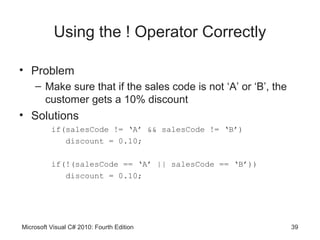
• Problem
    – Make sure that if the sales code is not ‘A’ or ‘B’, the
      customer gets a 10% discount
• Solutions
          if(salesCode != ‘A’ && salesCode != ‘B’)
             discount = 0.10;

          if(!(salesCode == ‘A’ || salesCode == ‘B’))
             discount = 0.10;


Microsoft Visual C# 2010: Fourth Edition                        39
Decision-Making Issues in GUI
                    Programs
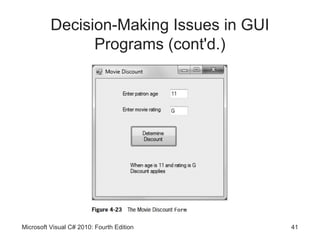
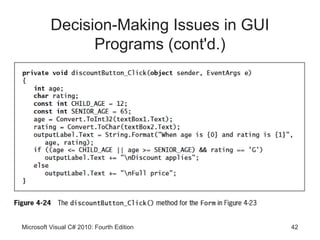
• Making a decision within a method in a GUI
  application is no different from making one in a
  console application
• You can use if, if…else, and switch
  statements in the same ways


Microsoft Visual C# 2010: Fourth Edition             40
Decision-Making Issues in GUI
                Programs (cont'd.)


Microsoft Visual C# 2010: Fourth Edition   41
Decision-Making Issues in GUI
                Programs (cont'd.)


Microsoft Visual C# 2010: Fourth Edition   42
You Do It

• Activities to explore
    – Using if-else Statements
    – Using AND and OR Logic


Microsoft Visual C# 2010: Fourth Edition         43
Summary

• A flowchart is a pictorial tool that helps you
  understand a program’s logic
• You use an if statement to make a single-
  alternative decision
• When you make a dual-alternative decision, you
  can use an if-else statement
• Conditional AND operator determines whether two
  expressions are both true
• Use the conditional OR operator when you want
  some action to occur when one or both of two
  conditions are true
Microsoft Visual C# 2010: Fourth Edition            44
Summary (cont'd.)

• AND operators take precedence
• The switch statement tests a single variable
  against a series of exact matches
• The conditional operator is used as an abbreviated
  version of the if-else statement
• You use the NOT operator to negate the result of
  any Boolean expression
• Common errors when making decisions
• Decisions within GUI methods are just like ones in
  console applications
Microsoft Visual C# 2010: Fourth Edition               45

Csc153 chapter 04

  • 1.
    Microsoft Visual C#2010 Fourth Edition Chapter 4 Making Decisions
  • 2.
    Objectives • Understand logic-planningtools and decision making • Learn how to make decisions using the if statement • Learn how to make decisions using the if-else statement • Use compound expressions in if statements Microsoft Visual C# 2010: Fourth Edition 2
  • 3.
    Objectives (cont'd.) • Makedecisions using the switch statement • Use the conditional operator • Use the NOT operator • Learn to avoid common errors when making decisions • Learn about decision-making issues in GUI programs Microsoft Visual C# 2010: Fourth Edition 3
  • 4.
    Understanding Logic-Planning Tools and Decision Making • Pseudocode – Tool that helps programmers plan a program’s logic by writing plain English statements • Flowchart – You write the steps in diagram form as a series of shapes connected by arrows • Sequence structure – One step follows another unconditionally – Sometimes, logical steps do not follow in an unconditional sequence Microsoft Visual C# 2010: Fourth Edition 4
  • 5.
    Understanding Logic-Planning Tools and Decision Making (cont'd.) Microsoft Visual C# 2010: Fourth Edition 5
  • 6.
    Understanding Logic-Planning Tools and Decision Making (cont'd.) • Decision structure – Involves choosing between alternative courses of action based on some value within a program – All computer decisions are yes-or-no decisions • When reduced to their most basic form Microsoft Visual C# 2010: Fourth Edition 6
  • 7.
    Understanding Logic-Planning Tools and Decision Making (cont'd.) Microsoft Visual C# 2010: Fourth Edition 7
  • 8.
    Making Decisions Usingthe if Statement • if statement – Used to make a single-alternative decision • Block – One or more statements contained within a pair of curly braces Microsoft Visual C# 2010: Fourth Edition 8
  • 9.
    Making Decisions Usingthe if Statement (cont'd.) Microsoft Visual C# 2010: Fourth Edition 9
  • 10.
    Making Decisions Usingthe if Statement (cont'd.) Microsoft Visual C# 2010: Fourth Edition 10
  • 11.
    Making Decisions Usingthe if Statement (cont'd.) Microsoft Visual C# 2010: Fourth Edition 11
  • 12.
    Making Decisions Usingthe if Statement (cont'd.) Microsoft Visual C# 2010: Fourth Edition 12
  • 13.
    Making Decisions Usingthe if Statement (cont'd.) • Nested if – One decision structure is contained within another Microsoft Visual C# 2010: Fourth Edition 13
  • 14.
    Making Decisions Usingthe if Statement (cont'd.) Microsoft Visual C# 2010: Fourth Edition 14
  • 15.
    Making Decisions Usingthe if Statement (cont'd.) Microsoft Visual C# 2010: Fourth Edition 15
  • 16.
    Making Decisions Usingthe if-else Statement • Dual-alternative decisions – Have two possible outcomes • if-else statement – Used to perform one action when a Boolean expression evaluates as true • And an alternate action when it evaluates as false Microsoft Visual C# 2010: Fourth Edition 16
  • 17.
    Making Decisions Usingthe if-else Statement (cont'd.) Microsoft Visual C# 2010: Fourth Edition 17
  • 18.
    Making Decisions Usingthe if-else Statement (cont'd.) Microsoft Visual C# 2010: Fourth Edition 18
  • 19.
    Using Compound Expressionsin if Statements • You can combine multiple decisions into a single if statement – Using a combination of AND and OR operators Microsoft Visual C# 2010: Fourth Edition 19
  • 20.
    Using the ConditionalAND Operator • Conditional AND operator – Determines whether two expressions are both true – Written as two ampersands (&&) – You must include a complete Boolean expression on each side of the operator • Short-circuit evaluation – Expressions in each part of an AND expression are evaluated only as much as necessary • To determine whether the entire expression is true or false Microsoft Visual C# 2010: Fourth Edition 20
  • 21.
    Using the ConditionalAND Operator (cont'd.) Microsoft Visual C# 2010: Fourth Edition 21
  • 22.
    Using the ConditionalOR Operator • Conditional OR operator – Used when you want some action to occur even if only one of two conditions is true – Written as || Microsoft Visual C# 2010: Fourth Edition 22
  • 23.
    Using the ConditionalOR Operator (cont'd.) Microsoft Visual C# 2010: Fourth Edition 23
  • 24.
    Using the LogicalAND and OR Operators • Boolean logical AND (&) and Boolean logical inclusive OR (|) operators – Work just like their && and || (conditional AND and OR) counterparts – They do not support short-circuit evaluation – Can lead to a side effect (unintended consequence) • Avoid writing expressions that contain side effects Microsoft Visual C# 2010: Fourth Edition 24
  • 25.
    Combining AND andOR Operators Microsoft Visual C# 2010: Fourth Edition 25
  • 26.
    Making Decisions Usingthe switch Statement • switch structure – Tests a single variable against a series of exact matches • Keywords – switch, case, break, and default • “No fall through rule” – Not allowing code to reach the end of a case – Not allowed in C# – Use a break statement at the end of each case Microsoft Visual C# 2010: Fourth Edition 26
  • 27.
    Making Decisions Usingthe switch Statement (cont'd.) Microsoft Visual C# 2010: Fourth Edition 27
  • 28.
    Making Decisions Usingthe switch Statement (cont'd.) Microsoft Visual C# 2010: Fourth Edition 28
  • 29.
    Making Decisions Usingthe switch Statement (cont'd.) • A switch does not need a default case – Good programming practice to include one • You can use multiple labels to govern a list of statements Microsoft Visual C# 2010: Fourth Edition 29
  • 30.
    Making Decisions Usingthe switch Statement (cont'd.) Microsoft Visual C# 2010: Fourth Edition 30
  • 31.
    Using an Enumerationwith a switch Statement • Using an enumeration with a switch structure can often be convenient Microsoft Visual C# 2010: Fourth Edition 31
  • 32.
    Using an Enumerationwith a switch Statement (cont'd.) Microsoft Visual C# 2010: Fourth Edition 32
  • 33.
    Using the ConditionalOperator • Conditional operator – Used as an abbreviated version of the if-else statement – A ternary operator • Syntax testExpression ? trueResult : falseResult; Microsoft Visual C# 2010: Fourth Edition 33
  • 34.
    Using the NOTOperator • NOT operator – Written as an exclamation point (!) – Negates the result of any Boolean expression Microsoft Visual C# 2010: Fourth Edition 34
  • 35.
    Avoiding Common ErrorsWhen Making Decisions • Most frequent errors include: – Using the assignment operator instead of the comparison operator – Inserting a semicolon after the Boolean expression in an if statement – Failing to block a set of statements with curly braces – Failing to include a complete Boolean expression on each side of an && or || operator Microsoft Visual C# 2010: Fourth Edition 35
  • 36.
    Performing Accurate andEfficient Range Checks • Range check – A series of if statements that determine whether a value falls within a specified range • Problem Microsoft Visual C# 2010: Fourth Edition 36
  • 37.
    Performing Accurate andEfficient Range Checks (cont'd.) • Solution if(saleAmount >= 1000) commissionRate = 0.08; else if(saleAmount >= 500) commissionRate = 0.06; else commissionRate = 0.05; Microsoft Visual C# 2010: Fourth Edition 37
  • 38.
    Using && andII Appropriately • Problem – Print an error message when an employee’s hourly pay rate is under $5.65 and when an employee’s hourly pay rate is over $60 • Solution if(payRate < 5.65 || payRate > 60) Console.WriteLine (“Error in pay rate”); Microsoft Visual C# 2010: Fourth Edition 38
  • 39.
    Using the !Operator Correctly • Problem – Make sure that if the sales code is not ‘A’ or ‘B’, the customer gets a 10% discount • Solutions if(salesCode != ‘A’ && salesCode != ‘B’) discount = 0.10; if(!(salesCode == ‘A’ || salesCode == ‘B’)) discount = 0.10; Microsoft Visual C# 2010: Fourth Edition 39
  • 40.
    Decision-Making Issues inGUI Programs • Making a decision within a method in a GUI application is no different from making one in a console application • You can use if, if…else, and switch statements in the same ways Microsoft Visual C# 2010: Fourth Edition 40
  • 41.
    Decision-Making Issues inGUI Programs (cont'd.) Microsoft Visual C# 2010: Fourth Edition 41
  • 42.
    Decision-Making Issues inGUI Programs (cont'd.) Microsoft Visual C# 2010: Fourth Edition 42
  • 43.
    You Do It •Activities to explore – Using if-else Statements – Using AND and OR Logic Microsoft Visual C# 2010: Fourth Edition 43
  • 44.
    Summary • A flowchartis a pictorial tool that helps you understand a program’s logic • You use an if statement to make a single- alternative decision • When you make a dual-alternative decision, you can use an if-else statement • Conditional AND operator determines whether two expressions are both true • Use the conditional OR operator when you want some action to occur when one or both of two conditions are true Microsoft Visual C# 2010: Fourth Edition 44
  • 45.
    Summary (cont'd.) • ANDoperators take precedence • The switch statement tests a single variable against a series of exact matches • The conditional operator is used as an abbreviated version of the if-else statement • You use the NOT operator to negate the result of any Boolean expression • Common errors when making decisions • Decisions within GUI methods are just like ones in console applications Microsoft Visual C# 2010: Fourth Edition 45