Microsoft Visual C# 2010
       Fourth Edition


        Chapter 6
       Using Arrays
Objectives
• Declare an array and assign values to array
  elements
• Access array elements
• Search an array using a loop
• Use the BinarySearch(), Sort(), and
  Reverse() methods
• Use multidimensional arrays
• Learn about array issues in GUI programs


Microsoft Visual C# 2010, Fourth Edition         2
Declaring an Array and Assigning
         Values to Array Elements
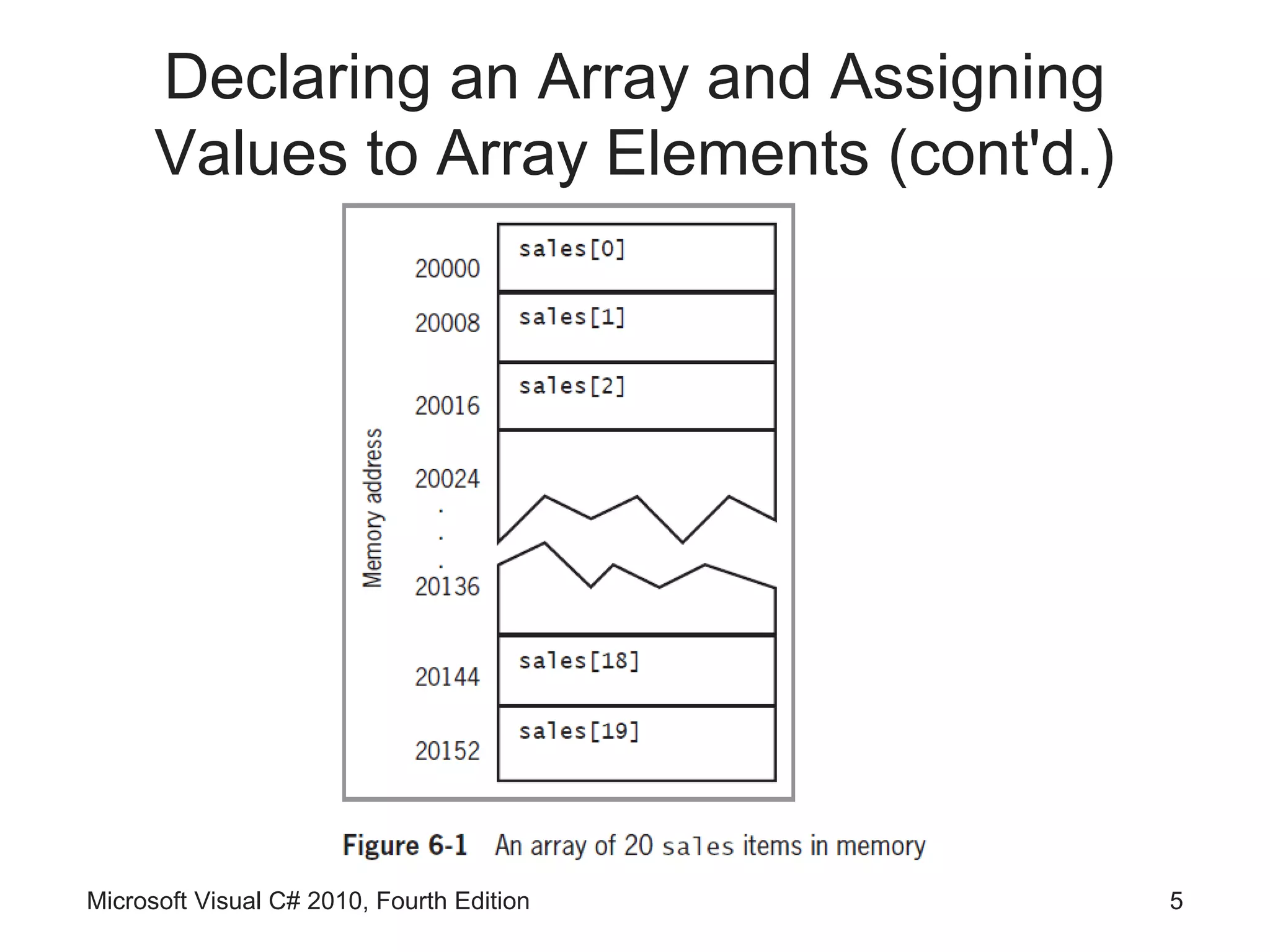
• Array
    – List of data items that all have the same data type and
      the same name
    – Each item is distinguished from the others by an index
• Declaring and creating an array
        double[] sales;
        sales = new double[20];
• new operator
    – Used to create objects
• You can change the size of an array

Microsoft Visual C# 2010, Fourth Edition                   3
Declaring an Array and Assigning
      Values to Array Elements (cont'd.)
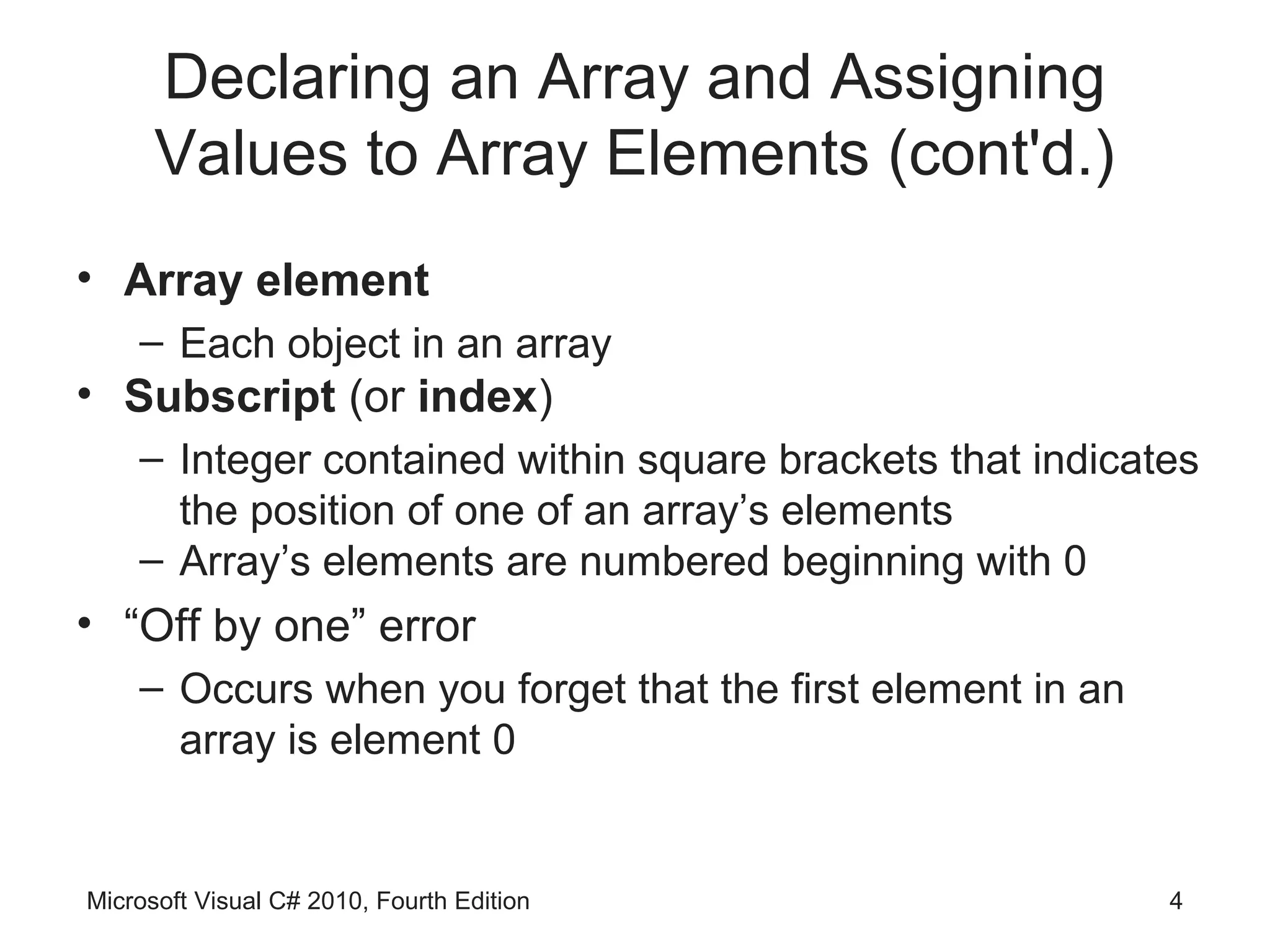
• Array element
    – Each object in an array
• Subscript (or index)
    – Integer contained within square brackets that indicates
      the position of one of an array’s elements
    – Array’s elements are numbered beginning with 0
• “Off by one” error
    – Occurs when you forget that the first element in an
      array is element 0


Microsoft Visual C# 2010, Fourth Edition                    4
Declaring an Array and Assigning
      Values to Array Elements (cont'd.)


Microsoft Visual C# 2010, Fourth Edition   5
Declaring an Array and Assigning
      Values to Array Elements (cont'd.)
• Assigning a value to an array element
          sales[0] = 2100.00;
• Printing an element value
          Console.WriteLine(sales[19]);


Microsoft Visual C# 2010, Fourth Edition   6
Initializing an Array

• In C#, arrays are objects
    – Arrays are instances of a class named
      System.Array
• Initializing objects
    – Numeric fields: 0
    – Character fields: ‘u0000’ or null
    – bool fields: false
• Initializer list
    – List of values provided for an array


Microsoft Visual C# 2010, Fourth Edition         7
Initializing an Array (cont'd.)

• Initializer list examples
    int[] myScores = new int[5] {100, 76, 88,
                     100, 90};
    int[] myScores = new int[] {100, 76, 88,
                     100, 90};
    int[] myScores = {100, 76, 88, 100, 90};


Microsoft Visual C# 2010, Fourth Edition        8
Accessing Array Elements

• The power of arrays becomes apparent when you
  use subscripts
    – Can be variables rather than constant values
• Using a loop to perform arithmetic on each element
        for (int sub = 0; sub < 5; ++sub)
          myScores[sub] += 3;


Microsoft Visual C# 2010, Fourth Edition               9
Using the Length Property

• Length property
    – Member of the System.Array class
    – Automatically holds an array’s length
• Examples
        int[] myScores = {100, 76, 88, 100, 90};
        Console.WriteLine(“Array size is {0}”,
                          myScores.Length);
        for (int x = 0; x < myScores.Length; ++x)
        Console.WriteLine(myScores[x]);


Microsoft Visual C# 2010, Fourth Edition            10
Using foreach

• foreach statement
    – Cycles through every array element without using a
      subscript
    – Uses a temporary iteration variable
          • Automatically holds each array value in turn
• Example
    double[] payRate = {6.00, 7.35, 8.12, 12.45, 22.22};
    foreach(double money in payRate)
    Console.WriteLine(“{0}”, money.ToString(“C”));


Microsoft Visual C# 2010, Fourth Edition                   11
Using foreach (cont'd.)

• Used under the following circumstances
    – When you want to access every array element
    – Since the iteration variable is read-only
          • You cannot assign a value to it


Microsoft Visual C# 2010, Fourth Edition            12
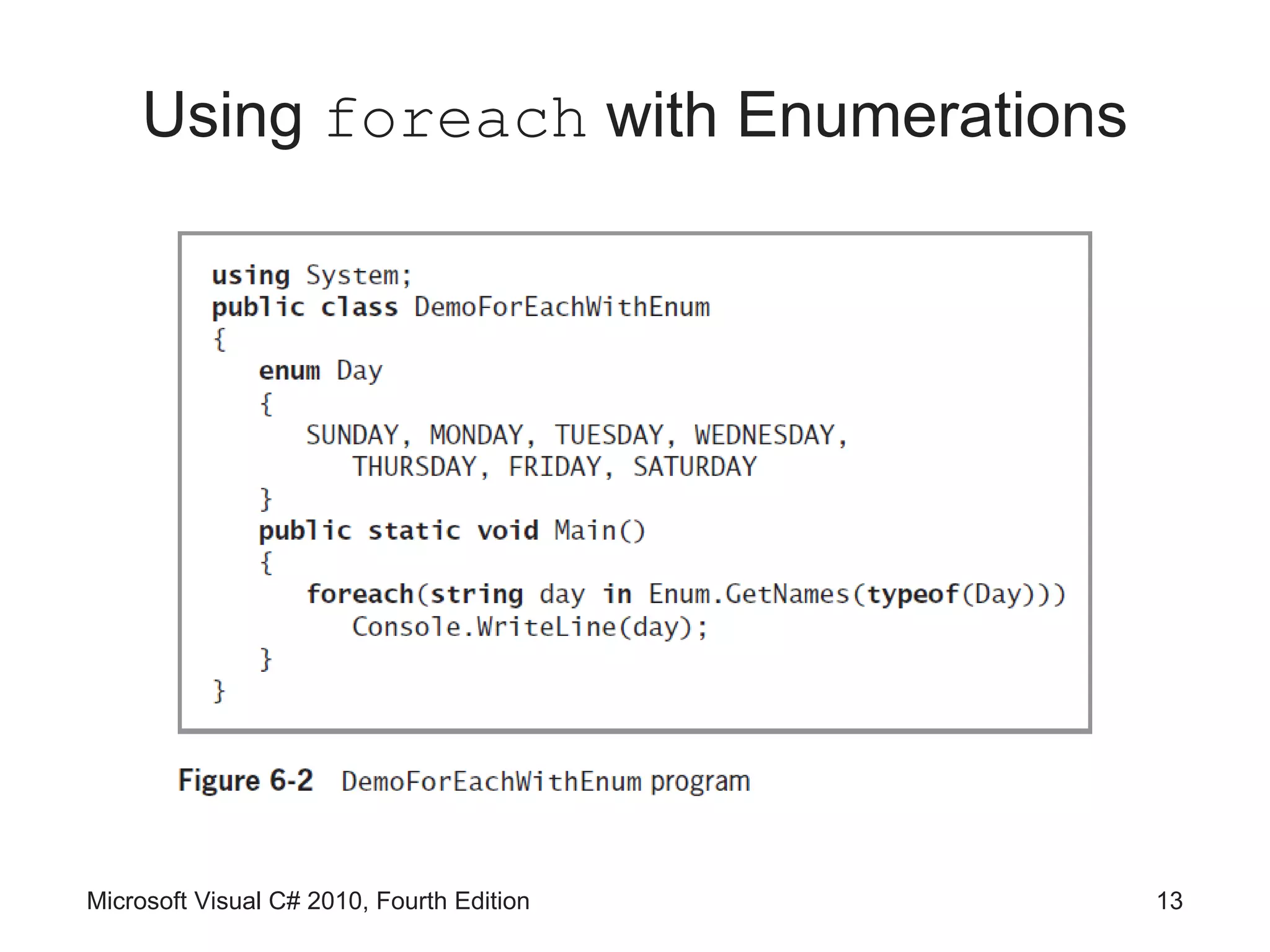
Using foreach with Enumerations


Microsoft Visual C# 2010, Fourth Edition   13
Searching an Array Using a Loop

• Searching options
    – Using a for loop
    – Using a while loop


Microsoft Visual C# 2010, Fourth Edition   14
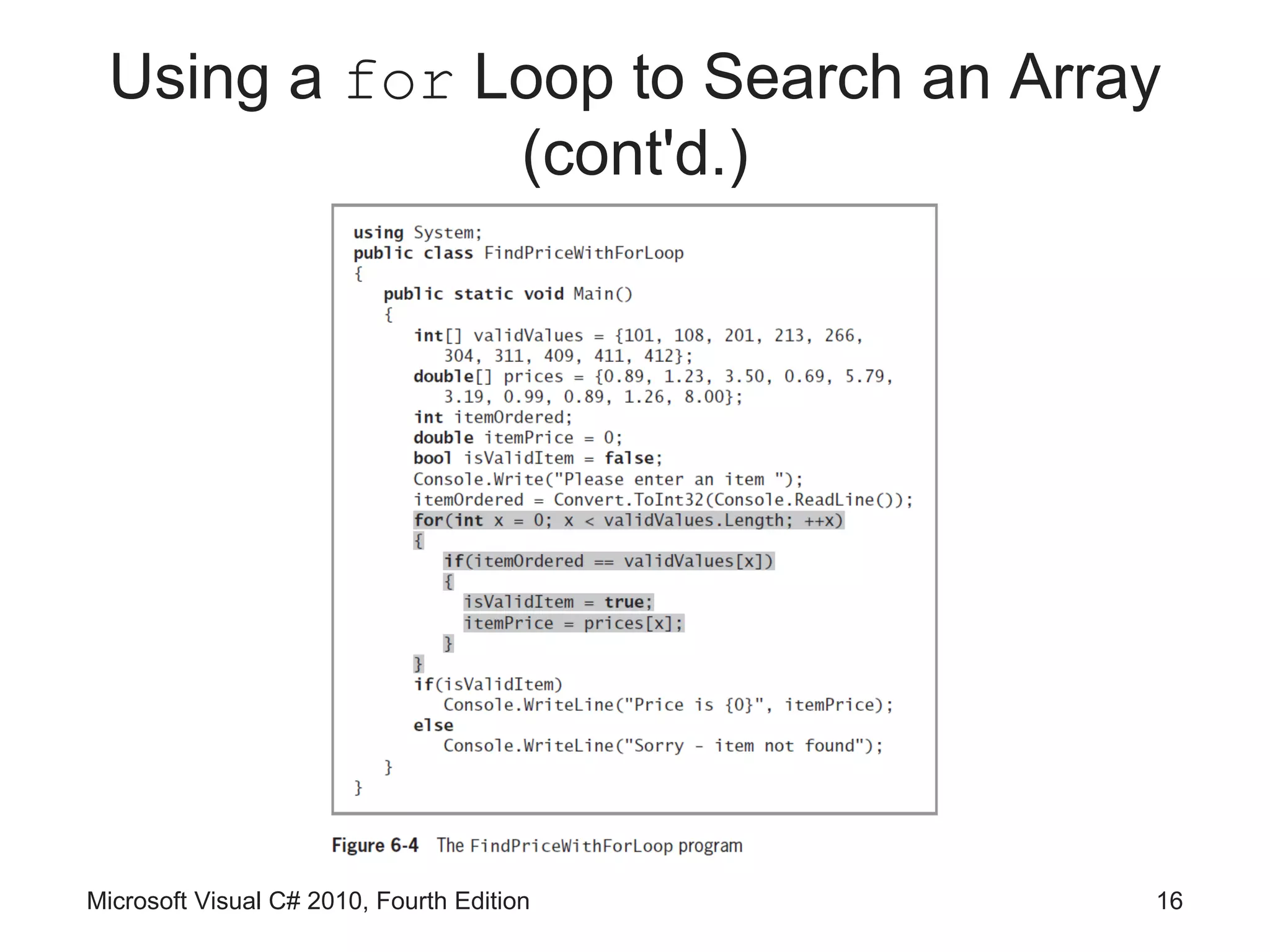
Using a for Loop to Search an Array

• Use a for statement to loop through the array
    – Set a Boolean variable to true when a match is found
• Solution is valid even with parallel arrays


Microsoft Visual C# 2010, Fourth Edition               15
Using a for Loop to Search an Array
              (cont'd.)


Microsoft Visual C# 2010, Fourth Edition   16
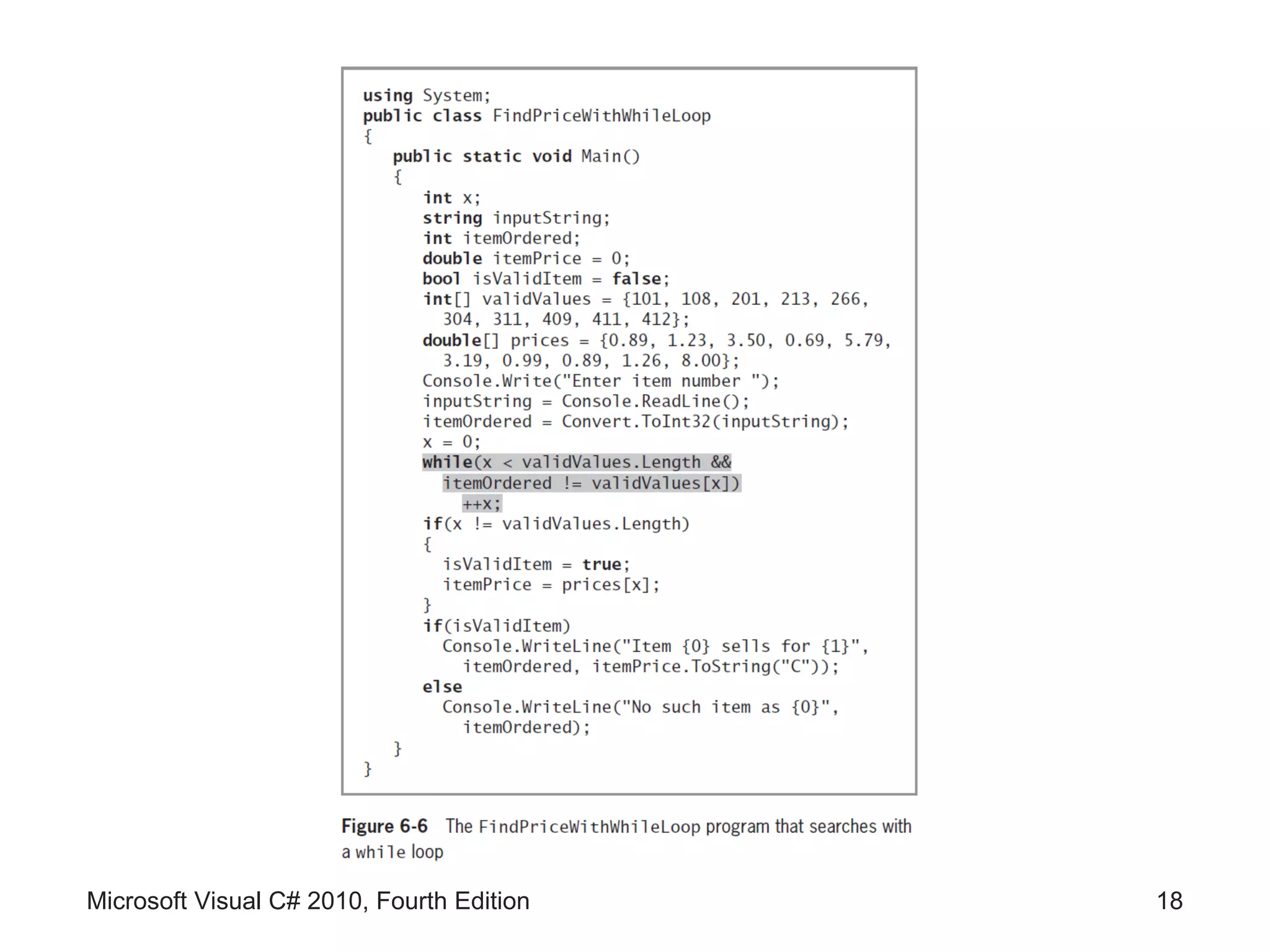
Using a while Loop to Search an
                  Array
• Use a while loop to search for a match


Microsoft Visual C# 2010, Fourth Edition   17
Microsoft Visual C# 2010, Fourth Edition   18
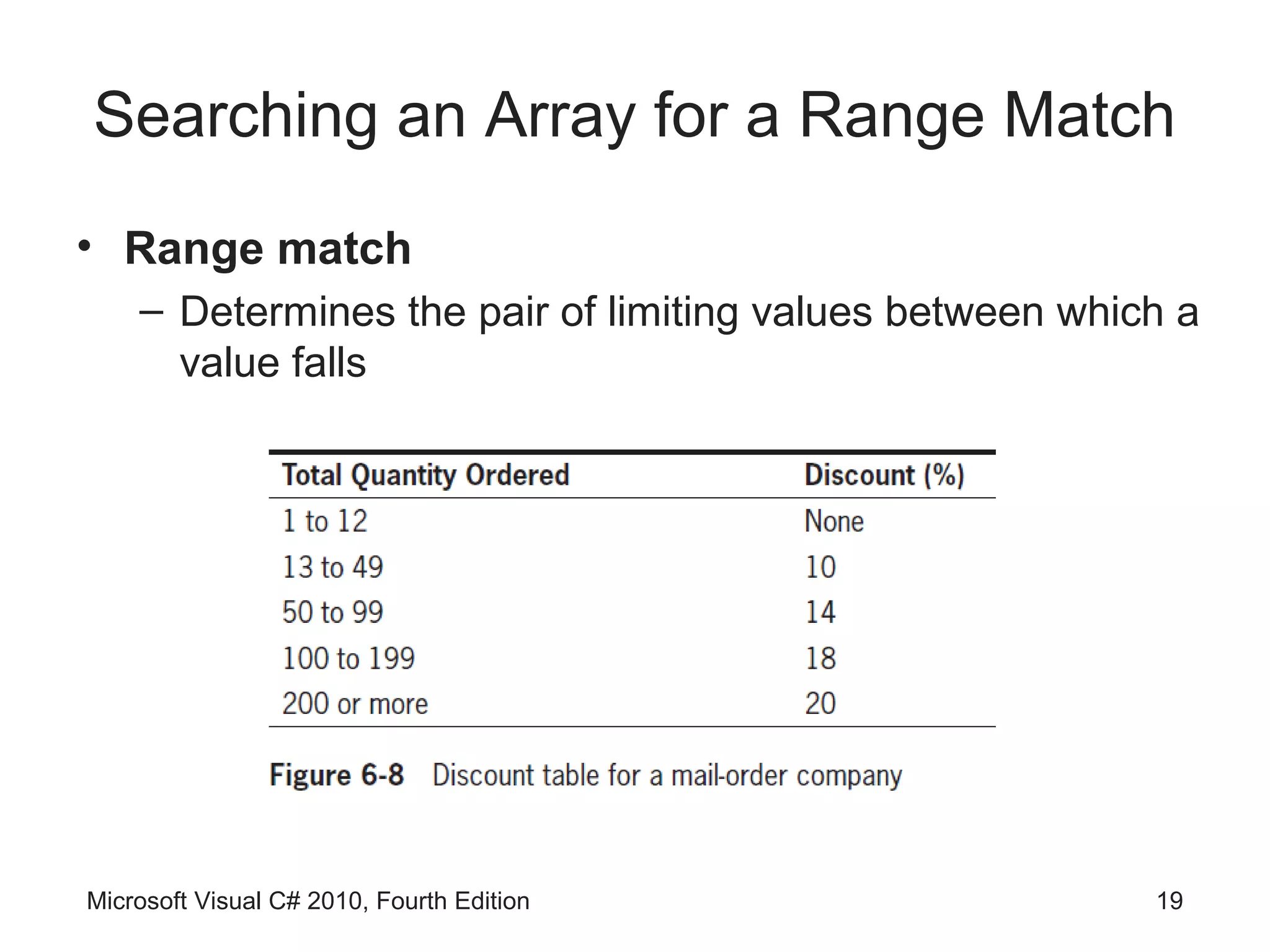
Searching an Array for a Range Match
• Range match
    – Determines the pair of limiting values between which a
      value falls


Microsoft Visual C# 2010, Fourth Edition                 19
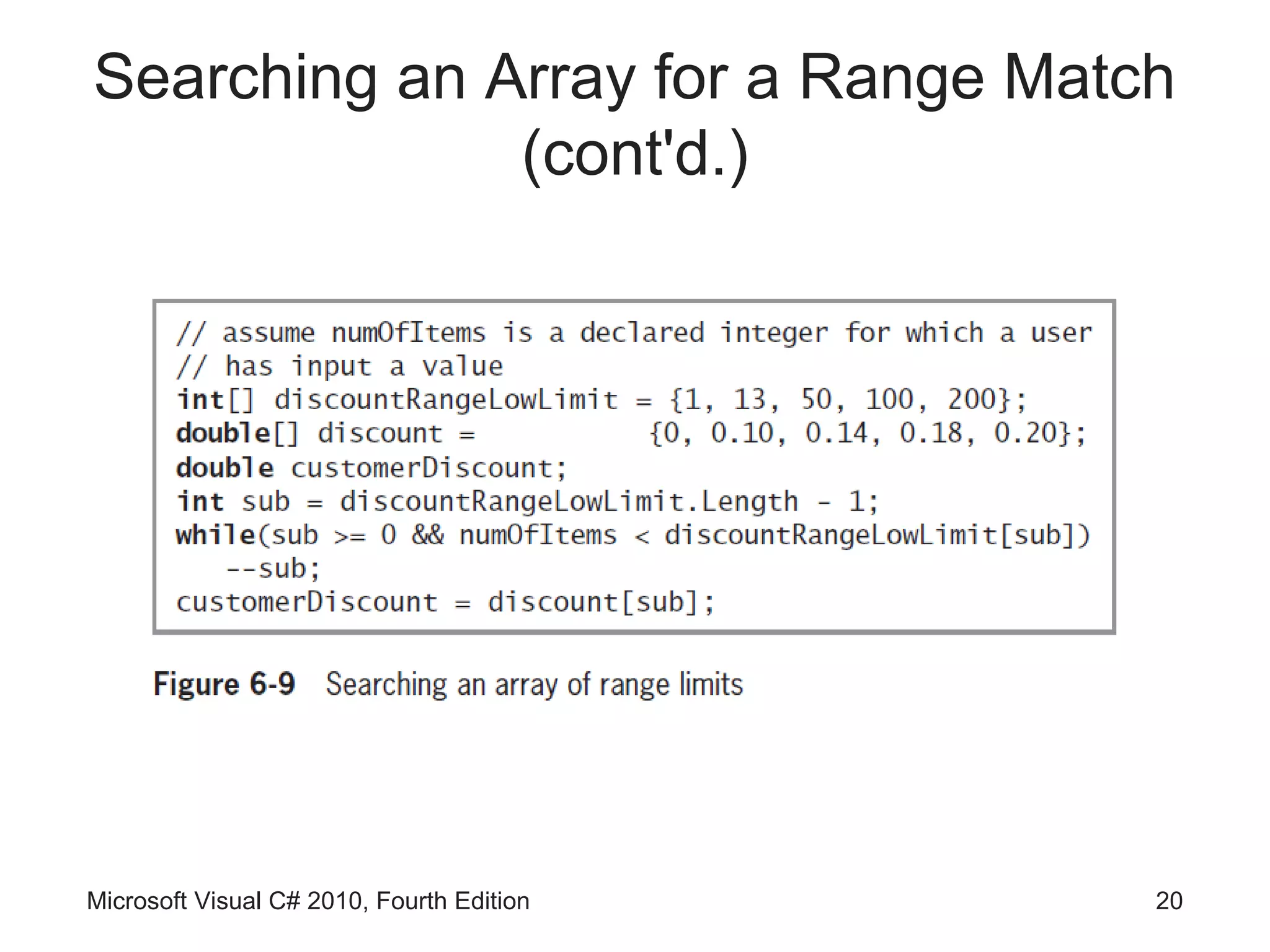
Searching an Array for a Range Match
              (cont'd.)


Microsoft Visual C# 2010, Fourth Edition   20
Using the BinarySearch(),
     Sort(),and Reverse() Methods
• System.Array class contains a variety of useful,
  built-in methods that can search, sort, and
  manipulate array elements


Microsoft Visual C# 2010, Fourth Edition             21
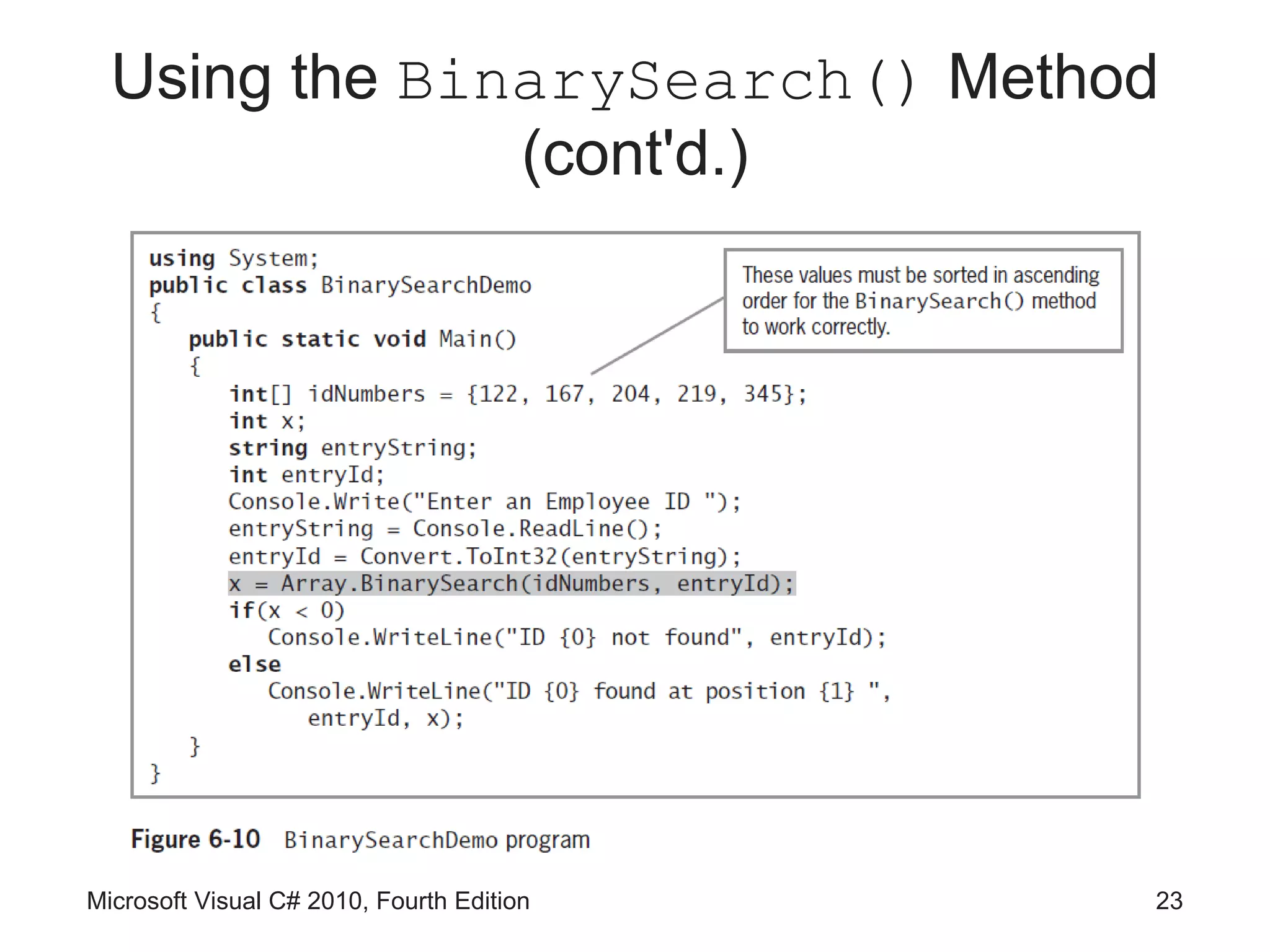
Using the BinarySearch() Method

• BinarySearch() method
    – Finds a requested value in a sorted array
    – Member of the System.Array class
• Do not use BinarySearch() under these
  circumstances
    – If your array items are not arranged in ascending order
    – If your array holds duplicate values and you want to
      find all of them
    – If you want to find a range match rather than an exact
      match

Microsoft Visual C# 2010, Fourth Edition                  22
Using the BinarySearch() Method
               (cont'd.)


Microsoft Visual C# 2010, Fourth Edition   23
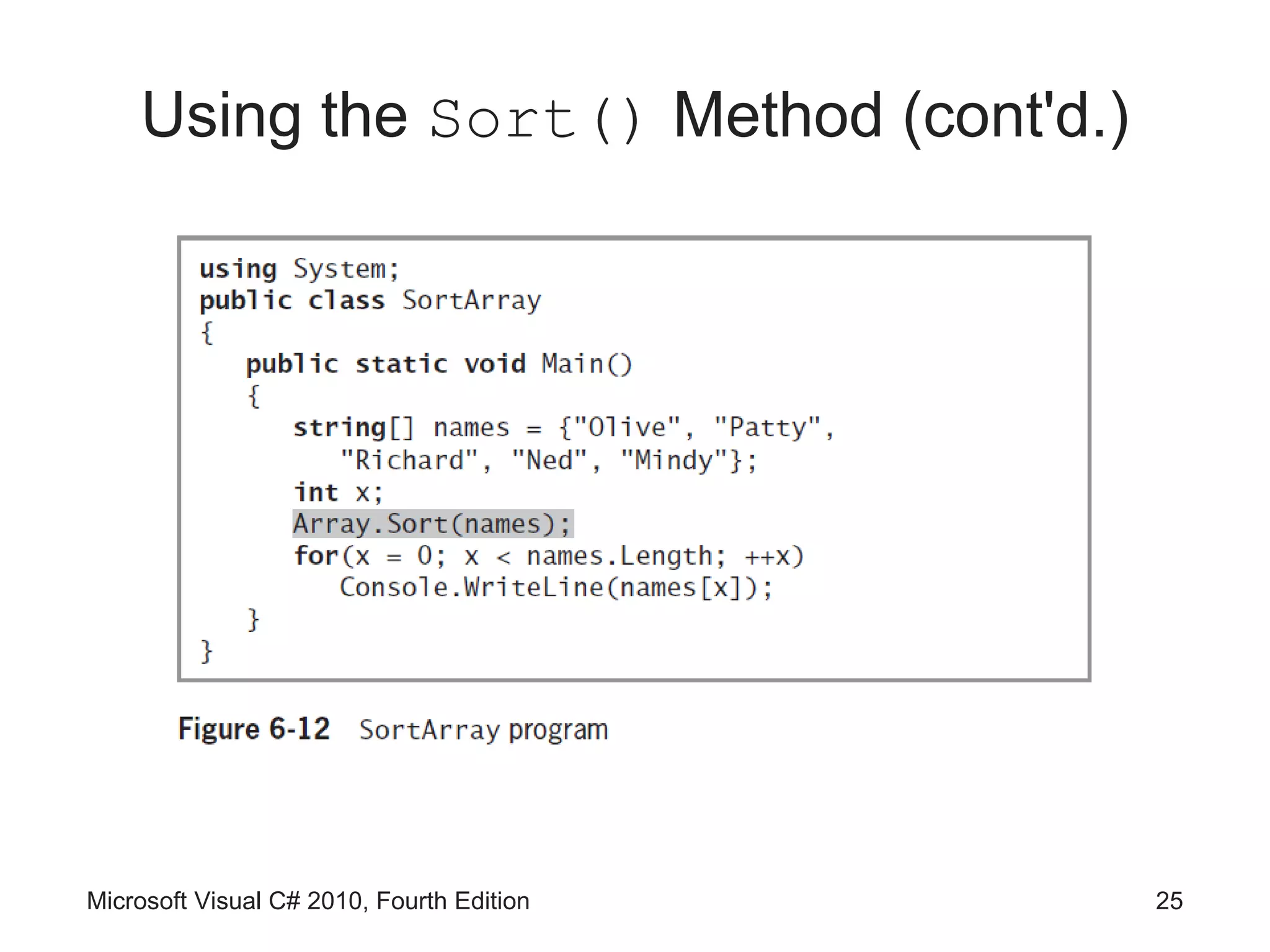
Using the Sort() Method

• Sort() method
    – Arranges array items in ascending order
    – Use it by passing the array name to Array.Sort()


Microsoft Visual C# 2010, Fourth Edition             24
Using the Sort() Method (cont'd.)


Microsoft Visual C# 2010, Fourth Edition   25
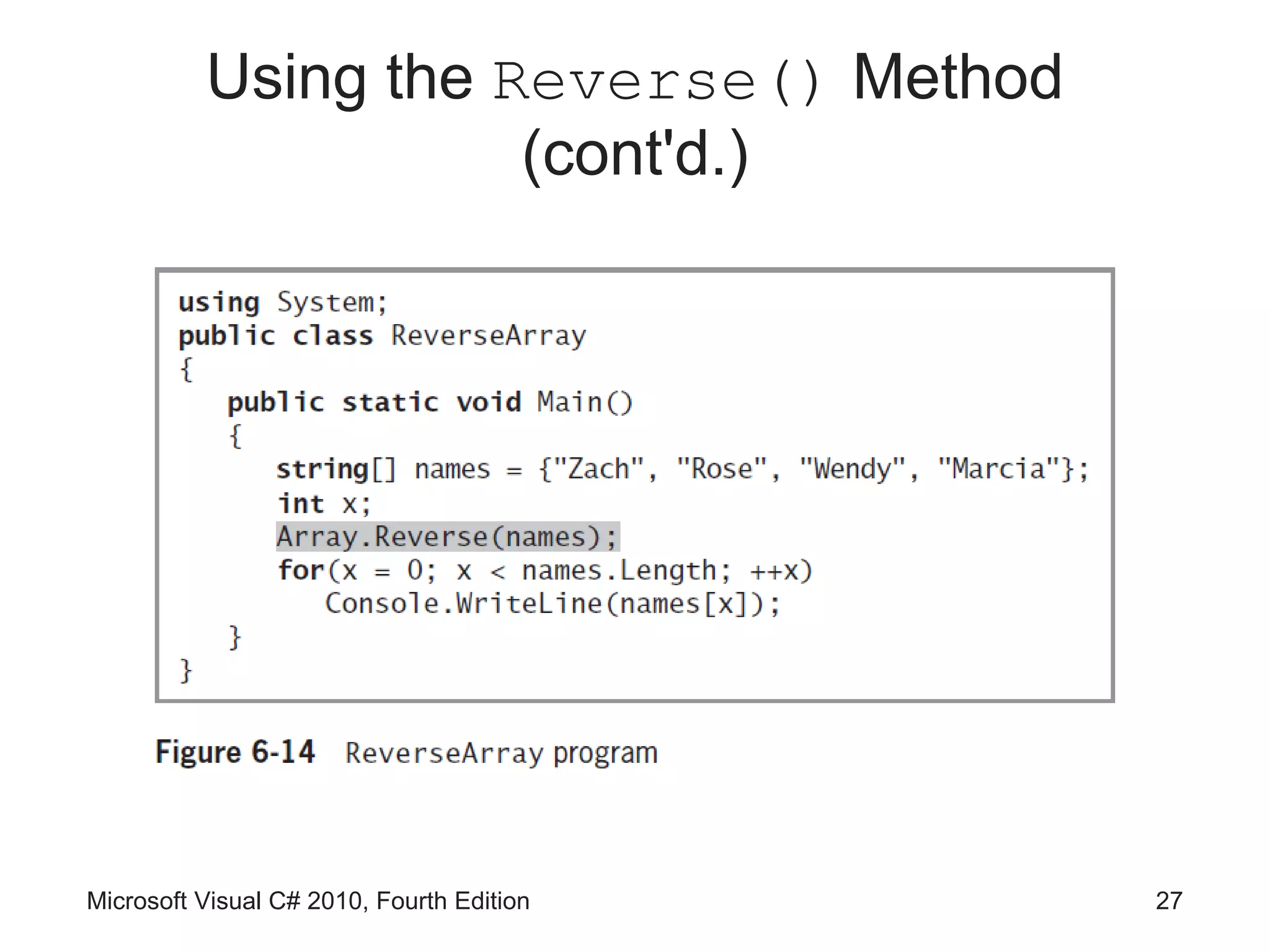
Using the Reverse() Method

• Reverse() method
    – Reverses the order of items in an array
    – Element that starts in position 0 is relocated to position
      Length – 1
    – Use it by passing the array name to the method


Microsoft Visual C# 2010, Fourth Edition                     26
Using the Reverse() Method
                     (cont'd.)


Microsoft Visual C# 2010, Fourth Edition   27
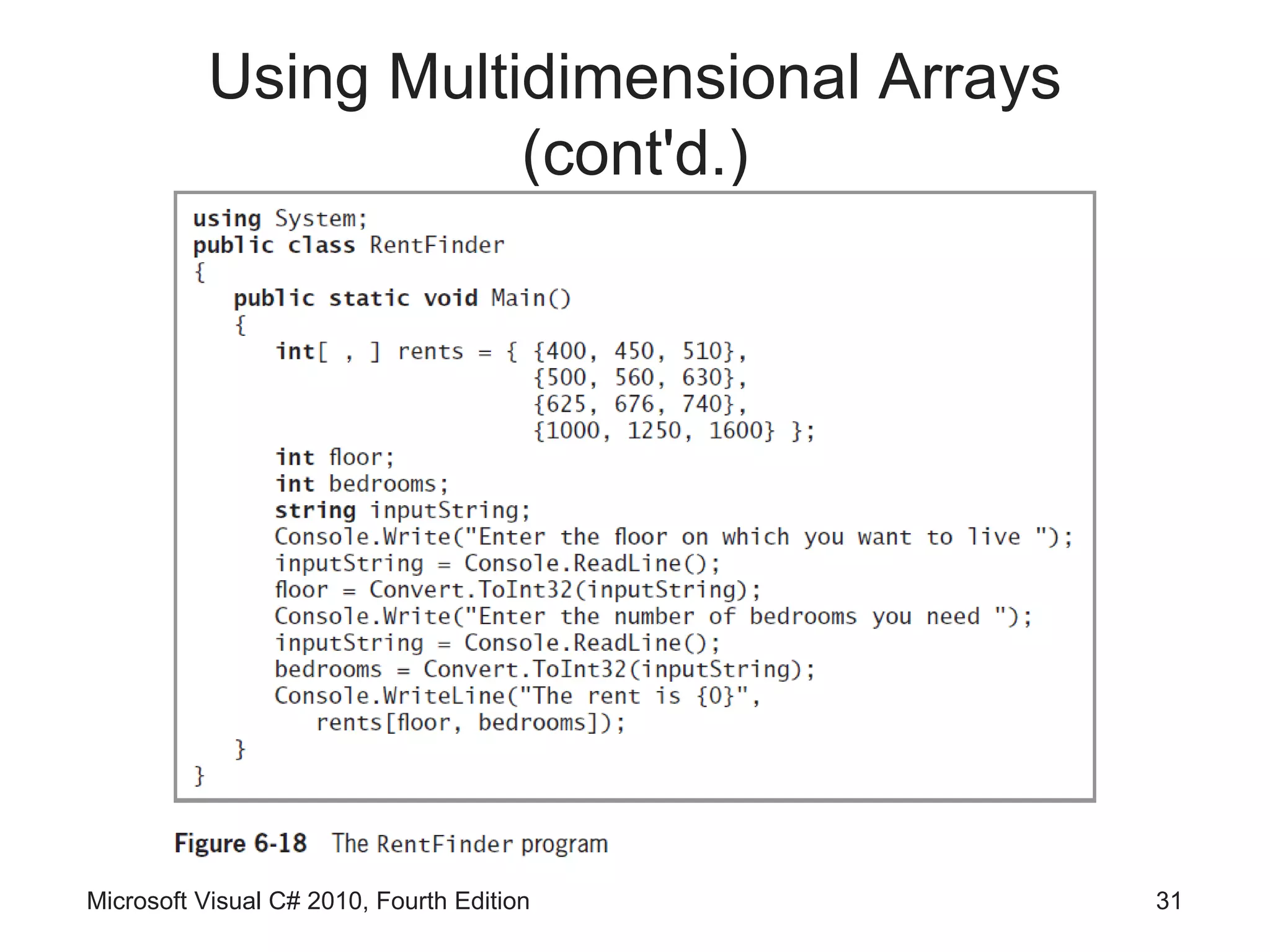
Using Multidimensional Arrays

• One-dimensional or single-dimensional array
    – Picture as a column of values
    – Elements can be accessed using a single subscript
• Multidimensional arrays
    – Require multiple subscripts to access the array
      elements
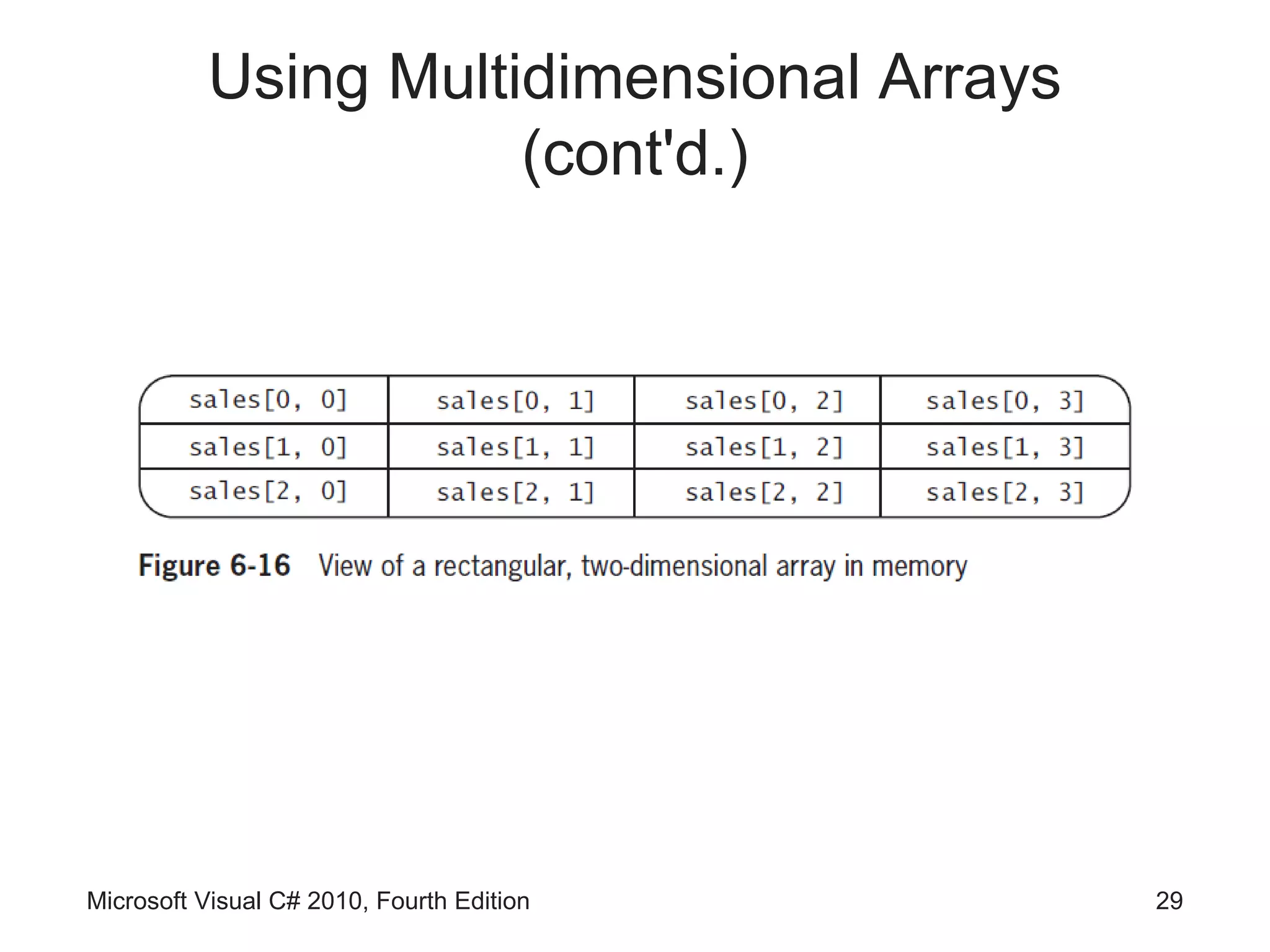
    – Two-dimensional arrays
          • Have two or more columns of values for each row
          • Also called rectangular array, matrix, or a table


Microsoft Visual C# 2010, Fourth Edition                        28
Using Multidimensional Arrays
                     (cont'd.)


Microsoft Visual C# 2010, Fourth Edition   29
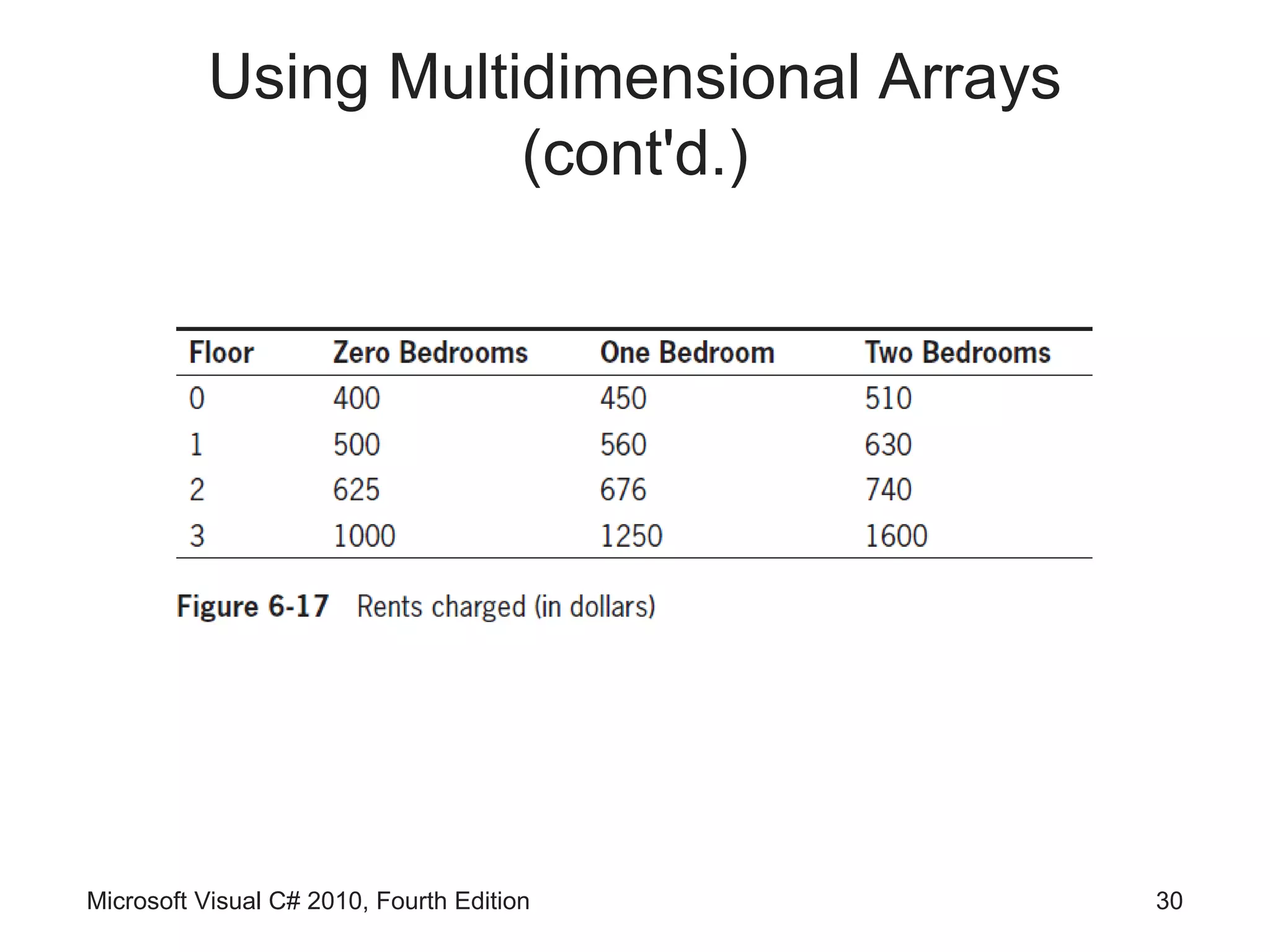
Using Multidimensional Arrays
                     (cont'd.)


Microsoft Visual C# 2010, Fourth Edition   30
Using Multidimensional Arrays
                     (cont'd.)


Microsoft Visual C# 2010, Fourth Edition   31
Using Multidimensional Arrays
                     (cont'd.)
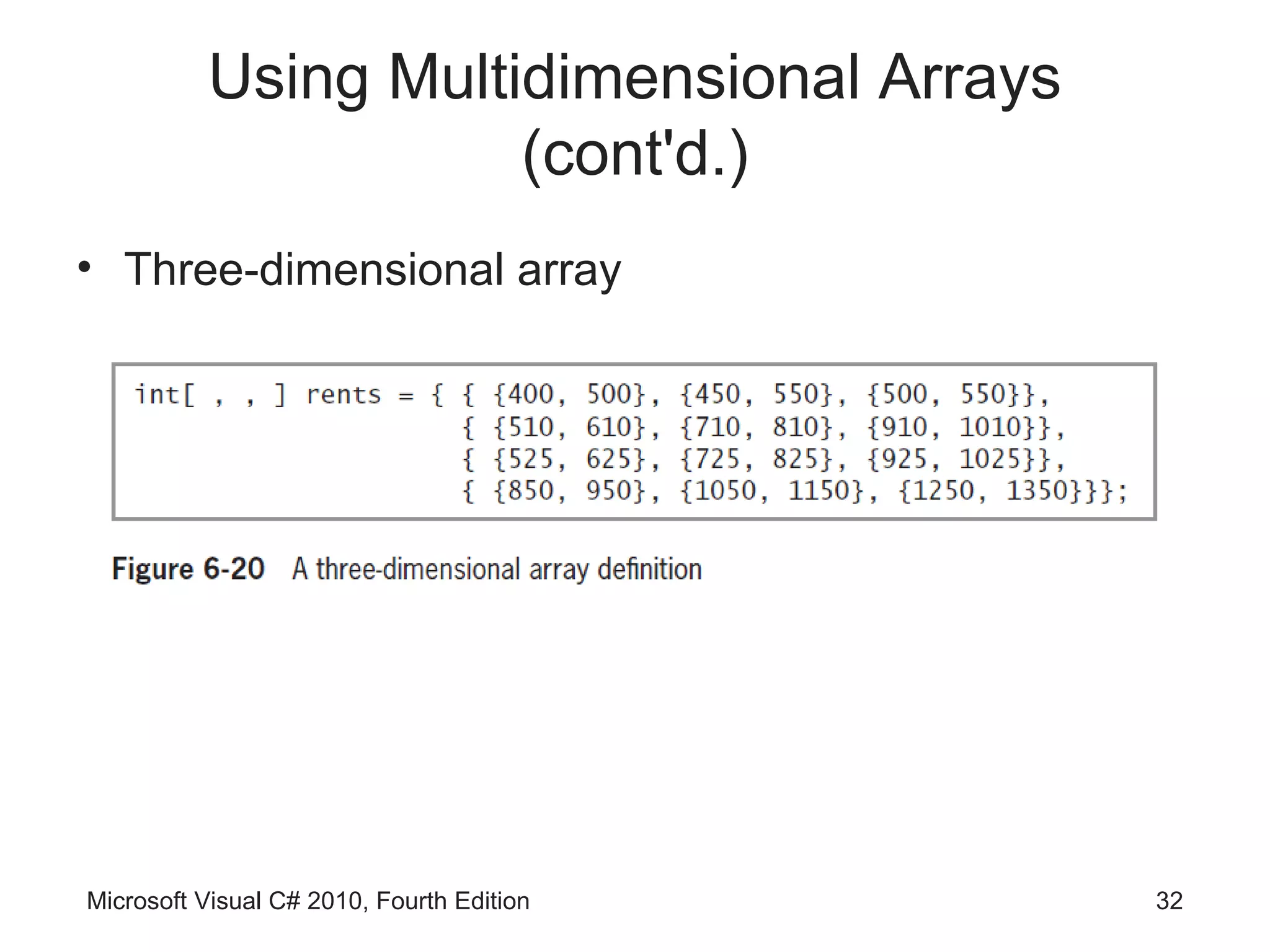
• Three-dimensional array


Microsoft Visual C# 2010, Fourth Edition   32
Using Multidimensional Arrays
                     (cont'd.)
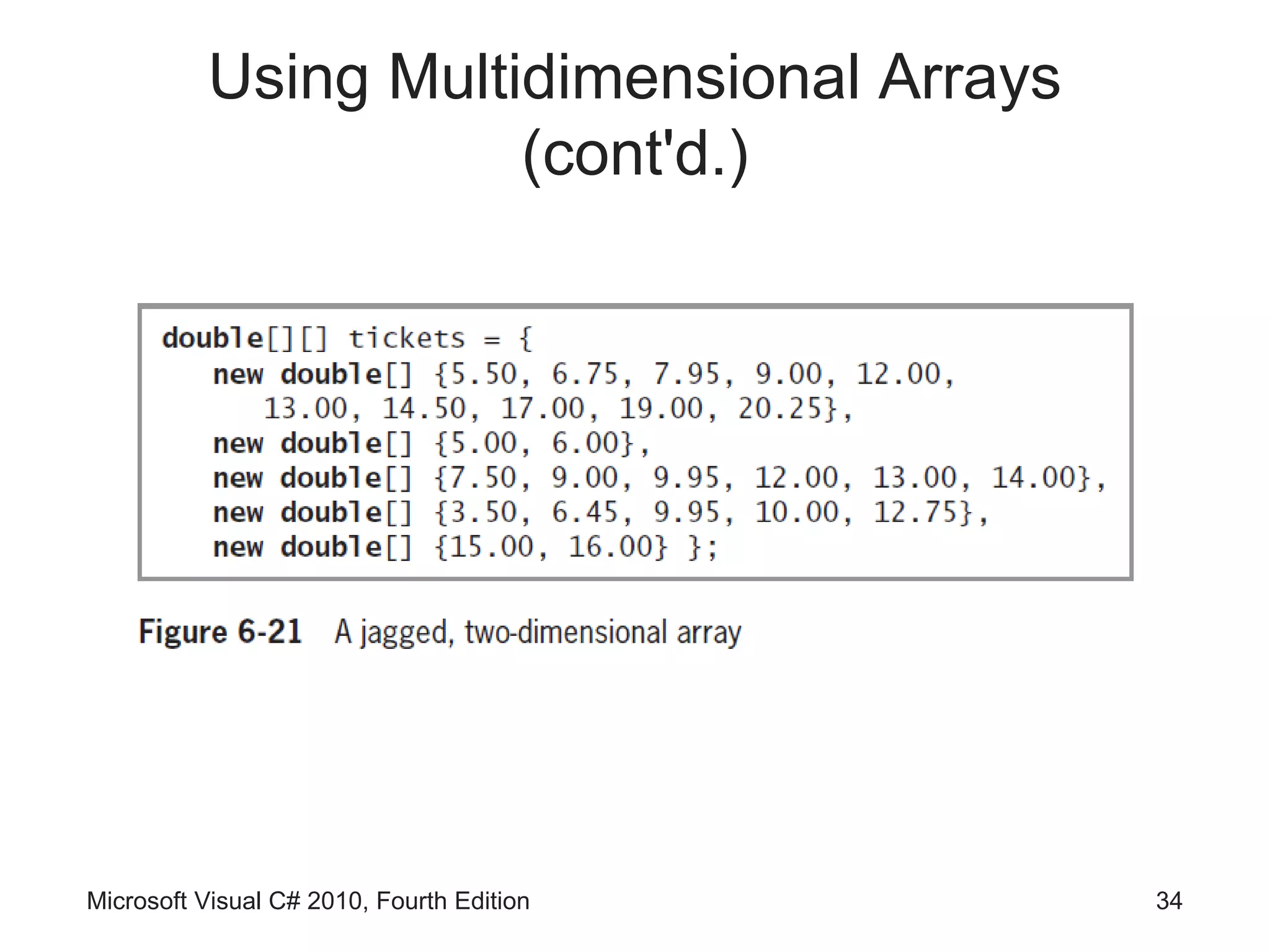
• Jagged array
    – One-dimensional array in which each element is
      another one-dimensional array
    – Each row can be a different length


Microsoft Visual C# 2010, Fourth Edition               33
Using Multidimensional Arrays
                     (cont'd.)


Microsoft Visual C# 2010, Fourth Edition   34
Array Issues in GUI Programs

• If array values change based on user input
   – Array must be stored outside any method that reacts to
     the user’s event


 Microsoft Visual C# 2010, Fourth Edition                35
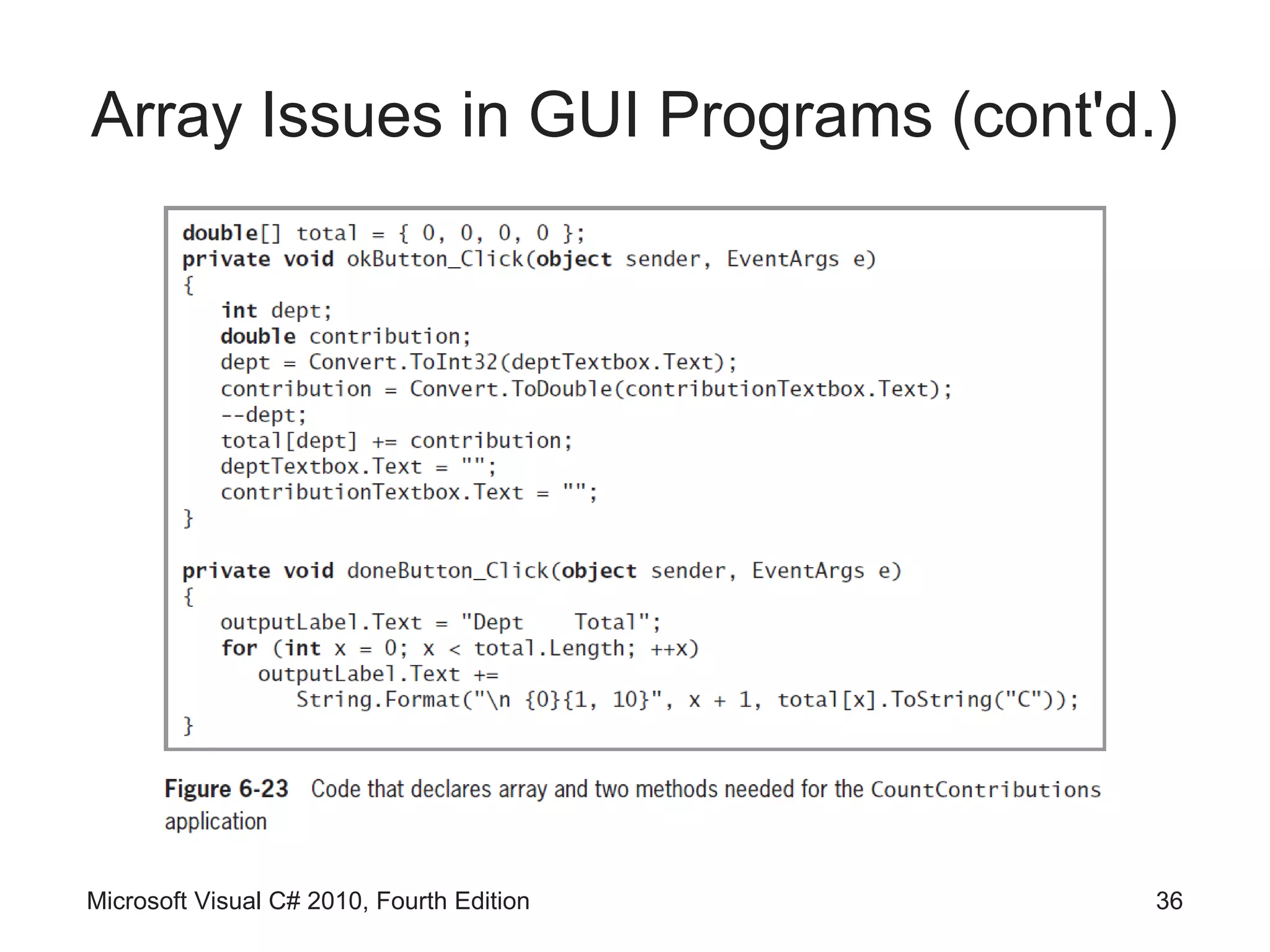
Array Issues in GUI Programs (cont'd.)


Microsoft Visual C# 2010, Fourth Edition   36
You Do It

• Activities to explore
   – Creating and Using an Array
   – Using the Sort() and Reverse() Methods


 Microsoft Visual C# 2010, Fourth Edition         37
Summary
• An array is a list of data items
     – All of which have the same type and the same name
     – Items are distinguished using a subscript or index
• In C#, arrays are objects of a class named
  System.Array
• The power of arrays becomes apparent when you
  begin to use subscripts
• Subscript you use remains in the range of 0
  through length -1


Microsoft Visual C# 2010, Fourth Edition                38
Summary (cont'd.)

• foreach statement cycles through every array
  element without using subscripts
• You can compare a variable to a list of values in an
  array
• You can create parallel arrays to more easily
  perform a range match
• The BinarySearch() method finds a requested
  value in a sorted array
• The Sort() method arranges array items in
  ascending order

Microsoft Visual C# 2010, Fourth Edition             39
Summary (cont'd.)

• The Reverse() method reverses the order of
  items in an array
• Multidimensional arrays require multiple subscripts
  to access the array elements
• Types of multidimensional arrays
     – Two-dimensional arrays (rectangular arrays)
     – Three-dimensional arrays
     – Jagged arrays


Microsoft Visual C# 2010, Fourth Edition             40

Csc153 chapter 06

  • 1.
    Microsoft Visual C#2010 Fourth Edition Chapter 6 Using Arrays
  • 2.
    Objectives • Declare anarray and assign values to array elements • Access array elements • Search an array using a loop • Use the BinarySearch(), Sort(), and Reverse() methods • Use multidimensional arrays • Learn about array issues in GUI programs Microsoft Visual C# 2010, Fourth Edition 2
  • 3.
    Declaring an Arrayand Assigning Values to Array Elements • Array – List of data items that all have the same data type and the same name – Each item is distinguished from the others by an index • Declaring and creating an array double[] sales; sales = new double[20]; • new operator – Used to create objects • You can change the size of an array Microsoft Visual C# 2010, Fourth Edition 3
  • 4.
    Declaring an Arrayand Assigning Values to Array Elements (cont'd.) • Array element – Each object in an array • Subscript (or index) – Integer contained within square brackets that indicates the position of one of an array’s elements – Array’s elements are numbered beginning with 0 • “Off by one” error – Occurs when you forget that the first element in an array is element 0 Microsoft Visual C# 2010, Fourth Edition 4
  • 5.
    Declaring an Arrayand Assigning Values to Array Elements (cont'd.) Microsoft Visual C# 2010, Fourth Edition 5
  • 6.
    Declaring an Arrayand Assigning Values to Array Elements (cont'd.) • Assigning a value to an array element sales[0] = 2100.00; • Printing an element value Console.WriteLine(sales[19]); Microsoft Visual C# 2010, Fourth Edition 6
  • 7.
    Initializing an Array •In C#, arrays are objects – Arrays are instances of a class named System.Array • Initializing objects – Numeric fields: 0 – Character fields: ‘u0000’ or null – bool fields: false • Initializer list – List of values provided for an array Microsoft Visual C# 2010, Fourth Edition 7
  • 8.
    Initializing an Array(cont'd.) • Initializer list examples int[] myScores = new int[5] {100, 76, 88, 100, 90}; int[] myScores = new int[] {100, 76, 88, 100, 90}; int[] myScores = {100, 76, 88, 100, 90}; Microsoft Visual C# 2010, Fourth Edition 8
  • 9.
    Accessing Array Elements •The power of arrays becomes apparent when you use subscripts – Can be variables rather than constant values • Using a loop to perform arithmetic on each element for (int sub = 0; sub < 5; ++sub) myScores[sub] += 3; Microsoft Visual C# 2010, Fourth Edition 9
  • 10.
    Using the LengthProperty • Length property – Member of the System.Array class – Automatically holds an array’s length • Examples int[] myScores = {100, 76, 88, 100, 90}; Console.WriteLine(“Array size is {0}”, myScores.Length); for (int x = 0; x < myScores.Length; ++x) Console.WriteLine(myScores[x]); Microsoft Visual C# 2010, Fourth Edition 10
  • 11.
    Using foreach • foreachstatement – Cycles through every array element without using a subscript – Uses a temporary iteration variable • Automatically holds each array value in turn • Example double[] payRate = {6.00, 7.35, 8.12, 12.45, 22.22}; foreach(double money in payRate) Console.WriteLine(“{0}”, money.ToString(“C”)); Microsoft Visual C# 2010, Fourth Edition 11
  • 12.
    Using foreach (cont'd.) •Used under the following circumstances – When you want to access every array element – Since the iteration variable is read-only • You cannot assign a value to it Microsoft Visual C# 2010, Fourth Edition 12
  • 13.
    Using foreach withEnumerations Microsoft Visual C# 2010, Fourth Edition 13
  • 14.
    Searching an ArrayUsing a Loop • Searching options – Using a for loop – Using a while loop Microsoft Visual C# 2010, Fourth Edition 14
  • 15.
    Using a forLoop to Search an Array • Use a for statement to loop through the array – Set a Boolean variable to true when a match is found • Solution is valid even with parallel arrays Microsoft Visual C# 2010, Fourth Edition 15
  • 16.
    Using a forLoop to Search an Array (cont'd.) Microsoft Visual C# 2010, Fourth Edition 16
  • 17.
    Using a whileLoop to Search an Array • Use a while loop to search for a match Microsoft Visual C# 2010, Fourth Edition 17
  • 18.
    Microsoft Visual C#2010, Fourth Edition 18
  • 19.
    Searching an Arrayfor a Range Match • Range match – Determines the pair of limiting values between which a value falls Microsoft Visual C# 2010, Fourth Edition 19
  • 20.
    Searching an Arrayfor a Range Match (cont'd.) Microsoft Visual C# 2010, Fourth Edition 20
  • 21.
    Using the BinarySearch(), Sort(),and Reverse() Methods • System.Array class contains a variety of useful, built-in methods that can search, sort, and manipulate array elements Microsoft Visual C# 2010, Fourth Edition 21
  • 22.
    Using the BinarySearch()Method • BinarySearch() method – Finds a requested value in a sorted array – Member of the System.Array class • Do not use BinarySearch() under these circumstances – If your array items are not arranged in ascending order – If your array holds duplicate values and you want to find all of them – If you want to find a range match rather than an exact match Microsoft Visual C# 2010, Fourth Edition 22
  • 23.
    Using the BinarySearch()Method (cont'd.) Microsoft Visual C# 2010, Fourth Edition 23
  • 24.
    Using the Sort()Method • Sort() method – Arranges array items in ascending order – Use it by passing the array name to Array.Sort() Microsoft Visual C# 2010, Fourth Edition 24
  • 25.
    Using the Sort()Method (cont'd.) Microsoft Visual C# 2010, Fourth Edition 25
  • 26.
    Using the Reverse()Method • Reverse() method – Reverses the order of items in an array – Element that starts in position 0 is relocated to position Length – 1 – Use it by passing the array name to the method Microsoft Visual C# 2010, Fourth Edition 26
  • 27.
    Using the Reverse()Method (cont'd.) Microsoft Visual C# 2010, Fourth Edition 27
  • 28.
    Using Multidimensional Arrays •One-dimensional or single-dimensional array – Picture as a column of values – Elements can be accessed using a single subscript • Multidimensional arrays – Require multiple subscripts to access the array elements – Two-dimensional arrays • Have two or more columns of values for each row • Also called rectangular array, matrix, or a table Microsoft Visual C# 2010, Fourth Edition 28
  • 29.
    Using Multidimensional Arrays (cont'd.) Microsoft Visual C# 2010, Fourth Edition 29
  • 30.
    Using Multidimensional Arrays (cont'd.) Microsoft Visual C# 2010, Fourth Edition 30
  • 31.
    Using Multidimensional Arrays (cont'd.) Microsoft Visual C# 2010, Fourth Edition 31
  • 32.
    Using Multidimensional Arrays (cont'd.) • Three-dimensional array Microsoft Visual C# 2010, Fourth Edition 32
  • 33.
    Using Multidimensional Arrays (cont'd.) • Jagged array – One-dimensional array in which each element is another one-dimensional array – Each row can be a different length Microsoft Visual C# 2010, Fourth Edition 33
  • 34.
    Using Multidimensional Arrays (cont'd.) Microsoft Visual C# 2010, Fourth Edition 34
  • 35.
    Array Issues inGUI Programs • If array values change based on user input – Array must be stored outside any method that reacts to the user’s event Microsoft Visual C# 2010, Fourth Edition 35
  • 36.
    Array Issues inGUI Programs (cont'd.) Microsoft Visual C# 2010, Fourth Edition 36
  • 37.
    You Do It •Activities to explore – Creating and Using an Array – Using the Sort() and Reverse() Methods Microsoft Visual C# 2010, Fourth Edition 37
  • 38.
    Summary • An arrayis a list of data items – All of which have the same type and the same name – Items are distinguished using a subscript or index • In C#, arrays are objects of a class named System.Array • The power of arrays becomes apparent when you begin to use subscripts • Subscript you use remains in the range of 0 through length -1 Microsoft Visual C# 2010, Fourth Edition 38
  • 39.
    Summary (cont'd.) • foreachstatement cycles through every array element without using subscripts • You can compare a variable to a list of values in an array • You can create parallel arrays to more easily perform a range match • The BinarySearch() method finds a requested value in a sorted array • The Sort() method arranges array items in ascending order Microsoft Visual C# 2010, Fourth Edition 39
  • 40.
    Summary (cont'd.) • TheReverse() method reverses the order of items in an array • Multidimensional arrays require multiple subscripts to access the array elements • Types of multidimensional arrays – Two-dimensional arrays (rectangular arrays) – Three-dimensional arrays – Jagged arrays Microsoft Visual C# 2010, Fourth Edition 40