HY556 - Distributed Systems
Professor: Panagiota Fatourou
Spring 2011
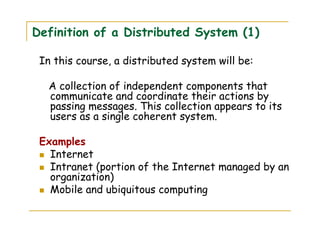
Definition of a Distributed System (1)
In this course, a distributed system will be:
A collection of independent components that
communicate and coordinate their actions by
passing messages. This collection appears to its
users as a single coherent system.
Examples
Internet
Intranet (portion of the Internet managed by an
organization)
Mobile and ubiquitous computing
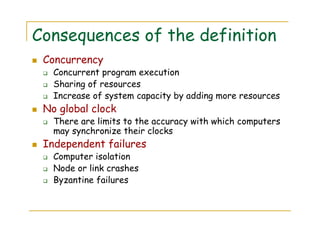
Consequences of the definition
Concurrency
Concurrent program execution
Sharing of resources
Increase of system capacity by adding more resources
No global clock
There are limits to the accuracy with which computers
may synchronize their clocks
Independent failures
Computer isolation
Node or link crashes
Byzantine failures
Resources
The term resource characterizes the
range of things that can usefully be shared
in a distributed system.
Hardware Components
Disks, printers, etc.
Software-defined entities
Files, databases, data objects of all kinds, etc.
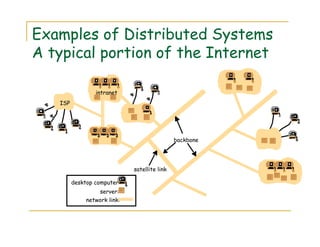
Examples of Distributed Systems
A typical portion of the Internet
intranet
ISP
desktop computer:
backbone
satellite link
server:
¤
network link:
¤
¤
¤
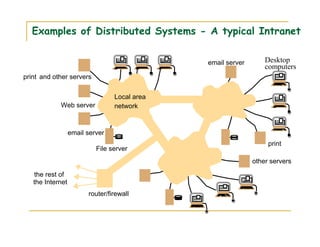
Examples of Distributed Systems - A typical Intranet
the rest of
email server
Web server
Desktop
computers
File server
router/firewall
print and other servers
other servers
print
Local area
network
email server
the Internet
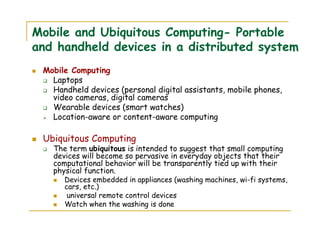
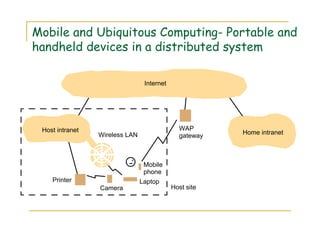
Mobile and Ubiquitous Computing- Portable
and handheld devices in a distributed system
Mobile Computing
Laptops
Handheld devices (personal digital assistants, mobile phones,
video cameras, digital cameras
Wearable devices (smart watches)
Location-aware or content-aware computing
Ubiquitous Computing
The term ubiquitous is intended to suggest that small computing
devices will become so pervasive in everyday objects that their
computational behavior will be transparently tied up with their
physical function.
Devices embedded in appliances (washing machines, wi-fi systems,
cars, etc.)
universal remote control devices
Watch when the washing is done
Mobile and Ubiquitous Computing- Portable and
handheld devices in a distributed system
Laptop
Mobile
Printer
Camera
Internet
Host intranet Home intranet
WAP
Wireless LAN
phone
gateway
Host site
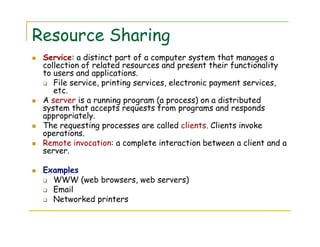
Resource Sharing
Service: a distinct part of a computer system that manages a
collection of related resources and present their functionality
to users and applications.
File service, printing services, electronic payment services,
etc.
A server is a running program (a process) on a distributed
system that accepts requests from programs and responds
appropriately.
The requesting processes are called clients. Clients invoke
operations.
Remote invocation: a complete interaction between a client and a
server.
Examples
WWW (web browsers, web servers)
Email
Networked printers
World Wide Web
WWW allows to the user
to retrieve and view documents of many types (audio,
video, etc.)
to interact with an unlimited set of services
Hypertext structure
links (hyperlinks) from documents to other documents
Open system
Operation is based on communication standards and
document standards that are freely published and well
implemented.
(many types of browsers, many types of servers, etc.)
Open to the types of resources that can be published or
shared on it
New-image formats can be supported
(helper applications and plug-ins)
World Wide Web
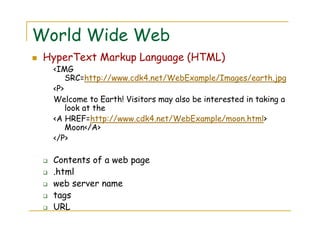
HyperText Markup Language (HTML)
<IMG
SRC=http://www.cdk4.net/WebExample/Images/earth.jpg
<P>
Welcome to Earth! Visitors may also be interested in taking a
look at the
<A HREF=http://www.cdk4.net/WebExample/moon.html>
Moon</A>
</P>
Contents of a web page
.html
web server name
tags
URL
World Wide Web
Uniform Resource Locators (URLs)
Every URL has two top-level components
Scheme: scheme-specific-identifier
Common schemes: mailto:, ftp:, http:, nntp: (a Usenet
newsgroup), mid: (e-mail message)
New types of resources can be added
<name of new-type of resource>: (a protocol is needed
for accessing the new type of resources -> add a
plug-in: gives the capability to a browser to use the
new protocol
Web servers and web browsers
Internet
BrowsersWeb servers
www.google.com
www.cdk3.net
www.w3c.org
Protocols
Activity.html
http://www.w3c.org/Protocols/Activity.html
http://www.google.comlsearch?q=kindberg
http://www.cdk3.net/
File system of
www.w3c.org
http://servername[:port] [/pathname] [?query] [#fragment]
~username, ~/public_html, index.html
World Wide Web
Client-server system with standard rules for
interaction (HyperText Transfer Protocol-HTTP)
Request-reply interaction
Content types
Not all browsers manage all types of content
Browsers include a list of the type of contents they are
interested in when they issue a request
The server includes the content type in the reply message
(the strings that denote the content type are called MIME
types -> standardized
One resource per request
Simple access control
World Wide Web
Dynamic pages (forms)
URL designates a program on the server
Common Gateway Interface (CGI): program that web
servers run to generate content for their clients
Java-scripts (are downloaded with a web form to
provide better-quality interaction with the user)
Applet: is of more general functionality than Java-
scripts. Applets are downloaded automatically and run
when the browser fetches a corresponding web page.
May access the network
provide customized user interfaces
JAVA based
World Wide Web
Dangling links
Users often get lost in the hyperspace
Search engines
Scalability issues for popular web servers
Challenges - Heterogeneity
Heterogeneity applies to all of the following:
Networks
Use Internet protocols for communication
Computer hardware
Data types may be represented in different ways on
different sorts of hardware
Operating systems
The interface for implementing the internet protocol is
not the same (messages in Unix or in Windows)
Programming languages
Different representations for characters and data
structures (arrays, structs, etc.)
Implementations by different developers
Standards need to be agreed and adopted
Challenges - Heterogeneity
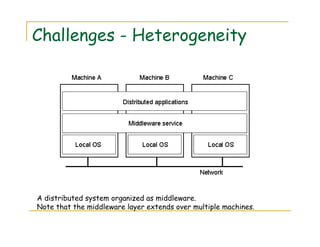
Middleware
A software layer that provides a
programming abstraction as well as
masking the heterogeneity of the
underlying networks, hardware, operating
systems and programming languages.
CORBA (Common Object Request Broker)
Implemented over the Internet protocols
Provides a uniform computational model for use
by the programmers of servers and distributed
applications.
Challenges - Heterogeneity
A distributed system organized as middleware.
Note that the middleware layer extends over multiple machines.
Challenges - Heterogeneity
Mobile Code
Applets
Virtual Machine
Provides a way of making code executable on any
hardware
The compiler generates code for a virtual machine (of a
particular language) instead of hardware order code
The virtual machine of the language needs to be
implemented once for each type of hardware to enable
programs to run.
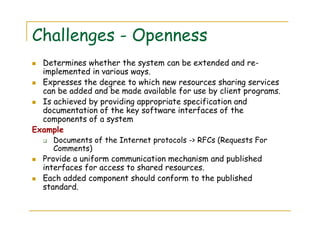
Challenges - Openness
Determines whether the system can be extended and re-
implemented in various ways.
Expresses the degree to which new resources sharing services
can be added and be made available for use by client programs.
Is achieved by providing appropriate specification and
documentation of the key software interfaces of the
components of a system
Example
Documents of the Internet protocols -> RFCs (Requests For
Comments)
Provide a uniform communication mechanism and published
interfaces for access to shared resources.
Each added component should conform to the published
standard.
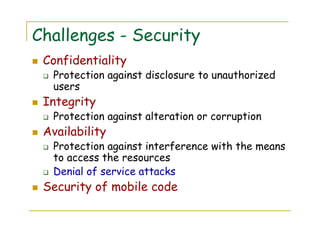
Challenges - Security
Confidentiality
Protection against disclosure to unauthorized
users
Integrity
Protection against alteration or corruption
Availability
Protection against interference with the means
to access the resources
Denial of service attacks
Security of mobile code
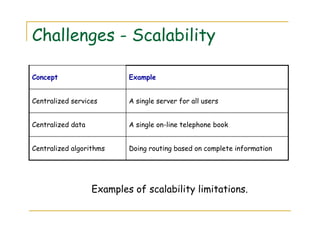
Challenges - Scalability
Doing routing based on complete informationCentralized algorithms
A single on-line telephone bookCentralized data
A single server for all usersCentralized services
ExampleConcept
Examples of scalability limitations.
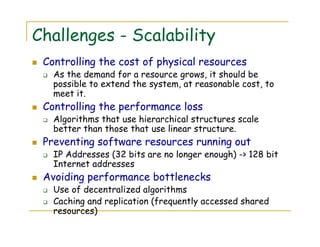
Challenges - Scalability
Controlling the cost of physical resources
As the demand for a resource grows, it should be
possible to extend the system, at reasonable cost, to
meet it.
Controlling the performance loss
Algorithms that use hierarchical structures scale
better than those that use linear structure.
Preventing software resources running out
IP Addresses (32 bits are no longer enough) -> 128 bit
Internet addresses
Avoiding performance bottlenecks
Use of decentralized algorithms
Caching and replication (frequently accessed shared
resources)
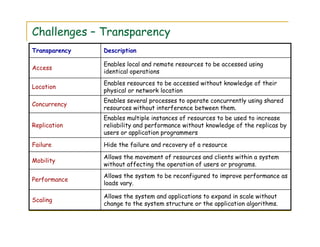
Challenges – Transparency
Hide the failure and recovery of a resourceFailure
Enables multiple instances of resources to be used to increase
reliability and performance without knowledge of the replicas by
users or application programmers
Replication
Enables several processes to operate concurrently using shared
resources without interference between them.
Concurrency
Allows the system and applications to expand in scale without
change to the system structure or the application algorithms.
Scaling
Allows the system to be reconfigured to improve performance as
loads vary.
Performance
Allows the movement of resources and clients within a system
without affecting the operation of users or programs.
Mobility
Enables resources to be accessed without knowledge of their
physical or network location
Location
Enables local and remote resources to be accessed using
identical operations
Access
DescriptionTransparency
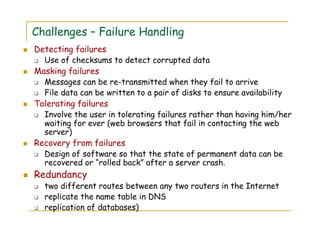
Challenges – Failure Handling
Detecting failures
Use of checksums to detect corrupted data
Masking failures
Messages can be re-transmitted when they fail to arrive
File data can be written to a pair of disks to ensure availability
Tolerating failures
Involve the user in tolerating failures rather than having him/her
waiting for ever (web browsers that fail in contacting the web
server)
Recovery from failures
Design of software so that the state of permanent data can be
recovered or “rolled back” after a server crash.
Redundancy
two different routes between any two routers in the Internet
replicate the name table in DNS
replication of databases)
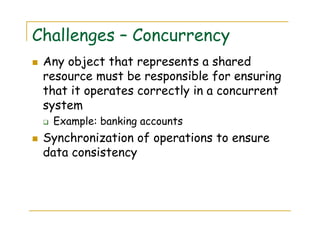
Challenges – Concurrency
Any object that represents a shared
resource must be responsible for ensuring
that it operates correctly in a concurrent
system
Example: banking accounts
Synchronization of operations to ensure
data consistency
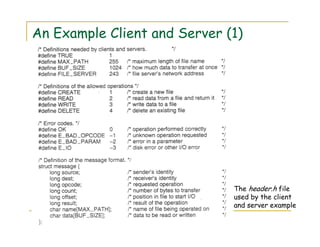
An Example Client and Server (1)
The header.h file
used by the client
and server example
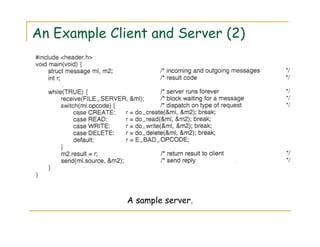
An Example Client and Server (2)
A sample server.
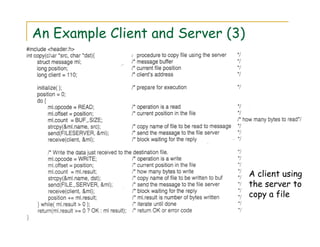
An Example Client and Server (3)
1-27 b
A client using
the server to
copy a file

Cs556 section1

  • 1.
    HY556 - DistributedSystems Professor: Panagiota Fatourou Spring 2011
  • 2.
    Definition of aDistributed System (1) In this course, a distributed system will be: A collection of independent components that communicate and coordinate their actions by passing messages. This collection appears to its users as a single coherent system. Examples Internet Intranet (portion of the Internet managed by an organization) Mobile and ubiquitous computing
  • 3.
    Consequences of thedefinition Concurrency Concurrent program execution Sharing of resources Increase of system capacity by adding more resources No global clock There are limits to the accuracy with which computers may synchronize their clocks Independent failures Computer isolation Node or link crashes Byzantine failures
  • 4.
    Resources The term resourcecharacterizes the range of things that can usefully be shared in a distributed system. Hardware Components Disks, printers, etc. Software-defined entities Files, databases, data objects of all kinds, etc.
  • 5.
    Examples of DistributedSystems A typical portion of the Internet intranet ISP desktop computer: backbone satellite link server: ¤ network link: ¤ ¤ ¤
  • 6.
    Examples of DistributedSystems - A typical Intranet the rest of email server Web server Desktop computers File server router/firewall print and other servers other servers print Local area network email server the Internet
  • 7.
    Mobile and UbiquitousComputing- Portable and handheld devices in a distributed system Mobile Computing Laptops Handheld devices (personal digital assistants, mobile phones, video cameras, digital cameras Wearable devices (smart watches) Location-aware or content-aware computing Ubiquitous Computing The term ubiquitous is intended to suggest that small computing devices will become so pervasive in everyday objects that their computational behavior will be transparently tied up with their physical function. Devices embedded in appliances (washing machines, wi-fi systems, cars, etc.) universal remote control devices Watch when the washing is done
  • 8.
    Mobile and UbiquitousComputing- Portable and handheld devices in a distributed system Laptop Mobile Printer Camera Internet Host intranet Home intranet WAP Wireless LAN phone gateway Host site
  • 9.
    Resource Sharing Service: adistinct part of a computer system that manages a collection of related resources and present their functionality to users and applications. File service, printing services, electronic payment services, etc. A server is a running program (a process) on a distributed system that accepts requests from programs and responds appropriately. The requesting processes are called clients. Clients invoke operations. Remote invocation: a complete interaction between a client and a server. Examples WWW (web browsers, web servers) Email Networked printers
  • 10.
    World Wide Web WWWallows to the user to retrieve and view documents of many types (audio, video, etc.) to interact with an unlimited set of services Hypertext structure links (hyperlinks) from documents to other documents Open system Operation is based on communication standards and document standards that are freely published and well implemented. (many types of browsers, many types of servers, etc.) Open to the types of resources that can be published or shared on it New-image formats can be supported (helper applications and plug-ins)
  • 11.
    World Wide Web HyperTextMarkup Language (HTML) <IMG SRC=http://www.cdk4.net/WebExample/Images/earth.jpg <P> Welcome to Earth! Visitors may also be interested in taking a look at the <A HREF=http://www.cdk4.net/WebExample/moon.html> Moon</A> </P> Contents of a web page .html web server name tags URL
  • 12.
    World Wide Web UniformResource Locators (URLs) Every URL has two top-level components Scheme: scheme-specific-identifier Common schemes: mailto:, ftp:, http:, nntp: (a Usenet newsgroup), mid: (e-mail message) New types of resources can be added <name of new-type of resource>: (a protocol is needed for accessing the new type of resources -> add a plug-in: gives the capability to a browser to use the new protocol
  • 13.
    Web servers andweb browsers Internet BrowsersWeb servers www.google.com www.cdk3.net www.w3c.org Protocols Activity.html http://www.w3c.org/Protocols/Activity.html http://www.google.comlsearch?q=kindberg http://www.cdk3.net/ File system of www.w3c.org http://servername[:port] [/pathname] [?query] [#fragment] ~username, ~/public_html, index.html
  • 14.
    World Wide Web Client-serversystem with standard rules for interaction (HyperText Transfer Protocol-HTTP) Request-reply interaction Content types Not all browsers manage all types of content Browsers include a list of the type of contents they are interested in when they issue a request The server includes the content type in the reply message (the strings that denote the content type are called MIME types -> standardized One resource per request Simple access control
  • 15.
    World Wide Web Dynamicpages (forms) URL designates a program on the server Common Gateway Interface (CGI): program that web servers run to generate content for their clients Java-scripts (are downloaded with a web form to provide better-quality interaction with the user) Applet: is of more general functionality than Java- scripts. Applets are downloaded automatically and run when the browser fetches a corresponding web page. May access the network provide customized user interfaces JAVA based
  • 16.
    World Wide Web Danglinglinks Users often get lost in the hyperspace Search engines Scalability issues for popular web servers
  • 17.
    Challenges - Heterogeneity Heterogeneityapplies to all of the following: Networks Use Internet protocols for communication Computer hardware Data types may be represented in different ways on different sorts of hardware Operating systems The interface for implementing the internet protocol is not the same (messages in Unix or in Windows) Programming languages Different representations for characters and data structures (arrays, structs, etc.) Implementations by different developers Standards need to be agreed and adopted
  • 18.
    Challenges - Heterogeneity Middleware Asoftware layer that provides a programming abstraction as well as masking the heterogeneity of the underlying networks, hardware, operating systems and programming languages. CORBA (Common Object Request Broker) Implemented over the Internet protocols Provides a uniform computational model for use by the programmers of servers and distributed applications.
  • 19.
    Challenges - Heterogeneity Adistributed system organized as middleware. Note that the middleware layer extends over multiple machines.
  • 20.
    Challenges - Heterogeneity MobileCode Applets Virtual Machine Provides a way of making code executable on any hardware The compiler generates code for a virtual machine (of a particular language) instead of hardware order code The virtual machine of the language needs to be implemented once for each type of hardware to enable programs to run.
  • 21.
    Challenges - Openness Determineswhether the system can be extended and re- implemented in various ways. Expresses the degree to which new resources sharing services can be added and be made available for use by client programs. Is achieved by providing appropriate specification and documentation of the key software interfaces of the components of a system Example Documents of the Internet protocols -> RFCs (Requests For Comments) Provide a uniform communication mechanism and published interfaces for access to shared resources. Each added component should conform to the published standard.
  • 22.
    Challenges - Security Confidentiality Protectionagainst disclosure to unauthorized users Integrity Protection against alteration or corruption Availability Protection against interference with the means to access the resources Denial of service attacks Security of mobile code
  • 23.
    Challenges - Scalability Doingrouting based on complete informationCentralized algorithms A single on-line telephone bookCentralized data A single server for all usersCentralized services ExampleConcept Examples of scalability limitations.
  • 24.
    Challenges - Scalability Controllingthe cost of physical resources As the demand for a resource grows, it should be possible to extend the system, at reasonable cost, to meet it. Controlling the performance loss Algorithms that use hierarchical structures scale better than those that use linear structure. Preventing software resources running out IP Addresses (32 bits are no longer enough) -> 128 bit Internet addresses Avoiding performance bottlenecks Use of decentralized algorithms Caching and replication (frequently accessed shared resources)
  • 25.
    Challenges – Transparency Hidethe failure and recovery of a resourceFailure Enables multiple instances of resources to be used to increase reliability and performance without knowledge of the replicas by users or application programmers Replication Enables several processes to operate concurrently using shared resources without interference between them. Concurrency Allows the system and applications to expand in scale without change to the system structure or the application algorithms. Scaling Allows the system to be reconfigured to improve performance as loads vary. Performance Allows the movement of resources and clients within a system without affecting the operation of users or programs. Mobility Enables resources to be accessed without knowledge of their physical or network location Location Enables local and remote resources to be accessed using identical operations Access DescriptionTransparency
  • 26.
    Challenges – FailureHandling Detecting failures Use of checksums to detect corrupted data Masking failures Messages can be re-transmitted when they fail to arrive File data can be written to a pair of disks to ensure availability Tolerating failures Involve the user in tolerating failures rather than having him/her waiting for ever (web browsers that fail in contacting the web server) Recovery from failures Design of software so that the state of permanent data can be recovered or “rolled back” after a server crash. Redundancy two different routes between any two routers in the Internet replicate the name table in DNS replication of databases)
  • 27.
    Challenges – Concurrency Anyobject that represents a shared resource must be responsible for ensuring that it operates correctly in a concurrent system Example: banking accounts Synchronization of operations to ensure data consistency
  • 28.
    An Example Clientand Server (1) The header.h file used by the client and server example
  • 29.
    An Example Clientand Server (2) A sample server.
  • 30.
    An Example Clientand Server (3) 1-27 b A client using the server to copy a file