Thank you for Joining!
The Webinar will begin shortly.
Presented by:
#CVRtips
Cross-Validation Rules:
Tips to Optimize your GL
#CVRtips
Webinar Mechanics
• Submit text questions.
• Q&A addressed at the end of the session and posted on LinkedIn.
• Everyone will receive an email with a link to view a recorded version of
today’s session.
• Polling questions will be presented during the session. If you want CPE
credit for this webinar, you must answer all of the polling questions.
4 ©2020 eprentise. All rights reserved.
Who Is eprentise?
In 2007 eprentise was founded
on its original product, FlexField
 Enables customers to make
unprecedented changes to their financial
chart of accounts while maintaining
transactional history and data integrity.
In 2009 we introduced our Consolidation,
Divestiture, and Reorganization products
 Transformational software which can copy, change, filter, or
merge all elements of Oracle EBS financial systems to
address ever-changing business needs, such as regulatory
compliance and growth opportunities.
In 2020 we are expanding to new markets with our C Collection
analytics suite, and our Audit Automation software
 Automated Audit provides internal auditors and
the finance team with drill-down data from a
balance sheet report into the transaction-level
detail. The software covers hundreds of
substantive procedures for the entire enterprise
domain and builds in consistent audit processes
and workflows across the organization.
 C Collection analytics provides transparency
and identifies potential problem areas with
transactional data. This allows users to
reduce costs, leverage opportunities across
the enterprise, improve business processes,
and increase the confidence level of the users
in their data, processes, and operations.
Transformation to Optimization
One-time usage to subscription model
5 ©2020 eprentise. All rights reserved.
Objective 1: Learn how cross-validation rules work in
Oracle E-Business Suite.
Objective 2: Learn how to set up cross validation rules.
Objective 3: Learn how a good chart of accounts design
reduces the need for complex cross-validation
rules.
Objective 4: Understand the importance of ranges in
designing cross-validation rules.
Learning Objectives
6 ©2020 eprentise. All rights reserved.
 Cross-validation Rules Overview
 Introduction
 Chart of Accounts Basics
 Cross-validation Rule Setup
 Defining and Creating Your Rules
 Optimizing Cross-validation Rules
 Chart of Accounts Design
 Logical Ranges
 Data and Information Segmentation
 Seven Criteria for Designing Good Cross-validation Rules
Agenda
7 ©2020 eprentise. All rights reserved.
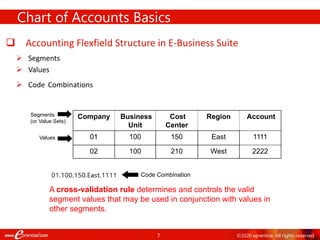
 Accounting Flexfield Structure in E-Business Suite
 Segments
 Values
 Code Combinations
Chart of Accounts Basics
Company Business
Unit
Cost
Center
Region Account
01 100 150 East 1111
02 100 210 West 2222
Segments
(or Value Sets)
Values
Code Combination
A cross-validation rule determines and controls the valid
segment values that may be used in conjunction with values in
other segments.
8 ©2020 eprentise. All rights reserved.
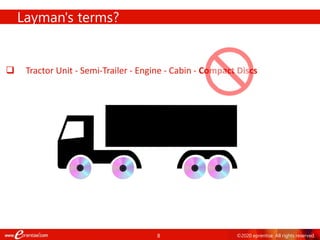
 Tractor Unit - Semi-Trailer - Engine - Cabin - Compact Discs
Layman's terms?
9 ©2020 eprentise. All rights reserved.
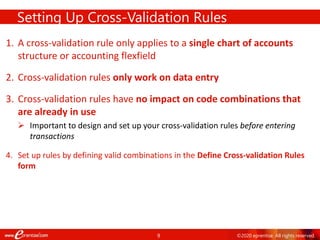
1. A cross-validation rule only applies to a single chart of accounts
structure or accounting flexfield
2. Cross-validation rules only work on data entry
3. Cross-validation rules have no impact on code combinations that
are already in use
 Important to design and set up your cross-validation rules before entering
transactions
4. Set up rules by defining valid combinations in the Define Cross-validation Rules
form
Setting Up Cross-Validation Rules
10 ©2020 eprentise. All rights reserved.
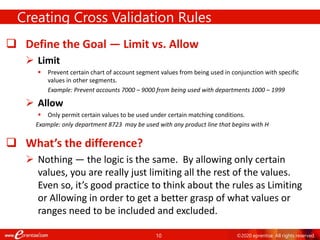
 Define the Goal — Limit vs. Allow
 Limit
 Prevent certain chart of account segment values from being used in conjunction with specific
values in other segments.
Example: Prevent accounts 7000 – 9000 from being used with departments 1000 – 1999
 Allow
 Only permit certain values to be used under certain matching conditions.
Example: only department 8723 may be used with any product line that begins with H
 What’s the difference?
 Nothing — the logic is the same. By allowing only certain
values, you are really just limiting all the rest of the values.
Even so, it’s good practice to think about the rules as Limiting
or Allowing in order to get a better grasp of what values or
ranges need to be included and excluded.
Creating Cross Validation Rules
11 ©2020 eprentise. All rights reserved.
POLL QUESTION #1
12 ©2020 eprentise. All rights reserved.
CVR Elements (or Statements)
The first part of setting up your rule is defining the cross-validation
rule elements, or statements.
• Include element
– First create an Include element that includes the entire range of values for each
segment. Every cross-validation rule must include at least one Include element.
• Exclude element(s)
– Next create any necessary Exclude elements that place limits on the values that
can be used. Exclude elements override Include elements.
Always start with a global Inclusion – then move on to Exclusions.
13 ©2020 eprentise. All rights reserved.
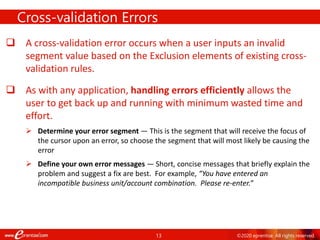
 A cross-validation error occurs when a user inputs an invalid
segment value based on the Exclusion elements of existing cross-
validation rules.
 As with any application, handling errors efficiently allows the
user to get back up and running with minimum wasted time and
effort.
 Determine your error segment — This is the segment that will receive the focus of
the cursor upon an error, so choose the segment that will most likely be causing the
error
 Define your own error messages — Short, concise messages that briefly explain the
problem and suggest a fix are best. For example, “You have entered an
incompatible business unit/account combination. Please re-enter.”
Cross-validation Errors
14 ©2020 eprentise. All rights reserved.
Defining Rules in the Form
General Ledger General Ledger
CV_REVENUE_SEGMENT No revenue accounts between 30000 and 40000 for balance
sheet departments between 1000 and 1999
Include
Exclude 000.1000.30000.000.000
000.0000.00000.000.000 999.9999.99999.ZZZ.999
999.1999.40000.ZZZ.999
CV_REVENUE_001: Please choose a valid department outside of 1000-1999 for revenue account
Department 1000 1999
15 ©2020 eprentise. All rights reserved.
We’ll use the following five-segment Accounting Flexfield in the
examples that follow:
Example COA Structure & Values
Company Department Account Product Line Intercompany
3 digits Numeric 4 digits
Numeric
5 digits
Numeric
3 digits
Alphanumeric
3 digits
Numeric
Example
Values
001 US Holding
Co
1010 Administrative 40000 Revenue C99 CPUs 001 US Holding
Co
010 ABC Hard
Drives, Ltd.
5042 Consulting 20000 Liabilities D47 Internal
Hard
drives
010 ABC
Solutions,
Ltd.
320 DEF
Systems,
LLC
7640 Repair and
Maintenance-
Internal Hard
Drives
50013 Expenses
Replacement
parts for
Internal Hard
Drives
M50 Memory 320 DEF
Systems,
LLC
731 GHI
Enterprises,
Inc.
2020 Finance 35000 Sales -
Hardware
S10 Installation
Services
731 GHI
Enterprises,
Inc.
16 ©2020 eprentise. All rights reserved.
 Goal — Prevent revenue account values between 30000 and
40000 from being used with balance sheet department values
between 1000 and 1999.
 Elements: Global Include, single Exclude
 Error segment: Department
CVR Example 1
1
6
17 ©2020 eprentise. All rights reserved.
CVR Example 2
 Goal — Only department 7640 is permitted for use with any product line that
starts with S.
 Elements: Global Include, three Excludes
 Error segment: Department
This exclude statement prevents the departments below
7640 from using any product line that starts with anything
below S:
This exclude statement prevents the departments above
7640 from using any product line that starts with anything
below S:
This exclude statement prevents the departments below 7640
from using any product line that starts with anything above S:
| 17
18 ©2020 eprentise. All rights reserved.
19 ©2020 eprentise. All rights reserved.
POLL QUESTION #2
20 ©2020 eprentise. All rights reserved.
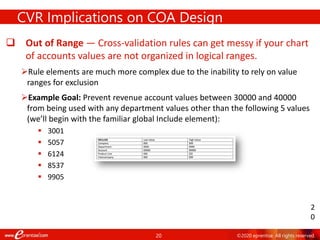
 Out of Range — Cross-validation rules can get messy if your chart
of accounts values are not organized in logical ranges.
Rule elements are much more complex due to the inability to rely on value
ranges for exclusion
Example Goal: Prevent revenue account values between 30000 and 40000
from being used with any department values other than the following 5 values
(we’ll begin with the familiar global Include element):
 3001
 5057
 6124
 8537
 9905
CVR Implications on COA Design
2
0
21 ©2020 eprentise. All rights reserved.
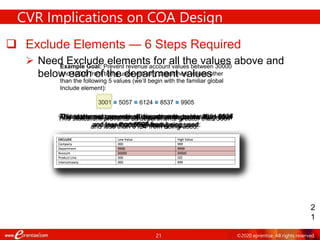
Example Goal: Prevent revenue account values between 30000
and 40000 from being used with any department values other
than the following 5 values (we’ll begin with the familiar global
Include element):
3001  5057  6124  8537  9905
 Exclude Elements — 6 Steps Required
 Need Exclude elements for all the values above and
below each of the department values
CVR Implications on COA Design
2
1
This statement prevents all departments greater than 3001
and less than 5057 from being used:
This statement prevents all departments below 3001 from
being used:
This statement prevents all departments greater than 5057
and less than 6124 from being used:
This statement prevents all departments greater than 6124
and less than 8537 from being used:
This statement prevents all departments greater than 8537
and less than 9905 from being used:
And finally, this statement prevents all departments greater
than 9905 from being used:
22 ©2020 eprentise. All rights reserved.
CVR Implications on COA Design
2
2
23 ©2020 eprentise. All rights reserved.
 Trying to include more than two segments in a cross-validation
rule is too complex and leads to even more required Exclude
elements.
 Soon, you’re at thousands of rules to maintain
 It’s easy to steer clear of this problem by adhering to best
practices when designing your chart of accounts
 Ranges
 One type of data in one (and only one) segment
 Similar data in only one segment
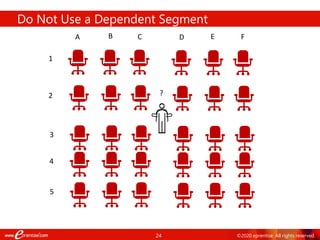
 Do not implement a dependent segment
Best Practices
24 ©2020 eprentise. All rights reserved.
Do Not Use a Dependent Segment
A B C D E F
1
2
3
?
4
5
25 ©2020 eprentise. All rights reserved.
 Review existing key flexfields when you update your cross-
validation rules to maintain consistent validation.
 Regardless of your current validation rules, GL accepts a key flexfield combination if the
combination already exists and is enabled.
 Maintenance Suggestions:
 Decide upon your cross-validation rules when you first set up your key flexfield
structure.
 Review existing combinations and disable any combinations that do not match the
criteria of your new rules.
Maintaining Your CV Rules and Valid Combinations
26 ©2020 eprentise. All rights reserved.
Reports for Checking Cross-validation Rules:
Cross-Validation Rules Listing Report
This report lists all the cross-validation rules that exist for a
particular flexfield structure. This is the information you
define using the Define Cross-Validation Rules form presented
in a multiple-rule format you can review and keep for your
records for a given flexfield structure.
Cross-Validation Rule Violation Report
This report provides a listing of all the previously-created
flexfield combinations that violate your cross-validation rules.
You can also choose to have the report program actually
disable the existing combinations that violate your new rules.
Available Reports
27 ©2020 eprentise. All rights reserved.
POLL QUESTION #3
28 ©2020 eprentise. All rights reserved.
1. Design your chart of accounts with cross-validation rules in mind.
2. Start each rule with an Include statement that includes the entire range of
values.
3. Limit each rule to only 2 segments.
4. Make your error messages very descriptive so that when a user gets an
error, he or she understands what changes need to be made to the
entered code combination.
5. Use several simple rules rather than one complex rule.
6. Start your Cross-validation Error Messages with CV so that the user
knows that the combination is failing because of a Cross-validation rule
(as opposed to a security rule, or an end-dated value) when they get the
error message.
7. Use a single chart of accounts for all your operations. This greatly reduces the
number of cross-validation rules necessary.
Seven Criteria for an Optimized CVR Design
2
8
 Keep values in ranges
 Put similar data in only one segment, and keep each
segment for only one type of data
 Use alphanumerics only when necessary
 Do not implement a dependent segment
29 ©2020 eprentise. All rights reserved.
Thank You!
- One World, One System, A Single Source of Truth -
Harrison Figura
Product Director
hfigura@eprentise.com
Hosted by eprentise®
Questions and Responses shared on EBS Answers:
linkedin.com/groups/4683349/
www.eprentise.com | www.AgilityByDesign.com | www.CrystallizeAnalytics.com
#CVRtips

Cross-Validation Rules: Tips to Optimize your GL

  • 1.
    Thank you forJoining! The Webinar will begin shortly. Presented by: #CVRtips
  • 2.
    Cross-Validation Rules: Tips toOptimize your GL #CVRtips
  • 3.
    Webinar Mechanics • Submittext questions. • Q&A addressed at the end of the session and posted on LinkedIn. • Everyone will receive an email with a link to view a recorded version of today’s session. • Polling questions will be presented during the session. If you want CPE credit for this webinar, you must answer all of the polling questions.
  • 4.
    4 ©2020 eprentise.All rights reserved. Who Is eprentise? In 2007 eprentise was founded on its original product, FlexField  Enables customers to make unprecedented changes to their financial chart of accounts while maintaining transactional history and data integrity. In 2009 we introduced our Consolidation, Divestiture, and Reorganization products  Transformational software which can copy, change, filter, or merge all elements of Oracle EBS financial systems to address ever-changing business needs, such as regulatory compliance and growth opportunities. In 2020 we are expanding to new markets with our C Collection analytics suite, and our Audit Automation software  Automated Audit provides internal auditors and the finance team with drill-down data from a balance sheet report into the transaction-level detail. The software covers hundreds of substantive procedures for the entire enterprise domain and builds in consistent audit processes and workflows across the organization.  C Collection analytics provides transparency and identifies potential problem areas with transactional data. This allows users to reduce costs, leverage opportunities across the enterprise, improve business processes, and increase the confidence level of the users in their data, processes, and operations. Transformation to Optimization One-time usage to subscription model
  • 5.
    5 ©2020 eprentise.All rights reserved. Objective 1: Learn how cross-validation rules work in Oracle E-Business Suite. Objective 2: Learn how to set up cross validation rules. Objective 3: Learn how a good chart of accounts design reduces the need for complex cross-validation rules. Objective 4: Understand the importance of ranges in designing cross-validation rules. Learning Objectives
  • 6.
    6 ©2020 eprentise.All rights reserved.  Cross-validation Rules Overview  Introduction  Chart of Accounts Basics  Cross-validation Rule Setup  Defining and Creating Your Rules  Optimizing Cross-validation Rules  Chart of Accounts Design  Logical Ranges  Data and Information Segmentation  Seven Criteria for Designing Good Cross-validation Rules Agenda
  • 7.
    7 ©2020 eprentise.All rights reserved.  Accounting Flexfield Structure in E-Business Suite  Segments  Values  Code Combinations Chart of Accounts Basics Company Business Unit Cost Center Region Account 01 100 150 East 1111 02 100 210 West 2222 Segments (or Value Sets) Values Code Combination A cross-validation rule determines and controls the valid segment values that may be used in conjunction with values in other segments.
  • 8.
    8 ©2020 eprentise.All rights reserved.  Tractor Unit - Semi-Trailer - Engine - Cabin - Compact Discs Layman's terms?
  • 9.
    9 ©2020 eprentise.All rights reserved. 1. A cross-validation rule only applies to a single chart of accounts structure or accounting flexfield 2. Cross-validation rules only work on data entry 3. Cross-validation rules have no impact on code combinations that are already in use  Important to design and set up your cross-validation rules before entering transactions 4. Set up rules by defining valid combinations in the Define Cross-validation Rules form Setting Up Cross-Validation Rules
  • 10.
    10 ©2020 eprentise.All rights reserved.  Define the Goal — Limit vs. Allow  Limit  Prevent certain chart of account segment values from being used in conjunction with specific values in other segments. Example: Prevent accounts 7000 – 9000 from being used with departments 1000 – 1999  Allow  Only permit certain values to be used under certain matching conditions. Example: only department 8723 may be used with any product line that begins with H  What’s the difference?  Nothing — the logic is the same. By allowing only certain values, you are really just limiting all the rest of the values. Even so, it’s good practice to think about the rules as Limiting or Allowing in order to get a better grasp of what values or ranges need to be included and excluded. Creating Cross Validation Rules
  • 11.
    11 ©2020 eprentise.All rights reserved. POLL QUESTION #1
  • 12.
    12 ©2020 eprentise.All rights reserved. CVR Elements (or Statements) The first part of setting up your rule is defining the cross-validation rule elements, or statements. • Include element – First create an Include element that includes the entire range of values for each segment. Every cross-validation rule must include at least one Include element. • Exclude element(s) – Next create any necessary Exclude elements that place limits on the values that can be used. Exclude elements override Include elements. Always start with a global Inclusion – then move on to Exclusions.
  • 13.
    13 ©2020 eprentise.All rights reserved.  A cross-validation error occurs when a user inputs an invalid segment value based on the Exclusion elements of existing cross- validation rules.  As with any application, handling errors efficiently allows the user to get back up and running with minimum wasted time and effort.  Determine your error segment — This is the segment that will receive the focus of the cursor upon an error, so choose the segment that will most likely be causing the error  Define your own error messages — Short, concise messages that briefly explain the problem and suggest a fix are best. For example, “You have entered an incompatible business unit/account combination. Please re-enter.” Cross-validation Errors
  • 14.
    14 ©2020 eprentise.All rights reserved. Defining Rules in the Form General Ledger General Ledger General Ledger General Ledger CV_REVENUE_SEGMENT No revenue accounts between 30000 and 40000 for balance sheet departments between 1000 and 1999 Include Exclude 000.1000.30000.000.000 000.0000.00000.000.000 999.9999.99999.ZZZ.999 999.1999.40000.ZZZ.999 CV_REVENUE_001: Please choose a valid department outside of 1000-1999 for revenue account Department 1000 1999
  • 15.
    15 ©2020 eprentise.All rights reserved. We’ll use the following five-segment Accounting Flexfield in the examples that follow: Example COA Structure & Values Company Department Account Product Line Intercompany 3 digits Numeric 4 digits Numeric 5 digits Numeric 3 digits Alphanumeric 3 digits Numeric Example Values 001 US Holding Co 1010 Administrative 40000 Revenue C99 CPUs 001 US Holding Co 010 ABC Hard Drives, Ltd. 5042 Consulting 20000 Liabilities D47 Internal Hard drives 010 ABC Solutions, Ltd. 320 DEF Systems, LLC 7640 Repair and Maintenance- Internal Hard Drives 50013 Expenses Replacement parts for Internal Hard Drives M50 Memory 320 DEF Systems, LLC 731 GHI Enterprises, Inc. 2020 Finance 35000 Sales - Hardware S10 Installation Services 731 GHI Enterprises, Inc.
  • 16.
    16 ©2020 eprentise.All rights reserved.  Goal — Prevent revenue account values between 30000 and 40000 from being used with balance sheet department values between 1000 and 1999.  Elements: Global Include, single Exclude  Error segment: Department CVR Example 1 1 6
  • 17.
    17 ©2020 eprentise.All rights reserved. CVR Example 2  Goal — Only department 7640 is permitted for use with any product line that starts with S.  Elements: Global Include, three Excludes  Error segment: Department This exclude statement prevents the departments below 7640 from using any product line that starts with anything below S: This exclude statement prevents the departments above 7640 from using any product line that starts with anything below S: This exclude statement prevents the departments below 7640 from using any product line that starts with anything above S: | 17
  • 18.
    18 ©2020 eprentise.All rights reserved.
  • 19.
    19 ©2020 eprentise.All rights reserved. POLL QUESTION #2
  • 20.
    20 ©2020 eprentise.All rights reserved.  Out of Range — Cross-validation rules can get messy if your chart of accounts values are not organized in logical ranges. Rule elements are much more complex due to the inability to rely on value ranges for exclusion Example Goal: Prevent revenue account values between 30000 and 40000 from being used with any department values other than the following 5 values (we’ll begin with the familiar global Include element):  3001  5057  6124  8537  9905 CVR Implications on COA Design 2 0
  • 21.
    21 ©2020 eprentise.All rights reserved. Example Goal: Prevent revenue account values between 30000 and 40000 from being used with any department values other than the following 5 values (we’ll begin with the familiar global Include element): 3001  5057  6124  8537  9905  Exclude Elements — 6 Steps Required  Need Exclude elements for all the values above and below each of the department values CVR Implications on COA Design 2 1 This statement prevents all departments greater than 3001 and less than 5057 from being used: This statement prevents all departments below 3001 from being used: This statement prevents all departments greater than 5057 and less than 6124 from being used: This statement prevents all departments greater than 6124 and less than 8537 from being used: This statement prevents all departments greater than 8537 and less than 9905 from being used: And finally, this statement prevents all departments greater than 9905 from being used:
  • 22.
    22 ©2020 eprentise.All rights reserved. CVR Implications on COA Design 2 2
  • 23.
    23 ©2020 eprentise.All rights reserved.  Trying to include more than two segments in a cross-validation rule is too complex and leads to even more required Exclude elements.  Soon, you’re at thousands of rules to maintain  It’s easy to steer clear of this problem by adhering to best practices when designing your chart of accounts  Ranges  One type of data in one (and only one) segment  Similar data in only one segment  Do not implement a dependent segment Best Practices
  • 24.
    24 ©2020 eprentise.All rights reserved. Do Not Use a Dependent Segment A B C D E F 1 2 3 ? 4 5
  • 25.
    25 ©2020 eprentise.All rights reserved.  Review existing key flexfields when you update your cross- validation rules to maintain consistent validation.  Regardless of your current validation rules, GL accepts a key flexfield combination if the combination already exists and is enabled.  Maintenance Suggestions:  Decide upon your cross-validation rules when you first set up your key flexfield structure.  Review existing combinations and disable any combinations that do not match the criteria of your new rules. Maintaining Your CV Rules and Valid Combinations
  • 26.
    26 ©2020 eprentise.All rights reserved. Reports for Checking Cross-validation Rules: Cross-Validation Rules Listing Report This report lists all the cross-validation rules that exist for a particular flexfield structure. This is the information you define using the Define Cross-Validation Rules form presented in a multiple-rule format you can review and keep for your records for a given flexfield structure. Cross-Validation Rule Violation Report This report provides a listing of all the previously-created flexfield combinations that violate your cross-validation rules. You can also choose to have the report program actually disable the existing combinations that violate your new rules. Available Reports
  • 27.
    27 ©2020 eprentise.All rights reserved. POLL QUESTION #3
  • 28.
    28 ©2020 eprentise.All rights reserved. 1. Design your chart of accounts with cross-validation rules in mind. 2. Start each rule with an Include statement that includes the entire range of values. 3. Limit each rule to only 2 segments. 4. Make your error messages very descriptive so that when a user gets an error, he or she understands what changes need to be made to the entered code combination. 5. Use several simple rules rather than one complex rule. 6. Start your Cross-validation Error Messages with CV so that the user knows that the combination is failing because of a Cross-validation rule (as opposed to a security rule, or an end-dated value) when they get the error message. 7. Use a single chart of accounts for all your operations. This greatly reduces the number of cross-validation rules necessary. Seven Criteria for an Optimized CVR Design 2 8  Keep values in ranges  Put similar data in only one segment, and keep each segment for only one type of data  Use alphanumerics only when necessary  Do not implement a dependent segment
  • 29.
    29 ©2020 eprentise.All rights reserved. Thank You! - One World, One System, A Single Source of Truth - Harrison Figura Product Director hfigura@eprentise.com Hosted by eprentise® Questions and Responses shared on EBS Answers: linkedin.com/groups/4683349/ www.eprentise.com | www.AgilityByDesign.com | www.CrystallizeAnalytics.com #CVRtips