
Creating Library Toolbars to Enhance Research Chad Mairn April 10, 2008 FACC Joint Commission Spring Conference
Search engines vs.  Library Resources We know that students use search engines instead of library resources. So, let’s offer a tool to help provide shortcuts back to library resources  AND  let’s make it happen with the least amount of effort.
LibX Toolbar  Free!  A client-side application so there is no need for a server. LibX.org will host the toolbar.  Browser Add-on (extension) is easy to install and easily customizable by the user. Works on Firefox and Internet Explorer (beta).
What can it do?
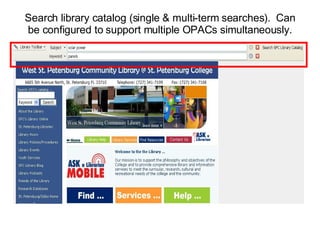
Search library catalog (single & multi-term searches).  Can be configured to support multiple OPACs simultaneously.
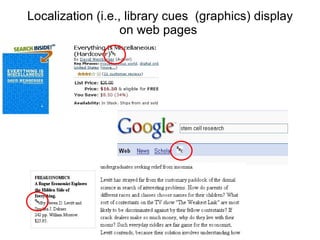
Localization (i.e., library cues  (graphics) display on web pages
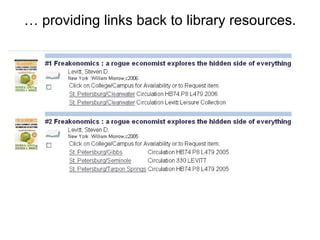
…  providing links back to library resources.
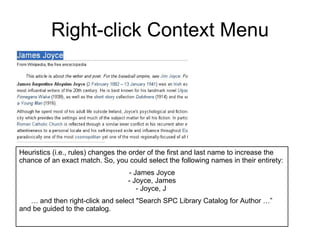
Right-click Context Menu Heuristics (i.e., rules) changes the order of the first and last name to increase the chance of an exact match. So, you could select the following names in their entirety: - James Joyce - Joyce, James - Joyce, J  …  and then right-click and select "Search SPC Library Catalog for Author …”  and be guided to the catalog.
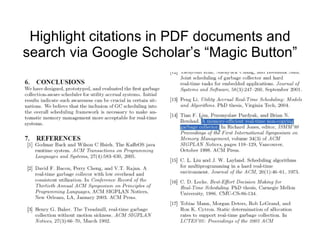
Highlight citations in PDF documents and search via Google Scholar’s “Magic Button”
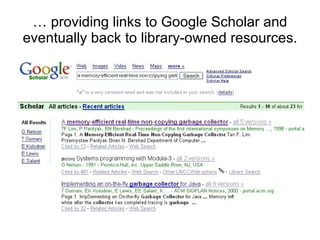
…  providing links to Google Scholar and eventually back to library-owned resources.
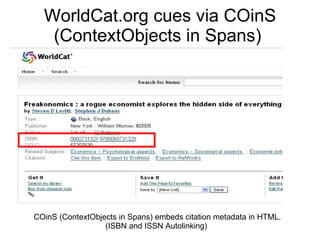
WorldCat.org cues via COinS (ContextObjects in Spans)  COinS (ContextObjects in Spans) embeds citation metadata in HTML. (ISBN and ISSN Autolinking)
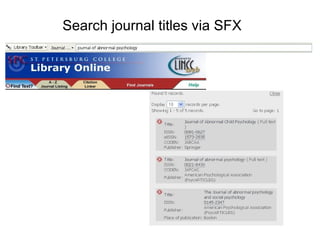
Search journal titles via SFX
How do you make a LibX edition for your library?
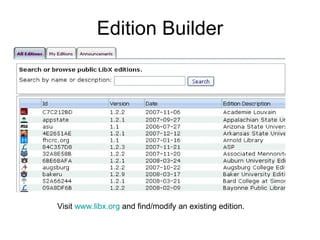
Edition Builder Visit  www.libx.org  and find/modify an existing edition.
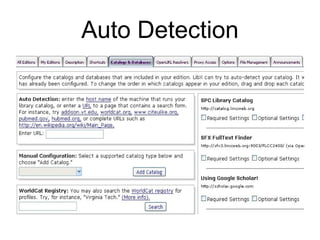
Auto Detection
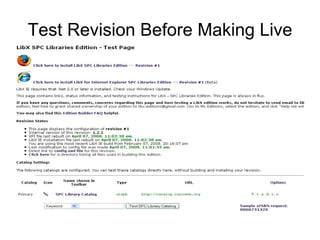
Test Revision Before Making Live
For more technical LibX information Visit  http:// libx.org The Dawn of the Embedded Library: Integrating Library Services into People's Trusted Networks, Oct 3, Somerville, MA, 2006.  Download source and configure LibX yourself (libx.mozdev.org) Create a config file (XML) and send it to  [email_address]
Conduit ( http://www.conduit.com )  Search via Google and/or add custom search RSS reader is built in Gadgets galore  Add personal library links Branding Chat and/or send email Pop up blocker and more
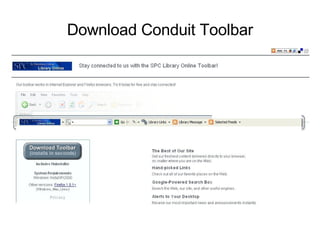
Download Conduit Toolbar
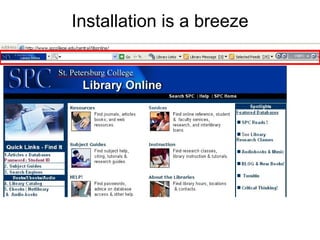
Installation is a breeze
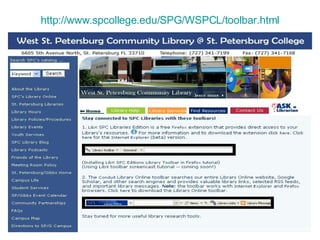
http:// www.spcollege.edu/SPG/WSPCL/toolbar.html
Some issues Locating your institution’s localbase. Visit  http:// catalog.linccweb.org/F?func =find- b&local_base = WHATEVER&find_code   Still playing with A-Z functionality. Internet Explorer is in beta. Promotion! Promotion! Promotion!
References LibX:  http://libx.org Conduit:  http:// www.conduit.com Questions? Please feel free to contact me.  Chad Mairn [email_address] (727) 341.7181 Google Talk ID: chadmairn

Creating Library Toolbars To Enhance Research

  • 1.
    Creating Library Toolbarsto Enhance Research Chad Mairn April 10, 2008 FACC Joint Commission Spring Conference
  • 2.
    Search engines vs. Library Resources We know that students use search engines instead of library resources. So, let’s offer a tool to help provide shortcuts back to library resources AND let’s make it happen with the least amount of effort.
  • 3.
    LibX Toolbar Free! A client-side application so there is no need for a server. LibX.org will host the toolbar. Browser Add-on (extension) is easy to install and easily customizable by the user. Works on Firefox and Internet Explorer (beta).
  • 4.
  • 5.
    Search library catalog(single & multi-term searches). Can be configured to support multiple OPACs simultaneously.
  • 6.
    Localization (i.e., librarycues (graphics) display on web pages
  • 7.
    … providinglinks back to library resources.
  • 8.
    Right-click Context MenuHeuristics (i.e., rules) changes the order of the first and last name to increase the chance of an exact match. So, you could select the following names in their entirety: - James Joyce - Joyce, James - Joyce, J … and then right-click and select "Search SPC Library Catalog for Author …” and be guided to the catalog.
  • 9.
    Highlight citations inPDF documents and search via Google Scholar’s “Magic Button”
  • 10.
    … providinglinks to Google Scholar and eventually back to library-owned resources.
  • 11.
    WorldCat.org cues viaCOinS (ContextObjects in Spans) COinS (ContextObjects in Spans) embeds citation metadata in HTML. (ISBN and ISSN Autolinking)
  • 12.
  • 13.
    How do youmake a LibX edition for your library?
  • 14.
    Edition Builder Visit www.libx.org and find/modify an existing edition.
  • 15.
  • 16.
  • 17.
    For more technicalLibX information Visit http:// libx.org The Dawn of the Embedded Library: Integrating Library Services into People's Trusted Networks, Oct 3, Somerville, MA, 2006. Download source and configure LibX yourself (libx.mozdev.org) Create a config file (XML) and send it to [email_address]
  • 18.
    Conduit ( http://www.conduit.com) Search via Google and/or add custom search RSS reader is built in Gadgets galore Add personal library links Branding Chat and/or send email Pop up blocker and more
  • 19.
  • 20.
  • 21.
  • 22.
    Some issues Locatingyour institution’s localbase. Visit http:// catalog.linccweb.org/F?func =find- b&local_base = WHATEVER&find_code Still playing with A-Z functionality. Internet Explorer is in beta. Promotion! Promotion! Promotion!
  • 23.
    References LibX: http://libx.org Conduit: http:// www.conduit.com Questions? Please feel free to contact me. Chad Mairn [email_address] (727) 341.7181 Google Talk ID: chadmairn