Into the user environment now! How the users changed and how libraries can adjust Guus van den Brekel Coördinator Electronic Services,  Central Medical Library University Medical Center Groningen 10th   EUROPEAN  CONFERENCE OF  MEDICAL  AND HEALTH  LIBRARIES Cluj-Napoca ,  Romania , 11th-16th  of September  2006
The build up … Introduction The Problem (in short) What to do on the SHORT term? What could we do NOW? Demo QuickSearch Library Toolbar
T HE PROBLEM LIBRARY DISCONNECTS THE CHALLENGE
Fragmentation of information The user has to spend a lot of effort: To find them To learn to use them separately To search them separately To evaluate them To keep up with all individual changes To repeat the above, constantly
No  Shortcuts No  Intersections No  Teleports -;) No Visibility, lack of presence
What we are up against … We are not the only one anymore …
So the  World  has changed, … the  User  has changed … and the  Libraries  …… just did not change enough
How can we turn that around? From product-oriented to  user -oriented Dig into user-environments !
Keep up with what they are doing!
The new users they are more fascinated by new technologies Multitasking is a way of life; Staying connected is essential;  Interactive, not isolation  Zero tolerance for delay; Actions are more important than knowledge; Learning by doing, not by being told Trial-and-error approach to improvement  is a viable model for learning Cut-and-Paste Culture
library user environments resource environment Source: Lorcan Dempsey, Liber 2005 lab books exhibitions PDAs learning management systems campus portal course material text book personal collections reading lists Institutional repository Digital collections E-reserve Catalog Licensed collections Aggregations Virtual reference Cataloging ILL lab books exhibitions PDAs learning management systems campus portal course material text book personal collections reading lists
But how do we  start  to change?
new central information system:  component-based software, no monolithic ILS Open standards and protocols: inter-operability modular web-based library services Web 2.0 social software On The Long Term  (1) On The SHORT Term  (1)
On The SHORT Term  (2) use of logs stats, evaluate and  re-use “ Make the data work harder”.  Combinations of data-sets can be used to create new services. in more ways than one; platform independent
A Short Term example “ Building around the box” From statistics to new services   From Metalib -> LiveTrix   http://Livetrix.ub.rug.nl
Already implemented in LiveTrix Discovery/suggestion tool (no need to select resource/database or subject first! Spellcheck/adviser  Inline- SFX & lending info with OPAC records Impact factor info with Journals  Related terms info
Top Ten Technologies for Libraries to embrase Weblogs RSS Wiki's IM : Instant Messaging  Podcasting OpenSource Software SMS Text Messaging Social Software User-created content Mashing-up services
But what can we do NOW?
“ Quick and Easy” Top Three “Tools” the Desktop   (desktop search application) The Office applications   (Research Task Pane) the Browser
The  Browser Browser extensions Bookmarklets User scripts Plugins Toolbars!  (Have a look at:  Library   Success  : a best  practice   Wiki )
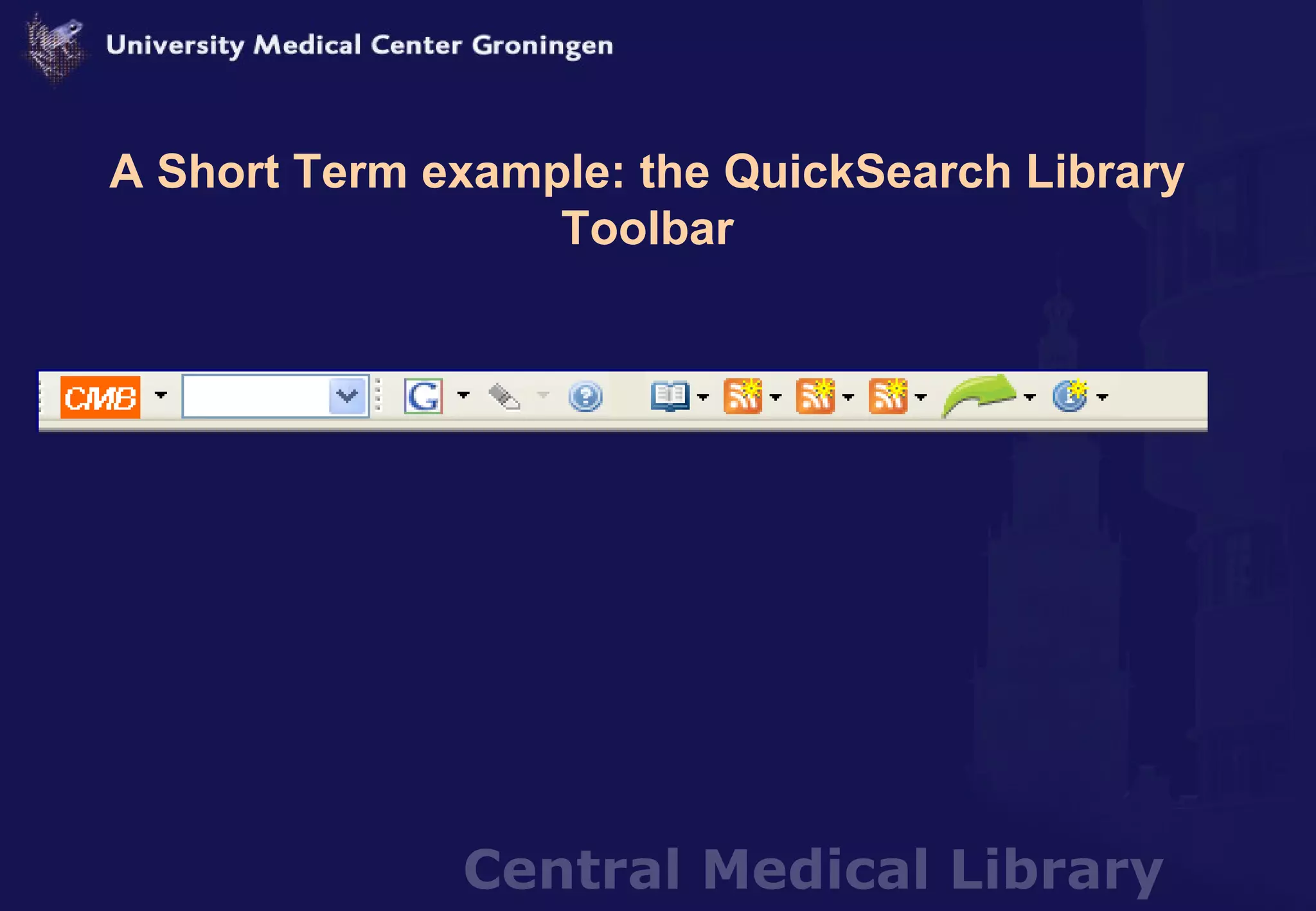
A Short Term example: the QuickSearch Library Toolbar
Toolbar FREE software SAFE: No spam, spyware,POP-UPS or adverts EASY: quick creation and maintenance Completely web-based IE and Firefox Windows 2000 & Xp
How does it work ?
To install or not to….. Some rights needed Offer it via network if IT doesn’t let you  USB-stick with Portable Firefox! “Your own portable library” Search functionality  without   Toolbar
What do the users like about the Toolbar?
Elements of the Toolbar Visibility Presence Access Search Usability Communication Interaction Actuality Transparancy
What are the Benefits of all this?  increase usage collection & databases  (on & off campus) More contact moments user vs. library improve the awareness of library services in general (branding) boost unknown valuable resources Posibilities to get better insight user search patterns and needs
And now for something completely different … The ultimate chase for the user … Extreme example of libraries following the users everywhere!
Building a Library in a Virtual “environment” Ok, but what are they doing in a  VIDEO GAME?
The Second Life Medical Library 2.0 The chase for the Users …… Into The  User Environment  : no  limits
Thank you for your attention. This is a mash-up of articles, presentations, blog-posts published on these subjects, mixed with my own experience and opinions.  You can find all of them  at http:// del.icio.us/digicmb/cluj

Into the User Environment now!

  • 1.
    Into the userenvironment now! How the users changed and how libraries can adjust Guus van den Brekel Coördinator Electronic Services, Central Medical Library University Medical Center Groningen 10th EUROPEAN CONFERENCE OF MEDICAL AND HEALTH LIBRARIES Cluj-Napoca , Romania , 11th-16th of September 2006
  • 2.
    The build up… Introduction The Problem (in short) What to do on the SHORT term? What could we do NOW? Demo QuickSearch Library Toolbar
  • 3.
    T HE PROBLEMLIBRARY DISCONNECTS THE CHALLENGE
  • 4.
    Fragmentation of informationThe user has to spend a lot of effort: To find them To learn to use them separately To search them separately To evaluate them To keep up with all individual changes To repeat the above, constantly
  • 5.
    No ShortcutsNo Intersections No Teleports -;) No Visibility, lack of presence
  • 6.
    What we areup against … We are not the only one anymore …
  • 7.
    So the World has changed, … the User has changed … and the Libraries …… just did not change enough
  • 8.
    How can weturn that around? From product-oriented to user -oriented Dig into user-environments !
  • 9.
    Keep up withwhat they are doing!
  • 10.
    The new usersthey are more fascinated by new technologies Multitasking is a way of life; Staying connected is essential; Interactive, not isolation Zero tolerance for delay; Actions are more important than knowledge; Learning by doing, not by being told Trial-and-error approach to improvement is a viable model for learning Cut-and-Paste Culture
  • 11.
    library user environmentsresource environment Source: Lorcan Dempsey, Liber 2005 lab books exhibitions PDAs learning management systems campus portal course material text book personal collections reading lists Institutional repository Digital collections E-reserve Catalog Licensed collections Aggregations Virtual reference Cataloging ILL lab books exhibitions PDAs learning management systems campus portal course material text book personal collections reading lists
  • 12.
    But how dowe start to change?
  • 13.
    new central informationsystem: component-based software, no monolithic ILS Open standards and protocols: inter-operability modular web-based library services Web 2.0 social software On The Long Term (1) On The SHORT Term (1)
  • 14.
    On The SHORTTerm (2) use of logs stats, evaluate and re-use “ Make the data work harder”. Combinations of data-sets can be used to create new services. in more ways than one; platform independent
  • 15.
    A Short Termexample “ Building around the box” From statistics to new services From Metalib -> LiveTrix http://Livetrix.ub.rug.nl
  • 16.
    Already implemented inLiveTrix Discovery/suggestion tool (no need to select resource/database or subject first! Spellcheck/adviser Inline- SFX & lending info with OPAC records Impact factor info with Journals Related terms info
  • 17.
    Top Ten Technologiesfor Libraries to embrase Weblogs RSS Wiki's IM : Instant Messaging Podcasting OpenSource Software SMS Text Messaging Social Software User-created content Mashing-up services
  • 18.
    But what canwe do NOW?
  • 19.
    “ Quick andEasy” Top Three “Tools” the Desktop (desktop search application) The Office applications (Research Task Pane) the Browser
  • 20.
    The BrowserBrowser extensions Bookmarklets User scripts Plugins Toolbars! (Have a look at: Library Success : a best practice Wiki )
  • 21.
    A Short Termexample: the QuickSearch Library Toolbar
  • 22.
    Toolbar FREE softwareSAFE: No spam, spyware,POP-UPS or adverts EASY: quick creation and maintenance Completely web-based IE and Firefox Windows 2000 & Xp
  • 23.
  • 24.
    To install ornot to….. Some rights needed Offer it via network if IT doesn’t let you USB-stick with Portable Firefox! “Your own portable library” Search functionality without Toolbar
  • 25.
    What do theusers like about the Toolbar?
  • 26.
    Elements of theToolbar Visibility Presence Access Search Usability Communication Interaction Actuality Transparancy
  • 27.
    What are theBenefits of all this? increase usage collection & databases (on & off campus) More contact moments user vs. library improve the awareness of library services in general (branding) boost unknown valuable resources Posibilities to get better insight user search patterns and needs
  • 28.
    And now forsomething completely different … The ultimate chase for the user … Extreme example of libraries following the users everywhere!
  • 29.
    Building a Libraryin a Virtual “environment” Ok, but what are they doing in a VIDEO GAME?
  • 30.
    The Second LifeMedical Library 2.0 The chase for the Users …… Into The User Environment : no limits
  • 31.
    Thank you foryour attention. This is a mash-up of articles, presentations, blog-posts published on these subjects, mixed with my own experience and opinions. You can find all of them at http:// del.icio.us/digicmb/cluj

Editor's Notes

  • #2 My subject is. Have been focussing too much on our own