First steps:
   Create your own digital story
       Learn how to use the equipment and tools that your students will
        be using
       Get a feel for the processes and steps involved in digital
        storytelling

   Plan the project: objectives, timeline, equipment, resources
    (volunteer support, equipment, internet access)

   Create a unit plan, gather materials (handouts, models)

   The more volunteer support you can have in the class, the better!

   Plan for students finishing at different times – must be flexible and
    prepared with other learning activities for Ss who complete the
    task quickly (or insist on working on it on their home computer)
In the classroom
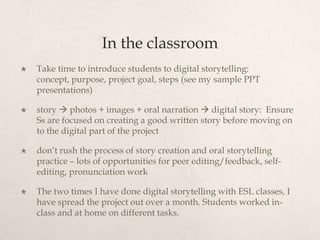
   Take time to introduce students to digital storytelling:
    concept, purpose, project goal, steps (see my sample PPT
    presentations)

   story  photos + images + oral narration  digital story: Ensure
    Ss are focused on creating a good written story before moving on
    to the digital part of the project

   don’t rush the process of story creation and oral storytelling
    practice – lots of opportunities for peer editing/feedback, self-
    editing, pronunciation work

   The two times I have done digital storytelling with ESL classes, I
    have spread the project out over a month. Students worked in-
    class and at home on different tasks.
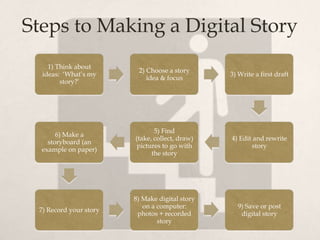
Steps to Making a Digital Story
    1) Think about
                         2) Choose a story
  ideas: ‘What’s my                             3) Write a first draft
                            idea & focus
        story?’


                               5) Find
       6) Make a
                        (take, collect, draw)   4) Edit and rewrite
    storyboard (an
                         pictures to go with           story
  example on paper)
                              the story


                        8) Make digital story
                           on a computer:         9) Save or post
 7) Record your story
                         photos + recorded         digital story
                                story
The most challenging parts:
   The equipment: one laptop per student, reliable and fast internet
    access, scanner, is the software same or different?

   Copyright issues – think this through and do work with the
    students on this before you get students gathering images and
    music for their story

   Putting all of the elements together into a digital story: for
    students who are new to iMovie, MovieMaker, Voicethread, or
    whatever tool you’re using to create the story, they will need to
    learn how to use it. Some students will need a lot of time and
    support, while others don’t need any

   Moving students through the project on the same timeline
A few tips: Make sure…
   you have enough support in the classroom depending on
    your Ss’ levels of digital literacy

   shorter stories = an easier (to make) digital story (see
    KirstyMcGeoch’s ‘1-minute stories)

   the equipment you need is available and plentiful, and
    that you’re comfortable using it.
                                                create a digital
                                                   story as a
    make your                                     whole class
    own digital
      story
                              use your tech-
                               savvy Ss as
                             helpers/resourc
                                    es
How else can digital storytelling be
        used with ESL learners?
    narrow the focus/topic: an end of term project (‘what
     I’ve learned this term’)

    whole class or small groups: create a digital story based
     on a common experience (party/celebration, field trip)

    students can create a ‘commercial’ to advertise a
     product, or their class…(see the VCC ELSA Youth coffee
     commercial!)

    using written journal entries as a springboard to a digital
     story
Creating digital stories - the process

Creating digital stories - the process

  • 2.
    First steps:  Create your own digital story  Learn how to use the equipment and tools that your students will be using  Get a feel for the processes and steps involved in digital storytelling  Plan the project: objectives, timeline, equipment, resources (volunteer support, equipment, internet access)  Create a unit plan, gather materials (handouts, models)  The more volunteer support you can have in the class, the better!  Plan for students finishing at different times – must be flexible and prepared with other learning activities for Ss who complete the task quickly (or insist on working on it on their home computer)
  • 3.
    In the classroom  Take time to introduce students to digital storytelling: concept, purpose, project goal, steps (see my sample PPT presentations)  story  photos + images + oral narration  digital story: Ensure Ss are focused on creating a good written story before moving on to the digital part of the project  don’t rush the process of story creation and oral storytelling practice – lots of opportunities for peer editing/feedback, self- editing, pronunciation work  The two times I have done digital storytelling with ESL classes, I have spread the project out over a month. Students worked in- class and at home on different tasks.
  • 4.
    Steps to Makinga Digital Story 1) Think about 2) Choose a story ideas: ‘What’s my 3) Write a first draft idea & focus story?’ 5) Find 6) Make a (take, collect, draw) 4) Edit and rewrite storyboard (an pictures to go with story example on paper) the story 8) Make digital story on a computer: 9) Save or post 7) Record your story photos + recorded digital story story
  • 5.
    The most challengingparts:  The equipment: one laptop per student, reliable and fast internet access, scanner, is the software same or different?  Copyright issues – think this through and do work with the students on this before you get students gathering images and music for their story  Putting all of the elements together into a digital story: for students who are new to iMovie, MovieMaker, Voicethread, or whatever tool you’re using to create the story, they will need to learn how to use it. Some students will need a lot of time and support, while others don’t need any  Moving students through the project on the same timeline
  • 6.
    A few tips:Make sure…  you have enough support in the classroom depending on your Ss’ levels of digital literacy  shorter stories = an easier (to make) digital story (see KirstyMcGeoch’s ‘1-minute stories)  the equipment you need is available and plentiful, and that you’re comfortable using it. create a digital story as a make your whole class own digital story use your tech- savvy Ss as helpers/resourc es
  • 7.
    How else candigital storytelling be used with ESL learners?  narrow the focus/topic: an end of term project (‘what I’ve learned this term’)  whole class or small groups: create a digital story based on a common experience (party/celebration, field trip)  students can create a ‘commercial’ to advertise a product, or their class…(see the VCC ELSA Youth coffee commercial!)  using written journal entries as a springboard to a digital story