By Marcy Mitchell
www.mtechbd.com

1


Internet Marketing Consultant
◦ Owner of MTECH Internet Marketing- 17 years
 Web site development/ Search engine optimization
 Social Media
 Internet marketing consultant (PPC, SEO, Marketing plans)

◦ Internet Marketing Director for a number of leading
real estate firms & community websites
(DurangoDowntown.com & Pagosa.com)
◦ SBDC Business Advisor
◦ Certified Marketing for Smarties Coach
2
1.
2.

3.

4.

5.

What is Wordpress?
Wordpress.com vs.
Wordpress.org
Differences b/w free themes, paid
themes and custom themes
Navigating the WordPress
Backend
Importance of Blogging
3
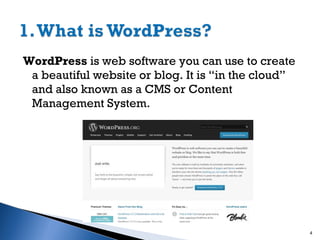
WordPress is web software you can use to create
a beautiful website or blog. It is “in the cloud”
and also known as a CMS or Content
Management System.

4
Started in 2003 to enhance topography of writers.
Open Source Platform – meaning hundreds of people
all over the world working on it.
Currently largest self-hosted blogging tool with 60
Million sites/users
Thousands of plugins, themes and widgets
Built on PHP and MYSQL with CSS stylesheets
controlling the look.

5
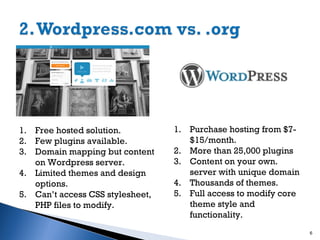
1. Free hosted solution.
2. Few plugins available.
3. Domain mapping but content
on Wordpress server.
4. Limited themes and design
options.
5. Can’t access CSS stylesheet,
PHP files to modify.

1. Purchase hosting from $7$15/month.
2. More than 25,000 plugins
3. Content on your own.
server with unique domain
4. Thousands of themes.
5. Full access to modify core
theme style and
functionality.
6
6. Automated backup system by
Wordpress.com.
7. Used primarily for personal
sites.
8. Can’t control SEO or gain credit
for new pages.
9. Can’t transfer theme to
wordpress.org or other server.

6. Manual Backup by you or
website provider.
7. Used primarily for
professional sites.
8. Install SEO plugin and make
site search engine
friendly.
9. Can move site to a number
of WordPress-friendly
hosting accounts.
7
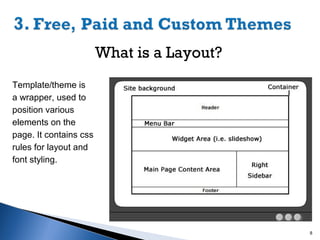
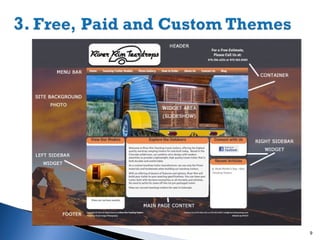
What is a Layout?
Template/theme is
a wrapper, used to
position various
elements on the
page. It contains css
rules for layout and
font styling.

8
9
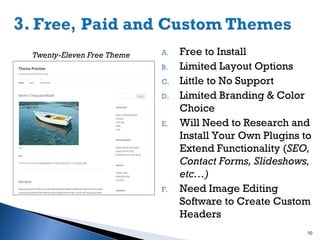
Twenty-Eleven Free Theme

A.
B.
C.
D.

E.

F.

Free to Install
Limited Layout Options
Little to No Support
Limited Branding & Color
Choice
Will Need to Research and
Install Your Own Plugins to
Extend Functionality (SEO,
Contact Forms, Slideshows,
etc…)
Need Image Editing
Software to Create Custom
Headers
10
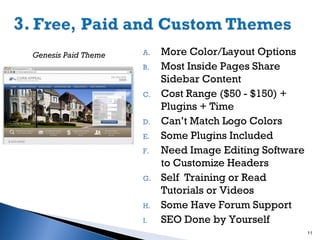
Genesis Paid Theme

A.
B.

C.

D.
E.
F.

G.

H.
I.

More Color/Layout Options
Most Inside Pages Share
Sidebar Content
Cost Range ($50 - $150) +
Plugins + Time
Can’t Match Logo Colors
Some Plugins Included
Need Image Editing Software
to Customize Headers
Self Training or Read
Tutorials or Videos
Some Have Forum Support
SEO Done by Yourself
11
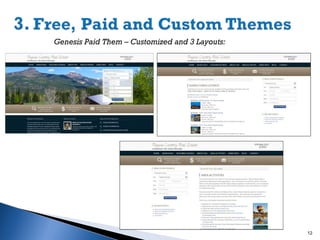
Genesis Paid Them – Customized and 3 Layouts:

12
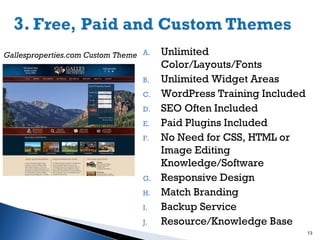
Gallesproperties.com Custom Theme A.
B.
C.
D.
E.
F.

G.
H.
I.
J.

Unlimited
Color/Layouts/Fonts
Unlimited Widget Areas
WordPress Training Included
SEO Often Included
Paid Plugins Included
No Need for CSS, HTML or
Image Editing
Knowledge/Software
Responsive Design
Match Branding
Backup Service
Resource/Knowledge Base
13
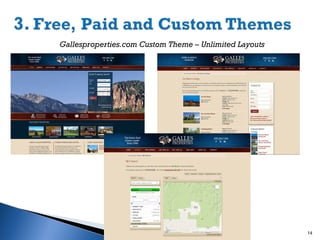
Gallesproperties.com Custom Theme – Unlimited Layouts

14
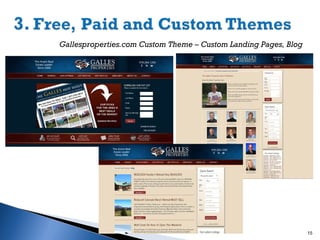
Gallesproperties.com Custom Theme – Custom Landing Pages, Blog

15
16
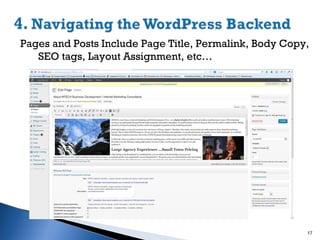
Pages and Posts Include Page Title, Permalink, Body Copy,
SEO tags, Layout Assignment, etc…

17
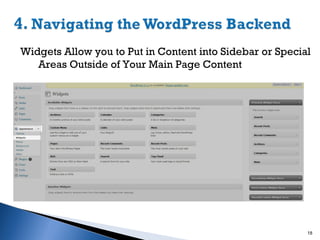
Widgets Allow you to Put in Content into Sidebar or Special
Areas Outside of Your Main Page Content

18
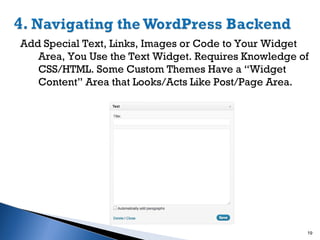
Add Special Text, Links, Images or Code to Your Widget
Area, You Use the Text Widget. Requires Knowledge of
CSS/HTML. Some Custom Themes Have a “Widget
Content” Area that Looks/Acts Like Post/Page Area.

19
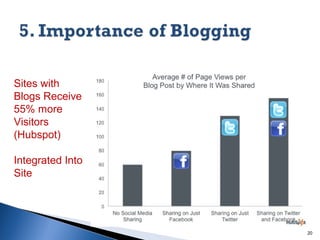
Sites with
Blogs Receive
55% more
Visitors
(Hubspot)
Integrated Into
Site

20


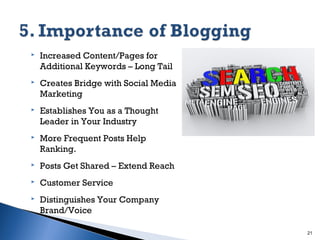
Increased Content/Pages for
Additional Keywords – Long Tail



Creates Bridge with Social Media
Marketing



Establishes You as a Thought
Leader in Your Industry



More Frequent Posts Help
Ranking.



Posts Get Shared – Extend Reach



Customer Service



Distinguishes Your Company
Brand/Voice
21


Develop Content Strategy
◦ What is Your Niche? What Do you Know/Do That is Unique?








◦ Research Knowledge Clients Need. What Questions?
◦ Careful…the More You Talk About Yourself The Less
People Want to Listen.
CONSISTENCY is Key
Make Sure Grammar is Correct.
Add Social Sharing Plugin & Social Media Links
Add Twitter Feeds and Facebook Feeds.
Add High Quality Photos and Videos.
Have Fun…But Remember Your Brand.

22










Decide How Much Learning / Time You Have
Dedicate Time Each Week for Blogging/Social Media
Websites Are Now Interactive – Plan on Tweaking
SEO Requires Updates and More Interaction
Spend Time Looking at Sites You Like BEFORE Hiring
Web Firm
Responsive Design is Causing More Simple Design
Determine Your Voice & Specialty
Work With Professionals Who Train and Empower You

23

Creating a Powerful Website Presence through WordPress and Blogging

  • 1.
  • 2.
     Internet Marketing Consultant ◦Owner of MTECH Internet Marketing- 17 years  Web site development/ Search engine optimization  Social Media  Internet marketing consultant (PPC, SEO, Marketing plans) ◦ Internet Marketing Director for a number of leading real estate firms & community websites (DurangoDowntown.com & Pagosa.com) ◦ SBDC Business Advisor ◦ Certified Marketing for Smarties Coach 2
  • 3.
    1. 2. 3. 4. 5. What is Wordpress? Wordpress.comvs. Wordpress.org Differences b/w free themes, paid themes and custom themes Navigating the WordPress Backend Importance of Blogging 3
  • 4.
    WordPress is websoftware you can use to create a beautiful website or blog. It is “in the cloud” and also known as a CMS or Content Management System. 4
  • 5.
    Started in 2003to enhance topography of writers. Open Source Platform – meaning hundreds of people all over the world working on it. Currently largest self-hosted blogging tool with 60 Million sites/users Thousands of plugins, themes and widgets Built on PHP and MYSQL with CSS stylesheets controlling the look. 5
  • 6.
    1. Free hostedsolution. 2. Few plugins available. 3. Domain mapping but content on Wordpress server. 4. Limited themes and design options. 5. Can’t access CSS stylesheet, PHP files to modify. 1. Purchase hosting from $7$15/month. 2. More than 25,000 plugins 3. Content on your own. server with unique domain 4. Thousands of themes. 5. Full access to modify core theme style and functionality. 6
  • 7.
    6. Automated backupsystem by Wordpress.com. 7. Used primarily for personal sites. 8. Can’t control SEO or gain credit for new pages. 9. Can’t transfer theme to wordpress.org or other server. 6. Manual Backup by you or website provider. 7. Used primarily for professional sites. 8. Install SEO plugin and make site search engine friendly. 9. Can move site to a number of WordPress-friendly hosting accounts. 7
  • 8.
    What is aLayout? Template/theme is a wrapper, used to position various elements on the page. It contains css rules for layout and font styling. 8
  • 9.
  • 10.
    Twenty-Eleven Free Theme A. B. C. D. E. F. Freeto Install Limited Layout Options Little to No Support Limited Branding & Color Choice Will Need to Research and Install Your Own Plugins to Extend Functionality (SEO, Contact Forms, Slideshows, etc…) Need Image Editing Software to Create Custom Headers 10
  • 11.
    Genesis Paid Theme A. B. C. D. E. F. G. H. I. MoreColor/Layout Options Most Inside Pages Share Sidebar Content Cost Range ($50 - $150) + Plugins + Time Can’t Match Logo Colors Some Plugins Included Need Image Editing Software to Customize Headers Self Training or Read Tutorials or Videos Some Have Forum Support SEO Done by Yourself 11
  • 12.
    Genesis Paid Them– Customized and 3 Layouts: 12
  • 13.
    Gallesproperties.com Custom ThemeA. B. C. D. E. F. G. H. I. J. Unlimited Color/Layouts/Fonts Unlimited Widget Areas WordPress Training Included SEO Often Included Paid Plugins Included No Need for CSS, HTML or Image Editing Knowledge/Software Responsive Design Match Branding Backup Service Resource/Knowledge Base 13
  • 14.
    Gallesproperties.com Custom Theme– Unlimited Layouts 14
  • 15.
    Gallesproperties.com Custom Theme– Custom Landing Pages, Blog 15
  • 16.
  • 17.
    Pages and PostsInclude Page Title, Permalink, Body Copy, SEO tags, Layout Assignment, etc… 17
  • 18.
    Widgets Allow youto Put in Content into Sidebar or Special Areas Outside of Your Main Page Content 18
  • 19.
    Add Special Text,Links, Images or Code to Your Widget Area, You Use the Text Widget. Requires Knowledge of CSS/HTML. Some Custom Themes Have a “Widget Content” Area that Looks/Acts Like Post/Page Area. 19
  • 20.
    Sites with Blogs Receive 55%more Visitors (Hubspot) Integrated Into Site 20
  • 21.
     Increased Content/Pages for AdditionalKeywords – Long Tail  Creates Bridge with Social Media Marketing  Establishes You as a Thought Leader in Your Industry  More Frequent Posts Help Ranking.  Posts Get Shared – Extend Reach  Customer Service  Distinguishes Your Company Brand/Voice 21
  • 22.
     Develop Content Strategy ◦What is Your Niche? What Do you Know/Do That is Unique?       ◦ Research Knowledge Clients Need. What Questions? ◦ Careful…the More You Talk About Yourself The Less People Want to Listen. CONSISTENCY is Key Make Sure Grammar is Correct. Add Social Sharing Plugin & Social Media Links Add Twitter Feeds and Facebook Feeds. Add High Quality Photos and Videos. Have Fun…But Remember Your Brand. 22
  • 23.
            Decide How MuchLearning / Time You Have Dedicate Time Each Week for Blogging/Social Media Websites Are Now Interactive – Plan on Tweaking SEO Requires Updates and More Interaction Spend Time Looking at Sites You Like BEFORE Hiring Web Firm Responsive Design is Causing More Simple Design Determine Your Voice & Specialty Work With Professionals Who Train and Empower You 23