SharePointintersection
Create Engaging Branding SharePoint Portals
and Plan for Content
Cathy Dew
catpaint1@live.com
Speaker Bio

 Cathy Dew


Consultant at Planet Technologies



Graphic Designer, Consultant and SharePoint MVP



Over 6 years of SharePoint
branding experience



Author: SharePoint 2010: Six in One



catpaint1 on Twitter

2

© DEVintersection. All rights reserved.
http://www.DEVintersection.com
Introduction
 Gather Requirements









What kind of site

Scenario – CatDragged In Corporation
Organize the Site
Determine Content Needs
Design your Site
Develop
Engage Users

3

© DEVintersection. All rights reserved.
http://www.DEVintersection.com
Gather Requirements

Start at the Beginning
What is the Purpose?







Public Facing
Extranet
Intranet – Informational Only
Intranet – Informational and Collaboration
Intranet – Collaboration Only
Intranet with Social and MySites Plus everything else

5

© DEVintersection. All rights reserved.
http://www.DEVintersection.com
Asking the Questions

 Can be the biggest challenge
 Example Questions:





What is the one thing you want users to know when they go to your
site?
What sites do you like?
What sites don’t you like?

6

© DEVintersection. All rights reserved.
http://www.DEVintersection.com
Poll Questions
 Do you currently have an intranet?
 Do you visit the homepage of your intranet?
 Do you participate in any Social Networks?

7

© DEVintersection. All rights reserved.
http://www.DEVintersection.com
Scenario – CatDragged In Corp
CatDragged In

 Cat Supply Manufacturer that needs to
manage their business documents and
communicate effectively with their employees.
 They currently have a SharePoint 2007 intranet that is poorly managed and
often has very stale content.

8

© DEVintersection. All rights reserved.
http://www.DEVintersection.com
Scenario – CatDragged In Corp
 The Company has the following Business Units












CatDragged In

Accounting
Administrative/Executive
Human Resources
IT
Manufacturing
Project Management Office
Quality Assurance
Research and Development
Sales and Marketing
Shipping

9

© DEVintersection. All rights reserved.
http://www.DEVintersection.com
Scenario – CatDragged In Corp
CatDragged In

 Challenges:







How to Organize their Content
How to Engage their Users
How to Keep their Content Fresh
Geographically Divided Teams
Capture and Store Documents and Knowledge in a Centralized Location

10

© DEVintersection. All rights reserved.
http://www.DEVintersection.com
Organizing, Managing, and Content

Developing the Plan
Organizing Chaos
 Determine the Site Structure



Questions of Content and Site Templates/Site Collections
Will it be Organizational, Functional or a Mix of Both

12

© DEVintersection. All rights reserved.
http://www.DEVintersection.com
Site Map
 CatDragged In decided to go in an Organizational Site Map with a few extra
bonus Sites that fall outside a Department
 Questions to ask:




How do your users typically find information?
How do your users typically work, who do they work with on a daily basis?

13

© DEVintersection. All rights reserved.
http://www.DEVintersection.com
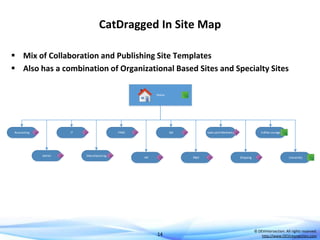
CatDragged In Site Map
 Mix of Collaboration and Publishing Site Templates
 Also has a combination of Organizational Based Sites and Specialty Sites
Home

Accounting

IT

Admin

PMO

Manufacturing

QA

HR

Sales and Marketing

R&D

14

Coffee Lounge

Shipping

University

© DEVintersection. All rights reserved.
http://www.DEVintersection.com
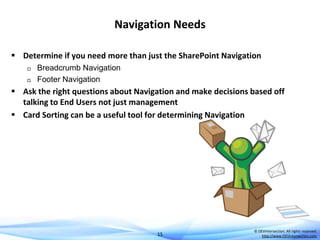
Navigation Needs
 Determine if you need more than just the SharePoint Navigation



Breadcrumb Navigation
Footer Navigation

 Ask the right questions about Navigation and make decisions based off
talking to End Users not just management
 Card Sorting can be a useful tool for determining Navigation

15

© DEVintersection. All rights reserved.
http://www.DEVintersection.com
But What About the Content
 What is it that you want to put on the main pages?









News
Announcements
FAQs
Letter from the President
HR Information
Tips and Tricks
Events

16

© DEVintersection. All rights reserved.
http://www.DEVintersection.com
Who will Manage Content
 Centralized or Decentralized Management?



IT Staff will manage all is Centralized
Departments will manage their own is Decentralized

 Advantages to Decentralized




Content is Updated more Frequently
Content stays relevant to the time frame
Less overhead on IT Staff

 Disadvantages to Decentralized



Must live in the same Site Collection (unless you use a 3rd Party tool)
Training must be performed for Content Owners

17

© DEVintersection. All rights reserved.
http://www.DEVintersection.com
Where Does My Content Live?
 Determining the Content Locations is especially important for things like
Rollup Lists and Announcements.




Did you create more than one Site Collection for database size purposes
or security concerns?
Do you want it in a team site, or in a section of the main intranet, typically
publishing pages?

18

© DEVintersection. All rights reserved.
http://www.DEVintersection.com
What Kind of Pages will I use?
 Determine if you will be using Publishing Pages or Collaboration Sites
 Will you Use a Custom Page Layout?


Publishing Infrastructure allows for this using Design Manager or SPD
methods

 Will you be creating Custom Display Templates?




Customize the way information is displayed in items like the Search Pages
and some WebParts and Views
Use the Design Manager, SPD or other tools to create these

19

© DEVintersection. All rights reserved.
http://www.DEVintersection.com
Web Parts for Displaying Content









Video/Media
Document Libraries
Content by Search Web Part
Content Editor
Wiki Style Pages
Calendars
Announcements
Yammer

20

© DEVintersection. All rights reserved.
http://www.DEVintersection.com
Getting User Attention
 This is one of the bigger challenges when planning the User Experience
 Need that “Squirrel” moment
 Pay attention to your users demographics






Gamification
Stock Ticker
Weather
Social

21

© DEVintersection. All rights reserved.
http://www.DEVintersection.com
Time to Design the Site

Ready, Set, Go
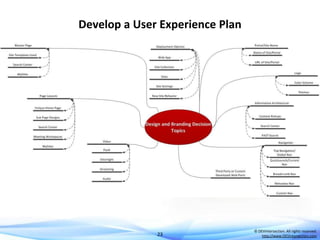
Develop a User Experience Plan

23

© DEVintersection. All rights reserved.
http://www.DEVintersection.com
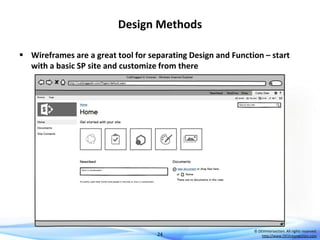
Design Methods
 Wireframes are a great tool for separating Design and Function – start
with a basic SP site and customize from there

24

© DEVintersection. All rights reserved.
http://www.DEVintersection.com
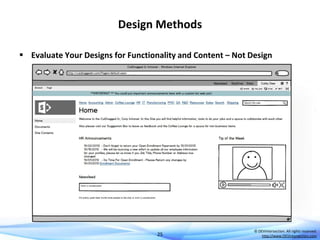
Design Methods
 Evaluate Your Designs for Functionality and Content – Not Design

25

© DEVintersection. All rights reserved.
http://www.DEVintersection.com
Wireframe Tools
 Balsamiq



SharePoint 2013 Team Site Template from Flucidity
http://flucidity.azurewebsites.net/2013/02/sharepoint-2013-balsamiqmock-up-template/

 Visio
 Adobe Creative Suite

26

© DEVintersection. All rights reserved.
http://www.DEVintersection.com
Create a User Experience Artifact Plan
 Determine Master Page Needs









Design Manager or Custom

Determine CSS Needs
Determine if your site will be Responsive
Browsers will you target
Web Parts will you use
Images will you need
Page Layouts if Needed

27

© DEVintersection. All rights reserved.
http://www.DEVintersection.com
Determine Deployment Plan
 Solution



Sandboxed for Office 365
Visual Studio Full Trust for On Premises

 Manual Application



SPD
Browser

28

© DEVintersection. All rights reserved.
http://www.DEVintersection.com
Create Design Mockups
 At this stage you will want to create a design mockup
 Standard Web Development principles and requirements apply at this
stage
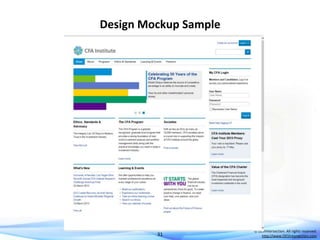
 Mockups will contain the visual elements, colors and images you
propose for the final solution

29

© DEVintersection. All rights reserved.
http://www.DEVintersection.com
Things to Pay Attention To
 Pay Close Attention to:


Navigation










Top Navigation
Quick Launch Navigation
Breadcrumbs

Ribbon
Suite Bar
Search Pages – Display Templates for Search Results Pages
Any Web Template Changes
My Sites

30

© DEVintersection. All rights reserved.
http://www.DEVintersection.com
Design Mockup Sample

31

© DEVintersection. All rights reserved.
http://www.DEVintersection.com
Create Customized Design Artifacts
 Make use of the tool you are most comfortable with to develop your
design artifacts
 SharePoint 2013 Design Manager
 Adobe Creative Suite
 SharePoint Designer 2013
 NotePad
 Visual Studio
 Plus Many More

32

© DEVintersection. All rights reserved.
http://www.DEVintersection.com
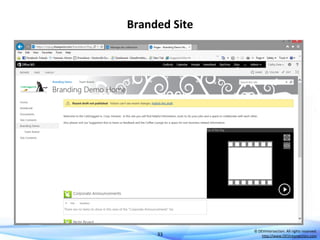
Branded Site

33

© DEVintersection. All rights reserved.
http://www.DEVintersection.com
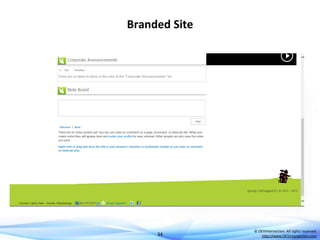
Branded Site

34

© DEVintersection. All rights reserved.
http://www.DEVintersection.com
Branded Site Artifact List






One Custom Master Page – Built in SPD – no HTML version
One Custom CSS File
Custom Images
Video Library
Corporate Announcements Library

35

© DEVintersection. All rights reserved.
http://www.DEVintersection.com
Plan Adoption Activities

Understand Your Users
Always Know the Implications
 Each User Experience Decision has Implications and Ramifications in a
SharePoint Environment




Navigation consistency
Permissions
Site Template

37

© DEVintersection. All rights reserved.
http://www.DEVintersection.com
User Adoption Activity Samples





Scavenger Hunts
Rewards
Searches
Attend Susan Hanley’s User Adoption Session tomorrow morning.

38

© DEVintersection. All rights reserved.
http://www.DEVintersection.com
Demo

Demo Title
Subtitle
Questions?
Don’t forget to enter your evaluation
of this session using EventBoard!

Thank you!

Create Engaging Branded SharePoint Portals and Plan for Content

  • 1.
    SharePointintersection Create Engaging BrandingSharePoint Portals and Plan for Content Cathy Dew catpaint1@live.com
  • 2.
    Speaker Bio  CathyDew  Consultant at Planet Technologies  Graphic Designer, Consultant and SharePoint MVP  Over 6 years of SharePoint branding experience  Author: SharePoint 2010: Six in One  catpaint1 on Twitter 2 © DEVintersection. All rights reserved. http://www.DEVintersection.com
  • 3.
    Introduction  Gather Requirements        Whatkind of site Scenario – CatDragged In Corporation Organize the Site Determine Content Needs Design your Site Develop Engage Users 3 © DEVintersection. All rights reserved. http://www.DEVintersection.com
  • 4.
  • 5.
    What is thePurpose?       Public Facing Extranet Intranet – Informational Only Intranet – Informational and Collaboration Intranet – Collaboration Only Intranet with Social and MySites Plus everything else 5 © DEVintersection. All rights reserved. http://www.DEVintersection.com
  • 6.
    Asking the Questions Can be the biggest challenge  Example Questions:    What is the one thing you want users to know when they go to your site? What sites do you like? What sites don’t you like? 6 © DEVintersection. All rights reserved. http://www.DEVintersection.com
  • 7.
    Poll Questions  Doyou currently have an intranet?  Do you visit the homepage of your intranet?  Do you participate in any Social Networks? 7 © DEVintersection. All rights reserved. http://www.DEVintersection.com
  • 8.
    Scenario – CatDraggedIn Corp CatDragged In  Cat Supply Manufacturer that needs to manage their business documents and communicate effectively with their employees.  They currently have a SharePoint 2007 intranet that is poorly managed and often has very stale content. 8 © DEVintersection. All rights reserved. http://www.DEVintersection.com
  • 9.
    Scenario – CatDraggedIn Corp  The Company has the following Business Units           CatDragged In Accounting Administrative/Executive Human Resources IT Manufacturing Project Management Office Quality Assurance Research and Development Sales and Marketing Shipping 9 © DEVintersection. All rights reserved. http://www.DEVintersection.com
  • 10.
    Scenario – CatDraggedIn Corp CatDragged In  Challenges:      How to Organize their Content How to Engage their Users How to Keep their Content Fresh Geographically Divided Teams Capture and Store Documents and Knowledge in a Centralized Location 10 © DEVintersection. All rights reserved. http://www.DEVintersection.com
  • 11.
    Organizing, Managing, andContent Developing the Plan
  • 12.
    Organizing Chaos  Determinethe Site Structure   Questions of Content and Site Templates/Site Collections Will it be Organizational, Functional or a Mix of Both 12 © DEVintersection. All rights reserved. http://www.DEVintersection.com
  • 13.
    Site Map  CatDraggedIn decided to go in an Organizational Site Map with a few extra bonus Sites that fall outside a Department  Questions to ask:   How do your users typically find information? How do your users typically work, who do they work with on a daily basis? 13 © DEVintersection. All rights reserved. http://www.DEVintersection.com
  • 14.
    CatDragged In SiteMap  Mix of Collaboration and Publishing Site Templates  Also has a combination of Organizational Based Sites and Specialty Sites Home Accounting IT Admin PMO Manufacturing QA HR Sales and Marketing R&D 14 Coffee Lounge Shipping University © DEVintersection. All rights reserved. http://www.DEVintersection.com
  • 15.
    Navigation Needs  Determineif you need more than just the SharePoint Navigation   Breadcrumb Navigation Footer Navigation  Ask the right questions about Navigation and make decisions based off talking to End Users not just management  Card Sorting can be a useful tool for determining Navigation 15 © DEVintersection. All rights reserved. http://www.DEVintersection.com
  • 16.
    But What Aboutthe Content  What is it that you want to put on the main pages?        News Announcements FAQs Letter from the President HR Information Tips and Tricks Events 16 © DEVintersection. All rights reserved. http://www.DEVintersection.com
  • 17.
    Who will ManageContent  Centralized or Decentralized Management?   IT Staff will manage all is Centralized Departments will manage their own is Decentralized  Advantages to Decentralized    Content is Updated more Frequently Content stays relevant to the time frame Less overhead on IT Staff  Disadvantages to Decentralized   Must live in the same Site Collection (unless you use a 3rd Party tool) Training must be performed for Content Owners 17 © DEVintersection. All rights reserved. http://www.DEVintersection.com
  • 18.
    Where Does MyContent Live?  Determining the Content Locations is especially important for things like Rollup Lists and Announcements.   Did you create more than one Site Collection for database size purposes or security concerns? Do you want it in a team site, or in a section of the main intranet, typically publishing pages? 18 © DEVintersection. All rights reserved. http://www.DEVintersection.com
  • 19.
    What Kind ofPages will I use?  Determine if you will be using Publishing Pages or Collaboration Sites  Will you Use a Custom Page Layout?  Publishing Infrastructure allows for this using Design Manager or SPD methods  Will you be creating Custom Display Templates?   Customize the way information is displayed in items like the Search Pages and some WebParts and Views Use the Design Manager, SPD or other tools to create these 19 © DEVintersection. All rights reserved. http://www.DEVintersection.com
  • 20.
    Web Parts forDisplaying Content         Video/Media Document Libraries Content by Search Web Part Content Editor Wiki Style Pages Calendars Announcements Yammer 20 © DEVintersection. All rights reserved. http://www.DEVintersection.com
  • 21.
    Getting User Attention This is one of the bigger challenges when planning the User Experience  Need that “Squirrel” moment  Pay attention to your users demographics     Gamification Stock Ticker Weather Social 21 © DEVintersection. All rights reserved. http://www.DEVintersection.com
  • 22.
    Time to Designthe Site Ready, Set, Go
  • 23.
    Develop a UserExperience Plan 23 © DEVintersection. All rights reserved. http://www.DEVintersection.com
  • 24.
    Design Methods  Wireframesare a great tool for separating Design and Function – start with a basic SP site and customize from there 24 © DEVintersection. All rights reserved. http://www.DEVintersection.com
  • 25.
    Design Methods  EvaluateYour Designs for Functionality and Content – Not Design 25 © DEVintersection. All rights reserved. http://www.DEVintersection.com
  • 26.
    Wireframe Tools  Balsamiq   SharePoint2013 Team Site Template from Flucidity http://flucidity.azurewebsites.net/2013/02/sharepoint-2013-balsamiqmock-up-template/  Visio  Adobe Creative Suite 26 © DEVintersection. All rights reserved. http://www.DEVintersection.com
  • 27.
    Create a UserExperience Artifact Plan  Determine Master Page Needs        Design Manager or Custom Determine CSS Needs Determine if your site will be Responsive Browsers will you target Web Parts will you use Images will you need Page Layouts if Needed 27 © DEVintersection. All rights reserved. http://www.DEVintersection.com
  • 28.
    Determine Deployment Plan Solution   Sandboxed for Office 365 Visual Studio Full Trust for On Premises  Manual Application   SPD Browser 28 © DEVintersection. All rights reserved. http://www.DEVintersection.com
  • 29.
    Create Design Mockups At this stage you will want to create a design mockup  Standard Web Development principles and requirements apply at this stage  Mockups will contain the visual elements, colors and images you propose for the final solution 29 © DEVintersection. All rights reserved. http://www.DEVintersection.com
  • 30.
    Things to PayAttention To  Pay Close Attention to:  Navigation         Top Navigation Quick Launch Navigation Breadcrumbs Ribbon Suite Bar Search Pages – Display Templates for Search Results Pages Any Web Template Changes My Sites 30 © DEVintersection. All rights reserved. http://www.DEVintersection.com
  • 31.
    Design Mockup Sample 31 ©DEVintersection. All rights reserved. http://www.DEVintersection.com
  • 32.
    Create Customized DesignArtifacts  Make use of the tool you are most comfortable with to develop your design artifacts  SharePoint 2013 Design Manager  Adobe Creative Suite  SharePoint Designer 2013  NotePad  Visual Studio  Plus Many More 32 © DEVintersection. All rights reserved. http://www.DEVintersection.com
  • 33.
    Branded Site 33 © DEVintersection.All rights reserved. http://www.DEVintersection.com
  • 34.
    Branded Site 34 © DEVintersection.All rights reserved. http://www.DEVintersection.com
  • 35.
    Branded Site ArtifactList      One Custom Master Page – Built in SPD – no HTML version One Custom CSS File Custom Images Video Library Corporate Announcements Library 35 © DEVintersection. All rights reserved. http://www.DEVintersection.com
  • 36.
  • 37.
    Always Know theImplications  Each User Experience Decision has Implications and Ramifications in a SharePoint Environment    Navigation consistency Permissions Site Template 37 © DEVintersection. All rights reserved. http://www.DEVintersection.com
  • 38.
    User Adoption ActivitySamples     Scavenger Hunts Rewards Searches Attend Susan Hanley’s User Adoption Session tomorrow morning. 38 © DEVintersection. All rights reserved. http://www.DEVintersection.com
  • 39.
  • 40.
    Questions? Don’t forget toenter your evaluation of this session using EventBoard! Thank you!