IO2 module 3
Assistive Technology and
CP
CP-CARE - 2016-1-TR01-KA202-035094
(01.12.2016 – 30.11.2019)
Unit 1 - Brief information on
assistive technology
Assistive technologhy is any equipment, appliance
or product that improves, protects or enhances the
functional capacities of persons with disabilities, is
sold on the market, or is designed, adapted or
adapted as necessary.
What is Assistive Technology?
- To be able to perform daily life
activities alone,
- To enable people without sight,
hearing, speech, and movement to
perform these functions,
- To support the growth and development
process,
- To facilitate the learning function,
- To provide security and convenience.
The effects
of assistive
technology in
Cerebral
Palsy
Assistive Technology In Cerebral Palsy And
Types Of Uses Of Technology
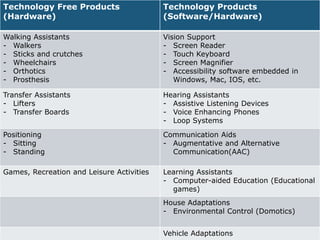
Technology Free Products
(Hardware)
Technology Products
(Software/Hardware)
Walking Assistants
- Walkers
- Sticks and crutches
- Wheelchairs
- Orthotics
- Prosthesis
Vision Support
- Screen Reader
- Touch Keyboard
- Screen Magnifier
- Accessibility software embedded in
Windows, Mac, IOS, etc.
Transfer Assistants
- Lifters
- Transfer Boards
Hearing Assistants
- Assistive Listening Devices
- Voice Enhancing Phones
- Loop Systems
Positioning
- Sitting
- Standing
Communication Aids
- Augmentative and Alternative
Communication(AAC)
Games, Recreation and Leisure Activities Learning Assistants
- Computer-aided Education (Educational
games)
House Adaptations
- Environmental Control (Domotics)
Vehicle Adaptations
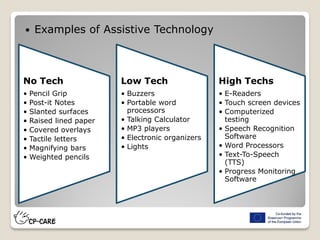
No Tech
• Pencil Grip
• Post-it Notes
• Slanted surfaces
• Raised lined paper
• Covered overlays
• Tactile letters
• Magnifying bars
• Weighted pencils
Low Tech
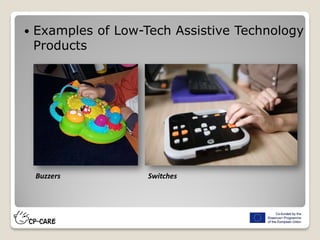
• Buzzers
• Portable word
processors
• Talking Calculator
• MP3 players
• Electronic organizers
• Lights
High Techs
• E-Readers
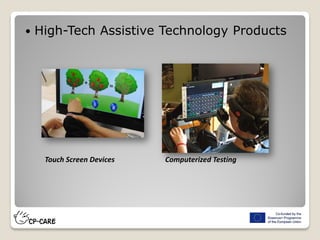
• Touch screen devices
• Computerized
testing
• Speech Recognition
Software
• Word Processors
• Text-To-Speech
(TTS)
• Progress Monitoring
Software
 Examples of Assistive Technology
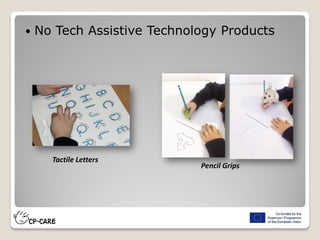
 No Tech Assistive Technology Products
Tactile Letters
Pencil Grips
 Examples of Low-Tech Assistive Technology
Products
Buzzers Switches
 High-Tech Assistive Technology Products
Computerized TestingTouch Screen Devices
References
 Assistive Technology Act, United States Congress
2004.
 http://istanbultip.istanbul.edu.tr/ogrenci/wp-
content/uploads/2016/10/asistif-teknoloji-resa-
ayd%C4%B1n.pdf
Unit 2 - Augmentative and
Alternative Communication (AAC)
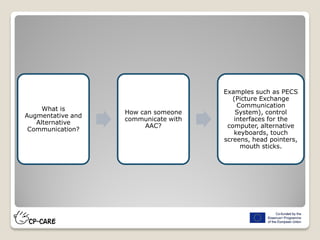
What is
Augmentative and
Alternative
Communication?
How can someone
communicate with
AAC?
Examples such as PECS
(Picture Exchange
Communication
System), control
interfaces for the
computer, alternative
keyboards, touch
screens, head pointers,
mouth sticks.
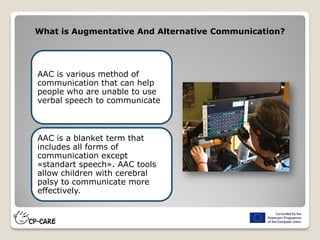
AAC is various method of
communication that can help
people who are unable to use
verbal speech to communicate
AAC is a blanket term that
includes all forms of
communication except
«standart speech». AAC tools
allow children with cerebral
palsy to communicate more
effectively.
What is Augmentative And Alternative Communication?
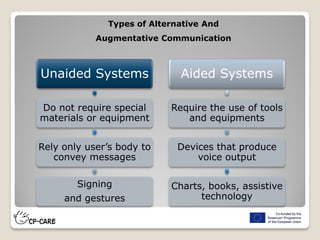
Unaided Systems
Do not require special
materials or equipment
Rely only user’s body to
convey messages
Signing
and gestures
Aided Systems
Require the use of tools
and equipments
Devices that produce
voice output
Charts, books, assistive
technology
Types of Alternative And
Augmentative Communication
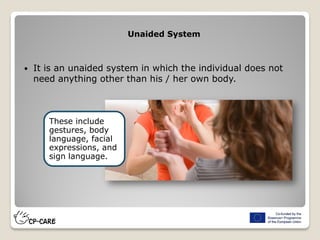
 It is an unaided system in which the individual does not
need anything other than his / her own body.
Unaided System
These include
gestures, body
language, facial
expressions, and
sign language.
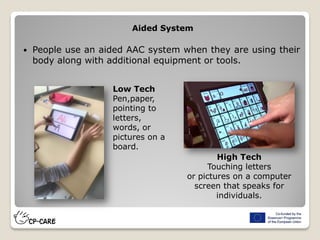
 People use an aided AAC system when they are using their
body along with additional equipment or tools.
Aided System
High Tech
Touching letters
or pictures on a computer
screen that speaks for
individuals.
Low Tech
Pen,paper,
pointing to
letters,
words, or
pictures on a
board.
Eligibility For AAC
•Physically involved but cognitively able
•Multiply involved with unknown cognitive abilities
•Physically able but motor speech or language
delayed
•Pre-verbal or emergent-verbal
•Developmentally delayed
•Exhibiting behavior disorders related to inability to
communicate effectively
•Severe speech sound production difficulties
individuals
with complex
communication
needs who
are/have:
Who have difficulty accessing
their curriculum in the absence of
AAC support?
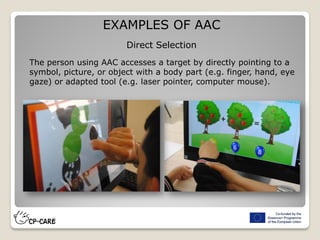
EXAMPLES OF AAC
Direct Selection
The person using AAC accesses a target by directly pointing to a
symbol, picture, or object with a body part (e.g. finger, hand, eye
gaze) or adapted tool (e.g. laser pointer, computer mouse).
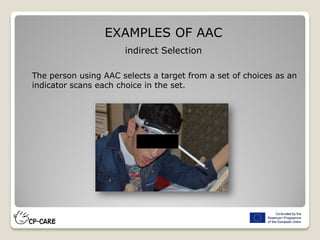
EXAMPLES OF AAC
indirect Selection
The person using AAC selects a target from a set of choices as an
indicator scans each choice in the set.
References
 https://www.abclawcenters.com/cerebral-palsy-technologies-
augmentative-and-alternative-communication-aac/
 https://allaboutaac.wordpress.com/considerations/access-method/
Unit 3 – Assistive Technology For
The Lower Extremity
A. Positioning
• Sitting
• Standing
B. Mobility
• Orthotics
• Sticks and crutches
• Walkers
• Wheelchairs
• Others
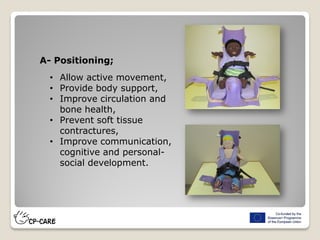
A- Positioning;
• Allow active movement,
• Provide body support,
• Improve circulation and
bone health,
• Prevent soft tissue
contractures,
• Improve communication,
cognitive and personal-
social development.
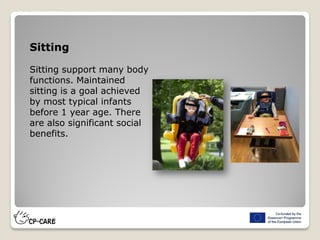
Sitting
Sitting support many body
functions. Maintained
sitting is a goal achieved
by most typical infants
before 1 year age. There
are also significant social
benefits.
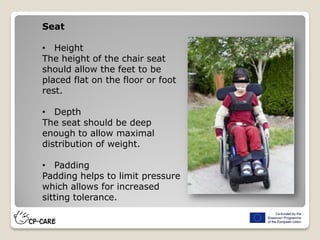
Seat
• Height
The height of the chair seat
should allow the feet to be
placed flat on the floor or foot
rest.
• Depth
The seat should be deep
enough to allow maximal
distribution of weight.
• Padding
Padding helps to limit pressure
which allows for increased
sitting tolerance.
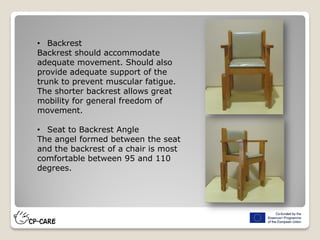
• Backrest
Backrest should accommodate
adequate movement. Should also
provide adequate support of the
trunk to prevent muscular fatigue.
The shorter backrest allows great
mobility for general freedom of
movement.
• Seat to Backrest Angle
The angel formed between the seat
and the backrest of a chair is most
comfortable between 95 and 110
degrees.
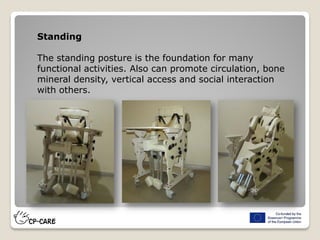
Standing
The standing posture is the foundation for many
functional activities. Also can promote circulation, bone
mineral density, vertical access and social interaction
with others.
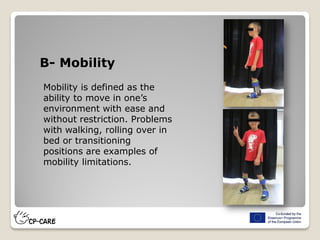
B- Mobility
Mobility is defined as the
ability to move in one’s
environment with ease and
without restriction. Problems
with walking, rolling over in
bed or transitioning
positions are examples of
mobility limitations.
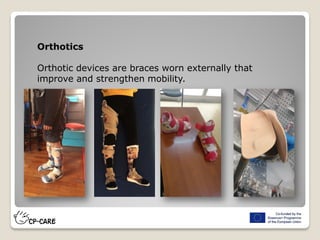
Orthotics
Orthotic devices are braces worn externally that
improve and strengthen mobility.
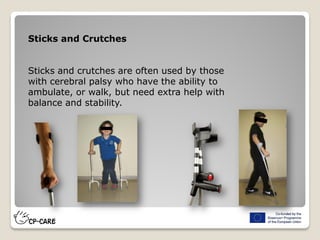
Sticks and Crutches
Sticks and crutches are often used by those
with cerebral palsy who have the ability to
ambulate, or walk, but need extra help with
balance and stability.
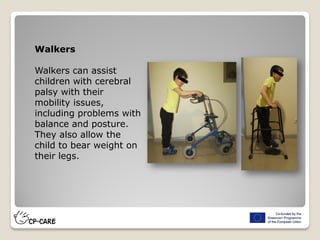
Walkers
Walkers can assist
children with cerebral
palsy with their
mobility issues,
including problems with
balance and posture.
They also allow the
child to bear weight on
their legs.
Wheelchairs
Wheelchairs are common mobility aids for non-
ambulatory cerebral palsy patients. There are numerous
design options and features to choose from, but there
are two basic types: manual wheelchairs and electric
wheelchairs
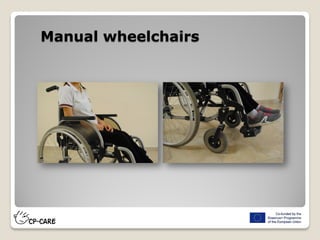
Manual
Wheelchairs
Electric
Wheelchairs
https://www.youtube.com/watch?v=K-MTAe45cMo
References
 Raine S, Meadows L, Lynch-Ellerington M. The Bobath Concept: Theory
and Clinical Practice in Neurological Rehabilitation Çeviren: Karaduman
A,Yildirim SA, Yilmaz ÖT. Bobath Kavrami Nörolojik Rehabilitasyonda Teori
ve Klinik Uygulama. Pelikan Kitabevi., Ankara; 2012 s: 154-178
 www.drdenizdogan.com/2012/06/tekerlekli-sandalyeler.html
 www.theradapt.com
 https://www.nhs.uk/conditions/kyphosis/treatment/
Unit 4 - Assistive Technology
for the upper extremity
Functions of the upper extremity
The use of hands is important to be independent in
everyday life.
In daily life, a number of important activities are performed
using hands.
Activities range from ones that require more strenght and
less skill, such as carrying a heavy object, to ones that
require selective grip and skill, such as thread a needle.
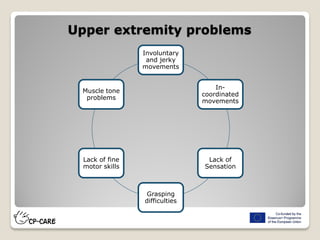
Upper extremity problems
Involuntary
and jerky
movements
In-
coordinated
movements
Lack of
Sensation
Grasping
difficulties
Lack of fine
motor skills
Muscle tone
problems
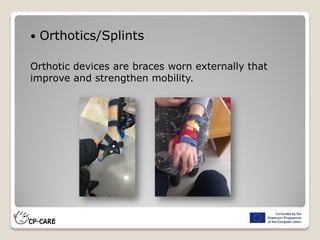
 Orthotics/Splints
Orthotic devices are braces worn externally that
improve and strengthen mobility.
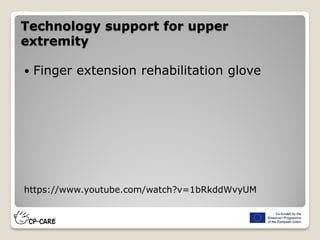
Technology support for upper
extremity
 Finger extension rehabilitation glove
https://www.youtube.com/watch?v=1bRkddWvyUM
References
 Raine S, Meadows L, Lynch-Ellerington M. The Bobath Concept: Theory
and Clinical Practice in Neurological Rehabilitation Çeviren: Karaduman
A,Yildirim SA, Yilmaz ÖT. Bobath Kavrami Nörolojik Rehabilitasyonda Teori
ve Klinik Uygulama. Pelikan Kitabevi., Ankara; 2012 s: 154-178
 Sveistrup H, Thornton M, Brvanton C, et al. Outcomes of intervention
programs using flatscreen virtual reality. Conf Proc iEEE Eng Med Biol Soc.
2004;7: 4856–4858
 A paediatric interactive therapy system for arm and hand rehabilitation.
in Virtual Rehabilitation, 2008
 Alamri A, Eid M, iglesias R, Shirmohammadi S, El Sadik A. Haptic virtual
rehabilitation exercises for poststroke diagnosis. iEEE Trans instrum Meas
2008;57:1876-84.
 Bouzit M, Burdea G, Popescu G, Boian R. The Rutgers Master ii—New
design force-feedback glove. iEEE Trans instrum Meas 2002:7;256-63
Unit 5 – Mobility And Transfer
Devices
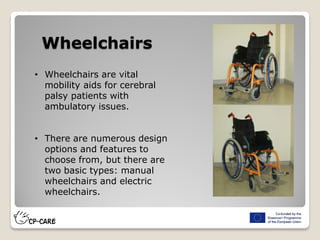
Wheelchairs
• Wheelchairs are vital
mobility aids for cerebral
palsy patients with
ambulatory issues.
• There are numerous design
options and features to
choose from, but there are
two basic types: manual
wheelchairs and electric
wheelchairs.
 Things to watch out for the right
wheelchair:
Width of the selected wheelchair should be the child’s hip
width plus two fingers wide.
The length of the seating area of the selected wheelchair
should be from the hip to the back of the knee.
Arm height of the wheelchair should be from the seat to
the elbow.
if the child has a problem with head or body control, the
back support can be raised to the back of the head.
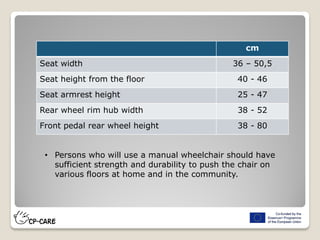
cm
Seat width 36 – 50,5
Seat height from the floor 40 - 46
Seat armrest height 25 - 47
Rear wheel rim hub width 38 - 52
Front pedal rear wheel height 38 - 80
• Persons who will use a manual wheelchair should have
sufficient strength and durability to push the chair on
various floors at home and in the community.
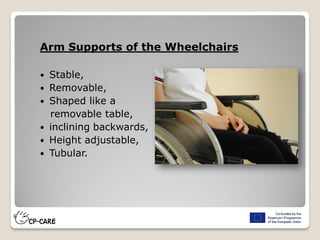
Arm Supports of the Wheelchairs
 Stable,
 Removable,
 Shaped like a
removable table,
 inclining backwards,
 Height adjustable,
 Tubular.
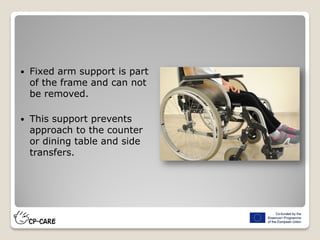
 Fixed arm support is part
of the frame and can not
be removed.
 This support prevents
approach to the counter
or dining table and side
transfers.
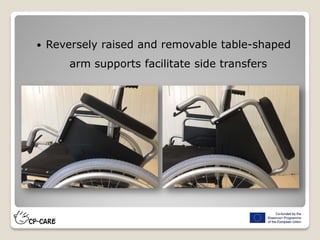
 Reversely raised and removable table-shaped
arm supports facilitate side transfers
 Tubular arm supports are available for
lightweight frames.
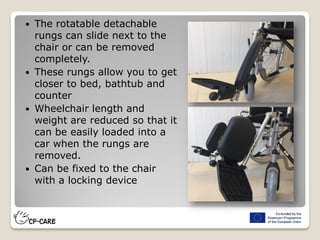
 The rotatable detachable
rungs can slide next to the
chair or can be removed
completely.
 These rungs allow you to get
closer to bed, bathtub and
counter
 Wheelchair length and
weight are reduced so that it
can be easily loaded into a
car when the rungs are
removed.
 Can be fixed to the chair
with a locking device
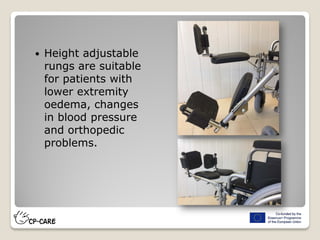
 Height adjustable
rungs are suitable
for patients with
lower extremity
oedema, changes
in blood pressure
and orthopedic
problems.
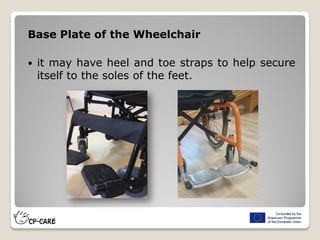
Base Plate of the Wheelchair
 it may have heel and toe straps to help secure
itself to the soles of the feet.
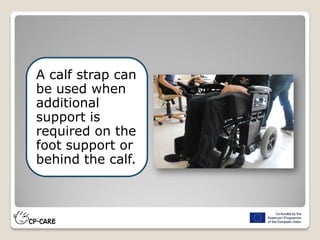
A calf strap can
be used when
additional
support is
required on the
foot support or
behind the calf.
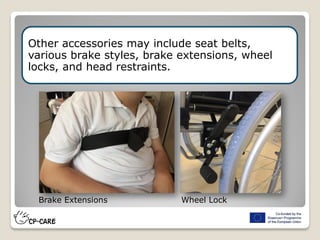
Other accessories may include seat belts,
various brake styles, brake extensions, wheel
locks, and head restraints.
Brake Extensions Wheel Lock
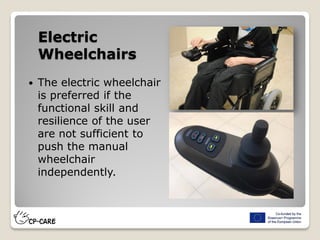
 The electric wheelchair
is preferred if the
functional skill and
resilience of the user
are not sufficient to
push the manual
wheelchair
independently.
Electric
Wheelchairs
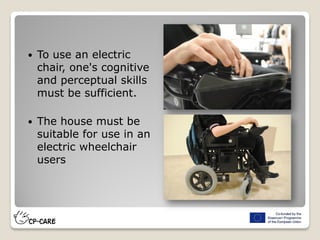
 To use an electric
chair, one's cognitive
and perceptual skills
must be sufficient.
 The house must be
suitable for use in an
electric wheelchair
users
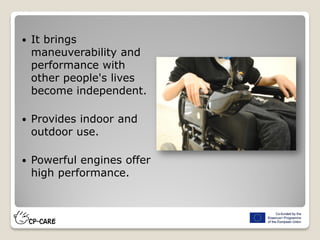
 It brings
maneuverability and
performance with
other people's lives
become independent.
 Provides indoor and
outdoor use.
 Powerful engines offer
high performance.
Manual wheelchairs
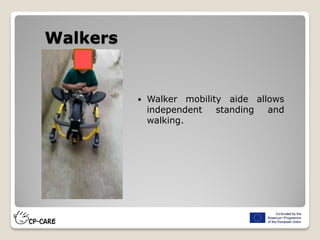
Walkers
 Walker mobility aide allows
independent standing and
walking.
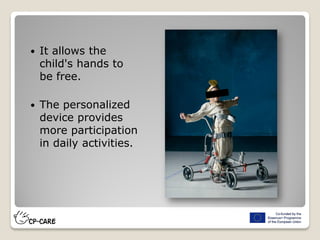
 It allows the
child's hands to
be free.
 The personalized
device provides
more participation
in daily activities.
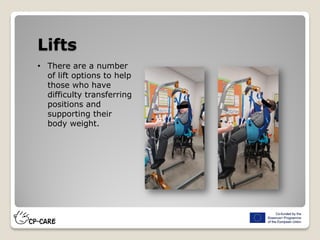
Lifts
• There are a number
of lift options to help
those who have
difficulty transferring
positions and
supporting their
body weight.
Electric
Wheelchairs
Walkers Manual
wheelchairs
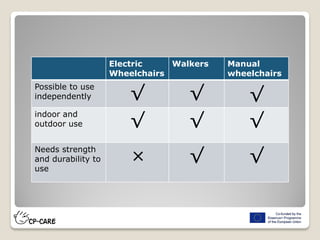
Possible to use
independently √ √ √
indoor and
outdoor use √ √ √
Needs strength
and durability to
use
× √ √
References
 www. madeformovement.com
 Berner TF: Overview of manual wheelchairs and what to consider when
making seating and positioning selections, OT Pract 12(19):CE1–CE8,
2007.
 www.drdenizdogan.com
Unit 6 – Virtual Reality in
Rehabilitation
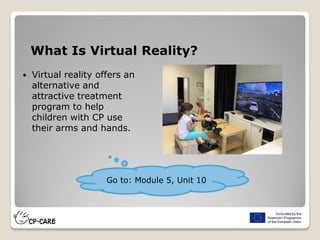
What Is Virtual Reality?
 Virtual reality offers an
alternative and
attractive treatment
program to help
children with CP use
their arms and hands.
Go to: Module 5, Unit 10
It includes;
 Sensory Gloves
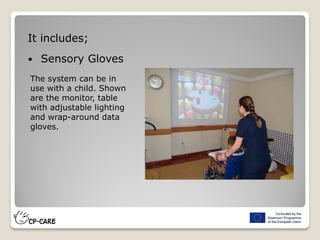
The system can be in
use with a child. Shown
are the monitor, table
with adjustable lighting
and wrap-around data
gloves.
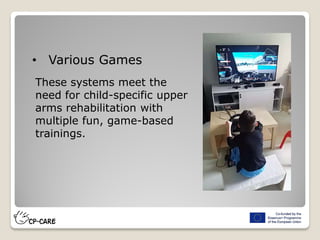
• Various Games
These systems meet the
need for child-specific upper
arms rehabilitation with
multiple fun, game-based
trainings.
 Gloves are the most important part of using
virtual reality in hand and arm rehabilitation.
 These gloves, which are used to perform
skill-related activities of the hand in virtual
environment, can detect angles of motion
and positions of fingers and hand
movements through sensors.
 On the computer screen, in the games and their virtual
environment view, the patient can see the image of his /
her hand and can perform various activities such as
moving, holding (e.g. cupping), releasing, squeezing,
gripping, working with weight, maze game.
https://www.youtube.com/watch?v=Axj_wyGHhcg
Improve functional skills
Improve the quality of active
movement
Improve coordination
Motivate the client into repetitive
movements
Virtual reality can:
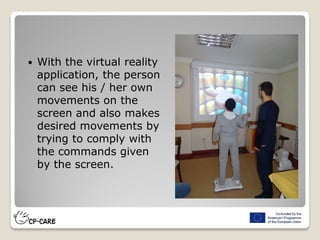
 With the virtual reality
application, the person
can see his / her own
movements on the
screen and also makes
desired movements by
trying to comply with
the commands given
by the screen.
References
 Weiss PL, Rand D, Katz N, Kizony R. Video capture virtual reality as a
flexible and effective rehabilitation tool. J NeuroEng Rehabil. 2004;1:12-
24.
 Virtual Reality in Pediatric Neurorehabilitation: Attention Deficit
Hyperactivity Disorder, Autism and Cerebral Palsy
 Pediatrik Rehabilitasyonda Oyun Konsollari ile Sanal Gerçeklik
Uygulamalari. Turkiye Klinikleri J Physiother Rehabil-Special Topics
2015;1(1):30-34
Unit 7 – Cerebral palsy
and therapeutic equipment
Therapeutic equipment
•helps to improve the functions of the individual and increases the
efficiency of the treatment applied.
•can support symmetry in the body, and provide equal load distribution to
the joints.
•improves mobility so as to be more independent in daily living activities.
What is Therapeutic Equipment?
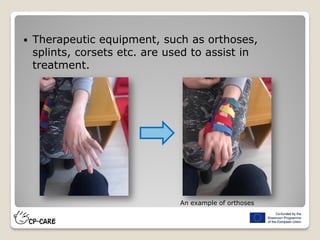
 Therapeutic equipment, such as orthoses,
splints, corsets etc. are used to assist in
treatment.
An example of orthoses
• can make the child more mobile,
and improve communication with
peers, thus contributing to
emotional and social development.
• reduces the child's energy
expenditure. Thus, children with
cerebral palsy can develop more
effective functions with less
energy.
• helps to regulate muscle tone
(tension or looseness).
Therapeutic
equipments
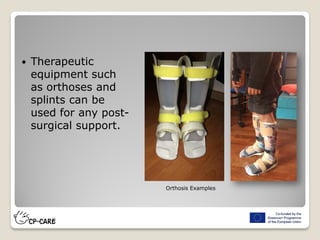
 Therapeutic
equipment such
as orthoses and
splints can be
used for any post-
surgical support.
Orthosis Examples
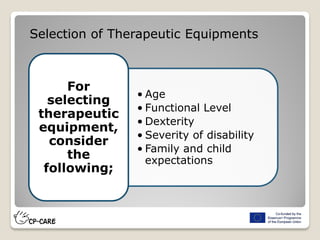
• Age
• Functional Level
• Dexterity
• Severity of disability
• Family and child
expectations
For
selecting
therapeutic
equipment,
consider
the
following;
Selection of Therapeutic Equipments
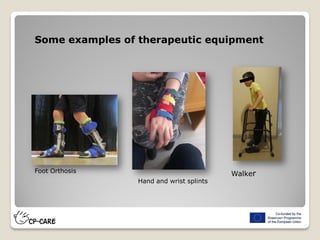
Some examples of therapeutic equipment
Hand and wrist splints
Foot Orthosis Walker
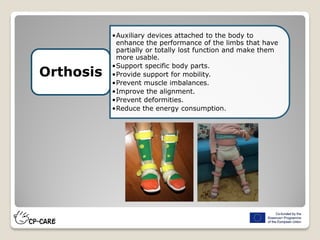
•Auxiliary devices attached to the body to
enhance the performance of the limbs that have
partially or totally lost function and make them
more usable.
•Support specific body parts.
•Provide support for mobility.
•Prevent muscle imbalances.
•Improve the alignment.
•Prevent deformities.
•Reduce the energy consumption.
Orthosis
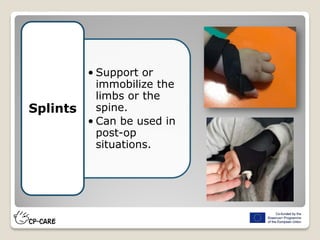
• Support or
immobilize the
limbs or the
spine.
• Can be used in
post-op
situations.
Splints
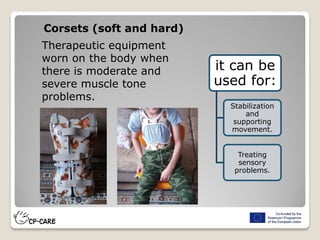
Corsets (soft and hard)
it can be
used for:
Stabilization
and
supporting
movement.
Treating
sensory
problems.
Therapeutic equipment
worn on the body when
there is moderate and
severe muscle tone
problems.
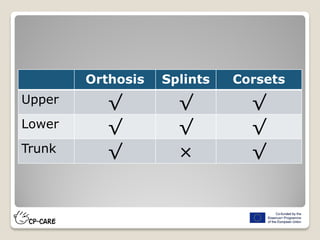
Orthosis Splints Corsets
Upper √ √ √
Lower √ √ √
Trunk √ × √
References
 Yalçin, S., Özaras, N., Dormans, J., & Susman, M. (2000). Serebral palsi
tedavi ve rehabilitasyon. Pediatrik ortopedi ve rehabilitasyon dizisi. Mas
Matbaacilik, İstanbul.
 Ehlert, R., Manfio, E. F., de Oliveira Heidrich, R., & Goldani, R. (2017).
Cerebral palsy: Influence of TheraTogs® on gait, posture and in functional
performance. Fisioterapia em Movimento, 30(2).
 http://www.cerebralpalsy.org/information/mobility/orthotics
Unit 8 - Adaptive
equipments/devices and
cerebral palsy
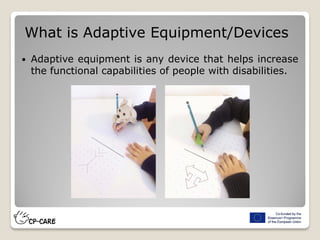
 Adaptive equipment is any device that helps increase
the functional capabilities of people with disabilities.
What is Adaptive Equipment/Devices
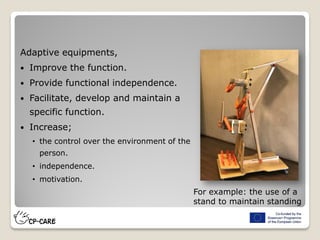
Adaptive equipments,
 Improve the function.
 Provide functional independence.
 Facilitate, develop and maintain a
specific function.
 Increase;
• the control over the environment of the
person.
• independence.
• motivation.
For example: the use of a
stand to maintain standing
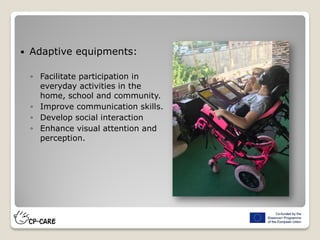
 Adaptive equipments:
◦ Facilitate participation in
everyday activities in the
home, school and community.
◦ Improve communication skills.
◦ Develop social interaction
◦ Enhance visual attention and
perception.
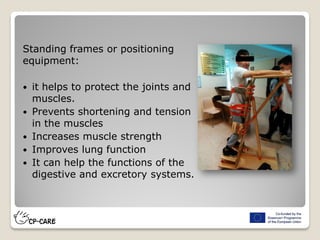
Standing frames or positioning
equipment:
 it helps to protect the joints and
muscles.
 Prevents shortening and tension
in the muscles
 Increases muscle strength
 Improves lung function
 It can help the functions of the
digestive and excretory systems.
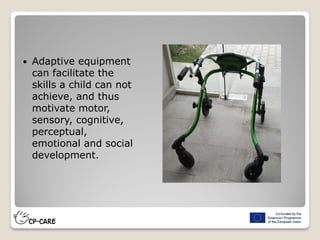
 Adaptive equipment
can facilitate the
skills a child can not
achieve, and thus
motivate motor,
sensory, cognitive,
perceptual,
emotional and social
development.
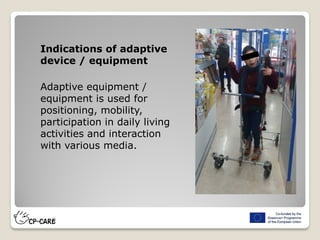
Indications of adaptive
device / equipment
Adaptive equipment /
equipment is used for
positioning, mobility,
participation in daily living
activities and interaction
with various media.
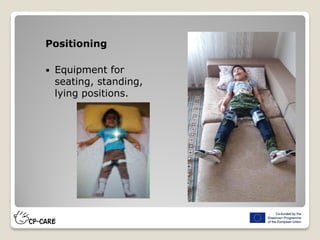
Positioning
 Equipment for
seating, standing,
lying positions.
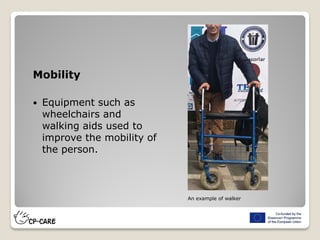
Mobility
 Equipment such as
wheelchairs and
walking aids used to
improve the mobility of
the person.
An example of walker
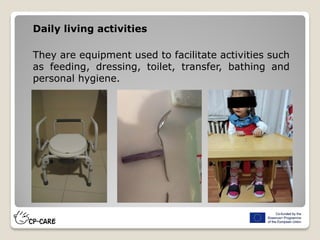
Daily living activities
They are equipment used to facilitate activities such
as feeding, dressing, toilet, transfer, bathing and
personal hygiene.
References
 Dell AG, Newton DA, Petroff JG. Assistive Technology in the
Classroom:Enhancing the School Experiences of Students with
Disabilities. 2nd ed. Boston, MA: Pearson Education Inc; 2012.
 George Mason University. Assistive technology initiative. Equityand
diversity services. http://ati.gmu.edu/what_ati.cfm. Accessed July 11,
2013.
 Copley J, Ziviani J. Barriers to the use of assistive technology for children
with multiple disbilities. Occup Ther Inter. 2004;11(4):229–243.
 Angelo DH. Impact of augmentative and alternative communication
devices on families. Augmentative Alt Commn. 2000;16:37–47.
CP-Care project partners
 Gazi University (Turkey)
 PhoenixKM BVBA (Belgium)
 Bilge Special Education And Rehabilitation
Clinic (Turkey)
 Spastic Children Foundation Of Turkey
(Turkey)
 SERÇEV- Association For Children With
Cerebral Palsy (Turkey)
 Asociacion Espanola De Fisioterapeutas
(Spain)
 National Association Of Professionals Working
With People With Disabilities (Bulgaria)
CP-CARE curriculum, learning material,
handbook by www.cpcare.eu is licensed
under a Creative Commons Attribution-
NonCommercial 3.0 Unported License.
Based on a work at www.cpcare.eu
Permissions beyond the scope of this
license may be available at www. cpcare.eu
This project (CP-CARE - 2016-1-TR01-
KA202-035094) has been funded with
support from the European Commission.
This communication reflects the views only
of the author, and the Commission cannot
be held responsible for any use which may
be made of the information contained
therein.

CP-Care - Module 3 - Assistive technology

  • 1.
    IO2 module 3 AssistiveTechnology and CP CP-CARE - 2016-1-TR01-KA202-035094 (01.12.2016 – 30.11.2019)
  • 2.
    Unit 1 -Brief information on assistive technology
  • 3.
    Assistive technologhy isany equipment, appliance or product that improves, protects or enhances the functional capacities of persons with disabilities, is sold on the market, or is designed, adapted or adapted as necessary. What is Assistive Technology?
  • 4.
    - To beable to perform daily life activities alone, - To enable people without sight, hearing, speech, and movement to perform these functions, - To support the growth and development process, - To facilitate the learning function, - To provide security and convenience. The effects of assistive technology in Cerebral Palsy
  • 5.
    Assistive Technology InCerebral Palsy And Types Of Uses Of Technology
  • 6.
    Technology Free Products (Hardware) TechnologyProducts (Software/Hardware) Walking Assistants - Walkers - Sticks and crutches - Wheelchairs - Orthotics - Prosthesis Vision Support - Screen Reader - Touch Keyboard - Screen Magnifier - Accessibility software embedded in Windows, Mac, IOS, etc. Transfer Assistants - Lifters - Transfer Boards Hearing Assistants - Assistive Listening Devices - Voice Enhancing Phones - Loop Systems Positioning - Sitting - Standing Communication Aids - Augmentative and Alternative Communication(AAC) Games, Recreation and Leisure Activities Learning Assistants - Computer-aided Education (Educational games) House Adaptations - Environmental Control (Domotics) Vehicle Adaptations
  • 7.
    No Tech • PencilGrip • Post-it Notes • Slanted surfaces • Raised lined paper • Covered overlays • Tactile letters • Magnifying bars • Weighted pencils Low Tech • Buzzers • Portable word processors • Talking Calculator • MP3 players • Electronic organizers • Lights High Techs • E-Readers • Touch screen devices • Computerized testing • Speech Recognition Software • Word Processors • Text-To-Speech (TTS) • Progress Monitoring Software  Examples of Assistive Technology
  • 8.
     No TechAssistive Technology Products Tactile Letters Pencil Grips
  • 9.
     Examples ofLow-Tech Assistive Technology Products Buzzers Switches
  • 10.
     High-Tech AssistiveTechnology Products Computerized TestingTouch Screen Devices
  • 11.
    References  Assistive TechnologyAct, United States Congress 2004.  http://istanbultip.istanbul.edu.tr/ogrenci/wp- content/uploads/2016/10/asistif-teknoloji-resa- ayd%C4%B1n.pdf
  • 12.
    Unit 2 -Augmentative and Alternative Communication (AAC)
  • 13.
    What is Augmentative and Alternative Communication? Howcan someone communicate with AAC? Examples such as PECS (Picture Exchange Communication System), control interfaces for the computer, alternative keyboards, touch screens, head pointers, mouth sticks.
  • 14.
    AAC is variousmethod of communication that can help people who are unable to use verbal speech to communicate AAC is a blanket term that includes all forms of communication except «standart speech». AAC tools allow children with cerebral palsy to communicate more effectively. What is Augmentative And Alternative Communication?
  • 15.
    Unaided Systems Do notrequire special materials or equipment Rely only user’s body to convey messages Signing and gestures Aided Systems Require the use of tools and equipments Devices that produce voice output Charts, books, assistive technology Types of Alternative And Augmentative Communication
  • 16.
     It isan unaided system in which the individual does not need anything other than his / her own body. Unaided System These include gestures, body language, facial expressions, and sign language.
  • 17.
     People usean aided AAC system when they are using their body along with additional equipment or tools. Aided System High Tech Touching letters or pictures on a computer screen that speaks for individuals. Low Tech Pen,paper, pointing to letters, words, or pictures on a board.
  • 18.
    Eligibility For AAC •Physicallyinvolved but cognitively able •Multiply involved with unknown cognitive abilities •Physically able but motor speech or language delayed •Pre-verbal or emergent-verbal •Developmentally delayed •Exhibiting behavior disorders related to inability to communicate effectively •Severe speech sound production difficulties individuals with complex communication needs who are/have: Who have difficulty accessing their curriculum in the absence of AAC support?
  • 19.
    EXAMPLES OF AAC DirectSelection The person using AAC accesses a target by directly pointing to a symbol, picture, or object with a body part (e.g. finger, hand, eye gaze) or adapted tool (e.g. laser pointer, computer mouse).
  • 20.
    EXAMPLES OF AAC indirectSelection The person using AAC selects a target from a set of choices as an indicator scans each choice in the set.
  • 21.
  • 22.
    Unit 3 –Assistive Technology For The Lower Extremity
  • 23.
    A. Positioning • Sitting •Standing B. Mobility • Orthotics • Sticks and crutches • Walkers • Wheelchairs • Others
  • 24.
    A- Positioning; • Allowactive movement, • Provide body support, • Improve circulation and bone health, • Prevent soft tissue contractures, • Improve communication, cognitive and personal- social development.
  • 25.
    Sitting Sitting support manybody functions. Maintained sitting is a goal achieved by most typical infants before 1 year age. There are also significant social benefits.
  • 26.
    Seat • Height The heightof the chair seat should allow the feet to be placed flat on the floor or foot rest. • Depth The seat should be deep enough to allow maximal distribution of weight. • Padding Padding helps to limit pressure which allows for increased sitting tolerance.
  • 27.
    • Backrest Backrest shouldaccommodate adequate movement. Should also provide adequate support of the trunk to prevent muscular fatigue. The shorter backrest allows great mobility for general freedom of movement. • Seat to Backrest Angle The angel formed between the seat and the backrest of a chair is most comfortable between 95 and 110 degrees.
  • 28.
    Standing The standing postureis the foundation for many functional activities. Also can promote circulation, bone mineral density, vertical access and social interaction with others.
  • 29.
    B- Mobility Mobility isdefined as the ability to move in one’s environment with ease and without restriction. Problems with walking, rolling over in bed or transitioning positions are examples of mobility limitations.
  • 30.
    Orthotics Orthotic devices arebraces worn externally that improve and strengthen mobility.
  • 31.
    Sticks and Crutches Sticksand crutches are often used by those with cerebral palsy who have the ability to ambulate, or walk, but need extra help with balance and stability.
  • 32.
    Walkers Walkers can assist childrenwith cerebral palsy with their mobility issues, including problems with balance and posture. They also allow the child to bear weight on their legs.
  • 33.
    Wheelchairs Wheelchairs are commonmobility aids for non- ambulatory cerebral palsy patients. There are numerous design options and features to choose from, but there are two basic types: manual wheelchairs and electric wheelchairs Manual Wheelchairs Electric Wheelchairs https://www.youtube.com/watch?v=K-MTAe45cMo
  • 34.
    References  Raine S,Meadows L, Lynch-Ellerington M. The Bobath Concept: Theory and Clinical Practice in Neurological Rehabilitation Çeviren: Karaduman A,Yildirim SA, Yilmaz ÖT. Bobath Kavrami Nörolojik Rehabilitasyonda Teori ve Klinik Uygulama. Pelikan Kitabevi., Ankara; 2012 s: 154-178  www.drdenizdogan.com/2012/06/tekerlekli-sandalyeler.html  www.theradapt.com  https://www.nhs.uk/conditions/kyphosis/treatment/
  • 35.
    Unit 4 -Assistive Technology for the upper extremity
  • 36.
    Functions of theupper extremity The use of hands is important to be independent in everyday life. In daily life, a number of important activities are performed using hands. Activities range from ones that require more strenght and less skill, such as carrying a heavy object, to ones that require selective grip and skill, such as thread a needle.
  • 37.
    Upper extremity problems Involuntary andjerky movements In- coordinated movements Lack of Sensation Grasping difficulties Lack of fine motor skills Muscle tone problems
  • 38.
     Orthotics/Splints Orthotic devicesare braces worn externally that improve and strengthen mobility.
  • 39.
    Technology support forupper extremity  Finger extension rehabilitation glove https://www.youtube.com/watch?v=1bRkddWvyUM
  • 40.
    References  Raine S,Meadows L, Lynch-Ellerington M. The Bobath Concept: Theory and Clinical Practice in Neurological Rehabilitation Çeviren: Karaduman A,Yildirim SA, Yilmaz ÖT. Bobath Kavrami Nörolojik Rehabilitasyonda Teori ve Klinik Uygulama. Pelikan Kitabevi., Ankara; 2012 s: 154-178  Sveistrup H, Thornton M, Brvanton C, et al. Outcomes of intervention programs using flatscreen virtual reality. Conf Proc iEEE Eng Med Biol Soc. 2004;7: 4856–4858  A paediatric interactive therapy system for arm and hand rehabilitation. in Virtual Rehabilitation, 2008  Alamri A, Eid M, iglesias R, Shirmohammadi S, El Sadik A. Haptic virtual rehabilitation exercises for poststroke diagnosis. iEEE Trans instrum Meas 2008;57:1876-84.  Bouzit M, Burdea G, Popescu G, Boian R. The Rutgers Master ii—New design force-feedback glove. iEEE Trans instrum Meas 2002:7;256-63
  • 41.
    Unit 5 –Mobility And Transfer Devices
  • 42.
    Wheelchairs • Wheelchairs arevital mobility aids for cerebral palsy patients with ambulatory issues. • There are numerous design options and features to choose from, but there are two basic types: manual wheelchairs and electric wheelchairs.
  • 43.
     Things towatch out for the right wheelchair: Width of the selected wheelchair should be the child’s hip width plus two fingers wide. The length of the seating area of the selected wheelchair should be from the hip to the back of the knee. Arm height of the wheelchair should be from the seat to the elbow. if the child has a problem with head or body control, the back support can be raised to the back of the head.
  • 44.
    cm Seat width 36– 50,5 Seat height from the floor 40 - 46 Seat armrest height 25 - 47 Rear wheel rim hub width 38 - 52 Front pedal rear wheel height 38 - 80 • Persons who will use a manual wheelchair should have sufficient strength and durability to push the chair on various floors at home and in the community.
  • 45.
    Arm Supports ofthe Wheelchairs  Stable,  Removable,  Shaped like a removable table,  inclining backwards,  Height adjustable,  Tubular.
  • 46.
     Fixed armsupport is part of the frame and can not be removed.  This support prevents approach to the counter or dining table and side transfers.
  • 47.
     Reversely raisedand removable table-shaped arm supports facilitate side transfers
  • 48.
     Tubular armsupports are available for lightweight frames.
  • 49.
     The rotatabledetachable rungs can slide next to the chair or can be removed completely.  These rungs allow you to get closer to bed, bathtub and counter  Wheelchair length and weight are reduced so that it can be easily loaded into a car when the rungs are removed.  Can be fixed to the chair with a locking device
  • 50.
     Height adjustable rungsare suitable for patients with lower extremity oedema, changes in blood pressure and orthopedic problems.
  • 51.
    Base Plate ofthe Wheelchair  it may have heel and toe straps to help secure itself to the soles of the feet.
  • 52.
    A calf strapcan be used when additional support is required on the foot support or behind the calf.
  • 53.
    Other accessories mayinclude seat belts, various brake styles, brake extensions, wheel locks, and head restraints. Brake Extensions Wheel Lock
  • 54.
     The electricwheelchair is preferred if the functional skill and resilience of the user are not sufficient to push the manual wheelchair independently. Electric Wheelchairs
  • 55.
     To usean electric chair, one's cognitive and perceptual skills must be sufficient.  The house must be suitable for use in an electric wheelchair users
  • 56.
     It brings maneuverabilityand performance with other people's lives become independent.  Provides indoor and outdoor use.  Powerful engines offer high performance.
  • 57.
  • 58.
    Walkers  Walker mobilityaide allows independent standing and walking.
  • 59.
     It allowsthe child's hands to be free.  The personalized device provides more participation in daily activities.
  • 60.
    Lifts • There area number of lift options to help those who have difficulty transferring positions and supporting their body weight.
  • 61.
    Electric Wheelchairs Walkers Manual wheelchairs Possible touse independently √ √ √ indoor and outdoor use √ √ √ Needs strength and durability to use × √ √
  • 62.
    References  www. madeformovement.com Berner TF: Overview of manual wheelchairs and what to consider when making seating and positioning selections, OT Pract 12(19):CE1–CE8, 2007.  www.drdenizdogan.com
  • 63.
    Unit 6 –Virtual Reality in Rehabilitation
  • 64.
    What Is VirtualReality?  Virtual reality offers an alternative and attractive treatment program to help children with CP use their arms and hands. Go to: Module 5, Unit 10
  • 65.
    It includes;  SensoryGloves The system can be in use with a child. Shown are the monitor, table with adjustable lighting and wrap-around data gloves.
  • 66.
    • Various Games Thesesystems meet the need for child-specific upper arms rehabilitation with multiple fun, game-based trainings.
  • 67.
     Gloves arethe most important part of using virtual reality in hand and arm rehabilitation.  These gloves, which are used to perform skill-related activities of the hand in virtual environment, can detect angles of motion and positions of fingers and hand movements through sensors.
  • 68.
     On thecomputer screen, in the games and their virtual environment view, the patient can see the image of his / her hand and can perform various activities such as moving, holding (e.g. cupping), releasing, squeezing, gripping, working with weight, maze game. https://www.youtube.com/watch?v=Axj_wyGHhcg
  • 69.
    Improve functional skills Improvethe quality of active movement Improve coordination Motivate the client into repetitive movements Virtual reality can:
  • 70.
     With thevirtual reality application, the person can see his / her own movements on the screen and also makes desired movements by trying to comply with the commands given by the screen.
  • 71.
    References  Weiss PL,Rand D, Katz N, Kizony R. Video capture virtual reality as a flexible and effective rehabilitation tool. J NeuroEng Rehabil. 2004;1:12- 24.  Virtual Reality in Pediatric Neurorehabilitation: Attention Deficit Hyperactivity Disorder, Autism and Cerebral Palsy  Pediatrik Rehabilitasyonda Oyun Konsollari ile Sanal Gerçeklik Uygulamalari. Turkiye Klinikleri J Physiother Rehabil-Special Topics 2015;1(1):30-34
  • 72.
    Unit 7 –Cerebral palsy and therapeutic equipment
  • 73.
    Therapeutic equipment •helps toimprove the functions of the individual and increases the efficiency of the treatment applied. •can support symmetry in the body, and provide equal load distribution to the joints. •improves mobility so as to be more independent in daily living activities. What is Therapeutic Equipment?
  • 74.
     Therapeutic equipment,such as orthoses, splints, corsets etc. are used to assist in treatment. An example of orthoses
  • 75.
    • can makethe child more mobile, and improve communication with peers, thus contributing to emotional and social development. • reduces the child's energy expenditure. Thus, children with cerebral palsy can develop more effective functions with less energy. • helps to regulate muscle tone (tension or looseness). Therapeutic equipments
  • 76.
     Therapeutic equipment such asorthoses and splints can be used for any post- surgical support. Orthosis Examples
  • 77.
    • Age • FunctionalLevel • Dexterity • Severity of disability • Family and child expectations For selecting therapeutic equipment, consider the following; Selection of Therapeutic Equipments
  • 78.
    Some examples oftherapeutic equipment Hand and wrist splints Foot Orthosis Walker
  • 79.
    •Auxiliary devices attachedto the body to enhance the performance of the limbs that have partially or totally lost function and make them more usable. •Support specific body parts. •Provide support for mobility. •Prevent muscle imbalances. •Improve the alignment. •Prevent deformities. •Reduce the energy consumption. Orthosis
  • 80.
    • Support or immobilizethe limbs or the spine. • Can be used in post-op situations. Splints
  • 81.
    Corsets (soft andhard) it can be used for: Stabilization and supporting movement. Treating sensory problems. Therapeutic equipment worn on the body when there is moderate and severe muscle tone problems.
  • 82.
    Orthosis Splints Corsets Upper√ √ √ Lower √ √ √ Trunk √ × √
  • 83.
    References  Yalçin, S.,Özaras, N., Dormans, J., & Susman, M. (2000). Serebral palsi tedavi ve rehabilitasyon. Pediatrik ortopedi ve rehabilitasyon dizisi. Mas Matbaacilik, İstanbul.  Ehlert, R., Manfio, E. F., de Oliveira Heidrich, R., & Goldani, R. (2017). Cerebral palsy: Influence of TheraTogs® on gait, posture and in functional performance. Fisioterapia em Movimento, 30(2).  http://www.cerebralpalsy.org/information/mobility/orthotics
  • 84.
    Unit 8 -Adaptive equipments/devices and cerebral palsy
  • 85.
     Adaptive equipmentis any device that helps increase the functional capabilities of people with disabilities. What is Adaptive Equipment/Devices
  • 86.
    Adaptive equipments,  Improvethe function.  Provide functional independence.  Facilitate, develop and maintain a specific function.  Increase; • the control over the environment of the person. • independence. • motivation. For example: the use of a stand to maintain standing
  • 87.
     Adaptive equipments: ◦Facilitate participation in everyday activities in the home, school and community. ◦ Improve communication skills. ◦ Develop social interaction ◦ Enhance visual attention and perception.
  • 88.
    Standing frames orpositioning equipment:  it helps to protect the joints and muscles.  Prevents shortening and tension in the muscles  Increases muscle strength  Improves lung function  It can help the functions of the digestive and excretory systems.
  • 89.
     Adaptive equipment canfacilitate the skills a child can not achieve, and thus motivate motor, sensory, cognitive, perceptual, emotional and social development.
  • 90.
    Indications of adaptive device/ equipment Adaptive equipment / equipment is used for positioning, mobility, participation in daily living activities and interaction with various media.
  • 91.
    Positioning  Equipment for seating,standing, lying positions.
  • 92.
    Mobility  Equipment suchas wheelchairs and walking aids used to improve the mobility of the person. An example of walker
  • 93.
    Daily living activities Theyare equipment used to facilitate activities such as feeding, dressing, toilet, transfer, bathing and personal hygiene.
  • 94.
    References  Dell AG,Newton DA, Petroff JG. Assistive Technology in the Classroom:Enhancing the School Experiences of Students with Disabilities. 2nd ed. Boston, MA: Pearson Education Inc; 2012.  George Mason University. Assistive technology initiative. Equityand diversity services. http://ati.gmu.edu/what_ati.cfm. Accessed July 11, 2013.  Copley J, Ziviani J. Barriers to the use of assistive technology for children with multiple disbilities. Occup Ther Inter. 2004;11(4):229–243.  Angelo DH. Impact of augmentative and alternative communication devices on families. Augmentative Alt Commn. 2000;16:37–47.
  • 95.
    CP-Care project partners Gazi University (Turkey)  PhoenixKM BVBA (Belgium)  Bilge Special Education And Rehabilitation Clinic (Turkey)  Spastic Children Foundation Of Turkey (Turkey)  SERÇEV- Association For Children With Cerebral Palsy (Turkey)  Asociacion Espanola De Fisioterapeutas (Spain)  National Association Of Professionals Working With People With Disabilities (Bulgaria)
  • 96.
    CP-CARE curriculum, learningmaterial, handbook by www.cpcare.eu is licensed under a Creative Commons Attribution- NonCommercial 3.0 Unported License. Based on a work at www.cpcare.eu Permissions beyond the scope of this license may be available at www. cpcare.eu This project (CP-CARE - 2016-1-TR01- KA202-035094) has been funded with support from the European Commission. This communication reflects the views only of the author, and the Commission cannot be held responsible for any use which may be made of the information contained therein.