Continuous Deployment Applied
Ran Levy, Backend Director
Elad Shmitanka, Operations engineer
Agenda
● Overview about MyHeritage
● Background – the days before CD
● Why switching to CD?
● CD
● Wins
Family history for Families
Building next generation tools for family history enthusiasts
and their families
Discover Preserve Share
Challenge: Scale
79 million registered users
1.9 billion tree profiles
6.2 billion historical records
200 million photos
42 languages
1 million daily emails
Agenda
● Overview about MyHeritage
● Background – the days before CD
● Why switching to CD?
● CD
● Wins
Background – the days before CD
● Working in branches (many).
● Weekly service pack (dedicated branch).
● Emergencies and HOT Service Pack.
Background – the days before CD
● Advantages:
○ Intensively tested and monitored.
● Disadvantages:
○ Delivering value to user only on weekly basis.
○ Unstable deliveries to QA without clear owner to problems.
○ Developers needs to get back to previous work.
○ Huge time waster across the entire R&D.
○ Difficult rollbacks in case a problem reached production.
Agenda
● Overview about MyHeritage
● Background – the days before CD
● Why switching to CD?
● CD
● Wins
What is Continuous Deployment ?
Continuous Deployment is a set of practices aimed at,
building, testing, and releasing software frequently.
These principles help reduce the cost, time and risk of
delivering changes to customers by allowing for more
incremental changes to applications in production.
Why switching to CD?
● Fast feedback loop.
● Risk reduction.
● Better coding.
● Increase velocity.
● Easy and fast recovery.
● Bridges the gap between QA (team) and Dev.
Agenda
● Overview about MyHeritage
● Background – the days before CD
● Why switching to CD?
● CD
○ Transition phase
○ The early days
○ The future is here
● Wins
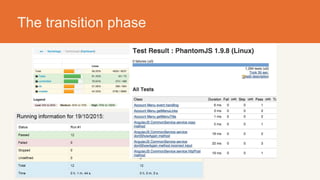
The transition phase
Before switching to CD
● Learn from others (like we did).
● Several engineering practices and tools MUST be in
place.
The transition phase
● Gradually skipping Service Pack
○ No actual gain for SPCs (manual dists).
○ We gave up SPCs and the sky didn’t fall.
○ Still coding in branches.
● Small gradual steps:
○ Applying CD in completely new code by a single dev.
○ Applying CD in a single agile team.
○ Applying CD in two agile teams.
The transition phase
● What have we learned?
○ Fewer bugs.
○ More stability in production.
○ Better velocity.
CD – the early days
● More frequent commits.
● Branches have gradually disappeared.
● Manual procedure for updating production
○ Prone to human errors
○ Required dist synchronization
○ Time waster
○ …
● Let’s improve and automate the process
CD – the future is here
What did we have?
● Servers list - Static list
● Scripts - Mixture of PHP and bash
● Error handling - Manual
● SVN problems - Calculating deltas, long processes, conflicts
● Dist method - Rsync , only delta of files
● Queue
● Scripts - Jenkins with a few scripts
Ok, So what did we change?
● Servers list - Mcollective using Puppet filters
● Error handling - Jenkins Flow plugin, catch
● SVN problems - Working on trunk, revert & update
● Dist method - RPM, Mcollective
● Queue - Builtin in Jenkins
What did we add?
● Tests
● Apache configuration changes
● Notifications - In Hipchat, with mentioning
● Daily digest of changes
● Automatic cleanup of the build machine
So, how does it looks like? (Hipchat)
And in jenkins?
Flow schema
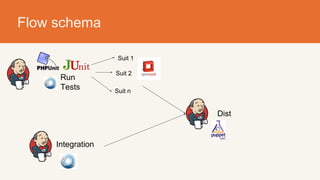
Flow schema
Flow schema
Prepare
workspace
Flow schema
Prepare
workspace
Run
Tests
Prepare
assets
Flow schema
Run
Tests
Prepare
assets
Suit 1
Suit 2
Suit n
Build
RPM
IntegrationCanary
Flow schema
Run
Tests
Suit 1
Suit 2
Suit n
Integration
Dist
Flow schema
Suit 1
Suit 2
Suit n
Integration
Dist
Cleanup
Handle
flow
results
Flow schema
Prepare
workspace
Parse commit
message
Run Tests
Build
RPM
Canary Integration
Handle
flow results
Dist Cleanup
Suit 1
Suit 2
Suit n
Prepare
assets
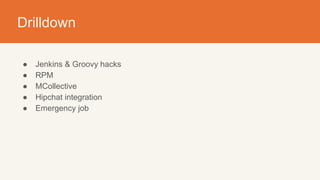
Drilldown
● Jenkins & Groovy hacks
● RPM
● MCollective
● Hipchat integration
● Emergency job
Jenkins & Groovy hacks
● Accessing all the classes of jenkins
● How do we make sure the SVN revision will be static across all the jobs?
Jenkins & Groovy hacks
● Accessing all the classes of jenkins
● How do we make sure the SVN revision will be static across all the jobs?
● How do we know which files changed?
Flow #9 Flow #8 Flow #7 Flow #6
Prepare
workspace
Prepare
workspace
Prepare
workspace
Prepare
workspace
Flow #5
Prepare
workspace
RPM
RPM (RedHat Package Manager) - Package management
system for RedHat (Originally). Contains arbitrary set of files,
configurations files and pre & post scripts.
RPM (continue)
● Why RPM? (In short? a lot)
○ Mature
○ Config files are managed/tracked
○ Version tracking
○ Dependency management
○ Native OS tools to manage lifecycle (install/query/update/uninstall/downgrade)
○ Rich ecosystem and toolchain
○ Always contains the entire codebase (easier to recover from missed updates)
○ Doesn’t touch unmanaged files (i.e PID files)
● Problems we have encountered..
○ Large packages (Reduced from a ~700M to currently ~450M)
○ I/O & Network usage on the repo machine (simple HTTP server)
○ Yum locking mechanism in Puppet
MCollective
MCollective - a framework
for building server
orchestration or parallel
job-execution systems.
Most users
programmatically execute
administrative tasks on
clusters of servers.
MCollective (Continue)
● Packages plugin - https://github.com/myheritage/mcollective-plugin-
packages
● Distributor plugin - In-house
○ Used for emergency dists (explained later)
○ clear cache/reload apache
● Dynamic host list
○ Easier to manage - Given free by Mcollective
○ Host in maintenance - Simply stop Mcollective service
● Scaleable
HipChat
Group and private chat, file sharing, and integrations.
● Has API
● Web, Mobile & desktop clients
● Mentioning
● History
● Rooms
HipChat (Continue)
● Using HipChat plugin V0.1.8
● Plugin allows only limited functionality (0.1.9 offers more), No
customized messages, no mentioning
● Groovy for the rescue!
● HuBot for the rescue!
Emergency job
We have problems in the site, what do we do?
1. Put a stop flag - Disabling new dists
2. Committing a fix and disting emergency
Emergency job
Get changed
files
Compress Upload to httpd
“Go, download and
extract”
Additional problems we’ve encountered
● Parallelism of UnitTests
● Minify failures
● Stop flag job
● Clear cache
○ PHP is script based language
○ Cache is used to improve performance
○ requires cache invalidation
CD 2.0 / Lessons learned
● Improving visibility of the root cause
● Break the Groovy to files and methods
● Yum locking (Should be resolved at Puppet 4.x)
● RPM has it’s disadvantages
○ MCollective RSync plugin (https://github.
com/myheritage/mcollective-rsync-agent)
Agenda
● Overview about MyHeritage
● Background – the days before CD
● Why switching to CD?
● CD
● Wins
Wins
● Around 20-30 dists per day to deliver close feedback and
higher business value.
● Reduced maintenance time for dist procedure.
● Higher quality:
○ Less bugs.
○ Better coding.
○ Increased testing coverage.
Wins
● Reduced code base and assets separation from code base.
● Higher velocity.
● Easy and fast recovery.
● Satisfaction or R&D, DevOps and the organization.
We are hiring!

Continuous Deployment Applied at MyHeritage

  • 1.
    Continuous Deployment Applied RanLevy, Backend Director Elad Shmitanka, Operations engineer
  • 2.
    Agenda ● Overview aboutMyHeritage ● Background – the days before CD ● Why switching to CD? ● CD ● Wins
  • 3.
    Family history forFamilies Building next generation tools for family history enthusiasts and their families Discover Preserve Share
  • 4.
    Challenge: Scale 79 millionregistered users 1.9 billion tree profiles 6.2 billion historical records 200 million photos 42 languages 1 million daily emails
  • 5.
    Agenda ● Overview aboutMyHeritage ● Background – the days before CD ● Why switching to CD? ● CD ● Wins
  • 6.
    Background – thedays before CD ● Working in branches (many). ● Weekly service pack (dedicated branch). ● Emergencies and HOT Service Pack.
  • 7.
    Background – thedays before CD ● Advantages: ○ Intensively tested and monitored. ● Disadvantages: ○ Delivering value to user only on weekly basis. ○ Unstable deliveries to QA without clear owner to problems. ○ Developers needs to get back to previous work. ○ Huge time waster across the entire R&D. ○ Difficult rollbacks in case a problem reached production.
  • 8.
    Agenda ● Overview aboutMyHeritage ● Background – the days before CD ● Why switching to CD? ● CD ● Wins
  • 9.
    What is ContinuousDeployment ? Continuous Deployment is a set of practices aimed at, building, testing, and releasing software frequently. These principles help reduce the cost, time and risk of delivering changes to customers by allowing for more incremental changes to applications in production.
  • 10.
    Why switching toCD? ● Fast feedback loop. ● Risk reduction. ● Better coding. ● Increase velocity. ● Easy and fast recovery. ● Bridges the gap between QA (team) and Dev.
  • 11.
    Agenda ● Overview aboutMyHeritage ● Background – the days before CD ● Why switching to CD? ● CD ○ Transition phase ○ The early days ○ The future is here ● Wins
  • 12.
    The transition phase Beforeswitching to CD ● Learn from others (like we did). ● Several engineering practices and tools MUST be in place.
  • 13.
  • 14.
  • 15.
  • 16.
  • 17.
    The transition phase ●Gradually skipping Service Pack ○ No actual gain for SPCs (manual dists). ○ We gave up SPCs and the sky didn’t fall. ○ Still coding in branches. ● Small gradual steps: ○ Applying CD in completely new code by a single dev. ○ Applying CD in a single agile team. ○ Applying CD in two agile teams.
  • 18.
    The transition phase ●What have we learned? ○ Fewer bugs. ○ More stability in production. ○ Better velocity.
  • 19.
    CD – theearly days ● More frequent commits. ● Branches have gradually disappeared. ● Manual procedure for updating production ○ Prone to human errors ○ Required dist synchronization ○ Time waster ○ … ● Let’s improve and automate the process
  • 20.
    CD – thefuture is here
  • 21.
    What did wehave? ● Servers list - Static list ● Scripts - Mixture of PHP and bash ● Error handling - Manual ● SVN problems - Calculating deltas, long processes, conflicts ● Dist method - Rsync , only delta of files ● Queue
  • 22.
    ● Scripts -Jenkins with a few scripts Ok, So what did we change? ● Servers list - Mcollective using Puppet filters ● Error handling - Jenkins Flow plugin, catch ● SVN problems - Working on trunk, revert & update ● Dist method - RPM, Mcollective ● Queue - Builtin in Jenkins
  • 23.
    What did weadd? ● Tests ● Apache configuration changes ● Notifications - In Hipchat, with mentioning ● Daily digest of changes ● Automatic cleanup of the build machine
  • 24.
    So, how doesit looks like? (Hipchat)
  • 25.
  • 26.
  • 27.
  • 28.
  • 29.
  • 30.
    Flow schema Run Tests Prepare assets Suit 1 Suit2 Suit n Build RPM IntegrationCanary
  • 31.
    Flow schema Run Tests Suit 1 Suit2 Suit n Integration Dist
  • 32.
    Flow schema Suit 1 Suit2 Suit n Integration Dist Cleanup Handle flow results
  • 33.
    Flow schema Prepare workspace Parse commit message RunTests Build RPM Canary Integration Handle flow results Dist Cleanup Suit 1 Suit 2 Suit n Prepare assets
  • 34.
    Drilldown ● Jenkins &Groovy hacks ● RPM ● MCollective ● Hipchat integration ● Emergency job
  • 35.
    Jenkins & Groovyhacks ● Accessing all the classes of jenkins ● How do we make sure the SVN revision will be static across all the jobs?
  • 36.
    Jenkins & Groovyhacks ● Accessing all the classes of jenkins ● How do we make sure the SVN revision will be static across all the jobs? ● How do we know which files changed? Flow #9 Flow #8 Flow #7 Flow #6 Prepare workspace Prepare workspace Prepare workspace Prepare workspace Flow #5 Prepare workspace
  • 37.
    RPM RPM (RedHat PackageManager) - Package management system for RedHat (Originally). Contains arbitrary set of files, configurations files and pre & post scripts.
  • 38.
    RPM (continue) ● WhyRPM? (In short? a lot) ○ Mature ○ Config files are managed/tracked ○ Version tracking ○ Dependency management ○ Native OS tools to manage lifecycle (install/query/update/uninstall/downgrade) ○ Rich ecosystem and toolchain ○ Always contains the entire codebase (easier to recover from missed updates) ○ Doesn’t touch unmanaged files (i.e PID files) ● Problems we have encountered.. ○ Large packages (Reduced from a ~700M to currently ~450M) ○ I/O & Network usage on the repo machine (simple HTTP server) ○ Yum locking mechanism in Puppet
  • 39.
    MCollective MCollective - aframework for building server orchestration or parallel job-execution systems. Most users programmatically execute administrative tasks on clusters of servers.
  • 40.
    MCollective (Continue) ● Packagesplugin - https://github.com/myheritage/mcollective-plugin- packages ● Distributor plugin - In-house ○ Used for emergency dists (explained later) ○ clear cache/reload apache ● Dynamic host list ○ Easier to manage - Given free by Mcollective ○ Host in maintenance - Simply stop Mcollective service ● Scaleable
  • 41.
    HipChat Group and privatechat, file sharing, and integrations. ● Has API ● Web, Mobile & desktop clients ● Mentioning ● History ● Rooms
  • 42.
    HipChat (Continue) ● UsingHipChat plugin V0.1.8 ● Plugin allows only limited functionality (0.1.9 offers more), No customized messages, no mentioning ● Groovy for the rescue! ● HuBot for the rescue!
  • 43.
    Emergency job We haveproblems in the site, what do we do? 1. Put a stop flag - Disabling new dists 2. Committing a fix and disting emergency
  • 44.
    Emergency job Get changed files CompressUpload to httpd “Go, download and extract”
  • 45.
    Additional problems we’veencountered ● Parallelism of UnitTests ● Minify failures ● Stop flag job ● Clear cache ○ PHP is script based language ○ Cache is used to improve performance ○ requires cache invalidation
  • 46.
    CD 2.0 /Lessons learned ● Improving visibility of the root cause ● Break the Groovy to files and methods ● Yum locking (Should be resolved at Puppet 4.x) ● RPM has it’s disadvantages ○ MCollective RSync plugin (https://github. com/myheritage/mcollective-rsync-agent)
  • 47.
    Agenda ● Overview aboutMyHeritage ● Background – the days before CD ● Why switching to CD? ● CD ● Wins
  • 48.
    Wins ● Around 20-30dists per day to deliver close feedback and higher business value. ● Reduced maintenance time for dist procedure. ● Higher quality: ○ Less bugs. ○ Better coding. ○ Increased testing coverage.
  • 49.
    Wins ● Reduced codebase and assets separation from code base. ● Higher velocity. ● Easy and fast recovery. ● Satisfaction or R&D, DevOps and the organization.
  • 50.