


Introduction
• University Faculty       • Employee - IT
                             Company
• Batch, Pascal, PERL,     • Shell Scripts
  Javascript, C++, JAVA
• DUNE2                    • Modern Conflict


• I love to visit all the nearby islands of Cebu.
• Introduce version control and CI
• Focus only on Subversion and Jenkins
• Discuss about installation and getting started
  with these tools.
• Sharing of personal experiences pertaining to
  the tools mentioned is also encouraged during
  the Q&A.
Version Control
• Also known as revision control.

• According to http://www.smashingmagazine.com/ the
  most obvious benefit of revision control is
   – ability to have an unlimited number of people
     working on the same code base, without having to
     constantly send files back and forth.
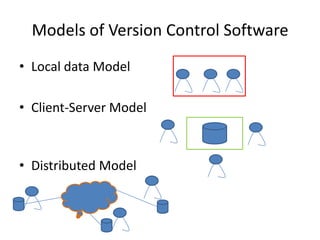
Models of Version Control Software
• Local data Model

• Client-Server Model


• Distributed Model
Version Control in the Market
• Proprietary
  – BitKeeper
  – PVCS
  – Synergy
  – Perforce
  – ClearCase
  – Visual SourceSafe
  – Rational Team Concert
Version Control in the Market
• Open Source
  – Concurrent Versions System (CVS)
  – Subversion (SVN)
  – Distributed Concurrent Versions System (DCVS)
  – Bazaar
  – Mercurial
  – Git
• Triggered development by CollabNet, Inc in early
  2000
• Took 14 months to develop
• Became part of ASF's family of top-level projects
  on early 2010.

• Book titled Version Control with Subversion can
  be found and/or downloaded at
           http://svnbook.red-bean.com/
• Subversion current version is 1.7
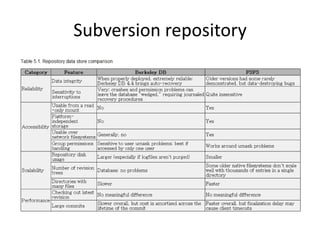
Subversion repository
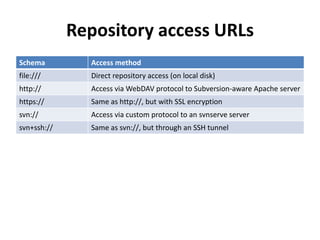
Repository access URLs
Schema         Access method
file:///       Direct repository access (on local disk)
http://        Access via WebDAV protocol to Subversion-aware Apache server
https://       Same as http://, but with SSL encryption
svn://         Access via custom protocol to an svnserve server
svn+ssh://     Same as svn://, but through an SSH tunnel
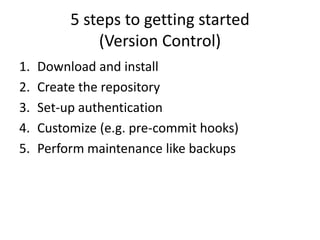
5 steps to getting started
              (Version Control)
1.   Download and install
2.   Create the repository
3.   Set-up authentication
4.   Customize (e.g. pre-commit hooks)
5.   Perform maintenance like backups
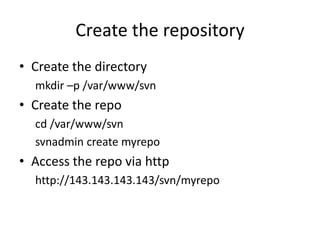
Create the repository
• Create the directory
  mkdir –p /var/www/svn
• Create the repo
  cd /var/www/svn
  svnadmin create myrepo
• Access the repo via http
  http://143.143.143.143/svn/myrepo
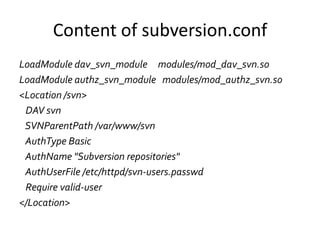
Content of subversion.conf
LoadModule dav_svn_module modules/mod_dav_svn.so
LoadModule authz_svn_module modules/mod_authz_svn.so
<Location /svn>
 DAV svn
 SVNParentPath /var/www/svn
 AuthType Basic
 AuthName "Subversion repositories"
 AuthUserFile /etc/httpd/svn-users.passwd
 Require valid-user
</Location>
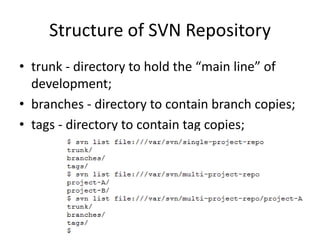
Structure of SVN Repository
• trunk - directory to hold the “main line” of
  development;
• branches - directory to contain branch copies;
• tags - directory to contain tag copies;
Customize
• Use of hooks like pre-commit
• The pre-commit hook is run just before a
  commit transaction is promoted to a new
  revision.
• Useful for freezing a release and/or requiring
  for log messages before revisions are
  committed to the repository.
• /var/www/svn/myrepo/hooks/pre-commit
Backups
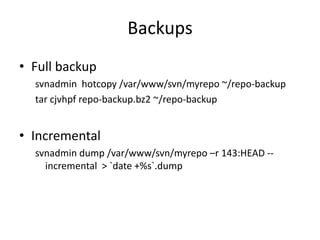
• Full backup
  svnadmin hotcopy /var/www/svn/myrepo ~/repo-backup
  tar cjvhpf repo-backup.bz2 ~/repo-backup


• Incremental
  svnadmin dump /var/www/svn/myrepo –r 143:HEAD --
    incremental > `date +%s`.dump
Subversion Best Practices
1.   Use a sane repository layout
2.   Commit logical changesets
3.   Use the issue-tracker wisely
4.   Provide meaningful log message
5.   Know when to branch
Continuous Integration (CI)
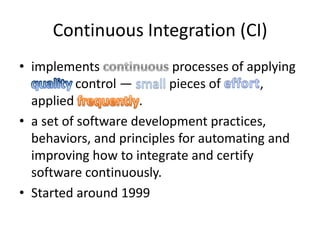
• implements              processes of applying
           control —      pieces of      ,
  applied            .
• a set of software development practices,
  behaviors, and principles for automating and
  improving how to integrate and certify
  software continuously.
• Started around 1999
• to deliver stable, high-quality code
  consistently and quickly;
• detect and fix problems early;
• deliver quality software;
• reduce time to market of the finish product;
Principles
•   Maintain a Single Source Repository
•   Automate the Build
•   Make Your Build Self-Testing
•   Everyone Commits To the Mainline Every Day
•   Every Commit Should Build the Mainline on an
    Integration Machine
•   Keep the Build Fast
•   Test in a Clone of the Production Environment
•   Make it Easy for Anyone to Get the Latest Executable
•   Everyone can see what's happening
•   Automate Deployment
CI in the Market
• Proprietary
  – Build Forge
  – AnthillPro
  – BuildMaster
  – TeamCity
CI in the Market
• OpenSource
  – CruiseControl
  – Jenkins/Hudson
4 steps to getting started (Jenkins)
1.   Download and install
2.   Create and configure the project/job
3.   Run your first build
4.   Customize
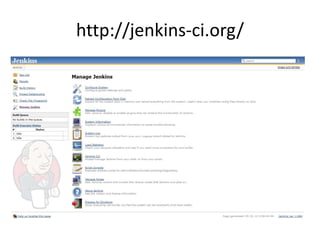
http://jenkins-ci.org/
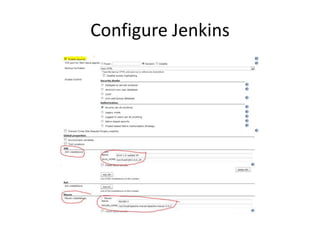
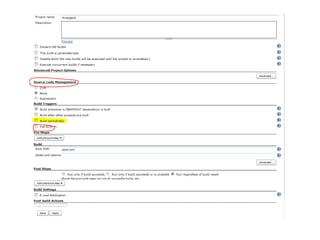
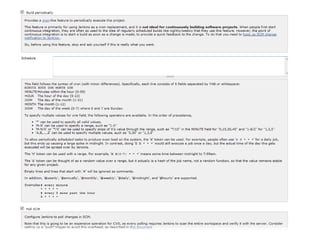
Configure Jenkins
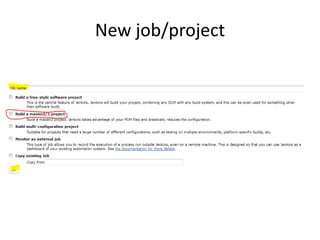
New job/project
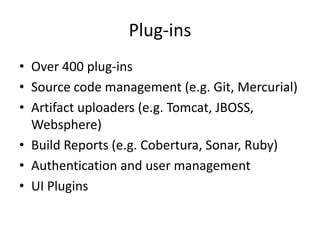
Plug-ins
• Over 400 plug-ins
• Source code management (e.g. Git, Mercurial)
• Artifact uploaders (e.g. Tomcat, JBOSS,
  Websphere)
• Build Reports (e.g. Cobertura, Sonar, Ruby)
• Authentication and user management
• UI Plugins
Reasons for CI
• Reports Any Build Failures to the Team
• Reduces the Risk of Integrating Code
     Private builds –> integration builds –> release builds
• Establishes Greater Confidence in the Product
  – Incorporated automated unit test in the build
• Improves the Efficiency of the Team
Reference:
• Internet

Version Control and Continuous Integration

  • 2.
    Introduction • University Faculty • Employee - IT Company • Batch, Pascal, PERL, • Shell Scripts Javascript, C++, JAVA • DUNE2 • Modern Conflict • I love to visit all the nearby islands of Cebu.
  • 3.
    • Introduce versioncontrol and CI • Focus only on Subversion and Jenkins • Discuss about installation and getting started with these tools. • Sharing of personal experiences pertaining to the tools mentioned is also encouraged during the Q&A.
  • 4.
    Version Control • Alsoknown as revision control. • According to http://www.smashingmagazine.com/ the most obvious benefit of revision control is – ability to have an unlimited number of people working on the same code base, without having to constantly send files back and forth.
  • 5.
    Models of VersionControl Software • Local data Model • Client-Server Model • Distributed Model
  • 6.
    Version Control inthe Market • Proprietary – BitKeeper – PVCS – Synergy – Perforce – ClearCase – Visual SourceSafe – Rational Team Concert
  • 7.
    Version Control inthe Market • Open Source – Concurrent Versions System (CVS) – Subversion (SVN) – Distributed Concurrent Versions System (DCVS) – Bazaar – Mercurial – Git
  • 8.
    • Triggered developmentby CollabNet, Inc in early 2000 • Took 14 months to develop • Became part of ASF's family of top-level projects on early 2010. • Book titled Version Control with Subversion can be found and/or downloaded at http://svnbook.red-bean.com/ • Subversion current version is 1.7
  • 10.
  • 11.
    Repository access URLs Schema Access method file:/// Direct repository access (on local disk) http:// Access via WebDAV protocol to Subversion-aware Apache server https:// Same as http://, but with SSL encryption svn:// Access via custom protocol to an svnserve server svn+ssh:// Same as svn://, but through an SSH tunnel
  • 12.
    5 steps togetting started (Version Control) 1. Download and install 2. Create the repository 3. Set-up authentication 4. Customize (e.g. pre-commit hooks) 5. Perform maintenance like backups
  • 13.
    Create the repository •Create the directory mkdir –p /var/www/svn • Create the repo cd /var/www/svn svnadmin create myrepo • Access the repo via http http://143.143.143.143/svn/myrepo
  • 14.
    Content of subversion.conf LoadModuledav_svn_module modules/mod_dav_svn.so LoadModule authz_svn_module modules/mod_authz_svn.so <Location /svn> DAV svn SVNParentPath /var/www/svn AuthType Basic AuthName "Subversion repositories" AuthUserFile /etc/httpd/svn-users.passwd Require valid-user </Location>
  • 15.
    Structure of SVNRepository • trunk - directory to hold the “main line” of development; • branches - directory to contain branch copies; • tags - directory to contain tag copies;
  • 16.
    Customize • Use ofhooks like pre-commit • The pre-commit hook is run just before a commit transaction is promoted to a new revision. • Useful for freezing a release and/or requiring for log messages before revisions are committed to the repository. • /var/www/svn/myrepo/hooks/pre-commit
  • 17.
    Backups • Full backup svnadmin hotcopy /var/www/svn/myrepo ~/repo-backup tar cjvhpf repo-backup.bz2 ~/repo-backup • Incremental svnadmin dump /var/www/svn/myrepo –r 143:HEAD -- incremental > `date +%s`.dump
  • 18.
    Subversion Best Practices 1. Use a sane repository layout 2. Commit logical changesets 3. Use the issue-tracker wisely 4. Provide meaningful log message 5. Know when to branch
  • 19.
    Continuous Integration (CI) •implements processes of applying control — pieces of , applied . • a set of software development practices, behaviors, and principles for automating and improving how to integrate and certify software continuously. • Started around 1999
  • 20.
    • to deliverstable, high-quality code consistently and quickly; • detect and fix problems early; • deliver quality software; • reduce time to market of the finish product;
  • 22.
    Principles • Maintain a Single Source Repository • Automate the Build • Make Your Build Self-Testing • Everyone Commits To the Mainline Every Day • Every Commit Should Build the Mainline on an Integration Machine • Keep the Build Fast • Test in a Clone of the Production Environment • Make it Easy for Anyone to Get the Latest Executable • Everyone can see what's happening • Automate Deployment
  • 23.
    CI in theMarket • Proprietary – Build Forge – AnthillPro – BuildMaster – TeamCity
  • 24.
    CI in theMarket • OpenSource – CruiseControl – Jenkins/Hudson
  • 25.
    4 steps togetting started (Jenkins) 1. Download and install 2. Create and configure the project/job 3. Run your first build 4. Customize
  • 26.
  • 27.
  • 28.
  • 31.
    Plug-ins • Over 400plug-ins • Source code management (e.g. Git, Mercurial) • Artifact uploaders (e.g. Tomcat, JBOSS, Websphere) • Build Reports (e.g. Cobertura, Sonar, Ruby) • Authentication and user management • UI Plugins
  • 32.
    Reasons for CI •Reports Any Build Failures to the Team • Reduces the Risk of Integrating Code Private builds –> integration builds –> release builds • Establishes Greater Confidence in the Product – Incorporated automated unit test in the build • Improves the Efficiency of the Team
  • 35.

Editor's Notes

  • #4 Jenkins will center on Java
  • #5 What? Background and HistoryWhy? Reasons for usageTell how it is done before (e.g. one to two users only doing the development)http://www.smashingmagazine.com/2008/09/18/the-top-7-open-source-version-control-systems/
  • #6 &gt;all developers must use the same computer system.&gt;developers use a shared single repository.&gt;each developer works directly with his or her own local repository, and changes are shared between repositories as a separate stephttp://en.wikipedia.org/wiki/List_of_revision_control_software
  • #7 Green – client-server modelBrown – distributed modelGet a show of hand of who is using what and take note http://en.wikipedia.org/wiki/List_of_revision_control_softwareTell the story about the BitKeeper being used by Linux Kernel before they created Git.
  • #8 Green – client-server modelBrown – distributed modelGet a show of hand of who is using what and take note
  • #9 An “upgrade” to CVS before.ASF – Apache Software FoundationSelf-hosting used on August 31, 2001
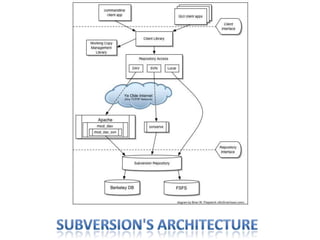
  • #10 http://svnbook.red-bean.com/en/1.7/svn.intro.whatis.html#svn.intro.architecture.dia-1For our example, assumption is Linux OSFSFS database; andusing DAV over Apache
  • #11 http://svnbook.red-bean.com/en/1.7/svn.reposadmin.planning.html#svn.reposadmin.projects.chooselayout
  • #12 Built-in repository browsing is available via web browser using the http against using svn.For details on what access to use http://svnbook.red-bean.com/en/1.7/svn.serverconfig.choosing.htmlFor subversion clients, see http://en.wikipedia.org/wiki/Comparison_of_Subversion_clients
  • #13 Determine the OS and note of the requirements (disk space, memory) but with most HW specs these days it is not anymore of concern.
  • #14 Note that /var/www/svn/myrepo directory will be created after svnadmin is executed.
  • #15 Where svn-users.passwd contains the users and passwords for subversion access via HTTP.Usehtpasswd to create the password file and add usersTo enable fine grain access then seeAuthzSVNAccessFile apache attributeModifying this would require HTTP service to be restarted;Check out http://svnbook.red-bean.com/en/1.7/svn.serverconfig.httpd.html for details.
  • #16 Svnredbook:
  • #18 Make sure to verify the copied repo using command below:svnadmin verify /someplace/repo-backupFor incremental, backup is done from revision 143 to the latest one (HEAD)
  • #19 From http://svn.apache.org/repos/asf/subversion/trunk/doc/user/svn-best-practices.htmlChangesets – bugfixes, new features or enhancements
  • #20 What?Why?http://en.wikipedia.org/wiki/Continuous_integration
  • #22 Continuous integration avoids or detects compatibility problems early. Integration is a &quot;pay me now or pay me more later&quot; kind of activity. Integration is similar to credit card: either you pay now or pay more later.http://www.extremeprogramming.org/rules/integrateoften.html
  • #23 http://www.martinfowler.com/articles/continuousIntegration.html by Martin Fowler
  • #24 Get a show of hand and take note
  • #25 Get a show of hand and take noteTell briefstory about Hudson (Oracle) and Jenkins.
  • #26 You would need java and maven installed. Memory is a factor when determining the HW specs.Biased on use of Subversion
  • #28 Set-up Maven and JDK needed before proceeding with the set-up.Enable security is recommended pick the Security Realm and Authorization
  • #30 Once you click on Subversion under Source Code Management, the path to the repository needs to be supplied.
  • #33 Email the status of the latest buildsReduces the Time to Find Integration IssuesUnit tests are included during buildsAutomation compiling and packages allow the developers to concentrate more on the coding and fixing broken builds quickly and fix them ASAPA Practical Guide to Distributed Scrum by  Elizabeth Woodward, SteffanSurdek and Matthew Ganis
  • #36 http://en.wikipedia.org/wiki/Comparison_of_revision_control_softwarehttp://en.wikipedia.org/wiki/Comparison_of_Continuous_Integration_Softwarehttp://www.extremeprogramming.org/rules/integrateoften.html