A Series Of Unfortunate Container Events
Netflix’s container platform lessons learned
About the speakers and team
Follow along - @sargun @tomaszbak_ca @fabiokung
@aspyker @amit_joshee @anwleung
2
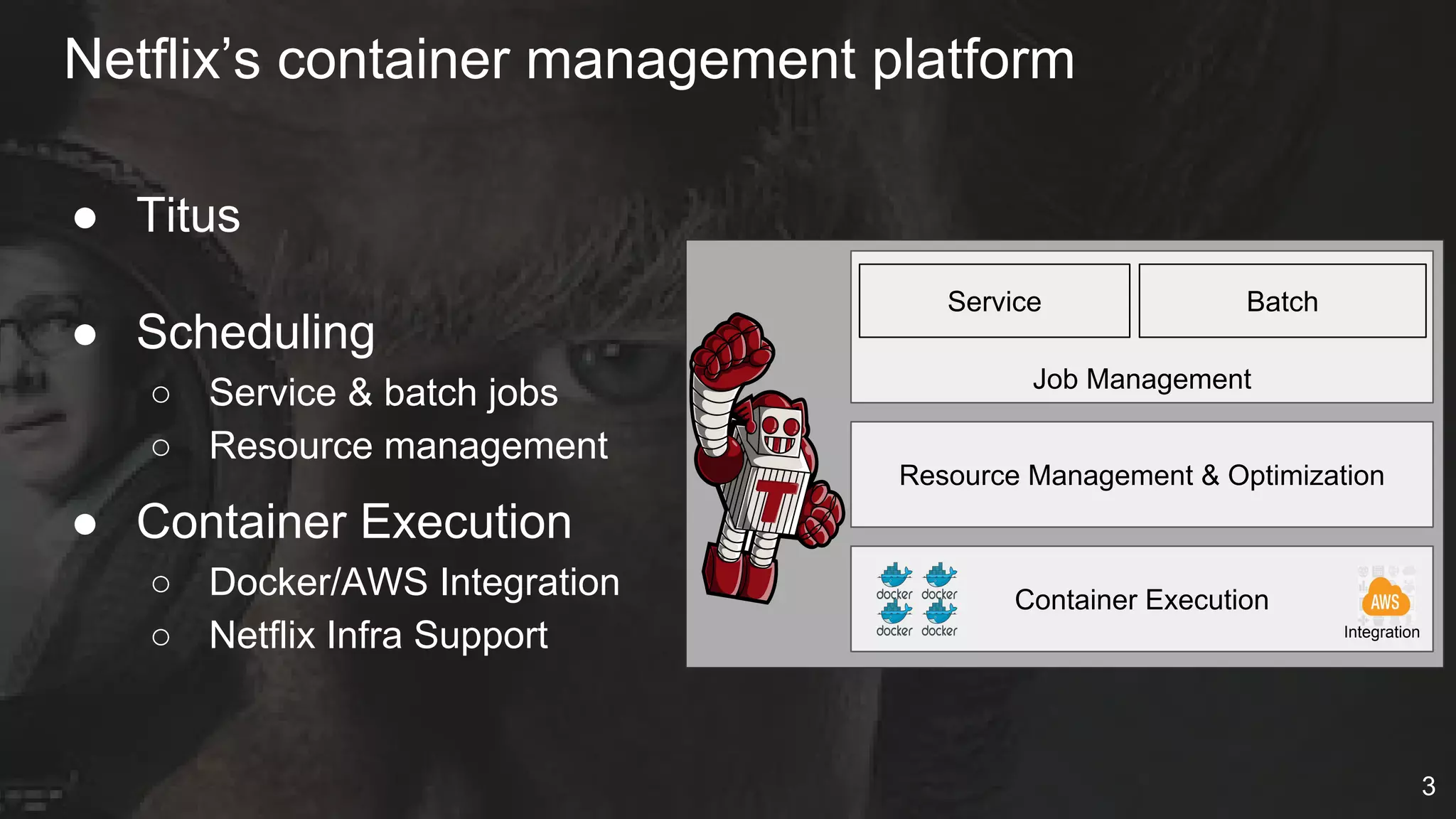
Netflix’s container management platform
● Titus
● Scheduling
○ Service & batch jobs
○ Resource management
● Container Execution
○ Docker/AWS Integration
○ Netflix Infra Support
Service
Job Management
Resource Management & Optimization
Container Execution
Integration
Batch
3
Containers In
Production
4
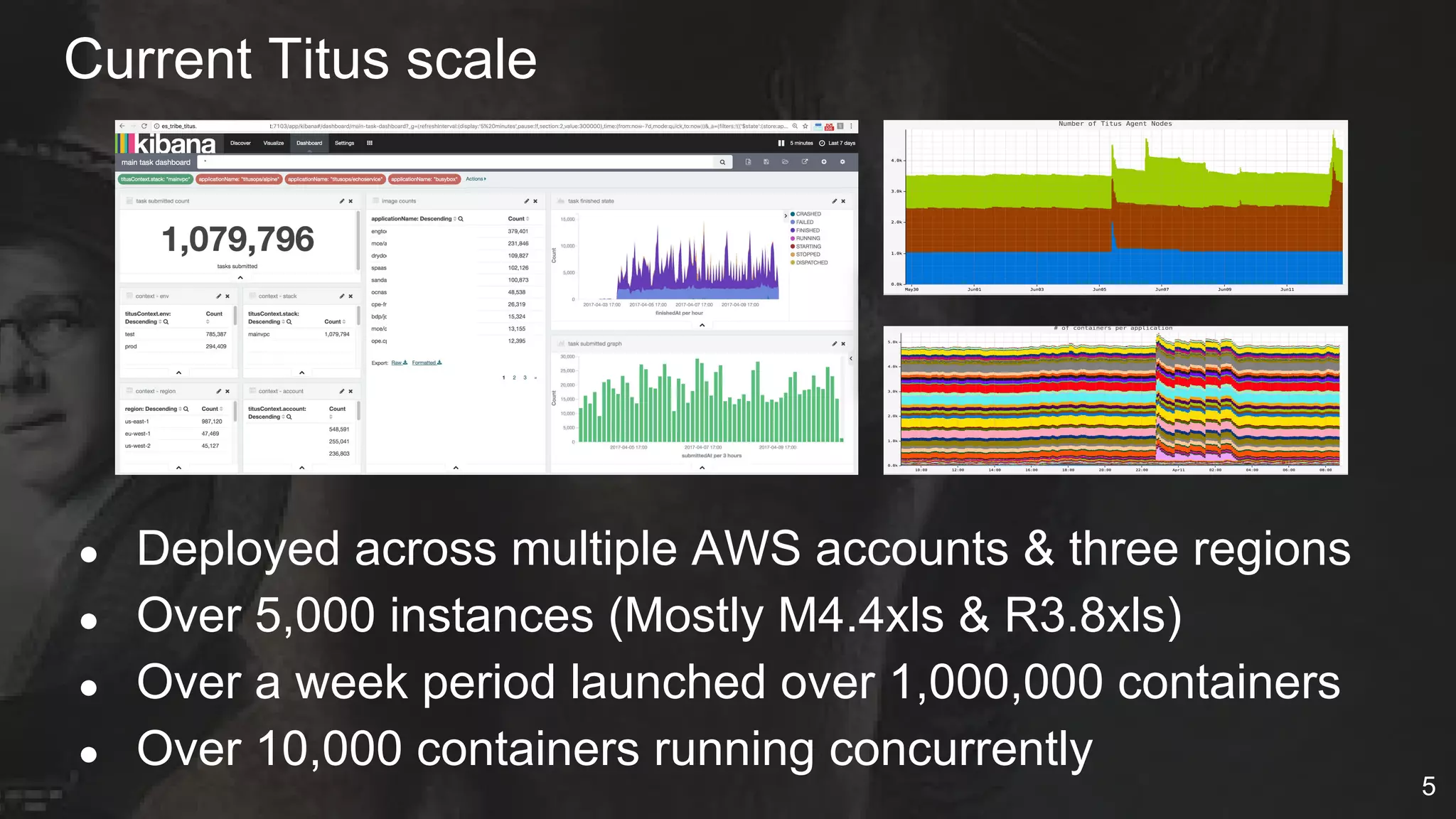
Current Titus scale
● Deployed across multiple AWS accounts & three regions
● Over 5,000 instances (Mostly M4.4xls & R3.8xls)
● Over a week period launched over 1,000,000 containers
● Over 10,000 containers running concurrently
5
Single cloud platform for VMs and containers
● CI/CD (Spinnaker)
● Telemetry systems
● Discovery and RPC load balancing
● Healthcheck, Edda and system metrics
● Chaos monkey
● Traffic control (Flow & Kong)
● Netflix secure secret management
● Interactive access (ala ssh)
6
Integrate containers with AWS EC2
● VPC Connectivity (IP per container)
● Security Groups
● EC2 Metadata service
● IAM Roles
● Multi-tenant isolation (cpu, memory, disk quota, network)
● Live and S3 persisted logs rotation & mgmt
● Environmental context to similar to user data
● Autoscaling service jobs (coming)
7
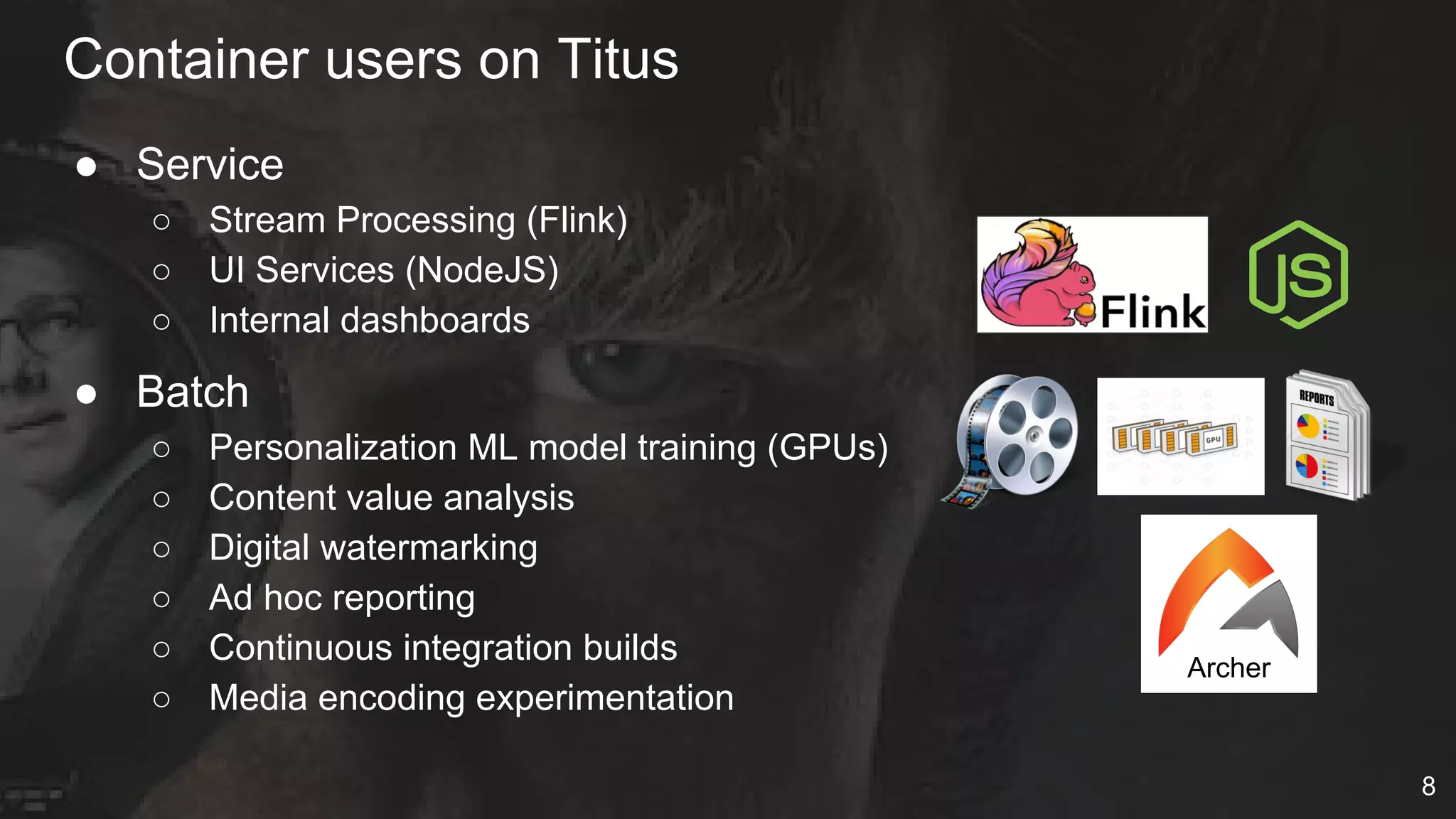
● Service
○ Stream Processing (Flink)
○ UI Services (NodeJS)
○ Internal dashboards
● Batch
○ Personalization ML model training (GPUs)
○ Content value analysis
○ Digital watermarking
○ Ad hoc reporting
○ Continuous integration builds
○ Media encoding experimentation
Container users on Titus
Archer
8
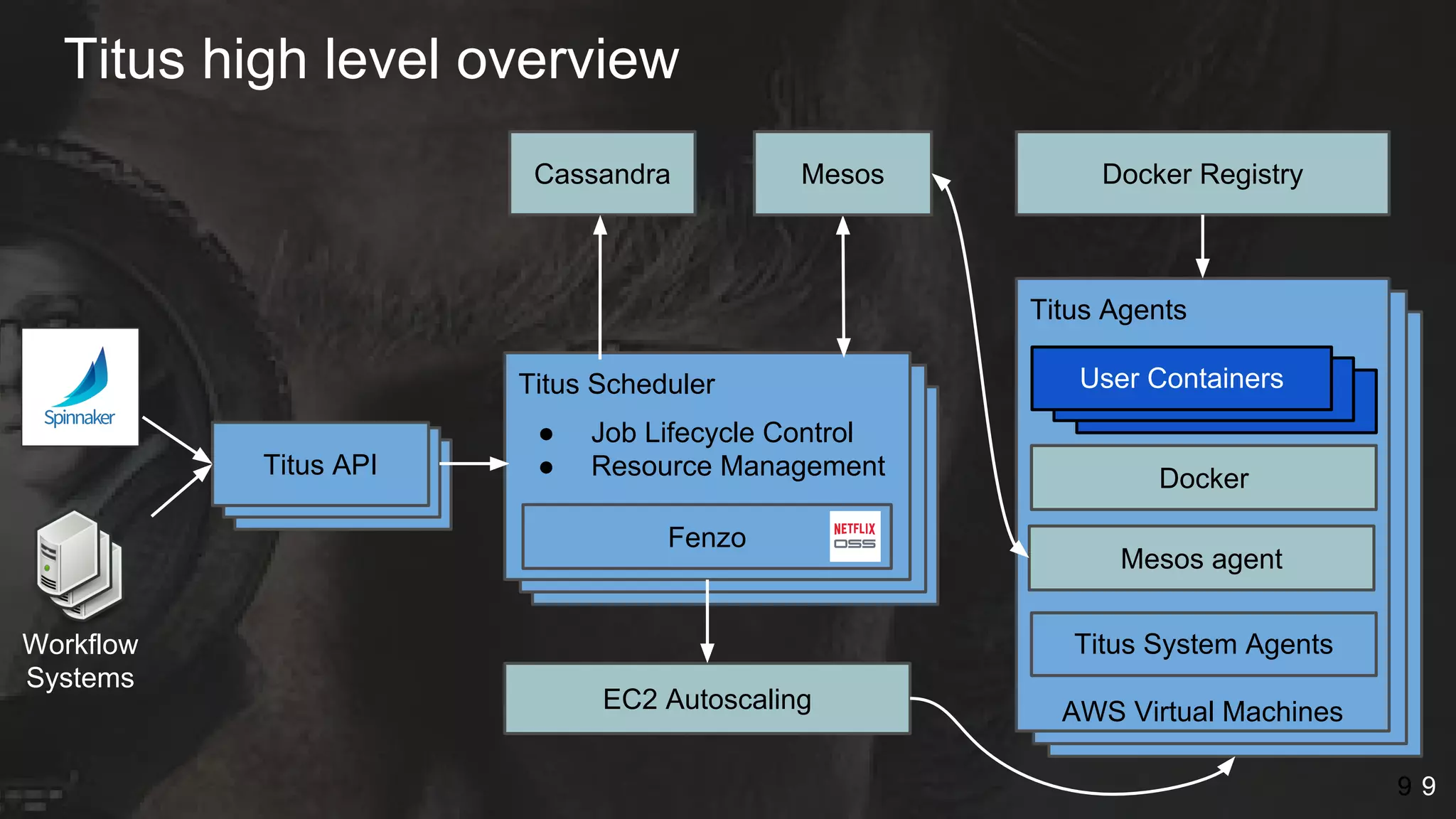
Titus high level overview
9
RheaRheaTitus API
Cassandra
Titus Scheduler
● Job Lifecycle Control
● Resource Management
EC2 Autoscaling
Fenzo
9
container
container
container
docker
Titus Agents
Mesos agent
Docker
Docker Registry
containercontainerUser Containers
AWS Virtual Machines
Mesos
Titus System AgentsWorkflow
Systems
9
Look away, look away, Look away, look away
This session will wreck your evening​, your whole life, and your day
Every single episode is nothing but dismay
So, look away, Look away, look away
Lessons learned from a year in production?
10
Expect
Bad Actors
11
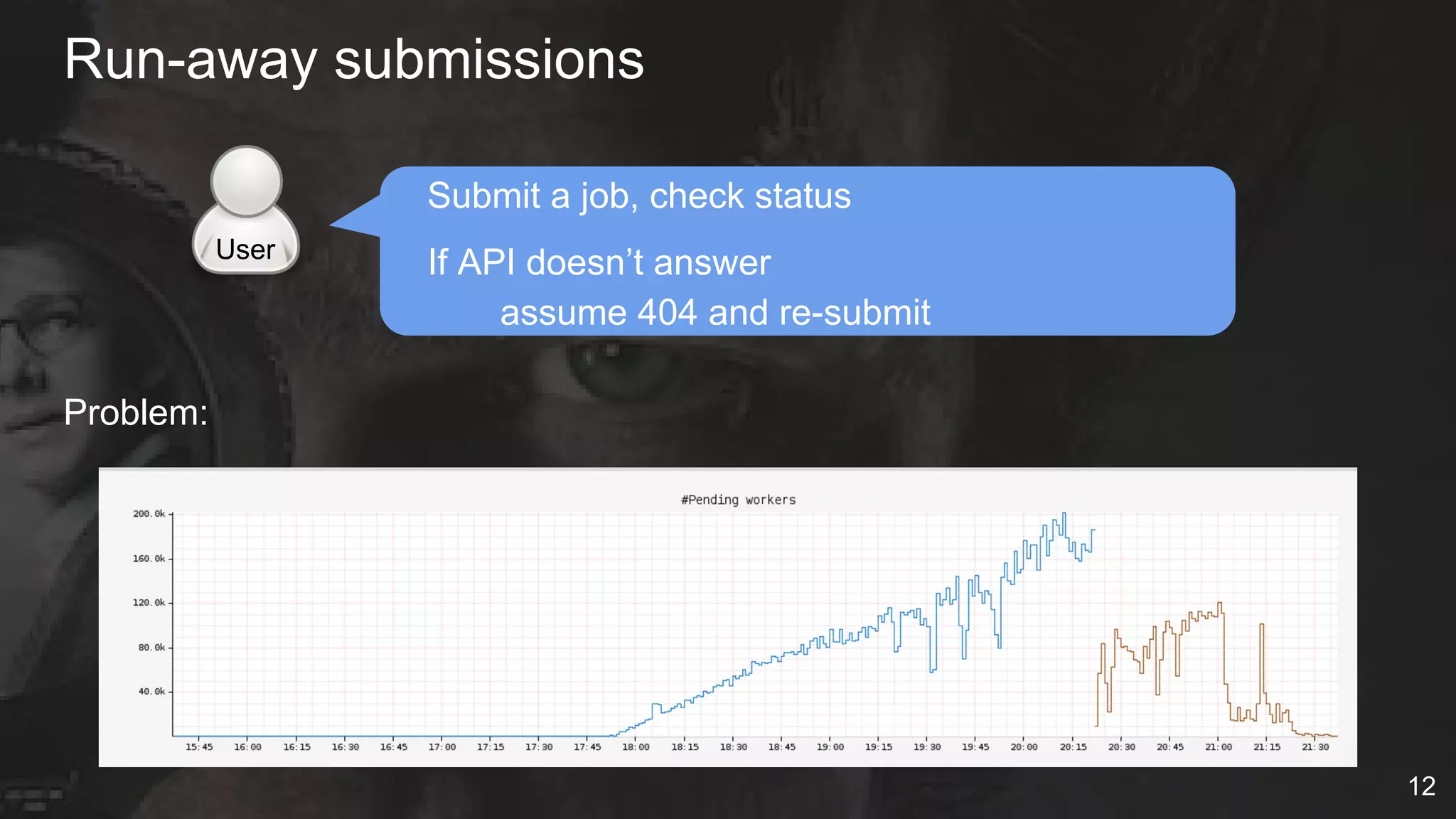
Run-away submissions
Submit a job, check status
If API doesn’t answer
assume 404 and re-submit
Problem:
User
12
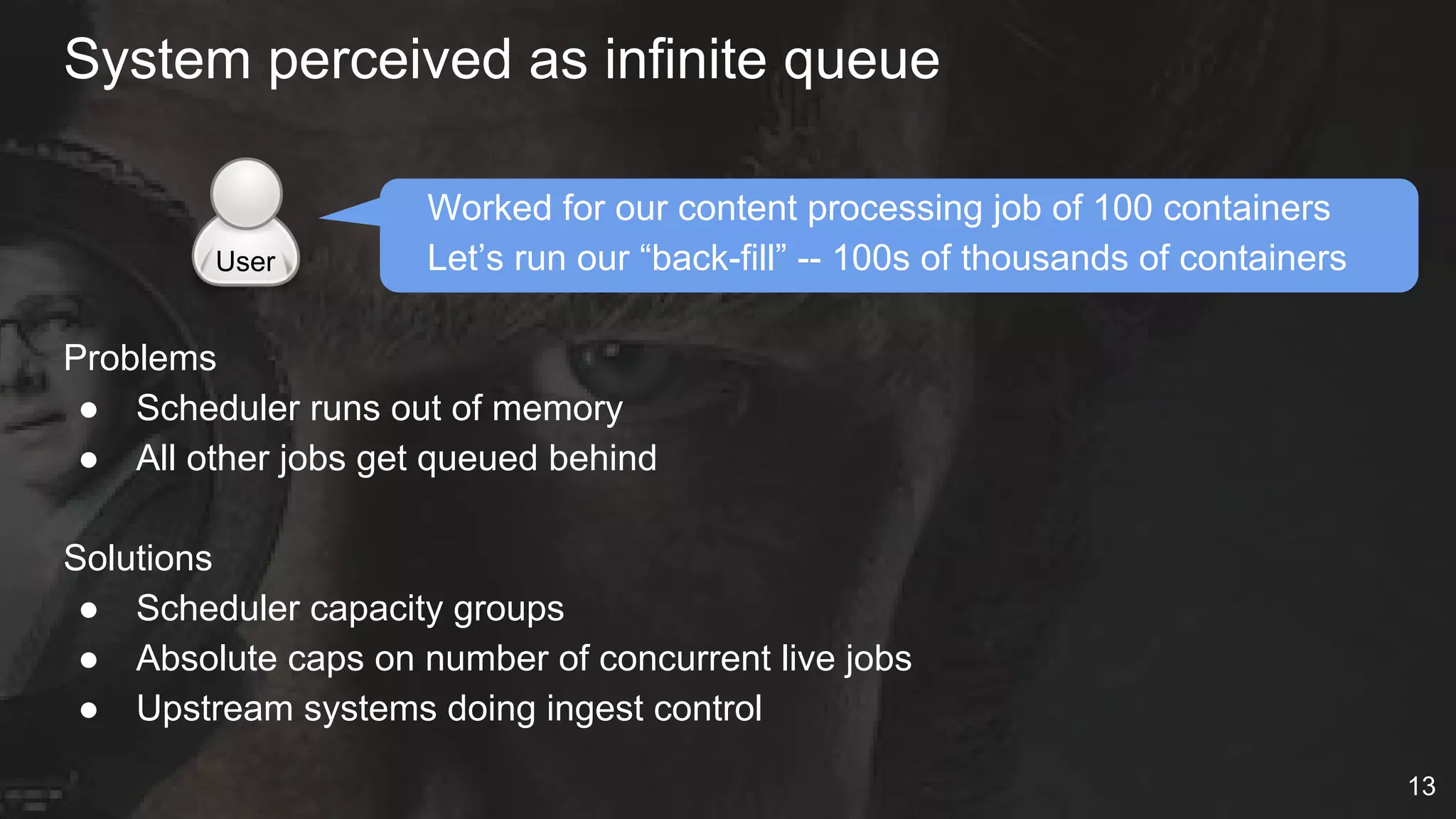
Worked for our content processing job of 100 containers
Let’s run our “back-fill” -- 100s of thousands of containers
Problems
● Scheduler runs out of memory
● All other jobs get queued behind
Solutions
● Scheduler capacity groups
● Absolute caps on number of concurrent live jobs
● Upstream systems doing ingest control
System perceived as infinite queue
User
13
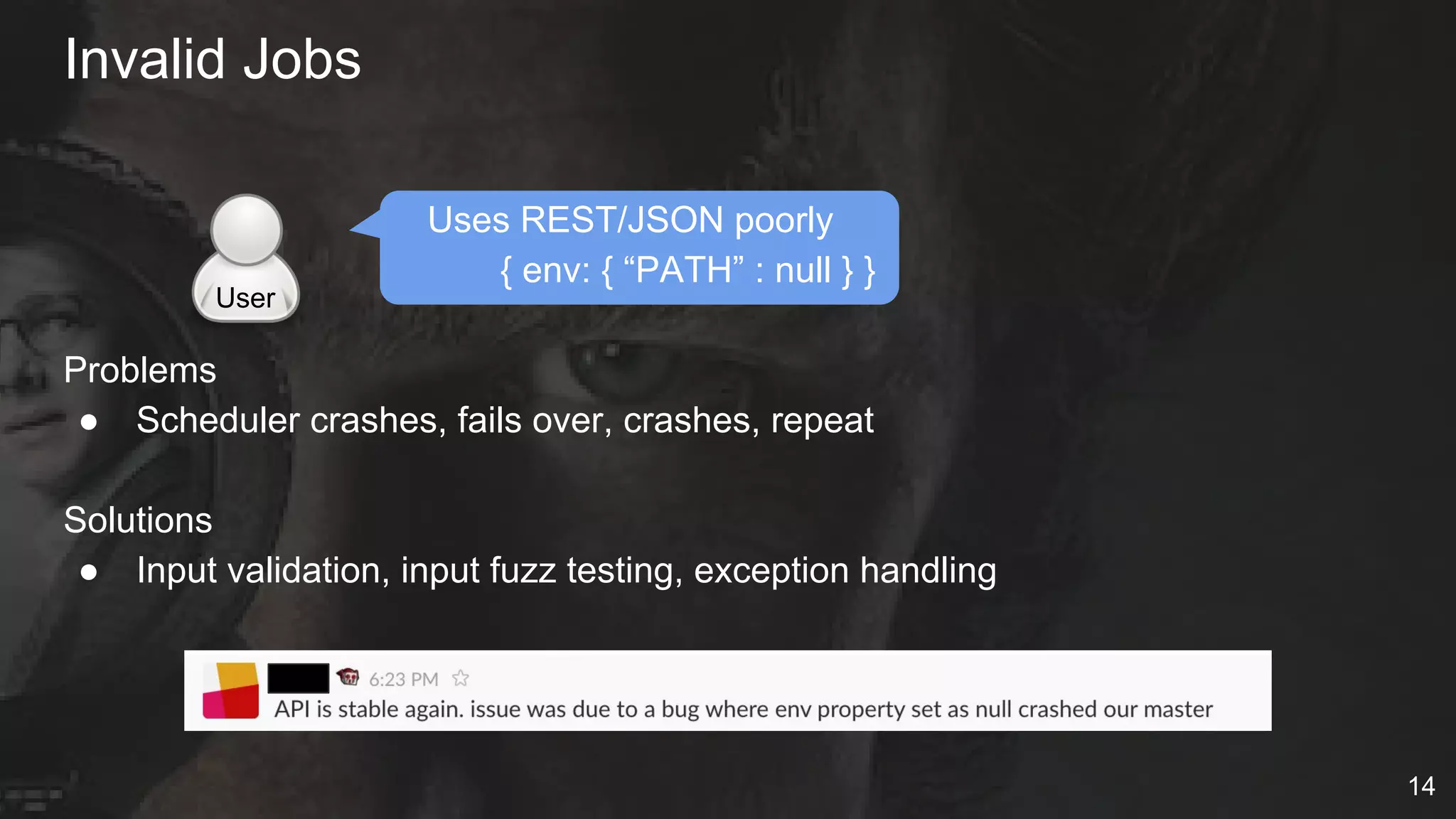
Uses REST/JSON poorly
{ env: { “PATH” : null } }
Problems
● Scheduler crashes, fails over, crashes, repeat
Solutions
● Input validation, input fuzz testing, exception handling
Invalid Jobs
User
14
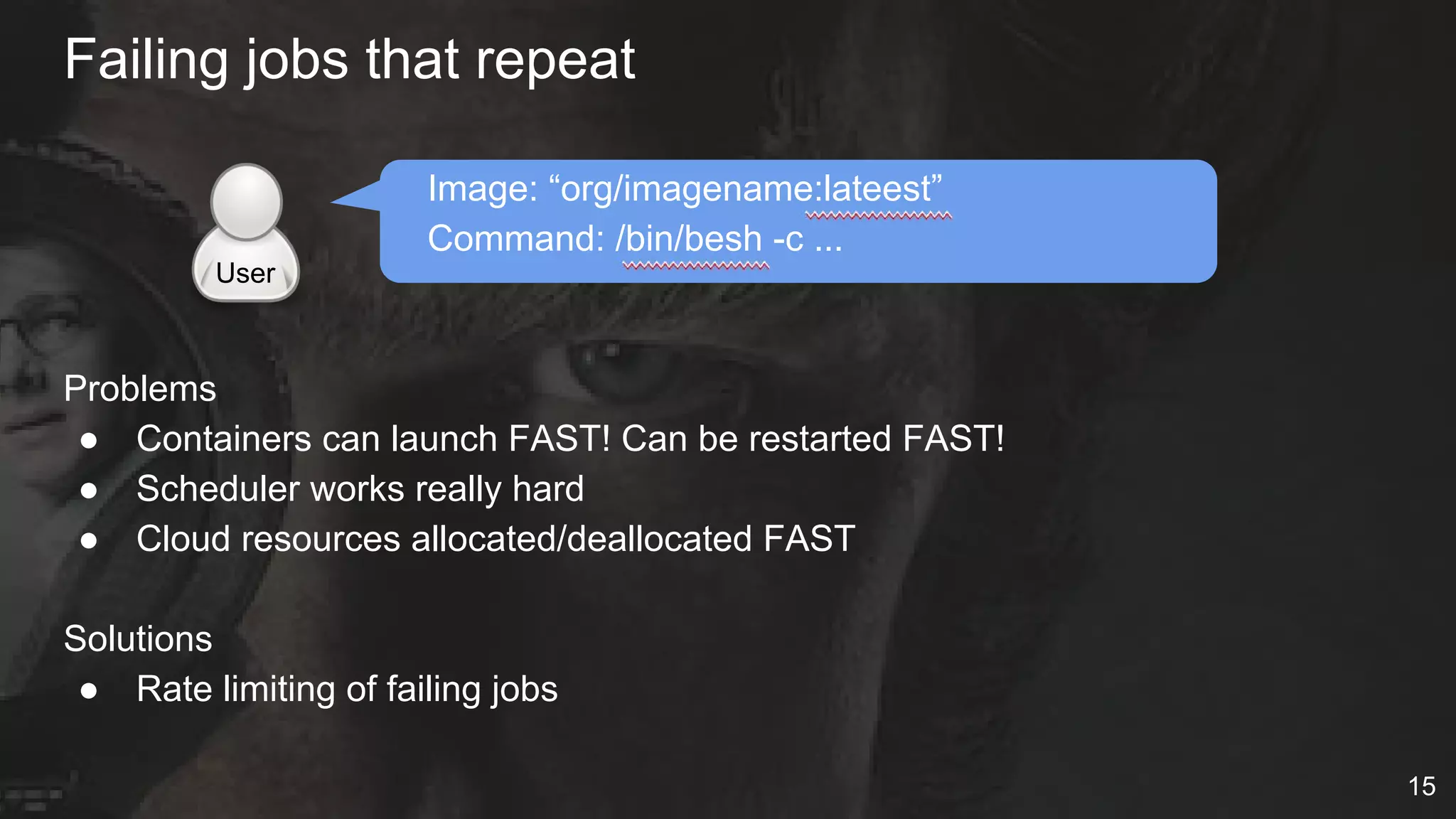
Failing jobs that repeat
Image: “org/imagename:lateest”
Command: /bin/besh -c ...
Problems
● Containers can launch FAST! Can be restarted FAST!
● Scheduler works really hard
● Cloud resources allocated/deallocated FAST
Solutions
● Rate limiting of failing jobs
User
15
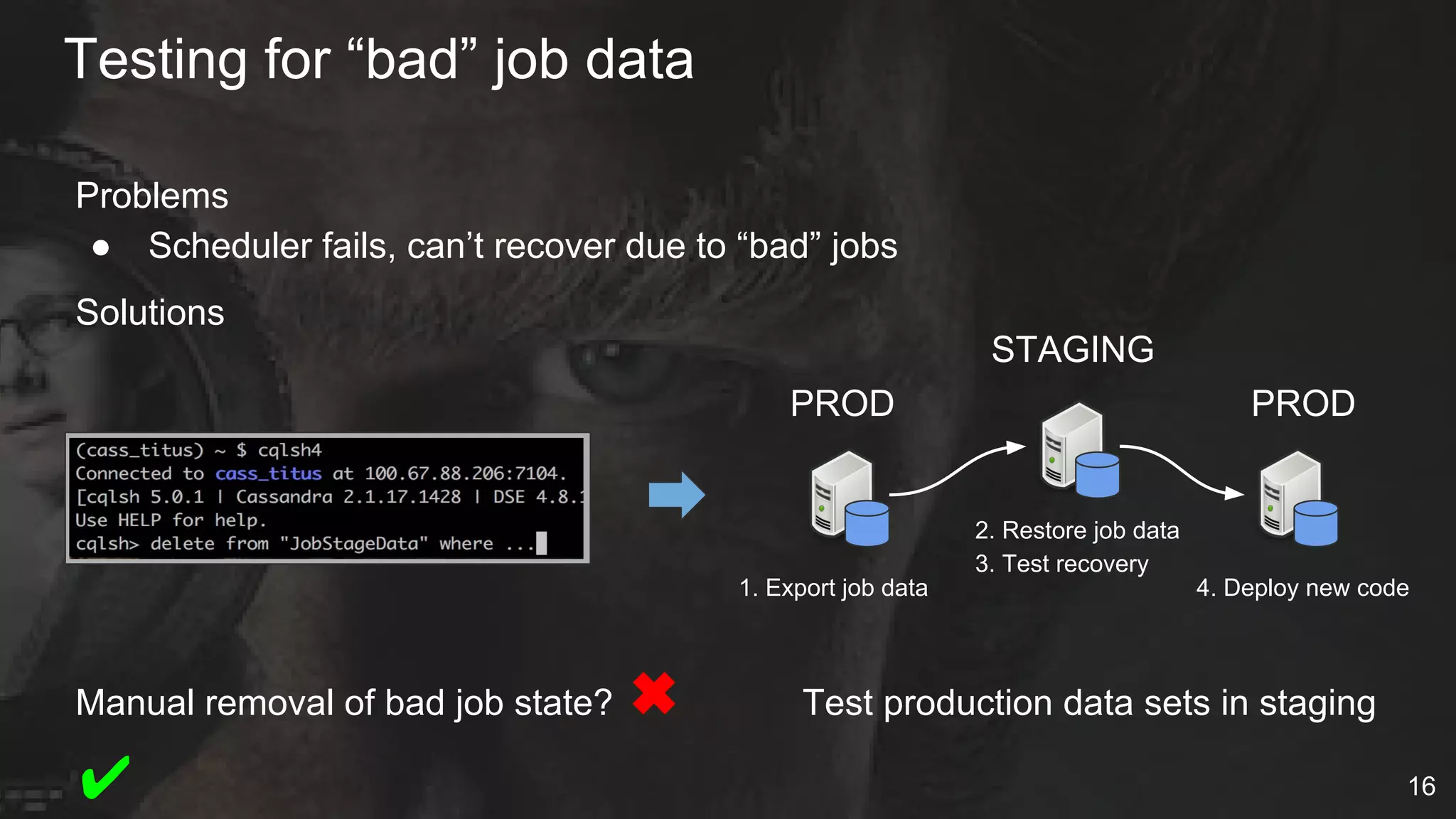
Problems
● Scheduler fails, can’t recover due to “bad” jobs
Solutions
Manual removal of bad job state? ✖ Test production data sets in staging
✔
Testing for “bad” job data
16
1. Export job data
2. Restore job data
3. Test recovery
4. Deploy new code
PROD
STAGING
PROD
Identifying bad actors
V2 API
● user (optional)
V2 Auditing
● Added collection of user
performing action
V3 API
● Owner -> teamEmail (required)
17
● User Namespaces
○ Docker 1.10 - User Namespaces (Feb 2016)
○ Docker 1.11 - Fixed shared networking NSs
■ User id mapping is per daemon (not per container)
○ Deployed user namespaces recently
■ Problems - shared NFS, OSX LDAP uid/gid’s
● Locked Down hosts
○ Users only have access to containers, not hosts
○ Required “power user” ssh access for perf/debugging
Really bad actors - container escapes protections
18
The Cloud Isn’t Perfect
19
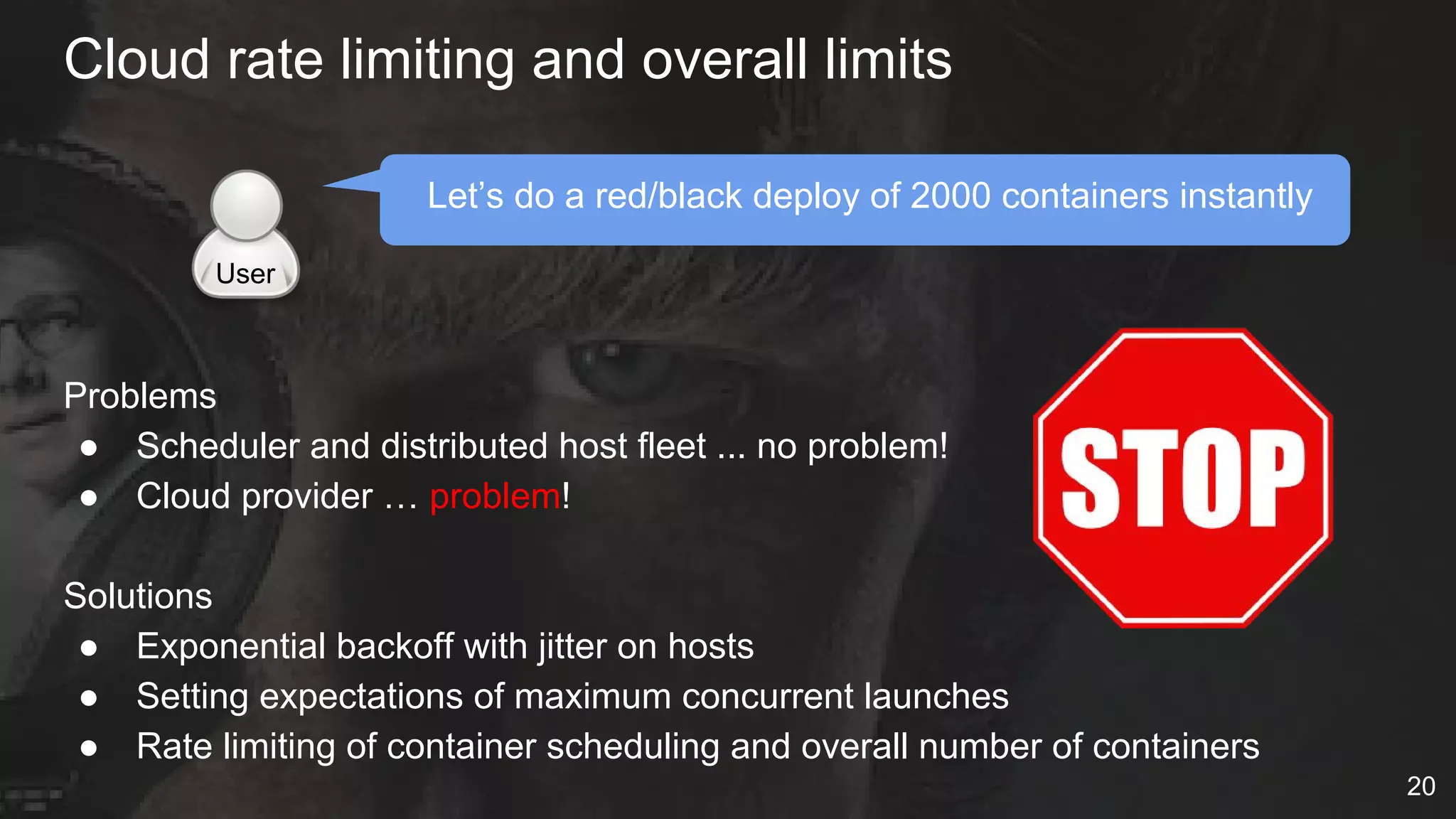
Cloud rate limiting and overall limits
Let’s do a red/black deploy of 2000 containers instantly
Problems
● Scheduler and distributed host fleet ... no problem!
● Cloud provider … problem!
Solutions
● Exponential backoff with jitter on hosts
● Setting expectations of maximum concurrent launches
● Rate limiting of container scheduling and overall number of containers
User
20
Hosts start or go bad
Problems
● Hosts come up with flakey networks
● Host disks come up and are slow
● Hosts go bad over time
Solutions
● Scheduler must be aware
of host health checks
● Linux, storage, etc warming
● Auto-termination if hosts take too
long to become healthy
21
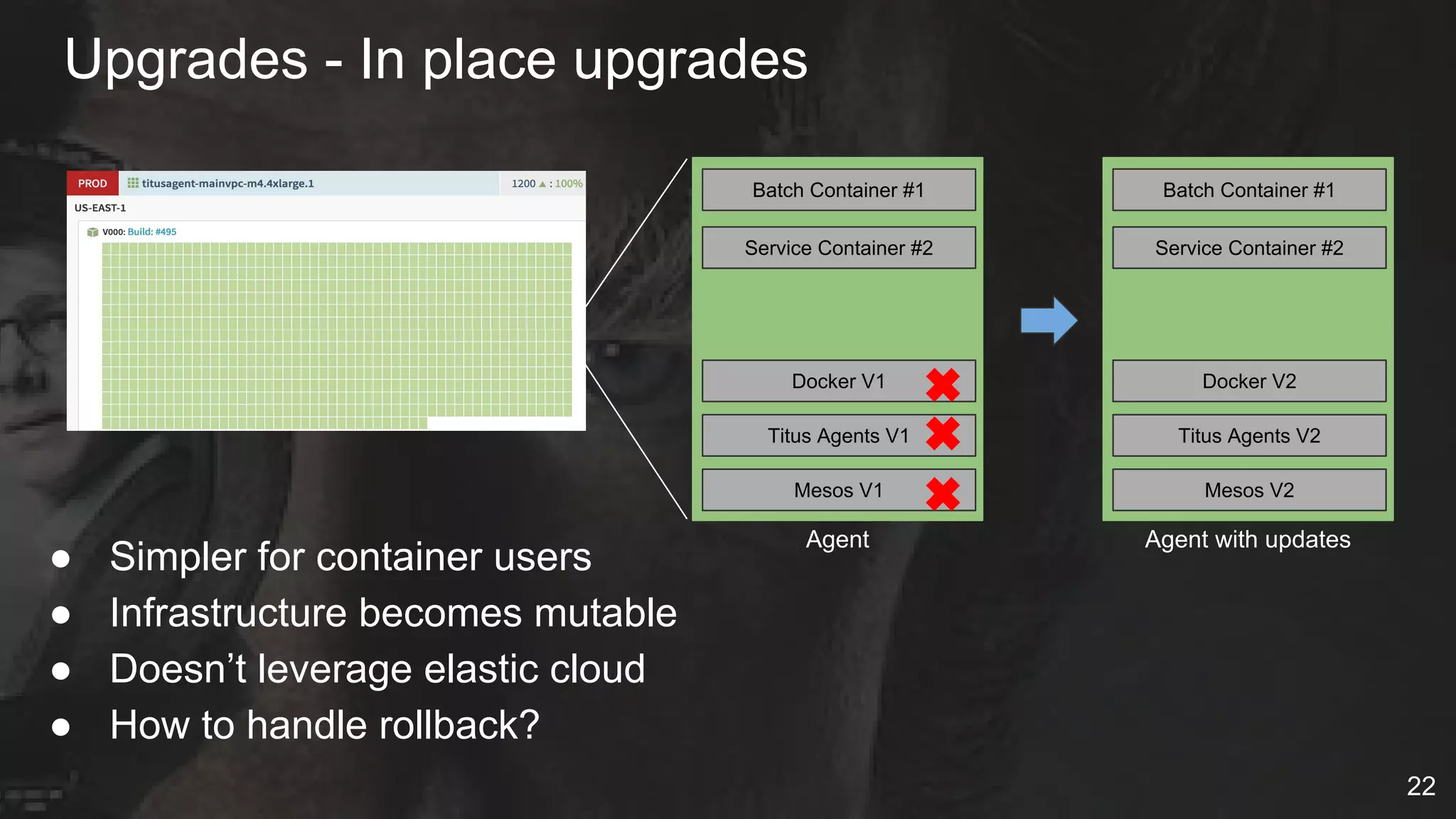
Upgrades - In place upgrades
● Simpler for container users
● Infrastructure becomes mutable
● Doesn’t leverage elastic cloud
● How to handle rollback?
Docker V1
Titus Agents V1
Mesos V1
Batch Container #1
Service Container #2
Docker V2
Titus Agents V2
Mesos V2
Batch Container #1
Service Container #2
Agent Agent with updates
✖
✖
✖
22
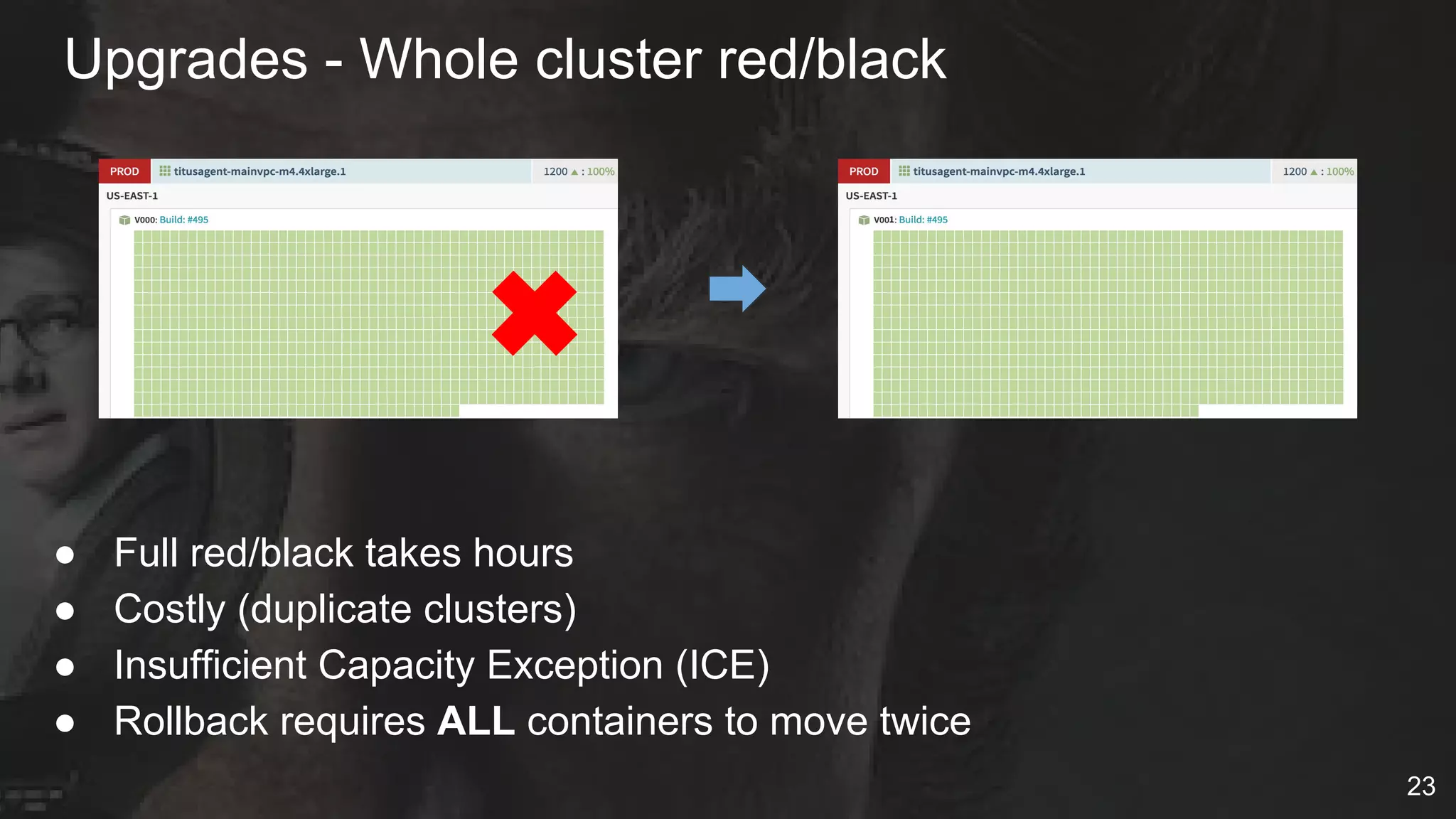
Upgrades - Whole cluster red/black
● Full red/black takes hours
● Costly (duplicate clusters)
● Insufficient Capacity Exception (ICE)
● Rollback requires ALL containers to move twice
✖
23
Upgrades - Partitioned cluster updates
● Requires complex scheduler knowledge
○ Batch jobs to have runtime limits
○ Service jobs with Spinnaker migration tasks
● Starting point for fleet cluster management
Docker V1
Titus Agents V1
Mesos V1
Batch Container #1
Service Container #2
Docker V2
Titus Agents V2
Mesos V2
Service Container #2
Let “drain”
old
new
✖
✖
✖
24
CI/CD
Task
Migration
Our Code Isn’t Perfect
25
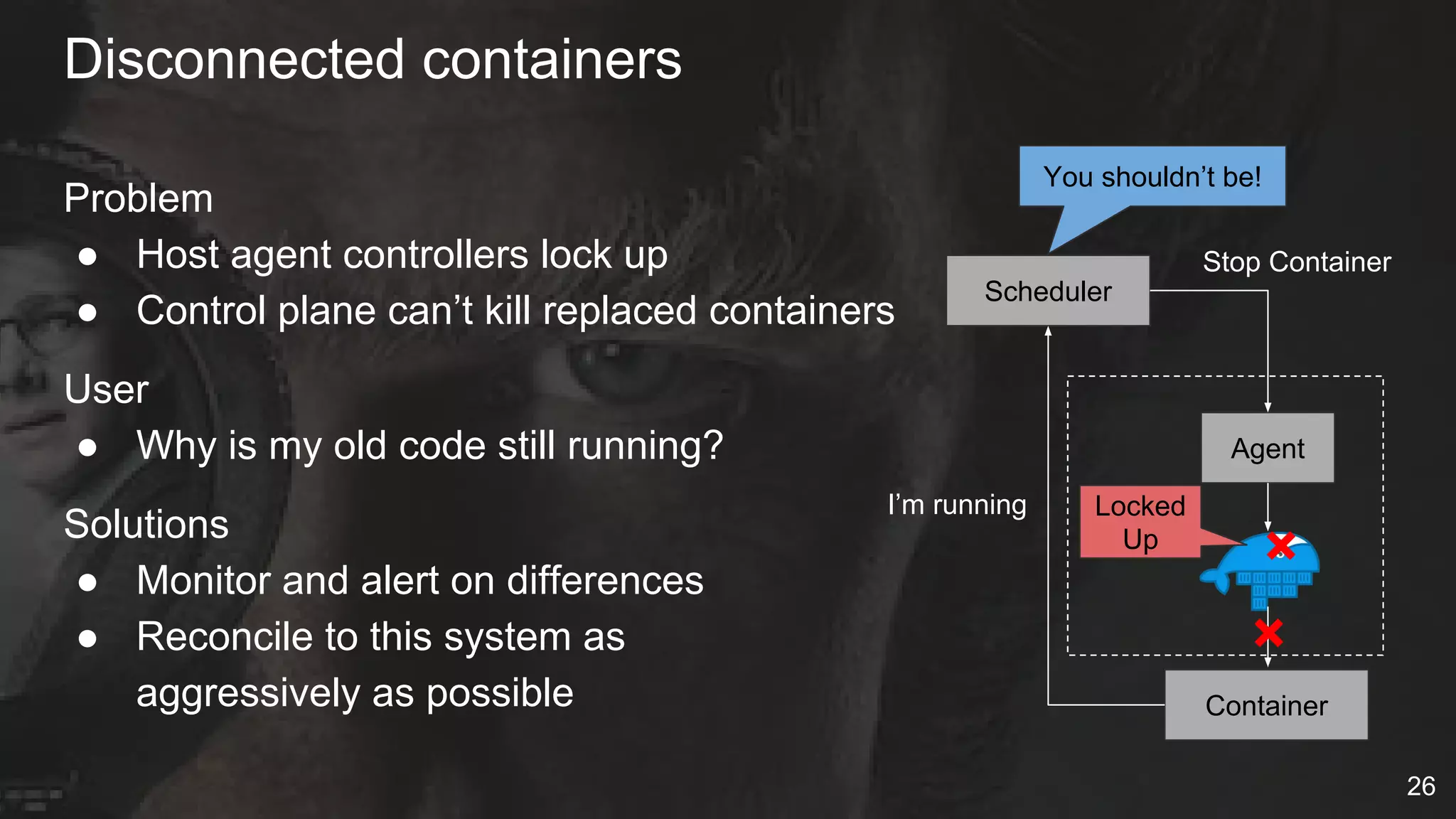
Disconnected containers
Problem
● Host agent controllers lock up
● Control plane can’t kill replaced containers
User
● Why is my old code still running?
Solutions
● Monitor and alert on differences
● Reconcile to this system as
aggressively as possible Container
Scheduler
I’m running
You shouldn’t be!
Agent
Stop Container
×
×
Locked
Up
26
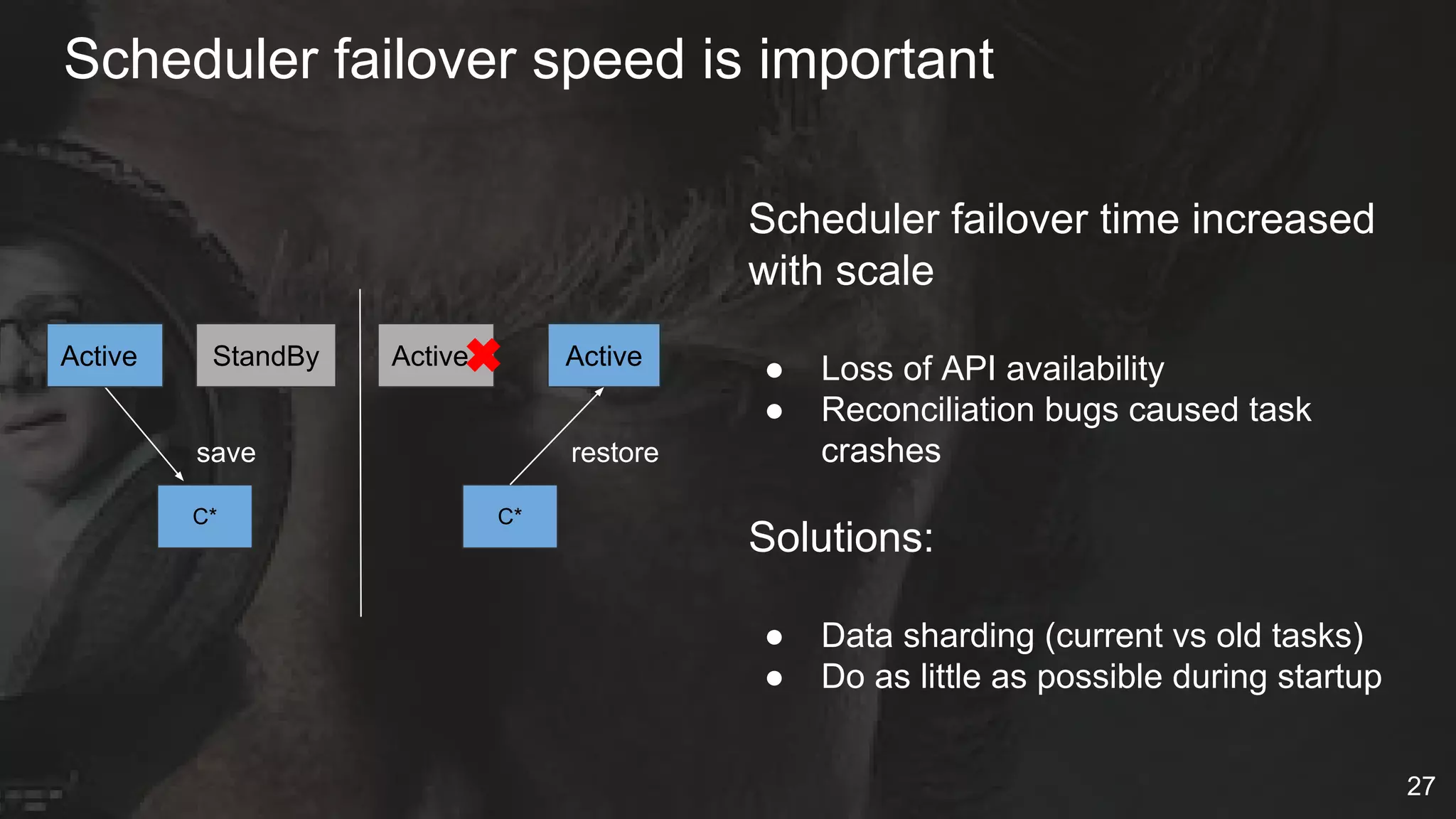
Scheduler failover speed is important
27
StandBy
C*
save
Active
C*
restore
Scheduler failover time increased
with scale
● Loss of API availability
● Reconciliation bugs caused task
crashes
Solutions:
● Data sharding (current vs old tasks)
● Do as little as possible during startup
Active Active✖
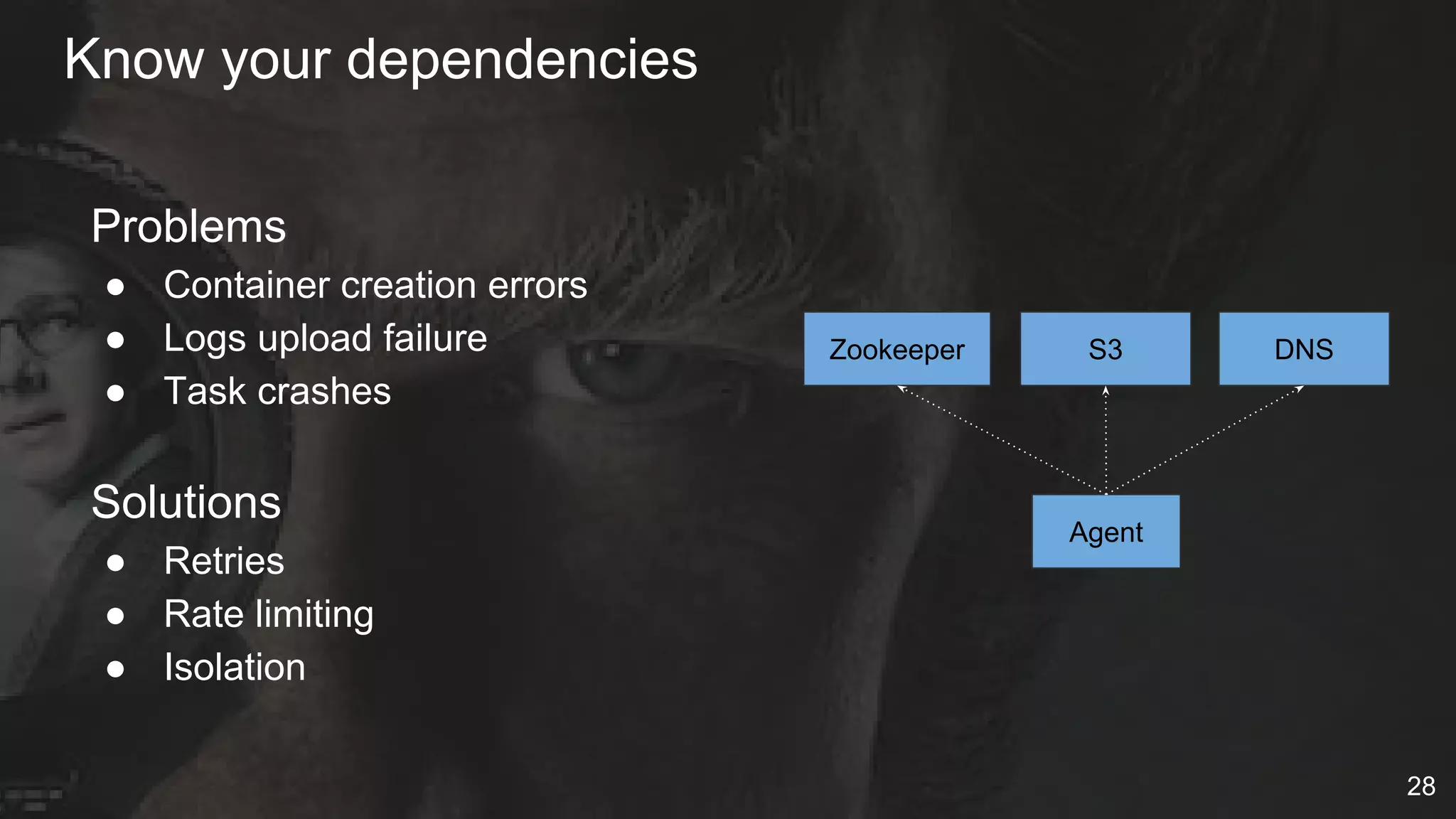
Know your dependencies
28
Agent
DNSS3Zookeeper
Problems
● Container creation errors
● Logs upload failure
● Task crashes
Solutions
● Retries
● Rate limiting
● Isolation
● Containers start with Docker .. end with the kernel
● Best container runtimes deeply leverage kernel primitives
○ Resource Isolation
○ Security
○ Networking etc
● Debugging tools (tracepoints, perf events) not container aware
○ Need for BPF, Kprobe
Containers require kernel knowledge
29
Problems
● Our instances fail
● Our code fails
● Our dependencies fail
Solutions
● Learn to love the Chaos Monkey
● Enabled for prod and all
services (even our scheduler)
Strategy: Embrace chaos
30
Alerting and dashboards key
Very complex system == very complex telemetry and alerting
Continuously evolving
● Based on real incidents and resulting deep analysis
Telemetry system Number
Metrics 100’s
Dashboard Graphs 70+
Alerts 50+
Elastic Search Indexes 4
31
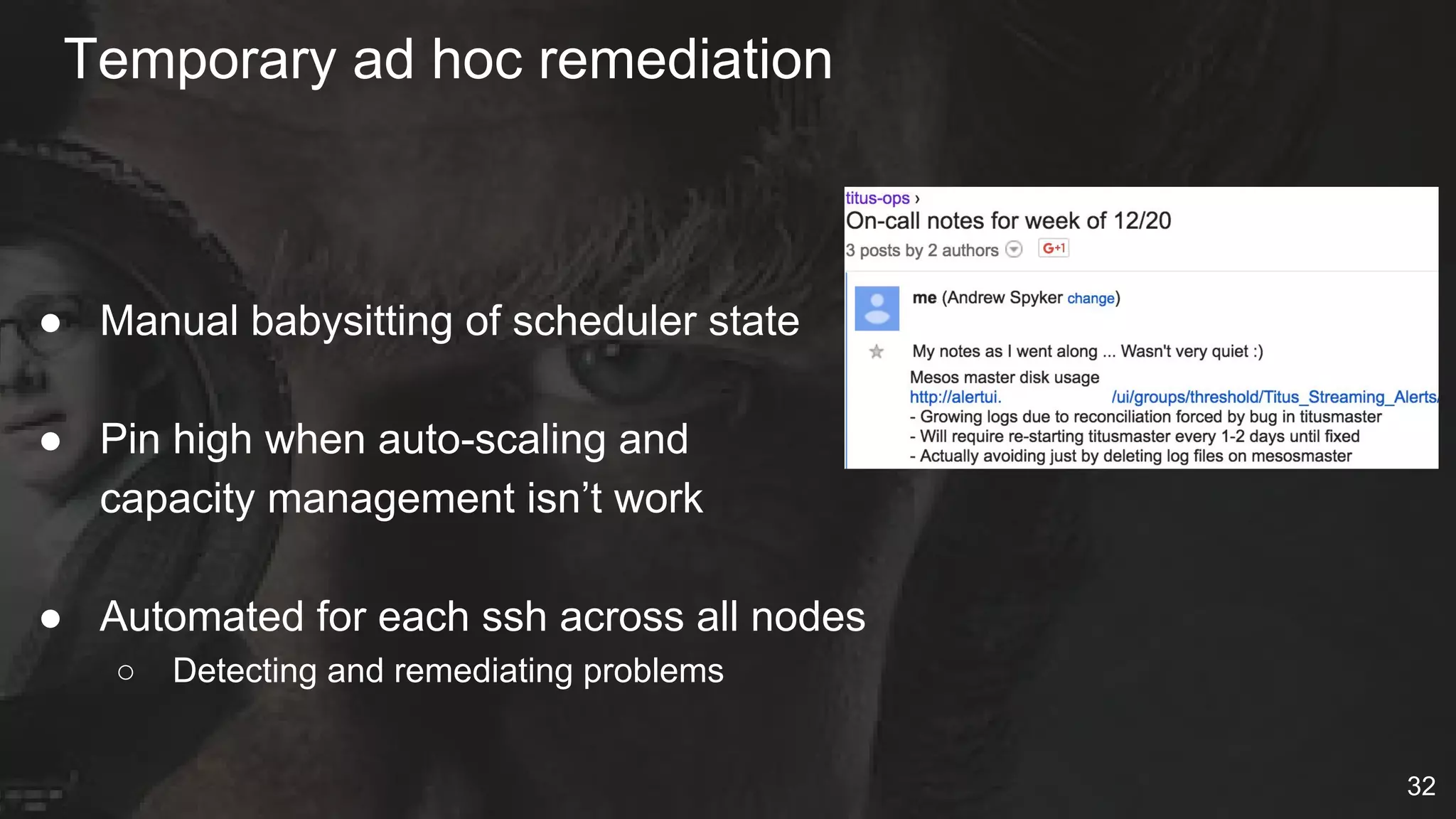
Temporary ad hoc remediation
● Manual babysitting of scheduler state
● Pin high when auto-scaling and
capacity management isn’t work
● Automated for each ssh across all nodes
○ Detecting and remediating problems
32
What has worked well?
33
Solid software
Docker Distribution
● Our Docker registry
● Simple redirect on top of S3
Apache Mesos
● Extensible resource manager
● Highly reliable replicated log
Zookeeper
● Leader Election
● Isolated
Cassandra
● CDE Internal Service
● Careful of access model
34
Managing the Titus product
Focus on core business value
● Container cluster management
Features are important
● Deciding what not to do …
Just as important!
Deliberately chose NOT to do
● Service Discovery / RPC
● Continuous Delivery
35
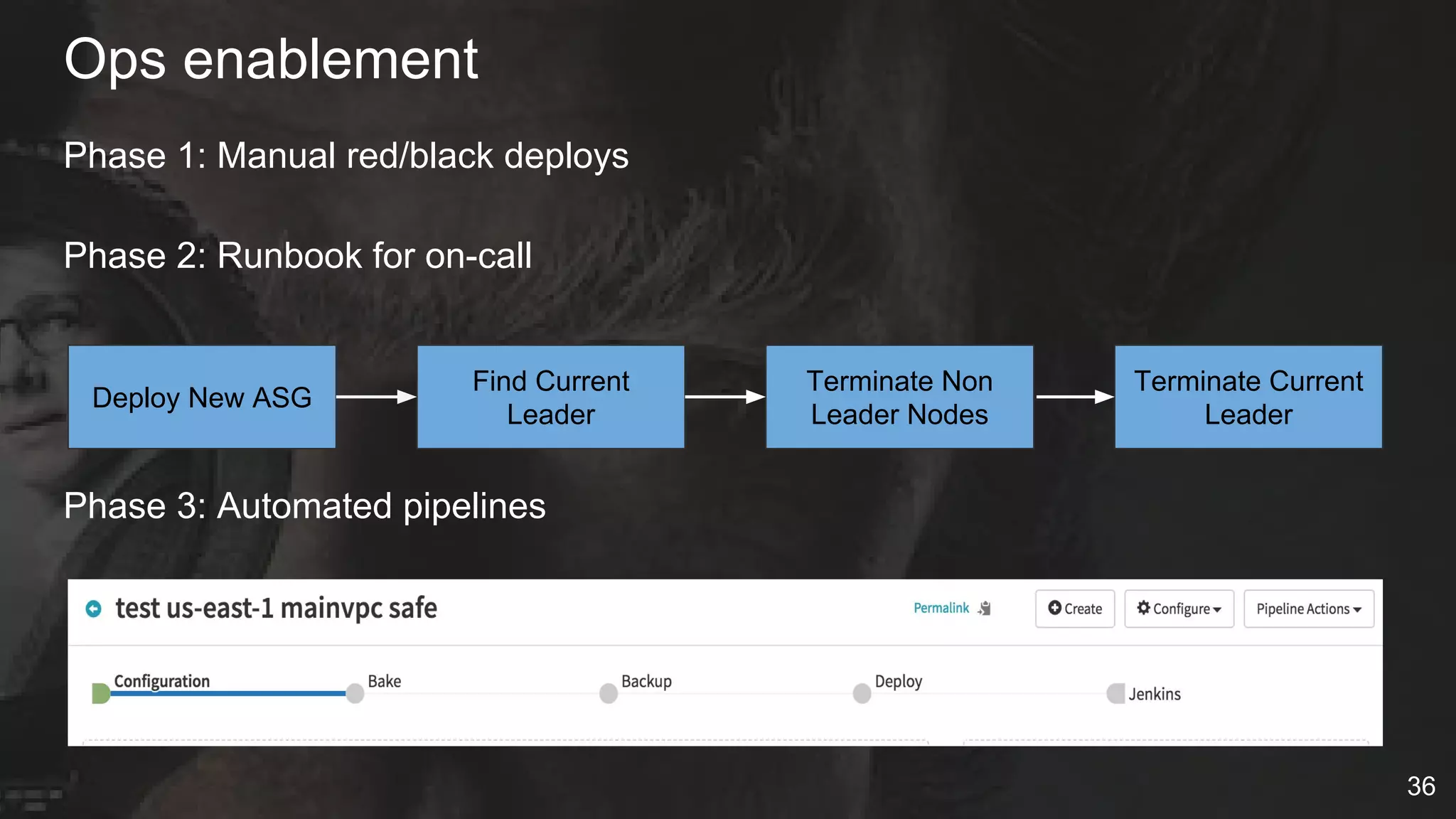
Ops enablement
Phase 1: Manual red/black deploys
Phase 2: Runbook for on-call
Phase 3: Automated pipelines
Deploy New ASG
Find Current
Leader
Terminate Non
Leader Nodes
Terminate Current
Leader
36
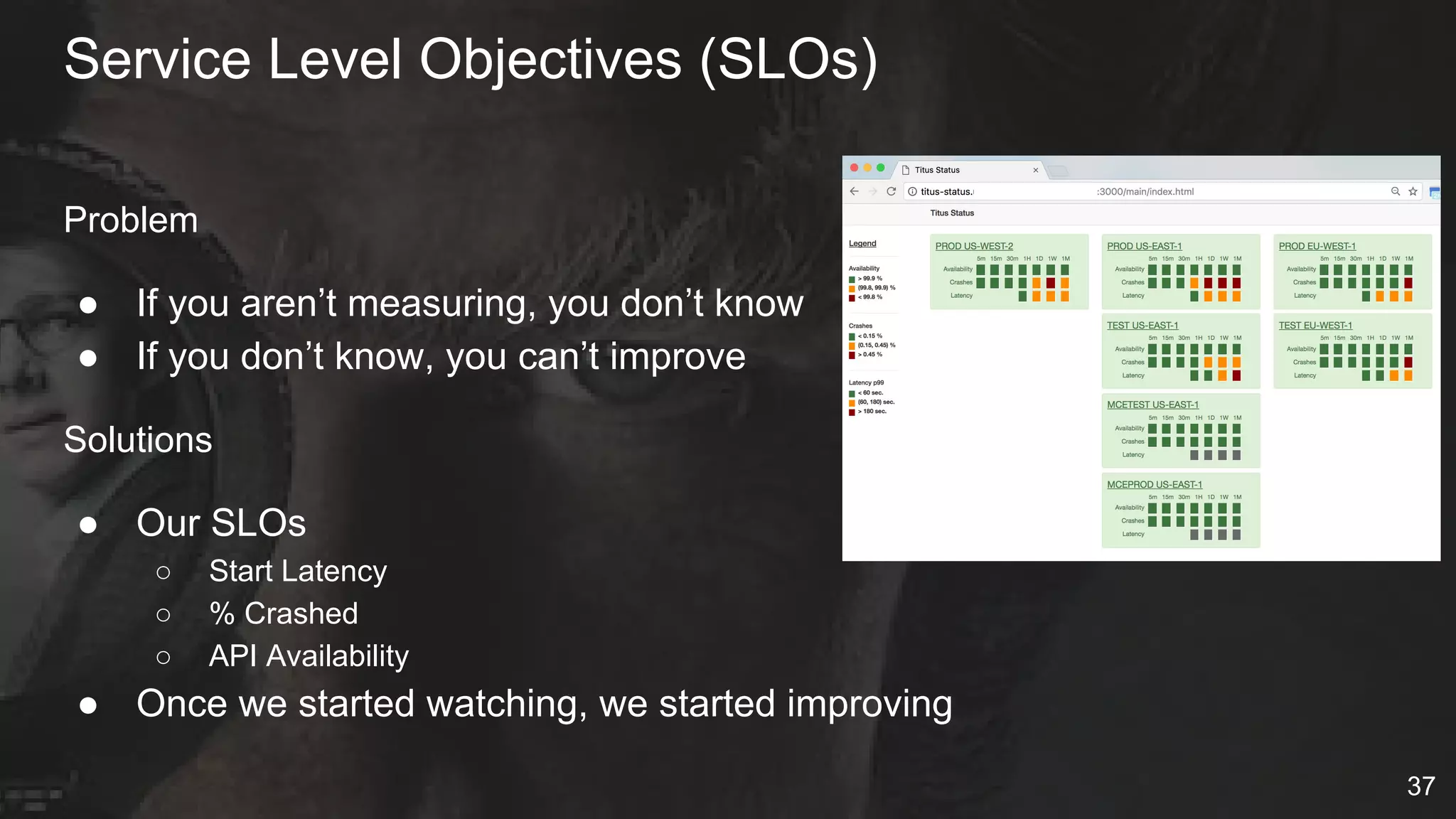
Problem
● If you aren’t measuring, you don’t know
● If you don’t know, you can’t improve
Solutions
● Our SLOs
○ Start Latency
○ % Crashed
○ API Availability
● Once we started watching, we started improving
Service Level Objectives (SLOs)
37
Onboarding slowly
38
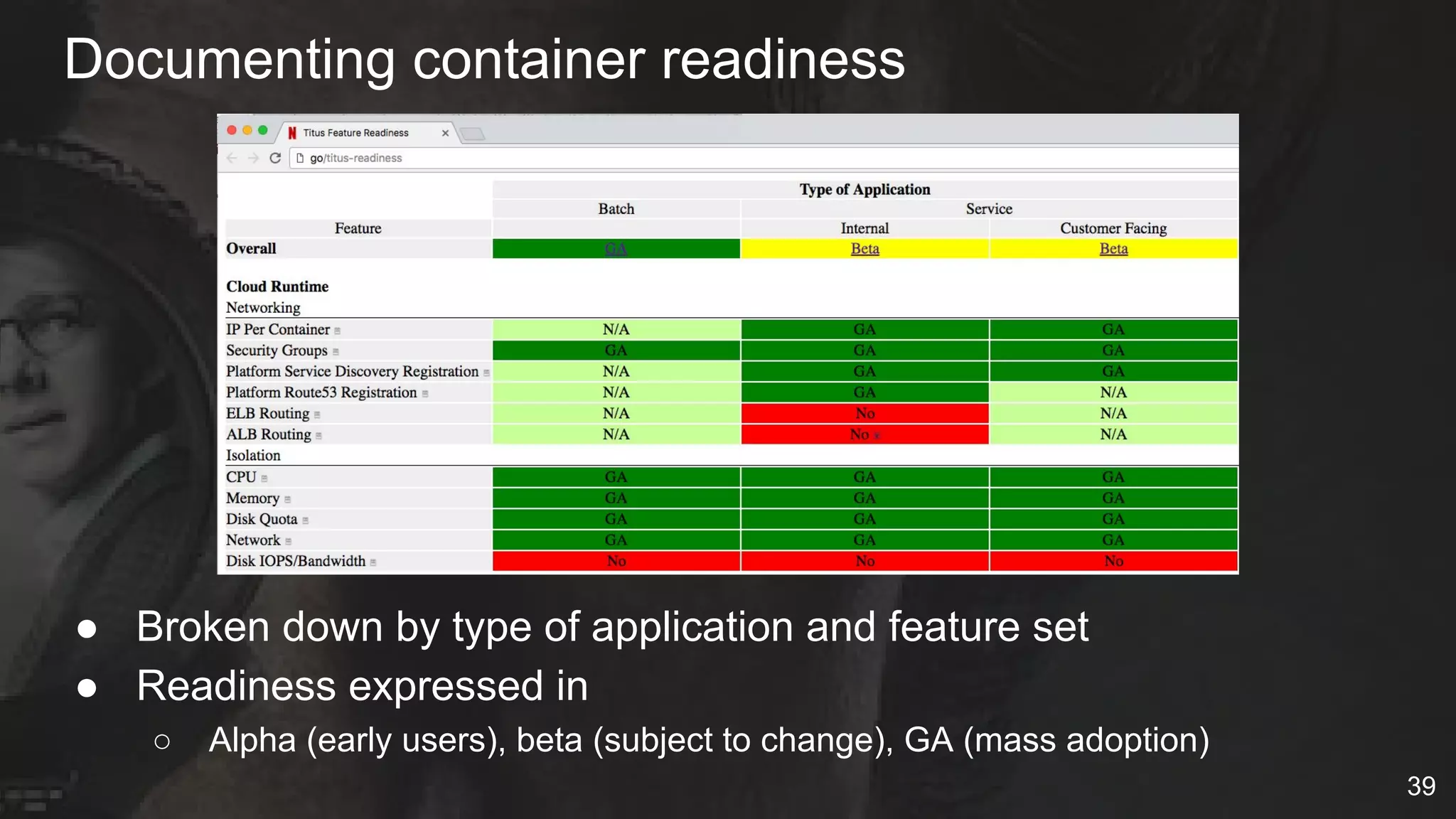
Documenting container readiness
● Broken down by type of application and feature set
● Readiness expressed in
○ Alpha (early users), beta (subject to change), GA (mass adoption)
39
Growing usage slowly, carefully
Titus Created
Batch GA
4Q 2015
Service Support
Added
1Q 2016
First Scale
Production Service
4Q 2016
Netflix Customer
Facing Service
2Q 2017
40
shadow
Key takeaways
● Expect problematic containers & workloads
● Continued need for cloud to evolve for containers
● Container schedulers, runtime are complex
● Ops enablement key for production systems
● Users need help adopting containers responsibly
● Worth the effort due to value containers unlock
41
Questions?
42
Backup
Titus High Level Overview
44
Titus UITitus UI
RheaRheaTitus API
Titus UI
Cassandra
Titus Master
Job Management &
Scheduler
Zookeeper
EC2
Auto-scaling API
Mesos Master
Fenzo
44
Docker
Registry
Docker
Registry
container
container
container
docker
Titus Agent
metrics agents
Titus executor
logging agent
btrfs
Mesos agent
Docker
S3
Docker
Registry
container
Pod & VPC network
drivers
containercontainer
AWS
metadata proxy
Integration
AWS VMs

Series of Unfortunate Netflix Container Events - QConNYC17

  • 1.
    A Series OfUnfortunate Container Events Netflix’s container platform lessons learned
  • 2.
    About the speakersand team Follow along - @sargun @tomaszbak_ca @fabiokung @aspyker @amit_joshee @anwleung 2
  • 3.
    Netflix’s container managementplatform ● Titus ● Scheduling ○ Service & batch jobs ○ Resource management ● Container Execution ○ Docker/AWS Integration ○ Netflix Infra Support Service Job Management Resource Management & Optimization Container Execution Integration Batch 3
  • 4.
  • 5.
    Current Titus scale ●Deployed across multiple AWS accounts & three regions ● Over 5,000 instances (Mostly M4.4xls & R3.8xls) ● Over a week period launched over 1,000,000 containers ● Over 10,000 containers running concurrently 5
  • 6.
    Single cloud platformfor VMs and containers ● CI/CD (Spinnaker) ● Telemetry systems ● Discovery and RPC load balancing ● Healthcheck, Edda and system metrics ● Chaos monkey ● Traffic control (Flow & Kong) ● Netflix secure secret management ● Interactive access (ala ssh) 6
  • 7.
    Integrate containers withAWS EC2 ● VPC Connectivity (IP per container) ● Security Groups ● EC2 Metadata service ● IAM Roles ● Multi-tenant isolation (cpu, memory, disk quota, network) ● Live and S3 persisted logs rotation & mgmt ● Environmental context to similar to user data ● Autoscaling service jobs (coming) 7
  • 8.
    ● Service ○ StreamProcessing (Flink) ○ UI Services (NodeJS) ○ Internal dashboards ● Batch ○ Personalization ML model training (GPUs) ○ Content value analysis ○ Digital watermarking ○ Ad hoc reporting ○ Continuous integration builds ○ Media encoding experimentation Container users on Titus Archer 8
  • 9.
    Titus high leveloverview 9 RheaRheaTitus API Cassandra Titus Scheduler ● Job Lifecycle Control ● Resource Management EC2 Autoscaling Fenzo 9 container container container docker Titus Agents Mesos agent Docker Docker Registry containercontainerUser Containers AWS Virtual Machines Mesos Titus System AgentsWorkflow Systems 9
  • 10.
    Look away, lookaway, Look away, look away This session will wreck your evening​, your whole life, and your day Every single episode is nothing but dismay So, look away, Look away, look away Lessons learned from a year in production? 10
  • 11.
  • 12.
    Run-away submissions Submit ajob, check status If API doesn’t answer assume 404 and re-submit Problem: User 12
  • 13.
    Worked for ourcontent processing job of 100 containers Let’s run our “back-fill” -- 100s of thousands of containers Problems ● Scheduler runs out of memory ● All other jobs get queued behind Solutions ● Scheduler capacity groups ● Absolute caps on number of concurrent live jobs ● Upstream systems doing ingest control System perceived as infinite queue User 13
  • 14.
    Uses REST/JSON poorly {env: { “PATH” : null } } Problems ● Scheduler crashes, fails over, crashes, repeat Solutions ● Input validation, input fuzz testing, exception handling Invalid Jobs User 14
  • 15.
    Failing jobs thatrepeat Image: “org/imagename:lateest” Command: /bin/besh -c ... Problems ● Containers can launch FAST! Can be restarted FAST! ● Scheduler works really hard ● Cloud resources allocated/deallocated FAST Solutions ● Rate limiting of failing jobs User 15
  • 16.
    Problems ● Scheduler fails,can’t recover due to “bad” jobs Solutions Manual removal of bad job state? ✖ Test production data sets in staging ✔ Testing for “bad” job data 16 1. Export job data 2. Restore job data 3. Test recovery 4. Deploy new code PROD STAGING PROD
  • 17.
    Identifying bad actors V2API ● user (optional) V2 Auditing ● Added collection of user performing action V3 API ● Owner -> teamEmail (required) 17
  • 18.
    ● User Namespaces ○Docker 1.10 - User Namespaces (Feb 2016) ○ Docker 1.11 - Fixed shared networking NSs ■ User id mapping is per daemon (not per container) ○ Deployed user namespaces recently ■ Problems - shared NFS, OSX LDAP uid/gid’s ● Locked Down hosts ○ Users only have access to containers, not hosts ○ Required “power user” ssh access for perf/debugging Really bad actors - container escapes protections 18
  • 19.
  • 20.
    Cloud rate limitingand overall limits Let’s do a red/black deploy of 2000 containers instantly Problems ● Scheduler and distributed host fleet ... no problem! ● Cloud provider … problem! Solutions ● Exponential backoff with jitter on hosts ● Setting expectations of maximum concurrent launches ● Rate limiting of container scheduling and overall number of containers User 20
  • 21.
    Hosts start orgo bad Problems ● Hosts come up with flakey networks ● Host disks come up and are slow ● Hosts go bad over time Solutions ● Scheduler must be aware of host health checks ● Linux, storage, etc warming ● Auto-termination if hosts take too long to become healthy 21
  • 22.
    Upgrades - Inplace upgrades ● Simpler for container users ● Infrastructure becomes mutable ● Doesn’t leverage elastic cloud ● How to handle rollback? Docker V1 Titus Agents V1 Mesos V1 Batch Container #1 Service Container #2 Docker V2 Titus Agents V2 Mesos V2 Batch Container #1 Service Container #2 Agent Agent with updates ✖ ✖ ✖ 22
  • 23.
    Upgrades - Wholecluster red/black ● Full red/black takes hours ● Costly (duplicate clusters) ● Insufficient Capacity Exception (ICE) ● Rollback requires ALL containers to move twice ✖ 23
  • 24.
    Upgrades - Partitionedcluster updates ● Requires complex scheduler knowledge ○ Batch jobs to have runtime limits ○ Service jobs with Spinnaker migration tasks ● Starting point for fleet cluster management Docker V1 Titus Agents V1 Mesos V1 Batch Container #1 Service Container #2 Docker V2 Titus Agents V2 Mesos V2 Service Container #2 Let “drain” old new ✖ ✖ ✖ 24 CI/CD Task Migration
  • 25.
    Our Code Isn’tPerfect 25
  • 26.
    Disconnected containers Problem ● Hostagent controllers lock up ● Control plane can’t kill replaced containers User ● Why is my old code still running? Solutions ● Monitor and alert on differences ● Reconcile to this system as aggressively as possible Container Scheduler I’m running You shouldn’t be! Agent Stop Container × × Locked Up 26
  • 27.
    Scheduler failover speedis important 27 StandBy C* save Active C* restore Scheduler failover time increased with scale ● Loss of API availability ● Reconciliation bugs caused task crashes Solutions: ● Data sharding (current vs old tasks) ● Do as little as possible during startup Active Active✖
  • 28.
    Know your dependencies 28 Agent DNSS3Zookeeper Problems ●Container creation errors ● Logs upload failure ● Task crashes Solutions ● Retries ● Rate limiting ● Isolation
  • 29.
    ● Containers startwith Docker .. end with the kernel ● Best container runtimes deeply leverage kernel primitives ○ Resource Isolation ○ Security ○ Networking etc ● Debugging tools (tracepoints, perf events) not container aware ○ Need for BPF, Kprobe Containers require kernel knowledge 29
  • 30.
    Problems ● Our instancesfail ● Our code fails ● Our dependencies fail Solutions ● Learn to love the Chaos Monkey ● Enabled for prod and all services (even our scheduler) Strategy: Embrace chaos 30
  • 31.
    Alerting and dashboardskey Very complex system == very complex telemetry and alerting Continuously evolving ● Based on real incidents and resulting deep analysis Telemetry system Number Metrics 100’s Dashboard Graphs 70+ Alerts 50+ Elastic Search Indexes 4 31
  • 32.
    Temporary ad hocremediation ● Manual babysitting of scheduler state ● Pin high when auto-scaling and capacity management isn’t work ● Automated for each ssh across all nodes ○ Detecting and remediating problems 32
  • 33.
  • 34.
    Solid software Docker Distribution ●Our Docker registry ● Simple redirect on top of S3 Apache Mesos ● Extensible resource manager ● Highly reliable replicated log Zookeeper ● Leader Election ● Isolated Cassandra ● CDE Internal Service ● Careful of access model 34
  • 35.
    Managing the Titusproduct Focus on core business value ● Container cluster management Features are important ● Deciding what not to do … Just as important! Deliberately chose NOT to do ● Service Discovery / RPC ● Continuous Delivery 35
  • 36.
    Ops enablement Phase 1:Manual red/black deploys Phase 2: Runbook for on-call Phase 3: Automated pipelines Deploy New ASG Find Current Leader Terminate Non Leader Nodes Terminate Current Leader 36
  • 37.
    Problem ● If youaren’t measuring, you don’t know ● If you don’t know, you can’t improve Solutions ● Our SLOs ○ Start Latency ○ % Crashed ○ API Availability ● Once we started watching, we started improving Service Level Objectives (SLOs) 37
  • 38.
  • 39.
    Documenting container readiness ●Broken down by type of application and feature set ● Readiness expressed in ○ Alpha (early users), beta (subject to change), GA (mass adoption) 39
  • 40.
    Growing usage slowly,carefully Titus Created Batch GA 4Q 2015 Service Support Added 1Q 2016 First Scale Production Service 4Q 2016 Netflix Customer Facing Service 2Q 2017 40 shadow
  • 41.
    Key takeaways ● Expectproblematic containers & workloads ● Continued need for cloud to evolve for containers ● Container schedulers, runtime are complex ● Ops enablement key for production systems ● Users need help adopting containers responsibly ● Worth the effort due to value containers unlock 41
  • 42.
  • 43.
  • 44.
    Titus High LevelOverview 44 Titus UITitus UI RheaRheaTitus API Titus UI Cassandra Titus Master Job Management & Scheduler Zookeeper EC2 Auto-scaling API Mesos Master Fenzo 44 Docker Registry Docker Registry container container container docker Titus Agent metrics agents Titus executor logging agent btrfs Mesos agent Docker S3 Docker Registry container Pod & VPC network drivers containercontainer AWS metadata proxy Integration AWS VMs