Continuing Professional
Development for teaching
information literacy & digital literacy
Sheila Webber
Information School, University of Sheffield
XVIII CRAI Conference May 2023
Images
created
by
Sheila
Webber
and
Midjourney
References and links at
https://tinyurl.com/jornadasCRAI
Main themes
1. What is it important to learn about and
develop, in order to be able to develop
students’ information literacy (and other
literacies)?
2. What are some ways librarians can
learn and develop their ability to teach
and support teaching – focusing on
Continuing Professional Development?
Images
created
by
Sheila
Webber
and
Midjourney
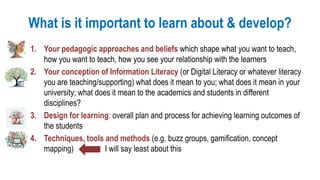
What is it important to learn about & develop?
1. Your pedagogic approaches and beliefs which shape what you want to teach,
how you want to teach, how you see your relationship with the learners
2. Your conception of Information Literacy (or Digital Literacy or whatever literacy
you are teaching/supporting) what does it mean to you; what does it mean in your
university; what does it mean to the academics and students in different
disciplines?
3. Design for learning: overall plan and process for achieving learning outcomes of
the students
4. Techniques, tools and methods (e.g. buzz groups, gamification, concept
mapping) I will say least about this
Your pedagogic
approaches and beliefs
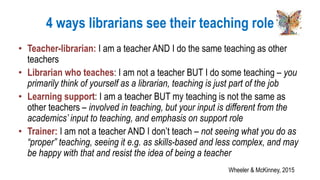
4 ways librarians see their teaching role
• Teacher-librarian: I am a teacher AND I do the same teaching as other
teachers
• Librarian who teaches: I am not a teacher BUT I do some teaching – you
primarily think of yourself as a librarian, teaching is just part of the job
• Learning support: I am a teacher BUT my teaching is not the same as
other teachers – involved in teaching, but your input is different from the
academics’ input to teaching, and emphasis on support role
• Trainer: I am not a teacher AND I don’t teach – not seeing what you do as
“proper” teaching, seeing it e.g. as skills-based and less complex, and may
be happy with that and resist the idea of being a teacher
Wheeler & McKinney, 2015
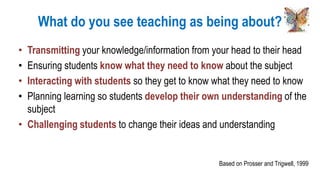
What do you see teaching as being about?
• Transmitting your knowledge/information from your head to their head
• Ensuring students know what they need to know about the subject
• Interacting with students so they get to know what they need to know
• Planning learning so students develop their own understanding of the
subject
• Challenging students to change their ideas and understanding
Based on Prosser and Trigwell, 1999
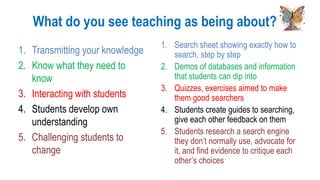
What do you see teaching as being about?
1. Transmitting your knowledge
2. Know what they need to
know
3. Interacting with students
4. Students develop own
understanding
5. Challenging students to
change
1. Search sheet showing exactly how to
search, step by step
2. Demos of databases and information
that students can dip into
3. Quizzes, exercises aimed to make
them good searchers
4. Students create guides to searching,
give each other feedback on them
5. Students research a search engine
they don’t normally use, advocate for
it, and find evidence to critique each
other’s choices
Self auditing
• Where am I now?
– Can be constrained by your university, academics and managers allow you to
do
• Where do I want to be?
– Whatever your aspirations: useful to understand some pedagogic theory and
language, so can be an effective supporter and advisor
– How do I need to develop to get to where I want to be – knowledge, skills,
attitudes
You may end up knowing more about pedagogy that some professors, can be an advantage, but can
also be frustrating!
Continuing Professional Development
• Qualifications and courses about teaching, for teachers (e.g. in
the UK: PG Certificate which new academics have to take; Open
University material on Scholarship of Teaching & Learning (SoTL)
• MOOCs
• Communities of Practice in your university, your region: journal
clubs, peer observation, mentoring etc. Exemplar: Cambridge
Information Literacy Network
• Reading! e.g. Saunders & Wong (2020) open access textbook
• Reflection: keeping a teaching diary or developing a portfolio
Your conception of
Information Literacy
(IL), Digital Literacy (or
whatever literacy you
are teaching)
Questions to think about
• What does it mean to you? Regularly think about this, is your idea of
IL or DL changing?
• What does it mean in your university? There may be a framework
of statement (if there isn’t, should there be?)
• What does it mean to academics and students in different
disciplines? Listening to them, reading any accreditation documents,
may be research about IL or DL in their subject
• What does it mean to other librarians in your university/country?
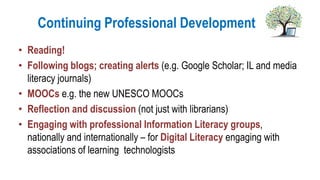
Continuing Professional Development
• Reading!
• Following blogs; creating alerts (e.g. Google Scholar; IL and media
literacy journals)
• MOOCs e.g. the new UNESCO MOOCs
• Reflection and discussion (not just with librarians)
• Engaging with professional Information Literacy groups,
nationally and internationally – for Digital Literacy engaging with
associations of learning technologists
Design for learning
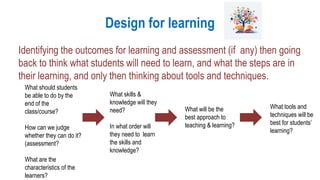
Design for learning
Identifying the outcomes for learning and assessment (if any) then going
back to think what students will need to learn, and what the steps are in
their learning, and only then thinking about tools and techniques.
What should students
be able to do by the
end of the
class/course?
How can we judge
whether they can do it?
(assessment?
What are the
characteristics of the
learners?
What will be the
best approach to
teaching & learning?
What skills &
knowledge will they
need?
In what order will
they need to learn
the skills and
knowledge?
What tools and
techniques will be
best for students’
learning?
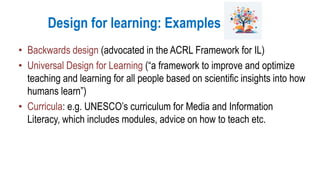
Design for learning: Examples
• Backwards design (advocated in the ACRL Framework for IL)
• Universal Design for Learning (“a framework to improve and optimize
teaching and learning for all people based on scientific insights into how
humans learn”)
• Curricula: e.g. UNESCO’s curriculum for Media and Information
Literacy, which includes modules, advice on how to teach etc.
Example design for learning – if you
have very limited time with learners
• Identifying frequently identified IL learning outcomes in your university
• Creating online learning material (tutorials, activities, quizzes, guides etc)
that can be used in different learning contexts
• Identifying how this can be personalised and connected to specific subjects
and courses
• Identifying the digital skills that are needed for students to engage happily
for online learning: do you need to create learning material for that too!
• Using face to face time for
– Listening to academics and advising them of how they can meet their learning goals
related to IL (including integrating your material into their teaching)
– Carrying out activities that persuade learners that it is relevant and worthwhile
connecting with the online IL learning
Techniques, tools and
methods
Most about this - in the literature, in presentations etc!
Continuing Professional Development for learning
design, teaching tools and techniques
• MOOCS & short online courses (e.g. Library Juice Academy; FutureLearn)
• Teachmeets – online or face to face meetings where librarians share short
(e.g. 10 minute) presentations on specific tools, techniques, examples
• Examples given in articles, conference presentations, webinars
• Collaborations with learning technologists (in your university: also learning
technology conferences, publications, following them on Twitter etc.)
• Re-usable lesson plans etc. produced for specific frameworks e.g. ACRL
sandbox; UNESCO MIL curriculum and database
• Videos, games, quizzes etc produced by media literacy agencies (particularly
to fight misinformation)
For now and the future
• Familiarising yourself with new tools & techniques – but then choosing the
best approach & tool for the learning need – not “the newest” – and being
happy to blend online and face to face activities and tools
• Covering IL of visual media (how to be information literate with YouTube,
Instagram, charts etc.)
• Learning about generative AI – already many ideas relevant to teaching
information literacy e.g.
– Asking AI to suggest search strategies
– Setting activities where students create paragraphs using AI, check credibility and
critique them
Sheila Webber
Information School
University of Sheffield
s.webber@sheffield.ac.uk
Twitter: @sheilayoshikawa
http://information-literacy.blogspot.com/
http://www.slideshare.net/sheilawebber/
References and links at https://tinyurl.com/jornadasCRAI
Graphics by Sheila Webber using
Midjourney AI

Continuing Professional Development for teaching information literacy & digital literacy

  • 1.
    Continuing Professional Development forteaching information literacy & digital literacy Sheila Webber Information School, University of Sheffield XVIII CRAI Conference May 2023 Images created by Sheila Webber and Midjourney
  • 2.
    References and linksat https://tinyurl.com/jornadasCRAI
  • 3.
    Main themes 1. Whatis it important to learn about and develop, in order to be able to develop students’ information literacy (and other literacies)? 2. What are some ways librarians can learn and develop their ability to teach and support teaching – focusing on Continuing Professional Development? Images created by Sheila Webber and Midjourney
  • 4.
    What is itimportant to learn about & develop? 1. Your pedagogic approaches and beliefs which shape what you want to teach, how you want to teach, how you see your relationship with the learners 2. Your conception of Information Literacy (or Digital Literacy or whatever literacy you are teaching/supporting) what does it mean to you; what does it mean in your university; what does it mean to the academics and students in different disciplines? 3. Design for learning: overall plan and process for achieving learning outcomes of the students 4. Techniques, tools and methods (e.g. buzz groups, gamification, concept mapping) I will say least about this
  • 5.
  • 6.
    4 ways librarianssee their teaching role • Teacher-librarian: I am a teacher AND I do the same teaching as other teachers • Librarian who teaches: I am not a teacher BUT I do some teaching – you primarily think of yourself as a librarian, teaching is just part of the job • Learning support: I am a teacher BUT my teaching is not the same as other teachers – involved in teaching, but your input is different from the academics’ input to teaching, and emphasis on support role • Trainer: I am not a teacher AND I don’t teach – not seeing what you do as “proper” teaching, seeing it e.g. as skills-based and less complex, and may be happy with that and resist the idea of being a teacher Wheeler & McKinney, 2015
  • 7.
    What do yousee teaching as being about? • Transmitting your knowledge/information from your head to their head • Ensuring students know what they need to know about the subject • Interacting with students so they get to know what they need to know • Planning learning so students develop their own understanding of the subject • Challenging students to change their ideas and understanding Based on Prosser and Trigwell, 1999
  • 8.
    What do yousee teaching as being about? 1. Transmitting your knowledge 2. Know what they need to know 3. Interacting with students 4. Students develop own understanding 5. Challenging students to change 1. Search sheet showing exactly how to search, step by step 2. Demos of databases and information that students can dip into 3. Quizzes, exercises aimed to make them good searchers 4. Students create guides to searching, give each other feedback on them 5. Students research a search engine they don’t normally use, advocate for it, and find evidence to critique each other’s choices
  • 9.
    Self auditing • Wheream I now? – Can be constrained by your university, academics and managers allow you to do • Where do I want to be? – Whatever your aspirations: useful to understand some pedagogic theory and language, so can be an effective supporter and advisor – How do I need to develop to get to where I want to be – knowledge, skills, attitudes You may end up knowing more about pedagogy that some professors, can be an advantage, but can also be frustrating!
  • 10.
    Continuing Professional Development •Qualifications and courses about teaching, for teachers (e.g. in the UK: PG Certificate which new academics have to take; Open University material on Scholarship of Teaching & Learning (SoTL) • MOOCs • Communities of Practice in your university, your region: journal clubs, peer observation, mentoring etc. Exemplar: Cambridge Information Literacy Network • Reading! e.g. Saunders & Wong (2020) open access textbook • Reflection: keeping a teaching diary or developing a portfolio
  • 11.
    Your conception of InformationLiteracy (IL), Digital Literacy (or whatever literacy you are teaching)
  • 12.
    Questions to thinkabout • What does it mean to you? Regularly think about this, is your idea of IL or DL changing? • What does it mean in your university? There may be a framework of statement (if there isn’t, should there be?) • What does it mean to academics and students in different disciplines? Listening to them, reading any accreditation documents, may be research about IL or DL in their subject • What does it mean to other librarians in your university/country?
  • 13.
    Continuing Professional Development •Reading! • Following blogs; creating alerts (e.g. Google Scholar; IL and media literacy journals) • MOOCs e.g. the new UNESCO MOOCs • Reflection and discussion (not just with librarians) • Engaging with professional Information Literacy groups, nationally and internationally – for Digital Literacy engaging with associations of learning technologists
  • 14.
  • 15.
    Design for learning Identifyingthe outcomes for learning and assessment (if any) then going back to think what students will need to learn, and what the steps are in their learning, and only then thinking about tools and techniques. What should students be able to do by the end of the class/course? How can we judge whether they can do it? (assessment? What are the characteristics of the learners? What will be the best approach to teaching & learning? What skills & knowledge will they need? In what order will they need to learn the skills and knowledge? What tools and techniques will be best for students’ learning?
  • 16.
    Design for learning:Examples • Backwards design (advocated in the ACRL Framework for IL) • Universal Design for Learning (“a framework to improve and optimize teaching and learning for all people based on scientific insights into how humans learn”) • Curricula: e.g. UNESCO’s curriculum for Media and Information Literacy, which includes modules, advice on how to teach etc.
  • 17.
    Example design forlearning – if you have very limited time with learners • Identifying frequently identified IL learning outcomes in your university • Creating online learning material (tutorials, activities, quizzes, guides etc) that can be used in different learning contexts • Identifying how this can be personalised and connected to specific subjects and courses • Identifying the digital skills that are needed for students to engage happily for online learning: do you need to create learning material for that too! • Using face to face time for – Listening to academics and advising them of how they can meet their learning goals related to IL (including integrating your material into their teaching) – Carrying out activities that persuade learners that it is relevant and worthwhile connecting with the online IL learning
  • 18.
    Techniques, tools and methods Mostabout this - in the literature, in presentations etc!
  • 19.
    Continuing Professional Developmentfor learning design, teaching tools and techniques
  • 20.
    • MOOCS &short online courses (e.g. Library Juice Academy; FutureLearn) • Teachmeets – online or face to face meetings where librarians share short (e.g. 10 minute) presentations on specific tools, techniques, examples • Examples given in articles, conference presentations, webinars • Collaborations with learning technologists (in your university: also learning technology conferences, publications, following them on Twitter etc.) • Re-usable lesson plans etc. produced for specific frameworks e.g. ACRL sandbox; UNESCO MIL curriculum and database • Videos, games, quizzes etc produced by media literacy agencies (particularly to fight misinformation)
  • 21.
    For now andthe future • Familiarising yourself with new tools & techniques – but then choosing the best approach & tool for the learning need – not “the newest” – and being happy to blend online and face to face activities and tools • Covering IL of visual media (how to be information literate with YouTube, Instagram, charts etc.) • Learning about generative AI – already many ideas relevant to teaching information literacy e.g. – Asking AI to suggest search strategies – Setting activities where students create paragraphs using AI, check credibility and critique them
  • 22.
    Sheila Webber Information School Universityof Sheffield s.webber@sheffield.ac.uk Twitter: @sheilayoshikawa http://information-literacy.blogspot.com/ http://www.slideshare.net/sheilawebber/ References and links at https://tinyurl.com/jornadasCRAI Graphics by Sheila Webber using Midjourney AI